Grafana OnCall
Last Updated: September 13, 2026
Table of Contents
- Grafana OnCall Overview
- Architecture
- Installation
- Integration Setup
- On-Call Schedule Configuration
- Escalation Chains
- Alert Grouping and Routing
- ChatOps Integration
- Grafana IRM Integration
- Mobile App
- PagerDuty/OpsGenie Comparison
- Best Practices
Grafana OnCall Overview
Grafana OnCall OSS was archived on 2026-03-24. Its repository moved to grafana-cold-storage/oncall and is read-only. This chapter supports review/migration of existing installations; it is not a recommendation for a new production OSS deployment. Check maintained Grafana Cloud IRM features, APIs and plans separately.
Cloud Connection ended on 2026-03-24. OSS mobile push through the Grafana IRM app and SMS/voice notifications relying on Cloud Connection no longer function. Separately configured Twilio or other notification services are distinct paths; this does not mean every self-hosted phone/SMS mechanism ended.
The reviewed archived source is af0fbd40558c9a63bcf438589894c440fc434a54. The latest release is labelled v1.16.11, while that source's Helm chart/appVersion is 1.15.6; these are not interchangeable version identifiers. Examples were checked against this source and official OnCall API documentation. No actual OnCall account creation, API writes or notifications were performed.
Key Features
- On-Call Schedule Management: Rotations, overrides, holiday management
- Escalation Chains: Time-based automatic escalation
- Alert Grouping: Consolidate related alerts
- Various Integrations: Alertmanager, Grafana, CloudWatch, Webhook
- ChatOps: Slack, MS Teams, Telegram integration
- Notification channels: availability depends on the deployment, integrations and user rules
Grafana OnCall vs PagerDuty vs OpsGenie
| Option | Current review basis |
|---|---|
| OnCall OSS | Archived existing installation; dependency, recovery and migration ownership |
| Grafana Cloud IRM / PagerDuty | Verify maintenance, required channels/schedules/APIs, regions and contract terms |
| Opsgenie | End of sale 2025-06-04; service/support end scheduled 2027-04-05. Existing users need a migration plan |
Do not select a product using fixed integration counts, old prices or subjective basic/advanced rankings.
Architecture
Grafana OnCall Components
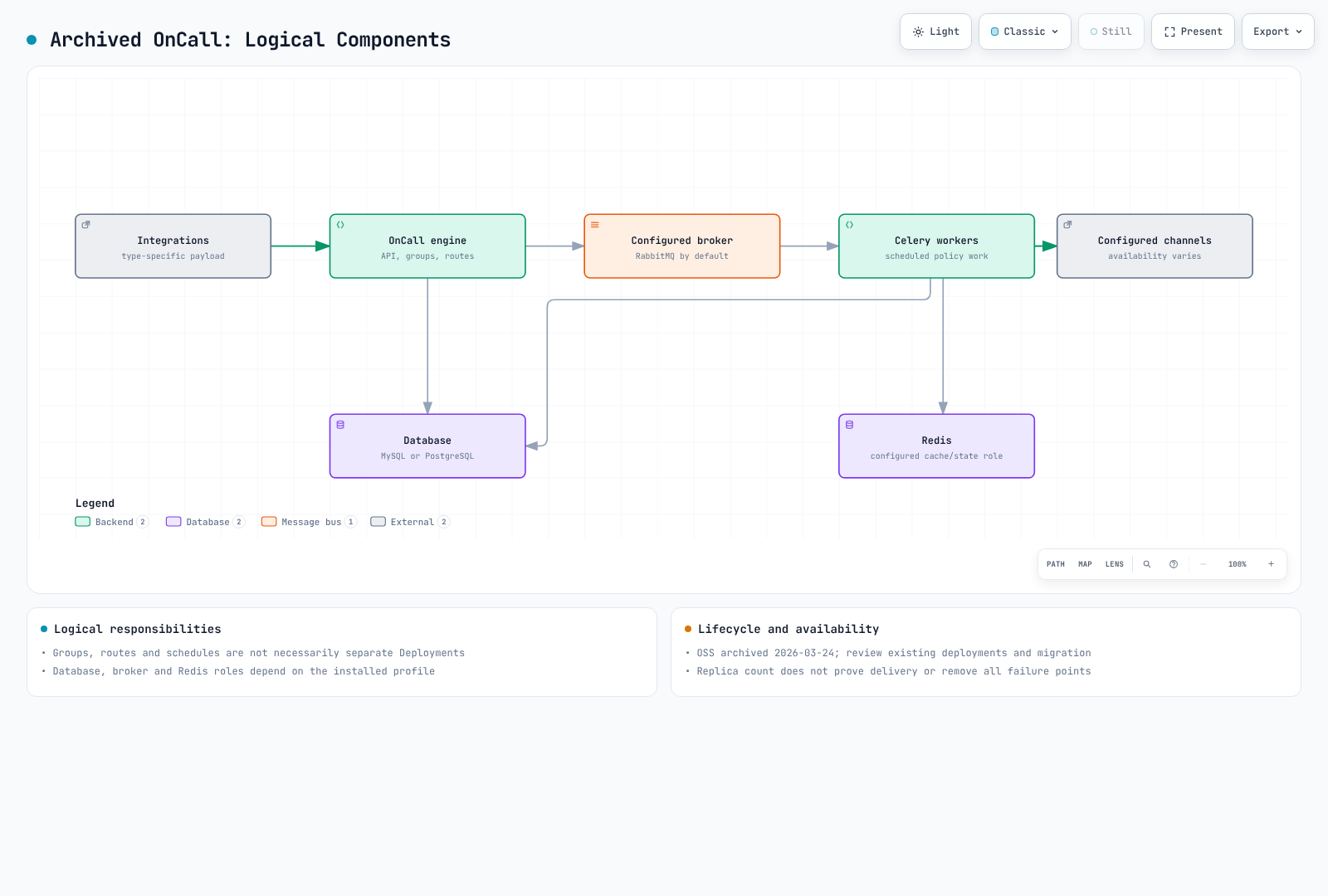
These are logical responsibilities, not necessarily separate Deployments. Inspect the installed profile for database.type, broker.type, Redis, engine/Celery placement and plugin connectivity.
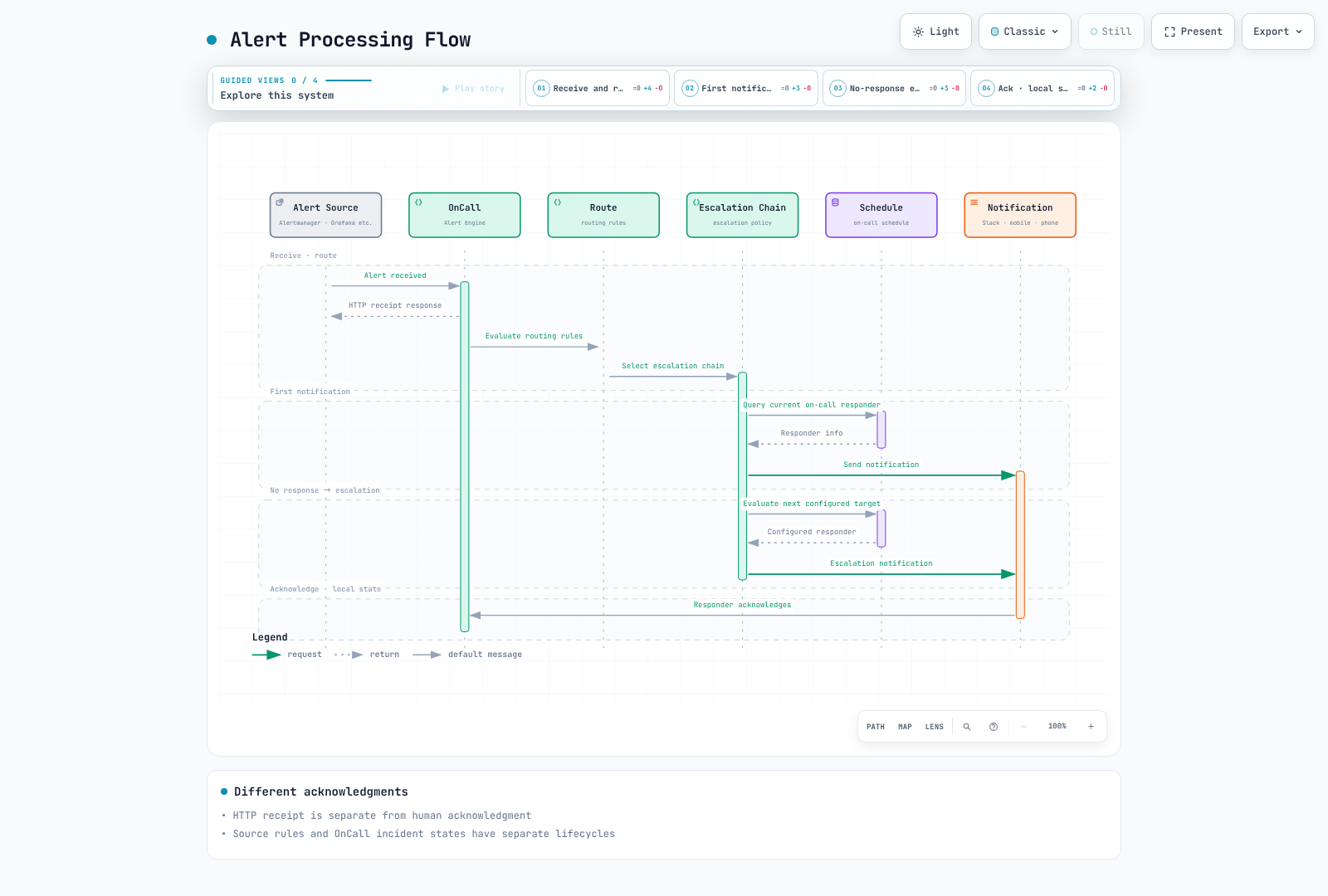
Alert Processing Flow
Installation
Installation via Helm (EKS)
Inventory the existing release/chart/image digests, database, broker, Grafana plugin, authentication and channel dependencies before considering changes. Compare helm list, workload images and protected helm get values/manifest output. Values/manifests can contain real credentials: store them privately, not in chat, Git or build logs.
The archived chart includes old cert-manager, ingress-nginx and database dependencies. Do not mix unrelated current Grafana charts with archived source versions or treat a simple helm install command as evidence of current security support.
Basic values.yaml Configuration
These are actual keys in the inspected archived chart. They distinguish settings that the old examples could silently ignore or misinterpret.
| Responsibility | Archived chart key |
|---|---|
| API/engine replicas | engine.replicaCount, not oncall.replicaCount |
| URL | base_url plus base_url_protocol |
| Additional environment | env map, not a raw Kubernetes env list |
| External PostgreSQL | externalPostgresql.db_name, existingSecret, passwordKey, TLS options |
| External Redis | externalRedis.existingSecret, passwordKey, ssl_options |
| Application encryption keys | oncall.secrets.existingSecret, secretKey, mirageSecretKey |
| Telegram/Twilio | Nested oncall.telegram and oncall.twilio settings |
Defaults enable MariaDB, RabbitMQ, Redis, Grafana, ingress-nginx, cert-manager and other components. Changing database.type to PostgreSQL does not automatically disable MariaDB or unrelated dependencies. settings.hobby and generic Firebase YAML are not validated production profiles.
Production values.yaml
More replicas alone do not eliminate single points of failure. Test engine, Celery, scheduler/beat, database, broker/cache, plugin, notification provider, DNS and certificate failures, including queue durability, duplicate work, retries and recovery. Distinguish RabbitMQ broker responsibilities from Redis and inspect the actual broker.type.
The existing deployment owner must review DB/Redis TLS verification, role-specific secret delivery, network access, backup/restore and migration. An internet-facing ALB or an external database hostname does not make a configuration production-ready. This audit did not deploy EKS, test HA or exercise real notification providers.
Creating Secrets
Do not pass actual values through --from-literal arguments or plaintext Helm values. Use approved secret stores/protected files, and manage existing encryption keys together with database backups. Blindly changing an existing installation's Mirage key/IV can prevent decryption of stored data. Public API tokens, integration webhook URLs and Slack/Twilio/Telegram credentials have different permissions and rotation requirements.
Integration Setup
Alertmanager Integration
Use the full generated URL for the selected integration type. The URL itself may be a secret, so store it in a protected file. Do not invent an /api/v1/webhook/<id>/ path and combine it with a public API token. The following Alertmanager configuration defines current matchers and both receivers; it was not used to send notifications.
# Materialize the generated integration URL in this protected file.
# This example is not enabled or contacted during the documentation audit.
route:
  receiver: no-page
  group_by: [alertname, cluster, namespace, service]
  group_wait: 30s
  group_interval: 5m
  repeat_interval: 4h
  routes:
    - matchers: ['severity=~"critical|warning"']
      receiver: oncall
receivers:
  - name: no-page
  - name: oncall
    webhook_configs:
      - url_file: /etc/oncall/integration-url
        send_resolved: true
amtool 0.34 validated syntax and four critical/warning/info/fallback routing cases. send_resolved forwards source resolution messages; it does not make manual OnCall resolution change the source rule automatically.
Grafana Alerting Integration
Check the supported contact point and generated integration for the installed Grafana/OnCall plugin versions. INI settings, provisioning YAML and UI APIs are distinct; the old example incorrectly labelled INI as YAML. Grafana Alerting rule/notification state and OnCall alert-group state are also separate.
CloudWatch Integration
Use the CloudWatch-specific integration's SNS confirmation, signature and payload handling requirements. Subscribing SNS to any generic webhook does not guarantee compatibility. Test ALARM/OK/INSUFFICIENT_DATA transitions, confirmation, duplicates/retries, topic/endpoint permissions and actual delivery. This audit created no SNS subscription or alarm action.
Webhook Integration
A generic webhook payload must match explicitly configured parsing, grouping and resolution templates. Sending alert_uid, state and labels does not make every integration interpret them identically. Serialize JSON properly and design HTTPS verification, timeouts, error handling and retry/deduplication behavior. Keep URLs, tokens and personal data out of logs.
The public API uses the documented raw Authorization token; do not add Bearer automatically. Grafana service-account-token authentication also requires X-Grafana-URL. The API origin and integration webhook are separate authentication paths.
The read-only inventory tool uses GET only and validates pagination origin/collection/count, TLS, redirects and file permissions. Its output may contain secret integration URLs and personal data; it is not a complete database/key/history backup or atomic migration snapshot. Twelve local TLS fixture tests passed without querying a real account.
On-Call Schedule Configuration
Schedule Concept
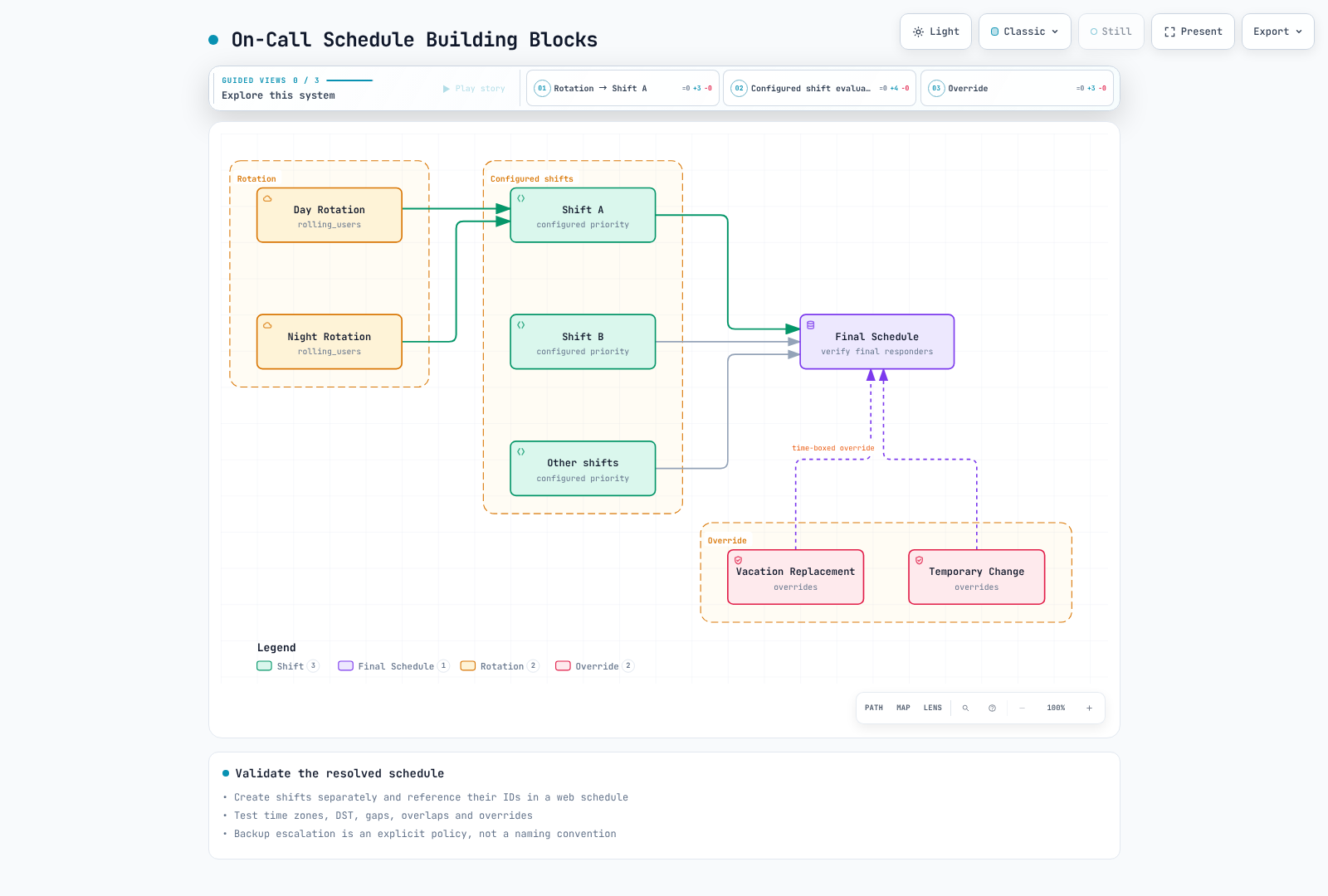
Review time zone, shift priority and overrides together. Naming layers primary/secondary does not configure backup escalation automatically. Inspect final responders in the API/UI and test gaps, overlaps, DST and handoff boundaries.
Creating Schedule (API)
A web schedule's shifts contains IDs of existing shifts, not nested shift objects. Create a shift under /api/v1/on_call_shifts/, then attach its returned ID to a web schedule at /api/v1/schedules/. These are operator-reviewed request examples requiring real IDs/dates; no writes were performed.
{
  "name": "Illustrative weekly rotation",
  "type": "rolling_users",
  "time_zone": "Asia/Seoul",
  "start": "2026-09-14T09:00:00",
  "duration": 604800,
  "frequency": "weekly",
  "interval": 1,
  "week_start": "MO",
  "start_rotation_from_user_index": 0,
  "rolling_users": [
    ["REPLACE_WITH_USER_ID_A"],
    ["REPLACE_WITH_USER_ID_B"]
  ]
}{
"name": "Illustrative SRE schedule",
"type": "web",
"time_zone": "Asia/Seoul",
"shifts": ["REPLACE_WITH_EXISTING_SHIFT_ID"]
}Rotation Types
Weekly recurrence requires week_start, a positive interval and the starting user index for rolling_users. Daily/weekly/hourly recurrence is not equivalent to changing duration alone. The source validator accepts start as YYYY-MM-DDTHH:MM:SS with a separate time_zone; do not copy the old offset-bearing string. The JSON dates are illustrative samples, not operational schedules.
Nineteen checks execute actual upstream pure validators and inspect serializer fields. They do not prove database user/shift existence or final calendar assignments.
Override Settings
In this source, an override is a separate /api/v1/on_call_shifts/ type, not the old assumed /schedules/<id>/overrides/ request. Connect it to the intended schedule while preserving existing shift IDs. Verify the installed API's association/priority behavior and inspect final responders in a bounded test period.
{
  "name": "Illustrative temporary replacement",
  "type": "override",
  "time_zone": "Asia/Seoul",
  "start": "2026-09-15T09:00:00",
  "duration": 28800,
  "users": ["REPLACE_WITH_EXISTING_USER_ID"]
}
Escalation Chains
Escalation Chain Structure
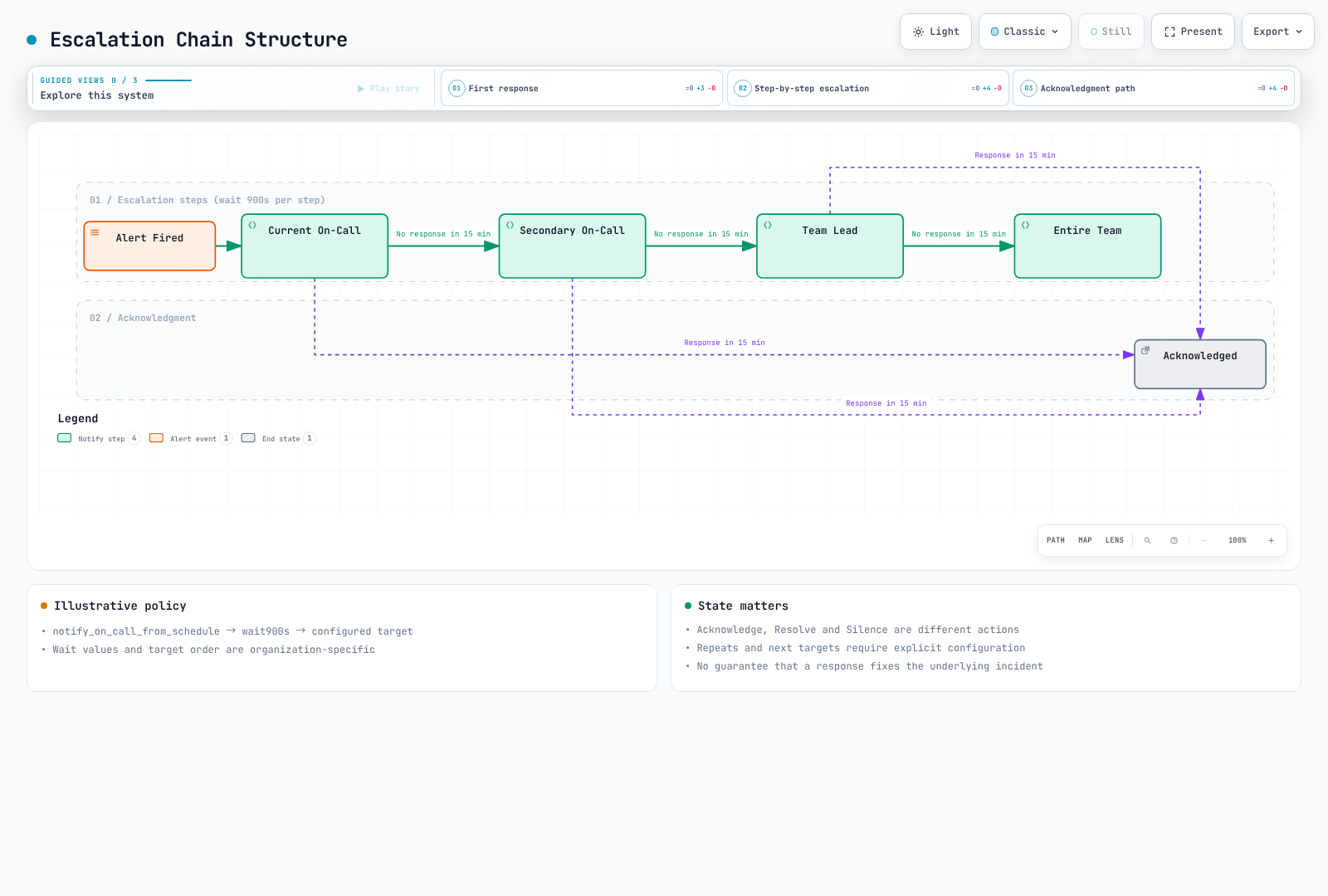
Acknowledge, Resolve and Silence are different states. Acknowledgment does not fix the underlying problem or deactivate the source rule. Verify wait, stop and re-page conditions using the actual policy and integration state. The diagram's 15-minute windows are illustrative policy, not a product guarantee.
Creating Escalation Chain
Verify existing chain, schedule and user IDs and permissions; review create/update requests separately. This is one wait step for /api/v1/escalation_policies/, not a complete chain-creation request. The inspected source accepts wait durations from one minute to 24 hours, expressed as seconds.
{
  "escalation_chain_id": "REPLACE_WITH_EXISTING_CHAIN_ID",
  "position": 1,
  "type": "wait",
  "duration": 900
}
Escalation Policy Types
The source serializer supports schedule/user/team/group notification, waits, time/count conditions, custom webhooks and feature-enabled incident declaration. The custom webhook reference is action_to_trigger; do not assume the old webhook_id or a universal repeat_after field. declare_incident exists but requires organization feature enablement.
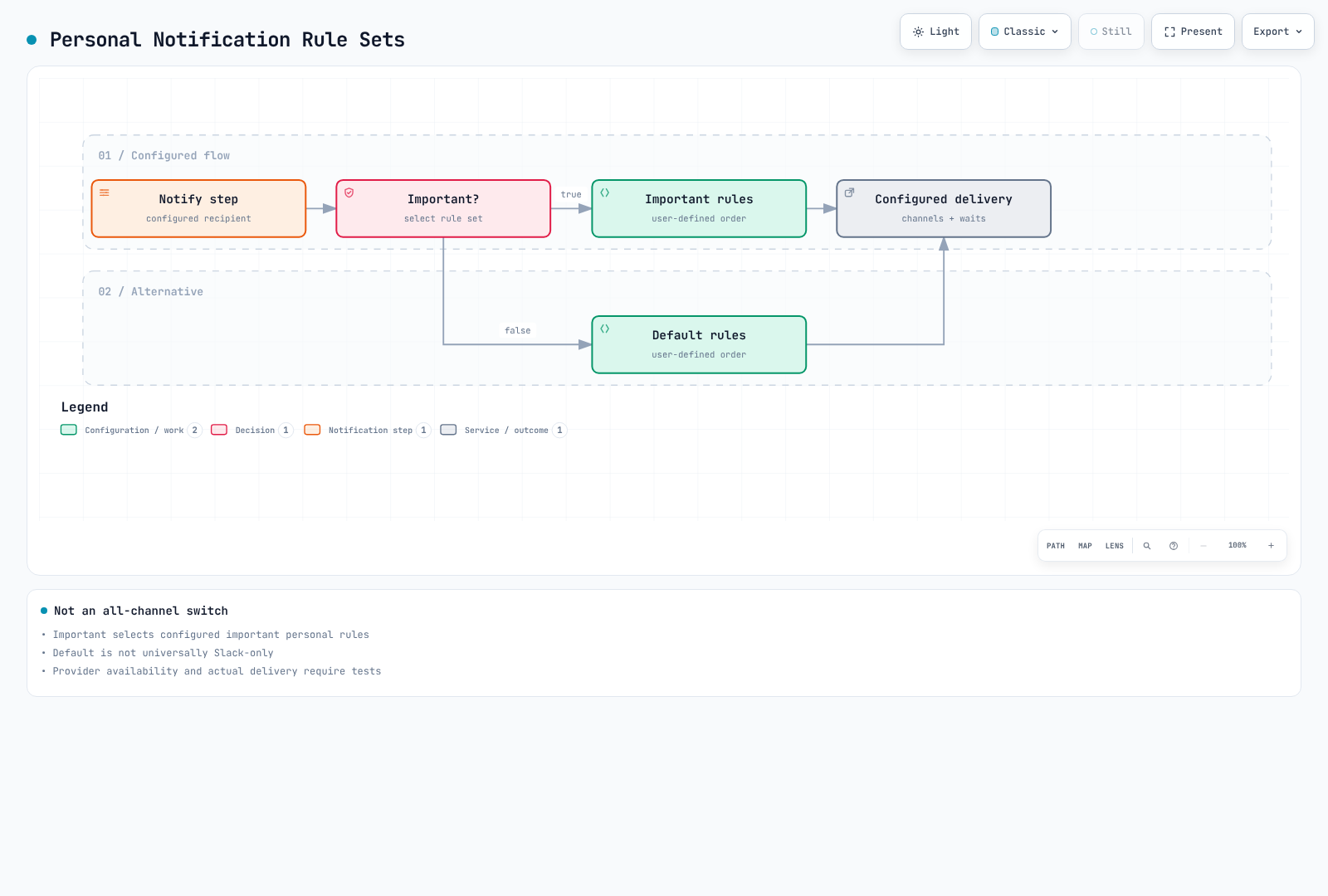
important:true selects the user's configured important notification rules; it does not unconditionally fan out to every channel. Review per-user default/important rule order, waits, channels and actual availability.
Escalation Chains by Severity
Agree on severity-specific purpose, response windows, backups, work hours and re-page behavior. Notifying the same schedule again does not always mean notifying a different next responder. Verify actual repeat/conditional-step API fields and prevent duplicate paging for one incident. Real phone/SMS/webhook delivery requires an approved test path and was not exercised here.
Alert Grouping and Routing
Route Settings
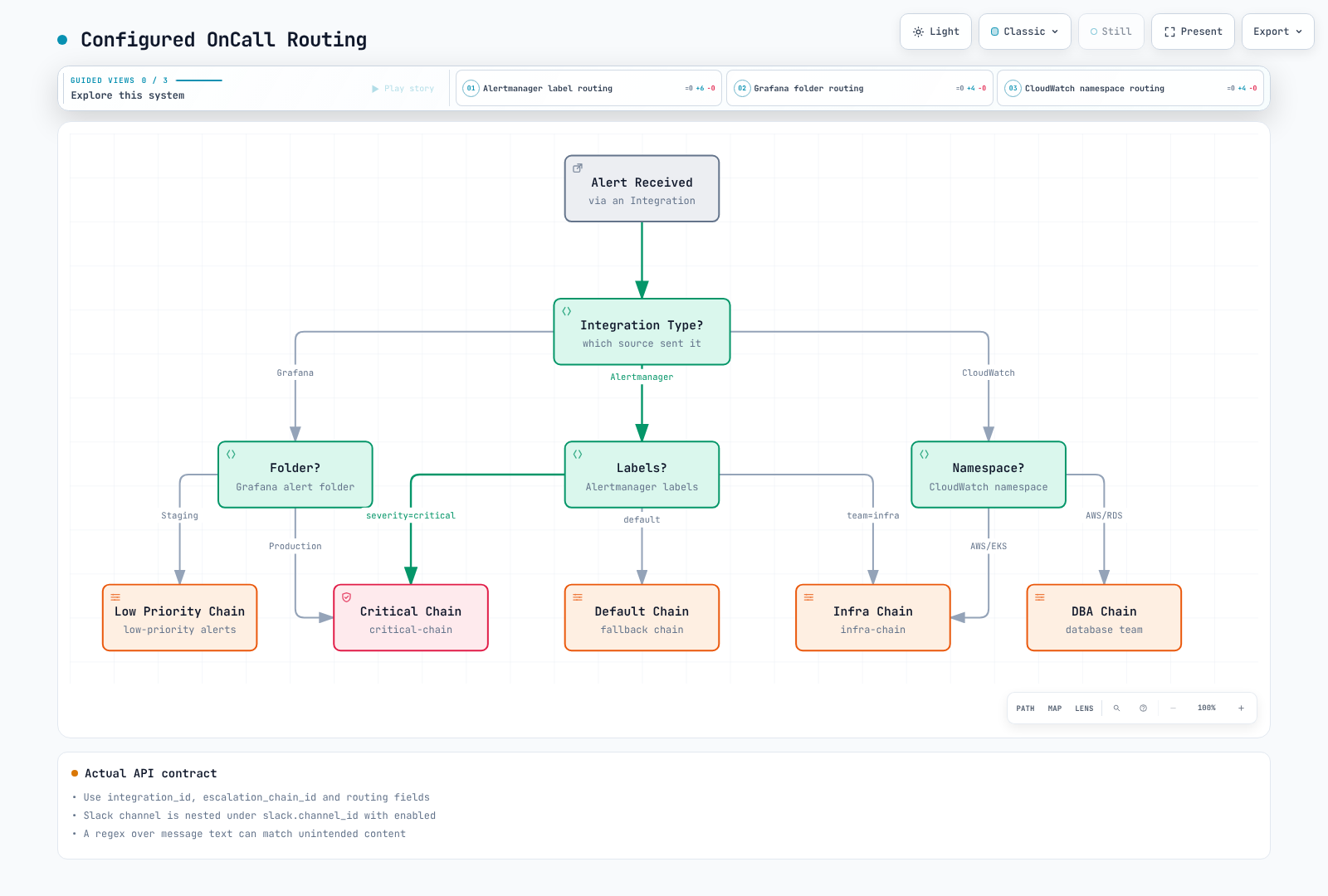
Check each integration's actual payload, route ordering and default route for unmatched events. Alertmanager, Grafana and CloudWatch payloads differ; a regex matching arbitrary message text can misroute. Test normal, missing, malformed and conflicting cases.
Creating Routes
This example uses fields present in the inspected route serializer. Slack uses nested slack.channel_id/enabled, not the old flat slack_channel_id. Real integration/chain/channel IDs and authorization are required. The regex is illustrative for a specific payload, not a universal provider template.
{
  "integration_id": "REPLACE_WITH_EXISTING_INTEGRATION_ID",
  "routing_type": "regex",
  "routing_regex": "\"severity\"\\s*:\\s*\"critical\"",
  "position": 0,
  "escalation_chain_id": "REPLACE_WITH_EXISTING_CHAIN_ID",
  "slack": {
    "channel_id": "REPLACE_WITH_EXISTING_SLACK_CHANNEL_ID",
    "enabled": true
  }
}
Alert Grouping Configuration
Include appropriate cluster/environment/namespace/service scope in grouping keys to avoid collisions. Too few fields merge unrelated incidents; unbounded IDs fragment groups. The old mixed group_wait/group_interval/resolve_timeout YAML was not a universal OnCall integration schema. Distinguish Alertmanager timers from OnCall grouping/resolution templates.
Choose template variables from the actual integration payload. payload.labels is not guaranteed or universally at the top level of Alertmanager requests. Escape JSON correctly and do not treat user input as trusted code.
ChatOps Integration
Slack Integration
Verify the installed Slack app's OAuth/signing secrets, scopes and workspace connection. Reference discovered slack_channels through the route's nested Slack settings; do not assume the old POST /slack_channels example creates/connects a channel. App installation and user actions require a separate authorized operating procedure and were not performed here.
Slack Commands
The old /oncall ack, /oncall resolve and /oncall silence list was not established by the inspected source. It uses a configurable root command and /grafana examples. Check the installed app's current help/documentation and buttons; slash commands are not Bash commands.
Slack Workflow
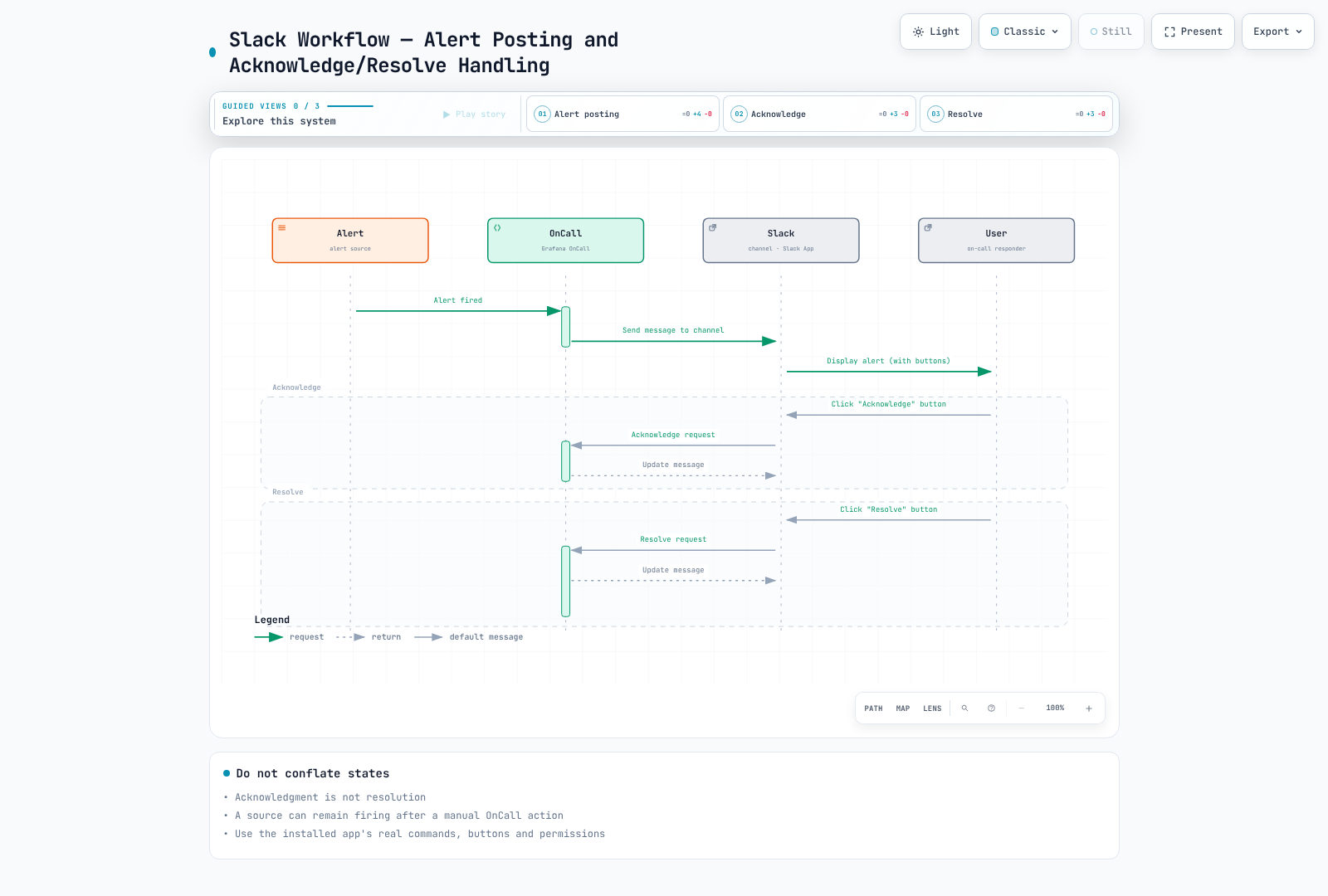
Acknowledge/Resolve/Silence buttons change OnCall state through an authorized user action. Delivery acknowledgment, Slack-message updates and the source monitor's state are separate; do not assume automatic reverse status updates.
MS Teams Integration
Verify Microsoft's currently supported webhook/workflow and card format. Do not copy an old Office connector URL and MessageCard JSON as a universal new integration. An outgoing webhook is not installed merely by writing YAML; its template context, authentication, payload, delivery and failures need actual configuration. No Teams messages were sent.
Telegram Integration
The archived chart uses nested oncall.telegram token/existingSecret/tokenKey settings and separate telegramPolling. The old top-level telegram.enabled block labelled Bash was not a correct Helm configuration. Verify bot credentials, webhook/polling ownership, user linking and current availability. No bot creation or user messages were performed.
Grafana IRM Integration
Incident Response Management
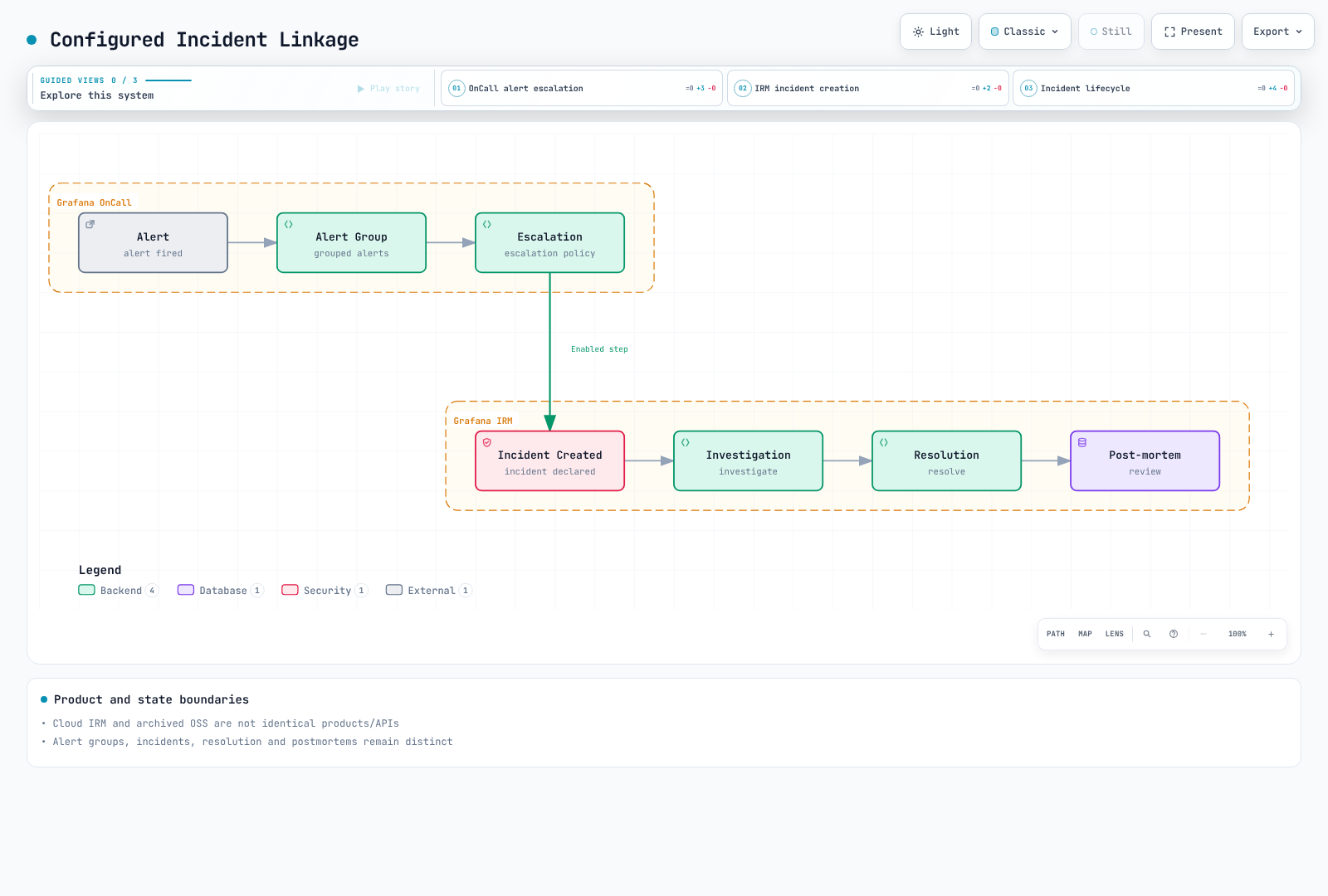
Distinguish maintained Grafana Cloud IRM alerting/on-call/incident capabilities from archived OnCall OSS. IRM is not simply a rename of Grafana Incident, nor a guarantee of identical OSS APIs, permissions or feature coverage. Verify the destination's current features, contract, retention and export/import support.
Automatic Incident Creation
The inspected source contains a real declare_incident step, but validates organization feature enablement. Adding arbitrary severity/title_template YAML does not configure an incident integration. Distinguish alert groups, incidents, acknowledgment, resolution and postmortems, and verify ownership/state transitions in an approved test.
Mobile App
Mobile App Features
Supported app/deployment combinations can offer alert feeds, state actions, schedules and notifications, subject to backend connectivity, OS permissions, network and user rules. Immediate delivery or working push on every self-hosted installation is not guaranteed.
Mobile App Configuration
The old mobile.firebase block is not a key in the inspected archived chart. An arbitrary Firebase service-account file does not establish working push. Cloud Connection has ended: OSS Grafana IRM app push and SMS/voice using that connection are unavailable. Configure and verify a separately supported Twilio/notification-service path or migration destination. No Firebase project/account or push notification was created.
Notification Channel Priority
Important/default selects separate personal notification-rule sets. Their order, waits, channels and availability apply; important does not mean simultaneous delivery to all channels. Test delivery, acknowledgment and escalation behavior.
PagerDuty/OpsGenie Comparison
Feature Comparison
Compare the same requirements against actual plans, usage and contracts. Old per-user prices, integration counts and basic/advanced rankings are not current selection evidence. Check schedules/overrides, conditional escalation, SSO, retention, API permissions, channel/country limits, support and migration cost. OnCall OSS is archived, and Opsgenie requires migration planning against its announced lifecycle.
Migration Considerations
The default direction is no longer a new migration from PagerDuty/Opsgenie into OnCall OSS. Inventory existing OnCall/ending-tool data and dependencies, then validate a maintained destination's feature differences and recovery. Free code does not eliminate hosting, operations, support or communication costs.
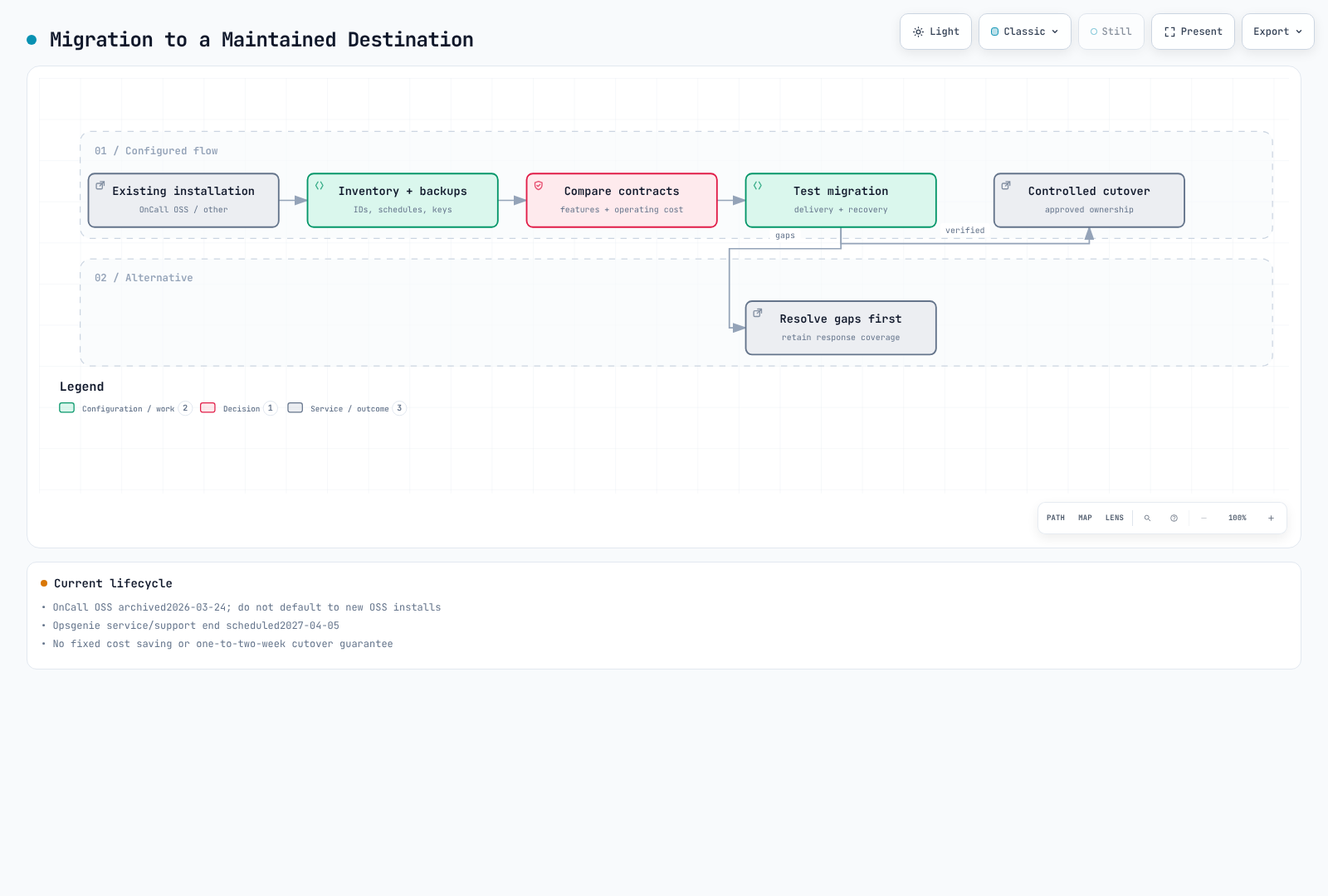
Migration Checklist
- [ ] Inventory users/teams, schedules/time zones/overrides, chains/routes, templates and integrations
- [ ] Prepare separate database/key/configuration/history backups and recovery tests
- [ ] Verify destination features, ID mapping, permissions, privacy and retention
- [ ] Test synthetic firing/resolved/missing/retry/duplicate/no-response/handoff cases
- [ ] Prevent duplicate paging during parallel operation; define ownership, cutover and rollback criteria
- [ ] Switch source URLs/tokens in an approved sequence and retire unnecessary access after validation
- [ ] Complete responder training and operational handoff
A fixed one-to-two-week overlap is not a guarantee, and API inventory is not a complete backup.
Best Practices
On-Call Schedule Design
Agree schedules using actual time zones, holidays, handoffs, backups and staffing. Weekly shifts, 09:00 handoffs or a minimum of three/four people are not universal answers. Transfer ongoing incidents, expiring silences and coverage gaps.
Escalation Design
Document severity-specific actions/response goals, backup/management paths, re-page and stop conditions. Interrupting pages need actionable responses; non-urgent information can use another path. Important does not guarantee phone/SMS delivery.
Alert Quality Management
Review repetition, false positives, missed events, delivery failures and actual response outcomes. Recheck data and state transitions after changing filters/templates/grouping/source URLs, and retain a safe restoration path.
On-Call Wellness
Agree workload, compensation, recovery time and responsibilities with the team. Reduce recurring incident causes and improve runbooks, automation and handoff. Specific shift/recovery durations are contextual operating policies.
Quiz
Test your knowledge with the Grafana OnCall Quiz.