Part 1: Spark on Kubernetes Fundamentals
Review baseline: Spark 4.2.0, Kubernetes 1.34+; example image uses Java 21
Last reviewed: September 12, 2026
Cluster mode and client mode
Kubernetes supports both Spark deployment modes. Client mode has been supported since Spark 2.4 and is not restricted to notebooks.
| Mode | Driver location | Operational consequence |
|---|---|---|
| Cluster | A driver pod created for the submission | The submitter needs API access; the driver needs its own service account/RBAC |
| Client | The submitting application, in a pod or on a host | Executors must reach the driver's advertised RPC/block-manager endpoints; keep the driver alive |
Reaching the Kubernetes API is not sufficient to establish executor-to-driver connectivity. Client-mode networking may need a stable Service/hostname and fixed ports. If its driver runs in a pod, configure the actual driver pod name for executor owner-reference garbage collection; do not invent a pod owner for a driver running outside Kubernetes.
Who schedules what?
The API server handles authentication and admission and stores API objects; the Kubernetes scheduler places pods, and node kubelets start their containers. The Spark driver requests executor pods and its own schedulers coordinate stages/tasks on the registered executors. These are different layers.
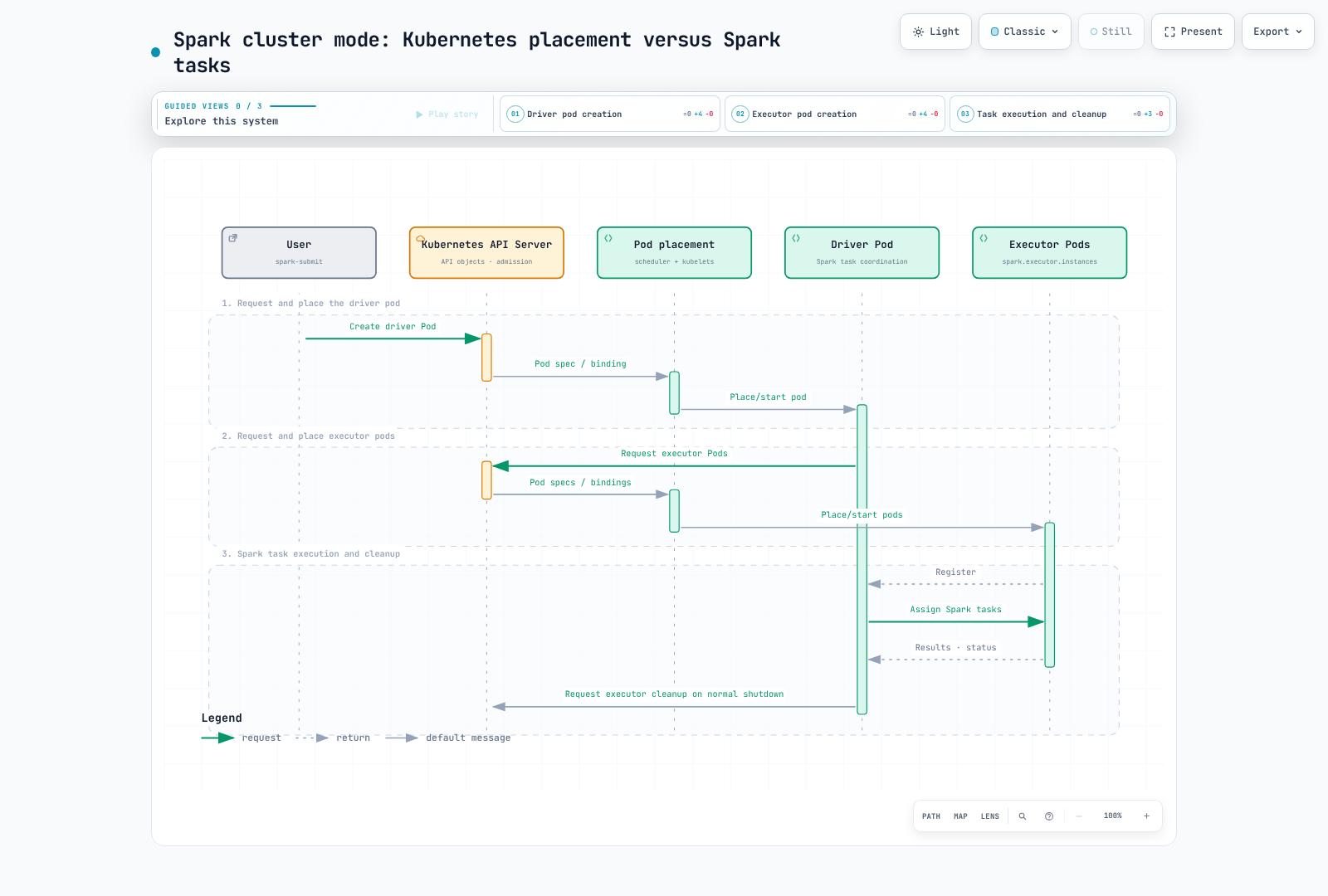
- The submitter requests the driver pod and associated resources.
- Kubernetes places and starts the driver; the driver requests executor pods.
- Kubernetes places/starts executors; they register with the driver.
- The driver assigns Spark tasks; executors execute and report results/status.
- On normal shutdown, Spark cleans up executors according to its configuration. A completed/failed driver pod can remain for logs; failure and owner-reference behavior must be considered rather than assuming immediate cleanup of everything.
This avoids a separate YARN or Spark Standalone control layer, but does not eliminate Kubernetes capacity, node, storage, network or image operations.
A concrete cluster-mode example
Prerequisites: Spark 4.2.0 locally, a compatible kubectl/current kubeconfig context, Kubernetes 1.34+, namespace capacity and image access. The submitter's API credentials and the in-cluster driver's RBAC are separate. The SparkPi example does not need AWS data permissions; S3 workloads additionally need their chosen workload identity and compatible Hadoop/AWS libraries.
A namespace administrator reviews/applies rbac.yaml:
apiVersion: v1
kind: Namespace
metadata:
  name: spark-jobs
---
apiVersion: v1
kind: ServiceAccount
metadata:
  name: spark-driver
  namespace: spark-jobs
---
apiVersion: v1
kind: ServiceAccount
metadata:
  name: spark-executor
  namespace: spark-jobs
automountServiceAccountToken: false
---
apiVersion: rbac.authorization.k8s.io/v1
kind: Role
metadata:
  name: spark-driver
  namespace: spark-jobs
rules:
- apiGroups:
  - ''
  resources:
  - pods
  - services
  - configmaps
  verbs:
  - create
  - get
  - list
  - watch
  - delete
  - patch
---
apiVersion: rbac.authorization.k8s.io/v1
kind: RoleBinding
metadata:
  name: spark-driver
  namespace: spark-jobs
roleRef:
  apiGroup: rbac.authorization.k8s.io
  kind: Role
  name: spark-driver
subjects:
- kind: ServiceAccount
  name: spark-driver
  namespace: spark-jobs
This role supports the basic example without dynamically created PVCs. Additional volume/resource-management features may need corresponding scoped permissions. Executor pods use a separate service account with API token automount disabled. Only trusted job code/submitters should use a namespace where the driver can create pods; RBAC alone is not a sandbox for untrusted application code.
Save these as Pod templates, not standalone pods to kubectl apply. Spark fills in its image, commands and other fields:
Driver template, driver-template.yaml:
apiVersion: v1
kind: Pod
metadata:
  name: spark-driver-template
spec:
  securityContext:
    runAsNonRoot: true
    runAsUser: 185
    runAsGroup: 185
    seccompProfile:
      type: RuntimeDefault
  containers:
  - name: spark-kubernetes-driver
    securityContext:
      allowPrivilegeEscalation: false
      capabilities:
        drop:
        - ALL
Executor template, executor-template.yaml:
apiVersion: v1
kind: Pod
metadata:
  name: spark-executor-template
spec:
  securityContext:
    runAsNonRoot: true
    runAsUser: 185
    runAsGroup: 185
    seccompProfile:
      type: RuntimeDefault
  containers:
  - name: spark-kubernetes-executor
    securityContext:
      allowPrivilegeEscalation: false
      capabilities:
        drop:
        - ALL
  automountServiceAccountToken: false
  terminationGracePeriodSeconds: 60
The files are accessible to the submitting process. In cluster mode Spark arranges for the executor template to be mounted into the driver. Spark overrides some template fields, so inspect the generated pods when combining templates, operator webhooks and Spark settings.
#!/bin/bash
set -euo pipefail
# Run in the directory containing driver-template.yaml and executor-template.yaml.
KUBE_CONTEXT="$(kubectl config current-context)"
KUBE_API_URL="$(kubectl --context "$KUBE_CONTEXT" config view --minify -o jsonpath='{.clusters[0].cluster.server}')"
case "$KUBE_API_URL" in https://*) ;; *) echo "Expected an HTTPS Kubernetes API URL" >&2; exit 1;; esac
SPARK_APP_NAME="spark-pi-$(date -u +%Y%m%d%H%M%S)"
spark-submit \
  --master "k8s://${KUBE_API_URL}" \
  --deploy-mode cluster \
  --name "$SPARK_APP_NAME" \
  --class org.apache.spark.examples.SparkPi \
  --conf "spark.kubernetes.context=$KUBE_CONTEXT" \
  --conf spark.kubernetes.namespace=spark-jobs \
  --conf spark.kubernetes.container.image=spark:4.2.0-scala2.13-java21-ubuntu \
  --conf spark.kubernetes.authenticate.driver.serviceAccountName=spark-driver \
  --conf spark.kubernetes.authenticate.executor.serviceAccountName=spark-executor \
  --conf "spark.kubernetes.driver.pod.name=$SPARK_APP_NAME-driver" \
  --conf spark.kubernetes.driver.podTemplateFile=driver-template.yaml \
  --conf spark.kubernetes.executor.podTemplateFile=executor-template.yaml \
  --conf spark.kubernetes.executor.terminationGracePeriodSeconds=60s \
  --conf spark.driver.cores=1 \
  --conf spark.driver.memory=1g \
  --conf spark.kubernetes.driver.limit.cores=1 \
  --conf spark.executor.cores=1 \
  --conf spark.executor.memory=1g \
  --conf spark.kubernetes.executor.limit.cores=1 \
  --conf spark.executor.instances=3 \
  local:///opt/spark/examples/jars/spark-examples.jar 10
kubectl -n spark-jobs logs "$SPARK_APP_NAME-driver"
kubectl -n spark-jobs get pod "$SPARK_APP_NAME-driver" -o jsonpath='{.status.phase}{"\n"}'
Apply rbac.yaml before running the submission script. The versioned official image contains the spark-examples.jar symlink; local:/// means the artifact is already in the container, not a local laptop file to upload. Mirror/pin the image through your normal supply-chain process if required. The helper script uses a fresh driver name and the selected kubeconfig context; preserve these values for failure investigation.
Three fixed executors are requested, but quota, admission, scheduling, image pulls or node capacity can keep pods Pending. Check driver/executor events and logs; spark-submit alone is not evidence of successful task execution.
Resources are requests, limits and task slots
| Spark setting | Kubernetes/default-profile effect |
|---|---|
spark.driver.cores | Driver CPU request unless overridden |
spark.executor.cores | Executor task capacity and default CPU request |
spark.kubernetes.{driver,executor}.request.cores | Overrides Kubernetes CPU request, not the executor's Spark task-slot setting |
spark.kubernetes.{driver,executor}.limit.cores | Explicit CPU limit; a CPU limit is not automatically implied by cores |
| Driver memory | Request and limit include heap plus configured/calculated overhead |
| Executor memory | Request and limit include heap, overhead and applicable off-heap/PySpark memory |
For this JVM example, 1 GiB heap plus the default minimum 384 MiB overhead yields 1,408 MiB memory request/limit. That is a verified default calculation, not a universal job size. Python/native memory and custom ResourceProfiles need their own review. A CPU request below task capacity can permit contention; changing a request is not the same as changing how many Spark tasks an executor can run.
Dynamic Resource Allocation
Spark DRA changes executor count as task backlog/idle conditions change. It is different from Kubernetes DRA for devices and from a node autoscaler's response to Pending pods.
Stock Spark on Kubernetes does not support the YARN-style external shuffle service. Shuffle tracking is a supported choice, but not the only mechanism in Spark: decommission-based shuffle preservation and a suitable reliable ShuffleDataIO implementation are alternatives with their own conditions.
For a shuffle-tracking profile:
spark.dynamicAllocation.enabled=true
spark.dynamicAllocation.shuffleTracking.enabled=true
spark.dynamicAllocation.minExecutors=2
spark.dynamicAllocation.initialExecutors=3
spark.dynamicAllocation.maxExecutors=20
spark.kubernetes.allocation.batch.size=5
Pass these properties with --conf or a properties file. Shuffle tracking was introduced in Spark 3.0 and is already true by default in 4.2; stating it explicitly documents the choice. The old claim that both explicit flags are always mandatory is incorrect.
Tracking tries to retain executors holding active shuffle data. Configured tracking/cached-executor idle timeouts, forced termination and node failure can still cause recomputation. It is not durable shared storage. Enabling overlapping preservation mechanisms can delay executor release; test their interaction.
The initial count considers minExecutors, initialExecutors and an existing spark.executor.instances value. The example's fixed count of three matches its initial count of three; min=2 does not mean it must start with two.
spark.kubernetes.allocation.batch.size controls a batch of pod requests. It is not a direct EC2 scaling policy: API throttling, pod allocation timing, ResourceQuota, scheduling constraints and node provisioning remain separate.
Graceful decommission is best effort
These settings enable executor/block-manager decommission and migration of applicable RDD/shuffle blocks:
spark.decommission.enabled=true
spark.storage.decommission.enabled=true
spark.storage.decommission.rddBlocks.enabled=true
spark.storage.decommission.shuffleBlocks.enabled=true
spark.kubernetes.executor.terminationGracePeriodSeconds=60s
With the chosen Spark 4.2 Kubernetes path, enabling decommission injects a preStop hook that runs spark.kubernetes.decommission.script, default /opt/decom.sh. The official image includes it. That script finds the executor JVM, sends SIGPWR and waits; Spark's default decommission signal is PWR. Normal pod termination is therefore mediated by this hook, not by assuming every plain SIGTERM automatically migrates data.
Custom images must include a working script and its tools, and a changed signal must match the script. Spark can override a template's lifecycle settings. Inspect the actual hook and test both planned scale-down and interruption paths.
The submission explicitly sets spark.kubernetes.executor.terminationGracePeriodSeconds=60s. Spark 4.2 overrides the pod template's value with this setting, whose default is 30 seconds; setting only terminationGracePeriodSeconds: 60 in the template is insufficient. The grace period includes preStop execution. It is an upper budget, not a promise of migration completion or a delay of the underlying Spot termination deadline. Healthy destination executors, disk/network capacity, time and any configured fallback storage are required. Hard node loss or forced deletion can bypass the opportunity entirely. Explicit deletion-grace settings, including Spark's dynamic-allocation delete path, can also change the available budget.
These flags do not restart a failed driver, replace application checkpoints or guarantee end-to-end exactly-once output. Distinguish recomputable intermediate blocks from durable input/output and plan recovery accordingly.
References and validation
A local SparkPi job ran successfully with the driver bound to loopback and UI disabled. Native Spark 4.2 feature-step tests confirmed memory mapping, default CPU-limit behavior and automatic decommission-hook insertion without creating a Kubernetes client. These checks do not prove EKS submission, RBAC/CNI enforcement, actual migration completion or AWS data access.
- Spark 4.2.0 on Kubernetes
- Spark 4.2.0 configuration
- Spark 4.2.0 dynamic allocation alternatives
- Driver resource mapping
- Executor resources and decommission hook
- Official decommission script
- Official Spark image tags