Amazon EKS Upgrades
Last Updated: October 12, 2026
Keeping your Amazon EKS cluster up to date is important for security, stability, and leveraging new features. This document provides strategies, best practices, and step-by-step guides for safely upgrading EKS clusters.
These are owner-reviewed procedures, not an upgrade executed in this audit. Use an explicit account, Region, and Kubernetes context, record the approved source/target versions and update IDs, and validate application behavior. Do not run every alternative example consecutively against the same resources. Local parsing/mocks do not establish production readiness.
Table of Contents
- EKS Upgrade Overview
- Upgrade Planning and Preparation
- EKS Control Plane Upgrade
- Node Group Upgrade
- Add-on Upgrade
- Upgrade Validation and Troubleshooting
- Upgrade Automation
- Upgrade Best Practices
EKS Upgrade Overview
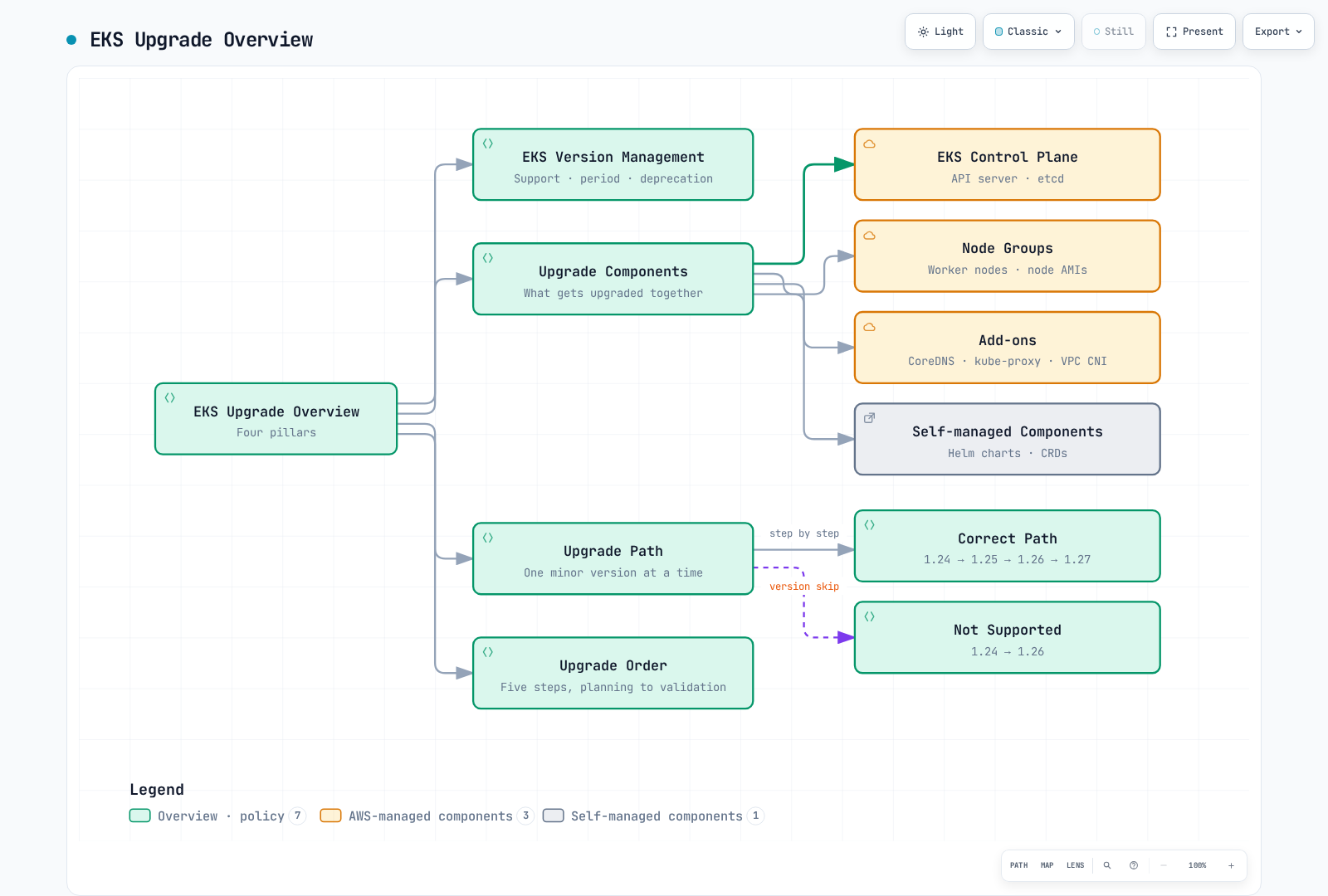
EKS Version Management
EKS uses Kubernetes version numbering, with its own release/support calendar. Each minor version receives 14 months of standard support, followed by 12 months of extended support at an additional charge. AWS announces end of standard support at least 60 days in advance. Consult the current EKS catalog/calendar; an upstream Kubernetes release is not automatically available on EKS. Avoid a fixed “minimum four versions” assumption or treating 14 months as the entire support lifecycle.
Recent EKS Upgrade Announcements (2026)
- Kubernetes 1.37 available (October 1, 2026): EKS 1.37 is now a supported target. On Auto Mode, newly created custom NodePools that omit a consolidation policy default to
Balanced; the built-ingeneral-purposeandsystempools also useBalanced. SELinux volume mounts are stable and enabled by default for supported CSI and Pod configurations. Before upgrading, review intended NodePool behavior and the SELinux/CSI requirements for workloads sharing volumes under different labels. See the Kubernetes 1.37 section of the EKS standard-support release notes and support calendar. - Kubernetes version rollback support (July 1, 2026): If an upgrade causes problems, you can now roll the control plane back to the previous minor version within 7 days. EKS runs an automated Rollback Readiness check beforehand, covering API compatibility, version skew, add-on compatibility, and cluster health. For a user-initiated rollback, Auto Mode replaces eligible worker nodes before reverting the control plane; this is not an automatic reaction to application failures. Eligibility and disruption controls still apply. The feature has no additional charge in Regions offering EKS; node/storage and applicable version-support charges still apply. See Rollback Procedure below for details. (Source: Amazon EKS announces Kubernetes version rollback)
- 99.99% SLA and 8XL control plane tier (March 20, 2026): The SLA for Provisioned Control Plane clusters increased from 99.95% to 99.99%, measured at one-minute granularity. A new 8XL scaling tier doubles the API request-handling capacity of the previous 4XL tier, targeting very large clusters and AI/ML/HPC workloads. (Source: Amazon EKS announces SLA and 8XL scaling tier)
Upgrade Components
EKS cluster upgrades include the following components:
- EKS Control Plane: Kubernetes API server, etcd, controller manager, etc.
- Node Groups: Worker nodes and node AMIs
- Add-ons: AWS managed add-ons (e.g., CoreDNS, kube-proxy, VPC CNI)
- Self-managed Components: Helm charts, custom resources, etc.
Upgrade Path
EKS clusters must be upgraded one minor version at a time:
- Historical illustration: 1.24 → 1.25 → 1.26 → 1.27 shows the one-minor pattern; these are not current deployment targets.
- A direct 1.24 → 1.26 jump illustrates an unsupported skipped minor.
- For a real change, choose the next minor actually offered by EKS for your Region and support policy.
Upgrade Order
- Inventory/test/backup, resolve active updates, and align nodes with the current control-plane minor as the conservative preparation workflow.
- Apply any required add-on/controller bridge versions compatible with both current and target Kubernetes versions; verify component-specific prerequisites.
- Upgrade the control plane by one supported minor and wait for that update ID to succeed.
- Upgrade nodes, clients/controllers, and remaining add-ons in their verified dependency order, checking every step. Auto Mode owns its built-in capabilities and starts node updates after the control-plane upgrade.
- Validate actual node versions, workload readiness, traffic, storage, and SLOs.
For kubelet 1.25+, upstream permits up to three minors behind the API server, never newer; mixed API-server versions narrow the allowed range. EKS documentation states both pre-upgrade node alignment guidance and the supported skew allowance. This runbook chooses alignment as a preparation policy; it does not claim every supported skew is universally rejected by the EKS API. Add-ons are not universally “all before” or “all after” the control plane. Rollback has a different node-first sequence, described below.
Upgrade Planning and Preparation
Upgrade Assessment
Before starting an upgrade, you should assess the following:
Version Compatibility Check
Check compatibility with the target Kubernetes version:
- API Deprecation: Identify workloads using deprecated APIs
- Feature Changes: Review feature changes in the new version
- Add-on Compatibility: Verify add-ons are compatible with the target version
An image list or kubectl get … .apiVersion is not a client/API-deprecation audit: the API server returns negotiated/current representations. A beta API is not automatically deprecated. Review source/Helm manifests, clients, CRDs, webhooks and EKS upgrade insights against the target release. A single API-server metrics scrape is only observed evidence; absence/error is not proof of no deprecated usage.
Save the following read-only collector as eks-upgrade-preflight.py. Export CLUSTER_NAME, AWS_REGION, EXPECTED_ACCOUNT_ID, KUBE_CONTEXT, and TARGET_VERSION; save its JSON with restricted local permissions. Its successful exit means collection succeeded, not that the upgrade is approved or all workloads are compatible.
import json
import os
import re
import subprocess


def run_json(args):
    result = subprocess.run(args, check=True, capture_output=True, text=True, timeout=60)
    return json.loads(result.stdout)


def run_text(args):
    return subprocess.run(args, check=True, capture_output=True, text=True, timeout=30).stdout.strip()


def inspect_upgrade(cluster_name, region, expected_account, context, target, query=run_json, text=run_text):
    if not re.fullmatch(r"[0-9]{12}", expected_account):
        raise ValueError("Set the reviewed 12-digit AWS account ID")
    if not re.fullmatch(r"[0-9]+\.[0-9]+", target):
        raise ValueError("Target must be an EKS major.minor version")
    aws = [os.environ.get("AWS_CLI", "aws")]
    suffix = ["--region", region, "--output", "json", "--no-cli-pager"]
    identity = query(aws + ["sts", "get-caller-identity"] + suffix)
    if identity["Account"] != expected_account:
        raise RuntimeError("AWS account mismatch")
    cluster = query(aws + ["eks", "describe-cluster", "--name", cluster_name] + suffix)["cluster"]
    if cluster["status"] != "ACTIVE":
        raise RuntimeError("Cluster must be ACTIVE; inspect any in-progress updates")
    if cluster["arn"].split(":")[4] != expected_account:
        raise RuntimeError("Cluster/account mismatch")
    current = cluster["version"]
    current_parts = tuple(map(int, current.split(".")))
    target_parts = tuple(map(int, target.split(".")))
    if target_parts != (current_parts[0], current_parts[1] + 1):
        raise ValueError("This upgrade example requires exactly the next minor version")
    server = text(["kubectl", "--context", context, "config", "view", "--minify",
                   "--output", "jsonpath={.clusters[0].cluster.server}"])
    if server != cluster["endpoint"]:
        raise RuntimeError("Kubernetes context does not match the EKS API endpoint")
    catalog = query(aws + ["eks", "describe-cluster-versions", "--cluster-versions", target,
                         "--include-all", "--no-default-only"] + suffix)["clusterVersions"]
    if not any(item["clusterVersion"] == target and item.get("versionStatus") in
               ["STANDARD_SUPPORT", "EXTENDED_SUPPORT"] for item in catalog):
        raise ValueError("Target is not offered as a supported EKS version in this Region")
    insights = query(aws + [
        "eks", "list-insights", "--cluster-name", cluster_name,
        "--filter", json.dumps({"categories": ["UPGRADE_READINESS"], "kubernetesVersions": [target]}),
    ] + suffix)["insights"]
    nodes = query(["kubectl", "--context", context, "get", "nodes", "--output", "json"])["items"]
    update_ids = query(aws + ["eks", "list-updates", "--name", cluster_name] + suffix)["updateIds"]
    addon_names = query(aws + ["eks", "list-addons", "--cluster-name", cluster_name] + suffix)["addons"]
    addons = []
    for name in addon_names:
        addon = query(aws + ["eks", "describe-addon", "--cluster-name", cluster_name,
                             "--addon-name", name] + suffix)["addon"]
        addons.append({"name": name, "version": addon["addonVersion"], "status": addon["status"]})
    return {
        "cluster": cluster_name, "region": region, "account": expected_account,
        "currentVersion": current, "targetVersion": target, "targetCatalog": catalog,
        "insights": insights,
        "clusterUpdateIds": update_ids,
        "nodes": [{"name": node["metadata"]["name"],
                   "kubeletVersion": node["status"]["nodeInfo"]["kubeletVersion"],
                   "ready": next((condition.get("status") for condition in node["status"].get("conditions", [])
                                  if condition.get("type") == "Ready"), None),
                   "computeType": node["metadata"].get("labels", {}).get("eks.amazonaws.com/compute-type"),
                   "nodegroup": node["metadata"].get("labels", {}).get("eks.amazonaws.com/nodegroup")}
                  for node in nodes],
        "managedAddons": addons,
        "decision": "Inventory collected only; active-update review, owner approval, node alignment, API/client scans, "
                    "backups/restore tests, add-on bridge versions, capacity, and workload tests remain required.",
    }


if __name__ == "__main__":
    report = inspect_upgrade(
        os.environ["CLUSTER_NAME"], os.environ["AWS_REGION"],
        os.environ["EXPECTED_ACCOUNT_ID"], os.environ["KUBE_CONTEXT"],
        os.environ["TARGET_VERSION"],
    )
    print(json.dumps(report, indent=2))
Resource Requirements Assessment
Assess the resources needed for the upgrade:
- Cluster Capacity: Sufficient capacity to accommodate additional nodes during upgrade
- Downtime Tolerance: Whether workloads can tolerate downtime
- Rollback Plan: Rollback plan in case of issues
Upgrade Schedule Planning
Plan the upgrade schedule:
- Maintenance Window: Schedule upgrade during low traffic periods
- Phased Approach: Start with non-production environments and progress to production
- Rollback Window: Plan time needed for rollback in case of issues
Pre-upgrade Preparation
Check Cluster State
Check cluster state before upgrade:
# Check node status
kubectl --context "$KUBE_CONTEXT" get nodes

# Check pod status
kubectl --context "$KUBE_CONTEXT" get pods --all-namespaces

# Check component status
kubectl --context "$KUBE_CONTEXT" get --raw /readyz

# Check events
kubectl --context "$KUBE_CONTEXT" get events --all-namespaces
Create Backup
Back up important data before upgrade:
EKS owns the managed control-plane etcd; an etcd-pod/etcdctl snapshot command in your namespace cannot back it up. kubectl get all also omits important resources and volume data and is not a complete backup.
AWS Backup for EKS can protect cluster state and PVC-backed EBS/EFS/S3 resources through composite recovery points, with the documented IAM, API/API_AND_CONFIG_MAP access mode, storage, and restore prerequisites. Alternatively, use an owned Velero/application backup setup with verified volume coverage and credentials. Review namespace/cluster-scoped coverage, database consistency, retention, and restore tests. A backup request returning an ID does not prove completion or recoverability.
Test Upgrade
Test the upgrade in a non-production environment:
- Create a test cluster similar to production environment
- Perform upgrade on test cluster
- Test workloads and features
- Identify and resolve issues
Create Upgrade Documentation
Document the upgrade process:
- Upgrade steps
- Responsible parties and contacts
- Rollback procedures
- Troubleshooting guide
EKS Control Plane Upgrade
Control Plane Upgrade Preparation
Check Current Version
Check the current EKS cluster version:
aws eks describe-cluster --name "$CLUSTER_NAME" --region "$AWS_REGION" --query "cluster.version"Check Available Versions
Check available Kubernetes versions:
aws eks describe-cluster-versions --region "$AWS_REGION" \
  --no-default-only --output json --no-cli-pager
Create Upgrade Plan
Before submitting a normal upgrade, review the current EKS guidance: enforcement requiring --force for upgrade-insight findings is temporarily rolled back. This differs from the blocking ROLLBACK_READINESS rules for version rollback. Resolve or explicitly assess findings; rolling 30-day deprecated-API evidence can remain after a fix. Ensure the cluster subnets exist, have the required spare addresses (EKS can require up to five), and permit control-plane communication. A started control-plane upgrade cannot be paused/stopped; clients must handle reconnects.
Create a control plane upgrade plan:
- Upgrade time: Select low traffic periods
- Monitoring setup: Monitor cluster state during upgrade
- Rollback plan: Rollback procedure in case of issues
Control Plane Upgrade Execution
Upgrade Using AWS Management Console
- Log in to AWS Management Console
- Navigate to Amazon EKS service
- Select the cluster to upgrade from the cluster list
- Select "Cluster configuration" tab
- Click "Update Kubernetes version"
- Select target version and click "Update"
Upgrade Using AWS CLI
Run only after the recorded plan and preconditions are approved. Save the polling helper in the next section as eks-wait-update.py. This requests only the control-plane update; it does not upgrade nodes/add-ons or prove workload readiness.
set -euo pipefail
: "${CLUSTER_NAME:?Set the reviewed cluster}"
: "${AWS_REGION:?Set the reviewed Region}"
: "${TARGET_VERSION:?Set the next supported EKS minor version}"
umask 077
aws eks update-cluster-version \
  --name "$CLUSTER_NAME" --region "$AWS_REGION" \
  --kubernetes-version "$TARGET_VERSION" --output json --no-cli-pager \
  > control-plane-update.json
UPDATE_ID=$(jq -er '.update.id | select(type == "string" and length > 0)' control-plane-update.json)
export CLUSTER_NAME AWS_REGION UPDATE_ID
unset NODEGROUP_NAME ADDON_NAME
python3 eks-wait-update.py
Upgrade Using eksctl
eksctl upgrade cluster \
  --name "$CLUSTER_NAME" --region "$AWS_REGION" \
  --version "$TARGET_VERSION" \
  --approve
Control Plane Upgrade Monitoring
Check Upgrade Status
Check the upgrade status:
Track DescribeUpdate for the exact update ID. cluster-active/nodegroup-active is not proof that this request succeeded, and AWS CLI 2.36.44 has no eks wait update-successful waiter. Save this as eks-wait-update.py; for a node-group/add-on request set exactly one of NODEGROUP_NAME or ADDON_NAME, otherwise leave both unset. It fails on API errors, failure/cancellation, unknown states, or the client deadline. A client timeout does not cancel the AWS operation. The default two-hour client wait must be adjusted for the approved operation, particularly long Auto Mode rollbacks.
import json
import os
import subprocess
import time
from pathlib import Path


def wait_update(lookup, timeout_seconds, interval_seconds=15, clock=time.monotonic, sleep=time.sleep):
    if timeout_seconds <= 0 or interval_seconds < 0:
        raise ValueError("Use a positive timeout and nonnegative polling interval")
    deadline = clock() + timeout_seconds
    while True:
        update = lookup()["update"]
        status = update["status"]
        print(json.dumps({"id": update["id"], "status": status, "errors": update.get("errors", [])}), flush=True)
        if status == "Successful":
            return update
        if status in ["Failed", "Cancelled"]:
            raise RuntimeError(f"EKS update ended with {status}; inspect its error details")
        if status not in ["InProgress", "Cancelling"]:
            raise RuntimeError(f"Unexpected update status: {status}")
        if clock() >= deadline:
            raise TimeoutError("Client wait expired; the AWS operation may still be running. Preserve its update ID.")
        sleep(interval_seconds)


if __name__ == "__main__":
    cluster = os.environ["CLUSTER_NAME"]
    region = os.environ["AWS_REGION"]
    update_id = os.environ["UPDATE_ID"]
    nodegroup = os.environ.get("NODEGROUP_NAME")
    addon = os.environ.get("ADDON_NAME")
    if nodegroup and addon:
        raise ValueError("Set only NODEGROUP_NAME or ADDON_NAME for a scoped update")
    command = [
        os.environ.get("AWS_CLI", "aws"), "eks", "describe-update",
        "--name", cluster, "--region", region, "--update-id", update_id,
        "--output", "json", "--no-cli-pager",
    ]
    if nodegroup:
        command += ["--nodegroup-name", nodegroup]
    if addon:
        command += ["--addon-name", addon]
    status_file = Path(os.environ.get("UPDATE_STATUS_FILE", "eks-update-status.json"))

    def lookup():
        completed = subprocess.run(command, check=True, capture_output=True, text=True, timeout=60)
        response = json.loads(completed.stdout)
        status_file.write_text(json.dumps(response, indent=2) + "\n")
        return response

    wait_update(lookup, int(os.environ.get("WAIT_TIMEOUT_SECONDS", "7200")))
Monitor Cluster State
Monitor cluster state during upgrade:
# Check node status
kubectl --context "$KUBE_CONTEXT" get nodes

# Check pod status
kubectl --context "$KUBE_CONTEXT" get pods --all-namespaces

# Check events
kubectl --context "$KUBE_CONTEXT" get events --all-namespaces --sort-by='.lastTimestamp'
Monitor CloudWatch Metrics
Monitor the control-plane metrics actually published for your EKS version/tier and your configured telemetry: API request rate/latency/errors, API readiness and client reconnects, scheduling, node/workload health, and application SLOs. Do not assume direct etcd/controller-manager endpoints or every component metric is exposed. /readyz checks API readiness, not all application or historical availability conditions.
Control Plane Upgrade Troubleshooting
Common Issues
Common issues that may occur during control plane upgrade:
- Upgrade Failure: Upgrade process fails or is interrupted
- API Server Availability: API server availability issues during upgrade
- Compatibility Issues: Compatibility issues between workloads and new version
Troubleshooting Steps
- Check upgrade status
- Review CloudTrail logs
- Review EKS control plane logs
- Contact AWS Support
Node Group Upgrade
After upgrading the control plane, you need to upgrade the node groups. There are several strategies for node group upgrades, each with advantages and disadvantages.
Node Group Upgrade Strategies
Managed Node Group Upgrade
Managed node groups are a node group management feature provided by AWS that automates node upgrades:
- Replacement strategy:
maxUnavailable/percentage allows parallel replacement. APIupdateStrategy=DEFAULTlaunches new capacity before removing old capacity;MINIMALremoves old capacity first and has different availability/capacity tradeoffs. - Draining: normal updates use Pod eviction/PDB checks; controllers recreate Pods rather than live-migrating them. The node-group force option can bypass PDB-related drain failures and is not the same as the cluster-rollback force flag.
- Version/AMI selection: choose the reviewed Kubernetes and AMI release, or a new version of the original launch template for custom AMIs. A failed update is not proof of automatic fleet rollback; inspect mixed node/AMI state and update errors.
Self-managed Node Group Upgrade
For self-managed node groups, you must manually upgrade nodes:
- Blue/Green Deployment: Create new node group and migrate workloads
- Rolling Upgrade: Drain and terminate nodes one by one and replace with new nodes
- In-place Upgrade: Upgrade kubelet and container runtime on existing nodes
Fargate Node Upgrade
AWS owns Fargate node infrastructure, but the workload owner must coordinate Pod replacement. Newly launched Fargate Pods use a kubelet version matching the control plane; existing Pods are not upgraded by the control-plane operation. Plan controller rollouts, availability, and validation instead of treating Fargate as requiring no upgrade work. Auto Mode is different: it starts its own incremental node replacement after a control-plane upgrade, subject to its disruption controls.
Managed Node Group Upgrade
Check Managed Node Group Version
Check the current managed node group version:
aws eks describe-nodegroup \
  --cluster-name "$CLUSTER_NAME" --region "$AWS_REGION" \
  --nodegroup-name "$NODEGROUP_NAME" \
  --query "nodegroup.version"
Upgrade Using AWS Management Console
- Log in to AWS Management Console
- Navigate to Amazon EKS service
- Select the cluster to upgrade from the cluster list
- Select "Compute" tab
- Select the node group to upgrade
- Click "Update node group"
- Select target version and click "Update"
Upgrade Using AWS CLI
For an EKS-optimized AMI, use the reviewed release and target version. This operation has its own update ID; keep the node-group scope when polling. Review platform/AMI-family support—an AL2 node group is not migrated to AL2023 merely by changing the Kubernetes version.
set -euo pipefail
: "${CLUSTER_NAME:?}"; : "${AWS_REGION:?}"; : "${NODEGROUP_NAME:?}"
: "${TARGET_VERSION:?Set the reviewed target, no newer than the control plane}"
: "${TARGET_AMI_RELEASE:?Set the reviewed EKS-optimized AMI release}"
umask 077
aws eks describe-nodegroup --cluster-name "$CLUSTER_NAME" --nodegroup-name "$NODEGROUP_NAME" \
  --region "$AWS_REGION" --output json > nodegroup-before.json
if jq -e '.nodegroup.amiType == "CUSTOM"' nodegroup-before.json >/dev/null; then
  echo "Use the custom launch-template path for this node group" >&2
  exit 1
fi
aws eks update-nodegroup-version \
  --cluster-name "$CLUSTER_NAME" --nodegroup-name "$NODEGROUP_NAME" --region "$AWS_REGION" \
  --kubernetes-version "$TARGET_VERSION" --release-version "$TARGET_AMI_RELEASE" \
  --output json > nodegroup-update.json
UPDATE_ID=$(jq -er '.update.id | select(type == "string" and length > 0)' nodegroup-update.json)
export CLUSTER_NAME AWS_REGION UPDATE_ID NODEGROUP_NAME
unset ADDON_NAME
python3 eks-wait-update.py
For a custom AMI, update the original launch template to a reviewed new version. Do not pass Kubernetes version or releaseVersion with that custom-AMI request; verify the actual kubelet/runtime/AMI on replacement nodes.
set -euo pipefail
: "${CLUSTER_NAME:?}"; : "${AWS_REGION:?}"; : "${NODEGROUP_NAME:?}"
: "${LAUNCH_TEMPLATE_ID:?Set the same launch template originally used by the group}"
: "${LAUNCH_TEMPLATE_VERSION:?Set the reviewed version containing the updated custom AMI}"
aws eks update-nodegroup-version \
  --cluster-name "$CLUSTER_NAME" --nodegroup-name "$NODEGROUP_NAME" --region "$AWS_REGION" \
  --launch-template "id=$LAUNCH_TEMPLATE_ID,version=$LAUNCH_TEMPLATE_VERSION" \
  --output json > nodegroup-update.json
UPDATE_ID=$(jq -er '.update.id | select(type == "string" and length > 0)' nodegroup-update.json)
export CLUSTER_NAME AWS_REGION UPDATE_ID NODEGROUP_NAME
unset ADDON_NAME
python3 eks-wait-update.py
Upgrade Using eksctl
eksctl upgrade nodegroup \
  --cluster "$CLUSTER_NAME" --region "$AWS_REGION" \
  --name "$NODEGROUP_NAME" \
  --kubernetes-version "$TARGET_VERSION"
Managed Node Group Upgrade Configuration
You can configure managed node group upgrade behavior:
- Max Unavailable: Maximum number of nodes unavailable during upgrade
- PDBs: constrain eligible voluntary evictions, not every failure or application outcome. A forced node-group update can ignore a PDB issue. Changing managed-node-group desired/min/max scaling configuration is an ASG scaling operation and does not provide the upgrade drain/PDB guarantees; do not use a size-to-zero switch as a safe migration.
aws eks update-nodegroup-config \
  --cluster-name "$CLUSTER_NAME" --region "$AWS_REGION" \
  --nodegroup-name "$NODEGROUP_NAME" \
  --update-config maxUnavailable=1
Self-managed Node Group Upgrade
Blue/Green Deployment
Prepare a new, differently named node group from the owning configuration, preserving the reviewed subnet/zone, IAM, AMI architecture/bootstrap, labels, taints, storage, and network requirements. See the cluster creation guide. eksctl create nodegroup defaults to a managed group; a self-managed configuration must explicitly select --managed=false or the appropriate nodeGroups config section. Creation uses --version, whereas eksctl upgrade nodegroup uses --kubernetes-version.
- Create green capacity from the reviewed config, then verify node count, target kubelet/AMI, Ready status, CNI/DNS, and application scheduling. Merely listing nodes is not that validation.
- Move workloads in owner-controlled phases. A preferred affinity is not a guarantee of placement on green; inspect actual Pod node assignments and storage topology.
- Drain one identified old node at a time with a finite timeout; stop if an eviction or health check fails. Revalidate workloads/replacement capacity before continuing.
- Retire the old group only after recorded migration, health, data-retention, and recovery acceptance. Do not delete it automatically after an unchecked loop or a fixed sleep.
set -euo pipefail
: "${KUBE_CONTEXT:?Set the reviewed cluster context}"
: "${NODE_NAME:?Set one reviewed old node}"
kubectl --context "$KUBE_CONTEXT" get node "$NODE_NAME" -o wide
kubectl --context "$KUBE_CONTEXT" get node "$NODE_NAME" \
  -o jsonpath='{.spec.providerID}{"\n"}'
kubectl --context "$KUBE_CONTEXT" get pods --all-namespaces \
  --field-selector "spec.nodeName=$NODE_NAME" -o wide
# Stop on failure. Do not terminate the instance or delete the node group here.
kubectl --context "$KUBE_CONTEXT" drain "$NODE_NAME" --ignore-daemonsets --timeout=10m
This default drain refuses unmanaged/local-data cases that need a separate decision. --delete-emptydir-data explicitly permits losing emptyDir data; do not add it blindly. kubectl drain --force allows unmanaged Pods and is different from bypassing eviction/PDB checks. Reconcile DaemonSets, static Pods, controllers, and persistent data through their owners.
Rolling Upgrade
For a self-managed ASG, first update the owned launch configuration/template to the validated AMI; otherwise replacements can boot the old image again. Use the single-node drain gate above and verify the node provider ID, EC2 instance, and ASG ownership before any termination. Do not map a Kubernetes node to the first EC2 private-DNS-name search result. Have the ASG owner replace the drained instance, wait for a new correctly configured Ready node and workload recovery, then continue. A 60-second sleep does not prove replacement readiness. Direct ASG scaling/instance refresh requires the corresponding Kubernetes draining integration; it does not automatically enforce a PDB.
In-place Upgrade
Use a separately tested, OS/image-specific procedure only for self-managed hosts that support it. Prefer an immutable, validated AMI replacement path for EKS-optimized managed fleets; Auto Mode/Fargate infrastructure is service owned. A generic yum update kubelet kubectl neither selects a reviewed Kubernetes/runtime version nor constitutes an EKS node upgrade. An SSM request is asynchronous: do not uncordon until its invocation, required service restarts, actual versions, node readiness, and workload tests have succeeded. Preserve failure evidence instead of automatically uncordoning or terminating after an error.
Node Upgrade Monitoring and Validation
Check Node Version
Check node Kubernetes version:
kubectl --context "$KUBE_CONTEXT" get nodes -o custom-columns=NAME:.metadata.name,VERSION:.status.nodeInfo.kubeletVersionCheck Node Status
Check node status:
kubectl --context "$KUBE_CONTEXT" get nodes
kubectl --context "$KUBE_CONTEXT" describe nodes
Check Pod Deployment
Verify pods are deployed normally:
kubectl --context "$KUBE_CONTEXT" get pods --all-namespaces -o wide
kubectl --context "$KUBE_CONTEXT" get pods --all-namespaces -o custom-columns=NAMESPACE:.metadata.namespace,NAME:.metadata.name,PHASE:.status.phase,READY:'.status.conditions[?(@.type=="Ready")].status'
Add-on Upgrade
Inventory the actual component owners and upgrade paths. EKS-managed add-on versions are not automatically upgraded by a control-plane upgrade; the owner selects and initiates a compatible update. Required bridge releases can precede the control-plane change. Auto Mode built-in capabilities are managed separately by AWS; do not install or update duplicate node networking/storage/DNS components as if every cluster used the same DaemonSets/Deployments.
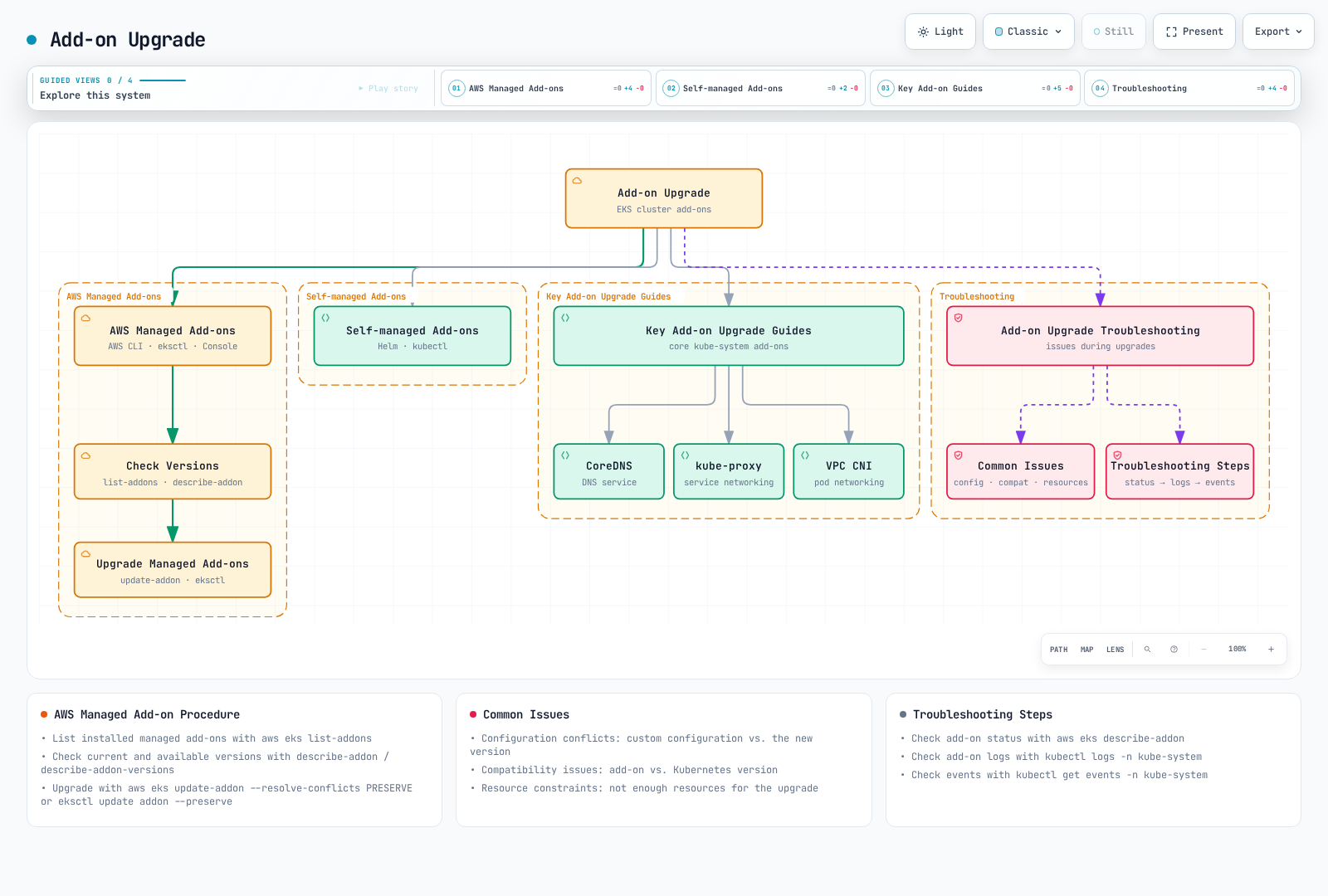
AWS Managed Add-ons
Check Managed Add-on List
Check managed add-ons installed in the cluster:
aws eks list-addons --cluster-name "$CLUSTER_NAME" --region "$AWS_REGION"Check Managed Add-on Version
Check the current version of managed add-ons:
aws eks describe-addon \
  --cluster-name "$CLUSTER_NAME" --region "$AWS_REGION" \
  --addon-name vpc-cni \
  --query "addon.addonVersion"
Check Available Add-on Versions
Check available add-on versions:
An array’s first element is not a contract for “latest” or the correct version. Review compatibilities, default-version markers, platform/compute/architecture support, release notes, IAM changes, and intermediate-version requirements. Capture configuration and identity associations before changing the add-on. Save files with restricted permissions; configuration can contain sensitive values.
set -euo pipefail
: "${CLUSTER_NAME:?}"; : "${AWS_REGION:?}"; : "${ADDON_NAME:?}"
: "${TARGET_VERSION:?Set the Kubernetes version for this stage}"
umask 077
aws eks describe-addon --cluster-name "$CLUSTER_NAME" --addon-name "$ADDON_NAME" \
  --region "$AWS_REGION" --output json > addon-before.json
aws eks describe-addon-versions --addon-name "$ADDON_NAME" \
  --kubernetes-version "$TARGET_VERSION" --region "$AWS_REGION" \
  --output json > addon-candidates.json
# Select ADDON_VERSION after reviewing compatibility, architecture, compute type, and upgrade path.
: "${ADDON_VERSION:?Set the reviewed add-on version}"
aws eks describe-addon-configuration --addon-name "$ADDON_NAME" \
  --addon-version "$ADDON_VERSION" --region "$AWS_REGION" \
  --output json > addon-schema.json
jq -r '.addon.configurationValues // "{}"' addon-before.json > addon-config-candidate.json
Upgrade Managed Add-ons
You can upgrade managed add-ons using AWS Management Console, AWS CLI, or eksctl:
Validate the candidate JSON against the target schema and preserve the intended configuration/identity semantics. PRESERVE addresses conflicts in managed fields; it does not validate every custom value, guarantee application behavior, or merge an explicit partial configuration into the old JSON. Passing {} can reset configuration. Update one owned add-on at a time and check its update ID, health, version, and workload behavior.
set -euo pipefail
: "${CLUSTER_NAME:?}"; : "${AWS_REGION:?}"; : "${ADDON_NAME:?}"; : "${ADDON_VERSION:?}"
: "${REVIEWED_ADDON_CONFIG_FILE:?Provide the complete reviewed target configuration JSON}"
aws eks update-addon --cluster-name "$CLUSTER_NAME" --addon-name "$ADDON_NAME" \
  --addon-version "$ADDON_VERSION" --region "$AWS_REGION" \
  --configuration-values "file://$REVIEWED_ADDON_CONFIG_FILE" \
  --resolve-conflicts PRESERVE --output json > addon-update.json
UPDATE_ID=$(jq -er '.update.id | select(type == "string" and length > 0)' addon-update.json)
export CLUSTER_NAME AWS_REGION UPDATE_ID ADDON_NAME
unset NODEGROUP_NAME
python3 eks-wait-update.py
aws eks describe-addon --cluster-name "$CLUSTER_NAME" --addon-name "$ADDON_NAME" \
  --region "$AWS_REGION" --output json
For eksctl 0.229, update addon has --wait and --config-file, but no --preserve flag. Put the intended conflict policy in a reviewed eksctl configuration, or use the explicit AWS CLI procedure above. eksctl --force migrates ownership from a self-managed add-on and is not a generic conflict-preservation option.
Self-managed Add-ons
Upgrade Self-managed Add-ons
Upgrade self-managed add-ons using Helm or kubectl:
Use the existing Helm/manifests owner. The example assumes a reviewed chart repository/OCI reference and an existing release; it deliberately does not use --install to create a second manager when the release is missing. Inspect the new chart’s CRD and IAM migration requirements; helm upgrade alone does not upgrade CRDs in a chart’s crds/ directory. Helm and raw-manifest deployment are alternatives, not consecutive update steps. The former Metrics Server 0.6.1/3.8.2 example is not a target-version compatibility selection.
set -euo pipefail
: "${KUBE_CONTEXT:?}"; : "${RELEASE:?}"; : "${ADDON_NAMESPACE:?}"
: "${CHART_REF:?Set the verified repository/chart or OCI reference}"
: "${CHART_VERSION:?Set a reviewed compatible chart version}"
: "${REVIEWED_VALUES_FILE:?Set the complete reviewed target values file}"
umask 077
helm get values "$RELEASE" --namespace "$ADDON_NAMESPACE" --kube-context "$KUBE_CONTEXT" \
  --all > addon-values-before.yaml
helm show values "$CHART_REF" --version "$CHART_VERSION" > addon-values-defaults.yaml
# Merge/migrate values and handle CRDs/IAM through the owner before this step.
helm upgrade "$RELEASE" "$CHART_REF" --version "$CHART_VERSION" \
  --namespace "$ADDON_NAMESPACE" --kube-context "$KUBE_CONTEXT" \
  -f "$REVIEWED_VALUES_FILE" --wait --timeout 15m
Key Add-on Upgrade Guides
CoreDNS Upgrade
For standard nodes, determine whether EKS or another tool owns the CoreDNS Deployment, preserve the Corefile/PDB/custom settings, and follow the selected version’s migration notes. Auto Mode nodes run CoreDNS as a node system service: a pure Auto Mode cluster does not require the Deployment add-on, while a mixed cluster must retain DNS for non-Auto nodes. Do not interpret a missing Deployment in pure Auto Mode as a failed upgrade.
kube-proxy Upgrade
Keep kube-proxy compatible with the API server and the nodes on which it runs; it must not be newer than the API server. Use the target’s supported add-on build and verified order. Auto Mode manages its service networking; do not assume a self-managed kube-proxy DaemonSet exists there.
VPC CNI Upgrade
For standard EC2 nodes, verify the CNI version path, IP/prefix mode, IAM, network-policy settings, and workload connectivity. Do not assume a single aws-node ConfigMap contains every setting: include EKS configurationValues, DaemonSet/container configuration, service-account identity, and the owning Helm/GitOps configuration where applicable. Auto Mode’s built-in networking follows its own management path.
Use the generic capture/select/update/wait process above for each EKS-owned add-on. Inspect standard-node agents only where they are actually installed:
kubectl --context "$KUBE_CONTEXT" -n kube-system get deployment coredns -o wide
kubectl --context "$KUBE_CONTEXT" -n kube-system get daemonset kube-proxy aws-node -o wide
Add-on Upgrade Troubleshooting
Common Issues
Common issues that may occur during add-on upgrade:
- Configuration Conflicts: Conflicts between custom configuration and new version
- Compatibility Issues: Compatibility issues between add-on and Kubernetes version
- Resource Constraints: Insufficient resources for upgrade
Troubleshooting Steps
- Check add-on status:
aws eks describe-addon \
  --cluster-name "$CLUSTER_NAME" --region "$AWS_REGION" \
--addon-name vpc-cni- Check add-on logs:
kubectl --context "$KUBE_CONTEXT" logs -n kube-system -l k8s-app=kube-dns
kubectl --context "$KUBE_CONTEXT" logs -n kube-system -l k8s-app=kube-proxy
kubectl --context "$KUBE_CONTEXT" logs -n kube-system -l k8s-app=aws-node- Check add-on events:
kubectl --context "$KUBE_CONTEXT" get events -n kube-system --sort-by='.lastTimestamp'Upgrade Validation and Troubleshooting
After the upgrade is complete, you need to validate that the cluster is operating normally and resolve any issues that may occur.
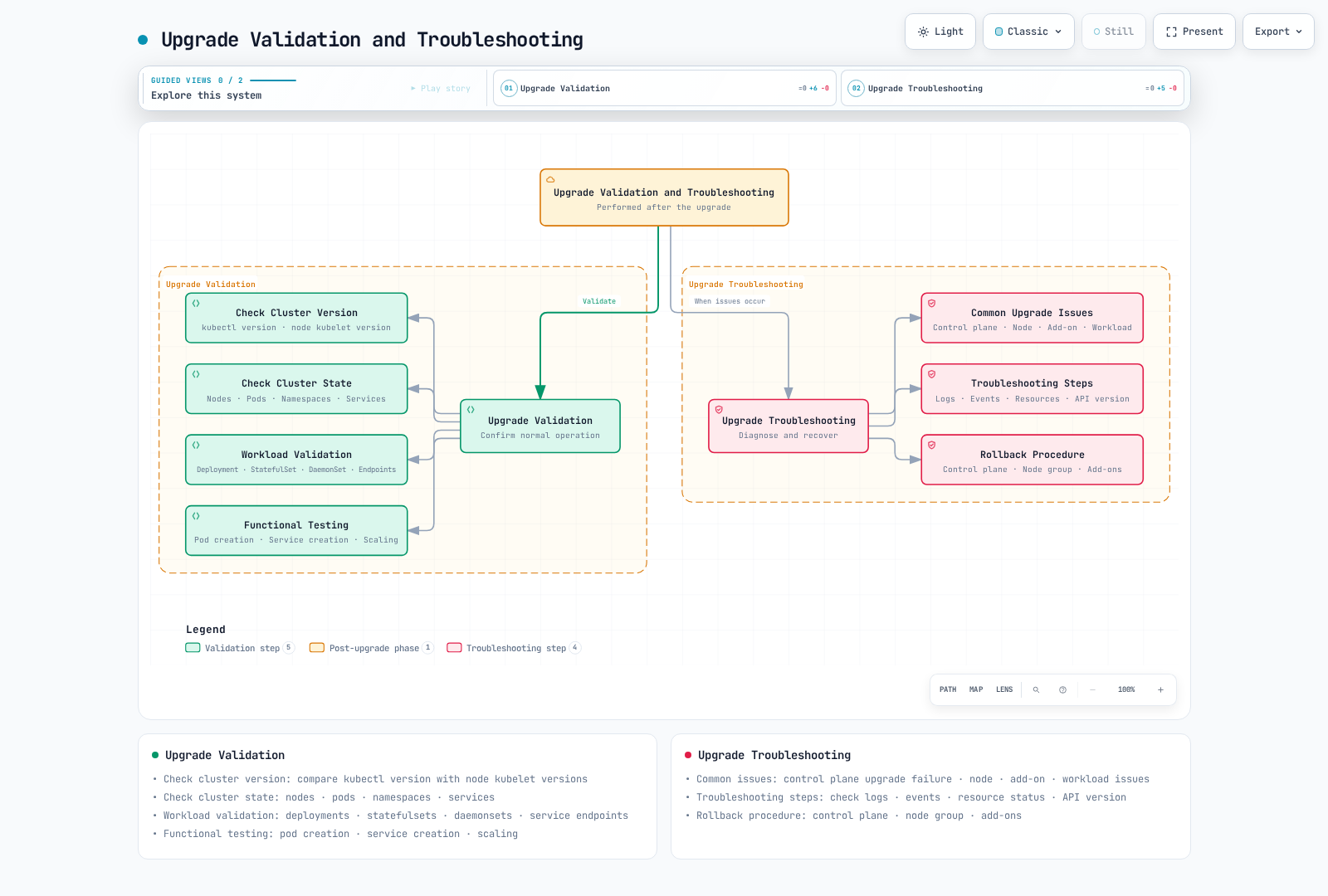
Upgrade Validation
Check Cluster Version
Check cluster and node versions:
# Check cluster version
kubectl --context "$KUBE_CONTEXT" version --output=yaml

# Check node version
kubectl --context "$KUBE_CONTEXT" get nodes -o custom-columns=NAME:.metadata.name,VERSION:.status.nodeInfo.kubeletVersion
Check Cluster State
Check the status of cluster components:
# Check node status
kubectl --context "$KUBE_CONTEXT" get nodes

# Check pod status
kubectl --context "$KUBE_CONTEXT" get pods --all-namespaces

# Check namespace status
kubectl --context "$KUBE_CONTEXT" get namespaces

# Check service status
kubectl --context "$KUBE_CONTEXT" get services --all-namespaces
Workload Validation
Verify application workloads are operating normally:
# Check deployment status
kubectl --context "$KUBE_CONTEXT" get deployments --all-namespaces

# Check statefulset status
kubectl --context "$KUBE_CONTEXT" get statefulsets --all-namespaces

# Check daemonset status
kubectl --context "$KUBE_CONTEXT" get daemonsets --all-namespaces

# Check service endpoints
kubectl --context "$KUBE_CONTEXT" get endpointslices.discovery.k8s.io --all-namespaces
Functional Testing
Use isolated, owned test resources and explicit acceptance criteria. The following Linux EC2-node smoke test covers Deployment rollout/scale, Service/DNS requests, and PVC data across separate Jobs. It is not a load benchmark, a test of every node/AZ, or proof of application/HA/security correctness. Add workload-specific, ingress/egress, controller/webhook, and recovery tests. Fargate/hybrid/other platform paths need their own compatible test plan.
Save as eks-upgrade-smoke.py. It uses the pinned official BusyBox image manifest checked for this audit; no image or cluster test was executed here. Before running, verify image policy, admission/network rules, available capacity, and a compatible filesystem StorageClass on the selected nodes. Set KUBE_CONTEXT, TEST_STORAGE_CLASS, RUN_SMOKE_TEST=yes, and a reviewed SMOKE_NODE_SELECTOR JSON map if testing specific replacement nodes. The script creates a unique namespace, never adopts an existing one, stops on failure, and records actual placement and PV reclamation details. WaitForFirstConsumer volumes receive a writer consumer before waiting for completion.
Resources are retained by default for review. CLEANUP_ON_SUCCESS=yes deletes only the namespace UID created by that run after successful checks. Namespace deletion may leave billable PV/storage when the class uses Retain; inspect the recorded PV and clean up only the owned test storage. Failure is preserved for diagnosis, not reported as success. Short current metrics and 20 sequential HTTP requests do not establish performance equivalence.
import json
import os
import subprocess
import uuid
from pathlib import Path

IMAGE = "docker.io/library/busybox@sha256:73aaf090f3d85aa34ee199857f03fa3a95c8ede2ffd4cc2cdb5b94e566b11662"


def manifests(namespace, storage_class, marker, node_selector):
    if node_selector.get("kubernetes.io/os", "linux") != "linux":
        raise ValueError("This BusyBox example requires Linux nodes")
    node_selector = {"kubernetes.io/os": "linux", **node_selector}
    security = {"runAsNonRoot": True, "runAsUser": 65532, "fsGroup": 65532,
                "seccompProfile": {"type": "RuntimeDefault"}}
    container_security = {"allowPrivilegeEscalation": False, "readOnlyRootFilesystem": True,
                          "capabilities": {"drop": ["ALL"]}}
    resources = {"requests": {"cpu": "50m", "memory": "32Mi"},
                 "limits": {"cpu": "200m", "memory": "128Mi"}}

    def job(name, command, with_volume=False):
        container = {"name": "check", "image": IMAGE, "command": ["sh", "-ec", command],
                     "resources": resources, "securityContext": container_security}
        pod = {"restartPolicy": "Never", "automountServiceAccountToken": False,
               "securityContext": security, "nodeSelector": node_selector, "containers": [container]}
        if with_volume:
            container["volumeMounts"] = [{"name": "data", "mountPath": "/data"}]
            pod["volumes"] = [{"name": "data", "persistentVolumeClaim": {"claimName": "smoke-data"}}]
        return {"apiVersion": "batch/v1", "kind": "Job", "metadata": {"name": name, "namespace": namespace},
                "spec": {"backoffLimit": 0, "activeDeadlineSeconds": 120,
                         "template": {"spec": pod}}}

    config = {"apiVersion": "v1", "kind": "ConfigMap",
              "metadata": {"name": "smoke-content", "namespace": namespace},
              "data": {"index.html": marker + "\n"}}
    deployment = {
        "apiVersion": "apps/v1", "kind": "Deployment",
        "metadata": {"name": "smoke-http", "namespace": namespace},
        "spec": {"replicas": 2, "selector": {"matchLabels": {"app": "smoke-http"}},
                 "template": {"metadata": {"labels": {"app": "smoke-http"}}, "spec": {
                     "automountServiceAccountToken": False, "securityContext": security,
                     "nodeSelector": node_selector,
                     "containers": [{"name": "http", "image": IMAGE,
                                     "command": ["httpd", "-f", "-p", "8080", "-h", "/www"],
                                     "securityContext": container_security, "resources": resources,
                                     "ports": [{"name": "http", "containerPort": 8080}],
                                     "readinessProbe": {"httpGet": {"path": "/", "port": "http"}},
                                     "volumeMounts": [{"name": "content", "mountPath": "/www", "readOnly": True}]}],
                     "volumes": [{"name": "content", "configMap": {"name": "smoke-content"}}],
                 }}},
    }
    service = {"apiVersion": "v1", "kind": "Service",
               "metadata": {"name": "smoke-http", "namespace": namespace},
               "spec": {"selector": {"app": "smoke-http"}, "ports": [{"port": 80, "targetPort": "http"}]}}
    pvc = {"apiVersion": "v1", "kind": "PersistentVolumeClaim",
           "metadata": {"name": "smoke-data", "namespace": namespace},
           "spec": {"storageClassName": storage_class, "accessModes": ["ReadWriteOnce"],
                    "resources": {"requests": {"storage": "1Gi"}}}}
    writer = job("smoke-write", f"printf '%s\\n' '{marker}' > /data/marker; sync", True)
    reader = job("smoke-read", f"test \"$(cat /data/marker)\" = '{marker}'", True)
    http = job("smoke-request", f"i=0; while [ \"$i\" -lt 20 ]; do "
               f"test \"$(wget -T 5 -q -O - http://smoke-http)\" = '{marker}'; "
               "i=$((i + 1)); sleep 1; done")
    return [config, deployment, service, pvc, writer], reader, http


def run_smoke(context, storage_class, node_selector, call=subprocess.run):
    if not context or not storage_class or not isinstance(node_selector, dict):
        raise ValueError("Set the reviewed context, StorageClass, and node selector map")
    namespace = "eks-upgrade-smoke-" + uuid.uuid4().hex[:12]
    marker = uuid.uuid4().hex
    evidence = Path(namespace)
    evidence.mkdir()
    prefix = ["kubectl", "--context", context]

    def kubectl(*args, payload=None):
        completed = call(prefix + list(args), input=json.dumps(payload) if payload else None,
                         check=True, capture_output=True, text=True, timeout=240)
        return completed.stdout

    # Create, never apply/adopt, the namespace. A failed creation must not lead to deletion.
    created = json.loads(kubectl("create", "namespace", namespace, "--output", "json"))
    namespace_uid = created["metadata"]["uid"]
    (evidence / "namespace.json").write_text(json.dumps(created, indent=2) + "\n")
    print(f"Owned smoke namespace: {namespace}; preserve evidence and inspect PV reclamation before cleanup.", flush=True)
    try:
        initial, reader, http = manifests(namespace, storage_class, marker, node_selector)
        kubectl("create", "-f", "-", payload={"apiVersion": "v1", "kind": "List", "items": initial})
        # The writer is a PVC consumer, so WaitForFirstConsumer provisioning can proceed.
        kubectl("-n", namespace, "wait", "--for=condition=Complete", "job/smoke-write", "--timeout=180s")
        kubectl("-n", namespace, "delete", "job", "smoke-write", "--cascade=foreground",
                "--wait=true", "--timeout=60s")
        kubectl("create", "-f", "-", payload=reader)
        kubectl("-n", namespace, "wait", "--for=condition=Complete", "job/smoke-read", "--timeout=180s")
        kubectl("-n", namespace, "rollout", "status", "deployment/smoke-http", "--timeout=180s")
        kubectl("-n", namespace, "scale", "deployment/smoke-http", "--replicas=3")
        kubectl("-n", namespace, "rollout", "status", "deployment/smoke-http", "--timeout=180s")
        kubectl("create", "-f", "-", payload=http)
        kubectl("-n", namespace, "wait", "--for=condition=Complete", "job/smoke-request", "--timeout=180s")
        pods = json.loads(kubectl("-n", namespace, "get", "pods", "--output", "json"))
        claim = json.loads(kubectl("-n", namespace, "get", "pvc", "smoke-data", "--output", "json"))
        volume = json.loads(kubectl("get", "pv", claim["spec"]["volumeName"], "--output", "json"))
        result = {"namespace": namespace, "namespaceUID": namespace_uid, "nodeSelector": node_selector,
                  "checks": ["PVC write/read across Jobs", "Deployment rollout/scale", "20 HTTP/DNS requests"],
                  "pods": pods, "pvc": claim, "pv": volume,
                  "limits": "A bounded smoke test, not a load benchmark, HA proof, or full application validation."}
        (evidence / "result.json").write_text(json.dumps(result, indent=2) + "\n")
    except Exception:
        print(f"Smoke test failed; namespace {namespace} retained for diagnosis.", flush=True)
        raise
    print(f"Smoke checks completed. Evidence: {evidence}/result.json", flush=True)
    if os.environ.get("CLEANUP_ON_SUCCESS") == "yes":
        current = json.loads(kubectl("get", "namespace", namespace, "--output", "json"))
        if current["metadata"]["uid"] != namespace_uid:
            raise RuntimeError("Namespace identity changed; refusing cleanup")
        kubectl("delete", "namespace", namespace, "--wait=true", "--timeout=180s")
        print("Namespace deleted; inspect the recorded PV reclaim policy for retained billable storage.", flush=True)
    return namespace


if __name__ == "__main__":
    if os.environ.get("RUN_SMOKE_TEST") != "yes":
        raise SystemExit("Set RUN_SMOKE_TEST=yes only for the approved test scope")
    os.umask(0o077)
    run_smoke(os.environ["KUBE_CONTEXT"], os.environ["TEST_STORAGE_CLASS"],
              json.loads(os.environ.get("SMOKE_NODE_SELECTOR", "{}")))
Upgrade Troubleshooting
Common Upgrade Issues
Common issues that may occur during upgrade:
Control Plane Upgrade Failure:
- API server availability issues
- etcd database issues
- IAM permission issues
Node Upgrade Issues:
- Node draining failure
- New node startup failure
- kubelet version mismatch
Add-on Upgrade Issues:
- Configuration conflicts
- Compatibility issues
- Resource constraints
Workload Issues:
- Workload failure due to API deprecation
- Pod scheduling failure due to resource constraints
- Networking issues
Troubleshooting Steps
- Check Logs:
set -euo pipefail
: "${CLUSTER_NAME:?}"; : "${AWS_REGION:?}"; : "${KUBE_CONTEXT:?}"
: "${START_TIME_MS:?Set the reviewed start timestamp in epoch milliseconds}"
: "${END_TIME_MS:?Set the reviewed analysis-window end timestamp}"
aws eks describe-cluster --name "$CLUSTER_NAME" --region "$AWS_REGION" \
  --query 'cluster.logging' --output json --no-cli-pager
# Read existing logs; enabling logging is a separate change and does not backfill history.
aws logs filter-log-events --region "$AWS_REGION" \
  --log-group-name "/aws/eks/$CLUSTER_NAME/cluster" \
  --start-time "$START_TIME_MS" --end-time "$END_TIME_MS" \
  --max-items 200 --output json --no-cli-pager
# Standard EC2-node agents only, where installed; these are Pod logs, not all host journals.
kubectl --context "$KUBE_CONTEXT" -n kube-system logs -l k8s-app=kube-proxy \
  --all-containers=true --prefix=true --since=15m --tail=100
kubectl --context "$KUBE_CONTEXT" -n kube-system logs -l k8s-app=aws-node \
--all-containers=true --prefix=true --since=15m --tail=100- Check Events:
kubectl --context "$KUBE_CONTEXT" get events --all-namespaces --sort-by='.lastTimestamp'- Check Resource Status:
kubectl --context "$KUBE_CONTEXT" describe nodes
kubectl --context "$KUBE_CONTEXT" -n "$WORKLOAD_NAMESPACE" get deployments,statefulsets,daemonsets,pods -o wide- Check API Version:
kubectl --context "$KUBE_CONTEXT" api-versionsRollback Procedure
EKS version rollback is a real, user-initiated operation introduced in July 2026. Use the current rollback guide, not a blanket older “no downgrade” statement. This changes the Kubernetes minor version; it does not restore an earlier etcd/application/PV-data snapshot or automatically revert add-ons. The platform version becomes the latest platform version for the previous minor.
Eligibility and preparation
- Initiate within 7 days after the in-place upgrade completed. A cluster created at its current version is not eligible. Only the immediately previous minor is allowed; rollbacks cannot be chained to older minors.
- The target must be supported. For an extended-support target, first adopt the
EXTENDEDsupport policy and account for its charges. End-of-extended-support automatic upgrades cannot be reversed; standard-support auto-upgrades have their documented extended-policy condition. - The cluster must be ACTIVE with no conflicting update. A backward-incompatible EKS feature enabled at the new version can prevent rollback.
--forcecannot bypass these prerequisites. - Review rollback insights, application/client/CRD/webhook compatibility, node skew, and add-on compatibility. The checks are point-in-time/best effort; avoid introducing incompatible changes while rollback proceeds.
ROLLBACK_READINESS ERROR/UNKNOWN findings block rollback; WARNING is advisory. This differs from the temporarily withdrawn enforcement of normal upgrade insights. The rollback --force flag bypasses insight checks (ERROR/WARNING/UNKNOWN), but does not make an unsafe plan safe or bypass eligibility and Auto Mode disruption controls. Resolve findings where possible and treat any override as an explicit risk decision; it is omitted from the normal examples.
aws eks list-insights --cluster-name "$CLUSTER_NAME" --region "$AWS_REGION" \
  --filter '{"categories":["ROLLBACK_READINESS"]}' --output json --no-cli-pager
# Set INSIGHT_ID from the response to inspect one finding.
aws eks describe-insight --cluster-name "$CLUSTER_NAME" --region "$AWS_REGION" \
  --id "$INSIGHT_ID" --output json --no-cli-pager
kubectl --context "$KUBE_CONTEXT" get nodes -o wide
Prepare nodes and add-ons before the control plane
Managed node groups can be rolled back with UpdateNodegroupVersion as documented in the current managed-node-group guide. Do this before lowering the control plane and verify the resulting node/AMI versions. Older API overview text still contains a no-rollback statement; the current rollback guide explicitly describes this version-rollback workflow. It is not a general promise of arbitrary historical AMI downgrades. A custom-AMI group needs its reviewed original launch-template path.
set -euo pipefail
: "${CLUSTER_NAME:?}"; : "${AWS_REGION:?}"; : "${NODEGROUP_NAME:?}"
: "${ROLLBACK_VERSION:?Set the reviewed previous minor for the eligible rollback}"
aws eks update-nodegroup-version \
  --cluster-name "$CLUSTER_NAME" --nodegroup-name "$NODEGROUP_NAME" --region "$AWS_REGION" \
  --kubernetes-version "$ROLLBACK_VERSION" --output json --no-cli-pager > node-rollback-update.json
UPDATE_ID=$(jq -er '.update.id | select(type == "string" and length > 0)' node-rollback-update.json)
export CLUSTER_NAME AWS_REGION UPDATE_ID NODEGROUP_NAME
unset ADDON_NAME
python3 eks-wait-update.py
Self-managed/hybrid nodes are the owner’s responsibility. Auto Mode handles its own nodes automatically before the control plane. Fargate kubelets cannot be rolled back in place: coordinate availability and controllers (including HPA/GitOps/Jobs) so incompatible Fargate Pods are not immediately recreated at the newer version. Use a tested migration/maintenance plan, then recreate them after the control plane is reverted. A simple Pod deletion loop is not sufficient. Forcing past the Fargate skew insight does not make newer kubelets supported by the older API server.
EKS does not revert add-on versions. Select compatible bridge/previous add-on versions and reviewed configuration, using their own update IDs and functional checks. Self-managed controllers/CRDs require independent assessment. Do not use blanket OVERWRITE or a guessed old AL2 node group as a rollback plan.
Request and monitor the control-plane rollback
Use update-cluster-version with the approved previous minor; there is no separate rollback-cluster command. This is an alternative to an upgrade request, not a step to run automatically after every update. Set an appropriate explicit client wait and preserve the returned update ID:
set -euo pipefail
: "${CLUSTER_NAME:?}"; : "${AWS_REGION:?}"; : "${ROLLBACK_VERSION:?}"
: "${WAIT_TIMEOUT_SECONDS:?Set an explicit client wait for the approved rollback}"
aws eks update-cluster-version --name "$CLUSTER_NAME" --region "$AWS_REGION" \
  --kubernetes-version "$ROLLBACK_VERSION" --output json --no-cli-pager > rollback-update.json
UPDATE_ID=$(jq -er '.update.id | select(type == "string" and length > 0)' rollback-update.json)
export CLUSTER_NAME AWS_REGION UPDATE_ID WAIT_TIMEOUT_SECONDS
unset NODEGROUP_NAME ADDON_NAME
python3 eks-wait-update.py
Auto Mode timing and cancellation
During Auto Mode node rollback the cluster can remain ACTIVE, then becomes UPDATING for the control-plane phase. Track the update ID throughout. NodePool drift budgets and node do-not-disrupt annotations can block node replacement; PDBs and Pod do-not-disrupt annotations delay it subject to terminationGracePeriod. They are not absolute application-availability guarantees. --force does not override these controls.
Auto Mode rollbackConfig.timeoutMinutes defaults to 720 and accepts 120–10080. It is a minimum-bound timeout, not an exact deadline. On timeout the update fails, the control plane remains at the current version, and nodes drift back toward it. The original seven-day initiation window still matters when retrying. CLI 2.36.44 was locally parser-checked for the following option:
# Alternative Auto Mode request: do not run this as a second request after the preceding one.
# Select a reviewed timeout from 120 to 10080 minutes; default is 720 when omitted.
aws eks update-cluster-version --name "$CLUSTER_NAME" --region "$AWS_REGION" \
  --kubernetes-version "$ROLLBACK_VERSION" --rollback-config timeoutMinutes=720 \
  --output json --no-cli-pager > rollback-update.json
Use the returned ID and the same waiter after an Auto Mode request; the helper’s default two-hour wait is shorter than the service’s default twelve-hour timeout, so choose the client deadline deliberately. CI/IaC/credential timeouts do not cancel the AWS operation. CancelUpdate is available only during the Auto Mode node phase before control-plane rollback; it is best effort, and already disrupting nodes finish their operation. Watch Cancelling → Cancelled and the subsequent node convergence. A normal control-plane upgrade or a started control-plane rollback cannot be canceled this way.
# Only during the cancellable Auto Mode node phase, before control-plane rollback starts.
aws eks cancel-update --name "$CLUSTER_NAME" --region "$AWS_REGION" \
  --update-id "$UPDATE_ID" --output json --no-cli-pager
A CloudFormation stack rollback or Git revert does not automatically initiate an EKS version rollback. Reconcile IaC state/plans with the observed version after an explicit recovery. If rollback is ineligible, evaluate a forward fix or a new cluster on a supported version with tested migration/restore. None of these mechanisms automatically undo database migrations or application data changes.
Upgrade Automation
In large-scale environments, automating the upgrade process is important. You can automate EKS upgrades using the following tools and methods.
Automation Using eksctl
Use a reviewed eksctl configuration and the correct operation flags. upgrade cluster --approve requests the control-plane change; without --approve, the command previews it. Creating node groups uses --version, while upgrade nodegroup uses --kubernetes-version. Choose one owner/tool for each operation, then verify the actual EKS update and workload state. Do not run an AWS CLI update and an eksctl update as consecutive duplicate requests.
Automation Using AWS CLI and Scripts
The read-only preflight, exact-update poller, and per-component request examples above are building blocks. An orchestrator must preserve their results and stop on failures, timeouts, or incomplete validation. It must use approved add-on/AMI/configuration versions rather than array order, handle custom-AMI and Auto/Fargate differences, and resume by update ID after a client failure. It must not claim the entire upgrade succeeded because a resource became ACTIVE. This inspection entry point does not initiate an upgrade:
set -euo pipefail
: "${CLUSTER_NAME:?}"; : "${AWS_REGION:?}"; : "${EXPECTED_ACCOUNT_ID:?}"
: "${KUBE_CONTEXT:?}"; : "${TARGET_VERSION:?}"
export CLUSTER_NAME AWS_REGION EXPECTED_ACCOUNT_ID KUBE_CONTEXT TARGET_VERSION
umask 077
python3 eks-upgrade-preflight.py > preflight.json
# Review this evidence and the workload/backup/capacity plan before a separate change step.
Automation Using GitOps
Git can hold desired versions, compatibility evidence, and reviewed runbooks. Argo CD/Flux does not natively turn an eksctl ClusterConfig file into an EKS control-plane change; an appropriately authorized AWS-aware controller or runner is needed. A Git/CloudFormation rollback does not automatically reverse an EKS version upgrade.
The following workflow is deliberately read-only readiness collection. Commit the complete eks-upgrade-preflight.py shown above at runbooks/eks-upgrade-preflight.py before use. Provision the trusted private-network runner and reviewed AWS CLI/kubectl/Python toolchain separately. The pinned Actions use Node.js 24; the self-hosted runner must support that runtime. Configure repository variables and the protected eks-upgrade-review environment, and bind OIDC trust to this repository/environment and sts.amazonaws.com. Naming an environment alone does not create reviewer protections. Use an inspection role with only the required EKS/STS reads and Kubernetes node-list access; the example does not need cluster-version mutation permissions.
Review the artifact with application/API/backup/capacity tests, then use a separate approved change stage with the per-component procedures above. This workflow does not claim that collection success equals readiness or that a production upgrade was tested. Artifact access must match the sensitivity of infrastructure/insight metadata; the isolated kubeconfig is not uploaded.
name: Inspect EKS upgrade readiness
'on':
  workflow_dispatch:
    inputs:
      target_version:
        description: Reviewed next EKS minor version; inspection only
        required: true
        type: string
permissions:
  contents: read
  id-token: write
concurrency:
  group: eks-readiness-${{ vars.AWS_REGION }}-${{ vars.EKS_CLUSTER_NAME }}
  cancel-in-progress: false
jobs:
  inspect:
    runs-on:
    - self-hosted
    - linux
    - eks-upgrade
    environment: eks-upgrade-review
    timeout-minutes: 20
    env:
      CLUSTER_NAME: ${{ vars.EKS_CLUSTER_NAME }}
      AWS_REGION: ${{ vars.AWS_REGION }}
      EXPECTED_ACCOUNT_ID: ${{ vars.AWS_ACCOUNT_ID }}
      KUBE_CONTEXT: eks-upgrade-review
      TARGET_VERSION: ${{ inputs.target_version }}
    steps:
    - uses: actions/checkout@3d3c42e5aac5ba805825da76410c181273ba90b1
      with:
        persist-credentials: false
    - name: Assume the scoped review role
      uses: aws-actions/configure-aws-credentials@cbe3b392738ccf3f987d68400dafcf4b0624a56c
      with:
        role-to-assume: ${{ vars.EKS_REVIEW_ROLE_ARN }}
        aws-region: ${{ env.AWS_REGION }}
        allowed-account-ids: ${{ env.EXPECTED_ACCOUNT_ID }}
        unset-current-credentials: true
    - name: Prepare isolated context
      shell: bash
      run: "set -euo pipefail\numask 077\nEVIDENCE_DIR=\"$RUNNER_TEMP/eks-readiness-$GITHUB_RUN_ID-$GITHUB_RUN_ATTEMPT\"\
        \nKUBECONFIG=\"$EVIDENCE_DIR/kubeconfig\"\nexport EVIDENCE_DIR KUBECONFIG\n\
        mkdir -m 700 -p \"$EVIDENCE_DIR\"\nprintf 'EVIDENCE_DIR=%s\\nKUBECONFIG=%s\\\
        n' \"$EVIDENCE_DIR\" \"$KUBECONFIG\" >> \"$GITHUB_ENV\"\naws eks update-kubeconfig\
        \ --name \"$CLUSTER_NAME\" --region \"$AWS_REGION\" \\\n  --kubeconfig \"\
        $KUBECONFIG\" --alias \"$KUBE_CONTEXT\"\naws --version\nkubectl version --client\
        \ --output=json\npython3 --version"
      id: prepare
    - name: Collect review evidence
      shell: bash
      run: 'set -euo pipefail

        umask 077

        python3 runbooks/eks-upgrade-preflight.py > "$EVIDENCE_DIR/preflight.json"'
    - name: Preserve the review artifact
      if: ${{ always() && steps.prepare.outcome == 'success' }}
      uses: actions/upload-artifact@043fb46d1a93c77aae656e7c1c64a875d1fc6a0a
      with:
        name: eks-readiness-${{ github.run_id }}-${{ github.run_attempt }}
        path: ${{ env.EVIDENCE_DIR }}/preflight.json
        if-no-files-found: warn
        retention-days: 14
Automation Best Practices
Best practices for EKS upgrade automation:
- Gradual Approach: Start with non-production environments and progress to production
- Recovery Plan: Use a tested, eligibility-aware recovery procedure; do not blindly reverse versions or data changes
- Validation Steps: Include automated validation steps after upgrade
- Notifications: Configure notifications for upgrade success or failure
- Documentation: Document automation process and steps
Upgrade Best Practices
Let's look at best practices for EKS cluster upgrades.
General Best Practices
Upgrade Planning
- Version Selection: Select stable version and review release notes
- Upgrade Schedule: Schedule upgrade during low traffic periods
- Phased Approach: Start with non-production environments and progress to production
- Rollback Planning: Create rollback plan in case of issues
Upgrade Preparation
- Backup: Back up important data
- Resource Allocation: Secure sufficient resources for upgrade
- Compatibility Check: Verify workload and add-on compatibility
- Deprecated API Identification: Identify and update workloads using deprecated APIs
Upgrade Execution
- Preparation: Align current node versions and any required bridge add-ons/controllers before the target change
- Control Plane Target: Request the next supported minor and verify the update ID
- Dependent Components: Upgrade nodes, remaining add-ons/controllers, and clients in the reviewed compatibility order
- Gradual Node Upgrade: Gradually upgrade nodes to minimize workload disruption
Post-upgrade
- Validation: Validate cluster and workload status
- Monitoring: Monitor cluster after upgrade
- Documentation: Document upgrade process and results
- Learning: Learn from issues encountered during upgrade and their solutions
Best Practices for Large Clusters
Additional best practices for large EKS cluster upgrades:
- Canary Deployment: Start with some nodes or workloads and gradually expand
- Automation: Automate upgrade process
- Enhanced Monitoring: Continuously monitor cluster state during upgrade
- Communication Plan: Regularly communicate upgrade status to stakeholders
- Controlled Recovery: Automate evidence/eligibility checks and apply the reviewed recovery path; rollback is conditional
Best Practices for Financial Services
Additional best practices for EKS cluster upgrades in the financial services industry:
- Regulatory Compliance: Ensure upgrade meets regulatory requirements
- Risk Assessment: Perform risk assessment before upgrade
- Change Management: Follow strict change management processes
- Enhanced Testing: Perform thorough testing before upgrade
- Enhanced Documentation: Detailed documentation of upgrade process and results
Conclusion
Successfully upgrading an Amazon EKS cluster requires thorough planning, preparation, and validation. This document covered strategies, steps, and best practices for safely upgrading EKS cluster control planes, node groups, and add-ons.
Key Points:
- EKS Upgrade Overview: EKS version management, upgrade components and path
- Upgrade Planning and Preparation: Upgrade assessment, preparation, and testing
- EKS Control Plane Upgrade: Control plane upgrade methods and monitoring
- Node Group Upgrade: Managed and self-managed node group upgrade strategies
- Add-on Upgrade: AWS managed and self-managed add-on upgrades
- Upgrade Validation and Troubleshooting: Upgrade validation and common issue resolution
- Upgrade Automation: Upgrade automation using eksctl, AWS CLI, and GitOps
- Upgrade Best Practices: General best practices and industry-specific best practices
Keeping your EKS cluster up to date allows you to leverage security patches, bug fixes, and new features, improving the overall security, stability, and performance of your cluster.
References
- Amazon EKS Upgrade Documentation
- Kubernetes Versions and Version Skew
- EKS Managed Node Group Upgrade
- EKS Add-on Upgrade
- eksctl Documentation
- Kubernetes Upgrade Best Practices
Quiz
To test what you've learned in this chapter, try the topic quiz.