Kubernetes Security
Supported Versions: Kubernetes 1.35, 1.36, 1.37 Last Updated: February 23, 2026
In Kubernetes, security is a key element for protecting clusters and applications. In this chapter, we'll explore Kubernetes security concepts, authentication and authorization mechanisms, network policies, security contexts, and how to enhance security in Amazon EKS.
Lab Environment Setup
To follow the examples in this document, you'll need the following tools and environment:
Required Tools
- kubectl within one minor version of the API server
- A working Kubernetes cluster (EKS, minikube, kind, etc.)
- OpenSSL (for certificate creation)
Security Example Setup
# Create namespace
kubectl create namespace security-demo

# Create service account
kubectl -n security-demo create serviceaccount demo-sa

# Create role
kubectl -n security-demo apply -f - <<EOF
apiVersion: rbac.authorization.k8s.io/v1
kind: Role
metadata:
  name: pod-reader
rules:
- apiGroups: [""]
  resources: ["pods"]
  verbs: ["get", "watch", "list"]
EOF

# Create role binding
kubectl -n security-demo apply -f - <<EOF
apiVersion: rbac.authorization.k8s.io/v1
kind: RoleBinding
metadata:
  name: read-pods
subjects:
- kind: ServiceAccount
  name: demo-sa
  namespace: security-demo
roleRef:
  kind: Role
  name: pod-reader
  apiGroup: rbac.authorization.k8s.io
EOF

# Create Pod with security context
kubectl -n security-demo apply -f - <<EOF
apiVersion: v1
kind: Pod
metadata:
  name: security-context-demo
spec:
  serviceAccountName: demo-sa
  securityContext:
    runAsUser: 1000
    runAsGroup: 3000
    fsGroup: 2000
    runAsNonRoot: true
    seccompProfile:
      type: RuntimeDefault
  containers:
  - name: sec-ctx-demo
    image: busybox
    command: ["sh", "-c", "sleep 3600"]
    securityContext:
      allowPrivilegeEscalation: false
      readOnlyRootFilesystem: true
EOF
Kubernetes Security Architecture
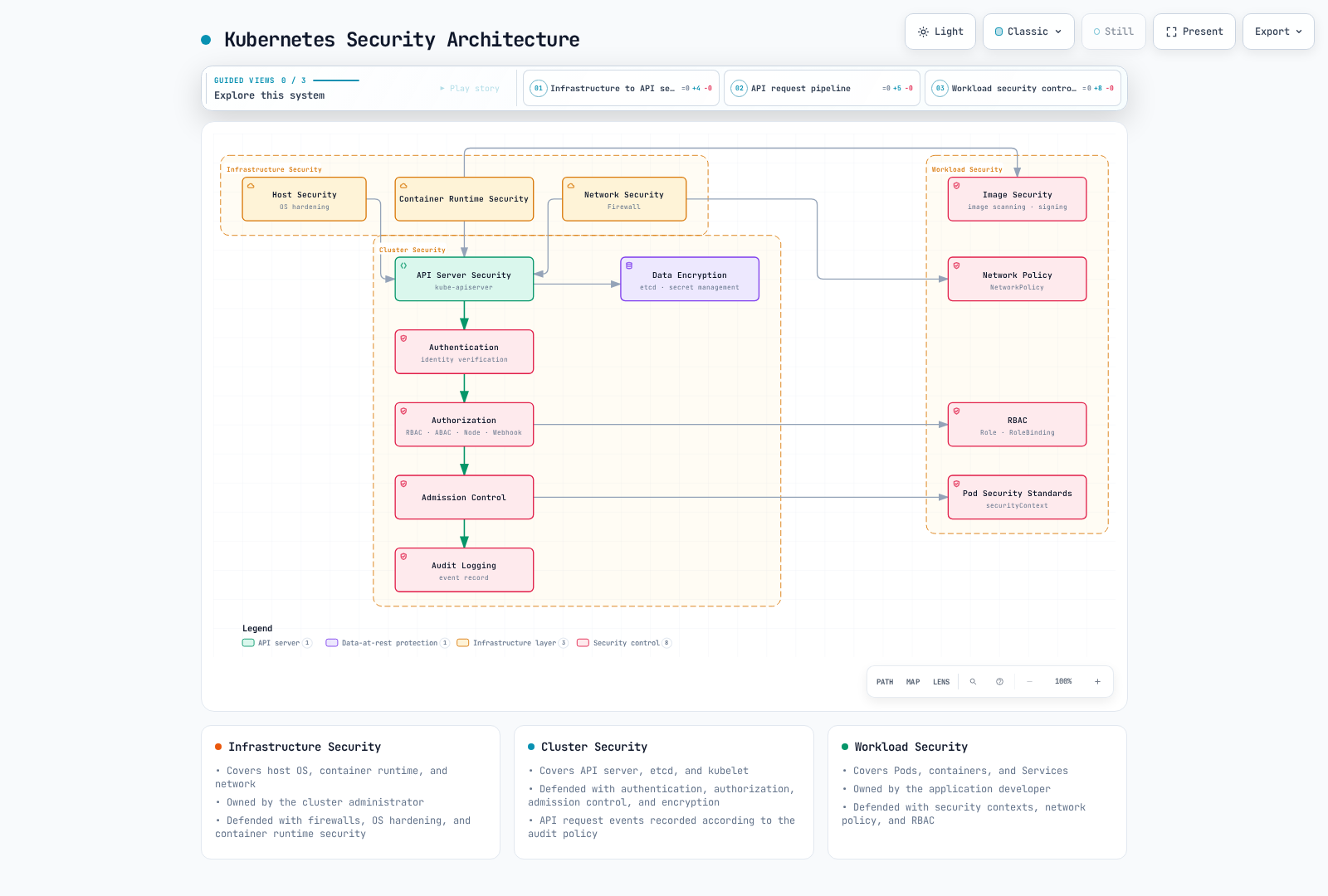
Table of Contents
- Security Overview
- Authentication
- Authorization
- Security Context
- Network Policy
- Secret Management
- Image Security
- Pod Security Standards
- Audit
- Amazon EKS Security Enhancement
Security Overview
Key Concept: Kubernetes security follows a Defense in Depth approach, providing multiple security mechanisms at the infrastructure, cluster, and workload levels.
Kubernetes security consists of the following main areas:
Security Area Comparison
| Security Area | Main Components | Responsible Party | Security Mechanisms |
|---|---|---|---|
| Infrastructure Security | Host OS, Container Runtime, Network | Cluster Administrator | Firewall, OS hardening, Container runtime security |
| Cluster Security | API Server, etcd, kubelet | Cluster Administrator | Authentication, Authorization, Admission Control, Encryption |
| Workload Security | Pods, Containers, Services | Application Developer | Security Context, Network Policy, RBAC |
Security Principles
- Principle of Least Privilege: Grant only the minimum necessary permissions
- Defense in Depth: Defense through multiple security layers
- Default Deny: Deny everything not explicitly allowed
- Security Hardening: Apply stronger security settings than defaults
- Continuous Monitoring: Detect and respond to security events
Authentication
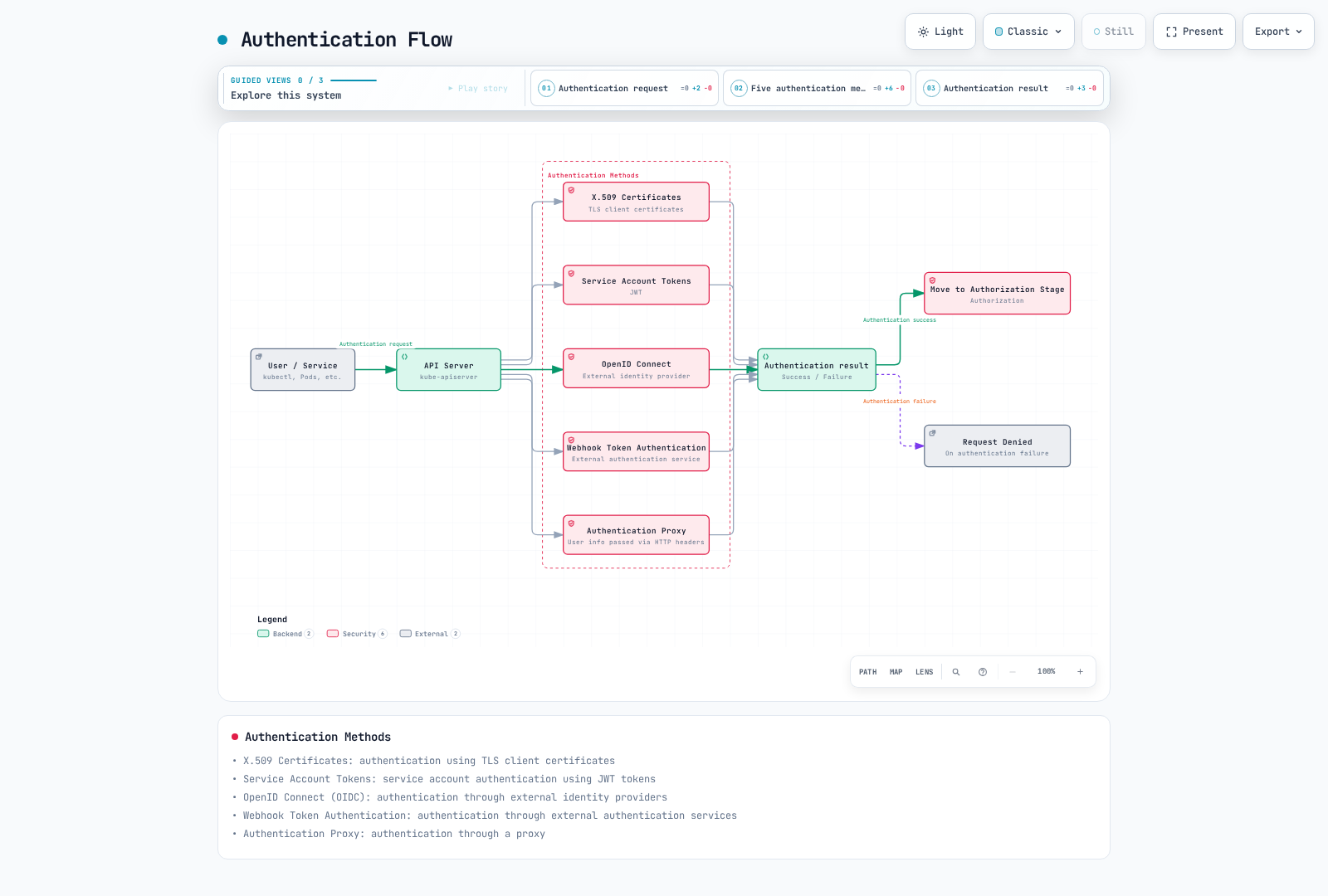
To access the Kubernetes API server, you must go through an authentication process. Kubernetes supports various authentication methods:
X.509 Certificates
Kubernetes uses TLS certificates to authenticate clients. This is mainly used for internal cluster communication and administrator authentication.
# Example kubeconfig setup for certificate-based authentication
kubectl config set-credentials admin --client-certificate=admin.crt --client-key=admin.key
Service Account Tokens
Service accounts are accounts used by processes running in Pods to communicate with the API server. Current Pods normally receive short-lived, Pod-bound projected tokens through the TokenRequest API; kubelet rotates them and applications must reread the token file. Since v1.24, creating a ServiceAccount no longer automatically creates a long-lived token Secret. Set automountServiceAccountToken: false when API credentials are unnecessary (as in this web-server example). For an explicit short-lived token, use kubectl create token; long-lived token Secrets are a legacy exception.
apiVersion: v1
kind: ServiceAccount
metadata:
  name: my-service-account
namespace: defaultapiVersion: v1
kind: Pod
metadata:
name: my-pod
spec:
serviceAccountName: my-service-account
automountServiceAccountToken: false
containers:
- name: my-container
image: nginx:1.30.4OpenID Connect (OIDC)
Supports authentication through external identity providers (for example, Google or Microsoft Entra ID). This is useful for implementing Single Sign-On (SSO) in enterprise environments.
Configure a trusted client-go ExecCredential login plugin for your identity provider and complete its login flow. This kubeconfig user fragment uses a placeholder executable; replace it with the installed plugin and its documented arguments. EKS IAM authentication uses AWS-signed tokens (for example through aws eks get-token), not IAM as a generic OIDC identity provider.
users:
- name: oidc-user
  user:
    exec:
      apiVersion: client.authentication.k8s.io/v1
      command: oidc-login-helper
      interactiveMode: IfAvailable
      provideClusterInfo: true
Webhook Token Authentication
A method that validates tokens through an external authentication service. The API server forwards tokens to an external service, which validates the token and returns user information.
Authentication Proxy
A method where an authentication proxy is placed in front of the API server to handle user authentication. The proxy includes authenticated user information in HTTP headers and forwards them to the API server.
Authorization
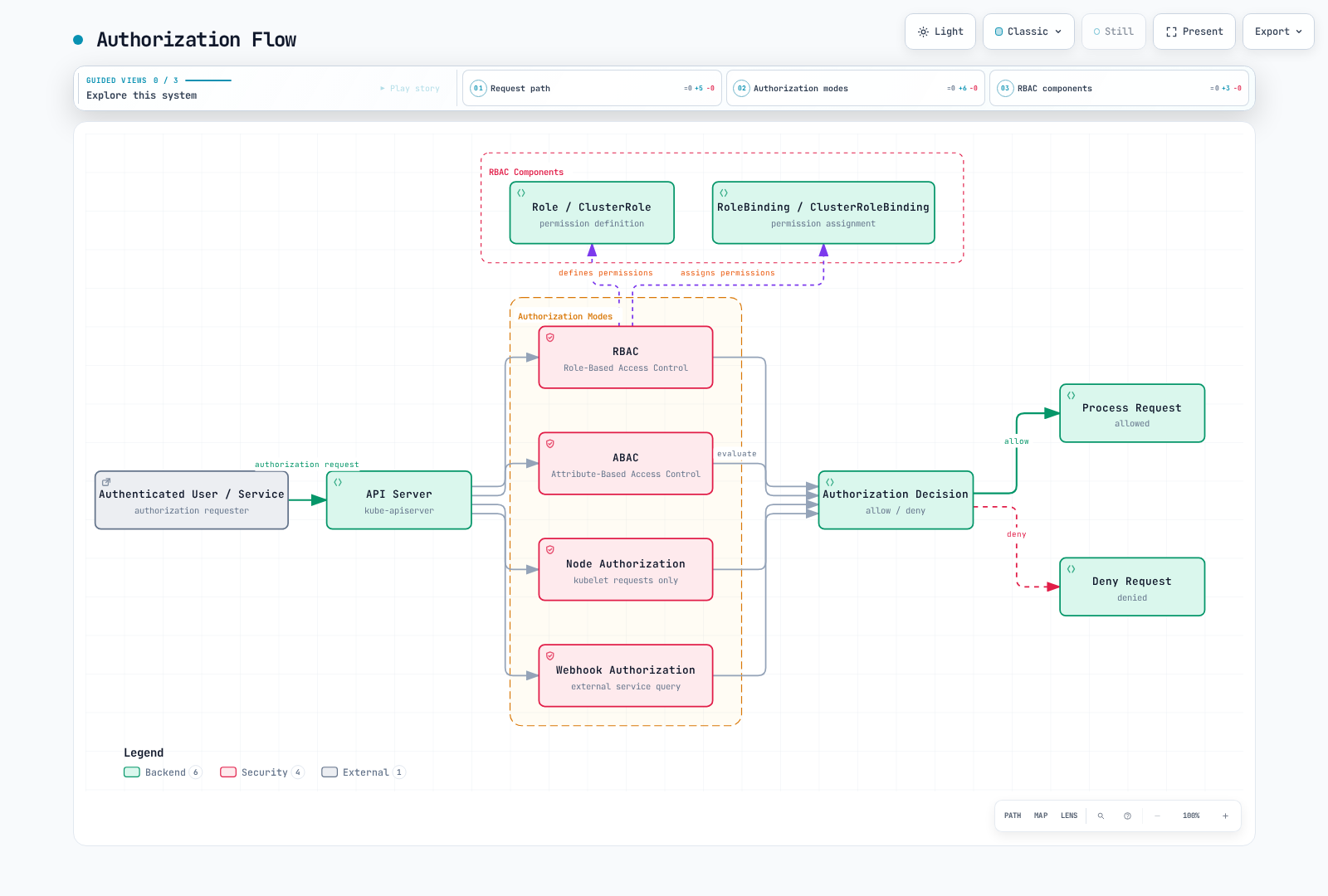
If authentication is the process of verifying "who you are," authorization is the process of determining "what you can do." Kubernetes supports various authorization modes:
RBAC (Role-Based Access Control)
RBAC is the most widely used authorization mechanism in Kubernetes. Through Roles and RoleBindings, you grant specific permissions to users or service accounts for certain resources.
Role and ClusterRole
A Role is namespaced; a ClusterRole is cluster-scoped and can describe namespaced or cluster-scoped permissions. Neither grants access by itself: a RoleBinding limits namespaced access to its namespace, while a ClusterRoleBinding grants cluster-wide access.
# Namespace Role example
apiVersion: rbac.authorization.k8s.io/v1
kind: Role
metadata:
  namespace: default
  name: pod-reader
rules:
- apiGroups: [""]
  resources: ["pods"]
verbs: ["get", "watch", "list"]# Cluster-wide ClusterRole example
apiVersion: rbac.authorization.k8s.io/v1
kind: ClusterRole
metadata:
name: node-reader
rules:
- apiGroups: [""]
resources: ["nodes"]
verbs: ["get", "watch", "list"]RoleBinding and ClusterRoleBinding
RoleBinding binds a Role or ClusterRole to users, groups, or service accounts in a specific namespace. ClusterRoleBinding binds a ClusterRole to users, groups, or service accounts across the entire cluster.
# RoleBinding example
apiVersion: rbac.authorization.k8s.io/v1
kind: RoleBinding
metadata:
  name: read-pods
  namespace: default
subjects:
- kind: User
  name: jane
  apiGroup: rbac.authorization.k8s.io
roleRef:
  kind: Role
  name: pod-reader
apiGroup: rbac.authorization.k8s.io# ClusterRoleBinding example
apiVersion: rbac.authorization.k8s.io/v1
kind: ClusterRoleBinding
metadata:
name: read-nodes-global
subjects:
- kind: Group
name: node-viewers
apiGroup: rbac.authorization.k8s.io
roleRef:
kind: ClusterRole
name: node-reader
apiGroup: rbac.authorization.k8s.ioABAC (Attribute-Based Access Control)
ABAC is a method of granting permissions based on user attributes, resource attributes, environment attributes, etc. In Kubernetes, policies are defined through JSON files. It's less commonly used than RBAC due to management complexity, despite being more flexible.
Node Authorization
Node authorization is a special authorization mode used when kubelets access the API server. Kubelets can only access resources related to the nodes they are running on (Pods, node status, etc.).
Webhook Authorization
A method where authorization decisions are made through an external service. The API server forwards authorization requests to an external service, which decides whether to allow or deny the request.
Security Context
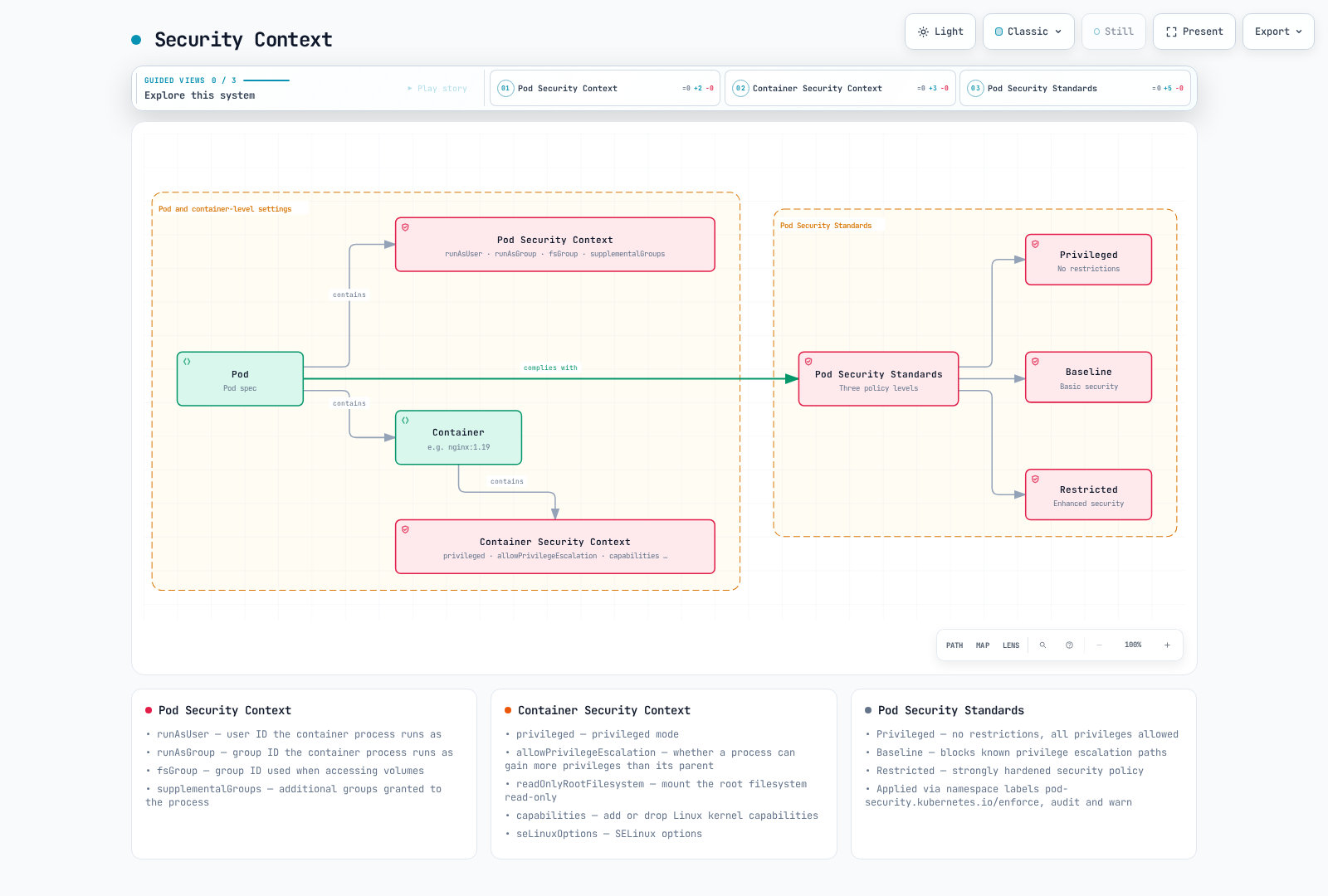
Security context defines security settings at the Pod or container level. This allows fine-grained control over privileges, access control, capabilities, and more.
Pod Security Context
apiVersion: v1
kind: Pod
metadata:
  name: security-context-pod
spec:
  securityContext:
    runAsUser: 1000
    runAsGroup: 3000
    fsGroup: 2000
    runAsNonRoot: true
    seccompProfile:
      type: RuntimeDefault
  containers:
  - name: security-context-container
    image: busybox:1.36
    command: ["sh", "-c", "sleep 3600"]
    securityContext:
      allowPrivilegeEscalation: false
      capabilities:
        drop:
        - ALL
      readOnlyRootFilesystem: true
In the example above:
runAsUser: User ID under which the container process runsrunAsGroup: Group ID under which the container process runsfsGroup: Group ID used when accessing volumesallowPrivilegeEscalation: Whether a process can gain more privileges than its parent processcapabilities: Add or remove Linux kernel capabilitiesreadOnlyRootFilesystem: Mount root filesystem as read-only
Pod Security Standards
PodSecurityPolicy was removed in v1.25. Pod Security Admission (stable in v1.25) can enforce the Pod Security Standards through namespace labels. The standards are policy definitions, not a PodSecurityStandard API resource. They define three levels:
- Privileged: No restrictions, all privileges allowed
- Baseline: Blocks known privilege escalation paths
- Restricted: Strongly hardened security policy
# Example applying Pod Security Standards to namespace
apiVersion: v1
kind: Namespace
metadata:
  name: my-namespace
  labels:
    pod-security.kubernetes.io/enforce: restricted
    pod-security.kubernetes.io/audit: restricted
    pod-security.kubernetes.io/warn: restricted
Restricted Linux workloads need runAsNonRoot: true, allowPrivilegeEscalation: false, a permitted seccomp profile, and dropped capabilities as well as restrictions on host access. readOnlyRootFilesystem is useful hardening but is not itself required by Restricted. Pin *-version namespace labels when you need a fixed policy version.
Network Policy
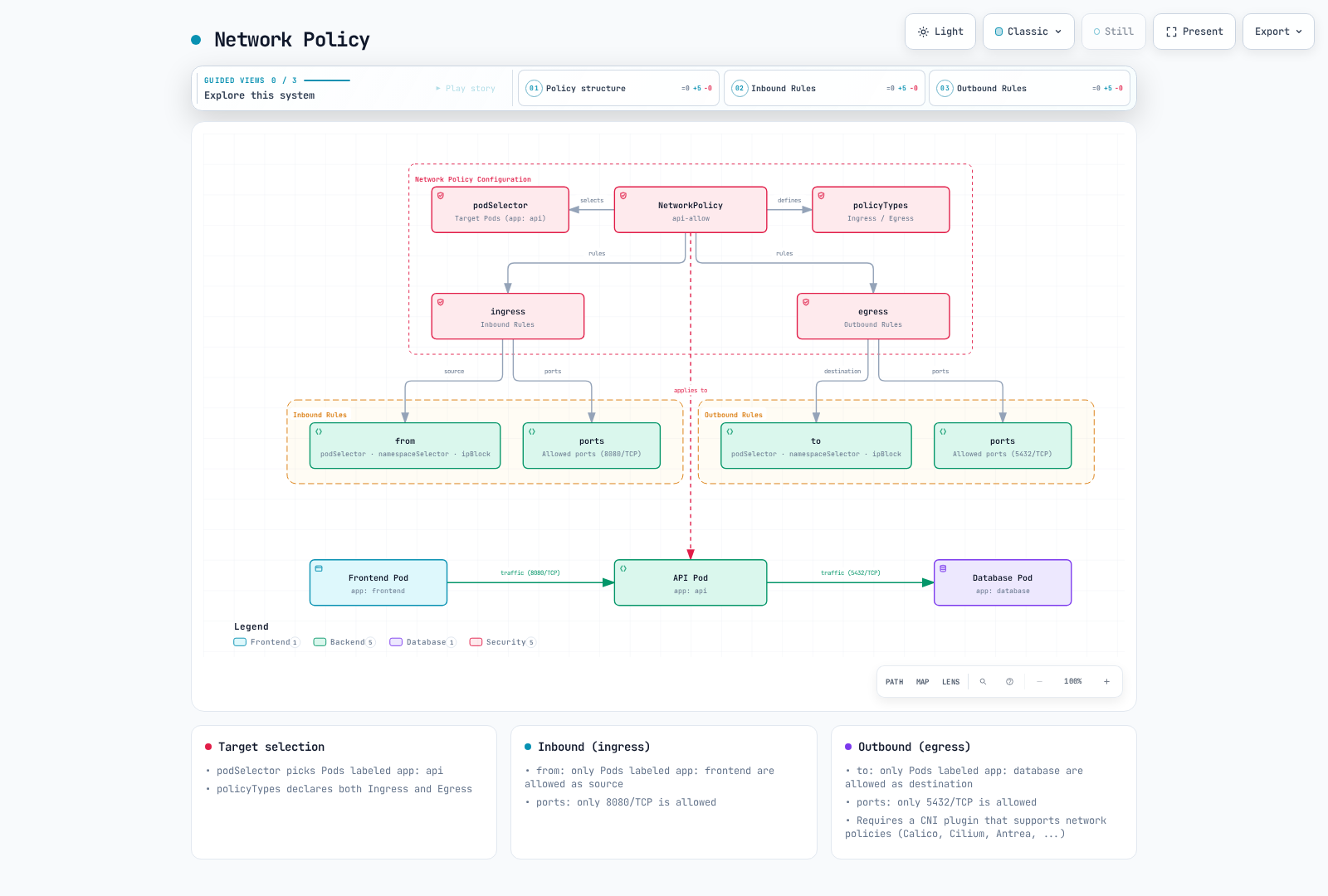
Network policies provide a way to control communication between Pods. By default, all Pods in a Kubernetes cluster can communicate with each other, but this can be restricted using network policies.
apiVersion: networking.k8s.io/v1
kind: NetworkPolicy
metadata:
  name: api-allow
  namespace: default
spec:
  podSelector:
    matchLabels:
      app: api
  policyTypes:
  - Ingress
  - Egress
  ingress:
  - from:
    - podSelector:
        matchLabels:
          app: frontend
    ports:
    - protocol: TCP
      port: 8080
  egress:
  - to:
    - podSelector:
        matchLabels:
          app: database
    ports:
    - protocol: TCP
      port: 5432
In the example above:
- Defines a network policy for Pods with
app=api - Allows only inbound traffic on port 8080 from Pods with
app=frontend - Allows only outbound traffic to port 5432 on Pods with
app=database
To use network policies, the cluster's network plugin must support network policies. CNI plugins like Calico, Cilium, and Antrea support network policies.
These podSelectors refer to Pods in default. Policies are additive, so another policy can allow more traffic; source egress and destination ingress must both permit a connection. This example omits DNS: add TCP/UDP 53 access to the actual cluster DNS endpoints if the application resolves Service names.
Secret Management
Kubernetes Secrets are used to store and manage sensitive information such as passwords, API keys, and certificates. The Secret API uses base64 for data; that encoding is not encryption. At-rest protection depends on the cluster: self-managed clusters require encryption configuration, while current EKS clusters have default envelope encryption. RBAC and safe application handling are required in either case.
Secret Encryption
To encrypt secrets stored in etcd, you need to configure the API server's encryption configuration:
apiVersion: apiserver.config.k8s.io/v1
kind: EncryptionConfiguration
resources:
  - resources:
      - secrets
    providers:
      - aescbc:
          keys:
            - name: key1
              secret: <base64-encoded-key>
      - identity: {}
The self-managed API server must load this file with --encryption-provider-config; protect the key and rewrite existing Secrets. This is not a Kubernetes resource to apply with kubectl.
External Secret Management
For more secure secret management, you can use external secret management systems:
- HashiCorp Vault
- AWS Secrets Manager
- Azure Key Vault
- Google Secret Manager
- External Secrets Operator
Image Security
Container image security is an important part of Kubernetes security.
Image Vulnerability Scanning
Scan container images for vulnerabilities to identify and resolve known security issues:
- Trivy
- Clair
- Anchore
- AWS ECR Scan
- Docker Hub Scan
Image Signing and Verification
Verify the origin and integrity of images through image signing:
- Notary
- Cosign
- Portieris
- AWS Signer
- Connaisseur
Image Policies
Restrict pulling images only from trusted registries through image policies:
apiVersion: apiserver.config.k8s.io/v1
kind: AdmissionConfiguration
plugins:
- name: ImagePolicyWebhook
  configuration:
    imagePolicy:
      kubeConfigFile: /path/to/kubeconfig
      allowTTL: 50
      denyTTL: 50
      retryBackoff: 500
      defaultAllow: false
ImagePolicyWebhook requires a running policy backend and self-managed API server admission configuration; this file alone does not enforce registry rules. EKS does not expose arbitrary API-server flags: use supported admission webhooks/policy controllers there.
Audit
Kubernetes auditing provides a mechanism to record and analyze events occurring in the cluster.
#ImagePolicyWebhook requires a running policy backend and self-managed API server admission configuration; this file alone does not enforce registry rules. EKS does not expose arbitrary API-server flags: use supported admission webhooks/policy controllers there.
Audit Policy
Audit policies define which events to record:
apiVersion: audit.k8s.io/v1
kind: Policy
rules:
- level: Metadata
  resources:
  - group: ""
    resources: ["secrets", "serviceaccounts/token"]
  - group: "authentication.k8s.io"
    resources: ["tokenreviews"]
- level: Metadata
Audit levels:
None: Don't record eventsMetadata: Record only request metadata (user, time, resource, etc.)Request: Record request metadata and request bodyRequestResponse: Record request metadata, request body, and response body
#ImagePolicyWebhook requires a running policy backend and self-managed API server admission configuration; this file alone does not enforce registry rules. EKS does not expose arbitrary API-server flags: use supported admission webhooks/policy controllers there.
Audit Log Backends
Audit logs can be stored in various backends:
- File
- Webhook
The built-in backends are file/log and webhook. Forward their output to Elasticsearch/Loki with a collector; those are not native dynamic audit backends. This example records metadata only so Secret/token bodies are not copied into logs. Self-managed clusters must configure an audit policy and backend on the API server; EKS audit logs are enabled through control plane logging.
Amazon EKS Security Enhancement
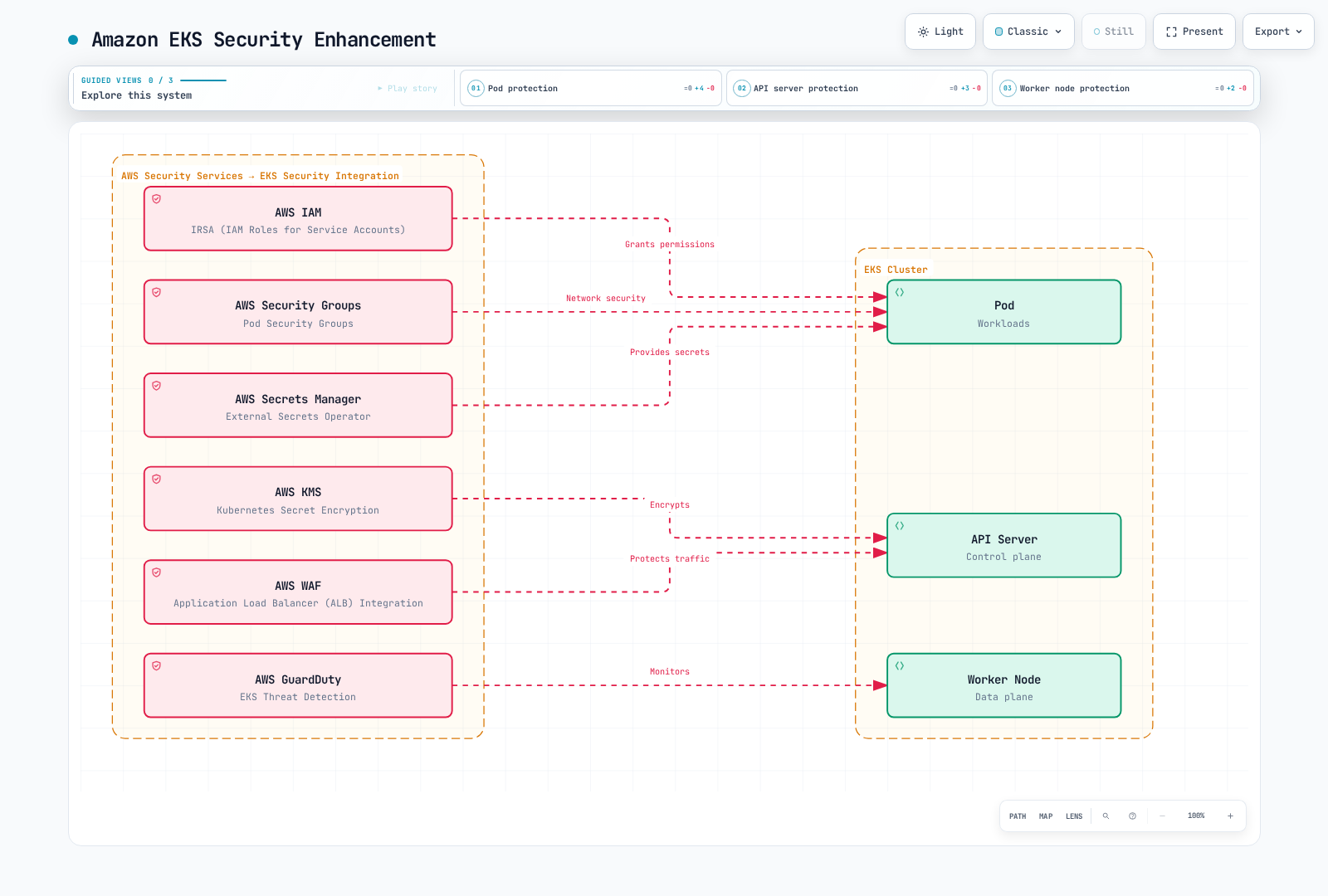
Amazon EKS can enhance security by integrating with AWS security services in addition to Kubernetes' basic security features.
IAM Roles and Service Accounts (IRSA)
Using IRSA (IAM Roles for Service Accounts), you can associate IAM roles with Kubernetes service accounts to securely access AWS services.
# Create OIDC provider
eksctl utils associate-iam-oidc-provider --cluster my-cluster --approve

# Create IAM role and associate with service account
eksctl create iamserviceaccount \
  --name my-service-account \
  --namespace default \
  --cluster my-cluster \
  --attach-policy-arn arn:aws:iam::123456789012:policy/ReadApplicationBucket \
  --approve
Create ReadApplicationBucket with s3:GetObject scoped to the required bucket/prefix and s3:ListBucket only if needed. Do not grant every bucket through a broad managed policy. EKS Pod Identity is another option on supported compute; Fargate applications use IRSA.
Secret Encryption with AWS KMS
EKS 1.28+ encrypts all Kubernetes API data with an AWS-owned KMS key by default. A customer-managed key is optional. See the configuration chapter for a correctly scoped association example; do not confuse base64 API representation with the managed at-rest encryption.
AWS Security Groups
Apply AWS security groups to EKS cluster nodes and Pods to control network traffic.
# Create security group
SECURITY_GROUP_ID=$(aws ec2 create-security-group \
  --vpc-id vpc-0123456789abcdef0 \
  --group-name eks-client-access --description "EKS client access example" \
  --query GroupId --output text)

# Add inbound rule
aws ec2 authorize-security-group-ingress \
  --group-id "$SECURITY_GROUP_ID" \
  --protocol tcp \
  --port 443 \
  --cidr 10.0.0.0/16
Replace the VPC/CIDR for your environment and associate the security group with the intended resource; merely creating a group does not protect existing nodes or Pods. Pod security groups additionally require supported VPC CNI configuration and SecurityGroupPolicy.
AWS WAF
AWS WAF protects HTTP(S) application traffic through an associated ALB or CloudFront distribution; it is not attached directly to the EKS API server, Pods, or an NLB. A Web ACL with Allow as its default and no rules blocks nothing. Configure and test rules, then associate the regional ACL with the application ALB (same Region), for example:
aws wafv2 associate-web-acl \
  --web-acl-arn "$WEB_ACL_ARN" \
  --resource-arn "$APPLICATION_ALB_ARN"
AWS GuardDuty
Use AWS GuardDuty to detect and respond to security threats in EKS clusters.
First inspect the detector in the target account/Region. EKS audit-log analysis (EKS_AUDIT_LOGS) and Runtime Monitoring (RUNTIME_MONITORING) are separate features. Runtime Monitoring also requires agent coverage on supported nodes; automated EKS agent management uses EKS_ADDON_MANAGEMENT. Existing EKS_RUNTIME_MONITORING users must follow the migration procedure rather than enable both runtime features.
aws guardduty list-detectors
aws guardduty get-detector --detector-id "$DETECTOR_ID"
Set DETECTOR_ID from the returned IDs, then follow the Runtime Monitoring setup and verify coverage. GuardDuty generates findings; automated remediation needs separately configured workflows.
Security Best Practices
Here are best practices for enhancing the security of Kubernetes clusters and workloads.
Cluster Security
- Keep Versions Up to Date: Keep Kubernetes and all components up to date to patch known vulnerabilities.
- Restrict API Server Access: Restrict access to the API server and allow public access only when necessary.
- etcd Encryption: Encrypt data stored in etcd to protect sensitive information.
- Enable Audit Logging: Enable audit logging to monitor and analyze cluster activity.
- Implement Network Policies: Implement network policies to restrict Pod-to-Pod communication.
Workload Security
- Principle of Least Privilege: Grant only the minimum necessary permissions to Pods and containers.
- Non-root User: Run containers as non-root users.
- Read-only Filesystem: Mount container root filesystems as read-only when possible.
- Resource Limits: Set CPU and memory resource limits to prevent DoS attacks.
- Configure Security Context: Properly configure Pod and container security contexts.
Image Security
- Minimal Base Images: Use base images with minimal packages.
- Image Vulnerability Scanning: Regularly scan container images for vulnerabilities.
- Image Signing and Verification: Verify the origin and integrity of images through image signing.
- Trusted Registries: Pull images only from trusted registries.
- Use Latest Images: Regularly update images to patch known vulnerabilities.
#These podSelectors refer to Pods in default. Policies are additive, so another policy can allow more traffic; source egress and destination ingress must both permit a connection. This example omits DNS: add TCP/UDP 53 access to the actual cluster DNS endpoints if the application resolves Service names.
Secret Management
- External Secret Management: Use external secret management systems to securely manage secrets.
- Secret Encryption: Encrypt secrets stored in etcd.
- Secret Rotation: Regularly rotate secrets to enhance security.
- Minimum Privilege Access: Restrict access to secrets to only the necessary Pods.
- Use Volumes Instead of Environment Variables: Mount secrets through volumes instead of environment variables.
Conclusion
Kubernetes security must be implemented at multiple layers, considering security in all areas including cluster infrastructure, Kubernetes components, and application workloads. Along with Kubernetes' basic security features like authentication, authorization, network policies, and security contexts, you can enhance cluster and workload security through additional security measures like image security, secret management, and audit logging.
When using Amazon EKS, you can further enhance security by integrating with various AWS security services. Services like IAM Roles and Service Accounts (IRSA), secret encryption with AWS KMS, AWS Security Groups, AWS WAF, and AWS GuardDuty can be used to improve EKS cluster security.
Security is an ongoing process, so it's important to maintain the security posture of clusters and workloads through regular security assessments and updates.
Quiz
To test what you learned in this chapter, try the Security Quiz.
References
- Kubernetes Official Documentation - Security
- Kubernetes Official Documentation - Authentication
- Kubernetes Official Documentation - Authorization
- Kubernetes Official Documentation - RBAC
- Kubernetes Official Documentation - Network Policies
- Kubernetes Official Documentation - Security Context
- Kubernetes Official Documentation - Pod Security Standards
- Kubernetes Official Documentation - Secrets
- Kubernetes Official Documentation - Audit
- Amazon EKS Official Documentation - Security
- Amazon EKS Official Documentation - IAM Roles for Service Accounts
- Amazon EKS Official Documentation - Secret Encryption
- Amazon EKS Security Best Practices