Calico Deep Dive: Kubernetes Networking and Policy
Example baseline: Calico Open Source 3.32.2
Last reviewed: October 12, 2026
Latest release: Calico 3.33.0, released October 1, is the latest Open Source release and is tested against Kubernetes 1.35–1.37.
Commands in this series remain pinned to 3.32.2, whose tested range is 1.34–1.36. These examples have not been validated against 3.33.0. Review the 3.33.0 release notes and current requirements before selecting a release. This is not an open-ended
3.29+ / Kubernetes 1.28+compatibility guarantee.
Overview
Calico provides networking and network policy for Kubernetes, with additional host and VM capabilities that depend on the deployment and product edition. This series covers architecture, encapsulation and routing, BGP, policy, eBPF, EKS integration and operations. Choose a configuration using the current requirements, not an undated maturity or resource-usage ranking.
July 2026: Calico for VMs on Kubernetes
Tigera's official announcement is dated July 23, 2026. It describes VM/container networking, IP continuity, L2 bridge extension, policy and observability for VMware migrations. This is a product announcement, not a promise that every advertised capability is included in Calico Open Source. Check the exact edition, topology and feature status: the Enterprise 3.23 release notes still mark KubeVirt live migration as tech preview. Marketing availability does not remove that feature-specific limitation.
Compatibility and feature boundaries
- Calico 3.32.2 was released on August 30, 2026 and is tested on Kubernetes 1.34–1.36. The newer 3.33.0 release is tested on Kubernetes 1.35–1.37; Kubernetes 1.37 availability alone does not establish compatibility for the pinned 3.32.2 examples.
- The general Linux requirement is kernel 5.10 or later with the required modules. Consult the eBPF guide for supported architectures, vendor backports and higher requirements for individual features.
- Linux data planes include iptables, nftables and eBPF. Defaults depend on installer/platform; current self-managed kubeadm operator installations can default to eBPF. There is no blanket feature-parity guarantee.
- Calico for Windows supports specified IPv4 VXLAN and BGP configurations, but not Linux eBPF, IPIP, IPv6/dual stack, WireGuard or every Linux policy feature.
- Open Source includes tiered policies, Goldmane flow aggregation and the Whisker UI. DNS/FQDN policy, application-layer policy and other advanced capabilities have edition boundaries in the product comparison.
Calico and Cilium
| Requirement | Calico | Cilium |
|---|---|---|
| Linux data plane | iptables / nftables / eBPF, depending on configuration | eBPF, with Envoy for applicable L7 functions |
| Kubernetes NetworkPolicy | Supported, plus Calico policies and tiers | Supported, plus Cilium policies |
| L7 / DNS policy | Check Enterprise/Cloud licensing and feature status | HTTP and DNS policy available; protocol-specific limits apply |
| BGP | BIRD-based routing in the applicable networking mode | BGP control-plane advertisement; assess the required routes and topology |
| Observability | Open Source Goldmane/Whisker and metrics; paid features add capabilities | Hubble and metrics |
| Windows | Supported configurations with significant limitations | Cilium 1.20 agents require Linux; not a Windows beta dataplane |
| kube-proxy replacement | Available with the eBPF data plane | Available when configured |
| Multi-cluster / mesh | Separate features and integrations; edition-dependent | Cluster Mesh and optional service-mesh features; not all enabled by installation |
Both can be production choices. Resource usage and operational complexity depend on rules, traffic, platform and tuning. Validate the required features on the target environment. Do not install two primary CNIs on one cluster merely because they work in separate environments. Cilium's versioned requirements and this site's Cilium service-mesh guide describe its platform and mesh boundaries.
Architecture
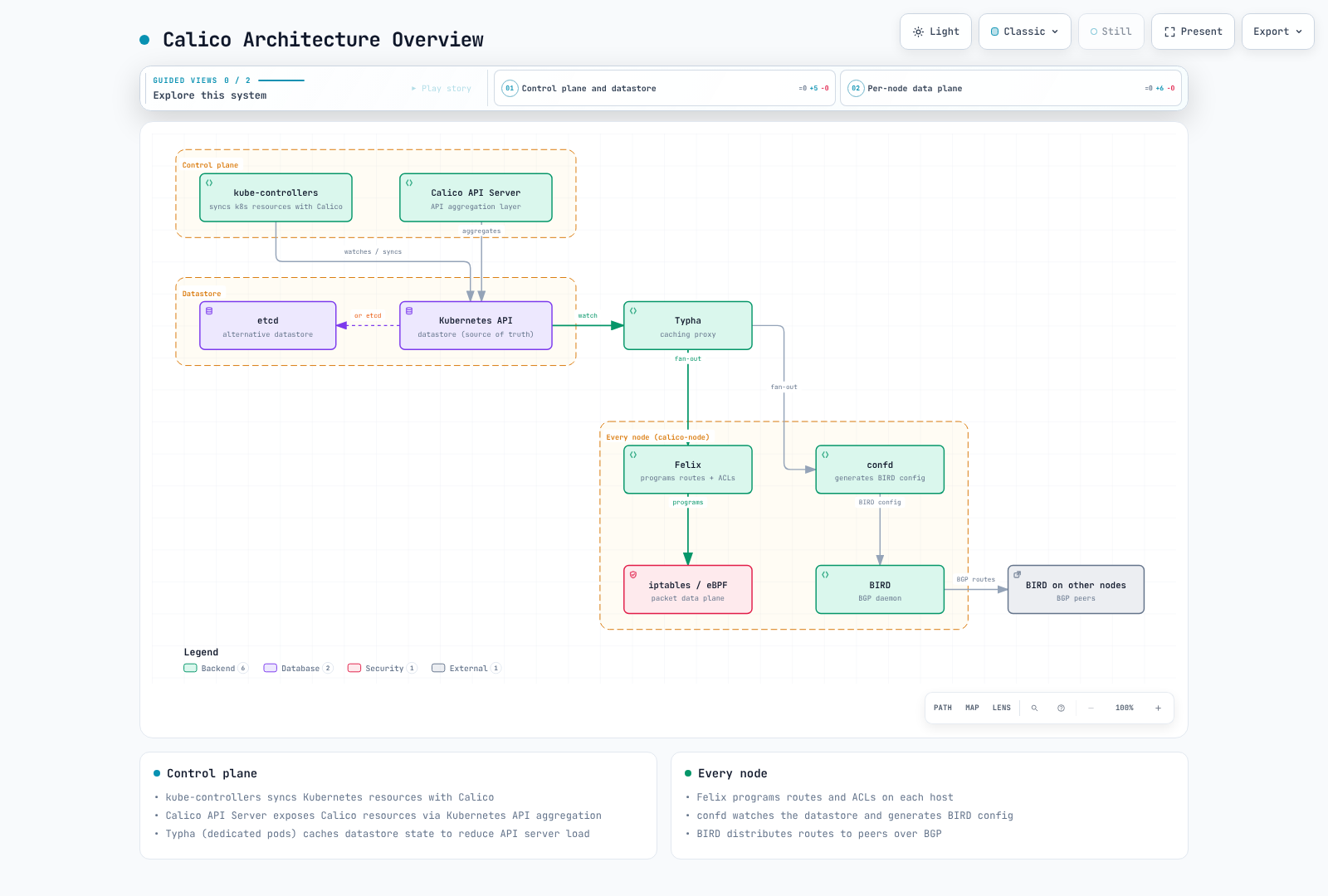
The figure is a schematic BGP deployment, not a mandatory component layout. The EKS policy-only example below uses the Kubernetes datastore and omits BIRD/confd. “Control plane” describes a logical role, not placement on EKS managed control-plane machines. Typha is a separate Deployment rather than a per-node process.
| Component | Role and scope |
|---|---|
| Felix | Programs policy and applicable routes on workload nodes |
| BIRD / confd | BGP and its configuration when that backend is enabled; absent in policy-only mode |
| Typha | Optional datastore update cache/fan-out; operator scales replicas with the installation, not necessarily three |
| kube-controllers | Kubernetes resource reconciliation, synchronization and cleanup |
| Calico CNI / IPAM | Interface and Pod-address management when Calico owns networking; Amazon VPC CNI/IPAM retains these roles in the EKS example |
| Calico API server | Aggregated projectcalico.org/v3 API over internal CRDs in the default model; native v3 CRDs are a separate tech preview |
Use the architecture reference and the actual rendered workloads to identify enabled components. This guide uses the Kubernetes API datastore; an etcd-backed design has separate installation and feature constraints.
Networking modes and MTU
| Mode | Encapsulation and routing | Example Pod MTU with a 1500-byte IPv4 underlay |
|---|---|---|
| IPIP | IPv4-in-IPv4, usually with BGP route distribution | 1480 |
| VXLAN | UDP 4789 by default; VXLAN Pod routing does not require BGP | 1450 |
| Unencapsulated | Underlay must route Pod addresses; BGP is one way to distribute routes | 1500 |
| CrossSubnet | An IPIP or VXLAN setting that encapsulates only across node subnets | Still reserve the required tunnel overhead for paths that need it |
These MTUs are examples, not universal constants. IPv6 VXLAN overhead, jumbo underlays, WireGuard and cloud path limits change the calculation. IPIP supports IPv4 only, and IPv4 VXLAN is also usable where IPIP is unsuitable. Check MTU configuration and overlay requirements. BGP availability alone does not prove that every underlay hop can route Pod CIDRs; same-L2 adjacency is not a universal prerequisite for an unencapsulated routed fabric. Plan the underlay, ports, address family and platform before selecting a mode.
EKS: retain Amazon VPC CNI and add Calico policy
This example is for Linux EC2 nodes with an existing, supported Amazon VPC CNI installation. It does not replace Pod networking. It is not an Auto Mode or Fargate installation recipe. The official EKS guide requires:
- Disable Amazon VPC CNI's native network-policy enforcement before selecting Calico as the policy engine; running both conflicts. For an existing protected cluster, plan and validate the policy handover rather than creating an unprotected transition.
- Set VPC CNI
ANNOTATE_POD_IP=trueand grant itsaws-nodeServiceAccountpatchaccess to Pods. Manage these settings through the installed add-on/configuration owner so reconciliation does not revert them. Check the actual ServiceAccount name before applying the additive RBAC example below. - Do not claim coverage for IPv6 Pods with
ENABLE_V4_EGRESS=true: the Calico EKS guide explicitly excludes enforcement for that combination. - Choose one installation method below. These are fresh-install examples, not commands for taking over an existing operator or migrating an active CNI.
apiVersion: rbac.authorization.k8s.io/v1
kind: ClusterRole
metadata:
  name: calico-vpc-cni-pod-ip-patch
rules:
  - apiGroups: [""]
    resources: ["pods"]
    verbs: ["patch"]
---
apiVersion: rbac.authorization.k8s.io/v1
kind: ClusterRoleBinding
metadata:
  name: calico-vpc-cni-pod-ip-patch
roleRef:
  apiGroup: rbac.authorization.k8s.io
  kind: ClusterRole
  name: calico-vpc-cni-pod-ip-patch
subjects:
  - kind: ServiceAccount
    name: aws-node
    namespace: kube-system
Method A: pinned operator manifests
set -euo pipefail
CALICO_VERSION=v3.32.2
kubectl create -f "https://raw.githubusercontent.com/projectcalico/calico/$CALICO_VERSION/manifests/v1_crd_projectcalico_org.yaml"
kubectl create -f "https://raw.githubusercontent.com/projectcalico/calico/$CALICO_VERSION/manifests/tigera-operator.yaml"
kubectl -n tigera-operator rollout status deployment/tigera-operator --timeout=300s
kubectl apply -f - <<'YAML'
apiVersion: operator.tigera.io/v1
kind: Installation
metadata:
  name: default
spec:
  kubernetesProvider: EKS
  cni:
    type: AmazonVPC
  calicoNetwork:
    bgp: Disabled
    linuxDataplane: Iptables
---
apiVersion: operator.tigera.io/v1
kind: APIServer
metadata:
  name: default
spec: {}
YAML
Method B: pinned Helm installation
Complete the same VPC CNI prerequisites. Calico 3.32 separates the CRD installation from the operator chart; installing only the small operator chart is insufficient for a fresh cluster. Save these values as calico-eks-values.yaml:
installation:
  kubernetesProvider: EKS
  cni:
    type: AmazonVPC
  calicoNetwork:
    bgp: Disabled
    linuxDataplane: Iptables
apiServer:
enabled: trueset -euo pipefail
helm repo add projectcalico https://docs.tigera.io/calico/charts
helm repo update projectcalico
helm template calico-crds projectcalico/crd.projectcalico.org.v1 --version v3.32.2 | kubectl apply --server-side -f -
helm install calico projectcalico/tigera-operator --version v3.32.2 --namespace tigera-operator --create-namespace -f calico-eks-values.yamlThe pinned chart also enables Goldmane and Whisker by default. Review those components and access controls in the rendered manifests. Native projectcalico.org/v3 CRDs are a separate tech preview; the examples here use the conventional internal CRDs plus aggregated API server.
Verify, then test policy behavior
kubectl get tigerastatus
kubectl -n calico-system get pods -o wide
kubectl -n calico-system rollout status daemonset/calico-node --timeout=300s
kubectl wait --for=condition=Available apiservice/v3.projectcalico.org --timeout=300s
kubectl get felixconfigurations.projectcalico.org
Inspect degraded/progressing status and test both allowed and denied flows using disposable workloads before relying on enforcement. A Ready DaemonSet is not a policy proof. In AmazonVPC policy-only mode, empty Calico IPPools or absent BIRD sessions are not necessarily faults: AWS still supplies Pod IPAM and networking.
Full Calico networking and other installation methods
Full Calico networking on EKS is a separate new-cluster design. The official procedure starts without workload nodes and changes the CNI before adding them; do not apply a cni.type: Calico fragment over a running VPC CNI cluster. See EKS integration and the official EKS procedure. For self-managed clusters without an existing CNI, use the on-premises guide. Direct manifests remain an alternative, but their namespace, Typha configuration and lifecycle differ from operator installs. Choose one owner rather than layering Helm, operator and calico.yaml installations.
Policy examples with explicit scope
Use a dedicated calico-demo namespace. The following ingress and egress examples select only that namespace; they are not a cluster-wide zero-trust rollout. Existing Calico tiers and earlier policies can still change the result.
apiVersion: v1
kind: Namespace
metadata:
  name: calico-demo
---
apiVersion: networking.k8s.io/v1
kind: NetworkPolicy
metadata:
  name: allow-frontend-to-backend
  namespace: calico-demo
spec:
  podSelector:
    matchLabels:
      app: backend
  policyTypes: [Ingress]
  ingress:
    - from:
        - podSelector:
            matchLabels:
              app: frontend
      ports:
        - protocol: TCP
          port: 8080
The peer podSelector means frontend Pods in the same namespace. It does not authenticate users, allow all same-namespace traffic, or set egress policy. The next independent example restricts egress from the demo namespace to selected CoreDNS Pods on UDP/TCP 53 and denies other egress:
apiVersion: projectcalico.org/v3
kind: GlobalNetworkPolicy
metadata:
  name: calico-demo-dns-only
spec:
  namespaceSelector: kubernetes.io/metadata.name == 'calico-demo'
  selector: all()
  order: 100
  types: [Egress]
  egress:
    - action: Allow
      protocol: UDP
      destination:
        namespaceSelector: kubernetes.io/metadata.name == 'kube-system'
        selector: k8s-app == 'kube-dns'
        ports: [53]
    - action: Allow
      protocol: TCP
      destination:
        namespaceSelector: kubernetes.io/metadata.name == 'kube-system'
        selector: k8s-app == 'kube-dns'
        ports: [53]
    - action: Deny
Confirm the real DNS endpoints and labels first. This selector-based example targets ordinary CoreDNS Pods; it is not a NodeLocal DNSCache or Auto Mode system-resolver policy. Port 53 alone does not identify an authorized DNS server. If you also need application egress, design and test those explicit allowances before enabling the final deny. A separate later allow cannot override a matching earlier Calico Deny.
FQDN policy is edition-specific
The destination.domains field used in Calico Enterprise/Cloud DNS policies is not in the Open Source 3.32.2 NetworkPolicy schema. Do not apply it to this Open Source installation. For an entitled deployment, use the domain-based policy guide, configure trusted DNS servers and permit the DNS path. Restrict domains deliberately: *.amazonaws.com would be a broad allowance, not authorization to one AWS account or service. DNS-to-IP authorization is not equivalent to validating HTTP Host or TLS identity.
Monitoring and health
apiVersion: projectcalico.org/v3
kind: FelixConfiguration
metadata:
  name: default
spec:
  prometheusMetricsEnabled: true
  prometheusMetricsPort: 9091
Metrics are disabled by default in Felix. Enabling this listener does not create a Prometheus scrape job or make it publicly safe; configure private discovery and access controls using the metrics guide. flowLogsFileEnabled is not an Open Source FelixConfiguration field. Use the supported Goldmane/Whisker flow-log path instead of copying Enterprise file-log settings.
| Metric | Meaning |
|---|---|
felix_active_local_endpoints | Active local workload and host endpoints |
felix_active_local_policies | Policies active for endpoints on this node |
felix_iptables_rules | Active iptables rules; data-plane-specific |
felix_int_dataplane_failures | Failed dataplane updates that will be retried |
felix_cluster_num_hosts | Felix's cluster-wide host count; do not sum it across every Felix instance |
typha_connections_accepted | Cumulative accepted connections, not the current connection count |
typha_connections_active | Currently open client connections |
See the Felix and Typha metric references. They are component health/configuration metrics, not a universal denied-packet counter. Felix health defaults to localhost:9099; Typha health commonly uses 9098 when enabled. Read the deployed probes before checking them: curl localhost on your laptop does not inspect a node's health server.
Troubleshooting
kubectl -n calico-system get pods -o wide
kubectl -n calico-system logs -l k8s-app=calico-node -c calico-node --tail=100
kubectl get installations.operator.tigera.io default -o yaml
kubectl get networkpolicies.networking.k8s.io -A
kubectl get networkpolicies.projectcalico.org -A
kubectl get globalnetworkpolicies.projectcalico.org
kubectl get ippools.projectcalico.org -o wide
Operator installs normally use calico-system; direct manifests can use kube-system. Use fully qualified API resource names to distinguish Kubernetes and Calico NetworkPolicies. kubectl get nodes ...status.conditions is not a Calico routing-status command. BIRD status commands only apply when BGP is enabled, and calicoctl node status needs the appropriate Calico node environment rather than an arbitrary administrator laptop.
| Symptom | Investigate before changing configuration |
|---|---|
| Pod has no IP | Identify the IPAM owner first: VPC CNI logs/capacity in policy-only EKS, Calico IPAM otherwise |
| Cross-node failure | Routes, underlay/firewall permissions, MTU and the chosen encapsulation; enabling a tunnel blindly can worsen the outage |
| Policy mismatch | Endpoint labels, namespaces, direction, tiers/order, existing policies and actual dataplane |
| High CPU | Traffic/rule scale and metrics/profile evidence; an eBPF migration is a planned change, not an immediate generic fix |
Use a matching-version calicoctl only when needed, selecting the actual operating system/CPU architecture and verifying the release artifact. Never infer a policy-only failure solely from missing BGP or Calico IPAM state.
Deep-dive contents
| Part | Topic |
|---|---|
| 1 | Introduction, project history and lab setup |
| 2 | Components, datastore and packet flow |
| 3 | Encapsulation, direct routing and MTU |
| 4 | BGP, route reflectors and external integration |
| 5 | NetworkPolicy, tiers and policy design |
| 6 | eBPF setup, limitations and troubleshooting |
| 7 | Advanced networking/security topics |
| 8 | EKS and VPC CNI integration |
| 9 | Operations and diagnostics |
| Glossary | Terminology |
Calico introduction quiz · Official documentation · Latest release 3.33.0 · Example baseline 3.32.2