Backstage as an Internal Developer Portal
Last Updated: September 12, 2026 · Backstage 1.54.7 / Helm chart 2.10.0
Role and Adoption Scope
Backstage is an open-source developer portal framework originating at Spotify, licensed under Apache 2.0. CNCF lists it as Incubating. A portal can be the user-facing part of an IDP; it does not replace all infrastructure, delivery, policy or operations automation.
Software Catalog models ownership, APIs and resource relationships. Software Templates execute configured actions over prepared skeletons. TechDocs handles documentation building, publication and reading. Search needs configured collators and indexing backends. Colocating code and documentation does not automatically keep the content current.
When comparing Port, Cortex, Humanitec, OpsLevel or other products, evaluate current hosting, data boundaries, extension APIs and staffing/subscription/infrastructure costs. Avoid unverified plugin/adoption counts, universal rankings or claims that Backstage costs only infrastructure. License terms and operating costs are different concerns.
Architecture and Plugins
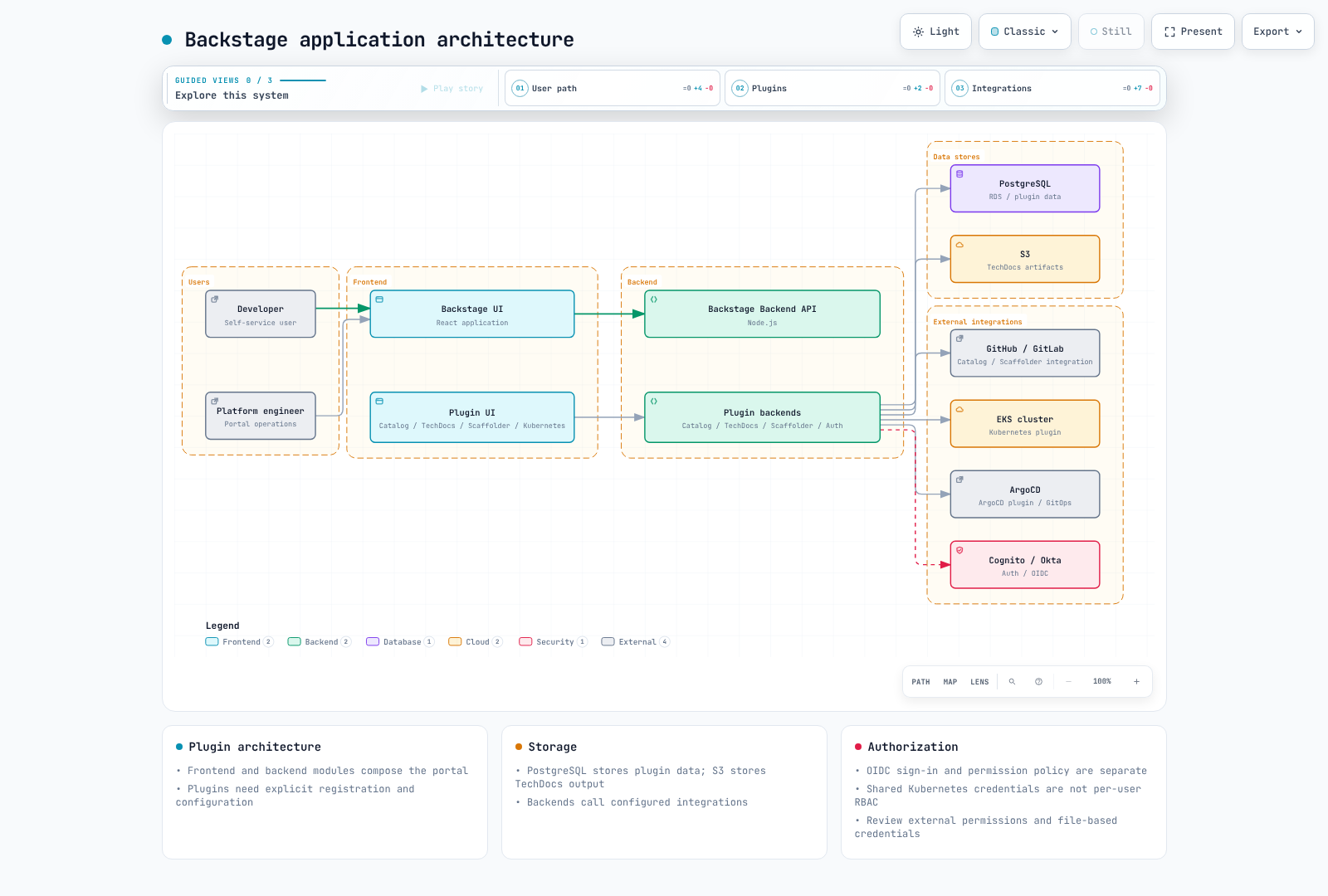
React frontends and Node.js backends compose catalog, scaffolder, auth and TechDocs plugins. Install and register the required modules. Plugins do not inherently provide independent deployment or security isolation. Use legacy EntityPage or newer frontend extension APIs according to the selected app architecture.
App Creation, Builds and Versions
Backstage releases, individual npm package versions, Helm chart versions and custom image revisions are different values. Release 1.54.7 requires Node.js 22 or 24; the former Node 20 Dockerfile is not a current default.
The inspected create-app package is 0.9.1. After generation, inspect its lockfile, packageManager and frontend/backend structure. These commands describe the app build flow; a full Backstage application was not built during this audit.
npx @backstage/create-app@0.9.1
# In the generated app, using its supported Node/Yarn versions:
yarn install --immutable
yarn tsc
yarn build:backend
Review the generated packages/backend/Dockerfile. The current template extracts skeleton.tar.gz, installs production dependencies, extracts bundle.tar.gz and runs packages/backend. Merely copying dist and running node packages/backend/dist does not match that bundle format.
Match host/container Node major and native-module ABI, and verify OS/architecture images. Do not create a second UID-1000 user that conflicts with the image's node user. Prepare ECR/push permissions and image digests separately; do not bake credentials into images, build arguments or environment variables. With external TechDocs builds, reader images need not run the document build toolchain.
EKS Configuration with Credential Files
The following is a configuration example. Replace example.invalid and approved organization, bucket and OIDC client values. This is not evidence of a connection to PostgreSQL, an identity provider, GitHub or S3.
Prepare backstage-credentials through an approved provider/ESO flow and mount it as files. Backstage's actual loader resolves $file and trims trailing newlines. Align config/mount paths and verify when each plugin rereads rotated values. SubPath mounts and startup-only configuration can require rollouts.
This example divides one PostgreSQL database into plugin schemas. ensureExists/ensureSchemaExists are disabled, requiring schemas/databases to be prepared. Schemas accessed through the same credential are not independent security boundaries. Review migration permissions and aggregate pool connections across plugins × replicas. Validate the RDS CA and keep TLS verification enabled.
app:
  title: Example Developer Portal
  baseUrl: https://backstage.example.com
backend:
  baseUrl: https://backstage.example.com
  listen:
    port: 7007
  cors:
    origin: https://backstage.example.com
    credentials: true
  database:
    client: pg
    pluginDivisionMode: schema
    ensureExists: false
    ensureSchemaExists: false
    connection:
      host: backstage-db.example.invalid
      port: 5432
      database: backstage
      user: backstage
      password:
        $file: /var/run/backstage-secrets/postgres-password
      ssl:
        rejectUnauthorized: true
        ca:
          $file: /var/run/backstage-public/rds-ca.pem
    knexConfig:
      pool:
        min: 0
        max: 10
  auditor:
    severityLogLevelMappings:
      low: debug
      medium: info
      high: warn
      critical: error
auth:
  environment: production
  session:
    secret:
      $file: /var/run/backstage-secrets/auth-session-secret
  providers:
    oidc:
      production:
        metadataUrl: https://issuer.example.invalid/.well-known/openid-configuration
        clientId: replace-with-approved-client-id
        clientSecret:
          $file: /var/run/backstage-secrets/oidc-client-secret
        additionalScopes: [profile, email]
        signIn:
          resolvers:
            - resolver: emailMatchingUserEntityProfileEmail
permission:
  enabled: true
integrations:
  github:
    - host: github.com
      token:
        $file: /var/run/backstage-secrets/github-token
catalog:
  providers:
    github:
      approvedOrg:
        organization: replace-approved-org
        catalogPath: /catalog-info.yaml
        filters:
          branch: main
          repository: "^approved-.*$"
        schedule:
          frequency: {minutes: 30}
          timeout: {minutes: 3}
  rules:
    - allow: [Component, API, Resource, System, Domain, Group, User, Template, Location]
techdocs:
  builder: external
  publisher:
    type: awsS3
    awsS3:
      bucketName: replace-approved-techdocs-bucket
      region: us-west-2
The backend also supports RDS IAM authentication, but it needs the signer package, rds-db:connect, database-user setup and TLS. Do not automatically mix that flow with the password-file example.
Helm Configuration and HA
Build an image containing the configured Backstage application. The example.invalid image below is a placeholder. Prepare the ServiceAccount, credential Secret, RDS CA ConfigMap and app-config ConfigMap first. No public ingress is created by default; approved internal or CloudFront-fronted access, authentication, TLS and network controls remain operational requirements.
fullnameOverride: backstage
backstage:
  image:
    registry: example.invalid
    repository: backstage
    tag: replace-with-reviewed-app-revision
  replicas: 3
  resources:
    requests:
      cpu: 250m
      memory: 512Mi
    limits:
      cpu: "1"
      memory: 1Gi
  extraEnvVarsSecrets: []
  extraAppConfig:
    - filename: app-config.production.yaml
      configMapRef: backstage-app-config
  extraVolumeMounts:
    - name: credentials
      mountPath: /var/run/backstage-secrets
      readOnly: true
    - name: public-config
      mountPath: /var/run/backstage-public
      readOnly: true
  extraVolumes:
    - name: credentials
      secret:
        secretName: backstage-credentials
    - name: public-config
      configMap:
        name: backstage-public-config
  readinessProbe:
    httpGet:
      path: /.backstage/health/v1/readiness
      port: 7007
  livenessProbe:
    httpGet:
      path: /.backstage/health/v1/liveness
      port: 7007
  strategy:
    type: RollingUpdate
    rollingUpdate:
      maxUnavailable: 0
      maxSurge: 1
serviceAccount:
  create: false
  name: backstage
  automountServiceAccountToken: false
postgresql:
  enabled: false
ingress:
  enabled: false
examples/platform/backstage/app-config-configmap.yaml stores that configuration under data.app-config.production.yaml. It matches extraAppConfig's filename/configMapRef and contains file references rather than secret values.
helm template backstage backstage/backstage --version 2.10.0 --namespace backstage -f examples/platform/backstage/helm-values.yamlRegister the official backstage.github.io/charts repository first. This audit downloaded and rendered that chart locally. serviceAccount is a top-level chart value, not backstage.serviceAccount. The former backstage.podDisruptionBudget value does not create a PDB in chart 2.10.0; prepare this resource separately.
apiVersion: policy/v1
kind: PodDisruptionBudget
metadata:
  name: backstage
  namespace: backstage
spec:
  minAvailable: 2
  selector:
    matchLabels:
      app.kubernetes.io/name: backstage
      app.kubernetes.io/instance: backstage
Current health paths are /.backstage/health/v1/readiness and liveness. Align load-balancer health checks with the actual backend. Three replicas or a PDB alone do not ensure AZ distribution, database HA or zero downtime. Verify topology rules, shared database/session state, background tasks and upgrade migrations.
OIDC Sign-In and Identity
Register the OIDC backend provider module and configure frontend sign-in. metadataUrl must identify trusted issuer discovery for the selected Cognito pool or Okta issuer. The current provider uses additionalScopes for extra scopes.
emailMatchingUserEntityProfileEmail is an example catalog-user resolver. Review issuer/email verification, enrollment boundaries and duplicate emails; do not map arbitrary external claims to catalog administrators. Leave dangerouslyAllowSignInWithoutUserInCatalog disabled. Avoid registering both the built-in provider and a custom resolver module under the same provider ID.
Software Catalog
These eight entities cover seven kinds with resolvable owner/system/domain references. Declare Resource dependencies through Component.dependsOn. Do not assume an invented dependencyOf field automatically creates backend relations. Registering a Resource entity does not provision AWS infrastructure.
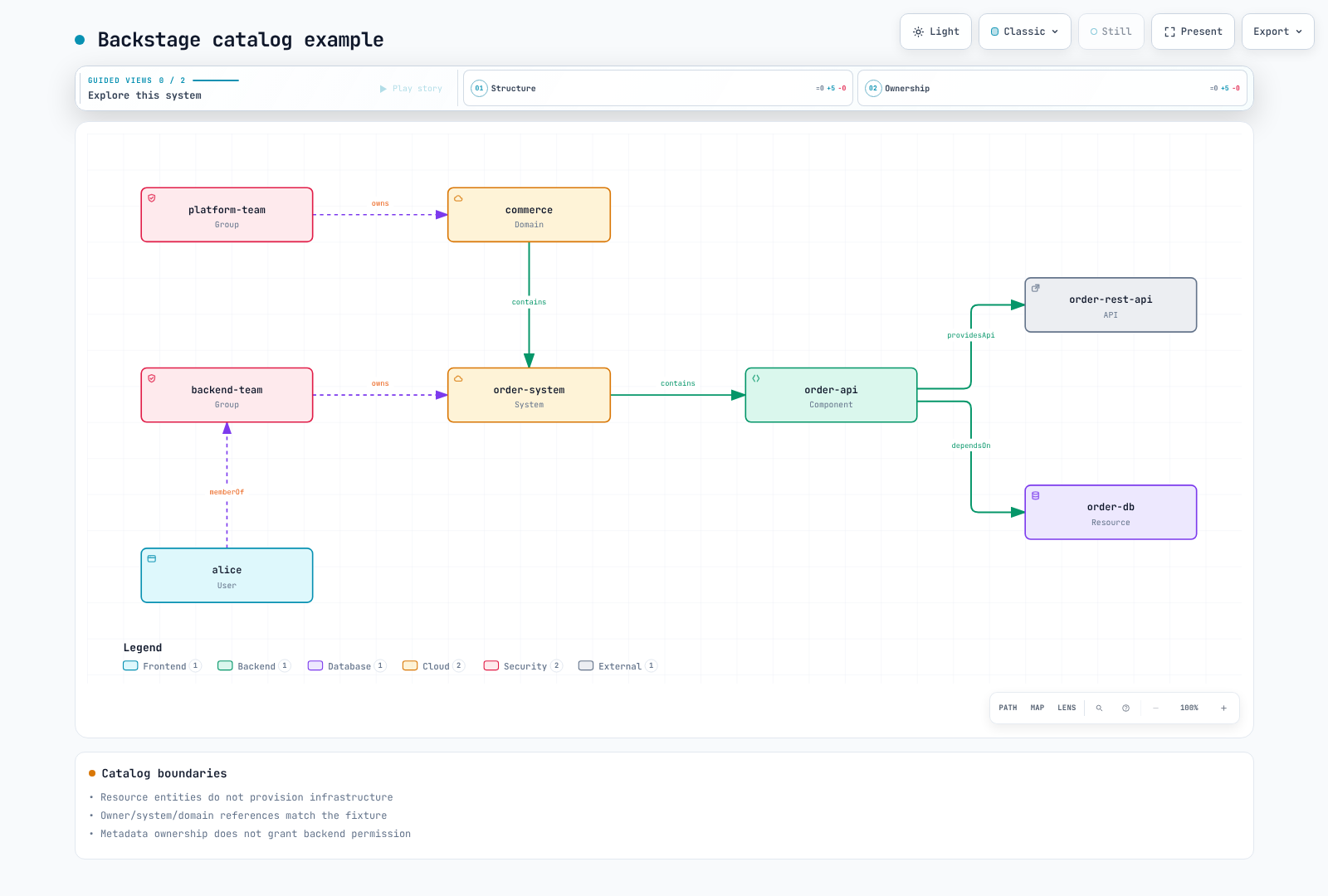
apiVersion: backstage.io/v1alpha1
kind: Domain
metadata:
  name: commerce
spec:
  owner: group:default/platform-team
---
apiVersion: backstage.io/v1alpha1
kind: System
metadata:
  name: order-system
spec:
  owner: group:default/backend-team
  domain: commerce
---
apiVersion: backstage.io/v1alpha1
kind: Component
metadata:
  name: order-api
  annotations:
    backstage.io/techdocs-ref: dir:.
    backstage.io/kubernetes-id: order-api
    backstage.io/kubernetes-namespace: production
    github.com/project-slug: replace-approved-org/order-api
    argocd/app-name: order-api
spec:
  type: service
  lifecycle: production
  owner: group:default/backend-team
  system: order-system
  providesApis:
  - order-rest-api
  dependsOn:
  - resource:default/order-db
---
apiVersion: backstage.io/v1alpha1
kind: API
metadata:
  name: order-rest-api
spec:
  type: openapi
  lifecycle: production
  owner: group:default/backend-team
  system: order-system
  definition: "openapi: 3.0.3\ninfo:\n  title: Order API\n  version: 1.0.0\npaths:\n\
    \  /orders:\n    get:\n      responses:\n        \"200\":\n          description:\
    \ Orders returned\n"
---
apiVersion: backstage.io/v1alpha1
kind: Resource
metadata:
  name: order-db
spec:
  type: database
  owner: group:default/backend-team
  system: order-system
---
apiVersion: backstage.io/v1alpha1
kind: Group
metadata:
  name: platform-team
spec:
  type: team
  children: []
---
apiVersion: backstage.io/v1alpha1
kind: Group
metadata:
  name: backend-team
spec:
  type: team
  children: []
  members:
  - alice
---
apiVersion: backstage.io/v1alpha1
kind: User
metadata:
  name: alice
spec:
  profile:
    displayName: Alice
    email: alice@example.com
  memberOf:
  - backend-team
GitHub discovery needs integration credentials and the catalog-backend-module-github module. Configure catalogPath, branch/repository filters and scheduling for the actual organization. Restrict trusted sources rather than assuming every repository or arbitrary Location is safe to ingest. File locations must match container paths; a glob string alone does not establish registration.
Software Templates and GitOps
This is a complete small skeleton for catalog and TechDocs files only. It is not labeled a fully implemented microservice with runtime, Dockerfile, Helm and CI. A runtime golden path needs real language-specific source, tests, image build, charts, environment values and pipelines. Adding a checkbox does not provision a database or HPA.
apiVersion: scaffolder.backstage.io/v1beta3
kind: Template
metadata:
  name: reviewed-documentation-starter
  title: Reviewed documentation starter
  description: Creates a catalog and TechDocs skeleton; it does not deploy an application.
spec:
  owner: group:default/platform-team
  type: documentation
  parameters:
    - title: Service metadata
      required: [name, description, owner, repoUrl]
      properties:
        name:
          type: string
          pattern: "^[a-z][a-z0-9-]{1,38}[a-z0-9]$"
        description:
          type: string
          maxLength: 200
        owner:
          type: string
          enum: [group:default/backend-team, group:default/platform-team]
        repoUrl:
          type: string
          ui:field: RepoUrlPicker
          ui:options:
            allowedHosts: [github.com]
            allowedOwners: [replace-approved-org]
  steps:
    - id: fetch
      name: Render the complete documentation skeleton
      action: fetch:template
      input:
        url: ./skeleton
        values:
          name: ${{ parameters.name }}
          description: ${{ parameters.description }}
          owner: ${{ parameters.owner }}
    - id: publish
      name: Create the approved repository
      action: publish:github
      input:
        repoUrl: ${{ parameters.repoUrl }}
        allowedHosts: [github.com]
        repoVisibility: private
        defaultBranch: main
        description: ${{ parameters.description }}
    - id: register
      name: Register the published catalog entity
      action: catalog:register
      input:
        repoContentsUrl: ${{ steps.publish.output.repoContentsUrl }}
        catalogInfoPath: /catalog-info.yaml
  output:
    links:
      - title: Repository
        url: ${{ steps.publish.output.remoteUrl }}
      - title: Catalog
        entityRef: ${{ steps.register.output.entityRef }}
The template/skeleton directory contains catalog-info.yaml, mkdocs.yml and docs/index.md. Dump-encoded description/owner values preserve YAML strings, including tested quotes/newlines. OwnerPicker entity references are not GitHub team slugs; do not grant collaborator permissions through naive string replacement. RepoUrlPicker restrictions are UI behavior, not substitutes for backend action checks or GitHub credential scope.
publish:github needs the GitHub action module. Inspect registered actions and their actual input schemas. This example registers after repository publication. In an infrastructure publish:github:pull-request flow, do not immediately register a main-branch file that does not exist until merge; perform discovery/registration afterward.
ACK/kro DatabaseClaim is not a built-in kind. Prepare a validated RGD/CRD, controller and permissions, using the current ACK, kro and integration examples. Catalog entity references contain ':' and '/', so they cannot be copied verbatim into Kubernetes label values.
@roadiehq/scaffolder-backend-argocd 1.8.1 provides argocd:create-resources. It requires appName, argoInstance, namespace, repoUrl and path; projectName/labelValue are optional. namespace is the deployment destination, and the old revision input is absent from this action's schema. Register its backend module and token, restricting AppProject, destination and repository permissions. No repository creation or ArgoCD API call was executed here.
Distinguish Backstage Nunjucks expressions from GitHub expressions in workflow skeletons. The former CI attempted git push with contents:read and could trigger repeated self-commits. Propose reviewed image digests through a separate GitOps PR with appropriate authentication, branch protection and merge checks.
TechDocs and S3
With external builders, CI builds/publishes while the Backstage backend reads S3. Separate reader and publisher IAM roles; do not grant runtime readers PutObject/DeleteObject by default. Enable all four S3 Block Public Access settings and configure KMS key policy/permissions when applicable. ACK field names are blockPublicACLs/ignorePublicACLs.
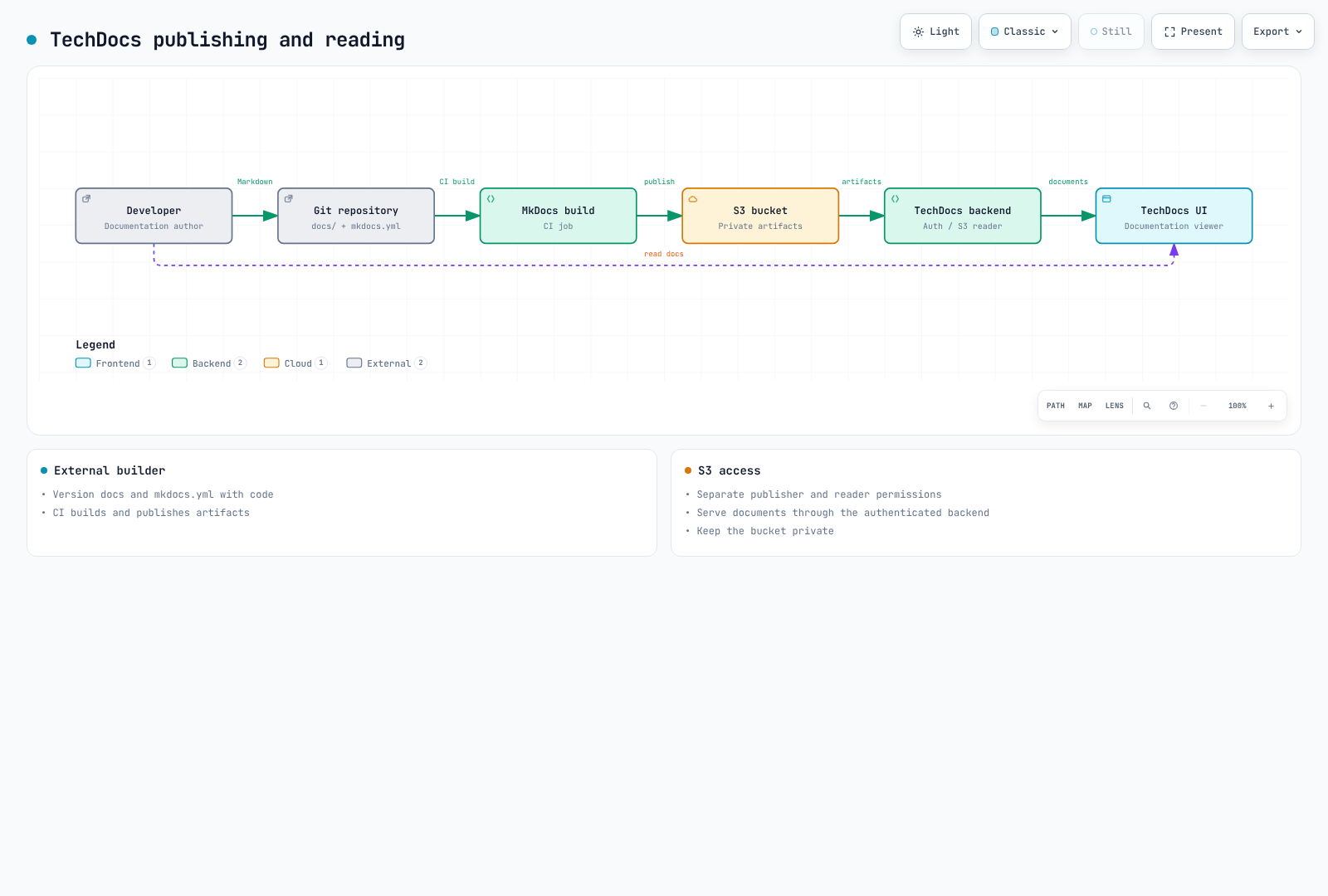
TechDocs still supports credentials.roleArn but marks it deprecated. This example omits it in favor of prepared workload identity/SDK credentials; use aws account/provider configuration when needed. Align reader/publisher bucketRootPath and verify namespace/kind/name entity keys with the actual CLI.
The small skeleton was built with MkDocs/techdocs-core in strict mode; this is not a build of every service's documentation. Publishing CI needs trusted branches/events, id-token:write, constrained OIDC trust and publisher permissions. Nothing was uploaded to S3 during this audit.
Kubernetes, ArgoCD and Cost Plugins
The Kubernetes plugin needs frontend/backend registration, actual endpoint/CA, authentication and RBAC. Do not copy printed long-lived ServiceAccount tokens into environment variables. EKS AWS authentication requires workload identity, target-role/EKS access and Kubernetes authorization, with x-k8s-aws-id matching the real cluster name.
Server-side cluster credentials can be shared across Backstage users. multiTenant locators and catalog namespace/id selectors are not authorization boundaries. Review per-user data scope, backend permission coverage and cluster RBAC. Match workload labels to catalog annotations. Pod logs need pods/log authorization and feature configuration. Listing KEDA/Karpenter customResources does not generate dedicated scaling UI; use actual CRD status fields.
ArgoCD UI plugins and scaffolder actions have separate packages, registration and permissions. The inspected Roadie UI package is 2.12.5. The old @kubecost/backstage-plugin and backend package names returned npm 404s. They are not retained as installable commands; select a maintained integration or verified cost-API adapter. Review allocation and pricing semantics separately from UI cards.
Permission Framework
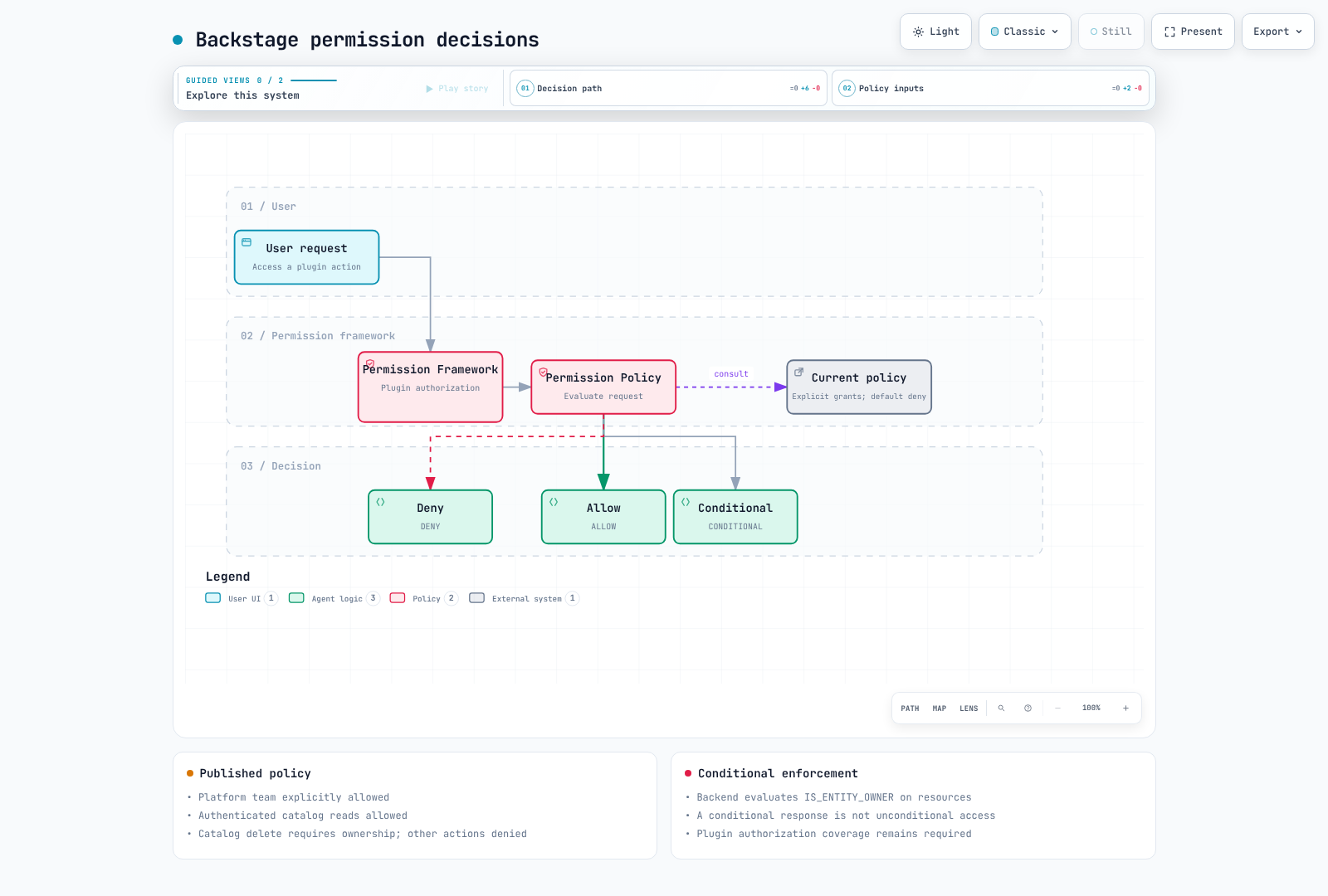
permission.enabled:true does not install a team policy. Register this module in the backend without competing allow-all policy registration. It uses current PolicyQueryUser and AuthService/UserInfoService interfaces, not deprecated user.info or the older user.identity shape.
This example explicitly allows trusted platform-team administrators, authenticated catalog reads and owner-conditional catalog deletion, denying other actions. It is not a complete allowlist for the whole portal; add required actions deliberately. Protect Group/User sources against users granting themselves higher privileges.
import {
  AuthorizeResult,
  isPermission,
  type PolicyDecision,
} from '@backstage/plugin-permission-common';
import type {
  PermissionPolicy,
  PolicyQuery,
  PolicyQueryUser,
} from '@backstage/plugin-permission-node';
import {
  catalogEntityDeletePermission,
  catalogEntityReadPermission,
} from '@backstage/plugin-catalog-common/alpha';
import {
  coreServices,
  createBackendModule,
  type AuthService,
  type UserInfoService,
} from '@backstage/backend-plugin-api';
import { policyExtensionPoint } from '@backstage/plugin-permission-node/alpha';

export class TeamPolicy implements PermissionPolicy {
  constructor(
    private readonly userInfo: UserInfoService,
    private readonly auth: Pick<AuthService, 'isPrincipal'>,
  ) {}

  async handle(
    request: PolicyQuery,
    user?: PolicyQueryUser,
  ): Promise<PolicyDecision> {
    if (!user || !this.auth.isPrincipal(user.credentials, 'user')) {
      return { result: AuthorizeResult.DENY };
    }
    const { ownershipEntityRefs } = await this.userInfo.getUserInfo(
      user.credentials,
    );
    if (ownershipEntityRefs.includes('group:default/platform-team')) {
      return { result: AuthorizeResult.ALLOW };
    }
    if (isPermission(request.permission, catalogEntityReadPermission)) {
      return { result: AuthorizeResult.ALLOW };
    }
    if (
      isPermission(request.permission, catalogEntityDeletePermission) &&
      ownershipEntityRefs.length > 0
    ) {
      return {
        result: AuthorizeResult.CONDITIONAL,
        pluginId: 'catalog',
        resourceType: 'catalog-entity',
        conditions: {
          resourceType: 'catalog-entity',
          rule: 'IS_ENTITY_OWNER',
          params: { claims: ownershipEntityRefs },
        },
      };
    }
    // Add explicit grants for required plugin actions after reviewing their scope.
    return { result: AuthorizeResult.DENY };
  }
}

export const teamPolicyModule = createBackendModule({
  pluginId: 'permission',
  moduleId: 'reviewed-team-policy',
  register(reg) {
    reg.registerInit({
      deps: {
        policy: policyExtensionPoint,
        userInfo: coreServices.userInfo,
        auth: coreServices.auth,
      },
      async init({ policy, userInfo, auth }) {
        policy.setPolicy(new TeamPolicy(userInfo, auth));
      },
    });
  },
});
CONDITIONAL decisions must be applied to actual entity relations by the catalog backend. Catalog deletion is separate from GitHub modification or ArgoCD deployment privileges. Do not generalize this into “owners may perform every update.” Eight policy cases used mocked identity services, not real OIDC or the catalog ownership evaluator.
Auditing, Recovery and Upgrades
The current core Auditor Service logs through rootLogger by default and supports backend.auditor.severityLogLevelMappings. The former backend.audit and backend.events.modules awsCloudWatch settings do not automatically configure audit collection. Check which events plugins actually emit, then forward logs through a separate pipeline. Avoid leaking credentials or personal data in event metadata.
Plan PostgreSQL snapshot/PITR, TechDocs versioning/replication/lifecycle, configuration/catalog sources and secret-provider recovery for actual RPO/RTO requirements. Shared-database schemas, Aurora replicas or S3 replication alone do not provide complete isolation, backups or automatic failover. Aurora restoration also needs instances, networking and endpoint cutover validation.
For upgrades, review release notes and plugin compatibility, then validate versions:bump, lockfiles, types/tests, images and staging database migrations. Do not assume a generic backstage-cli db:migrate command exists; follow plugin/backend migration lifecycle. Restoring an old image does not automatically restore database schemas.
Verification Scope
Both original guides—2,279 Korean and 2,226 English lines—their 143-line quizzes and 118 unique code blocks were read. Checks included official chart rendering, five actual loader file includes, eight catalog entities plus one invalid input, TypeScript/eight policy cases, two template-string cases and a small TechDocs build.
No full Backstage app/image, PostgreSQL/OIDC, GitHub/ArgoCD/Kubernetes/AWS API, real template action, deployment, load or HA test was performed. Placeholders and operator prerequisites are explicit.