ArgoCD Installation
Review baseline: Argo CD 3.5.2 / Helm Chart 10.8.4; manifest and CLI pins updated to patch 3.5.4 after release-note review (examples not re-run) Last Updated: October 12, 2026
Table of Contents
- Prerequisites
- Installation Methods
- CLI Installation
- Initial Access
- High Availability Setup
- ArgoCD on Amazon EKS
- Declarative Setup
- Upgrading ArgoCD
Prerequisites
This is a self-managed installation guide. EKS managed Argo CD uses separate capability creation, authorization and configuration; do not overlay a self-managed installation there. Check the overview compatibility table and EKS support windows. A chart's minimum kubeVersion is not a tested/support guarantee.
Permission to create a namespace does not prove permissions for CRDs, ClusterRoles and bindings. Check the actual context/authorization. The HA bundle requires at least three nodes for anti-affinity. Measure CPU/memory for application, cluster and repository scale; a fixed 10/50GB Redis PVC is not universally required.
kubectl version --client
kubectl config current-context
kubectl cluster-info
kubectl auth can-i create customresourcedefinitions.apiextensions.k8s.io
kubectl auth can-i create clusterrolebindings.rbac.authorization.k8s.io
Installation Methods
Choose one installation owner: manifests, Helm or Kustomize. The non-HA/HA commands below are alternatives, not sequential steps. A custom namespace also requires updating ServiceAccount subjects in ClusterRoleBindings.
Method 1: Plain Manifests (Recommended for Getting Started)
The simplest installation method using official manifests:
# Create namespace
kubectl create namespace argocd

# Install ArgoCD (non-HA)
kubectl apply --server-side -n argocd -f https://raw.githubusercontent.com/argoproj/argo-cd/v3.5.4/manifests/install.yaml
For high availability:
# Install HA manifests
kubectl apply --server-side -n argocd -f https://raw.githubusercontent.com/argoproj/argo-cd/v3.5.4/manifests/ha/install.yaml
Method 2: Helm Chart (Recommended for Production)
The Helm chart provides more configuration options:
# Add Argo Helm repository
helm repo add argo https://argoproj.github.io/argo-helm
helm repo update

# Install with default values
helm install argocd argo/argo-cd --version 10.8.4 \
  --namespace argocd \
  --create-namespace

# Install with custom values
helm install argocd argo/argo-cd --version 10.8.4 \
  --namespace argocd \
  --create-namespace \
  --values values.yaml
Chart 10.8.4 deploys Argo CD v3.5.2 (its appVersion), not the 3.5.4 patch pinned by the manifest examples, so it lacks the 3.5.4 security fixes. Argo CD 3.5.4 first ships in chart 10.9.7, a chart minor update this guide has not reviewed; read the chart changelog before moving the pin.
Example values.yaml for production:
These are HA starting values to tune under real load. The chart configures controller shard count and ApplicationSet leader election; Dex remains at one replica. Choose either default or custom installation. Review helm template output first; enable ServiceMonitor only if Operator CRDs are installed.
fullnameOverride: argocd
global:
  domain: argocd.example.com
configs:
  params:
    server.insecure: false
  cm:
    url: https://argocd.example.com
    users.anonymous.enabled: 'false'
    exec.enabled: 'false'
controller:
  replicas: 2
  resources:
    requests:
      cpu: 250m
      memory: 512Mi
    limits:
      cpu: '1'
      memory: 2Gi
  pdb:
    enabled: true
    minAvailable: 1
server:
  replicas: 2
  service:
    type: ClusterIP
  ingress:
    enabled: false
  resources:
    requests:
      cpu: 100m
      memory: 128Mi
    limits:
      cpu: 500m
      memory: 512Mi
  pdb:
    enabled: true
    minAvailable: 1
repoServer:
  replicas: 2
  resources:
    requests:
      cpu: 100m
      memory: 256Mi
    limits:
      cpu: '1'
      memory: 1Gi
  pdb:
    enabled: true
    minAvailable: 1
applicationSet:
  replicas: 2
  pdb:
    enabled: true
    minAvailable: 1
notifications:
  enabled: true
redis:
  enabled: false
redis-ha:
  enabled: true
  replicas: 3
  persistentVolume:
    enabled: false
  haproxy:
    enabled: true
    replicas: 3
Method 3: Kustomize
For GitOps-managed ArgoCD installations:
# kustomization.yaml
apiVersion: kustomize.config.k8s.io/v1beta1
kind: Kustomization

namespace: argocd

resources:
  - https://raw.githubusercontent.com/argoproj/argo-cd/v3.5.4/manifests/install.yaml

patches:
  - patch: |-
      - op: replace
        path: /spec/template/spec/containers/0/resources
        value:
          requests:
            cpu: 500m
            memory: 512Mi
          limits:
            cpu: 2000m
            memory: 2Gi
    target:
      kind: Deployment
      name: argocd-server

configMapGenerator:
  - name: argocd-cm
    behavior: merge
    literals:
      - url=https://argocd.example.com
Apply with:
kubectl apply --server-side -k .CLI Installation
Linux / macOS
Save the following as a script and run it. Match CPU architecture/server version and verify official release checksums. Homebrew is an alternative on macOS; check its installed version.
#!/usr/bin/env bash
set -euo pipefail
ARGOCD_VERSION=v3.5.4
case "$(uname -s)" in
  Linux) ARGOCD_OS=linux ;;
  Darwin) ARGOCD_OS=darwin ;;
  *) echo 'Select the release package for your OS' >&2; exit 1 ;;
esac
case "$(uname -m)" in
  x86_64) ARGOCD_ARCH=amd64 ;;
  arm64|aarch64) ARGOCD_ARCH=arm64 ;;
  *) echo 'Select a supported release architecture' >&2; exit 1 ;;
esac
ARGOCD_BINARY="argocd-${ARGOCD_OS}-${ARGOCD_ARCH}"
ARGOCD_INSTALL_TMP=$(mktemp -d)
trap 'rm -rf -- "$ARGOCD_INSTALL_TMP"' EXIT
cd "$ARGOCD_INSTALL_TMP"
curl --fail --location --remote-name \
  "https://github.com/argoproj/argo-cd/releases/download/${ARGOCD_VERSION}/${ARGOCD_BINARY}"
curl --fail --location --remote-name \
  "https://github.com/argoproj/argo-cd/releases/download/${ARGOCD_VERSION}/cli_checksums.txt"
EXPECTED=$(awk -v name="$ARGOCD_BINARY" '$2 == name || $2 == "*" name {print $1}' cli_checksums.txt)
[[ "$EXPECTED" =~ ^[a-f0-9]{64}$ ]]
if command -v sha256sum >/dev/null; then
  ACTUAL=$(sha256sum "$ARGOCD_BINARY" | awk '{print $1}')
else
  ACTUAL=$(shasum -a 256 "$ARGOCD_BINARY" | awk '{print $1}')
fi
[[ "$ACTUAL" == "$EXPECTED" ]]
sudo install -m 0755 "$ARGOCD_BINARY" /usr/local/bin/argocd
argocd version --client
Windows
Download argocd-windows-amd64.exe and cli_checksums.txt from the v3.5.4 release. Compare Get-FileHash -Algorithm SHA256 with the matching checksum entry. Install in a user-owned directory and add it to the user PATH instead of using System32 as the default.
Completion
# Bash session
source <(argocd completion bash)
# Zsh alternative:
# source <(argocd completion zsh)
Initial Access
Option 1: Port Forwarding (Development)
# Forward API server port
kubectl port-forward svc/argocd-server -n argocd 8080:443

# Access at https://localhost:8080
Ingress Access
Use a maintained controller, a valid certificate and an intentional access boundary. Community ingress-nginx retired in March 2026 and is not the new default here. The EKS section below gives a consistent internal ALB/HTTPS-backend example; follow another controller's documentation for passthrough/gRPC.
Retrieve Initial Password
# Get the auto-generated admin password
kubectl -n argocd get secret argocd-initial-admin-secret \
  -o jsonpath="{.data.password}" | base64 -d && echo
Login
# CLI login
argocd login argocd.example.com

# Or with port-forwarding
argocd login localhost:8080

# Use the interactive password prompt
argocd login localhost:8080 --username admin
Change Admin Password
# Update password interactively
argocd account update-password

# Delete the initial secret after changing password
kubectl -n argocd delete secret argocd-initial-admin-secret
High Availability Setup
HA Architecture
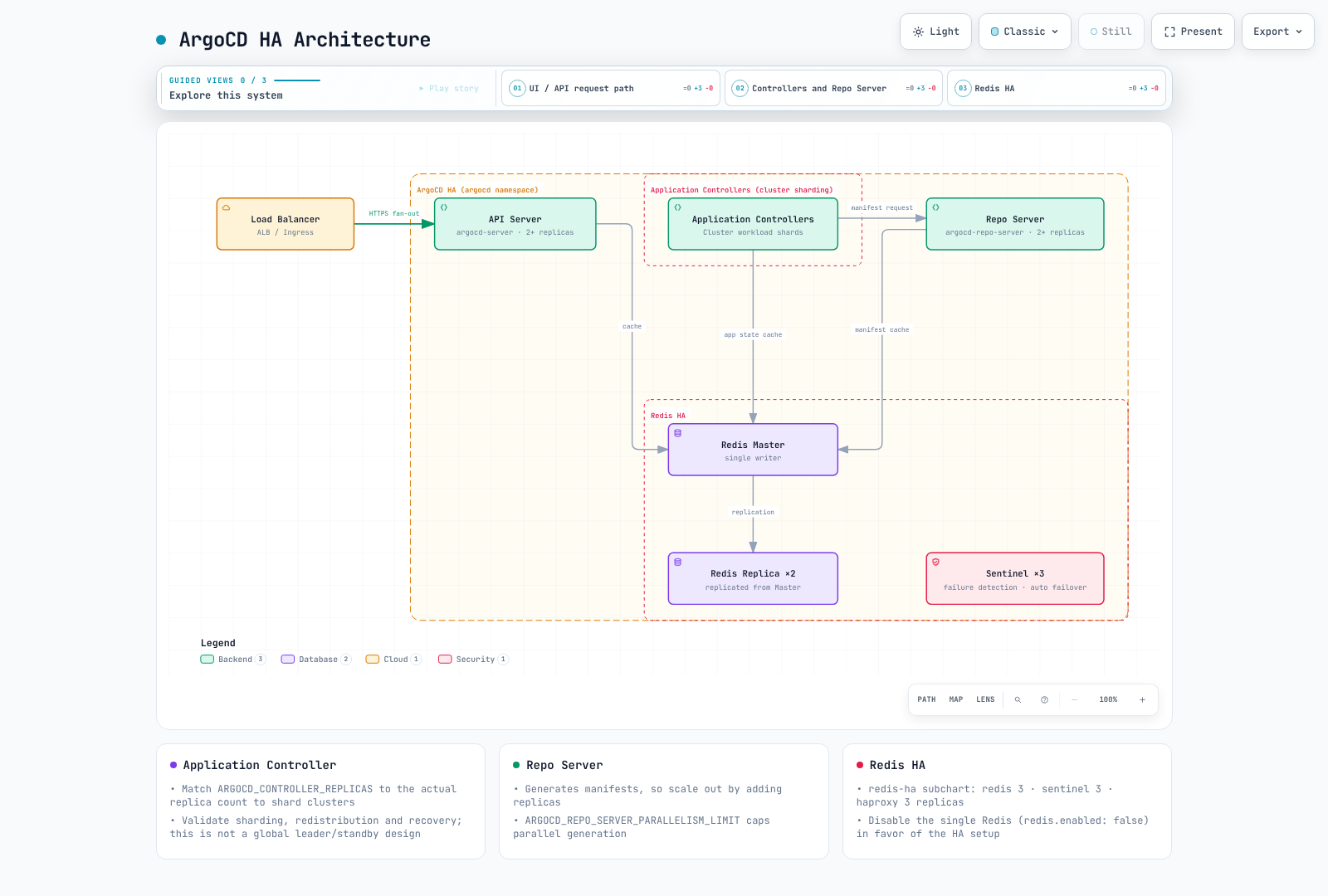
Check the following in the rendered Helm example.
- Application Controller distributes clusters among shards rather than using one global leader and standbys. The chart aligns replica count with
ARGOCD_CONTROLLER_REPLICAS. Validate algorithm, redistribution and recovery; dynamic distribution is a separate feature. - ApplicationSet leader election differs from Application Controller sharding. This chart enables leader election for multiple ApplicationSet replicas.
- Bundled Dex uses in-memory storage; adding replicas can create inconsistent data. Keep its default single replica and validate a supported design for additional HA requirements.
- Redis is a disposable cache; Kubernetes objects persist Argo configuration. Redis HA replica count is
redis-ha.replicas, notredis-ha.redis.replicas. The bundle uses three Redis/Sentinel instances. - PDBs limit voluntary eviction, not node failures or every rollout. Test distribution, readiness, dependencies and reconciliation recovery.
- Tune Repo Server concurrency, HPA and CPU limits from real manifest-generation/memory load. There is no universal “100 apps means two shards” threshold.
ArgoCD on Amazon EKS
ALB and TLS
This example uses an internal ALB. Prepare AWS Load Balancer Controller, subnets/tags/security groups, DNS and a valid same-region ACM certificate. Replace the certificate placeholder/hostname and provide the management client with network access to the ALB.
apiVersion: networking.k8s.io/v1
kind: Ingress
metadata:
  name: argocd-server
  namespace: argocd
  annotations:
    alb.ingress.kubernetes.io/scheme: internal
    alb.ingress.kubernetes.io/target-type: ip
    alb.ingress.kubernetes.io/backend-protocol: HTTPS
    alb.ingress.kubernetes.io/healthcheck-protocol: HTTPS
    alb.ingress.kubernetes.io/healthcheck-path: /healthz
    alb.ingress.kubernetes.io/listen-ports: '[{"HTTPS":443}]'
    alb.ingress.kubernetes.io/certificate-arn: REPLACE_WITH_ACM_CERTIFICATE_ARN
    alb.ingress.kubernetes.io/ssl-policy: ELBSecurityPolicy-TLS13-1-2-2021-06
spec:
  ingressClassName: alb
  rules:
  - host: argocd.example.com
    http:
      paths:
      - path: /
        pathType: Prefix
        backend:
          service:
            name: argocd-server
            port:
              number: 443
Keep server.insecure=false because the backend uses HTTPS. Use --grpc-web for CLI traffic through this single HTTP target group. Native gRPC requires a separate gRPC target group and routing conditions as documented upstream.
argocd login argocd.example.com --grpc-webIRSA and Function-Specific Permissions
An IAM annotation alone does not configure AWS integrations or token renewal. Distinguish the actual identity for each function.
| Function | Identity |
|---|---|
| Deploy to another EKS API | Controller and required ApplicationSet/Server management role → target AssumeRole → EKS Access Entry/RBAC |
| Read OCI/Helm sources | Actual Repo Server registry authentication, credential provider and token renewal |
| Discover images/update Git | Separate Image Updater |
| Read Secrets Manager | Role of the actual AWS caller, such as External Secrets |
| Pull Pod images | Node role or Fargate execution role |
IRSA needs an OIDC provider and aud/sub-constrained trust; Pod Identity needs the agent, association and supported SDK. Limit target trust and management-role AssumeRole permissions to intended ARNs. Separately configure target EKS access entries, namespace authorization and API connectivity. Recreate affected Pods after changing workload identity where required.
Declarative EKS Cluster Registration
After establishing roles and permissions, register using the real endpoint and CA. Explicitly select the management-cluster kubeconfig context.
# IAM roles, trust relationships and target EKS access/RBAC must already exist.
set -euo pipefail
: "${ARGOCD_CONTEXT:?Set the management cluster kubeconfig context}"
: "${TARGET_EKS_NAME:?Set the target EKS cluster name}"
: "${TARGET_AWS_REGION:?Set the target region}"
: "${TARGET_ROLE_ARN:?Set the authorized target-cluster IAM role}"
umask 077
aws eks describe-cluster --name "$TARGET_EKS_NAME" --region "$TARGET_AWS_REGION" \
  --query 'cluster.{name:name,server:endpoint,ca:certificateAuthority.data}' \
  --output json > target-eks.json
jq --arg role "$TARGET_ROLE_ARN" '{
  apiVersion:"v1", kind:"Secret",
  metadata:{name:"target-eks",namespace:"argocd",
    labels:{"argocd.argoproj.io/secret-type":"cluster"}},
  type:"Opaque",
  data:{name:(.name|@base64),server:(.server|@base64),config:({
    awsAuthConfig:{clusterName:.name,roleARN:$role},
    tlsClientConfig:{insecure:false,caData:.ca}
  }|tojson|@base64)}
}' target-eks.json > target-cluster-secret.json
kubectl --context "$ARGOCD_CONTEXT" apply -f target-cluster-secret.json
argocd cluster list
Imperative argocd cluster add accepts a kubeconfig context name. An EKS default context may be an ARN, but this is not an AWS API accepting arbitrary ARNs. It may create target ServiceAccount/RBAC objects; scope them to the required namespaces and permissions.
Declarative Setup
For Helm, manage configs.cm/configs.params in values. For manifests, merge required keys below with existing settings. Avoid Helm and a separate kubectl owner competing over the same fields.
apiVersion: v1
kind: ConfigMap
metadata:
  name: argocd-cm
  namespace: argocd
  labels:
    app.kubernetes.io/part-of: argocd
data:
  url: https://argocd.example.com
  users.anonymous.enabled: "false"
  exec.enabled: "false"
---
apiVersion: v1
kind: ConfigMap
metadata:
  name: argocd-cmd-params-cm
  namespace: argocd
  labels:
    app.kubernetes.io/part-of: argocd
data:
  server.insecure: "false"
Set admin.enabled=false only after testing SSO authorization and recovery access. Design any /argocd subpath together with ingress routes and server.rootpath/basehref; it is not a default requirement. Command-line/environment settings may require a component rollout.
Prefer built-in health checks for supported resources such as Rollouts. Custom Lua must return a valid state even when status is absent; do not equate unknown with Healthy. Custom Kustomize versions require kustomize.path.<version> plus the actual executable. Use repository Secrets below instead of legacy repositories/repository.credentials ConfigMap fields.
Repository Credentials
These examples bootstrap Secrets from protected files. Supply actual users/repositories/App IDs and only the required read permissions. Do not commit tokens, private keys or base64 Secrets to Git. Use one owner, such as External Secrets, for ongoing rotation.
HTTPS credential template
set -euo pipefail
# Bootstrap one credential method; use an external secret manager for rotation.
# Credential files must contain only their value, without an accidental trailing newline.
kubectl -n argocd create secret generic github-repo-creds \
  --from-literal=url=https://github.com/myorg/ \
  --from-file=username=/secure/path/github-user \
  --from-file=password=/secure/path/github-token
kubectl -n argocd label secret github-repo-creds \
  argocd.argoproj.io/secret-type=repo-creds
repo-creds is a URL-prefix credential template; repository registers one repository. Check precedence when a repository already has explicit credentials.
SSH
set -euo pipefail
kubectl -n argocd create secret generic private-repo-ssh \
  --from-literal=type=git \
  --from-literal=url=git@github.com:myorg/private-repo.git \
  --from-file=sshPrivateKey=/secure/path/id_ed25519
kubectl -n argocd label secret private-repo-ssh \
  argocd.argoproj.io/secret-type=repository
Verify the SSH server host key through a trusted channel before adding it to known hosts; do not trust an unverified key scan.
GitHub App
set -euo pipefail
kubectl -n argocd create secret generic github-app-creds \
  --from-literal=url=https://github.com/myorg/ \
  --from-literal=githubAppID=123456 \
  --from-literal=githubAppInstallationID=12345678 \
  --from-file=githubAppPrivateKey=/secure/path/github-app.pem
kubectl -n argocd label secret github-app-creds \
  argocd.argoproj.io/secret-type=repo-creds
Upgrading ArgoCD
Pre-Upgrade Checklist
Review every relevant breaking-change guide from the installed version to the target, and test in staging. Do not assume a direct 2.x-to-3.5 version substitution is sufficient. Keep the same installation owner. Encrypt and restrict access to Secret backups; they are not safe to commit to Git.
- Review release notes for breaking changes
- Backup current installation:bash
umask 077 kubectl get applications,applicationsets -n argocd -o yaml > applications-backup.yaml kubectl get appprojects -n argocd -o yaml > projects-backup.yaml kubectl get secrets -n argocd -l argocd.argoproj.io/secret-type -o yaml > secrets-backup.yaml - Check cluster compatibility, chart values, target-cluster permissions and rollback/restore procedures. Configuration backup does not back up application databases.
Upgrade via Manifests
# Apply new version manifests
kubectl apply --server-side -n argocd -f https://raw.githubusercontent.com/argoproj/argo-cd/v3.5.4/manifests/install.yaml

# Wait for rollout
kubectl rollout status deployment argocd-server -n argocd
kubectl rollout status deployment argocd-repo-server -n argocd
kubectl rollout status statefulset/argocd-application-controller -n argocd
Upgrade via Helm
# Update repo
helm repo update

# Check available versions
helm search repo argo/argo-cd --versions

# Upgrade
helm upgrade argocd argo/argo-cd \
  --namespace argocd \
  --values values.yaml \
  --version 10.8.4
Post-Upgrade Verification
# Verify versions
argocd version

# Check all applications sync status
argocd app list

# Verify component health
kubectl get pods -n argocd
Troubleshooting Installation
Common Issues
Pods not starting:
# Check pod events
kubectl describe pod -n argocd -l app.kubernetes.io/name=argocd-server

# Check logs
kubectl logs -n argocd -l app.kubernetes.io/name=argocd-server --tail=100
Repository connection failed:
# Test repository access
argocd repo list
argocd repo get https://github.com/myorg/myrepo.git
Certificate issues:
# Check TLS certificates
# Select the Secret actually used by the server (argocd-server-tls or its configured fallback).
: "${ARGOCD_TLS_SECRET:?Set the actual TLS Secret name}"
kubectl get secret -n argocd "$ARGOCD_TLS_SECRET" -o jsonpath='{.data.tls\.crt}' \
  | base64 -d | openssl x509 -noout -dates -subject -issuer
# An ALB frontend ACM certificate is a separate TLS layer.
Quiz
To test what you've learned, try the ArgoCD installation quiz.