WorkloadEntry
Reviewed Version: Istio 1.31.0 Last Updated: September 11, 2026
WorkloadEntry is a resource for registering Virtual Machines (VMs) or bare-metal servers into the Istio service mesh. This enables workloads outside of Kubernetes to utilize the mesh's traffic management, security, and observability features.
Table of Contents
- Overview
- WorkloadEntry vs Kubernetes Pod
- Architecture
- Basic Usage
- ServiceEntry Integration
- VM Registration Practical Guide
- Security Settings (mTLS)
- Health Checks and Monitoring
- Advanced Configuration
- Troubleshooting
- Best Practices
Overview
WorkloadEntry describes a workload; creating it does not install Envoy, bootstrap identity, create network connectivity, or publish a DNS record. This chapter uses sidecar-mode VM integration. Examples are independent; keep each ServiceEntry, selected WorkloadEntries, and ServiceAccount in the intended namespace. The diagrams show registry/configuration relationships, not extra network hops.
What is WorkloadEntry?
WorkloadEntry is an Istio Custom Resource Definition (CRD) that registers workloads (VMs, bare-metal) outside the mesh into the Istio service mesh.
Use Scenarios
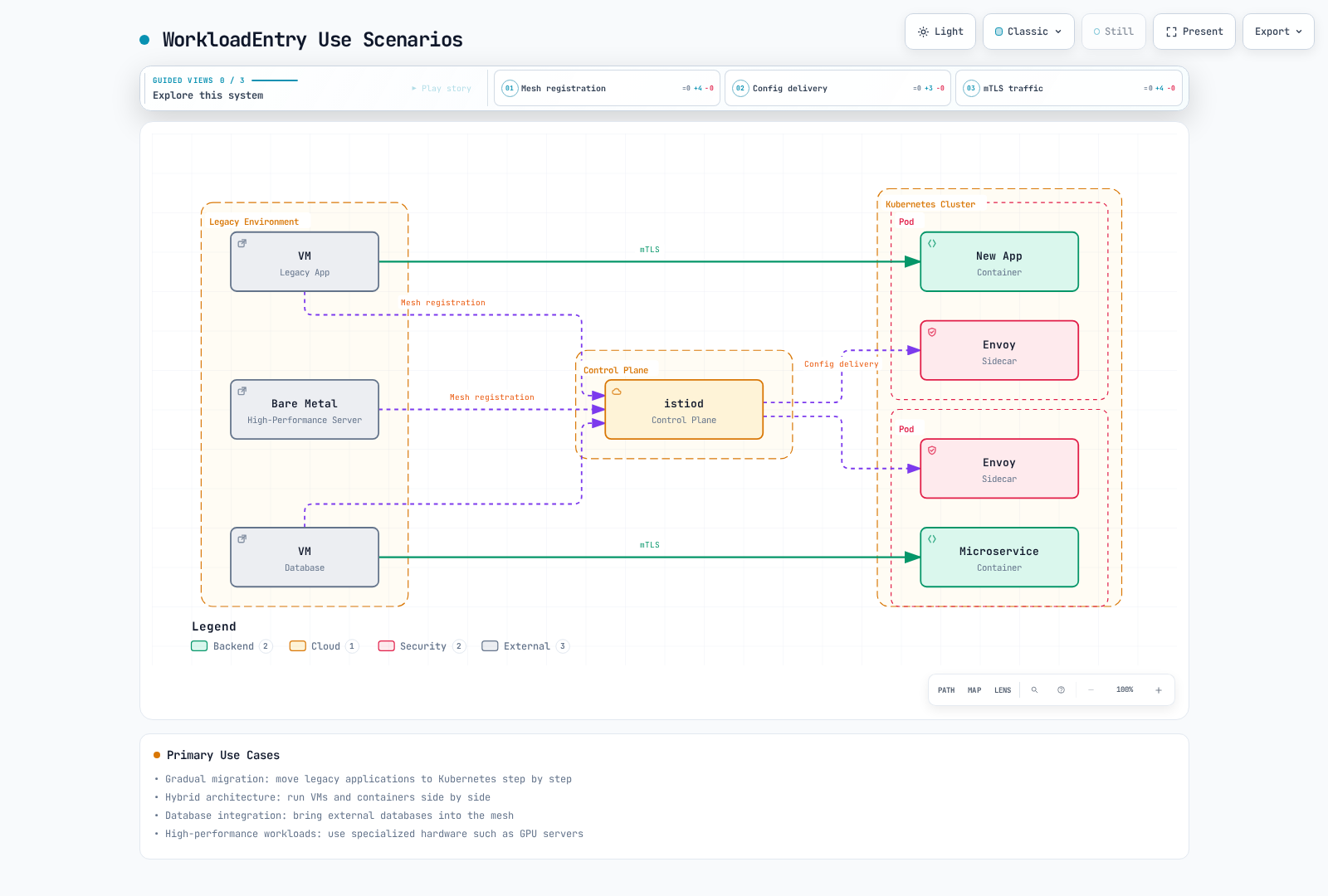
Primary Use Cases:
- Gradual Migration: Incrementally migrate legacy applications to Kubernetes
- Hybrid Architecture: Operate VMs and containers simultaneously
- Database Integration: Include external databases in the mesh
- High-Performance Workloads: Utilize specialized hardware like GPU servers
WorkloadEntry vs Kubernetes Pod
Comparison Table
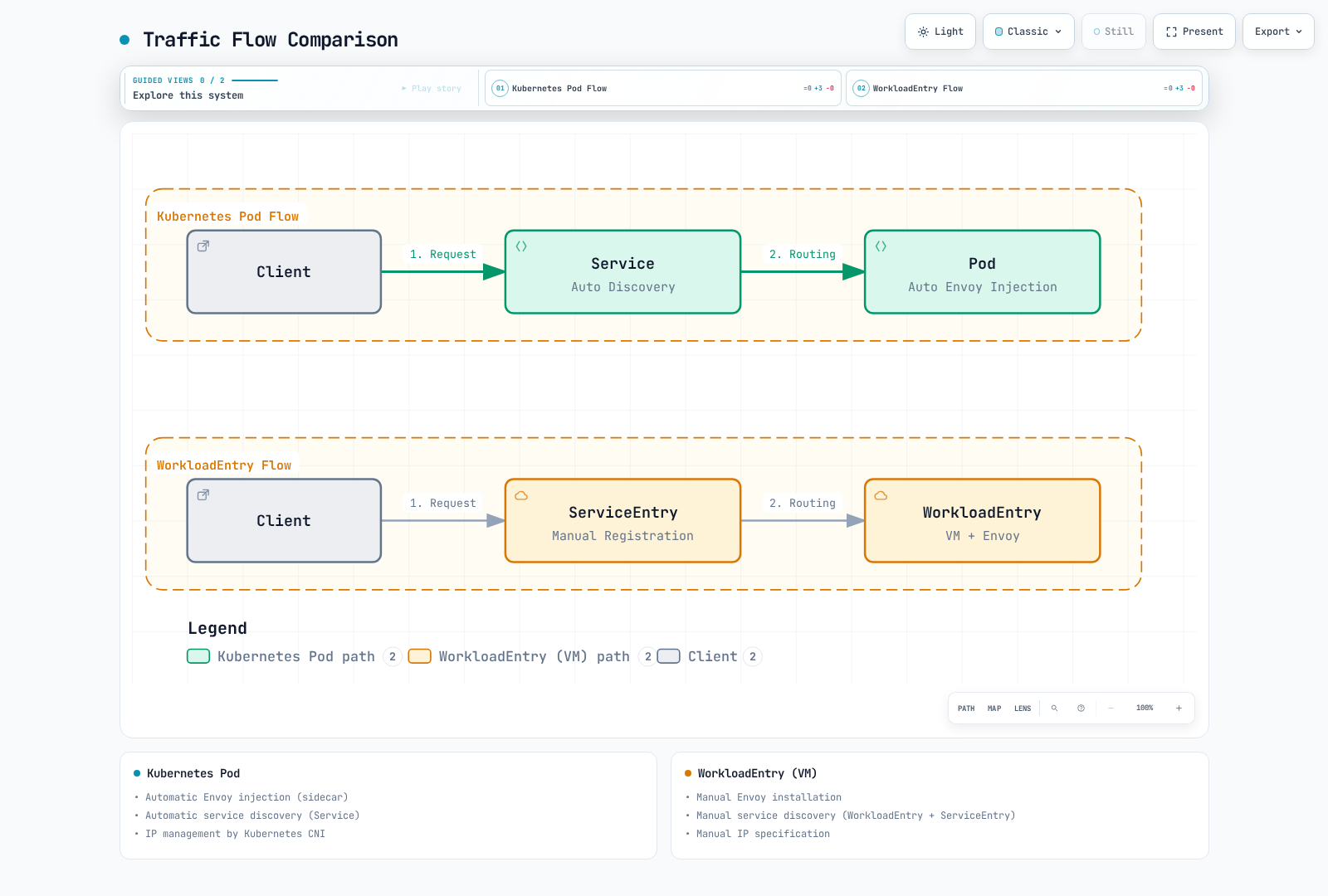
| Characteristic | Kubernetes Pod | WorkloadEntry (VM) |
|---|---|---|
| Deployment Location | Inside cluster | Outside cluster |
| Envoy Injection | Automatic (sidecar) | Manual installation |
| Service Discovery | Automatic (Service) | Manual (WorkloadEntry) |
| IP Management | Kubernetes CNI | Manual specification |
| mTLS | Automatic | Automatic (certificate deployment required) |
| Health Checks | Automatic (Liveness/Readiness) | Manual configuration |
| Scaling | HPA | Manual |
| Operational Complexity | Low | High |
| Use Scenario | Cloud-native apps | Legacy apps, specialized hardware |
Traffic Flow Comparison
Architecture
VM Workload Architecture
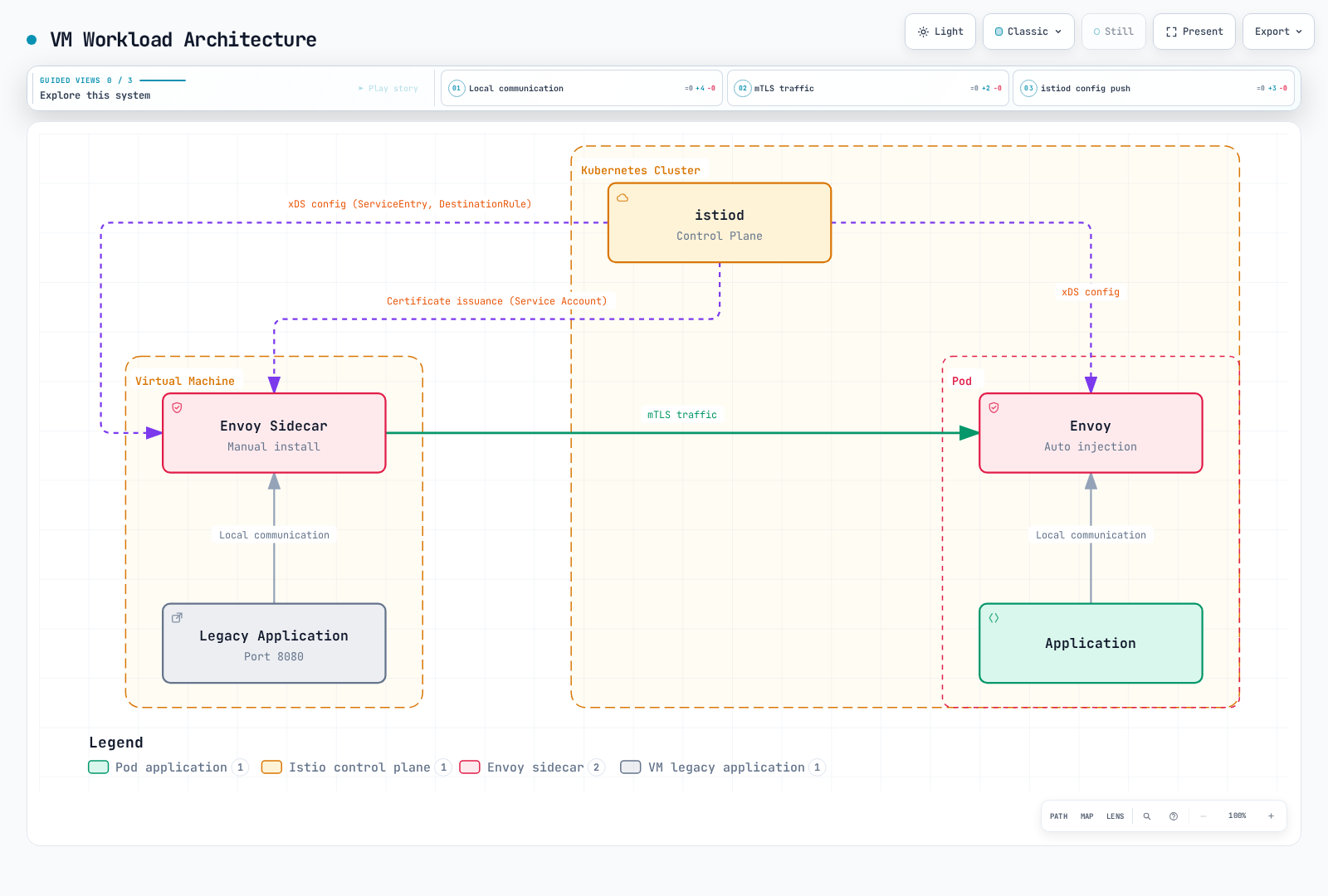
Key Components
- WorkloadEntry: VM information registration (IP, ports, labels)
- ServiceEntry: Service definition and WorkloadEntry reference
- Envoy Proxy: Manually installed sidecar on VM
- istiod: Configuration deployment and certificate management
- Service Account: VM identity authentication
Basic Usage
WorkloadEntry Resource Definition
apiVersion: networking.istio.io/v1
kind: WorkloadEntry
metadata:
  name: legacy-api-vm-1
  namespace: production
spec:
  # VM's IP address
  address: 192.168.1.100

  # Labels for service selection
  labels:
    app: legacy-api
    version: v1.0
    tier: backend

  # Service account for mTLS authentication
  serviceAccount: legacy-api-sa

  # Ports to expose
  ports:
    http: 8080
    https: 8443
    metrics: 9090

  # Locality information (optional)
  locality: us-west-2/us-west-2a

  # Weight (for load balancing, optional)
  weight: 100

  # Network (multi-network environment, optional)
  network: vm-network
Required Field Descriptions
| Field | Description | Example |
|---|---|---|
| address | Endpoint address (IP, or DNS with DNS resolution; may be omitted for a configured remote network) | 192.168.1.100 |
| labels | Labels for ServiceEntry matching | app: legacy-api |
| serviceAccount | SA for mTLS authentication | legacy-api-sa |
| ports | Port map to expose | http: 8080 |
Registering Multiple VMs
# VM 1
apiVersion: networking.istio.io/v1
kind: WorkloadEntry
metadata:
  name: api-vm-1
  namespace: production
spec:
  address: 192.168.1.101
  labels:
    app: api-service
    version: v1
  serviceAccount: api-sa
  ports:
    http: 8080
---
# VM 2
apiVersion: networking.istio.io/v1
kind: WorkloadEntry
metadata:
  name: api-vm-2
  namespace: production
spec:
  address: 192.168.1.102
  labels:
    app: api-service
    version: v1
  serviceAccount: api-sa
  ports:
    http: 8080
---
# VM 3 (different version)
apiVersion: networking.istio.io/v1
kind: WorkloadEntry
metadata:
  name: api-vm-3
  namespace: production
spec:
  address: 192.168.1.103
  labels:
    app: api-service
    version: v2  # New version
  serviceAccount: api-sa
  ports:
    http: 8080
ServiceEntry Integration
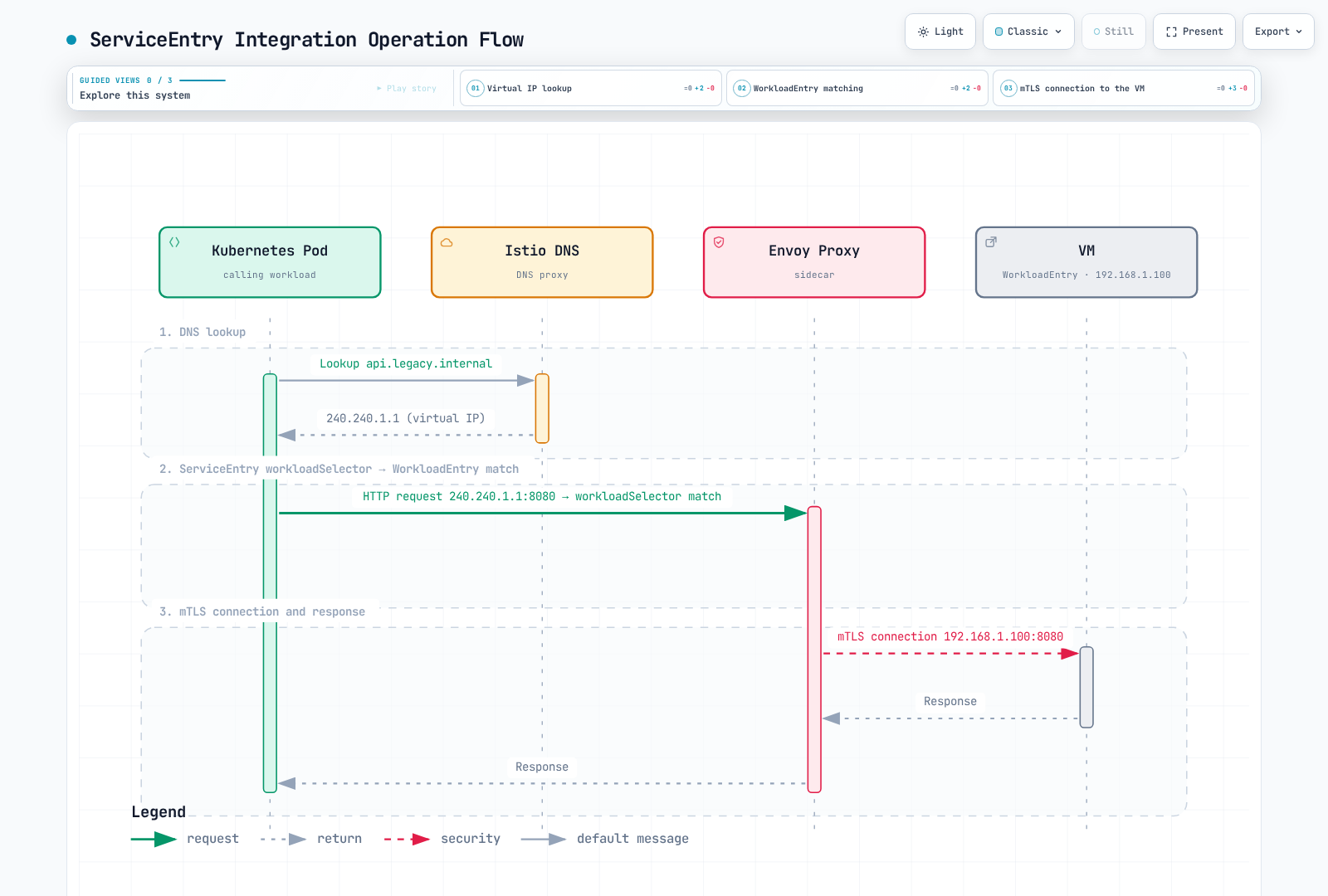
WorkloadEntry is always used together with ServiceEntry.
Basic Integration Pattern
# 1. Define service with ServiceEntry
apiVersion: networking.istio.io/v1
kind: ServiceEntry
metadata:
  name: legacy-api
  namespace: production
spec:
  hosts:
  - api.legacy.internal
  addresses:
  - 240.240.1.1  # Virtual IP
  ports:
  - number: 8080
    name: http
    protocol: HTTP
  location: MESH_INTERNAL
  resolution: STATIC
  workloadSelector:
    labels:
      app: legacy-api  # Match with WorkloadEntry labels
---
# 2. Register VM with WorkloadEntry
apiVersion: networking.istio.io/v1
kind: WorkloadEntry
metadata:
  name: legacy-api-vm-1
  namespace: production
spec:
  address: 192.168.1.100
  labels:
    app: legacy-api  # Match with ServiceEntry
    version: v1
  serviceAccount: legacy-api-sa
  ports:
    http: 8080
Operation Flow
Load Balancing
Automatic load balancing when multiple WorkloadEntries exist:
apiVersion: networking.istio.io/v1
kind: ServiceEntry
metadata:
  name: database-cluster
  namespace: vm-workloads
spec:
  hosts:
  - db.cluster.internal
  ports:
  - number: 5432
    name: postgresql
    protocol: TCP
  location: MESH_INTERNAL
  resolution: STATIC
  workloadSelector:
    labels:
      app: postgres
      tier: database
      role: primary
---
# Separate read-only replica service
apiVersion: networking.istio.io/v1
kind: ServiceEntry
metadata:
  name: database-replicas
  namespace: vm-workloads
spec:
  hosts:
  - db-replicas.cluster.internal
  ports:
  - number: 5432
    name: postgresql
    protocol: TCP
  location: MESH_INTERNAL
  resolution: STATIC
  workloadSelector:
    labels:
      app: postgres
      tier: database
      role: replica
---
# Primary DB
apiVersion: networking.istio.io/v1
kind: WorkloadEntry
metadata:
  name: postgres-primary
  namespace: vm-workloads
spec:
  serviceAccount: vm-postgres-sa
  address: 10.0.1.100
  labels:
    app: postgres
    tier: database
    role: primary
  weight: 100  # Weight
---
# Replica DB 1
apiVersion: networking.istio.io/v1
kind: WorkloadEntry
metadata:
  name: postgres-replica-1
  namespace: vm-workloads
spec:
  serviceAccount: vm-postgres-sa
  address: 10.0.1.101
  labels:
    app: postgres
    tier: database
    role: replica
  weight: 50
---
# Replica DB 2
apiVersion: networking.istio.io/v1
kind: WorkloadEntry
metadata:
  name: postgres-replica-2
  namespace: vm-workloads
spec:
  serviceAccount: vm-postgres-sa
  address: 10.0.1.102
  labels:
    app: postgres
    tier: database
    role: replica
  weight: 50
Send writes only to the primary service and reads to replicas only when the application tolerates replication semantics. Generic endpoint weights do not understand PostgreSQL roles. Configure DNS capture/unique VIPs for same-port services, and bootstrap each VM with the stated ServiceAccount.
VM Registration Practical Guide
Prerequisites
VM Requirements:
- Network: Can communicate with Kubernetes cluster
- OS/CPU: a Linux distribution and architecture supported by the selected sidecar package; this example uses the Debian package
- Connectivity: reach istiod xDS/CA through its exposed VM gateway (normally 15012), and route workload traffic over the chosen topology. 15017 is a Kubernetes webhook port, not a VM application requirement.
Kubernetes Preparation:
- Istio installation complete
- Create namespace for VM usage
- Create ServiceAccount
Before generating bootstrap files, expose the existing control plane for VM access using the official VM installation procedure. A cluster-only istiod Service is not enough. This walkthrough assumes routed Pod-to-VM connectivity in one logical network; use the documented east-west/network configuration for separated networks. The generated cluster ID must match istiod’s configuration.
Step 1: Create ServiceAccount
# Create namespace
kubectl create namespace vm-workloads

# Create ServiceAccount
kubectl create serviceaccount vm-postgres-sa -n vm-workloads

# VM identity bootstrap does not require listing Kubernetes Secrets.
Step 2: Prepare WorkloadGroup Bootstrap Input
WorkloadGroup serves as a template for multiple WorkloadEntries:
apiVersion: networking.istio.io/v1
kind: WorkloadGroup
metadata:
  name: postgres-vms
  namespace: vm-workloads
spec:
  metadata:
    labels:
      app: postgres
      version: v14
  template:
    serviceAccount: vm-postgres-sa
    network: ""  # Same logical network in this walkthrough
    ports:
      postgresql: 5432
      metrics: 9187
Step 3: Install Envoy on VM
Generate Automatic Installation Script
# Generate VM registration files with istioctl
umask 077
istioctl x workload entry configure \
  -f workloadgroup.yaml \
  -o vm-postgres-1 \
  --clusterID Kubernetes

# Generated files:
# - cluster.env: Cluster information
# - istio-token: Authentication token
# - mesh.yaml: Mesh configuration
# - root-cert.pem: Root certificate
# - hosts: /etc/hosts entries
Execute Installation on VM
# Run on the administration workstation before entering the VM shell
ssh user@192.168.1.100 'install -d -m 700 "$HOME/istio-bootstrap"'
scp vm-postgres-1/* user@192.168.1.100:istio-bootstrap/
ssh user@192.168.1.100

# From this point, run on the VM
VM_BOOTSTRAP_DIR="$HOME/istio-bootstrap"
curl -fsSLo istio-sidecar.deb \
  https://blob.istio.io/istio-release/releases/1.31.0/deb/istio-sidecar.deb
sudo dpkg -i istio-sidecar.deb
sudo install -d -o istio-proxy -m 0750 \
  /etc/certs /var/run/secrets/tokens /var/lib/istio/envoy /etc/istio/config /etc/istio/proxy
sudo install -o istio-proxy -m 0644 "$VM_BOOTSTRAP_DIR/root-cert.pem" /etc/certs/root-cert.pem
sudo install -o istio-proxy -m 0600 "$VM_BOOTSTRAP_DIR/istio-token" /var/run/secrets/tokens/istio-token
sudo install -o istio-proxy -m 0600 "$VM_BOOTSTRAP_DIR/cluster.env" /var/lib/istio/envoy/cluster.env
sudo install -o istio-proxy -m 0600 "$VM_BOOTSTRAP_DIR/mesh.yaml" /etc/istio/config/mesh
# Review/merge once; replace stale istiod entries rather than appending duplicates
cat "$VM_BOOTSTRAP_DIR/hosts" | sudo tee -a /etc/hosts >/dev/null
sudo systemctl enable --now istio
sudo systemctl status istio
Step 4: Register WorkloadEntry
The commands above use manual registration. Apply this WorkloadEntry after the VM agent is bootstrapped; do not also create a duplicate manual entry for an auto-registered VM:
apiVersion: networking.istio.io/v1
kind: WorkloadEntry
metadata:
  name: postgres-vm-1
  namespace: vm-workloads
spec:
  address: 192.168.1.100
  labels:
    app: postgres
    version: v14
  serviceAccount: vm-postgres-sa
  ports:
    postgresql: 5432
metrics: 9187kubectl apply -f workloadentry.yamlStep 5: Create ServiceEntry
apiVersion: networking.istio.io/v1
kind: ServiceEntry
metadata:
  name: postgres-service
  namespace: vm-workloads
spec:
  hosts:
  - postgres.vm.internal
  addresses:
  - 240.240.2.1
  ports:
  - number: 5432
    name: postgresql
    protocol: TCP
  - number: 9187
    name: metrics
    protocol: HTTP
  location: MESH_INTERNAL
  resolution: STATIC
  workloadSelector:
    labels:
app: postgreskubectl apply -f serviceentry.yamlStep 6: Test Connection
apiVersion: v1
kind: Pod
metadata:
  name: pg-client
  namespace: vm-workloads
  labels:
    sidecar.istio.io/inject: "true"
  annotations:
    proxy.istio.io/config: |
      proxyMetadata:
        ISTIO_META_DNS_CAPTURE: "true"
spec:
  containers:
  - name: postgres
    image: postgres:14
command: ["sleep", "infinity"]kubectl apply -f pg-client.yaml
kubectl wait -n vm-workloads --for=condition=Ready pod/pg-client --timeout=120s
kubectl exec -it pg-client -n vm-workloads -c postgres -- \
psql -h postgres.vm.internal -U dbuser -d mydbSave the Pod manifest as pg-client.yaml. The PostgreSQL client version is an application example, independent of the Istio version. Supply valid database credentials interactively. After applying the restrictive policy below, use an allowed ServiceAccount for tests; the default test identity will be denied. Remove the test Pod when finished.
Security Settings (mTLS)
Automatic mTLS Enablement
With the VM agent bootstrapped for the declared ServiceAccount, mesh proxies can use auto mTLS. WorkloadEntry alone does not turn a plain VM into a mesh participant:
# Force mTLS with PeerAuthentication
apiVersion: security.istio.io/v1
kind: PeerAuthentication
metadata:
  name: default
  namespace: vm-workloads
spec:
  mtls:
    mode: STRICT  # mTLS required for both VM and pod
VM Identity Verification
Unlike pod-sidecar bootstrap, the VM integration persists its issued certificate/key under /etc/certs and uses the existing mTLS identity for renewal. These files appear after successful bootstrap. Keep keys private; regenerate bootstrap material only as part of a diagnosed recovery, not by printing or copying credentials into logs.
# Check certificates on VM
sudo ls -la /etc/certs/
# cert-chain.pem: Certificate chain
# key.pem: Private key
# root-cert.pem: Root CA

# Check certificate contents
sudo openssl x509 -in /etc/certs/cert-chain.pem -text -noout

# Check Subject Alternative Name (SAN):
# spiffe://cluster.local/ns/vm-workloads/sa/vm-postgres-sa
Access Control (AuthorizationPolicy)
# PostgreSQL access control
apiVersion: security.istio.io/v1
kind: AuthorizationPolicy
metadata:
  name: postgres-access
  namespace: vm-workloads
spec:
  selector:
    matchLabels:
      app: postgres  # WorkloadEntry labels
  action: ALLOW
  rules:
  # Allow only API service access
  - from:
    - source:
        principals:
        - cluster.local/ns/production/sa/api-service-sa
    to:
    - operation:
        ports: ["5432"]

  # Allow monitoring service access
  - from:
    - source:
        principals:
        - cluster.local/ns/istio-system/sa/prometheus
    to:
    - operation:
        ports: ["9187"]  # postgres_exporter
mTLS Verification
# Use a PostgreSQL client in an authorized mesh workload; PostgreSQL is not HTTPS
kubectl exec -it <authorized-client-pod> -n production -c <app-container> -- \
  psql -h postgres.vm.internal -U dbuser -d mydb
# Inspect the client proxy's TLS transport and certificates separately
istioctl proxy-config clusters <authorized-client-pod> -n production --fqdn postgres.vm.internal -o json
istioctl proxy-config secret <authorized-client-pod> -n production
# On the VM, inspect public certificate information through its local admin interface
curl -fsS http://127.0.0.1:15000/certs
Health Checks and Monitoring
Health Check Configuration
For the optional automated workflow, the relevant control-plane flags are PILOT_ENABLE_WORKLOAD_ENTRY_AUTOREGISTRATION and PILOT_ENABLE_WORKLOAD_ENTRY_HEALTHCHECKS; merge them into the existing installation settings as documented.
WorkloadGroup supports readiness probes. The documented auto-registration/health-check workflow requires enabling its istiod flags, applying the WorkloadGroup, and generating bootstrap files with --autoregister. It is an opt-in workflow, distinct from the manual path above. The DestinationRule below is passive connection-failure detection, not an active health probe:
apiVersion: networking.istio.io/v1
kind: DestinationRule
metadata:
  name: postgres-healthcheck
  namespace: vm-workloads
spec:
  host: postgres.vm.internal
  trafficPolicy:
    connectionPool:
      tcp:
        maxConnections: 100
    outlierDetection:
      consecutive5xxErrors: 5  # Exclude after 5 consecutive failures
      interval: 30s         # Check every 30 seconds
      baseEjectionTime: 30s # Exclude for 30 seconds
      maxEjectionPercent: 50 # Exclude up to 50%
minHealthPercent: 0 # Disable panic fail-open threshold# Optional WorkloadGroup probe fragment for the documented auto-registration workflow
spec:
probe:
initialDelaySeconds: 5
periodSeconds: 5
timeoutSeconds: 3
tcpSocket:
host: 127.0.0.1
port: 5432VM Health Check Endpoint
Add a health check endpoint to your VM application:
# Python Flask example
from flask import Flask, jsonify
import psycopg2

app = Flask(__name__)

@app.route('/health', methods=['GET'])
def health():
    try:
        # Verify database connection
        conn = psycopg2.connect("dbname=mydb user=dbuser", connect_timeout=3)
        conn.close()
        return jsonify({"status": "healthy"}), 200
    except psycopg2.Error:
        return jsonify({"status": "unhealthy"}), 503

if __name__ == '__main__':
    app.run(host='127.0.0.1', port=8080)
Prometheus Metrics Collection
ServiceMonitor discovers Kubernetes Services/endpoints, not WorkloadEntry or ServiceEntry directly. For this VM, deploy postgres_exporter on 9187, expose that named port in the WorkloadEntry/ServiceEntry, and add an explicit scrape job to the existing collector configuration. The collector must resolve the synthetic hostname, use mesh mTLS, and have an identity allowed by the exporter AuthorizationPolicy.
# Fragment for the existing Prometheus scrape_configs
- job_name: workloadentry-postgres
  scrape_interval: 30s
  metrics_path: /metrics
  static_configs:
  - targets: ["postgres.vm.internal:9187"]
Grafana Dashboard Queries
# Native PostgreSQL traffic has TCP counters, not HTTP status/latency metrics
sum(rate(istio_tcp_connections_opened_total{reporter="source",destination_service="postgres.vm.internal"}[5m]))
sum(rate(istio_tcp_sent_bytes_total{reporter="source",destination_service="postgres.vm.internal"}[5m]))

# Collector/exporter health; inspect the actual emitted labels
up{job="workloadentry-postgres"}
pg_up{job="workloadentry-postgres"}
Advanced Configuration
Multi-Network Environment
A network name only identifies topology. Configure reachability/east-west gateways and matching mesh network data separately; it does not create a VPC route, peering connection, or gateway. Locality is region/zone/subzone; use real values that agree with the client proxy.
Register VMs in different networks:
# VM in Network A
apiVersion: networking.istio.io/v1
kind: WorkloadEntry
metadata:
  name: api-vm-network-a
spec:
  address: 192.168.1.100
  labels:
    app: api-service
  serviceAccount: api-sa
  network: network-a
  ports:
    http: 8080
---
# VM in Network B
apiVersion: networking.istio.io/v1
kind: WorkloadEntry
metadata:
  name: api-vm-network-b
spec:
  address: 10.0.1.100
  labels:
    app: api-service
  serviceAccount: api-sa
  network: network-b
  ports:
    http: 8080
Locality-aware Load Balancing
apiVersion: networking.istio.io/v1
kind: WorkloadEntry
metadata:
  name: api-vm-us-west
spec:
  address: 192.168.1.100
  labels:
    app: api-service
  locality: us-west-2/us-west-2a
  weight: 100
---
apiVersion: networking.istio.io/v1
kind: WorkloadEntry
metadata:
  name: api-vm-us-east
spec:
  address: 10.0.1.100
  labels:
    app: api-service
  locality: us-east-1/us-east-1a
  weight: 100
---
# Locality-aware routing with DestinationRule
apiVersion: networking.istio.io/v1
kind: DestinationRule
metadata:
  name: api-locality-lb
spec:
  host: api.service.internal
  trafficPolicy:
    loadBalancer:
      localityLbSetting:
        enabled: true
        distribute:
        - from: us-west-2/*
          to:
            "us-west-2/*": 80
            "us-east-1/*": 20
        - from: us-east-1/*
          to:
            "us-east-1/*": 80
            "us-west-2/*": 20
Canary Deployment
Canary deployment can also be applied to WorkloadEntry:
# v1 version VM
apiVersion: networking.istio.io/v1
kind: WorkloadEntry
metadata:
  name: api-vm-v1
spec:
  address: 192.168.1.100
  labels:
    app: api-service
    version: v1
  serviceAccount: api-sa
---
# v2 version VM (Canary)
apiVersion: networking.istio.io/v1
kind: WorkloadEntry
metadata:
  name: api-vm-v2
spec:
  address: 192.168.1.101
  labels:
    app: api-service
    version: v2
  serviceAccount: api-sa
---
# Traffic splitting with VirtualService
apiVersion: networking.istio.io/v1
kind: VirtualService
metadata:
  name: api-service-canary
spec:
  hosts:
  - api.service.internal
  http:
  - route:
    - destination:
        host: api.service.internal
        subset: v1
      weight: 90
    - destination:
        host: api.service.internal
        subset: v2
      weight: 10
---
# Define subsets with DestinationRule
apiVersion: networking.istio.io/v1
kind: DestinationRule
metadata:
  name: api-service-subsets
spec:
  host: api.service.internal
  subsets:
  - name: v1
    labels:
      version: v1
  - name: v2
    labels:
      version: v2
Troubleshooting
WorkloadEntry Not Registered
Symptom: Resource visible in kubectl get workloadentry but traffic not routing
Verification:
# 1. Check WorkloadEntry status
kubectl get workloadentry -n vm-workloads -o yaml

# 2. Check ServiceEntry's workloadSelector
kubectl get serviceentry -n vm-workloads -o yaml | grep -A 5 workloadSelector

# 3. Verify label matching
# WorkloadEntry labels:
#   app: postgres
# ServiceEntry workloadSelector:
#   labels:
#     app: postgres  # Must match

# 4. Check Envoy configuration
istioctl proxy-config endpoints <pod-name> -n production

# Output should include WorkloadEntry's IP:
# ENDPOINT            STATUS      CLUSTER
# 192.168.1.100:5432 HEALTHY outbound|5432||postgres.vm.internalResolution:
# Modify labels to match exactly
apiVersion: networking.istio.io/v1
kind: WorkloadEntry
metadata:
  name: postgres-vm-1
  namespace: vm-workloads
spec:
  address: 192.168.1.100
  serviceAccount: vm-postgres-sa
  labels:
    app: postgres  # Must be identical to ServiceEntry
    version: v14
mTLS Connection Failure on VM
Symptom: connection refused or TLS handshake failed
Verification:
# Check Envoy logs on VM
sudo journalctl -u istio -f | grep -i tls

# Check certificates
sudo ls -la /etc/certs/
sudo openssl x509 -in /etc/certs/cert-chain.pem -text -noout

# Check certificate expiration
sudo openssl x509 -in /etc/certs/cert-chain.pem -noout -dates

# Check ServiceAccount token
sudo ls -la /var/run/secrets/tokens/
sudo stat /var/run/secrets/tokens/istio-tokenResolution:
# Regenerate bootstrap inputs from the admin workstation; this command does not issue a certificate
umask 077
istioctl x workload entry configure \
  -f workloadgroup.yaml \
  -o vm-postgres-1 \
  --clusterID Kubernetes

# Copy to VM and restart Envoy
scp vm-postgres-1/* user@192.168.1.100:istio-bootstrap/
# Reapply all reviewed runtime files and permissions using the VM installation steps,
# including the token and mesh configuration; then restart istio. Do not replace only the root CA.
Traffic Not Reaching Due to Health Check Failure
Symptom: Envoy marks WorkloadEntry as UNHEALTHY
Verification:
# Check Envoy endpoint status
istioctl proxy-config endpoints <pod-name> -n production | grep postgres

# Output:
# 192.168.1.100:5432  UNHEALTHY  outbound|5432||postgres.vm.internal

# Check DestinationRule's outlierDetection
kubectl get destinationrule -n vm-workloads -o yamlResolution:
# Adjust OutlierDetection settings
apiVersion: networking.istio.io/v1
kind: DestinationRule
metadata:
  name: postgres-healthcheck
  namespace: vm-workloads
spec:
  host: postgres.vm.internal
  trafficPolicy:
    outlierDetection:
      consecutive5xxErrors: 10     # More lenient
      interval: 60s             # Increase check interval
      baseEjectionTime: 60s
      maxEjectionPercent: 50    # Bound ejection; 100 would allow excluding every endpoint
DNS Lookup Failure
A ServiceEntry VIP alone does not create a CoreDNS record. Enable DNS capture on the calling sidecar and recreate its Pod, or provide a real DNS record. VM bootstrap enables the VM DNS proxy; that does not automatically enable capture on every Kubernetes client.
Symptom: postgres.vm.internal lookup fails from pod
Verification:
# Check ServiceEntry
kubectl get serviceentry -n vm-workloads

# DNS lookup test
kubectl exec pg-client -n vm-workloads -c postgres -- getent hosts postgres.vm.internal

# Check Istio DNS Proxy enablement
kubectl get pod <pod-name> -o yaml | grep ISTIO_META_DNS_CAPTUREResolution:
# Add addresses to ServiceEntry
apiVersion: networking.istio.io/v1
kind: ServiceEntry
metadata:
  name: postgres-service
  namespace: vm-workloads
spec:
  hosts:
  - postgres.vm.internal
  addresses:
  - 240.240.2.1  # Specify virtual IP
  ports:
  - number: 5432
    name: postgresql
    protocol: TCP
  location: MESH_INTERNAL
  resolution: STATIC
  workloadSelector:
    labels:
      app: postgres
Best Practices
1. Naming Conventions
# WorkloadEntry name: <app>-<role>-<id>
name: postgres-primary-1
name: postgres-replica-2
name: api-backend-vm-3

# ServiceEntry name: <app>-service
name: postgres-service
name: api-service

# ServiceAccount name: <app>-sa
name: postgres-sa
name: api-sa
2. Label Strategy
spec:
  labels:
    # Required labels
    app: postgres          # Application name
    version: v14           # Version

    # Optional labels
    tier: database         # Tier (frontend, backend, database)
    role: primary          # Role (primary, replica, canary)
    environment: production # Environment
    team: platform         # Team
3. ServiceAccount Management
# Separate ServiceAccount by namespace
kubectl create sa db-sa -n databases
kubectl create sa api-sa -n applications
kubectl create sa cache-sa -n middleware

# Principle of least privilege
kubectl create role db-limited \
  --verb=get \
  --resource=configmaps \
  -n databases
4. Monitoring and Alerting
apiVersion: monitoring.coreos.com/v1
kind: PrometheusRule
metadata:
  name: workloadentry-alerts
  namespace: vm-workloads
spec:
  groups:
  - name: workloadentry
    rules:
    - alert: VMExporterScrapeDown
      expr: up{job="workloadentry-postgres"} == 0 or absent(up{job="workloadentry-postgres"})
      for: 5m
      labels:
        severity: critical
      annotations:
        summary: "VM exporter scrape target is unavailable"
    - alert: PostgresExporterReportsDown
      expr: pg_up{job="workloadentry-postgres"} == 0
      for: 5m
      labels:
        severity: warning
5. Documentation
Maintain documentation for each WorkloadEntry:
apiVersion: networking.istio.io/v1
kind: WorkloadEntry
metadata:
  name: postgres-primary-1
  annotations:
    description: "Primary PostgreSQL database for production"
    owner: "platform-team@example.com"
    provisioned-date: "2025-11-26"
    os: "Ubuntu 22.04 LTS"
    location: "us-west-2a"
    runbook: "https://wiki.example.com/postgres-vm-runbook"
spec:
  address: 192.168.1.100
  labels:
    app: postgres
    version: v14
6. Backup and Disaster Recovery
Preserve the original WorkloadGroup/ServiceEntry/manual WorkloadEntry manifests and mesh version separately from diagnostic exports. Securely back up the VM’s persisted identity as required. Exported objects contain server metadata/status that must be reviewed before restore; auto-registered entries should be recreated by their controller, not duplicated manually. Restore namespaces/accounts and control-plane reachability first.
# Backup WorkloadEntry
kubectl get workloadentry -n vm-workloads -o yaml > workloadentries-backup.yaml

# Backup ServiceEntry
kubectl get serviceentry -n vm-workloads -o yaml > serviceentries-backup.yaml

# Restore
kubectl apply -f serviceentry.yaml
# Manual-registration path only: use the reviewed declarative source, not raw status snapshots
kubectl apply -f workloadentry.yaml
7. Gradual Migration Strategy
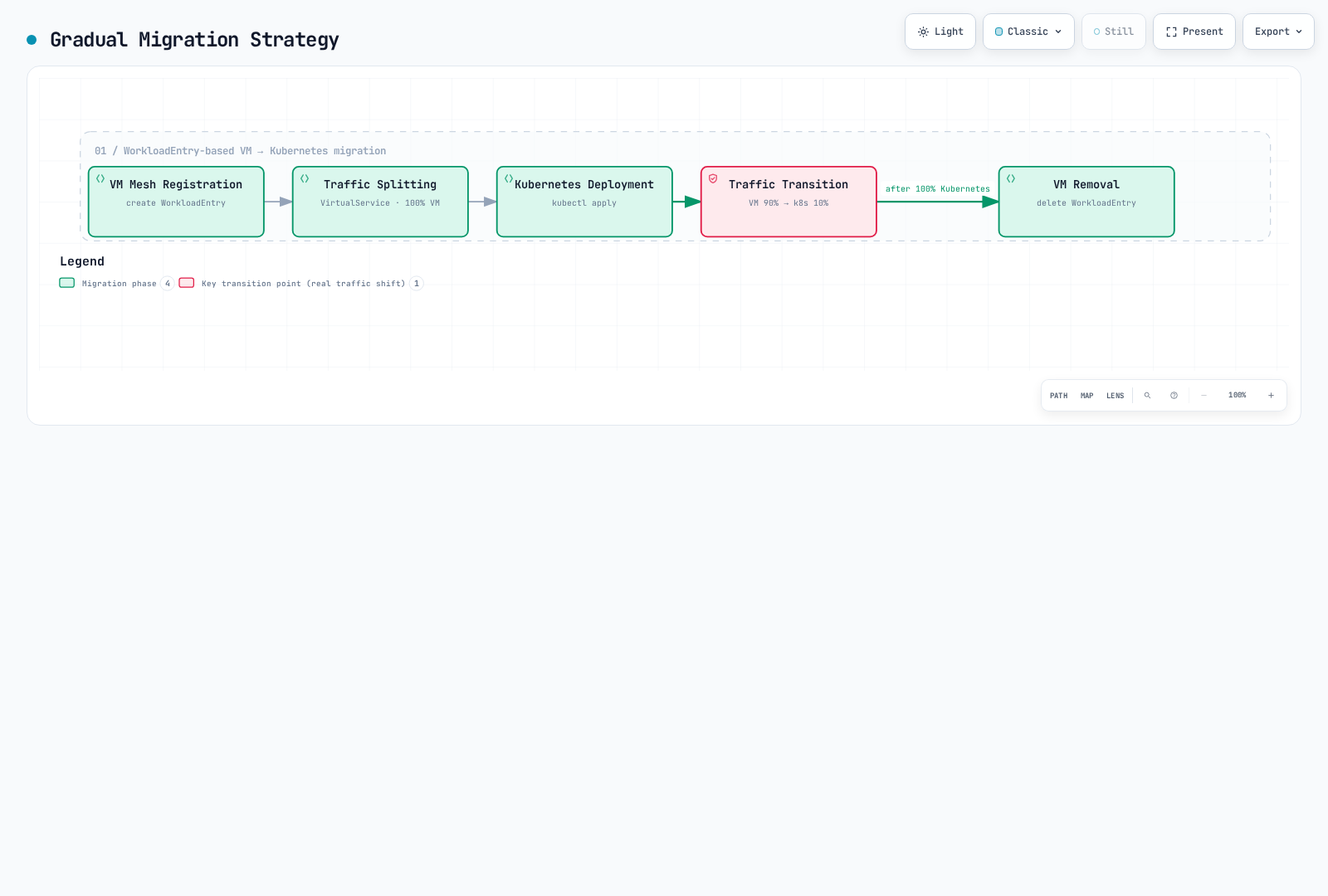
Before these phases, bootstrap the legacy VM identity and create the shared ServiceEntry/subsets below. The Kubernetes deployment must be in vm-workloads with app=api and version=k8s, and its proxy/DNS configuration must be ready before traffic moves.
apiVersion: networking.istio.io/v1
kind: ServiceEntry
metadata:
  name: api-migration-service
  namespace: vm-workloads
spec:
  hosts: [api.internal]
  addresses: [240.240.4.1]
  ports:
  - number: 8080
    name: http
    protocol: HTTP
  location: MESH_INTERNAL
  resolution: STATIC
  workloadSelector:
    labels:
      app: api
---
apiVersion: networking.istio.io/v1
kind: DestinationRule
metadata:
  name: api-migration-subsets
  namespace: vm-workloads
spec:
  host: api.internal
  subsets:
  - name: legacy
    labels:
      version: legacy
  - name: k8s
    labels:
      version: k8s
Phase 1: VM Mesh Registration
# Register WorkloadEntry
apiVersion: networking.istio.io/v1
kind: WorkloadEntry
metadata:
  name: legacy-api-vm
  namespace: vm-workloads
spec:
  serviceAccount: api-sa
  address: 192.168.1.100
  labels:
    app: api
    version: legacy
Phase 2: Traffic Splitting (100% VM)
apiVersion: networking.istio.io/v1
kind: VirtualService
metadata:
  name: api-migration
  namespace: vm-workloads
spec:
  hosts:
  - api.internal
  http:
  - route:
    - destination:
        host: api.internal
        subset: legacy
      weight: 100
Phase 3: Kubernetes Deployment
kubectl apply -n vm-workloads -f kubernetes-deployment.yamlPhase 4: Gradual Traffic Transition
# 10% Kubernetes
apiVersion: networking.istio.io/v1
kind: VirtualService
metadata:
  name: api-migration
  namespace: vm-workloads
spec:
  hosts:
  - api.internal
  http:
  - route:
    - destination:
        host: api.internal
        subset: legacy  # VM
      weight: 90
    - destination:
        host: api.internal
        subset: k8s     # Kubernetes
      weight: 10
Phase 5: VM Removal
# After transitioning 100% traffic to Kubernetes
kubectl delete workloadentry legacy-api-vm -n vm-workloads