Architecture
Reviewed Version: Istio 1.31.0 API Version:
networking.istio.io/v1,security.istio.io/v1Last Updated: September 11, 2026
This document provides an in-depth look at Istio's internal architecture and networking mechanisms.
For background and history, refer to the Basic Concepts document.
Important Changes (Istio 1.5+):
- Pilot, Citadel, Galley are no longer separate components
- They are consolidated into a single binary called Istiod (
pilot-discovery) - Pilot/Citadel/Galley terminology refers to historical names describing functionality
Table of Contents
This chapter primarily describes sidecar mode. Ambient uses Rust-based ztunnel per node and optional L7 waypoint proxies; its interception and DNS paths differ. Mixer was retired, with telemetry moved into proxies, rather than merged into istiod. JSON and injected-pod excerpts below are schematic, not complete deployable manifests.
- Istio Architecture Overview
- Control Plane: Istiod
- Data Plane: Envoy Proxy
- Sidecar Injection Mechanism
- iptables and Traffic Interception
- DNS Processing Mechanism
- xDS API Communication
- Optimization with Sidecar Resource
Istio Architecture Overview
Overall Structure
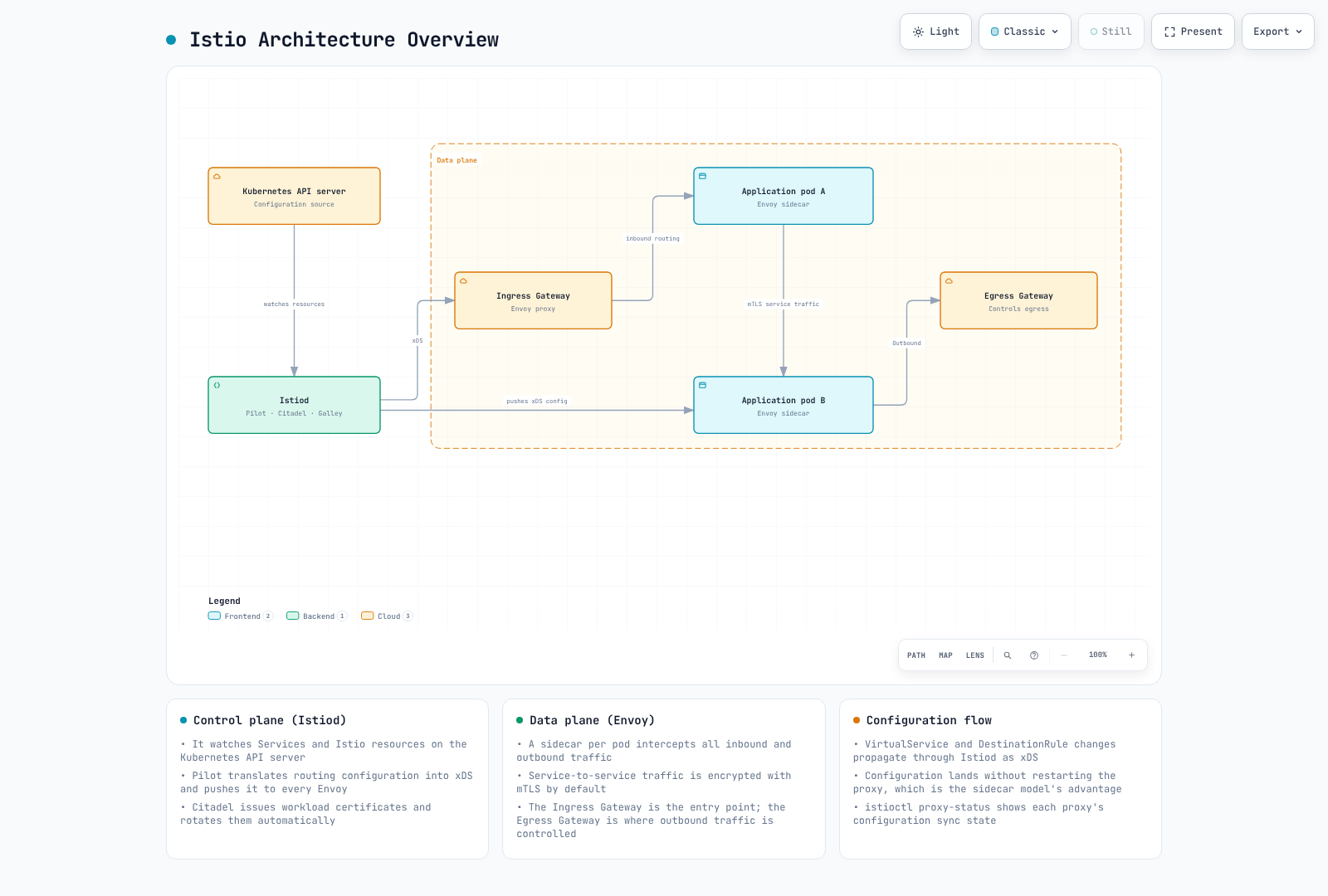
Control Plane vs Data Plane
| Category | Control Plane (Istiod) | Data Plane (Envoy) |
|---|---|---|
| Role | Policy management, configuration distribution | Actual traffic processing |
| Location | Separate pods (typically 1-3) | All application pods |
| Language | Go | C++ |
| Load | Low | High (all traffic) |
| Scalability | Horizontal scaling (HA) | Automatic (1 per pod) |
Control Plane: Istiod
Istiod Internal Structure
Important: Since Istio 1.5, Pilot, Citadel, and Galley are internal functions of Istiod, not separate components.
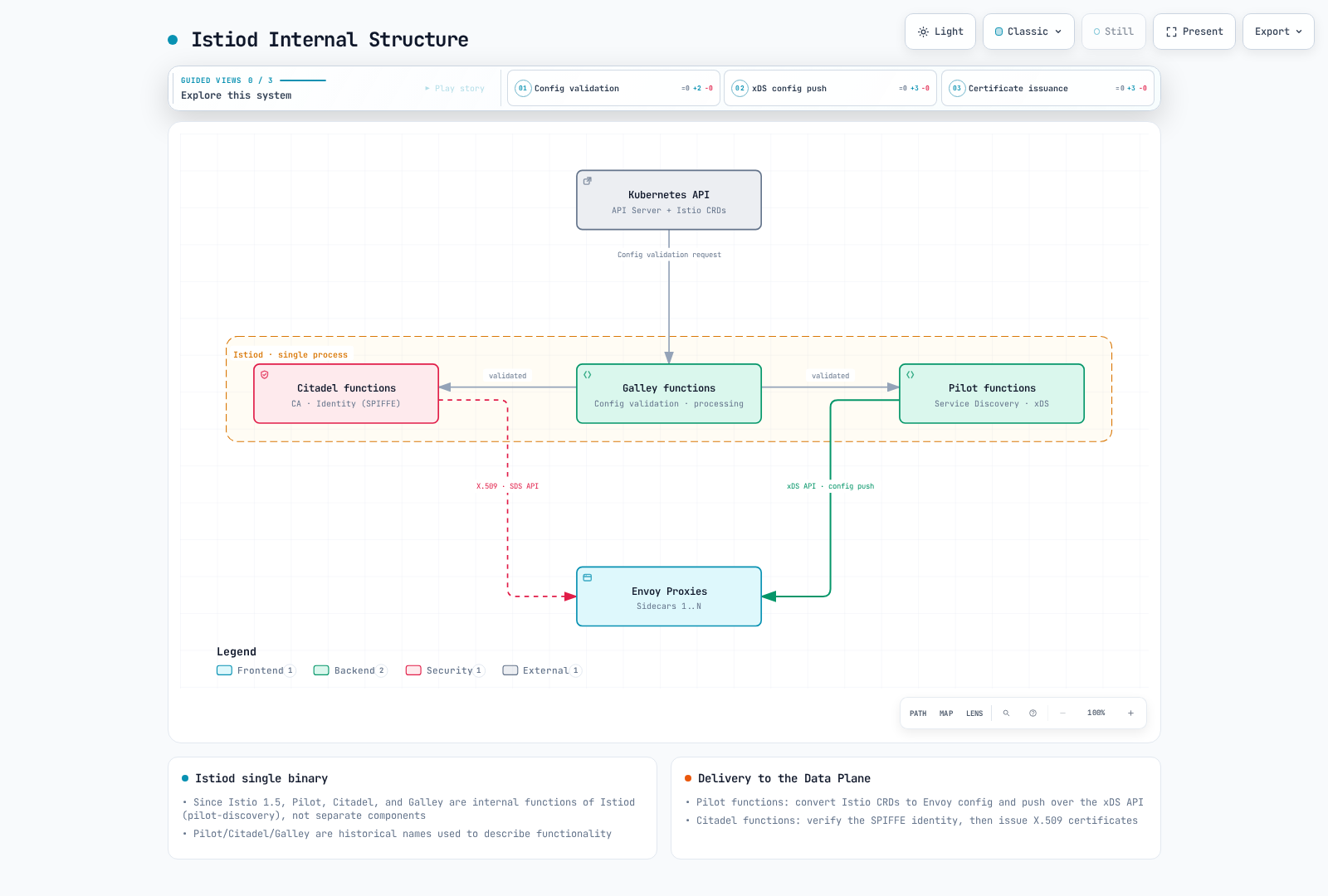
Istiod Main Functions
Note: The functions below are integrated within Istiod in Istio 1.31. Historical names (Pilot, Citadel, Galley) are used to describe functionality.
1. Service Discovery (Pilot Functionality)
# Kubernetes Service detection
apiVersion: v1
kind: Service
metadata:
  name: reviews
spec:
  selector:
    app: reviews
  ports:
  - port: 9080
Istiod tracks:
- Kubernetes Services
- EndpointSlices (pod IPs)
- Pod state changes
- External services (ServiceEntry)
2. Traffic Management (Pilot Functionality)
Converts Istio CRDs to Envoy configuration:
# VirtualService (user-defined)
apiVersion: networking.istio.io/v1
kind: VirtualService
metadata:
  name: reviews
spec:
  hosts:
  - reviews
  http:
  - route:
    - destination:
        host: reviews
        subset: v1
      weight: 90
    - destination:
        host: reviews
        subset: v2
      weight: 10
↓ Istiod converts to Envoy configuration ↓
{
  "match": {"prefix": "/"},
  "route": {
    "weighted_clusters": {
      "clusters": [
        {"name": "outbound|9080|v1|reviews.default.svc.cluster.local", "weight": 90},
        {"name": "outbound|9080|v2|reviews.default.svc.cluster.local", "weight": 10}
      ]
    }
  }
}
3. Certificate Management (Citadel Functionality)
The Istio agent creates the key and CSR, authenticates to istiod, and receives a signed certificate. Envoy obtains that certificate and key from the local agent through SDS. Certificate lifetime is configurable; rotation precedes expiry.
SPIFFE ID Format:
spiffe://cluster.local/ns/default/sa/reviews4. Configuration Validation (Galley Functionality)
Admission validation checks schema and local configuration constraints. Cross-resource existence is checked with istioctl analyze; a destination that does not exist is not necessarily rejected by the admission webhook. This example references a missing Gateway:
# invalid-vs.yaml
apiVersion: networking.istio.io/v1
kind: VirtualService
metadata:
  name: invalid
spec:
  hosts:
  - reviews
  gateways:
  - missing-gateway
  http:
  - route:
    - destination:
host: reviewsistioctl analyze invalid-vs.yaml --use-kube=false
# IST0101: Referenced gateway not found: "missing-gateway"Istiod Process Structure
Actual Implementation in Istio 1.31:
# Inspect the configured binary arguments; no shell in the image is required
kubectl get deployment istiod -n istio-system   -o jsonpath='{.spec.template.spec.containers[?(@.name=="discovery")].args}'
# The discovery container runs pilot-discovery discovery.
Key Points:
- Istiod runs as a single Go binary called
pilot-discovery - Pilot, Citadel, and Galley are historical role names, not a promise of current package names
- All functions run as goroutines within a single process
Main Ports Provided by Istiod:
| Port | Protocol | Purpose | Functionality |
|---|---|---|---|
| 15010 | gRPC | xDS (legacy) | Backward compatibility |
| 15012 | gRPC | xDS over TLS | Primary xDS API endpoint |
| 15014 | HTTP | Control plane monitoring | Metrics and health checks |
| 15017 | HTTPS | Webhook | Injection and validation |
| 8080 | HTTP | Debug | Debugging interface |
Istiod Deployment
High Availability Configuration:
# Merge into the existing istioctl install file; do not replace a managed Deployment
apiVersion: install.istio.io/v1alpha1
kind: IstioOperator
spec:
  components:
    pilot:
      k8s:
        hpaSpec:
          minReplicas: 3
          maxReplicas: 5
        resources:
          requests:
            cpu: 500m
            memory: 2Gi
Typical Resource Usage:
- CPU: 0.5 - 2 cores
- Memory: 2 - 4 GB
- Can handle thousands of services and pods
Data Plane: Envoy Proxy
Envoy Architecture
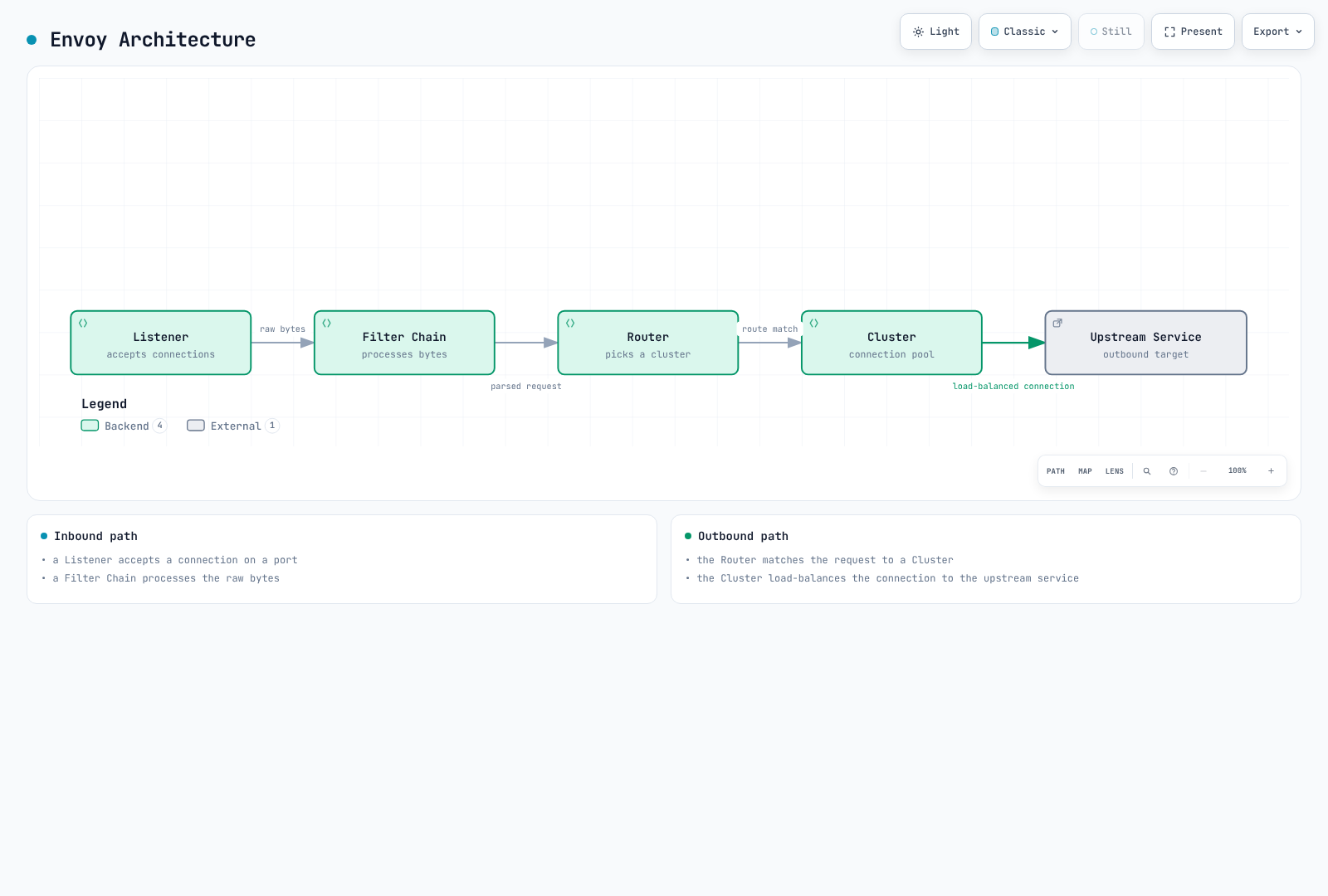
Envoy Main Components
1. Listeners
Receives connections on ports:
{
  "name": "0.0.0.0_15001",
  "address": {
    "socket_address": {
      "address": "0.0.0.0",
      "port_value": 15001
    }
  },
  "filter_chains": [...]
}
Default Istio Listeners:
0.0.0.0:15001: All outbound TCP traffic0.0.0.0:15006: All inbound TCP traffic0.0.0.0:15021: Health check0.0.0.0:15090: Prometheus metrics
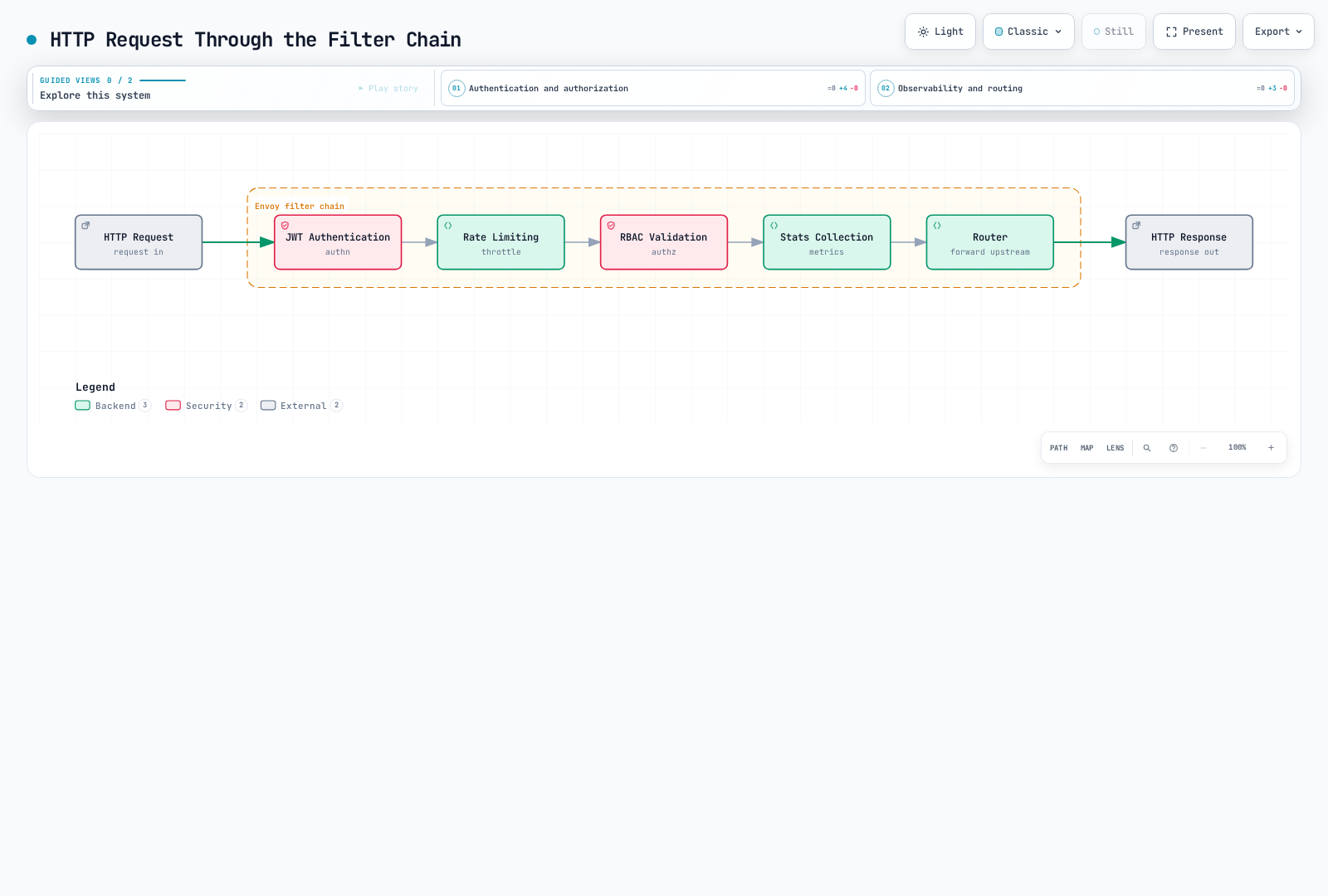
2. Filters
Plugins that process requests/responses:
3. Clusters
Logical groups of upstream services:
{
  "name": "outbound|9080|v1|reviews.default.svc.cluster.local",
  "type": "EDS",
  "eds_cluster_config": {
    "service_name": "outbound|9080|v1|reviews.default.svc.cluster.local"
  },
  "circuit_breakers": {...},
  "outlier_detection": {...}
}
4. Endpoints
Actual pod IP list:
{
  "cluster_name": "outbound|9080|v1|reviews",
  "endpoints": [
    {
      "lb_endpoints": [
        {"endpoint": {"address": {"socket_address": {"address": "10.244.1.5", "port_value": 9080}}}},
        {"endpoint": {"address": {"socket_address": {"address": "10.244.2.8", "port_value": 9080}}}}
      ]
    }
  ]
}
Envoy Performance
Measure the actual traffic pattern, configuration size, and telemetry settings. The official benchmark is explicitly for Istio 1.24; there is no universal RPS/core, sub-millisecond P99, or memory guarantee. Size istiod from service/proxy count and configuration churn as well.
Sidecar Injection Mechanism
Injection Process
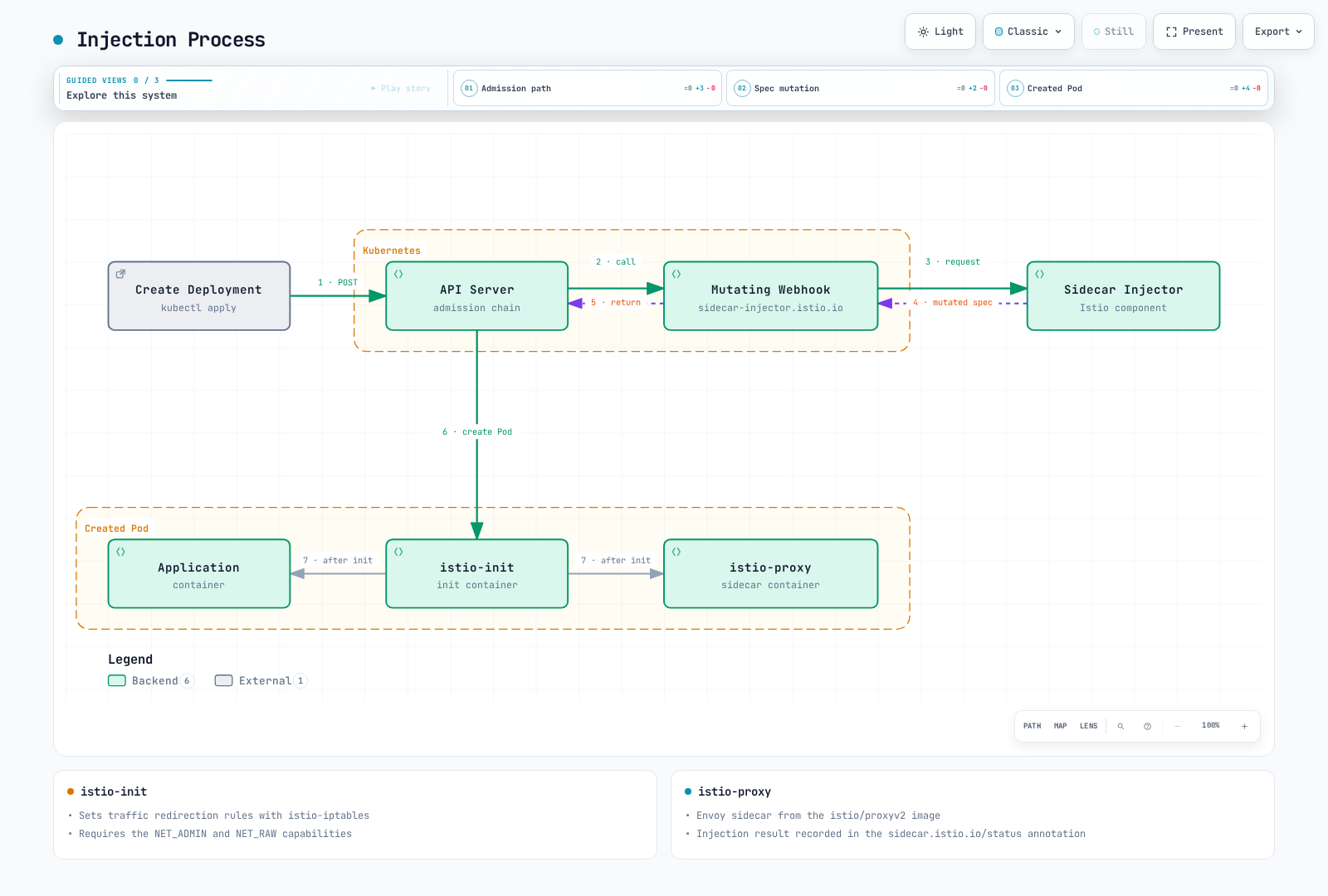
The webhook mutates Pod creation requests, not the Deployment itself. Existing pods need recreation after enabling injection. With Istio CNI, networking setup moves out of the privileged per-pod init container; native sidecars can also change the generated pod layout.
Original vs After Injection
Original Deployment:
apiVersion: apps/v1
kind: Deployment
metadata:
  name: reviews
spec:
  selector:
    matchLabels:
      app: reviews
  template:
    metadata:
      labels:
        app: reviews
    spec:
      containers:
      - name: reviews
        image: reviews:v1
        ports:
        - containerPort: 9080
After Injection:
apiVersion: v1
kind: Pod
metadata:
  annotations:
    sidecar.istio.io/status: '{"initContainers":["istio-init"],"containers":["istio-proxy"]}'
spec:
  initContainers:
  - name: istio-init
    image: istio/proxyv2:1.31.0
    command: ['istio-iptables', ...]
    securityContext:
      capabilities:
        add: [NET_ADMIN, NET_RAW]
  containers:
  - name: reviews
    image: reviews:v1
    ports:
    - containerPort: 9080
  - name: istio-proxy
    image: istio/proxyv2:1.31.0
    args: ['proxy', 'sidecar', ...]
Enabling Sidecar Injection
Automatic Injection (Recommended)
Namespace Level:
# Add label to namespace
kubectl label namespace default istio-injection=enabled

# All pods deployed to this namespace will automatically have sidecar injected
kubectl apply -f deployment.yaml
Pod Level (Label):
apiVersion: v1
kind: Pod
metadata:
  name: example-app
  labels:
    sidecar.istio.io/inject: "true"  # Enable injection per pod
spec:
  containers:
  - name: app
    image: myapp:v1
Manual Injection
Use istioctl kube-inject command to inject sidecar directly into YAML files.
# Inject sidecar into YAML file and deploy
istioctl kube-inject -f deployment.yaml | kubectl apply -f -

# Or save to file
istioctl kube-inject -f deployment.yaml -o deployment-injected.yaml
kubectl apply -f deployment-injected.yaml
Manual Injection Scenarios:
- Environments where automatic injection cannot be used
- When explicit control is needed in CI/CD pipelines
- When you want to inspect injected YAML for debugging
iptables and Traffic Interception
istio-init Container
Role: Sets up iptables rules to redirect pod network traffic to Envoy Proxy
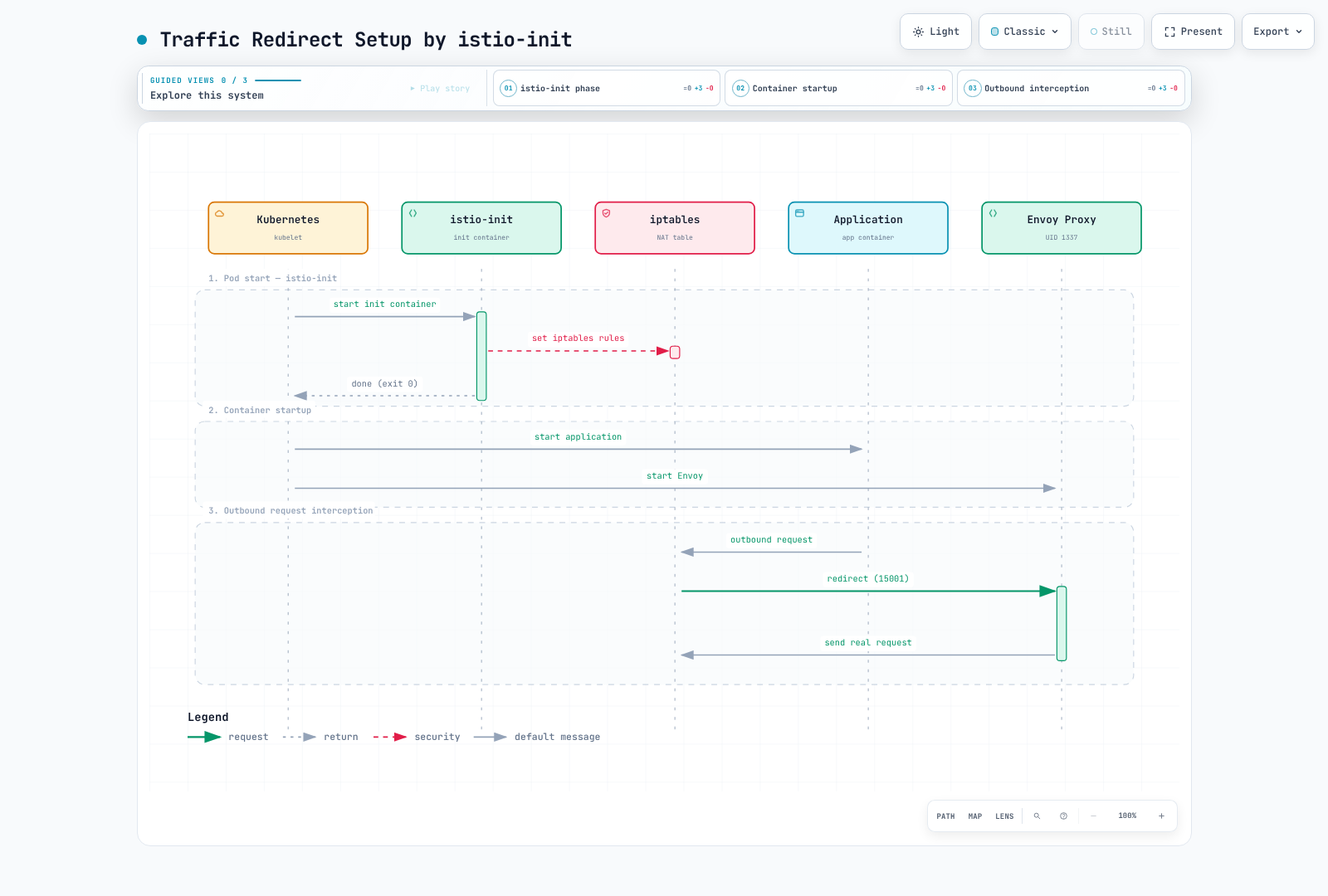
iptables Rules Detail
Simplified rule sketch — not a script to execute:
#!/bin/bash
# istio-iptables script (simplified)

# 1. OUTPUT chain: Application outbound traffic
iptables -t nat -A OUTPUT -p tcp \
  -m owner ! --uid-owner 1337 \
  -j REDIRECT --to-port 15001     # Envoy outbound port

# 2. PREROUTING chain: Inbound traffic to pod
iptables -t nat -A PREROUTING -p tcp \
  -j REDIRECT --to-port 15006     # Envoy inbound port

# 3. Exclusion rules
# - localhost traffic
iptables -t nat -I OUTPUT -d 127.0.0.1/32 -j RETURN

# - Istiod communication (15012)
iptables -t nat -I OUTPUT -p tcp --dport 15012 -j RETURN

# - DNS (53)
iptables -t nat -I OUTPUT -p udp --dport 53 -j RETURN
Traffic Flow (After iptables Applied)
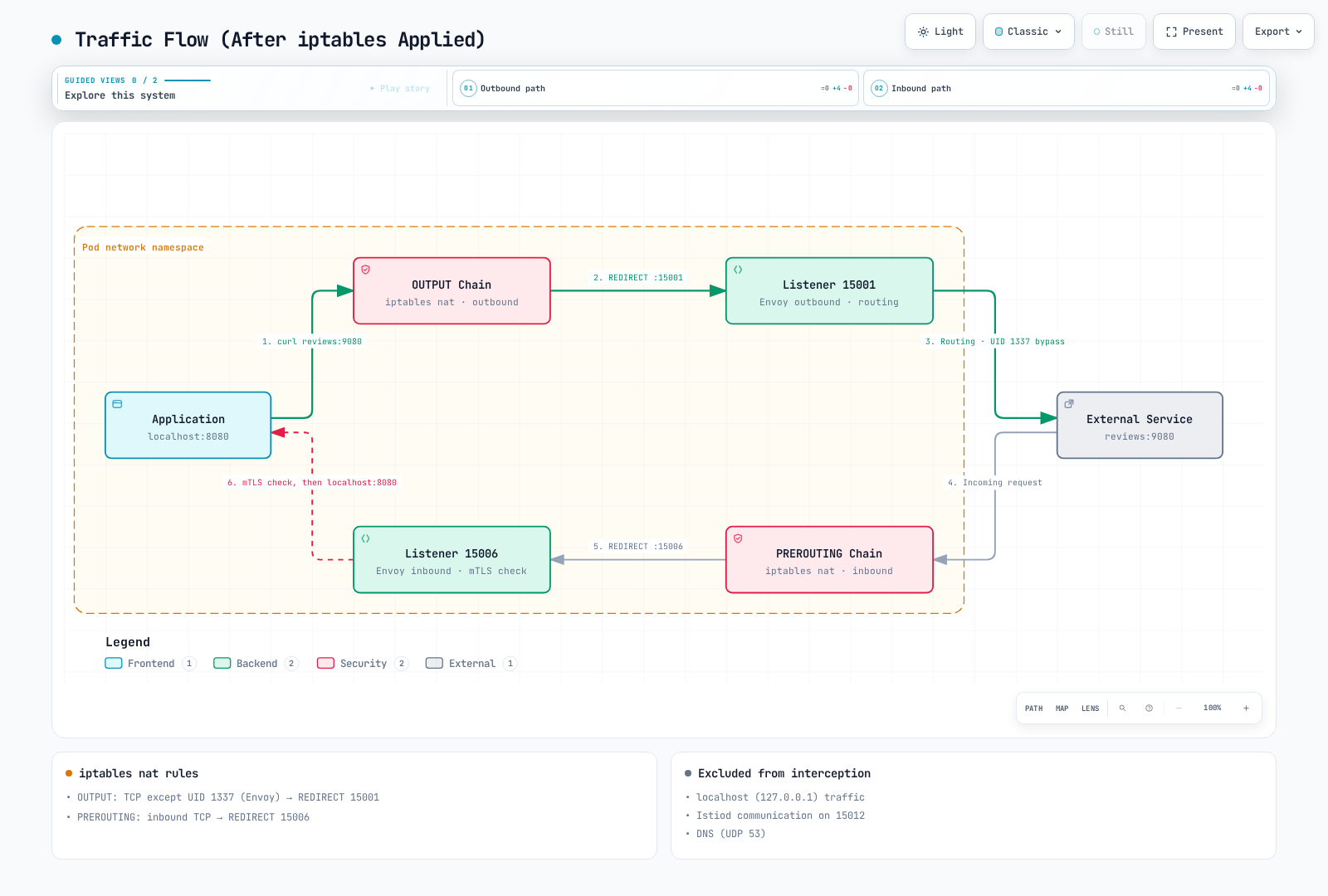
Checking iptables Rules
Check from inside the pod:
A normal istio-proxy container may be distroless and lacks NET_ADMIN. Inspect rules only through an approved node/pod-network-namespace debugging session with the necessary tools and capabilities. The following is illustrative output from iptables -t nat -L -n -v:
# OUTPUT chain
Chain OUTPUT (policy ACCEPT)
target     prot opt source     destination
ISTIO_OUTPUT  tcp  --  0.0.0.0/0  0.0.0.0/0

# ISTIO_OUTPUT detail
Chain ISTIO_OUTPUT (1 references)
RETURN     all  --  0.0.0.0/0  127.0.0.1           # Exclude localhost
RETURN     all  --  0.0.0.0/0  0.0.0.0/0           owner UID match 1337  # Exclude Envoy
REDIRECT   tcp  --  0.0.0.0/0  0.0.0.0/0           redir ports 15001  # Redirect rest

# PREROUTING chain
Chain PREROUTING (policy ACCEPT)
ISTIO_INBOUND  tcp  --  0.0.0.0/0  0.0.0.0/0

# ISTIO_INBOUND detail
Chain ISTIO_INBOUND (1 references)
REDIRECT   tcp  --  0.0.0.0/0  0.0.0.0/0           redir ports 15006
Init container vs Istio CNI
Both paths configure traffic redirection. Istio CNI is a privileged node DaemonSet chained to the primary CNI, such as AWS VPC CNI; it is not an eBPF replacement for that CNI. It is optional for sidecars and required for ambient mode.
DNS Processing Mechanism
Kubernetes DNS Basic Operation
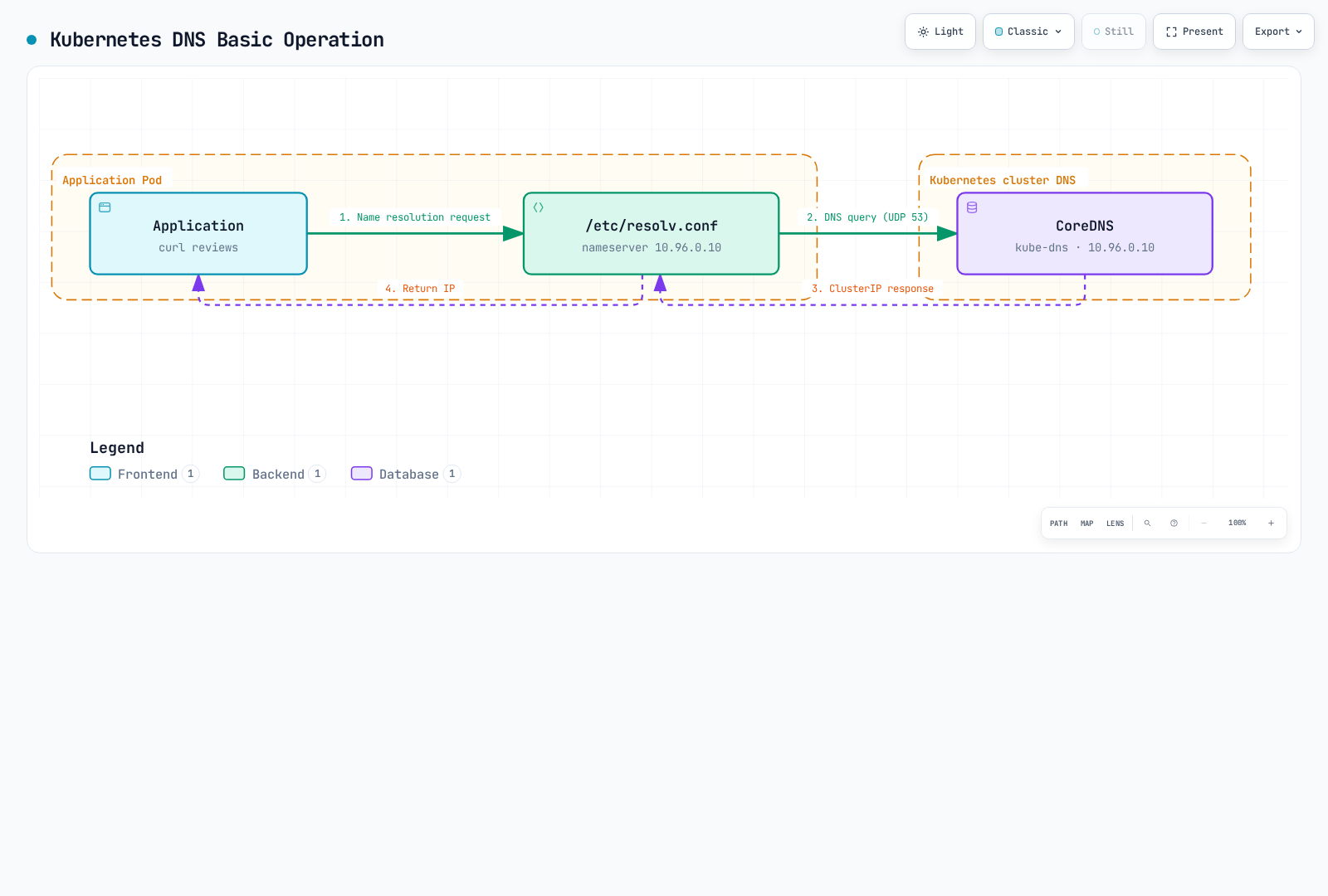
/etc/resolv.conf (inside pod):
nameserver 10.96.0.10  # kube-dns ClusterIP
search default.svc.cluster.local svc.cluster.local cluster.local
options ndots:5
Envoy's DNS Processing
Application DNS resolution and Envoy endpoint discovery are different operations:
The application resolves a service name first. Envoy then uses routing configuration and EDS endpoint data to select an upstream; EDS does not replace the application DNS lookup.
Advantages:
- EDS distributes endpoints to Envoy; application DNS still uses its configured resolver unless DNS capture answers locally
- Dynamic Endpoint updates
- Advanced routing (versions, weights, etc.)
DNS Proxy (Optional in Sidecar Mode)
DNS Proxy feature added in Istio 1.8+:
The sidecar DNS proxy runs in the Istio agent and answers from a locally cached name table supplied by istiod. It does not query istiod for each DNS request. Unknown names go to the resolver in /etc/resolv.conf. Ambient DNS capture is enabled by default from Istio 1.25. Merge the following into the installation file and restart affected sidecar workloads.
apiVersion: install.istio.io/v1alpha1
kind: IstioOperator
spec:
  meshConfig:
    defaultConfig:
      proxyMetadata:
ISTIO_META_DNS_CAPTURE: "true" # Enable DNS ProxyOperation:
With DNS capture enabled: application → Istio agent DNS proxy → local name table, or upstream resolver when the name is unknown.
DNS Proxy iptables rules:
# Redirect UDP port 53 to Istio agent DNS proxy
iptables -t nat -A OUTPUT -p udp --dport 53 \
  -m owner ! --uid-owner 1337 \
  -j REDIRECT --to-port 15053
xDS API Communication
xDS Protocol Overview
xDS: Stands for Discovery Service, Envoy's dynamic configuration protocol.
LDS, RDS, CDS, and EDS are logical resource types, normally multiplexed over an aggregated discovery stream (ADS). Sidecar SDS is served by the local Istio agent, not a fifth direct istiod stream.
xDS API Types
| API | Name | Role | Example |
|---|---|---|---|
| LDS | Listener Discovery | Receive port configuration | 15001, 15006 |
| RDS | Route Discovery | HTTP routing rules | VirtualService |
| CDS | Cluster Discovery | Upstream services | DestinationRule |
| EDS | Endpoint Discovery | Pod IP list | Service Endpoints |
| SDS | Secret Discovery | TLS certificates | mTLS certificates |
xDS Communication Flow
At startup, the agent bootstraps identity and proxies the discovery connection to istiod. Envoy acknowledges accepted configurations; istiod pushes updates when configuration or endpoints change. SDS supplies certificates separately through the local agent.
Verifying xDS Communication
Check with Envoy Admin API:
# Export via istioctl; no curl or shell is required inside the proxy image
istioctl proxy-config all <pod-name> -n default -o json > config-dump.json
jq '.configs[] | select(."@type" | endswith("ListenersConfigDump")) | .dynamic_listeners' config-dump.json
jq '.configs[] | select(."@type" | endswith("ClustersConfigDump")) | .dynamic_active_clusters' config-dump.json
jq '.configs[] | select(."@type" | endswith("RoutesConfigDump")) | .dynamic_route_configs' config-dump.json
Check with istioctl:
# Listener configuration
istioctl proxy-config listeners <pod-name> -n default

# Cluster configuration
istioctl proxy-config clusters <pod-name> -n default

# Endpoint configuration
istioctl proxy-config endpoints <pod-name> -n default

# Route configuration
istioctl proxy-config routes <pod-name> -n default
Optimization with Sidecar Resource
Problem: Receiving All Service Information
By default, each Envoy receives information about all services in the entire mesh:
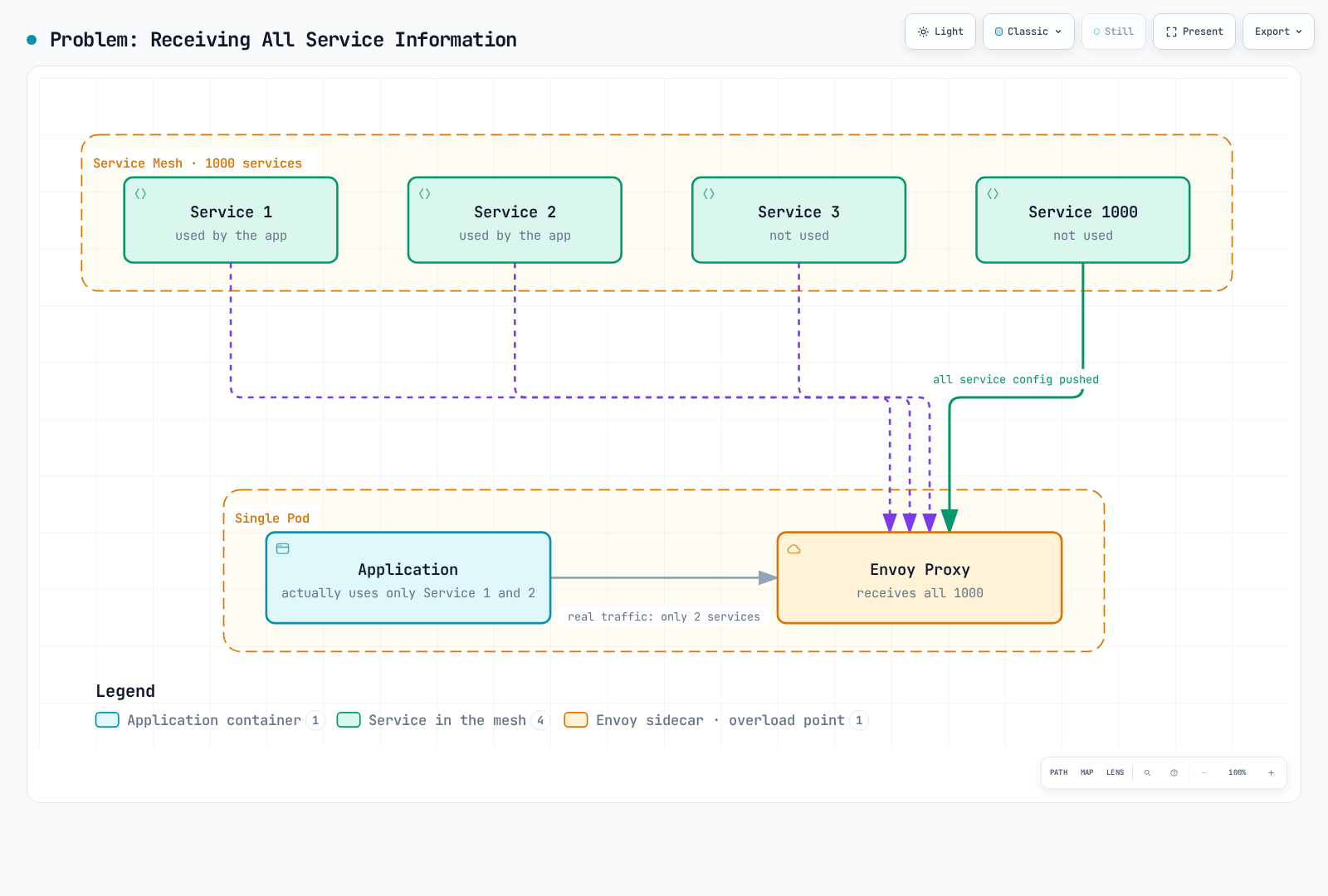
Problems:
- Increased memory usage
- Increased CPU usage (configuration processing)
- Network bandwidth waste
- Increased Istiod load
Solution: Sidecar Resource
Use Sidecar resource to restrict receiving only necessary services:
apiVersion: networking.istio.io/v1
kind: Sidecar
metadata:
  name: default
  namespace: default
spec:
  egress:
  - hosts:
    - "./*"  # All services in same namespace
    - "istio-system/*"  # All services in istio-system
    - "production/reviews.production.svc.cluster.local"  # Only reviews in production namespace
Configuration scoping and REGISTRY_ONLY are not outbound firewalls. Use AuthorizationPolicy and network enforcement for isolation. Sidecar resources do not configure ambient proxies.
Sidecar Resource Examples
1. Namespace Configuration Scoping
apiVersion: networking.istio.io/v1
kind: Sidecar
metadata:
  name: default
  namespace: team-a
spec:
  egress:
  - hosts:
    - "team-a/*"  # Own namespace only
    - "istio-system/*"  # System services
    - "shared/*"  # Shared services
2. Import Specific Services
apiVersion: networking.istio.io/v1
kind: Sidecar
metadata:
  name: frontend
  namespace: default
spec:
  workloadSelector:
    labels:
      app: frontend
  egress:
  - port:
      number: 443
      name: https
      protocol: HTTPS
    hosts:
    - "external/*"
  - hosts:
    - "default/reviews.default.svc.cluster.local"
    - "default/ratings.default.svc.cluster.local"
    - "default/details.default.svc.cluster.local"
3. Detect Unregistered Destinations
apiVersion: networking.istio.io/v1
kind: Sidecar
metadata:
  name: external-only
  namespace: default
spec:
  workloadSelector:
    labels:
      app: batch-job
  egress:
  - hosts:
    - "./*"  # Same namespace
  outboundTrafficPolicy:
    mode: REGISTRY_ONLY  # Known Kubernetes services and ServiceEntry destinations
Sidecar Resource Effects
Importing fewer services reduces configuration size and can reduce proxy memory and push work. Cluster count also depends on ports and subsets, so one service does not always equal one Envoy cluster. Measure the effect; fixed memory or push-time savings are not guaranteed.
DNS and Sidecar Integration
apiVersion: networking.istio.io/v1
kind: Sidecar
metadata:
  name: dns-optimized
  namespace: default
spec:
  egress:
  - hosts:
    - "default/reviews.default.svc.cluster.local"
    - "default/ratings.default.svc.cluster.local"
  # Scope imported service configuration
# DNS capture is configured separatelyResult:
- The proxy imports the selected service configuration; this is not a DNS allowlist
- External domains like
google.comforwarded to CoreDNS - Memory and CPU savings