Traffic Management Quiz
Reviewed Version: Istio 1.31.0 EKS Versions: 1.34–1.36 Last Updated: September 11, 2026
This quiz tests your understanding of Istio's traffic management features.
Multiple Choice Questions (1-5)
Question 1: Role of VirtualService
Which statement about VirtualService is correct?
A. It is a resource that replaces Kubernetes Service
B. It can only define load balancing algorithms
C. It defines routing rules and controls traffic
D. It sends every application request through istiod
Show Answer
Answer: C
VirtualService is a core Istio CRD that controls traffic by defining routing rules.
Explanation:
- A (X): VirtualService does not replace Kubernetes Service; it adds routing rules on top of Service
- B (X): Load balancing is handled by DestinationRule; VirtualService defines routing rules
- C (O): VirtualService defines the following:
- HTTP/TCP routing rules
- URL path-based routing
- Header-based routing
- Weight-based traffic splitting
- Timeout and Retry settings
- D (X): istiod compiles the VirtualService API object; Envoy enforces the resulting routing configuration in the data plane
Example:
apiVersion: networking.istio.io/v1
kind: VirtualService
metadata:
  name: reviews
spec:
  hosts:
  - reviews
  http:
  - match:
    - headers:
        end-user:
          exact: jason
    route:
    - destination:
        host: reviews
        subset: v2
  - route:
    - destination:
        host: reviews
        subset: v1
Reference:
Question 2: DestinationRule Functions
Which is NOT a function performed by DestinationRule?
A. Defining subsets
B. Configuring load balancing algorithms
C. HTTP path-based routing
D. Configuring Connection Pool
Show Answer
Answer: C
HTTP path-based routing is the role of VirtualService.
Explanation:
Main Functions of DestinationRule:
- Defining Subsets (A - O)
apiVersion: networking.istio.io/v1
kind: DestinationRule
metadata:
  name: reviews
spec:
  host: reviews
  subsets:
  - name: v1
    labels:
      version: v1
  - name: v2
    labels:
version: v2- Load Balancing Configuration (B - O)
spec:
  trafficPolicy:
    loadBalancer:
simple: ROUND_ROBIN # RANDOM, LEAST_REQUEST, etc.- Connection Pool Configuration (D - O)
spec:
  trafficPolicy:
    connectionPool:
      tcp:
        maxConnections: 100
      http:
http1MaxPendingRequests: 50- HTTP Path-based Routing (C - X)
- This is VirtualService's role:
# Handled by VirtualService
apiVersion: networking.istio.io/v1
kind: VirtualService
metadata:
  name: path-routing-example
spec:
  hosts:
  - api-service
  http:
  - match:
    - uri:
        prefix: /api  # Path-based routing
    route:
    - destination:
        host: api-service
Comparison Table:
| Function | VirtualService | DestinationRule |
|---|---|---|
| Routing rules | Yes | No |
| Path matching | Yes | No |
| Subset definition | No | Yes |
| Load balancing | No | Yes |
| Connection Pool | No | Yes |
Reference:
Question 3: Canary Deployment Traffic Splitting
What is the traffic ratio between v1 and v2 in the following VirtualService configuration?
apiVersion: networking.istio.io/v1
kind: VirtualService
metadata:
  name: reviews
spec:
  hosts:
  - reviews
  http:
  - route:
    - destination:
        host: reviews
        subset: v1
      weight: 80
    - destination:
        host: reviews
        subset: v2
      weight: 20
A. v1: 50%, v2: 50%
B. v1: 80%, v2: 20%
C. v1: 20%, v2: 80%
D. v1: 100%, v2: 0%
Show Answer
Answer: B
Since the weight values are v1: 80, v2: 20, traffic is distributed as 80% to v1 and 20% to v2.
Explanation:
Weight-based Traffic Splitting:
- The
weightfield represents relative ratios - Total weight: 80 + 20 = 100
- v1 ratio: 80/100 = 80%
- v2 ratio: 20/100 = 20%
Canary Deployment Stages:
# Stage 1: 10% Canary
- weight: 90  # v1
- weight: 10  # v2

# Stage 2: 25% Canary
- weight: 75  # v1
- weight: 25  # v2

# Stage 3: 50% Canary
- weight: 50  # v1
- weight: 50  # v2

# Stage 4: 100% v2
- weight: 0   # v1
- weight: 100 # v2
Automated Canary with Argo Rollouts:
# Strategy fragment; merge into a complete Rollout with selector/template
strategy:
  canary:
    trafficRouting:
      istio:
        virtualService:
          name: reviews
        destinationRule:
          name: reviews
          stableSubsetName: v1
          canarySubsetName: v2
    steps:
    - setWeight: 10
    - pause: {duration: 2m}
    - setWeight: 25
    - pause: {duration: 2m}
    - setWeight: 50
    - pause: {duration: 2m}
Reference:
Question 4: Gateway Purpose
Which is NOT a role of an Istio ingress Gateway configuration?
A. Define listener ports, protocols, and allowed hosts
B. Configure TLS termination using a certificate Secret
C. Automatically inject a proxy into every application Pod and secure all east-west traffic by itself
D. Bind ingress traffic to VirtualService routing
Show Answer
Answer: C
An Istio Gateway configures an existing gateway proxy. Workload enrollment and service-to-service mesh security require the sidecar or ambient data plane and its policies. Gateway proxies can themselves originate upstream mTLS, so “Gateway never uses mTLS” would also be incorrect. The Gateway does not issue certificates; credentialName references a Secret managed separately in the gateway workload namespace.
apiVersion: networking.istio.io/v1
kind: Gateway
metadata:
  name: bookinfo-gateway
  namespace: istio-system
spec:
  selector:
    istio: ingressgateway
  servers:
  - port:
      number: 443
      name: https
      protocol: HTTPS
    hosts: [bookinfo.example.com]
    tls:
      mode: SIMPLE
credentialName: bookinfo-secretQuestion 5: Timeout and Retry Policy
What does the following VirtualService configuration mean?
apiVersion: networking.istio.io/v1
kind: VirtualService
metadata:
  name: reviews
spec:
  hosts:
  - reviews
  http:
  - route:
    - destination:
        host: reviews
    timeout: 10s
    retries:
      attempts: 3
      perTryTimeout: 2s
A. Retry up to 3 times after the original request, with each delivery limited to 2 seconds and the whole request limited to 10 seconds
B. Retry up to 3 times within 2 seconds total, each attempt limited to 10 seconds
C. Unlimited retries within 10 seconds total, each attempt limited to 2 seconds
D. Fail after 10 seconds without retries
Show Answer
Answer: A
This configuration permits up to 3 additional retries after the original request, limits each delivery to 2 seconds, and limits the whole request to 10 seconds. It can therefore deliver the request upstream up to four times.
Explanation:
Configuration Interpretation:
timeout: 10s           # Maximum time for entire request
retries:
  attempts: 3          # Up to 3 retries after the original request
  perTryTimeout: 2s    # Time limit for each delivery
These timing examples assume a failure eligible under retryOn and omit backoff/processing overhead. A timeout does not imply every policy will retry it.
Execution Scenarios:
Scenario 1: First attempt succeeds
+- 1st attempt: 1.5s elapsed -> Success
+- Total time: 1.5s

Scenario 2: Success after 2 attempts
+- 1st attempt: 2s timeout -> Failure
+- 2nd attempt: 1.8s elapsed -> Success
+- Total time: 3.8s

Scenario 3: Original request plus all 3 retries fail
+- 1st attempt: 2s timeout -> Failure
+- 2nd attempt: 2s timeout -> Failure
+- 3rd attempt: 2s timeout -> Failure
+- 4th attempt: 2s timeout -> Failure
+- Total time: about 8s
Retry Condition Settings:
retries:
  attempts: 3
  perTryTimeout: 2s
  retryOn: 5xx,connect-failure,refused-stream  # Retry conditions
Best Practices:
# Read requests: limited retry
- match:
  - method:
      regex: "^(GET|HEAD)$"
  retries:
    attempts: 2
    perTryTimeout: 2s
    retryOn: connect-failure,refused-stream

# Write requests: disable mesh retry
- match:
  - method:
      regex: "^(POST|PUT|PATCH|DELETE)$"
  retries:
    attempts: 0
Cautions:
- To budget for every retry,
timeoutshould be roughly greater than(1 + attempts) x perTryTimeout, with backoff included - Too many retries can cause cascading failure
attempts: 0disables retry;attempts: 1permits one replay after the original request- Disable mesh retry by default for POST/PATCH because the server can commit and lose only the response
- Workload mTLS or network encryption does not make request replay safe
Reference:
Short Answer Questions (6-10)
Question 6: Argo Rollouts + Istio Canary Deployment
Describe a subset-based canary rollout with automatic metric gates, including resources, ordering, and abort conditions.
Show Answer
Use a Service, DestinationRule stable/canary subsets, a VirtualService route, AnalysisTemplates, and a complete Rollout. Argo updates route weights and subset pod-template hashes; it does not create the pre-referenced Istio resources. Host-level integration instead uses separate stable/canary Services. Named routes must match the Rollout’s explicit route list; a single route can omit that list.
Use a fresh lab namespace with sidecar injection and a compatible Argo Rollouts controller/CLI (the audited guide uses v1.10.0). Add the pod scrape relabeling below to Prometheus and confirm canary traffic has rollout_hash and reporter="destination" labels. These gates measure the newest ReplicaSet rather than a diluted stable+canary average.
# Existing workload pod scrape job: relabel_configs fragment
- source_labels: [__meta_kubernetes_pod_label_rollouts_pod_template_hash]
  target_label: rollout_hash
Create the prerequisites first:
apiVersion: v1
kind: Service
metadata:
  name: reviews
  namespace: default
spec:
  ports:
  - port: 9080
    name: http
  selector:
    app: reviews
---
apiVersion: networking.istio.io/v1
kind: DestinationRule
metadata:
  name: reviews-destrule
  namespace: default
spec:
  host: reviews
  subsets:
  - name: stable
    labels:
      app: reviews
  - name: canary
    labels:
      app: reviews
---
apiVersion: networking.istio.io/v1
kind: VirtualService
metadata:
  name: reviews-vsvc
  namespace: default
spec:
  hosts:
  - reviews
  http:
  - name: primary
    route:
    - destination:
        host: reviews
        subset: stable
      weight: 100
    - destination:
        host: reviews
        subset: canary
      weight: 0
---
apiVersion: argoproj.io/v1alpha1
kind: AnalysisTemplate
metadata:
  name: success-rate
  namespace: default
spec:
  args:
  - name: service-name
  - name: pod-template-hash
  metrics:
  - name: success-rate
    interval: 30s
    count: 4
    successCondition: len(result) == 1 && !isNaN(result[0]) && result[0] >= 0.95
    failureLimit: 0
    provider:
      prometheus:
        address: http://prometheus.istio-system:9090
        query: "sum(rate(\n  istio_requests_total{\n    destination_service_name=\"\
          {{args.service-name}}\",\n    reporter=\"destination\",\n    rollout_hash=\"\
          {{args.pod-template-hash}}\",\n    destination_workload_namespace=\"default\"\
          ,\n    response_code!~\"5.*\"\n  }[2m]\n))\n/\nsum(rate(\n  istio_requests_total{\n\
          \    destination_service_name=\"{{args.service-name}}\",\n    reporter=\"\
          destination\",\n    rollout_hash=\"{{args.pod-template-hash}}\",\n    destination_workload_namespace=\"\
          default\"\n  }[2m]\n))\n"
---
apiVersion: argoproj.io/v1alpha1
kind: AnalysisTemplate
metadata:
  name: latency
  namespace: default
spec:
  args:
  - name: service-name
  - name: pod-template-hash
  metrics:
  - name: latency-p95
    interval: 30s
    count: 4
    successCondition: len(result) == 1 && !isNaN(result[0]) && result[0] <= 500
    failureLimit: 0
    provider:
      prometheus:
        address: http://prometheus.istio-system:9090
        query: "histogram_quantile(0.95,\n  sum(rate(\n    istio_request_duration_milliseconds_bucket{\n\
          \      destination_service_name=\"{{args.service-name}}\",\n    reporter=\"\
          destination\",\n    rollout_hash=\"{{args.pod-template-hash}}\",\n     \
          \ destination_workload_namespace=\"default\"\n    }[2m]\n  )) by (le)\n\
          )\n"
Then create the Rollout:
apiVersion: argoproj.io/v1alpha1
kind: Rollout
metadata:
  name: reviews
  namespace: default
spec:
  replicas: 5
  revisionHistoryLimit: 2
  selector:
    matchLabels:
      app: reviews
  template:
    metadata:
      labels:
        app: reviews
        sidecar.istio.io/inject: 'true'
    spec:
      containers:
      - name: reviews
        image: docker.io/istio/examples-bookinfo-reviews-v2:1.20.3
        ports:
        - containerPort: 9080
        resources:
          requests:
            memory: 64Mi
            cpu: 100m
          limits:
            memory: 128Mi
            cpu: 200m
  strategy:
    canary:
      trafficRouting:
        istio:
          virtualService:
            name: reviews-vsvc
            routes:
            - primary
          destinationRule:
            name: reviews-destrule
            canarySubsetName: canary
            stableSubsetName: stable
      steps:
      - setWeight: 10
      - pause:
          duration: 2m
      - analysis:
          templates:
          - templateName: success-rate
          - templateName: latency
          args:
          - name: service-name
            value: reviews
          - name: pod-template-hash
            valueFrom:
              podTemplateHashValue: Latest
      - setWeight: 25
      - pause:
          duration: 2m
      - analysis:
          templates:
          - templateName: success-rate
          - templateName: latency
          args:
          - name: service-name
            value: reviews
          - name: pod-template-hash
            valueFrom:
              podTemplateHashValue: Latest
      - setWeight: 50
      - pause:
          duration: 2m
      - analysis:
          templates:
          - templateName: success-rate
          - templateName: latency
          args:
          - name: service-name
            value: reviews
          - name: pod-template-hash
            valueFrom:
              podTemplateHashValue: Latest
      - setWeight: 75
      - pause:
          duration: 2m
      - analysis:
          templates:
          - templateName: success-rate
          - templateName: latency
          args:
          - name: service-name
            value: reviews
          - name: pod-template-hash
            valueFrom:
              podTemplateHashValue: Latest
The first deployment establishes the stable version; update the image to exercise canary stages. Each weighted stage has a finite inline analysis gate. With failureLimit 0, one failed measurement aborts the active rollout; missing/NaN data cannot pass. A successful gate advances to the next stage. Timing depends on traffic, scrape/analysis intervals and reconciliation, not a guaranteed few seconds.
kubectl argo rollouts get rollout reviews --watch
kubectl get analysisruns
kubectl argo rollouts set image reviews reviews=istio/examples-bookinfo-reviews-v3:1.20.3
# Stop a failing active rollout; undo is a separate desired-template rollback
kubectl argo rollouts abort reviews
Allow configuration to propagate and verify healthy endpoints before shifting live traffic. Do not let another controller overwrite Argo-managed weights/hashes. See the complete rollout guide for installation and execution prerequisites.
Question 7: Blue/Green vs Canary
Compare traffic movement, resource needs, rollback, and suitable use cases.
Show Answer
| Aspect | Blue/Green | Canary |
|---|---|---|
| Traffic | Preview first, then switch the active Service selector | Increase routed request weight in steps |
| Validation | Pre- and post-promotion analysis | Inline/background analysis during progression |
| Capacity | Often two full revisions during the transition; preview sizing can vary | Depends on replicas and scaling policy; retaining full stable capacity can approach two revisions |
| Rollback | Switch back while the previous revision/capacity remains available | Abort the active rollout to stable; undo/redeploy after promotion as appropriate |
| Main tradeoff | Simple production cutover, broad impact at promotion | Smaller exposure per stage, more routing/analysis coordination |
Neither cutover is network-atomic: endpoint/proxy propagation and existing connections matter. Neither reverses database migrations or external side effects. Keep schemas and API contracts compatible during coexistence. Canary weight is not a stable user cohort; A/B tests need an explicit cohort key.
Blue/Green suits releases that can be extensively previewed and have enough temporary capacity. Canary suits progressive production validation when representative traffic and trustworthy metrics exist. Do not choose canary solely on an assumed “1x plus a little” cost: inspect its scaling settings, including optional dynamicStableScale.
# Alternative strategy fragment for a complete Rollout
strategy:
  blueGreen:
    activeService: myapp-active
    previewService: myapp-preview
    autoPromotionEnabled: false
    scaleDownDelaySeconds: 600
    prePromotionAnalysis:
      templates:
      - templateName: smoke-tests
    postPromotionAnalysis:
      templates:
      - templateName: post-promotion-tests
Create the Services and matching AnalysisTemplates with their required arguments before use. Choose retention to cover post-promotion analysis and rollback needs. A hybrid progression is a designed workflow; changing a strategy field mid-rollout is not an automatic canary-to-blue/green conversion.
Question 8: Traffic Mirroring (Shadow Testing)
Explain how to safely test new versions using Traffic Mirroring. Include use cases, configuration methods, and cautions.
Show Answer
Answer:
Traffic Mirroring Concept:
Traffic mirroring is a technique that duplicates production traffic and sends it to a new version, while ignoring the responses. It's also called "shadow testing".
1. How It Works
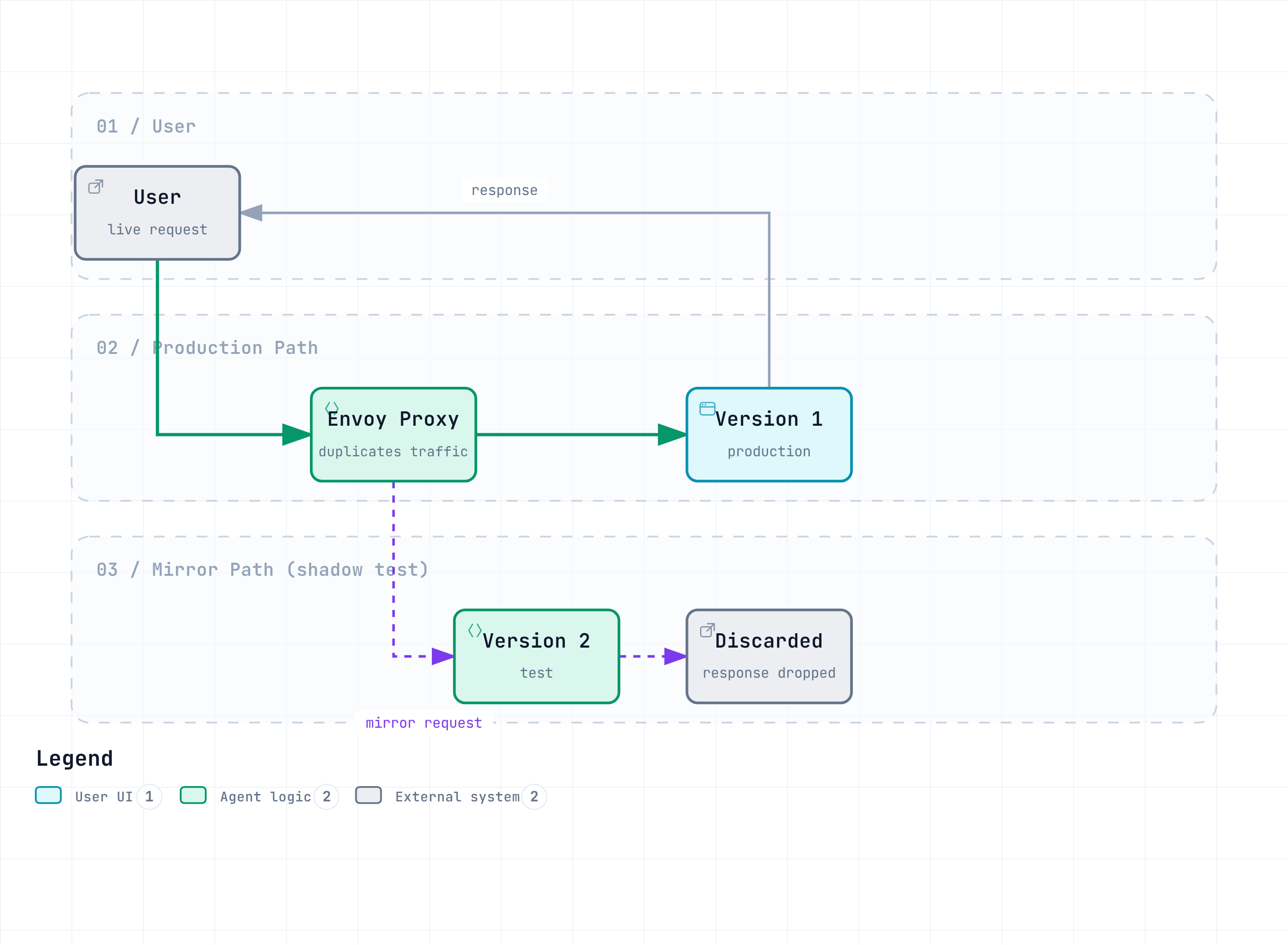
Key Characteristics:
- Users only receive v1's response
- v2's response is discarded by Envoy
- v2 responses are not returned to the client, but shared-resource contention and write side effects can still affect users
2. Configuration Methods
Basic Mirroring (100%):
apiVersion: networking.istio.io/v1
kind: VirtualService
metadata:
  name: reviews
spec:
  hosts:
  - reviews
  http:
  - route:
    - destination:
        host: reviews
        subset: v1
      weight: 100  # Primary traffic
    mirror:
      host: reviews
      subset: v2  # Mirror target
    mirrorPercentage:
      value: 100  # 100% mirroring
Partial Mirroring (50%):
spec:
  http:
  - route:
    - destination:
        host: reviews
        subset: v1
      weight: 100
    mirror:
      host: reviews
      subset: v2
    mirrorPercentage:
      value: 50  # Only 50% mirroring (reduce traffic load)
Mirroring + Canary Combination:
spec:
  http:
  - route:
    # Primary traffic: 90% v1, 10% v2
    - destination:
        host: reviews
        subset: v1
      weight: 90
    - destination:
        host: reviews
        subset: v2
      weight: 10

    # Mirroring: Mirror all traffic to v3 (test)
    mirror:
      host: reviews
      subset: v3
    mirrorPercentage:
      value: 100
3. Use Cases
Case 1: New Version Performance Testing
Purpose: Verify if v2's performance is better than v1

1. Run v1 (production) + v2 (mirror) simultaneously
2. Monitor v2's latency, CPU, memory
3. If v2 is faster than v1 -> Proceed with Canary deployment
4. If v2 is slower than v1 -> Optimize and retest
Case 2: Database Migration Validation
Purpose: Verify new database schema

1. v1 -> Existing DB
2. v2 -> New DB (mirroring)
3. Verify v2's query performance and error rate
4. If no issues -> Switch to v2
Case 3: Bug Fix Validation
Purpose: Verify that bug fix actually works

1. Run v1 (with bug) + v2 (fixed version, mirror)
2. Test v2 with production traffic
3. If v2's error rate decreases -> Deploy
Case 4: Cache Warming
Purpose: Pre-populate new version's cache

1. Deploy v2, then warm its cache with mirror traffic before cutover
2. Once v2's cache is sufficiently populated
3. Warmup can reduce cache misses; it does not guarantee no cold start
4. Monitoring Configuration
Monitor Mirror Traffic with Prometheus Queries:
# v2 (mirror) error rate
sum(rate(
  istio_requests_total{
    destination_version="v2",
    response_code=~"5.."
  }[5m]
))
/
sum(rate(
  istio_requests_total{
    destination_version="v2"
  }[5m]
))

# v1 vs v2 latency comparison
histogram_quantile(0.95,
  sum(rate(
    istio_request_duration_milliseconds_bucket[5m]
  )) by (destination_version, le)
)
Grafana Dashboard:
# Panel 1: Error rate comparison (v1 vs v2)
# Panel 2: Latency comparison (P50, P95, P99)
# Panel 3: CPU/Memory usage
# Panel 4: Request count (v1: actual, v2: mirror)
5. Cautions
Warning - Increased Load:
Mirroring increases service load.

Example:
- v1: 1000 RPS
- v2: 1000 RPS (mirror)
- Total load: 2000 RPS

Choose the percentage from shadow capacity and the test hypothesis; 50% is not a universal safe limit
Warning - Watch for Side Effects:
# Don't mirror write operations!

# Bad example
POST /api/orders  # Both v1 and v2 create orders -> Duplicates!

# Good example
GET /api/orders   # Mirror only read-only operations
Warning - Cost:
Mirroring increases resources and costs.

- 100% mirroring duplicates request volume on that route
- CPU, response traffic, and database cost depend on workload behavior

Solution: Mirror only for short periods (1-2 days)
Warning - Cannot Validate Responses:
Mirror traffic responses are discarded, so
Istio does not compare response content. Application instrumentation or a dedicated shadow comparison system can validate correctness separately.

Can validate:
- Error rate
- Latency
- Resource usage

Cannot validate:
- Response/business correctness requires additional validation tooling
6. Best Practices
# Good examples
1. Mirror only read-only APIs
2. mirrorPercentage: 50% (reduce load)
3. Short-term testing (1-2 days)
4. Automatic validation based on metrics

# Bad examples
1. Mirroring write operations (duplicate data)
2. mirrorPercentage: 100% without capacity planning
3. Long-term mirroring (cost increase)
4. Manual validation (slow)
Reference:
Question 9: Locality and Cross-AZ Costs
Explain locality routing on EKS, the failover requirements, and how to estimate savings from measured traffic.
Show Answer
Istiod derives locality from node topology; Pods do not automatically inherit node labels. Inspect Nodes and proxy endpoint locality:
kubectl get pods -o wide
kubectl get nodes -L topology.kubernetes.io/region,topology.kubernetes.io/zone
istioctl proxy-config endpoints <pod-name> -o json
A weighted-distribution example is:
apiVersion: networking.istio.io/v1
kind: DestinationRule
metadata:
  name: reviews-locality
spec:
  host: reviews
  trafficPolicy:
    loadBalancer:
      localityLbSetting:
        enabled: true
        distribute:
        - from: us-east-1/us-east-1a/*
          to:
            "us-east-1/us-east-1a/*": 80
            "us-east-1/us-east-1b/*": 20
        - from: us-east-1/us-east-1b/*
          to:
            "us-east-1/us-east-1b/*": 80
            "us-east-1/us-east-1a/*": 20
    outlierDetection:
      consecutive5xxErrors: 5
      interval: 10s
      baseEjectionTime: 30s
The remote 20% is active traffic, not idle failover capacity. Explicit failover is an alternative to distribute, and its from/to values are regions, for example us-east-1 to us-west-2; they are not region/zone paths. Zone failover uses endpoint locality/health. Provide healthy capacity in other AZs and verify ejection/panic behavior. PDB limits voluntary disruption; it neither creates replicas nor prevents AZ failure.
Hypothetical arithmetic, not an AWS price quote: assume 200,000 billable GB/month, cross-AZ share falling from 70% to 20%, and an effective rate of $0.01 per billable GB for the measured path.
| Before | After | |
|---|---|---|
| Cross-AZ GB | 140,000 | 40,000 |
| Modeled monthly charge | $1,400 | $400 |
Modeled savings are $1,000/month (71.4%) or $12,000/year. Use actual billing-path rates, directions, load-balancer/NAT/service charges, and measured bytes; do not derive traffic by multiplying service count by itself. Current rates depend on region and service/path, and same-AZ traffic is not universally free of every processing charge.
source_cluster/destination_cluster are cluster IDs, not AZs. Standard Istio metrics do not automatically provide every source/destination AZ label. Use explicitly configured topology telemetry or VPC Flow Logs with time-correct endpoint/AZ mapping and billing data. Measure latency under controlled traffic; no fixed 30–60% improvement is guaranteed.
Question 10: Gateway TLS Configuration
Explain TLS termination at Istio versus ACM TLS termination at an NLB, including HTTP redirects and certificate renewal.
Show Answer
Choose one termination design. Assume the gateway workload is in istio-system with istio=ingressgateway labels, matching Service ports, and an installed AWS Load Balancer Controller. Merge Service changes through its owning installer. The NLB certificate ARN and the Istio credentialName are different objects.
1. TLS at Istio
Use TCP passthrough on the NLB. For a local test, generate a certificate with a DNS SAN and explicitly trust it in the client. Replace example hostnames with a domain you control:
openssl req -x509 -nodes -days 365 -newkey rsa:2048 \
  -keyout bookinfo.key -out bookinfo.crt \
  -subj "/CN=bookinfo.example.com" \
  -addext "subjectAltName=DNS:bookinfo.example.com"
kubectl create secret tls bookinfo-secret -n istio-system \
--key=bookinfo.key --cert=bookinfo.crtapiVersion: networking.istio.io/v1
kind: Gateway
metadata:
name: bookinfo-gateway
namespace: istio-system
spec:
selector:
istio: ingressgateway
servers:
- port:
number: 443
name: https
protocol: HTTPS
hosts: [bookinfo.example.com]
tls:
mode: SIMPLE
credentialName: bookinfo-secret
- port:
number: 80
name: http
protocol: HTTP
hosts: [bookinfo.example.com]
tls:
httpsRedirect: true
---
apiVersion: networking.istio.io/v1
kind: VirtualService
metadata:
name: bookinfo-vs
namespace: default
spec:
hosts: [bookinfo.example.com]
gateways: [istio-system/bookinfo-gateway]
http:
- route:
- destination:
host: productpage
port:
number: 9080# INGRESS_HOST is the actual LB hostname; preserve the certificate hostname/SNI
curl --cacert bookinfo.crt \
--connect-to "bookinfo.example.com:443:${INGRESS_HOST}:443" \
https://bookinfo.example.com/productpage
curl -I --connect-to "bookinfo.example.com:80:${INGRESS_HOST}:80" \
http://bookinfo.example.com/productpage2. ACM termination at NLB
Use an ISSUED, DNS-validated ACM certificate in the NLB’s region. Requesting a certificate alone does not finish validation. NLB is a transport-layer load balancer and does not perform HTTP redirects; the SSL negotiation policy only selects TLS versions/ciphers. Send decrypted port-443 traffic to a different gateway target port from the HTTP-redirect listener to avoid a redirect loop:
apiVersion: v1
kind: Service
metadata:
  name: istio-ingressgateway
  namespace: istio-system
  annotations:
    service.beta.kubernetes.io/aws-load-balancer-type: external
    service.beta.kubernetes.io/aws-load-balancer-nlb-target-type: ip
    service.beta.kubernetes.io/aws-load-balancer-scheme: internet-facing
    service.beta.kubernetes.io/aws-load-balancer-ssl-cert: arn:aws:acm:us-east-1:123456789012:certificate/replace-with-issued-certificate
    service.beta.kubernetes.io/aws-load-balancer-ssl-ports: "443"
    service.beta.kubernetes.io/aws-load-balancer-backend-protocol: tcp
    service.beta.kubernetes.io/aws-load-balancer-ssl-negotiation-policy: ELBSecurityPolicy-TLS13-1-2-2021-06
    service.beta.kubernetes.io/aws-load-balancer-attributes: load_balancing.cross_zone.enabled=true
spec:
  type: LoadBalancer
  selector:
    istio: ingressgateway
    app: istio-ingressgateway
  ports:
  - name: http
    port: 80
    targetPort: 8080
  - name: https
    port: 443
    targetPort: 8081
---
apiVersion: networking.istio.io/v1
kind: Gateway
metadata:
  name: bookinfo-gateway
  namespace: istio-system
spec:
  selector:
    istio: ingressgateway
  servers:
  - port:
      number: 80
      name: http-redirect
      protocol: HTTP
    hosts: [bookinfo.example.com]
    tls:
      httpsRedirect: true
  - port:
      number: 443
      name: http-after-nlb
      protocol: HTTP
    hosts: [bookinfo.example.com]
This alternative replaces the prior TLS Gateway and uses the same VirtualService binding. The NLB-to-gateway leg is plaintext in this example. To encrypt that leg, configure a separate TLS backend design, not a mismatched SIMPLE/passthrough listener.
3. Client-certificate authentication at Istio
For an Istio MUTUAL listener, use a Secret containing server credentials and the trusted client CA; do not mix credentialName with a separate CA file path:
kubectl create secret generic server-cert-secret -n istio-system \
  --from-file=tls.crt=server.crt --from-file=tls.key=server.key \
--from-file=ca.crt=client-ca.crtapiVersion: networking.istio.io/v1
kind: Gateway
metadata:
name: mutual-gateway
namespace: istio-system
spec:
selector:
istio: ingressgateway
servers:
- port:
number: 443
name: https-mutual
protocol: HTTPS
hosts: [secure.example.com]
tls:
mode: MUTUAL
credentialName: server-cert-secret
minProtocolVersion: TLSV1_2curl --cacert server-ca.crt --cert client.crt --key client.key \
https://secure.example.com/apiConfigure a matching VirtualService/DNS for that host. A wildcard SAN such as *.example.com covers one leftmost label (api.example.com), not example.com or x.api.example.com. Set SANs explicitly. The cipherSuites field configures pre-TLS-1.3 suites; it does not select TLS 1.3 cipher suites.
4. Certificate renewal
cert-manager 1.21 supports Kubernetes 1.33–1.36; recheck its release matrix before installation or upgrade. If it is not already managed in the cluster, the audited release is v1.21.1:
kubectl apply -f https://github.com/cert-manager/cert-manager/releases/download/v1.21.1/cert-manager.yamlConfigure a Ready Issuer/ClusterIssuer with a challenge solver that matches your real ingress/Gateway API/DNS setup. An ingress class string alone does not ensure ACME challenges are reachable. Then create the Certificate in the gateway workload namespace:
apiVersion: cert-manager.io/v1
kind: Certificate
metadata:
  name: bookinfo-cert
  namespace: istio-system
spec:
  secretName: bookinfo-secret
  issuerRef:
    name: configured-issuer
    kind: ClusterIssuer
dnsNames: [bookinfo.example.com]kubectl wait --for=condition=Ready certificate/bookinfo-cert -n istio-system --timeout=120sIstio watches the resulting Secret; renewal is performed by cert-manager. Avoid competing manual Secret ownership. Public ingress needs certificates trusted by its clients; the self-signed example above is a lab trust setup, while internal PKI requires deliberate trust distribution and lifecycle management.
Score Calculation
- Multiple Choice 1-5: 10 points each (50 points total)
- Short Answer 6-10: 10 points each (50 points total)
- Total: 100 points
Evaluation Criteria:
- 90-100 points: Excellent (Istio Traffic Management Expert)
- 80-89 points: Good (Production Operations Ready)
- 70-79 points: Average (Additional Study Recommended)
- 60-69 points: Below Average (Basic Concept Review Needed)
- 0-59 points: Needs Re-study