Kubernetes Policies
Supported Versions: Kubernetes 1.35 - 1.37 Last Updated: February 22, 2026
In Kubernetes, policies are sets of rules that control and regulate the behavior of clusters and workloads. Through policies, you can manage various aspects such as security, resource usage, and network communication. In this chapter, we will learn about the different types of policies in Kubernetes, how to implement them, and policy management in Amazon EKS.
Lab Environment Setup
To follow the examples in this document, you need the following tools and environment:
Required Tools
- kubectl within one minor version of the API server
- A working Kubernetes cluster (EKS, minikube, kind, etc.)
- Kyverno CLI (optional)
- OPA Gatekeeper (optional)
Policy Example Setup
# Create namespace
kubectl create namespace policy-demo

# Create resource quota
kubectl -n policy-demo apply -f - <<EOF
apiVersion: v1
kind: ResourceQuota
metadata:
  name: demo-quota
spec:
  hard:
    requests.cpu: "1"
    requests.memory: 1Gi
    limits.cpu: "2"
    limits.memory: 2Gi
    pods: "10"
EOF

# Create network policy
kubectl -n policy-demo apply -f - <<EOF
apiVersion: networking.k8s.io/v1
kind: NetworkPolicy
metadata:
  name: default-deny
spec:
  podSelector: {}
  policyTypes:
  - Ingress
  - Egress
EOF

# Verify policies
kubectl -n policy-demo get resourcequota,networkpolicy
Kubernetes Policy Architecture
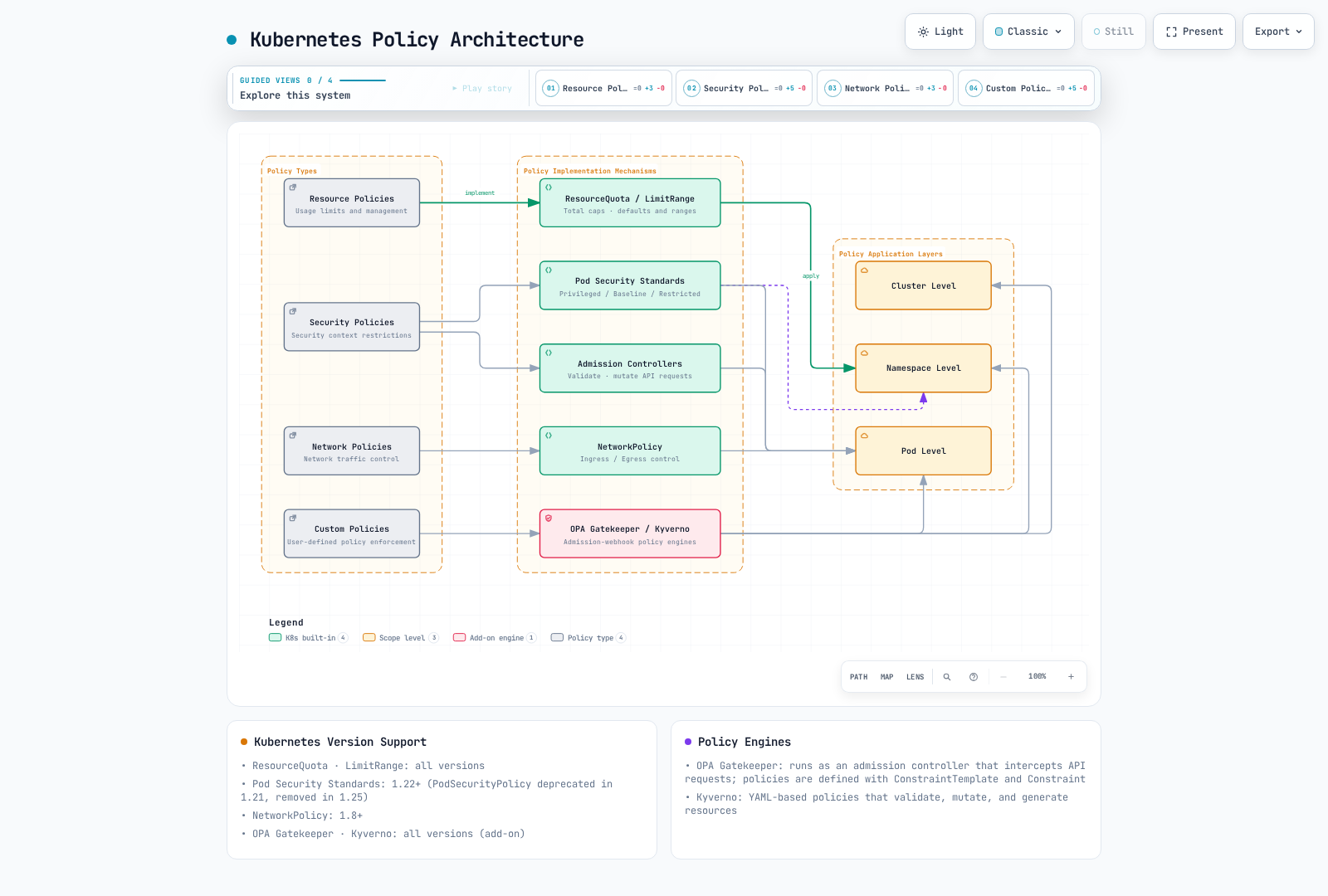
Policy Type Comparison
| Policy Type | Implementation Mechanism | Application Level | Primary Purpose | Kubernetes Version Support |
|---|---|---|---|---|
| Resource Policies | ResourceQuota, LimitRange | Namespace | Resource usage limitation and management | All versions |
| Security Policies | Pod Security Standards, Pod Security Admission (PSP removed) | Pod, Namespace | Security context restrictions | PSP removed: 1.25; PSA stable: 1.25 |
| Network Policies | NetworkPolicy | Pod | Network traffic control | 1.8+ |
| Custom Policies | OPA Gatekeeper, Kyverno | Cluster, Namespace, Pod | User-defined policy enforcement | Depends on installed engine compatibility |
Resource Policies
Resource policies are mechanisms for limiting and managing computing resources (CPU, memory, etc.) and object counts (pods, services, etc.) within a Kubernetes cluster.
ResourceQuota
ResourceQuota limits the total amount of resources that can be used within a namespace.
apiVersion: v1
kind: ResourceQuota
metadata:
  name: compute-resources
  namespace: dev
spec:
  hard:
    requests.cpu: "1"
    requests.memory: 1Gi
    limits.cpu: "2"
    limits.memory: 2Gi
    pods: "10"
    services: "5"
    persistentvolumeclaims: "5"
    secrets: "10"
    configmaps: "10"
LimitRange
LimitRange defaults container requests/limits and validates resource bounds for containers, Pods, or PVCs. Pod and PVC entries do not inject request/limit defaults.
apiVersion: v1
kind: LimitRange
metadata:
  name: limit-mem-cpu-per-container
  namespace: dev
spec:
  limits:
  - default:
      cpu: 500m
      memory: 512Mi
    defaultRequest:
      cpu: 100m
      memory: 256Mi
    max:
      cpu: "1"
      memory: 1Gi
    min:
      cpu: 50m
      memory: 128Mi
    type: Container
Table of Contents
- Policy Overview
- Resource Allocation Policies
- Pod Security Policies
- Network Policies
- Resource Quotas
- LimitRange
- Policy Engines
- Policy Management in Amazon EKS
- Policy Best Practices
- Conclusion
Policy Overview
Kubernetes policies provide a way for cluster administrators to define constraints on resources and workloads within the cluster. Policies are used for the following purposes:
- Security Enhancement: Prevent unauthorized operations and apply security best practices
- Resource Management: Limit resource usage and ensure fair resource distribution
- Compliance: Ensure compliance with organizational policies and regulations
- Standardization: Apply consistent configuration and deployment practices
Kubernetes can implement various types of policies through built-in resources (e.g., NetworkPolicy, ResourceQuota, LimitRange) or third-party policy engines (e.g., OPA Gatekeeper, Kyverno).
Resource Allocation Policies
Resource allocation policies control the amount of resources such as CPU and memory that pods and containers can use.
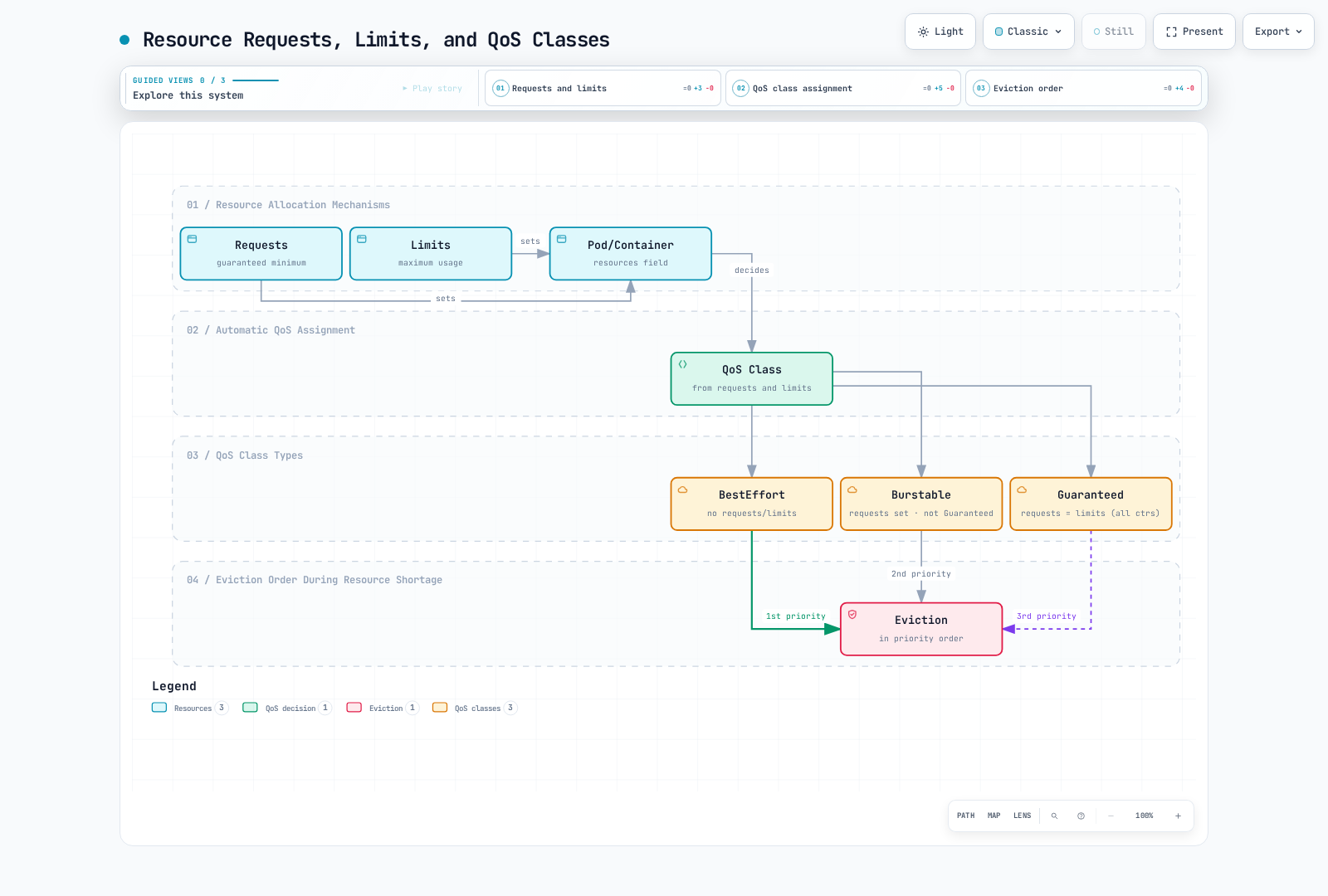
Resource Requests and Limits
You can manage resource usage by setting resource requests and limits for pods and containers:
apiVersion: v1
kind: Pod
metadata:
  name: resource-demo
spec:
  containers:
  - name: resource-demo-container
    image: nginx
    resources:
      requests:
        memory: "64Mi"
        cpu: "250m"
      limits:
        memory: "128Mi"
cpu: "500m"- requests: Scheduling reservation and runtime resource-allocation input; actual use may be lower
- limits: Runtime constraint: CPU is throttled, memory excess can trigger OOM killing
Setting resource requests and limits provides the following benefits:
- Resource Guarantee: The scheduler accounts for requested capacity; this is not an availability guarantee
- Resource Isolation: Prevents one pod from monopolizing another pod's resources
- Efficient Scheduling: The scheduler considers node resource capacity when placing pods
QoS (Quality of Service) Classes
Kubernetes automatically assigns QoS classes based on pod resource request and limit settings:
- Guaranteed: All containers have equal CPU and memory requests/limits in a container-level configuration
- Burstable: At least one container has resource requests set, but doesn't meet Guaranteed conditions
- BestEffort: No containers have resource requests and limits set
Node-pressure eviction considers whether usage exceeds requests, Pod priority, and relative usage. BestEffort is generally more exposed than Guaranteed, but QoS alone is not a strict ordering rule. Pod-level resources can also affect QoS; see the official QoS criteria.
Pod Security Policies
Pod Security Policy (PSP) was deprecated starting from Kubernetes 1.21 and completely removed in version 1.25. Instead, Pod Security Standards and Pod Security Admission have been introduced.
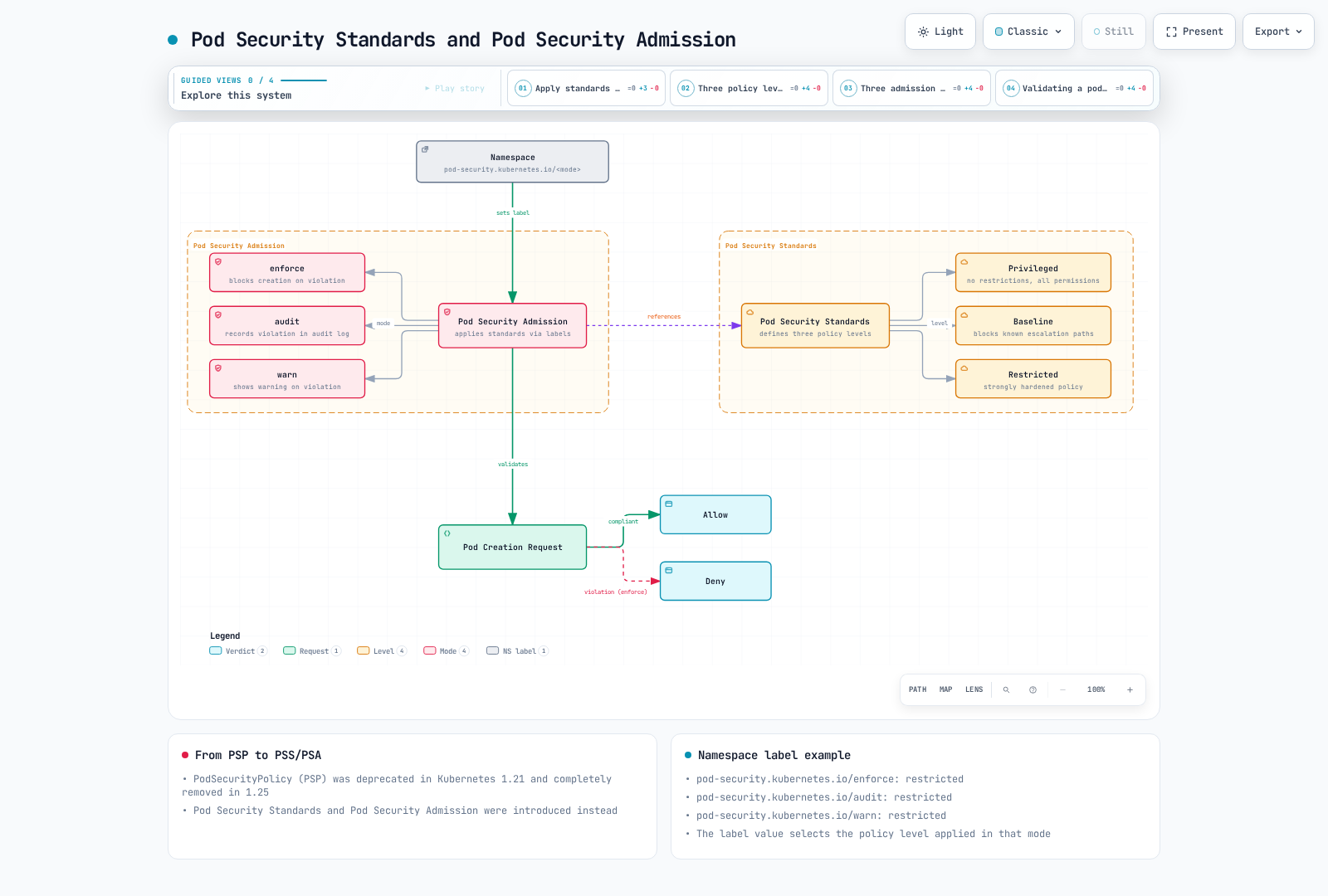
Pod Security Standards
Pod Security Standards define three policy levels:
- Privileged: No restrictions, all permissions allowed
- Baseline: Blocks known privilege escalation paths
- Restricted: Strongly hardened security policy
Pod Security Admission
Pod Security Admission applies Pod Security Standards through namespace labels:
apiVersion: v1
kind: Namespace
metadata:
  name: my-namespace
  labels:
    pod-security.kubernetes.io/enforce: restricted
    pod-security.kubernetes.io/audit: restricted
    pod-security.kubernetes.io/warn: restricted
Meaning of each label:
- enforce: Blocks pod creation that violates the policy
- audit: Records violations in audit logs
- warn: Displays warning messages for violations
Network Policies
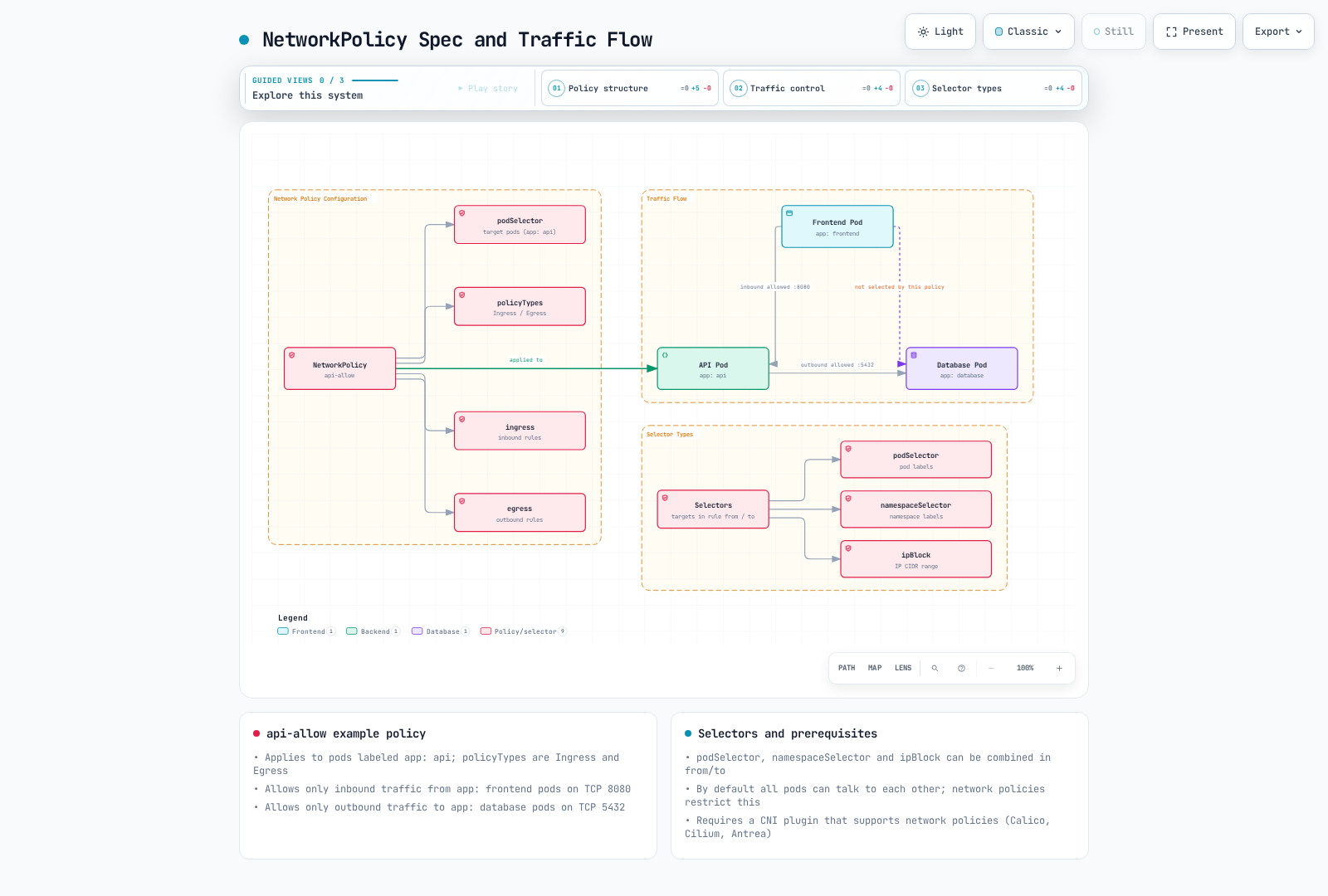
Network Policy provides a way to control communication between pods. By default, all pods in a Kubernetes cluster can communicate with each other, but network policies can restrict this.
apiVersion: networking.k8s.io/v1
kind: NetworkPolicy
metadata:
  name: api-allow
  namespace: default
spec:
  podSelector:
    matchLabels:
      app: api
  policyTypes:
  - Ingress
  - Egress
  ingress:
  - from:
    - podSelector:
        matchLabels:
          app: frontend
    ports:
    - protocol: TCP
      port: 8080
  egress:
  - to:
    - podSelector:
        matchLabels:
          app: database
    ports:
    - protocol: TCP
      port: 5432
In the example above:
- Defines a network policy for pods with
app=api - Only allows inbound traffic from pods with
app=frontendon port 8080 - Only allows outbound traffic to pods with
app=databaseon port 5432
To use network policies, the cluster's network plugin must support network policies. CNI plugins such as Calico, Cilium, and Antrea support network policies.
Pod selectors without a namespace selector stay in the policy namespace. Standard NetworkPolicies are additive; another policy can allow more traffic, and both source egress and destination ingress must permit a connection. The example also blocks DNS unless another egress rule allows TCP/UDP 53 to the cluster DNS endpoints.
Network Policy Types
- Ingress Policy: Controls traffic coming into the pod
- Egress Policy: Controls traffic going out of the pod
- Ingress and Egress Policy: Controls both directions of traffic
Network Policy Selectors
Network policies can filter traffic through various selectors:
- podSelector: Selects based on pod labels
- namespaceSelector: Selects based on namespace labels
- ipBlock: Selects based on IP CIDR ranges
# Example combining multiple selectors
ingress:
- from:
  - podSelector:
      matchLabels:
        app: frontend
    namespaceSelector:
      matchLabels:
        env: prod
  - ipBlock:
      cidr: 172.17.0.0/16
      except:
      - 172.17.1.0/24
Resource Quotas
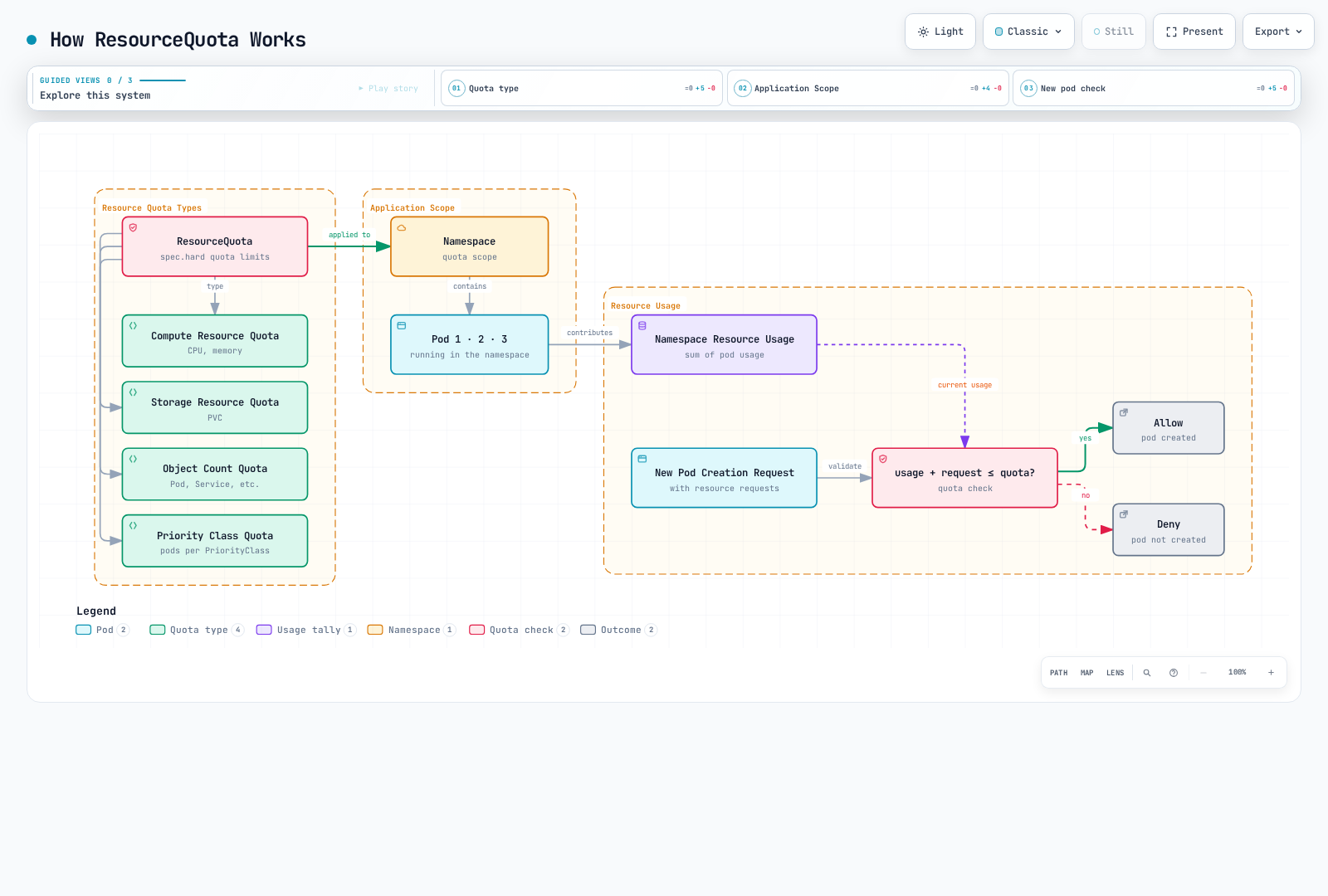
ResourceQuota limits the total amount of resources that can be used within a namespace. This prevents one team from monopolizing all resources when multiple teams or projects share cluster resources.
apiVersion: v1
kind: ResourceQuota
metadata:
  name: compute-resources
  namespace: team-a
spec:
  hard:
    pods: "10"
    requests.cpu: "4"
    requests.memory: 8Gi
    limits.cpu: "8"
    limits.memory: 16Gi
In the example above:
- The
team-anamespace can create a maximum of 10 non-terminal Pods - The sum of all pod CPU requests cannot exceed 4 cores
- The sum of all pod memory requests cannot exceed 8Gi
- The sum of all pod CPU limits cannot exceed 8 cores
- The sum of all pod memory limits cannot exceed 16Gi
Object Count Quota
Resource quotas can also limit the number of objects that can be created within a namespace beyond CPU and memory:
apiVersion: v1
kind: ResourceQuota
metadata:
  name: object-counts
  namespace: team-b
spec:
  hard:
    configmaps: "10"
    persistentvolumeclaims: "5"
    replicationcontrollers: "20"
    secrets: "10"
    services: "10"
    services.loadbalancers: "2"
Priority Class Quota
You can also set quotas for pods of specific priority classes:
Use a separate quota per priority class; keys such as pods.high do not exist. Create the corresponding PriorityClasses before scheduling Pods.
apiVersion: v1
kind: ResourceQuota
metadata:
  name: high-priority-quota
  namespace: team-c
spec:
  hard:
    pods: "5"
  scopeSelector:
    matchExpressions:
    - operator: In
      scopeName: PriorityClass
      values: ["high"]
---
apiVersion: v1
kind: ResourceQuota
metadata:
  name: medium-priority-quota
  namespace: team-c
spec:
  hard:
    pods: "3"
  scopeSelector:
    matchExpressions:
    - operator: In
      scopeName: PriorityClass
      values: ["medium"]
---
apiVersion: v1
kind: ResourceQuota
metadata:
  name: low-priority-quota
  namespace: team-c
spec:
  hard:
    pods: "2"
  scopeSelector:
    matchExpressions:
    - operator: In
      scopeName: PriorityClass
      values: ["low"]
LimitRange
LimitRange applies defaults to missing container requests/limits and validates minimum/maximum values during admission. It does not resize existing Pods or supply defaults for Pod/PVC entries.
apiVersion: v1
kind: LimitRange
metadata:
  name: cpu-limit-range
  namespace: default
spec:
  limits:
  - default:
      cpu: 1
      memory: 512Mi
    defaultRequest:
      cpu: 500m
      memory: 256Mi
    max:
      cpu: 2
      memory: 1Gi
    min:
      cpu: 100m
      memory: 128Mi
    type: Container
In the example above:
- default: Default limit applied when a container has no explicit limit
- defaultRequest: Default request applied when a container has no explicit request
- max: Maximum limit a container can set
- min: Minimum request a container can set
LimitRange can be applied to the following resource types:
- Container
- Pod
- PersistentVolumeClaim
Policy Engines
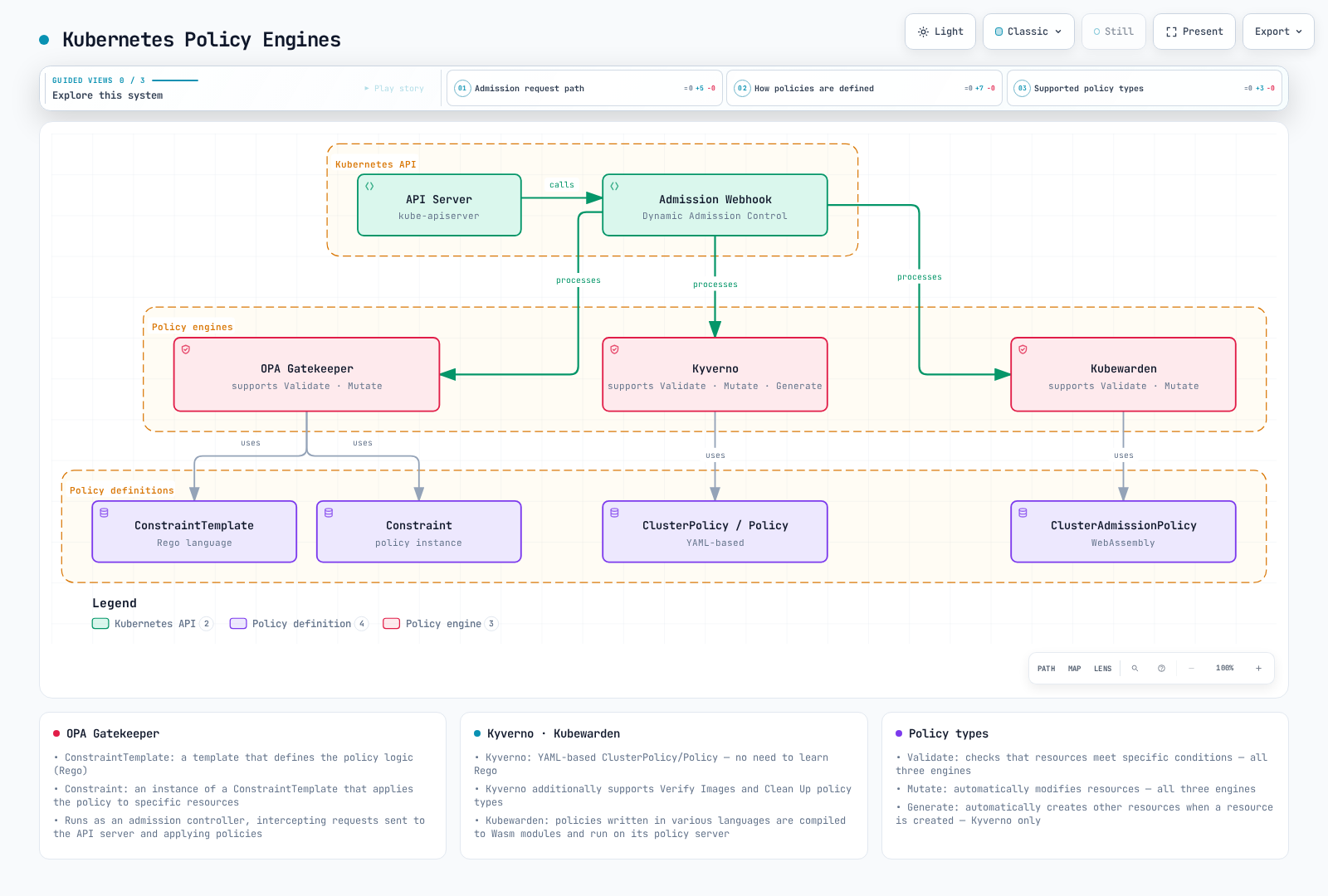
The Kubernetes ecosystem has several policy engines that can implement more complex and flexible policies.
OPA Gatekeeper
OPA (Open Policy Agent) Gatekeeper is an open-source project for defining and enforcing policies on Kubernetes clusters. Gatekeeper works as a Kubernetes admission controller that intercepts requests sent to the API server and applies policies.
Gatekeeper consists of the following components:
- ConstraintTemplate: A template that defines the policy logic
- Constraint: An instance of ConstraintTemplate that applies the policy to specific resources
# ConstraintTemplate example
apiVersion: templates.gatekeeper.sh/v1
kind: ConstraintTemplate
metadata:
  name: k8srequiredlabelkeys
spec:
  crd:
    spec:
      names:
        kind: K8sRequiredLabelKeys
      validation:
        openAPIV3Schema:
          type: object
          properties:
            labels:
              type: array
              items:
                type: string
  targets:
    - target: admission.k8s.gatekeeper.sh
      rego: |
        package k8srequiredlabelkeys
        violation[{"msg": msg, "details": {"missing_labels": missing}}] {
          provided := {label | input.review.object.metadata.labels[label]}
          required := {label | label := input.parameters.labels[_]}
          missing := required - provided
          count(missing) > 0
          msg := sprintf("missing required labels: %v", [missing])
}# Constraint example
apiVersion: constraints.gatekeeper.sh/v1beta1
kind: K8sRequiredLabelKeys
metadata:
name: require-app-label
spec:
match:
kinds:
- apiGroups: [""]
kinds: ["Pod"]
parameters:
labels: ["app", "owner"]Kyverno
Kyverno is a Kubernetes-native policy engine that can validate, mutate, and generate Kubernetes resources using YAML-based policies. You can write policies with syntax similar to Kubernetes resources without needing to learn the Rego language.
# Kyverno policy example
apiVersion: kyverno.io/v1
kind: ClusterPolicy
metadata:
  name: require-labels
spec:
  rules:
  - name: check-for-labels
    match:
      any:
      - resources:
          kinds:
          - Pod
    validate:
      failureAction: Enforce
      message: "The labels 'app' and 'owner' are required."
      pattern:
        metadata:
          labels:
            app: "?*"
            owner: "?*"
Kyverno supports the following policy types:
- Validate: Validates that resources meet specific conditions
- Mutate: Automatically modifies resources
- Generate: Automatically creates other resources when a resource is created
- Verify Images: Validates image signatures
- Clean Up: CleanupPolicy/ClusterCleanupPolicy schedule deletion of matching resources; this is separate from owner-reference garbage collection
Kubewarden
Kubewarden is a WebAssembly-based policy engine that allows writing policies in various programming languages. Policies are compiled into WebAssembly modules and run on the Kubewarden policy server.
# Kubewarden policy example
apiVersion: policies.kubewarden.io/v1
kind: ClusterAdmissionPolicy
metadata:
  name: require-labels
spec:
  module: "registry://ghcr.io/kubewarden/policies/safe-labels:<tested-tag>"
  mutating: false
  rules:
  - apiGroups: [""]
    apiVersions: ["v1"]
    resources: ["pods"]
    operations:
    - CREATE
    - UPDATE
  settings:
    mandatory_labels:
      - app
      - owner
Install the policy engines, their CRDs, and policy servers before these resources. The Gatekeeper example deliberately defines K8sRequiredLabelKeys to avoid conflicting with the richer library K8sRequiredLabels template. For Kubewarden, select a tested published safe-labels tag/digest and use its mandatory_labels settings; <tested-tag> is a placeholder.
Policy Management in Amazon EKS
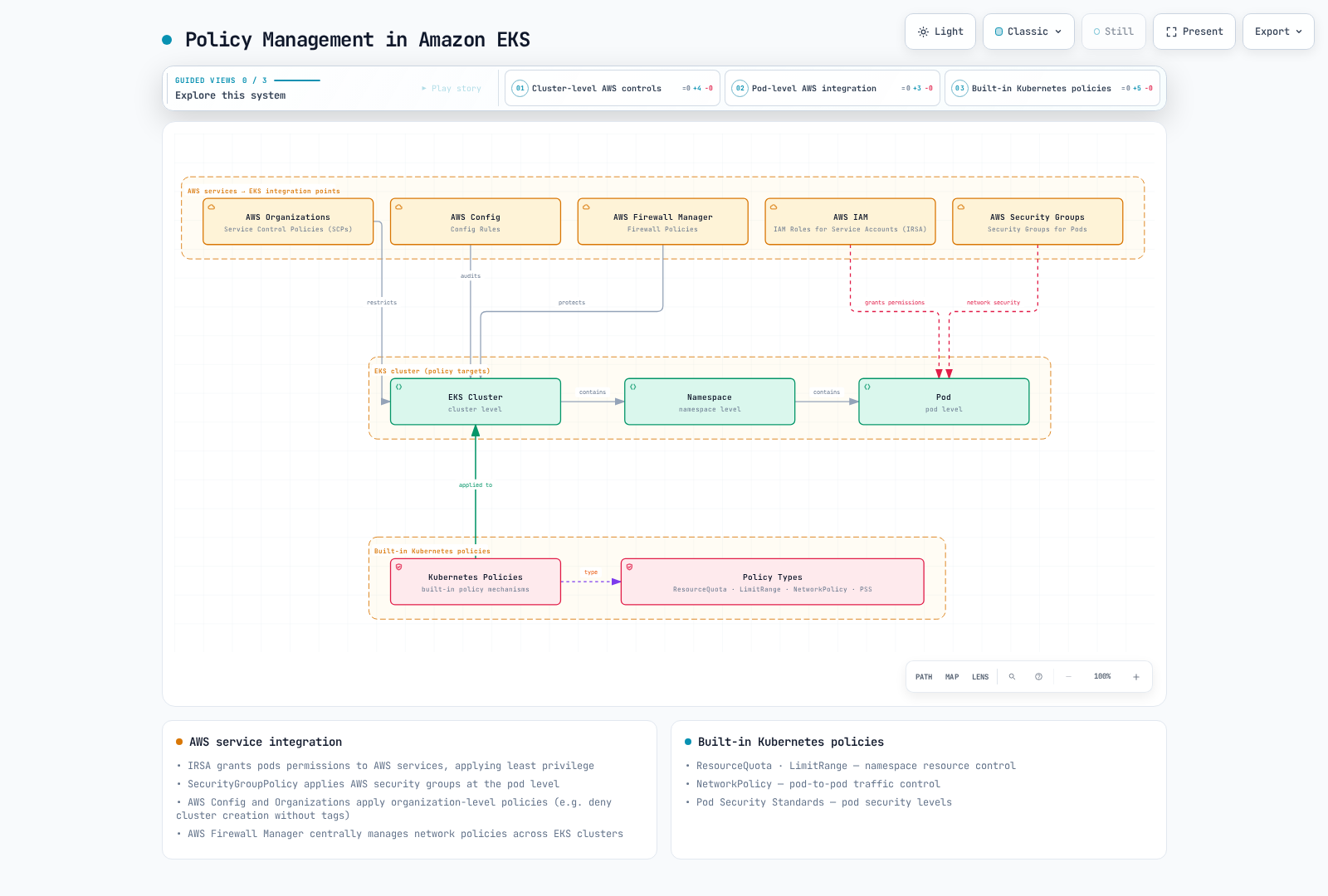
In Amazon EKS, you can manage policies using Kubernetes' default policy mechanisms along with various AWS services.
Integration with AWS IAM
Amazon EKS can grant permissions to pods for AWS services through IAM Roles for Service Accounts (IRSA). This allows applying the principle of least privilege.
# Create OIDC provider
eksctl utils associate-iam-oidc-provider --cluster my-cluster --approve

# Create IAM role and link to service account
eksctl create iamserviceaccount \
  --name my-service-account \
  --namespace default \
  --cluster my-cluster \
  --attach-policy-arn arn:aws:iam::123456789012:policy/ReadApplicationBucket \
  --approve
Create the referenced customer-managed policy with read access limited to the required bucket/prefix; EKS Pod Identity is also available on supported compute. IAM controls AWS API access, not Kubernetes resource authorization.
AWS Security Groups for Pods
Amazon EKS provides the ability to apply AWS security groups at the pod level. This allows for more fine-grained control of communication between pods.
apiVersion: vpcresources.k8s.aws/v1beta1
kind: SecurityGroupPolicy
metadata:
  name: allow-db-access
  namespace: default
spec:
  podSelector:
    matchLabels:
      app: web
  securityGroups:
    groupIds:
      - sg-0123456789abcdef0
Replace the security group ID with a group in the cluster VPC whose rules allow the required application and DNS traffic. Pod security groups require the supported VPC CNI setup, IAM permissions, and compatible compute; they are not supported on Windows or EKS Auto Mode.
AWS Config and AWS Organizations
AWS Config evaluates resource compliance; it does not itself deny CreateCluster. An Organizations service control policy (SCP) can deny creation without a required request tag in the member accounts/OUs where it applies, for example:
{
  "Version": "2012-10-17",
  "Statement": [
    {
      "Effect": "Deny",
      "Action": "eks:CreateCluster",
      "Resource": "*",
      "Condition": {
        "Null": {
          "aws:RequestTag/Environment": "true"
        }
      }
    }
  ]
}
AWS Firewall Manager
Firewall Manager centrally manages supported AWS protections such as WAF, VPC security groups, Network Firewall, and DNS Firewall. It does not reconcile Kubernetes NetworkPolicy objects; manage those through Kubernetes/GitOps policy tooling.
Policy Best Practices
Here are best practices for effectively managing policies in Kubernetes clusters.
Policy Design
- Principle of Least Privilege: Design policies that grant only the minimum necessary permissions.
- Gradual Application: Don't apply all policies at once; apply them gradually to minimize impact.
- Audit Mode: Run policies in audit mode before enforcement to evaluate impact.
- Clear Documentation: Clearly document the purpose and impact of each policy.
Resource Management
- Namespace Isolation: Separate namespaces by team or project and set appropriate resource quotas for each namespace.
- Default Limits: Use LimitRange to set default resource limits for all containers.
- QoS Class Consideration: Set appropriate QoS classes based on workload importance.
Network Security
- Default Deny Policy: Set policies that deny all traffic by default and explicitly allow only necessary communication.
- Granular Policies: Set network policies that finely control communication between pods.
- Regular Review: Regularly review and update network policies.
Policy Automation
- CI/CD Integration: Integrate policy validation into CI/CD pipelines to detect policy violations before deployment.
- Policy Testing: Test policies in a test environment first, then apply to production when there are no issues.
- Policy Version Control: Manage policies as code and use version control systems to track changes.
Conclusion
Kubernetes policies are powerful tools for controlling security, resource usage, and network communication for clusters and workloads. You can build a policy framework tailored to your organization's requirements by combining built-in policy mechanisms (ResourceQuota, LimitRange, NetworkPolicy, etc.) with third-party policy engines (OPA Gatekeeper, Kyverno, etc.).
When using Amazon EKS, you can further strengthen policy management by leveraging various AWS services (IAM, Security Groups, AWS Config, AWS Organizations, AWS Firewall Manager, etc.). Through integrating these services, you can effectively manage security, compliance, and resource management for clusters and workloads.
Policies are a continuously evolving area, so it's important to regularly review and update policies to respond to new threats and requirements. Additionally, managing policies as code and automating them is recommended to improve consistency and efficiency.
Quiz
To test what you learned in this chapter, try the Policies Quiz.
References
- Kubernetes Official Documentation - Resource Quotas
- Kubernetes Official Documentation - LimitRange
- Kubernetes Official Documentation - Network Policies
- Kubernetes Official Documentation - Pod Security Standards
- Kubernetes Official Documentation - Pod Security Admission
- OPA Gatekeeper Official Documentation
- Kyverno Official Documentation
- Kubewarden Official Documentation
- Amazon EKS Official Documentation - IAM Roles for Service Accounts
- Amazon EKS Official Documentation - Security Groups for Pods
- AWS Config Official Documentation
- AWS Organizations Official Documentation
- AWS Firewall Manager Official Documentation