Basic Concepts
This document explains Istio's core concepts and architecture. Understanding these basic concepts is important for effectively using Istio.
Table of Contents
- Background and History
- Why Istio?
- Istio Architecture
- Deployment Modes: Sidecar vs Ambient
- Core Resources
- Traffic Management Concepts
- Security Concepts
- Observability Concepts
- Namespaces and Service Mesh
- Next Steps
Background and History
The Birth of Service Mesh
Microservices Challenges
In the early 2010s, companies began breaking down monolithic applications into microservices.
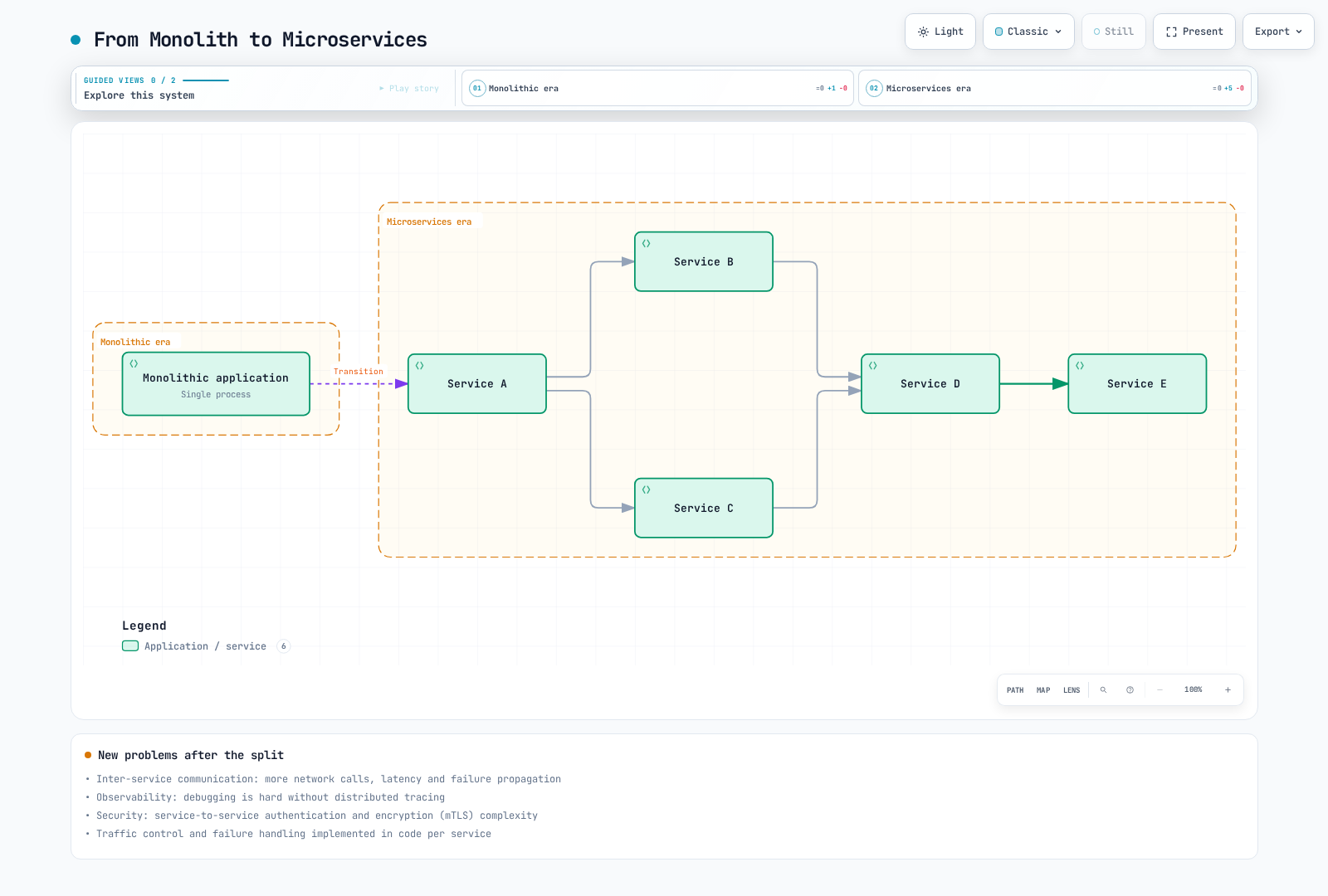
New Problems:
| Problem | Description | Impact |
|---|---|---|
| Inter-service Communication | Increased network calls | Latency, failure propagation |
| Observability | Need for distributed tracing | Difficult debugging |
| Security | Service-to-service authentication/encryption | mTLS implementation complexity |
| Traffic Control | Canary deployments, A/B testing | Application code modifications |
| Failure Handling | Circuit Breaker, Retry | Implementation per service |
Early Solution: Libraries
Problems:
- Need to develop libraries for each language (Hystrix for Java, separate library for Go...)
- Tightly coupled to application code
- Requires redeployment of all services for updates
- Complex version management
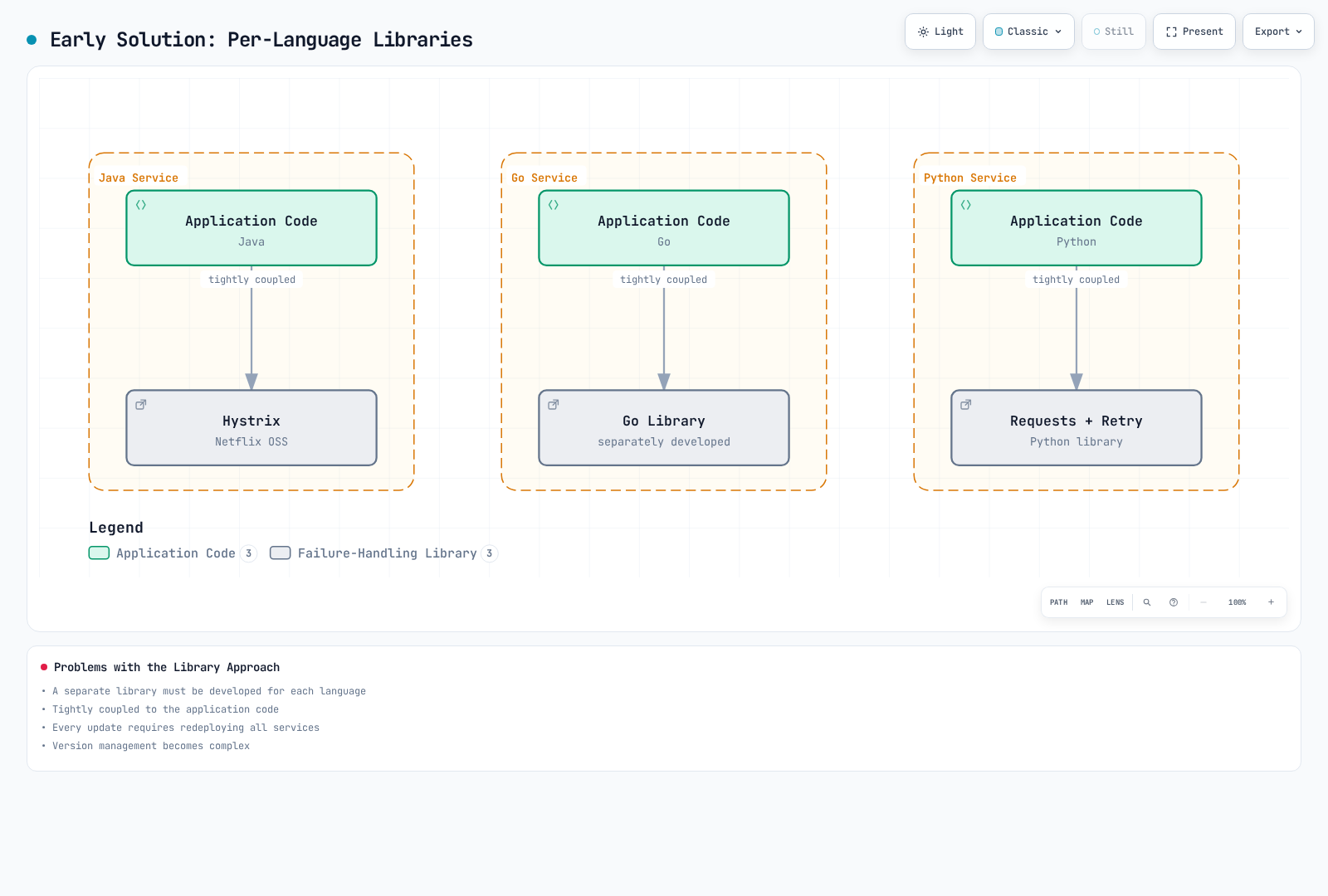
Service Mesh Idea: Move networking logic out of the application to an infrastructure layer
The Birth of Envoy Proxy
Lyft's Problem
In 2015, Lyft was experiencing the following problems:
- Operating 200+ microservices
- Various languages and frameworks (Python, Go, Java, etc.)
- Existing proxies (HAProxy, NGINX) were insufficient
- Difficult dynamic configuration changes
- Lack of observability
- Limited advanced routing features
Matt Klein and Envoy
Matt Klein (Lyft engineer) open-sourced Envoy in 2016.
Problems Envoy Solved:
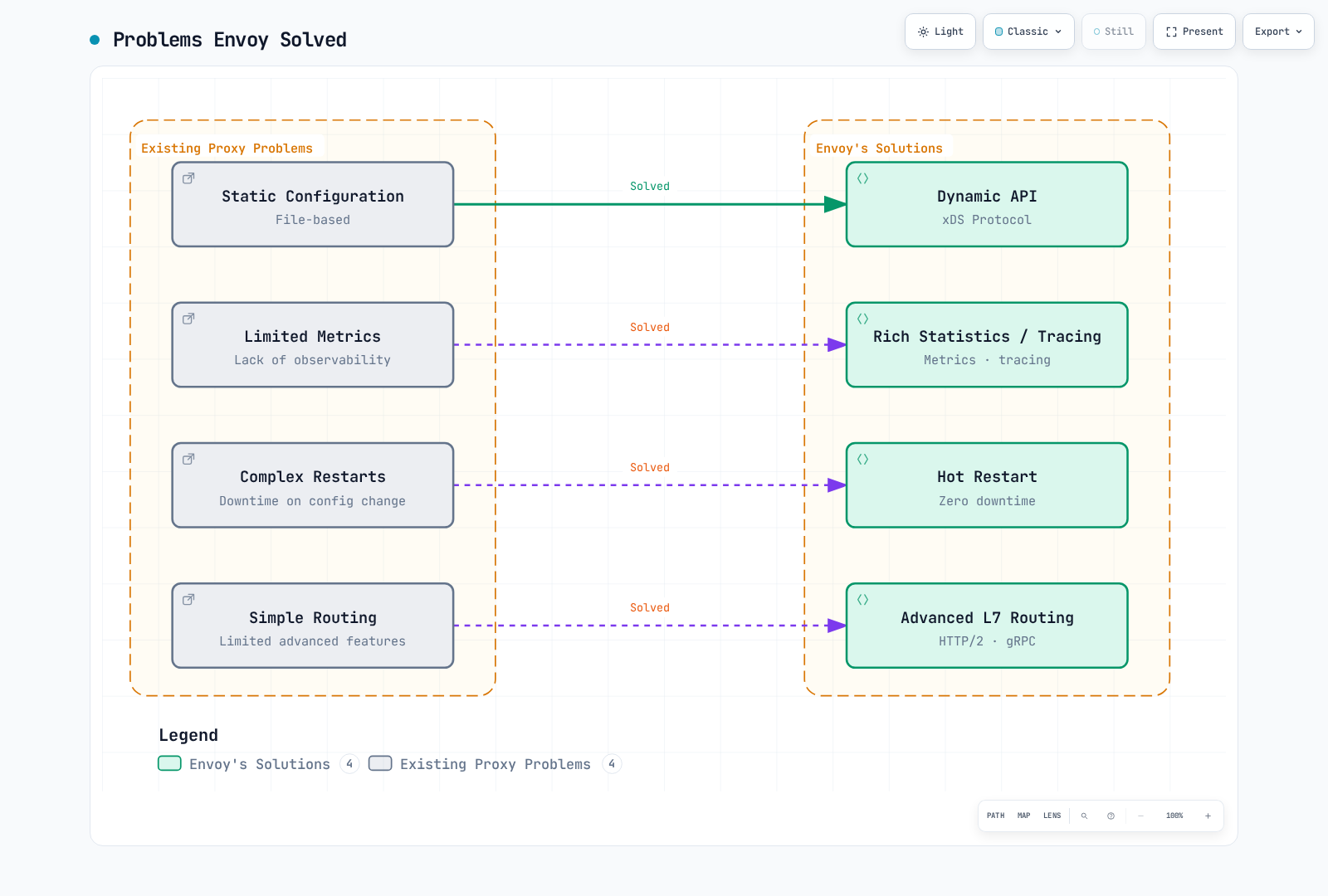
Key Features of Envoy:
- Out-of-process Architecture: Separate process from application
- xDS APIs: Dynamic configuration updates
- L7 Proxy: HTTP/2, gRPC, WebSocket support
- Observability: Detailed metrics, tracing, logging
- Performance: Written in C++, high performance
CNCF Adoption
Timeline:
- September 2016: Envoy open-sourced
- September 2017: Accepted as CNCF project (Incubating)
- November 2018: Promoted to CNCF Graduated project
The Birth and History of Istio
Google, IBM, Lyft Collaboration
In May 2017, Google, IBM, and Lyft collaborated to announce Istio.
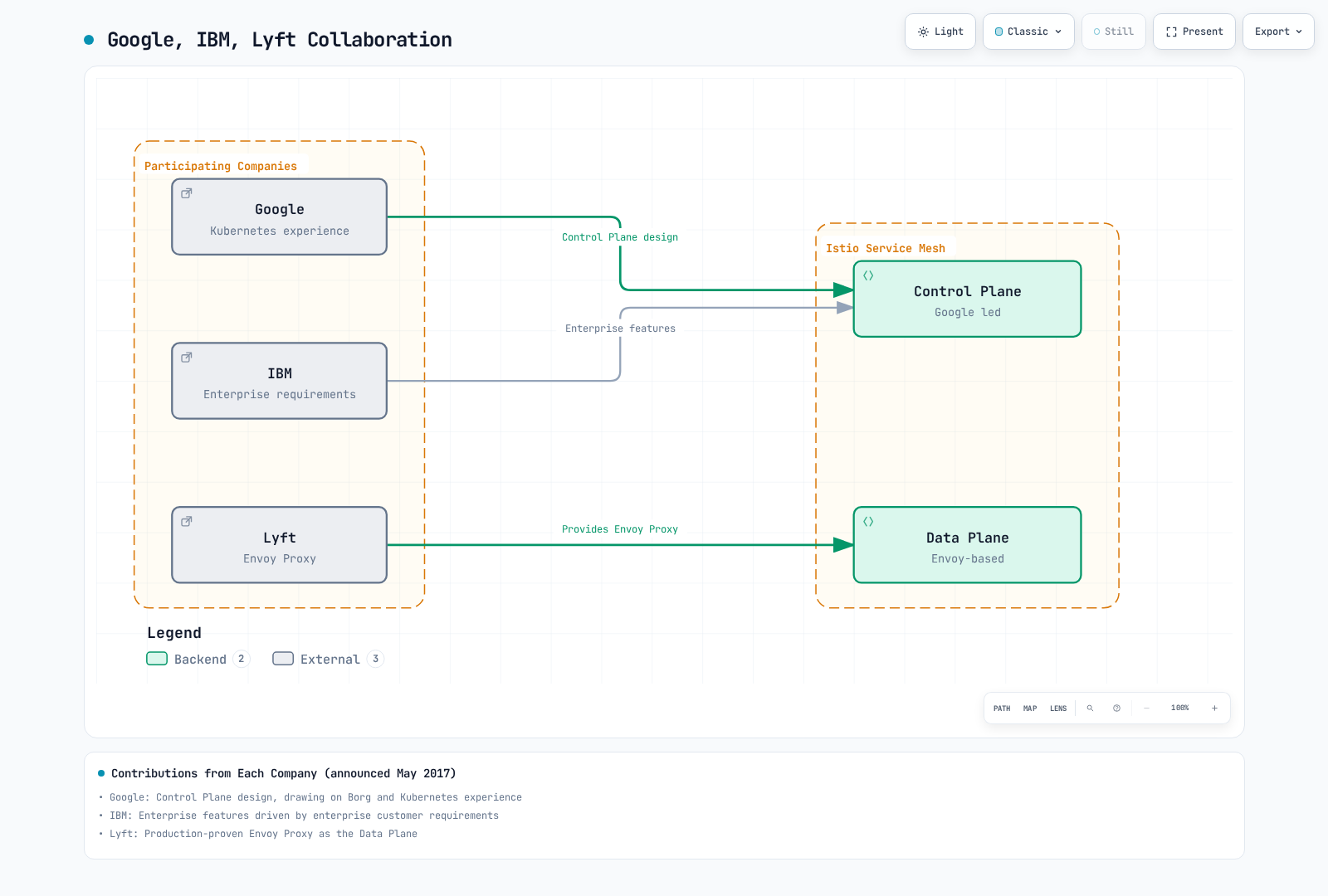
Contributions from Each Company:
| Company | Main Contribution | Reason |
|---|---|---|
| Control Plane design | Borg, Kubernetes experience | |
| IBM | Enterprise features | Enterprise customer requirements |
| Lyft | Envoy Proxy | Production-proven proxy |
Istio Version History
Major Milestones:
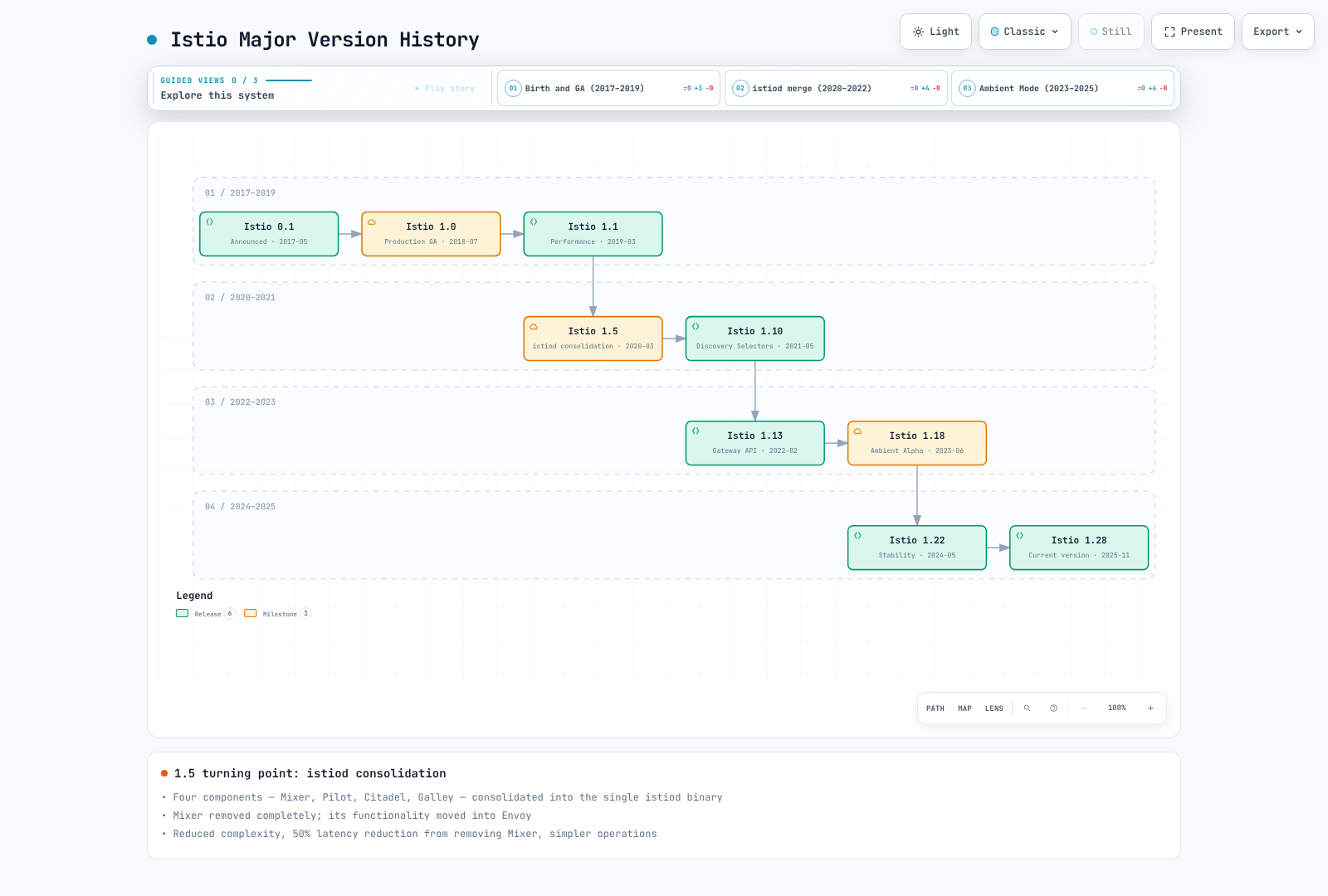
Version 1.5 (March 2020) - Important Turning Point:
Previous architecture (Istio 1.4 and earlier):
Separated into individual components:
- Mixer (policy/telemetry)
- Pilot (traffic management)
- Citadel (certificate management)
- Galley (configuration validation)
New architecture (Istio 1.5+):
Istiod (consolidated into single binary)
├── Pilot functionality (Service Discovery, Traffic Management)
├── Citadel functionality (Certificate Authority, Identity)
└── Galley functionality (Configuration Validation)

Mixer was deprecated during this transition; telemetry moved into the proxies
Reasons for Change:
- Reduced complexity (4 components → 1)
- Reduced telemetry-path overhead (actual improvement depends on workload)
- Simplified operations (single process management)
- Resource efficiency (reduced memory, CPU usage)
Why Istio?
Kubernetes provides container orchestration, but has limitations in managing complex communication between microservices. Istio is a service mesh solution to address these problems.
Microservices Challenges
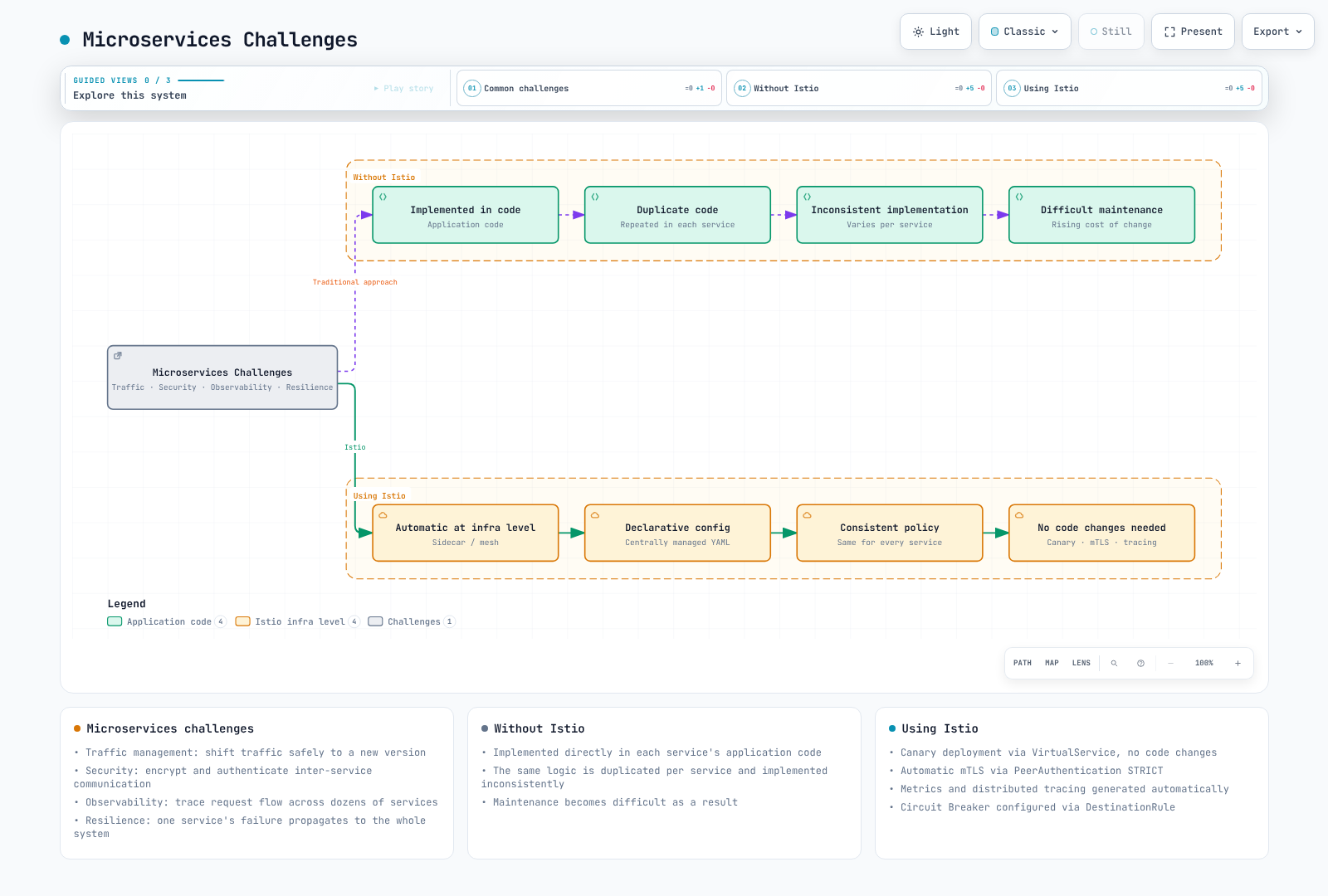
Core Values Provided by Istio
1. Traffic Management
Problem: Want to safely transition traffic when deploying new versions.
Istio Solution:
# Canary deployment without code changes
apiVersion: networking.istio.io/v1
kind: VirtualService
metadata:
  name: reviews
spec:
  hosts:
  - reviews
  http:
  - route:
    - destination:
        host: reviews
        subset: v1
      weight: 90  # Existing version 90%
    - destination:
        host: reviews
        subset: v2
weight: 10 # New version 10%Benefits:
- No application code modification required
- Real-time traffic split adjustment
- Rollback can be automated by a rollout controller; Istio applies the routing weights
- A/B testing, Blue/Green deployment support
2. Security
Problem: Want to encrypt and authenticate inter-service communication.
Istio Solution:
# Automatic mTLS enablement
apiVersion: security.istio.io/v1
kind: PeerAuthentication
metadata:
  name: default
  namespace: istio-system
spec:
  mtls:
mode: STRICT # Require mTLS on enrolled inbound workloadsBenefits:
- Automatic certificate issuance and renewal
- Automatic service identity verification
- Fine-grained permission control
- Zero Trust network implementation
3. Observability
Problem: Difficult to trace request flow across dozens of microservices.
Istio Solution:
- Automatic metric generation (Latency, Traffic, Errors, Saturation)
- Distributed Tracing
- Service topology visualization
Benefits:
- Automatic identification of bottlenecks
- Quick error root cause identification
- Real-time service status monitoring
4. Resilience
Problem: Failure of one service propagates to the entire system.
Istio Solution:
# Automatic Circuit Breaker configuration
apiVersion: networking.istio.io/v1
kind: DestinationRule
metadata:
  name: reviews
spec:
  host: reviews
  trafficPolicy:
    outlierDetection:
      consecutive5xxErrors: 5
      interval: 30s
baseEjectionTime: 30sBenefits:
- Failure isolation (Circuit Breaker)
- Automatic retry and timeout
- Automatic removal of unhealthy instances
- Traffic limiting (Rate Limiting)
When to Use Istio
Service counts below are illustrative; security and operational requirements decide suitability.
✅ When Istio is Suitable:
- Microservices Architecture
- 10 or more services
- Complex dependencies between services
- Frequent deployments
- Advanced Traffic Management Needed
- Canary deployments, A/B testing
- Fine-grained routing control
- Traffic Mirroring
- Strong Security Requirements
- Inter-service encryption mandatory
- Fine-grained access control
- Regulatory compliance
- Observability and Debugging
- Complex inter-service problem tracking
- Performance bottleneck identification
- SLO/SLA monitoring
❌ When Istio May Be Overkill:
- Simple Applications
- Few services (less than 5)
- Simple requirements
- Kubernetes Ingress is sufficient
- Resource Constraints
- Small cluster
- Cannot handle resource overhead
- Sidecar memory cost burden
- Lack of Operations Capability
- Insufficient learning time
- No dedicated platform team
- Prefer simpler solutions
Alternatives Comparison
Kubernetes Ingress vs Istio
| Feature | Kubernetes Ingress | Istio |
|---|---|---|
| Scope | External → Cluster | External + Internal inter-service |
| Routing | Basic (Path, Host) | Advanced (Header, Cookie, etc.) |
| mTLS | Manual setup | Automatic |
| Observability | Limited | Rich |
| Complexity | Low | High |
| Use Case | Simple apps | Microservices |
AWS VPC Lattice vs Istio
For detailed comparison, refer to the AWS Integration document.
Quick Summary:
- VPC Lattice: AWS managed, simple, cross-VPC/account communication
- Istio: Open source, powerful features, Kubernetes and VM workloads, fine-grained control
Linkerd vs Istio
| Property | Istio | Linkerd |
|---|---|---|
| Complexity | High | Low |
| Features | Very rich | Core features only |
| Resources | High | Low |
| Learning Curve | Steep | Gentle |
| Community | Large | Small |
Selection Guide:
- Need advanced features and flexibility → Istio
- Need simple and lightweight mesh → Linkerd
Deployment Modes: Sidecar vs Ambient
Istio supports two deployment modes: Sidecar Mode and Ambient Mode.
Sidecar Mode (Default)
Injects an Envoy proxy as a sidecar container into each application pod.
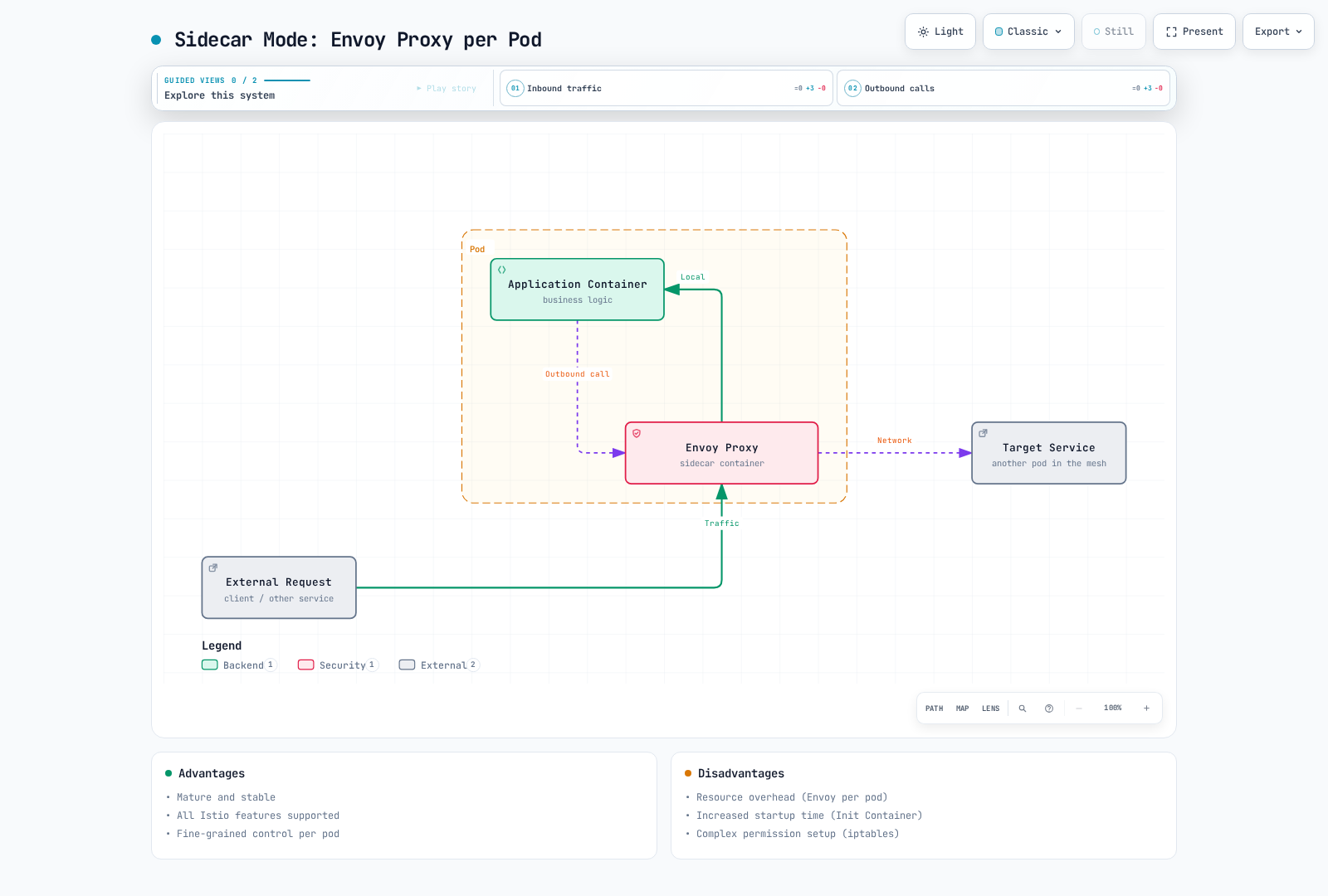
Advantages:
- Mature and stable
- Mature L4/L7 feature set; support differs by data-plane mode
- Fine-grained control per pod
Disadvantages:
- Resource overhead (Envoy per pod)
- Increased startup time (Init Container)
- Complex permission setup (iptables)
Ambient Mode (GA since Istio 1.24)
Handles traffic at the node level without sidecars.
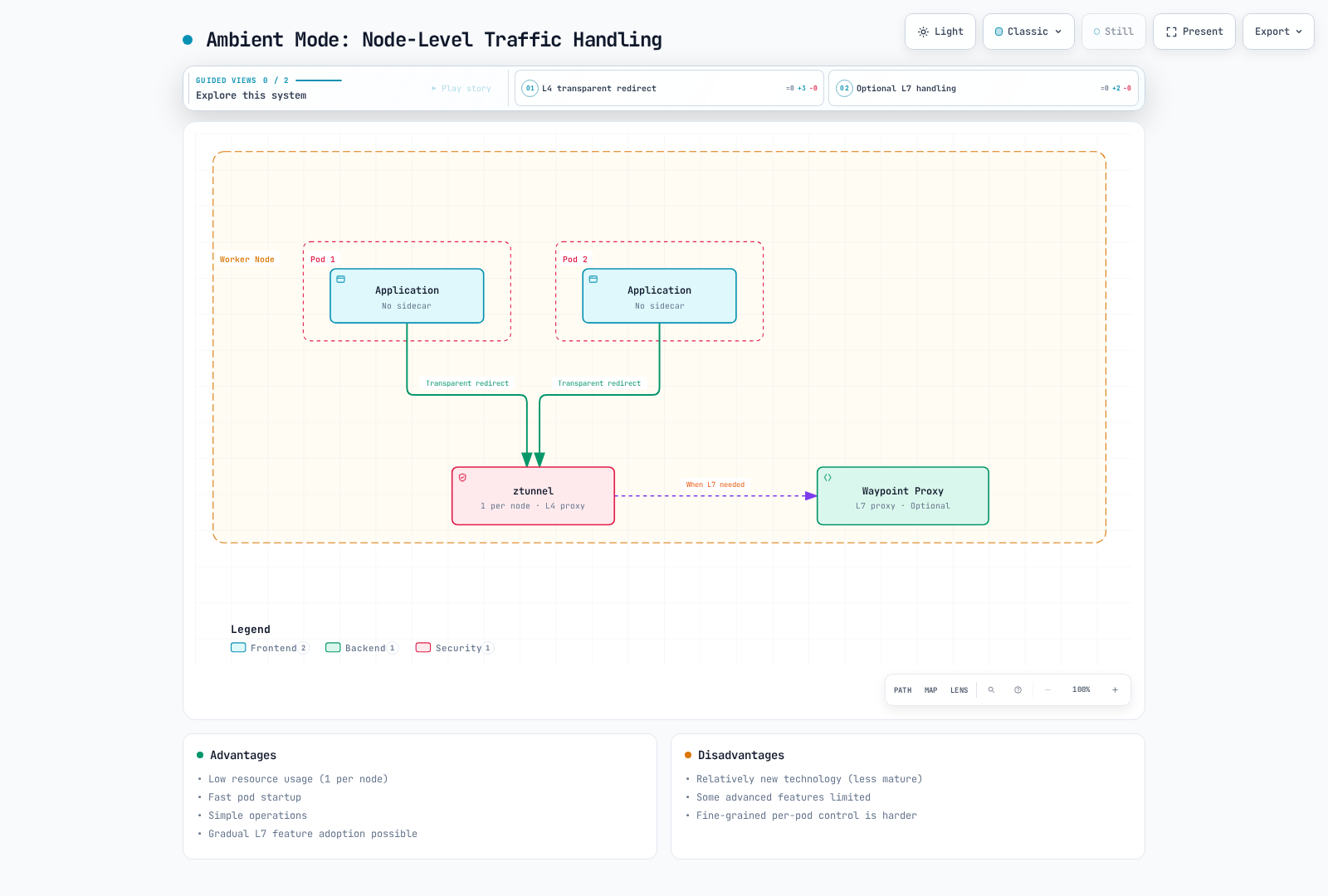
Advantages:
- Low resource usage (1 per node)
- Fast pod startup
- Simple operations
- Gradual L7 feature application possible
Disadvantages:
- Feature parity must be checked for the chosen release and topology
- Some advanced features limited
- Difficult fine-grained control per pod
Comparison Table
| Property | Sidecar Mode | Ambient Mode |
|---|---|---|
| Resource Usage | High (per pod) | Low (per node) |
| Startup Time | Slow (Init Container) | Fast |
| Operational Complexity | High | Low |
| L4 Features | Supported | Supported |
| L7 Features | Full support | Optional (Waypoint) |
| Maturity | Stable | Core features GA since 1.24 |
| Migration | - | Possible from existing sidecar |
| Recommended Use | Advanced L7 features needed | Resource efficiency priority |
Selection Guide
Choose Sidecar Mode:
- Need features specific to sidecars, such as VM integration
- Need fine-grained policy control per pod
- Need production-proven stability
Choose Ambient Mode:
- Resource efficiency is important
- Only simple L4 features needed
- Planning to gradually add L7 features
For details, refer to the Advanced: Ambient Mode document.
Istio Architecture
Istio consists of two main components: Control Plane and Data Plane.
| Component | Description |
|---|---|
| Control Plane (istiod) | Central control system responsible for service discovery, configuration distribution, certificate management |
| Data Plane (Envoy Proxy) | Envoy sidecars, or ambient ztunnel plus optional waypoints; handles mesh traffic |
For detailed architecture structure, internal operation principles, and traffic interception mechanisms, refer to the Architecture document.
Core Resources
The examples below use sidecar APIs. Do not apply all overlapping routing/policy examples together. Gateway requires matching gateway pods and a TLS Secret in their namespace. Ambient uses Gateway API routing and waypoint-targeted L7 policies; a Sidecar resource does not configure ztunnel.
Istio uses Kubernetes Custom Resource Definitions (CRDs) to manage configuration.
1. VirtualService
VirtualService defines how requests are routed to services.
apiVersion: networking.istio.io/v1
kind: VirtualService
metadata:
  name: reviews-route
spec:
  hosts:
  - reviews  # Target service
  http:
  - match:
    - headers:
        end-user:
          exact: jason
    route:
    - destination:
        host: reviews
        subset: v2  # Route specific user to v2
  - route:
    - destination:
        host: reviews
        subset: v1  # Route to v1 by default
Key Features:
- Path-based routing (Path, Header, Query Parameter)
- Traffic splitting (Canary, A/B testing)
- Retry, Timeout, Fault Injection
- URL Rewrite, Header manipulation
2. DestinationRule
DestinationRule defines service subsets (versions) and applies traffic policies.
apiVersion: networking.istio.io/v1
kind: DestinationRule
metadata:
  name: reviews-destination
spec:
  host: reviews
  trafficPolicy:
    loadBalancer:
      simple: LEAST_REQUEST  # Load balancing algorithm
    connectionPool:
      tcp:
        maxConnections: 100
      http:
        http1MaxPendingRequests: 50
        maxRequestsPerConnection: 2
    outlierDetection:
      consecutive5xxErrors: 5
      interval: 30s
      baseEjectionTime: 30s
  subsets:
  - name: v1
    labels:
      version: v1
  - name: v2
    labels:
      version: v2
  - name: v3
    labels:
      version: v3
Key Features:
- Service version (subset) definition
- Load balancing algorithm
- Connection Pool settings
- Connection-pool circuit breaking and Outlier Detection
- TLS settings
3. Gateway
Gateway manages external traffic entering the mesh.
apiVersion: networking.istio.io/v1
kind: Gateway
metadata:
  name: bookinfo-gateway
spec:
  selector:
    istio: ingressgateway  # Select Ingress Gateway pod
  servers:
  - port:
      number: 80
      name: http
      protocol: HTTP
    hosts:
    - "bookinfo.example.com"
  - port:
      number: 443
      name: https
      protocol: HTTPS
    tls:
      mode: SIMPLE
      credentialName: bookinfo-credential  # TLS certificate
    hosts:
    - "bookinfo.example.com"
Key Features:
- Define external traffic entry point
- Host, port, protocol settings
- TLS termination
- SNI routing
4. ServiceEntry
ServiceEntry allows external services outside the mesh to be used like internal services.
apiVersion: networking.istio.io/v1
kind: ServiceEntry
metadata:
  name: external-api
spec:
  hosts:
  - api.external.com
  ports:
  - number: 443
    name: https
    protocol: HTTPS
  location: MESH_EXTERNAL
  resolution: DNS
Key Features:
- External service registration
- Traffic control for external services
- Egress traffic management
5. PeerAuthentication
PeerAuthentication defines authentication policies between services.
apiVersion: security.istio.io/v1
kind: PeerAuthentication
metadata:
  name: default
  namespace: default
spec:
  mtls:
    mode: STRICT  # STRICT, PERMISSIVE, DISABLE
6. AuthorizationPolicy
AuthorizationPolicy defines service access permissions.
apiVersion: security.istio.io/v1
kind: AuthorizationPolicy
metadata:
  name: allow-ratings
  namespace: default
spec:
  selector:
    matchLabels:
      app: ratings
  action: ALLOW
  rules:
  - from:
    - source:
        principals: ["cluster.local/ns/default/sa/reviews"]
    to:
    - operation:
        methods: ["GET"]
Traffic Management Concepts
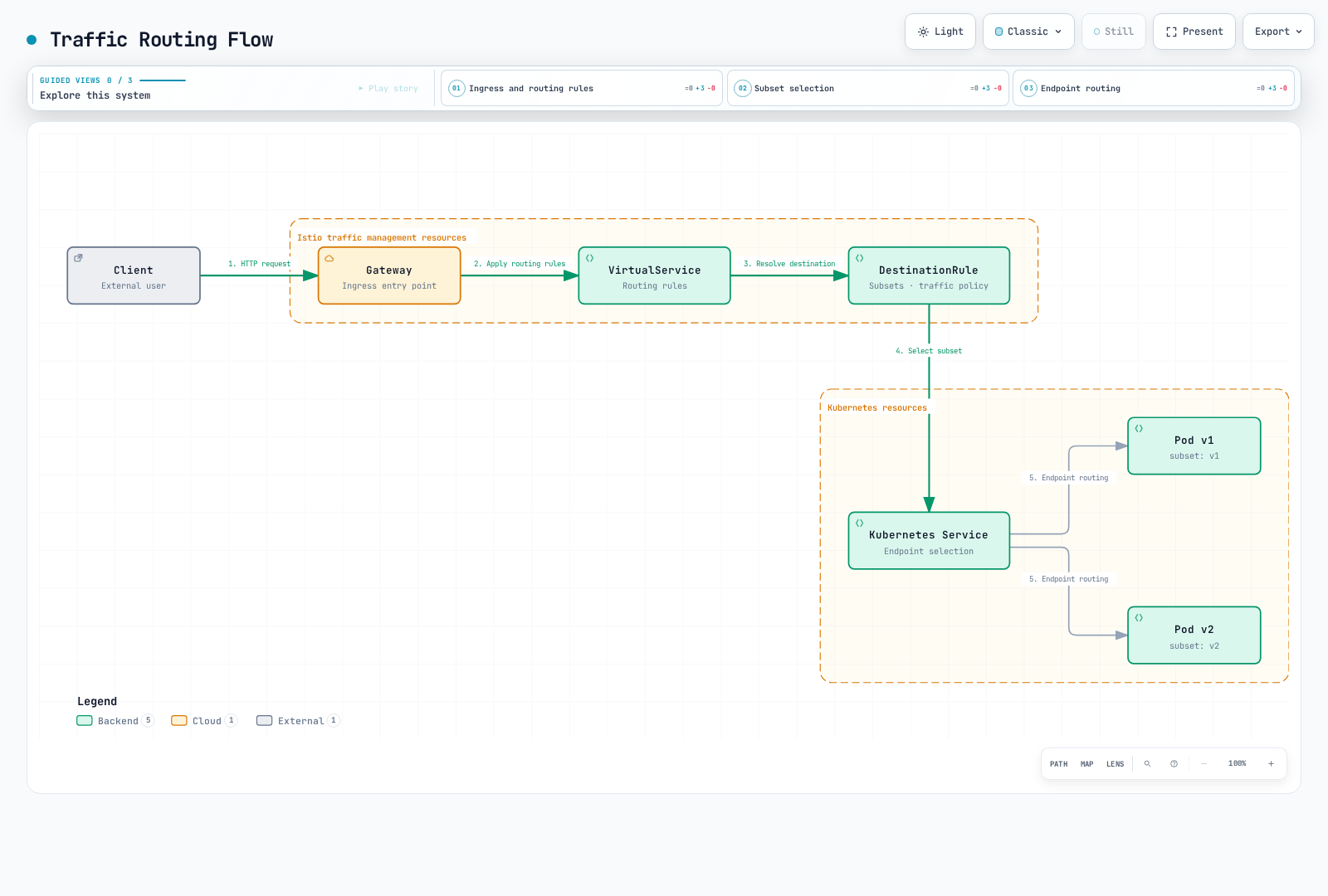
Traffic Routing Flow
The diagram shows configuration relationships. Gateway, VirtualService, and DestinationRule are API objects, not sequential network hops; Envoy normally selects pod endpoints from EDS.
Traffic Splitting (Canary Deployment)
apiVersion: networking.istio.io/v1
kind: VirtualService
metadata:
  name: reviews-canary
spec:
  hosts:
  - reviews
  http:
  - route:
    - destination:
        host: reviews
        subset: v1
      weight: 90  # 90% of traffic
    - destination:
        host: reviews
        subset: v2
      weight: 10  # 10% of traffic (canary)
Circuit Breaker
apiVersion: networking.istio.io/v1
kind: DestinationRule
metadata:
  name: reviews-circuit-breaker
spec:
  host: reviews
  trafficPolicy:
    connectionPool:
      tcp:
        maxConnections: 100
      http:
        http1MaxPendingRequests: 10
        maxRequestsPerConnection: 2
    outlierDetection:
      consecutive5xxErrors: 5
      interval: 30s
      baseEjectionTime: 30s
      maxEjectionPercent: 50
Security Concepts
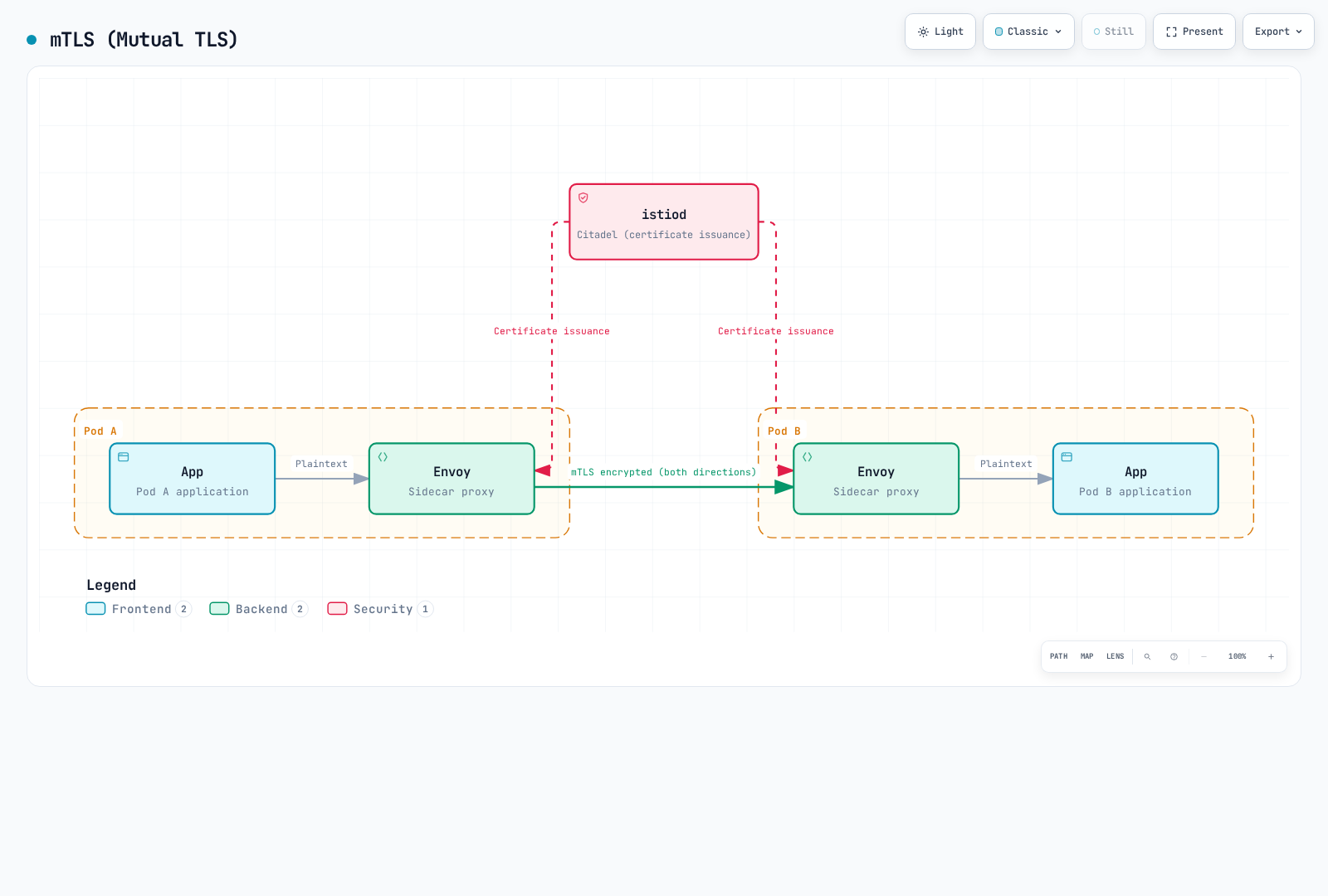
mTLS (Mutual TLS)
Auto mTLS encrypts traffic between enrolled mesh workloads. Enforce STRICT to reject plaintext inbound traffic; traffic outside the mesh is not automatically protected.
mTLS Modes:
- STRICT: mTLS only allowed
- PERMISSIVE: Both mTLS and plaintext allowed (for migration)
- DISABLE: mTLS disabled
Ambient does not support PeerAuthentication DISABLE; STRICT also blocks traffic bypassing the mesh.
Authentication and Authorization
# JWT Authentication
apiVersion: security.istio.io/v1
kind: RequestAuthentication
metadata:
  name: jwt-auth
spec:
  jwtRules:
  - issuer: "https://accounts.google.com"
    jwksUri: "https://www.googleapis.com/oauth2/v3/certs"
---
# Authorization Policy
apiVersion: security.istio.io/v1
kind: AuthorizationPolicy
metadata:
  name: require-jwt
spec:
  action: DENY
  rules:
  - from:
    - source:
        notRequestPrincipals: ["*"]
Observability Concepts
Istio exposes proxy metrics; access logs, tracing providers, and collectors require configuration. Applications must propagate trace context. Ambient L7 metrics and tracing require a waypoint.
Automatically Generated Metrics
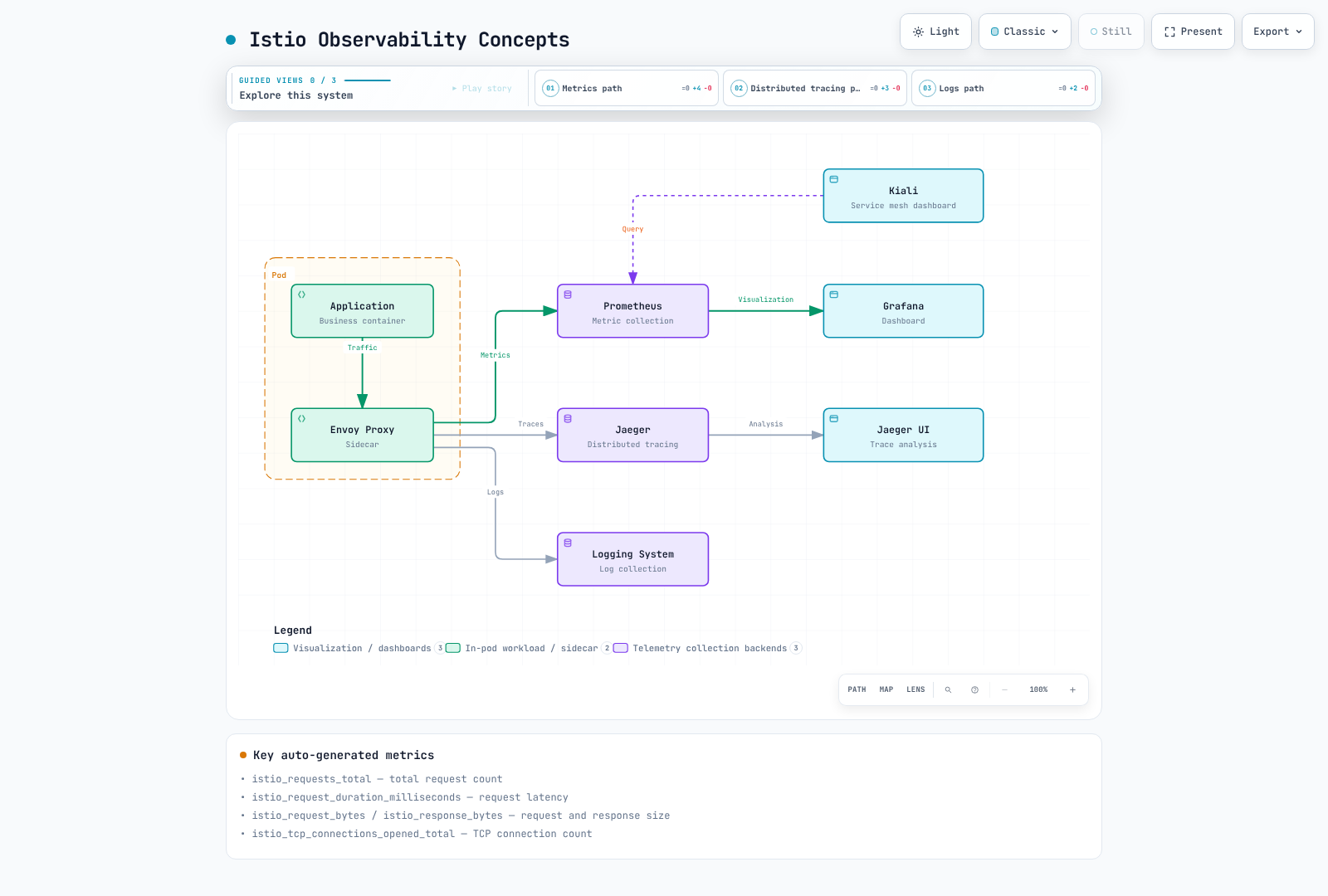
Key Metrics
| Metric | Description |
|---|---|
istio_requests_total | Total request count |
istio_request_duration_milliseconds | Request latency |
istio_request_bytes | Request size |
istio_response_bytes | Response size |
istio_tcp_connections_opened_total | TCP connection count |
Distributed Tracing
# tracing-install.yaml: merge into the existing istioctl installation file
apiVersion: install.istio.io/v1alpha1
kind: IstioOperator
spec:
  meshConfig:
    enableTracing: true
    extensionProviders:
    - name: otel-tracing
      opentelemetry:
        service: opentelemetry-collector.observability.svc.cluster.local
        port: 4317
Apply installation settings with istioctl install -f <merged-install-file>, or equivalent Helm values. Deploy the named OTLP collector separately. Apply the following Telemetry resource with kubectl; 1% is illustrative and should be tuned.
apiVersion: telemetry.istio.io/v1
kind: Telemetry
metadata:
  name: mesh-tracing
  namespace: istio-system
spec:
  tracing:
  - providers:
    - name: otel-tracing
    randomSamplingPercentage: 1
Namespaces and Service Mesh
Namespace Isolation
This DENY-all policy is an intentional complete block. For a default-deny baseline with selected ALLOW exceptions, use an ALLOW policy with no rules instead: DENY takes precedence over every ALLOW.
# Per-namespace mTLS policy
apiVersion: security.istio.io/v1
kind: PeerAuthentication
metadata:
  name: default
  namespace: production
spec:
  mtls:
    mode: STRICT
---
# Per-namespace authorization policy
apiVersion: security.istio.io/v1
kind: AuthorizationPolicy
metadata:
  name: deny-all
  namespace: production
spec:
  action: DENY
  rules:
  - {}
Service Mesh Scope
# Include only specific namespaces in the mesh
kubectl label namespace default istio-injection=enabled
kubectl label namespace staging istio-injection=enabled

# Exclude specific namespace
kubectl label namespace kube-system istio-injection=disabled
Multi-tenancy
Sidecar.egress.hosts limits imported proxy configuration, not network access. Use AuthorizationPolicy and an enforcing NetworkPolicy implementation for tenant isolation.
# Restrict mesh scope with Sidecar resource
apiVersion: networking.istio.io/v1
kind: Sidecar
metadata:
  name: default
  namespace: production
spec:
  egress:
  - hosts:
    - "production/*"  # Import production configuration; not an access-control boundary
    - "istio-system/*"
VM Workload Registration
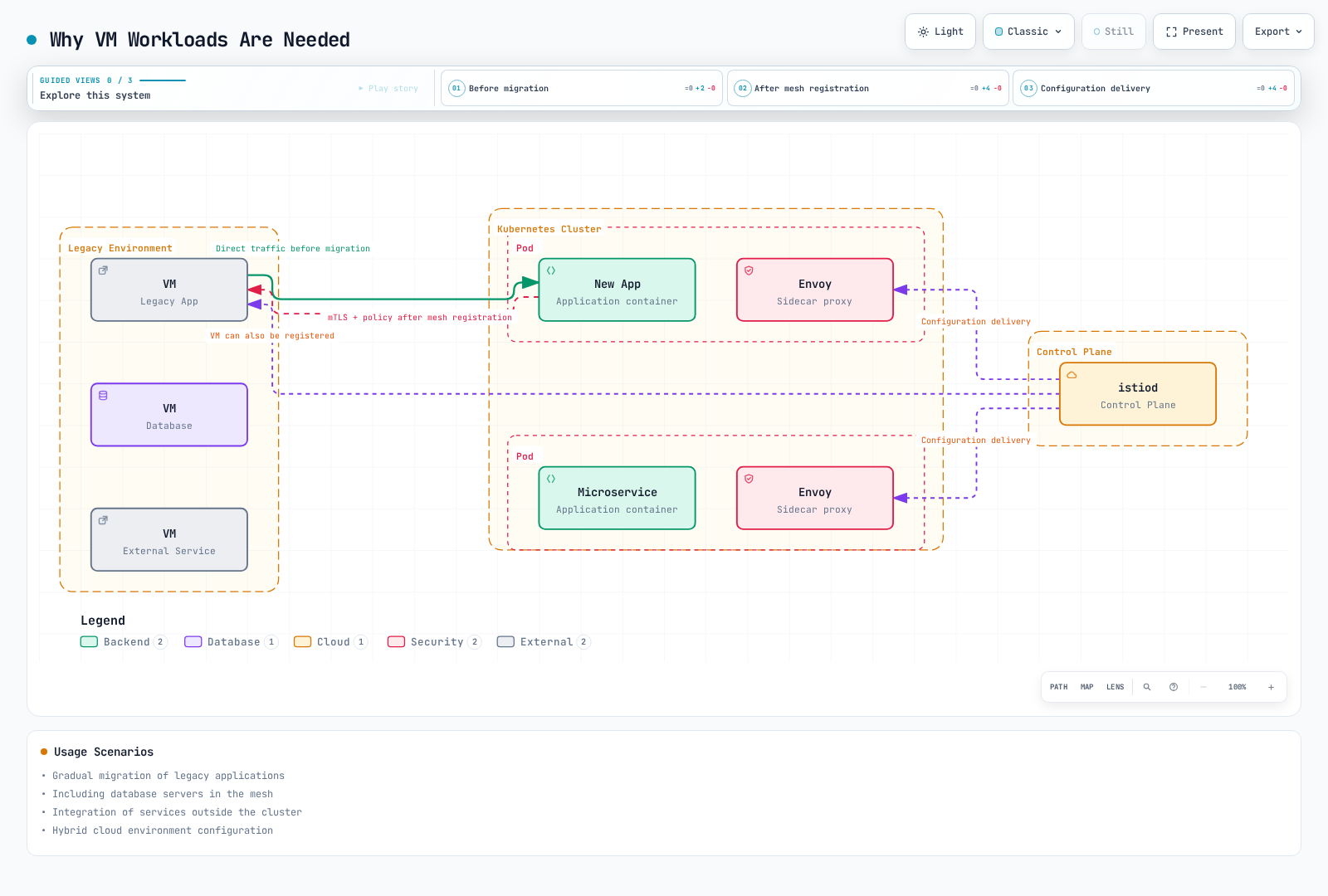
Istio can register not only Kubernetes pods but also Virtual Machine (VM) workloads in the service mesh. This allows legacy applications or services outside the cluster to utilize Istio's traffic management, security, and observability features.
Why VM Workloads Are Needed
Usage Scenarios:
- Gradual migration of legacy applications
- Including database servers in the mesh
- Integration of services outside the cluster
- Hybrid cloud environment configuration
VM Registration Architecture
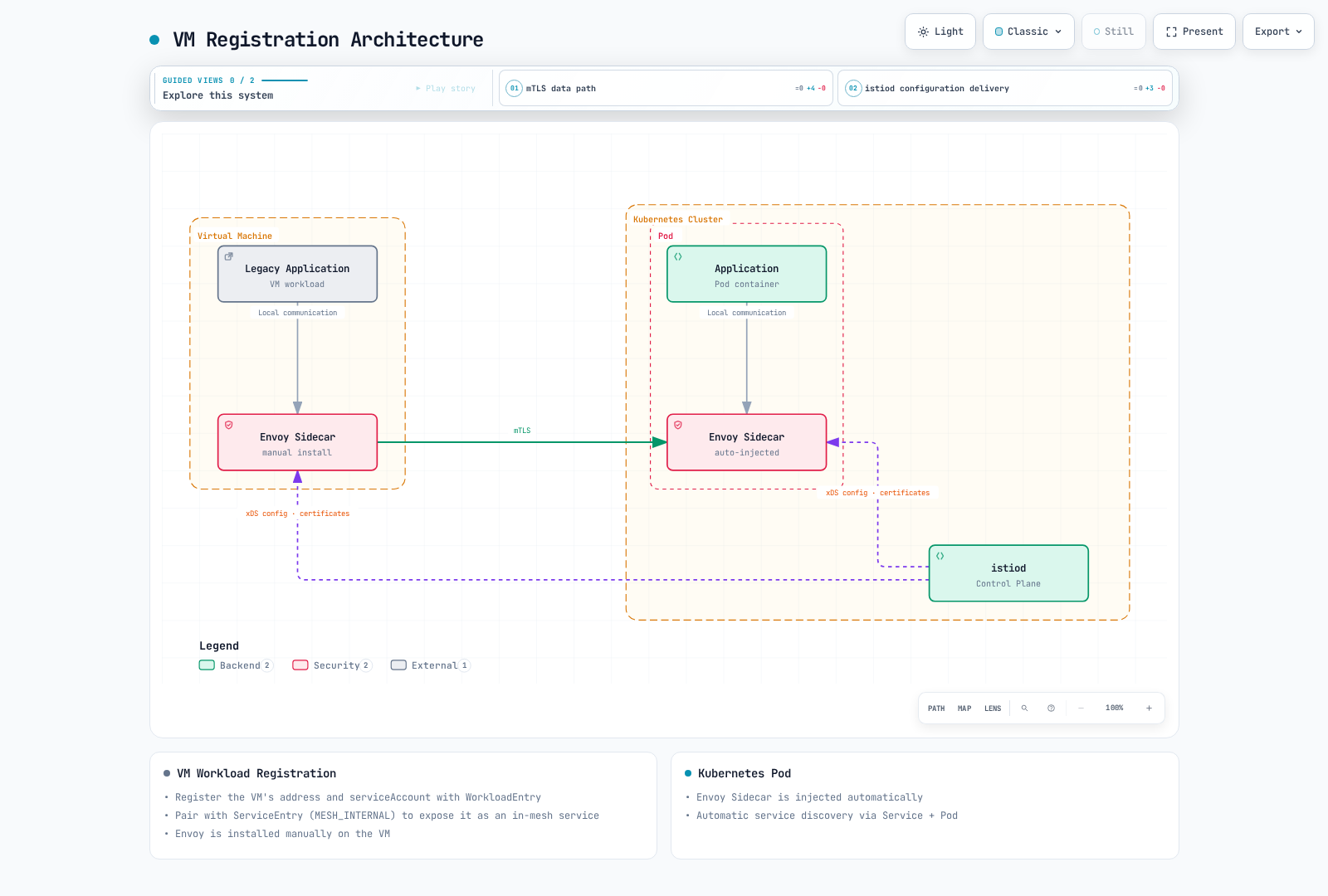
WorkloadEntry Resource
These are registration excerpts. A WorkloadEntry alone does not install a proxy or enable mTLS: first follow the VM installation guide for WorkloadGroup, service account, bootstrap token/CA, agent, and network reachability. Configure DNS capture or DNS records for ServiceEntry hostnames; a ServiceEntry does not create CoreDNS records.
VM workloads are registered with the WorkloadEntry resource.
apiVersion: networking.istio.io/v1
kind: WorkloadEntry
metadata:
  name: legacy-database
  namespace: default
spec:
  address: 192.168.1.100  # VM IP address
  labels:
    app: mysql
    version: v5.7
  serviceAccount: database-sa
  ports:
    mysql: 3306
WorkloadEntry Key Fields:
address: VM IP addresslabels: Matches with service selectorserviceAccount: Service account for mTLS authenticationports: Exposed port definition
Integration with ServiceEntry
WorkloadEntry is used with ServiceEntry to register VM services in the mesh.
# Define service with ServiceEntry
apiVersion: networking.istio.io/v1
kind: ServiceEntry
metadata:
  name: legacy-database
spec:
  hosts:
  - database.legacy.com
  ports:
  - number: 3306
    name: mysql
    protocol: TCP
  location: MESH_INTERNAL  # Register as internal mesh service
  resolution: STATIC
  workloadSelector:
    labels:
      app: mysql
---
# Register VM instance with WorkloadEntry
apiVersion: networking.istio.io/v1
kind: WorkloadEntry
metadata:
  name: mysql-vm-1
  namespace: default
spec:
  address: 192.168.1.100
  labels:
    app: mysql
    version: v5.7
  serviceAccount: mysql-sa
VM Registration vs Multi-Cluster Comparison
| Feature | VM Workload Registration | Multi-Cluster | Kubernetes Pod |
|---|---|---|---|
| Workload Location | VM outside cluster | Different Kubernetes cluster | Inside cluster |
| Envoy Installation | Manual installation | Automatic (sidecar) | Automatic (sidecar) |
| Registration Method | WorkloadEntry | Remote Kubernetes service discovery | Service + Pod |
| mTLS | Supported | Supported | Supported |
| Service Discovery | Manual (IP specified) | Automatic | Automatic |
| Usage Scenario | Legacy apps, DB | Multi-cloud, disaster recovery | Cloud-native apps |
| Operational Complexity | High | Medium | Low |
Benefits of VM Registration
1. Gradual Migration
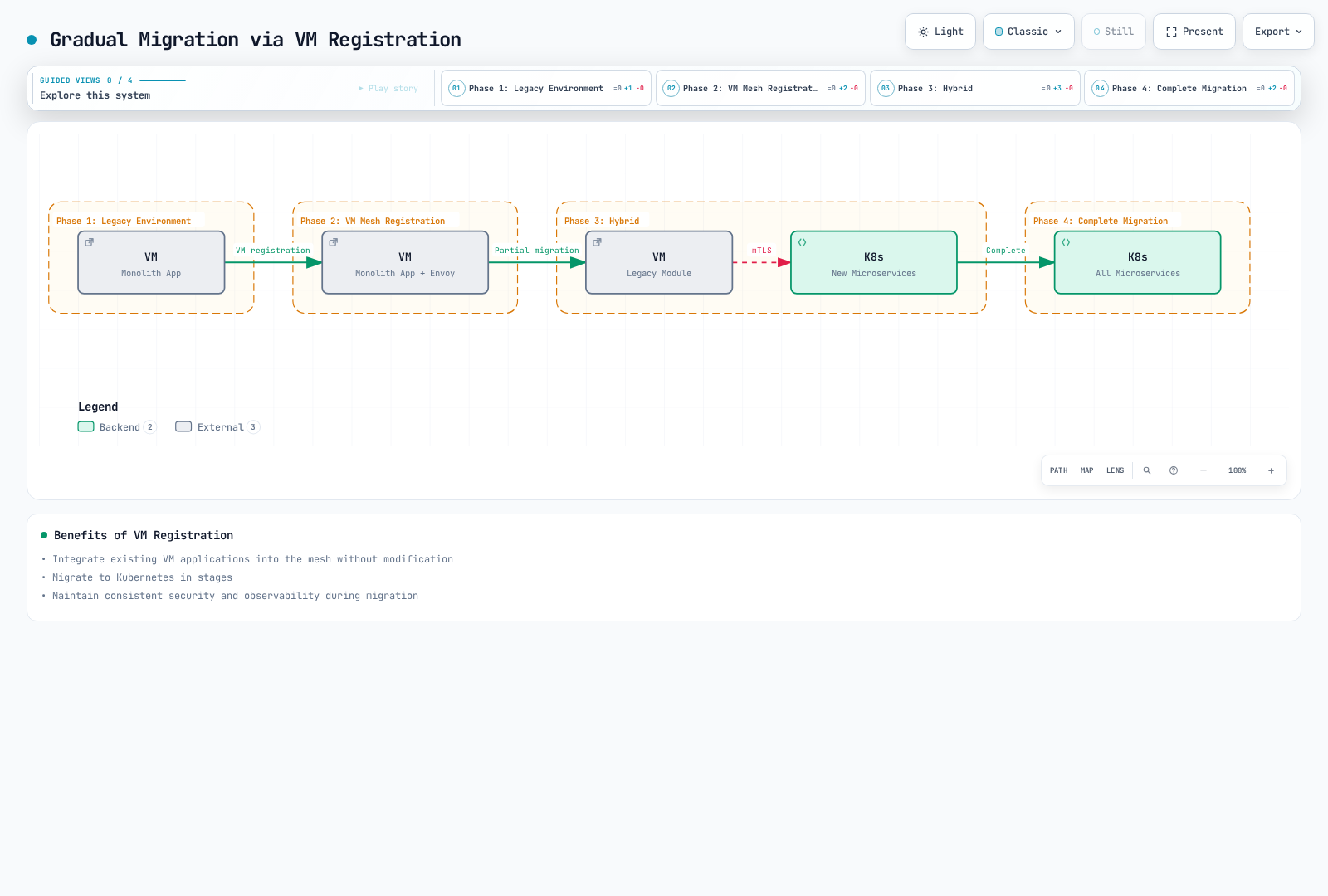
Benefits:
- Integrate existing VM applications into mesh without modification
- Migrate to Kubernetes in stages
- Maintain consistent security and observability during migration
2. Unified Security Policy
# mTLS policy applied to both VMs and pods
apiVersion: security.istio.io/v1
kind: PeerAuthentication
metadata:
  name: default
  namespace: default
spec:
  mtls:
    mode: STRICT  # Enforce mTLS for both VMs and pods
---
# VM database access control
apiVersion: security.istio.io/v1
kind: AuthorizationPolicy
metadata:
  name: database-access
  namespace: default
spec:
  selector:
    matchLabels:
      app: mysql  # WorkloadEntry label
  action: ALLOW
  rules:
  - from:
    - source:
        principals: ["cluster.local/ns/default/sa/app-sa"]
    to:
    - operation:
        ports: ["3306"]
3. Consistent Observability
VM telemetry depends on the protocol, just as for pods. The MySQL example is TCP and has no HTTP response codes or HTTP request spans.
# TCP bytes received per second; verify the actual workload label in your metrics
sum(rate(istio_tcp_received_bytes_total{destination_workload="mysql-vm-1"}[5m]))

# TCP connections opened per second
sum(rate(istio_tcp_connections_opened_total{destination_workload="mysql-vm-1"}[5m]))
VM Registration Limitations
- Manual Envoy Installation: Must manually install and configure Envoy proxy on VM
- Network Connectivity: Network connection between VM and Kubernetes cluster required
- Bootstrap Identity: Provision the root CA and service-account token securely; the Istio agent obtains and rotates workload certificates
- Operational Burden: VM Envoy version management and updates required
- Auto-scaling Limitation: No auto-scaling like Kubernetes HPA
Practical Usage Example
Scenario: Legacy Database Integration
# 1. Define database service with ServiceEntry
apiVersion: networking.istio.io/v1
kind: ServiceEntry
metadata:
  name: legacy-postgres
  namespace: production
spec:
  hosts:
  - postgres.production.svc.cluster.local
  addresses:
  - 240.240.1.10  # Virtual IP
  ports:
  - number: 5432
    name: postgresql
    protocol: TCP
  location: MESH_INTERNAL
  resolution: STATIC
  workloadSelector:
    labels:
      app: postgres
      tier: database
---
# 2. Register VM instance with WorkloadEntry
apiVersion: networking.istio.io/v1
kind: WorkloadEntry
metadata:
  name: postgres-vm-1
  namespace: production
spec:
  address: 10.0.1.100  # Actual VM IP
  labels:
    app: postgres
    tier: database
    version: v13
  serviceAccount: postgres-sa
  ports:
    postgresql: 5432
---
# 3. Access control policy
apiVersion: security.istio.io/v1
kind: AuthorizationPolicy
metadata:
  name: postgres-access-control
  namespace: production
spec:
  selector:
    matchLabels:
      app: postgres
  action: ALLOW
  rules:
  - from:
    - source:
        namespaces: ["production"]
        principals: ["cluster.local/ns/production/sa/api-service"]
    to:
    - operation:
ports: ["5432"]Result:
- Kubernetes pods access database via
postgres.production.svc.cluster.local - Automatic mTLS encryption between VM and pods
- Access control policy applied
- TCP metrics for this database; HTTP tracing requires an HTTP workload and trace-context propagation
Workload Registration Comparison Summary
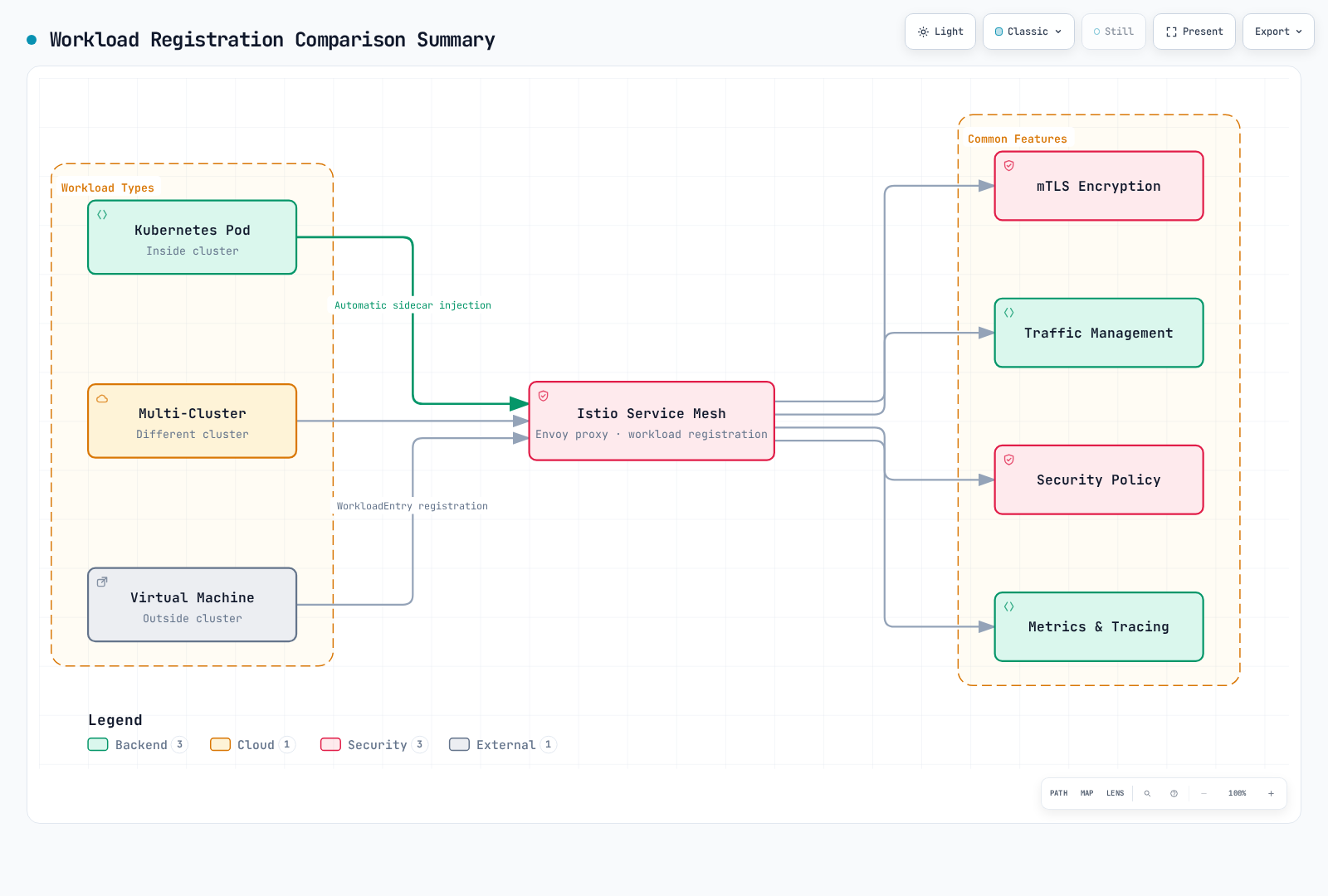
Through Istio's flexible workload registration capabilities:
- Kubernetes Pod: Cloud-native applications
- Multi-Cluster: Multi-cloud, regional distribution, disaster recovery
- Virtual Machine: Legacy apps, databases, hybrid environments
All workloads receive consistent security, traffic management, and observability features.
Next Steps
You now understand Istio's basic concepts. Learn how to use them in practice through the following documents:
Core Features
- Traffic Management
- Gateway and VirtualService usage
- DestinationRule and subset definition
- ServiceEntry and WorkloadEntry (VM registration)
- Advanced routing patterns (Canary, A/B testing)
- Traffic Mirroring and Shadowing
- Security
- mTLS configuration and PeerAuthentication
- Authentication (RequestAuthentication, JWT)
- Authorization (AuthorizationPolicy)
- Security policy management
- External authentication integration
- Observability
- Metric collection (Prometheus)
- Distributed tracing (Jaeger, Zipkin)
- Logging configuration
- Kiali service mesh visualization
- Grafana dashboards
- Resilience
- Circuit Breaker pattern
- Retry and Timeout settings
- Rate Limiting
- Outlier Detection
- Fault Injection testing
Advanced Topics
- Advanced Topics
- Ambient Mode (sidecar-less mesh)
- Multi-Cluster configuration
- EnvoyFilter customization
- DNS Proxy and Caching
- VM workload detailed configuration
- WASM plugin development