Multi-cluster
Last Updated: September 11, 2026 · Istio1.31 · Kubernetes1.32–1.36. The installation examples below describe sidecar topologies and are independent alternatives. Ambient has different support limits. No cluster, AWS or production-load deployment was performed by this audit.
Multi-cluster Service Mesh connects multiple Kubernetes clusters into a unified service mesh.
Table of Contents
- Do You Really Need Multi-cluster?
- Architecture Selection Guide
- Istio vs AWS VPC Lattice
- Topology
- Primary-Remote Setup
- Multi-Primary Setup
- Cross-cluster Communication
- Using with VPC Lattice
- Practical Examples
- Performance and Cost Comparison
- Troubleshooting
Do You Really Need Multi-cluster?
Multi-cluster Service Mesh is powerful but increases complexity and cost. Careful consideration is needed before adoption.
Decision Flow
Use the requirements below as constraints; no checklist score makes one architecture universally preferable.
When Multi-cluster is Needed
1. Geographic Distribution and Latency Optimization
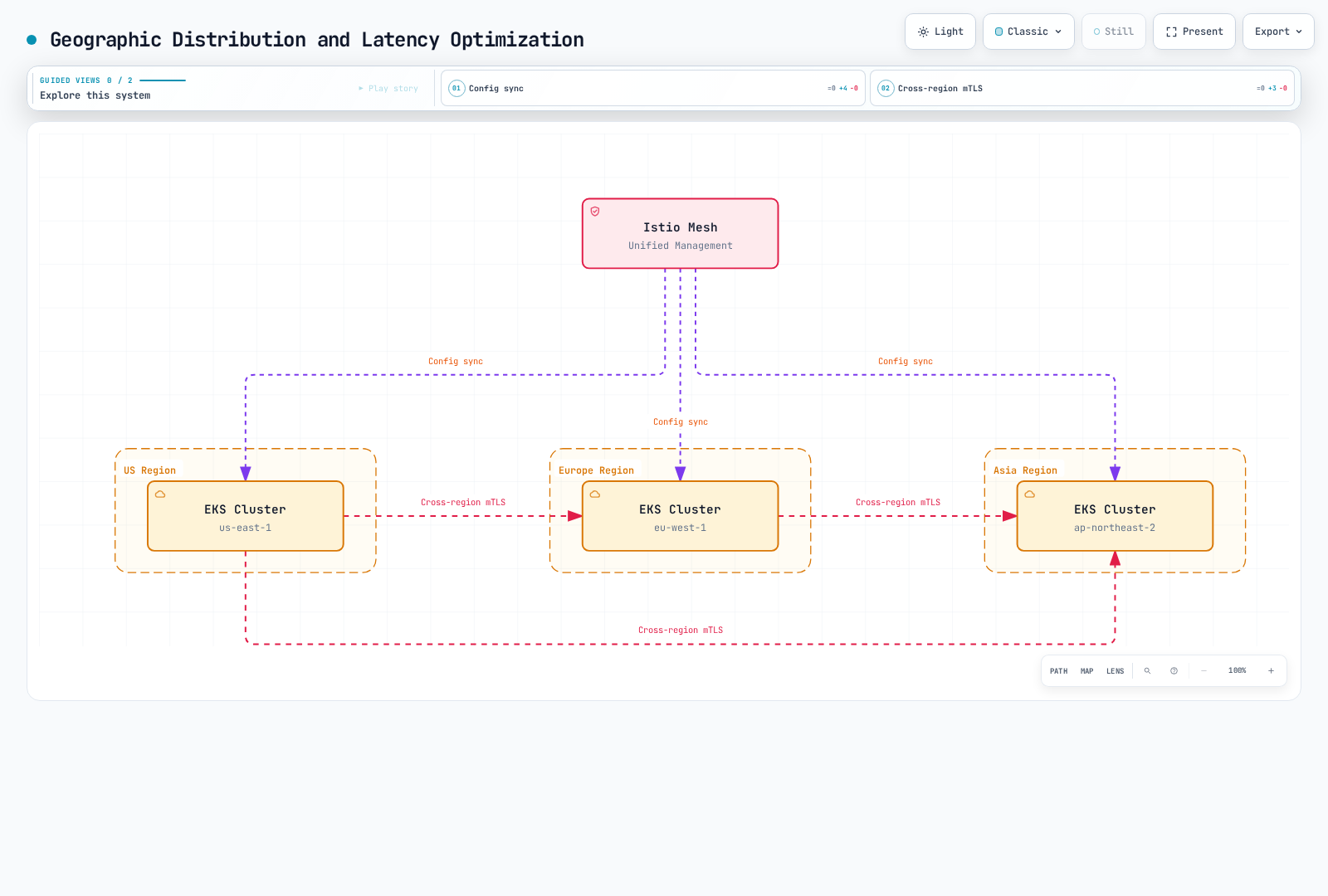
When needed:
- Global user-facing services (latency goal <100ms)
- Workload-specific data-placement obligations; a mesh does not itself establish compliance
- Regional traffic routing and failure isolation
2. Disaster Recovery (DR)
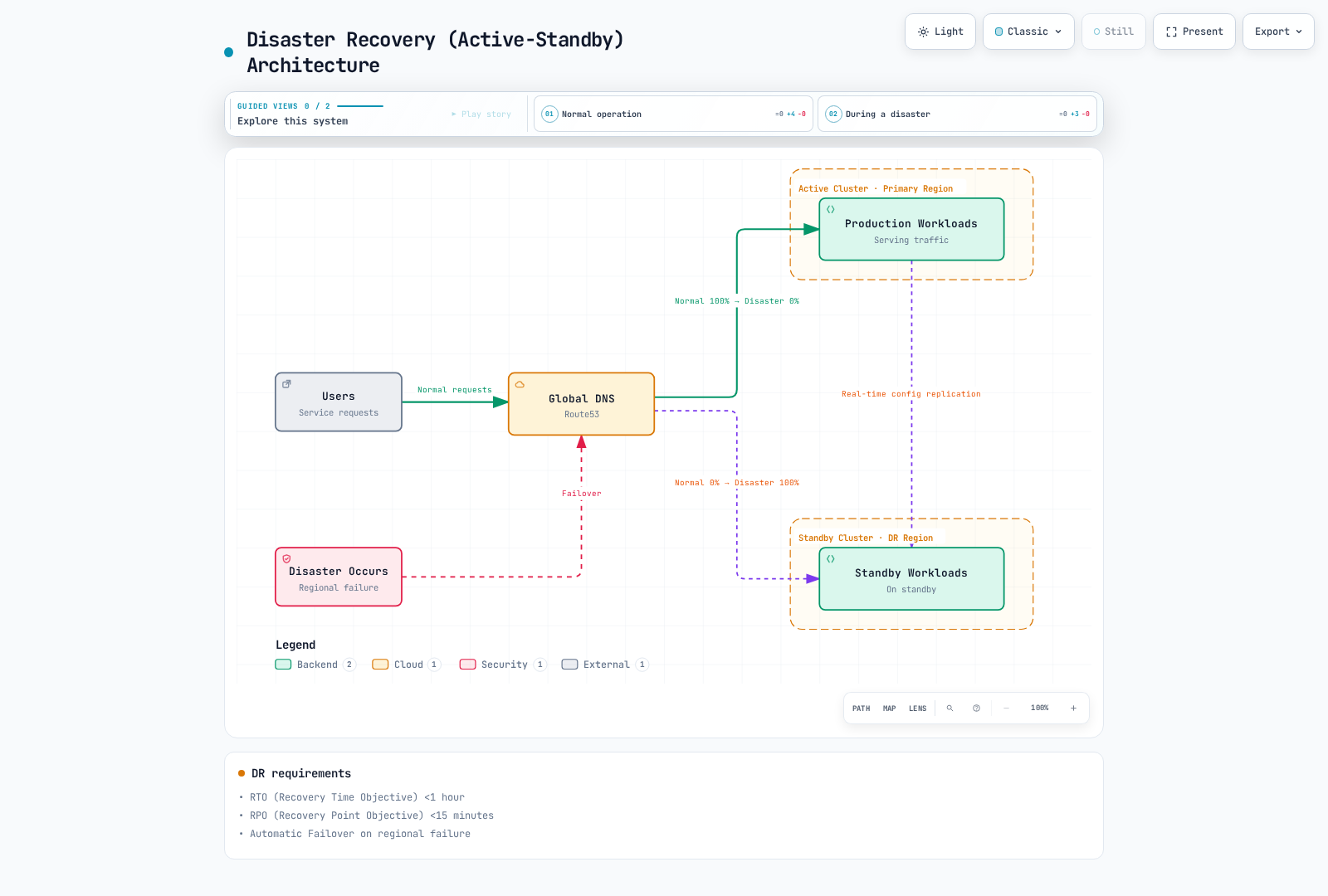
When needed:
- RTO (Recovery Time Objective) <1 hour
- RPO (Recovery Point Objective) <15 minutes
- Automatic Failover on regional failure
RTO/RPO figures above are example requirements, not outcomes guaranteed by a mesh. The DR diagram assumes separately implemented deployment/data replication and DNS health routing; clients, caches and existing connections affect switchover.
3. Environment Separation and Staged Deployment
When needed:
- Dev/Staging/Prod cluster separation with unified management
- Blue/Green deployments at cluster level
- Canary deployments with gradual regional expansion
4. Organizational Boundaries and Security Isolation
When needed:
- Independent cluster operation per team/department
- Enhanced Multi-tenancy
- Explicitly assessed isolation boundaries; shared mesh trust is a separate decision
When Multi-cluster is NOT Needed
1. Single Region, Small Scale Services
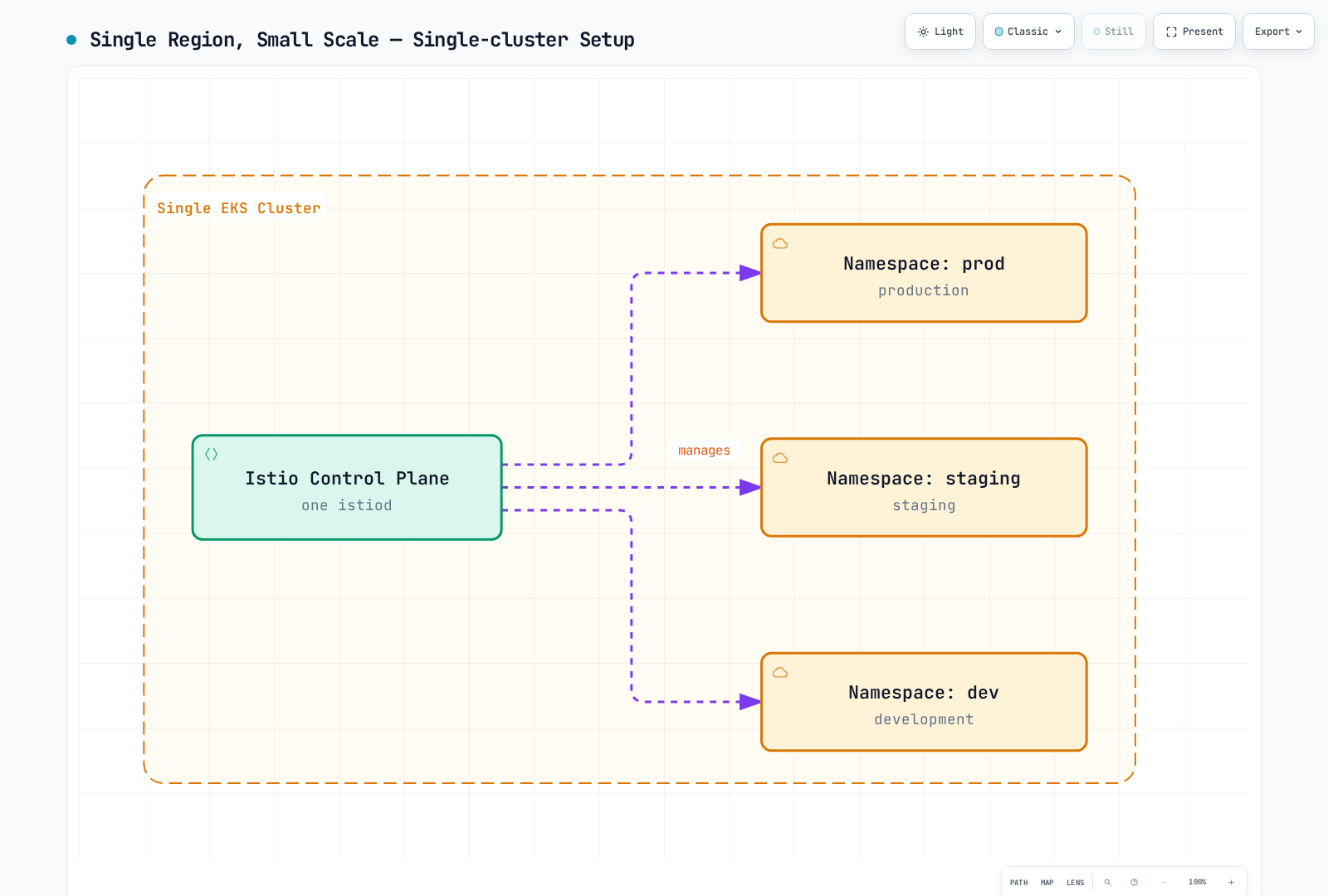
Use instead:
- Kubernetes Namespace separation
- NetworkPolicy for network isolation
- RBAC for access control
2. When Operational Complexity Cannot Be Handled
Multi-cluster operational requirements:
- An accountable team able to operate networking, PKI, upgrades and cross-cluster incidents
- East-West Gateway management and monitoring
- Cross-cluster certificate management
- Cross-cluster debugging capability
If your team is small:
- Single-cluster Istio or
- AWS VPC Lattice (managed service)
3. When Cost is a Key Consideration
Multi-cluster additional costs:
- East-west load-balancer hours/capacity and processing charges for the chosen platform
- Billable cross-region bytes and direction/region-specific rates
- Control-plane/gateway replicas and observability/storage capacity
Checklist
Answer these questions before adoption:
Architecture:
- [ ] Are 2 or more clusters already in operation?
- [ ] Is multi-region deployment needed?
- [ ] Are cross-cluster service calls frequent?
Business Requirements:
- [ ] Targeting global users?
- [ ] Is Disaster Recovery (DR) essential?
- [ ] Are RTO/RPO requirements strict?
Security and Compliance:
- [ ] Is data localization needed?
- [ ] Is strong cross-cluster isolation needed?
Operational Capability:
- [ ] Do you have Istio experts?
- [ ] Can you debug complex networking issues?
- [ ] Can you afford additional costs?
Results:
Use the answers as design inputs, not a numerical recommendation score. Region, trust, API, recovery and operating constraints can rule out an option regardless of how many boxes are checked.
Architecture Selection Guide
| Decision | Required evidence |
|---|---|
| Regional HA versus regional disaster recovery | Control-plane/workload placement, replicated data and tested recovery procedures |
| Cross-cluster mesh | Reachable APIs/gateways, common trust design, namespace/service identity and independently distributed configuration |
| Regional Lattice connectivity | Regional service network, VPC associations/endpoints, listener/auth mode and target reachability |
| Cross-region connectivity | Explicit global network/endpoint and application/data design; direct regional VPC associations are not a global fabric |
| Cost and staffing | Measured workload, equal traffic assumptions, actual billing and operating effort |
Comparison of Each Solution
Single-cluster Istio
Pros:
- Simplest management
- Fewer components can simplify the cost model; measure the actual workload
- Fast debugging
- All Istio features available
Cons:
- Shared cluster failure domain; regional HA can still be configured
- Regional dependency unless a separate recovery architecture exists
- A single EKS control plane is regional; broader failure-domain distribution needs additional design
Suitable when:
- Single region service
- A team whose regional reliability goals fit this operational scope
- Regional HA can be achieved without requiring cross-region DR
Multi-cluster Istio
Pros:
- Complete geographic distribution
- A basis for explicitly designed traffic failover; application/data DR remains separate
- All L7 features (Retry, Timeout, Circuit Breaker)
- Fine-grained traffic control
- Unified observability
Cons:
- High operational complexity
- East-West Gateway management required
- Cross-region data transfer costs
- Difficult debugging
Suitable when:
- Global services
- Strong DR needed
- Fine-grained L7 control essential
AWS VPC Lattice
Pros:
- AWS fully managed
- Simple setup
- Low operational burden
- Cross-VPC connectivity with explicit associations and access policies
- Model service/request/data and operational costs for the actual workload
Cons:
- Different resilience controls; no equivalent per-hop retry/outlier configuration in the listener rule API
- AWS lock-in
- Header/method/path and weighted-target routing, with different match types and limits from Istio
- Different metrics/log interfaces; full tracing needs application integration
Suitable when:
- AWS-centric architecture
- Only simple service connectivity needed
- Operational simplification priority
Istio vs AWS VPC Lattice
Feature Comparison
| Area | Istio sidecar mesh | VPC Lattice services |
|---|---|---|
| Routing | VirtualService/DestinationRule policies | HTTP header exact/prefix/contains, path exact/prefix, method and weighted target-group rules |
| Resilience | Per-hop retries/timeouts, pool breakers and outlier detection | Managed service/connection limits; not the same configurable per-hop retry/outlier API |
| TLS identity | Workload mTLS with compatible mesh trust | HTTPS terminates at Lattice; TLS passthrough can carry application mTLS but is not managed SPIFFE identity |
| Authorization | Istio/application policies | HTTP(S) auth policies and IAM/SigV4 where required; a SourceVpc-only allow can include anonymous callers |
| TLS passthrough limits | Depends on configured gateway | Custom-domain SNI, TCP target group and default rule only; anonymous-principal auth policies, not HTTP-header IAM authentication |
| Observability | Configured proxy/app metrics, logs and traces | CloudWatch metrics and access logs; application tracing/context remains a separate integration |
| Cost | Compute, gateways, data transfer and operations | Service time, requests/data processing and applicable resource/endpoint charges; no universal cheaper winner |
Lattice services, resource configurations and service networks are Regional. Cross-region/on-premises clients require an explicit supported network/endpoint path; peering/transit traffic needs the appropriate service-network VPC endpoint, not just an association. TLS passthrough and HTTPS termination have different routing/authentication contracts. A hybrid must state each TLS and identity boundary.
Architecture Pattern Comparison
Pattern 1: Istio Multi-cluster Only
Pros:
- Full Istio features
- Unified observability
- Fine-grained control
Cons:
- East-West Gateway management required
- High complexity
- Cross-region data transfer costs
Pattern 2: VPC Lattice Only
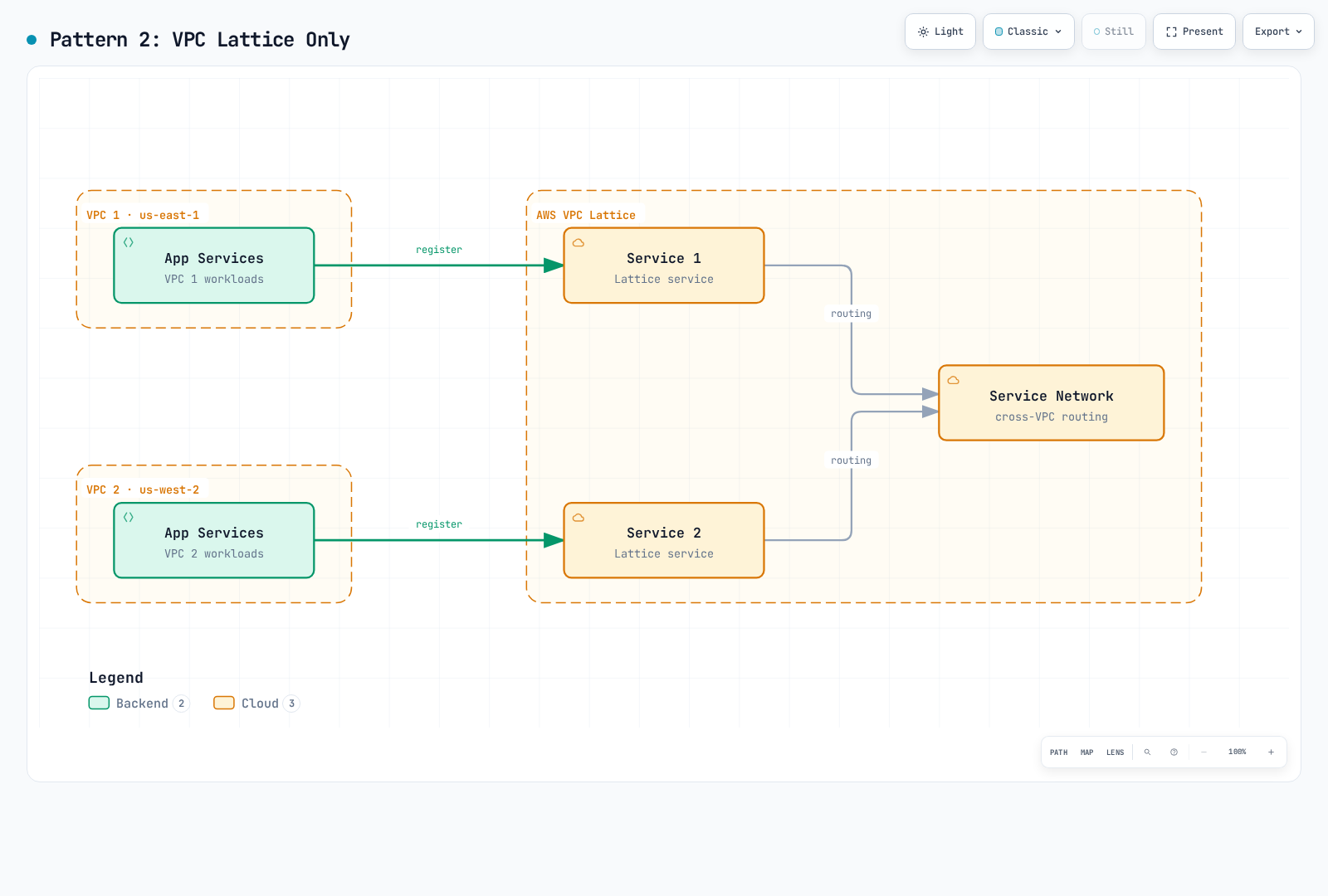
Pros:
- AWS fully managed
- Simple setup
- Low operational burden
Cons:
- Cannot use Istio features
- Limited traffic control
- Kubernetes integration requires the AWS Gateway API Controller and its supported APIs
Pattern 3: Hybrid (A Regional Connectivity Option)
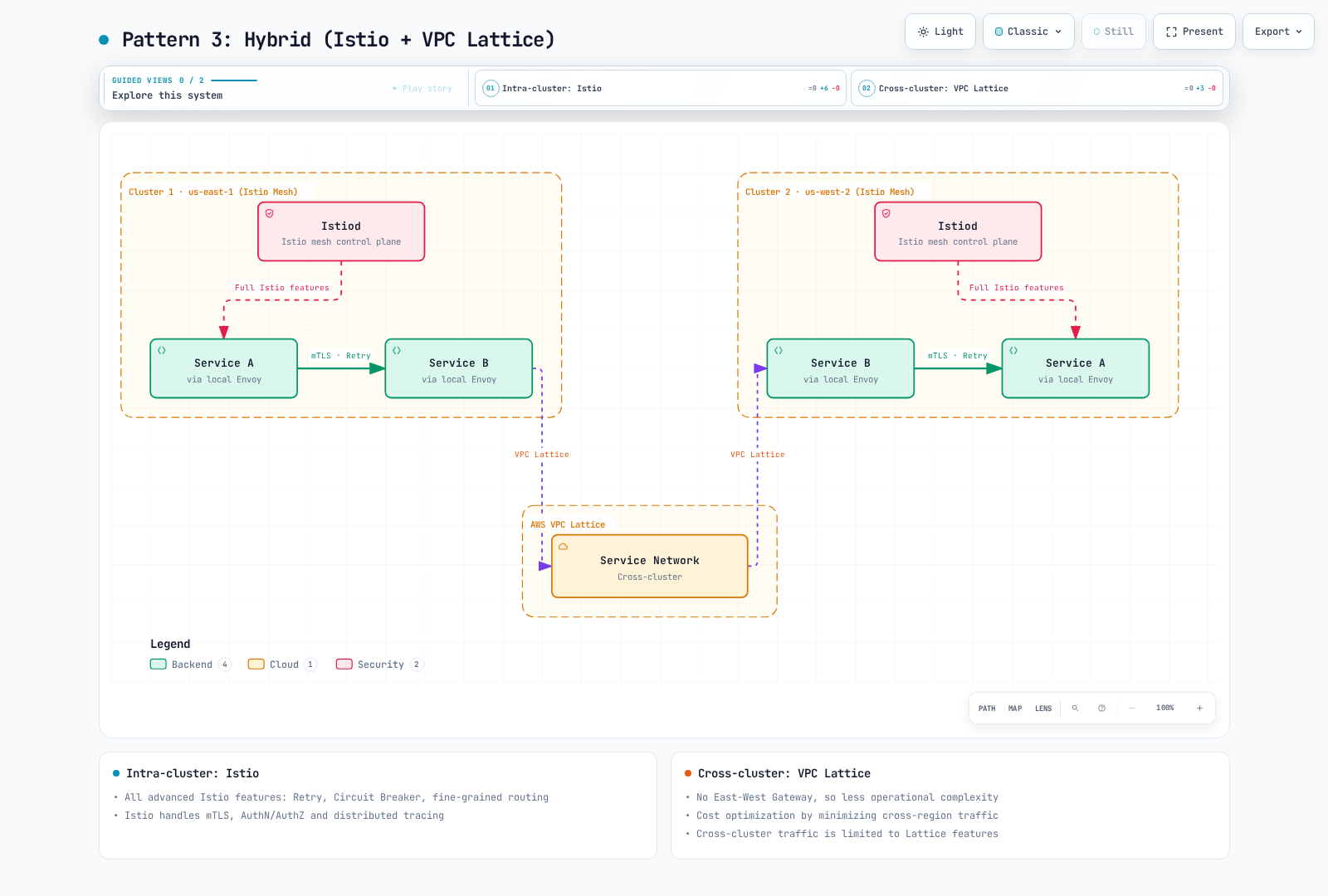
Pros:
- Intra-cluster: All advanced Istio features (Retry, Circuit Breaker, fine-grained routing)
- Cross-cluster: Simple VPC Lattice management and stability
- Reduced operational complexity (no East-West Gateway)
- Cost must be measured; choosing Lattice does not itself reduce required cross-region bytes
Cons:
- Need to understand two technology stacks
- Cross-cluster limited to Lattice features
Suitable when:
- AWS environment
- Complex traffic control needed intra-cluster
- Only simple connectivity needed cross-cluster
Multi-cluster Overview
With Multi-cluster Service Mesh you can:
- Multi-region deployment
- Disaster Recovery (DR)
- Environment separation (dev/staging/prod)
- Cross-cluster service discovery and communication
Topology
These are sidecar topologies. Current ambient multicluster supports Beta multi-primary/multi-network, with separate limitations; do not reuse primary/remote instructions for ambient. Each primary reads authorized Kubernetes APIs. Istiod does not replicate other Istio CRDs, application configuration or databases to another primary; distribute those separately. A shared trust domain gives the same namespace/ServiceAccount identity across clusters, so cluster separation alone is not authorization isolation.
One primary installation can have multiple replicas. A primary outage affects discovery, injection and certificate operations; existing proxies can retain configuration, so it is not an immediate universal traffic outage. Multi-primary reduces that dependency but does not eliminate all shared failure modes.
Primary-Remote
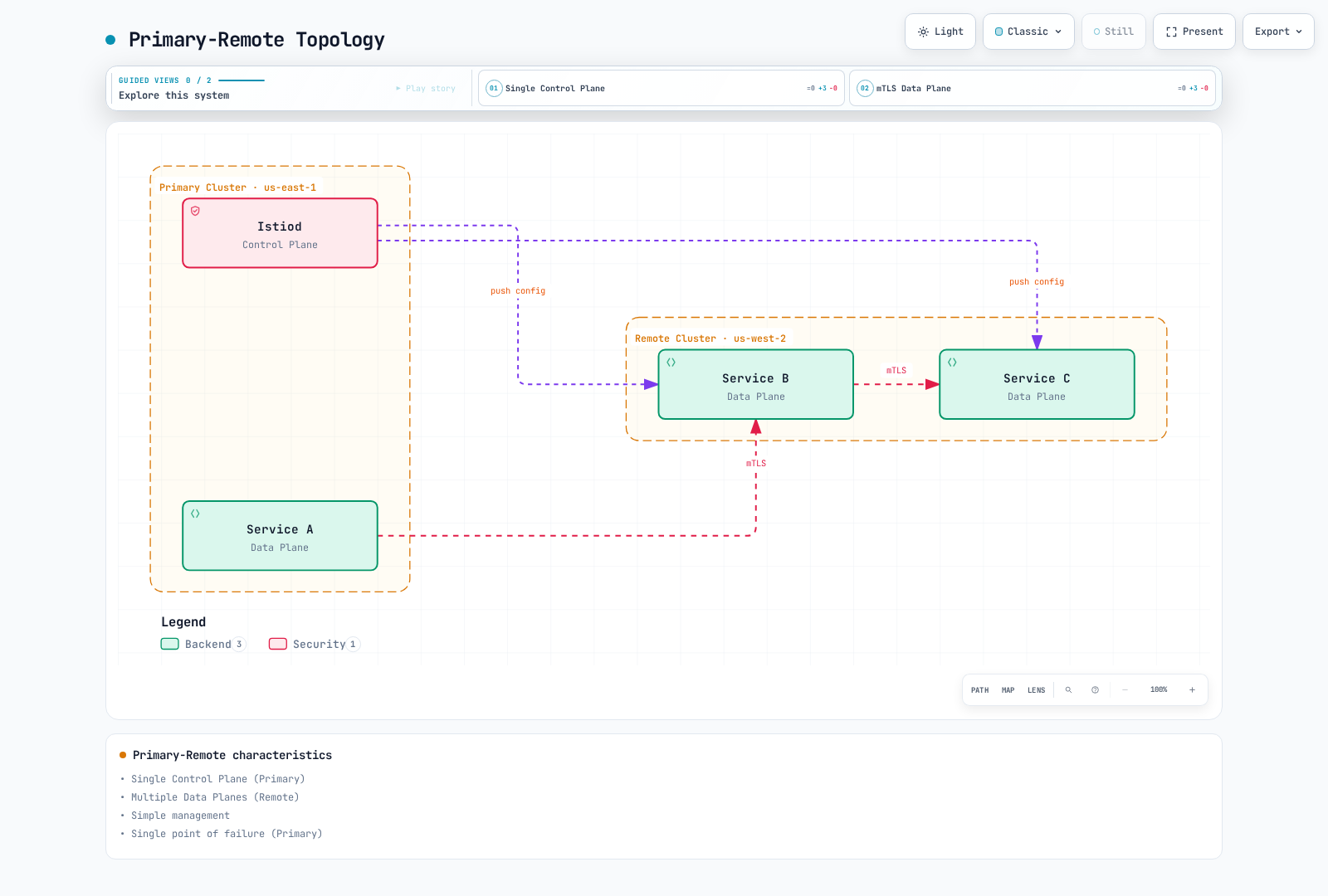
Characteristics:
- Single Control Plane (Primary)
- Multiple Data Planes (Remote)
- Simple management
- Shared dependency on the primary deployment for discovery/injection/certificate operations
Multi-Primary
Characteristics:
- Multiple Control Planes
- High availability
- Complex management
- Regional autonomy
Shared Prerequisites
Work from the Istio1.31 distribution directory, with two existing compatible clusters and reviewed kubeconfig contexts. These examples assume the default revision; preserve the installed revision in namespace labels and gateway generation when it differs. Both Kubernetes APIs and the required data/control-plane paths must be reachable. Plan shared trust before installation: multi-primary issuers must chain to a trusted common root (or an explicitly supported trust design); matching meshID strings do not establish certificate trust. Follow the official prerequisites and CA preparation and keep private CA material protected. Independently distribute application/mesh configuration; remote secrets do not replicate it.
export CTX_CLUSTER1=cluster1
export CTX_CLUSTER2=cluster2
kubectl --context="$CTX_CLUSTER1" get nodes
kubectl --context="$CTX_CLUSTER2" get nodes
Primary-Remote Setup
This is the official IP-based, same-network sidecar topology: Pods must be directly reachable across clusters, and the remote API must be reachable from the primary. It is not an EKS NLB-hostname recipe. The1.31 chart can represent a DNS-valued remotePilotAddress using an ExternalName Service; the IP lookup in this walkthrough is not a complete DNS-based EKS design. Use the external-control-plane guide for the injection URL, signed DNS certificates and actual control-plane reachability. Rendering a DNS value does not verify that deployment. IstioOperator below is input to istioctl, not an in-cluster operator resource.
1. Primary Cluster Setup
# Context setup
export CTX_CLUSTER1=cluster1

# Install Istio
istioctl install --context="${CTX_CLUSTER1}" -f - <<EOF
apiVersion: install.istio.io/v1alpha1
kind: IstioOperator
spec:
  values:
    global:
      meshID: mesh1
      externalIstiod: true
      multiCluster:
        clusterName: cluster1
      network: network1
EOF

# Install East-West Gateway
samples/multicluster/gen-eastwest-gateway.sh --network network1 > primary-eastwest.yaml
# Review platform-specific L4 load balancer and access settings before applying
istioctl install --context="${CTX_CLUSTER1}" -f primary-eastwest.yaml

# Expose Gateway
kubectl apply --context="${CTX_CLUSTER1}" -f \
  samples/multicluster/expose-istiod.yaml
2. Remote Cluster Setup
# Context setup
export CTX_CLUSTER2=cluster2

# Prepare the remote namespace and identify its managing primary
kubectl --context="$CTX_CLUSTER2" create namespace istio-system --dry-run=client -o yaml | kubectl --context="$CTX_CLUSTER2" apply -f -
kubectl --context="$CTX_CLUSTER2" annotate namespace istio-system topology.istio.io/controlPlaneClusters=cluster1 --overwrite
DISCOVERY_ADDRESS=$(kubectl --context="$CTX_CLUSTER1" -n istio-system get svc istio-eastwestgateway -o jsonpath='{.status.loadBalancer.ingress[0].ip}')
if [ -z "$DISCOVERY_ADDRESS" ]; then
  echo "This IP-based lab requires a reachable LB IP; DNS-based EKS endpoints need the external-control-plane design." >&2
  exit 1
fi


# Install Istio with Remote configuration
istioctl install --context="${CTX_CLUSTER2}" -f - <<EOF
apiVersion: install.istio.io/v1alpha1
kind: IstioOperator
spec:
  profile: remote
  values:
    istiodRemote:
      injectionPath: /inject/cluster/cluster2/net/network1
    global:
      meshID: mesh1
      multiCluster:
        clusterName: cluster2
      network: network1
      remotePilotAddress: ${DISCOVERY_ADDRESS}
EOF

# Give the primary access to the REMOTE API after remote components are configured
istioctl create-remote-secret \
  --context="${CTX_CLUSTER2}" \
  --name=cluster2 | \
  kubectl apply -f - --context="${CTX_CLUSTER1}"
Multi-Primary Setup
For this separate-network topology, each primary must reach the peer API and the peer east-west gateway. Provision the topology-appropriate CA secrets before installing Istiod. Configure L4 load balancers, gateway reachability and scoped access for the real platform; an ALB or another TLS-terminating L7 hop is incompatible with AUTO_PASSTHROUGH. See AWS integration for EKS load-balancer prerequisites.
1. Set Both Clusters as Primary
# Cluster 1
istioctl install --context="${CTX_CLUSTER1}" -f - <<EOF
apiVersion: install.istio.io/v1alpha1
kind: IstioOperator
spec:
  values:
    global:
      meshID: mesh1
      multiCluster:
        clusterName: cluster1
      network: network1
EOF

# Cluster 2
istioctl install --context="${CTX_CLUSTER2}" -f - <<EOF
apiVersion: install.istio.io/v1alpha1
kind: IstioOperator
spec:
  values:
    global:
      meshID: mesh1
      multiCluster:
        clusterName: cluster2
      network: network2
EOF# Both networks need their own gateway and service exposure
kubectl --context="$CTX_CLUSTER1" label namespace istio-system topology.istio.io/network=network1 --overwrite
kubectl --context="$CTX_CLUSTER2" label namespace istio-system topology.istio.io/network=network2 --overwrite
samples/multicluster/gen-eastwest-gateway.sh --network network1 > eastwest-cluster1.yaml
samples/multicluster/gen-eastwest-gateway.sh --network network2 > eastwest-cluster2.yaml
# Review platform-specific LB/access settings in these generated inputs before installing
istioctl install --context="$CTX_CLUSTER1" -f eastwest-cluster1.yaml
istioctl install --context="$CTX_CLUSTER2" -f eastwest-cluster2.yaml
kubectl --context="$CTX_CLUSTER1" apply -n istio-system -f samples/multicluster/expose-services.yaml
kubectl --context="$CTX_CLUSTER2" apply -n istio-system -f samples/multicluster/expose-services.yaml2. Cross-register Remote Secrets
# Cluster 1's Secret to Cluster 2
istioctl create-remote-secret \
  --context="${CTX_CLUSTER1}" \
  --name=cluster1 | \
  kubectl apply -f - --context="${CTX_CLUSTER2}"

# Cluster 2's Secret to Cluster 1
istioctl create-remote-secret \
  --context="${CTX_CLUSTER2}" \
  --name=cluster2 | \
  kubectl apply -f - --context="${CTX_CLUSTER1}"
Cross-cluster Communication
Use remote discovery with matching Service/namespace names and the required DNS visibility. Istiod does not copy Service objects or Deployments between clusters. This lab defines the Service in both clusters, deploys the backend only in cluster2 and calls it from an injected client in cluster1. In different networks, Istio selects the east-west gateway and SNI/mTLS path; do not replace it with an HTTP ServiceEntry to port15443.
Save the following as shared-httpbin-service.yaml:
apiVersion: v1
kind: Service
metadata:
  name: httpbin
  namespace: multicluster-demo
spec:
  selector:
    app: httpbin
  ports:
  - name: http
    port: 8000
targetPort: 8080for context in "$CTX_CLUSTER1" "$CTX_CLUSTER2"; do
kubectl --context="$context" create namespace multicluster-demo --dry-run=client -o yaml | kubectl --context="$context" apply -f -
# Default revision lab; use the recorded revision label if installed differently
kubectl --context="$context" label namespace multicluster-demo istio-injection=enabled --overwrite
kubectl --context="$context" apply -f shared-httpbin-service.yaml
done
kubectl --context="$CTX_CLUSTER2" apply -n multicluster-demo -f samples/httpbin/httpbin.yaml
kubectl --context="$CTX_CLUSTER1" apply -n multicluster-demo -f samples/curl/curl.yaml
kubectl --context="$CTX_CLUSTER2" rollout status deployment/httpbin -n multicluster-demo --timeout=120s
kubectl --context="$CTX_CLUSTER1" rollout status deployment/curl -n multicluster-demo --timeout=120s
istioctl proxy-config endpoints deployment/curl --context="$CTX_CLUSTER1" -n multicluster-demo --cluster 'outbound|8000||httpbin.multicluster-demo.svc.cluster.local'
kubectl --context="$CTX_CLUSTER1" exec -n multicluster-demo deploy/curl -c curl -- curl -sS --max-time 5 http://httpbin:8000/headersThe HTTP response tests the application path, not certificate trust by itself. Inspect the caller/receiver TLS configuration and identity evidence as in the security chapter. The official multicluster verification provides additional scenarios. These commands assume the trust, network, policy and discovery prerequisites already hold.
Using with VPC Lattice
Hybrid Contracts and Configuration Fragments
This alternative starts with independent Istio meshes and a regional Lattice service path. Changing meshID or setting a supposed multiCluster.enabled switch is not a safe way to disconnect an already joined mesh. Use the installation guide and a reviewed trust/remote-secret/policy migration when changing topology.
The following commands are configuration examples, not an end-to-end production deployment. They assume authorized management identities, actual VPC/security-group IDs, installed AWS Gateway API Controller/CRDs and a working HTTPS Lattice service. The management credentials for these commands are separate from the application caller role that only needs the intended data-plane permissions. Lattice services/networks are Regional; clients arriving through peering/transit need the supported service-network endpoint/network path. Direct associations of two same-Region VPCs do not create a three-Region network.
1. Create or Select the Regional Service Network
For a new network, capture the returned ID instead of looking up an ambiguous name. If a network already exists, use its verified ID instead of creating another. VPC association enables a client path; it does not publish Kubernetes Services or authorize every request.
# Both VPCs below are in this Region; use real reviewed VPC/security-group IDs
LATTICE_REGION=us-east-1
: "${VPC1_ID:?Set cluster1 VPC ID}"
: "${VPC2_ID:?Set cluster2 VPC ID}"
: "${LATTICE_SG1_ID:?Set cluster1 association security group}"
: "${LATTICE_SG2_ID:?Set cluster2 association security group}"
SERVICE_NETWORK_ID=$(aws vpc-lattice create-service-network   --region "$LATTICE_REGION" --name my-service-network --auth-type AWS_IAM   --query id --output text)
aws vpc-lattice create-service-network-vpc-association --region "$LATTICE_REGION"   --service-network-identifier "$SERVICE_NETWORK_ID" --vpc-identifier "$VPC1_ID"   --security-group-ids "$LATTICE_SG1_ID"
aws vpc-lattice create-service-network-vpc-association --region "$LATTICE_REGION"   --service-network-identifier "$SERVICE_NETWORK_ID" --vpc-identifier "$VPC2_ID"   --security-group-ids "$LATTICE_SG2_ID"
2. Publish Through the Controller with a Defined Ingress Boundary
The controller's amazon-vpc-lattice GatewayClass and Gateway reference a service network by name. A Gateway named my-service-network can reference the separately managed network above. A supported HTTPRoute/GRPCRoute supplies service/listener/target routing and its own assigned endpoint; the Gateway is not one universal service DNS endpoint.
ServiceExport is a valid controller-specific API, but it creates a target group, not a complete Lattice service/network association. The old lattice-service-network annotation did not provide that workflow. The optional export below assumes an existing lattice-entry ingress Service on port80; creating it alone exposes no complete route:
# Optional target-group export only; assumes this ingress Service already exists
apiVersion: application-networking.k8s.aws/v1alpha1
kind: ServiceExport
metadata:
  name: lattice-entry
  namespace: istio-system
spec:
  exportedPorts:
  - port: 80
    routeType: HTTP
For actual publication, complete the Gateway, HTTPRoute and, where applicable, ServiceImport configuration. Match the installed controller/CRD version; exportedPorts was checked against v2.1.3.
Lattice does not originate Istio SPIFFE mTLS to a STRICT backend. Provide a separately configured ingress boundary that accepts the intended Lattice traffic, restricts bypass and originates mesh mTLS to the backend, or explicitly design another supported backend-security contract. Do not silently weaken backend policy. The backend may see the ingress identity rather than the original IAM caller; trusted identity propagation requires its own design. This document does not provision that boundary, IAM roles, ACM certificates or DNS.
3. Discover and Call the Actual HTTPS Endpoint
After the provider route and service-network association are ready, obtain the service's real DNS name. The application must use HTTPS, verify the matching certificate, and sign the actual host/path/payload where authenticated access is required. Do not invent a .lattice.svc.cluster.local name or add SIMPLE TLS around application TLS.
# Obtain the real service ID from the reconciled provider configuration
: "${LATTICE_SERVICE_ID:?Set the created and associated HTTPS Lattice service ID}"
aws vpc-lattice get-service --region "$LATTICE_REGION"   --service-identifier "$LATTICE_SERVICE_ID" > lattice-service.json
LATTICE_SERVICE_DNS=$(jq -er '.dnsEntry.domainName' lattice-service.json)
LATTICE_SERVICE_ARN=$(jq -er '.arn' lattice-service.json)

# JSON is also a valid Kubernetes manifest; this explicitly renders the hostname
jq -n --arg host "$LATTICE_SERVICE_DNS" '{
  apiVersion:"networking.istio.io/v1",kind:"ServiceEntry",
  metadata:{name:"remote-service-via-lattice",namespace:"default"},
  spec:{hosts:[$host],location:"MESH_EXTERNAL",resolution:"DNS",
        ports:[{number:443,name:"https",protocol:"HTTPS"}]}
}' > lattice-service-entry.json
kubectl --context="$CTX_CLUSTER1" apply -f lattice-service-entry.json
This ServiceEntry only makes the external service known to the caller's Istio registry; it does not provision Lattice connectivity, policy or a signer. Application-originated HTTPS is opaque to the sidecar, so HTTP-level proxy routing/metrics require a different explicitly designed TLS-termination path.
4. Require the Intended IAM Caller
AWS_IAM enables policy evaluation. A wildcard Principal with only a SourceVpc condition can permit anonymous requests; it is not proof of IAM authentication. This example instead names an IAM role and scopes access to one service and the two direct-association VPCs.
: "${CALLER_ROLE_ARN:?Set the explicitly authorized caller IAM role ARN}"
# Compact resource policy; explicit role requires an authenticated caller
jq -cn --arg role "$CALLER_ROLE_ARN" --arg service "$LATTICE_SERVICE_ARN"   --arg vpc1 "$VPC1_ID" --arg vpc2 "$VPC2_ID" '{
  Version:"2012-10-17",Statement:[{
    Effect:"Allow",Principal:{AWS:$role},Action:"vpc-lattice-svcs:Invoke",
    Resource:($service+"/*"),
    Condition:{StringEquals:{"vpc-lattice-svcs:SourceVpc":[$vpc1,$vpc2]}}
  }]
}' > lattice-auth-policy.json
aws vpc-lattice put-auth-policy --region "$LATTICE_REGION"   --resource-identifier "$SERVICE_NETWORK_ID" --policy file://lattice-auth-policy.json
The caller role also needs the appropriate identity-based Invoke permission. Every enabled service-network/service auth policy must allow the request, and an explicit deny wins. If service-level authentication is enabled, manage that policy too; avoid competing CLI/controller policy owners. Use a supported application SDK/signer or validated signing proxy with workload credentials. Istio TLS settings do not generate SigV4 signatures; changing host/path/body after signing can invalidate them.
Traffic Flow and Observability
The intended flow is: caller signs and establishes HTTPS → Lattice authorizes and terminates HTTPS → the configured ingress boundary enters the backend mesh → the application receives the request. TLS passthrough is a different contract: custom-domain SNI/TCP targets, only a default rule and anonymous-principal auth policies; it can carry application mTLS but does not provide HTTP-header IAM authentication.
Keep trace context and collector/backend configuration compatible across applications. Crossing a cluster or Lattice boundary does not inherently split a trace. Verify the actual identity, TLS and telemetry path rather than assuming the original two-cluster diagram is a complete deployment.
Practical Examples
Example 1: Global E-commerce (Multi-Primary + VPC Lattice)
A global application can deploy regional meshes and regional Lattice service networks. Within a Region, a local Order service can call a local Payment service through the defined Lattice/ingress contract. Cross-Region calls need a separate supported network/endpoint design; the removed diagram did not establish that path by placing three Regions around one service network. Data replication and regional failover remain application/infrastructure responsibilities.
The following intra-cluster example assumes a real cart Service and matching v1/v2 Pod labels. The user-type header chooses a route; it is not authentication. Mesh retries are disabled because cart operations can have side effects.
Configuration Example
Cluster 1/2: Frontend -> Cart (Istio)
apiVersion: networking.istio.io/v1
kind: VirtualService
metadata:
  name: cart-service
  namespace: default
spec:
  hosts:
  - cart.default.svc.cluster.local
  http:
  - match:
    - headers:
        user-type:
          exact: premium
    route:
    - destination:
        host: cart.default.svc.cluster.local
        subset: v2
      weight: 100
    retries:
      attempts: 0
  - route:
    - destination:
        host: cart.default.svc.cluster.local
        subset: v1
      weight: 100
    retries:
      attempts: 0
---
apiVersion: networking.istio.io/v1
kind: DestinationRule
metadata:
  name: cart-service
  namespace: default
spec:
  host: cart.default.svc.cluster.local
  trafficPolicy:
    connectionPool:
      tcp:
        maxConnections: 100
      http:
        http1MaxPendingRequests: 1024
        maxRequestsPerConnection: 10
    outlierDetection:
      interval: 10s
      baseEjectionTime: 30s
      consecutive5xxErrors: 5
      minHealthPercent: 0
  subsets:
  - name: v1
    labels:
      version: v1
  - name: v2
    labels:
      version: v2
Regional Order → Payment through Lattice
Use the actual HTTPS DNS and rendered ServiceEntry from the hybrid section, with a working provider route, compatible ingress boundary and SigV4 caller. Do not add SIMPLE TLS around an application HTTPS stream or invent a Kubernetes .svc.cluster.local alias. A regional Lattice path does not independently solve global routing or data recovery.
Example 2: Disaster Recovery (DR) Scenario
This is a manual Route53 alias-failover configuration for two existing regional NLBs. It does not deploy workloads, load balancers, TLS listeners, replication or a health service. Configure each target group’s real application readiness/health first. Do not combine this record owner with the earlier incomplete ExternalDNS annotations or invent health-check IDs.
The example uses EvaluateTargetHealth for the NLB aliases, without a separate public HTTPS health check. If deeper application/data health is required, design a suitable endpoint/alarm health signal; the old HTTP80 Service and HTTPS443 probe did not match. Private-only endpoints cannot simply be tested by public Route53 HTTP checkers.
# Existing, healthy NLBs and a DNS zone controlled by this workflow
PRIMARY_REGION=us-east-1
STANDBY_REGION=us-west-2
RECORD_NAME=api.example.com
: "${PRIMARY_LB_ARN:?Set the primary NLB ARN}"
: "${STANDBY_LB_ARN:?Set the standby NLB ARN}"
: "${ZONE_ID:?Set the Route53 hosted zone ID}"
aws elbv2 describe-load-balancers --region "$PRIMARY_REGION" \
  --load-balancer-arns "$PRIMARY_LB_ARN" > primary-nlb.json
aws elbv2 describe-load-balancers --region "$STANDBY_REGION" \
  --load-balancer-arns "$STANDBY_LB_ARN" > standby-nlb.json

# Each regional load balancer supplies its own canonical hosted-zone ID
jq -n --arg name "$RECORD_NAME" \
  --slurpfile primary primary-nlb.json --slurpfile standby standby-nlb.json '
  def record($id; $mode; $lb):
    {Action:"UPSERT",ResourceRecordSet:{
      Name:$name,Type:"A",SetIdentifier:$id,Failover:$mode,
      AliasTarget:{HostedZoneId:$lb.CanonicalHostedZoneId,
                   DNSName:$lb.DNSName,EvaluateTargetHealth:true}
    }};
  {Changes:[
    record("primary";"PRIMARY";$primary[0].LoadBalancers[0]),
    record("secondary";"SECONDARY";$standby[0].LoadBalancers[0])
  ]}
' > failover-config.json

# Review the records/zone before applying; do not give another DNS controller ownership
aws route53 change-resource-record-sets --hosted-zone-id "$ZONE_ID" \
  --change-batch file://failover-config.json
Check existing records and restore/rollback plans before changing DNS. An alias A record is not a complete IPv6 configuration; dualstack use also needs appropriate AAAA records and reachability. DNS caches, connection reuse, target-group health semantics and all-unhealthy behavior affect failover. Test these alongside application/data recovery. Neither DNS nor Istio establishes a15-minute RPO or one-hour RTO by itself.
Performance and Cost Comparison
The old latency/RPS/CPU/memory table had no reproducible benchmark source, release, hardware or load conditions. The cost table also compared different traffic volumes (10TB versus5TB) and arbitrary staffing budgets. They cannot establish a cheaper/faster architecture, and are not relabeled as current measurements.
| Component | Measure or price explicitly |
|---|---|
| Application latency/throughput | Same regions, payload, concurrency, TLS, policies, application capacity and percentile definition |
| Mesh compute | Actual Istiod/proxy/gateway/telemetry replicas and resource consumption; include Kubernetes/EKS costs separately |
| Network | Equal billable bytes/directions, regional transfer, LB/endpoint/TGW/peering processing and capacity |
| Lattice services | Provisioned service time, requests and data processing; resource configurations/endpoints have their own model |
| Operations/DR | Observed engineering effort, incident/recovery exercises and business impact assumptions |
Use Lattice pricing and actual billing data. VPC peering does not automatically eliminate inter-Region transfer fees. Lattice documents no additional inter-AZ data-transfer charge within its service, which is different from zero data-processing cost. Ambient does not guarantee90% resource savings; use equivalent-policy measurements. Neither a fixed staff count nor a$1,000/hour downtime threshold selects the architecture.
Troubleshooting
# Verify cross-cluster connectivity
istioctl ps --context="${CTX_CLUSTER1}"
istioctl ps --context="${CTX_CLUSTER2}"

# Check Remote Secret
kubectl get secrets -n istio-system --context="${CTX_CLUSTER1}"

# Verify cross-cluster traffic
kubectl logs -n istio-system -l app=istiod --context="${CTX_CLUSTER1}"
References
Official Documentation
Blogs and Case Studies
Related Documents
- Ambient Mode - Resource optimization
- mTLS - Secure cross-cluster communication
- VPC Lattice - AWS managed service networking
Summary
Choose a topology from its actual trust, network, API and recovery requirements. A single regional cluster can provide multi-AZ HA. Sidecar multicluster can extend discovery and mesh mTLS when its prerequisites hold, but does not replicate application state. Lattice is managed regional application networking with listener-specific TLS/auth contracts. A hybrid must define each identity/termination boundary and any cross-Region path. Validate behavior and equal-workload costs before recommending an option.