Infrastructure Setup
Validation baseline: Terraform 1.15.7, AWS Provider 6.64.0, EKS module 21.25.0, VPC module 6.7.2, Pod Identity module 2.9.0 Last reviewed: September 11, 2026. Local schema/mock-plan validation; not a live AWS deployment result.
< Table of Contents | Next: NLB Weighted Routing and Blue/Green Clusters >
This example describes an account/environment-specific state bucket and blue/green clusters in one Region. Built-in Auto Mode pools can use multiple configured AZs. Color names or subnet tags do not pin workers to one AZ. For single-AZ worker cells, design NodePool/NodeClass placement, routing, and recovery capacity separately using Zonal Operations.
Create the example files in a separate eks-terraform/ project. Terraform does not automatically inherit .tf files from a parent 00-shared directory; use each root’s declarations and avoid copying duplicate variables/locals alongside them. For existing v20/v5 state, review module migration guides and the real plan before upgrading. Retain each root’s .terraform.lock.hcl and pin module versions separately too.
The API endpoint is private by default. kubectl validation and GitOps controllers require actual API connectivity, such as a VPC runner or VPN. This guide does not provision that access path.
Overview
This guide presents a Terraform reference architecture for deploying Amazon EKS clusters with Auto Mode enabled. The 3-layer approach separates infrastructure concerns by change frequency, ownership, and blast radius, enabling teams to work independently while maintaining operational safety.
Key Design Principles:
- Separation of Concerns: Each layer has distinct ownership and change patterns
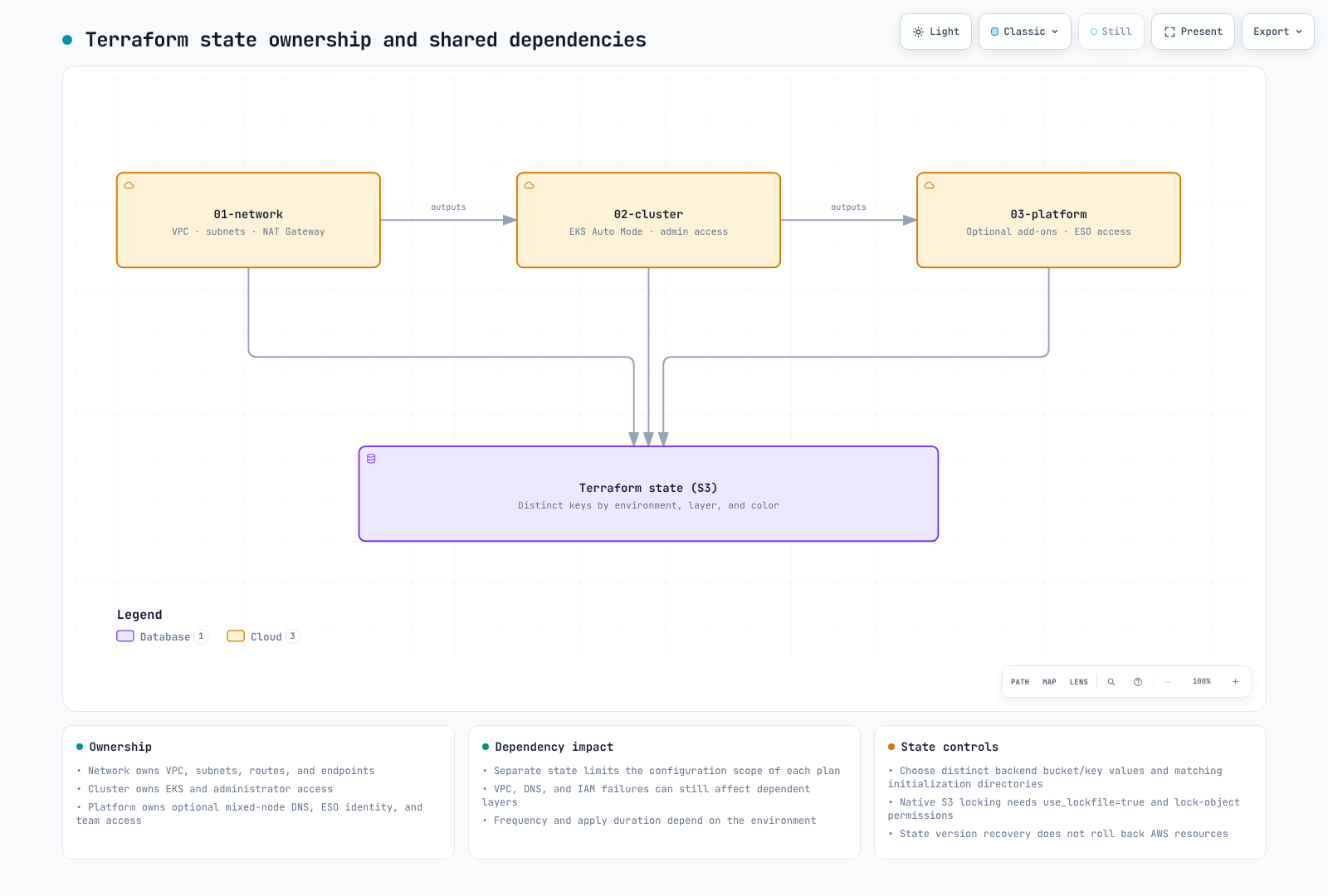
- Blast Radius Minimization: State separation reduces change scope; dependency failures can still affect other layers
- State Isolation: Independent Terraform state files per layer
- GitOps Ready: Terraform manages AWS infrastructure; Kubernetes resources are managed by ArgoCD
1. 3-Layer Architecture Introduction
Why Separate Layers?
Traditional monolithic Terraform configurations create several operational challenges:
- Long Plan/Apply Times: Every change requires evaluating all resources
- Blast Radius: A single misconfiguration can affect the entire infrastructure
- Team Conflicts: Multiple teams competing for the same state file
- Change Risk: Network changes bundled with application changes increase deployment risk
The 3-layer architecture addresses these challenges by organizing infrastructure into distinct tiers based on stability and ownership.
Layer Characteristics (illustrative frequencies)
| Layer | Name | Change Frequency | Primary Owner | Blast Radius | Dependencies |
|---|---|---|---|---|---|
| 01 | Network | Quarterly | Infrastructure Team | High | None |
| 02 | Cluster | Monthly | Platform Team | Medium | 01-network |
| 03 | Platform | Weekly | Platform/App Teams | DNS/access changes can affect the cluster | 01-network, 02-cluster |
Directory Structure
eks-terraform/
├── 00-shared/
│   ├── variables.tf          # Common variables across all layers
│   ├── bootstrap/main.tf     # Local state creates the S3 backend
│   └── providers.tf.template # Provider configuration template
├── 01-network/
│   ├── main.tf               # VPC, subnets, NAT Gateway
│   ├── variables.tf          # Network-specific variables
│   ├── outputs.tf            # VPC ID, subnet IDs for downstream
│   ├── backend.tf            # S3 backend: network/terraform.tfstate
│   └── providers.tf
├── 02-cluster/
│   ├── main.tf               # EKS cluster with Auto Mode
│   ├── data.tf               # Remote state from 01-network
│   ├── variables.tf          # Cluster-specific variables
│   ├── outputs.tf            # Cluster endpoint, OIDC provider
│   ├── backend.tf            # S3 backend: cluster/terraform.tfstate
│   └── providers.tf
└── 03-platform/
    ├── main.tf               # Add-ons, Pod Identity, RBAC
    ├── data.tf               # Remote state from 01-network, 02-cluster
    ├── variables.tf          # Platform-specific variables
    ├── outputs.tf            # Add-on ARNs, role mappings
    ├── backend.tf            # S3 backend: platform/terraform.tfstate
    └── providers.tf
Include these paths in the new project’s .gitignore. Keep each root’s .terraform.lock.hcl in version control.
.terraform/
.terraform-data/
.bootstrap-state/
*.tfstate
*.tfstate.*
*.tfplan
Change Flow Visualization
2. 00-shared: Common Configuration
The shared layer contains configuration templates and common variables used across all layers. These are naming examples, not automatically imported parent configuration.
S3 Backend Configuration
First, create the S3 bucket for Terraform state management:
Note: Starting from Terraform 1.10, the S3 backend supports native state locking via
use_lockfile = true, leveraging S3 conditional writes. This eliminates the need for a DynamoDB table for state locking.
# 00-shared/bootstrap/main.tf
# Run this once to create backend infrastructure

terraform {
  backend "local" {}
  required_version = ">= 1.10.0"
  required_providers {
    aws = {
      source  = "hashicorp/aws"
      version = "6.64.0"
    }
  }
}

provider "aws" {
  region = var.region
}

variable "region" {
  description = "AWS region"
  type        = string
  default     = "ap-northeast-2"
}

variable "project_name" {
  description = "Project name for resource naming"
  type        = string
  default     = "eks-platform"
}

variable "environment" {
  description = "Environment name"
  type        = string
  default     = "prod"
}

locals {
  bucket_name = "${var.project_name}-${var.environment}-${data.aws_caller_identity.current.account_id}-tfstate"
}

# S3 bucket for Terraform state
resource "aws_s3_bucket" "terraform_state" {
  bucket = local.bucket_name

  lifecycle {
    prevent_destroy = true
  }

  tags = {
    Name        = local.bucket_name
    Environment = var.environment
    ManagedBy   = "terraform"
  }
}

resource "aws_s3_bucket_versioning" "terraform_state" {
  bucket = aws_s3_bucket.terraform_state.id
  versioning_configuration {
    status = "Enabled"
  }
}

resource "aws_s3_bucket_server_side_encryption_configuration" "terraform_state" {
  bucket = aws_s3_bucket.terraform_state.id

  rule {
    apply_server_side_encryption_by_default {
      sse_algorithm = "aws:kms"
    }
    bucket_key_enabled = true
  }
}

resource "aws_s3_bucket_public_access_block" "terraform_state" {
  bucket = aws_s3_bucket.terraform_state.id

  block_public_acls       = true
  block_public_policy     = true
  ignore_public_acls      = true
  restrict_public_buckets = true
}

output "state_bucket_name" {
  value = aws_s3_bucket.terraform_state.id
}

data "aws_caller_identity" "current" {}
Common Variables
# 00-shared/variables.tf
# Common variables used across all layers

variable "region" {
  description = "AWS region for all resources"
  type        = string
  default     = "ap-northeast-2"
}

variable "environment" {
  description = "Environment name (dev, staging, prod)"
  type        = string
  default     = "prod"

  validation {
    condition     = contains(["dev", "staging", "prod"], var.environment)
    error_message = "Environment must be dev, staging, or prod."
  }
}

variable "project_name" {
  description = "Project name used for resource naming"
  type        = string
  default     = "eks-platform"

  validation {
    condition     = can(regex("^[a-z][a-z0-9-]{2,20}$", var.project_name))
    error_message = "Project name must be lowercase, start with letter, 3-21 chars."
  }
}

variable "common_tags" {
  description = "Common tags applied to all resources"
  type        = map(string)
  default = {
    ManagedBy = "terraform"
    Project   = "eks-platform"
  }
}

locals {
  # Standard naming convention
  name_prefix = "${var.project_name}-${var.environment}"

  # Merge common tags with environment
  tags = merge(var.common_tags, {
    Environment = var.environment
  })

  # Backend configuration
}
3. 01-network: VPC Configuration
The network layer establishes the foundational VPC infrastructure. This layer changes infrequently and requires careful planning due to its high blast radius.
Design Considerations
The layout uses two distinct AZs. Blue/green identifies deployment environments; the default Auto Mode pools are not constrained to a single AZ. Size CIDRs for pod allocation, warm pools, endpoint ENIs, growth, and other VPC occupants. The example /16 is not a universal production recommendation or a guarantee against IP exhaustion.
Main Configuration
# 01-network/main.tf

terraform {
  required_version = ">= 1.10.0"
  required_providers {
    aws = {
      source  = "hashicorp/aws"
      version = "6.64.0"
    }
  }
}

provider "aws" {
  region = var.region

  default_tags {
    tags = local.tags
  }
}

locals {
  name_prefix = "${var.project_name}-${var.environment}"

  tags = {
    Environment = var.environment
    Project     = var.project_name
    ManagedBy   = "terraform"
    Layer       = "network"
  }

  # Availability zones for blue/green clusters
  azs = var.availability_zones

  # Subnet CIDR allocation
  # VPC: 10.0.0.0/16 (65,536 IPs)
  # Public subnets:  10.0.0.0/20, 10.0.16.0/20  (4,096 IPs each)
  # Private subnets: 10.0.128.0/18, 10.0.192.0/18 (16,384 IPs each)
  public_subnets  = [cidrsubnet(var.vpc_cidr, 4, 0), cidrsubnet(var.vpc_cidr, 4, 1)]
  private_subnets = [cidrsubnet(var.vpc_cidr, 2, 2), cidrsubnet(var.vpc_cidr, 2, 3)]
}

module "vpc" {
  source  = "terraform-aws-modules/vpc/aws"
  version = "6.7.2"

  name = "${local.name_prefix}-vpc"
  cidr = var.vpc_cidr

  azs             = local.azs
  public_subnets  = local.public_subnets
  private_subnets = local.private_subnets

  # NAT Gateway configuration
  enable_nat_gateway     = true
  single_nat_gateway     = false # One per AZ for HA
  one_nat_gateway_per_az = true

  # DNS settings
  enable_dns_hostnames = true
  enable_dns_support   = true

  # VPC Flow Logs
  enable_flow_log                      = true
  create_flow_log_cloudwatch_log_group = true
  create_flow_log_cloudwatch_iam_role  = true
  flow_log_max_aggregation_interval    = 60

  # Public subnet tags for EKS load balancers
  public_subnet_tags = {
    "kubernetes.io/role/elb" = "1"
    Type                     = "public"
  }

  # Private subnet tags for EKS internal load balancers
  private_subnet_tags = {
    "kubernetes.io/role/internal-elb" = "1"
    Type                              = "private"
  }

  tags = local.tags
}

# Additional subnet tags for specific clusters
# Blue cluster (ap-northeast-2a)
# Green cluster (ap-northeast-2c)
# VPC endpoints reduce NAT traffic; compare endpoint hourly/data costs for the actual workload
module "vpc_endpoints" {
  source  = "terraform-aws-modules/vpc/aws//modules/vpc-endpoints"
  version = "6.7.2"

  vpc_id = module.vpc.vpc_id

  endpoints = {
    eks_auth = {
      service             = "eks-auth"
      private_dns_enabled = true
      subnet_ids          = module.vpc.private_subnets
      security_group_ids  = [aws_security_group.vpc_endpoints.id]
    }

    s3 = {
      service      = "s3"
      service_type = "Gateway"
      route_table_ids = concat(
        module.vpc.private_route_table_ids,
        module.vpc.public_route_table_ids
      )
      tags = { Name = "${local.name_prefix}-s3-endpoint" }
    }
    ecr_api = {
      service             = "ecr.api"
      private_dns_enabled = true
      subnet_ids          = module.vpc.private_subnets
      security_group_ids  = [aws_security_group.vpc_endpoints.id]
      tags                = { Name = "${local.name_prefix}-ecr-api-endpoint" }
    }
    ecr_dkr = {
      service             = "ecr.dkr"
      private_dns_enabled = true
      subnet_ids          = module.vpc.private_subnets
      security_group_ids  = [aws_security_group.vpc_endpoints.id]
      tags                = { Name = "${local.name_prefix}-ecr-dkr-endpoint" }
    }
    sts = {
      service             = "sts"
      private_dns_enabled = true
      subnet_ids          = module.vpc.private_subnets
      security_group_ids  = [aws_security_group.vpc_endpoints.id]
      tags                = { Name = "${local.name_prefix}-sts-endpoint" }
    }
    logs = {
      service             = "logs"
      private_dns_enabled = true
      subnet_ids          = module.vpc.private_subnets
      security_group_ids  = [aws_security_group.vpc_endpoints.id]
      tags                = { Name = "${local.name_prefix}-logs-endpoint" }
    }
  }

  tags = local.tags
}

# Security group for VPC endpoints
resource "aws_security_group" "vpc_endpoints" {
  name        = "${local.name_prefix}-vpc-endpoints-sg"
  description = "Security group for VPC endpoints"
  vpc_id      = module.vpc.vpc_id

  ingress {
    description = "HTTPS from VPC"
    from_port   = 443
    to_port     = 443
    protocol    = "tcp"
    cidr_blocks = [var.vpc_cidr]
  }

  tags = merge(local.tags, {
    Name = "${local.name_prefix}-vpc-endpoints-sg"
  })
}
Variables
# 01-network/variables.tf

variable "region" {
  description = "AWS region"
  type        = string
  default     = "ap-northeast-2"
}

variable "environment" {
  description = "Environment name"
  type        = string
  default     = "prod"
}

variable "project_name" {
  description = "Project name"
  type        = string
  default     = "eks-platform"
}

variable "vpc_cidr" {
  description = "VPC CIDR block"
  type        = string
  default     = "10.0.0.0/16"

  validation {
    condition     = can(cidrnetmask(var.vpc_cidr))
    error_message = "VPC CIDR must be a valid IPv4 CIDR block."
  }
}

variable "availability_zones" {
  description = "Two distinct standard Availability Zones in the selected region"
  type        = list(string)
  default     = ["ap-northeast-2a", "ap-northeast-2c"]
  validation {
    condition     = length(var.availability_zones) == 2 && length(distinct(var.availability_zones)) == 2
    error_message = "Choose two distinct Availability Zones for this layout."
  }
}
Outputs
# 01-network/outputs.tf

output "vpc_id" {
  description = "VPC ID"
  value       = module.vpc.vpc_id
}

output "vpc_cidr" {
  description = "VPC CIDR block"
  value       = module.vpc.vpc_cidr_block
}

output "private_subnet_ids" {
  description = "Private subnet IDs"
  value       = module.vpc.private_subnets
}

output "public_subnet_ids" {
  description = "Public subnet IDs"
  value       = module.vpc.public_subnets
}

output "private_subnet_cidrs" {
  description = "Private subnet CIDR blocks"
  value       = module.vpc.private_subnets_cidr_blocks
}

output "public_subnet_cidrs" {
  description = "Public subnet CIDR blocks"
  value       = module.vpc.public_subnets_cidr_blocks
}

output "nat_gateway_ids" {
  description = "NAT Gateway IDs"
  value       = module.vpc.natgw_ids
}

output "azs" {
  description = "Availability zones used"
  value       = module.vpc.azs
}

# Zone-specific outputs for blue/green clusters
output "blue_zone" {
  description = "Blue cluster availability zone"
  value       = module.vpc.azs[0]
}

output "green_zone" {
  description = "Green cluster availability zone"
  value       = module.vpc.azs[1]
}

output "blue_private_subnet_id" {
  description = "Blue cluster private subnet ID"
  value       = module.vpc.private_subnets[0]
}

output "green_private_subnet_id" {
  description = "Green cluster private subnet ID"
  value       = module.vpc.private_subnets[1]
}

output "blue_public_subnet_id" {
  description = "Blue cluster public subnet ID"
  value       = module.vpc.public_subnets[0]
}

output "green_public_subnet_id" {
  description = "Green cluster public subnet ID"
  value       = module.vpc.public_subnets[1]
}

output "vpc_endpoints_sg_id" {
  description = "VPC endpoints security group ID"
  value       = aws_security_group.vpc_endpoints.id
}
Backend Configuration
# 01-network/backend.tf

terraform {
  backend "s3" {
    key          = "network/terraform.tfstate"
    encrypt      = true
    use_lockfile = true
  }
}
4. 02-cluster: EKS Auto Mode
The cluster layer deploys EKS with Auto Mode enabled. Auto Mode simplifies cluster operations by automating compute, networking, and storage management.
Understanding EKS Auto Mode
EKS Auto Mode provides:
- Compute Auto Mode: Automatic node provisioning and scaling
- Network Auto Mode: Managed VPC CNI with automatic IP management
- Storage Auto Mode: Managed block-storage integration; create the StorageClass explicitly
For more details on EKS Auto Mode, see Getting Started with EKS Auto Mode.
Data Sources
# 02-cluster/data.tf

# Reference network layer outputs
data "terraform_remote_state" "network" {
  backend = "s3"

  config = {
    bucket = "${var.project_name}-${var.environment}-${data.aws_caller_identity.current.account_id}-tfstate"
    key    = "network/terraform.tfstate"
    region = var.region
  }
}

# Current AWS account and region
data "aws_caller_identity" "current" {}
data "aws_region" "current" {}

# EKS cluster auth for kubectl provider
Main Configuration
# 02-cluster/main.tf

terraform {
  required_version = ">= 1.10.0"
  required_providers {
    aws = {
      source  = "hashicorp/aws"
      version = "6.64.0"
    }
  }
}

provider "aws" {
  region = var.region

  default_tags {
    tags = local.tags
  }
}

locals {
  name_prefix  = "${var.project_name}-${var.environment}"
  cluster_name = "${local.name_prefix}-${var.cluster_color}"

  tags = {
    Environment  = var.environment
    Project      = var.project_name
    ManagedBy    = "terraform"
    Layer        = "cluster"
    ClusterColor = var.cluster_color
  }

  # Network outputs from layer 01
  vpc_id             = data.terraform_remote_state.network.outputs.vpc_id
  private_subnet_ids = data.terraform_remote_state.network.outputs.private_subnet_ids
  public_subnet_ids  = data.terraform_remote_state.network.outputs.public_subnet_ids

  # Select subnet based on cluster color
  cluster_subnet_id = var.cluster_color == "blue" ? data.terraform_remote_state.network.outputs.blue_private_subnet_id : data.terraform_remote_state.network.outputs.green_private_subnet_id
}

module "eks" {
  source  = "terraform-aws-modules/eks/aws"
  version = "21.25.0"

  name               = local.cluster_name
  kubernetes_version = var.cluster_version

  # Network configuration
  vpc_id     = local.vpc_id
  subnet_ids = local.private_subnet_ids

  # Cluster endpoint access
  endpoint_public_access  = false
  endpoint_private_access = true

  # EKS Auto Mode Configuration
  compute_config = {
    enabled    = true
    node_pools = ["general-purpose", "system"]
  }

  # Enable Auto Mode for networking
  # Enable Auto Mode for storage
  # Control plane logging
  cloudwatch_log_group_retention_in_days = var.log_retention_days

  enabled_log_types = [
    "api",
    "audit",
    "authenticator",
    "controllerManager",
    "scheduler"
  ]

  # Encryption configuration
  iam_role_use_name_prefix      = false
  node_iam_role_use_name_prefix = false
  create_kms_key                = false
  encryption_config = {
    provider_key_arn = aws_kms_key.eks.arn
    resources        = ["secrets"]
  }

  # Access configuration - using Access Entries (recommended)
  authentication_mode = "API_AND_CONFIG_MAP"

  # Cluster access entries
  access_entries = {
    # Cluster admin
    admin = {
      kubernetes_groups = []
      principal_arn     = var.cluster_admin_arn
      policy_associations = {
        admin = {
          policy_arn = "arn:aws:eks::aws:cluster-access-policy/AmazonEKSClusterAdminPolicy"
          access_scope = {
            type = "cluster"
          }
        }
      }
    }
  }

  tags = local.tags
}

# KMS key for EKS secrets encryption
resource "aws_kms_key" "eks" {
  description             = "KMS key for EKS ${local.cluster_name} secrets encryption"
  deletion_window_in_days = 7
  enable_key_rotation     = true

  tags = merge(local.tags, {
    Name = "${local.cluster_name}-eks-secrets"
  })
}

resource "aws_kms_alias" "eks" {
  name          = "alias/${local.cluster_name}-eks-secrets"
  target_key_id = aws_kms_key.eks.key_id
}

# CloudWatch Log Group for EKS control plane logs
# Security group rules for cluster
resource "aws_security_group_rule" "cluster_ingress_vpc" {
  description       = "Allow VPC traffic to cluster API"
  type              = "ingress"
  from_port         = 443
  to_port           = 443
  protocol          = "tcp"
  cidr_blocks       = [data.terraform_remote_state.network.outputs.vpc_cidr]
  security_group_id = module.eks.cluster_security_group_id
}
Variables
# 02-cluster/variables.tf

variable "region" {
  description = "AWS region"
  type        = string
  default     = "ap-northeast-2"
}

variable "environment" {
  description = "Environment name"
  type        = string
  default     = "prod"
}

variable "project_name" {
  description = "Project name"
  type        = string
  default     = "eks-platform"
}

variable "cluster_color" {
  description = "Cluster color identifier (blue or green)"
  type        = string
  default     = "blue"

  validation {
    condition     = contains(["blue", "green"], var.cluster_color)
    error_message = "Cluster color must be blue or green."
  }
}

variable "cluster_version" {
  description = "EKS cluster version"
  type        = string
  default     = "1.36"
}

variable "cluster_admin_arn" {
  description = "IAM ARN for cluster admin access"
  type        = string
}

variable "log_retention_days" {
  description = "CloudWatch log retention in days"
  type        = number
  default     = 30
}
Outputs
# 02-cluster/outputs.tf

output "cluster_name" {
  description = "EKS cluster name"
  value       = module.eks.cluster_name
}

output "cluster_endpoint" {
  description = "EKS cluster API endpoint"
  value       = module.eks.cluster_endpoint
}

output "cluster_certificate_authority_data" {
  description = "Base64 encoded cluster CA certificate"
  value       = module.eks.cluster_certificate_authority_data
  sensitive   = true
}

output "cluster_arn" {
  description = "EKS cluster ARN"
  value       = module.eks.cluster_arn
}

output "cluster_version" {
  description = "EKS cluster Kubernetes version"
  value       = module.eks.cluster_version
}

output "cluster_security_group_id" {
  description = "EKS cluster security group ID"
  value       = module.eks.cluster_security_group_id
}

output "node_security_group_id" {
  description = "EKS node security group ID"
  value       = module.eks.node_security_group_id
}

output "oidc_provider_arn" {
  description = "OIDC provider ARN for IRSA"
  value       = module.eks.oidc_provider_arn
}

output "oidc_provider_url" {
  description = "OIDC provider URL"
  value       = module.eks.cluster_oidc_issuer_url
}

output "cluster_primary_security_group_id" {
  description = "EKS cluster primary security group ID"
  value       = module.eks.cluster_primary_security_group_id
}

output "kms_key_arn" {
  description = "KMS key ARN for secrets encryption"
  value       = aws_kms_key.eks.arn
}

output "cluster_color" {
  description = "Cluster color identifier"
  value       = var.cluster_color
}
Backend Configuration
# 02-cluster/backend.tf

terraform {
  backend "s3" {
    encrypt      = true
    use_lockfile = true
  }
}
5. 03-platform: Add-ons and Pod Identity
Do not duplicate Auto Mode’s built-in Pod Identity agent, node networking, or block-storage integration with ordinary aws-node/EBS CSI/agent add-ons. Current Auto Mode runs node-local CoreDNS as a system service. Pure Auto Mode needs no CoreDNS Deployment. Mixed clusters containing non-Auto nodes must retain the Deployment: set enable_coredns_addon=true and pin a compatible version. The example defaults to false. Create the Auto Mode StorageClass through GitOps with ebs.csi.eks.amazonaws.com using the official instructions.
This Pod Identity example lets the External Secrets controller read explicitly named Secrets Manager/SSM values. An association does not install ESO or create its ServiceAccount: configure the same namespace/SA through GitOps and use a supported SDK default credential chain. ListSecrets-based discovery is outside this minimal policy. Customer-managed KMS keys also require kms:Decrypt on the required key ARNs and permission in the key policy.
Image pulls use kubelet/node-role permissions, not application Pod Identity. Configure ArgoCD target-EKS authentication and OCI/ECR token refresh separately using ArgoCD Installation and Applications. Cluster-layer administrators own their access entries; do not create the same principal again in the platform layer.
The platform layer manages EKS add-ons, Pod Identity associations, and access entries for application teams. This layer changes frequently as teams onboard and application requirements evolve.
Data Sources
# 03-platform/data.tf

# Reference network layer
data "terraform_remote_state" "network" {
  backend = "s3"

  config = {
    bucket = "${var.project_name}-${var.environment}-${data.aws_caller_identity.current.account_id}-tfstate"
    key    = "network/terraform.tfstate"
    region = var.region
  }
}

# Reference cluster layer
data "terraform_remote_state" "cluster" {
  backend = "s3"

  config = {
    bucket = "${var.project_name}-${var.environment}-${data.aws_caller_identity.current.account_id}-tfstate"
    key    = "cluster/${var.cluster_color}/terraform.tfstate"
    region = var.region
  }
}

# Current AWS account
data "aws_caller_identity" "current" {}
data "aws_region" "current" {}

# EKS cluster auth
Main Configuration
# 03-platform/main.tf

terraform {
  required_version = ">= 1.10.0"
  required_providers {
    aws = {
      source  = "hashicorp/aws"
      version = "6.64.0"
    }
  }
}

provider "aws" {
  region = var.region

  default_tags {
    tags = local.tags
  }
}

locals {
  name_prefix  = "${var.project_name}-${var.environment}"
  cluster_name = data.terraform_remote_state.cluster.outputs.cluster_name

  tags = {
    Environment  = var.environment
    Project      = var.project_name
    ManagedBy    = "terraform"
    Layer        = "platform"
    ClusterColor = var.cluster_color
  }
}

#------------------------------------------------------------------------------
# EKS Add-ons
#------------------------------------------------------------------------------

# Optional CoreDNS Deployment for mixed clusters; pure Auto Mode uses node-local CoreDNS
resource "aws_eks_addon" "coredns" {
  count = var.enable_coredns_addon ? 1 : 0
  cluster_name = local.cluster_name
  addon_name   = "coredns"

  addon_version               = var.coredns_addon_version
  resolve_conflicts_on_create = "NONE"
  resolve_conflicts_on_update = "PRESERVE"

  tags = local.tags
}

#------------------------------------------------------------------------------
# Pod Identity Associations
#------------------------------------------------------------------------------

# External Secrets Operator Pod Identity
resource "aws_eks_pod_identity_association" "external_secrets" {
  cluster_name    = local.cluster_name
  namespace       = "external-secrets"
  service_account = "external-secrets"
  role_arn        = aws_iam_role.external_secrets.arn

  tags = local.tags
}

resource "aws_iam_role" "external_secrets" {
  name = "${local.cluster_name}-external-secrets-role"

  assume_role_policy = jsonencode({
    Version = "2012-10-17"
    Statement = [
      {
        Effect = "Allow"
        Principal = {
          Service = "pods.eks.amazonaws.com"
        }
        Action = [
          "sts:AssumeRole",
          "sts:TagSession"
        ]
        Condition = {
          StringEquals = {
            "aws:RequestTag/eks-cluster-arn"            = "arn:aws:eks:${var.region}:${data.aws_caller_identity.current.account_id}:cluster/${local.cluster_name}"
            "aws:RequestTag/kubernetes-namespace"       = "external-secrets"
            "aws:RequestTag/kubernetes-service-account" = "external-secrets"
          }
        }
      }
    ]
  })

  tags = local.tags
}

# External Secrets Secrets Manager access
resource "aws_iam_role_policy" "external_secrets_sm" {
  name = "secrets-manager-access"
  role = aws_iam_role.external_secrets.id

  policy = jsonencode({
    Version = "2012-10-17"
    Statement = [
      {
        Effect = "Allow"
        Action = [
          "secretsmanager:GetSecretValue",
          "secretsmanager:DescribeSecret",
        ]
        Resource = "arn:aws:secretsmanager:${var.region}:${data.aws_caller_identity.current.account_id}:secret:${var.project_name}/*"
      },
      {
        Effect = "Allow"
        Action = [
          "ssm:GetParameter",
          "ssm:GetParameters",
          "ssm:GetParametersByPath"
        ]
        Resource = "arn:aws:ssm:${var.region}:${data.aws_caller_identity.current.account_id}:parameter/${var.project_name}/*"
      }
    ]
  })
}

#------------------------------------------------------------------------------
# Access Entries for Teams
#------------------------------------------------------------------------------

# Developer access (namespace-scoped)
resource "aws_eks_access_entry" "developers" {
  for_each = var.developer_roles

  cluster_name  = local.cluster_name
  principal_arn = each.value.arn
  type          = "STANDARD"

  tags = local.tags
}

resource "aws_eks_access_policy_association" "developers" {
  for_each = var.developer_roles

  cluster_name  = local.cluster_name
  principal_arn = each.value.arn
  policy_arn    = "arn:aws:eks::aws:cluster-access-policy/AmazonEKSEditPolicy"

  access_scope {
    type       = "namespace"
    namespaces = each.value.namespaces
  }

  depends_on = [aws_eks_access_entry.developers]
}

# Read-only access for monitoring
resource "aws_eks_access_entry" "readonly" {
  for_each = var.readonly_roles

  cluster_name  = local.cluster_name
  principal_arn = each.value
  type          = "STANDARD"

  tags = local.tags
}

resource "aws_eks_access_policy_association" "readonly" {
  for_each = var.readonly_roles

  cluster_name  = local.cluster_name
  principal_arn = each.value
  policy_arn    = "arn:aws:eks::aws:cluster-access-policy/AmazonEKSViewPolicy"

  access_scope {
    type = "cluster"
  }

  depends_on = [aws_eks_access_entry.readonly]
}
# If named secrets or SecureString parameters use customer-managed KMS keys,
# grant this ESO role kms:Decrypt on the required key ARNs and allow it in the key policy.
Variables
# 03-platform/variables.tf

variable "region" {
  description = "AWS region"
  type        = string
  default     = "ap-northeast-2"
}

variable "environment" {
  description = "Environment name"
  type        = string
  default     = "prod"
}

variable "project_name" {
  description = "Project name"
  type        = string
  default     = "eks-platform"
}

variable "cluster_color" {
  description = "Cluster color identifier"
  type        = string
  default     = "blue"
}

variable "developer_roles" {
  description = "Developer IAM roles and their namespace access"
  type = map(object({
    arn        = string
    namespaces = list(string)
  }))
  default = {}
}

variable "readonly_roles" {
  description = "Read-only IAM role ARNs"
  type        = map(string)
  default     = {}
}

variable "enable_coredns_addon" {
  description = "Retain a CoreDNS deployment for non-Auto Mode nodes in a mixed cluster"
  type = bool
  default = false
}

variable "coredns_addon_version" {
  description = "Pin a CoreDNS EKS addon version verified for this Kubernetes version and region"
  type        = string
  default     = null
  validation {
    condition     = !var.enable_coredns_addon || can(regex("^v[0-9]+\\.[0-9]+\\.[0-9]+-eksbuild\\.[0-9]+$", var.coredns_addon_version))
    error_message = "Select a compatible vX.Y.Z-eksbuild.N version with describe-addon-versions."
  }
}
Outputs
# 03-platform/outputs.tf

output "external_secrets_role_arn" {
  description = "External Secrets IAM role ARN"
  value       = aws_iam_role.external_secrets.arn
}


output "coredns_addon_version" {
  value = var.enable_coredns_addon ? aws_eks_addon.coredns[0].addon_version : null
}
Backend Configuration
# 03-platform/backend.tf

terraform {
  backend "s3" {
    encrypt      = true
    use_lockfile = true
  }
}
6. Inter-Layer Integration
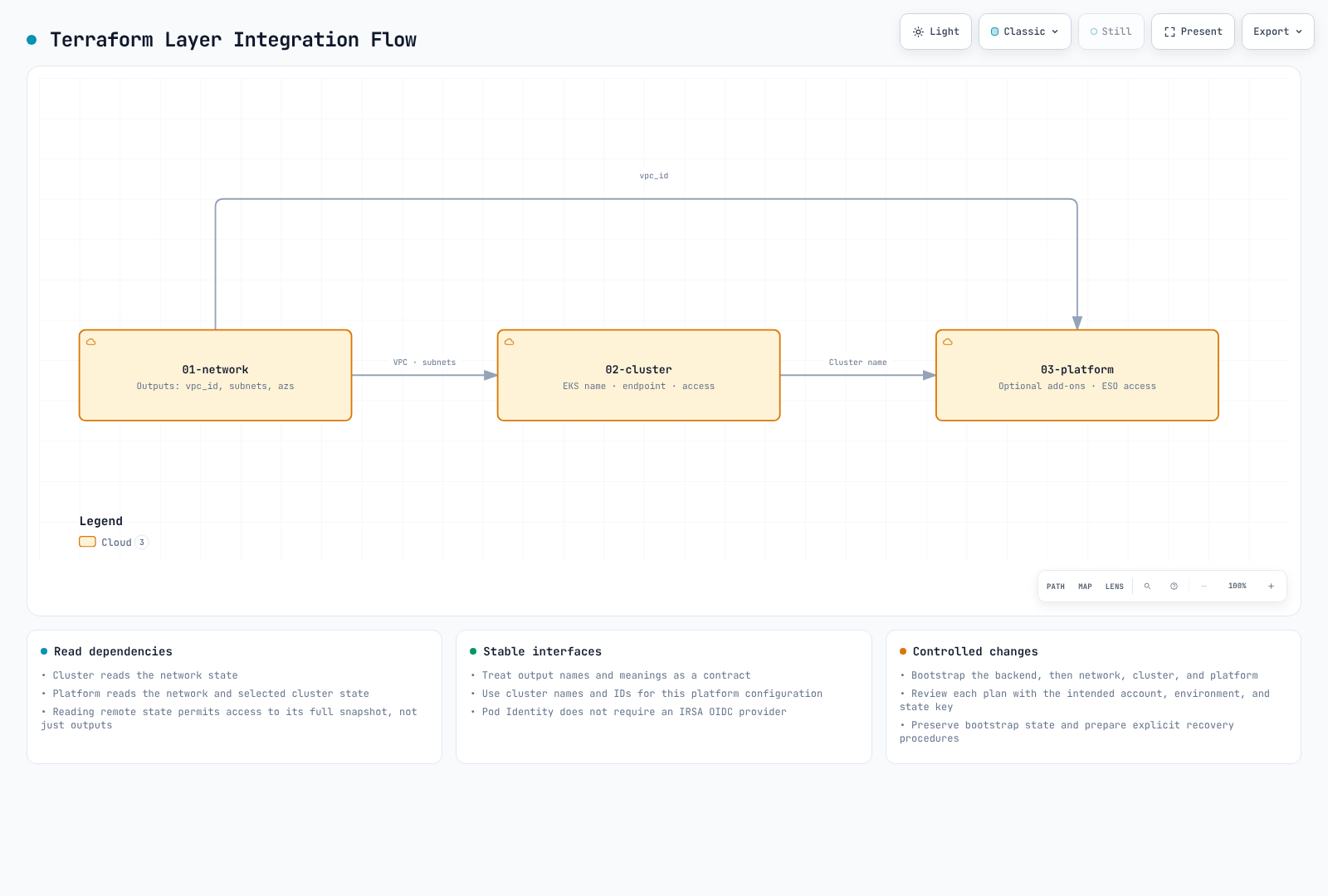
Remote State Pattern
The terraform_remote_state data source exposes root outputs, but its reader can access the full state snapshot. It is not an output-only security boundary. Across trust boundaries, consider publishing only the required values through a separate channel such as SSM parameters.
# Pattern: Consuming outputs from another layer
data "terraform_remote_state" "network" {
  backend = "s3"

  config = {
    bucket = "${var.project_name}-${var.environment}-${data.aws_caller_identity.current.account_id}-tfstate"
    key    = "network/terraform.tfstate"
    region = "ap-northeast-2"
  }
}

# Usage
locals {
  vpc_id = data.terraform_remote_state.network.outputs.vpc_id
}
Output/Data Flow
State Management Best Practices
- Use Consistent Bucket Naming:
{project}-{env}-{account-id}-tfstate - Organize by Layer and Color:
network/,cluster/blue/,platform/green/ - Enable Versioning: Recover from state corruption
- Enable Encryption: Protect sensitive values in state
- Use S3 Native Locking (Terraform 1.10+): Enable
use_lockfile = truein backend configuration for S3 conditional writes-based state locking without DynamoDB
State File Organization
s3://eks-platform-prod-ACCOUNT_ID-tfstate/
├── network/
│   └── terraform.tfstate
├── cluster/
│   ├── blue/
│   │   └── terraform.tfstate
│   └── green/
│       └── terraform.tfstate
└── platform/
    ├── blue/
    │   └── terraform.tfstate
    └── green/
        └── terraform.tfstate
7. Validation
Deployment Order
This is a new-project recipe. It requires the AWS CLI, Terraform, jq, and deployment permissions. Set DOCS_ADMIN_ARN to a real administrator IAM ARN first. These commands create resources; review and explicitly confirm each terraform apply plan. Pure Auto Mode disables the CoreDNS add-on. Set DOCS_ENABLE_COREDNS_ADDON=true only when extending this to mixed clusters, to query and pin the add-on version. The generated inputs contain only required values; merge any extra tags or team permissions before planning.
Bucket/region come from the generated backend JSON. TF_DATA_DIR separates account, environment, root, and cluster color. The English example manages each cluster in its own state. Protect and back up bootstrap state; exclude it, .terraform-data/, and plan files from Git. Do not reuse this as a migration procedure for existing state.
set -euo pipefail
# Run from the NEW eks-terraform project containing the documented files.
DOCS_ROOT="$PWD"
DOCS_ENV="dev"
DOCS_REGION="ap-northeast-2"
DOCS_PROJECT="eks-platform"
DOCS_K8S_VERSION="1.36"
: "${DOCS_ADMIN_ARN:?Set an existing IAM administrator role ARN}"
DOCS_ACCOUNT_ID="$(aws sts get-caller-identity --query Account --output text)"
mkdir -p environments ".bootstrap-state/$DOCS_ACCOUNT_ID"
chmod 700 .bootstrap-state ".bootstrap-state/$DOCS_ACCOUNT_ID"

jq -n --arg region "$DOCS_REGION" --arg env "$DOCS_ENV" --arg project "$DOCS_PROJECT" \
  '{region:$region, environment:$env, project_name:$project}' \
  > "environments/$DOCS_ENV.tfvars.json"

# Pure Auto Mode uses node-local CoreDNS. Set true only for mixed/non-Auto nodes.
DOCS_ENABLE_COREDNS_ADDON="${DOCS_ENABLE_COREDNS_ADDON:-false}"
case "$DOCS_ENABLE_COREDNS_ADDON" in true|false) ;; *) exit 2 ;; esac
if [[ "$DOCS_ENABLE_COREDNS_ADDON" == true ]]; then
  DOCS_COREDNS_VERSION="$(aws eks describe-addon-versions --region "$DOCS_REGION" \
    --addon-name coredns --kubernetes-version "$DOCS_K8S_VERSION" --output json | \
    jq -er --arg version "$DOCS_K8S_VERSION" '
      [.addons[0].addonVersions[]
       | select(any(.compatibilities[]; .clusterVersion == $version and .defaultVersion == true))
       | .addonVersion] | first // empty
    ')"
  jq -n --arg version "$DOCS_COREDNS_VERSION" \
    '{enable_coredns_addon:true, coredns_addon_version:$version}' \
    > "environments/$DOCS_ENV.platform.tfvars.json"
else
  jq -n '{enable_coredns_addon:false}' > "environments/$DOCS_ENV.platform.tfvars.json"
fi

jq -n --arg admin "$DOCS_ADMIN_ARN" --arg version "$DOCS_K8S_VERSION" \
  '{cluster_admin_arn:$admin, cluster_version:$version}' > "environments/$DOCS_ENV.cluster.tfvars.json"

# Isolate local bootstrap state by account and environment.
export TF_DATA_DIR="$DOCS_ROOT/.terraform-data/$DOCS_ACCOUNT_ID/$DOCS_ENV/bootstrap"
terraform -chdir=00-shared/bootstrap init \
  -backend-config="path=$DOCS_ROOT/.bootstrap-state/$DOCS_ACCOUNT_ID/$DOCS_ENV.tfstate"
terraform -chdir=00-shared/bootstrap plan -var-file="../../environments/$DOCS_ENV.tfvars.json"
# Review the plan. This apply presents its own plan and asks for confirmation.
terraform -chdir=00-shared/bootstrap apply -var-file="../../environments/$DOCS_ENV.tfvars.json"
DOCS_STATE_BUCKET="$(terraform -chdir=00-shared/bootstrap output -raw state_bucket_name)"
jq -n --arg bucket "$DOCS_STATE_BUCKET" --arg region "$DOCS_REGION" \
  '{bucket:$bucket, region:$region}' > "environments/$DOCS_ENV.backend.json"

apply_layer() {
  local layer="$1" key="$2" suffix="$3"
  shift 3
  export TF_DATA_DIR="$DOCS_ROOT/.terraform-data/$DOCS_ACCOUNT_ID/$DOCS_ENV/$suffix"
  terraform -chdir="$layer" init \
    -backend-config="../environments/$DOCS_ENV.backend.json" -backend-config="key=$key"
  terraform -chdir="$layer" validate
  terraform -chdir="$layer" plan -var-file="../environments/$DOCS_ENV.tfvars.json" "$@"
  # Review the new plan and explicitly confirm apply.
  terraform -chdir="$layer" apply -var-file="../environments/$DOCS_ENV.tfvars.json" "$@"
}

apply_layer 01-network network/terraform.tfstate network

for DOCS_COLOR in blue green; do
  apply_layer 02-cluster "cluster/$DOCS_COLOR/terraform.tfstate" "cluster/$DOCS_COLOR"     -var-file="../environments/$DOCS_ENV.cluster.tfvars.json" -var="cluster_color=$DOCS_COLOR"
  apply_layer 03-platform "platform/$DOCS_COLOR/terraform.tfstate" "platform/$DOCS_COLOR"     -var-file="../environments/$DOCS_ENV.platform.tfvars.json" -var="cluster_color=$DOCS_COLOR"
done
Verification Commands
Run using AWS CLI credentials for the configured administrator principal. EKS access policies do not replace IAM eks:DescribeCluster permission. Automatic Terraform-creator administration is disabled; use an administrator profile or an authorized AssumeRole configuration where needed. This checks the default two-cluster deployment; omit disabled clusters. Verify StorageClasses after their separate GitOps setup.
for DOCS_COLOR in blue green; do
  DOCS_CLUSTER_NAME="${DOCS_PROJECT}-${DOCS_ENV}-${DOCS_COLOR}"
  DOCS_CONTEXT="${DOCS_COLOR}-${DOCS_ENV}"
  aws eks update-kubeconfig --region "$DOCS_REGION" \
    --name "$DOCS_CLUSTER_NAME" --alias "$DOCS_CONTEXT"
  kubectl --context "$DOCS_CONTEXT" get nodes
  kubectl --context "$DOCS_CONTEXT" get nodepools
  kubectl --context "$DOCS_CONTEXT" get pods -n kube-system
  aws eks list-pod-identity-associations --region "$DOCS_REGION" \
    --cluster-name "$DOCS_CLUSTER_NAME"
done
Smoke Test Script
The following creates a uniquely named temporary namespace and a DNS Job in each explicit kube-context. It validates workload scheduling and cluster DNS, not external LB traffic or every application dependency. Cleanup checks the namespace UID and failures return a nonzero exit code. Use an approved mirrored image via DOCS_TEST_IMAGE where Docker Hub is unavailable.
#!/usr/bin/env bash
set -euo pipefail

if (( $# == 0 )); then
  echo "Usage: $0 <kube-context> [<kube-context> ...]" >&2
  exit 2
fi
command -v kubectl >/dev/null
command -v jq >/dev/null
DOCS_TEST_IMAGE="${DOCS_TEST_IMAGE:-docker.io/library/busybox@sha256:73aaf090f3d85aa34ee199857f03fa3a95c8ede2ffd4cc2cdb5b94e566b11662}"

smoke_cluster() (
  set -euo pipefail
  context="$1"
  namespace=""
  namespace_uid=""
  cleanup() {
    [[ -n "$namespace" ]] || return 0
    current_uid="$(kubectl --context "$context" get namespace "$namespace" \
      --ignore-not-found -o jsonpath='{.metadata.uid}')" || return 1
    [[ -n "$current_uid" ]] || return 0
    if [[ "$current_uid" != "$namespace_uid" ]]; then
      echo "Cleanup skipped: namespace identity changed: $namespace" >&2
      return 0
    fi
    kubectl --context "$context" delete namespace "$namespace" --timeout=120s
  }
  trap 'result=$?; cleanup || result=1; exit "$result"' EXIT

  kubectl --context "$context" version -o json | jq -er '.serverVersion.gitVersion'
  # Mixed clusters retain the Deployment; pure Auto Mode can have none.
  coredns_deployment="$(kubectl --context "$context" get deployment coredns \
    -n kube-system --ignore-not-found -o name)"
  if [[ -n "$coredns_deployment" ]]; then
    kubectl --context "$context" rollout status deployment/coredns -n kube-system --timeout=600s
  fi
  kubectl --context "$context" get nodepools -o json | jq -e '
    any(.items[]; any(.status.conditions[]?; .type == "Ready" and .status == "True"))
  ' >/dev/null

  record="$(kubectl --context "$context" create -f - -o json <<'JSON'
{"apiVersion":"v1","kind":"Namespace","metadata":{"generateName":"docs-smoke-","labels":{"pod-security.kubernetes.io/enforce":"restricted"}}}
JSON
  )"
  namespace="$(jq -er '.metadata.name' <<<"$record")"
  namespace_uid="$(jq -er '.metadata.uid' <<<"$record")"

  jq -n --arg namespace "$namespace" --arg image "$DOCS_TEST_IMAGE" '{
    apiVersion: "batch/v1", kind: "Job",
    metadata: {name: "dns-check", namespace: $namespace},
    spec: {
      backoffLimit: 0, activeDeadlineSeconds: 300,
      template: {spec: {
        restartPolicy: "Never", automountServiceAccountToken: false,
        securityContext: {runAsNonRoot: true, runAsUser: 65534, seccompProfile: {type: "RuntimeDefault"}},
        containers: [{name: "check", image: $image,
          command: ["sh", "-ec", "nslookup kubernetes.default.svc.cluster.local"],
          securityContext: {allowPrivilegeEscalation: false, readOnlyRootFilesystem: true, capabilities: {drop: ["ALL"]}},
          resources: {requests: {cpu: "10m", memory: "16Mi"}, limits: {cpu: "100m", memory: "64Mi"}}
        }]
      }}
    }
  }' | kubectl --context "$context" create -f -

  if ! kubectl --context "$context" wait --for=condition=complete job/dns-check \
    -n "$namespace" --timeout=360s; then
    kubectl --context "$context" describe pods -n "$namespace" >&2 || true
    kubectl --context "$context" logs job/dns-check -n "$namespace" --tail=100 >&2 || true
    exit 1
  fi
  kubectl --context "$context" logs job/dns-check -n "$namespace" --tail=30
  kubectl --context "$context" get pods -n kube-system -o json | jq -e '
    all(.items[]; .status.phase == "Succeeded" or
      any(.status.conditions[]?; .type == "Ready" and .status == "True"))
  ' >/dev/null
  echo "Workload scheduling and cluster DNS passed: $context"
)

for context in "$@"; do
  smoke_cluster "$context"
done
Save the script as smoke-test.sh and explicitly select the created contexts.
bash smoke-test.sh "blue-${DOCS_ENV}" "green-${DOCS_ENV}"Terraform Validation
Use the same initialized data directories as the deployment recipe. A plan can read AWS resources and remote state and acquire a state lock; it does not apply the proposed infrastructure changes.
export TF_DATA_DIR="$DOCS_ROOT/.terraform-data/$DOCS_ACCOUNT_ID/$DOCS_ENV/network"
terraform -chdir=01-network validate
terraform -chdir=01-network fmt -check
for DOCS_COLOR in blue green; do
  for DOCS_LAYER in cluster platform; do
    DOCS_DIR="02-cluster"
    [[ "$DOCS_LAYER" == platform ]] && DOCS_DIR="03-platform"
    export TF_DATA_DIR="$DOCS_ROOT/.terraform-data/$DOCS_ACCOUNT_ID/$DOCS_ENV/$DOCS_LAYER/$DOCS_COLOR"
    terraform -chdir="$DOCS_DIR" validate
    terraform -chdir="$DOCS_DIR" fmt -check
  done
done
Key Design Principles
Terraform Manages AWS Infrastructure Only
This architecture follows a clear separation:
| Layer | Terraform Manages | GitOps Manages |
|---|---|---|
| Network | VPC, Subnets, NAT, Endpoints | - |
| Cluster | EKS, KMS, CloudWatch | - |
| Platform | Add-ons, IAM Roles, Access Entries | - |
| Kubernetes | - | NodePool, Deployments, Services |
Kubernetes resources (NodePool definitions, application Deployments) are managed by ArgoCD GitOps. See GitOps Pipeline Configuration for details.
Cross-References
- Getting Started with EKS Auto Mode
- EKS Security Best Practices
- NLB Weighted Routing and Blue/Green Clusters
- GitOps Pipeline Configuration
< Table of Contents | Next: NLB Weighted Routing and Blue/Green Clusters >