Egress Control
Egress control is a feature that manages outbound traffic from the mesh and enhances security.
Table of Contents
Egress Overview
This example routes application-originated HTTPS through a sidecar and an egress gateway. Replace api.external.com with a resolvable endpoint you control and use a compatible, already-installed Istio control plane. ServiceEntry registers a destination; it does not force traffic through a gateway or act as a firewall. Enforce egress restrictions with network controls as well.
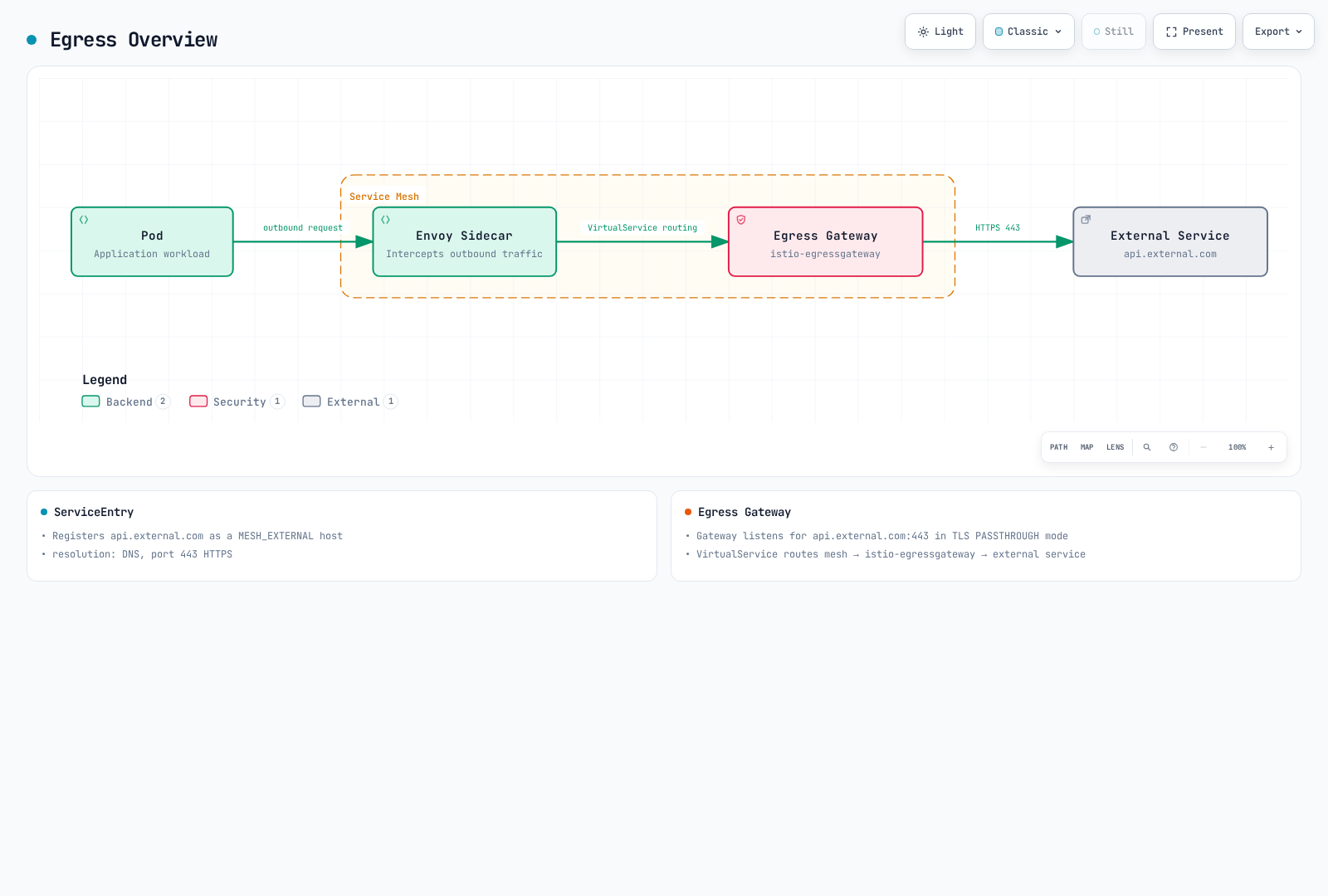
ServiceEntry Configuration
Registering External Services
apiVersion: networking.istio.io/v1
kind: ServiceEntry
metadata:
  name: external-api
spec:
  hosts:
  - api.external.com
  ports:
  - number: 443
    name: https
    protocol: HTTPS
  location: MESH_EXTERNAL
  resolution: DNS
HTTP External Service
apiVersion: networking.istio.io/v1
kind: ServiceEntry
metadata:
  name: httpbin
spec:
  hosts:
  - httpbin.org
  ports:
  - number: 80
    name: http
    protocol: HTTP
  location: MESH_EXTERNAL
  resolution: DNS
Egress Gateway
Installing Egress Gateway
helm install istio-egressgateway istio/gateway \
  -n istio-system \
  --version 1.31.0 \
  --set service.type=ClusterIP \
  --set labels.app=istio-egressgateway \
  --set labels.istio=egressgateway \
  --wait
Configuring Egress Gateway
apiVersion: networking.istio.io/v1
kind: Gateway
metadata:
  name: istio-egressgateway
  namespace: istio-system
spec:
  selector:
    istio: egressgateway
  servers:
  - port:
      number: 443
      name: tls
      protocol: TLS
    hosts:
    - api.external.com
    tls:
      mode: PASSTHROUGH
---
apiVersion: networking.istio.io/v1
kind: DestinationRule
metadata:
  name: egressgateway-for-external
  namespace: default
spec:
  host: istio-egressgateway.istio-system.svc.cluster.local
  subsets:
  - name: external
---
apiVersion: networking.istio.io/v1
kind: VirtualService
metadata:
  name: direct-external-through-egress-gateway
  namespace: default
spec:
  hosts:
  - api.external.com
  gateways:
  - mesh
  - istio-system/istio-egressgateway
  tls:
  - match:
    - gateways:
      - mesh
      port: 443
      sniHosts:
      - api.external.com
    route:
    - destination:
        host: istio-egressgateway.istio-system.svc.cluster.local
        subset: external
        port:
          number: 443
  - match:
    - gateways:
      - istio-system/istio-egressgateway
      port: 443
      sniHosts:
      - api.external.com
    route:
    - destination:
        host: api.external.com
        port:
          number: 443
TLS Origination
The example preserves the application’s TLS connection to the external service; the egress gateway routes using SNI. TLS origination instead starts TLS at a proxy after the application sends HTTP. That requires a matching HTTP ServiceEntry port/targetPort and DestinationRule TLS policy; follow the TLS origination guide and avoid originating a second TLS layer over an already encrypted application connection.
Verification
Configure the chart repository and version as in the installation guide. Keep these resources in their specified namespaces, and ensure the original external ServiceEntry is in default or exported to the client namespace. Use a mesh client with SNI, inspect both proxy routes, and verify the egress gateway receives the connection. Merely reaching the external endpoint does not prove gateway traversal.
istioctl analyze -A
kubectl get pods -n istio-system -l istio=egressgateway
istioctl proxy-config listeners <egress-pod> -n istio-system
istioctl proxy-config clusters <client-pod> -n default