Part 2: Kubeflow Pipelines
Supported Versions: Kubeflow Pipelines 2.16.1, Kubeflow Community Distribution 26.03.1 Latest independent release checked: KFP 2.17.2 (September 4, 2026; latest
kfpSDK on PyPI: 2.17.0), checked October 12, 2026; examples use 2.16.1 Last Updated: October 12, 2026
Lab Environment Setup
Local compilation requires Python and kfp==2.16.1; this chapter was checked with Python 3.12. Upstream KFP 2.17.2 is available (the latest kfp SDK package on PyPI is 2.17.0), but this pin matches Community Distribution 26.03.1. It does not validate a new SDK/backend combination.
Compilation does not contact a cluster. Remote execution needs a compatible KFP backend, an authenticated client, and namespace permissions. S3 also requires workload identity for the execution ServiceAccount and components that access artifacts.
What Kubeflow Pipelines Is
KFP connects components with typed parameters/artifacts and tracks runs. The open-source KFP 2.16.1 backend used here translates IR into Argo Workflows. Argo manages workflow order and Pod creation; the Kubernetes scheduler places Pods on nodes. Cached tasks, importers and nested DAGs mean that every logical task does not correspond to a separate user-container execution.
KFP v2 Architecture: IR YAML and Backend Execution
Community Distribution 26.03.1 bundles KFP 2.16.1. The legacy v1 default compilation path produced Argo Workflow YAML; v2 Compiler().compile(...) produces PipelineSpec-based IR YAML. Uploading/storing a pipeline and creating a Run are separate operations. Upload alone does not execute it.
IR avoids writing Argo objects directly, but it does not guarantee unrestricted portability to every backend. IR/SDK versions, supported features, Kubernetes platform extensions, authentication and storage must match the target. The kfp package also provides client APIs and Python component execution support; its role does not end at compilation.
Core Concepts
| Concept | Role and scope |
|---|---|
| Pipeline | Graph authored with @dsl.pipeline; uploaded definitions/versions and executions are separate |
| Component / Task | Reusable component definition and a graph invocation; lightweight Python is one form alongside containers/importers/graphs |
| Run / Experiment | Execution with inputs and a group of related runs; distinct from Katib's Experiment CRD |
| Parameter | Strings, numbers and small structured input/output values |
| Artifact | Dataset/Model/Metrics-style object with URI, type and metadata; not necessarily a single file |
| MLMD | Registered executions, artifacts and relationships; not automatic recording of every external side effect or file integrity |
Metadata records and artifact bytes are separate. Record code/image/data revisions and hashes when reproducibility and content verification matter.
How a Pipeline Run Flows Through the System
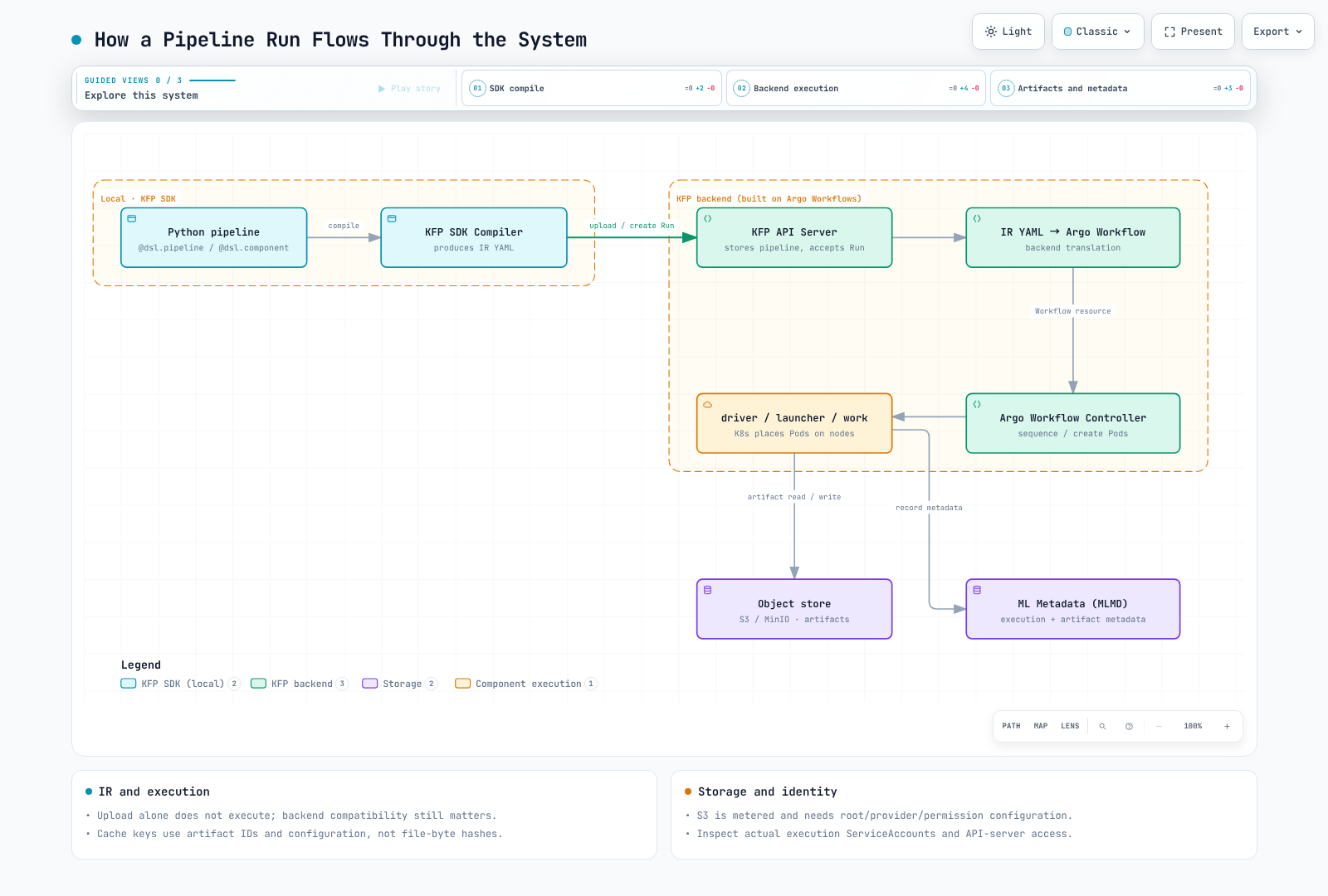
Compilation is local. After Run creation, the API server, Argo, KFP driver/launcher and user containers cooperate. The launcher/runtime handles artifact paths, transfer and metadata. Kubernetes node placement remains separate from Argo's workflow sequencing.
EKS-Specific Artifact Storage
The reviewed distribution's default installation includes MinIO, but not every KFP installation or artifact URI uses it. Inspect the pipeline root, imported URIs and provider configuration. Metadata-oriented artifacts such as Metrics are not necessarily metric files.
For S3, configure pipeline_root, the provider and credential chain using the current object-store guide. S3 incurs storage, request and transfer charges; it is not a free default artifact service.
Do not assume pipeline-runner is the execution ServiceAccount in every environment. Inspect the Run's selected account and actual Pods, plus access needed by the API server/launcher. IRSA is documented in the current guide. Pod Identity requires verification of SDK, agent, association and runtime support; this chapter did not execute AWS integration. Part 1 explains these boundaries and the legacy AWS distribution's installation limitation.
A Simple Two-Step Pipeline
The following illustrates a minimal data-prep -> train pipeline using the KFP v2 SDK's decorators, with a typed Dataset artifact passed from the first component to the second:
from kfp import dsl, compiler
from kfp.dsl import Dataset, Model, Output, Input

@dsl.component(base_image="python:3.12-slim", packages_to_install=["pandas==2.3.3"])
def prepare_data(output_dataset: Output[Dataset]):
    import pandas as pd

    # In a real pipeline this would read from S3 or another source
    df = pd.DataFrame({"feature": [1, 2, 3, 4], "label": [0, 1, 0, 1]})
    df.to_csv(output_dataset.path, index=False)

@dsl.component(base_image="python:3.12-slim", packages_to_install=["scikit-learn==1.7.2", "pandas==2.3.3"])
def train_model(input_dataset: Input[Dataset], output_model: Output[Model]):
    import pandas as pd
    from sklearn.linear_model import LogisticRegression
    import pickle

    df = pd.read_csv(input_dataset.path)
    clf = LogisticRegression().fit(df[["feature"]], df["label"])
    with open(output_model.path, "wb") as f:
        pickle.dump(clf, f)

@dsl.pipeline(name="data-prep-train-pipeline")
def data_prep_train_pipeline():
    prep_task = prepare_data()
    train_task = train_model(input_dataset=prep_task.outputs["output_dataset"])

compiler.Compiler().compile(
    pipeline_func=data_prep_train_pipeline,
    package_path="data_prep_train_pipeline.yaml",
)
The Output[Dataset] to Input[Dataset] connection records a graph dependency and artifact type. Actual .path preparation and transfer happen at runtime. Compilation does not validate storage or training.
These are lightweight Python components. @dsl.component extracts function code; it does not automatically build images. packages_to_install installs dependencies at execution time in the base image. The former example omitted pandas from prepare_data; both components now declare their dependencies and their function bodies were checked locally. For production, prebuild dependencies into a container, pin its digest, and test that container separately. The Python image tag and transitive dependencies here are not a fully locked build.
Load only the trusted pickle produced by this exercise. Loading an external pickle can execute arbitrary code. This tiny model demonstrates the API and is not a model-quality validation result.
Caching Behavior
In 2.16.1 the key includes input parameter values, input artifact names/IDs, output specifications, the container image string, command/arguments, and PVC names. Cache lookup is scoped by pipeline name and namespace. It does not read and hash input artifact file bytes on every lookup.
Mutating a file behind the same artifact ID, an image tag, or external database/API state may therefore leave the key unchanged. Existing cached metadata also does not ensure deleted output objects remain readable downstream. Pass data versions/hashes as explicit parameters and consider disabling caching for mutable external state or side effects.
# Inside the pipeline function, disable caching for this task.
prep_task.set_caching_options(enable_caching=False)
An authenticated client's create_run_from_pipeline_package(..., enable_caching=False) overrides task caching for the Run; None preserves compiled task settings. CLI defaults and KFP_DISABLE_EXECUTION_CACHING_BY_DEFAULT can also change compilation defaults; set the environment variable before importing KFP.
Validation and Sources
IR was compiled with Python 3.12 / KFP 2.16.1 and checked for dependencies, types, and caching settings. Function bodies were executed locally on CPU with pandas 2.3.3 / scikit-learn 1.7.2. Docker, Argo, cluster cache reuse, S3 and Pod Identity execution were not tested.
- 2.16.1 cache-key implementation
- 2.16.1 cache lookup and reuse
- Official caching guide
- Lightweight Python components
Next Steps
With pipelines authored, compiled, and running, the next question is usually where the interactive development work behind those pipeline components happens in the first place. Part 3: Kubeflow Notebooks covers the per-user notebook environments teams use to author and iterate on the code that ends up packaged into pipeline components — and, further down this series, Part 6: KServe — Model Serving on Kubernetes covers serving the models those pipelines ultimately produce.
Quiz
To test what you've learned in this chapter, try the Topic Quiz.