Authentication
Istio supports service-to-service authentication (Peer Authentication) and end-user authentication (Request Authentication).
Table of Contents
- Authentication Overview
- Request Authentication (JWT)
- OAuth/OIDC Integration
- Practical Examples
- Troubleshooting
Authentication Overview
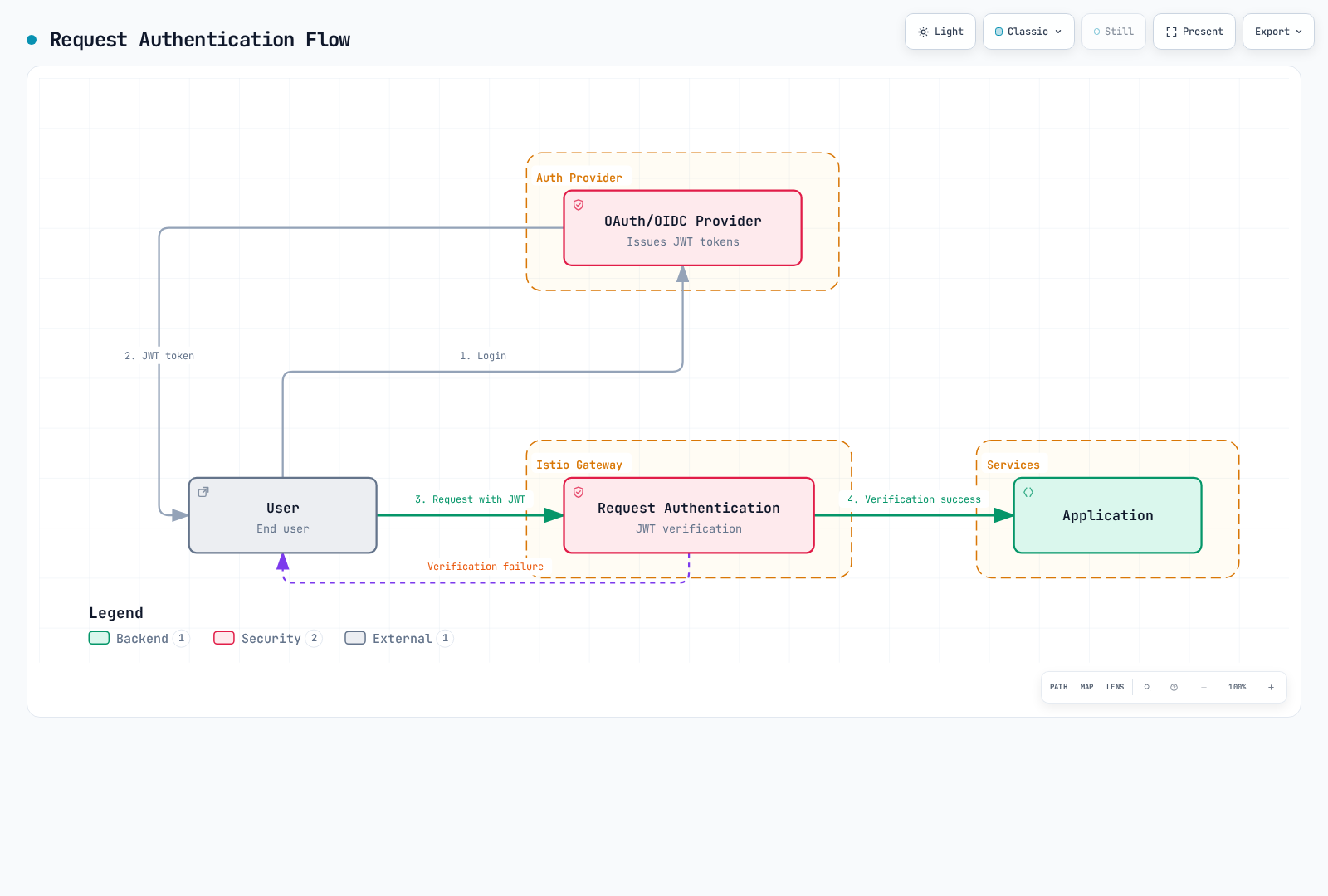
RequestAuthentication rejects invalid presented JWTs but accepts requests with no credentials unless AuthorizationPolicy requires them. It verifies tokens; it does not perform login, OAuth redirects, refresh, or introspection of opaque access tokens. Use the issuer discovery document for the exact issuer/JWKS and configure the intended audience. Examples are alternatives for the app=myapp HTTP workload in default; the diagram shows a gateway deployment, which needs the policy attached to that gateway instead.
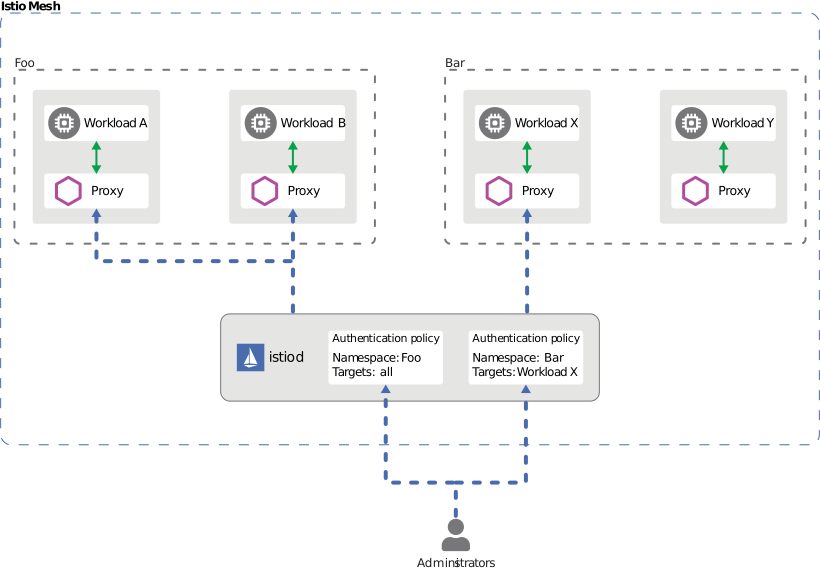
Istio provides two types of authentication:
Peer Authentication (Service-to-Service Authentication)
- Service-to-service authentication using mTLS
- Identity verification based on SPIFFE ID
- Configured with PeerAuthentication CRD
Request Authentication (End-User Authentication)
- User authentication based on JWT tokens
- Integration with OAuth/OIDC providers
- Configured with RequestAuthentication CRD
Request Authentication (JWT)
Basic JWT Verification
apiVersion: security.istio.io/v1
kind: RequestAuthentication
metadata:
  name: jwt-auth
  namespace: default
spec:
  selector:
    matchLabels:
      app: myapp
  jwtRules:
  - issuer: "https://accounts.google.com"
    jwksUri: "https://www.googleapis.com/oauth2/v3/certs"
    audiences: ["<your-google-client-id>"]
Multiple Issuer Support
apiVersion: security.istio.io/v1
kind: RequestAuthentication
metadata:
  name: multi-issuer-jwt
  namespace: default
spec:
  selector:
    matchLabels:
      app: myapp
  jwtRules:
  - issuer: "https://accounts.google.com"
    jwksUri: "https://www.googleapis.com/oauth2/v3/certs"
    audiences: ["<your-google-client-id>"]
  - issuer: "https://login.microsoftonline.com/tenant-id/v2.0"
    jwksUri: "https://login.microsoftonline.com/tenant-id/discovery/v2.0/keys"
    audiences: ["<your-api-application-client-id>"]
Custom Header
apiVersion: security.istio.io/v1
kind: RequestAuthentication
metadata:
  name: jwt-custom-header
  namespace: default
spec:
  selector:
    matchLabels:
      app: myapp
  jwtRules:
  - issuer: "https://auth.example.com"
    jwksUri: "https://auth.example.com/.well-known/jwks.json"
    audiences: ["my-api"]
    fromHeaders:
    - name: "x-auth-token"
      prefix: "Bearer "
OAuth/OIDC Integration
AWS Cognito
apiVersion: security.istio.io/v1
kind: RequestAuthentication
metadata:
  name: cognito-jwt
  namespace: default
spec:
  selector:
    matchLabels:
      app: myapp
  jwtRules:
  - issuer: "https://cognito-idp.us-west-2.amazonaws.com/us-west-2_EXAMPLE"
    jwksUri: "https://cognito-idp.us-west-2.amazonaws.com/us-west-2_EXAMPLE/.well-known/jwks.json"
For Cognito API access, validate token_use=access and the intended client_id. ID tokens use aud for the app client ID; access-token aud is present only for resource binding, so do not blindly set the ID-token audience rule on an access token. Add API-specific scope/group authorization as required. Replace the sample pool/client values.
apiVersion: security.istio.io/v1
kind: AuthorizationPolicy
metadata:
  name: cognito-access-token
  namespace: default
spec:
  selector:
    matchLabels:
      app: myapp
  action: ALLOW
  rules:
  - from:
    - source:
        requestPrincipals:
        - "https://cognito-idp.us-west-2.amazonaws.com/us-west-2_EXAMPLE/*"
    when:
    - key: request.auth.claims[token_use]
      values: ["access"]
    - key: request.auth.claims[client_id]
      values: ["<your-app-client-id>"]
Keycloak
apiVersion: security.istio.io/v1
kind: RequestAuthentication
metadata:
  name: keycloak-jwt
  namespace: default
spec:
  selector:
    matchLabels:
      app: myapp
  jwtRules:
  - issuer: "https://keycloak.example.com/realms/myrealm"
    jwksUri: "https://keycloak.example.com/realms/myrealm/protocol/openid-connect/certs"
    audiences: ["my-api"]
Keycloak’s current default context path omits /auth. A deployment configured with http-relative-path=/auth must use that configured issuer path instead.
Auth0
apiVersion: security.istio.io/v1
kind: RequestAuthentication
metadata:
  name: auth0-jwt
  namespace: default
spec:
  selector:
    matchLabels:
      app: myapp
  jwtRules:
  - issuer: "https://your-tenant.auth0.com/"
    jwksUri: "https://your-tenant.auth0.com/.well-known/jwks.json"
    audiences:
    - "https://your-api.example.com"
Practical Examples
JWT Verification + Authorization
# JWT Verification
apiVersion: security.istio.io/v1
kind: RequestAuthentication
metadata:
  name: jwt-auth
  namespace: default
spec:
  selector:
    matchLabels:
      app: myapp
  jwtRules:
  - issuer: "https://auth.example.com"
    jwksUri: "https://auth.example.com/.well-known/jwks.json"
    audiences: ["my-api"]
---
# Deny requests without JWT
apiVersion: security.istio.io/v1
kind: AuthorizationPolicy
metadata:
  name: require-jwt
  namespace: default
spec:
  selector:
    matchLabels:
      app: myapp
  action: ALLOW
  rules:
  - from:
    - source:
        requestPrincipals: ["*"]
Troubleshooting
JWT Verification Failure
# 1. Check RequestAuthentication
kubectl get requestauthentication -A
kubectl describe requestauthentication <name> -n <namespace>

# 2. Decode JWT token
python3 - <<'PYJWT'
import base64, getpass, json
segment = getpass.getpass("JWT (not echoed): ").split(".")[1]
claims = json.loads(base64.urlsafe_b64decode(segment + "=" * (-len(segment) % 4)))
print({k: claims.get(k) for k in ("iss", "aud", "exp", "nbf", "token_use", "client_id")})
PYJWT

# 3. Verify JWKS endpoint
curl -fsS https://auth.example.com/.well-known/jwks.json

# 4. Check Envoy logs
kubectl logs <pod-name> -c istio-proxy -n <namespace> | grep JWT
Decoded claims are untrusted until signature/issuer/audience/time checks succeed. Do not paste live tokens into command history or public decoders. Local JWT verification does not automatically consult an issuer’s revocation state. Test no-token, expired-token, wrong-issuer/audience and valid-token cases. For ambient L7 authentication use waypoint targetRefs rather than workload selectors.