ExampleCorp Order System: ACK + kro Integration
Last Updated: September 12, 2026 · kro 0.9.4 / AWS Load Balancer Controller 3.5.0
Scenario and Verification Scope
ExampleCorp is fictional. This guide defines an integration contract connecting a kro application graph to ACK-managed infrastructure. It is not an end-to-end lab supplying a working Order API or public application image. The former fictional ECR image is not presented as runnable.
ACK manages NLB, TargetGroup, Listener, Route 53 records and Aurora. kro creates Service, ConfigMap, TargetGroupBinding (TGB) and Deployment resources. A separate AWS Load Balancer Controller (LBC) reconciles TGB and registers/deregisters Pod IP targets. Installing only ACK and kro does not implement that connection.
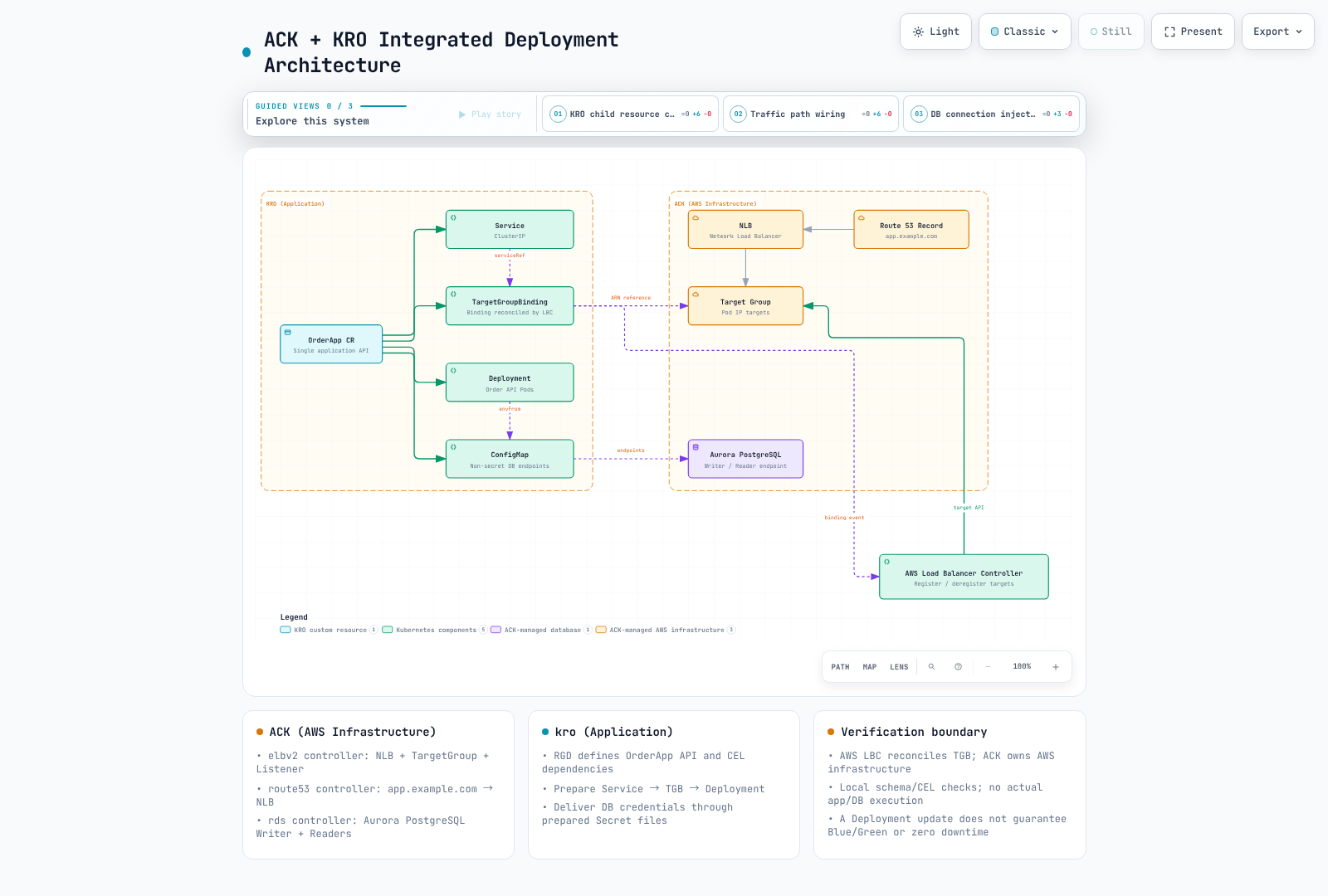
Infrastructure and Application Prerequisites
First review the current schemas and lifecycle guidance in the ACK resource examples. Prepare approved VPC/private subnets/security groups, an internal NLB/Listener, an ip TargetGroup, DNS and Aurora cluster/instances. Read the TargetGroup ARN from .status.ackResourceMetadata.arn, not the former .status.targetGroupARN.
Prepare AWS LBC, its CRDs, IAM/ServiceAccount and webhook separately. This guide checks OSS LBC 3.5.0's elbv2.k8s.aws/v1beta1 TGB, not EKS Auto Mode's distinct load-balancing APIs. TGB authors can reference TargetGroups within controller IAM permissions, so constrain allowed ARNs, namespaces and write access.
The operator must supply an Order API image satisfying this contract:
- Serve HTTP on the configured port with readiness at
/readyz. - Read DB_WRITER_HOST, DB_READER_HOST, DB_PORT and DB_NAME from ConfigMap configuration.
- Read and rotate credential files below DB_CREDENTIALS_DIR. Do not put passwords in environment variables, ConfigMaps or status.
- Work with UID 10001, a read-only root, bounded resources and a writable /tmp volume. Adapt the contract under the security policy if the actual image differs.
Prepare production and order-db-credentials through an approved provider/ESO flow. RDS-managed Secrets Manager credentials do not automatically create a Kubernetes Secret. Application database/users, minimal DB permissions, TLS verification and connection pooling are separate requirements. Naming a database in the CR does not create it.
Readiness Gates and Creation Order
For LBC Pod readiness gates, label the namespace elbv2.k8s.aws/pod-readiness-gate-inject=enabled before Pod creation. A matching Service and its ip TGB must already exist. The graph enforces Service → TGB → Deployment through CEL; a Deployment annotation references the TGB name to establish that dependency.
The TGB has no readyWhen waiting for healthy targets. Making Pod creation wait for target health can deadlock when no Pod exists to become a healthy target. TGB existence, LBC reconciliation, target health and Pod readiness are different states. Verify webhook failurePolicy/injection, rollout, shutdown grace and deregistration delay.
ResourceGraphDefinition
These files also live in examples/platform/examplecorp. Review and add aggregation RBAC for OrderApp/status/finalizers and Service, ConfigMap, Deployment and TGB resources. Permission to create RGDs delegates use of controller privileges.
apiVersion: kro.run/v1alpha1
kind: ResourceGraphDefinition
metadata:
  name: examplecorp-webapps
spec:
  schema:
    apiVersion: v1alpha1
    group: platform.example.com
    kind: OrderApp
    scope: Namespaced
    spec:
      replicas: integer | default=3 minimum=1 maximum=10
      image: string | required=true
      port: integer | default=8080 minimum=1 maximum=65535
      targetGroupARN: string | required=true
      vpcID: string | required=true
      credentialsSecretName: string | required=true
      aurora:
        writerEndpoint: string | required=true
        readerEndpoint: string | required=true
        port: integer | default=5432
        dbName: string | required=true
    status:
      availableReplicas: ${deployment.status.availableReplicas}
      serviceIP: ${service.spec.clusterIP}
  resources:
  - id: service
    template:
      apiVersion: v1
      kind: Service
      metadata:
        name: ${schema.metadata.name}
        namespace: ${schema.metadata.namespace}
        labels:
          app.kubernetes.io/name: ${schema.metadata.name}
      spec:
        type: ClusterIP
        selector:
          app.kubernetes.io/name: ${schema.metadata.name}
        ports:
        - name: http
          port: ${schema.spec.port}
          targetPort: http
  - id: dbConfig
    template:
      apiVersion: v1
      kind: ConfigMap
      metadata:
        name: ${schema.metadata.name + "-db"}
        namespace: ${schema.metadata.namespace}
        labels:
          app.kubernetes.io/name: ${schema.metadata.name}
      data:
        DB_WRITER_HOST: ${schema.spec.aurora.writerEndpoint}
        DB_READER_HOST: ${schema.spec.aurora.readerEndpoint}
        DB_PORT: ${string(schema.spec.aurora.port)}
        DB_NAME: ${schema.spec.aurora.dbName}
  - id: targetGroupBinding
    template:
      apiVersion: elbv2.k8s.aws/v1beta1
      kind: TargetGroupBinding
      metadata:
        name: ${schema.metadata.name + "-tgb"}
        namespace: ${schema.metadata.namespace}
        labels:
          app.kubernetes.io/name: ${schema.metadata.name}
      spec:
        targetGroupARN: ${schema.spec.targetGroupARN}
        targetType: ip
        vpcID: ${schema.spec.vpcID}
        serviceRef:
          name: ${service.metadata.name}
          port: ${schema.spec.port}
  - id: deployment
    readyWhen:
    - ${deployment.status.availableReplicas >= deployment.spec.replicas}
    - ${deployment.status.observedGeneration >= deployment.metadata.generation}
    template:
      apiVersion: apps/v1
      kind: Deployment
      metadata:
        name: ${schema.metadata.name}
        namespace: ${schema.metadata.namespace}
        labels:
          app.kubernetes.io/name: ${schema.metadata.name}
      spec:
        replicas: ${schema.spec.replicas}
        selector:
          matchLabels:
            app.kubernetes.io/name: ${schema.metadata.name}
        template:
          metadata:
            labels:
              app.kubernetes.io/name: ${schema.metadata.name}
            annotations:
              platform.example.com/target-group-binding: ${targetGroupBinding.metadata.name}
          spec:
            automountServiceAccountToken: false
            securityContext:
              runAsNonRoot: true
              runAsUser: 10001
              runAsGroup: 10001
              fsGroup: 10001
              seccompProfile:
                type: RuntimeDefault
            containers:
            - name: order-api
              image: ${schema.spec.image}
              ports:
              - name: http
                containerPort: ${schema.spec.port}
              securityContext:
                allowPrivilegeEscalation: false
                readOnlyRootFilesystem: true
                capabilities:
                  drop:
                  - ALL
              resources:
                requests:
                  cpu: 100m
                  memory: 64Mi
                limits:
                  cpu: 500m
                  memory: 128Mi
              readinessProbe:
                httpGet:
                  path: /readyz
                  port: http
              volumeMounts:
              - name: tmp
                mountPath: /tmp
              - name: db-credentials
                mountPath: /var/run/order-db
                readOnly: true
              envFrom:
              - configMapRef:
                  name: ${dbConfig.metadata.name}
              env:
              - name: DB_CREDENTIALS_DIR
                value: /var/run/order-db
            volumes:
            - name: tmp
              emptyDir:
                sizeLimit: 64Mi
            - name: db-credentials
              secret:
                secretName: ${schema.spec.credentialsSecretName}
Instance Inputs
The example.invalid addresses/image and ARN/VPC ID below are placeholders. Read actual ACK endpoints/ARNs and verify the application image digest and Secret before use. Manually copied endpoints do not automatically follow ACK changes; provide an approved GitOps input-update path.
apiVersion: platform.example.com/v1alpha1
kind: OrderApp
metadata:
  name: order-api
  namespace: production
spec:
  replicas: 3
  image: example.invalid/order-api:replace-with-reviewed-image
  port: 8080
  targetGroupARN: arn:aws:elasticloadbalancing:us-west-2:123456789012:targetgroup/replace-with-approved-tg/0123456789abcdef
  vpcID: vpc-0123456789abcdef0
  credentialsSecretName: order-db-credentials
  aurora:
    writerEndpoint: replace-with-writer-endpoint.example.invalid
    readerEndpoint: replace-with-reader-endpoint.example.invalid
    port: 5432
    dbName: orders
Verification and Operations
kubectl get orderapps.platform.example.com order-api -n production -o yaml
kubectl get deploy,svc,targetgroupbindings.elbv2.k8s.aws,configmap \
  -n production -l app.kubernetes.io/name=order-api
kubectl get pods -n production -l app.kubernetes.io/name=order-api -o wide
Inspect CR conditions and Deployment state together with Pod readiness gates, EndpointSlices, TGB state, AWS target health, DNS/HTTP and database TLS connectivity. Whether readiness checks the database depends on the actual app. All generated resource metadata carries the same query label.
A new payment service needs a reviewed image, a separate TargetGroup/Listener routing plan and database user/permissions/schema contract. Sharing Aurora does not guarantee data, performance or cost isolation. Sharing a TargetGroup across TGBs/clusters requires deliberate multiClusterTargetGroup lifecycle handling; ignoring the default ownership model can deregister other targets.
Add Aurora replicas through ACK DBInstances using supported class/region combinations; names/tags do not fix writer roles. Follow promotionTier, endpoint and failover guidance in the RDS example, then test actual load and recovery.
Updating a Deployment image normally performs RollingUpdate, not automatic Blue/Green or guaranteed zero downtime. Blue/Green needs separate application versions, targets/routing cutover, validation metrics, rollback conditions and database compatibility. Deleting/replacing a CR can clean up child TGBs/Deployments and target associations; it is not a harmless version switch.
Checks Performed
Both original guides and all examples were read and compared with current RGD/TGB schemas. cel-go compiled/evaluated 21 unique expressions to check four resources, Service/Pod selectors, ConfigMap/Service references, TGB-before-Deployment dependency and status. These are local checks using synthetic inputs. No AWS resources, app image, database, target-health, Pod mutation or traffic were executed.