Part 5: Cluster Access, Validation, Upgrade and Deletion
Last Updated: September 11, 2026
This guide covers an existing EKS cluster. Use the authorized account/Region and a private kubeconfig. The examples were reviewed against current AWS documentation and local parsers; no AWS changes, cluster workloads or production recovery tests were executed in this audit.
Configuring Cluster Access
Establish the Context
Set EXAMPLE_CLUSTER and EXAMPLE_REGION for the intended cluster. The current AWS CLI identity needs the appropriate AWS API permissions. For Kubernetes administration, use an already authorized identity; optionally set ADMIN_ROLE_ARN to an approved role the operator can assume. A kubeconfig does not grant permissions. Initial administration depends on the cluster's bootstrap/access configuration, not a universal “creator only” rule.
Use one dedicated Bash session for the variables and helper functions below. Run only the workflow you need; upgrades and deletion are separate operations.
set -euo pipefail
umask 077
: "${EXAMPLE_CLUSTER:?Set the existing cluster name}"
: "${EXAMPLE_REGION:?Set the Region}"
EKS_REVIEW_DIR=$(mktemp -d /tmp/eks-lifecycle-review.XXXXXX)
ADMIN_KUBECONFIG="$EKS_REVIEW_DIR/admin.kubeconfig"
aws eks describe-cluster --name "$EXAMPLE_CLUSTER" --region "$EXAMPLE_REGION" \
  --query cluster --output json > "$EKS_REVIEW_DIR/cluster-before.json"
jq -e '{arn,createdAt} | (.arn | type == "string") and (.createdAt != null)' \
  "$EKS_REVIEW_DIR/cluster-before.json" >/dev/null
EXPECTED_CLUSTER_ARN=$(jq -er '.arn' "$EKS_REVIEW_DIR/cluster-before.json")
EXPECTED_CLUSTER_CREATED=$(jq -er '.createdAt | tostring' "$EKS_REVIEW_DIR/cluster-before.json")
CLUSTER_KUBERNETES_VERSION=$(jq -er '.version' "$EKS_REVIEW_DIR/cluster-before.json")
KUBECONFIG_ARGS=(--name "$EXAMPLE_CLUSTER" --region "$EXAMPLE_REGION"
  --kubeconfig "$ADMIN_KUBECONFIG" --alias "$EXAMPLE_CLUSTER-review")
if [ -n "${ADMIN_ROLE_ARN:-}" ]; then
  KUBECONFIG_ARGS+=(--role-arn "$ADMIN_ROLE_ARN")
fi
aws eks update-kubeconfig "${KUBECONFIG_ARGS[@]}"
This writes a private kubeconfig under the recorded review directory instead of changing the default context. Without --kubeconfig, the AWS CLI chooses its output path from KUBECONFIG or the default ~/.kube/config; that path is not fixed in all environments.
Access entries can use EKS access policies, Kubernetes groups with RBAC, or both. Their permissions are additive: a namespace RoleBinding cannot reduce an EKS cluster-admin access policy. This example uses a custom group and namespace RBAC without adding a broad access policy.
Wait for EKS Updates
Configuration/version changes are asynchronous. Use the returned update ID and stop on errors rather than treating one ACTIVE/InProgress observation as proof of completion:
# Additional describe-update arguments can identify a node group or add-on.
wait_eks_update() {
  local update_id="$1"
  shift
  local update_json update_status attempt
  for attempt in $(seq 1 120); do
    update_json=$(aws eks describe-update --name "$EXAMPLE_CLUSTER" \
      --region "$EXAMPLE_REGION" --update-id "$update_id" "$@" --output json) || return 1
    update_status=$(printf '%s' "$update_json" | jq -er '.update.status') || return 1
    case "$update_status" in
      Successful) return 0 ;;
      Failed|Cancelled)
        printf '%s' "$update_json" | jq '.update.errors' >&2
        return 1 ;;
      InProgress) sleep 10 ;;
      *) printf 'Unexpected update status: %s\n' "$update_status" >&2; return 1 ;;
    esac
  done
  printf 'Update %s did not finish within this wait window; inspect it before retrying.\n' "$update_id" >&2
  return 1
}
Method 1: Access Entries and Scoped RBAC
Inspect the authentication mode first. A legacy CONFIG_MAP cluster can enable API_AND_CONFIG_MAP after migration review. An API cluster already supports access entries; do not try to turn ConfigMap access back on. Preserve administrator and node access during the one-way migration.
AUTH_MODE=$(aws eks describe-cluster --name "$EXAMPLE_CLUSTER" --region "$EXAMPLE_REGION" \
  --query cluster.accessConfig.authenticationMode --output text)
case "$AUTH_MODE" in
  CONFIG_MAP)
    AUTH_UPDATE_ID=$(aws eks update-cluster-config --name "$EXAMPLE_CLUSTER" \
      --region "$EXAMPLE_REGION" --access-config authenticationMode=API_AND_CONFIG_MAP \
      --query update.id --output text)
    wait_eks_update "$AUTH_UPDATE_ID"
    ;;
  API_AND_CONFIG_MAP|API)
    printf '%s\n' 'Access entries are already enabled.'
    ;;
  *)
    printf 'Unexpected authentication mode: %s\n' "$AUTH_MODE" >&2
    exit 1
    ;;
esac
Use a separate existing developer IAM role, not the only administrator role. The generated group and namespace avoid unrelated bindings. Let EKS generate the username so assumed-role sessions remain identifiable. system:masters is not an appropriate group for this namespace-limited example.
# Use a separate, existing developer IAM role; retain the administrator's access.
: "${DEVELOPER_ROLE_ARN:?Existing role that the test operator can assume}"
ACCESS_NAMESPACE="eks-access-$(date +%s)-$$"
DEVELOPER_GROUP="$ACCESS_NAMESPACE-developers"
kubectl --kubeconfig "$ADMIN_KUBECONFIG" create namespace "$ACCESS_NAMESPACE"
ACCESS_NAMESPACE_UID=$(kubectl --kubeconfig "$ADMIN_KUBECONFIG" \
  get namespace "$ACCESS_NAMESPACE" -o jsonpath='{.metadata.uid}')
: "${ACCESS_NAMESPACE_UID:?}"
jq -n --arg name "$ACCESS_NAMESPACE" --arg uid "$ACCESS_NAMESPACE_UID" \
  '{namespace:$name,namespaceUID:$uid}' > "$EKS_REVIEW_DIR/access-namespace.json"
kubectl --kubeconfig "$ADMIN_KUBECONFIG" label namespace "$ACCESS_NAMESPACE" \
  pod-security.kubernetes.io/enforce=restricted \
  "pod-security.kubernetes.io/enforce-version=v$CLUSTER_KUBERNETES_VERSION"

# Creation fails rather than rewriting an existing principal's entry.
aws eks create-access-entry --cluster-name "$EXAMPLE_CLUSTER" --region "$EXAMPLE_REGION" \
  --principal-arn "$DEVELOPER_ROLE_ARN" --type STANDARD \
  --kubernetes-groups "$DEVELOPER_GROUP" \
  --query accessEntry --output json > "$EKS_REVIEW_DIR/created-access-entry.json"
Create the matching Role and Group binding, then test with the developer role itself. This Role does not grant direct Secret reads or RBAC/namespace administration. Creating workloads can still use identities and Secrets available inside that namespace; enforce allowed service accounts/mounts through admission controls when stronger isolation is required.
kubectl --kubeconfig "$ADMIN_KUBECONFIG" -n "$ACCESS_NAMESPACE" create -f - <<EOF
apiVersion: rbac.authorization.k8s.io/v1
kind: Role
metadata:
  name: developer
rules:
- apiGroups: [""]
  resources: ["pods", "pods/log"]
  verbs: ["get", "list", "watch"]
- apiGroups: [""]
  resources: ["services", "configmaps"]
  verbs: ["get", "list", "watch", "create", "update", "patch", "delete"]
- apiGroups: ["apps"]
  resources: ["deployments", "statefulsets"]
  verbs: ["get", "list", "watch", "create", "update", "patch", "delete"]
---
apiVersion: rbac.authorization.k8s.io/v1
kind: RoleBinding
metadata:
  name: developer-binding
subjects:
- kind: Group
  name: $DEVELOPER_GROUP
  apiGroup: rbac.authorization.k8s.io
roleRef:
  kind: Role
  name: developer
  apiGroup: rbac.authorization.k8s.io
EOF

DEVELOPER_KUBECONFIG="$EKS_REVIEW_DIR/developer.kubeconfig"
aws eks update-kubeconfig --name "$EXAMPLE_CLUSTER" --region "$EXAMPLE_REGION" \
  --role-arn "$DEVELOPER_ROLE_ARN" --kubeconfig "$DEVELOPER_KUBECONFIG" \
  --alias "$EXAMPLE_CLUSTER-developer"

# Allow for access-entry propagation; test using the role, not --as impersonation.
kubectl --kubeconfig "$DEVELOPER_KUBECONFIG" auth can-i list pods -n "$ACCESS_NAMESPACE"
kubectl --kubeconfig "$DEVELOPER_KUBECONFIG" -n "$ACCESS_NAMESPACE" get pods
NODE_DELETE_ALLOWED=$(kubectl --kubeconfig "$DEVELOPER_KUBECONFIG" auth can-i delete nodes 2>"$EKS_REVIEW_DIR/can-i-errors.txt") || {
  # kubectl returns nonzero for an ordinary "no"; distinguish other failures.
  [ "$NODE_DELETE_ALLOWED" = no ] || exit 1
}
[ "$NODE_DELETE_ALLOWED" = no ] || {
  printf '%s\n' 'Unexpected cluster-wide permission; review all access policies and RBAC bindings.' >&2
  exit 1
}
Access entries are eventually consistent; inspect errors and allow propagation before retrying. kubectl --as/--as-group impersonation tests Kubernetes RBAC, not the EKS access-policy permissions of the IAM principal. Likewise, auth can-i --list is not a complete inventory of EKS access-policy grants. IAM users are supported principals, but prefer roles with temporary credentials; an existing user needs its own appropriately configured credential path.
Method 2: Legacy aws-auth Migration
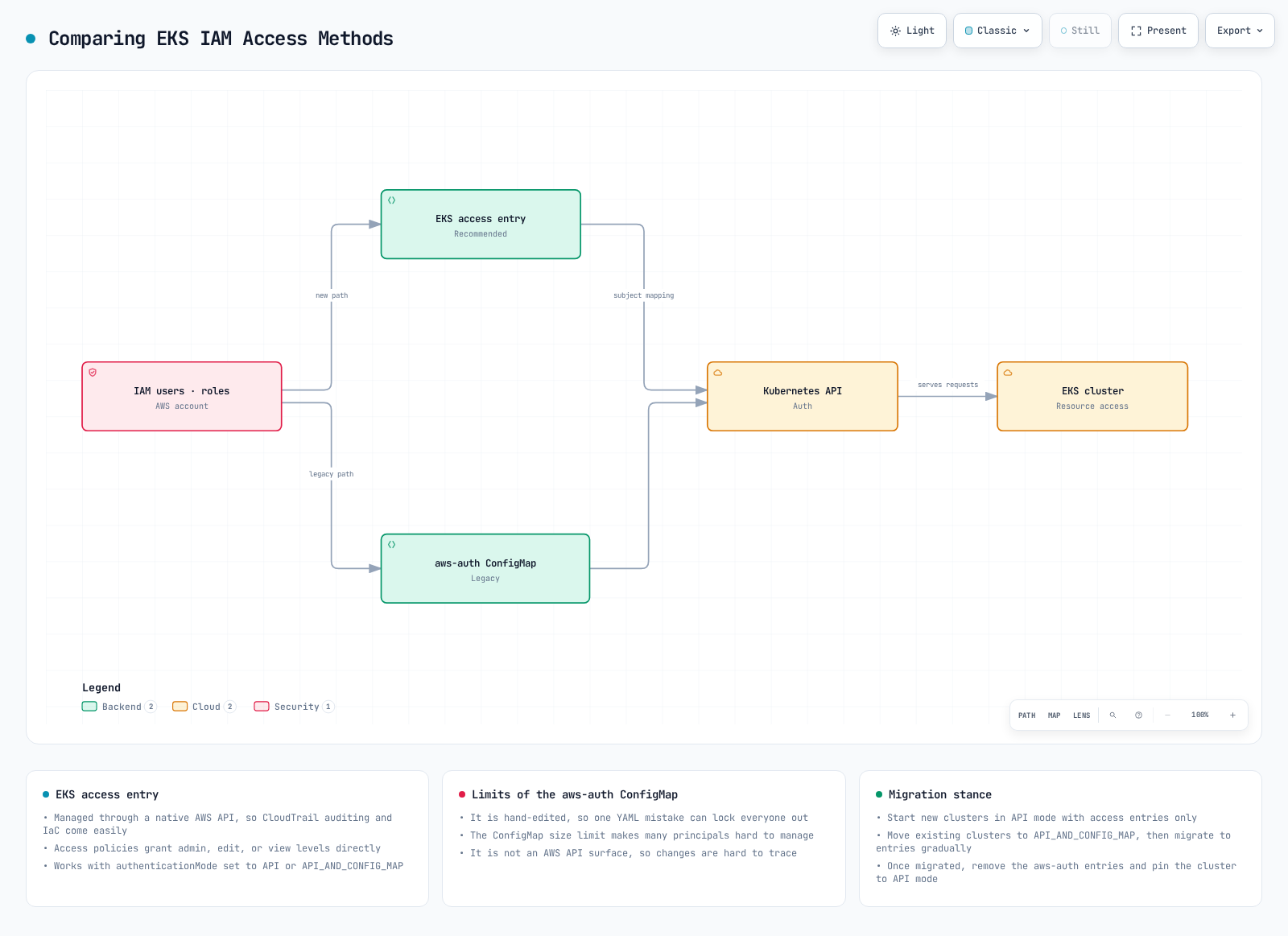
Use this path only while the cluster authentication mode includes ConfigMap access. Preserve the actual full ConfigMap; do not replace it with a sample containing only one node role. Existing managed-node and Fargate mappings must remain until their corresponding access entries have been verified. Both methods can be managed through IaC and audited through their appropriate AWS/Kubernetes logs.
kubectl --kubeconfig "$ADMIN_KUBECONFIG" -n kube-system get configmap aws-auth -o yaml   > "$EKS_REVIEW_DIR/aws-auth-before.yaml"
kubectl --kubeconfig "$ADMIN_KUBECONFIG" -n kube-system edit configmap aws-auth
Merge only reviewed role/user entries into the existing mapRoles/mapUsers YAML, using the same custom Group as its RoleBinding. Keep node usernames/groups and all unrelated mappings intact. Legacy aws-auth role-ARN path constraints differ from access entries; follow the documented migration path instead of hand-normalizing arbitrary ARNs. When the same principal is in both systems, its access-entry mapping takes precedence. Keep a separate administrator session while validating the migrated identity.
Cluster Validation
Check the Intended Compute and System Components
kubectl --kubeconfig "$ADMIN_KUBECONFIG" get nodes -o wide
kubectl --kubeconfig "$ADMIN_KUBECONFIG" get pods -n kube-system -o wide
aws eks list-addons --cluster-name "$EXAMPLE_CLUSTER" --region "$EXAMPLE_REGION"
Verify expected node counts/readiness, Deployment/DaemonSet rollout status and add-on health. Running is a Pod phase, not proof of container readiness, and successful Jobs may correctly be Succeeded. An empty node list is not a healthy conventional EC2 cluster. Auto Mode, Fargate and Hybrid Nodes have different system-component layouts; a default StorageClass is needed only for workloads relying on it.
Deploy an Owned HTTP Test
This conventional Linux example uses a small HTTP responder in a newly created namespace. It tests scheduling, image pulls, DNS and a ClusterIP Service without automatically provisioning a public load balancer. Existing organization-wide policies may require an approved allowance for DNS/HTTP; this example does not disable those policies.
VALIDATION_NAMESPACE="eks-validation-$(date +%s)-$$"
kubectl --kubeconfig "$ADMIN_KUBECONFIG" create namespace "$VALIDATION_NAMESPACE"
VALIDATION_NAMESPACE_UID=$(kubectl --kubeconfig "$ADMIN_KUBECONFIG" \
  get namespace "$VALIDATION_NAMESPACE" -o jsonpath='{.metadata.uid}')
: "${VALIDATION_NAMESPACE_UID:?}"
jq -n --arg name "$VALIDATION_NAMESPACE" --arg uid "$VALIDATION_NAMESPACE_UID" \
  '{namespace:$name,namespaceUID:$uid}' > "$EKS_REVIEW_DIR/validation-namespace.json"
kubectl --kubeconfig "$ADMIN_KUBECONFIG" label namespace "$VALIDATION_NAMESPACE" \
  pod-security.kubernetes.io/enforce=restricted \
  "pod-security.kubernetes.io/enforce-version=v$CLUSTER_KUBERNETES_VERSION"
kubectl --kubeconfig "$ADMIN_KUBECONFIG" -n "$VALIDATION_NAMESPACE" create -f - <<'EOF'
apiVersion: apps/v1
kind: Deployment
metadata:
  name: http-validation
spec:
  replicas: 3
  selector:
    matchLabels: {app: http-validation}
  template:
    metadata:
      labels: {app: http-validation}
    spec:
      automountServiceAccountToken: false
      securityContext:
        runAsNonRoot: true
        runAsUser: 1000
        runAsGroup: 1000
        fsGroup: 1000
        seccompProfile: {type: RuntimeDefault}
      containers:
      - name: server
        image: public.ecr.aws/docker/library/busybox:1.37.0
        command: [sh, -c]
        args:
        - 'printf "%s\n" eks-validation-ok > /work/index.html && exec httpd -f -p 8080 -h /work'
        ports:
        - containerPort: 8080
        readinessProbe:
          httpGet: {path: /, port: 8080}
        resources:
          requests: {cpu: 50m, memory: 32Mi}
          limits: {cpu: 200m, memory: 64Mi}
        securityContext:
          allowPrivilegeEscalation: false
          readOnlyRootFilesystem: true
          capabilities: {drop: [ALL]}
        volumeMounts:
        - {name: work, mountPath: /work}
      volumes:
      - name: work
        emptyDir: {}
---
apiVersion: v1
kind: Service
metadata:
  name: http-validation
spec:
  type: ClusterIP
  selector: {app: http-validation}
  ports:
  - {port: 8080, targetPort: 8080, protocol: TCP}
EOF
kubectl --kubeconfig "$ADMIN_KUBECONFIG" -n "$VALIDATION_NAMESPACE" \
rollout status deployment/http-validation --timeout=180skubectl --kubeconfig "$ADMIN_KUBECONFIG" -n "$VALIDATION_NAMESPACE" create -f - <<'EOF'
apiVersion: batch/v1
kind: Job
metadata:
name: dns-http-check
spec:
backoffLimit: 0
template:
spec:
restartPolicy: Never
automountServiceAccountToken: false
securityContext:
runAsNonRoot: true
runAsUser: 1000
seccompProfile: {type: RuntimeDefault}
containers:
- name: client
image: public.ecr.aws/docker/library/busybox:1.37.0
command: [sh, -c]
args:
- |
set -eu
nslookup http-validation
response=$(wget -qO- -T 5 http://http-validation:8080/) || exit 1
[ "$response" = eks-validation-ok ]
printf '%s\n' 'DNS and Service HTTP check passed'
resources:
requests: {cpu: 10m, memory: 16Mi}
limits: {cpu: 100m, memory: 32Mi}
securityContext:
allowPrivilegeEscalation: false
readOnlyRootFilesystem: true
capabilities: {drop: [ALL]}
EOF
kubectl --kubeconfig "$ADMIN_KUBECONFIG" -n "$VALIDATION_NAMESPACE" \
wait --for=condition=complete job/dns-http-check --timeout=120s
kubectl --kubeconfig "$ADMIN_KUBECONFIG" -n "$VALIDATION_NAMESPACE" logs job/dns-http-checkA passing result covers this path only, not all networking, storage or application requirements. Optional load-balancer validation needs an installed/authorized controller, a reviewed scheme, subnet/security rules and the correct loadBalancerClass for conventional or Auto Mode compute. AWS commonly returns a hostname in status.loadBalancer.ingress, not a literal external IP. Such a test creates billable resources and must include their cleanup. A port-forward is useful for debugging but bypasses the normal Service/load-balancer data path.
CURRENT_VALIDATION_UID=$(kubectl --kubeconfig "${ADMIN_KUBECONFIG:?}" \
  get namespace "${VALIDATION_NAMESPACE:?}" --ignore-not-found \
  -o jsonpath='{.metadata.uid}') || exit 1
if [ -z "$CURRENT_VALIDATION_UID" ]; then
  printf '%s\n' 'Validation namespace is already absent.'
elif [ "$CURRENT_VALIDATION_UID" = "${VALIDATION_NAMESPACE_UID:?Recorded UID required}" ]; then
  kubectl --kubeconfig "$ADMIN_KUBECONFIG" delete namespace "$VALIDATION_NAMESPACE" --wait=true
else
  printf '%s\n' 'Namespace identity changed; no deletion attempted.' >&2
  exit 1
fi
Verify Actual Log Delivery
Control-plane logging must be enabled before expecting new events. Inspect enabled types and stream timestamps in the correct Region; a log group's existence alone does not prove delivery. Delivery is best effort and streams rotate. Review actual relevant events with appropriate access rather than dumping logs into a public report.
aws eks describe-cluster --name "$EXAMPLE_CLUSTER" --region "$EXAMPLE_REGION" \
  --query cluster.logging
aws logs describe-log-streams --region "$EXAMPLE_REGION" \
  --log-group-name "/aws/eks/$EXAMPLE_CLUSTER/cluster" \
  --order-by LastEventTime --descending --max-items 5 \
  --query 'logStreams[].{stream:logStreamName,lastEvent:lastEventTimestamp}'
Worker kubelet/container logs require their own collection path. They are not enabled merely by turning on EKS control-plane logs.
Cluster Upgrade
Use the EKS version calendar and upgrade insights. Review removed APIs, workload/data backups, capacity and compatible add-on versions. Before upgrading the control plane, bring managed/Fargate nodes to its current minor as required by the EKS procedure, and update self-managed/Hybrid nodes as recommended. The kubelet must not be newer than the API server. The following API workflow is not a replacement for those readiness checks; use the owning Terraform/eksctl workflow for resources managed there.
# Read the EKS release catalog; add-on versions are not the cluster release catalog.
aws eks describe-cluster-versions --region "$EXAMPLE_REGION" \
  --query 'clusterVersions[].{version:clusterVersion,status:versionStatus,standardEnd:endOfStandardSupportDate,extendedEnd:endOfExtendedSupportDate}' \
  --output table

: "${NEXT_KUBERNETES_VERSION:?Select the next supported minor after readiness review}"
CURRENT_KUBERNETES_VERSION=$(aws eks describe-cluster --name "$EXAMPLE_CLUSTER" \
  --region "$EXAMPLE_REGION" --query cluster.version --output text)
if [[ "$CURRENT_KUBERNETES_VERSION" =~ ^1\.([0-9]+)$ ]]; then
  EXPECTED_NEXT_VERSION="1.$((BASH_REMATCH[1] + 1))"
else
  printf '%s\n' 'Unexpected version; stop and inspect.' >&2
  exit 1
fi
[ "$NEXT_KUBERNETES_VERSION" = "$EXPECTED_NEXT_VERSION" ] || {
  printf '%s\n' 'This upgrade workflow only permits the next minor version.' >&2
  exit 1
}
CLUSTER_UPDATE_ID=$(aws eks update-cluster-version --name "$EXAMPLE_CLUSTER" \
  --region "$EXAMPLE_REGION" --kubernetes-version "$NEXT_KUBERNETES_VERSION" \
  --query update.id --output text)
wait_eks_update "$CLUSTER_UPDATE_ID"
Update Nodes and Add-ons
For each reviewed managed node group, validate update strategy, PDBs, spare capacity and persistent-volume constraints first. Do not use forced eviction as a routine workaround:
# Configure/review node update strategy and PDB/capacity prerequisites separately first.
: "${NODEGROUP_TO_UPDATE:?Select an owned managed node group}"
NODE_UPDATE_ID=$(aws eks update-nodegroup-version --cluster-name "$EXAMPLE_CLUSTER" \
  --region "$EXAMPLE_REGION" --nodegroup-name "$NODEGROUP_TO_UPDATE" \
  --query update.id --output text)
wait_eks_update "$NODE_UPDATE_ID" --nodegroup-name "$NODEGROUP_TO_UPDATE"
Self-managed/Hybrid nodes need their own image/package and drain lifecycle. Auto Mode manages its node lifecycle; existing Fargate Pods may need controlled replacement to pick up the current version. Match controllers such as Cluster Autoscaler to the target minor. Follow each add-on’s compatibility procedure when deciding which prerequisite updates must happen before the control-plane step.
: "${ADDON_NAME:?Select an existing managed add-on}"
TARGET_CLUSTER_VERSION=$(aws eks describe-cluster --name "$EXAMPLE_CLUSTER" \
  --region "$EXAMPLE_REGION" --query cluster.version --output text)
aws eks describe-addon --cluster-name "$EXAMPLE_CLUSTER" --region "$EXAMPLE_REGION" \
  --addon-name "$ADDON_NAME" > "$EKS_REVIEW_DIR/addon-before.json"
aws eks describe-addon-versions --region "$EXAMPLE_REGION" --addon-name "$ADDON_NAME" \
  --kubernetes-version "$TARGET_CLUSTER_VERSION"

: "${REVIEWED_ADDON_VERSION:?Choose a compatible build before inspecting its schema}"
aws eks describe-addon-configuration --region "$EXAMPLE_REGION" --addon-name "$ADDON_NAME" \
  --addon-version "$REVIEWED_ADDON_VERSION" --query configurationSchema --output text \
  > "$EKS_REVIEW_DIR/addon-target-schema.json"
# Preserve the configuration string, whether the service returned JSON or YAML.
jq -er '(.addon.configurationValues // "{}") |
  if type != "string" then error("Unexpected configurationValues type")
  elif . == "" then "{}" else . end' \
  "$EKS_REVIEW_DIR/addon-before.json" > "$EKS_REVIEW_DIR/addon-values-reviewed.txt"
# Stop here to review this file against the target schema, plus IAM and direct customizations.
Review the saved configuration against the target schema before applying. Capture any direct Kubernetes customizations that are absent from configurationValues; for managed CoreDNS, place a custom Corefile in the supported corefile configuration key. PRESERVE is not a substitute for configuration ownership or schema review.
: "${REVIEWED_ADDON_VERSION:?Use the reviewed compatible build}"
ADDON_UPDATE_ID=$(aws eks update-addon --cluster-name "$EXAMPLE_CLUSTER" \
  --region "$EXAMPLE_REGION" --addon-name "$ADDON_NAME" \
  --addon-version "$REVIEWED_ADDON_VERSION" --resolve-conflicts PRESERVE \
  --configuration-values "file://$EKS_REVIEW_DIR/addon-values-reviewed.txt" \
  --query update.id --output text)
wait_eks_update "$ADDON_UPDATE_ID" --addon-name "$ADDON_NAME"
aws eks describe-addon --cluster-name "$EXAMPLE_CLUSTER" --region "$EXAMPLE_REGION" \
  --addon-name "$ADDON_NAME" --query 'addon.{status:status,version:addonVersion,health:health}'
EKS currently supports conditional rollback to the previous minor within seven days of an in-place upgrade. It does not rewind etcd, workload configuration or persistent data. Prepare compatible nodes/add-ons and check all rollback eligibility conditions; Auto Mode handles its own node rollback. Do not rely on a blanket “downgrade impossible” statement or an unconditional undo guarantee.
Cluster Deletion
Retirement is a separate, reviewed operation. Confirm the target account/Region, cluster identity, backups/restore needs and ownership of every related resource. Inventory first; do not run a blanket PVC or all-namespace Service deletion command.
# Read-only inventory: review ownership and data retention before selecting any deletion.
kubectl --kubeconfig "$ADMIN_KUBECONFIG" get services,ingresses -A
kubectl --kubeconfig "$ADMIN_KUBECONFIG" get pvc -A
kubectl --kubeconfig "$ADMIN_KUBECONFIG" get pv
aws eks list-nodegroups --cluster-name "$EXAMPLE_CLUSTER" --region "$EXAMPLE_REGION"
aws eks list-fargate-profiles --cluster-name "$EXAMPLE_CLUSTER" --region "$EXAMPLE_REGION"
aws eks list-capabilities --cluster-name "$EXAMPLE_CLUSTER" --region "$EXAMPLE_REGION"
Delete only explicitly reviewed Services/Ingresses and data resources through their owners. PVC deletion can delete storage under a Delete reclaim policy; Retain, snapshots, backups and finalizers require separate handling. Stop applications and wait for the intended storage/load-balancer cleanup while the controllers and IAM permissions still exist. EKS node-group listing covers managed groups only; separately inventory self-managed ASGs/instances and Hybrid Nodes.
Use the Original Resource Owner
For the layered Terraform project, use the saved, reviewed reverse-order destruction plans in Part 4. For an eksctl-created cluster, follow its deletion workflow after the resource/data prerequisites, and wait for completion:
eksctl delete cluster --name "${EXAMPLE_CLUSTER:?}" --region "${EXAMPLE_REGION:?}" --waitDo not use API deletion to remove resources owned by Terraform or CloudFormation and then assume the state/stack remains consistent. For an API-owned cluster, handle all owned managed groups, Fargate profiles and EKS Capabilities before the final cluster deletion. Capabilities such as ACK, Argo CD or kro have their own cleanup policies. Disable deletion protection only through the reviewed owner workflow; the checks below stop if it remains enabled.
check_retirement_cluster() {
  [ "${RETIREMENT_REVIEWED:?Set yes only after this cluster retirement is reviewed}" = yes ] || return 1
  local current_cluster
  current_cluster=$(aws eks describe-cluster --name "$EXAMPLE_CLUSTER" --region "$EXAMPLE_REGION" \
    --query cluster --output json) || return 1
  printf '%s' "$current_cluster" |
    jq -e --arg arn "${EXPECTED_CLUSTER_ARN:?}" --arg created "${EXPECTED_CLUSTER_CREATED:?}" \
      '.arn == $arn and (.createdAt | tostring) == $created and .deletionProtection != true' \
      >/dev/null || {
        printf '%s\n' 'Cluster identity changed or deletion protection is enabled; stop.' >&2
        return 1
      }
}# For an API-owned group, after workload/data cleanup and ownership review.
: "${NODEGROUP_TO_DELETE:?Select a reviewed managed node group}"
aws eks describe-nodegroup --cluster-name "$EXAMPLE_CLUSTER" --region "$EXAMPLE_REGION" \
--nodegroup-name "$NODEGROUP_TO_DELETE" --query 'nodegroup.{arn:nodegroupArn,status:status}'
if [ "${RETIREMENT_REVIEWED:?Set yes only for this reviewed cluster retirement}" = yes ]; then
check_retirement_cluster
aws eks delete-nodegroup --cluster-name "$EXAMPLE_CLUSTER" --region "$EXAMPLE_REGION" \
--nodegroup-name "$NODEGROUP_TO_DELETE"
aws eks wait nodegroup-deleted --cluster-name "$EXAMPLE_CLUSTER" --region "$EXAMPLE_REGION" \
--nodegroup-name "$NODEGROUP_TO_DELETE"
fi# Delete profiles serially; another profile cannot be deleted while one is DELETING.
: "${FARGATE_PROFILE_TO_DELETE:?Select a reviewed Fargate profile}"
aws eks describe-fargate-profile --cluster-name "$EXAMPLE_CLUSTER" --region "$EXAMPLE_REGION" \
--fargate-profile-name "$FARGATE_PROFILE_TO_DELETE"
if [ "${RETIREMENT_REVIEWED:?}" = yes ]; then
check_retirement_cluster
aws eks delete-fargate-profile --cluster-name "$EXAMPLE_CLUSTER" --region "$EXAMPLE_REGION" \
--fargate-profile-name "$FARGATE_PROFILE_TO_DELETE"
aws eks wait fargate-profile-deleted --cluster-name "$EXAMPLE_CLUSTER" --region "$EXAMPLE_REGION" \
--fargate-profile-name "$FARGATE_PROFILE_TO_DELETE"
fiRepeat for each reviewed owned item, serializing Fargate-profile deletions. Finish capability and self-managed infrastructure cleanup through their documented owners. Then verify the recorded cluster identity and empty managed-resource lists before the final API call:
# Final API-owned-cluster step. It does not disable deletion protection or delete capabilities.
[ "${RETIREMENT_REVIEWED:?}" = yes ] || exit 1
check_retirement_cluster
aws eks describe-cluster --name "$EXAMPLE_CLUSTER" --region "$EXAMPLE_REGION" \
  --query cluster --output json > "$EKS_REVIEW_DIR/cluster-before-delete.json"
jq -e --arg arn "${EXPECTED_CLUSTER_ARN:?}" --arg created "${EXPECTED_CLUSTER_CREATED:?}" \
  '.arn == $arn and (.createdAt | tostring) == $created and .deletionProtection != true' \
  "$EKS_REVIEW_DIR/cluster-before-delete.json" >/dev/null || {
    printf '%s\n' 'Cluster identity changed or deletion protection is enabled; stop.' >&2
    exit 1
  }
aws eks list-nodegroups --cluster-name "$EXAMPLE_CLUSTER" --region "$EXAMPLE_REGION" \
  > "$EKS_REVIEW_DIR/remaining-nodegroups.json"
aws eks list-fargate-profiles --cluster-name "$EXAMPLE_CLUSTER" --region "$EXAMPLE_REGION" \
  > "$EKS_REVIEW_DIR/remaining-fargate.json"
aws eks list-capabilities --cluster-name "$EXAMPLE_CLUSTER" --region "$EXAMPLE_REGION" \
  > "$EKS_REVIEW_DIR/remaining-capabilities.json"
jq -e '.nodegroups | type == "array" and length == 0' \
  "$EKS_REVIEW_DIR/remaining-nodegroups.json" >/dev/null
jq -e '.fargateProfileNames | type == "array" and length == 0' \
  "$EKS_REVIEW_DIR/remaining-fargate.json" >/dev/null
jq -e '.capabilities | type == "array" and length == 0' \
  "$EKS_REVIEW_DIR/remaining-capabilities.json" >/dev/null
aws eks delete-cluster --name "$EXAMPLE_CLUSTER" --region "$EXAMPLE_REGION"
aws eks wait cluster-deleted --name "$EXAMPLE_CLUSTER" --region "$EXAMPLE_REGION"
Review Remaining Resources and Retention
Auto Mode cluster deletion also removes its managed nodes/EC2 instances and load balancers as documented. It does not justify deleting arbitrary shared VPC resources. Review retained volumes/snapshots, NAT gateways/EIPs, ENIs, security groups, IAM roles, OIDC providers and log groups against the recorded ownership and retention plan.
Use the original VPC/IAM Terraform state or CloudFormation stacks where applicable. A lone delete-vpc command is not a dependency-aware teardown. Do not detach generic EKSClusterRole/EKSNodeRole policies or delete shared roles by name. Keep log groups and encryption keys needed for audit/recovery; deleting the EKS control plane does not imply they should be erased.
Quiz
EKS Cluster Creation - Part 5 Quiz