AI/ML Workloads
Review baseline: GPU Operator 26.7.0 / NVIDIA device plugin 0.20.0 / FSx CSI 1.10.0 Last Updated: September 12, 2026
Kubernetes is a powerful platform for running AI/ML workloads. In this chapter, we will learn how to run AI/ML workloads on EKS and explore best practices.
Characteristics of AI/ML Workloads
AI/ML workloads have different characteristics compared to typical application workloads:
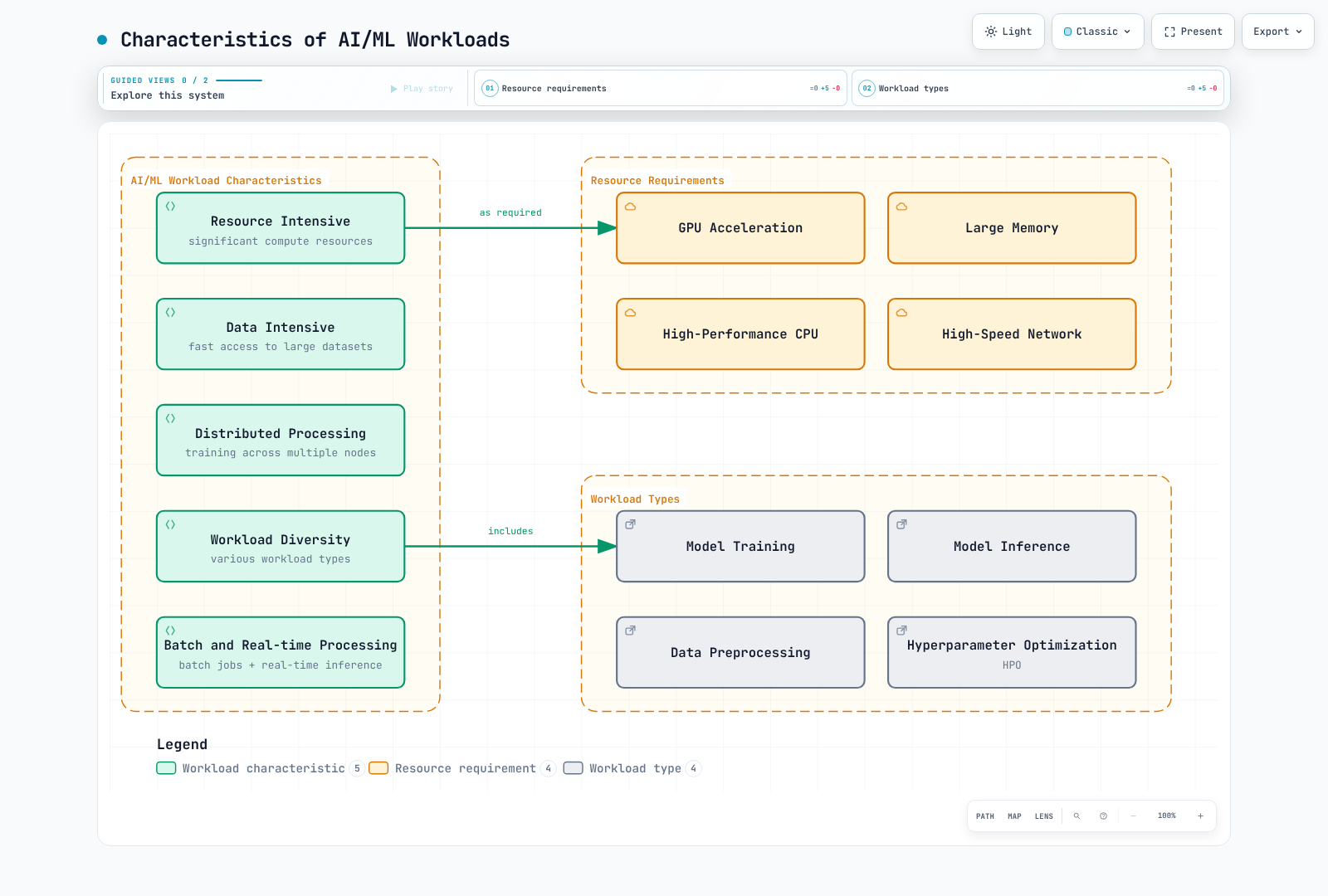
- Resource Intensive: Requires significant computing resources including GPUs, high-performance CPUs, and large memory.
- Data Intensive: Requires fast access to large datasets.
- Distributed Processing: Requires distributed processing across multiple nodes for large-scale model training.
- Workload Diversity: Includes various types of workloads such as training, inference, and data preprocessing.
Distinctions for AI/ML Design
Verify support against the selected framework, image, device and Kubernetes version:
1. Large Language Model (LLM) Deployment
Large Language Models (LLMs) are one of the most prominent technologies in AI recently. Key considerations for efficiently deploying LLMs on Kubernetes:
- Model Sharding: Distributing large models across multiple GPUs
- Precision selection: Distinguish FP16/BF16 computation from INT8/INT4 quantization and validate accuracy/device support
- Inference Optimization: Improving inference performance using vLLM, TensorRT, ONNX Runtime, etc.
- Scaling Strategy: Increasing throughput through horizontal scaling
2. AI Orchestration Frameworks
Specialized orchestration frameworks for managing AI/ML workloads on Kubernetes:
- Kubeflow: Comprehensive platform for machine learning workflows
- Ray on Kubernetes: Distributed computing framework
- KServe: Inference management with Knative/Standard and other paths
- Seldon Core: Model serving and monitoring
3. GPU Sharing and Optimization
Technologies for efficiently utilizing GPU resources:
- MIG (Multi-Instance GPU): Partitioning of NVIDIA A100/H100 GPUs
- Sharing approaches: MPS and time-slicing differ from each other and from MIG in isolation/support
- Dynamic Allocation: Dynamic allocation of GPU resources as needed
- GPU Operator: Automating GPU management in Kubernetes
4. MLOps and GitOps Integration
Applying DevOps principles for AI/ML lifecycle management:
- Model Version Control: Model versioning integrated with Git
- CI/CD Pipelines: Automating model training and deployment
- A/B tests and canaries: Experimental comparison and gradual rollout have different goals/metrics
- Monitoring and Feedback Loops: Model performance monitoring and retraining
5. Vector Database Integration
Vector database integration for embeddings and semantic search:
- Pinecone: Managed vector search
- Milvus: Open-source vector database
- Faiss: Facebook AI's efficient similarity search library
- OpenSearch: Search engine with vector search capabilities
Batch and online inference have different latency/throughput goals.
AI/ML Infrastructure Configuration in EKS
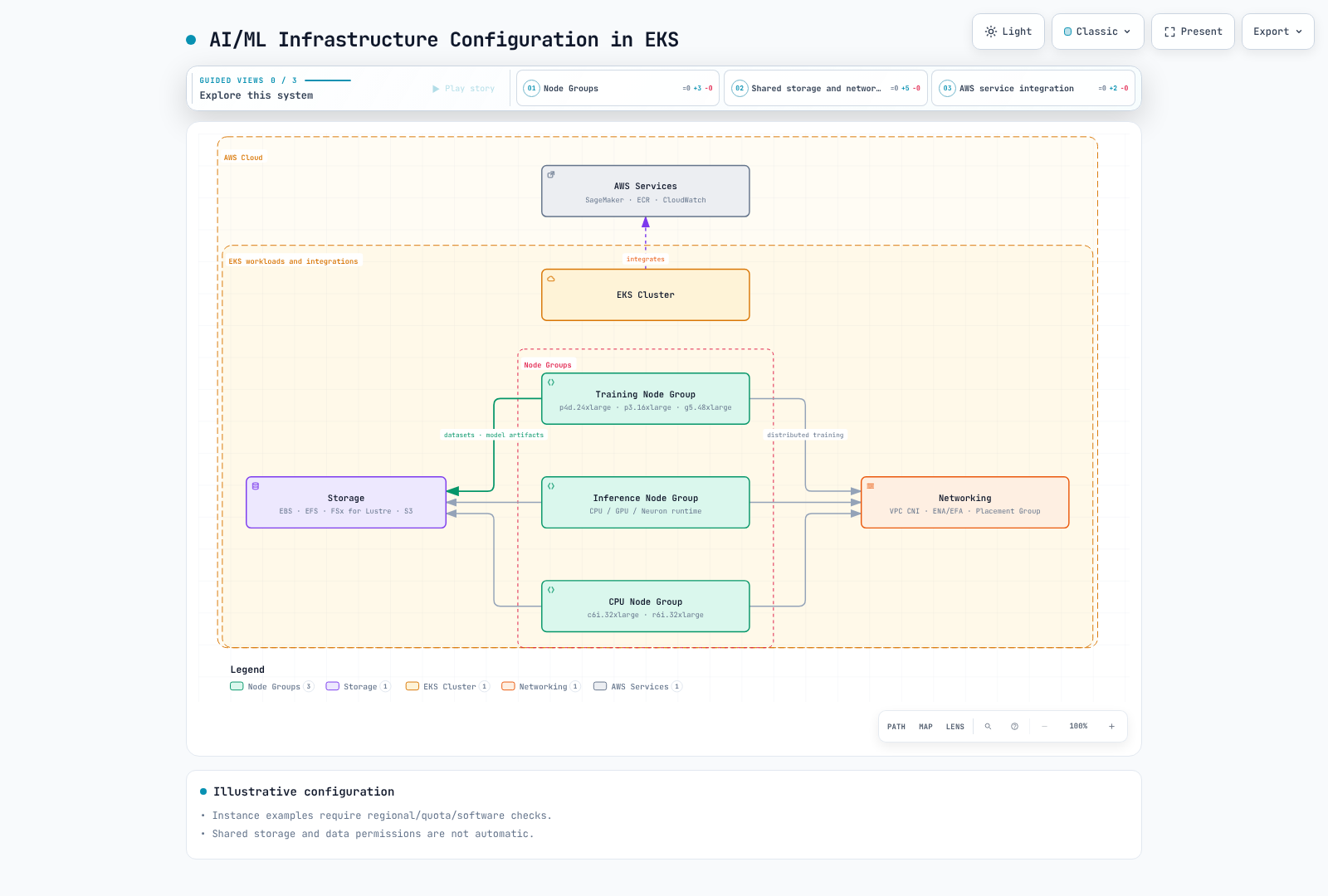
Node Type Selection
These are capacity examples, not an exhaustive current catalog or ranking. Check regional availability, quotas, CPU architecture, GPU memory and software compatibility:
GPU Instances:
- p4d.24xlarge: 8x NVIDIA A100 GPU, 320GB GPU memory
- p3.16xlarge: 8x NVIDIA V100 GPU, 128GB GPU memory
- g5.xlarge~g5.48xlarge: NVIDIA A10G GPU, up to 8 GPUs
- g4dn.12xlarge: 4 T4 GPUs; g4dn.16xlarge: 1 T4 GPU — size and GPU count do not increase monotonically
CPU Optimized Instances:
- c6i.32xlarge: 128 vCPU, 256GB memory
- c7g.16xlarge: 64 vCPU (AWS Graviton3), 128GB memory
Memory Optimized Instances:
- r6i.32xlarge: 128 vCPU, 1024GB memory
- x2gd.16xlarge: 64 vCPU, 1024GB memory
Inferentia Instances:
- inf1.24xlarge: 16 AWS Inferentia chips, 96 vCPU, 192GB memory
Trainium Instances:
- trn1.32xlarge: 16 AWS Trainium chips, 128 vCPU, 512GB memory
Storage Configuration
AI/ML workloads require high-performance storage:
Amazon EBS:
- gp3: Default general-purpose SSD storage
- io2: High-performance SSD storage
- st1: Throughput-optimized HDD storage
Amazon EFS:
- Useful when multiple nodes need access to shared data
- Performance mode: General Purpose is recommended; previous-generation Max I/O is incompatible with Elastic throughput
- Throughput modes: Elastic, Provisioned and Bursting — compare workload needs, pricing and limits
Amazon FSx for Lustre:
- High-performance parallel file system
- Provides fast access to large datasets
- Simplifies data import and export through S3 integration
Amazon S3:
- Stores large datasets
- Stores training data and model artifacts
Networking Configuration
Networking configuration for distributed training:
Cluster Placement Groups:
- Minimizes latency between nodes
- Places nodes within the same availability zone
Enhanced Networking:
- Elastic Network Adapter (ENA)
- ENA Express
- Elastic Fabric Adapter (EFA)
VPC CNI Configuration:
- IP address management for large-scale pod deployments
- Secondary IP address range configuration
AI/ML Workload Deployment
NVIDIA GPU Operator and Device Allocation
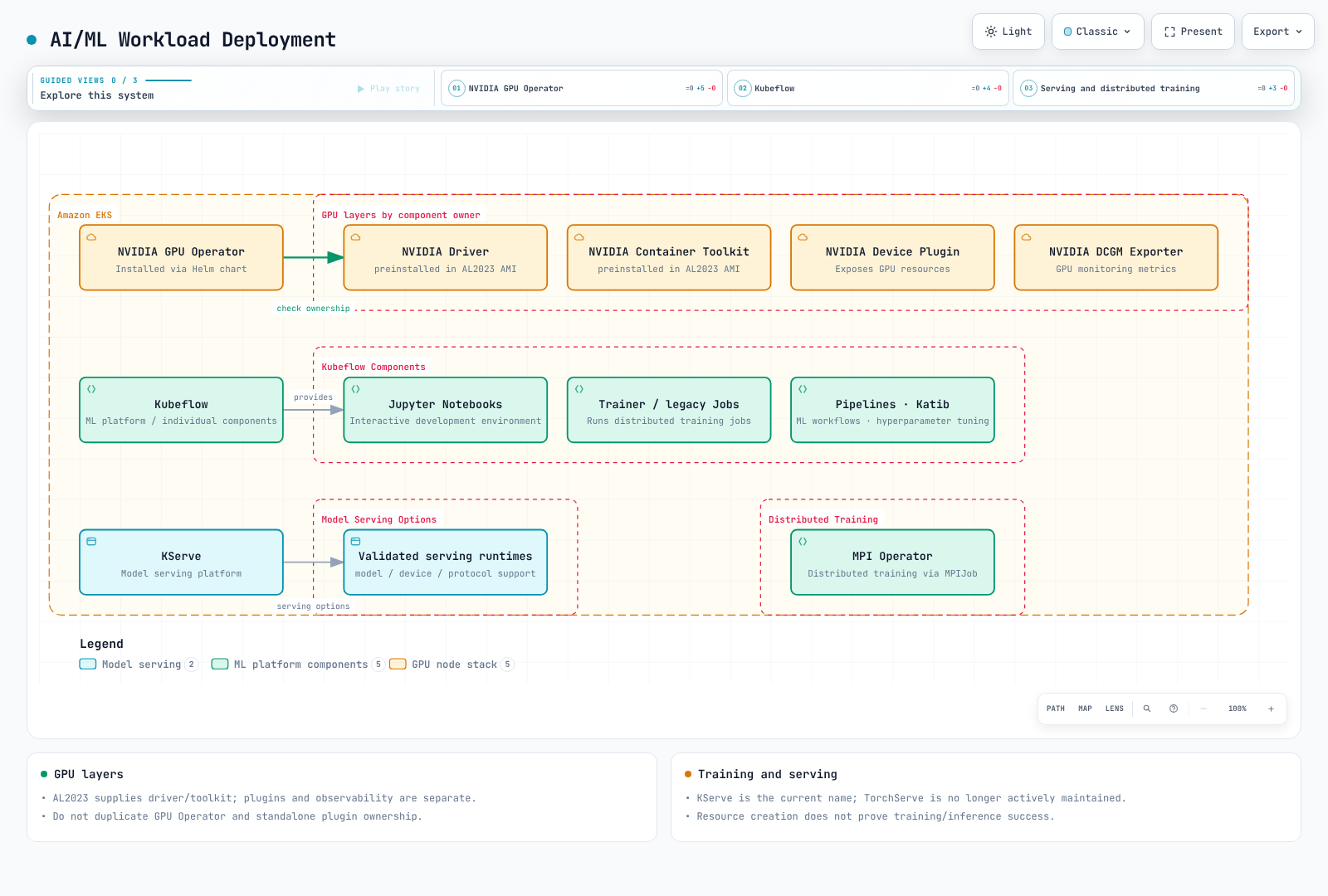
EKS AL2023 NVIDIA AMIs already contain drivers and Container Toolkit, so disable their installation by GPU Operator. They do not contain the device plugin/DRA driver, which requires configuration. Bottlerocket NVIDIA AMIs include the device plugin. Avoid installing duplicate owners.
This command renders locally the reviewed Operator chart. Inspect ClusterPolicy/RBAC and actual installation requirements before deployment.
# AL2023 NVIDIA AMI profile: host driver/toolkit are already installed.
helm repo add nvidia https://helm.ngc.nvidia.com/nvidia
helm repo update nvidia
helm template gpu-operator nvidia/gpu-operator \
  --version v26.7.0 --namespace gpu-operator \
  --set driver.enabled=false --set toolkit.enabled=false \
  > gpu-operator.rendered.yaml
The NVIDIA extended resource is nvidia.com/gpu. Integer limits imply an equal request; if both are specified they must match. 0.5 is not valid GPU allocation. This CUDA 12.8 image is illustrative; verify host-driver/architecture compatibility and pin the image digest before deployment. No GPU execution was performed in this review.
apiVersion: v1
kind: Pod
metadata:
  name: gpu-allocation-check
spec:
  restartPolicy: Never
  containers:
    - name: check
      image: nvidia/cuda:12.8.1-base-ubuntu22.04
      command: ["nvidia-smi", "-L"]
      resources:
        requests:
          cpu: "100m"
          memory: 128Mi
        limits:
          memory: 256Mi
          nvidia.com/gpu: 1
Kubeflow and Distributed Training
Use the pinned 26.03.1 installation guide for dependencies, identity and storage instead of a master-branch one-line installation. The serving project is KServe; KFServing is its historical name.
Distributed execution can use Trainer, legacy TFJob/PyTorchJob or the separate MPI Operator. Distinguish the MPI Operator API from legacy Training Operator by installed CRDs/version. Job controllers create Pods; an MPI launcher or torchrun starts processes.
A single Pod cannot fulfill torchrun --nnodes=2, and an invented Pod DNS name does not provide rendezvous. Supply actual training code/image, worker count, Service/DNS, ranks/backend, data sharding and checkpoint/timeout/retry behavior. Gang scheduling needs separate policy/scheduler support.
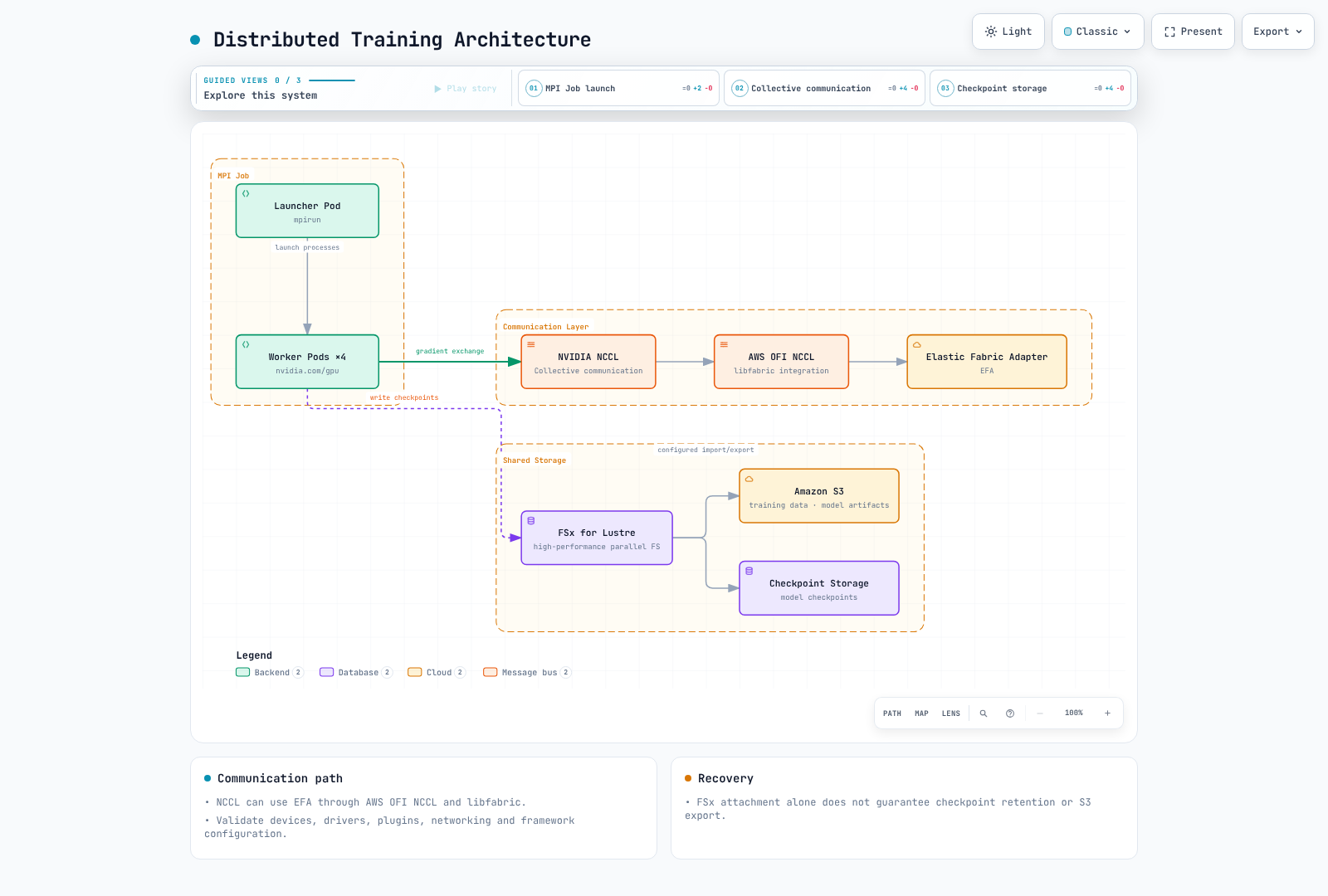
For NCCL over EFA the path is AWS OFI NCCL plugin → libfabric → EFA. MPI can launch processes without being NCCL's mandatory transport layer. Verify ENA/EFA, GPUDirect, security groups, AMI and libraries separately. Multus/SR-IOV or device hostPath mounts alone do not configure EFA/GPUDirect on EKS.
Model Serving
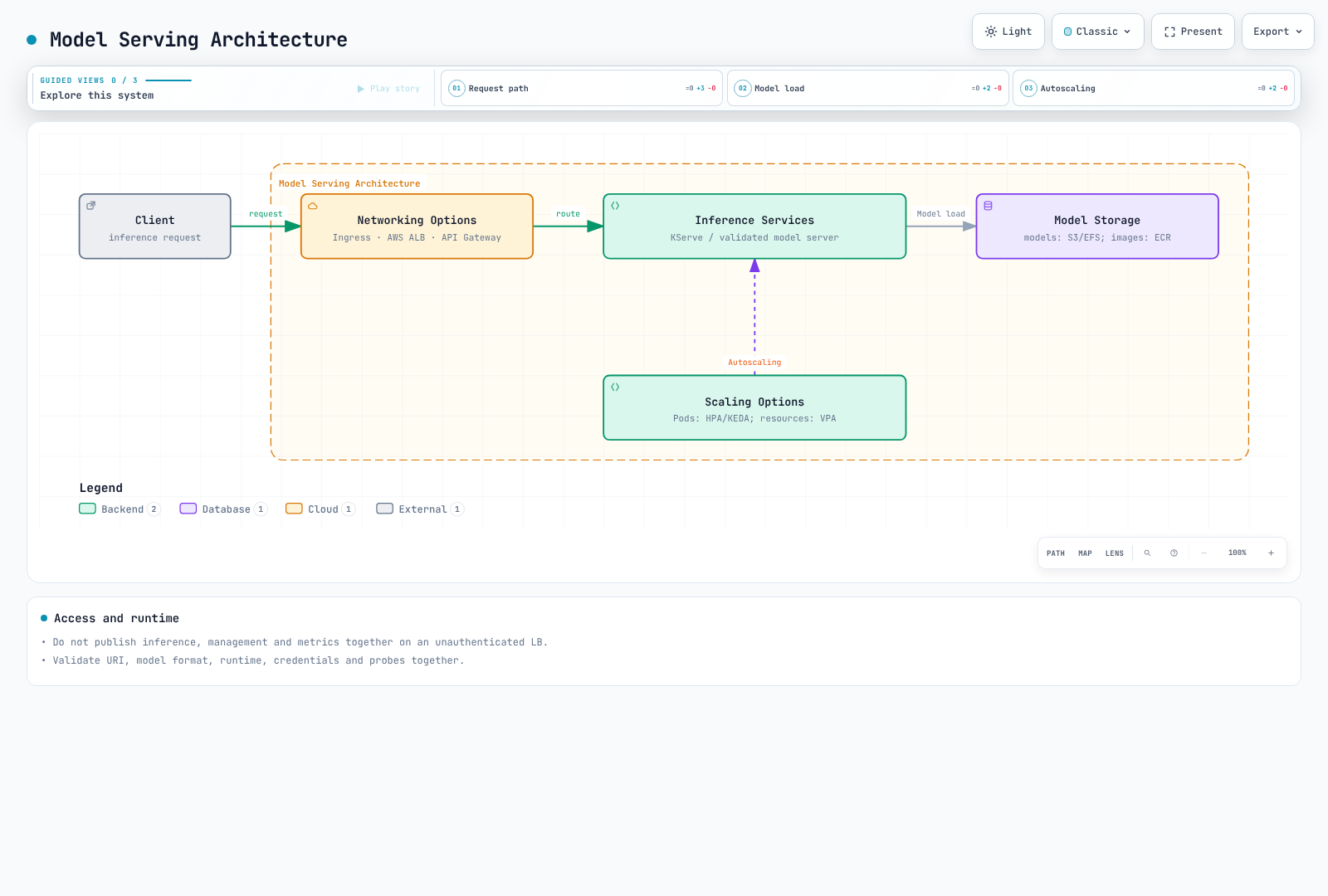
Check KServe Knative/Standard mode, runtime/model format, URI access, protocol and GPU device configuration. A GPU request alone does not enable GPU inference. Triton needs a model repository, backend configuration and readiness validation too.
TorchServe announces no active maintenance or planned security fixes, so it is not a maintained default for new deployments. Do not publish inference, management and metrics ports together through an unauthenticated LoadBalancer. Configure authenticated ingress and appropriate internal management access.
AI/ML Workload Optimization
GPU Sharing and Memory
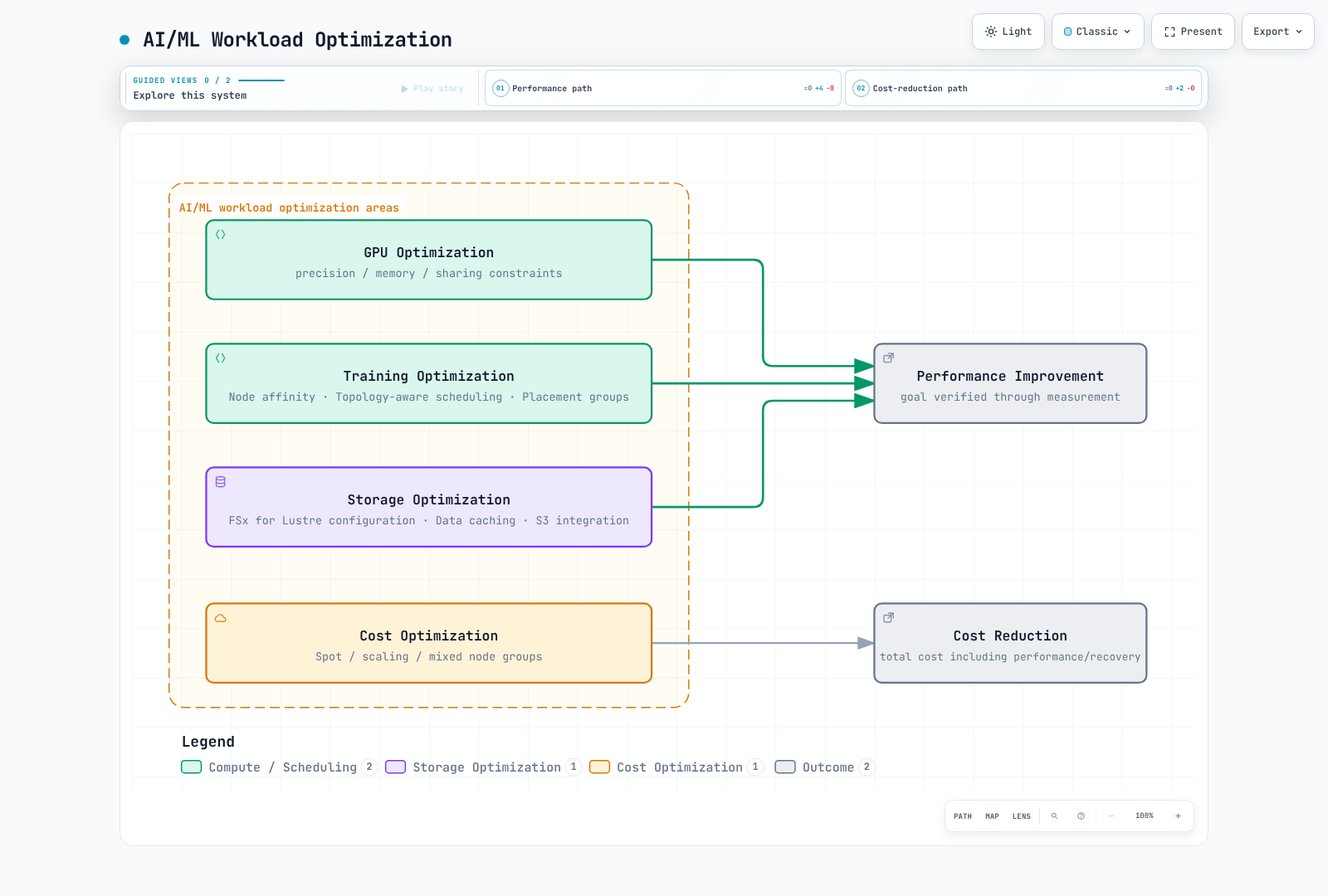
Time-slicing exposes shared GPU access without memory/fault isolation or proportional performance guarantees. MPS uses a separate control daemon; the reviewed plugin documentation labels support experimental and excludes MIG-enabled devices. A RuntimeClass plus a privileged MPS Pod does not configure sharing across the node.
This is a standalone device-plugin configuration. If GPU Operator owns the plugin, use that owner's configuration path instead.
# device-plugin-sharing.yaml: NVIDIA device plugin configuration, not a Pod.
version: v1
sharing:
  timeSlicing:
    renameByDefault: true
    failRequestsGreaterThanOne: true
    resources:
      - name: nvidia.com/gpu
replicas: 2# Alternative to an operator-owned plugin; do not install a second owner.
helm repo add nvdp https://nvidia.github.io/k8s-device-plugin
helm repo update nvdp
helm template nvdp nvdp/nvidia-device-plugin \
--version 0.20.0 --namespace nvidia-device-plugin \
--set config.default=shared \
--set-file config.map.shared=device-plugin-sharing.yaml \
> device-plugin.rendered.yamlThis exposes nvidia.com/gpu.shared; Pods request an integer one of that resource. replicas=2 does not guarantee half the GPU memory. Verify selected nodes, allocation and contention on real GPU hardware.
Placement and Topology
Zone/region annotations do not control Pod placement. Use nodeSelector/affinity against actual node labels; anti-affinity/spread selectors must match Pod labels too. Substitute the actual AZ below. Same-AZ placement, spreading across nodes and gang admission are different constraints.
apiVersion: v1
kind: Pod
metadata:
  name: placement-check
  labels:
    app: placement-check
spec:
  restartPolicy: Never
  nodeSelector:
    topology.kubernetes.io/zone: us-west-2a
  affinity:
    podAntiAffinity:
      preferredDuringSchedulingIgnoredDuringExecution:
        - weight: 100
          podAffinityTerm:
            labelSelector:
              matchLabels:
                app: placement-check
            topologyKey: kubernetes.io/hostname
  containers:
    - name: check
      image: python:3.12-slim
      command: ["python", "-c", "print('placement check')"]
      resources:
        requests:
          cpu: "100m"
          memory: 64Mi
        limits:
          cpu: "1"
          memory: 128Mi
Storage and Caching
Static FSx CSI provisioning connects an existing filesystem with PV/PVC. Replace filesystem ID, DNS, mount name, capacity and namespace with actual values. Retain avoids automatic filesystem deletion; charges remain until separately cleaned up.
apiVersion: v1
kind: PersistentVolume
metadata:
  name: ml-fsx-existing
spec:
  capacity:
    storage: 1200Gi
  volumeMode: Filesystem
  accessModes: [ReadWriteMany]
  storageClassName: ""
  persistentVolumeReclaimPolicy: Retain
  mountOptions: [flock]
  csi:
    driver: fsx.csi.aws.com
    volumeHandle: fs-0123456789abcdef0
    volumeAttributes:
      dnsname: fs-0123456789abcdef0.fsx.us-west-2.amazonaws.com
      mountname: replace-with-actual-mount-name
---
apiVersion: v1
kind: PersistentVolumeClaim
metadata:
  name: ml-dataset
  namespace: ml-workloads
spec:
  accessModes: [ReadWriteMany]
  storageClassName: ""
  volumeName: ml-fsx-existing
  resources:
    requests:
      storage: 1200Gi
Dynamic provisioning creates a filesystem from a StorageClass/PVC. Do not put static volumeHandle/DNS settings in the StorageClass or mix in an undefined fsx.aws.k8s.io/Lustre resource. Use the driver's dynamic example and check deployment-type-specific throughput/backup rules; SCRATCH_2 cannot use persistent-only options.
An Alluxio worker DaemonSet alone is not a complete cache deployment. Design master/worker roles, paths, memory, network, consistency and retention. Benchmark a separate test path on the actual mounted PVC; FIO against an unmounted /data does not measure FSx performance.
Monitoring and Logging
Prometheus and Grafana
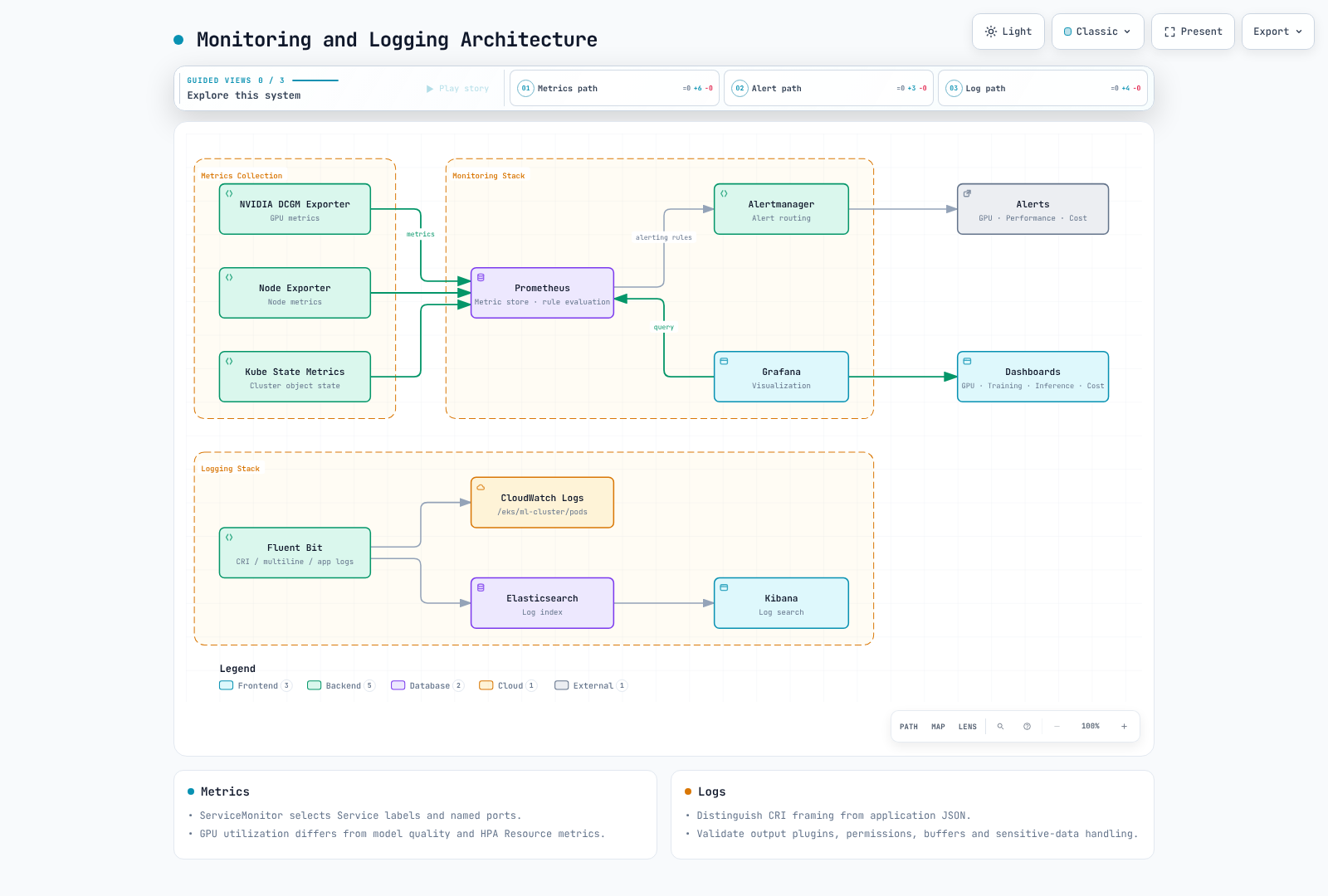
DCGM Exporter provides GPU metrics, distinct from device-plugin allocatable capacity. Avoid duplicating an operator-owned exporter with another DaemonSet. A Docker-socket mount is not required for a containerd setup.
ServiceMonitor selects Service labels and named ports, not Pod labels directly. Match these values to the installed exporter Service and ensure Prometheus selects the ServiceMonitor namespace/labels too.
apiVersion: monitoring.coreos.com/v1
kind: ServiceMonitor
metadata:
  name: gpu-metrics
  namespace: monitoring
spec:
  namespaceSelector:
    matchNames: [gpu-operator]
  selector:
    matchLabels:
      app: nvidia-dcgm-exporter
  endpoints:
    - port: gpu-metrics
      interval: 15s
Observe GPU utilization/memory/errors alongside application requests, errors and latency histograms. Accuracy needs an evaluation path with ground truth; adding replicas does not improve model quality. Replace old Grafana graph/flot JSON with current time-series/gauge formats and actual datasource UIDs, then validate import.
Log Collection
Containerd CRI log framing and application JSON are different layers. Configure Fluent Bit CRI/multiline parsing, paths, position database/rotation and Kubernetes metadata RBAC. Do not copy removed Elasticsearch/OpenSearch document types or undefined parser names. CloudWatch/output integrations need image plugins, workload IAM and network access. Manage sensitive model payloads and retry-buffer growth. See the selected collection path in the observability guide.
Cost Optimization
Spot and Node Provisioning
Spot interruptions/capacity shortages require external checkpoints, retry/idempotency and recovery-time validation. Use current NodePool/EC2NodeClass configuration from the Karpenter guide, including image/AMI revision, taints/tolerations, limits and interruption handling. Mixing CPU/GPU node groups is different from the EKS Hybrid Nodes product.
HPA and Metrics
Use HPA Resource metrics for CPU/memory provided by metrics-server. nvidia.com/gpu allocation is not a GPU-utilization Resource metric. GPU/request signals require exporters and a custom/external metrics adapter.
This example uses RPS exposed per namespace/Pod by an adapter. The target Deployment and adapter require separate installation; 100 RPS is an illustrative target to calibrate through measurement. Assign one scaling owner instead of multiple HPAs/KEDA controllers controlling the same replica count.
apiVersion: autoscaling/v2
kind: HorizontalPodAutoscaler
metadata:
  name: inference-hpa
  namespace: ml-workloads
spec:
  scaleTargetRef:
    apiVersion: apps/v1
    kind: Deployment
    name: inference-service
  minReplicas: 1
  maxReplicas: 10
  metrics:
    - type: Pods
      pods:
        metric:
          name: inference_requests_per_second
        target:
          type: AverageValue
          averageValue: "100"
Incorrect aggregation/label grouping can prevent an adapter from returning per-Pod values. Histogram percentiles or model accuracy are not automatically suitable proportional HPA signals. Measure load/queue/latency/utilization and achieved throughput together. Pod reduction can leave EC2 charges until node termination; time of day alone does not lower On-Demand rates.
Data and Model Access
Kubernetes RBAC governs API access; S3/KMS permissions use workload IAM. Use object storage, encryption and file-based credentials instead of large model Secrets or decryption keys in environment variables. Secret base64 is not encryption. NetworkPolicy namespaceSelector and podSelector within one peer are AND; separate entries are OR. Allow actual DNS/storage/metrics directions too.
Validation and References
This chapter was corrected using official GPU Operator/device-plugin Helm rendering and manifest/configuration review. No actual GPU, FSx creation/mount, distributed training, serving or autoscaling execution was performed. Validate component versions and node requirements in the target environment.
- EKS accelerated AMIs
- Kubernetes GPU scheduling
- NVIDIA device plugin 0.20.0
- FSx CSI 1.10.0
- EFS performance modes
- Kubernetes HPA
Quiz
To test what you've learned in this chapter, try the Topic Quiz.