Pod Security Standards (PSS)
Validation Baseline: Kubernetes PSA library
k8s.io/pod-security-admissionv0.36.2; example PSS policy v1.35 Last Updated: October 12, 2026
Pod Security Standards (PSS) is a standardized policy framework for Pod security in Kubernetes. This document covers PSS concepts, configuration methods, and implementation in EKS environments.
PSS defines policies; PSA is the built-in admission implementation that applies them. This guide assumes ordinary Linux Pods without user namespaces, unless stated otherwise. Local upstream policy evaluation and schema/command checks are distinct from deployment: no live cluster, EKS, or container execution was tested. The example v1.35 is a pinned policy definition, not a claim about the latest Kubernetes/EKS supported version. latest changes meaning when the API server is upgraded.
Table of Contents
- Evolution from PSP to PSS
- Pod Security Admission (PSA) Controller
- Security Levels
- Enforcement Modes
- Namespace-Level Configuration
- Migration from PSP to PSS
- EKS Defaults and Configuration
- Security Profile Details
- Exemptions Configuration
- Best Practices for Gradual Adoption
Evolution from PSP to PSS
History of PodSecurityPolicy (PSP)
PodSecurityPolicy (PSP) was first introduced in Kubernetes 1.3 as a Pod security mechanism. However, it was deprecated in Kubernetes 1.21 and completely removed in 1.25 due to the following issues:
┌─────────────────────────────────────────────────────────────────┐
│                    Key Issues with PSP                           │
├─────────────────────────────────────────────────────────────────┤
│ 1. Complex RBAC binding requirements                             │
│ 2. Implicit policy application (unclear which policy applies)    │
│ 3. User vs workload permission confusion                         │
│ 4. No warn/audit rollout modes                                               │
│ 5. Limited audit capabilities                                    │
└─────────────────────────────────────────────────────────────────┘
Introduction of PSS
Pod Security Standards (PSS) and Pod Security Admission (PSA) were introduced as alpha in Kubernetes 1.22, became beta in 1.23, and reached GA (Generally Available) in 1.25.
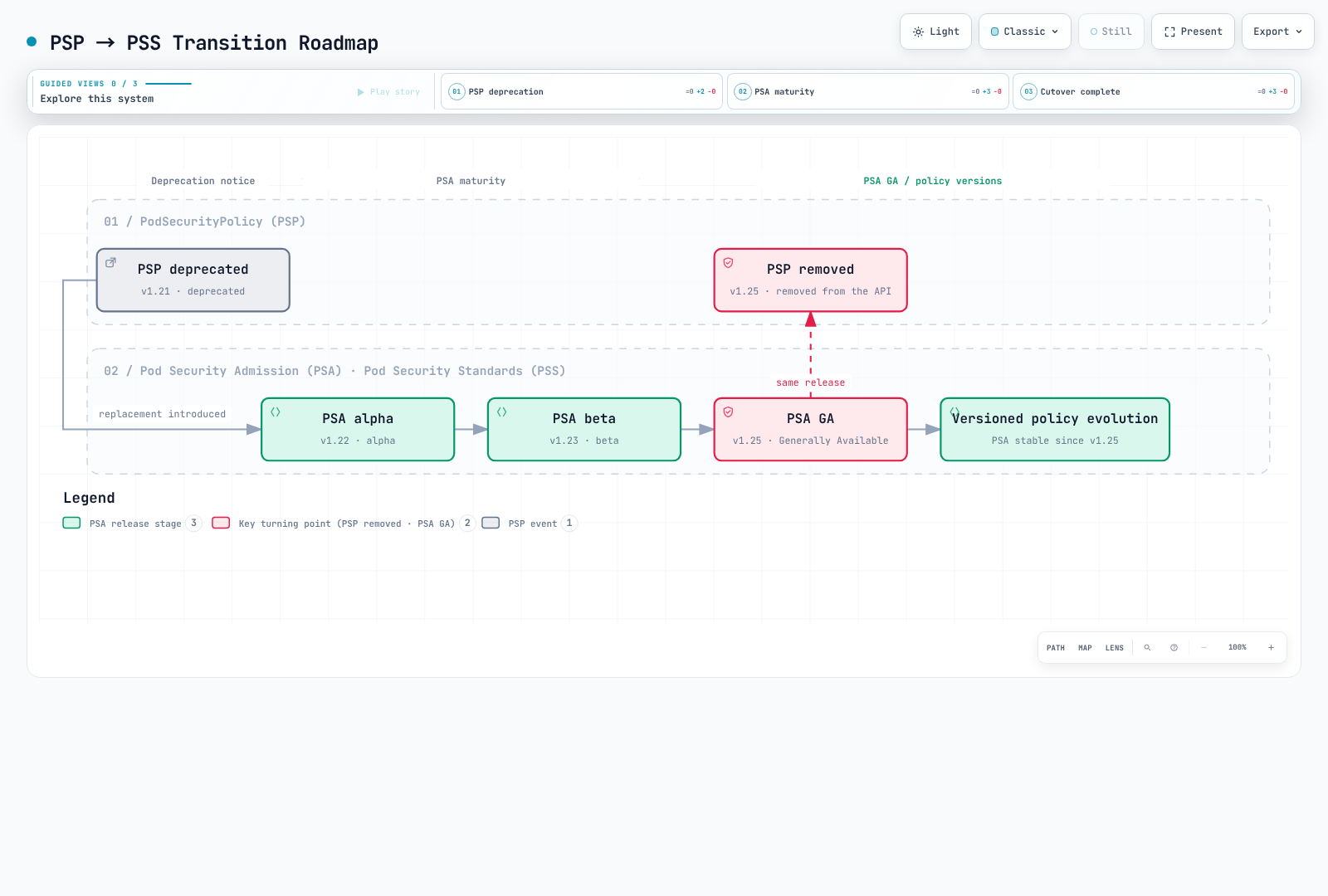
Diagram interpretation: PSA reached GA in 1.25; 1.28 is not a separate stabilization milestone.
PSP vs PSS Comparison
| Feature | PodSecurityPolicy (PSP) | Pod Security Standards (PSS) |
|---|---|---|
| Activation | Former admission plugin | PSS definitions enforced by the built-in PSA plugin |
| Policy Definition | Custom PSP resources | Three pre-defined profiles |
| Policy Binding | Complex RBAC binding | Simple namespace labels |
| Scope | Cluster-wide or namespace | Namespace level |
| Policy preview | No PSA-style warn/audit modes; API dry-run is separate | warn/audit modes plus API dry-run |
| Auditing | Limited | Built-in audit support |
| Flexibility | High (fine-grained control) | Medium (standardized profiles) |
| Complexity | High | Low |
Pod Security Admission (PSA) Controller
PSA Architecture
PSA runs inside the API server during validating admission, after mutating admission. Authentication, authorization, schema validation, and other admission checks also apply. This is not an external webhook, and the diagram must not imply a universal ordering between PSA and every other validator.
Request → authentication / authorization → mutating admission
        → validating admission (PSA + other checks) → persistence if accepted
How PSA Works
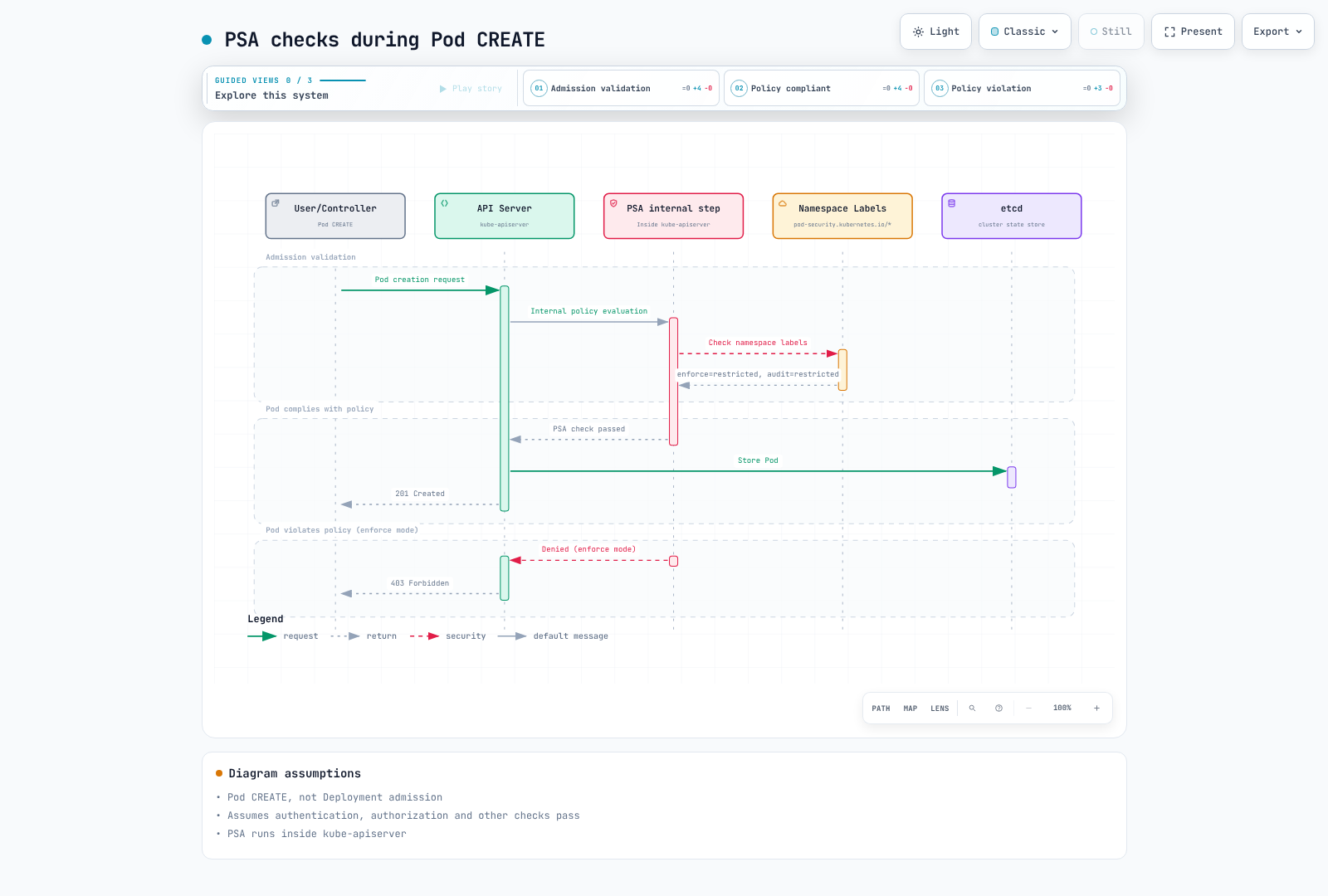
Diagram scope: PSA is internal to the API server. A successful Pod CREATE is persisted only after all applicable checks pass; PSA approval alone does not guarantee 201 Created.
Verifying PSA Status
PSA became beta and enabled by default in Kubernetes 1.23, then reached GA in 1.25. An absent explicit --enable-admission-plugins=PodSecurity flag does not mean it is disabled. Inspect self-managed API server configuration for explicit disabling; EKS does not expose that configuration. Metrics show evaluations, not a feature-gate setting. Access to /metrics needs authorization, and an unused series can be absent.
kubectl --context "$PSS_CONTEXT" get namespace "$PSS_NAMESPACE" -o yaml
kubectl --context "$PSS_CONTEXT" get --raw /metrics
Use the positive/negative Pod dry-run controls below to test the actual admission path. Never infer compliance from a successful Deployment dry-run alone.
Security Levels
PSS defines three security levels (profiles). Each level applies progressively stricter security constraints.
1. Privileged
This profile adds no PSS restrictions. It neither enables container privileges automatically nor bypasses RBAC, API validation, or other admission policies.
# Privileged profile: PSS imposes no controls; API/RBAC/other policies still apply
# Use cases: System daemons, CNI plugins, monitoring agents

apiVersion: v1
kind: Pod
metadata:
  name: privileged-pod
  namespace: pss-privileged-lab
spec:
  hostNetwork: true      # Allowed
  hostPID: true          # Allowed
  hostIPC: true          # Allowed
  containers:
  - name: privileged-container
    image: nginx
    securityContext:
      privileged: true   # Allowed
      runAsUser: 0    # Allowed
Privileged level allows:
- Host network, PID, IPC namespaces
- Privileged containers
- All capabilities
- HostPath mounts
- Any user/group IDs
2. Baseline
Applies minimal restrictions to prevent known privilege escalations. Suitable for most general workloads.
# Baseline level: Prevents known privilege escalations
# Use cases: General applications, web servers, API servers

apiVersion: v1
kind: Pod
metadata:
  name: baseline-pod
spec:
  containers:
  - name: app
    image: nginx
    securityContext:
      # The following are prohibited in Baseline:
      # privileged: true        ❌
      # allowPrivilegeEscalation is not constrained by Baseline

      # The following are allowed in Baseline:
      runAsNonRoot: false      # ✓ (allowed but not recommended)
      readOnlyRootFilesystem: false  # ✓ (allowed)
    ports:
    - containerPort: 80
Baseline Level Restrictions:
| Field | Restriction |
|---|---|
| HostProcess | Windows HostProcess containers prohibited |
| Host Namespaces | hostNetwork, hostPID, hostIPC prohibited |
| Privileged Containers | privileged: true prohibited |
| Capabilities | Explicit additions are limited to the listed baseline allowlist; NET_RAW is not on it |
| HostPath Volumes | hostPath volumes prohibited |
| Host Ports | Built-in PSA permits unset/0; it has no custom port allowlist |
| AppArmor | Unset or RuntimeDefault/Localhost; legacy annotations use runtime/default or localhost/* |
| SELinux | Only restricted type values, user/role setting prohibited |
| /proc Mount Type | Only default value allowed |
| Seccomp | Unset allowed; if specified, RuntimeDefault or Localhost (not Unconfined) |
| Sysctls | Only the PSS version’s explicit sysctl allowlist; not every kubelet-safe sysctl |
3. Restricted
The most restrictive policy applying Pod security hardening best practices. Suitable for security-sensitive workloads.
apiVersion: v1
kind: Pod
metadata:
  name: restricted-pod
spec:
  automountServiceAccountToken: false
  securityContext:
    runAsNonRoot: true
    runAsUser: 101
    runAsGroup: 101
    fsGroup: 101
    seccompProfile:
      type: RuntimeDefault
  containers:
  - name: app
    image: ghcr.io/nginx/nginx-unprivileged@sha256:442753882674b49ae2c1de83ed67896131c0777f56df5005e356e62bc3f7e7ce
    securityContext:
      allowPrivilegeEscalation: false
      readOnlyRootFilesystem: true
      capabilities:
        drop: [ALL]
    ports:
    - containerPort: 8080
    resources:
      requests:
        cpu: 50m
        memory: 64Mi
      limits:
        cpu: 500m
        memory: 128Mi
    volumeMounts:
    - name: tmp
      mountPath: /tmp
  volumes:
  - name: tmp
    emptyDir: {}
Restricted Level Additional Restrictions:
| Field | Restriction |
|---|---|
| Volume Types | Only configMap, csi, downwardAPI, emptyDir, ephemeral, persistentVolumeClaim, projected, secret allowed |
| Privilege Escalation | allowPrivilegeEscalation: false required |
| Running as Non-root | runAsNonRoot: true required |
| Running as Non-root user | Explicit runAsUser: 0 prohibited (v1.23+); field may be omitted |
| Seccomp | RuntimeDefault or Localhost required |
| Capabilities | Must drop all capabilities, only NET_BIND_SERVICE can be added |
The controls apply to applicable regular, init, and ephemeral containers. A Pod-level non-root/seccomp value can be inherited; a conflicting container override is not compliant. Policy v1.34+ also forbids a nonempty host in HTTP/TCP probes and lifecycle hooks. In v1.35, hostUsers: false relaxes the non-root checks; Baseline also relaxes procMount, but Restricted still prohibits Unmasked. This requires actual user-namespace support, not merely a label. Windows-specific relaxations for privilege escalation, seccomp, and Linux capabilities are separate from this Linux example.
Security Level Comparison Chart
┌──────────────────────────────────────────────────────────────────────────┐
│                     Security Level Comparison                             │
├──────────────────────────────────────────────────────────────────────────┤
│                                                                          │
│  Restriction  ━━━━━━━━━━━━━━━━━━━━━━━━━━━━━━━━━━━━━━━━━━━━━━━━━━━▶       │
│               Low                                           High          │
│                                                                          │
│  ┌──────────────┐    ┌──────────────┐    ┌──────────────┐               │
│  │  Privileged  │    │   Baseline   │    │  Restricted  │               │
│  │              │    │              │    │              │               │
│  │ No           │    │ Prevent      │    │ Security     │               │
│  │ restrictions │    │ known        │    │ best         │               │
│  │              │    │ escalations  │    │ practices    │               │
│  │              │    │              │    │              │               │
│  │ Use cases:   │    │ Use cases:   │    │ Use cases:   │               │
│  │ - CNI        │    │ - General    │    │ - Financial  │               │
│  │ - CSI        │    │   apps       │    │   apps       │               │
│  │ - Monitoring │    │ - Web        │    │ - Healthcare │               │
│  │              │    │   servers    │    │ - Multi-     │               │
│  │              │    │ - API        │    │   tenant     │               │
│  └──────────────┘    └──────────────┘    └──────────────┘               │
│                                                                          │
└──────────────────────────────────────────────────────────────────────────┘
Enforcement Modes
PSA provides three enforcement modes. These modes can be used independently or together.
1. enforce
Rejects violating Pod creation and relevant Pod updates. Workload templates receive warn/audit checks; enforcement occurs on the resulting Pods. Relabeling a namespace does not evict already running Pods.
# enforce mode: Block Pod creation on violation
apiVersion: v1
kind: Namespace
metadata:
  name: production
  labels:
    pod-security.kubernetes.io/enforce: restricted
    pod-security.kubernetes.io/enforce-version: v1.35
Illustrative response excerpt (not a recorded cluster execution):
# Attempting to create a policy-violating Pod
$ kubectl apply --dry-run=server -f privileged-pod.yaml -n production
Error from server (Forbidden): error when creating "privileged-pod.yaml":
pods "privileged-pod" is forbidden: violates PodSecurity "restricted:v1.35":
privileged (container "app" must not set securityContext.privileged=true),
allowPrivilegeEscalation != false (container "app" must set
securityContext.allowPrivilegeEscalation=false)
2. audit
Adds violation annotations to audit events; this mode does not itself reject the request. Audit-policy/log-delivery configuration determines whether those events are retained. Other modes and admission checks may still reject.
# audit mode: Record violations in audit logs
apiVersion: v1
kind: Namespace
metadata:
  name: staging
  labels:
    pod-security.kubernetes.io/audit: restricted
    pod-security.kubernetes.io/audit-version: v1.35
Synthetic audit-event excerpt (not a complete captured event):
{
  "kind": "Event",
  "apiVersion": "audit.k8s.io/v1",
  "level": "Metadata",
  "auditID": "00000000-0000-4000-8000-000000000001",
  "stage": "ResponseComplete",
  "requestURI": "/api/v1/namespaces/staging/pods",
  "verb": "create",
  "user": {
    "username": "developer@example.com"
  },
  "objectRef": {
    "resource": "pods",
    "namespace": "staging",
    "name": "my-pod"
  },
  "annotations": {
    "pod-security.kubernetes.io/audit-violations": "privileged (container \"app\" must not set securityContext.privileged=true)"
  }
}
3. warn
Returns client-visible warnings without itself rejecting the request; enforce or other admission checks may still reject.
# warn mode: Display warning messages on violation
apiVersion: v1
kind: Namespace
metadata:
  name: development
  labels:
    pod-security.kubernetes.io/warn: restricted
    pod-security.kubernetes.io/warn-version: v1.35
Illustrative warning excerpt (not a recorded execution):
$ kubectl apply --dry-run=server -f non-compliant-pod.yaml -n development
Warning: would violate PodSecurity "restricted:v1.35":
allowPrivilegeEscalation != false (container "app" must set
securityContext.allowPrivilegeEscalation=false),
unrestricted capabilities (container "app" must set
securityContext.capabilities.drop=["ALL"])
pod/my-pod created (server dry run)
Mode Combination Strategy
The initial Privileged stage is only for a namespace without a stronger existing policy. Never lower Baseline/Restricted enforcement to follow this diagram.
In production environments, combining multiple modes is recommended:
# Recommended configuration: Use mode combinations
apiVersion: v1
kind: Namespace
metadata:
  name: app-namespace
  labels:
    # Current enforcement level
    pod-security.kubernetes.io/enforce: baseline
    pod-security.kubernetes.io/enforce-version: v1.35
    # Audit next level
    pod-security.kubernetes.io/audit: restricted
    pod-security.kubernetes.io/audit-version: v1.35
    # Warn next level
    pod-security.kubernetes.io/warn: restricted
    pod-security.kubernetes.io/warn-version: v1.35
┌─────────────────────────────────────────────────────────────────┐
│ Mode Combination Strategy │
├─────────────────────────────────────────────────────────────────┤
│ │
│ Phase 1: Assess Current State │
│ ┌─────────────────────────────────────────────────────────┐ │
│ │ enforce: privileged │ │
│ │ audit: baseline │ │
│ │ warn: baseline │ │
│ └─────────────────────────────────────────────────────────┘ │
│ │ │
│ ▼ │
│ Phase 2: Gradual Hardening │
│ ┌─────────────────────────────────────────────────────────┐ │
│ │ enforce: baseline │ │
│ │ audit: restricted │ │
│ │ warn: restricted │ │
│ └─────────────────────────────────────────────────────────┘ │
│ │ │
│ ▼ │
│ Phase 3: Final Goal │
│ ┌─────────────────────────────────────────────────────────┐ │
│ │ enforce: restricted │ │
│ │ audit: restricted │ │
│ │ warn: restricted │ │
│ └─────────────────────────────────────────────────────────┘ │
│ │
└─────────────────────────────────────────────────────────────────┘Namespace-Level Configuration
Basic Label Configuration
PSS is configured through namespace labels:
apiVersion: v1
kind: Namespace
metadata:
  name: secure-namespace
  labels:
    # Format: pod-security.kubernetes.io/<MODE>: <LEVEL>
    pod-security.kubernetes.io/enforce: restricted
    pod-security.kubernetes.io/enforce-version: v1.35
    pod-security.kubernetes.io/audit: restricted
    pod-security.kubernetes.io/audit-version: v1.35
    pod-security.kubernetes.io/warn: restricted
    pod-security.kubernetes.io/warn-version: v1.35
Version Specification
You can use PSS definitions from a specific Kubernetes version:
apiVersion: v1
kind: Namespace
metadata:
  name: versioned-namespace
  labels:
    # Use PSS definitions from a specific version
    pod-security.kubernetes.io/enforce: restricted
    pod-security.kubernetes.io/enforce-version: v1.35  # Specific version

    # Using 'latest' applies PSS from current cluster version
    # pod-security.kubernetes.io/enforce-version: latest
Environment-Specific Configuration Examples
---
# Development environment: Relaxed policy
apiVersion: v1
kind: Namespace
metadata:
  name: development
  labels:
    environment: development
    pod-security.kubernetes.io/enforce: baseline
    pod-security.kubernetes.io/warn: restricted
---
# Staging environment: Intermediate policy
apiVersion: v1
kind: Namespace
metadata:
  name: staging
  labels:
    environment: staging
    pod-security.kubernetes.io/enforce: baseline
    pod-security.kubernetes.io/audit: restricted
    pod-security.kubernetes.io/warn: restricted
---
# Production environment: Strict policy
apiVersion: v1
kind: Namespace
metadata:
  name: production
  labels:
    environment: production
    pod-security.kubernetes.io/enforce: restricted
    pod-security.kubernetes.io/audit: restricted
    pod-security.kubernetes.io/warn: restricted
Adding Labels to Existing Namespaces
# Add labels using kubectl
kubectl label namespace my-namespace \
  pod-security.kubernetes.io/enforce=restricted \
  pod-security.kubernetes.io/enforce-version=v1.35 \
  pod-security.kubernetes.io/audit=restricted \
  pod-security.kubernetes.io/warn=restricted

# Verify labels
kubectl get namespace my-namespace -o yaml | grep pod-security
Migration from PSP to PSS
Migration Overview
Migration from PSP to PSS should be carefully planned and performed in stages.
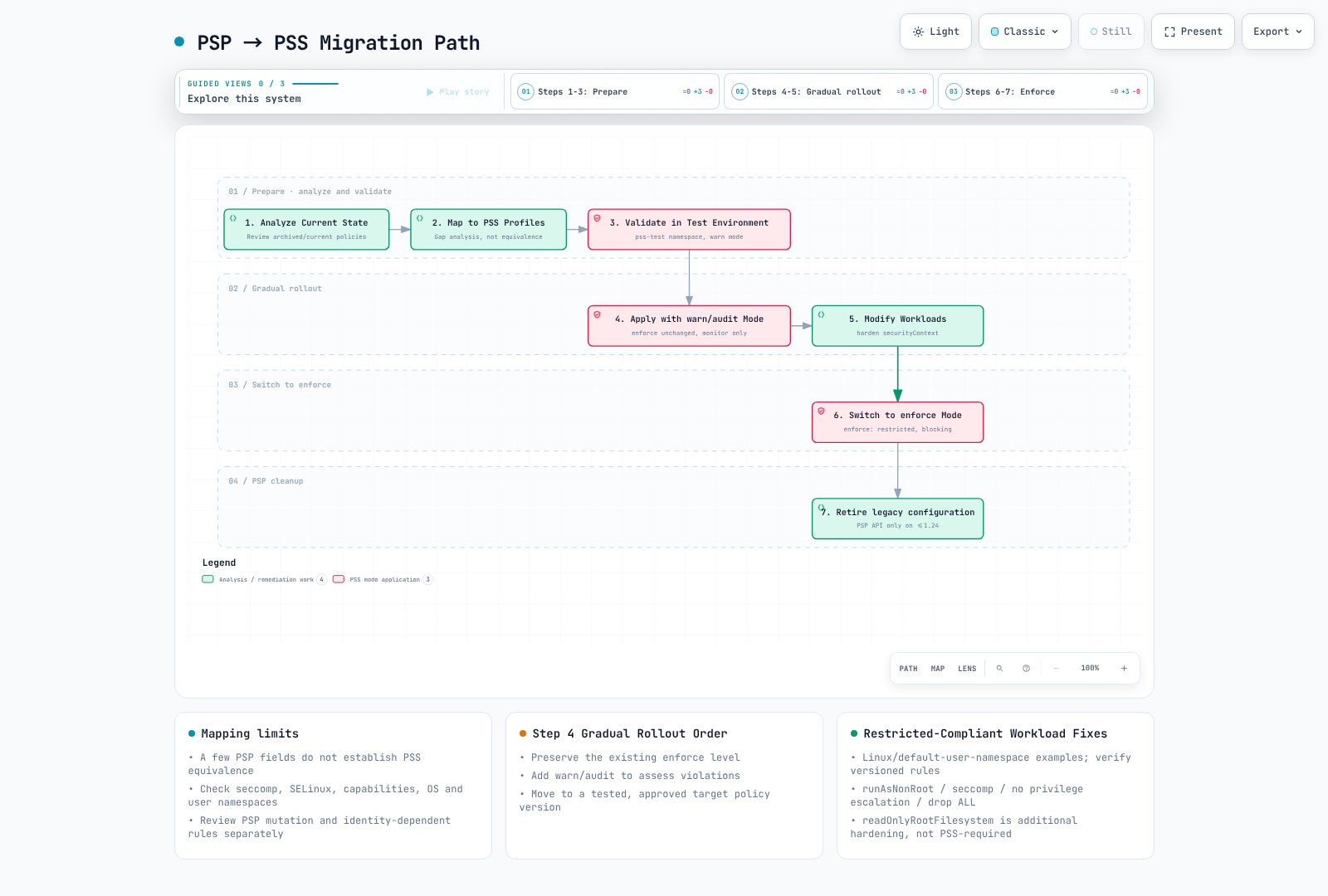
Diagram scope: PSP analysis/removal is historical. Never lower an existing stronger enforce policy for observation; readOnlyRootFilesystem is recommended, not required by Restricted.
Step 1: Analyze Current PSP
Historical procedure only: PSP commands/resources below apply to old clusters that still served policy/v1beta1 (up to Kubernetes 1.24), or to saved manifests. Do not apply this PSP to a current cluster. Also inventory fields previously defaulted/mutated by PSP; PSA does not fill them in.
# List current PSPs
kubectl get psp

# Get PSP details
kubectl get psp <psp-name> -o yaml

# Check Pods with PSP applied
kubectl get pods --all-namespaces -o jsonpath='{range .items[*]}{.metadata.namespace}/{.metadata.name}: {.metadata.annotations.kubernetes\.io/psp}{"\n"}{end}'
Step 2: Map PSP to PSS Profiles
# Example: Existing PSP
apiVersion: policy/v1beta1
kind: PodSecurityPolicy
metadata:
  name: restricted-psp
spec:
  privileged: false
  allowPrivilegeEscalation: false
  requiredDropCapabilities:
    - ALL
  volumes:
    - 'configMap'
    - 'emptyDir'
    - 'projected'
    - 'secret'
    - 'downwardAPI'
    - 'persistentVolumeClaim'
  hostNetwork: false
  hostIPC: false
  hostPID: false
  runAsUser:
    rule: MustRunAsNonRoot
  seLinux:
    rule: RunAsAny
  fsGroup:
    rule: RunAsAny
  supplementalGroups:
    rule: RunAsAny
Mapping Result: Restricted is a candidate target, not an equivalent policy. This PSP lacks the required seccomp control and allows SELinux settings that PSS may reject. Compare every control and every resulting Pod; three selected fields cannot establish equivalence.
PSP to PSS Mapping Table
| Workload requirement | Candidate PSS profile | Required review |
|---|---|---|
| Host namespaces, privileged container, or hostPath | Privileged | Isolate the exception and apply additional controls |
| No host access but root process is needed | Baseline | Check every Baseline control, including capabilities and seccomp |
| Non-root, no privilege escalation, drop ALL | Restricted | Also check volumes, seccomp, overrides, and version-specific controls |
Step 3: Validate in Test Environment
# Create test namespace
kubectl create namespace pss-test

# Apply restricted in warn mode
kubectl label namespace pss-test \
  pod-security.kubernetes.io/warn=restricted \
  pod-security.kubernetes.io/warn-version=v1.35

# Test existing workload deployment
kubectl apply -f my-deployment.yaml -n pss-test

# Check warnings and modify workloads
Step 4: Gradual Application
# Staged migration namespace configuration
apiVersion: v1
kind: Namespace
metadata:
  name: migrating-namespace
  labels:
    # Phase 1: New namespace without a previous stronger enforce policy
    pod-security.kubernetes.io/enforce: privileged
    pod-security.kubernetes.io/audit: baseline
    pod-security.kubernetes.io/warn: baseline

    # Phase 2: Apply baseline, monitor restricted
    # pod-security.kubernetes.io/enforce: baseline
    # pod-security.kubernetes.io/audit: restricted
    # pod-security.kubernetes.io/warn: restricted

    # Phase 3: Final restricted enforcement
    # pod-security.kubernetes.io/enforce: restricted
Step 5: Modify Workloads
Before: a plain nginx Pod with no security context fails Restricted checks. Adding runAsNonRoot alone is insufficient: the image user, listener, and writable paths must also be compatible. The corrected Pod uses the upstream unprivileged image (UID/GID 101), port 8080, and writable /tmp with a read-only root filesystem.
apiVersion: v1
kind: Pod
metadata:
  name: new-pod
spec:
  automountServiceAccountToken: false
  securityContext:
    runAsNonRoot: true
    runAsUser: 101
    runAsGroup: 101
    fsGroup: 101
    seccompProfile:
      type: RuntimeDefault
  containers:
  - name: app
    image: ghcr.io/nginx/nginx-unprivileged@sha256:442753882674b49ae2c1de83ed67896131c0777f56df5005e356e62bc3f7e7ce
    securityContext:
      allowPrivilegeEscalation: false
      readOnlyRootFilesystem: true
      capabilities:
        drop: [ALL]
    ports:
    - containerPort: 8080
    resources:
      requests:
        cpu: 50m
        memory: 64Mi
      limits:
        cpu: 500m
        memory: 128Mi
    volumeMounts:
    - name: tmp
      mountPath: /tmp
  volumes:
  - name: tmp
    emptyDir: {}
Migration Automation Script
This deliberately targets one reviewed namespace, adds only previously absent warn/audit labels, preserves enforce, and uses the observed resource version to reject a concurrent edit. It is a real namespace mutation when run; inspect the target first. Existing labels cause a failure for manual comparison rather than an automatic downgrade. Warnings appear on subsequent requests, not as a retrospective scan of all running Pods.
#!/usr/bin/env python3
# add-pss-observation.py CONTEXT NAMESPACE
import json, subprocess, sys

if len(sys.argv) != 3:
    raise SystemExit("Usage: add-pss-observation.py CONTEXT NAMESPACE")
context, namespace = sys.argv[1:]
if namespace in {"kube-system", "kube-public", "kube-node-lease"}:
    raise SystemExit("Refusing system namespace; review its workload requirements separately")
base = ["kubectl", "--context", context, "--request-timeout=30s"]
obj = json.loads(subprocess.run(
    base + ["get", "namespace", namespace, "-o", "json"],
    check=True, text=True, capture_output=True).stdout)
labels = obj["metadata"].get("labels", {})
new = {
    "pod-security.kubernetes.io/warn": "restricted",
    "pod-security.kubernetes.io/warn-version": "v1.35",
    "pod-security.kubernetes.io/audit": "restricted",
    "pod-security.kubernetes.io/audit-version": "v1.35",
}
if any(key in labels for key in new):
    raise SystemExit("Existing observation policy: review it; do not overwrite automatically")
subprocess.run(base + [
    "label", "namespace", namespace,
    "--resource-version=" + obj["metadata"]["resourceVersion"],
] + [key + "=" + value for key, value in new.items()], check=True)
EKS Defaults and Configuration
PSA Default Settings in EKS
AWS documents PSA as enabled by default from EKS 1.23, with cluster defaults privileged/latest for all modes and no static exemptions. Those permissive defaults are not a workload hardening policy. Namespace labels created by platform tools or administrators can override defaults; inspect the actual namespace rather than assuming every namespace is unlabeled.
kubectl --context "$PSS_CONTEXT" get namespace "$PSS_NAMESPACE" -o yamlConfiguring PSS in EKS
# Apply PSS to EKS namespace
apiVersion: v1
kind: Namespace
metadata:
  name: eks-app-namespace
  labels:
    # Example rollout choice, not a universal AWS requirement
    pod-security.kubernetes.io/enforce: baseline
    pod-security.kubernetes.io/enforce-version: v1.35
    pod-security.kubernetes.io/audit: restricted
    pod-security.kubernetes.io/warn: restricted

    # EKS-related labels
    app.kubernetes.io/managed-by: eks
EKS System Namespace Considerations
A host-access agent cannot satisfy Baseline, but that does not mean every Pod in kube-system needs full privileges. Review the exact add-on version and rendered Pod spec. Avoid a blanket overwrite that disables warn/audit for an entire system namespace. Where possible isolate approved host agents from ordinary applications and restrict who may deploy there. The following is a dedicated example namespace, not an instruction to relabel existing system namespaces.
apiVersion: v1
kind: Namespace
metadata:
  name: host-agents
  labels:
    pod-security.kubernetes.io/enforce: privileged
    pod-security.kubernetes.io/audit: restricted
    pod-security.kubernetes.io/audit-version: v1.35
    pod-security.kubernetes.io/warn: restricted
    pod-security.kubernetes.io/warn-version: v1.35
EKS Add-ons and PSS Compatibility
| Component / typical deployment | PSS review point |
|---|---|
VPC CNI aws-node, kube-proxy | Host networking or privileged node operations can exceed Baseline |
| EBS/EFS CSI node DaemonSets | Host mounts can exceed Baseline; controller Pods have different needs |
| Node-level CloudWatch Agent / Fluent Bit | Host log/filesystem access depends on the actual configuration |
| CoreDNS, AWS Load Balancer Controller, Cluster Autoscaler | Evaluate the rendered spec against Baseline/Restricted; a component name alone does not prove compliance |
EKS Auto Mode built-in node components differ from self-managed add-ons. This table is a review aid, not a tested compatibility matrix or a requirement to install every listed add-on.
EKS Terraform Example
This fragment manages one application namespace. Configure and review the Kubernetes provider and its target context separately; no provider initialization, plan, or apply was run. Adopt/import an existing namespace through its owner rather than creating competing Terraform/GitOps ownership. The policy is deliberately pinned, and no system-namespace labels are changed.
# Provider authentication/context and ownership must be configured separately.
resource "kubernetes_namespace_v1" "app" {
  metadata {
    name = "my-app"
    labels = {
      "pod-security.kubernetes.io/enforce"         = "restricted"
      "pod-security.kubernetes.io/enforce-version" = "v1.35"
      "pod-security.kubernetes.io/audit"           = "restricted"
      "pod-security.kubernetes.io/audit-version"   = "v1.35"
      "pod-security.kubernetes.io/warn"            = "restricted"
      "pod-security.kubernetes.io/warn-version"    = "v1.35"
      "environment"                              = "production"
    }
  }
}
Security Profile Details
Privileged Profile Details
The Privileged profile imposes no PSS restrictions; API validation, RBAC, and other admission checks remain in force. The following host-root example is for policy analysis only, not a recommended workload to deploy.
# All options allowed in Privileged profile
apiVersion: v1
kind: Pod
metadata:
  name: privileged-example
spec:
  hostNetwork: true
  hostPID: true
  hostIPC: true
  containers:
  - name: privileged-container
    image: nginx
    securityContext:
      privileged: true
      allowPrivilegeEscalation: true
      runAsUser: 0
      capabilities:
        add:
          - ALL
    volumeMounts:
    - name: host-root
      mountPath: /host
  volumes:
  - name: host-root
    hostPath:
      path: /
      type: Directory
Baseline Profile Details
# Baseline profile restrictions (v1.35)
#
# Prohibited fields and values:
#
# spec.hostNetwork: true prohibited
# spec.hostPID: true prohibited
# spec.hostIPC: true prohibited
#
# spec.containers[*].securityContext.privileged: true prohibited
# spec.initContainers[*].securityContext.privileged: true prohibited
# spec.ephemeralContainers[*].securityContext.privileged: true prohibited
#
# spec.containers[*].securityContext.capabilities.add restricted
#   - Allowed: NET_BIND_SERVICE (only this in Restricted)
#   - Additionally allowed in Baseline: AUDIT_WRITE, CHOWN, DAC_OVERRIDE,
#     FOWNER, FSETID, KILL, MKNOD, NET_BIND_SERVICE,
#     SETFCAP, SETGID, SETPCAP, SETUID, SYS_CHROOT
#
# spec.volumes[*].hostPath prohibited
#
# spec.containers[*].ports[*].hostPort prohibited (except 0)
#
# spec.securityContext.appArmorProfile.type restricted
#   - Allowed: profile omitted, or type RuntimeDefault/Localhost
#   - Prohibited: Unconfined
#
# spec.securityContext.seLinuxOptions.type restricted
#   - Prohibited: Custom types (container_t etc. allowed)
#
# spec.securityContext.seccompProfile.type restricted
#   - Prohibited: Unconfined
#
# spec.securityContext.sysctls restricted
#   - Only the explicit versioned PSS sysctl allowlist

apiVersion: v1
kind: Pod
metadata:
  name: baseline-compliant
spec:
  automountServiceAccountToken: false
  containers:
  - name: app
    image: ghcr.io/nginx/nginx-unprivileged@sha256:442753882674b49ae2c1de83ed67896131c0777f56df5005e356e62bc3f7e7ce
    ports:
    - containerPort: 8080
    securityContext:
      capabilities:
        drop: [ALL]
Restricted Profile Details
Restricted adds its volume allowlist, non-root execution, explicit seccomp, no privilege escalation, and dropping ALL capabilities to Baseline. NET_BIND_SERVICE is the only permitted addition, but this 8080 listener does not need it. readOnlyRootFilesystem is recommended hardening, not a PSS requirement. Setting containerPort is metadata; it does not reconfigure Nginx.
apiVersion: v1
kind: Pod
metadata:
  name: restricted-compliant
spec:
  automountServiceAccountToken: false
  securityContext:
    runAsNonRoot: true
    runAsUser: 101
    runAsGroup: 101
    fsGroup: 101
    seccompProfile:
      type: RuntimeDefault
  containers:
  - name: app
    image: ghcr.io/nginx/nginx-unprivileged@sha256:442753882674b49ae2c1de83ed67896131c0777f56df5005e356e62bc3f7e7ce
    securityContext:
      allowPrivilegeEscalation: false
      readOnlyRootFilesystem: true
      capabilities:
        drop: [ALL]
    ports:
    - containerPort: 8080
    resources:
      requests:
        cpu: 50m
        memory: 64Mi
      limits:
        cpu: 500m
        memory: 128Mi
    volumeMounts:
    - name: tmp
      mountPath: /tmp
  volumes:
  - name: tmp
    emptyDir: {}
Complete Restricted-Compliant Nginx Example
The digest was checked against upstream OCI metadata for Linux amd64/arm64 (Nginx 1.30.4, user 101); no image layers were pulled and no container was executed. Upstream documents port 8080, /tmp/nginx.pid, and temporary paths under /tmp. The ConfigMap below supplies the matching listener and health endpoint. Create it in the same namespace before the Deployment. Validate startup/readiness in your approved environment before rollout.
apiVersion: apps/v1
kind: Deployment
metadata:
  name: nginx-restricted
  namespace: production
spec:
  replicas: 3
  selector:
    matchLabels:
      app: nginx
  template:
    metadata:
      labels:
        app: nginx
    spec:
      automountServiceAccountToken: false
      securityContext:
        runAsNonRoot: true
        runAsUser: 101  # nginx user
        runAsGroup: 101
        fsGroup: 101
        seccompProfile:
          type: RuntimeDefault
      containers:
      - name: nginx
        image: ghcr.io/nginx/nginx-unprivileged@sha256:442753882674b49ae2c1de83ed67896131c0777f56df5005e356e62bc3f7e7ce
        securityContext:
          allowPrivilegeEscalation: false
          readOnlyRootFilesystem: true
          runAsNonRoot: true
          runAsUser: 101
          capabilities:
            drop:
              - ALL
        ports:
        - containerPort: 8080
        resources:
          limits:
            cpu: 100m
            memory: 128Mi
          requests:
            cpu: 50m
            memory: 64Mi
        volumeMounts:
        - name: tmp
          mountPath: /tmp
        - name: config
          mountPath: /etc/nginx/conf.d
          readOnly: true
        livenessProbe:
          httpGet:
            path: /healthz
            port: 8080
          initialDelaySeconds: 5
          periodSeconds: 10
        readinessProbe:
          httpGet:
            path: /healthz
            port: 8080
          initialDelaySeconds: 5
          periodSeconds: 5
      volumes:
      - name: tmp
        emptyDir: {}
      - name: config
        configMap:
          name: nginx-config
---
apiVersion: v1
kind: ConfigMap
metadata:
  name: nginx-config
  namespace: production
data:
  default.conf: |
    server {
        listen 8080;
        server_name localhost;

        location / {
            root /usr/share/nginx/html;
            index index.html;
        }

        location /healthz {
            return 200 'OK';
            add_header Content-Type text/plain;
        }
    }
Exemptions Configuration
Cluster-Level Exemptions Configuration
Self-managed API servers can load this configuration via --admission-control-config-file. The example keeps every exemption list empty. Exemptions skip all PSA modes. usernames matches an exact authenticated request username, not a group, wildcard, or the future Pod’s ServiceAccount. Exempting a controller account would bypass checks for the Pods it creates on behalf of many users. Namespace and RuntimeClass names also match exactly. Configure an exception only after separately constraining who can use it.
# Self-managed API server configuration; not an EKS control-plane setting
apiVersion: apiserver.config.k8s.io/v1
kind: AdmissionConfiguration
plugins:
- name: PodSecurity
  configuration:
    apiVersion: pod-security.admission.config.k8s.io/v1
    kind: PodSecurityConfiguration
    defaults:
      enforce: baseline
      enforce-version: v1.35
      audit: restricted
      audit-version: v1.35
      warn: restricted
      warn-version: v1.35
    exemptions:
      usernames: []
      runtimeClasses: []
      namespaces: []
Exemptions Configuration in EKS
EKS does not allow editing the managed API server’s AdmissionConfiguration. Namespace enforce: privileged is a permissive profile, not a static exemption: warn/audit can still evaluate requests. Restrict namespace write/deploy permissions and separate host agents from ordinary applications. For example, node-exporter configured with hostNetwork/hostPID/hostPath cannot pass Baseline; setting Baseline does not make those host accesses safe or permitted.
apiVersion: v1
kind: Namespace
metadata:
  name: host-agents
  labels:
    pod-security.kubernetes.io/enforce: privileged
    pod-security.kubernetes.io/audit: restricted
    pod-security.kubernetes.io/audit-version: v1.35
    pod-security.kubernetes.io/warn: restricted
    pod-security.kubernetes.io/warn-version: v1.35
RuntimeClass-Based Exemptions
A RuntimeClass selects a configured CRI runtime handler. Creating the resource does not install gVisor/Kata and does not grant a PSA exception. All targeted nodes must support the handler (or use appropriate scheduling constraints). This definition alone leaves PSA fully applicable:
apiVersion: node.k8s.io/v1
kind: RuntimeClass
metadata:
  name: gvisor
handler: runsc
Only a separately configured runtimeClasses: ["gvisor"] exemption on a self-managed API server skips PSA. Any request allowed to select that class could then bypass PSA; runtime isolation does not replace admission authorization. This managed-control-plane configuration is unavailable in EKS.
Fine-Grained Exemptions with Kyverno
Kyverno cannot turn a PSA denial into an allow. If a host agent needs an exception, first design the namespace’s PSA profile and deploy permissions, then add an independently enforcing policy with a narrowly scoped exception. A HostPath-only exclusion does not exclude hostNetwork/hostPID checks; matching an image tag or mutable Pod label alone is not authorization.
See Kyverno policy management for the reviewed policy APIs and version/deprecation limits. Do not copy a legacy ClusterPolicy with lowercase validationFailureAction: enforce; it is not a valid value, and ClusterPolicy is deprecated in Kyverno 1.19. A replacement must be tested against both the normal and exception workloads.
Best Practices for Gradual Adoption
Step 1: Analyze Current State
Preview a change to enforce, not warn: only an enforce-level/version change triggers the existing-Pod check. This server dry-run does not save labels or evict Pods. If the effective enforce policy is unchanged, no new scan is triggered. The scan is best effort and can limit/deduplicate warnings; silence is not a complete workload audit. Command/authentication failures remain failures.
#!/usr/bin/env bash
# preview-pss.sh: no namespace mutation
set -euo pipefail
: "${PSS_CONTEXT:?Set the approved test context}"
: "${PSS_NAMESPACE:?Set one namespace to inspect}"
kubectl --context "$PSS_CONTEXT" --request-timeout=30s \
  get namespace "$PSS_NAMESPACE" -o yaml
kubectl --context "$PSS_CONTEXT" --request-timeout=30s \
  label namespace "$PSS_NAMESPACE" \
  pod-security.kubernetes.io/enforce=restricted \
  pod-security.kubernetes.io/enforce-version=v1.35 \
  --overwrite --dry-run=server
Step 2: Gradual Rollout Strategy
The day ranges are an illustrative planning schedule, not measured migration durations. Use an explicit namespace inventory, never downgrade an existing stronger policy, and advance only after testing replacement Pods and rollback capacity.
# Gradual rollout using GitOps

# Phase 1: Monitoring (Day 1-7)
# - Apply warn: baseline to all namespaces
# - Collect and analyze violations

# Phase 2: Development Environment (Day 8-14)
# - Apply enforce: baseline to development namespaces
# - Apply warn: baseline to staging namespaces

# Phase 3: Staging Environment (Day 15-21)
# - Apply enforce: baseline to staging namespaces
# - Apply warn: baseline to production namespaces

# Phase 4: Production Environment (Day 22-28)
# - Apply enforce: baseline to production namespaces
# - Apply warn: restricted to all environments

# Phase 5: Restricted Hardening (Day 29+)
# - Apply enforce: restricted as default for new namespaces
# - Gradually migrate existing namespaces
Step 3: Set Up Monitoring and Alerts
These rules require Prometheus Operator CRDs, a selector that includes this PrometheusRule, and an authorized API-server scrape exposing pod_security_evaluations_total. Built-in PSA is not a webhook named pod-security-webhook. Evaluation labels include decision, policy_level, policy_version, mode, request_operation, resource, and subresource; there is no namespace label. Correlate retained audit events for namespace/request details. Missing metrics are not evidence of zero violations; audit-mode denial means a violating evaluation, not necessarily a rejected API request.
apiVersion: monitoring.coreos.com/v1
kind: PrometheusRule
metadata:
  name: pss-violations
  namespace: monitoring
spec:
  groups:
  - name: pod-security-standards
    rules:
    - alert: PSSViolationDetected
      expr: |
        sum by (policy_level, policy_version, mode) (
          increase(pod_security_evaluations_total{mode="enforce",decision="deny"}[5m])
        ) > 0
      labels:
        severity: warning
      annotations:
        summary: "PSA denied a Pod request"
        description: "Policy {{ $labels.policy_level }}:{{ $labels.policy_version }}. Correlate audit logs for namespace and request identity."
    - alert: PSSAuditViolation
      expr: |
        sum by (policy_level, policy_version, mode) (
          increase(pod_security_evaluations_total{mode="audit",decision="deny"}[5m])
        ) > 10
      for: 5m
      labels:
        severity: info
      annotations:
        summary: "PSA audit violations increasing"
        description: "{{ $value }} violating evaluations over five minutes; not a count of unique Pods."
Step 4: Automated Compliance Checks
Save this as check-pss.py in the project that owns the workloads. Prerequisites: Python 3 with PyYAML, a compatible kubectl, approved cluster credentials, a Kubernetes API server supporting policy v1.35, and an existing test namespace explicitly enforcing restricted:v1.35. The caller needs namespace read and Pod create authorization, even for server dry-run. Do not expose cluster credentials to untrusted pull-request code.
#!/usr/bin/env python3
# check-pss.py CONTEXT NAMESPACE pod.yaml [pod2.yaml ...]
# Requires Python 3 + PyYAML and a preconfigured, authorized kubectl.
import copy, json, subprocess, sys
from pathlib import Path
import yaml

if len(sys.argv) < 4:
    raise SystemExit("Usage: check-pss.py CONTEXT NAMESPACE pod.yaml [...]")
context, namespace, *files = sys.argv[1:]
pods = []
for filename in files:
    docs = list(yaml.safe_load_all(Path(filename).read_text()))
    if not docs or any(not isinstance(p, dict) for p in docs):
        raise SystemExit(f"{filename}: empty/non-object YAML")
    for pod in docs:
        if (pod.get("apiVersion"), pod.get("kind")) != ("v1", "Pod"):
            raise SystemExit(f"{filename}: only explicit v1 Pod test inputs are supported")
        meta = pod.setdefault("metadata", {})
        if meta.get("namespace", namespace) != namespace:
            raise SystemExit(f"{filename}: namespace mismatch")
        meta["namespace"] = namespace
        pods.append(pod)
base = ["kubectl", "--context", context, "--request-timeout=30s"]
ns = json.loads(subprocess.run(
    base + ["get", "namespace", namespace, "-o", "json"],
    check=True, text=True, capture_output=True).stdout)
labels = ns["metadata"].get("labels", {})
if (labels.get("pod-security.kubernetes.io/enforce"),
    labels.get("pod-security.kubernetes.io/enforce-version")) != ("restricted", "v1.35"):
    raise SystemExit("Test namespace must explicitly enforce restricted:v1.35")

def dry_run(pod):
    return subprocess.run(
        base + ["create", "--dry-run=server", "--validate=strict",
                "--namespace", namespace, "-f", "-"],
        input=json.dumps(pod), text=True, capture_output=True)

control = {
    "apiVersion": "v1", "kind": "Pod",
    "metadata": {"generateName": "pss-control-", "namespace": namespace},
    "spec": {
        "automountServiceAccountToken": False,
        "securityContext": {"runAsNonRoot": True, "runAsUser": 65532,
                            "seccompProfile": {"type": "RuntimeDefault"}},
        "containers": [{"name": "probe", "image": "registry.k8s.io/pause:3.10",
                        "securityContext": {"allowPrivilegeEscalation": False,
                                            "capabilities": {"drop": ["ALL"]}}}],
    },
}
good = dry_run(control)
if good.returncode:
    raise SystemExit("Positive control failed; no compliance result:\n" + good.stderr)
bad = copy.deepcopy(control)
bad["spec"]["hostPID"] = True
denied = dry_run(bad)
if denied.returncode == 0 or 'violates PodSecurity "restricted:v1.35"' not in denied.stderr:
    raise SystemExit("Negative control did not confirm PSA rejection:\n" + denied.stderr)
for pod in pods:
    result = dry_run(pod)
    if result.returncode:
        raise SystemExit("Pod dry-run failed:\n" + result.stderr)
print(f"{len(pods)} explicit Pod inputs passed server dry-run in {namespace}")python3 check-pss.py "$PSS_CONTEXT" "$PSS_NAMESPACE" ./pss-inputs/web-pod.yamlThe explicit input list must cover each workload’s Pod template, including init containers. This example rejects Deployments, empty files, wrong namespaces, query failures, missing enforcement, and an exempt/inactive negative-control path. Template extraction, mutating webhooks, scheduling, image startup, and future runtime behavior need separate checks. The negative control must be rejected by PSA; any other error is inconclusive and fails the check. A different exemption selected by a candidate Pod (for example an exempt RuntimeClass) must also be prohibited or tested separately by the test-cluster owner.
Step 5: Documentation and Training
# Pod Security Standards Guidelines

## Checklist for Developers

### When Writing Restricted-Level Pods:

- [ ] Set `spec.securityContext.runAsNonRoot: true`
- [ ] Set `spec.securityContext.seccompProfile.type: RuntimeDefault`
- [ ] Set `allowPrivilegeEscalation: false` on all containers
- [ ] Set `capabilities.drop: ["ALL"]` on all containers
- [ ] Set `readOnlyRootFilesystem: true` (recommended)
- [ ] Use unprivileged images (e.g., nginxinc/nginx-unprivileged)
- [ ] Mount emptyDir for writable paths

### Common Problem Solutions:

1. **nginx fails to bind port 80**
   → Add `NET_BIND_SERVICE` capability or use port 8080

2. **File write failures**
   → Mount emptyDir volumes to required paths

3. **Process runs as root**
   → Use unprivileged base image or add USER directive in Dockerfile
Troubleshooting
Common Errors and Solutions
1. "allowPrivilegeEscalation != false" Error
Illustrative error excerpt; the YAML is a partial Pod-spec correction, not a standalone manifest. Preserve the existing container image/configuration. Apply relevant per-container controls to init and ephemeral containers too.
allowPrivilegeEscalation != falsespec:
containers:
- name: app
securityContext:
allowPrivilegeEscalation: false2. "unrestricted capabilities" Error
Illustrative error excerpt; the YAML is a partial Pod-spec correction, not a standalone manifest. Preserve the existing container image/configuration. Apply relevant per-container controls to init and ephemeral containers too.
unrestricted capabilitiesspec:
containers:
- name: app
securityContext:
capabilities:
drop: [ALL]3. "runAsNonRoot != true" Error
Illustrative error excerpt; the YAML is a partial Pod-spec correction, not a standalone manifest. Preserve the existing container image/configuration. Apply relevant per-container controls to init and ephemeral containers too.
runAsNonRoot != truespec:
securityContext:
runAsNonRoot: true
runAsUser: 1014. "seccompProfile" Error
Illustrative error excerpt; the YAML is a partial Pod-spec correction, not a standalone manifest. Preserve the existing container image/configuration. Apply relevant per-container controls to init and ephemeral containers too.
seccompProfile must be RuntimeDefault or Localhostspec:
securityContext:
seccompProfile:
type: RuntimeDefaultPSS Violation Checking Tools
Polaris, kube-score, and Trivy provide additional static checks, not an exact substitute for the cluster’s versioned PSA policy, exemptions, and mutations. Install a reviewed version and consult its CLI help. A successful server dry-run is scoped to that request, identity, namespace, and moment; use the explicit Pod controls above.
# Dry-run check with kubectl
kubectl apply -f my-pod.yaml --dry-run=server

# Check with Polaris
polaris audit --audit-path ./k8s/ --format pretty

# Check with kube-score
kube-score score my-deployment.yaml

# Configuration check with Trivy
trivy config ./k8s/
Summary
Pod Security Standards (PSS) provides a standardized approach to managing Pod security in Kubernetes:
- Three Security Levels: Privileged (all privileges), Baseline (prevent known escalations), Restricted (least privilege)
- Three Enforcement Modes: enforce (block), audit (log), warn (warning)
- Namespace Labels: No PSP-style use binding; RBAC must still restrict namespace labels and workload creation
- Gradual Adoption Support: Safe migration through warn/audit modes
Recommendations
- Enable PSS from the start for new clusters
- Start with warn mode for existing clusters and gradually harden
- Apply at least baseline level in production environments
- Apply restricted level for sensitive workloads