Restricted-internet setup (S3, private endpoints, and proxy)
< Previous: Network Configuration | Table of Contents | Next: Node Bootstrap >
Supported Versions: EKS Hybrid Nodes; nodeadm v1.0.20 source checked. Select the Kubernetes, OS, runtime and add-on cohort for your cluster. Last Updated: September 16, 2026
This chapter prepares Hybrid Nodes whose public internet access is restricted. Hybrid Nodes still need connectivity to the AWS-hosted EKS control plane and the AWS services used for credentials. Physical transfer of software does not make Hybrid Nodes a disconnected Kubernetes distribution.
The examples are preparation and review procedures, not a tested production deployment. The audit verified source code, configuration and local failure cases; it did not build an OS image, publish artifacts, register a node or validate a real private network. The public artifact manifest could not be retrieved in the audit environment because TLS hostname verification failed. No certificate check was bypassed, and no current artifact patch or digest is inferred from that failed fetch.
Security-team companion: Hybrid Nodes network-separation review explains new control-plane-to-on-premises connections, endpoint types, permission and data boundaries, and review evidence. Private connectivity alone does not establish compliance.
Connectivity and isolation boundaries
| Pattern | What it provides | Hybrid Nodes consideration |
|---|---|---|
| Physically disconnected network | No live connection to AWS | Cannot provide the required EKS control-plane and credential-service connectivity |
| Controlled egress proxy | Approved external HTTPS destinations and logs | Configure the installer, package managers, host daemons and applicable Pods separately |
| VPN/Direct Connect with private endpoints | Private paths to the cluster and supported AWS APIs | Requires bidirectional routes, DNS, security groups and authorization; endpoints do not cover every public download host |
| Offline software transfer | A controlled way to import reviewed artifacts | Useful with private AWS connectivity; does not replace that connectivity |
Network restrictions can reduce exposure, but do not guarantee regulatory compliance, eliminate data exfiltration or prevent all supply-chain attacks. Certificate trust, approved publishers, signatures, patching, operator access and application data flows remain separate controls. Private connectivity also retains dependencies on AWS services and the on-premises network.
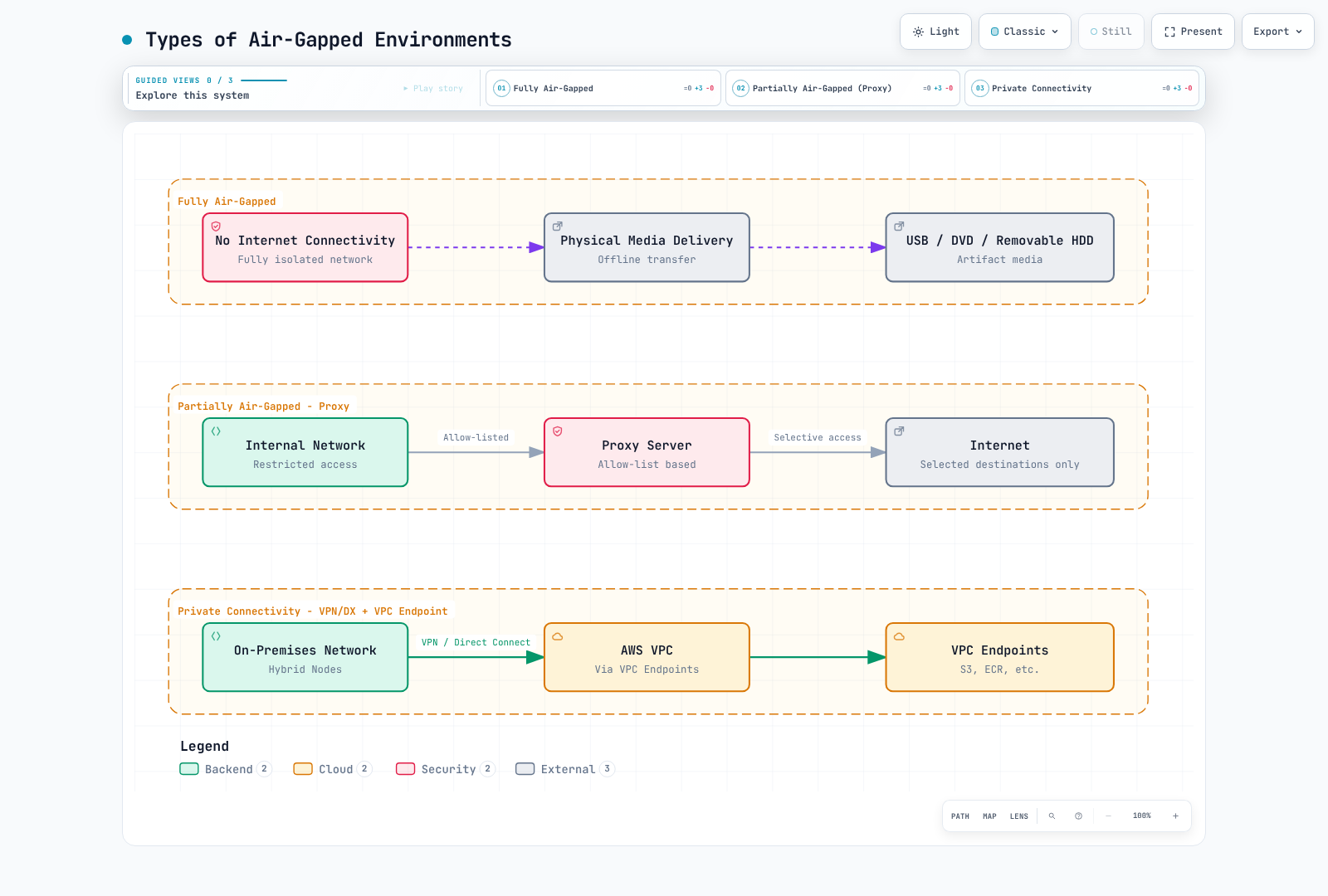
Diagram clarification: the physically isolated option is a comparison, not a supported Hybrid Nodes operating mode.
Architecture and artifact responsibilities
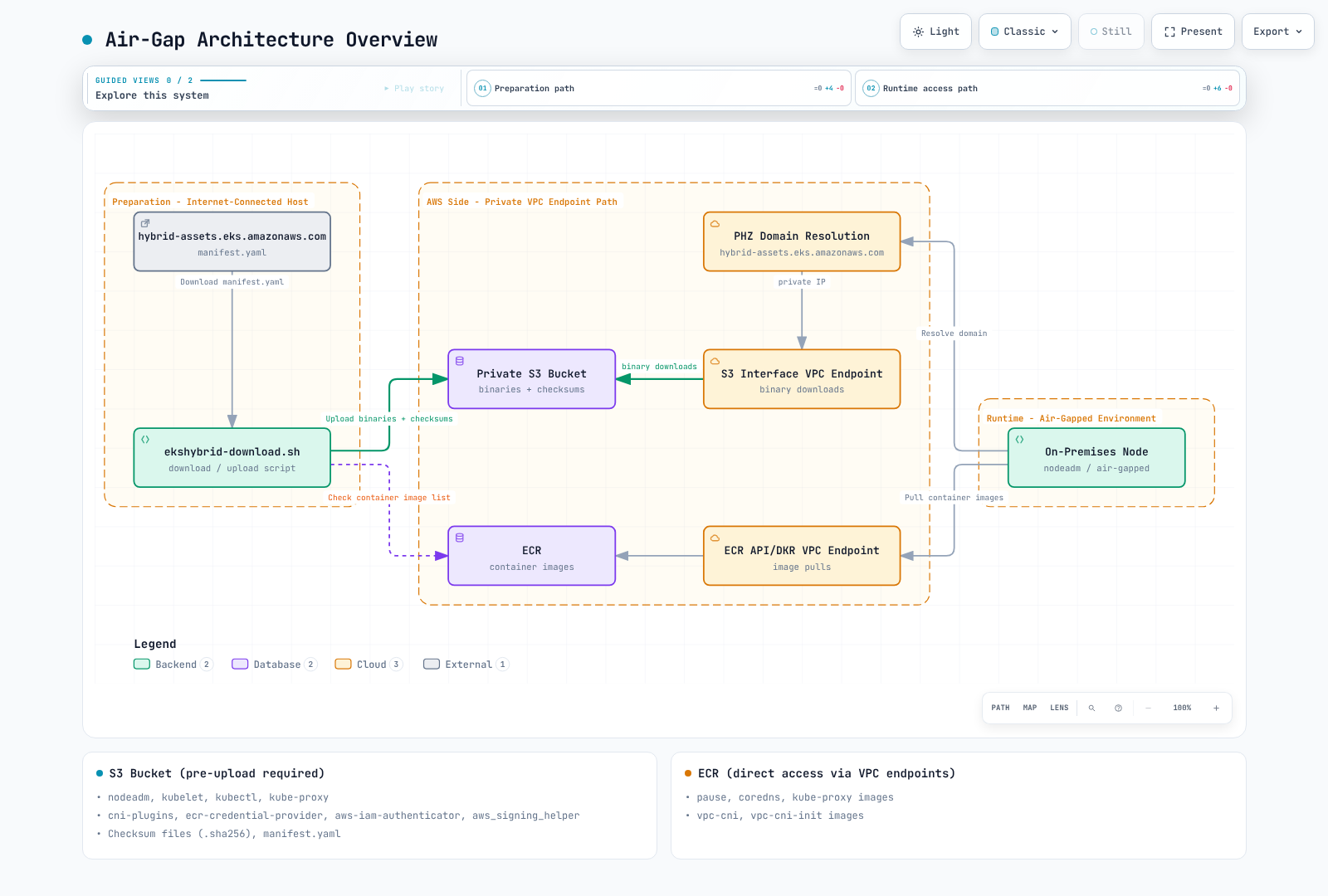
Diagram correction: the
hybrid-assets.eks.amazonaws.com → PHZ → S3shortcut is not a working transparent mirror. Use the installation paths below. DNS changes alone do not supply the original hostname's TLS certificate, S3 object routing or request authorization.
| Artifact | Preparation and delivery |
|---|---|
Hybrid nodeadm | Approve a release from aws/eks-hybrid; verify provenance and checksum before running it as root. This is different from EC2's amazon-eks-ami nodeadm |
| kubelet, kubectl, CNI plugins, ECR credential provider, IAM authenticator | Select one exact release/build/OS/architecture from the approved artifact manifest |
| IAM Roles Anywhere signing helper | Select and verify its own release; do not choose an arbitrary first array entry |
| SSM installer/agent | Separate Regional download, signature and registration path; not completely redirected by a custom EKS artifact manifest |
| containerd, runc, iptables and OS dependencies | Approved OS/runtime package cohort, including transitive dependencies and signed repository metadata |
| CNI, CoreDNS, kube-proxy, sandbox and workload images | Inventory the actual manifests, init containers, image digests and platforms; image tags are not supplied by the binary manifest |
Amazon VPC CNI (aws-node / vpc-cni-init) is not the CNI for Hybrid Nodes. Use the supported Hybrid CNI procedure in Network Configuration. Include kube-proxy only when the chosen CNI datapath uses it. A CNI plugin binary bundle is not a deployed CNI controller.
Choose an installation path
Path A: preinstalled OS image
On a controlled builder, install the approved Hybrid nodeadm and run nodeadm install with the cluster's selected Kubernetes version and credential provider. AWS documents this image-build use. Retain the installed artifacts and nodeadm tracker in the image.
# Controlled image builder only; installs software on this host.
set -euo pipefail
: "${KUBERNETES_VERSION:?Approved cluster-compatible version}"
: "${REGION:?}" "${CREDENTIAL_PROVIDER:?ssm or iam-ra}"
case "$CREDENTIAL_PROVIDER" in ssm|iam-ra) ;; *) exit 1 ;; esac
sudo nodeadm install "$KUBERNETES_VERSION" \
  --credential-provider "$CREDENTIAL_PROVIDER" --region "$REGION"
The default runtime source is the OS distro; that source is not supported on RHEL. For RHEL, select the documented Docker package source or preinstall a compatible runtime and use --containerd-source none. Docker source is not supported on AL2023. none does not install containerd for you.
Do not initialize/register the builder and clone its identity. Deliver each node's SSM activation or IAM Roles Anywhere certificate/private key through the approved per-node process. Do not bake activation codes, private keys, SSM registration state, kubelet certificates or operator credentials into a reusable image. Bottlerocket has its own preparation/bootstrap workflow and does not use this nodeadm procedure.
New SSM installations/upgrades require nodeadm 1.0.19 or later because older releases contain an outdated SSM signing key. This chapter inspected v1.0.20, not an unbounded latest binary.
Path B: a custom artifact manifest
The released v1.0.20 source supports the following flags even though the user-guide flag table does not list all of them:
| Command/setting | Actual behavior in the inspected release |
|---|---|
install --manifest-override file:///path/manifest.json | Reads the local manifest; JSON is accepted by the YAML decoder |
install --manifest-override https://mirror.example.com/manifest.json | Downloads the manifest with an ordinary HTTP client |
install --private-mode | Requires --manifest-override; skips OS package installation but still installs credential and EKS artifacts |
init --manifest-override ... --private-mode | Requires the manifest argument and obtains Region metadata from it; does not remove AWS authentication or EKS connectivity requirements |
Individual artifact uri / checksum_uri | Fetched over HTTP(S), without S3 SigV4 signing. A file:// manifest does not imply support for file:// artifact URLs |
gzip_uri | Preferred over uri when present; checksum verification occurs after decompression |
Check the exact deployed binary's install --help and init --help before using these flags. Private mode is not a complete offline package installer. Preinstall containerd with its systemd unit, runc, iptables, CA certificates and all required OS dependencies.
With --credential-provider ssm, v1.0.20 still constructs the Regional ssm-setup-cli and signature URLs separately. A manifest's ssm_releases field does not redirect this installation path. Plan access to those S3 objects and the later agent installation/registration dependencies, or use a validated preinstalled-image workflow.
Review a manifest and select one cohort
The upstream manifest has supported_eks_releases, iam_roles_anywhere_releases and region_config. Kubernetes records include major_minor_version, latest_patch_version, patch_releases[].version, patch_version, release_date and per-artifact URLs. Multiple builds may share a patch version. The earlier 1.33.3 example was a historical schema illustration, not evidence of a currently approved patch.
Keep the downloaded upstream manifest, its retrieval date/hash and approval record. Verify its HTTPS origin before selection. The following local selector requires an exact Kubernetes patch, build date, signing-helper release and architecture. It refuses ambiguous selections, missing artifacts, duplicate YAML keys and unknown Regions. It retains actual Region metadata instead of guessing an ECR account.
Save as select-mirror.py on the preparation host; it requires Python 3 and PyYAML:
#!/usr/bin/env python3
"""Build a local review plan, not an installer. Requires PyYAML."""
import copy
import datetime
import json
import re
import sys
from pathlib import Path
from urllib.parse import urlsplit

import yaml


class UniqueLoader(yaml.SafeLoader):
    pass


def mapping(loader, node, deep=False):
    result = {}
    for key_node, value_node in node.value:
        key = loader.construct_object(key_node, deep=deep)
        if key in result:
            raise ValueError("duplicate YAML key")
        result[key] = loader.construct_object(value_node, deep=deep)
    return result


UniqueLoader.add_constructor(
    yaml.resolver.BaseResolver.DEFAULT_MAPPING_TAG, mapping
)


def https_url(value):
    if not isinstance(value, str) or any(c.isspace() for c in value):
        raise ValueError("URL must be a nonempty HTTPS URL")
    parsed = urlsplit(value)
    if (parsed.scheme != "https" or not parsed.hostname or parsed.username
            or parsed.password or parsed.query or parsed.fragment):
        raise ValueError("HTTPS URL must not contain credentials, query or fragment")
    return value


def select(manifest, version, build_date, iam_version, arch, region, mirror):
    if not re.fullmatch(r"1\.\d+\.\d+", version):
        raise ValueError("an exact approved Kubernetes patch is required")
    datetime.date.fromisoformat(build_date)
    if arch not in ("amd64", "arm64"):
        raise ValueError("unsupported architecture")
    mirror = https_url(mirror).rstrip("/")
    region_info = manifest["region_config"][region]  # No account fallback.
    if (region_info.get("partition") != "aws"
            or region_info.get("dns_suffix") != "amazonaws.com"
            or not region_info.get("cred_providers", {}).get("iam-ra")
            or not re.fullmatch(r"\d{12}", str(region_info.get("ecr_account_id", "")))):
        raise ValueError("review a supported commercial Region with IAM Roles Anywhere")
    minor, patch = version.rsplit(".", 1)
    releases = [
        release
        for family in manifest["supported_eks_releases"]
        if family["major_minor_version"] == minor
        for release in family["patch_releases"]
        if release["version"] == version and release["patch_version"] == patch
        and release["release_date"] == build_date
    ]
    iam = [
        release for release in manifest["iam_roles_anywhere_releases"]
        if release["version"] == iam_version
    ]
    if len(releases) != 1 or len(iam) != 1:
        raise ValueError("release selection must be unique")
    eks_release, iam_release = copy.deepcopy(releases[0]), copy.deepcopy(iam[0])
    plan = []
    for release, names in [
        (eks_release, ["kubelet", "kubectl", "cni-plugins",
                       "ecr-credential-provider", "aws-iam-authenticator"]),
        (iam_release, ["aws_signing_helper"]),
    ]:
        chosen = []
        for name in names:
            matches = [a for a in release["artifacts"]
                       if a["name"] == name and a["arch"] == arch and a["os"] == "linux"]
            if len(matches) != 1:
                raise ValueError("missing or duplicate artifact: " + name)
            artifact = matches[0]
            item_id = "a%02d" % len(plan)
            plan.append({"id": item_id, "name": name,
                         "uri": https_url(artifact["uri"]),
                         "checksum_uri": https_url(artifact["checksum_uri"])})
            # Use the original, uncompressed URI; its checksum is not a gzip-file hash.
            artifact.pop("gzip_uri", None)
            artifact["uri"] = mirror + "/" + item_id + "/data"
            artifact["checksum_uri"] = mirror + "/" + item_id + "/data.sha256"
            chosen.append(artifact)
        release["artifacts"] = chosen
    selected = {
        "supported_eks_releases": [{
            "major_minor_version": minor, "latest_patch_version": patch,
            "patch_releases": [eks_release],
        }],
        "iam_roles_anywhere_releases": [iam_release],
        "region_config": {region: copy.deepcopy(region_info)},
    }
    return selected, {"artifacts": plan}


def main():
    if len(sys.argv) != 9:
        raise ValueError(
            "usage: select-mirror.py UPSTREAM VERSION BUILD_DATE IAM_VERSION "
            "ARCH REGION HTTPS_MIRROR_PREFIX NEW_OUTPUT_DIR"
        )
    source, version, date, iam, arch, region, mirror, output = sys.argv[1:]
    manifest = yaml.load(Path(source).read_text(), Loader=UniqueLoader)
    selected, plan = select(manifest, version, date, iam, arch, region, mirror)
    out = Path(output)
    out.mkdir(mode=0o700, parents=False, exist_ok=False)
    (out / "upstream.yaml").write_bytes(Path(source).read_bytes())
    (out / "manifest.json").write_text(json.dumps(selected, indent=2) + "\n")
    (out / "plan.json").write_text(json.dumps(plan, indent=2) + "\n")


if __name__ == "__main__":
    main()
The output directory must be new. The HTTPS mirror prefix must map to the same immutable object prefix used for publication. This script only builds a plan; it neither downloads nor authenticates to the mirror.
set -euo pipefail
: "${APPROVED_PATCH:?}" "${APPROVED_BUILD_DATE:?}" "${APPROVED_IAM_VERSION:?}"
: "${ARCH:?amd64 or arm64}" "${REGION:?}"
: "${MIRROR_PREFIX:?HTTPS URL for this reviewed candidate}"
: "${NEW_PLAN_DIR:?A new local directory}"
python3 select-mirror.py upstream.yaml "$APPROVED_PATCH" "$APPROVED_BUILD_DATE" \
  "$APPROVED_IAM_VERSION" "$ARCH" "$REGION" "$MIRROR_PREFIX" "$NEW_PLAN_DIR"
Review all source hosts and the six selected artifacts before downloading. This is an IAM Roles Anywhere artifact example, not an SSM installer mirror. It does not include nodeadm itself, OS packages, images, signing keys or certificates.
Save as download-plan.sh:
#!/usr/bin/env bash
# Download into a new plan directory. No AWS writes or host installation.
set -euo pipefail
umask 077
cd -- "${1:?Use the directory produced by select-mirror.py}"
test ! -e checksums.sha256
test ! -e queue.tsv
jq -er '.artifacts[] | [.id, .uri, .checksum_uri] | @tsv' plan.json > queue.tsv
test "$(wc -l < queue.tsv)" -eq 6
while IFS=$'\t' read -r item_id uri checksum_uri; do
  [[ "$item_id" =~ ^a[0-9]{2}$ ]]
  mkdir -- "$item_id"  # Refuse a partial run or existing directory.
  curl --fail --show-error --silent --location \
    --proto '=https' --proto-redir '=https' --connect-timeout 10 \
    --max-time 300 --max-filesize 268435456 \
    "$uri" -o "$item_id/data"
  curl --fail --show-error --silent --location \
    --proto '=https' --proto-redir '=https' --connect-timeout 10 \
    --max-time 30 --max-filesize 4096 \
    "$checksum_uri" -o "$item_id/upstream.sha256"
  expected=$(python3 - "$item_id/upstream.sha256" <<'CHECKSUM_PY'
import pathlib, re, sys
text = pathlib.Path(sys.argv[1]).read_text().strip()
match = re.fullmatch(r"([0-9a-fA-F]{64})(?:[ \t]+[^\r\n]+)?", text)
if not match:
    raise SystemExit("missing, malformed or multi-record upstream checksum")
print(match.group(1).lower())
CHECKSUM_PY
)
  actual=$(sha256sum "$item_id/data")
  [[ "${actual%% *}" == "$expected" ]]
  # nodeadm v1.0.20 requires GNU format: digest, space, filename.
  printf '%s  data\n' "$expected" > "$item_id/data.sha256"
done < queue.tsv
sha256sum manifest.json plan.json upstream.yaml a*/data a*/data.sha256 \
  > checksums.sha256
sha256sum --strict --check checksums.sha256
printf '%s\n' 'Six artifacts verified locally; publishing and node installation remain separate.'
The size limit is an intentional 256 MiB per artifact; review it if an approved artifact exceeds it. A download, malformed checksum or hash mismatch stops the script. A partial directory is retained for inspection; start a new candidate after resolving the cause. Do not delete a shared /tmp directory or skip missing checksums.
These hashes bind the selected bytes to the retrieved checksums. They are not an independent signature or proof that a compromised publisher is trustworthy. Protect the reviewed manifest/checksum record and use publisher verification where available.
Private S3 publication and authorization
Use a precreated, owned bucket with Block Public Access, approved encryption, versioning/retention and separate publisher/reader permissions. The examples below do not create a bucket or replace its policy. AccessDenied, expired credentials and timeouts are failures, not evidence that a bucket/object is absent.
An example reader-policy statement for an existing bucket is:
{
  "Sid": "ReadApprovedHybridArtifacts",
  "Effect": "Allow",
  "Principal": {"AWS": "arn:aws:iam::111122223333:role/HybridArtifactReader"},
  "Action": "s3:GetObject",
  "Resource": "arn:aws:s3:::example-hybrid-artifacts/hybrid-candidates/*",
  "Condition": {"StringEquals": {"aws:SourceVpce": "vpce-0123456789abcdef0"}}
}
Replace the account, role, bucket, prefix and endpoint with reviewed values. This statement grants one path; it does not revoke other existing grants. A bucket-wide Deny s3:* for every request outside one endpoint can also block the connected publisher and administrative recovery. Design those paths explicitly before applying such a boundary.
The named-principal policy requires a signed request. nodeadm's ordinary HTTPS downloader does not become an IAM-authenticated S3 client because the node has an IAM role. Two workable designs to validate are:
- Use an authenticated preparation agent/CLI to fetch the approved files, then provide them through an organization-controlled HTTPS artifact service with appropriate network access controls and a certificate for its own hostname.
- Use the preinstalled-image path, with no runtime binary mirror dependency.
A private S3 object URL returning 403 is not repaired by a DNS override. Do not put bearer presigned URLs or credentials into manifests, process arguments or published logs. If an organization chooses unauthenticated reads of nonsecret binaries restricted to a private network, that is a separate, explicitly reviewed policy—not the named-principal policy above.
Save as publish-plan.sh. Run only after the bucket owner approves the candidate and permissions; this script writes S3 objects:
#!/usr/bin/env bash
# Owner-approved publication only; creates billable S3 objects, never a bucket.
set -euo pipefail
umask 077
cd -- "${1:?Use a verified plan directory}"
: "${REGION:?}" "${BUCKET:?}" "${EXPECTED_ACCOUNT_ID:?}" "${PREFIX:?}"
[[ "$EXPECTED_ACCOUNT_ID" =~ ^[0-9]{12}$ ]]
[[ "$PREFIX" =~ ^hybrid-candidates/[A-Za-z0-9-]+$ ]]
sha256sum --strict --check checksums.sha256
aws s3api head-bucket --region "$REGION" --bucket "$BUCKET" \
  --expected-bucket-owner "$EXPECTED_ACCOUNT_ID"
# Manifest is last. Any failed write stops; retain the partial prefix for review.
for file in a{00..05}/data a{00..05}/data.sha256 checksums.sha256 \
            upstream.yaml plan.json manifest.json; do
  test -f "$file"
  aws s3api put-object --region "$REGION" --bucket "$BUCKET" \
    --expected-bucket-owner "$EXPECTED_ACCOUNT_ID" \
    --key "$PREFIX/$file" --body "$file" --if-none-match '*' \
    --server-side-encryption AES256 --checksum-algorithm SHA256 \
    --output json > "${file//\//_}.upload.json"
done
printf '%s\n' 'Candidate uploaded. Verify readback, mirror URL mapping and hashes before promotion.'
For a bucket requiring SSE-KMS, use its approved key and KMS permissions instead of the AES256 example. Conditional writes prevent overwriting an existing key; they do not make a multi-object upload atomic. The manifest is uploaded last, and a failed candidate remains unpublished until readback and the actual HTTPS mirror mapping are verified. Record returned object VersionIds/checksums and retention; S3 ETags are not a universal SHA-256 digest.
DNS and private endpoint requirements
hybrid-assets.eks.amazonaws.com is the AWS CloudFront download host. Creating a PHZ with that name and aliasing it to S3 does not preserve:
- the TLS certificate/SNI hostname;
- the HTTP Host header and S3 bucket/object key mapping;
- the original paths, especially when an uploader flattened all names;
- request authorization.
Do not fix this by disabling TLS checks. Keep the approved origin reachable through a controlled proxy, use the preinstalled image, or use supported manifest overrides with actual mirror URLs.
S3 Interface endpoints can serve on-premises clients over VPN/Direct Connect. S3 private DNS is supported. The private DNS only for inbound Resolver option requires a maintained S3 gateway endpoint for the VPC side; alternatively, route both VPC and on-premises requests through the interface endpoint. A gateway endpoint by itself is not directly accessible from on premises.
Select endpoints by their reviewed VPC and endpoint IDs, not the first S3 endpoint in a Region. Use the DNS/routing procedure in Network Configuration. EKS management API endpoints are not the Kubernetes API endpoint; private ECR endpoints do not provide general access to public ECR or CloudFront.
Install and initialize a prepared node
For the custom IAM Roles Anywhere path, the runtime, OS dependencies, approved nodeadm and mirror service must already be prepared. The command installs software on the target node:
set -euo pipefail
: "${APPROVED_PATCH:?}" "${REGION:?}" "${LOCAL_MANIFEST:?Absolute local path}"
[[ "$LOCAL_MANIFEST" = /* ]]
test -s "$LOCAL_MANIFEST"
sudo nodeadm install "$APPROVED_PATCH" --region "$REGION" \
  --credential-provider iam-ra --containerd-source none \
  --manifest-override "file://$LOCAL_MANIFEST" --private-mode
Prepare the per-node config using Prerequisites and Node Bootstrap. For example, the SSM config shape is:
apiVersion: node.eks.aws/v1alpha1
kind: NodeConfig
spec:
  cluster:
    name: my-hybrid-cluster
    region: ap-northeast-2
  hybrid:
    ssm:
      activationCode: REPLACE_WITH_NODE_ACTIVATION_CODE
      activationId: REPLACE_WITH_NODE_ACTIVATION_ID
Use exactly the provider installed on the node; this SSM shape is not the config for the IAM Roles Anywhere command above. Protect the populated file (root-owned, mode 0600), never commit it, and do not put secrets into shell history. Supplying hand-written API endpoint/CA fields does not remove the need for the documented cluster discovery and authentication path.
# Local config validation; this is not a join or an end-to-end network test.
sudo nodeadm config check --config-source file:///etc/eks/nodeconfig.yaml
After network, identity and CNI prerequisites pass, the owner may run nodeadm init. On the private-manifest path, pass the approved manifest again:
# Mutates the target node and registers it with EKS.
sudo nodeadm init --config-source file:///etc/eks/nodeconfig.yaml \
  --manifest-override file:///etc/eks/manifest.json --private-mode
There is no nodeadm init --dry-run in the inspected version. Do not skip initialization validation merely to make an incomplete preparation pass.
Container image delivery
Private ECR pulls require the ECR API and DKR paths, the S3 layer-download path, DNS and the appropriate image-pull permissions. A successful describe-repositories call does not prove that image layers can be downloaded. Prepopulate and test any pull-through cache; the ECR endpoint documentation describes additional internet requirements for a first uncached pull.
Use actual registry account/Region/image references from the deployed add-on manifests. Do not construct image tags by appending -eksbuild.1 to a Kubernetes patch or copy stale pause/CoreDNS versions from an unrelated cluster.
nodeadm installs the ECR helper at /etc/eks/image-credential-provider/ecr-credential-provider and initializes its config at /etc/eks/image-credential-provider/config.json. Check the generated kubelet configuration rather than writing an unused file under a different directory. ctr images pull is a separate client and does not automatically use kubelet's exec credential provider.
Offline image transfer
Select an approved digest and required platforms. For a multi-platform archive, preserve the index and digests where the source/destination formats support them:
# Preparation host: downloads images; requires reviewed registry authentication.
set -euo pipefail
: "${SOURCE_DIGEST_REF:?registry/repository@sha256:approved-digest}"
: "${NEW_IMAGE_DIR:?New directory}"
[[ "$SOURCE_DIGEST_REF" =~ @sha256:[0-9a-f]{64}$ ]]
mkdir -m 700 -- "$NEW_IMAGE_DIR"
skopeo copy --all --preserve-digests "docker://$SOURCE_DIGEST_REF" \
  "oci-archive:$NEW_IMAGE_DIR/image.tar:approved"
(cd "$NEW_IMAGE_DIR" && sha256sum image.tar > image.tar.sha256)
Transfer the archive and its independently protected approval/hash record. Before importing or pushing, run sha256sum --strict --check image.tar.sha256 in that directory and stop on failure. For an internal registry destination:
# Internal staging host: writes an image to the reviewed destination registry.
set -euo pipefail
: "${DEST_DIGEST_REF:?approved-registry/repository@sha256:approved-digest}"
[[ "$DEST_DIGEST_REF" =~ @sha256:[0-9a-f]{64}$ ]]
sha256sum --strict --check image.tar.sha256
skopeo copy --all --preserve-digests oci-archive:image.tar:approved \
  "docker://$DEST_DIGEST_REF"
Do not disable registry TLS verification. Changing compression/manifest format may prevent preserving a digest; stop and review the resulting identity instead of silently claiming it is unchanged.
Direct containerd preload is another option, but must be tested for the deployed runtime: Kubernetes uses the k8s.io namespace, imported references must match Pod/sandbox references, and all required platform blobs must exist. An archive's approved annotation is not automatically the registry name a Pod requests. Image garbage collection and imagePullPolicy can also cause later pulls. A successful tar import alone does not prove an offline Pod will start.
Signed local package repositories
Mirror the OS release, architecture, transitive dependencies and metadata as a reviewed cohort. Preserve vendor signatures or sign an organization-maintained repository with a separately trusted key.
Example Ubuntu client configuration for an already prepared and signed local flat repository:
deb [signed-by=/etc/apt/keyrings/hybrid-mirror.gpg] file:///srv/apt-repo ./The repository needs valid Release plus InRelease or Release.gpg, not just Packages.gz. Distribute and verify the key fingerprint through an independent trusted path. Do not use trusted=yes to suppress repository authentication.
Example DNF/YUM repository configuration:
[hybrid-local]
name=Reviewed hybrid packages
baseurl=file:///srv/yum-repo
enabled=1
gpgcheck=1
repo_gpgcheck=1
gpgkey=file:///etc/pki/rpm-gpg/RPM-GPG-KEY-hybrid-mirror
This requires valid package signatures and signed repository metadata. Metadata and package signing keys may differ; configure the approved key set. Do not set gpgcheck=0 when verification fails. Package installation and service restarts belong in an image build or a drained maintenance operation, not an arbitrary live-node verification script.
Proxy configuration
Build a per-client destination map first. Include loopback, actual private API/registry names and the node/Pod/Service ranges that must bypass the proxy. CIDR and suffix matching vary by client. Do not blindly put .eks.amazonaws.com into NO_PROXY: it also matches the public hybrid-assets.eks.amazonaws.com download host.
A shell example for reviewed nonsecret proxy configuration is:
export HTTP_PROXY=http://proxy.internal.example.com:3128
export HTTPS_PROXY=http://proxy.internal.example.com:3128
export NO_PROXY=localhost,127.0.0.1,::1,.svc,.cluster.local,registry.internal.example.com
export http_proxy="$HTTP_PROXY" https_proxy="$HTTPS_PROXY" no_proxy="$NO_PROXY"
Add the real private API hostname/IP and other bypass destinations; this is not a complete site configuration. A login shell's environment does not configure existing systemd services. Do not source or repeatedly append to /etc/environment.
For containerd.service and kubelet.service, use an owner-managed drop-in under /etc/systemd/system/UNIT.service.d/http-proxy.conf:
[Service]
Environment="HTTP_PROXY=http://proxy.internal.example.com:3128"
Environment="HTTPS_PROXY=http://proxy.internal.example.com:3128"
Environment="NO_PROXY=localhost,127.0.0.1,::1,.svc,.cluster.local,registry.internal.example.com"
Review existing drop-ins and restart the affected units only in the approved build/maintenance phase. A [proxy.http] section in containerd TOML is not the HTTP proxy configuration.
| Component | Configuration and conditions |
|---|---|
| nodeadm process | Pass only the reviewed proxy environment through sudo; do not forward the entire operator environment with sudo -E |
| containerd / kubelet | Separate systemd environment; generated kubelet config and host environment are different layers |
| SSM on Ubuntu with the documented snap install | snap.amazon-ssm-agent.amazon-ssm-agent.service.d/http-proxy.conf |
| SSM on AL2023/RHEL | amazon-ssm-agent.service.d/http-proxy.conf; confirm the actual installed unit |
| IAM Roles Anywhere credential process | nodeadm detects proxy variables when generating --with-proxy; the invoking daemon must also receive the correct environment |
IAM Roles Anywhere with spec.hybrid.enableCredentialsFile: true | aws_signing_helper_update.service does exist in this mode; configure its drop-in before initialization. Do not assume the service is present in every IAM Roles Anywhere installation |
| apt | An owner-managed /etc/apt/apt.conf.d/ file with Acquire::http::Proxy and Acquire::https::Proxy |
| snap | snap set system proxy.http=... proxy.https=..., when snap is actually used |
| dnf / yum | Review and update the existing configuration's proxy setting; do not replace its other settings or append duplicates |
| kube-proxy / other Pods | Configure their Pod environment only when their traffic requires the proxy |
For the documented proxy topology, configure kube-proxy after cluster creation and before joining the hybrid nodes. Preserve the existing NODE_NAME environment and all command arguments. The following is a strategic merge patch fragment, not a standalone DaemonSet:
spec:
  template:
    spec:
      containers:
        - name: kube-proxy
          env:
            - name: HTTP_PROXY
              value: http://proxy.internal.example.com:3128
            - name: HTTPS_PROXY
              value: http://proxy.internal.example.com:3128
            - name: NO_PROXY
              value: localhost,127.0.0.1,::1,.svc,.cluster.local
Review/extend bypass destinations and apply through the add-on's owner. A built-in DaemonSet strategic merge uses container/env names; JSON Patch add /containers/0/env can replace the entire existing environment and assumes the container index. Do not deploy kube-proxy merely for this example if the chosen CNI replaces it.
Validation and controlled updates
| Check | Evidence required | What is insufficient |
|---|---|---|
| Artifact integrity | Every selected file, checksum, approved manifest and cohort matches | Skipping missing files or accepting zero verified files |
| DNS/TLS | Correct destination and hostname/CA validation on the intended route | A 10.* address, any 172.* address, or curl -k |
| S3 | Actual authorized readback of the exact bucket/key/version, expected owner and hash | Listing a prefix or treating API errors as absence |
| ECR | Actual required digest/platform and layer pulls via the workload's credential path | describe-repositories or a standalone unauthenticated ctr call |
| nodeadm config | nodeadm config check succeeds with a protected, populated file | Missing config counted as success or nonexistent init --dry-run |
| Node operation | Credential refresh, Kubernetes API trust/authentication, CNI/DNS and a bounded workload test | A successful local parser check or one /healthz response |
Use nodeadm debug --config-source file:///etc/eks/nodeconfig.yaml for the documented connectivity/identity diagnostics when AWS reads are authorized. It contacts services and may emit sensitive diagnostic context; keep output private and redact before sharing. Do not turn unknown/failed checks into “ready for production.”
Update automation should discover candidates, then require source verification, compatibility review, OS/image scanning, local validation, a representative node canary and approval before promotion. Publish under a new immutable version/build prefix, retain the previous approved cohort, and record rollback limits. Do not run a cron job that silently overwrites production latest keys; nodeadm upgrade is disruptive and requires workload evacuation.
Historical bandwidth estimates in the earlier quiz—layer caching 50–80%, compression 30–50%, platform filtering 50%—had no attributable measurement. Preserve them only as unverified historical illustrations, not predicted savings. Measure actual bytes for your layer reuse, platform set and compression format; do not recompress approved content while claiming its digest stays unchanged.
Primary references
- AWS Hybrid nodeadm reference
- Prepare Hybrid operating systems
- Hybrid proxy configuration
- nodeadm v1.0.20 install flags and init flags
- Artifact selection/download implementation and SSM source
- S3 interface endpoints/private DNS
- ECR VPC endpoints
- Skopeo copy
- APT repository authentication
- DNF repository signature settings
- S3 PutObject conditions, encryption and checksums
- Kubernetes image names, digests and pull policies
< Previous: Network Configuration | Table of Contents | Next: Node Bootstrap >