Guidebook Roadmap
Last Updated: September 11, 2026
This guidebook tells one continuous story: from the Linux kernel through containers, Kubernetes, Amazon EKS, networking, service mesh, storage, databases, data pipelines, and AI/ML — plus the cross-cutting disciplines of security, GitOps, platform engineering, container registries, observability, and operations. This page is the map, and the recommended paths through it.
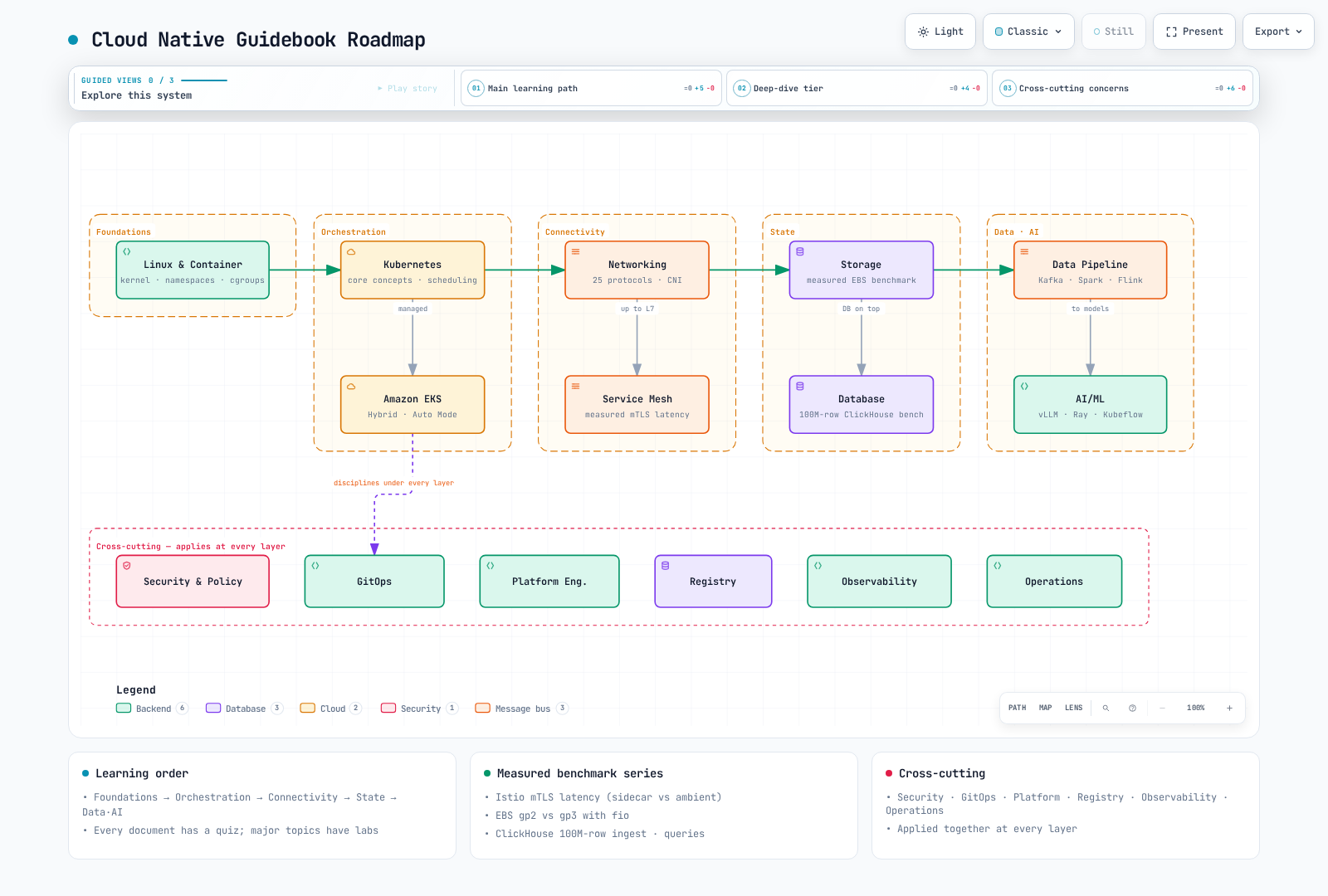
The domain map
| Layer | Domain | Start here | One-liner |
|---|---|---|---|
| Foundations | Linux & Container | Linux Basics | Kernel, namespaces, cgroups — what a container actually is |
| Orchestration | Kubernetes Core Concepts | Introduction to Kubernetes | Workloads, scheduling, and autoscaling — Kubernetes itself |
| Orchestration | Amazon EKS | Introduction to EKS | Cluster creation through Hybrid Nodes and Auto Mode |
| Connectivity | Networking | Network Fundamentals | 25 protocols up through CNI (Cilium/Calico) |
| Connectivity | Service Mesh | Istio | Istio/Linkerd/Cilium Mesh — with measured mTLS latency |
| State | Storage | Storage Overview | EBS gp2 vs gp3, measured with fio |
| State | Database | Databases Overview | The operator landscape and a 100M-row ClickHouse benchmark |
| Data & AI | Data Pipeline | Data on EKS Overview | Kafka, Spark, Airflow, and Flink deep dives — with a measured Kafka RF3/gp3 ingest ceiling |
| Data & AI | AI/ML | AI/ML Workloads | vLLM, Ray, Kubeflow, MLflow on EKS |
| Cross-cutting | Security & Policy | Kyverno | AuthN/Z, policy, runtime security, supply chain |
| Cross-cutting | GitOps | GitOps | ArgoCD, Flux, progressive delivery |
| Cross-cutting | Platform Engineering | Overview | ACK, KRO, Crossplane, Backstage |
| Cross-cutting | Container Registry | Overview | ECR, Harbor, image supply chain |
| Cross-cutting | Observability | Overview | Metrics, logs, tracing, alerting stacks |
| Cross-cutting | Operations Guide | Operations Guide | Capacity planning, FinOps, upgrades, and a symptom-first troubleshooting playbook |
The measured-benchmark series
Documents reporting prior runs on AWS resources. Check environment, repetitions, cache state, raw-record availability and limitations, then remeasure for current capacity planning:
- Istio sidecar vs ambient, measured — P50/P99 latency per mTLS data plane and 503 rates during rollouts
- EBS gp2 vs gp3 Measured Benchmark — a 10x IOPS gap at the same 100 GiB capacity, and the gp2 burst-credit cliff
- ClickHouse on EKS Measured Benchmark — 100M-row ingest throughput, compression ratios, query latency
- Kafka on EKS Measured Benchmark — RF3 ingest ceiling of ≈130–135 MiB/s (= one gp3 volume's write cap) vs 338 MiB/s at RF1, p99 by acks setting, and cold consumers cutting producer throughput by ~45%
- Pod Network Benchmark — the 0.040 → 0.339 → 0.544 ms RTT ladder (same node → same AZ → cross-AZ), a 4.96 Gbps single-flow cap regardless of AZ vs 9.94 Gbps with 8 flows, and
ndots:5's 10-query/8-NXDOMAIN amplification
Share a diagram — exports for LinkedIn and talks
Interactive diagrams in this guidebook open at https://www.atomai.click/kubernetes-docs/archmaps/<name>.html, and the Export button in the viewer toolbar (shortcut E) produces share-ready files on the spot. Available export items depend on the viewer version, browser capabilities and selection state.
What the Export menu offers
| Group | Menu item | Output | Use it for |
|---|---|---|---|
| Share | Share Card / Copy Share Card | 1200×630 PNG (download / clipboard) | LinkedIn and X link previews, READMEs, release notes |
| Share | Route Share Card | 1200×630 PNG (download only) | Appears only after a Route Probe (R) has resolved a path between two nodes |
| Share | Reach Share Card | 1200×630 PNG (download only) | Appears only after you trace a node's upstream/downstream reachability from its Semantic Passport |
| Share | Copy diagram | Full-diagram PNG to the clipboard | Pasting straight into slides or docs |
| Image | PNG / JPEG / WebP | Full-diagram raster image | PNG when you need lossless, JPEG/WebP when size matters |
| Vector & motion | SVG | Dual-theme (light + dark) vector | Slides that stay crisp at any zoom |
| Vector & motion | WebM | 6-second recording of the trace animation | A LinkedIn post where the flow actually moves in the feed |
Exports strip all viewer state — the Guide panel, Lens, finder, focus, route, story, camera position, radar, presentation mode, and temporary overlays — leaving only the diagram itself. The Share Card keeps your current theme and visual preset and always contains the complete diagram, uncropped. WebM recording needs a trace-animated diagram and MediaRecorder support in your browser; unsupported browsers say so in the menu.
The 30-second LinkedIn recipe
- Open the diagram — click the "Open full screen ↗" link under any embedded diagram (on GitBook, "🔍 View interactive diagram").
- Check the trace is playing — the toolbar Live/Still toggle should read Live. The motion flowing along the arrows is what the recording captures. Rehearsing a talk? Presentation stage (
F) gives the diagram the whole viewport. - Export → WebM for a moving post, or Export → Share Card for a static 1200×630 preview — WebM shows "Recording 6 seconds of motion…" and then the file downloads.
- Post — check the destination platform's current accepted formats and convert WebM if needed. Upload the Share Card as an image and include the source document URL. To point at a specific node, path, or story moment, use Copy link in the Semantic Passport or Route Probe, or Copy moment on a Story Beat (shown only on diagrams that define story chapters), and drop the deep link into a comment or slide.
The truth boundary
- Exports are communication assets. They are not evidence that an architecture was validated, and they do not replace the published HTML or the author's own validation. The Share Card never claims validation.
- A Route Share Card follows only authored, directed relationships. It never infers a route from geometry, and it refuses to export a stale or unreachable route.
- A Reach Share Card shows authored reachability. Do not present it as impact analysis, blast radius, breakage, or runtime causality.
Recommended paths
① Infrastructure onboarding — "containers to EKS"
Linux Basics → Container Technology → Introduction to Kubernetes → Core Concepts (pods/services/storage/configuration) → EKS Cluster Creation → Network Fundamentals. Check yourself with each document's quiz, and work through the labs in parallel.
② Platform / SRE — "a cluster you can operate"
EKS operations (upgrades/troubleshooting/resiliency) → Networking (VPC CNI, Cilium) → the Service Mesh comparison guide → Security & Policy → the Observability stack → GitOps → capacity planning and FinOps in the Operations Guide. The measured-benchmark series supplies the evidence this path runs on.
③ Data & AI platform — "the stateful world"
Storage → Database → Data Pipeline (Kafka → Spark → Airflow → Flink) → AI/ML (vLLM → Ray → Kubeflow). If you need GPUs and scheduling control, add the Custom Scheduler parts under Kubernetes Core Concepts.
Reading with LLMs
The guidebook provides an index and source text under the proposed llms.txt format. The AI tool still needs web retrieval or an MCP connection; supplying one URL does not guarantee automatic whole-book reading or indexing. See Reading with LLMs for the endpoints and usage examples.