Traffic Splitting
Traffic Splitting is one of Istio's most powerful features, enabling Canary deployments, A/B testing, and Blue/Green deployments without code changes.
Table of Contents
- Traffic Splitting Overview
- Canary Deployment
- Blue/Green Deployment
- A/B Testing
- Progressive Rollout
- Using with Traffic Mirroring
- Practical Examples
- Monitoring and Rollback
- Troubleshooting
Traffic Splitting Overview
Reviewed against Istio 1.31.0 and Argo Rollouts 1.10.0. These are alternative examples for a disposable test namespace; do not run several Rollouts with the same selector or let manual scripts/GitOps overwrite Rollouts-managed weights and subset hashes. Install the referenced Services, DestinationRules, AnalysisTemplates, gateway and Prometheus before rollout. The first deployment establishes a stable ReplicaSet; canary steps/analysis exercise a subsequent update. Weight controls request distribution, not a stable percentage of users.
Traffic Splitting uses the weight field in VirtualService to distribute traffic between multiple service versions by ratio.
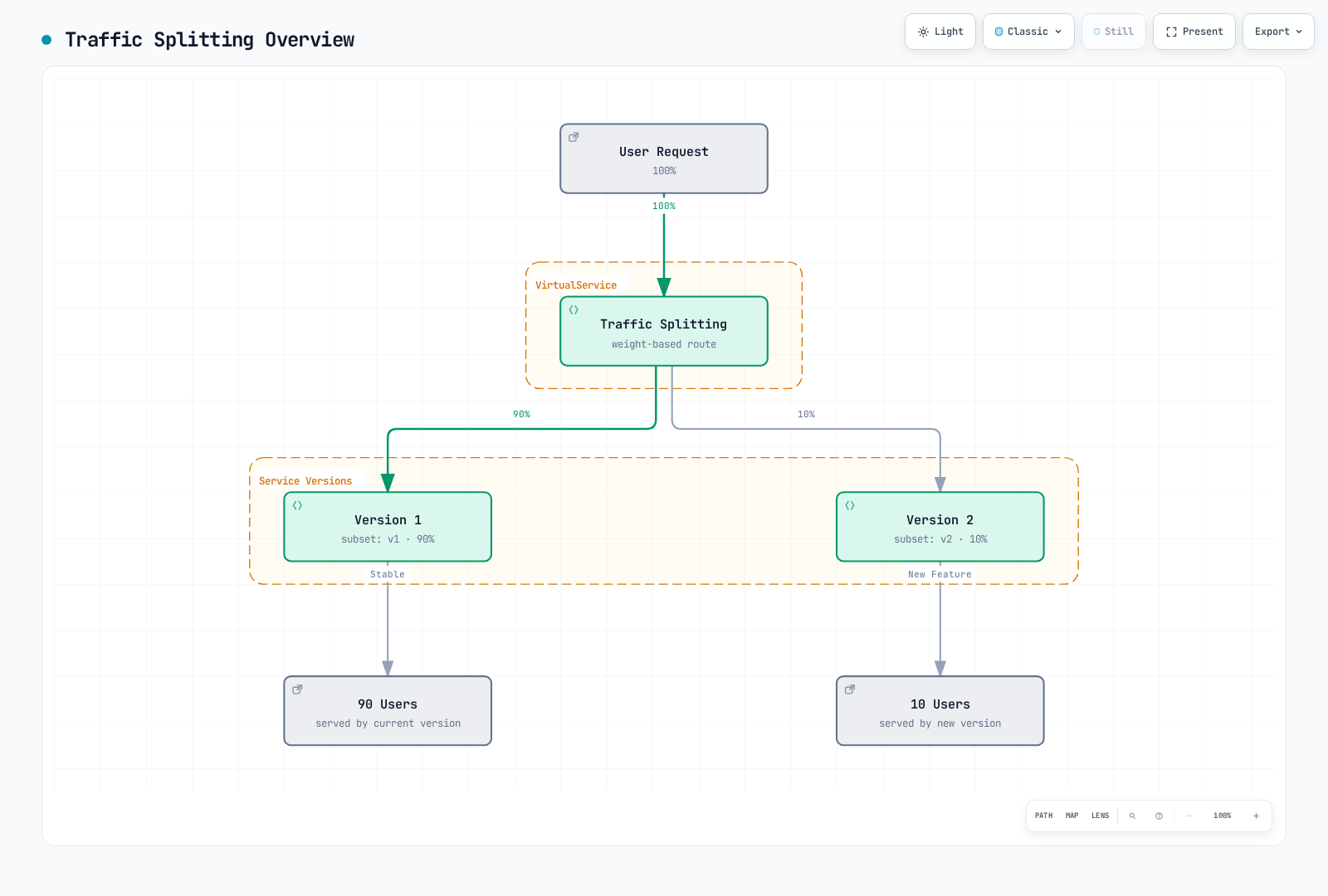
Basic Structure
apiVersion: networking.istio.io/v1
kind: VirtualService
metadata:
  name: reviews
spec:
  hosts:
  - reviews
  http:
  - route:
    - destination:
        host: reviews
        subset: v1
      weight: 90  # 90% of traffic
    - destination:
        host: reviews
        subset: v2
      weight: 10  # 10% of traffic
Canary Deployment
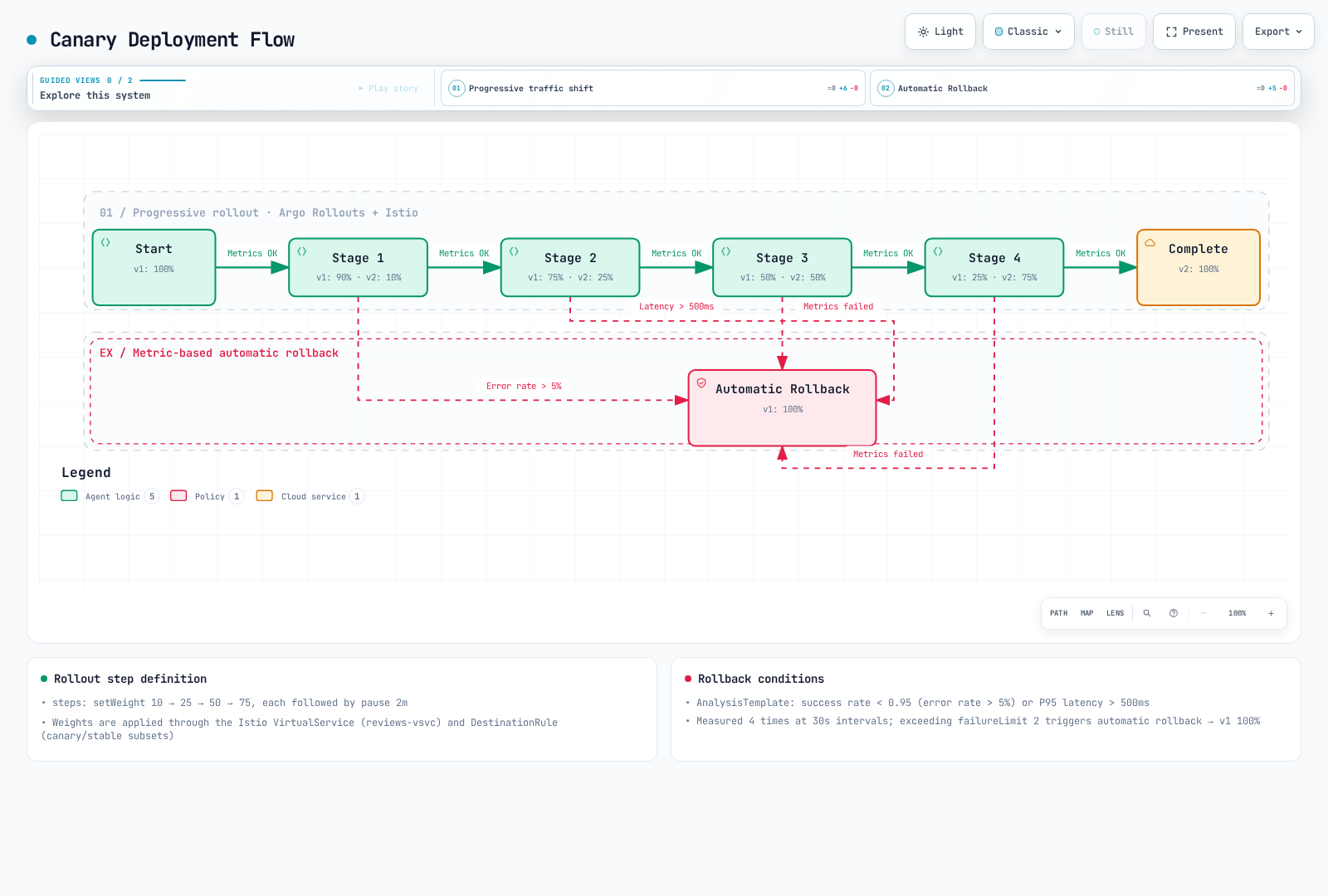
Canary deployment is a strategy that safely validates a new version by deploying it to only a small subset of users first. Using Argo Rollouts with Istio enables automated progressive deployment and metric-based automatic rollback.
Argo Rollouts + Istio Architecture
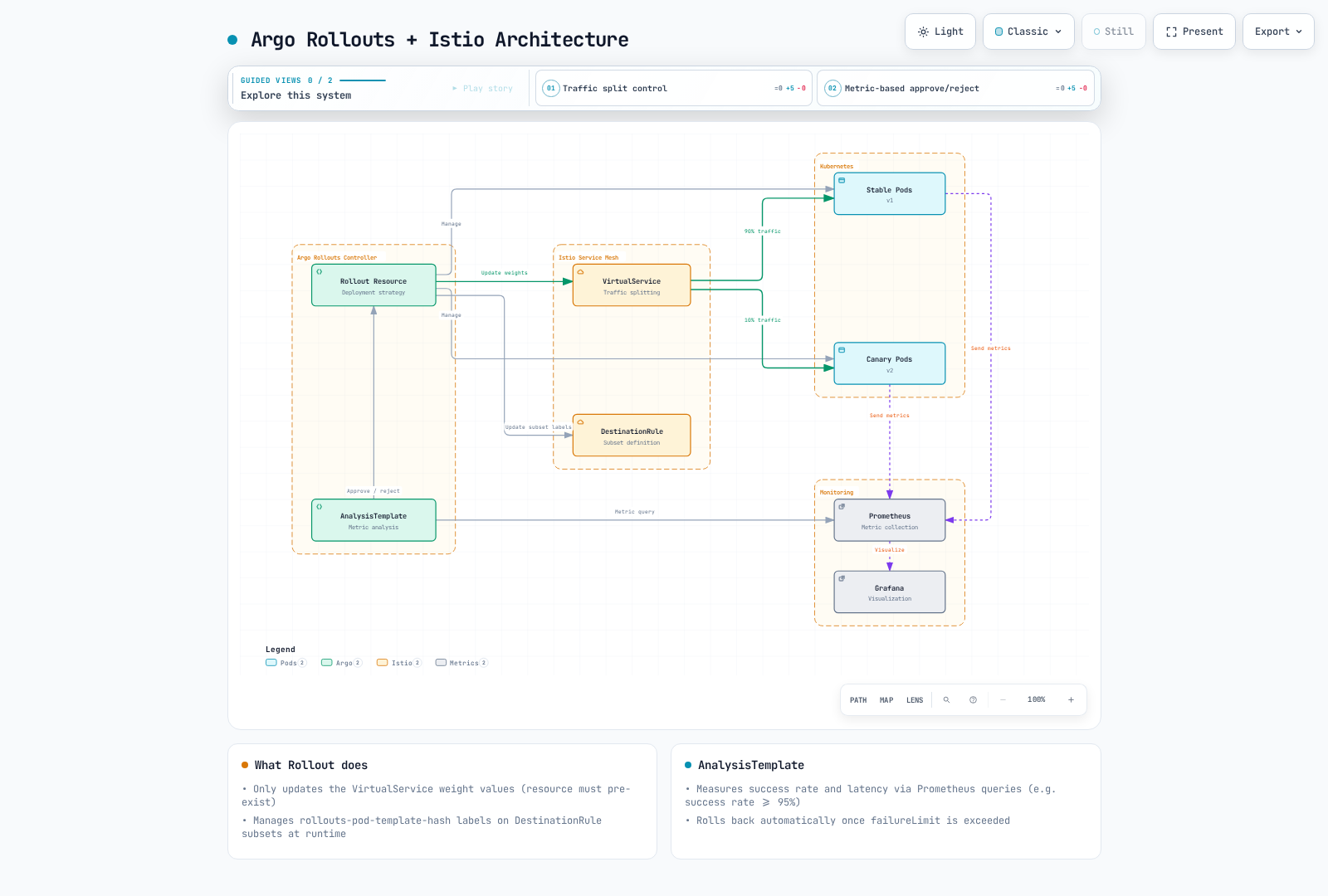
Canary Deployment Flow
Step 1: Install Argo Rollouts
# Install Argo Rollouts
kubectl create namespace argo-rollouts
kubectl apply -n argo-rollouts -f https://github.com/argoproj/argo-rollouts/releases/download/v1.10.0/install.yaml

# Install Argo Rollouts CLI (optional)
curl -LO https://github.com/argoproj/argo-rollouts/releases/download/v1.10.0/kubectl-argo-rollouts-linux-amd64
chmod +x kubectl-argo-rollouts-linux-amd64
sudo mv kubectl-argo-rollouts-linux-amd64 /usr/local/bin/kubectl-argo-rollouts

# Run Argo Rollouts Dashboard
kubectl argo rollouts dashboard
Step 2: Define Rollout Resource
apiVersion: argoproj.io/v1alpha1
kind: Rollout
metadata:
  name: reviews
  namespace: default
spec:
  replicas: 5
  revisionHistoryLimit: 2
  selector:
    matchLabels:
      app: reviews
  template:
    metadata:
      labels:
        app: reviews
        sidecar.istio.io/inject: "true"
    spec:
      containers:
      - name: reviews
        image: docker.io/istio/examples-bookinfo-reviews-v2:1.20.3
        ports:
        - containerPort: 9080
        resources:
          requests:
            memory: "64Mi"
            cpu: "100m"
          limits:
            memory: "128Mi"
            cpu: "200m"

  # Canary Deployment Strategy
  strategy:
    canary:
      # Traffic Control via Istio VirtualService
      trafficRouting:
        istio:
          virtualService:
            name: reviews-vsvc
            routes:
            - primary
          destinationRule:
            name: reviews-destrule
            canarySubsetName: canary
            stableSubsetName: stable

      # Canary Steps Definition
      steps:
      - setWeight: 10    # 10% traffic to Canary
      - pause:
          duration: 2m   # Wait 2 minutes

      - analysis:
          templates:
          - templateName: success-rate
          - templateName: latency
          args:
          - name: service-name
            value: reviews
          - name: pod-template-hash
            valueFrom:
              podTemplateHashValue: Latest

      - setWeight: 25    # 25% traffic to Canary
      - pause:
          duration: 2m

      - analysis:
          templates:
          - templateName: success-rate
          - templateName: latency
          args:
          - name: service-name
            value: reviews
          - name: pod-template-hash
            valueFrom:
              podTemplateHashValue: Latest

      - setWeight: 50    # 50% traffic to Canary
      - pause:
          duration: 2m

      - analysis:
          templates:
          - templateName: success-rate
          - templateName: latency
          args:
          - name: service-name
            value: reviews
          - name: pod-template-hash
            valueFrom:
              podTemplateHashValue: Latest

      - setWeight: 75    # 75% traffic to Canary
      - pause:
          duration: 2m

      - analysis:
          templates:
          - templateName: success-rate
          - templateName: latency
          args:
          - name: service-name
            value: reviews
          - name: pod-template-hash
            valueFrom:
              podTemplateHashValue: Latest
Step 3: Create Service
First, create the Kubernetes Service:
apiVersion: v1
kind: Service
metadata:
  name: reviews
  namespace: default
spec:
  ports:
  - port: 9080
    name: http
  selector:
    app: reviews  # Select all Pods from Rollout
Step 4: Define VirtualService
Important: Argo Rollouts updates the weights of the referenced VirtualService routes. It does not create that VirtualService; create it first.
apiVersion: networking.istio.io/v1
kind: VirtualService
metadata:
  name: reviews-vsvc
  namespace: default
spec:
  hosts:
  - reviews
  http:
  - name: primary  # Route name referenced by Rollout (required)
    route:
    - destination:
        host: reviews
        subset: stable  # Stable version
      weight: 100
    - destination:
        host: reviews
        subset: canary  # Canary version
      weight: 0
Key Points:
- Routes explicitly listed in the Rollout need matching
http[].namevalues; the routes list can be omitted when there is exactly one route - Rollout only automatically updates the
weightvalues of this VirtualService - Two destinations are required: stable and canary
Step 5: Define DestinationRule
Important: Argo Rollouts does NOT automatically create DestinationRule. It must be pre-created.
apiVersion: networking.istio.io/v1
kind: DestinationRule
metadata:
  name: reviews-destrule
  namespace: default
spec:
  host: reviews
  subsets:
  - name: stable
    labels:
      app: reviews
  - name: canary
    labels:
      app: reviews
Key Points:
- Subset names (
stable,canary) must match the Rollout'sstableSubsetNameandcanarySubsetName - Rollout automatically adds the
rollouts-pod-template-hashlabel to Pods - DestinationRule subsets select Pods based on this label
- Keep stable application labels if needed; Rollout adds and updates the pod-template hash in each subset. Wait for those selectors before sending traffic.
Step 6: Define AnalysisTemplate
Before using these canary gates, add this relabeling rule to the Prometheus pod scrape job that collects workload Istio metrics. Confirm rollout_hash and reporter="destination" appear on the scraped series. It identifies the actual canary ReplicaSet passed by podTemplateHashValue: Latest; service-wide averages would hide failures in a small canary. Supply representative request traffic; missing or NaN measurements must not promote a release.
# Add to the existing pod scrape job's relabel_configs
- source_labels: [__meta_kubernetes_pod_label_rollouts_pod_template_hash]
  target_label: rollout_hash
Success Rate Analysis
apiVersion: argoproj.io/v1alpha1
kind: AnalysisTemplate
metadata:
  name: success-rate
  namespace: default
spec:
  args:
  - name: service-name
  - name: pod-template-hash

  metrics:
  - name: success-rate
    interval: 30s
    count: 4  # Four measurements; interval is not total elapsed duration
    successCondition: len(result) == 1 && !isNaN(result[0]) && result[0] >= 0.95
    failureLimit: 0  # No failed measurement tolerated
    provider:
      prometheus:
        address: http://prometheus.istio-system:9090
        query: |
          sum(rate(
            istio_requests_total{
              destination_service_name="{{args.service-name}}",
              reporter="destination",
              rollout_hash="{{args.pod-template-hash}}",
              destination_workload_namespace="default",
              response_code!~"5.*"
            }[2m]
          ))
          /
          sum(rate(
            istio_requests_total{
              destination_service_name="{{args.service-name}}",
              reporter="destination",
              rollout_hash="{{args.pod-template-hash}}",
              destination_workload_namespace="default"
            }[2m]
          ))
Latency Analysis
apiVersion: argoproj.io/v1alpha1
kind: AnalysisTemplate
metadata:
  name: latency
  namespace: default
spec:
  args:
  - name: service-name
  - name: pod-template-hash

  metrics:
  - name: latency-p95
    interval: 30s
    count: 4
    successCondition: len(result) == 1 && !isNaN(result[0]) && result[0] <= 500
    failureLimit: 0
    provider:
      prometheus:
        address: http://prometheus.istio-system:9090
        query: |
          histogram_quantile(0.95,
            sum(rate(
              istio_request_duration_milliseconds_bucket{
                destination_service_name="{{args.service-name}}",
              reporter="destination",
              rollout_hash="{{args.pod-template-hash}}",
                destination_workload_namespace="default"
              }[2m]
            )) by (le)
          )
Deployment Execution and Monitoring
Deploy New Version
# Start Canary deployment with image update
kubectl argo rollouts set image reviews \
  reviews=docker.io/istio/examples-bookinfo-reviews-v3:1.20.3

# Check Rollout status
kubectl argo rollouts get rollout reviews --watch

# Real-time dashboard
kubectl argo rollouts dashboard
Manual Approval/Rejection
# Manual approval to proceed to next step
kubectl argo rollouts promote reviews

# Abort and rollback Canary deployment
kubectl argo rollouts abort reviews

# Rollback to specific revision
kubectl argo rollouts undo reviews
Monitor Deployment Progress
# Check Rollout status
kubectl argo rollouts status reviews

# Check analysis results
kubectl get analysisrun -w

# Check Canary vs Stable traffic distribution
kubectl get virtualservice reviews-vsvc -o yaml

# Check actual Pod status
kubectl get pods -l app=reviews --show-labels
Advanced Configuration: Metric-based Automatic Progression
Merge this strategy into the complete Rollout above; retain its selector/template. Other shortened Rollout examples below are also overlays, not standalone manifests.
apiVersion: argoproj.io/v1alpha1
kind: Rollout
metadata:
  name: reviews-auto
spec:
  replicas: 5
  strategy:
    canary:
      trafficRouting:
        istio:
          virtualService:
            name: reviews-vsvc
            routes:
            - primary
          destinationRule:
            name: reviews-destrule
            canarySubsetName: canary
            stableSubsetName: stable

      steps:
      - setWeight: 10
      - pause:
          duration: 1m

      # Automatic Analysis - Automatically proceed to next step on success
      - analysis:
          templates:
          - templateName: success-rate
          - templateName: latency
          args:
          - name: service-name
            value: reviews
          - name: pod-template-hash
            valueFrom:
              podTemplateHashValue: Latest

      - setWeight: 25
      - pause:
          duration: 1m

      - analysis:
          templates:
          - templateName: success-rate
          - templateName: latency
          args:
          - name: service-name
            value: reviews
          - name: pod-template-hash
            valueFrom:
              podTemplateHashValue: Latest

      - setWeight: 50
      - pause:
          duration: 1m

      - analysis:
          templates:
          - templateName: success-rate
          - templateName: latency
          args:
          - name: service-name
            value: reviews
          - name: pod-template-hash
            valueFrom:
              podTemplateHashValue: Latest

      - setWeight: 75
      - pause:
          duration: 1m

      - analysis:
          templates:
          - templateName: success-rate
          - templateName: latency
          args:
          - name: service-name
            value: reviews
          - name: pod-template-hash
            valueFrom:
              podTemplateHashValue: Latest
Key Considerations
1. VirtualService and DestinationRule Must Be Pre-created
Argo Rollouts does not create these resources. They must be created before deploying the Rollout:
# Order is important
kubectl apply -f service.yaml
kubectl apply -f destination-rule.yaml
kubectl apply -f virtual-service.yaml
kubectl apply -f analysis-templates.yaml
kubectl apply -f rollout.yaml
2. Labels Managed by Rollout
Argo Rollouts automatically adds/manages the following labels:
# Labels automatically added by Rollout
rollouts-pod-template-hash: <hash>  # For ReplicaSet identification
These labels are used for subset selection in DestinationRule.
3. HTTP Route Name Required
Only explicitly selected routes need the referenced name. Unmanaged header routes need not be named; this example selects primary:
# Wrong example
http:
- route:  # No name!
  - destination:
host: reviews# Correct example
http:
- name: primary # Required!
route:
- destination:
host: reviews4. Enable Istio Injection
Istio sidecar must be injected into Rollout Pods:
# Method 1: Namespace level
kubectl label namespace default istio-injection=enabled# Method 2: Pod level
template:
metadata:
labels:
sidecar.istio.io/inject: "true"Using with VirtualService Match
Tester/region/tier headers must be supplied by a trusted layer if they control privileged access. Unmanaged routes that always select canary are not changed by a weight rollback and can continue targeting a scaled-down canary; remove or adjust them as part of abort/cleanup.
Argo Rollouts can be used with VirtualService match conditions. This allows routing only traffic that meets specific conditions to Canary.
Example 1: Header-based Canary (for Internal Testers)
apiVersion: networking.istio.io/v1
kind: VirtualService
metadata:
  name: reviews-vsvc
spec:
  hosts:
  - reviews
  http:
  # Priority 1: Internal testers always go to Canary
  - match:
    - headers:
        x-canary-tester:
          exact: "true"
    route:
    - destination:
        host: reviews
        subset: canary

  # Priority 2: Normal traffic - Rollout manages this route's weight
  - name: primary
    route:
    - destination:
        host: reviews
        subset: stable
      weight: 100
    - destination:
        host: reviews
        subset: canary
      weight: 0
Usage Scenario:
# Internal testers always access Canary version
curl -H "x-canary-tester: true" http://reviews:9080/

# Regular users are routed based on Rollout's weight
curl http://reviews:9080/
Example 2: Region-based Staged Deployment
apiVersion: networking.istio.io/v1
kind: VirtualService
metadata:
  name: reviews-vsvc
spec:
  hosts:
  - reviews
  http:
  # Priority 1: Dev environment always gets latest version
  - match:
    - headers:
        x-env:
          exact: "dev"
    route:
    - destination:
        host: reviews
        subset: canary

  # Priority 2: Only specific region for Canary test (e.g., Seoul)
  - match:
    - headers:
        x-region:
          exact: "ap-northeast-2"
    name: seoul-traffic
    route:
    - destination:
        host: reviews
        subset: stable
      weight: 100
    - destination:
        host: reviews
        subset: canary
      weight: 0

  # Priority 3: Other regions stay on stable version
  - name: other-regions
    route:
    - destination:
        host: reviews
        subset: stable
Rollout Configuration:
apiVersion: argoproj.io/v1alpha1
kind: Rollout
metadata:
  name: reviews
spec:
  # ... (same as before)
  strategy:
    canary:
      trafficRouting:
        istio:
          virtualService:
            name: reviews-vsvc
            routes:
            - seoul-traffic  # Only apply Canary to Seoul traffic
          destinationRule:
            name: reviews-destrule
            canarySubsetName: canary
            stableSubsetName: stable
      steps:
      - setWeight: 10
      - pause: {duration: 2m}
      - setWeight: 50
      - pause: {duration: 2m}
Example 3: User Tier-based Deployment
apiVersion: networking.istio.io/v1
kind: VirtualService
metadata:
  name: reviews-vsvc
spec:
  hosts:
  - reviews
  http:
  # Priority 1: Beta program participants
  - match:
    - headers:
        x-user-tier:
          exact: "beta"
    route:
    - destination:
        host: reviews
        subset: canary

  # Priority 2: Only premium users for Canary test
  - match:
    - headers:
        x-user-tier:
          exact: "premium"
    name: premium-users
    route:
    - destination:
        host: reviews
        subset: stable
      weight: 100
    - destination:
        host: reviews
        subset: canary
      weight: 0

  # Priority 3: Free users get stable version
  - name: free-users
    route:
    - destination:
        host: reviews
        subset: stable
Example 4: Mobile App Version-based Deployment
apiVersion: networking.istio.io/v1
kind: VirtualService
metadata:
  name: reviews-vsvc
spec:
  hosts:
  - reviews
  http:
  # Priority 1: Only latest app version users get Canary
  - match:
    - headers:
        x-app-version:
          regex: "^3\\.([1-9][0-9]+)\\.[0-9]+$"  # 3.x.y with minor >= 10; not 4.x
    name: latest-app-version
    route:
    - destination:
        host: reviews
        subset: stable
      weight: 100
    - destination:
        host: reviews
        subset: canary
      weight: 0

  # Priority 2: Legacy app only gets stable version
  - name: legacy-app-version
    route:
    - destination:
        host: reviews
        subset: stable
Complete Deployment Example
A combined reference manifest for a new lab installation. Existing deployments need ordered changes and propagation checks; this apply is not atomic:
---
# Service
apiVersion: v1
kind: Service
metadata:
  name: reviews
spec:
  ports:
  - port: 9080
    name: http
  selector:
    app: reviews

---
# DestinationRule
apiVersion: networking.istio.io/v1
kind: DestinationRule
metadata:
  name: reviews-destrule
spec:
  host: reviews
  subsets:
  - name: stable
    labels: {app: reviews}  # Rollout adds the revision hash
  - name: canary
    labels: {app: reviews}  # Rollout adds the revision hash

---
# VirtualService
apiVersion: networking.istio.io/v1
kind: VirtualService
metadata:
  name: reviews-vsvc
spec:
  hosts:
  - reviews
  http:
  - name: primary
    route:
    - destination:
        host: reviews
        subset: stable
      weight: 100
    - destination:
        host: reviews
        subset: canary
      weight: 0

---
# Rollout
apiVersion: argoproj.io/v1alpha1
kind: Rollout
metadata:
  name: reviews
spec:
  replicas: 3
  selector:
    matchLabels:
      app: reviews
  template:
    metadata:
      labels:
        app: reviews
    spec:
      containers:
      - name: reviews
        image: istio/examples-bookinfo-reviews-v1:1.20.3
        ports:
        - containerPort: 9080

  strategy:
    canary:
      trafficRouting:
        istio:
          virtualService:
            name: reviews-vsvc
            routes:
            - primary
          destinationRule:
            name: reviews-destrule
            canarySubsetName: canary
            stableSubsetName: stable

      steps:
      - setWeight: 20
      - pause: {duration: 1m}
      - setWeight: 40
      - pause: {duration: 1m}
      - setWeight: 60
      - pause: {duration: 1m}
      - setWeight: 80
      - pause: {duration: 1m}
Considerations When Using with Match
1. Route Order Matters
HTTP routes in VirtualService are evaluated in order. Routes with match should be placed before routes managed by Rollout:
# Correct example
http:
- match:
    - headers:
        x-tester: {exact: "true"}
  route:
    - destination: {host: reviews, subset: canary}

- name: primary  # Managed by Rollout
  route:
    - destination: {host: reviews, subset: stable}
      weight: 100
    - destination: {host: reviews, subset: canary}
weight: 0# Wrong example - match is ignored if primary comes first
http:
- name: primary
route: [...]
- match: [...] # Never reached!
route: [...]2. Rollout Only Manages Specified Routes
Rollout only modifies weights for routes specified in the routes field:
strategy:
  canary:
    trafficRouting:
      istio:
        virtualService:
          name: reviews-vsvc
          routes:
          - primary  # Only modifies this route's weight
          # Other routes with match are not modified
3. Managing Multiple Routes Simultaneously
Multiple routes can be managed simultaneously if needed:
apiVersion: networking.istio.io/v1
kind: VirtualService
metadata:
  name: reviews-vsvc
spec:
  hosts:
  - reviews
  http:
  # Premium users route
  - match:
    - headers:
        x-user-tier: {exact: "premium"}
    name: premium-route
    route:
    - destination: {host: reviews, subset: stable}
      weight: 100
    - destination: {host: reviews, subset: canary}
      weight: 0

  # Standard users route
  - name: standard-route
    route:
    - destination: {host: reviews, subset: stable}
      weight: 100
    - destination: {host: reviews, subset: canary}
      weight: 0

---
apiVersion: argoproj.io/v1alpha1
kind: Rollout
metadata:
  name: reviews
spec:
  strategy:
    canary:
      trafficRouting:
        istio:
          virtualService:
            name: reviews-vsvc
            routes:
            - premium-route    # Manage both routes
            - standard-route
          destinationRule:
            name: reviews-destrule
            canarySubsetName: canary
            stableSubsetName: stable
      steps:
      - setWeight: 10
      - pause: {duration: 2m}
Troubleshooting
Rollout Stuck in Progressing State
# Check Rollout status
kubectl argo rollouts get rollout reviews

# Check Events
kubectl describe rollout reviews

# Common causes:
# 1. VirtualService/DestinationRule doesn't exist
kubectl get virtualservice reviews-vsvc
kubectl get destinationrule reviews-destrule

# 2. HTTP route name is wrong
kubectl get virtualservice reviews-vsvc -o yaml | grep "name:"

# 3. Istio sidecar not injected
kubectl get pods -l app=reviews -o jsonpath='{.items[*].spec.containers[*].name}'
Traffic Not Going to Canary
# Check VirtualService weight
kubectl get virtualservice reviews-vsvc -o yaml

# Check DestinationRule subsets
kubectl get destinationrule reviews-destrule -o yaml

# Check Pod labels
kubectl get pods -l app=reviews --show-labels

# Check Envoy configuration
istioctl proxy-config routes <pod-name>
Rollout Rollback
# Rollback to previous revision
kubectl argo rollouts undo reviews

# Rollback to specific revision
kubectl argo rollouts undo reviews --to-revision=2

# Abort and rollback immediately
kubectl argo rollouts abort reviews
Blue/Green Deployment with Argo Rollouts
Argo Rollouts also supports Blue/Green strategy:
apiVersion: argoproj.io/v1alpha1
kind: Rollout
metadata:
  name: reviews-bluegreen
spec:
  replicas: 5
  selector:
    matchLabels:
      app: reviews
  template:
    metadata:
      labels:
        app: reviews
    spec:
      containers:
      - name: reviews
        image: docker.io/istio/examples-bookinfo-reviews-v2:1.20.3
        ports:
        - containerPort: 9080

  strategy:
    blueGreen:
      activeService: reviews-active
      previewService: reviews-preview
      autoPromotionEnabled: false  # Manual approval
      scaleDownDelaySeconds: 30
      prePromotionAnalysis:
        templates:
        - templateName: smoke-tests
        args:
        - name: service-name
          value: reviews-preview
        - name: pod-template-hash
          valueFrom:
            podTemplateHashValue: Latest
Blue/Green Deployment
Blue/Green deployment maintains two identical production environments and switches traffic instantly. Using Argo Rollouts with Istio enables safe switching and automatic rollback.
Service-selector changes propagate asynchronously and existing connections can continue on the old ReplicaSet. A manual pause is not a failed approval. Pre-promotion failure leaves production on the old version; post-promotion analysis can switch it back while the old ReplicaSet is retained.
Argo Rollouts Blue/Green Architecture
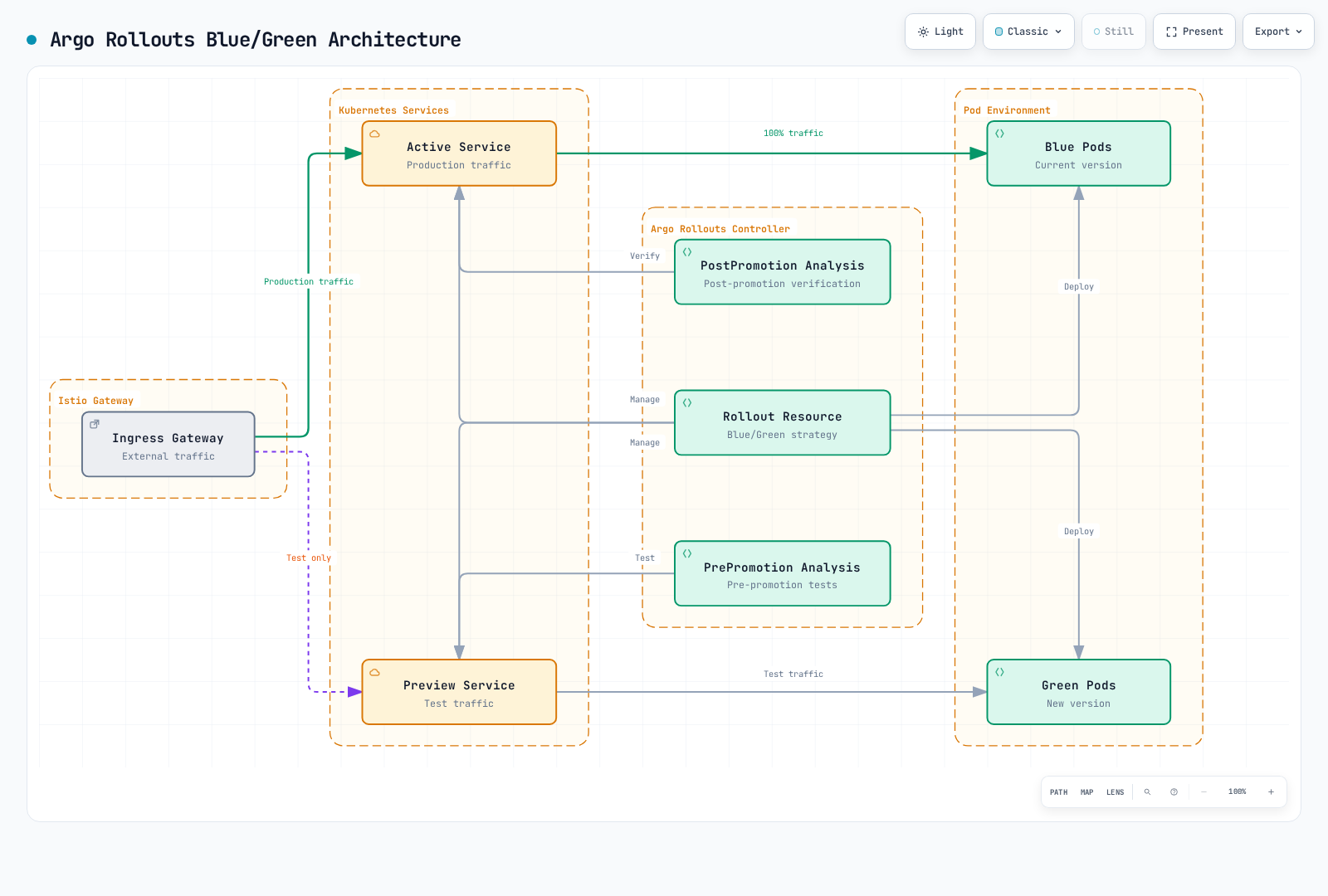
Blue/Green Deployment Flow
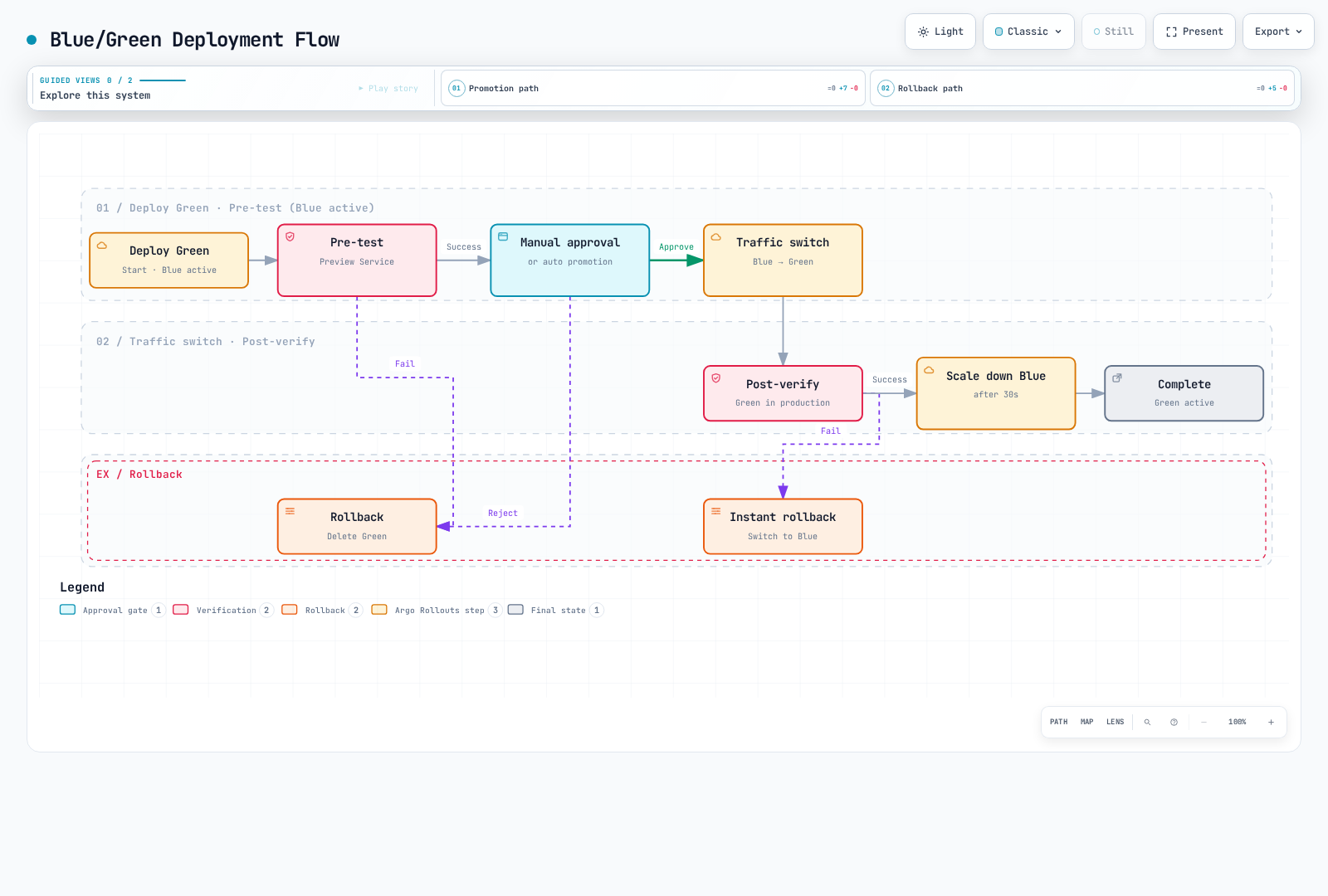
Step 1: Define Services
Blue/Green deployment requires two Services:
---
# Active Service - Production traffic
apiVersion: v1
kind: Service
metadata:
  name: reviews-active
spec:
  ports:
  - port: 9080
    name: http
  selector:
    app: reviews
    # Rollout automatically updates selector

---
# Preview Service - Test traffic
apiVersion: v1
kind: Service
metadata:
  name: reviews-preview
spec:
  ports:
  - port: 9080
    name: http
  selector:
    app: reviews
    # Rollout automatically updates selector
Step 2: Istio Gateway and VirtualService
---
# Gateway
apiVersion: networking.istio.io/v1
kind: Gateway
metadata:
  name: reviews-gateway
spec:
  selector:
    istio: ingressgateway
  servers:
  - port:
      number: 80
      name: http
      protocol: HTTP
    hosts:
    - reviews.example.com
    - reviews-preview.example.com

---
# VirtualService - Active Service
apiVersion: networking.istio.io/v1
kind: VirtualService
metadata:
  name: reviews-vsvc
spec:
  hosts:
  - reviews.example.com
  gateways:
  - reviews-gateway
  http:
  - route:
    - destination:
        host: reviews-active  # Route to Active Service
        port:
          number: 9080

---
# VirtualService - Preview Service (for testing)
apiVersion: networking.istio.io/v1
kind: VirtualService
metadata:
  name: reviews-preview-vsvc
spec:
  hosts:
  - reviews-preview.example.com
  gateways:
  - reviews-gateway
  http:
  - route:
    - destination:
        host: reviews-preview  # Route to Preview Service
        port:
          number: 9080
Step 3: Define Rollout Resource
apiVersion: argoproj.io/v1alpha1
kind: Rollout
metadata:
  name: reviews
spec:
  replicas: 3
  revisionHistoryLimit: 2
  selector:
    matchLabels:
      app: reviews
  template:
    metadata:
      labels:
        app: reviews
    spec:
      containers:
      - name: reviews
        image: istio/examples-bookinfo-reviews-v1:1.20.3
        ports:
        - containerPort: 9080

  strategy:
    blueGreen:
      # Specify Active/Preview Services
      activeService: reviews-active
      previewService: reviews-preview

      # Auto-promotion settings
      autoPromotionEnabled: false  # false: manual approval, true: auto-approve
      autoPromotionSeconds: 30     # Ignored while autoPromotionEnabled=false

      # Blue environment retention time
      scaleDownDelaySeconds: 600   # Retain old capacity through the post-promotion checks
      scaleDownDelayRevisionLimit: 2  # Keep up to 2 previous versions

      # Pre-test (validate Preview before deployment)
      prePromotionAnalysis:
        templates:
        - templateName: smoke-tests
        args:
        - name: service-name
          value: reviews-preview
        - name: pod-template-hash
          valueFrom:
            podTemplateHashValue: Latest

      # Post-verification (validate Active after switch)
      postPromotionAnalysis:
        templates:
        - templateName: post-promotion-tests
        args:
        - name: service-name
          value: reviews-active
        - name: pod-template-hash
          valueFrom:
            podTemplateHashValue: Latest

      # Anti-affinity (deploy Blue/Green on different nodes)
      antiAffinity:
        requiredDuringSchedulingIgnoredDuringExecution: {}
Step 4: Define AnalysisTemplate
Pre-test (Smoke Tests)
The Job provider succeeds on Job completion with exit code 0; it does not parse a printed HTTP status as result. These tests use the Bookinfo /health and /reviews/0 endpoints. The explicit native-sidecar annotation lets the Job finish while retaining mesh mTLS; it requires supported Kubernetes/Istio native-sidecar behavior. Test this on the selected EKS version.
apiVersion: argoproj.io/v1alpha1
kind: AnalysisTemplate
metadata:
  name: smoke-tests
spec:
  args:
  - name: service-name
  - name: pod-template-hash

  metrics:
  # 1. HTTP status code check
  - name: http-status
    interval: 10s
    count: 5
    provider:
      job:
        spec:
          activeDeadlineSeconds: 60
          template:
            metadata:
              labels:
                sidecar.istio.io/inject: "true"
              annotations:
                sidecar.istio.io/nativeSidecar: "true"
            spec:
              containers:
              - name: curl
                image: curlimages/curl:8.16.0
                command:
                - sh
                - -c
                - |
                  test "$(curl -fsS -o /dev/null -w "%{http_code}" http://{{args.service-name}}:9080/health)" = 200
              restartPolicy: Never
          backoffLimit: 1

  # 2. Basic functional test
  - name: functional-test
    interval: 10s
    count: 3
    provider:
      job:
        spec:
          activeDeadlineSeconds: 60
          template:
            metadata:
              labels:
                sidecar.istio.io/inject: "true"
              annotations:
                sidecar.istio.io/nativeSidecar: "true"
            spec:
              containers:
              - name: test
                image: curlimages/curl:8.16.0
                command:
                - sh
                - -c
                - |
                  # API endpoint test
                  curl -fsS http://{{args.service-name}}:9080/reviews/0
              restartPolicy: Never
          backoffLimit: 1
Post-verification Tests
apiVersion: argoproj.io/v1alpha1
kind: AnalysisTemplate
metadata:
  name: post-promotion-tests
spec:
  args:
  - name: service-name
  - name: pod-template-hash

  metrics:
  # Prometheus metric-based verification
  - name: error-rate
    interval: 30s
    count: 10
    successCondition: len(result) == 1 && !isNaN(result[0]) && result[0] < 0.05
    provider:
      prometheus:
        address: http://prometheus.istio-system:9090
        query: |
          sum(rate(
            istio_requests_total{
              destination_service_name="{{args.service-name}}",
              reporter="destination",
              rollout_hash="{{args.pod-template-hash}}",
              response_code=~"5.."
            }[1m]
          ))
          /
          sum(rate(
            istio_requests_total{
              destination_service_name="{{args.service-name}}",
              reporter="destination",
              rollout_hash="{{args.pod-template-hash}}"
            }[1m]
          ))

  - name: response-time
    interval: 30s
    count: 10
    successCondition: len(result) == 1 && !isNaN(result[0]) && result[0] < 500
    provider:
      prometheus:
        address: http://prometheus.istio-system:9090
        query: |
          histogram_quantile(0.95,
            sum(rate(
              istio_request_duration_milliseconds_bucket{
                destination_service_name="{{args.service-name}}",
              reporter="destination",
              rollout_hash="{{args.pod-template-hash}}"
              }[1m]
            )) by (le)
          )
Deployment Execution and Management
Deploy New Version
# Start Blue/Green deployment with image update
kubectl argo rollouts set image reviews \
  reviews=istio/examples-bookinfo-reviews-v2:1.20.3

# Check Rollout status
kubectl argo rollouts get rollout reviews --watch

# Test Preview environment
curl http://reviews-preview.example.com/
Manual Approval (Promotion)
# Manually approve after pre-tests succeed
kubectl argo rollouts promote reviews

# Or approve from dashboard
kubectl argo rollouts dashboard
Check Status
# Rollout status
kubectl argo rollouts status reviews

# Check Active/Preview Services
kubectl get svc reviews-active reviews-preview

# Check Pod status
kubectl get pods -l app=reviews --show-labels

# Check Analysis results
kubectl get analysisrun
Rollback
# Immediate rollback (switch to Blue)
kubectl argo rollouts abort reviews

# Rollback to previous version
kubectl argo rollouts undo reviews

# Rollback to specific revision
kubectl argo rollouts undo reviews --to-revision=3
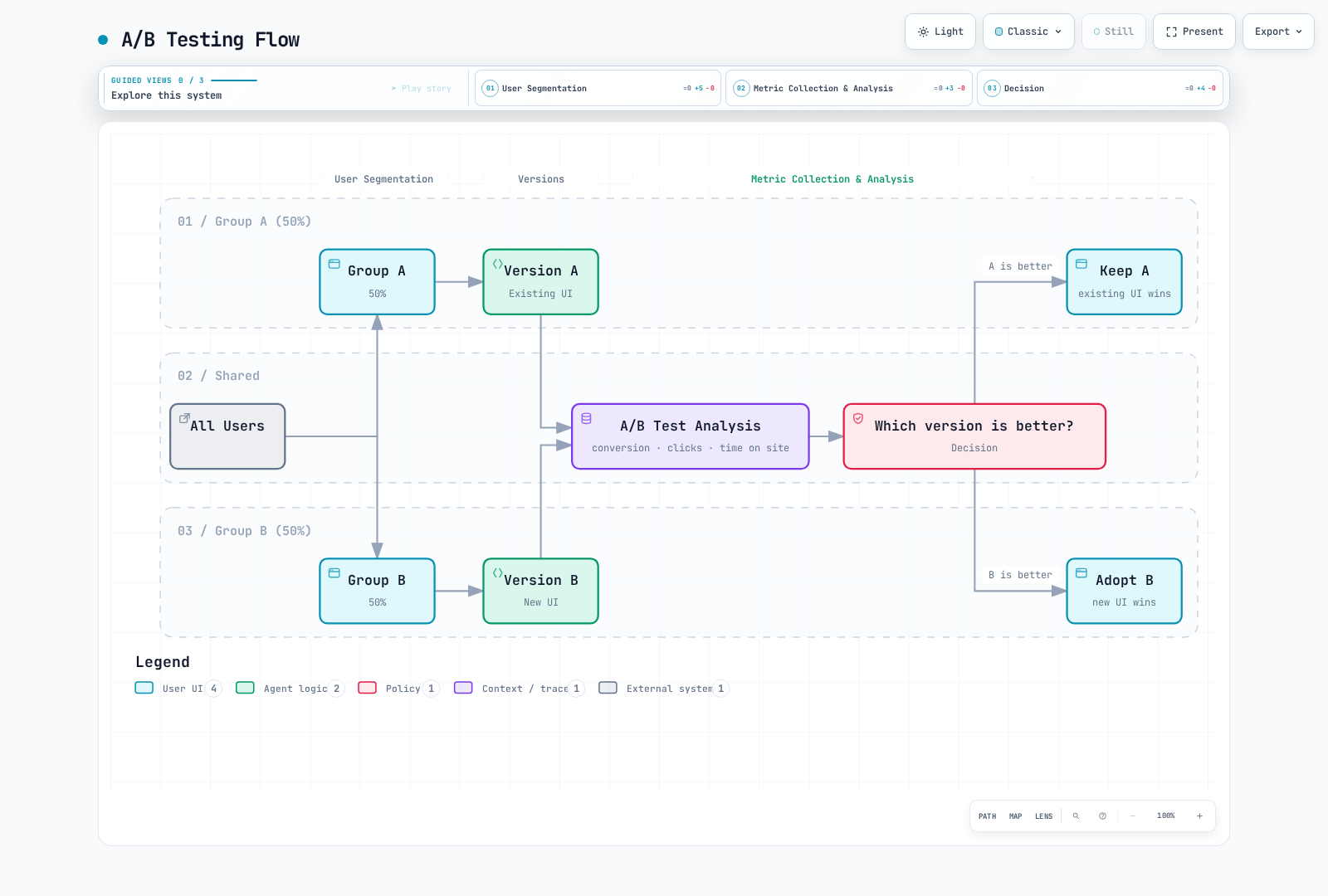
A/B Testing
A/B testing runs two versions simultaneously and classifies users based on specific criteria to measure effectiveness.
Cookie-based A/B Testing
apiVersion: networking.istio.io/v1
kind: VirtualService
metadata:
  name: myapp-ab-test
spec:
  hosts:
  - myapp.example.com
  http:
  # Group A (cookie value "a")
  - match:
    - headers:
        cookie:
          regex: "(^|.*;[ ]*)ab_test=a(;.*|$)"
    route:
    - destination:
        host: myapp
        subset: version-a

  # Group B (cookie value "b")
  - match:
    - headers:
        cookie:
          regex: "(^|.*;[ ]*)ab_test=b(;.*|$)"
    route:
    - destination:
        host: myapp
        subset: version-b

  # New users (no cookie) - 50/50 split
  - route:
    - destination:
        host: myapp
        subset: version-a
      weight: 50
      headers:
        response:
          add:
            set-cookie: "ab_test=a; Max-Age=2592000; Path=/; SameSite=Lax"
    - destination:
        host: myapp
        subset: version-b
      weight: 50
      headers:
        response:
          add:
            set-cookie: "ab_test=b; Max-Age=2592000; Path=/; SameSite=Lax"
Header-based A/B Testing
apiVersion: networking.istio.io/v1
kind: VirtualService
metadata:
  name: myapp-ab-header
spec:
  hosts:
  - myapp
  http:
  # Mobile users -> Version B (new mobile UI)
  - match:
    - headers:
        user-agent:
          regex: ".*Mobile.*"
    route:
    - destination:
        host: myapp
        subset: version-b

  # Premium users -> Version B (new features)
  - match:
    - headers:
        x-user-tier:
          exact: "premium"
    route:
    - destination:
        host: myapp
        subset: version-b

  # Regular users -> Version A
  - route:
    - destination:
        host: myapp
        subset: version-a
Geo-based A/B Testing
apiVersion: networking.istio.io/v1
kind: VirtualService
metadata:
  name: myapp-ab-geo
spec:
  hosts:
  - myapp
  http:
  # Test new version only in specific regions
  - match:
    - headers:
        x-country-code:
          regex: "US|CA"  # USA, Canada
    route:
    - destination:
        host: myapp
        subset: version-b
      weight: 50
    - destination:
        host: myapp
        subset: version-a
      weight: 50

  # Other regions get existing version
  - route:
    - destination:
        host: myapp
        subset: version-a
Progressive Rollout
Progressive rollout automatically increases traffic ratio over time. Using Argo Rollouts' Canary strategy enables automated progressive deployment.
Manual Progressive Rollout
For manual operation, configure explicit pauses and advance one stage only after reviewing the AnalysisRun and actual traffic. A timer plus a raw counter grep is not an error-rate gate. In this controller-managed example use:
kubectl argo rollouts get rollout reviews
kubectl get analysisruns
kubectl argo rollouts promote reviews
# If the active rollout fails validation:
kubectl argo rollouts abort reviews
Using with Traffic Mirroring
Combining traffic splitting with mirroring enables safer deployments.
apiVersion: networking.istio.io/v1
kind: VirtualService
metadata:
  name: myapp-canary-with-mirror
spec:
  hosts:
  - myapp
  http:
  - route:
    # Main traffic: 90% v1, 10% v2
    - destination:
        host: myapp
        subset: v1
      weight: 90
    - destination:
        host: myapp
        subset: v2
      weight: 10
    # Mirroring: duplicate all traffic to v3 (ignore response)
    mirror:
      host: myapp
      subset: v3
    mirrorPercentage:
      value: 100
Practical Examples
Example 1: User Segment-based Deployment
apiVersion: networking.istio.io/v1
kind: VirtualService
metadata:
  name: myapp-segmented-rollout
spec:
  hosts:
  - myapp.example.com
  http:
  # Internal employees - use new version first
  - match:
    - headers:
        x-employee:
          exact: "true"
    route:
    - destination:
        host: myapp
        subset: v2

  # Beta testers - next to use new version
  - match:
    - headers:
        x-beta-tester:
          exact: "true"
    route:
    - destination:
        host: myapp
        subset: v2

  # VIP customers - Canary 50%
  - match:
    - headers:
        x-user-tier:
          exact: "vip"
    route:
    - destination:
        host: myapp
        subset: v1
      weight: 50
    - destination:
        host: myapp
        subset: v2
      weight: 50

  # Regular customers - Canary 10%
  - route:
    - destination:
        host: myapp
        subset: v1
      weight: 90
    - destination:
        host: myapp
        subset: v2
      weight: 10
Example 2: Time-based Deployment
apiVersion: networking.istio.io/v1
kind: VirtualService
metadata:
  name: myapp-time-based
spec:
  hosts:
  - myapp
  http:
  # Korea daytime (KST 09:00-18:00) - stable version
  - match:
    - headers:
        x-country-code:
          exact: "KR"
        x-hour:
          regex: "0[9]|1[0-7]"  # 09-17 hours
    route:
    - destination:
        host: myapp
        subset: v1

  # Korea nighttime - Canary test
  - match:
    - headers:
        x-country-code:
          exact: "KR"
    route:
    - destination:
        host: myapp
        subset: v1
      weight: 80
    - destination:
        host: myapp
        subset: v2
      weight: 20

  # Other regions
  - route:
    - destination:
        host: myapp
        subset: v1
Example 3: Microservice Chain Canary
# Frontend Canary
apiVersion: networking.istio.io/v1
kind: VirtualService
metadata:
  name: frontend-canary
spec:
  hosts:
  - frontend
  http:
  - route:
    - destination:
        host: frontend
        subset: v1
      weight: 90
    - destination:
        host: frontend
        subset: v2
      weight: 10
---
# Backend Canary (only used by Frontend v2)
apiVersion: networking.istio.io/v1
kind: VirtualService
metadata:
  name: backend-canary
spec:
  hosts:
  - backend
  http:
  # Only requests from Frontend v2 go to Backend v2
  - match:
    - sourceLabels:
        app: frontend
        version: v2
    route:
    - destination:
        host: backend
        subset: v2

  # Rest go to Backend v1
  - route:
    - destination:
        host: backend
        subset: v1
Monitoring and Rollback
Prometheus Queries
# Requests per version
sum(rate(istio_requests_total{reporter="destination",destination_service="myapp.default.svc.cluster.local"}[5m])) by (destination_version)

# Error rate per version
sum(rate(istio_requests_total{reporter="destination",destination_service="myapp.default.svc.cluster.local",response_code=~"5.."}[5m])) by (destination_version)
/
sum(rate(istio_requests_total{reporter="destination",destination_service="myapp.default.svc.cluster.local"}[5m])) by (destination_version)

# Latency per version (P95)
histogram_quantile(0.95, sum(rate(istio_request_duration_milliseconds_bucket{reporter="destination",destination_service="myapp.default.svc.cluster.local"}[5m])) by (destination_version, le))

# Traffic split ratio
sum(rate(istio_requests_total{reporter="destination",destination_service="myapp.default.svc.cluster.local"}[5m])) by (destination_version)
/
scalar(sum(rate(istio_requests_total{reporter="destination",destination_service="myapp.default.svc.cluster.local"}[5m])))
Automatic Rollback
Use the AnalysisTemplates above as the rollout gate. Prometheus counter totals are not rates, and an empty/failed query is not proof of health. Check the latest ReplicaSet’s measurements, minimum traffic, and AnalysisRun phase. Let Argo Rollouts own routing changes; do not apply a competing VirtualService or assume abort changes the desired image back. undo reverts the desired template, while abort stops an active rollout and directs traffic according to the strategy’s stable state. After full promotion, validate the appropriate undo/redeployment path.
kubectl get analysisruns
kubectl describe analysisrun <analysis-run>
kubectl argo rollouts get rollout reviews
Troubleshooting
Traffic Splitting Not Working
# 1. Check DestinationRule
kubectl get destinationrule -A
kubectl describe destinationrule <name> -n <namespace>

# 2. Check subset labels
kubectl get pods -n <namespace> --show-labels

# 3. Check VirtualService configuration
istioctl proxy-config routes <pod-name> -n <namespace> -o json

# 4. Check actual traffic distribution
istioctl proxy-config routes <pod-name> -n <namespace> -o json
Weight Not Behaving as Expected
# Check Envoy cluster weights
istioctl proxy-config routes <pod-name> -n <namespace> -o json

# Check endpoint status
kubectl get endpointslices -n <namespace> -l kubernetes.io/service-name=<service-name> -o yaml

# Check Pod ready status
kubectl get pods -n <namespace> -l version=v2
Best Practices
1. Staged Rollout
# Good example: Gradual increase
# 5% -> 10% -> 25% -> 50% -> 100%

# Bad example: Sudden increase
# 5% -> 100%
2. Prepare Rollback Plan
# Prepare rollback YAML file in advance
cat > rollback-v1.yaml <<EOF
apiVersion: networking.istio.io/v1
kind: VirtualService
metadata:
  name: myapp
spec:
  hosts:
  - myapp
  http:
  - route:
    - destination:
        host: myapp
        subset: v1
      weight: 100
EOF

# Rollback command
kubectl apply -f rollback-v1.yaml
3. Monitoring is Essential
- Golden Signals monitoring: Latency, Traffic, Errors, Saturation
- SLO-based decisions: Automatic rollback if target SLO is not met
- Real-time alerts: Set up notifications via Slack, PagerDuty, etc.
4. Test Automation
Use Argo Rollouts' AnalysisTemplate to implement automated testing and verification:
# AnalysisTemplate for automated testing and verification
apiVersion: argoproj.io/v1alpha1
kind: AnalysisTemplate
metadata:
  name: success-rate
spec:
  args:
  - name: service-name
  - name: pod-template-hash
  metrics:
  - name: success-rate
    interval: 1m
    count: 10
    successCondition: len(result) == 1 && !isNaN(result[0]) && result[0] >= 0.95
    failureLimit: 3
    provider:
      prometheus:
        address: http://prometheus.istio-system:9090
        query: |
          sum(rate(
            istio_requests_total{
              destination_service_name="{{args.service-name}}",
              reporter="destination",
              rollout_hash="{{args.pod-template-hash}}",
              response_code!~"5.*"
            }[1m]
          ))
          /
          sum(rate(
            istio_requests_total{
              destination_service_name="{{args.service-name}}",
              reporter="destination",
              rollout_hash="{{args.pod-template-hash}}"
            }[1m]
          ))
---
# Using AnalysisTemplate in Rollout
apiVersion: argoproj.io/v1alpha1
kind: Rollout
metadata:
  name: myapp
spec:
  strategy:
    canary:
      steps:
      - setWeight: 10
      - pause: {duration: 1m}
      - analysis:
          templates:
          - templateName: success-rate
          args:
          - name: service-name
            value: myapp
          - name: pod-template-hash
            valueFrom:
              podTemplateHashValue: Latest
5. Documentation
# Annotation excerpt to merge into an existing VirtualService
metadata:
  name: myapp-canary
  annotations:
    description: "Canary deployment for myapp v2"
    owner: "platform-team"
    rollout-date: "2025-11-24"
    rollout-plan: "5% -> 10% -> 25% -> 50% -> 100%"
    monitoring-dashboard: "https://grafana.example.com/d/canary"
References
Istio Related
Argo Rollouts Related
- Argo Rollouts Official Documentation
- Istio Integration Guide
- Argo Rollouts GitHub
- Argo Rollouts Examples