Traffic Management
Istio's traffic management capabilities allow fine-grained control over traffic flow within the service mesh.
Table of Contents
- Gateway and VirtualService
- Routing
- DestinationRule ⭐ Essential Concept
- Traffic Splitting
- Retry and Timeout
- Load Balancing
- Circuit Breaker
- Fault Injection
- Traffic Mirroring
- Session Affinity
- Egress Control
- ServiceEntry (External Service Management)
- WorkloadEntry (VM Registration)
Overview
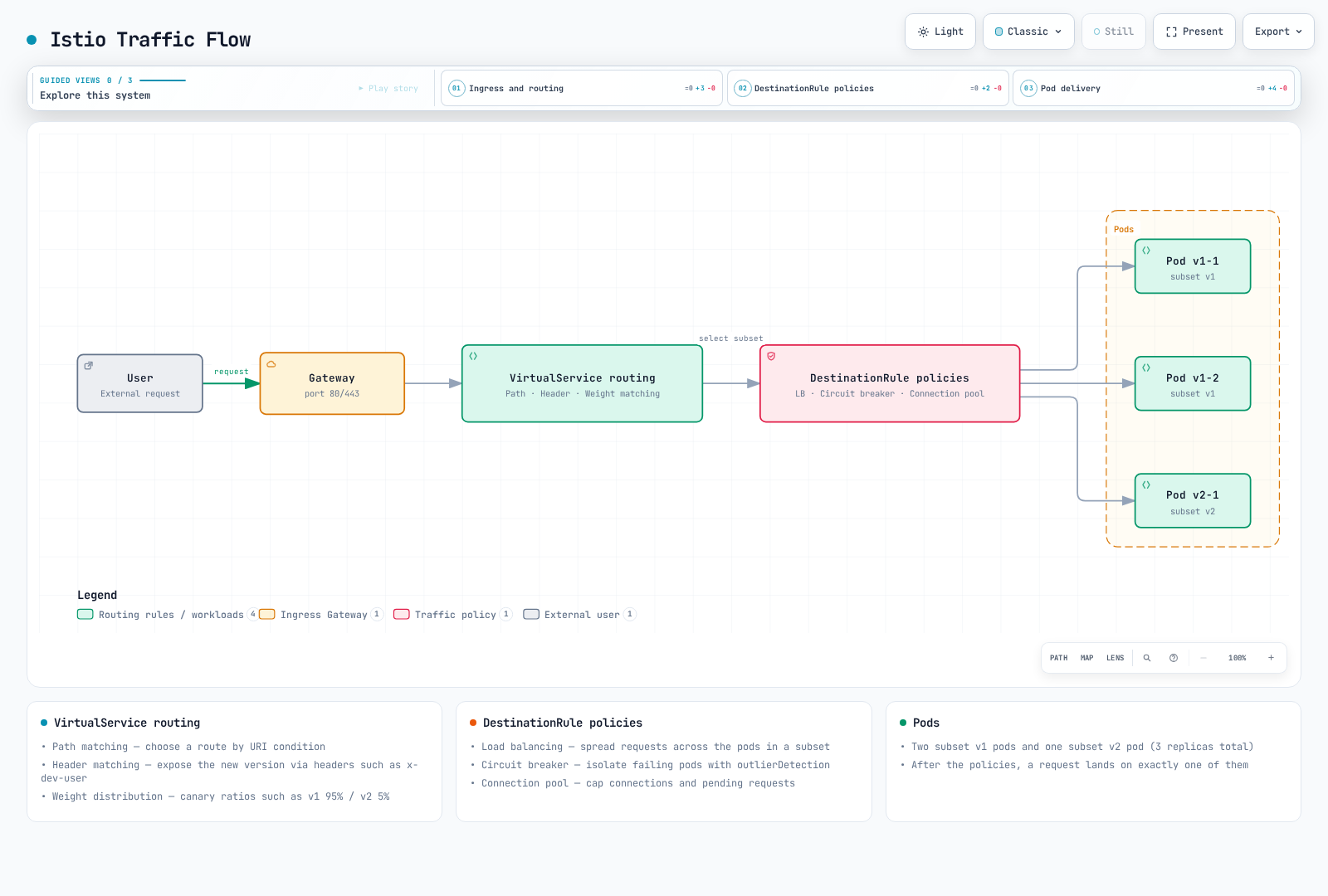
These are sidecar-mode configuration examples for a supported Istio release. Gateway, VirtualService, and DestinationRule are API objects consumed by proxies, not separate network hops. A mirror is an additional copy of selected requests, not the remainder of a 90/10 split; mirrored responses are discarded. The diagrams show logical configuration relationships.
The snippets are alternative examples, not one manifest to apply together. Create the referenced Services and DestinationRule subsets first. A VirtualService with no gateways list applies to the mesh; ingress routes require an explicit Gateway binding and matching hostname. For ambient, use supported Gateway API/waypoint routing.
Traffic management is one of Istio's core features, enabling the following operations without code changes:
Key Features
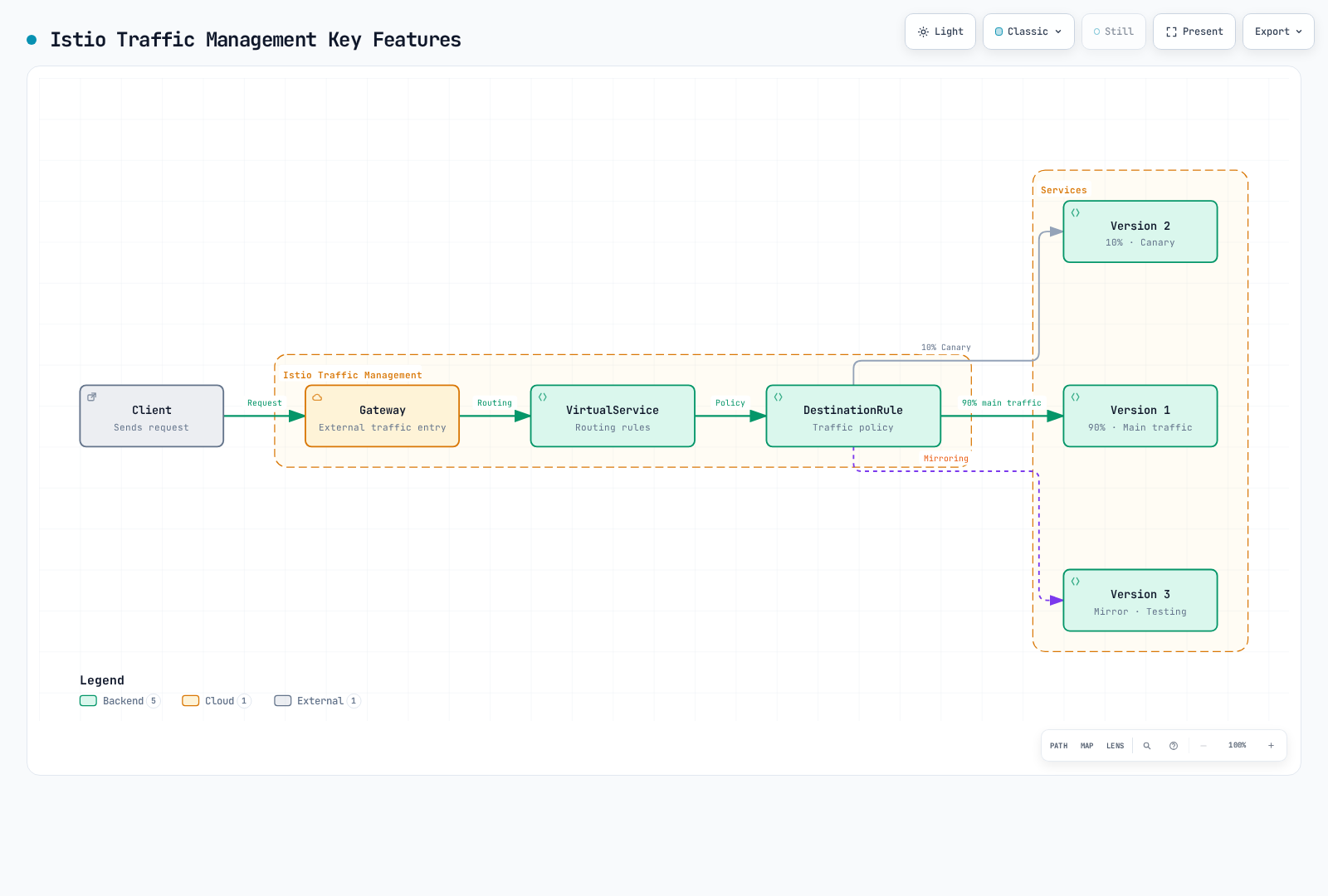
1. Intelligent Routing
- Path-based:
/api/v1→ Service A,/api/v2→ Service B - Header-based:
User-Agent: Mobile→ Mobile Version - Cookie-based: Route specific users to specific versions
- Weight-based: Distribute traffic by ratio
2. Deployment Strategies
Canary Deployment:
# Only 10% to new version
route:
- destination:
    host: reviews
    subset: v1
  weight: 90
- destination:
    host: reviews
    subset: v2
  weight: 10
Blue/Green Deployment:
# Instant switch
route:
- destination:
    host: reviews
    subset: v2  # Switch to Green
  weight: 100
3. Resilience Patterns
- Circuit Breaker: Isolate failing services
- Retry: Automatic retries
- Timeout: Response time limits
- Rate Limiting: Request rate control
4. Testing and Debugging
- Traffic Mirroring: Replicate production traffic for testing
- Fault Injection: Intentional fault injection
- A/B Testing: Provide different versions to different user groups
Core Resources
Gateway
Defines the entry point for external traffic into the mesh.
apiVersion: networking.istio.io/v1
kind: Gateway
metadata:
  name: my-gateway
spec:
  selector:
    istio: ingressgateway
  servers:
  - port:
      number: 80
      name: http
      protocol: HTTP
    hosts:
    - "myapp.example.com"
VirtualService
Defines how to route requests.
apiVersion: networking.istio.io/v1
kind: VirtualService
metadata:
  name: reviews
spec:
  hosts:
  - reviews
  http:
  - match:
    - uri:
        prefix: "/v2"
    route:
    - destination:
        host: reviews
        subset: v2
  - route:
    - destination:
        host: reviews
        subset: v1
DestinationRule
Defines policies for the destination service.
apiVersion: networking.istio.io/v1
kind: DestinationRule
metadata:
  name: reviews
spec:
  host: reviews
  trafficPolicy:
    loadBalancer:
      simple: LEAST_REQUEST
  subsets:
  - name: v1
    labels:
      version: v1
  - name: v2
    labels:
      version: v2
Practical Examples
Safe Canary Deployment
# Step 1: Start with 5% traffic
apiVersion: networking.istio.io/v1
kind: VirtualService
metadata:
  name: reviews-canary
spec:
  hosts:
  - reviews
  http:
  - route:
    - destination:
        host: reviews
        subset: v1
      weight: 95
    - destination:
        host: reviews
        subset: v2
      weight: 5
After monitoring, gradually increase if no issues:
- 5% → 10% → 25% → 50% → 100%
Header-based Routing (Developer Testing)
apiVersion: networking.istio.io/v1
kind: VirtualService
metadata:
  name: reviews-dev
spec:
  hosts:
  - reviews
  http:
  # Developers use new version
  - match:
    - headers:
        x-dev-user:
          exact: "true"
    route:
    - destination:
        host: reviews
        subset: v2
  # Regular users use stable version
  - route:
    - destination:
        host: reviews
        subset: v1
The developer header is a routing hint supplied by the client, not authentication or an authorization boundary.
Circuit Breaker + Retry
apiVersion: networking.istio.io/v1
kind: DestinationRule
metadata:
  name: reviews-resilient
spec:
  host: reviews
  trafficPolicy:
    # Connection Pool settings
    connectionPool:
      tcp:
        maxConnections: 100
      http:
        http1MaxPendingRequests: 50
        maxRequestsPerConnection: 2
    # Circuit Breaker
    outlierDetection:
      consecutive5xxErrors: 5
      interval: 30s
      baseEjectionTime: 30s
---
apiVersion: networking.istio.io/v1
kind: VirtualService
metadata:
  name: reviews-retry
spec:
  hosts:
  - reviews
  http:
  - route:
    - destination:
        host: reviews
    retries:
      attempts: 3
      perTryTimeout: 2s
      retryOn: 5xx,reset,connect-failure
    timeout: 10s
Traffic Flow
Learning Path
For effective traffic management learning, the following order is recommended:
Gateway and VirtualService ⭐ Starting Point
- Understanding basic concepts
- External traffic handling
- Advanced routing patterns
- Conditional routing
DestinationRule ⭐ Essential Concept
- Understanding Subset concept
- Traffic Policy basics
- Integration with VirtualService
- Canary deployment
- A/B testing
- Failure recovery
- Response time control
- Various algorithms
- Performance optimization
- Failure isolation
- Cascading Failure prevention
- Failure testing
- Chaos Engineering
- Production testing
- New version validation
- Sticky Session
- State preservation
- External service access
- Security hardening
- External service registration
- Egress Gateway integration
Best Practices
1. Gradual Rollout
# ❌ Bad example: 100% at once
weight: 100

# ✅ Good example: Gradual increase
# 5% → Monitor → 10% → Monitor → ...
2. Set Workload-Appropriate Timeouts
# ✅ Always set timeout
http:
- route:
  - destination:
      host: reviews
  timeout: 10s
Streaming requests may need different timeout settings. A short HTTP deadline is not suitable for every gRPC stream or long-lived response.
3. Use Retry Carefully
# ✅ Only when idempotency is guaranteed
retries:
  attempts: 3
  perTryTimeout: 2s
  retryOn: 5xx,reset,connect-failure
4. Adjust Circuit Breaker Thresholds
# ✅ Adjust according to service characteristics
outlierDetection:
  consecutive5xxErrors: 5      # Adjust per service
  interval: 30s
  baseEjectionTime: 30s
  maxEjectionPercent: 50    # Maximum 50% ejection
5. Monitor Metrics
Always monitor when changing traffic management:
- Request Rate: Change in request count
- Error Rate: Error ratio
- Latency: P50, P95, P99 latency
- Success Rate: Success ratio
Troubleshooting
Traffic Not Being Routed
# 1. Check VirtualService
kubectl get virtualservice -n <namespace>
kubectl describe virtualservice <name> -n <namespace>

# 2. Check DestinationRule
kubectl get destinationrule -n <namespace>

# 3. Check pod labels
kubectl get pods --show-labels -n <namespace>

# 4. Analyze Istio configuration
istioctl analyze -n <namespace>
Weight Not Being Applied
# Check Envoy configuration
istioctl proxy-config routes <pod-name> -n <namespace>

# Check cluster information
istioctl proxy-config clusters <pod-name> -n <namespace>
Next Steps
- Security: mTLS and authentication/authorization
- Observability: Metrics, logs, traces
- Resilience: Rate Limiting, Zone Aware Routing
References
Quiz
To test what you learned in this chapter, try the Istio Traffic Management Quiz.