Migrating from Managed Node Groups to Auto Mode
Supported Versions: EKS Auto Mode GA; examples reviewed for EKS 1.36 Last Updated: September 12, 2026
Migration requires application, storage and controller-ownership checks before old capacity is removed. The examples below are staged operations with locally checked schemas/CLI fixtures, not a verified zero-downtime production procedure. No cloud or cluster mutations were performed during this audit.
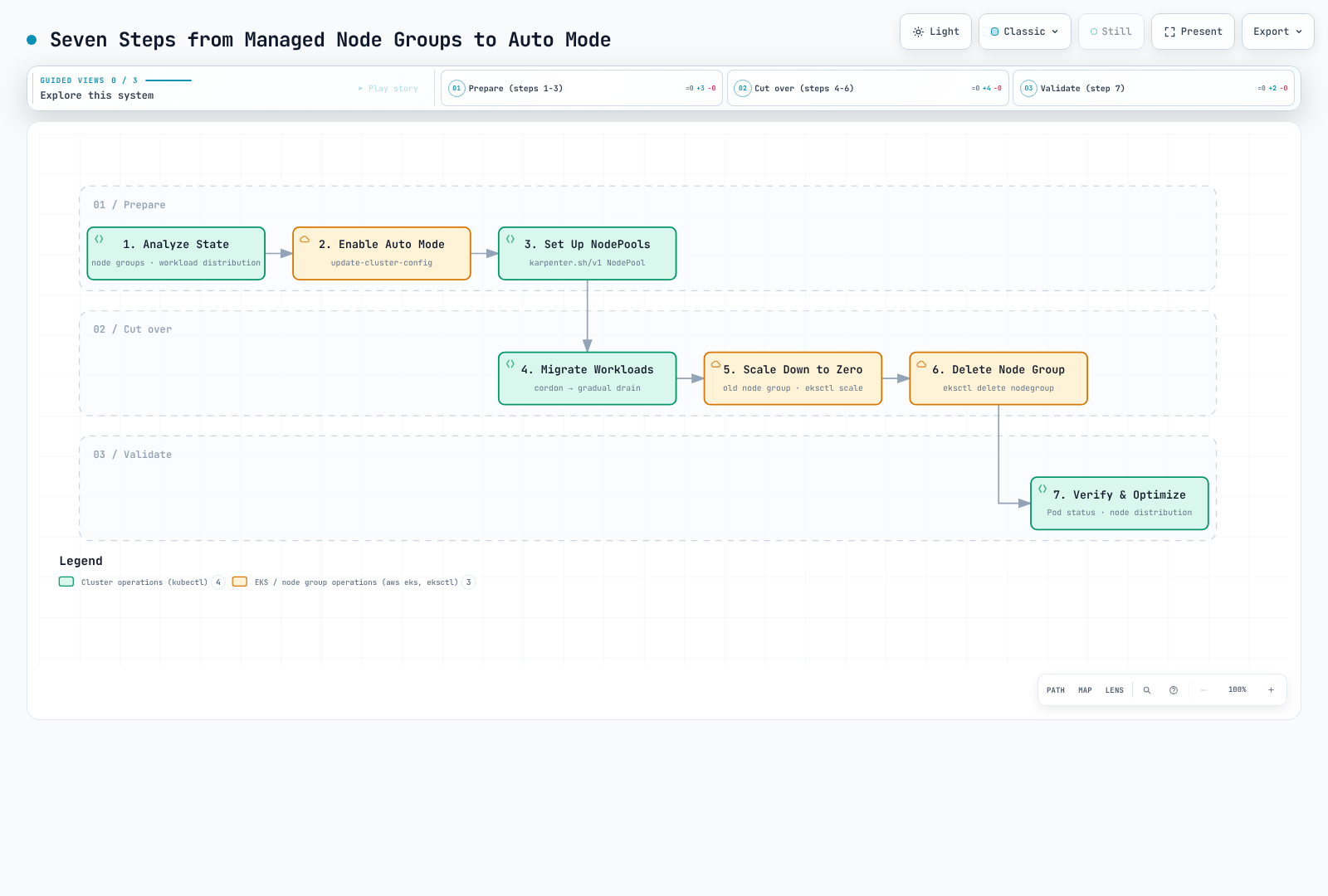
The diagram's final validation step does not authorize draining, scaling to zero or deletion without earlier health checks and a rollback plan.
1. Inventory and Bind the Operational Context
Use a currently supported EKS/add-on combination. The former 1.29 minimum was a historical feature floor, not current supported-version guidance. Confirm a compatible VPC CNI, kube-proxy, EBS CSI, snapshot controller and Pod Identity Agent where installed; use the official migration minimums and the compatibility listing for your actual Kubernetes version.
Record controller ownership, workload placement, system agents, volumes/AZs, load-balancer classes, IAM, recovery procedures and cost. The guard below checks account, cluster ARN/creation time/API endpoint and node-group ARN/creation time. These are point-in-time identity checks, not an atomic lock against concurrent controllers. A deliberately proxied endpoint needs a reviewed alternative, not silently bypassing a mismatch.
set -euo pipefail
: "${EXPECTED_ACCOUNT_ID:?Set the intended account}"
: "${AWS_REGION:?Set the cluster region}"
: "${CLUSTER_NAME:?Set the cluster name}"
: "${OLD_NODEGROUP:?Set the reviewed managed node group}"
: "${KUBECONFIG:?Set the reviewed kubeconfig}"
export KUBECONFIG
export KUBE_CONTEXT="${KUBE_CONTEXT:-$CLUSTER_NAME}"
check_account() {
  local actual
  actual=$(aws sts get-caller-identity --region "$AWS_REGION" --query Account --output text) || return
  test "$actual" = "$EXPECTED_ACCOUNT_ID" || { printf 'Account mismatch.\n' >&2; return 1; }
}
check_account
umask 077
export WORK_DIR
WORK_DIR=$(mktemp -d "$PWD/auto-migration.XXXXXXXX")
aws eks describe-cluster --name "$CLUSTER_NAME" --region "$AWS_REGION" --output json \
  > "$WORK_DIR/cluster-before.json"
aws eks describe-nodegroup --cluster-name "$CLUSTER_NAME" --nodegroup-name "$OLD_NODEGROUP" \
  --region "$AWS_REGION" --output json > "$WORK_DIR/nodegroup-before.json"
guard_context() {
  check_account || return
  local endpoint
  aws eks describe-cluster --name "$CLUSTER_NAME" --region "$AWS_REGION" --output json \
    > "$WORK_DIR/cluster-current.json" || return
  endpoint=$(kubectl --context "$KUBE_CONTEXT" config view --minify \
    -o jsonpath='{.clusters[0].cluster.server}') || return
  jq -e --arg endpoint "$endpoint" --slurpfile before "$WORK_DIR/cluster-before.json" '
    .cluster.arn == $before[0].cluster.arn and
    .cluster.createdAt == $before[0].cluster.createdAt and
    .cluster.endpoint == $endpoint and .cluster.status == "ACTIVE"
  ' "$WORK_DIR/cluster-current.json" >/dev/null
}
guard_nodegroup() {
  guard_context || return
  aws eks describe-nodegroup --cluster-name "$CLUSTER_NAME" --nodegroup-name "$OLD_NODEGROUP" \
    --region "$AWS_REGION" --output json > "$WORK_DIR/nodegroup-current.json" || return
  jq -e --slurpfile before "$WORK_DIR/nodegroup-before.json" '
    .nodegroup.nodegroupArn == $before[0].nodegroup.nodegroupArn and
    .nodegroup.createdAt == $before[0].nodegroup.createdAt and .nodegroup.status == "ACTIVE"
  ' "$WORK_DIR/nodegroup-current.json" >/dev/null
}
guard_nodegroup
printf 'Private migration evidence: %s\n' "$WORK_DIR"kubectl --context "$KUBE_CONTEXT" --request-timeout=15s \
get deployments,statefulsets,daemonsets,jobs,cronjobs -A -o json |
jq '[.items[] | (.spec.template // .spec.jobTemplate.spec.template) as $t |
{kind,namespace:.metadata.namespace,name:.metadata.name,uid:.metadata.uid,
nodeSelector:$t.spec.nodeSelector,affinity:$t.spec.affinity,tolerations:$t.spec.tolerations,
serviceAccountName:$t.spec.serviceAccountName,hostNetwork:$t.spec.hostNetwork,
pvcNames:[$t.spec.volumes[]?.persistentVolumeClaim.claimName // empty]}]' \
> "$WORK_DIR/workload-placement.json"
kubectl --context "$KUBE_CONTEXT" --request-timeout=15s get pods -A -o json |
jq '[.items[] | {namespace:.metadata.namespace,name:.metadata.name,node:.spec.nodeName,
phase:.status.phase,deletionTimestamp:.metadata.deletionTimestamp,
ready:([.status.conditions[]?|select(.type=="Ready")|.status]|first // "NotReported"),
owners:[.metadata.ownerReferences[]?|{kind,name,controller}]}]' \
> "$WORK_DIR/pod-state.json"The private files contain operational metadata; retain them for recovery. Query failures remain failures. kubectl top requires a working metrics API, and a current CPU snapshot does not replace workload history.
| Existing configuration | Migration consideration |
|---|---|
| Custom AMI/bootstrap/user data | Auto Mode uses managed Bottlerocket, not arbitrary AL2023/custom AMI/userData |
| Node IAM permissions | Prepare the node role/profile/access entry; migrate workload permissions to reviewed IRSA/Pod Identity rather than node-role/IMDS fallback |
| Cluster IAM role | Add required Auto Mode permissions/trust to the existing role; enabling through CLI does not automatically create all roles |
| Selectors/affinity/taints | Include Deployments, StatefulSets, DaemonSets, Jobs and CronJobs; remove conflicting placement deliberately |
| Alternative CNI/network configuration | Check documented compatibility before enabling; unsupported networking is not repaired by a NodeClass |
| Scaling/IaC ownership | Coordinate Cluster Autoscaler, GitOps and the original IaC owner so they do not undo migration changes |
Data, load balancers and mixed-node DNS
The drivers/controllers are different interfaces:
| Resource | Self-managed | Auto Mode |
|---|---|---|
| EBS StorageClass provisioner | ebs.csi.aws.com | ebs.csi.eks.amazonaws.com |
| NLB Service loadBalancerClass | service.k8s.aws/nlb | eks.amazonaws.com/nlb |
| ALB IngressClass controller | ingress.k8s.aws/alb | eks.amazonaws.com/alb |
| TargetGroupBinding apiVersion | elbv2.k8s.aws/v1beta1 | eks.amazonaws.com/v1 |
| Compute class | karpenter.k8s.aws/v1 EC2NodeClass | eks.amazonaws.com/v1 NodeClass |
An existing PVC does not switch drivers by editing its StorageClass name, and an existing load balancer is not automatically adopted by the managed controller. For EBS, use a tested backup/snapshot restore plan or the current AWS-documented stopped-workload, Retain, static PV/PVC recreation workflow. The latter reuses an EBS volume but recreates Kubernetes binding objects; it is not an in-place driver switch. Verify backup restoration, volume/AZ/KMS ownership, reclaim policy, finalizers, bindings and application consistency. No destructive volume migration script is provided here.
Keep the self-managed AWS Load Balancer Controller while it owns resources. Create/test the new managed load balancer and shift traffic through a reviewed blue/green DNS plan before decommissioning the old one. Review class immutability, annotations and TargetGroupBinding ownership separately; changing an API group is not a safe adoption operation.
Auto Mode nodes have node-local DNS. Retain the CoreDNS Deployment while any non-Auto nodes need it. Keep required CNI/proxy/storage/identity agents for remaining node types and scope their placement; pure Auto Mode's managed components are not a reason to remove mixed-cluster dependencies early.
2. Enable Auto Mode Without an Unrestricted Default Pool
Complete the IAM/access preparation in Getting Started first. The existing cluster role needs the documented Compute, BlockStoragePolicyV2, LoadBalancing, Networking and Cluster policies plus the required sts:TagSession trust. The example expects API or API_AND_CONFIG_MAP authentication and a prepared custom node role/profile with an EC2 access entry.
This staged path starts with no built-in pools. Therefore it creates its own NodeClass in the next step; do not assume default exists. Enabling an unrestricted general-purpose pool could schedule existing pending workloads before the intended cutover. The example refuses a cluster already running Auto Mode rather than replacing its existing pool list.
Use the specific update ID to wait for completion. Cluster ACTIVE alone is not proof that this configuration update succeeded.
wait_eks_update() {
  local id="$1" group="${2:-}" attempt status
  local extra=()
  test -n "$group" && extra=(--nodegroup-name "$group")
  for ((attempt=0; attempt<120; attempt++)); do
    aws eks describe-update --name "$CLUSTER_NAME" --region "$AWS_REGION" \
      --update-id "$id" "${extra[@]}" --output json > "$WORK_DIR/update-current.json" || return
    status=$(jq -er '.update.status' "$WORK_DIR/update-current.json") || return
    case "$status" in
      Successful) return 0 ;;
      Failed|Cancelled)
        jq '{id:.update.id,status:.update.status,errorCodes:[.update.errors[]?.errorCode]}' \
          "$WORK_DIR/update-current.json" >&2
        return 1 ;;
      InProgress) sleep 10 ;;
      *) printf 'Unknown update state; inspect saved evidence.\n' >&2; return 1 ;;
    esac
  done
  printf 'Update still unconfirmed; stop and retain its ID.\n' >&2
  return 1
}guard_context
jq -e '.cluster.computeConfig.enabled != true and
(.cluster.accessConfig.authenticationMode == "API" or
.cluster.accessConfig.authenticationMode == "API_AND_CONFIG_MAP")' \
"$WORK_DIR/cluster-current.json" >/dev/null
jq -n --arg name "$CLUSTER_NAME" '{
name:$name,
computeConfig:{enabled:true,nodePools:[]},
storageConfig:{blockStorage:{enabled:true}},
kubernetesNetworkConfig:{elasticLoadBalancing:{enabled:true}}
}' > "$WORK_DIR/enable-request.json"
aws eks update-cluster-config --region "$AWS_REGION" \
--cli-input-json "file://$WORK_DIR/enable-request.json" --output json \
> "$WORK_DIR/enable-response.json"
update_id=$(jq -er '.update.id' "$WORK_DIR/enable-response.json")
wait_eks_update "$update_id"
guard_context
jq -e '.cluster.computeConfig.enabled == true and
.cluster.computeConfig.nodePools == [] and
.cluster.storageConfig.blockStorage.enabled == true and
.cluster.kubernetesNetworkConfig.elasticLoadBalancing.enabled == true' \
"$WORK_DIR/cluster-current.json" >/dev/nullCompute, block storage and managed load balancing must be enabled or disabled together. Native request validation does not prove IAM/service admission will succeed; stop on an error and retain the update evidence. Do not rerun blindly after an uncertain response. Authentication-mode changes have separate migration/rollback constraints.
3. Create a Selective Pool and Test Both Sides
Replace the NodeClass profile/subnet/security-group placeholders with reviewed existing resources. The profile's role needs the correct node access entry; these manifests do not create IAM, VPC or application credentials.
apiVersion: v1
kind: Namespace
metadata:
  name: migration-lab
  labels:
    pod-security.kubernetes.io/enforce: restricted
    pod-security.kubernetes.io/enforce-version: v1.36
    pod-security.kubernetes.io/warn: restricted
    pod-security.kubernetes.io/warn-version: v1.36
    pod-security.kubernetes.io/audit: restricted
    pod-security.kubernetes.io/audit-version: v1.36
---
apiVersion: eks.amazonaws.com/v1
kind: NodeClass
metadata:
  name: migration-nodeclass
spec:
  instanceProfile: eks-migration-node-profile
  subnetSelectorTerms:
  - tags:
      Name: private-subnet
  securityGroupSelectorTerms:
  - tags:
      Name: worker-restricted
  advancedNetworking:
    associatePublicIPAddress: false
  ephemeralStorage:
    size: 100Gi
    iops: 3000
    throughput: 125
---
apiVersion: karpenter.sh/v1
kind: NodePool
metadata:
  name: migration-pool
spec:
  template:
    spec:
      requirements:
      - key: eks.amazonaws.com/instance-category
        operator: In
        values:
        - m
      - key: karpenter.sh/capacity-type
        operator: In
        values:
        - on-demand
      nodeClassRef:
        group: eks.amazonaws.com
        kind: NodeClass
        name: migration-nodeclass
      expireAfter: 168h
      terminationGracePeriod: 24h
      taints:
      - key: migration
        value: auto-mode
        effect: NoSchedule
    metadata:
      labels:
        migration: auto-mode
  disruption:
    consolidationPolicy: WhenEmptyOrUnderutilized
    consolidateAfter: 2m
    budgets:
    - nodes: '1'
  limits:
    cpu: '32'
    memory: 128Gi
---
apiVersion: apps/v1
kind: Deployment
metadata:
  name: legacy-canary
  namespace: migration-lab
spec:
  replicas: 2
  selector:
    matchLabels:
      app: legacy-canary
  template:
    metadata:
      labels:
        app: legacy-canary
    spec:
      containers:
      - name: web
        image: nginxinc/nginx-unprivileged:1.30.4@sha256:cb92301e719d6639028de775fe8b28e15f58343aca5e5372001311958aafb300
        resources:
          requests:
            cpu: 100m
            memory: 64Mi
          limits:
            cpu: 500m
            memory: 128Mi
        ports:
        - containerPort: 8080
        securityContext:
          allowPrivilegeEscalation: false
          capabilities:
            drop:
            - ALL
          readOnlyRootFilesystem: true
        volumeMounts:
        - name: tmp
          mountPath: /tmp
        readinessProbe:
          httpGet:
            path: /
            port: 8080
          periodSeconds: 5
      terminationGracePeriodSeconds: 60
      automountServiceAccountToken: false
      nodeSelector:
        eks.amazonaws.com/nodegroup: REPLACE_WITH_OLD_NODEGROUP
      tolerations: []
      securityContext:
        runAsNonRoot: true
        runAsUser: 101
        runAsGroup: 101
        fsGroup: 101
        seccompProfile:
          type: RuntimeDefault
      volumes:
      - name: tmp
        emptyDir:
          sizeLimit: 128Mi
  strategy:
    type: RollingUpdate
    rollingUpdate:
      maxSurge: 1
      maxUnavailable: 0
---
apiVersion: apps/v1
kind: Deployment
metadata:
  name: auto-canary
  namespace: migration-lab
spec:
  replicas: 2
  selector:
    matchLabels:
      app: auto-canary
  template:
    metadata:
      labels:
        app: auto-canary
    spec:
      containers:
      - name: web
        image: nginxinc/nginx-unprivileged:1.30.4@sha256:cb92301e719d6639028de775fe8b28e15f58343aca5e5372001311958aafb300
        resources:
          requests:
            cpu: 100m
            memory: 64Mi
          limits:
            cpu: 500m
            memory: 128Mi
        ports:
        - containerPort: 8080
        securityContext:
          allowPrivilegeEscalation: false
          capabilities:
            drop:
            - ALL
          readOnlyRootFilesystem: true
        volumeMounts:
        - name: tmp
          mountPath: /tmp
        readinessProbe:
          httpGet:
            path: /
            port: 8080
          periodSeconds: 5
      terminationGracePeriodSeconds: 60
      automountServiceAccountToken: false
      nodeSelector:
        karpenter.sh/nodepool: migration-pool
        eks.amazonaws.com/compute-type: auto
      tolerations:
      - key: migration
        operator: Equal
        value: auto-mode
        effect: NoSchedule
      securityContext:
        runAsNonRoot: true
        runAsUser: 101
        runAsGroup: 101
        fsGroup: 101
        seccompProfile:
          type: RuntimeDefault
      volumes:
      - name: tmp
        emptyDir:
          sizeLimit: 128Mi
  strategy:
    type: RollingUpdate
    rollingUpdate:
      maxSurge: 1
      maxUnavailable: 0
Replace REPLACE_WITH_OLD_NODEGROUP before using the legacy canary. The complete nginx examples use the reviewed non-root image and security context from the operations chapter. They test basic placement/readiness, not your application's state, identity or traffic path.
The Auto canary selects both the exact pool and eks.amazonaws.com/compute-type=auto. Existence of karpenter.sh/nodepool alone also matches self-managed Karpenter nodes. A toleration permits placement; it does not select a pool by itself.
| MNG setting | Auto Mode mapping |
|---|---|
| Instance types / capacity type | Exact instance requirements or deliberately broader categories; capacity-type requirement |
| Labels / taints | spec.template.metadata.labels / spec.template.spec.taints |
| Min/desired/max node count | Not equivalent to CPU/memory spec.limits; consider separate static-pool semantics if fixed desired nodes are required |
| Subnet / security groups | Custom NodeClass selectors and reviewed rules |
| AMI / bootstrap | No arbitrary AMI-family/userData mapping in Auto Mode |
4. Migrate in Waves and Stop on Failure
Start with representative low-risk workloads, then staging/non-critical production and critical workloads after their dependencies pass. Change the owning controller/GitOps desired configuration, not just a live Pod.
Review the entire placement policy: adding an Auto selector while retaining an old node-group selector can make the conjunction unschedulable. Do not erase unrelated pod affinity, security placement or tolerations with affinity: null. StatefulSets, active Jobs and local-volume workloads need their own data-aware procedure.
For a nonzero Deployment, this checks rollout and observed replica readiness:
: "${WORKLOAD_NAMESPACE:?Select the namespace}"
: "${DEPLOYMENT_NAME:?Select one migrated Deployment}"
kubectl --context "$KUBE_CONTEXT" -n "$WORKLOAD_NAMESPACE" rollout status \
  "deployment/$DEPLOYMENT_NAME" --timeout=10m
kubectl --context "$KUBE_CONTEXT" --request-timeout=15s -n "$WORKLOAD_NAMESPACE" \
  get deployment "$DEPLOYMENT_NAME" -o json |
jq -e '(.spec.replicas // 1) as $desired |
  $desired > 0 and .status.observedGeneration >= .metadata.generation and
  .status.updatedReplicas == $desired and .status.readyReplicas == $desired and
  .status.availableReplicas == $desired' >/dev/null
Also verify actual requests, DNS, load-balancer targets, volumes/read-write behavior, identity, logs/metrics and application SLOs. Deployment rolling-update settings and PDB Eviction API protections are different controls. A successful rollout status or Pod phase Running alone is not end-to-end availability evidence; completed Jobs may correctly be Succeeded.
Optional single-node drain
Only after reviewing replacement capacity, workload placement, PDBs and data durability, select one old managed node and its recorded UID:
: "${NODE_NAME:?Select exactly one old managed node}"
: "${EXPECTED_NODE_UID:?Set its previously reviewed UID}"
guard_nodegroup
kubectl --context "$KUBE_CONTEXT" --request-timeout=15s get node "$NODE_NAME" -o json \
  > "$WORK_DIR/node-before-drain.json"
jq -e --arg uid "$EXPECTED_NODE_UID" --arg group "$OLD_NODEGROUP" '
  .metadata.uid == $uid and .metadata.labels["eks.amazonaws.com/nodegroup"] == $group and
  .metadata.labels["eks.amazonaws.com/compute-type"] != "auto" and
  .metadata.deletionTimestamp == null and
  any(.status.conditions[]?; .type=="Ready" and .status=="True")
' "$WORK_DIR/node-before-drain.json" >/dev/null
kubectl --context "$KUBE_CONTEXT" drain "$NODE_NAME" --ignore-daemonsets --timeout=10m
printf 'Drain returned successfully. Validate application health before selecting another node.\n'
There is no bulk cordon/drain loop, fixed sleep health gate or “continue after failure.” The default drain refuses unmanaged Pods/local emptyDir data unless handled deliberately; do not append --force, --disable-eviction or --delete-emptydir-data to make a failure disappear. A failed/interrupted drain can leave the node cordoned: inspect it and restore scheduling only if the recovery plan calls for it. Validate the affected applications before choosing another node.
5. Scale Down Only After Old Workloads Are Gone
Changing an MNG's desired size does not respect PDBs: EKS uses ASG scale-down. This is different from the normal managed-node-group version-update drain. Halving desired size and sleeping five minutes is not safe stabilization.
Coordinate the original scaling/IaC owner and prevent new application scheduling to old nodes. The API example checks that all observed old nodes are cordoned and contain no active non-DaemonSet Pods, then requests zero min/desired size. It does not eliminate races from controllers that ignore cordons or replace nodes; keep the migration placement controls active. Review every remaining DaemonSet/system dependency and export required completed-job artifacts first.
guard_nodegroup
kubectl --context "$KUBE_CONTEXT" --request-timeout=15s get nodes \
  -l "eks.amazonaws.com/nodegroup=$OLD_NODEGROUP" -o json > "$WORK_DIR/old-nodes.json"
jq -e 'all(.items[]; .spec.unschedulable == true)' "$WORK_DIR/old-nodes.json" >/dev/null
kubectl --context "$KUBE_CONTEXT" --request-timeout=15s get pods -A -o json \
  | jq '{items:[.items[]|{metadata:{name:.metadata.name,namespace:.metadata.namespace,
         ownerReferences:.metadata.ownerReferences},spec:{nodeName:.spec.nodeName},
         status:{phase:.status.phase}}]}' > "$WORK_DIR/pods-before-scale.json"
jq --slurpfile nodes "$WORK_DIR/old-nodes.json" '
  ($nodes[0].items|map(.metadata.name)) as $names |
  [.items[] | select(.spec.nodeName as $n | $names|index($n)) |
   select(.status.phase!="Succeeded" and .status.phase!="Failed") |
   select(any(.metadata.ownerReferences[]?; .kind=="DaemonSet" and .controller==true)|not) |
   {namespace:.metadata.namespace,name:.metadata.name,phase:.status.phase}]
' "$WORK_DIR/pods-before-scale.json" > "$WORK_DIR/old-active-workloads.json"
jq -e 'length == 0' "$WORK_DIR/old-active-workloads.json" >/dev/null

guard_nodegroup
aws eks update-nodegroup-config --cluster-name "$CLUSTER_NAME" --nodegroup-name "$OLD_NODEGROUP" \
  --region "$AWS_REGION" --scaling-config minSize=0,desiredSize=0 --output json \
  > "$WORK_DIR/scale-zero-response.json"
update_id=$(jq -er '.update.id' "$WORK_DIR/scale-zero-response.json")
wait_eks_update "$update_id" "$OLD_NODEGROUP"
Wait for the actual old nodes/instances to disappear and recheck application health. Keep the node-group definition and recorded scaling configuration for an agreed rollback window. Zero desired capacity is not guaranteed immediately recoverable capacity.
6. Retire Old Infrastructure Through Its Owner
After successful workload/data/traffic validation and a deliberate stabilization period, delete the old group through the original owner: Terraform, CloudFormation, eksctl or another management workflow. Direct EKS API deletion of an IaC-owned group can leave drift, stacks, IAM roles or other resources.
The following is only for a reviewed direct-API-managed group. It requires zero desired size, rechecks node/workload state and refuses visible CloudFormation ownership tags. That check cannot discover every external IaC owner; establishing ownership remains a prerequisite.
guard_nodegroup
kubectl --context "$KUBE_CONTEXT" --request-timeout=15s get nodes \
  -l "eks.amazonaws.com/nodegroup=$OLD_NODEGROUP" -o json > "$WORK_DIR/old-nodes.json"
jq -e 'all(.items[]; .spec.unschedulable == true)' "$WORK_DIR/old-nodes.json" >/dev/null
kubectl --context "$KUBE_CONTEXT" --request-timeout=15s get pods -A -o json \
  | jq '{items:[.items[]|{metadata:{name:.metadata.name,namespace:.metadata.namespace,
         ownerReferences:.metadata.ownerReferences},spec:{nodeName:.spec.nodeName},
         status:{phase:.status.phase}}]}' > "$WORK_DIR/pods-before-scale.json"
jq --slurpfile nodes "$WORK_DIR/old-nodes.json" '
  ($nodes[0].items|map(.metadata.name)) as $names |
  [.items[] | select(.spec.nodeName as $n | $names|index($n)) |
   select(.status.phase!="Succeeded" and .status.phase!="Failed") |
   select(any(.metadata.ownerReferences[]?; .kind=="DaemonSet" and .controller==true)|not) |
   {namespace:.metadata.namespace,name:.metadata.name,phase:.status.phase}]
' "$WORK_DIR/pods-before-scale.json" > "$WORK_DIR/old-active-workloads.json"
jq -e 'length == 0' "$WORK_DIR/old-active-workloads.json" >/dev/null

: "${NODEGROUP_MANAGEMENT:?Use the original IaC owner, or explicitly set direct-api for an API-managed group}"
test "$NODEGROUP_MANAGEMENT" = direct-api
guard_nodegroup
jq -e '.nodegroup.scalingConfig.desiredSize == 0 and
  ((.nodegroup.tags // {} | keys | map(select(startswith("aws:cloudformation:"))) | length) == 0)' \
  "$WORK_DIR/nodegroup-current.json" >/dev/null
aws eks delete-nodegroup --cluster-name "$CLUSTER_NAME" --nodegroup-name "$OLD_NODEGROUP" \
  --region "$AWS_REGION" --output json > "$WORK_DIR/delete-nodegroup-response.json"
aws eks wait nodegroup-deleted --cluster-name "$CLUSTER_NAME" --nodegroup-name "$OLD_NODEGROUP" \
  --region "$AWS_REGION"
The deletion waiter must succeed. AccessDenied, expired credentials or other query failures are not absence. Audit separately owned IAM/network/storage resources and billing; a deleted node-group API object is not proof all associated costs have ended. The previous one-to-two-week stabilization example is a planning choice, not a universal requirement.
7. Final Validation and Optimization
Keep per-wave validation evidence and perform a final post-cleanup audit: expected controller/Pod readiness, placement, PVC health, DNS, application traffic, IAM, logs/metrics and complete cost allocation. Track cost during coexistence as both compute fleets and possibly both load balancers may be billed.
The former Pending 0–5 / >10 for five minutes, startup <90s / >120s, availability >99.9% / <99.5%, and API response <200ms / >500ms figures are unverified example thresholds. Use actual publishers, application objectives and measured baselines, not assumed Auto Mode default metrics.
Coexisting with Self-Managed Karpenter
AWS supports a direct coexistence migration. Its v1.1 prerequisite is a migration feature floor; also satisfy the current Kubernetes compatibility matrix (for example, Kubernetes 1.36 requires at least Karpenter 1.13). Keep the existing controller running while creating a distinct tainted Auto Mode pool and migrating selected workload groups.
Do not modify/delete shared nodepools.karpenter.sh or nodeclaims.karpenter.sh CRDs during the migration. Record ownership by the class reference and exact pool, not by the generic Karpenter label. After old workloads are gone, retire only the old owned NodePools/NodeClaims while their controller can finish finalization. Confirm their instances/dependencies are cleaned up, then uninstall the self-managed release and only its owned IAM/queue resources. Do not uninstall first or delete a namespace as a substitute for resource cleanup.
Roll Back Capacity and Placement Before Removing Auto Capacity
This is a workload/infrastructure migration rollback, not a Kubernetes control-plane version rollback.
- Keep the Auto pool intact. Restore or provision compatible old capacity first; if the old group was deleted, a saved scaling JSON cannot recreate it.
- Review the recorded scaling values against current workload demand. For the still-existing, same-identity group, the following can restore its previous settings:
guard_nodegroup
jq --arg name "$CLUSTER_NAME" --arg group "$OLD_NODEGROUP" '{
  clusterName:$name,nodegroupName:$group,scalingConfig:.nodegroup.scalingConfig
}' "$WORK_DIR/nodegroup-before.json" > "$WORK_DIR/restore-capacity-request.json"
aws eks update-nodegroup-config --region "$AWS_REGION" \
  --cli-input-json "file://$WORK_DIR/restore-capacity-request.json" --output json \
  > "$WORK_DIR/restore-capacity-response.json"
update_id=$(jq -er '.update.id' "$WORK_DIR/restore-capacity-response.json")
wait_eks_update "$update_id" "$OLD_NODEGROUP"- Wait for sufficient old nodes to be Ready, with working network/DNS/identity/storage agents. An update-success status does not prove Pod capacity is ready. Review node UIDs before uncordoning any still-existing old nodes.
- Restore the reviewed controller placement/traffic/data plan. Remove conflicting Auto selectors explicitly while preserving unrelated affinity. Verify actual workload readiness and application behavior on the old fleet.
- Only then retire the exact migration-owned Auto pool/resources through their owner. Deleting a NodePool can cascade to its nodes; never delete it as the first rollback step or select every node with a Karpenter label.
Disabling Auto Mode is optional and separate. First resolve all Auto-owned compute, storage and load-balancer dependencies. If that change is appropriate, all three flags belong in one request; this fragment only prepares the request file for review:
jq -n --arg name "$CLUSTER_NAME" '{
  name:$name,
  computeConfig:{enabled:false},
  storageConfig:{blockStorage:{enabled:false}},
  kubernetesNetworkConfig:{elasticLoadBalancing:{enabled:false}}
}' > "$WORK_DIR/disable-request.json"
Submit through the reviewed workflow with context checks and update-ID tracking if needed. Disabling Auto Mode does not restore application selectors, data or traffic, and it does not reverse authentication-mode changes.
References
- Enable Auto Mode on an existing cluster
- Migration reference, EBS and load balancers
- Managed node-group migration
- Self-managed Karpenter migration
- Managed node-group scaling and PDB behavior
- Auto Mode networking and mixed-node DNS
- NodeClass identity and access entry
- Karpenter/Kubernetes compatibility
- Safely drain a Kubernetes node
- Kubernetes Pod disruptions
< Previous: Workload Optimization | Table of Contents | Back to EKS Topics >