AWS Integration
This document covers how to integrate Istio with AWS services in an Amazon EKS environment.
Table of Contents
Reviewed September 11, 2026 for Linux EC2-backed EKS nodes and AWS Load Balancer Controller. NLB passthrough, ALB termination, and NLB termination below are alternative designs; do not apply their overlapping Service/Gateway resources together. Match gateway pod labels and target ports to the installation in Installation. Merge Service changes through the owning Helm/istioctl configuration. EKS Auto Mode uses its own load-balancer integration and supported annotations; Fargate cannot host Istio CNI/ztunnel.
- AWS Load Balancer Integration
- Istio vs Other Solutions Comparison
- EKS-Specific Optimization
- Best Practices
AWS Load Balancer Integration
Istio Ingress Gateway can be integrated with AWS Load Balancer to handle external traffic.
Network Load Balancer (NLB) Integration
NLB is a Layer 4 (TCP/UDP) load balancer, suitable when high performance and low latency are required.
NLB Architecture
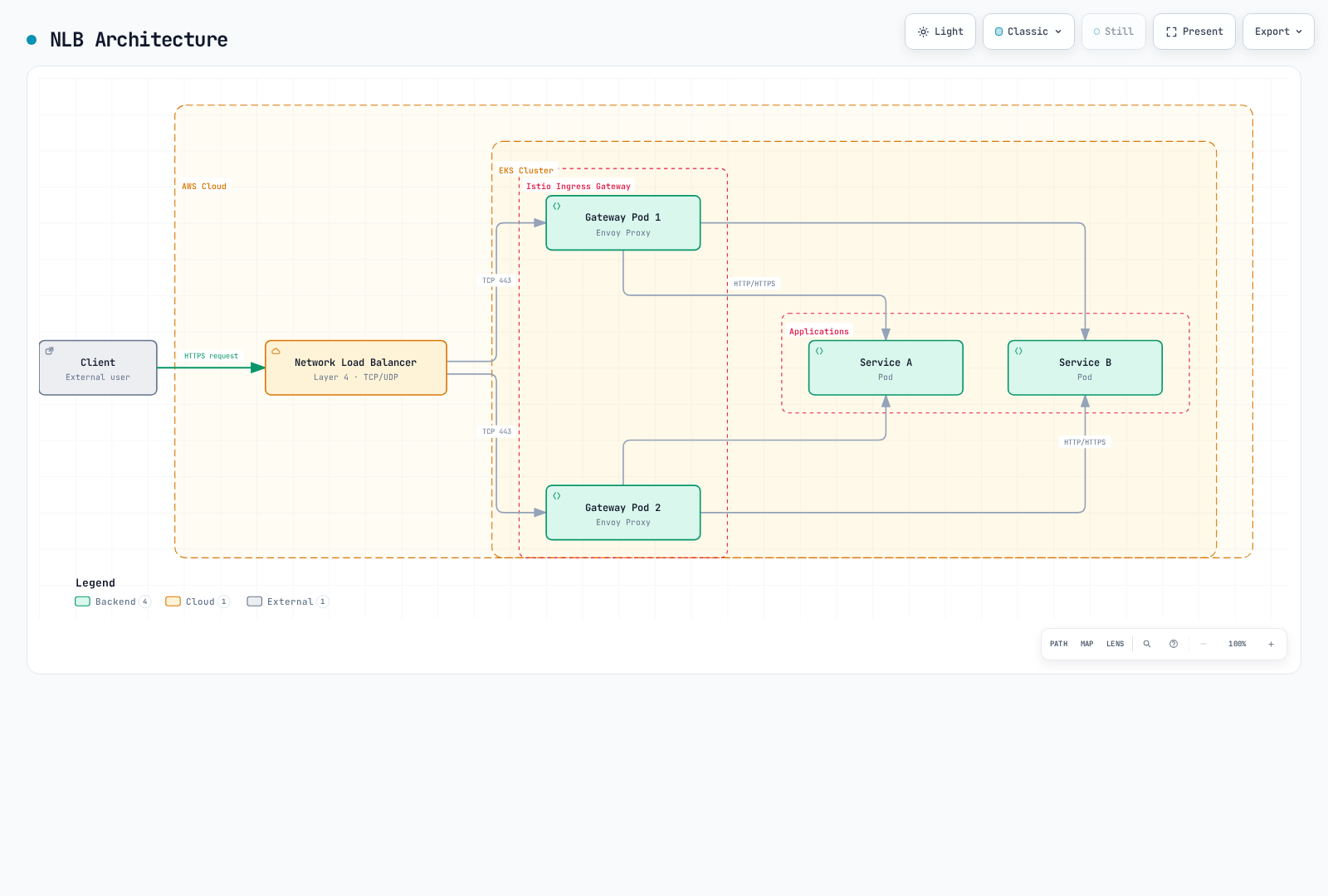
NLB Configuration
1. Install AWS Load Balancer Controller
# Create IAM policy
curl -fsSL -o iam_policy.json https://raw.githubusercontent.com/kubernetes-sigs/aws-load-balancer-controller/v3.5.0/docs/install/iam_policy.json

aws iam create-policy \
    --policy-name AWSLoadBalancerControllerIAMPolicy \
    --policy-document file://iam_policy.json

# Associate the cluster OIDC provider once before creating IRSA
eksctl utils associate-iam-oidc-provider --cluster my-cluster --approve

# IRSA setup
eksctl create iamserviceaccount \
  --cluster=my-cluster \
  --namespace=kube-system \
  --name=aws-load-balancer-controller \
  --attach-policy-arn="arn:aws:iam::<AWS_ACCOUNT_ID>:policy/AWSLoadBalancerControllerIAMPolicy" \
  --override-existing-serviceaccounts \
  --approve

# Install controller with Helm
helm repo add eks https://aws.github.io/eks-charts
helm repo update

helm install aws-load-balancer-controller eks/aws-load-balancer-controller \
  -n kube-system \
  --version 3.5.0 \
  --set clusterName=my-cluster \
  --set region=us-west-2 \
  --set vpcId="<VPC_ID>" \
  --set serviceAccount.create=false \
  --set serviceAccount.name=aws-load-balancer-controller
2. Istio Ingress Gateway Configuration with NLB
# istio-ingress-nlb.yaml
apiVersion: v1
kind: Service
metadata:
  name: istio-ingressgateway
  namespace: istio-system
  annotations:
    # NLB configuration
    service.beta.kubernetes.io/aws-load-balancer-type: "external"
    service.beta.kubernetes.io/aws-load-balancer-nlb-target-type: "ip"
    service.beta.kubernetes.io/aws-load-balancer-scheme: "internet-facing"

    # TCP passthrough: TLS terminates at Istio; no ACM TLS listener here

    # Health check configuration
    service.beta.kubernetes.io/aws-load-balancer-healthcheck-protocol: "http"
    service.beta.kubernetes.io/aws-load-balancer-healthcheck-port: "15021"
    service.beta.kubernetes.io/aws-load-balancer-healthcheck-path: "/healthz/ready"

    # Additional configuration
    service.beta.kubernetes.io/aws-load-balancer-attributes: "load_balancing.cross_zone.enabled=true"
spec:
  type: LoadBalancer
  selector:
    app: istio-ingressgateway
    istio: ingressgateway
  ports:
  - name: http2
    port: 80
    protocol: TCP
    targetPort: 8080
  - name: https
    port: 443
    protocol: TCP
    targetPort: 8443
3. Gateway Resource Configuration
apiVersion: networking.istio.io/v1
kind: Gateway
metadata:
  name: my-gateway
  namespace: istio-system
spec:
  selector:
    istio: ingressgateway
  servers:
  - port:
      number: 443
      name: https
      protocol: HTTPS
    tls:
      mode: SIMPLE
      credentialName: my-tls-secret
    hosts:
    - "myapp.example.com"
  - port:
      number: 80
      name: http
      protocol: HTTP
    hosts:
    - "myapp.example.com"
    tls:
      httpsRedirect: true
NLB Advantages
- High Performance: Handle millions of requests per second
- Low Latency: Operates at Layer 4 for fast responses
- Static IP: Elastic IP allocation possible
- Protocol Support: TCP, UDP, TLS
- Capacity planning: Measure connection/byte usage and compare regional pricing
NLB Use Cases
- WebSocket, gRPC, and other long-lived connections
- Handling millions of requests per second
- When static IP is required
- When TLS termination should be done at Istio
Application Load Balancer (ALB) Integration
ALB is a Layer 7 (HTTP/HTTPS) load balancer, suitable when advanced routing features are needed.
ALB Architecture
Client HTTPS reaches the ALB, which terminates TLS using ACM and forwards HTTP/1.1 to the Istio gateway in this example; Envoy then routes to the application.
ALB Configuration
1. Create ALB with Ingress Resource
# istio-ingress-alb.yaml
apiVersion: networking.k8s.io/v1
kind: Ingress
metadata:
  name: istio-ingress
  namespace: istio-system
  annotations:
    # ALB configuration
    alb.ingress.kubernetes.io/scheme: internet-facing
    alb.ingress.kubernetes.io/target-type: ip
    alb.ingress.kubernetes.io/listen-ports: '[{"HTTP": 80}, {"HTTPS": 443}]'
    alb.ingress.kubernetes.io/ssl-redirect: '443'

    # ACM certificate
    alb.ingress.kubernetes.io/certificate-arn: arn:aws:acm:region:account:certificate/cert-id

    # Health check
    alb.ingress.kubernetes.io/healthcheck-protocol: HTTP
    alb.ingress.kubernetes.io/healthcheck-port: '15021'
    alb.ingress.kubernetes.io/healthcheck-path: /healthz/ready
    alb.ingress.kubernetes.io/healthcheck-interval-seconds: '15'
    alb.ingress.kubernetes.io/healthcheck-timeout-seconds: '5'
    alb.ingress.kubernetes.io/success-codes: '200'
    alb.ingress.kubernetes.io/healthy-threshold-count: '2'
    alb.ingress.kubernetes.io/unhealthy-threshold-count: '2'

    # Additional configuration
    alb.ingress.kubernetes.io/load-balancer-attributes: idle_timeout.timeout_seconds=60
    alb.ingress.kubernetes.io/target-group-attributes: deregistration_delay.timeout_seconds=30
spec:
  ingressClassName: alb
  rules:
  - host: "myapp.example.com"
    http:
      paths:
      - path: /
        pathType: Prefix
        backend:
          service:
            name: istio-ingressgateway
            port:
              number: 80
For this ALB design, configure the gateway Service as ClusterIP, so it does not also provision an NLB. The ALB terminates TLS and forwards HTTP/1.1 by default; use this HTTP gateway without an HTTPS redirect. Add a VirtualService bound to my-alb-gateway for the application routes.
apiVersion: networking.istio.io/v1
kind: Gateway
metadata:
  name: my-alb-gateway
  namespace: istio-system
spec:
  selector:
    istio: ingressgateway
  servers:
  - port:
      number: 80
      name: http
      protocol: HTTP
    hosts:
    - "myapp.example.com"
2. Path-Based Routing
apiVersion: networking.k8s.io/v1
kind: Ingress
metadata:
  name: istio-ingress-path-based
  namespace: istio-system
  annotations:
    alb.ingress.kubernetes.io/scheme: internet-facing
    alb.ingress.kubernetes.io/target-type: ip
spec:
  ingressClassName: alb
  rules:
  - host: "api.example.com"
    http:
      paths:
      - path: /v1
        pathType: Prefix
        backend:
          service:
            name: istio-ingressgateway
            port:
              number: 80
  - host: "admin.example.com"
    http:
      paths:
      - path: /
        pathType: Prefix
        backend:
          service:
            name: istio-ingressgateway
            port:
              number: 80
ALB Advantages
- Advanced Routing: Path, Header, Query String-based routing
- WAF Integration: Enhanced security with AWS WAF
- Authentication Integration: Cognito, OIDC integration
- ACM Integration: Automatic certificate management
- Container Optimized: Optimized for ECS, EKS
ALB Use Cases
- HTTP/HTTPS only traffic
- When path-based routing is needed
- When WAF security is required
- When handling multiple domains with a single load balancer
NLB vs ALB Comparison
| Property | NLB | ALB |
|---|---|---|
| OSI Layer | Layer 4 (TCP/UDP) | Layer 7 (HTTP/HTTPS) |
| Capacity | Depends on traffic and capacity settings | Depends on traffic and capacity settings |
| Latency | Very low | Low |
| Static IP | Supported (Elastic IP) | Not supported |
| TLS Termination | TCP passthrough or TLS listener at NLB | Can be handled at ALB |
| Routing | IP/Port-based | Path, Host, Header-based |
| WAF Integration | Not available | Available |
| Cost | NLCU usage and regional rates | LCU usage and regional rates |
| WebSocket | Native support | Supported |
| gRPC | Native support | Requires HTTP/2 |
| Recommended Use | High performance, WebSocket, gRPC | HTTP routing, WAF, authentication |
Istio vs Other Solutions Comparison
Istio vs VPC Lattice
VPC Lattice is AWS's managed application networking service.
Architecture Comparison
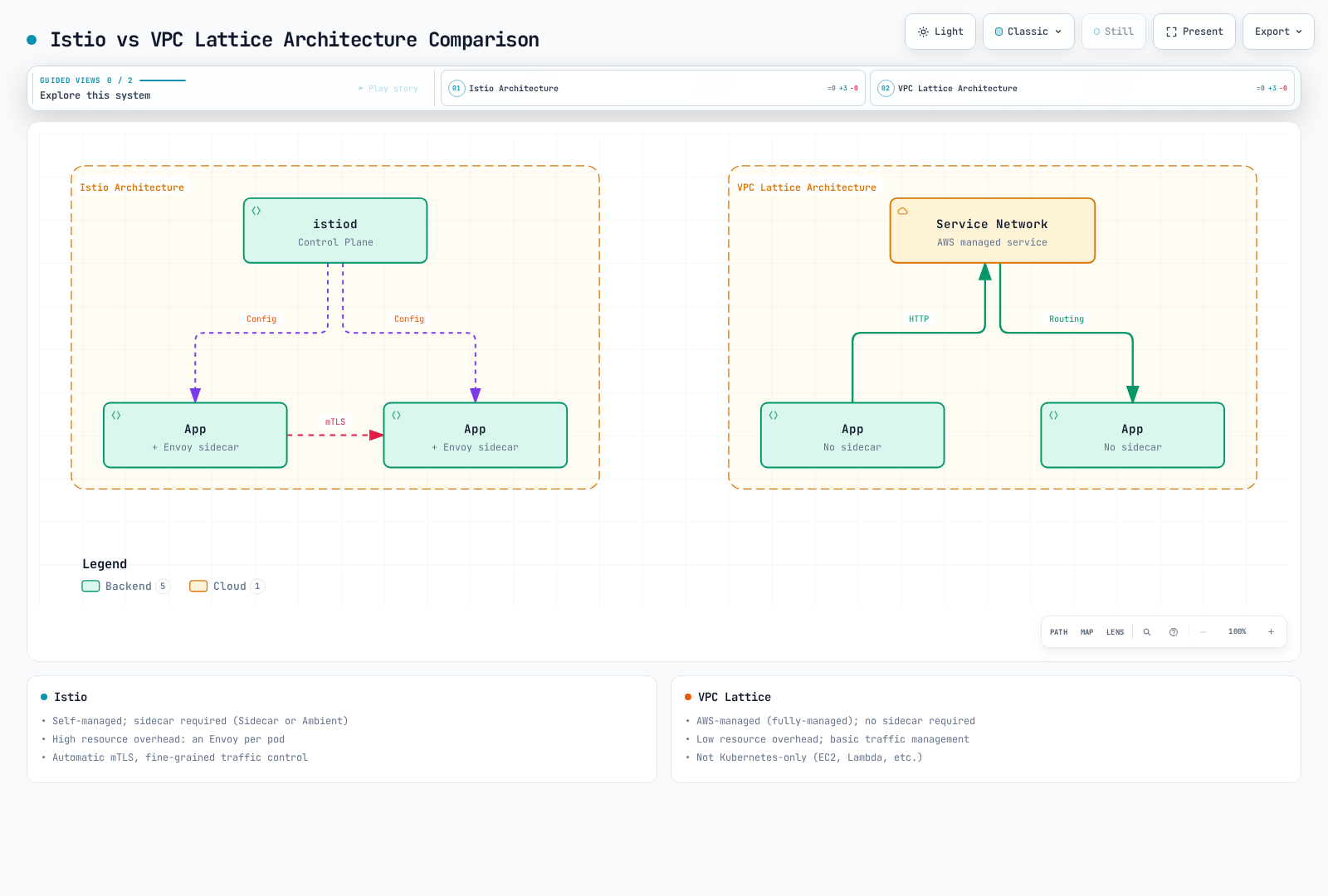
Feature Comparison
| Property | Istio | VPC Lattice |
|---|---|---|
| Management | Self-managed | AWS-managed (Fully-managed) |
| Sidecar | Sidecars in sidecar mode; none in ambient | Not required |
| Resource Overhead | Depends on sidecar/ambient topology | Low (no sidecar) |
| Complexity | High | Low |
| Learning Curve | Steep | Gentle |
| Traffic Management | Very advanced (fine-grained control) | Basic (sufficient features) |
| mTLS | Managed workload identities/certificates | Application-managed over TLS passthrough |
| Observability | Rich metrics, traces | Basic metrics |
| Fault Injection | Supported | Not supported |
| Circuit Breaker | Fine-grained control | No equivalent Istio policy API; service quotas are different |
| Rate Limiting | Local + Global | No equivalent Istio policy API; service quotas are different |
| Multi-cluster | Strong support | Cross-VPC connectivity |
| Cross-account | Complex | Simple (native support) |
| Cost | Compute cost (EC2) | Service usage cost |
| Vendor Lock-in | None (open source) | AWS lock-in |
| Kubernetes Only | No (VM support) | No (EC2, Lambda, etc.) |
VPC Lattice TLS passthrough retains application TLS/mTLS but cannot enforce IAM identity-based auth or use Lambda targets on that listener. HTTPS listeners and TLS passthrough have different security capabilities.
When to Choose Istio
Istio is suitable when:
- Fine-grained Traffic Control Needed
- Canary deployment, A/B testing, Traffic Mirroring
- Complex routing rules (Header, Cookie-based, etc.)
- Fault Injection for Chaos Engineering
- Strong Security Requirements
- Automatic mTLS encryption between services
- Fine-grained authorization policies
- JWT validation, RBAC
- Advanced Observability Needed
- Detailed metrics (Latency P50/P95/P99)
- Distributed tracing (Jaeger, Zipkin)
- Service topology visualization (Kiali)
- Multi-cluster Mesh
- Communication between multiple EKS clusters
- Cross-cluster failover
- Global load balancing
- Vendor Independence
- Possibility of moving to other clouds or on-premises
- Using Kubernetes standards
Example: Istio's Advanced Traffic Management
apiVersion: networking.istio.io/v1
kind: VirtualService
metadata:
  name: reviews
spec:
  hosts:
  - reviews
  http:
  # Header-based routing
  - match:
    - headers:
        user-agent:
          regex: ".*Mobile.*"
    route:
    - destination:
        host: reviews
        subset: mobile-v2
  # Canary deployment (10%)
  - match:
    - headers:
        x-canary:
          exact: "true"
    route:
    - destination:
        host: reviews
        subset: v3
      weight: 10
    - destination:
        host: reviews
        subset: v2
      weight: 90
  # Traffic Mirroring
  - route:
    - destination:
        host: reviews
        subset: v2
    mirror:
      host: reviews
      subset: v3
    mirrorPercentage:
      value: 100
When to Choose VPC Lattice
VPC Lattice is suitable when:
- Simple Service Connectivity
- Only basic load balancing and routing needed
- Fast implementation is important
- Low Operational Overhead
- Prefer AWS-managed services
- No sidecar management burden
- Cross-VPC/Account Communication
- Connecting services across multiple AWS accounts
- Communication without VPC peering
- Mixed Environments
- EKS + EC2 + Lambda mixed environments
- Using various compute types beyond just Kubernetes
- Cost Optimization
- Reducing sidecar resource costs
- Small-scale services
Using Istio + VPC Lattice Together
The two solutions are not mutually exclusive and can be used together:
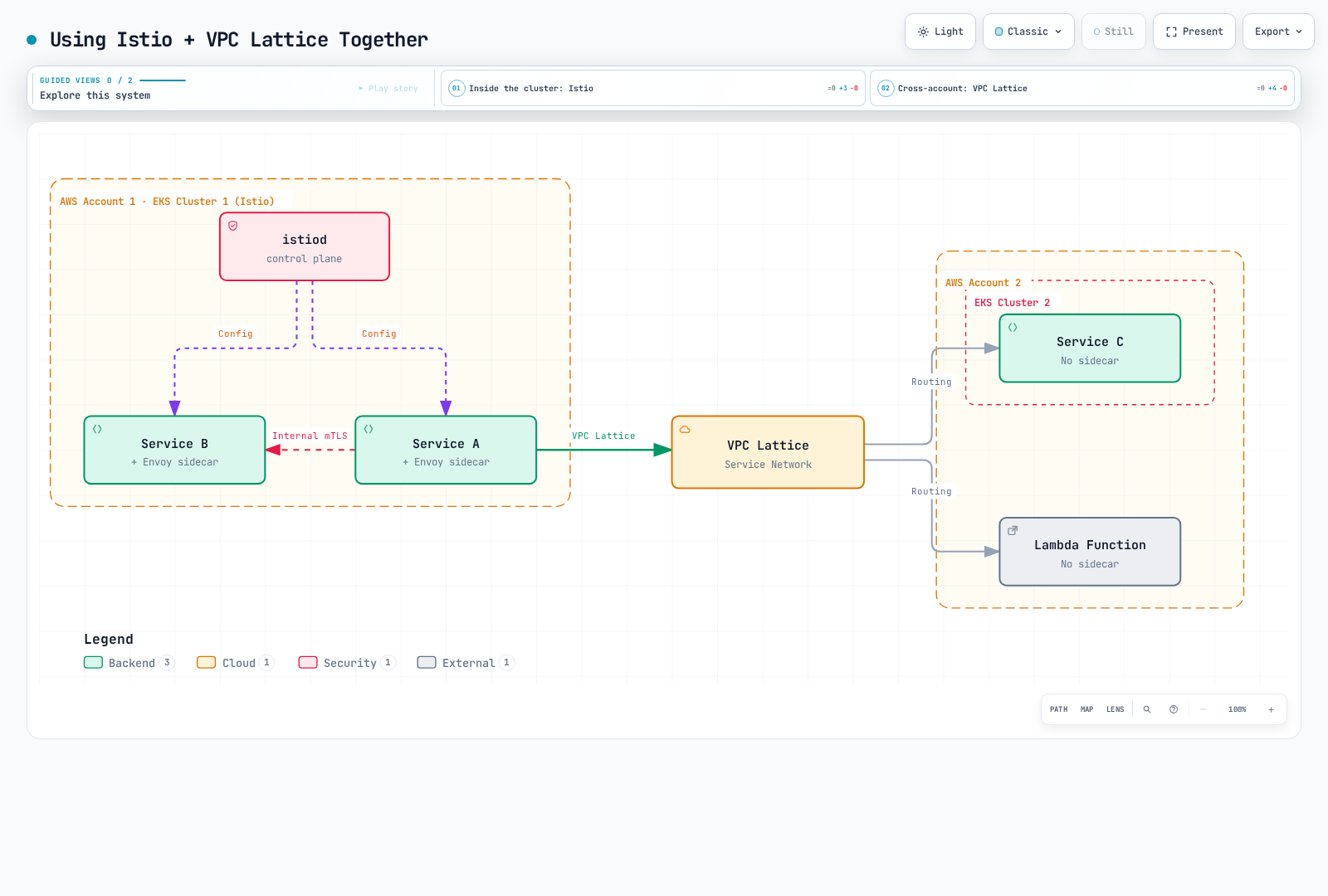
Use Cases:
- Inside cluster: Istio for fine-grained traffic management and security
- Cross-cluster/Cross-account: VPC Lattice for simple connectivity
- Mixed environments: Use VPC Lattice for connecting Istio clusters with Lambda/EC2
Istio vs Cilium (eBPF-based)
Cilium is a Kubernetes networking and security solution using eBPF.
Architecture Comparison
| Property | Istio | Cilium |
|---|---|---|
| Technology Stack | Envoy Proxy (sidecar) | eBPF (kernel level) |
| Primary Purpose | Service Mesh | CNI + Service Mesh |
| Networking | Operates on top of Kubernetes CNI | Provides CNI itself |
| Performance | Good | Excellent (kernel level) |
| Resource Usage | High (sidecar) | Low (kernel level) |
| L7 Features | Very powerful | Basic |
| Observability | Rich | Hubble (basic) |
| Learning Curve | Steep | Steep |
| Maturity | High | Medium (Service Mesh features) |
Feature Comparison
| Feature | Istio | Cilium |
|---|---|---|
| Network Policy | Kubernetes + Istio | Kubernetes + Cilium (more powerful) |
| L7 Load Balancing | Very fine-grained | Basic |
| mTLS | Automatic workload mTLS | Mutual authentication and WireGuard/IPsec encryption are separate |
| Traffic Management | Very advanced | Basic |
| Observability | Prometheus, Jaeger, Kiali | Hubble |
| Performance | Good | Excellent |
| Multi-cluster | Strong | Cluster Mesh |
When to Choose What
Choose Istio:
- L7 traffic management is core requirement
- Need powerful service mesh features
- Need rich observability and debugging tools
Choose Cilium:
- Considering CNI replacement
- Network security is main concern
- Performance optimization is important
- Want to leverage eBPF technology
Using Together:
- Can use Cilium as CNI and Istio as Service Mesh
- However, consider feature overlap and increased complexity
EKS-Specific Optimization
For ambient workloads using VPC CNI Pod ENI trunking and SecurityGroupPolicy, review the EKS ambient prerequisites: strict pod-security-group enforcement can break link-local health probes. The documented options include standard enforcing mode or exec probes; assess the policy implications before changing the CNI mode.
IAM Roles for Service Accounts (IRSA) Integration
EKS Pod Identity is another supported option for AWS API credentials on EC2-backed nodes. It requires the Pod Identity Agent and compatible AWS SDKs; it does not use the IRSA role annotation. Neither mechanism replaces Istio SPIFFE workload identity.
Set up IRSA to allow Istio workloads secure access to AWS services.
IRSA Configuration
# 1. Create OIDC provider
eksctl utils associate-iam-oidc-provider \
    --cluster my-cluster \
    --approve

# 2. Create IAM policy
cat <<EOF > app-policy.json
{
    "Version": "2012-10-17",
    "Statement": [
        {
            "Effect": "Allow",
            "Action": [
                "s3:GetObject",
                "s3:ListBucket"
            ],
            "Resource": [
                "arn:aws:s3:::my-bucket",
                "arn:aws:s3:::my-bucket/*"
            ]
        }
    ]
}
EOF

aws iam create-policy \
    --policy-name MyAppS3Policy \
    --policy-document file://app-policy.json

# 3. Link IAM Role to Service Account
eksctl create iamserviceaccount \
    --cluster my-cluster \
    --namespace default \
    --name my-app-sa \
    --role-name my-app-role \
    --attach-policy-arn "arn:aws:iam::<ACCOUNT_ID>:policy/MyAppS3Policy" \
    --approve
Using Istio with IRSA
apiVersion: v1
kind: ServiceAccount
metadata:
  name: my-app-sa
  namespace: default
  annotations:
    eks.amazonaws.com/role-arn: arn:aws:iam::<ACCOUNT_ID>:role/my-app-role
---
apiVersion: apps/v1
kind: Deployment
metadata:
  name: my-app
  namespace: default
spec:
  selector:
    matchLabels:
      app: my-app
  template:
    metadata:
      labels:
        app: my-app
    spec:
      serviceAccountName: my-app-sa  # Using IRSA
      containers:
      - name: app
        image: my-app:latest
        env:
        - name: AWS_REGION
          value: us-west-2
AWS Certificate Manager (ACM) Integration
How to use ACM certificates with Istio Gateway.
TLS Termination at NLB
apiVersion: v1
kind: Service
metadata:
  name: istio-ingressgateway
  namespace: istio-system
  annotations:
    service.beta.kubernetes.io/aws-load-balancer-type: "external"
    service.beta.kubernetes.io/aws-load-balancer-nlb-target-type: "ip"
    service.beta.kubernetes.io/aws-load-balancer-ssl-cert: "arn:aws:acm:region:account:certificate/cert-id"
    service.beta.kubernetes.io/aws-load-balancer-ssl-ports: "443"
    service.beta.kubernetes.io/aws-load-balancer-backend-protocol: "tcp"
spec:
  type: LoadBalancer
  selector:
    istio: ingressgateway
  ports:
  - name: https
    port: 443
    targetPort: 8080
This is a separate variant: ACM TLS ends at the NLB, and the target receives plaintext HTTP. Replace the TLS Gateway with this HTTP listener on Service port 443; do not use SIMPLE TLS or an HTTPS redirect for this backend.
apiVersion: networking.istio.io/v1
kind: Gateway
metadata:
  name: nlb-terminated-gateway
  namespace: istio-system
spec:
  selector:
    istio: ingressgateway
  servers:
  - port:
      number: 443
      name: http-after-nlb
      protocol: HTTP
    hosts:
    - "myapp.example.com"
TLS Termination at Istio (ACM Private CA)
# Generate a private key and CSR locally; clients must trust this private CA
openssl req -new -newkey rsa:2048 -nodes \
  -keyout private-key.pem -out csr.pem \
  -subj '/CN=myapp.example.com' -addext 'subjectAltName=DNS:myapp.example.com'

CA_ARN='arn:aws:acm-pca:region:account:certificate-authority/ca-id'
CERT_ARN=$(aws acm-pca issue-certificate \
  --certificate-authority-arn "$CA_ARN" \
  --csr fileb://csr.pem \
  --signing-algorithm SHA256WITHRSA \
  --validity Value=365,Type=DAYS \
  --query CertificateArn --output text)
aws acm-pca wait certificate-issued \
  --certificate-authority-arn "$CA_ARN" --certificate-arn "$CERT_ARN"
aws acm-pca get-certificate \
  --certificate-authority-arn "$CA_ARN" --certificate-arn "$CERT_ARN" \
  --output json > issued-certificate.json
jq -r '.Certificate + "\n" + .CertificateChain' issued-certificate.json > certificate-chain.pem
kubectl create secret tls my-tls-secret \
--cert=certificate-chain.pem --key=private-key.pem -n istio-systemapiVersion: networking.istio.io/v1
kind: Gateway
metadata:
name: my-gateway
namespace: istio-system
spec:
selector:
istio: ingressgateway
servers:
- port:
number: 443
name: https
protocol: HTTPS
tls:
mode: SIMPLE
credentialName: my-tls-secret # ACM certificate
hosts:
- "myapp.example.com"Certificate issuance alone does not install or renew the Secret. Automate renewal and Secret updates; an ACM ARN cannot be used directly as an Istio credentialName.
CloudWatch Container Insights Integration
Implement unified monitoring by sending Istio metrics to CloudWatch.
CloudWatch Agent Configuration
# For EC2-backed EKS; OIDC association is required for this IRSA path
kubectl create namespace amazon-cloudwatch --dry-run=client -o yaml | kubectl apply -f -
eksctl create iamserviceaccount \
  --cluster my-cluster --namespace amazon-cloudwatch --name cwagent-prometheus \
  --attach-policy-arn arn:aws:iam::aws:policy/CloudWatchAgentServerPolicy --approve
curl -fsSL -o prometheus-eks.yaml \
  https://raw.githubusercontent.com/aws-samples/amazon-cloudwatch-container-insights/latest/k8s-deployment-manifest-templates/deployment-mode/service/cwagent-prometheus/prometheus-eks.yaml
# Review/pin this manifest; merge the Istio scrape jobs and EMF declarations below before applying
kubectl apply -f prometheus-eks.yaml
kubectl rollout status deployment/cwagent-prometheus -n amazon-cloudwatch
A namespace and ServiceAccount alone do not deploy the agent. The official manifest supplies the Deployment, RBAC, and mounted ConfigMaps. Preserve the IRSA annotation if a deployment tool replaces ServiceAccounts. For an existing installation, update the owning configuration instead of deploying a second collector.
Prometheus Metric Scraping
# prometheus-config.yaml
apiVersion: v1
kind: ConfigMap
metadata:
  name: prometheus-config
  namespace: amazon-cloudwatch
data:
  prometheus.yaml: |
    global:
      scrape_interval: 1m
      scrape_timeout: 10s

    scrape_configs:
    # Istio Control Plane metrics
    - job_name: 'istiod'
      kubernetes_sd_configs:
      - role: pod
        namespaces:
          names:
          - istio-system
      relabel_configs:
      - source_labels: [__meta_kubernetes_pod_label_app, __meta_kubernetes_pod_container_port_name]
        action: keep
        regex: istiod;http-monitoring

    # Envoy sidecar metrics
    - job_name: 'envoy-stats'
      metrics_path: /stats/prometheus
      kubernetes_sd_configs:
      - role: pod
      relabel_configs:
      - source_labels: [__meta_kubernetes_pod_container_port_name]
        action: keep
        regex: '.*-envoy-prom'
Merge a declaration into prometheus-cwagentconfig under logs.metrics_collected.prometheus.emf_processor.metric_declaration; a scrape ConfigMap alone does not publish custom CloudWatch metrics. Preserve the manifest’s prometheus_config_path and other settings, then redeploy/restart the agent. For example:
{
  "source_labels": ["job"],
  "label_matcher": "^envoy-stats$",
  "dimensions": [["ClusterName", "job"]],
  "metric_selectors": ["^istio_requests_total$", "^istio_tcp_received_bytes_total$"]
}
CloudWatch Logs Insights Query
Run these as separate queries. They require proxy logs ingested by a log collector; Prometheus collection does not collect access logs. The latency query assumes structured JSON with a numeric request_duration_ms field (configure it from Envoy %DURATION% or parse your format first).
# Istio error log analysis
fields @timestamp, @message
| filter @logStream like /istio-proxy/
| filter @message like /error/
| sort @timestamp desc
| limit 100# Request latency analysis
fields @timestamp, request_duration_ms
| filter @logStream like /istio-proxy/
| stats avg(request_duration_ms), max(request_duration_ms), pct(request_duration_ms, 95) by bin(5m)EKS Optimization Settings
1. Pod Resources Optimization
# Envoy sidecar resource optimization
apiVersion: install.istio.io/v1alpha1
kind: IstioOperator
spec:
  meshConfig:
    defaultConfig:
      concurrency: 2  # Envoy worker threads, not a connection-pool limit
      proxyMetadata:
        # EKS optimization
        ISTIO_META_DNS_CAPTURE: "true"
  values:
    global:
      proxy:
        resources:
          requests:
            cpu: 100m
            memory: 128Mi
          limits:
            cpu: 2000m
            memory: 1024Mi
2. Cluster Autoscaler Considerations
HPA scales replicas and needs Metrics Server and resource requests; Cluster Autoscaler/Karpenter scales nodes. Configure the existing chart-managed HPA rather than creating a competing one.
# Istio Gateway Autoscaling
apiVersion: autoscaling/v2
kind: HorizontalPodAutoscaler
metadata:
  name: istio-ingressgateway
  namespace: istio-system
spec:
  scaleTargetRef:
    apiVersion: apps/v1
    kind: Deployment
    name: istio-ingressgateway
  minReplicas: 2
  maxReplicas: 10
  metrics:
  - type: Resource
    resource:
      name: cpu
      target:
        type: Utilization
        averageUtilization: 80
  - type: Resource
    resource:
      name: memory
      target:
        type: Utilization
        averageUtilization: 80
3. Pod Disruption Budget
apiVersion: policy/v1
kind: PodDisruptionBudget
metadata:
  name: istio-ingressgateway
  namespace: istio-system
spec:
  minAvailable: 1
  selector:
    matchLabels:
      app: istio-ingressgateway
Best Practices
1. Load Balancer Selection Guide
Use NLB:
- gRPC, WebSocket, and other long-lived connections
- Handling millions of requests per second
- Static IP required
- TLS termination at Istio
Use ALB:
- HTTP/HTTPS only
- Path-based routing
- WAF security required
- Cognito authentication integration
2. TLS Termination Location
Terminate at Load Balancer:
- ACM certificate auto-renewal
- Easy management
- Reduced Istio load
Terminate at Istio:
- End-to-end encryption required
- Fine-grained TLS policy control
- Using mTLS
3. Cost Optimization
- Spot Instances: Use for Istio Gateway workloads
- Graviton Instances: Cost savings with ARM-based instances
- Resource Limits: Set appropriate sidecar resource limits
- Ambient Mode: Consider for eliminating sidecar overhead
4. Security
- IRSA: Access AWS services with IAM roles
- Security Groups: Principle of least privilege
- mTLS: Enable encryption between services
- Network Policy: Enable enforcement with Amazon VPC CNI, Cilium, or Calico; verify platform support
5. Monitoring
- CloudWatch: Unified logs and metrics
- X-Ray: Distributed tracing
- Prometheus + Grafana: Detailed metrics
- Kiali: Service mesh visualization
Next Steps
If you've completed AWS integration, refer to the following documents:
- Traffic Management: Advanced traffic management features
- Security: mTLS and authentication/authorization
- Observability: Metrics, logs, trace collection