vLLM Deployment & Optimization
Review baseline: vLLM 0.29.0, CUDA 12.9 image variant; historical 0.6.4.post1 benchmark separated Latest release checked: vLLM 0.31.0 (October 5, 2026), checked October 12, 2026 Last Updated: October 12, 2026
vLLM is an open-source inference engine for generative models and supported multimodal/pooling workloads. It should not be expanded as “Vector Language Model.” This chapter reviews a specific release and EKS operating boundaries without universal speedup or model-support guarantees.
Lab Environment Setup
This chapter's manifests and local checks use v0.29.0, released September 9, 2026. Later releases followed: v0.30.0 (September 22, 2026) and v0.31.0 (October 5, 2026).
In v0.31.0:
- Per-request
mm_processor_kwargsandmedia_io_kwargsare rejected by default. Allow them only with the explicit--trust-request-mm-kwargsoption. tokenizer_mode="slow"was removed.
This chapter's 0.29.0 examples have not been re-run on v0.30.0 or v0.31.0. Review the release changes and compatibility before upgrading.
The 0.29.0 default PyPI/Docker path uses CUDA 13.0, with a separate v0.29.0-cu129 image. Some tagged installation text still calls CUDA 12.9 the default; inspect the actual image variant/digest.
PyPI requires Python >=3.10, ❤️.15, while the tagged GPU guide lists 3.10–3.13. This is not a guarantee for every Python/PyTorch/CUDA combination. The NVIDIA path requires compute capability 7.5 or newer, excluding V100 (7.0). Kernels, dtypes and quantization can impose additional device requirements.
Follow the AMI/driver/device-plugin conditions in AI/ML workloads. A CUDA image is not a drop-in Trainium/Inferentia deployment; validate Neuron or other platform plugins separately. Size GPU, RAM and disk for the model/cache/concurrency rather than treating g5.2xlarge or 50GB as universal minimums.
Introduction to vLLM
vLLM is an LLM inference engine with the following characteristics:
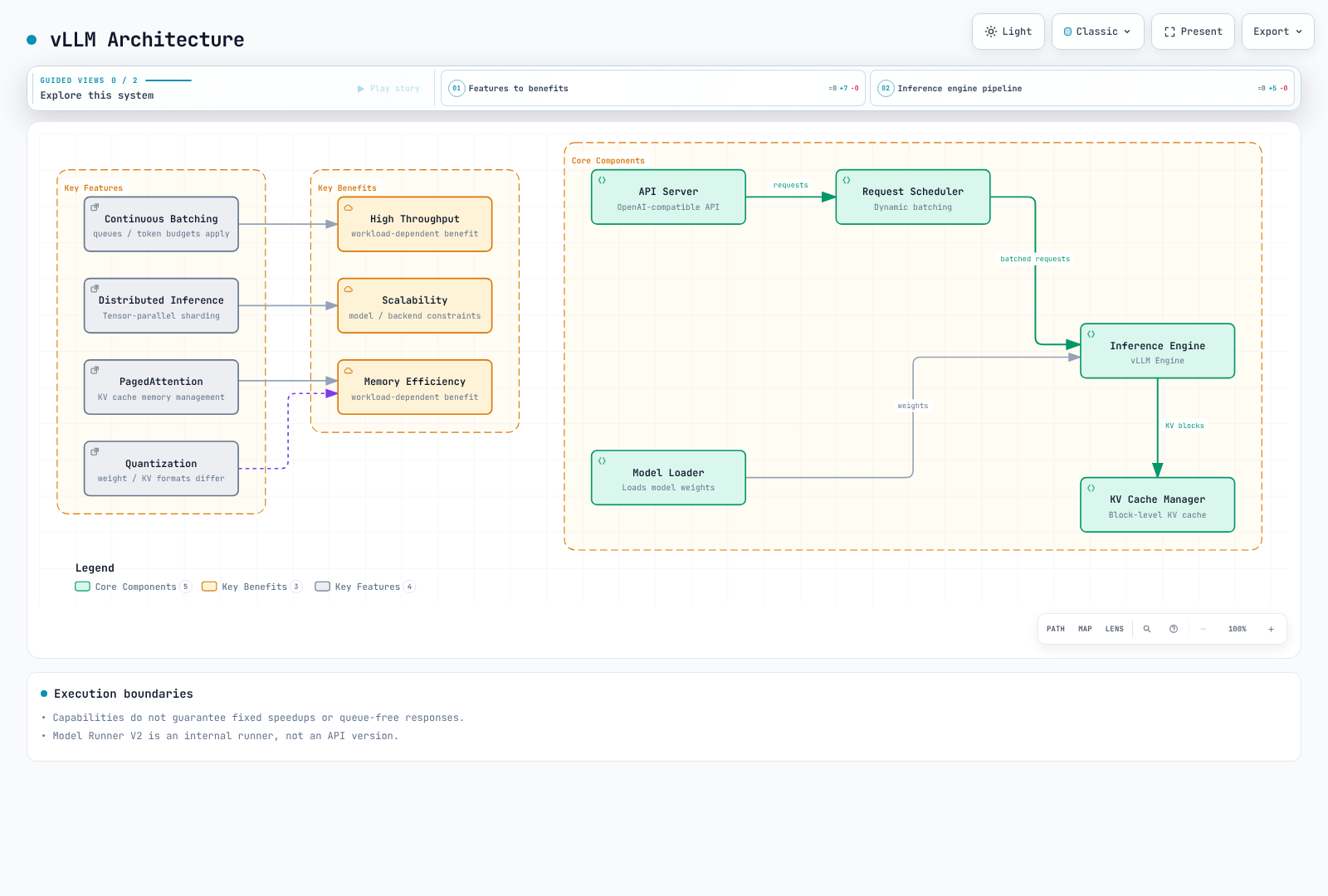
Capabilities and Support Boundaries
| Capability | Meaning and conditions |
|---|---|
| PagedAttention / KV cache | Manages token blocks to reduce waste; kernels/cache layouts depend on model/backend |
| Continuous batching | Scheduler adjusts work each step; no guarantee of immediate admission, no queueing or fixed speedup |
| TP / PP / DP / EP | Tensor, pipeline, data and expert parallelism are different axes requiring model/backend/network support |
| Precision / quantization | Distinguish FP16/BF16 dtypes from FP8/INT8/INT4/AWQ formats, and weight quantization from KV-cache quantization |
| Prefix caching / chunked prefill | Inspect supported-model defaults and overrides; not full-response caching or accuracy improvement |
| Structured outputs | response_format or structured_outputs constrains format; truth and business validity need separate checks |
| Tool calling | Requires model/chat template/parser and a client execution loop; server does not automatically execute tools |
| LoRA | Requires model support and adapter registration; changing request model alone does not load an adapter |
0.29.0 makes Model Runner V2 the default runner. This is not the OpenAI-compatible API version or a separate “vLLM Engine V2.” Model-family names do not guarantee all sizes, quantization or vision variants; verify architecture, artifact/tokenizer, chat template and kernels.
Current CLI Feature Configuration
Use vllm serve instead of the deprecated python -m vllm.entrypoints.openai.api_server. Previous --speculative-model/--num-speculative-tokens options are replaced by --speculative-config in the current CLI.
# Syntax when compatible target/draft models and sufficient memory are prepared.
vllm serve /models/target \
  --speculative-config '{"model":"/models/draft","method":"draft_model","num_speculative_tokens":5}'
This illustrates syntax; it does not provide those model files or establish a speedup. Draft acceptance, extra memory and communication costs can offset gains.
Register startup LoRA with --enable-lora --lora-modules adapter=/models/adapter. Runtime loading/unloading requires the separate VLLM_ALLOW_RUNTIME_LORA_UPDATING opt-in and a restricted operator path. --enable-auto-tool-choice needs the appropriate --tool-call-parser. Multimodal URLs also require SSRF controls, allowed domains and download/decode limits.
System Requirements
System requirements for deploying vLLM on EKS:
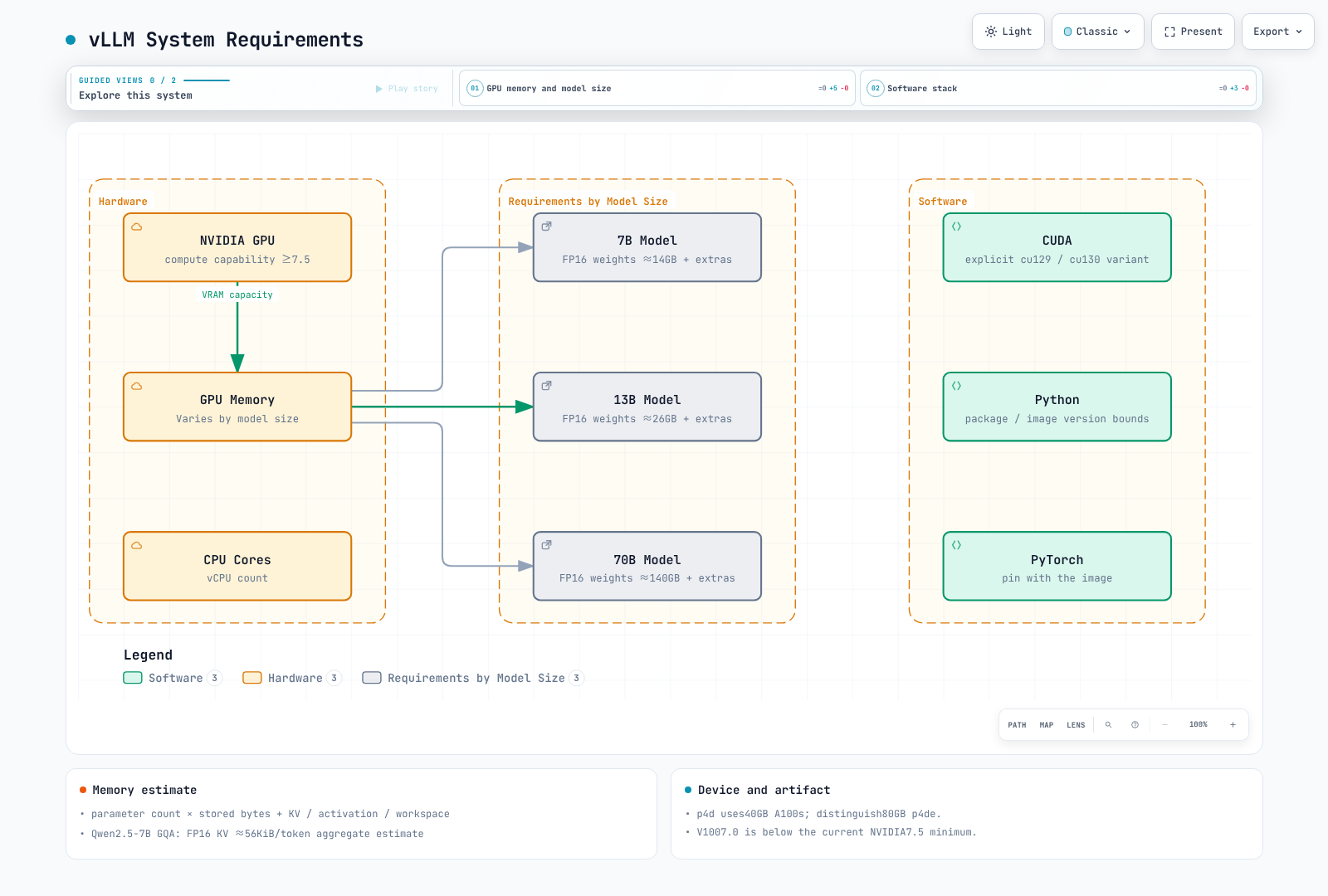
Start weight memory estimation with parameter count × stored bytes. FP16/BF16 weights alone for 70B are about 140GB, so 80GB is not a universal 70B requirement. Add KV cache, activations, CUDA graphs/workspaces and communication buffers, accounting for quantization metadata and replicated tensors.
A common dense-attention KV estimate is below. Use KV-head count for GQA/MQA rather than substituting hidden size from an MHA-only formula.
KV bytes ≈ 2 × layers × KV_heads × head_dim × cached_tokens × bytes_per_elementcached_tokens sums tokens retained across concurrent requests. TP sharding/replication, sliding windows, MLA and hybrid architectures need separate treatment. Current Qwen2.5-7B config has 28 layers, 4 KV heads and head dimension 128: about 56KiB/token at two bytes per element, or 224MiB for one 4096-token sequence. This is an aggregate estimate, not measured per-GPU or total model memory.
p4d.24xlarge uses 40GB A100s; distinguish 80GB A100 p4de instances. Compare p5/g6/g6e and other choices against regional capacity, drivers and workload needs. Fixed rules such as four CPU cores per GPU or RAM twice the weights do not replace measurement.
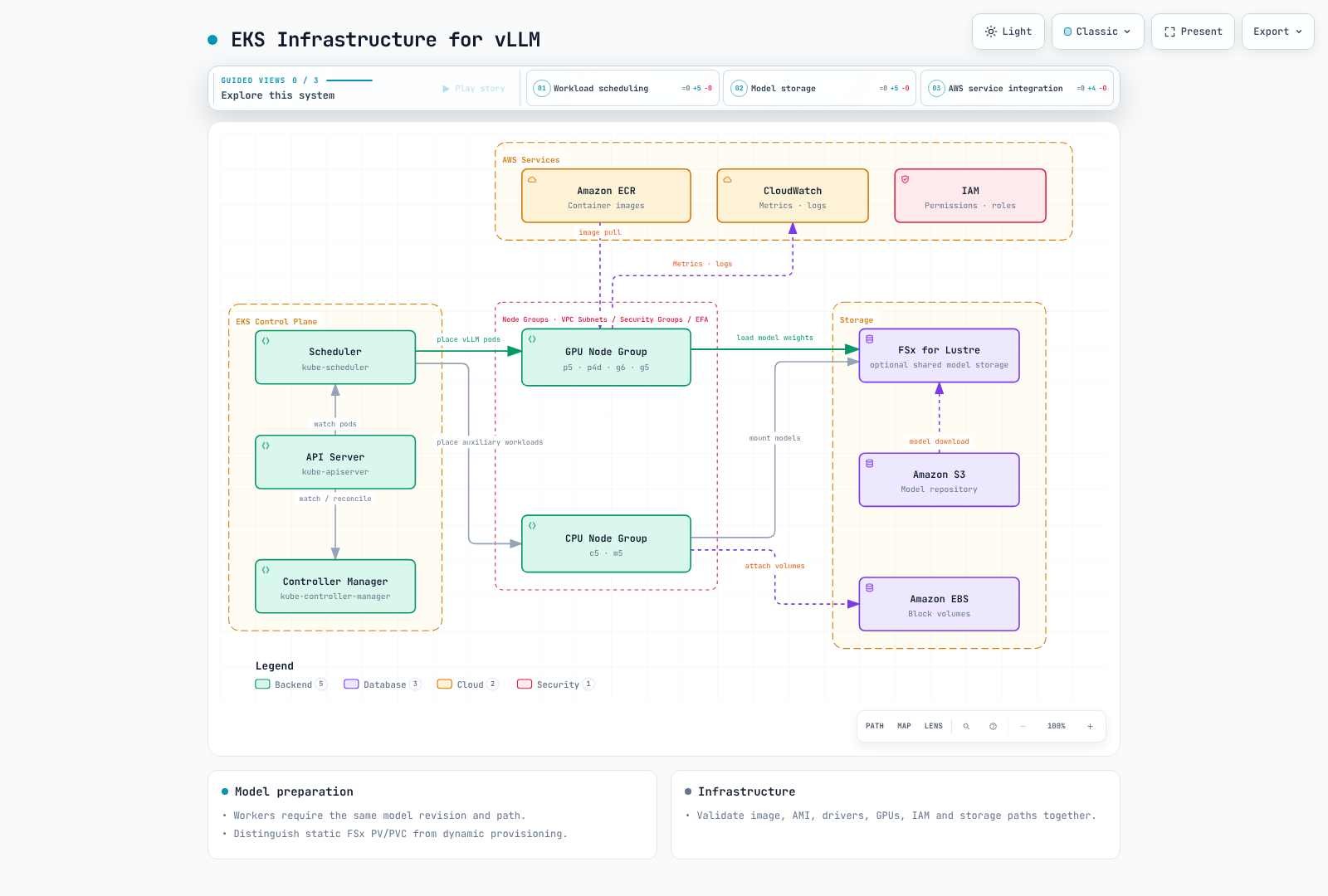
EKS Infrastructure Configuration
Storage and Model Preparation
FSx for Lustre is one option, not mandatory or universally optimal. Compare local NVMe/EBS, reusable caches, object storage and shared filesystems by loading time, cost and concurrency. emptyDir can survive a container restart but not Pod deletion/recreation.
Distinguish static FSx PV/PVC and dynamic provisioning. Hugging Face snapshot_download downloads from Hugging Face, not S3. Record repository revision, integrity, license and access permissions. For gated models, mount tokens as files and use a download stage that reads the file. Do not enable trust in executable remote code by default.
The example below uses a verified revision of public Qwen3-0.6B without a token. Its emptyDir cache downloads again after Pod recreation. Multi-node workers require the same model revision/path.
vLLM Deployment
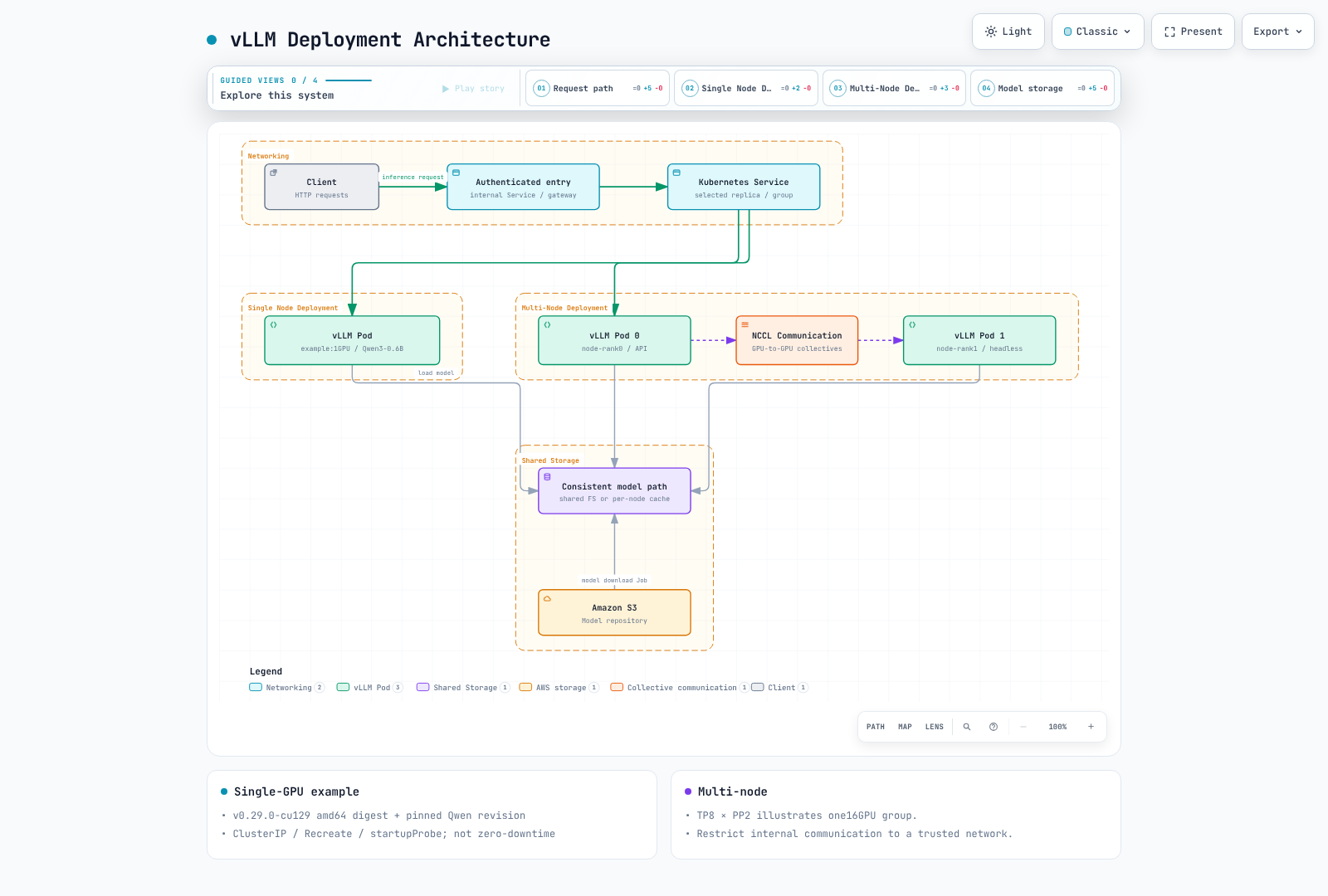
Deployment Architecture
The following diagram shows two main architectures for deploying vLLM on EKS:
Single-GPU Configuration Example
This is a template for review before GPU execution. Prepare the namespace and GPU driver/plugin. The digest identifies the v0.29.0-cu129 amd64 artifact; the model revision identifies the inspected public Qwen3-0.6B snapshot. Image pulling, non-root execution, kernel compilation and inference were not executed in this audit and require environment validation.
Recreate avoids requiring an extra GPU replica but causes update downtime. startupProbe allows about 15 minutes for startup; readiness is not an SLA. The Service is ClusterIP and does not create public ingress.
apiVersion: apps/v1
kind: Deployment
metadata:
  name: vllm-demo
  namespace: ml-inference
spec:
  replicas: 1
  strategy:
    type: Recreate
  selector:
    matchLabels:
      app: vllm-demo
  template:
    metadata:
      labels:
        app: vllm-demo
    spec:
      automountServiceAccountToken: false
      nodeSelector:
        kubernetes.io/arch: amd64
      securityContext:
        runAsNonRoot: true
        runAsUser: 1000
        runAsGroup: 1000
        fsGroup: 1000
        seccompProfile:
          type: RuntimeDefault
      containers:
        - name: vllm
          image: vllm/vllm-openai@sha256:3e10e8189823e0f7ae4620c271bcdaaf64127ec7d0edc351591a508498b7684a
          command: ["vllm", "serve"]
          args:
            - Qwen/Qwen3-0.6B
            - --revision=c1899de289a04d12100db370d81485cdf75e47ca
            - --served-model-name=qwen3-demo
            - --dtype=float16
            - --max-model-len=2048
            - --max-num-seqs=8
            - --gpu-memory-utilization=0.80
            - --host=0.0.0.0
            - --port=8000
          env:
            - name: HF_HOME
              value: /cache/huggingface
            - name: XDG_CACHE_HOME
              value: /cache
            - name: XDG_CONFIG_HOME
              value: /cache/config
            - name: VLLM_NO_USAGE_STATS
              value: "1"
            - name: VLLM_CACHE_ROOT
              value: /cache/vllm
            - name: TORCHINDUCTOR_CACHE_DIR
              value: /cache/torchinductor
            - name: TRITON_CACHE_DIR
              value: /cache/triton
          ports:
            - name: http
              containerPort: 8000
          resources:
            requests:
              cpu: "2"
              memory: 4Gi
              ephemeral-storage: 4Gi
            limits:
              cpu: "4"
              memory: 12Gi
              ephemeral-storage: 12Gi
              nvidia.com/gpu: 1
          securityContext:
            allowPrivilegeEscalation: false
            readOnlyRootFilesystem: true
            capabilities:
              drop: [ALL]
          startupProbe:
            httpGet:
              path: /health
              port: http
            periodSeconds: 10
            failureThreshold: 90
          readinessProbe:
            httpGet:
              path: /health
              port: http
            periodSeconds: 10
          volumeMounts:
            - name: cache
              mountPath: /cache
            - name: tmp
              mountPath: /tmp
            - name: shm
              mountPath: /dev/shm
      volumes:
        - name: cache
          emptyDir:
            sizeLimit: 8Gi
        - name: tmp
          emptyDir:
            sizeLimit: 1Gi
        - name: shm
          emptyDir:
            medium: Memory
            sizeLimit: 2Gi
---
apiVersion: v1
kind: Service
metadata:
  name: vllm-demo
  namespace: ml-inference
  labels:
    app: vllm-demo
spec:
  type: ClusterIP
  selector:
    app: vllm-demo
  ports:
    - name: http
      port: 8000
      targetPort: http
Multi-Node Sharding Versus Independent Replicas
Sharding one model replica requires TP/PP plus Ray or multiprocessing coordination. Independent API-server replicas each load the model and provide horizontal scaling; they are different designs.
0.29.0 supports multiprocessing --nnodes, --node-rank, --master-addr and --master-port. The old --rank, --tensor-parallel-rank and --distributed-init-method examples are not these CLI options. With two prepared nodes providing eight GPUs each, the command shape is:
# node0: substitute an actual trusted head IP and identical prepared model path.
vllm serve /models/model --distributed-executor-backend mp \
  --tensor-parallel-size 8 --pipeline-parallel-size 2 \
  --nnodes 2 --node-rank 0 --master-addr 10.0.0.10 --master-port 29500
# node1: the worker does not start a duplicate API server.
vllm serve /models/model --distributed-executor-backend mp \
  --tensor-parallel-size 8 --pipeline-parallel-size 2 \
  --nnodes 2 --node-rank 1 --master-addr 10.0.0.10 --master-port 29500 --headless
These commands do not create nodes, model files or connectivity. Kubernetes requires appropriate concurrent worker creation, pre-readiness DNS, per-Pod VLLM_HOST_IP, internal connectivity and shared memory. Ray requires a functioning cluster and compatible Ray dependency before starting one API entry point with --distributed-executor-backend ray; see Ray. Keep internal communication ports private.
Performance Optimization
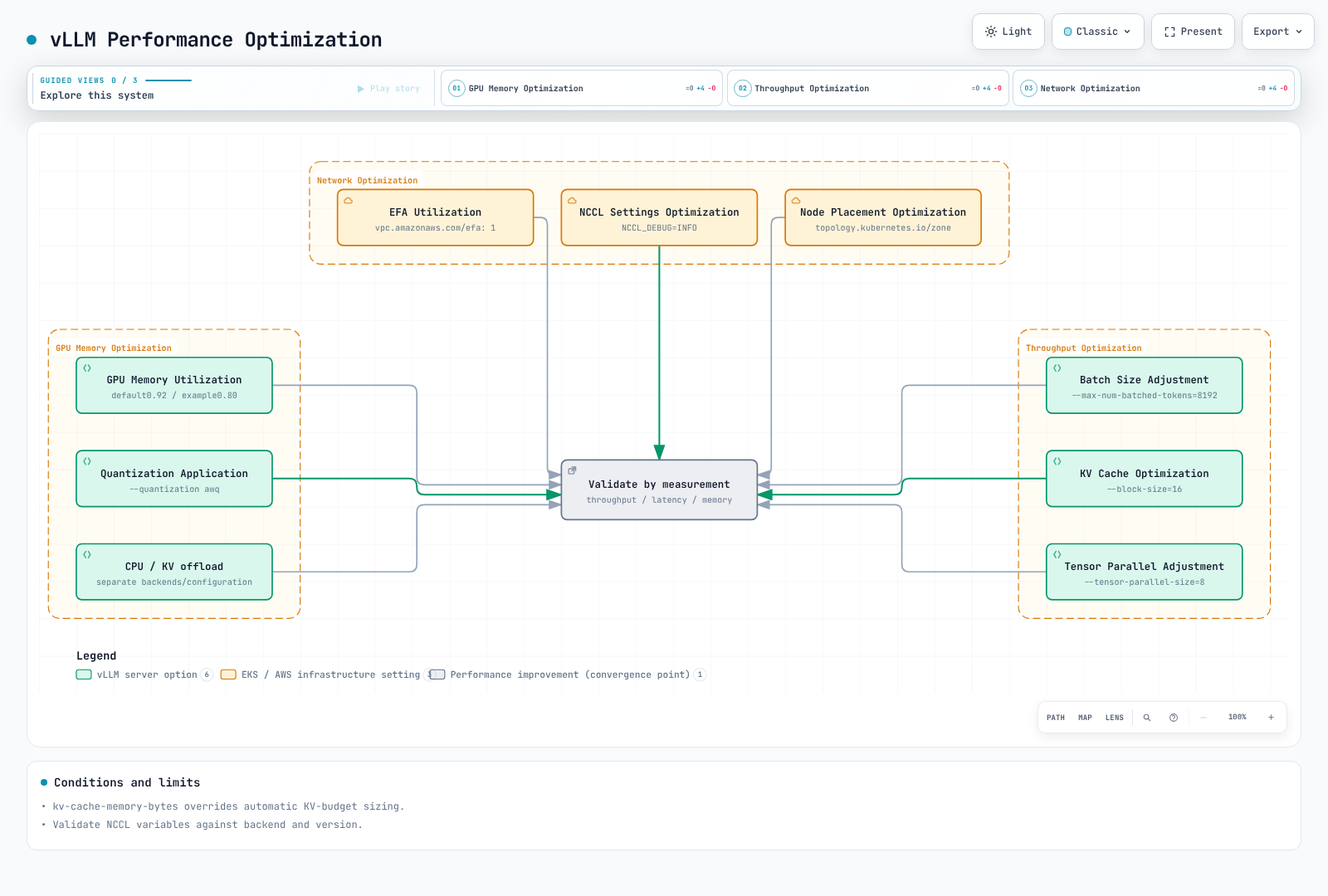
Memory, Scheduler and Communication Options
CacheConfig in 0.29.0 defaults gpu_memory_utilization to 0.92; this is not a hard cap on all process VRAM. The example explicitly chooses 0.80. --kv-cache-memory-bytes overrides automatic KV-cache sizing, so inspect option precedence.
--swap-space is absent from the current CLI. Weight CPU offload and KV offload are separate capabilities/configurations, not a guarantee that host RAM solves GPU limits. Prefix caching can default on for supported models; chunked prefill is also model-dependent. Queue limits, token budgets, max-num-seqs and max-model-len are different controls.
EFA requires supported EC2 devices, AMI/plugin/network and AWS OFI NCCL/libfabric. Do not copy invented NCCL_IB_ENABLE_RDMA flags or arbitrary mlx5/GID settings as universal defaults. Check current NVIDIA/PyTorch variables and actual backend logs. Single-node NCCL tests do not establish multi-node EFA performance.
Historical Measurement: Qwen2.5-7B on a Single L4 GPU
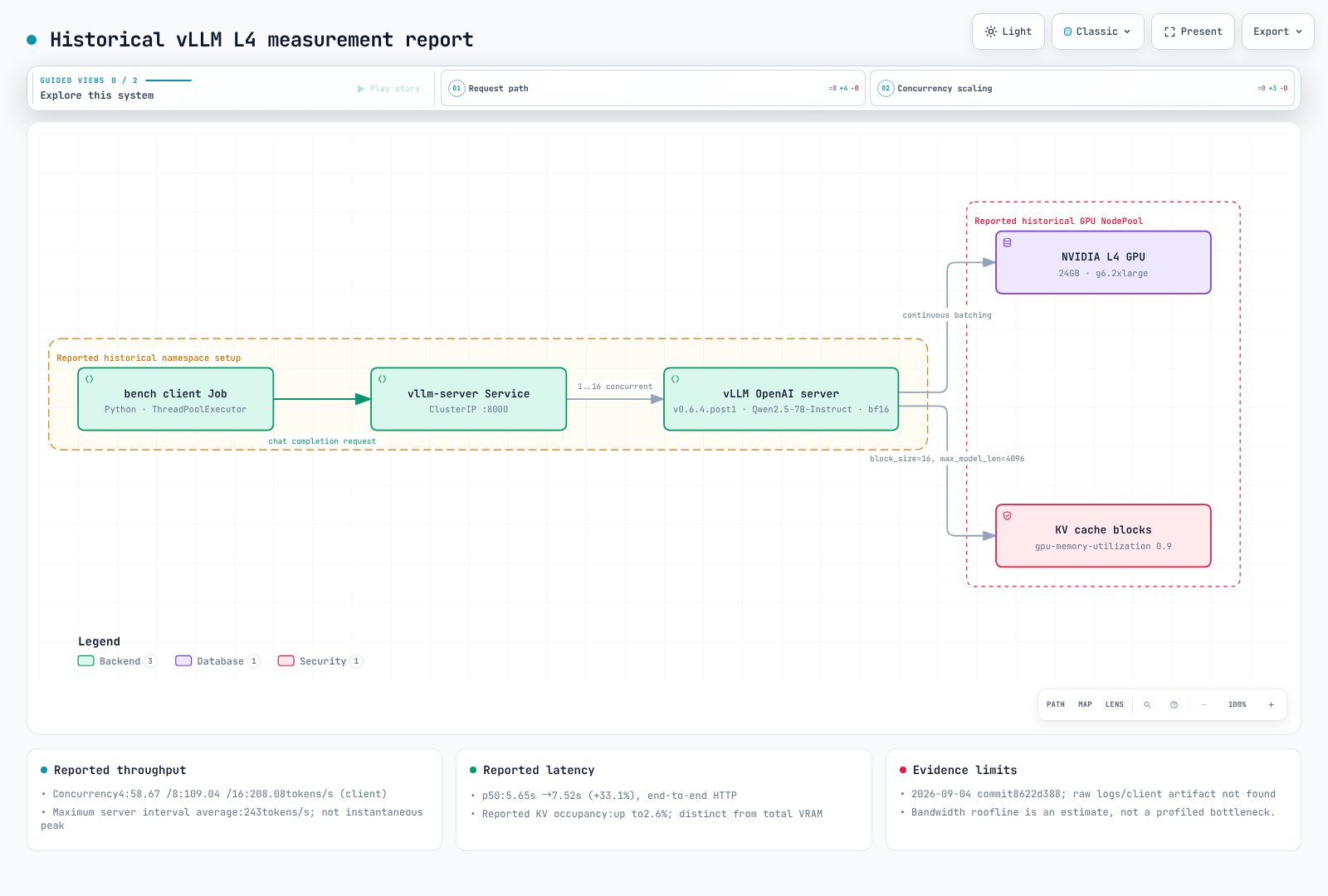
These are historical measurements reported in the September 4, 2026 repository commit. This audit did not find raw request results/server logs or a complete client artifact and did not rerun the experiment. The reported numbers are preserved, not relabeled as current 0.29.0 performance or independently reproduced results.
Setup
- Cluster: a dedicated Karpenter NodePool (
bench-gpu, on-demandg6.2xlarge— 1x NVIDIA L4, 24GB GPU memory, 8 vCPU, 32 GiB RAM), taintednvidia.com/gpu=true:NoScheduleand labeled to join the existingnvidia-device-plugindaemonsets, deleted immediately after the run. - Server:
vllm/vllm-openai:v0.6.4.post1(released 2024-11-15 — the vLLM project has since shipped its V1 engine with prefix caching on by default, so treat this as a snapshot of that release line, not current vLLM), modelQwen/Qwen2.5-7B-Instruct,--dtype bfloat16 --max-model-len 4096 --gpu-memory-utilization 0.90. One precision (bf16, the model's native dtype) with no quantization, speculative decoding, or prefix caching — the plain defaults this page describes elsewhere. - Client: a Python
ThreadPoolExecutorrunning as a Job inside the cluster (a separate, non-GPU node), hitting/v1/chat/completionsthrough thevllm-serverClusterIP Service. Non-streaming,temperature=0,max_tokens=128, 8 rotating short prompts (Kubernetes concept questions asking for 1-2 sentence answers). In practice every response ran close to the 128-token cap (a consistent ~102-token mean across all three concurrent batches) rather than stopping at 1-2 sentences — useful for comparing throughput apples-to-apples across concurrency levels, but worth knowing before reading the latency numbers as "time to answer a short question." - Cold start: from the vLLM engine's startup log to its
/healthendpoint returning200, about 4.5 minutes — dominated by downloading the ~15 GB of Qwen2.5-7B-Instruct weights from Hugging Face into the pod's ephemeral cache. Image pull time is not included; it was not measured separately.
Reproduce
# NodePool (Karpenter) - dedicated, deleted after the run — nodeClassRef points at the cluster's existing GPU EC2NodeClass (AMI/subnets/SG), not shown here
apiVersion: karpenter.sh/v1
kind: NodePool
metadata: { name: bench-gpu }
spec:
  limits: { cpu: "16", memory: 128Gi, nvidia.com/gpu: "1" }
  template:
    metadata:
      labels: { node-type: bench-gpu, nvidia.com/device-plugin.config: default }
    spec:
      expireAfter: 6h
      nodeClassRef: { group: karpenter.k8s.aws, kind: EC2NodeClass, name: gpu }
      requirements:
        - { key: node.kubernetes.io/instance-type, operator: In, values: [g6.2xlarge] }
      taints: [{ key: nvidia.com/gpu, value: "true", effect: NoSchedule }]
---
# vLLM server (namespace bench-gpu) + the ClusterIP Service the client calls
apiVersion: apps/v1
kind: Deployment
metadata: { name: vllm-server, namespace: bench-gpu }
spec:
  replicas: 1
  selector: { matchLabels: { app: vllm-server } }
  template:
    metadata: { labels: { app: vllm-server } }
    spec:
      nodeSelector: { node-type: bench-gpu }
      tolerations: [{ key: nvidia.com/gpu, value: "true", effect: NoSchedule }]
      containers:
        - name: vllm
          image: vllm/vllm-openai:v0.6.4.post1
          args: ["--model", "Qwen/Qwen2.5-7B-Instruct", "--max-model-len", "4096",
                 "--gpu-memory-utilization", "0.90", "--dtype", "bfloat16"]
          ports: [{ containerPort: 8000 }]
          resources:
            limits: { nvidia.com/gpu: "1" }
            requests: { nvidia.com/gpu: "1", cpu: "3", memory: 20Gi }
          readinessProbe: { httpGet: { path: /health, port: 8000 }, initialDelaySeconds: 30, periodSeconds: 10, failureThreshold: 60 }
---
apiVersion: v1
kind: Service
metadata: { name: vllm-server, namespace: bench-gpu }
spec:
  selector: { app: vllm-server }
  ports: [{ port: 8000, targetPort: 8000 }]
The manifests show part of the reported environment. They omit namespace creation, the existing EC2NodeClass and a complete client script, so they do not establish full reproduction. nvidia.com/device-plugin.config:default was a condition of that shared DaemonSet configuration, not a universal scheduling label requirement. The reported on-demand claim also needs the actual historical configuration.
Results
| Concurrency | Requests | Wall time | Client latency p50 / p90 | Client aggregate throughput | Server-reported peak generation throughput | GPU KV cache usage |
|---|---|---|---|---|---|---|
| 1 (serial) | 10 | ~53.2 s (sum of request latencies) | 5.65 s / 7.43 s | ~17-18 tokens/s per request | ~17 tokens/s | 0.1-0.2% |
| 4 | 16 | 27.78 s | 6.99 s / 7.88 s | 58.67 tokens/s | 65-66 tokens/s | 0.4-0.7% |
| 8 | 32 | 30.02 s | 7.18 s / 8.15 s | 109.04 tokens/s | 123-129 tokens/s | 0.8-1.4% |
| 16 | 64 | 31.35 s | 7.52 s / 8.74 s | 208.08 tokens/s | up to 243 tokens/s | 1.5-2.6% |
Client aggregate throughput is completion-token count divided by measured wall time. Server Avg generation throughput is an interval average; its largest logged value is not an instantaneous “true peak.” Time windows, token accounting and HTTP boundaries differ, so they are not directly interchangeable metrics.
Interpretation
Reported p50 increased from 5.65s to 7.52s, about 33.1%. Aggregate throughput at concurrency 4→8→16 was 58.67→109.04→208.08tokens/s. Distinguish this batching observation from causal proof of the underlying bottleneck.
Dividing roughly 300GB/s bandwidth by 15.2GB of weights gives an idealized roofline near 20 tokens/s. This audit has no profiler evidence directly measuring bandwidth or FLOP execution, so it does not establish “definitely memory-bound” or “nearly free additional requests.” KV-cache occupancy and total VRAM use are different quantities.
Caveats
This is a single run (n=1) on one model, one precision (bf16), one GPU type, and one context length — treat it as one calibrated data point, not a general vLLM/L4 performance claim. The client ran inside the cluster (a separate, non-GPU node), so network latency reflects intra-cluster hops, not an external caller. Latency here is full end-to-end HTTP response time, not time-to-first-token (TTFT) — no streaming was tested. Prefix caching, speculative decoding, FP8, and multi-GPU tensor parallelism (all described earlier on this page) were not exercised. Full reproduction needs missing execution artifacts and environment details; do not extrapolate these numbers to a different model size, GPU, or prompt length.
Monitoring and Logging
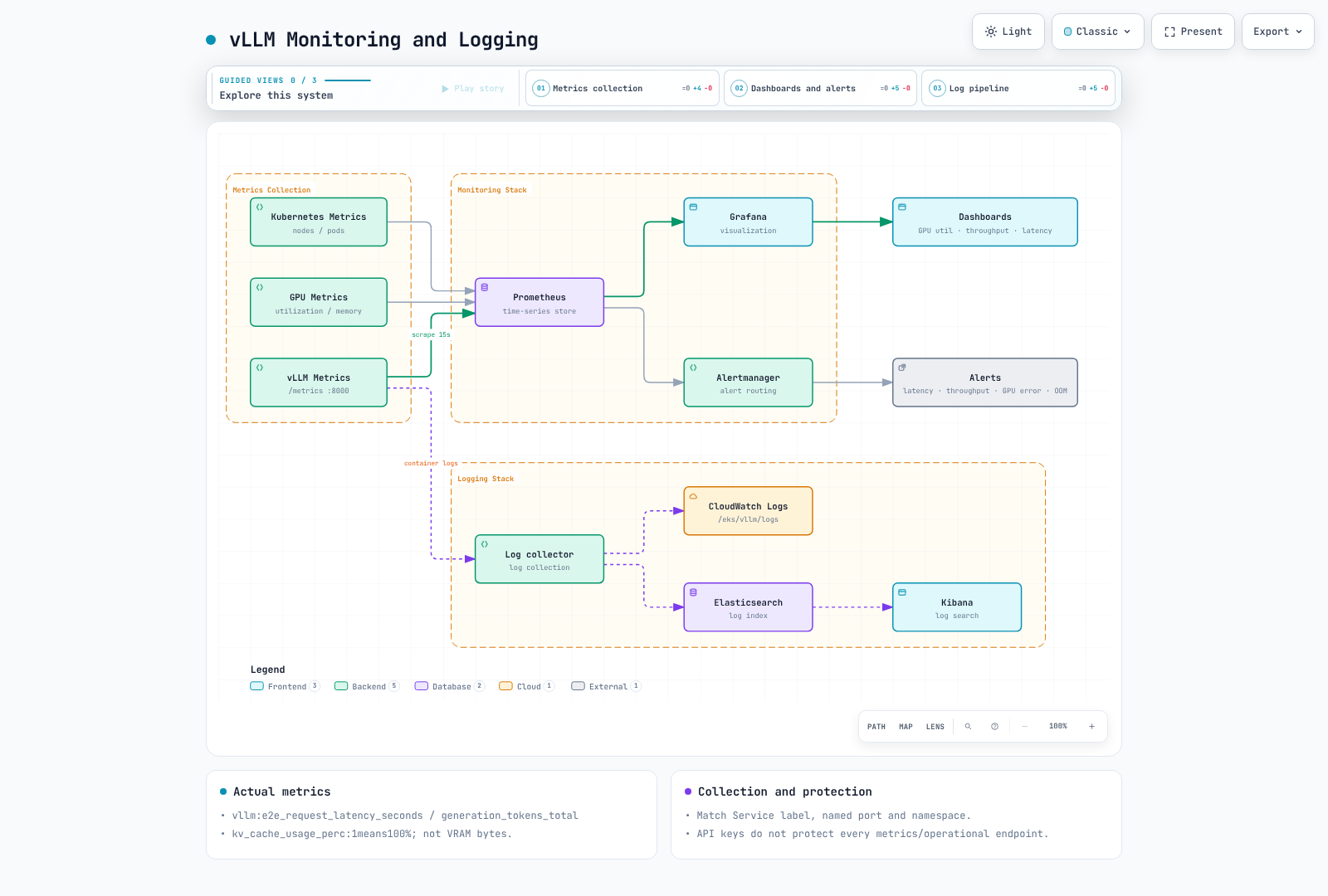
Metrics and Logs
The default /metrics endpoint uses the API's port 8000. Do not invent a separate 8001 port or --enable-metrics=true. Match Service labels, named ports and namespace selection in ServiceMonitor.
# End-to-end p95 by model
histogram_quantile(0.95, sum by (le, model_name) (rate(vllm:e2e_request_latency_seconds_bucket[5m])))
# Generation-token throughput
sum by (model_name) (rate(vllm:generation_tokens_total[5m]))
# Queued requests
sum by (model_name) (vllm:num_requests_waiting)
vllm:kv_cache_usage_perc is a ratio where 1 means 100%, not total GPU-memory bytes. Observe gateway errors/cancellations alongside success counters, and do not call healthy idle periods a low-throughput outage. Verify actual endpoint names/labels. Distinguish CRI framing from application logs and avoid indiscriminate prompt/output/token logging.
Autoscaling
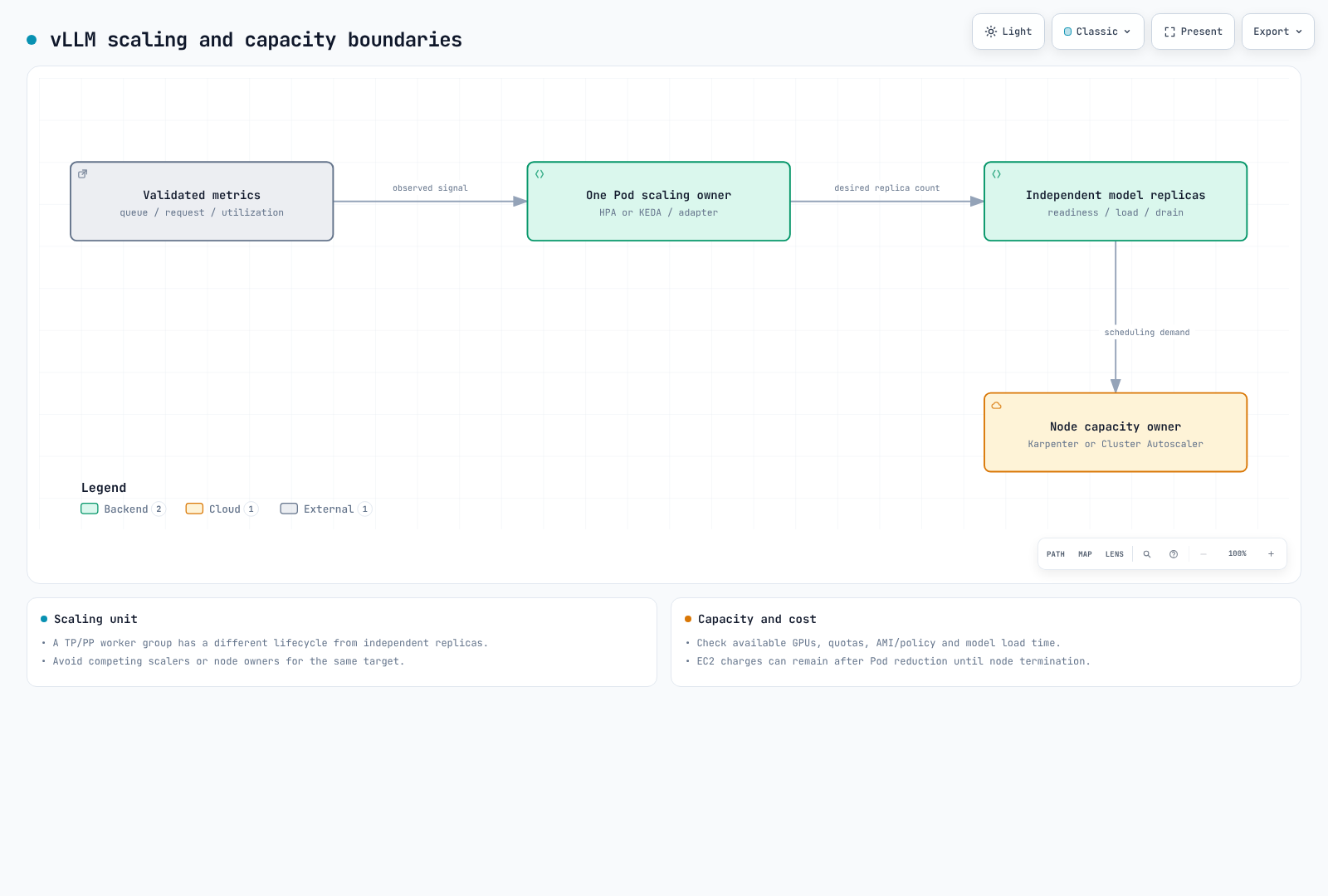
Autoscaling and Availability
Scaling independent replicas with HPA/KEDA differs from scaling a sharded model's worker group. Increasing StatefulSet replicas does not automatically reconfigure TP/PP. Validate adapter request/queue signals, and do not use CPU-utilization HPA without CPU requests. Avoid competing Karpenter/Cluster Autoscaler ownership of the same capacity.
PDBs constrain some voluntary evictions, not every failure. Independent replicas can span AZs; placing a communication-heavy TP/PP group across AZs has separate latency/cost implications. Validate model loading, warmup, draining, in-flight streams and spare GPUs before claiming interruption-free updates.
Security Configuration
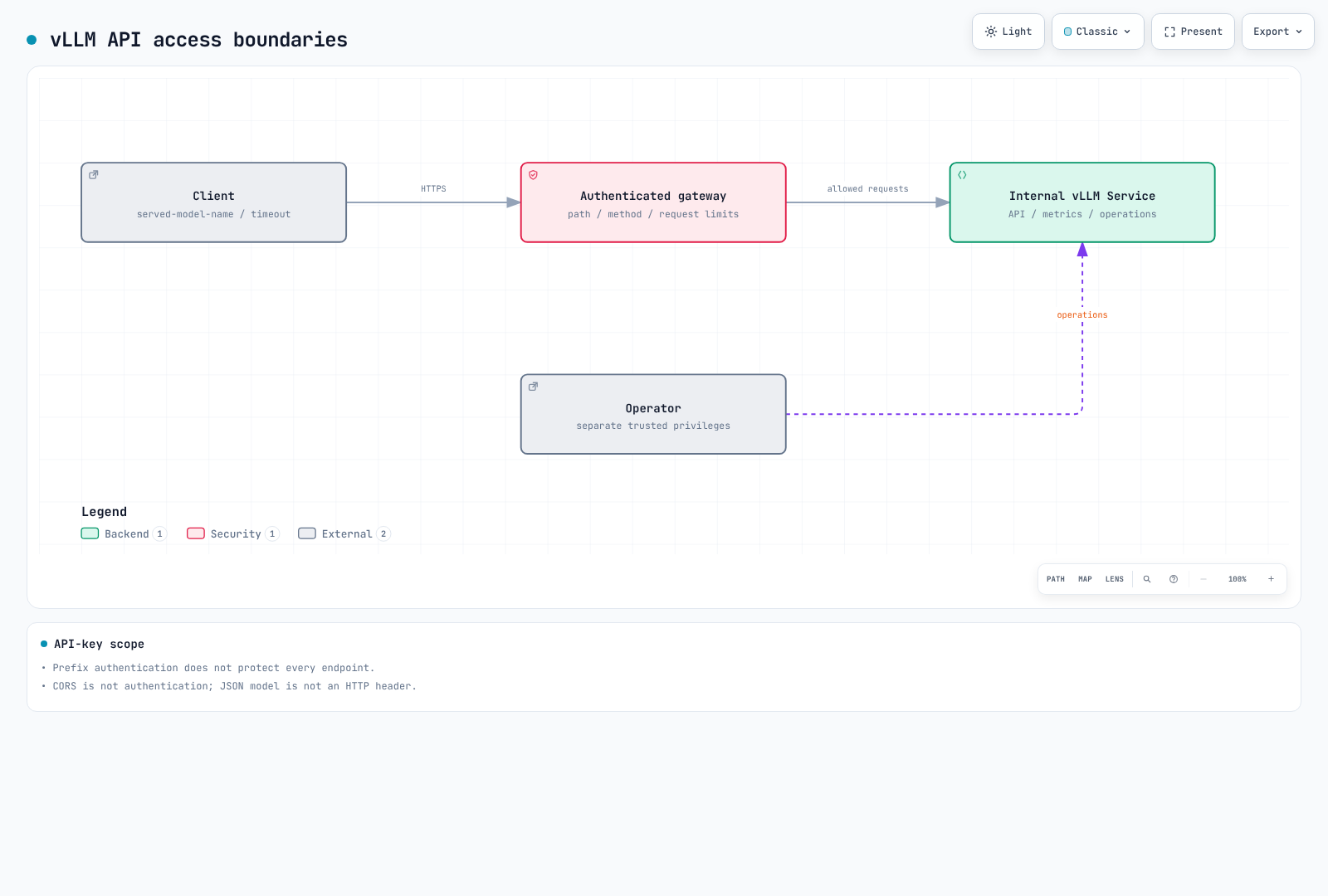
--api-key does not protect every endpoint. This version's middleware guards /v1, /v2, /inference and /cohere prefixes; /invocations, /metrics and some operational endpoints need additional protection. An authenticated gateway should allow only required paths/methods; restrict distributed communication to trusted networks. CORS is not authentication.
Runtime LoRA, remote model code and multimodal URLs each introduce trust/permission/SSRF boundaries. Regex blocking of “ignore instructions” does not prevent all prompt injection or guarantee PII removal. Enforce tool/data permissions independently of model output.
Provide secrets as files and place Pod/container securityContext fields correctly. Match NetworkPolicy selectors, DNS, scrape direction and internal traffic to actual configuration. Pod annotations cannot enable API-server auditing; do not log Secret RequestResponse bodies. EKS control-plane audit and application access logs are separate.
Client Integration
Client Request
After deployment/readiness validation, an authorized developer can use kubectl port-forward -n ml-inference service/vllm-demo 8000:8000. Keep its default localhost binding. This local example is not a replacement for production gateway authentication.
import json
import urllib.request

payload = {
    "model": "qwen3-demo",
    "messages": [{"role": "user", "content": "Explain a Kubernetes Pod briefly."}],
    "max_tokens": 64,
    "temperature": 0,
    "chat_template_kwargs": {"enable_thinking": False},
}
request = urllib.request.Request(
    "http://127.0.0.1:8000/v1/chat/completions",
    data=json.dumps(payload).encode(),
    headers={"Content-Type": "application/json"},
    method="POST",
)
with urllib.request.urlopen(request, timeout=60) as response:
    result = json.load(response)
print(result["choices"][0]["message"]["content"])
Request model must match served-model-name or /v1/models. Production clients need file-based gateway credentials plus timeout/error/stream handling. A JSON body model field is not an HTTP model header, so header routing does not automatically inspect it.
Validation Scope
Pinned source was inspected for CLI arguments, metrics, authentication and artifact metadata. Kubernetes schemas/local HTTP fixtures do not validate actual vLLM parser/kernel/GPU execution. This audit did not download model weights or create GPU servers/cloud resources.
References
- vLLM 0.29.0 release (review baseline)
- vLLM 0.31.0 release (latest checked)
- Parallelism and scaling
- Security boundaries
- Production metrics
- Structured outputs
- LoRA adapters
Quiz
To test what you've learned in this chapter, try the Topic Quiz.