Event capacity planning playbook
Last Updated: September 12, 2026 against KEDA 2.20.2 and self-managed Karpenter AWS provider 1.14.1. Numbers are calculations from stated assumptions, not production benchmark results.
PMs/planners supply demand, timing, latency and failure objectives. Operations validates app, node, DB, network and queue throughput, quotas and preparation time. Event type alone cannot guarantee traffic multipliers or a fixed warmup duration. Use rate limits, waiting rooms and backpressure where needed; scaling is not the only overload control.
1. Inputs and units
| Input | What to verify |
|---|---|
| Peak RPM/RPS | Units, user behavior, cache hits, retry amplification and per-API demand |
| Per-Pod throughput | Measured SLO capacity with representative inputs, requests and concurrency |
| Node capacity | Actual allocatable minus DaemonSets; CPU, memory and Pod-slot constraints |
| Failure objective | Define the traffic target during Pod/node/AZ loss |
| Time | IANA zone, explicit UTC offset and actual node/reservation active intervals |
| Cost | Price date, region, OS, tenancy, unused reservations and other services/tax |
The calculator checks rounding, units, reservation double-counting and AZ loss. It assumes one uniform Pod profile; aggregate other workloads and validate topology, volume and port constraints separately. Adding 30% capacity differs from leaving 30% of capacity unused. The AZ-loss test covers baseline peak demand, not simultaneous additional demand.
scenario.json
{
  "description": "Illustrative inputs; replace throughput and allocatable values with measured evidence.",
  "peak_rpm": 600000,
  "pod_rpm_at_slo": 3000,
  "extra_capacity_fraction": "0.30",
  "pod_cpu_milli": 1500,
  "pod_memory_mib": 2048,
  "allocatable_cpu_milli": 15500,
  "daemon_cpu_milli": 500,
  "allocatable_memory_mib": 29696,
  "daemon_memory_mib": 1024,
  "max_pods": 58,
  "daemon_pods": 7,
  "nodes_by_az": {"az-a": 15, "az-b": 11},
  "reserved_nodes_by_az": {"az-a": 15, "az-b": 11},
  "node_start": "2026-11-27T11:00:00+09:00",
  "node_end": "2026-11-27T15:00:00+09:00",
  "reservation_start": "2026-11-27T11:00:00+09:00",
  "reservation_end": "2026-11-27T15:00:00+09:00",
  "usd_per_instance_hour": "0.768",
  "price_region": "ap-northeast-2",
  "price_instance_type": "c5.4xlarge",
  "price_observed_date": "2026-09-12",
  "hpa_max_replicas": 300,
  "node_budget": 40,
  "require_one_az_loss": true,
  "other_services_budget_usd": null
}# capacity.py
"""Deterministic planning arithmetic, not a benchmark or AWS provisioning tool."""
import argparse
import json
from datetime import datetime, timezone
from decimal import Decimal, ROUND_CEILING, ROUND_HALF_UP
def number(value, name, minimum=Decimal(0), positive=False):
if isinstance(value, bool):
raise ValueError(f"{name}: boolean is not a number")
result = Decimal(str(value))
if not result.is_finite() or result < minimum or (positive and result == minimum):
raise ValueError(f"{name}: invalid finite range")
return result
def integer(value, name, positive=False):
result = number(value, name, positive=positive)
if result != result.to_integral_value():
raise ValueError(f"{name}: integer required")
return int(result)
def instant(value):
result = datetime.fromisoformat(value.replace("Z", "+00:00"))
if result.tzinfo is None or result.utcoffset() is None:
raise ValueError("Use timestamps with an explicit UTC offset")
return result.astimezone(timezone.utc)
def seconds_between(start, end):
delta = end-start
return Decimal(delta.days*86400 + delta.seconds) + Decimal(delta.microseconds)/Decimal(1_000_000)
def hours(start, end):
seconds = seconds_between(start,end)
if seconds < 60:
raise ValueError("Planning intervals must be at least 60 seconds")
return seconds/Decimal(3600)
def ceiling(value):
return int(value.to_integral_value(rounding=ROUND_CEILING))
def calculate(config):
if type(config.get("require_one_az_loss",False)) is not bool:
raise ValueError("require_one_az_loss must be a boolean")
demand = number(config["peak_rpm"], "peak_rpm", positive=True)
pod_rate = number(config["pod_rpm_at_slo"], "pod_rpm_at_slo", positive=True)
margin = number(config["extra_capacity_fraction"], "extra_capacity_fraction")
pod_cpu = number(config["pod_cpu_milli"], "pod_cpu_milli", positive=True)
pod_mem = number(config["pod_memory_mib"], "pod_memory_mib", positive=True)
cpu = number(config["allocatable_cpu_milli"], "allocatable_cpu_milli", positive=True) - number(config["daemon_cpu_milli"], "daemon_cpu_milli")
memory = number(config["allocatable_memory_mib"], "allocatable_memory_mib", positive=True) - number(config["daemon_memory_mib"], "daemon_memory_mib")
slots = integer(config["max_pods"], "max_pods", positive=True) - integer(config["daemon_pods"], "daemon_pods")
if cpu <= 0 or memory <= 0 or slots <= 0:
raise ValueError("No allocatable application capacity after DaemonSet overhead")
per_node = min(int(cpu//pod_cpu), int(memory//pod_mem), slots)
if per_node < 1:
raise ValueError("The workload cannot fit this node profile")
base_pods = ceiling(demand/pod_rate)
planned_pods = ceiling(demand*(Decimal(1)+margin)/pod_rate)
needed_nodes = ceiling(Decimal(planned_pods)/Decimal(per_node))
placements = {zone:integer(count, "nodes_by_az") for zone,count in config["nodes_by_az"].items()}
reservations = {zone:integer(count, "reserved_nodes_by_az") for zone,count in config["reserved_nodes_by_az"].items()}
if not placements or sum(placements.values()) < 1:
raise ValueError("Provide at least one planned node")
nodes = sum(placements.values())
survivors = nodes-max(placements.values())
surviving_rpm = Decimal(survivors*per_node)*pod_rate
start, end = instant(config["node_start"]), instant(config["node_end"])
reserve_start, reserve_end = instant(config["reservation_start"]), instant(config["reservation_end"])
node_hours = hours(start,end)
reservation_hours = hours(reserve_start,reserve_end)
overlap_start, overlap_end = max(start,reserve_start), min(end,reserve_end)
overlap = (seconds_between(overlap_start,overlap_end)/Decimal(3600)
if overlap_end > overlap_start else Decimal(0))
price = number(config["usd_per_instance_hour"], "usd_per_instance_hour", positive=True)
# Pay for running instances and unused reserved slots, without double-counting
# a matching instance occupying a reservation. Assume one instance profile/type.
running_cost = Decimal(nodes)*node_hours*price
unused_cost = Decimal(0)
for zone,reserved in reservations.items():
used = min(reserved,placements.get(zone,0))
unused_slot_hours = Decimal(reserved)*reservation_hours-Decimal(used)*overlap
unused_cost += unused_slot_hours*price
compute_cost = running_cost+unused_cost
other = config.get("other_services_budget_usd")
total = None if other is None else compute_cost+number(other,"other_services_budget_usd")
findings = []
if nodes < needed_nodes:
findings.append("Planned nodes do not satisfy the capacity target")
if planned_pods > integer(config["hpa_max_replicas"],"hpa_max_replicas",positive=True):
findings.append("Planned Pod target exceeds the approved HPA maximum")
if nodes > integer(config["node_budget"],"node_budget",positive=True):
findings.append("Planned nodes exceed the approved node budget")
if config.get("require_one_az_loss") and surviving_rpm < demand:
findings.append("Losing the largest AZ leaves less than the baseline peak demand capacity")
money = lambda value: format(value.quantize(Decimal("0.01"),rounding=ROUND_HALF_UP),"f")
return {
"base_pods":base_pods, "planned_pods_with_extra_capacity":planned_pods,
"pods_per_node_from_inputs":per_node, "minimum_nodes_for_capacity":needed_nodes,
"planned_nodes":nodes, "surviving_nodes_after_largest_az_loss":survivors,
"surviving_rpm":str(surviving_rpm), "node_hours_per_instance":str(node_hours),
"reservation_hours_per_slot":str(reservation_hours),
"running_instances_usd":money(running_cost), "unused_reservations_usd":money(unused_cost),
"ec2_compute_subtotal_usd":money(compute_cost),
"total_budget_estimate_usd":None if total is None else money(total),
"findings":findings,
"assumptions":[
"Input throughput/allocatable values require workload-specific measurement.",
"Extra capacity is added once; it is not the same as leaving that fraction unused.",
"Constant node counts over the interval; matching reservations consumed first within each AZ.",
"All instances/reservations have the same type/platform/tenancy and supplied hourly rate.",
"Current public pricing is an estimate for a future event, not a guaranteed charge.",
"EC2 subtotal excludes EBS, EKS/Auto Mode, networking, load balancers, databases, telemetry and tax.",
"Capacity and AZ arithmetic do not prove scheduling, recovery or application SLO."
]
}
if __name__ == "__main__":
parser = argparse.ArgumentParser()
parser.add_argument("input")
args = parser.parse_args()
try:
with open(args.input,encoding="utf-8") as stream:
result = calculate(json.load(stream))
except (ValueError, KeyError, ArithmeticError) as error:
parser.error(str(error))
print(json.dumps(result,indent=2))python3 capacity.py scenario.jsonThe example computes 200 baseline Pods, 260 with additional capacity and a minimum of 26 nodes. However, losing the larger of the 15/11-node AZs leaves 11 nodes and 330,000 RPM, below the 600,000 RPM baseline peak. Do not approve the plan while ignoring findings. A separate calculation with ten nodes in each of three AZs covers baseline peak for the same profile, but still requires placement and recovery testing.
Distinguish instances actually consuming reservations from unused slots. Matching hardware alone does not automatically attach an existing instance to a targeted reservation. Verify actual CapacityReservationId/available counts; the calculator's consumption assumption needs validation. Unknown other-service costs keep the total budget null. EC2 subtotal is not the entire event cost.
Pricing evidence
On 2026-09-12, AWS Price List API returned the following Seoul Linux/shared-tenancy On-Demand hourly prices without preinstalled software. They exclude contract discounts, Spot and tax.
| Type | vCPU | Memory | USD/hour |
|---|---|---|---|
| c5.2xlarge | 8 | 16 GiB | 0.384 |
| c5.4xlarge | 16 | 32 GiB | 0.768 |
| c6i.4xlarge | 16 | 32 GiB | 0.768 |
| m5.4xlarge | 16 | 64 GiB | 0.944 |
The illustrative 26-node/four-hour c5.4xlarge subtotal is $79.87. The original $70.72 estimate used an incorrect Seoul rate of $0.68/hour. If the same reservations become active thirty days before the nodes, the illustrative subtotal including unused slots is $14,456.83. These are calculations, not actual bills. Recheck pricing and activation time before the event. Include EBS, EKS/Auto Mode, LB, NAT/transfer, databases, telemetry and the distinction between baseline and incremental costs.
2. Responsibilities and prerequisites
The EC2NodeClass/NodePool examples use self-managed Karpenter. Auto Mode uses eks.amazonaws.com NodeClass; do not copy the same YAML. Current Auto Mode NodeClass also supports capacityReservationSelectorTerms, so do not assume reservations are unsupported. Check that service's selector, permission and support scope separately.
See the scaling chapter for baseline installation and operator IRSA. Prepare the application Deployments, ecommerce namespace, Prometheus and metric contract first. This authentication uses operator identity; it does not create an IAM role.
# trigger-auth.yaml
apiVersion: keda.sh/v1alpha1
kind: TriggerAuthentication
metadata:
  name: event-aws
  namespace: ecommerce
spec:
  podIdentity:
    provider: aws
    identityOwner: keda
operator-read-policy.json
{
  "Version": "2012-10-17",
  "Statement": [
    {
      "Effect": "Allow",
      "Action": ["sqs:GetQueueAttributes"],
      "Resource": "arn:aws:sqs:ap-northeast-2:123456789012:order-processing"
    },
    {
      "Effect": "Allow",
      "Action": ["cloudwatch:GetMetricData"],
      "Resource": "*",
      "Condition": {
        "StringEquals": {
          "aws:RequestedRegion": "ap-northeast-2"
        }
      }
    }
  ]
}
Replace account/queue ARN values and attach the required read permissions to the operator role. CloudWatch GetMetricData uses a requested-region condition rather than resource-level scoping. This policy does not grant worker ReceiveMessage/DeleteMessage permissions. In shared installations, also control who can create ScaledObjects and TriggerAuthentications.
3. KEDA: one owner per workload
Do not attach multiple ScaledObjects/HPAs to one Deployment. These examples target three distinct workloads: order-api, order-worker and frontend. Keep baseline metric autoscaling and remove/update the event Cron afterward.
Do not scale an API only from completed orders: completion can plateau or fall under saturation, incorrectly suggesting scale-down. Relate incoming requests, backlog and wait time to actual capacity. The following assumes an application http_requests_total counter and namespace/service scrape labels. Do not assume standard NGINX exporters automatically provide path/page-view metrics. This Prometheus is per-cluster; add cluster scoping for a shared backend.
# prometheus-rule.yaml
apiVersion: monitoring.coreos.com/v1
kind: PrometheusRule
metadata:
  name: event-demand
  namespace: observability
  labels:
    release: prometheus
spec:
  groups:
  - name: event-demand
    rules:
    - record: event:incoming_requests_per_minute:rate1m
      expr: sum by (namespace, service) (rate(http_requests_total{namespace="ecommerce",service="order-api"}[1m]))
        * 60
    - record: event:order_api_error_ratio:rate5m
      expr: (sum by (namespace, service) (rate(http_requests_total{namespace="ecommerce",service="order-api",status=~"5.."}[5m]))
        or 0 * sum by (namespace, service) (rate(http_requests_total{namespace="ecommerce",service="order-api"}[5m])))
        / (sum by (namespace, service) (rate(http_requests_total{namespace="ecommerce",service="order-api"}[5m]))
> 0)# order-api-scaledobject.yaml
apiVersion: keda.sh/v1alpha1
kind: ScaledObject
metadata:
name: order-api
namespace: ecommerce
labels:
event: flash-sale-2026-11
spec:
scaleTargetRef:
name: order-api
minReplicaCount: 5
maxReplicaCount: 300
pollingInterval: 15
advanced:
horizontalPodAutoscalerConfig:
behavior:
scaleUp:
stabilizationWindowSeconds: 0
policies:
- type: Percent
value: 100
periodSeconds: 15
scaleDown:
stabilizationWindowSeconds: 600
policies:
- type: Percent
value: 10
periodSeconds: 120
triggers:
- type: cron
metricType: AverageValue
metadata:
timezone: Asia/Seoul
start: 0 11 27 11 *
end: 0 15 27 11 *
desiredReplicas: '260'
- type: prometheus
metricType: AverageValue
metadata:
serverAddress: http://prometheus-kube-prometheus-prometheus.observability.svc:9090
query: event:incoming_requests_per_minute:rate1m{namespace="ecommerce",service="order-api"}
threshold: '3000'
ignoreNullValues: 'false'Threshold 3,000 is requests per Pod per minute, matching the illustrative throughput units. Replace it with load-test evidence. The query must resolve to one value. ignoreNullValues=false avoids hiding missing observations as zero demand. Test HPA error/missing-data behavior and manual response outside production.
Cron uses five Linux fields and has no year field. Leaving the November 27 example installed repeats it next year. Remove the event configuration from Git after a one-off event. IANA timezones follow DST: New York in May is EDT, not EST. Test boundaries, overlapping windows and ambiguous DST times.
HPA combines per-metric recommendations through a maximum, then applies min/max and behavior constraints. Cron supplies a demand floor, not a guarantee of Ready Pods. The ceiling comes from maxReplicaCount and other limits, not the other metrics. Policy or capacity constraints can delay reaching the target.
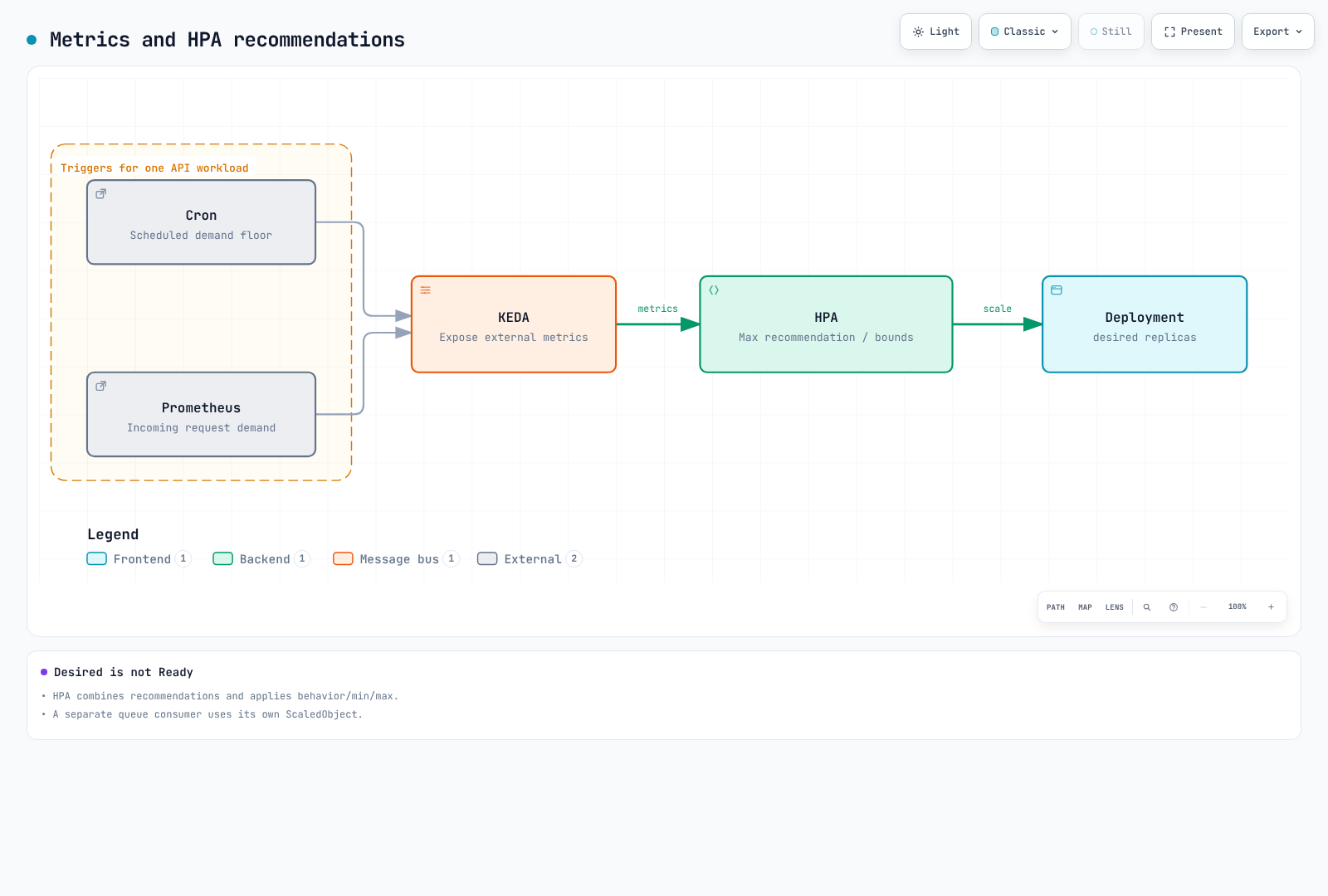
With minReplicaCount above zero, cooldownPeriod is not a generic delay before returning to baseline. Distinguish KEDA activation/scale-to-zero from HPA's 1→N loop and their polling/sync/cache intervals. Percent/periodSeconds is a rolling-window change limit, not an exact repeating timer. Stabilization is not simply a fixed sleep followed by one action.
SQS worker
queueLength is target backlog per Pod, not a promise that each Pod handles exactly ten messages. Choose it from processing time, concurrency and allowed wait, and monitor oldest-message age, DLQ and retries. This example includes visible and in-flight messages but excludes delayed ones; the counts are approximate. Implement visibility timeout, idempotency and shutdown/ack behavior separately.
# worker-scaledobject.yaml
apiVersion: keda.sh/v1alpha1
kind: ScaledObject
metadata:
  name: order-worker
  namespace: ecommerce
  labels:
    event: flash-sale-2026-11
spec:
  scaleTargetRef:
    name: order-worker
  minReplicaCount: 2
  maxReplicaCount: 100
  pollingInterval: 15
  advanced:
    horizontalPodAutoscalerConfig:
      behavior:
        scaleUp:
          stabilizationWindowSeconds: 0
          policies:
          - type: Percent
            value: 100
            periodSeconds: 15
        scaleDown:
          stabilizationWindowSeconds: 600
          policies:
          - type: Percent
            value: 10
            periodSeconds: 120
  triggers:
  - type: aws-sqs-queue
    metricType: AverageValue
    metadata:
      queueURL: https://sqs.ap-northeast-2.amazonaws.com/123456789012/order-processing
      awsRegion: ap-northeast-2
      queueLength: '10'
      activationQueueLength: '1'
      scaleOnInFlight: 'true'
      scaleOnDelayed: 'false'
    authenticationRef:
      name: event-aws
CloudWatch frontend
RequestCount is an application-published request count/delta; Sum over 60 seconds yields the period's request count. Do not sum repeatedly published per-minute rate gauges or cumulative counters. KEDA 2.20.2 uses metricStat, not metricStatType. minMetricValue is a NoData fallback, not activation threshold. ignoreNullValues=false takes precedence. Validate collection time, end offset and publishing delay.
# frontend-scaledobject.yaml
apiVersion: keda.sh/v1alpha1
kind: ScaledObject
metadata:
  name: frontend
  namespace: ecommerce
  labels:
    event: flash-sale-2026-11
spec:
  scaleTargetRef:
    name: frontend
  minReplicaCount: 3
  maxReplicaCount: 100
  triggers:
  - type: aws-cloudwatch
    metricType: AverageValue
    metadata:
      namespace: ECommerce/Frontend
      dimensionName: Service
      dimensionValue: frontend
      metricName: RequestCount
      metricStat: Sum
      metricStatPeriod: '60'
      metricCollectionTime: '180'
      metricEndTimeOffset: '60'
      metricUnit: Count
      targetMetricValue: '3000'
      activationTargetMetricValue: '0'
      minMetricValue: '0'
      ignoreNullValues: 'false'
      awsRegion: ap-northeast-2
    authenticationRef:
      name: event-aws
4. Dynamic versus static pre-provisioning
NodePool weight and limits alone do not create warm nodes. Dynamic pools respond to Pod scheduling demand. Pre-scaling the actual application and validating initialization is the baseline approach. Self-managed Karpenter also supports static NodePools through spec.replicas. This differs from an EC2 Auto Scaling stopped-instance Warm Pool.
This NodeClass is for self-managed Karpenter. Set real IAM role, subnet/SG tags and cluster version. The alias pins a release verified through the Seoul EKS 1.36 AL2023 x86_64 public SSM parameter. Recheck compatibility for other Kubernetes versions/architectures. Decide explicitly whether fallback is allowed when reservations are absent or exhausted.
# nodeclass.yaml
apiVersion: karpenter.k8s.aws/v1
kind: EC2NodeClass
metadata:
  name: event-nodes
spec:
  role: KarpenterNodeRole-my-cluster
  amiSelectorTerms:
  - alias: al2023@v20260903
  subnetSelectorTerms:
  - tags:
      karpenter.sh/discovery: my-cluster
  securityGroupSelectorTerms:
  - tags:
      karpenter.sh/discovery: my-cluster
  capacityReservationSelectorTerms:
  - tags:
      event: flash-sale-2026-11
  blockDeviceMappings:
  - deviceName: /dev/xvda
    ebs:
      volumeSize: 100Gi
      volumeType: gp3
      encrypted: true
  tags:
    event: flash-sale-2026-11
Option A: dynamic pool with actual application pre-scaling
reserved means ODCR/capacity-block capacity, not Reserved Instance discounts. Karpenter prefers reserved capacity among allowed types, then falls back to allowed alternatives. This example excludes Spot, but On-Demand does not guarantee service uptime or new capacity availability. weight expresses provisioning preference among compatible dynamic pools, not forced placement on existing nodes.
# dynamic-nodepool.yaml
apiVersion: karpenter.sh/v1
kind: NodePool
metadata:
  name: event-dynamic
spec:
  template:
    metadata:
      labels:
        event: flash-sale-2026-11
    spec:
      nodeClassRef:
        group: karpenter.k8s.aws
        kind: EC2NodeClass
        name: event-nodes
      taints:
      - key: event
        value: flash-sale-2026-11
        effect: NoSchedule
      requirements:
      - key: kubernetes.io/arch
        operator: In
        values:
        - amd64
      - key: karpenter.sh/capacity-type
        operator: In
        values:
        - reserved
        - on-demand
      - key: node.kubernetes.io/instance-type
        operator: In
        values:
        - c5.4xlarge
  limits:
    cpu: '640'
  weight: 100
  disruption:
    consolidationPolicy: WhenEmptyOrUnderutilized
    consolidateAfter: 10m
Match node/Pod event labels, selectors, taints and tolerations. This is a placement patch for an existing Deployment, not a complete standalone manifest. A namespace label does not automatically create Pod labels or EC2 billing tags. Changing a live workload's selector changes rollout/placement; verify ready capacity and PDBs first.
# workload-placement-patch.yaml
spec:
  template:
    metadata:
      labels:
        event: flash-sale-2026-11
    spec:
      nodeSelector:
        event: flash-sale-2026-11
      tolerations:
      - key: event
        operator: Equal
        value: flash-sale-2026-11
        effect: NoSchedule
Option B: static pools
This is an alternative, not an accidental addition to Option A. replicas=0 defines a static pool without creating nodes; raise the counts at the approved time. Once set, spec.replicas cannot be removed to switch to dynamic mode. Static pools cannot use weight and only support limits.nodes. They are not consolidated; scale operations bypass NodePool disruption budgets but respect PDBs. One pool allowing multiple AZs does not guarantee balanced placement, so this example separates AZs.
# static-nodepools.yaml
apiVersion: karpenter.sh/v1
kind: NodePool
metadata:
  name: event-static-a
spec:
  replicas: 0
  template:
    metadata:
      labels:
        event: flash-sale-2026-11
    spec:
      nodeClassRef:
        group: karpenter.k8s.aws
        kind: EC2NodeClass
        name: event-nodes
      taints:
      - key: event
        value: flash-sale-2026-11
        effect: NoSchedule
      requirements:
      - key: kubernetes.io/arch
        operator: In
        values:
        - amd64
      - key: karpenter.sh/capacity-type
        operator: In
        values:
        - reserved
        - on-demand
      - key: node.kubernetes.io/instance-type
        operator: In
        values:
        - c5.4xlarge
      - key: topology.kubernetes.io/zone
        operator: In
        values:
        - ap-northeast-2a
  limits:
    nodes: 12
---
apiVersion: karpenter.sh/v1
kind: NodePool
metadata:
  name: event-static-b
spec:
  replicas: 0
  template:
    metadata:
      labels:
        event: flash-sale-2026-11
    spec:
      nodeClassRef:
        group: karpenter.k8s.aws
        kind: EC2NodeClass
        name: event-nodes
      taints:
      - key: event
        value: flash-sale-2026-11
        effect: NoSchedule
      requirements:
      - key: kubernetes.io/arch
        operator: In
        values:
        - amd64
      - key: karpenter.sh/capacity-type
        operator: In
        values:
        - reserved
        - on-demand
      - key: node.kubernetes.io/instance-type
        operator: In
        values:
        - c5.4xlarge
      - key: topology.kubernetes.io/zone
        operator: In
        values:
        - ap-northeast-2b
  limits:
    nodes: 12
---
apiVersion: karpenter.sh/v1
kind: NodePool
metadata:
  name: event-static-c
spec:
  replicas: 0
  template:
    metadata:
      labels:
        event: flash-sale-2026-11
    spec:
      nodeClassRef:
        group: karpenter.k8s.aws
        kind: EC2NodeClass
        name: event-nodes
      taints:
      - key: event
        value: flash-sale-2026-11
        effect: NoSchedule
      requirements:
      - key: kubernetes.io/arch
        operator: In
        values:
        - amd64
      - key: karpenter.sh/capacity-type
        operator: In
        values:
        - reserved
        - on-demand
      - key: node.kubernetes.io/instance-type
        operator: In
        values:
        - c5.4xlarge
      - key: topology.kubernetes.io/zone
        operator: In
        values:
        - ap-northeast-2c
  limits:
nodes: 12# Example only after approval of matching capacity and cost:
DOCS_CONTEXT="my-event-cluster"
kubectl --context "$DOCS_CONTEXT" scale nodepool event-static-a --replicas=10
kubectl --context "$DOCS_CONTEXT" scale nodepool event-static-b --replicas=10
kubectl --context "$DOCS_CONTEXT" scale nodepool event-static-c --replicas=10If GitOps owns replicas, update its desired state as well. Verify static Nodes Ready before enabling placement and event scaling. Do not move live workloads onto zero-replica capacity or activate Cron before preparation. Include earlier preparation time in node_start/reservation_start cost inputs.
When using placeholders
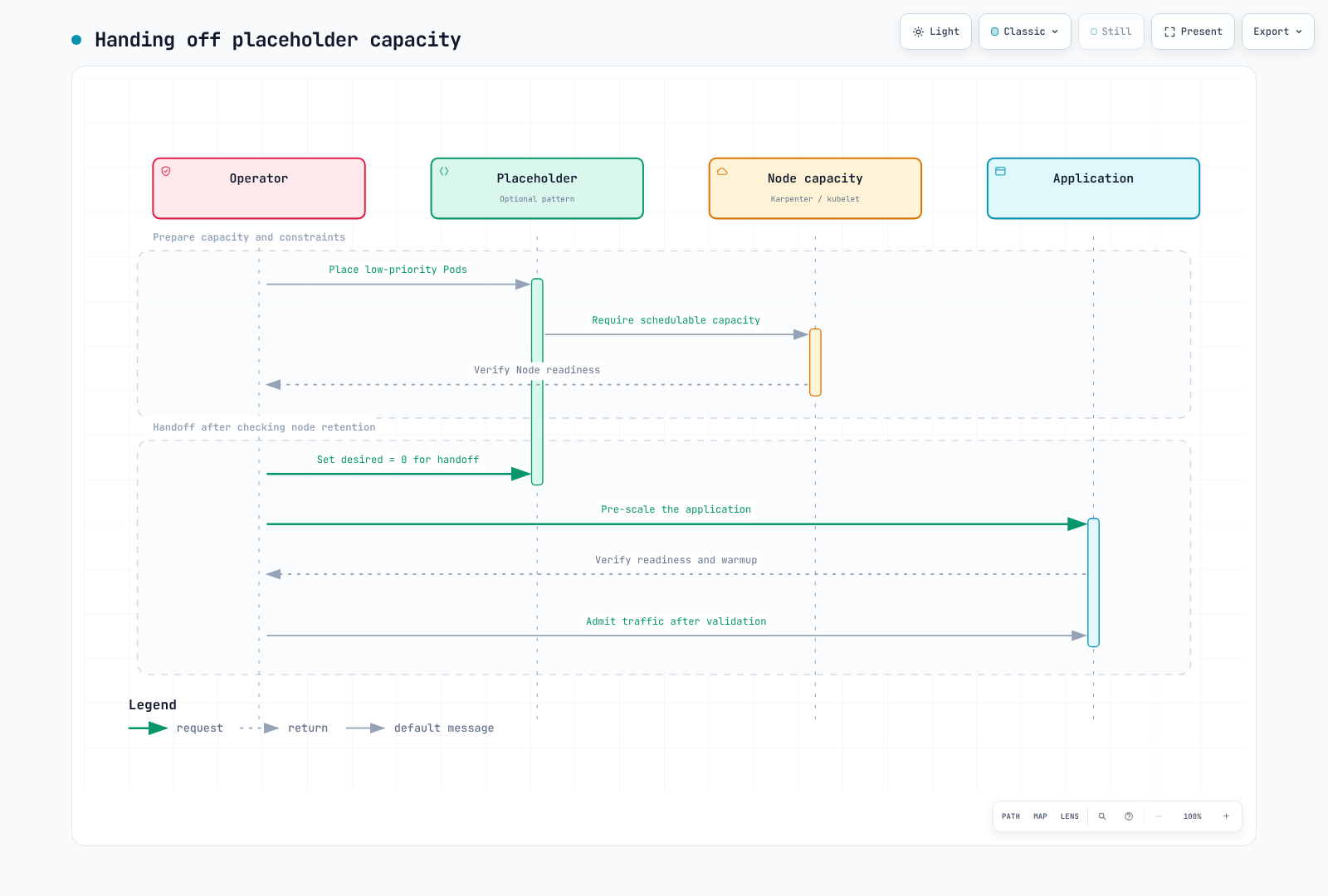
Low-priority Pods can be preemption candidates, but do not guarantee instant placement/readiness. Leaving their Deployment desired count unchanged can recreate preempted placeholders and provision additional nodes. Review node retention/expiry and handoff, remove placeholder demand, then verify app readiness. Check oversized requests, missing selectors and conflicts with baseline autoscalers.
5. Capacity Reservations: capacity and billing
targeted requires explicit reservation targeting; it is not a security ACL restricted to one NodePool. Verify account/sharing permissions, AZ, type, platform, tenancy and successful activation. Check selectors, status.capacityReservations and actual instance CapacityReservationId. Reserved capacity does not guarantee application readiness, SLO or failure-free execution.
The Terraform below creates immediate reservations. A future end_date does not mean a future start. Applying at D-30 can incur unused charges before the event. Future-dated reservations have separate eligibility, commitment and start-time rules. Set az_counts from the approved capacity and budget plan.
# reservations/main.tf
terraform {
  required_version = ">= 1.15.0, < 2.0.0"
  required_providers {
    aws = {
      source  = "hashicorp/aws"
      version = "6.64.0"
    }
  }
}

provider "aws" {
  region = var.region
}

variable "region" {
  type    = string
  default = "ap-northeast-2"
}

variable "event" {
  type    = string
  default = "flash-sale-2026-11"
}

variable "instance_type" {
  type    = string
  default = "c5.4xlarge"
}

variable "az_counts" {
  type        = map(number)
  description = "Approved matching capacity per Availability Zone in this AWS account."
  validation {
    condition = length(var.az_counts) > 0 && alltrue([
      for count in values(var.az_counts) : count > 0 && floor(count) == count
    ])
    error_message = "Provide positive integer reservation counts."
  }
}

variable "reservation_end_utc" {
  type        = string
  description = "RFC3339 expiration. This resource creates an immediate reservation, not a future-dated request."
  validation {
    condition     = can(timecmp(var.reservation_end_utc, plantimestamp())) && try(timecmp(var.reservation_end_utc, plantimestamp()) > 0, false)
    error_message = "The expiration must be a valid future RFC3339 timestamp."
  }
}

resource "aws_ec2_capacity_reservation" "event" {
  for_each                = var.az_counts
  instance_type           = var.instance_type
  instance_platform       = "Linux/UNIX"
  tenancy                 = "default"
  availability_zone       = each.key
  instance_count          = each.value
  instance_match_criteria = "targeted"
  end_date_type           = "limited"
  end_date                = var.reservation_end_utc
  tags = {
    Name  = "${var.event}-${each.key}"
    event = var.event
  }
}

output "reservation_ids" {
  value = { for zone, reservation in aws_ec2_capacity_reservation.event : zone => reservation.id }
}{
"az_counts": {
"ap-northeast-2a": 10,
"ap-northeast-2b": 10,
"ap-northeast-2c": 10
},
"reservation_end_utc": "2026-11-27T06:00:00Z"
}These are example inputs. Confirm account AZs, capacity and expiration before saving reservations/approved-event.tfvars.json. 15:00 KST is 06:00 UTC. Do not use past expiration dates or timestamps without offsets. Separate plan review from the actual creation time.
terraform -chdir=reservations init
terraform -chdir=reservations plan -var-file=approved-event.tfvars.json -out=event.tfplan
terraform -chdir=reservations show event.tfplan
Do not charge an occupied reserved slot a second time on top of its instance. Unused slots can be billed at the equivalent On-Demand rate. Check billing start, minimum billing unit and eligible discounts for immediate/future reservations. Cancellation/expiration does not automatically terminate running EC2 instances. Verify nodes, volumes and reservations separately during cleanup.
6. Startup timing and images
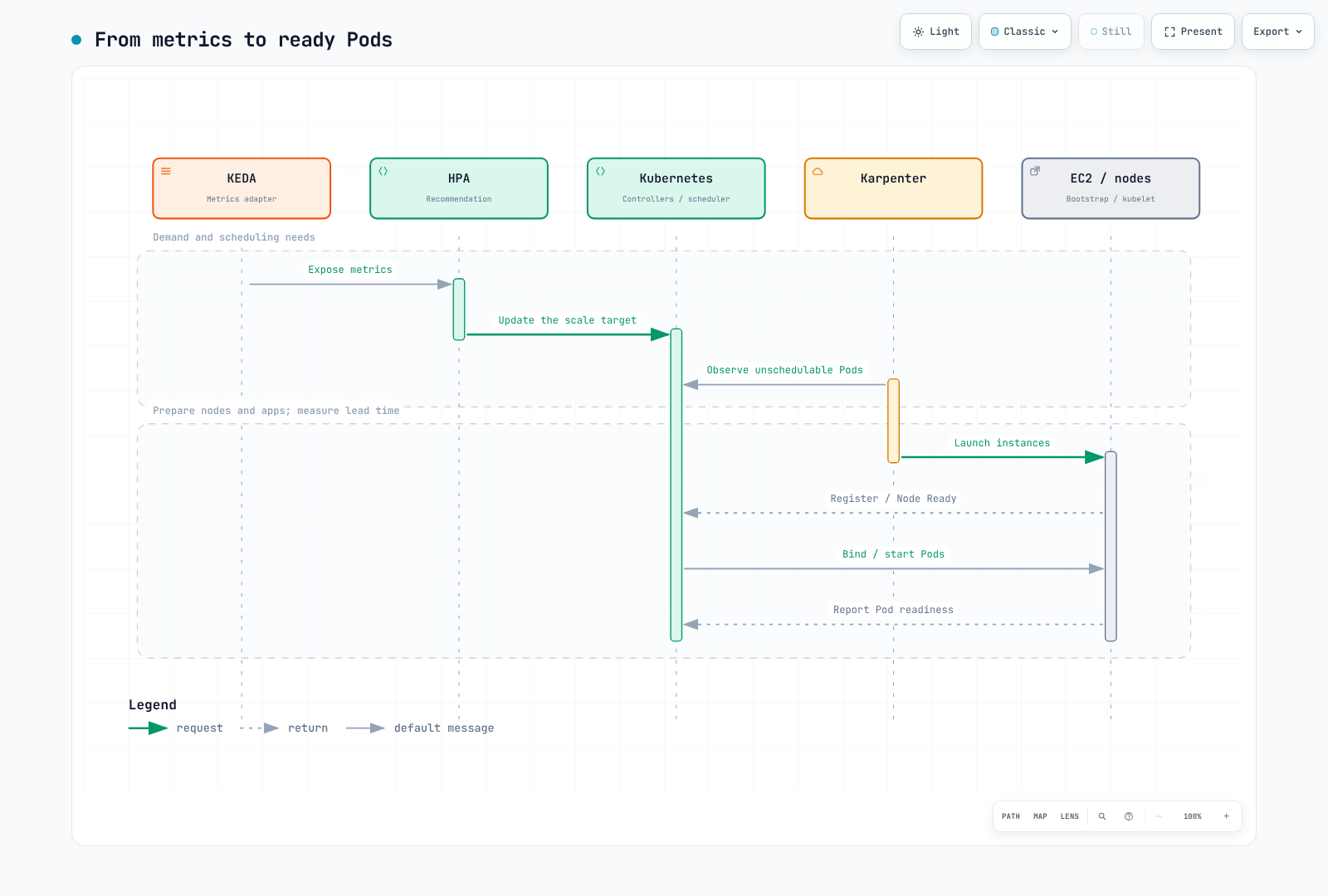
Measure KEDA polling, HPA sync, controller reconciliation, EC2 capacity/bootstrap, CNI, volume attachment, image pulling and application warmup separately. Distinguish desired and Ready counts in the flow below. Node count is not universally Pod count divided by ten.
Pre-scaling real application replicas validates initialization and dependency load, not just pulling. A generic cache DaemonSet running sh -c echo cached inside arbitrary app images fails for images without a shell, such as distroless. If using a cache tool, verify a supported harmless command, registry permissions, architecture, matching digest and node selectors. Image GC, node replacement and pull policies mean caching does not guarantee permanent retention or elimination of all pulls. Do not promise zero cold start.
7. Runbook
| Phase | Completion criteria |
|---|---|
| Planning | Demand, SLO, failure objectives, dependencies, budget, quotas and reservation feasibility |
| Non-production tests | Representative load, failures/recovery, startup distribution and missing metrics |
| Preparation | Render/validate pinned settings, record GitOps ownership and baseline restoration values |
| Activation | Prepare capacity during the approved billing window; verify nodes, placement, app readiness and SLO |
| Event | Observe desired/available, errors, latency, backlog age, constraints and cost |
| Completion | Restore Cron/floors, drain backlog/sessions/jobs and verify actual nodes/reservations |
Rendering, schemas and server dry-run do not test real EC2 availability or application warmup. Actual pre-scaling tests can create resources and charges and belong in a separate non-production test. Set and verify the actual context and region before changes.
DOCS_CONTEXT="my-event-cluster"
DOCS_REGION="ap-northeast-2"
kubectl --context "$DOCS_CONTEXT" -n ecommerce get scaledobjects
kubectl --context "$DOCS_CONTEXT" get nodes -l event=flash-sale-2026-11 -o wide
kubectl --context "$DOCS_CONTEXT" -n ecommerce get deployment order-api
DOCS_HPA=$(kubectl --context "$DOCS_CONTEXT" -n ecommerce get scaledobject order-api \
  -o jsonpath='{.status.hpaName}')
test -n "$DOCS_HPA" || exit 1
kubectl --context "$DOCS_CONTEXT" -n ecommerce get hpa "$DOCS_HPA"
Directly scaling the Deployment or patching a KEDA-owned HPA can be overwritten at reconciliation. Do not assume the HPA has the Deployment's name. If necessary, temporarily raise ScaledObject minReplicaCount within the approved maximum, record and restore the prior value, and update Git when GitOps owns it. Do not default to an emergency script that blindly creates pools or raises ceilings.
# Example only after checking the current maximum and change ownership:
kubectl --context "$DOCS_CONTEXT" -n ecommerce patch scaledobject order-api \
  --type merge -p '{"spec":{"minReplicaCount":260}}'
After the event, restore Cron/temporary floors while retaining baseline metric triggers. Deleting a ScaledObject does not automatically restore the original replica count. Deleting a NodePool can terminate associated nodes; do not automate cleanup with a timed delete or terraform destroy -target. For static pools, safely move workloads, lower desired counts to zero and confirm actual termination. Check PDBs, long jobs, sessions, reservations, volumes and charges separately.
8. Observation and post-event analysis
Compare demand, Deployment desired/available, HPA recommendations, error rate and latency for the same workload scope. A target metric is not a target Pod count; counting Running-phase gauge series is not counting Ready Pods.
max(kube_deployment_spec_replicas{namespace="ecommerce",deployment="order-api"})max(kube_deployment_status_replicas_available{namespace="ecommerce",deployment="order-api"})event:incoming_requests_per_minute:rate1m{namespace="ecommerce",service="order-api"} / 60event:order_api_error_ratio:rate5m{namespace="ecommerce",service="order-api"}Include cluster labels when collecting multiple clusters. Verify actual exporter metric/label names for SQS, CloudWatch and cost data. Do not assume an undefined metric such as node_cost_hourly exists. See the FinOps chapter for OpenCost/Kubecost APIs and cost scope. Check whether a GET API requires curl -G with --data-urlencode. Provision complete dashboard JSON bodies, not API wrappers or partial panels.
Record predicted/measured values, windows/sample counts, requests versus completed orders, desired versus available, dependency bottlenecks, actual node/reservation intervals and cost scope. Do not present hypothetical revenue/cost as measured results. On-Demand avoids Spot reclamation exposure but does not eliminate all failures. Test interruption, notification limitations, retry and recovery for Spot; do not decide only from fixed savings percentages or event duration.
Validation used Decimal calculations, pinned schemas/metadata, Cron boundaries/timezones, Terraform mocks and diagrams. It did not test real event load, EC2 availability, SQS processing or billing.
Official references
- KEDA Cron
- KEDA ScaledObject
- KEDA CloudWatch
- KEDA SQS
- Karpenter NodePools
- Karpenter NodeClasses
- Auto Mode NodeClass
- Capacity Reservations
- Reservation billing
- AWS Price List API