Part 3: Troubleshooting
Verified Example Versions: EKS Kubernetes 1.36, Amazon VPC CNI 1.23.0 Last Updated: September 11, 2026
Overview
This document covers performance optimization, troubleshooting methods, and advanced use cases for Amazon EKS networking. We will discuss how to optimize network performance, resolve common networking issues, and leverage advanced networking features.
Network Performance Optimization
There are several strategies for optimizing network performance in EKS clusters.
Instance Type Selection
C5/M5/R5 are examples of ENA-capable families, not a recommendation to choose an older generation. Compare the actual instance type’s baseline/burst bandwidth, packets per second, connection tracking, ENA queues, single-flow limits and workload CPU. Larger sizes are not a universal latency improvement, and 100 Gbps is not a universal ENA ceiling.
The official M5 specifications list m5.large: 0.75 Gbps baseline / up to 10 Gbps burst, and m5.24xlarge: 25 Gbps. These are instance limits, not measured application throughput. Sustained traffic, destination and single-flow restrictions can dominate. Query the intended Region instead of extrapolating from a family name:
set -euo pipefail
: "${AWS_REGION:?Set the instance Region}"
aws ec2 describe-instance-types --region "$AWS_REGION" \
  --instance-types m5.large m5.24xlarge \
  --query 'InstanceTypes[].{Type:InstanceType,Network:NetworkInfo.NetworkPerformance,Cards:NetworkInfo.NetworkCards,ENIs:NetworkInfo.MaximumNetworkInterfaces,IPsPerENI:NetworkInfo.Ipv4AddressesPerInterface}'
Cluster Networking Modes
EKS supports multiple networking modes, each with different performance characteristics.
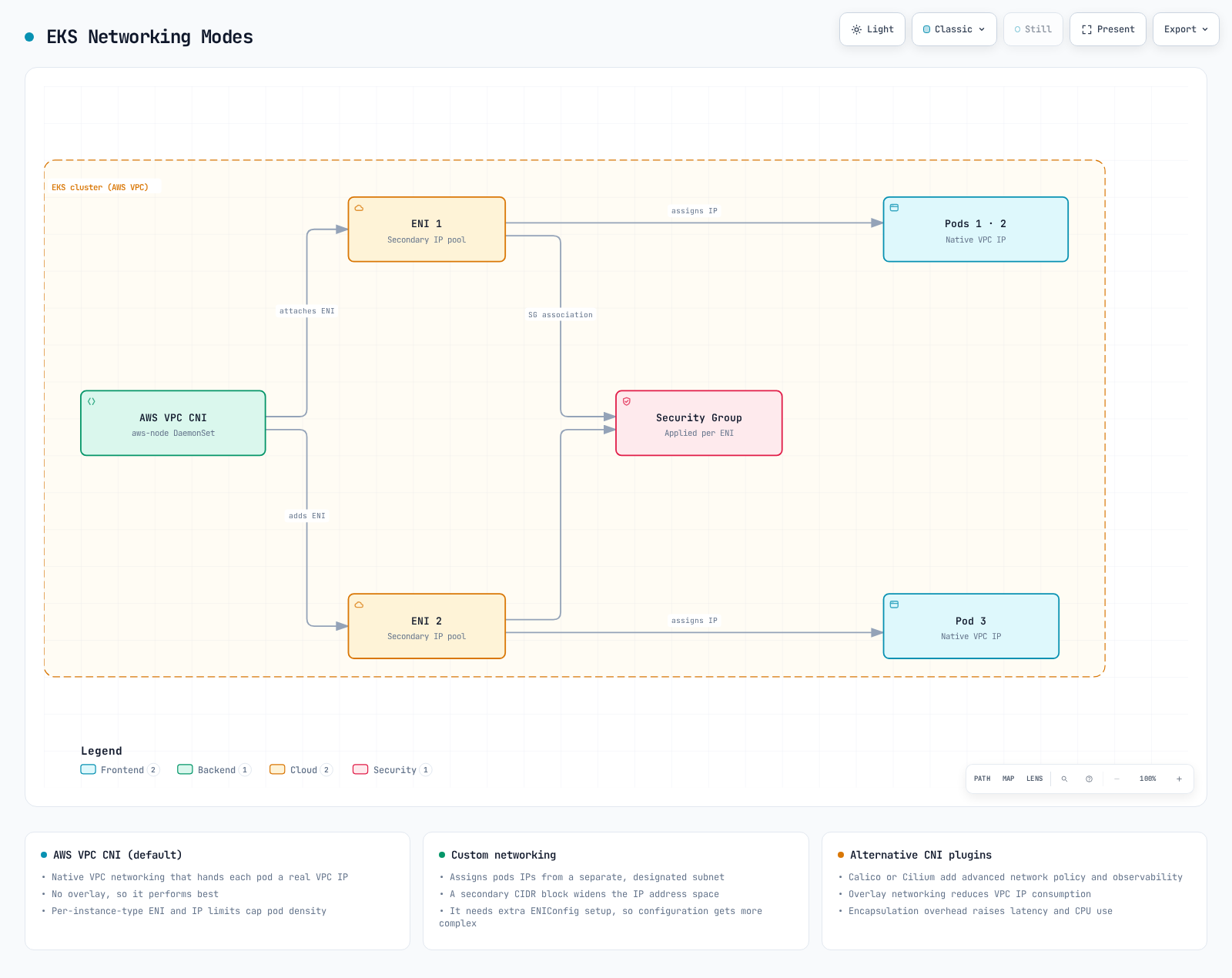
- Amazon VPC CNI (ordinary EC2 nodes):
- Assigns VPC IP addresses directly to pods.
- Uses native VPC addressing; throughput and latency still depend on instance/path limits. Prefix delegation primarily changes IP allocation and Pod density, not packet-path latency.
- Each node has a limit on the number of IP addresses it can assign.
- Custom Networking:
- Allows assigning IP addresses from specific subnets to pods.
- Can use appropriately routed secondary VPC CIDRs through same-VPC/AZ ENIConfig subnets. It does not enlarge an existing subnet in place.
- Provides finer control over network topology.
- Alternative CNI Plugins:
- Alternative CNI plugins such as Calico and Cilium can be used.
- Feature and performance differences depend on policy-only/chaining/overlay mode, encryption and workload. Native VPC CNI also supports NetworkPolicy on supported compute. Auto Mode and Hybrid Nodes have distinct networking/operational models; do not replace their CNI using ordinary EC2 instructions.
MTU Optimization
The actual VPC CNI environment variable is AWS_VPC_ENI_MTU, not ENI_MTU. In 1.23.0 it defaults to 9001; POD_MTU controls Pod virtual interfaces and, when unset, derives from the ENI MTU. Inspect both the init and main containers before changing configuration:
kubectl -n kube-system get daemonset aws-node -o json > aws-node-current.json
python3 - <<'PY'
import json
with open("aws-node-current.json") as stream:
    spec = json.load(stream)["spec"]["template"]["spec"]
for field in ("initContainers", "containers"):
    for container in spec.get(field, []):
        settings = {e["name"]: e.get("value", "<valueFrom>")
                    for e in container.get("env", [])
                    if e["name"] in {"AWS_VPC_ENI_MTU", "POD_MTU",
                      "DISABLE_TCP_EARLY_DEMUX", "POD_SECURITY_GROUP_ENFORCING_MODE"}}
        print(field, container["name"], settings)
PY
If path testing establishes that 1500 is appropriate, merge this Helm values fragment into the existing owner’s configuration. For an EKS add-on, inspect its exact configuration schema and preserve existing values rather than patching a Helm-owned DaemonSet. ENI/Pod interface changes may require planned node/Pod replacement; verify newly created interfaces and existing workloads separately.
env:
  AWS_VPC_ENI_MTU: "1500"
  POD_MTU: "1500"
Jumbo frames can reduce packet overhead, but the whole actual path must accommodate the packet size. SGs and subnets are not MTU-configured devices. Internet gateways/VPN paths commonly constrain MTU to 1500; gateways, peering, tunnels and load balancers have their own limits. Permit required ICMP “fragmentation needed”/IPv6 Packet Too Big messages for path MTU discovery. A successful small ping is not evidence that large application packets work. The IPv4 CNI range is 576–9001 and IPv6 is 1280–9001; a valid setting is not proof of end-to-end suitability.
TCP Optimization
TCP early demux: this is not a general throughput switch. In the documented Pod security-group strict mode case, disabling it lets kubelet TCP probes reach branch-ENI Pods. The setting belongs to aws-vpc-cni-init, not the aws-node main container. Standard mode does not require this workaround. Apply only after confirming the mode and failure path; the Helm fragment is:
init:
  env:
    DISABLE_TCP_EARLY_DEMUX: "true"
Keepalive: TCP keepalive detects inactive/broken long-lived connections only when the application enables it on the socket. It is distinct from HTTP connection pooling and does not speed up short-lived connections. Read values in the affected host/network namespace first; running sysctl on an administrator’s laptop reads that laptop, not EKS nodes:
sysctl net.ipv4.tcp_keepalive_time net.ipv4.tcp_keepalive_intvl \
  net.ipv4.tcp_keepalive_probes net.ipv4.tcp_rmem net.ipv4.tcp_wmem \
  net.core.rmem_max net.core.wmem_max
The original 60/15/6 values are an unmeasured tuning example, not universal production defaults. For a compatible Linux kernel and a non-hostNetwork workload, these sysctls are in Kubernetes’s safe set since 1.29. Merge only the sysctls into the existing Pod securityContext and preserve its other settings:
spec:
  template:
    spec:
      securityContext:
        sysctls:
        - name: net.ipv4.tcp_keepalive_time
          value: "60"
        - name: net.ipv4.tcp_keepalive_intvl
          value: "15"
        - name: net.ipv4.tcp_keepalive_probes
          value: "6"
Buffers: size experiments using bandwidth-delay product in bytes: bandwidth_bits_per_second × RTT_seconds / 8. TCP auto-tuning, parallel flows, socket overrides and total memory pressure matter. The former 16,777,216-byte maxima (16 MiB) and 4096 87380 16777216 / 4096 65536 16777216 triplets are examples, not measured optimal values. tcp_rmem/tcp_wmem are safe Pod sysctls since Kubernetes 1.32 with kernel 4.15+; net.core.* settings must not be assumed to have the same admission/isolation support. Use the node owner’s controlled configuration for node-level changes and compare error/latency/throughput/memory before and after.
Node Placement and Locality
These are alternative scheduling examples of the same Deployment. First create matching app=cache Pods in the same namespace. A preference does not force placement or move already-running Pods. The Python server is a training fixture; pin an approved image digest for reproducibility. Balance locality with replica spreading and node/AZ failure tolerance; same-node placement shares a failure domain.
Network performance can be improved by optimizing node placement and locality.
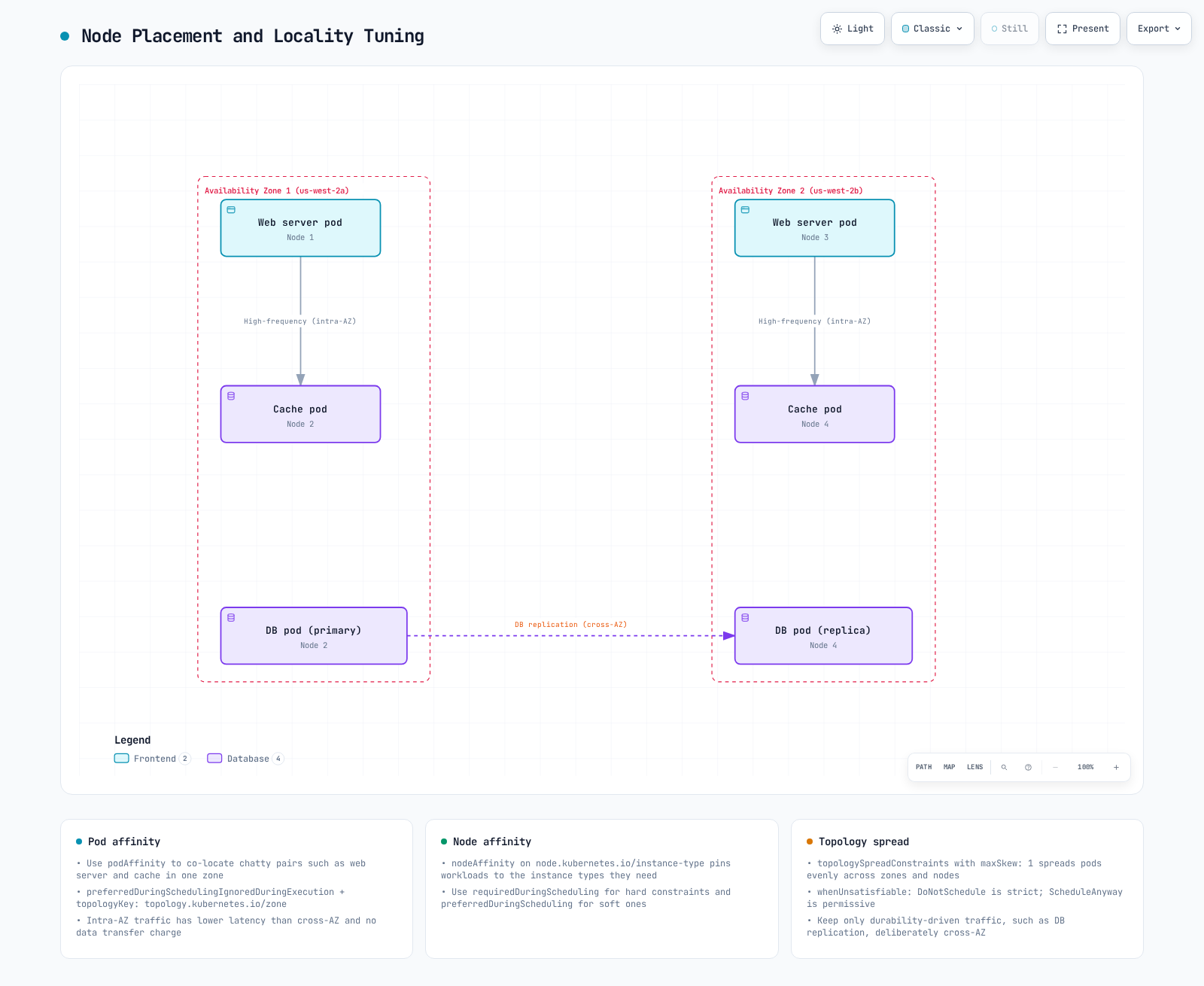
- Availability Zone Locality:
- Place frequently communicating pods in the same availability zone to reduce latency.
- Use pod affinity and anti-affinity to control pod placement.
apiVersion: apps/v1
kind: Deployment
metadata:
  name: web-server
spec:
  replicas: 3
  selector:
    matchLabels:
      app: web
  template:
    metadata:
      labels:
        app: web
    spec:
      automountServiceAccountToken: false
      securityContext:
        runAsNonRoot: true
        runAsUser: 10001
        runAsGroup: 10001
        seccompProfile:
          type: RuntimeDefault
      containers:
      - name: http
        image: python:3.13-alpine
        command:
        - python
        - -u
        - -c
        args:
        - |
          import os
          from http.server import BaseHTTPRequestHandler, HTTPServer
          class Handler(BaseHTTPRequestHandler):
              def do_GET(self):
                  self.send_response(200)
                  self.end_headers()
                  self.wfile.write((os.environ["APP_NAME"] + "\n").encode())
          HTTPServer(("0.0.0.0", 8080), Handler).serve_forever()
        env:
        - name: APP_NAME
          value: web
        ports:
        - name: http
          containerPort: 8080
        readinessProbe:
          httpGet:
            path: /health
            port: http
        resources:
          requests:
            cpu: 50m
            memory: 32Mi
          limits:
            cpu: 200m
            memory: 64Mi
        securityContext:
          allowPrivilegeEscalation: false
          readOnlyRootFilesystem: true
          capabilities:
            drop:
            - ALL
      affinity:
        podAffinity:
          preferredDuringSchedulingIgnoredDuringExecution:
          - weight: 100
            podAffinityTerm:
              labelSelector:
                matchExpressions:
                - key: app
                  operator: In
                  values:
                  - cache
topologyKey: topology.kubernetes.io/zone- Node Locality:
- Place frequently communicating pods on the same node to reduce network hops.
- This is particularly useful for latency-sensitive applications.
apiVersion: apps/v1
kind: Deployment
metadata:
  name: web-server
spec:
  replicas: 3
  selector:
    matchLabels:
      app: web
  template:
    metadata:
      labels:
        app: web
    spec:
      automountServiceAccountToken: false
      securityContext:
        runAsNonRoot: true
        runAsUser: 10001
        runAsGroup: 10001
        seccompProfile:
          type: RuntimeDefault
      containers:
      - name: http
        image: python:3.13-alpine
        command:
        - python
        - -u
        - -c
        args:
        - |
          import os
          from http.server import BaseHTTPRequestHandler, HTTPServer
          class Handler(BaseHTTPRequestHandler):
              def do_GET(self):
                  self.send_response(200)
                  self.end_headers()
                  self.wfile.write((os.environ["APP_NAME"] + "\n").encode())
          HTTPServer(("0.0.0.0", 8080), Handler).serve_forever()
        env:
        - name: APP_NAME
          value: web
        ports:
        - name: http
          containerPort: 8080
        readinessProbe:
          httpGet:
            path: /health
            port: http
        resources:
          requests:
            cpu: 50m
            memory: 32Mi
          limits:
            cpu: 200m
            memory: 64Mi
        securityContext:
          allowPrivilegeEscalation: false
          readOnlyRootFilesystem: true
          capabilities:
            drop:
            - ALL
      affinity:
        podAffinity:
          preferredDuringSchedulingIgnoredDuringExecution:
          - weight: 100
            podAffinityTerm:
              labelSelector:
                matchExpressions:
                - key: app
                  operator: In
                  values:
                  - cache
topologyKey: kubernetes.io/hostname- Service traffic preference:
For the current example, use trafficDistribution: PreferSameZone with a compatible service proxy. It prefers same-zone ready endpoints and falls back when none exist; it is not an isolation or cross-AZ-cost guarantee. Ensure enough local capacity. Remove an existing service.kubernetes.io/topology-mode: Auto annotation if intentionally switching approaches because it takes precedence. internalTrafficPolicy: Local/externalTrafficPolicy: Local impose stricter node-local behavior for their respective traffic and take precedence; they can drop traffic without a local endpoint.
apiVersion: v1
kind: Service
metadata:
  name: my-service
spec:
  selector:
    app: my-app
  ports:
  - port: 80
    targetPort: 8080
  type: ClusterIP
  trafficDistribution: PreferSameZone
Network Policy Optimization
Kubernetes NetworkPolicy allows are additive; ordering rules or policy names does not define “first match wins”. Putting frequently used rules first is not a portable optimization. Calico tiers/order and other vendor policies are different APIs. Preserve the required ingress/egress isolation while removing confirmed duplicate/obsolete rules through their owner. Measure the selected engine’s policy programming time, rule/map usage, CPU and packet drops under representative load; policy count alone does not establish a bottleneck.
Networking Troubleshooting
Let's explore common networking issues that can occur in EKS clusters and how to resolve them.
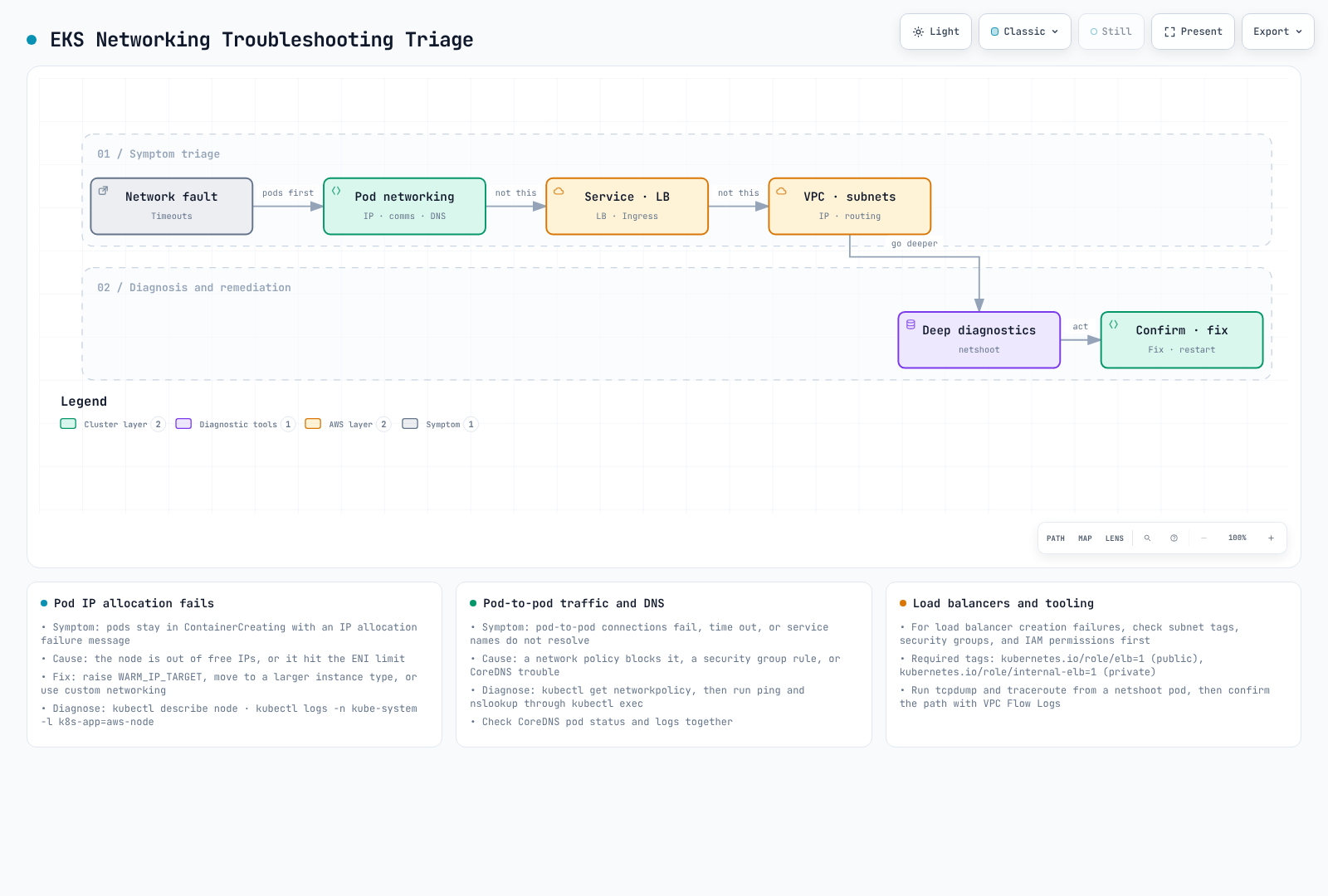
Pod Networking Issues
Start with the actual Pod events. ContainerCreating can mean CNI/IPAM, image, volume or runtime failure; it is not proof of IP exhaustion. Correlate the affected node, subnet free addresses, ENI/IP limits, prefix fragmentation, API errors/throttling and CNI logs:
set -euo pipefail
: "${APP_NAMESPACE:?Set the affected namespace}"
: "${APP_POD:?Set the affected Pod}"
: "${APP_SERVICE:?Set the affected Service}"
kubectl -n "$APP_NAMESPACE" describe pod "$APP_POD"
kubectl -n "$APP_NAMESPACE" get events --field-selector "involvedObject.name=$APP_POD" --sort-by=.metadata.creationTimestamp
kubectl -n "$APP_NAMESPACE" get service "$APP_SERVICE" -o yaml
kubectl -n "$APP_NAMESPACE" get endpointslices \
  -l "kubernetes.io/service-name=$APP_SERVICE" -o yaml
kubectl -n "$APP_NAMESPACE" get networkpolicy
kubectl -n kube-system logs -l k8s-app=aws-node -c aws-node --tail=200 --prefix=true
IP allocation: increasing WARM_IP_TARGET reserves more spare addresses and can worsen subnet exhaustion. Adjust warm targets only for the observed allocation/startup requirement and available capacity. A subnet without a contiguous /28 cannot allocate a prefix just because its total free-IP count is large. Changing node size cannot enlarge the subnet. Plan subnet/prefix reservations, supported node density or a staged networking migration after identifying the bottleneck.
Connectivity: compare same-node, cross-node, cross-zone, Pod-IP and Service paths with the application’s actual TCP/UDP protocol. DNS failure, an absent utility or ICMP blocking is not proof of NetworkPolicy rejection. The following assumes an existing, approved diagnostic Pod with the tools shown; adapt the cluster DNS suffix and the target URL. Do not install privileged tools into production Pods merely to run it:
set -euo pipefail
: "${APP_NAMESPACE:?Set the affected namespace}"
: "${DIAGNOSTIC_POD:?Set a running diagnostic Pod with curl and DNS tools}"
: "${TARGET_URL:?Set the real application URL and port}"
kubectl -n "$APP_NAMESPACE" exec "$DIAGNOSTIC_POD" -- cat /etc/resolv.conf
kubectl -n "$APP_NAMESPACE" exec "$DIAGNOSTIC_POD" -- nslookup kubernetes.default.svc.cluster.local
kubectl -n "$APP_NAMESPACE" exec "$DIAGNOSTIC_POD" -- curl \
  --fail --show-error --max-time 10 "$TARGET_URL"
DNS: inspect dnsPolicy/dnsConfig, resolv.conf, DNS Service/EndpointSlices, CoreDNS events/logs and upstream reachability. nslookup and dig are alternatives, not guaranteed contents of the application image. Native Auto Mode DNS has a different management path; absence of a traditional CoreDNS Deployment is not automatically a failure. Preserve managed add-on configuration and evidence before considering a restart.
Service and Load Balancing Issues
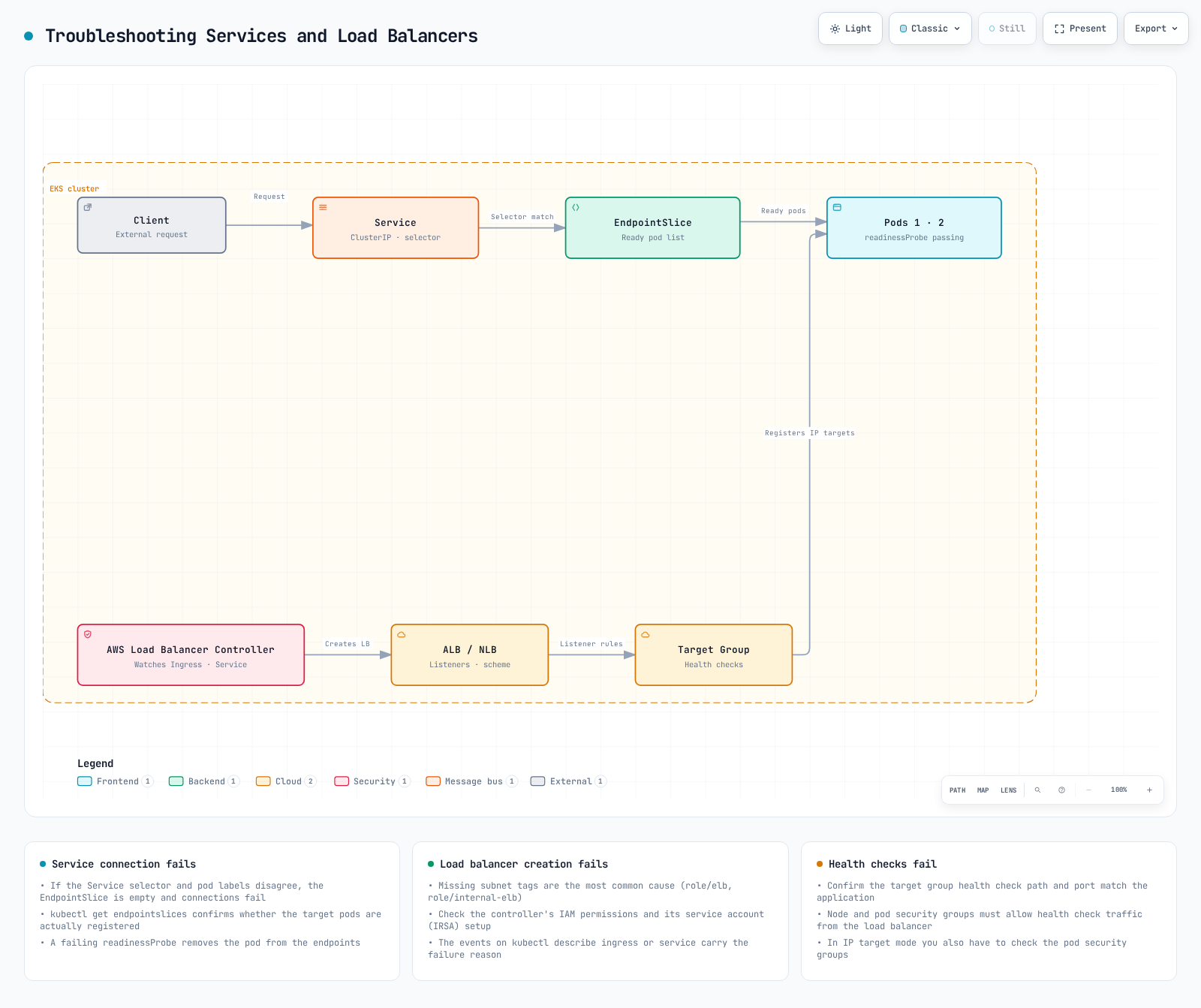
Service path: verify namespace, selector labels, real listening port, Service port/targetPort, readiness and EndpointSlice addresses/conditions. Use EndpointSlices rather than the legacy Endpoints API, which can truncate large backend sets. Then inspect the actual service-proxy/CNI mode and any traffic policy/locality preference.
Load balancer/Ingress: identify the owning controller and class first. For ordinary LBC, inspect Ingress events, controller logs and AWS target-health reason codes. Auto Mode has a managed controller with a different diagnostic path. Check scheme/client reachability, subnet discovery/configuration, frontend and target SG rules, actual target type, health-check port/path, certificate/SNI and DNS. A subnet tag does not create a route and “controller Running” does not establish that targets are healthy.
set -euo pipefail
: "${APP_NAMESPACE:?Set the affected namespace}"
: "${INGRESS_NAME:?Set the affected Ingress}"
: "${AWS_REGION:?Set the load balancer Region}"
: "${TARGET_GROUP_ARN:?Set the target group identified from this Ingress}"
kubectl -n "$APP_NAMESPACE" describe ingress "$INGRESS_NAME"
kubectl -n kube-system logs -l app.kubernetes.io/name=aws-load-balancer-controller --tail=200 --prefix=true
aws elbv2 describe-target-health --region "$AWS_REGION" --target-group-arn "$TARGET_GROUP_ARN"
Change one confirmed cause at a time, retain a rollback path, and repeat the same positive and negative application checks. The commands above are diagnostic examples; this audit did not execute against an EKS cluster.
Official references: EC2 bandwidth, MTU, VPC CNI 1.23.0 settings, Kubernetes sysctls, Service traffic distribution.
Quiz
To test what you've learned in this chapter, try the topic quiz.