Container Registry Best Practices
Last Updated: September 11, 2026
Introduction
This document consolidates best practices for container registry management across Docker Hub, Amazon ECR, and Harbor. These recommendations apply regardless of your chosen registry and focus on operational excellence, security, and cost optimization.
Account, region, hostname and repository values in API/CLI examples are illustrative. Prepare the target resources and credentials first. For Harbor API examples, set HARBOR_USER and use the curl --user password prompt. Obtain endpoint IDs from creation responses.
Tag Management
Immutable Tags
A version-shaped tag can still be overwritten unless the registry enforces immutability. Pin the tested digest in deployments and apply immutability rules to release tags. Immutability does not universally protect an artifact from deletion; check the registry's exact policy.
| Registry | Configuration |
|---|---|
| Docker Hub | Repository Tag mutability settings (Beta as of this review) |
| Amazon ECR | image-tag-mutability: IMMUTABLE |
| Harbor | Project tag immutability rules |
# ECR: Enable immutable tags
aws ecr put-image-tag-mutability \
  --repository-name myapp \
  --image-tag-mutability IMMUTABLE
Semantic Versioning
SemVer +build metadata is not directly valid in an image tag. Preserve full SemVer in OCI labels and map tags to the allowed alphanumeric, underscore, dot and hyphen syntax.
Use SemVer (Semantic Versioning) for release images:
MAJOR.MINOR.PATCH[-PRERELEASE][+BUILD]

Examples:
  1.0.0           - Initial release
  1.0.1           - Patch release (bug fixes)
  1.1.0           - Minor release (new features, backward compatible)
  2.0.0           - Major release (breaking changes)
  1.0.0-rc.1      - Release candidate
  1.0.0-beta.2    - Beta release
  1.0.0+build.123 - Build metadata
Tag Strategy by Environment
| Environment | Tag Pattern | Example | Mutability |
|---|---|---|---|
| Production | SemVer | 1.2.3 | Immutable |
| Staging | SemVer-rc | 1.2.3-rc.1 | Immutable |
| Development | SHA-based | abc123f-dev | Mutable |
| Feature branch | Branch-SHA | feature-auth-abc123f | Mutable |
| CI builds | Build number | build-456 | Mutable |
The latest Tag Anti-Pattern
Never use latest in production. Problems with latest:
- Non-deterministic: Different nodes may pull different images
- No rollback path: Cannot revert to "previous latest"
- Pull-policy ambiguity: an omitted policy defaults to
Alwaysforlatestat creation; cached layers can still be reused - Audit nightmare: Cannot determine what version is running
# BAD - Never do this in production
spec:
  containers:
  - name: app
    image: myregistry.com/myapp:latest
    imagePullPolicy: Always  # Checks the reference each start; cached layers can be reused

---
# GOOD - Use specific versions
spec:
  containers:
  - name: app
    image: myregistry.com/myapp:1.2.3
    # imagePullPolicy: IfNotPresent (default, efficient)
When latest is acceptable:
- Local development
- Tutorials and examples
- Base images in Dockerfiles (pin in production)
Promotion Workflows
Implement a promotion workflow rather than rebuilding images:
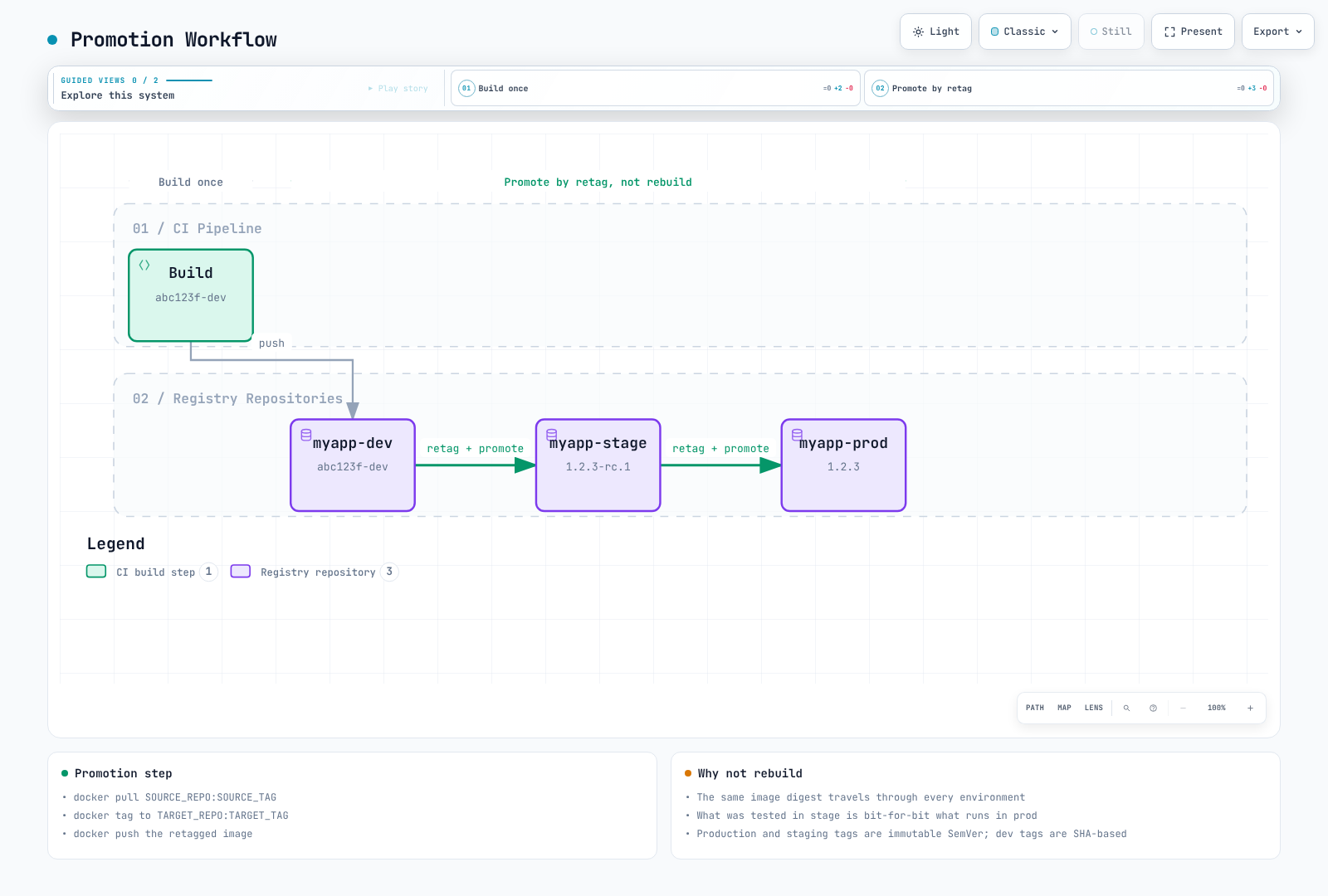
Promotion script:
#!/usr/bin/env bash
set -euo pipefail
: "${AWS_REGION:?Set the registry region}"
: "${ECR_REGISTRY:?Set account.dkr.ecr.region.amazonaws.com}"
: "${SOURCE_REPO:?Set the source repository}"
: "${SOURCE_DIGEST:?Set the scanned sha256 digest}"
: "${TARGET_REPO:?Set the pre-created destination repository}"
: "${TARGET_TAG:?Set a new immutable release tag}"
aws ecr get-login-password --region "$AWS_REGION" \
  | skopeo login --username AWS --password-stdin "$ECR_REGISTRY"
skopeo copy --all --preserve-digests \
  "docker://${ECR_REGISTRY}/${SOURCE_REPO}@${SOURCE_DIGEST}" \
  "docker://${ECR_REGISTRY}/${TARGET_REPO}:${TARGET_TAG}"
Image Naming Conventions
Standard Format
[REGISTRY/]NAMESPACE/REPOSITORY:TAG[@DIGEST]

Examples:
  nginx:1.30.4                                    # Docker Hub official
  myuser/myapp:v1.0.0                          # Docker Hub user
  123456789012.dkr.ecr.us-east-1.amazonaws.com/myapp:v1.0.0  # ECR
  harbor.example.com/production/myapp:v1.0.0   # Harbor
  ghcr.io/myorg/myapp:v1.0.0                   # GitHub Container Registry
Organizational Structure
REGISTRY/
├── NAMESPACE (organization/team/environment)/
│   ├── REPOSITORY (application name)/
│   │   ├── TAG (version)
│   │   └── TAG
│   └── REPOSITORY/
└── NAMESPACE/
Example ECR structure:
123456789012.dkr.ecr.us-east-1.amazonaws.com/
├── platform/
│   ├── ingress-controller:<supported-version>
│   ├── cert-manager:<supported-version>
│   └── external-dns:<supported-version>
├── myapp/
│   ├── api:v2.1.0
│   ├── web:v2.1.0
│   └── worker:v2.1.0
└── tools/
    ├── kubectl:<cluster-compatible-version>
    └── helm:<supported-version>
Environment Prefixes
For single-repository strategies:
myapp:v1.2.3                 # Production release
myapp:v1.2.3-staging         # Staging candidate
myapp:abc123f-dev            # Development build
myapp:abc123f-feature-auth   # Feature branch
Multi-Architecture Images
Use manifest lists for multi-arch support:
# Build for multiple architectures
docker buildx build \
  --platform linux/amd64,linux/arm64 \
  --tag myregistry.com/myapp:v1.0.0 \
  --push .

# Inspect manifest
docker manifest inspect myregistry.com/myapp:v1.0.0
Tag conventions for arch-specific images (if needed):
myapp:v1.0.0           # Manifest list (preferred)
myapp:v1.0.0-amd64     # AMD64-specific
myapp:v1.0.0-arm64     # ARM64-specific
Registry Mirroring and Caching
Why Mirror/Cache?
- Rate limit avoidance: Docker Hub limits pulls
- Improved performance: Local cache reduces latency
- Reliability: Preloaded mirrors reduce dependency; cache misses/refreshes still need upstream access
- Security: Control over what images enter your environment
- Cost savings: Reduce cross-region/internet transfer costs
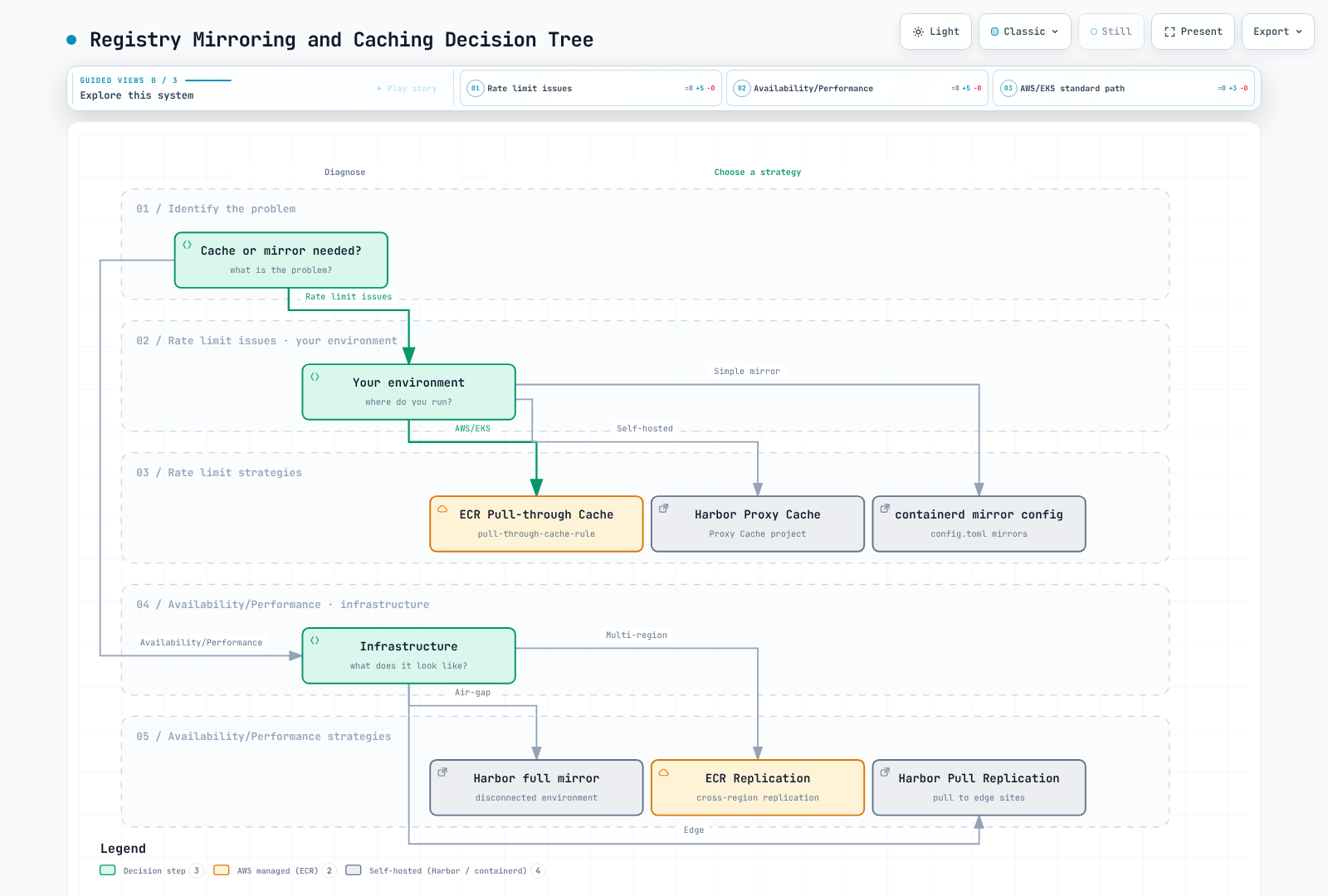
Pull-Through Cache Comparison
| Feature | ECR Pull-Through | Harbor Proxy | Distribution |
|---|---|---|---|
| Managed | Yes | No | No |
| Upstream support | Supported ECR upstreams | Supported Harbor adapters | Docker Hub |
| Authentication | Secrets Manager | Built-in | Environment vars |
| Scanning | According to repository/registry scanning configuration | According to project/scanner configuration | No built-in scanner |
| High availability | Built-in | Self-managed | Self-managed |
ECR Pull-Through Cache Setup
Store Docker Hub credentials in Secrets Manager in the same account/region under the ecr-pullthroughcache/ prefix, with username and accessToken keys. Resolve the actual secret ARN rather than constructing one. See Amazon ECR for repository creation/import permissions and the service-linked role.
# The upstream secret must already exist in this account and region.
: "${AWS_REGION:?Set the target AWS region}"
SECRET_ARN=$(aws secretsmanager describe-secret --region "$AWS_REGION" \
  --secret-id ecr-pullthroughcache/docker-hub --query ARN --output text)
aws ecr create-pull-through-cache-rule --region "$AWS_REGION" \
  --ecr-repository-prefix docker-hub \
  --upstream-registry-url registry-1.docker.io \
  --credential-arn "$SECRET_ARN"
Pull URI: ACCOUNT.dkr.ecr.REGION.amazonaws.com/docker-hub/library/nginx:1.30.4. Cache misses and refreshes still depend on upstream access.
Containerd Mirror Configuration
This example assumes a trusted mirror serving the same Docker Hub repository paths. Containerd 2.x uses the images plugin config_path; 1.x uses the CRI plugin path. The resolve capability trusts the mirror's tag-to-digest decisions. This does not automatically translate ECR/Harbor project prefixes or credentials.
# containerd 2.x: /etc/containerd/config.toml
[plugins."io.containerd.cri.v1.images".registry]
  config_path = "/etc/containerd/certs.d"
# For containerd 1.x, use plugins."io.containerd.grpc.v1.cri".registry.# /etc/containerd/certs.d/docker.io/hosts.toml
server = "https://registry-1.docker.io"
[host."https://mirror.example.com"]
capabilities = ["pull", "resolve"]
ca = "/etc/containerd/certs.d/docker.io/mirror-ca.crt"The server allows fallback to Docker Hub, so this is not an offline-only configuration. For disconnected networks and authenticated ECR/Harbor caches, use explicit internal image URIs and validate node CA trust, imagePullSecrets and actual pulls.
Harbor Proxy Cache Configuration
# 1. Create registry endpoint
curl --fail-with-body -X POST "https://harbor.example.com/api/v2.0/registries" \
  -H "Content-Type: application/json" \
  --user "$HARBOR_USER" \
  -d '{
    "name": "docker-hub",
    "type": "docker-hub",
    "url": "https://hub.docker.com",
    "credential": {
      "type": "basic",
      "access_key": "username",
      "access_secret": "password"
    }
  }'

# 2. Create proxy cache project
curl --fail-with-body -X POST "https://harbor.example.com/api/v2.0/projects" \
  -H "Content-Type: application/json" \
  --user "$HARBOR_USER" \
  -d '{
    "project_name": "dockerhub-cache",
    "registry_id": 1,
    "metadata": {"public": "true"}
  }'

# Usage: harbor.example.com/dockerhub-cache/library/nginx:latest
Disaster Recovery
Multi-Region Strategy
┌─────────────────────────────────────────────────────────────────┐
│                    Primary Region (us-east-1)                    │
│  ┌─────────────┐                                                │
│  │  ECR / Harbor│──────────────────┐                            │
│  └─────────────┘                   │                            │
└────────────────────────────────────┼────────────────────────────┘
                                     │ Replication
                                     ▼
┌─────────────────────────────────────────────────────────────────┐
│                    DR Region (eu-west-1)                         │
│  ┌─────────────┐                                                │
│  │  ECR / Harbor│                                                │
│  └─────────────┘                                                │
└─────────────────────────────────────────────────────────────────┘
ECR Cross-Region Replication
resource "aws_ecr_replication_configuration" "dr" {
  replication_configuration {
    rule {
      destination {
        region      = "eu-west-1"
        registry_id = data.aws_caller_identity.current.account_id
      }

      # Only replicate production images
      repository_filter {
        filter      = "prod-"
        filter_type = "PREFIX_MATCH"
      }
    }
  }
}
Harbor Replication for DR
# Configure DR Harbor as endpoint
# Add destination credentials through the protected Harbor UI before using this endpoint.
curl --fail-with-body -X POST "https://harbor-primary.example.com/api/v2.0/registries" \
  -H "Content-Type: application/json" \
  --user "$HARBOR_USER" \
  -d '{
    "name": "harbor-dr",
    "type": "harbor",
    "url": "https://harbor-dr.example.com"
  }'

# Create event-based replication
curl --fail-with-body -X POST "https://harbor-primary.example.com/api/v2.0/replication/policies" \
  -H "Content-Type: application/json" \
  --user "$HARBOR_USER" \
  -d '{
    "name": "dr-replication",
    "dest_registry": {"id": 1},
    "trigger": {"type": "event_based"},
    "enabled": true,
    "replicate_deletion": false
  }'
Backup Procedures and RTO/RPO
ECR replication is asynchronous and applies to images pushed/restored after configuration; existing artifacts require backfill. Validate destination policies, permissions, scanning, encryption, lifecycle settings and actual pulls. The replication configuration API replaces the registry configuration, so merge existing rules first.
Measure RPO/RTO in recovery drills including replication lag, detection, artifact/signature readiness and cluster/DNS failover. Event replication does not guarantee zero RPO or a five-minute RTO. Replicating deletions can remove the DR copy too, so design an independent backup.
A few Docker pull/save tags are not a complete backup. Preserve an inventory of tested digests, all target platforms, OCI manifests, signatures/SBOMs and restoration instructions. Use explicit inventory/checksums as in the Harbor Skopeo transfer procedure; back up Harbor metadata, blobs, configuration and keys consistently. A tar file in S3 is not a registry Kubernetes can pull from; import it into a recovery registry.
Cost Optimization
Cost Estimation
Estimate storage, region/AZ/internet transfer, scanning/signing, PrivateLink/NAT, registry compute/database/backups and operations separately. An illustrative ECR regional storage price of $0.10/GB-month is not the complete bill. Summing imageSizeInBytes is not the same as deduplicated billed layer storage. A fixed threshold such as 500 GB does not determine whether ECR or Harbor is cheaper.
Lifecycle Policy Essentials
The ECR example below expires three development tag prefixes after 30 days in a development-only repository. Multiple patterns in one tagPatternList are AND, not OR, so use a separate rule per prefix. Do not mix release/development tags on one digest; use Lifecycle Preview to protect deployed/rollback digests. Untagged images can still be deployed by digest and are not automatically safe to delete.
{
  "rules": [
    {
      "rulePriority": 1,
      "description": "Expire dev-* development artifacts after 30 days",
      "selection": {
        "tagStatus": "tagged",
        "tagPatternList": [
          "dev-*"
        ],
        "countType": "sinceImagePushed",
        "countNumber": 30,
        "countUnit": "days"
      },
      "action": {
        "type": "expire"
      }
    },
    {
      "rulePriority": 2,
      "description": "Expire feature-* development artifacts after 30 days",
      "selection": {
        "tagStatus": "tagged",
        "tagPatternList": [
          "feature-*"
        ],
        "countType": "sinceImagePushed",
        "countNumber": 30,
        "countUnit": "days"
      },
      "action": {
        "type": "expire"
      }
    },
    {
      "rulePriority": 3,
      "description": "Expire pr-* development artifacts after 30 days",
      "selection": {
        "tagStatus": "tagged",
        "tagPatternList": [
          "pr-*"
        ],
        "countType": "sinceImagePushed",
        "countNumber": 30,
        "countUnit": "days"
      },
      "action": {
        "type": "expire"
      }
    }
  ]
}
Harbor retention uses the OR union of retain rules and a different schema from ECR. Follow the Harbor UI/API dry-run procedure and verify GC after deletion.
Image Size Optimization
Use compatible builder/runtime images and copy only runtime dependencies. This Python example carries a virtual environment between the same Python base versions. Native extension/system-library requirements still need validation. Keep secrets, local virtual environments and caches out of the build context with .dockerignore.
FROM python:3.14-slim AS builder
WORKDIR /app
RUN python -m venv /opt/venv
COPY requirements.txt .
RUN /opt/venv/bin/pip install --no-cache-dir -r requirements.txt

FROM python:3.14-slim
WORKDIR /app
COPY --from=builder /opt/venv /opt/venv
COPY --chown=10001:10001 . .
ENV PATH="/opt/venv/bin:$PATH"
USER 10001:10001
CMD ["python", "app.py"]
Image size varies by application, architecture, compression and dependencies. Distroless does not automatically remove vulnerabilities; validate builder/runtime ABI, CA certificates, user IDs and debugging procedures. Pin tested base digests and dependency locks for releases, then update them regularly.
Transfer Cost Reduction
Use region-local registry references and verify replication before failover. VPC endpoints can reduce NAT traffic, but include interface endpoint hourly/data costs and the ECR API/DKR plus S3 paths. See Amazon ECR for complete regional Kustomize overlays.
Security Checklist
Image Scanning
Docker Hub uses Docker Scout; ECR provides AWS-native Basic scanning or Inspector-based Enhanced scanning; Harbor uses its configured Trivy/external scanner. Check pricing, supported artifacts, rescanning and database freshness. Auto-scanning is separate from deployment enforcement; failed/incomplete results are not zero findings. Follow the current ECR and Harbor procedures.
Admission Controllers
Combine image signature verification with Kyverno registry policies. A registry allowlist does not verify signatures or scan vulnerabilities. Vulnerability attestations require trusted signers, the actual predicate schema/fields and scan freshness. Do not assume a criticalCount field exists or apply a truncated public key.
Test normal/init/ephemeral containers and CREATE/UPDATE coverage in Audit before Enforce. A Gatekeeper constraint requires its matching ConstraintTemplate to be installed first.
Least Privilege Access
This policy allows pulls from selected ECR repositories. GetAuthorizationToken does not support repository-level resource permissions and needs Resource: "*"; the actual pull actions are ARN-scoped. In EKS, attach the permissions to the node role or Fargate Pod execution role. The application's IRSA/Pod Identity role does not supply credentials for its own initial image pull.
{
  "Version": "2012-10-17",
  "Statement": [
    {
      "Sid": "RegistryToken",
      "Effect": "Allow",
      "Action": "ecr:GetAuthorizationToken",
      "Resource": "*"
    },
    {
      "Sid": "PullApprovedRepositories",
      "Effect": "Allow",
      "Action": [
        "ecr:BatchCheckLayerAvailability",
        "ecr:GetDownloadUrlForLayer",
        "ecr:BatchGetImage"
      ],
      "Resource": [
        "arn:aws:ecr:ap-northeast-2:123456789012:repository/myapp-prod",
        "arn:aws:ecr:ap-northeast-2:123456789012:repository/base-images/*"
      ]
    }
  ]
}
For Harbor, use project-scoped pull-only robots with expiry/rotation. Follow the current /api/v2.0/robots schema and namespace-scoped imagePullSecrets procedure in Harbor.
Network Policies
Kubernetes NetworkPolicy controls traffic for selected Pods. Do not assume a Pod egress policy controls image pulls performed by node kubelet/containerd. Validate allowed registries at admission, and control node registry/DNS/ECR API/DKR/S3 access at the node/network layer. Application Pod egress policies must also account for DNS and required application traffic.
Secrets Management
This requires CRDs serving the External Secrets Operator v1 API and a configured ClusterSecretStore. Store complete valid Docker config JSON in the remote secret; passing the full JSON avoids breaking quoted/backslash-containing passwords through string interpolation. Reference the resulting Secret from a Pod/ServiceAccount in the same namespace.
apiVersion: external-secrets.io/v1
kind: ExternalSecret
metadata:
  name: registry-credentials
  namespace: production
spec:
  refreshInterval: 1h
  secretStoreRef:
    name: aws-secrets-manager
    kind: ClusterSecretStore
  target:
    name: registry-pull-secret
    creationPolicy: Owner
    template:
      engineVersion: v2
      type: kubernetes.io/dockerconfigjson
      data:
        .dockerconfigjson: "{{ .dockerconfigjson | toString }}"
  data:
  - secretKey: dockerconfigjson
    remoteRef:
      key: harbor-pull-dockerconfigjson
Repeatedly copying a stored ECR token does not renew its 12-hour lifetime. Use the native EKS image-pull identity or an explicitly configured ECR token generator. Monitor secret-store authorization, encryption and rotation failures.
CI/CD Integration Patterns
GitHub Actions with ECR
This example builds a single Linux/amd64 image into local Docker, scans that image, then pushes and signs it. Prepare the ECR repository, an OIDC IAM role restricted by aud/sub, push permissions and a supported runner. Actions are pinned to reviewed release commits. If rebuilding the same commit conflicts with an immutable tag, reuse its verified digest or assign a new build ID.
name: Build scan and publish to ECR
on:
  push:
    branches: [main]
    tags: ['v*']
permissions:
  contents: read
  id-token: write
env:
  AWS_REGION: ap-northeast-2
  ECR_REPOSITORY: myapp
jobs:
  publish:
    runs-on: ubuntu-24.04
    steps:
    - uses: actions/checkout@3d3c42e5aac5ba805825da76410c181273ba90b1 # v7.0.1
    - uses: aws-actions/configure-aws-credentials@cbe3b392738ccf3f987d68400dafcf4b0624a56c # v6.2.4
      with:
        role-to-assume: arn:aws:iam::123456789012:role/github-actions-ecr
        aws-region: ${{ env.AWS_REGION }}
    - uses: aws-actions/amazon-ecr-login@03f1aad4c6c7ffd436567f42f9384779290529bd # v2.1.7
      id: login
    - uses: docker/setup-buildx-action@37fe631027851001ddb9b187196cc803df7f5f0e # v4.3.0
    - uses: docker/build-push-action@53b7df96c91f9c12dcc8a07bcb9ccacbed38856a # v7.3.0
      with:
        context: .
        platforms: linux/amd64
        load: true
        push: false
        tags: ${{ steps.login.outputs.registry }}/${{ env.ECR_REPOSITORY }}:${{ github.sha }}
        cache-from: type=gha
        cache-to: type=gha,mode=max
    - uses: aquasecurity/trivy-action@ed142fd0673e97e23eac54620cfb913e5ce36c25 # v0.36.0
      with:
        version: v0.74.0
        image-ref: ${{ steps.login.outputs.registry }}/${{ env.ECR_REPOSITORY }}:${{ github.sha }}
        scan-type: image
        scanners: vuln
        exit-code: '1'
        severity: HIGH,CRITICAL
    - name: Publish scanned image and record digest
      id: publish
      env:
        REGISTRY: ${{ steps.login.outputs.registry }}
      run: |
        set -euo pipefail
        IMAGE="$REGISTRY/$ECR_REPOSITORY"
        docker push "$IMAGE:$GITHUB_SHA"
        DIGEST=$(aws ecr describe-images --repository-name "$ECR_REPOSITORY" \
          --image-ids "imageTag=$GITHUB_SHA" --query 'imageDetails[0].imageDigest' --output text)
        [[ "$DIGEST" =~ ^sha256:[a-f0-9]{64}$ ]]
        printf 'image=%s@%s\n' "$IMAGE" "$DIGEST" >> "$GITHUB_OUTPUT"
    - uses: sigstore/cosign-installer@6f9f17788090df1f26f669e9d70d6ae9567deba6 # v4.1.2
    - name: Sign the published digest with the job OIDC identity
      env:
        SIGNED_IMAGE: ${{ steps.publish.outputs.image }}
      run: cosign sign --yes "$SIGNED_IMAGE"
For a multi-platform release, scan every platform and promote the final index digest. Use publish.outputs.image for deployment and signature verification; a matching SemVer tag alone is not release approval. Keyless verification needs an admission policy constrained to this workflow's OIDC issuer/identity. If adding SARIF upload, configure Code Scanning eligibility and security-events: write.
GitLab CI with Harbor
This Docker-executor example uses TLS-enabled DinD. Configure the required privileged mode and shared /certs/client volume on an isolated dedicated runner. Supply project robot credentials through protected masked HARBOR_USERNAME/HARBOR_PASSWORD variables and trust the Harbor CA. Scan and publish consume the same build artifact, and publishing depends on scan success.
stages: [build, scan, publish]
workflow:
  rules:
    - if: '$CI_COMMIT_BRANCH == "main" || $CI_COMMIT_TAG'
variables:
  HARBOR_HOST: harbor.example.com
  IMAGE_NAME: harbor.example.com/myapp/app
  DOCKER_HOST: tcp://docker:2376
  DOCKER_TLS_CERTDIR: /certs
  DOCKER_TLS_VERIFY: "1"
  DOCKER_CERT_PATH: /certs/client
.docker:
  image: docker:29.8.0-cli
  services:
    - name: docker:29.8.0-dind
      alias: docker
build:
  extends: .docker
  stage: build
  script:
    - docker build -t "$IMAGE_NAME:$CI_COMMIT_SHA" .
    - docker save "$IMAGE_NAME:$CI_COMMIT_SHA" -o image.tar
  artifacts:
    paths: [image.tar]
    expire_in: 1 day
scan:
  stage: scan
  image:
    name: aquasec/trivy:0.74.0
    entrypoint: [""]
  needs:
    - job: build
      artifacts: true
  script:
    - trivy image --input image.tar --exit-code 1 --severity HIGH,CRITICAL
publish:
  extends: .docker
  stage: publish
  needs:
    - job: build
      artifacts: true
    - job: scan
      artifacts: false
  script:
    - printf '%s' "$HARBOR_PASSWORD" | docker login "$HARBOR_HOST" --username "$HARBOR_USERNAME" --password-stdin
    - docker load -i image.tar
    - docker push "$IMAGE_NAME:$CI_COMMIT_SHA"
Deployment and Image Updates
After scan/sign gates, update the GitOps repository with the verified digest and apply approval, admission verification and rollout checks. Argo CD Image Updater 1.x uses an ImageUpdater CR; copying old Application annotations alone is insufficient. Install its matching CRDs and configure Argo CD access, registry credentials and Git write-back authorization according to your release approval policy.
Image Management with skopeo
skopeo is a command-line tool for inspecting, copying, and synchronizing container images between registries. It operates without a Docker daemon and requires no root privileges, making it ideal for CI/CD pipelines and air-gap scenarios.
Installation
# RHEL/CentOS/Amazon Linux
sudo yum install -y skopeo

# Ubuntu/Debian
sudo apt-get install -y skopeo

# macOS
brew install skopeo
skopeo inspect — Remote Image Inspection
Inspect image metadata without pulling the image:
# Inspect Docker Hub image
skopeo inspect docker://docker.io/library/nginx:1.30.4

# Inspect ECR image (requires AWS auth)
skopeo inspect docker://123456789012.dkr.ecr.us-east-1.amazonaws.com/myapp:v1.0.0

# View raw manifest
skopeo inspect --raw docker://docker.io/library/nginx:1.30.4 | jq .

# Inspect specific architecture
skopeo --override-arch arm64 inspect docker://docker.io/library/nginx:1.30.4
skopeo copy — Cross-Registry Image Copy
Copy images directly between registries without pulling locally:
# Docker Hub → ECR
skopeo copy --all \
  docker://docker.io/library/nginx:1.30.4 \
  docker://123456789012.dkr.ecr.us-east-1.amazonaws.com/nginx:1.30.4

# ECR → Harbor
skopeo copy --all \
  docker://123456789012.dkr.ecr.us-east-1.amazonaws.com/myapp:v1.0.0 \
  docker://harbor.example.com/myapp/backend:v1.0.0

# Format conversion (Docker → OCI)
skopeo copy --all \
  docker://docker.io/library/nginx:1.30.4 \
  oci:nginx-oci:1.30.4

# Save as OCI archive
skopeo copy --all \
  docker://docker.io/library/nginx:1.30.4 \
  oci-archive:nginx-1.30.4.tar
skopeo sync — Bulk Registry Synchronization
Preview explicit tags before synchronization. Specifying a repository without a tag can copy all its tags. Each images-by-tag-regex value is a string, not a list. --scoped retains source registry/path components to avoid name collisions; prepare destination projects/repositories and authentication separately.
cat > sync-manifest.yaml <<'YAML'
docker.io:
  images:
    library/nginx:
      - "1.30.4"
  images-by-tag-regex:
    library/busybox: '^1\.37\.0$'
YAML
# Preview exact source/destination paths before creating target repositories.
skopeo sync --all --scoped --dry-run --src yaml --dest docker \
  sync-manifest.yaml harbor.internal/mirror
# After reviewing the preview and preparing destinations, remove --dry-run.
Air-Gap Image Transfer
skopeo excels at transferring images to disconnected environments:
# Step 1: Export images to tar on connected environment
skopeo copy --all docker://docker.io/library/nginx:1.30.4 oci-archive:nginx-1.30.4.tar
skopeo copy --all docker://docker.io/library/redis:7-alpine oci-archive:redis-7.tar
skopeo copy --all docker://registry.k8s.io/pause:3.10 oci-archive:pause-3.10.tar

# Step 2: Transfer via USB/secure file transfer to air-gapped environment

# Step 3: Import into Harbor on air-gapped environment
skopeo copy --all oci-archive:nginx-1.30.4.tar \
  docker://harbor.internal/library/nginx:1.30.4
skopeo copy --all oci-archive:redis-7.tar \
  docker://harbor.internal/library/redis:7-alpine
skopeo copy --all oci-archive:pause-3.10.tar \
  docker://harbor.internal/k8s/pause:3.10
Tip: Unlike
docker save/load, skopeo operates without a Docker daemon, making it usable on air-gapped servers where Docker is not installed.
Tool Comparison
| Tool | Role in this guide | Conditions to verify |
|---|---|---|
| Skopeo | Remote inspect, copy/sync, OCI archives | Authentication, manifest conversion, --all, referrer support |
| Docker/Buildx | Build, manifest inspection, push | Daemon/builder setup; rootless configurations also exist |
| crane | Remote image inspection/copy | Installed version's copy/export and signature support |
| ctr | containerd image store/import/export | Runtime socket permissions, namespace and platform selection |
--all selects platform manifests; it does not guarantee copying every signature/SBOM referrer. Use --preserve-digests when digest preservation is required and treat failures as failures. Follow the Harbor mapping, checksum, database, CA and restoration procedure for offline transport.
Summary
Key Takeaways
Tag Management
- Use immutable tags for production
- Follow SemVer for releases
- Never use
latestin production - Implement promotion workflows
Naming Conventions
- Establish consistent namespace structure
- Use environment prefixes for single-repo strategies
- Support multi-architecture images
Mirroring and Caching
- Implement pull-through caching to avoid rate limits
- Mirror critical external images
- Use validated mirror paths/authentication or explicit internal image URIs
Disaster Recovery
- Enable cross-region replication
- Define and test RTO/RPO targets
- Automate backup procedures
Cost Optimization
- Implement lifecycle policies everywhere
- Optimize image sizes with multi-stage builds
- Use regional endpoints to reduce transfer costs
Security
- Enable scan-on-push
- Implement admission controllers
- Follow least privilege principles
- Use network policies
CI/CD Integration
- Automate build-scan-sign-deploy pipelines
- Use OIDC for cloud authentication
- Implement security gates
Quick Reference Matrix
| Practice | Docker Hub | ECR | Harbor |
|---|---|---|---|
| Immutable tags | Tag mutability (Beta) | IMMUTABLE | Tag immutability rules |
| Lifecycle policies | API cleanup | Native | Tag retention |
| Vulnerability scanning | Docker Scout | AWS native/Inspector | Trivy or configured scanner |
| Image signing | External signing/OCI artifacts; verify compatibility | Signer/OCI artifacts | Cosign/Notation |
| Replication | N/A | Cross-region | Push/Pull |
| Pull-through cache | N/A | Native | Proxy project |
Checklist for New Deployments
- [ ] Repository naming convention documented
- [ ] Tag strategy defined and enforced
- [ ] Lifecycle policies configured
- [ ] Vulnerability scanning enabled
- [ ] Image signing implemented
- [ ] DR replication configured
- [ ] Access controls (RBAC/IAM) configured
- [ ] CI/CD pipeline integrated
- [ ] Monitoring and alerting set up
- [ ] Cost monitoring enabled
- [ ] Backup procedures tested