ArgoCD
Review baseline: Argo CD 3.5.2, Argo Rollouts 1.10.0; Argo CD manifest pins updated to patch 3.5.4 after release-note review (examples not re-run) Last Updated: October 12, 2026
Table of Contents
- What is ArgoCD?
- Key Benefits
- Architecture Overview
- Core Concepts
- Sub-Guide Navigation
- Quick Start
- Version Compatibility
What is ArgoCD?
ArgoCD is a declarative, GitOps continuous delivery tool for Kubernetes. It automates the deployment of applications to Kubernetes clusters by synchronizing the desired state defined in Git repositories with the actual state in the cluster.
Argo CD is part of the CNCF Graduated Argo project. Adoption alone does not establish suitability for a particular security or availability requirement.
Key Benefits
GitOps Native
- Git as Single Source of Truth: All application configurations stored in Git
- Declarative Deployments: Define desired state, ArgoCD handles the rest
- Audit Trail: Complete history of all changes via Git commits
- Rollback: Redeploy retained configuration revisions; database/external-state recovery is separate
Multi-Cluster Management
- Centralized Control: Manage hundreds of clusters from a single ArgoCD instance
- ApplicationSet: Template-based multi-cluster deployments
- Cluster Generator: Dynamic cluster targeting based on labels
Enterprise Ready
- RBAC: Fine-grained role-based access control
- SSO Integration: Direct OIDC or supported Dex connectors for other identity providers
- Multi-Tenancy: Project-based isolation
- High Availability: Production-ready HA deployment
Developer Experience
- Web UI: Visual application management and monitoring
- CLI: Full-featured command-line interface
- Notifications: Slack, Teams, email, webhook integrations
- Health Monitoring: Built-in and custom health checks
Architecture Overview
Core Components
| Component | Description | Replicas (HA) |
|---|---|---|
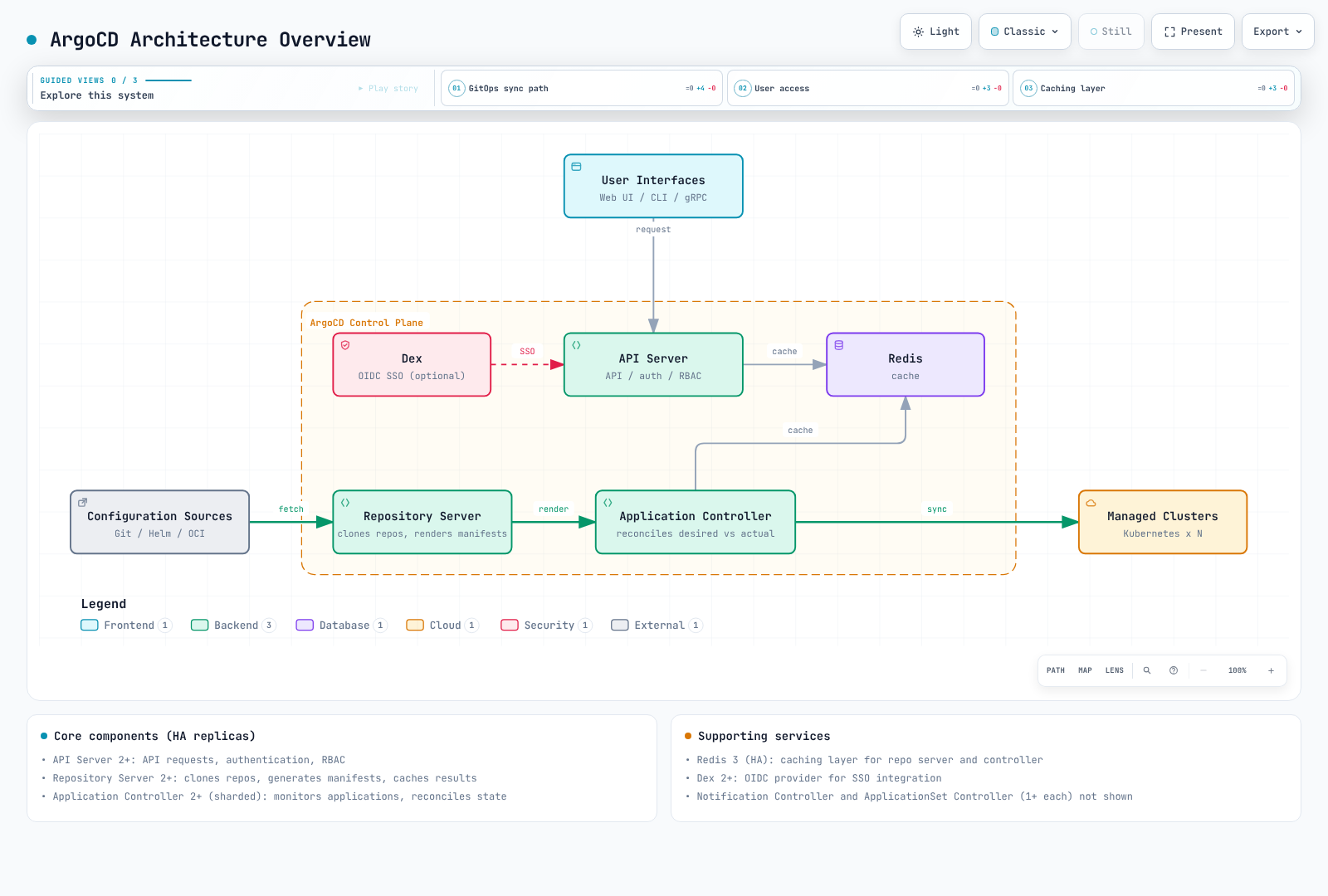
| API Server | Handles all API requests, authentication, and RBAC | 2+ |
| Repository Server | Clones repos, generates manifests, caches results | 2+ |
| Application Controller | Monitors applications, reconciles state | 2+ (sharded) |
| Redis | Caching layer for repo server and controller | 3 (HA) |
| Dex | Optional identity broker; bundled in-memory storage is not safely scaled by adding replicas | 1 in the standard bundle |
| Notification Controller | Sends notifications on events | 1+ |
| ApplicationSet Controller | Manages ApplicationSet resources | 1+ |
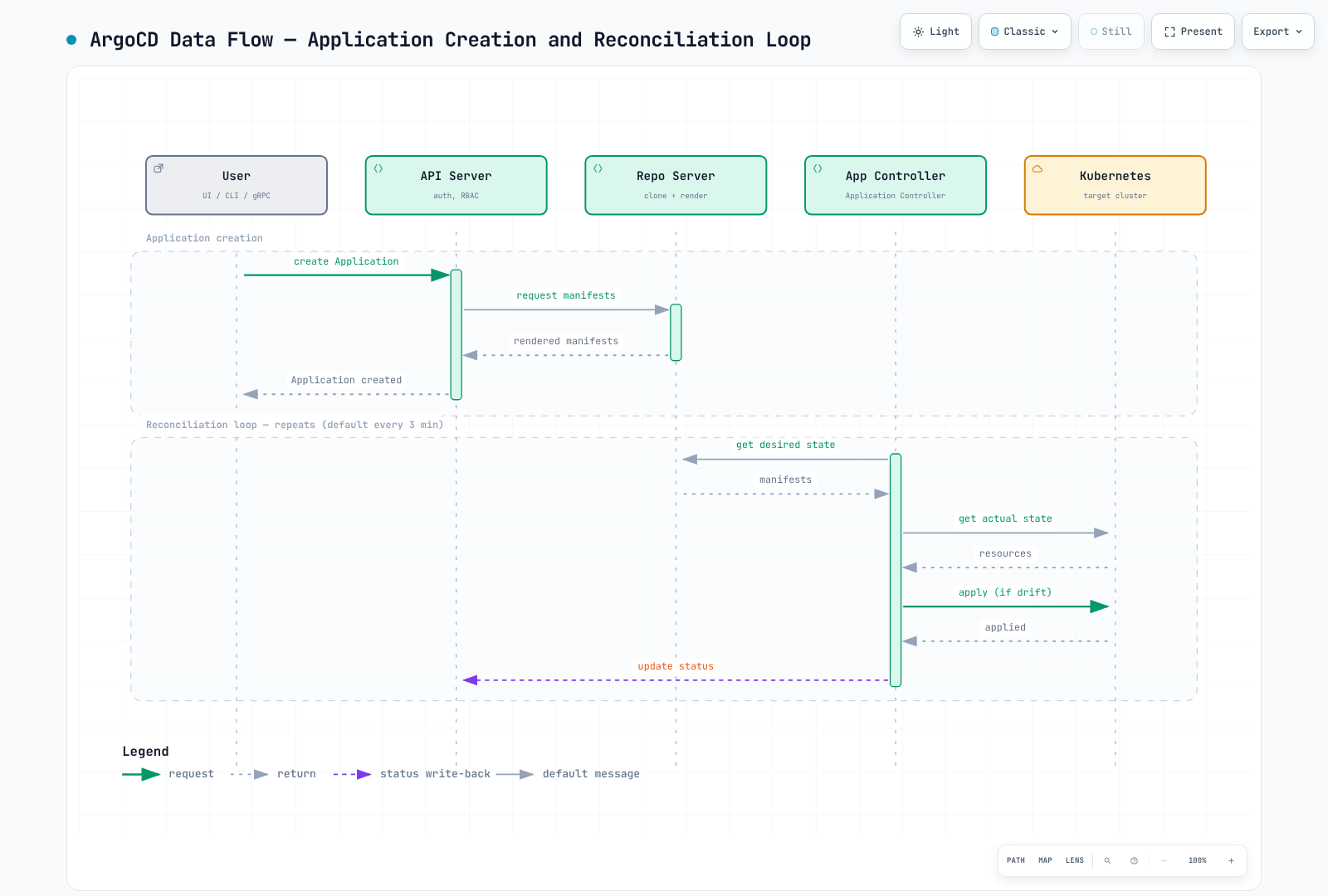
Data Flow
Core Concepts
Application
The Application CRD is the primary resource in ArgoCD. It defines:
- Source: Where to get the manifests (Git repo, Helm chart, OCI)
- Destination: Where to deploy (cluster and namespace)
- Sync Policy: How to handle synchronization
Project
Projects provide logical grouping and access control:
- Restrict which repositories can be used
- Limit destination clusters and namespaces
- Define allowed/denied resources
ApplicationSet
ApplicationSet enables managing multiple applications from a single definition using generators:
- List Generator: Static list of values
- Cluster Generator: Target registered clusters
- Git Generator: Scan repository directories/files
- Matrix/Merge: Combine multiple generators
Sync
Synchronization brings the cluster state to match the desired state:
- Manual Sync: User-triggered
- Auto Sync: Automatic on Git changes
- Self-Heal: Correct drift automatically
- Prune: Remove orphaned resources
Sub-Guide Navigation
| Guide | Description |
|---|---|
| Installation | Installation methods, CLI setup, HA configuration, EKS integration |
| Applications | Application CRD, source types, health checks, hooks, App of Apps |
| Sync Strategies | Sync policies, waves, windows, diffing, retry configuration |
| ApplicationSets | All generators, templating, progressive sync, multi-cluster patterns |
| Traffic Management | Argo Rollouts, blue-green, canary, analysis, ingress integration |
| Projects & RBAC | AppProject, RBAC policies, multi-tenancy, JWT tokens |
| Security | SSO integration, secret management, TLS, audit logging |
| Notifications | Notification services, triggers, templates, subscriptions |
| Best Practices | Repository patterns, performance tuning, troubleshooting, EKS tips |
| Rollouts Experiments Deep Dive | Experiment CRD, ephemeral ReplicaSet validation, AnalysisRun verdicts |
Quick Start
1. Install ArgoCD
This is a self-managed non-HA evaluation example. Prepare a compatible cluster, CRD/RBAC permissions and an empty dedicated namespace; use the installation guide for production HA/authentication/upgrade decisions.
# Create namespace
kubectl create namespace argocd

# Install ArgoCD
kubectl apply --server-side -n argocd -f https://raw.githubusercontent.com/argoproj/argo-cd/v3.5.4/manifests/install.yaml

# Wait for pods to be ready
kubectl wait --for=condition=Ready pods --all -n argocd --timeout=300s
2. Access the UI
# Port forward to access locally
kubectl port-forward svc/argocd-server -n argocd 8080:443
3. Get Initial Password
# Retrieve the initial admin password
kubectl -n argocd get secret argocd-initial-admin-secret \
  -o jsonpath="{.data.password}" | base64 -d && echo
4. Login via CLI
Install the matching OS/architecture CLI and verify release checksums as shown in the installation guide. Keep port forwarding running in another terminal.
# Install CLI (macOS)
brew install argocd

# Login
argocd login localhost:8080

# Change the bootstrap password
argocd account update-password
kubectl -n argocd delete secret argocd-initial-admin-secret
5. Deploy Your First Application
# Create application via CLI
argocd app create guestbook \
  --repo https://github.com/argoproj/argocd-example-apps.git \
  --path guestbook \
  --dest-server https://kubernetes.default.svc \
  --dest-namespace default

# Sync the application
argocd app sync guestbook
Or declaratively:
apiVersion: argoproj.io/v1alpha1
kind: Application
metadata:
  name: guestbook
  namespace: argocd
spec:
  project: default
  source:
    repoURL: https://github.com/argoproj/argocd-example-apps.git
    targetRevision: HEAD
    path: guestbook
  destination:
    server: https://kubernetes.default.svc
    namespace: default
  syncPolicy:
    automated:
      prune: true
      selfHeal: true
    syncOptions:
      - CreateNamespace=true
Version Compatibility
The reviewed baseline is Argo CD 3.5.2 / Helm chart 10.8.4; the manifest examples were updated to patch 3.5.4 after release-note review (not re-run). Chart 10.8.4 still deploys Argo CD v3.5.2; 3.5.4 first ships in chart 10.9.7. Application and installation-chart versions differ. Argo CD patches the three most recent minor lines; older lines are EOL.
Tested Kubernetes Combinations
| Argo CD | Kubernetes |
|---|---|
| 3.5 | 1.36, 1.35, 1.34, 1.33 |
| 3.4 | 1.35, 1.34, 1.33, 1.32 |
| 3.3 | 1.35, 1.34, 1.33, 1.32 |
This is the upstream test matrix recorded in the 3.5.4 repository. It differs from a chart's minimum kubeVersion constraint, Kubernetes/EKS support windows and the managed Argo CD version policy. There is no one-to-one EKS-minor-to-Argo-CD-minor mapping.
Recent Releases
- 3.5.0: released 2026-08-04. Check migration guidance for changes including the server's Helm 4 renderer.
- 3.5.1: released 2026-08-12.
- 3.5.2: released 2026-08-27.
- 3.5.3: released 2026-09-14. Bug fixes (health checks, sync retry state, UI).
- 3.5.4: released 2026-10-06. A security patch release: it fixes four CRITICAL issues — command execution in the repo-server via a Kustomize remote ref and via a Kustomize Helm config home, repo-server file reads via a Jsonnet import, and AppProject restrictions bypassed by PreDelete/PostDelete hooks (CVE-2026-77459) — with the same fixes backported in v3.4.10/v3.3.15. Behavior changes: Kustomize builds no longer honor
helmGlobals.configHome, and OCI manifests over 4 MiB are rejected; review the release notes before upgrading. - 3.6.0-rc1: first release candidate of the 3.6 line, published 2026-09-15. Not a production baseline.
October 2026 Update: Argo CD 4.0 Visioning Begins
Per the September 30 CNCF post, the Argo community has begun the visioning process for Argo CD 4.0, and ArgoCon North America 2026 (a full-day, two-track event co-located with KubeCon NA) will open with maintainer keynotes covering recent developments and upcoming versions. This is early roadmap direction-setting; 4.0 features and timing are not yet committed.
Argo Rollouts
Rollouts is a separate controller and can be used without Argo CD. This review uses its 1.10.0 documentation. Validate Rollouts CRDs/controller, traffic plugins, Kubernetes and Argo CD health-check integration instead of mapping unrelated product version numbers.
EKS Managed Argo CD Capability
EKS Capability for Argo CD is a distinct operating model from a self-managed installation. Its custom configuration applies only to supported argocd-cm keys, in the capability-configured namespace and with label app.kubernetes.io/part-of: argocd. Unsupported keys/flags are ignored; do not assume standard Lua libraries or arbitrary execution plugins are available. See the managed configuration guide.
Next Steps
- Installation Guide: Set up ArgoCD for production
- Applications Guide: Learn about Application CRD
- ApplicationSets Guide: Multi-cluster deployments
Resources
- ArgoCD Official Documentation
- ArgoCD GitHub Repository
- Argo Rollouts Documentation
- CNCF ArgoCD Project Page
Quiz
To test what you've learned, try the ArgoCD installation quiz.