Deep Dive into Networking Concepts
Review baseline: Cilium 1.20.2. Last reviewed: October 15, 2026.
This document provides in-depth explanations of core networking concepts needed to understand Cilium. It explores container networking, overlays, NAT, routing, DNS, load balancing and policy. Examples are conceptual or partial Helm/API configurations for prepared test environments, not complete installation or migration recipes. Verify platform and version prerequisites in the Cilium overview; managed platforms do not all permit the same CNI features.
Learning Objectives
Through this document, you will understand:
- The basic structure of the OSI model and TCP/IP stack and the role of each layer
- Basic principles and implementation methods of container networking
- Differences between overlay networks and underlay networks
- How core networking concepts such as NAT, routing, and DNS are utilized in Cilium
Table of Contents
- OSI Model and TCP/IP Stack
- Container Networking Basics
- Overlay Networks
- Network Address Translation (NAT)
- Routing Protocols
- DNS and Service Discovery
- Load Balancing Concepts
- Network Security Basics
OSI Model and TCP/IP Stack
Key Concept: The OSI model is a conceptual framework that classifies network communication into 7 abstract layers, making complex networking processes easier to understand.
The OSI (Open Systems Interconnection) model is a conceptual framework that classifies network communication into 7 abstract layers. Each layer is responsible for specific networking functions, allowing complex networking processes to be broken down for easier understanding.
OSI Model and TCP/IP Model Comparison
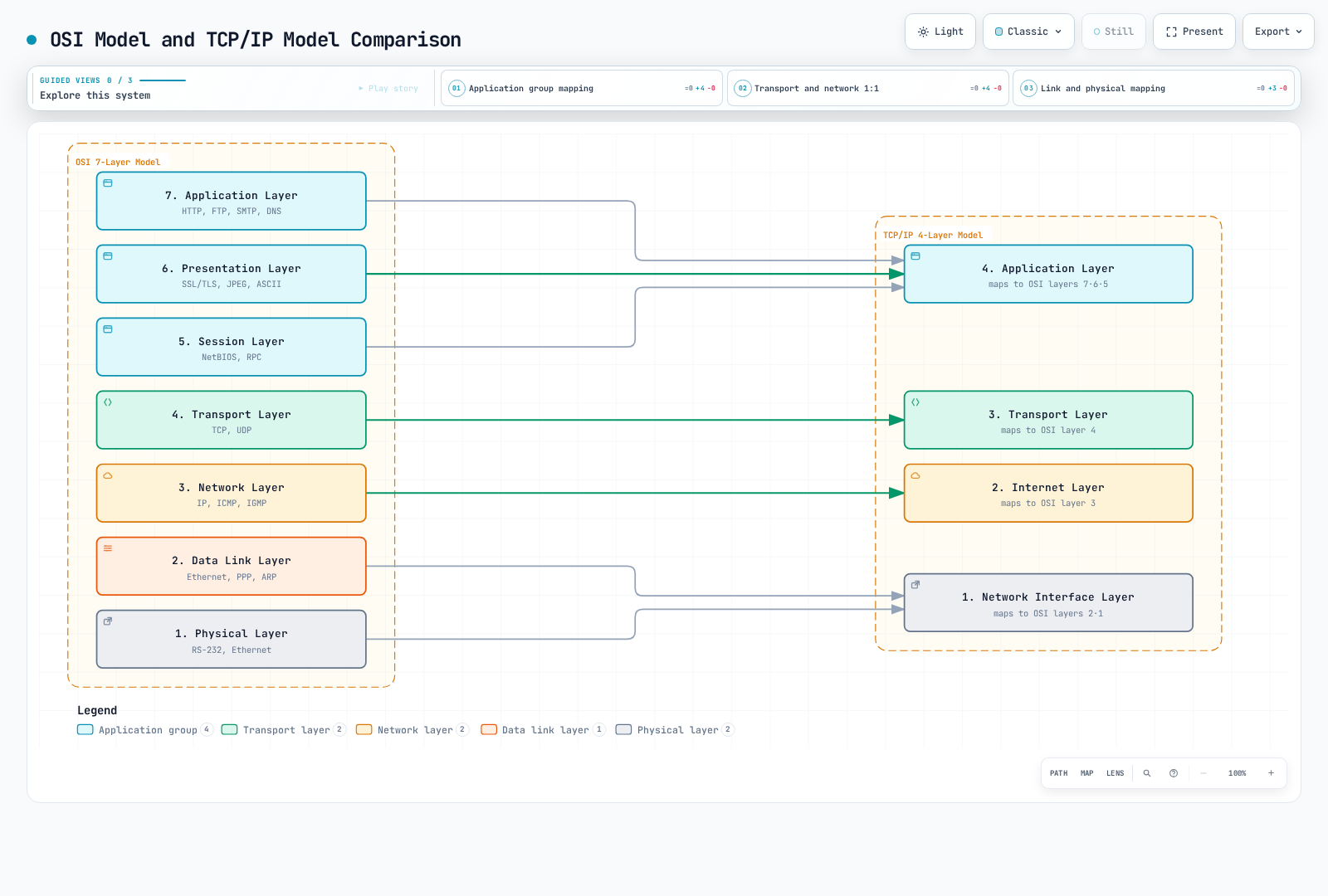
The mapping is a teaching approximation, not a protocol implementation specification. SSL is a legacy label in the figure; use supported TLS versions for current systems.
OSI 7-Layer Model
Physical Layer
- Converts bit streams into electrical, optical, or wireless signals
- Includes cables, transceivers and physical signaling; a switch also implements functions at higher layers
- Data unit: Bit
Data Link Layer
- Responsible for data transfer between nodes on a physical network
- Device identification using MAC (Media Access Control) addresses
- Error detection and, where the link protocol provides it, recovery; Ethernet error detection does not itself correct damaged frames
- Data unit: Frame
- Ethernet and Wi-Fi protocols operate at this layer
Network Layer
- Responsible for packet routing between different networks
- Logical addressing (IP addresses)
- Path determination and packet forwarding
- Data unit: Packet
- IP (Internet Protocol) is the core protocol of this layer
Transport Layer
- End-to-end communication control
- Data segmentation and reassembly
- TCP provides flow control and retransmission; UDP does not provide those guarantees
- Data unit: TCP segment or UDP datagram
- TCP (Transmission Control Protocol) and UDP (User Datagram Protocol) are the main protocols of this layer
Session Layer
- Establishment, maintenance, and termination of communication sessions
- Synchronization and dialog control
- Checkpoint setting and recovery
- Session management can be discussed at this layer; real RPC implementations do not necessarily map to a single OSI layer
Presentation Layer
- Data format conversion and encryption
- Character encoding, data compression, encryption/decryption
- Encoding/compression illustrate this responsibility; TLS is an Internet protocol, not a literal OSI presentation-layer implementation
Application Layer
- Provides network services used by applications, not necessarily a graphical user interface
- Services such as email, file transfer, web browsing
- HTTP, FTP, SMTP, DNS are examples of this layer
Relationship Between Cilium and OSI Model
Cilium operates at multiple OSI layers:
| OSI Layer | Cilium Feature | Example |
|---|---|---|
| L2 (Data Link) | Link-level reachability; optional L2 Announcements | ARP/NDP responses for configured Service VIPs |
| L3 (Network) | IP routing, CIDR-based policy | IP routing between pods |
| L4 (Transport) | Port-based filtering, connection tracking | Service port access control |
| L7 (Application) | Supported HTTP/gRPC and DNS proxy rules | HTTP path policy or DNS query policy |
L2 Announcements remains Beta in this baseline and requires its controller/device configuration. It is distinct from a general MAC-address security-policy interface.
TCP/IP Stack
The TCP/IP stack is a set of protocols that form the foundation of the Internet, an architecture often described with four layers and compared with OSI; it is not a direct implementation of the seven-layer model.
Network Interface Layer
- Corresponds to the Physical and Data Link layers of the OSI model
- Responsible for interface with physical network media
- Includes protocols like Ethernet and Wi-Fi
Internet Layer
- Corresponds to the Network layer of the OSI model
- Packet routing using IP (Internet Protocol)
- Includes ICMP (Internet Control Message Protocol); ARP resolves IPv4 next-hop link-layer addresses at the link boundary, while IPv6 uses Neighbor Discovery
Transport Layer
- Same as the Transport layer of the OSI model
- Includes TCP and UDP protocols
- Provides connection-oriented (TCP) and connectionless (UDP) communication
Application Layer
- Integrates the Session, Presentation, and Application layers of the OSI model
- Includes protocols like HTTP, SMTP, FTP, DNS
- Provides interface between user applications and the network
Cilium Features by Layer
Cilium provides features at various network layers:
- L2 (Data Link Layer): Link reachability and optional L2 service announcements; this is not a general MAC-address NetworkPolicy API or universal ARP-spoofing protection
- L3 (Network Layer): IP address-based routing and filtering, IPAM
- L4 (Transport Layer): Port-based filtering, load balancing, connection tracking
- L7 (Application Layer): Configured HTTP/gRPC proxy functions and DNS policy; the former Kafka L7 policy API is removed
Container Networking Basics
Container networking is a mechanism that allows containerized applications to communicate with each other and with the outside world. Container orchestration platforms like Kubernetes use various networking models and solutions.
Container Network Interface (CNI)
CNI (Container Network Interface) defines a standard interface between container runtimes and network plugins. Current Kubernetes uses a CRI container runtime to invoke CNI plugins. This interface allows multiple networking implementations; the CNI specification does not require every plugin to implement Kubernetes NetworkPolicy.
Key Components of CNI:
- Plugins: Executables responsible for creating and configuring network interfaces
- Configuration Files: JSON format files that define plugin behavior
- IPAM (IP Address Management): Module responsible for IP address allocation and management
Main Responsibilities of CNI Plugins:
- Adding/removing interfaces to/from container network namespaces
- Allocating and releasing IP addresses
- Configuring routing tables
- A networking implementation may separately provide policy controllers/datapath enforcement; policy is not a mandatory CNI execution operation
Container Networking Models
There are several container networking models, each suitable for different use cases and requirements.
1. Bridge Networking
- Creates a virtual bridge on the host to connect containers
- Each container connects to the bridge through virtual ethernet (veth) pairs
- Efficient communication between containers on the same host
- The default bridge is an example from standalone Linux Docker; it is not the Kubernetes or Cilium networking model
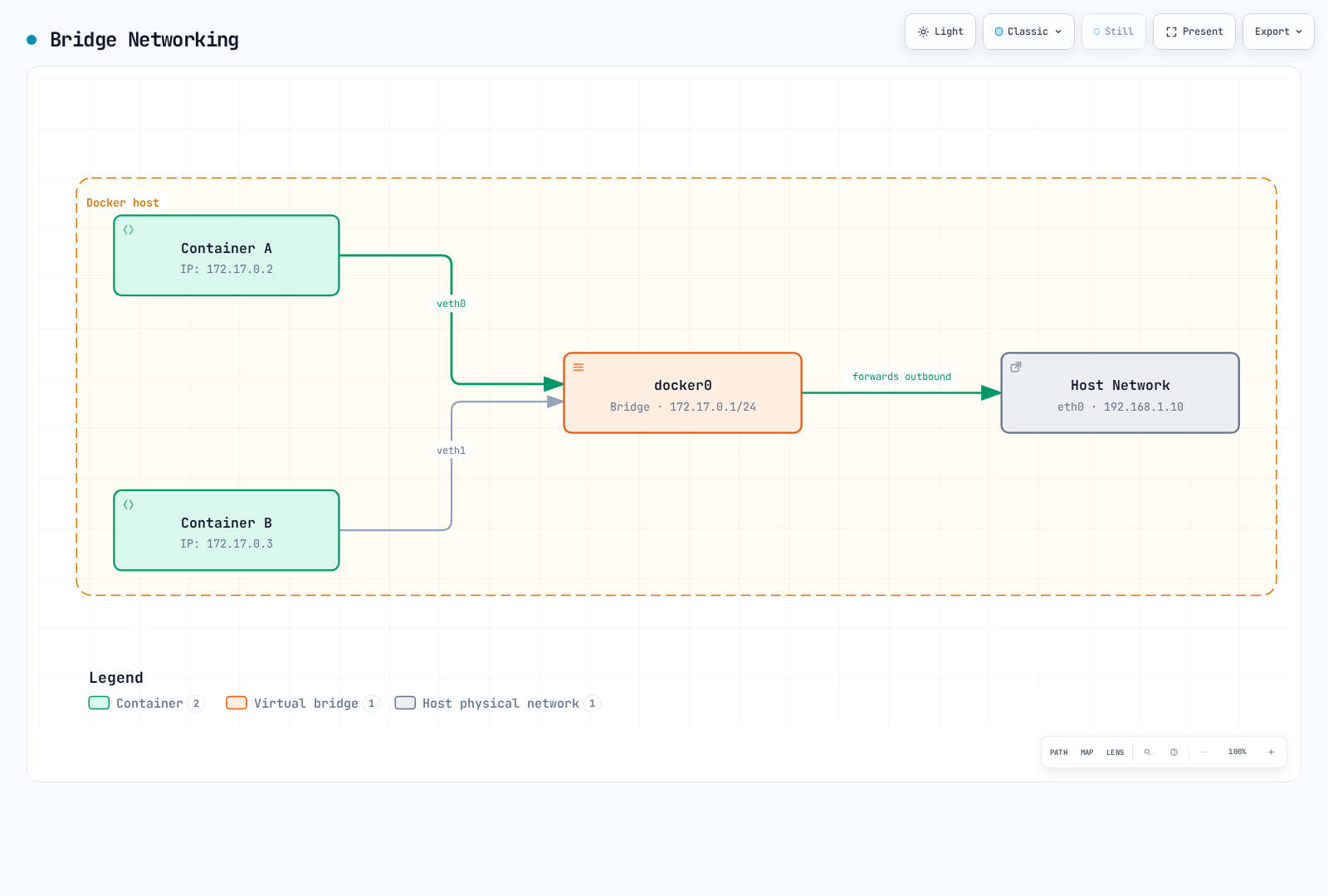
This is a Linux Docker bridge example with illustrative addresses. The host's routing/NAT path is simplified; it is not Cilium's default bridge topology.
2. Host Networking
- Container directly uses the host's network namespace
- No separate network isolation
- Avoids a separate container network namespace; performance still depends on the actual workload and path
- Potential for port conflicts
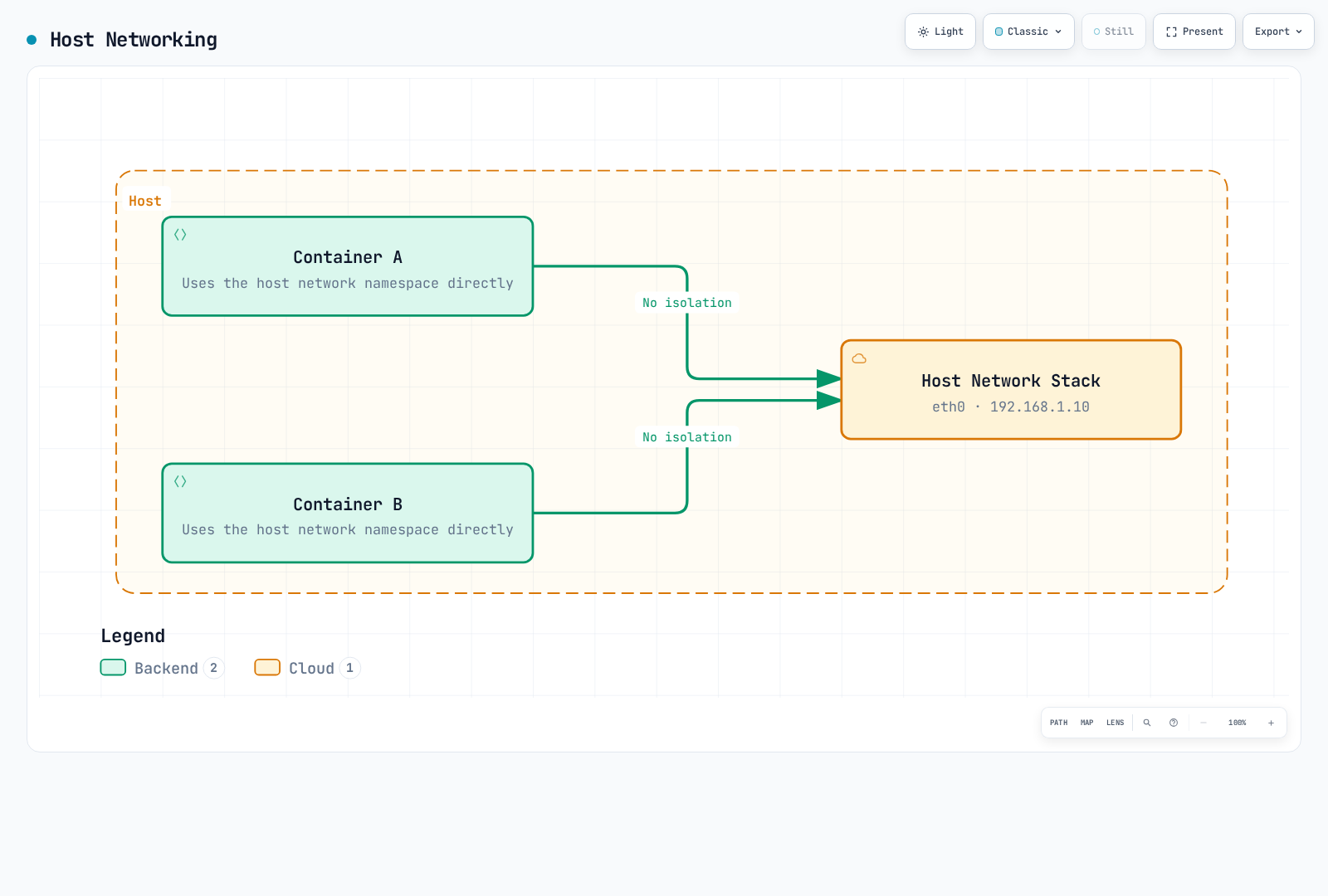
“No isolation” here means sharing the network namespace. It does not mean that every process, filesystem or other container isolation boundary is removed.
3. Overlay Networking
- Supports communication between containers across multiple hosts
- Uses encapsulation protocols like VXLAN and GENEVE
- Suitable for large-scale clusters
- Supported by Cilium, Calico, Flannel, etc.
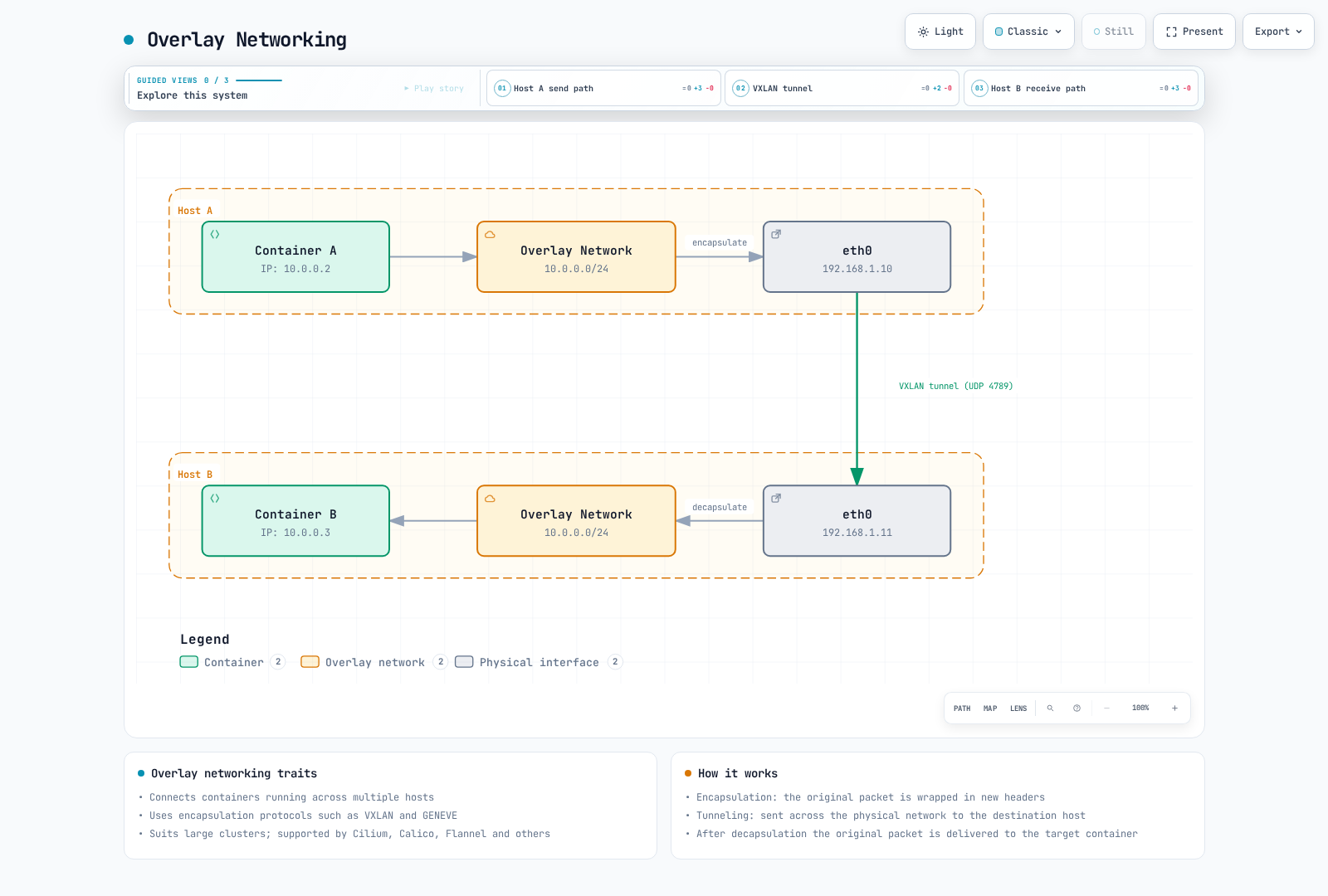
This generic VXLAN illustration uses standard UDP 4789 and a shared L2 subnet. Cilium's default VXLAN port is 8472; its Pod CIDR allocations must follow the selected IPAM mode rather than copying this drawing.
4. Underlay Networking (Direct Routing)
- Directly utilizes physical network infrastructure
- No encapsulation overhead
- Requires control over network infrastructure
- Can integrate with routing protocols like BGP
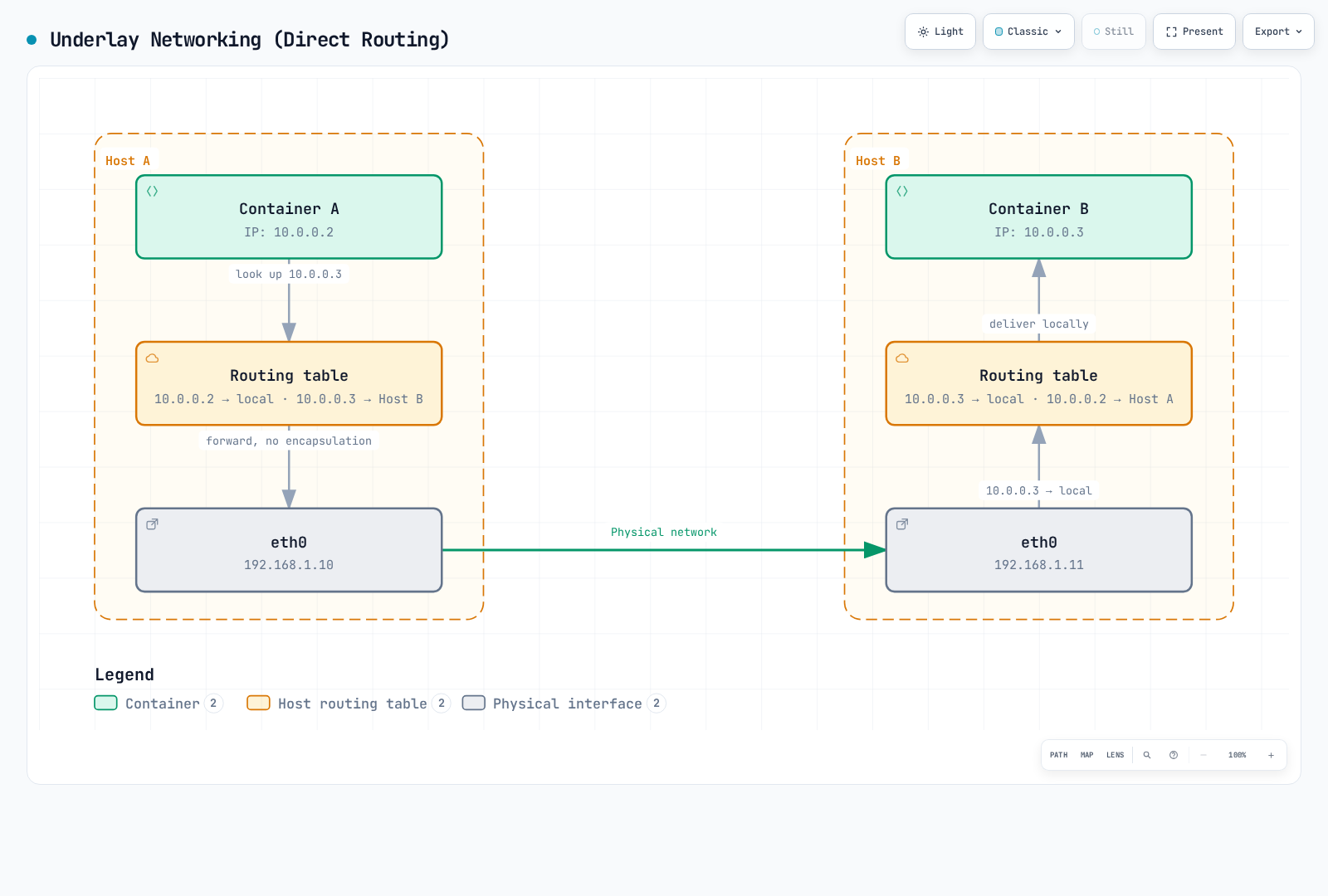
The entries illustrate host routes. An actual deployment still needs reachable next hops and valid forward/return routes for its Pod addresses.
Kubernetes Networking Model
The Kubernetes model provides direct Pod connectivity barring intentional network segmentation:
- Pods can communicate with other Pods without a mandatory proxy or NAT in the Pod network.
- Node agents must be able to communicate with Pods on that node. This is not a blanket requirement that every host reach every Pod.
- External connectivity follows the cluster's routing and security policy; unrestricted internet access is not required.
NetworkPolicy enforcement depends on a capable network implementation. The API can exist even when the installed plugin does not enforce it.
Kubernetes Network Components:
- Pod Network: Network connecting all pods in the cluster
- Service Network: Provides stable endpoints for sets of pods
- Cluster DNS: DNS service for service discovery
- Ingress/Egress: Manages communication with outside the cluster
Cilium's Container Networking Approach
Cilium leverages eBPF to provide a high-performance, scalable container networking solution:
- eBPF-based Data Path: Direct packet processing within the kernel
- Support for Various Networking Modes: Overlay (VXLAN, Geneve) and native routing; the generic Helm default is tunnel mode with VXLAN, subject to platform overrides
- Advanced Load Balancing: kube-proxy replacement functionality
- Network Policies: Granular policies at L3-L7 levels
- Integrated IPAM: Support for various IP address allocation strategies
A generic Helm installation without platform overrides defaults to cluster-pool IPAM: the operator allocates node CIDRs and agents allocate Pod IPs from their node's pool. ipam.mode: kubernetes uses the Node's spec.podCIDR/spec.podCIDRs. ENI mode uses EC2 interfaces and VPC addresses; it is not a universal recommendation for every EKS compute mode. See IPAM and policies.
Overlay Networks
Overlay networks are a technology that builds a virtual network layer on top of existing network infrastructure. This technology allows virtual network topologies to be created independently of physical network topology. In container environments, it is widely used to enable communication between containers across multiple hosts.
How Overlay Networks Work
Overlay networks work using encapsulation technology. Original packets are encapsulated inside other packets and transmitted through the physical network.
- Packet Encapsulation: The original packet (inner packet) is wrapped with new headers and sometimes new trailers.
- Tunneling: Encapsulated packets are transmitted through the physical network to the destination host.
- Packet Decapsulation: At the destination host, the outer header is removed and the original packet is extracted.
- Packet Forwarding: The original packet is forwarded to the destination container.
Major Overlay Network Protocols
VXLAN (Virtual Extensible LAN)
VXLAN is one of the most widely used overlay protocols in container networking.
- VXLAN Tunnel Endpoint (VTEP): Responsible for encapsulation and decapsulation of packets
- VXLAN Network Identifier (VNI): A 24-bit field with 16,777,216 possible values; this is not Cilium's supported tenant/endpoint capacity
- UDP Encapsulation: Standard VXLAN uses UDP 4789; Cilium's default VXLAN tunnel port is UDP 8472
- MAC-in-UDP Encapsulation: Encapsulates original L2 frames into UDP packets
VXLAN Packet Structure:
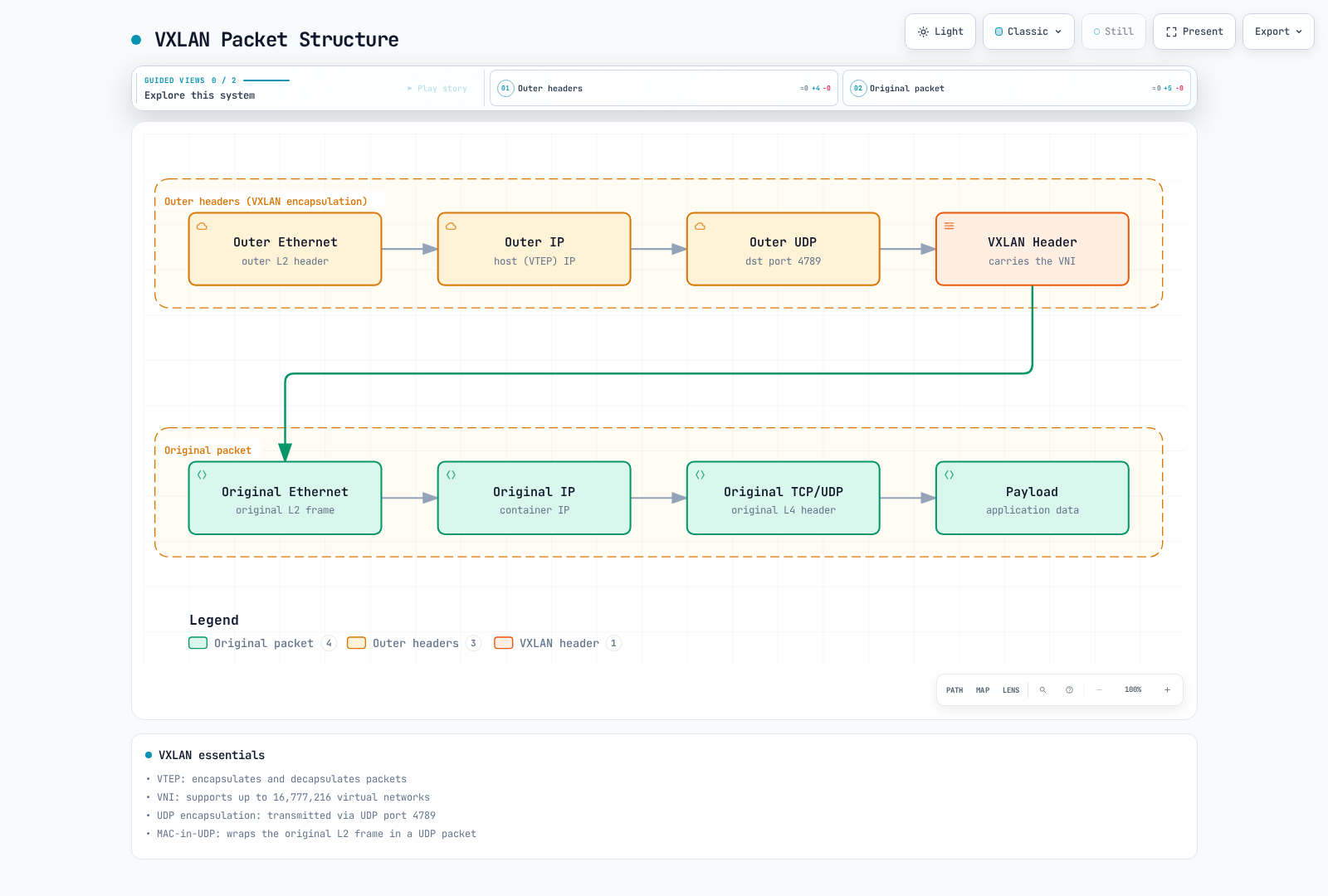
This is the generic VXLAN wire format. UDP 4789 and the 24-bit VNI describe the standard; Cilium defaults to UDP 8472 and uses overlay metadata for identity. Field width is not a cluster-capacity guarantee.
GENEVE (Generic Network Virtualization Encapsulation)
GENEVE is a more flexible overlay protocol designed to overcome VXLAN limitations.
- Extensible Option Headers: Supports various metadata
- Protocol Independent: Can be used with various virtualization technologies
- UDP Encapsulation: Transmitted via UDP port 6081
- Flexible Tunneling: Supports various network virtualization requirements
IPsec
IPsec is a protocol suite that provides security services at the IP packet level.
- Authentication and Encryption: IPsec provides mechanisms for integrity/authentication and, with the appropriate mode, confidentiality
- Transport and Tunnel Modes: Supports various deployment scenarios
- Security Association (SA): Defines security parameters between communicating parties
- Internet Key Exchange (IKE): A general IPsec negotiation mechanism. Cilium's IPsec setup instead uses an administrator-provided key Secret and its documented rotation procedure
Advantages and Disadvantages of Overlay Networks
Advantages:
- Flexibility: Can configure virtual networks independently of physical network topology
- Scalability: Supports large network segments and numerous endpoints
- Isolation: Logical segments can separate traffic when configured correctly; encapsulation alone is not authentication, encryption or a complete policy boundary
- Compatibility: Can work with existing network infrastructure
Disadvantages:
- Overhead: Increased packet size and processing overhead due to encapsulation
- MTU Considerations: Reduced Maximum Transmission Unit (MTU) due to encapsulation
- Complexity: Troubleshooting and debugging can be more complex
- Latency: Encapsulation adds processing work; measure the actual effect with the selected implementation and offloads
Overlay Networks in Cilium
Cilium supports overlay protocols like VXLAN and Geneve, leveraging eBPF to provide efficient packet processing.
- eBPF-assisted VXLAN Processing: BPF programs do not build the VXLAN header themselves; they set tunnel metadata (
bpf_skb_set_tunnel_key) and redirect to the flow-basedcilium_vxlan(orcilium_geneve) device, where the kernel's VXLAN/Geneve driver encapsulates and decapsulates. See Overlay and native routing - Efficient Routing: Packet forwarding through optimized paths
- Encryption Options: Encrypted overlay via IPsec or WireGuard
- Mode Selection: Choose a supported routing mode. Enabling automatic direct node routes together with tunnel mode is rejected; it is not a fallback mechanism
Cilium VXLAN Configuration Example:
Helm values for a new, prepared IPv4 test installation; choose non-overlapping Pod CIDRs. This is not a live IPAM migration or a replacement ConfigMap.
# vxlan-values.yaml
routingMode: tunnel
tunnelProtocol: vxlan
tunnelPort: 8472
autoDirectNodeRoutes: false
ipv4:
  enabled: true
ipv6:
  enabled: false
ipam:
  mode: cluster-pool
  operator:
    clusterPoolIPv4PodCIDRList:
    - 10.244.0.0/16
    clusterPoolIPv4MaskSize: 24
Network Address Translation (NAT)
Network Address Translation (NAT) is the process of modifying the source or destination addresses of IP packets. NAT is primarily used to enable devices on private networks to communicate with the public internet, or to enable communication between two networks with overlapping network address spaces.
Main Types of NAT
1. Source NAT (SNAT)
Source NAT modifies the source IP address of packets. It is typically used when devices on private networks access the internet.
- How It Works: Rewrites a source address, and sometimes its port; private-to-public translation is one common use
- Use Cases: Internet access, outbound connections
- Tracking: Stores connection state in NAT table
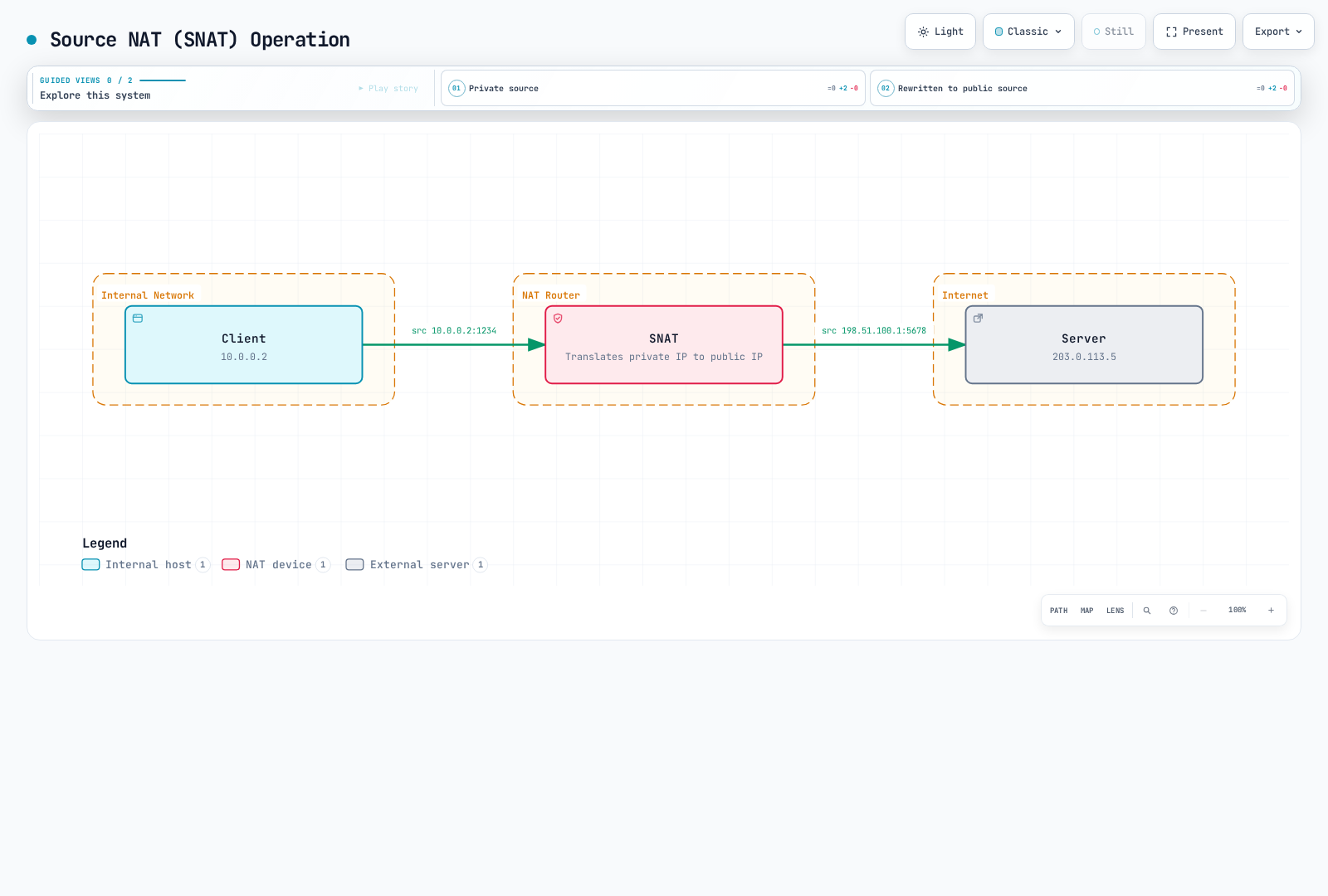
The documentation-range addresses illustrate one private-to-public SNAT case. SNAT means source translation; the replacement need not always be a public address.
2. Destination NAT (DNAT)
Destination NAT modifies the destination IP address of packets. It is typically used when accessing services on private networks from the public internet.
- How It Works: Rewrites a destination address/port; public-to-private forwarding is one example
- Use Cases: Port forwarding, load balancing, inbound connections
- Configuration: Defines mappings for specific ports or port ranges
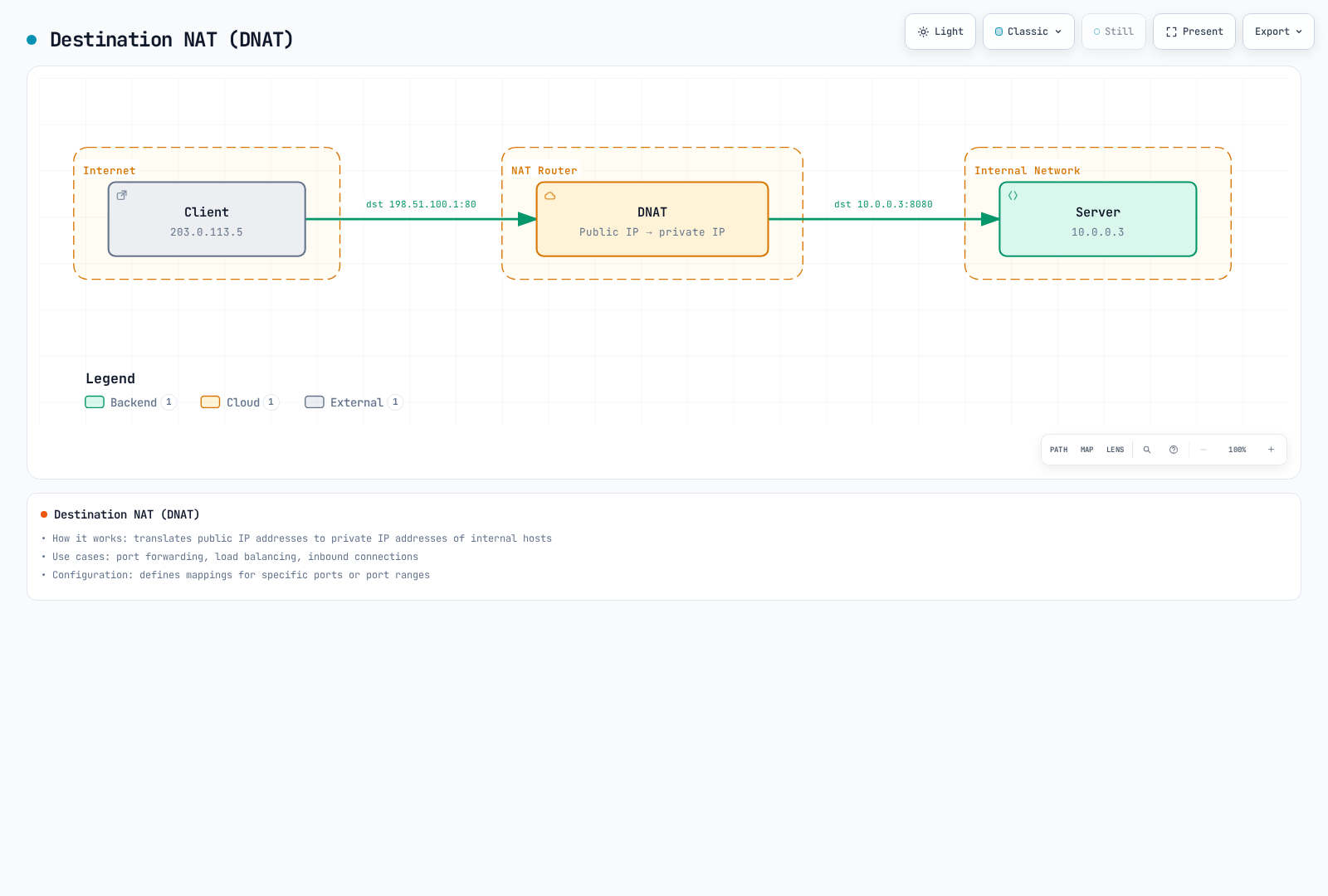
This shows one public-to-private DNAT case with documentation addresses. DNAT is destination translation and also appears in other address realms.
3. Port Address Translation (PAT)
PAT modifies both IP addresses and port numbers. This allows multiple internal hosts to share a single public IP address.
- How It Works: Translates IP:port combinations of internal hosts to different ports of a single public IP
- Use Cases: IP address conservation, support for many internal hosts
- Limitations: Finite port and state resources; the number of simultaneous flows also depends on protocol, destination tuples and mapping reuse, not a universal 65,000-connection ceiling
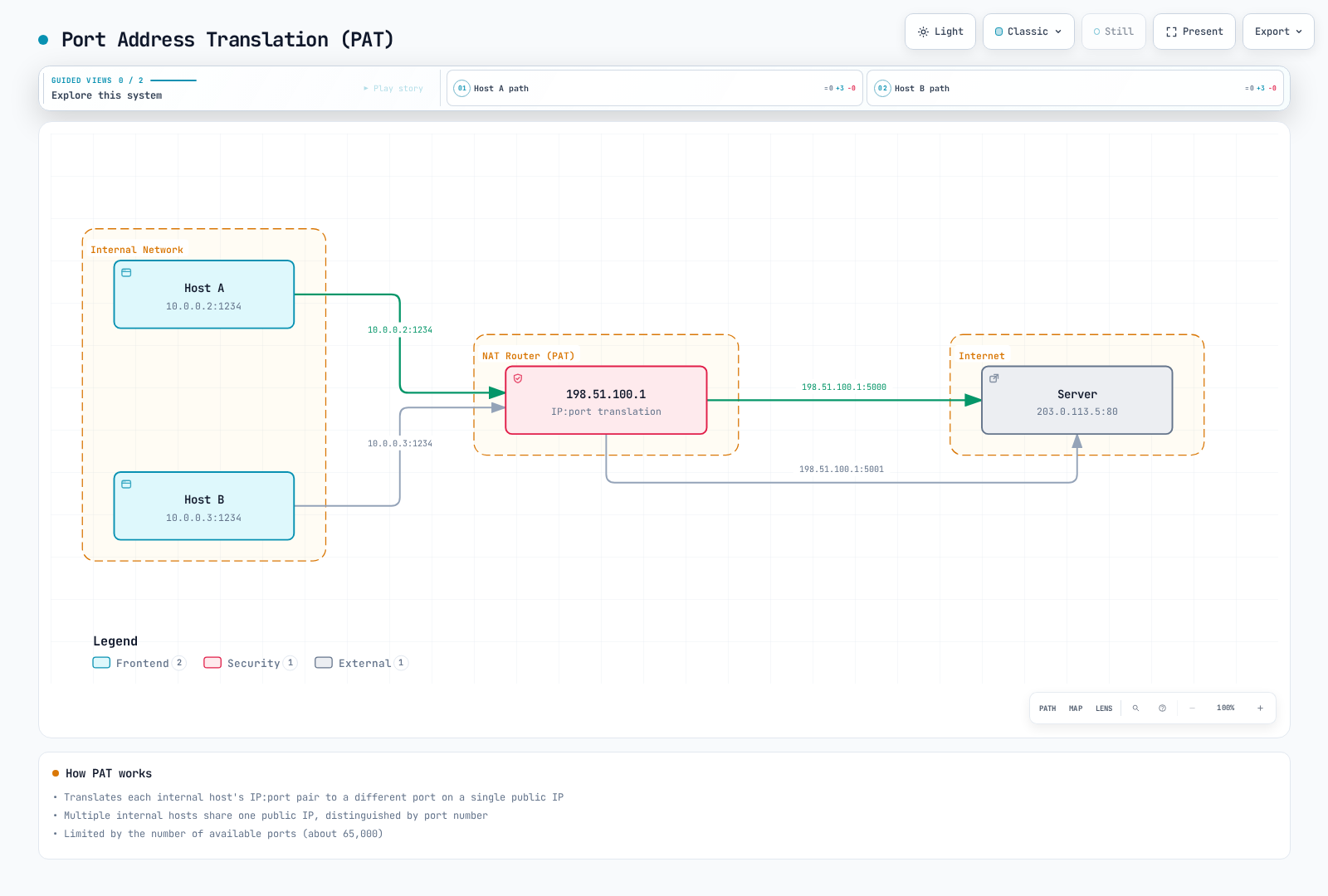
The example uses different translated ports for the same remote server. The roughly 65,000-port space is not a universal cap on all NAT connections; protocol, destination tuple, mapping behavior and state capacity matter.
4. Twice NAT and Bi-directional NAT
Twice NAT changes both source and destination addresses as traffic crosses address realms, and can help reconcile overlapping address spaces. The address mappings, DNS/application assumptions and return path must all be designed together.
Bi-directional NAT in RFC 2663 instead describes allowing sessions to be initiated from either realm. It does not, by definition, mean changing both addresses in each packet.
Advantages and Disadvantages of NAT
Advantages:
- IP Address Conservation: Supports many internal hosts with a limited number of public IP addresses
- Address Hiding: May conceal internal addresses, but NAT is not a substitute for firewall policy or authentication
- Address-Realm Reconciliation: Appropriate translation can connect overlapping realms; that does not provide isolation by itself
- Flexible Network Design: Can change ISP without reconfiguring internal network
Disadvantages:
- Connection Tracking Overhead: Resources needed for state table maintenance
- Certain Protocol Issues: Some protocols may not be compatible with NAT
- Loss of End-to-End Connectivity: Difficulty with direct peer-to-peer communication
- Complex Troubleshooting: NAT-related problem debugging can be complex
NAT in Kubernetes and Cilium
NAT in Kubernetes
Kubernetes uses NAT in various scenarios:
- Communication Outside the Cluster: SNAT may be used depending on address reachability, masquerading exclusions and the chosen datapath
- Service Implementation: Packet-based implementations can translate a Service destination; socket-level load balancing may choose a backend before such a packet exists
- NodePort Services: The implementation forwards a node IP:port to selected backends; return-path behavior depends on SNAT/DSR and traffic policy
- LoadBalancer Services: Provider/controller behavior varies and need not be a single DNAT step from a public address to a Pod
NAT in Cilium
Cilium leverages eBPF to provide efficient NAT implementation:
- eBPF-based NAT: Performs NAT directly within the kernel
- High-Performance Connection Tracking: Connection state tracking using optimized BPF maps
- NAT Controls: Supported masquerading exclusions, service forwarding and Egress Gateway features have distinct configuration and prerequisites
- Masquerading: Conditional source translation on configured paths/devices; excluded CIDRs and supported modes affect the result
Egress Gateway is a separate feature that directs matching outbound traffic through selected nodes and SNATs it to configured gateway addresses. It changes the original source IP; interfaces, addresses and return paths must be prepared. New Pods can send traffic before policy convergence, so it is not an immediate fail-closed source-IP guarantee.
Cilium NAT Configuration Example:
This Helm fragment assumes a prepared kube-proxy replacement/BPF masquerading environment with a reachable API endpoint. Review the actual attached devices and routes first. Excluding a CIDR from SNAT does not create a return route; the NAT size is an example, not a recommended universal capacity.
# masquerade-values.yaml
enableIPv4Masquerade: true
kubeProxyReplacement: true
bpf:
  masquerade: true
  natMax: 262144
ipMasqAgent:
  enabled: true
  config:
    nonMasqueradeCIDRs:
    - 10.0.0.0/8
    - 172.16.0.0/12
    - 192.168.0.0/16
    masqLinkLocal: false
Routing Protocols
Routing protocols define the rules and procedures that determine the optimal path for packets to travel from source to destination in a network. These protocols play an important role in adapting to network topology changes, efficiently forwarding traffic, and bypassing network failures.
Classification of Routing Protocols
1. Interior Gateway Protocols (IGP)
Interior Gateway Protocols are used to exchange routing information within a single Autonomous System (AS).
Distance Vector Protocols
RIP (Routing Information Protocol)
- Uses hop count as metric
- Valid metrics reach 15 hops; metric 16 represents unreachable
- Simple implementation, suitable for small networks
- Periodic updates are approximately every 30 seconds, with timer randomization and triggered updates for changes
EIGRP (Enhanced Interior Gateway Routing Protocol)
- Configurable composite metric; default coefficients use throughput/bandwidth and delay, not load or reliability
- Sends only partial updates
- Fast convergence
- Cisco-origin protocol documented in Informational RFC 7868; that publication is not an IETF Standards Track designation
Link State Protocols
OSPF (Open Shortest Path First)
- Calculates shortest path using Dijkstra's algorithm
- Area-based hierarchy
- Fast convergence
- Supports large-scale networks
- Exchanges topology information through Link State Advertisements (LSAs)
IS-IS (Intermediate System to Intermediate System)
- Link state protocol similar to OSPF
- Widely used in large service provider networks
- Supports multiple network layers
- Efficient routing updates
2. Exterior Gateway Protocols (EGP)
Exterior Gateway Protocols are used to exchange routing information between different Autonomous Systems.
- BGP (Border Gateway Protocol)
- Core routing protocol of the Internet
- Path vector protocol
- Policy-based routing decisions
- Reliable sessions over TCP
- Path selection through path attributes (AS path, local preference, etc.)
- iBGP (internal BGP) and eBGP (external BGP) variants
Routing Protocols in Container Networking
In container environments, traditional routing protocols are used alongside container-specific routing mechanisms.
1. Container Networking with BGP
BGP is gaining popularity in container networking for the following reasons:
- Reachability Advertisement: Advertises Pod or Service prefixes to routers; the local forwarding implementation still determines how traffic travels
- Scalability: Supports large-scale clusters and multi-cluster environments
- Existing Network Integration: Integration with data center network infrastructure
- Availability: Multipath and convergence depend on router policy, timers and a functioning datapath; a session alone does not guarantee fast failover
2. Container Network Routing Mechanisms
- Host-based Routing: Hosts maintain Pod routes and may participate in a separately configured route-advertisement mechanism
- Centralized Routing: Controller manages routing decisions centrally
- Distributed Routing: Direct routing information exchange between nodes
- Policy-based Routing: Routing decisions based on traffic characteristics
Routing in Cilium
Cilium implements routing with eBPF and supports different datapath modes. Host routing is a separate axis: BPF host routing optimizes forwarding inside the node and can bypass parts of the host stack/netfilter. It requires compatible kube-proxy replacement/BPF masquerading and has integration constraints. It does not mean selecting native rather than tunnel routing between nodes.
1. Native Routing (Direct Routing)
In native routing mode, Cilium routes pod IPs directly without overlay encapsulation.
- How It Works: Pod traffic uses underlay routes without overlay encapsulation; enabling native mode does not automatically enable BGP
- Advantages: Avoids overlay encapsulation overhead; actual performance requires measurement
- Requirements: Valid routes for the relevant Pod addresses and their return traffic, not merely reachability between node IPs
- Use Cases: Performance-critical workloads, single-subnet clusters
Native routing needs valid Pod routes, but choosing routingMode: native does not automatically advertise them with BGP. Provision the underlay/return routes or configure the appropriate route-distribution mechanism. The earlier host-route illustration shows the forwarding principle.
2. BGP Routing
Cilium supports BGP routing to integrate pod IPs with physical network infrastructure.
- How It Works: Cilium advertises pod CIDRs through BGP peering
- Advantages: Integration with existing network infrastructure, high availability
- Components: BGP peering, route filtering, community attributes
- Use Cases: Integration with data center networks, multi-cluster environments
3. Overlay Routing
Cilium can route pod traffic between nodes using overlay protocols like VXLAN or Geneve.
- How It Works: Encapsulates pod packets for transmission between nodes
- Advantages: Minimizes network infrastructure requirements, flexible deployment
- Use Cases: Cloud environments, complex network topologies
4. Hybrid Routing
Do not assume Cilium automatically uses native routes when reachable and otherwise falls back to an overlay. Current tunnel mode cannot be combined with autoDirectNodeRoutes: true; the agent rejects that configuration. Choose a supported datapath and provision its underlay.
The valid load-balancer mode called hybrid is a different feature: TCP uses DSR while UDP uses SNAT. It is not an overlay/native routing fallback.
Cilium Routing Configuration Examples
Native Routing Configuration:
This native-routing fragment assumes the intended Pod CIDR and nodes reachable on a shared L2 network for automatic direct routes. Other topologies need an appropriate routing mechanism. It must not be combined with tunnel mode as an automatic fallback.
# native-values.yaml
routingMode: native
autoDirectNodeRoutes: true
ipv4NativeRoutingCIDR: 10.244.0.0/16
BGP Routing Configuration:
The feature flag below is only one prerequisite. Configure the current CiliumBGPClusterConfig, CiliumBGPPeerConfig and CiliumBGPAdvertisement resources and the external router as described in Advanced Topics. BGP advertisement and the datapath routing mode are independent choices.
# bgp-values.yaml
bgpControlPlane:
  enabled: true
Overlay Routing Configuration:
Use the complete VXLAN values example above. Verify the running mode and port in agent status; do not overwrite installation settings with a small ConfigMap.
DNS and Service Discovery
DNS (Domain Name System) and service discovery play a critical role in modern network applications, especially in dynamic container environments. These mechanisms abstract service locations and allow applications to adapt to network topology changes.
DNS (Domain Name System)
DNS is a distributed system that translates human-readable domain names into IP addresses.
How DNS Works
- Hierarchical Namespace: Domain names are organized in a hierarchical structure separated by dots (e.g., www.example.com)
- Distributed Database: Network of DNS servers distributed worldwide
- Iterative and Recursive Queries: Two main methods of processing client requests
- Caching: Temporary storage of results for performance improvement
DNS Record Types
- A Record: Maps domain name to IPv4 address
- AAAA Record: Maps domain name to IPv6 address
- CNAME Record: Alias (canonical name) for domain name
- MX Record: Specifies mail server
- SRV Record: Specifies server providing specific service
- TXT Record: Stores text information (primarily used for verification and policies)
- PTR Record: Reverse mapping of IP address to domain name (reverse DNS)
DNS Resolution Process
A common uncached lookup separates the application's stub resolver from a recursive resolver:
| Step | Query/response |
|---|---|
| 1 | The stub asks its configured recursive resolver for www.example.com. |
| 2 | The resolver asks a root server and receives a referral to .com servers. |
| 3 | The resolver asks a .com server and receives a referral to example.com authoritative servers. |
| 4 | The resolver asks the authoritative server and obtains the relevant answer. |
| 5 | The resolver caches according to TTL and returns the answer to the stub. |
The authoritative servers do not normally forward this sequence among themselves. Caches, aliases and configured forwarders can change the exact exchanges.
Service Discovery in Container Environments
Service discovery is the process of automatically detecting available services and locating them on a network. In container environments, it is particularly important for effectively managing dynamically created and removed services.
Service Discovery Approaches
DNS-based Service Discovery
- Creates DNS records when services are registered
- Clients discover services through standard DNS lookups
- Simple and widely supported
- Examples: Kubernetes DNS, CoreDNS
Key-Value Store-based Service Discovery
- Stores service information in centralized key-value stores
- Clients query the store to discover services
- Rich metadata support
- Examples: etcd, Consul, ZooKeeper
API-based Service Discovery
- Provides service information through dedicated APIs
- Clients call APIs to discover services
- Complex querying and filtering support
- Example: Kubernetes API Server
Mesh-based Service Discovery
- Service mesh infrastructure handles service discovery
- Supports client-side load balancing and routing
- Advanced traffic management features
- Examples: Istio, Linkerd
DNS and Service Discovery in Kubernetes
Kubernetes provides built-in mechanisms for service discovery within the cluster.
Kubernetes Services
Kubernetes Services provide stable endpoints for sets of pods:
- ClusterIP: A Service virtual IP, normally used inside the cluster; any external routability is an explicit network design, not an intrinsic security boundary
- NodePort: A node port exposed on eligible node addresses, subject to traffic policy, routing and firewall rules
- LoadBalancer: Requests a provider/controller implementation, which may be public or internal
- ExternalName: DNS alias for external service
Kubernetes DNS
Kubernetes runs a cluster DNS service (typically CoreDNS) to support service discovery:
- Service DNS:
<service-name>.<namespace>.svc.<cluster-domain>;cluster.localis a common configured domain, not a universal constant - Pod DNS: The old address-based
pod.<cluster-domain>form is implementation-dependent/legacy. Stable Pod names commonly use hostname/subdomain with a corresponding headless Service - Headless Services: DNS can return endpoint addresses rather than a VIP; readiness and
publishNotReadyAddressesaffect which records are published
DNS lookup and Service forwarding are separate:
| Phase | Responsibility |
|---|---|
| DNS lookup | CoreDNS resolves an ordinary Service name to its ClusterIP using Kubernetes object state. It does not choose the application backend for that connection. |
| Connection | The client sends traffic to the returned Service address. |
| Forwarding | The Service implementation, such as Cilium's datapath, selects an eligible backend using its Service/EndpointSlice-derived state. |
| Headless Service | DNS returns endpoint addresses instead of a Service VIP; client-side behavior determines which address is used. |
Object watches and datapath updates are asynchronous; a DNS response is not a backend health probe.
Kubernetes Service Discovery Mechanisms
- Environment Variables: Service links can reflect Services present when the Pod is created; they are not a live discovery feed and can be disabled
- DNS: Service name resolution through cluster DNS
- API Server: Retrieve service information by directly querying Kubernetes API
- EndpointSlice Objects: Provide backend address, port and readiness information for Service implementations
DNS and Service Discovery in Cilium
Cilium integrates with Kubernetes service discovery mechanisms and provides additional features.
Cilium's DNS-based Policies
Cilium can define network policies based on DNS names:
- DNS Name-based Filtering: Access control for specific domain names
- Wildcard Support:
*.example.commatches one subdomain level;**.example.comsupports multiple levels in this version, and neither includes the apex without an explicit match - FQDN Policies: Policies based on Fully Qualified Domain Names (FQDNs)
This policy-only example requires the namespace, labeled workload and verified resolver path to exist. DNS observation and TCP 443 destination allowances are separate. The DNS * permits all query names; toFQDNs is not hostname authentication.
# dns-policy.yaml
apiVersion: cilium.io/v2
kind: CiliumNetworkPolicy
metadata:
  name: dns-policy
  namespace: cilium-fqdn-demo
spec:
  endpointSelector:
    matchLabels:
      app: myapp
  egress:
  - toEndpoints:
    - matchLabels:
        k8s:io.kubernetes.pod.namespace: kube-system
        k8s:k8s-app: kube-dns
    toPorts:
    - ports:
      - port: '53'
        protocol: UDP
      - port: '53'
        protocol: TCP
      rules:
        dns:
        - matchPattern: '*'
  - toFQDNs:
    - matchName: api.example.com
    - matchPattern: '*.api.example.com'
    toPorts:
    - ports:
      - port: '443'
        protocol: TCP
Cilium's Service Discovery Enhancements
Cilium provides several features that enhance Kubernetes service discovery:
eBPF-based Service Implementation:
- kube-proxy replacement
- Direct service load balancing within the kernel
- Improved performance and features
Global Services:
- Service discovery across multiple clusters
- Cross-cluster load balancing
- Matching Service names/namespaces and explicit sharing/ClusterMesh configuration
Service Affinity:
- Session affinity support
- ClientIP affinity is separate from the load-balancing algorithm; socket-level paths can use a network-namespace cookie
- Stateful connection support
Health Check Integration:
- Backend state follows Kubernetes readiness/EndpointSlice information and configured proxy checks
- Changes are propagated asynchronously
- Do not assume every Cilium Service performs active application probes or instantaneous failover
Cilium Service Configuration Example:
Session affinity is configured on the Service; Global Services use an annotation and a working ClusterMesh. Peer Services must have the same name and namespace. This example does not create the application, ClusterMesh or an external load balancer.
# global-service.yaml
apiVersion: v1
kind: Service
metadata:
  name: api
  namespace: cilium-service-demo
  annotations:
    service.cilium.io/global: 'true'
spec:
  type: ClusterIP
  selector:
    app: api
  ports:
  - name: http
    port: 80
    targetPort: 8080
  sessionAffinity: ClientIP
  sessionAffinityConfig:
    clientIP:
      timeoutSeconds: 10800
Load Balancing Concepts
Load balancing is a technology that distributes network traffic across multiple servers or backend services to optimize resource utilization, support throughput, latency and availability goals when combined with suitable capacity and backend health handling. In container environments, effectively distributing traffic among dynamically changing backend instances is particularly important.
Types of Load Balancing
1. L4 (Transport Layer) Load Balancing
L4 load balancing distributes traffic based on transport layer information such as IP addresses and port numbers.
- How It Works: Routing decisions based on TCP/UDP header information
- Advantages: Fast processing, low overhead, can handle encrypted traffic
- Disadvantages: Cannot perform advanced routing based on application layer information
- Use Cases: TCP/UDP-based services, high-performance requirements
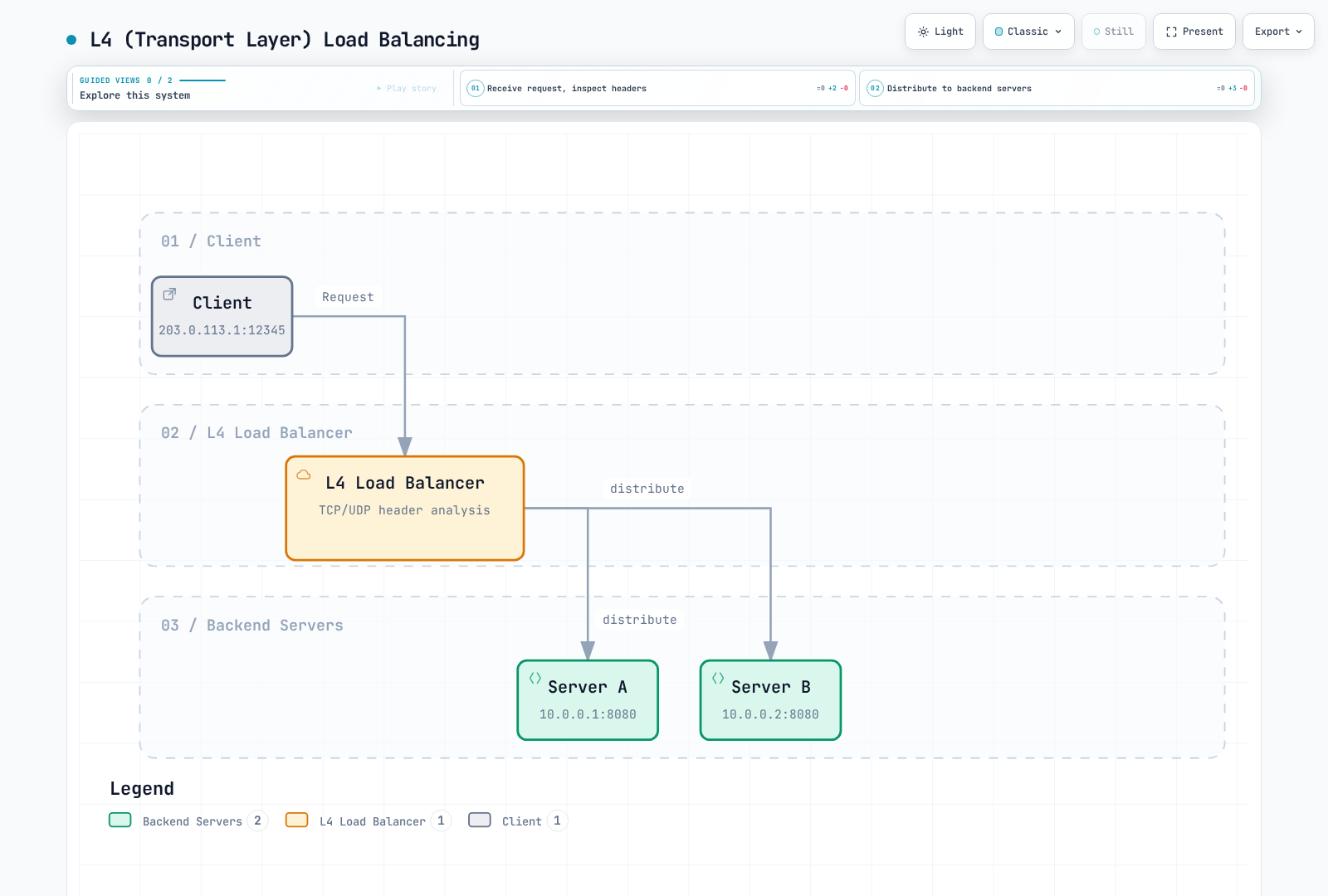
The branches represent possible backend choices, not broadcasting a connection to both servers. L4 forwarding can carry TLS without inspecting the encrypted HTTP payload.
2. L7 (Application Layer) Load Balancing
L7 load balancing distributes traffic based on application layer information such as HTTP headers, URLs, and cookies.
- How It Works: Routing decisions by inspecting HTTP/HTTPS request contents
- Advantages: Content-based routing, advanced traffic management, security features
- Disadvantages: Proxy processing cost; HTTP content inspection of HTTPS needs appropriate TLS termination
- Use Cases: Web applications, microservices, API gateways
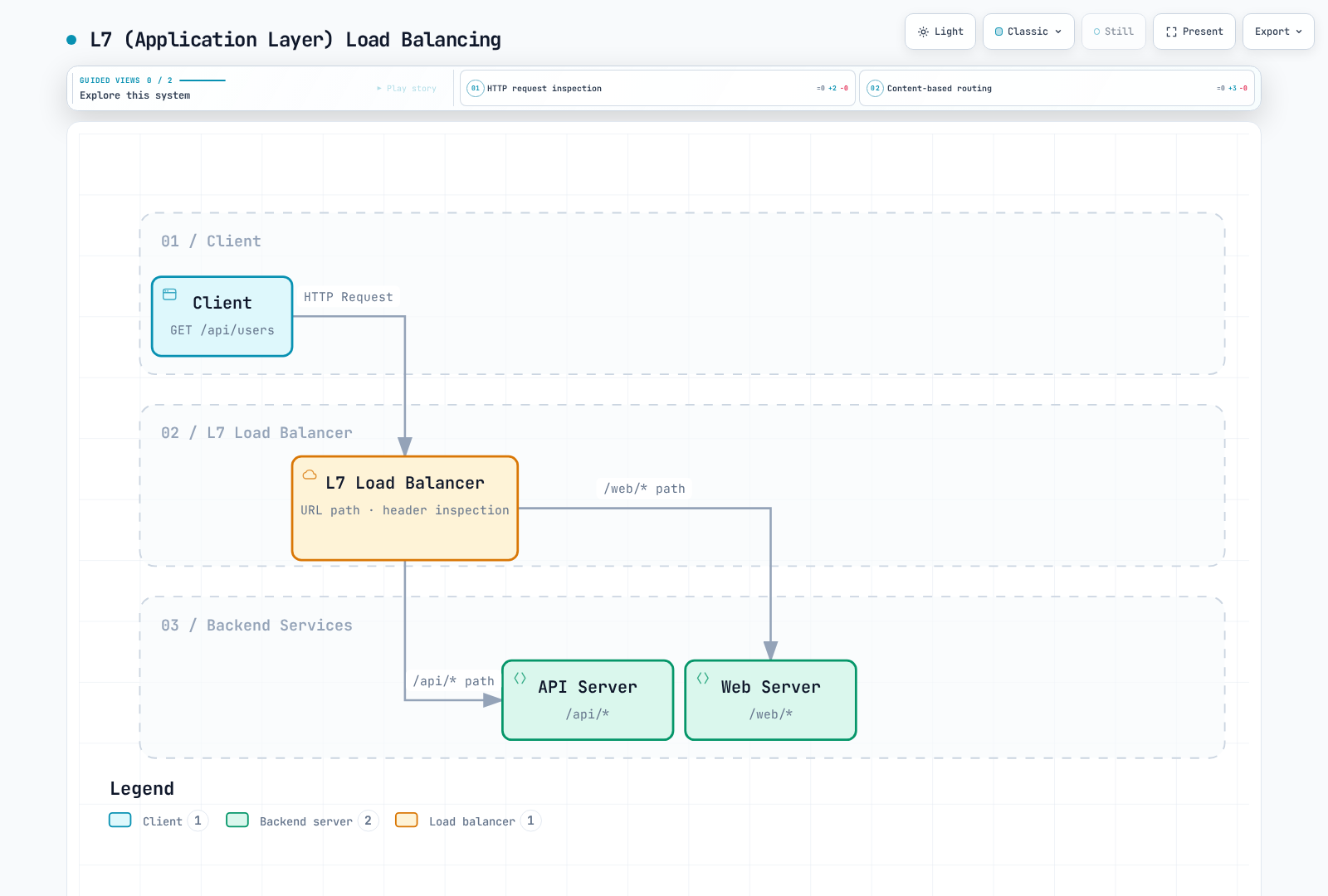
The selected route depends on the request attributes. HTTP content routing over HTTPS requires an appropriate TLS termination/inspection path.
Load Balancing Algorithms
Load balancing algorithms determine how traffic is distributed to backend servers.
1. Round Robin
- How It Works: Distributes requests to each backend server sequentially
- Advantages: Simple sequencing; equal request counts do not imply equal backend work
- Disadvantages: Does not consider server capacity differences or current load
- Variants: Weighted Round Robin (applies weights based on server capacity)
2. Least Connections
- How It Works: Forwards new requests to server with fewest active connections
- Advantages: Considers server load, effective for long connections
- Disadvantages: Connection count does not always accurately reflect load
- Variants: Weighted Least Connections (applies weights based on server capacity)
3. IP Hash
- How It Works: Hashes client IP address for consistent backend server selection
- Advantages: Can provide stable selection while inputs/backend membership remain stable; it is not permanent session storage
- Disadvantages: Possible uneven distribution, potential overload on specific servers
- Variants: Source-Destination IP Hash (considers both source and destination IPs)
4. Least Response Time
- How It Works: Forwards requests to server with shortest response time
- Advantages: Considers performance and availability, suitable for latency-sensitive applications
- Disadvantages: Response time measurement overhead, affected by network variability
- Variants: Weighted Response Time (considers both server capacity and response time)
5. Random Selection
- How It Works: Randomly selects backend server
- Advantages: Simple implementation, no special state tracking required
- Disadvantages: Possible uneven distribution
- Variants: Weighted Random Selection (adjusts probability based on server capacity)
Load Balancer Deployment Models
1. Hardware Load Balancers
- Characteristics: Dedicated physical equipment
- Advantages: High performance, reliability, dedicated hardware acceleration
- Disadvantages: Cost, limited scalability, lack of flexibility
- Examples: Application delivery controller appliances; some product families also offer virtual/software editions
2. Software Load Balancers
- Characteristics: Software running on general-purpose servers
- Advantages: Flexibility, cost efficiency, programmability
- Disadvantages: Capacity depends on implementation, hardware and workload; software is not inherently slower than every appliance
- Examples: NGINX, HAProxy, Envoy
3. Cloud Load Balancers
- Characteristics: Services managed by cloud providers
- Advantages: Reduced management overhead, auto-scaling, high availability
- Disadvantages: Vendor lock-in, limited customization
- Examples: AWS ELB/ALB/NLB, Google Cloud Load Balancing, Azure Load Balancer
4. Container-Native Load Balancers
- Characteristics: Load balancing optimized for container environments
- Advantages: Integration with container orchestration, dynamic service discovery
- Disadvantages: Specialized for container environments
- Examples: Kubernetes Services, Istio, Cilium
Load Balancing in Kubernetes
Kubernetes provides multiple levels of load balancing:
1. Service Load Balancing
- ClusterIP: Internal cluster load balancing
- NodePort: External access through node ports
- LoadBalancer: External load balancer provisioning
- ExternalName: DNS alias for external services
2. Ingress Controllers
- L7 load balancing and routing
- URL-based routing and TLS termination; authentication capabilities depend on the controller and configuration
- Implementations include Traefik, HAProxy and Istio-based controllers. Community
ingress-nginxretired in March 2026; remaining artifacts are not a maintained installation recommendation
3. Service Mesh
- Advanced traffic management between microservices
- Granular routing, traffic splitting, fault injection
- Examples: Istio, Linkerd and Consul service mesh; their traffic-management and security feature sets differ
Load Balancing in Cilium
Cilium implements efficient load balancing using eBPF:
1. eBPF-based Load Balancing
- kube-proxy Replacement: Direct service load balancing within the kernel
- Performance: Supported BPF paths can avoid parts of the conventional stack; quantify the result for the actual workload
- Scalability: Supports large-scale services and endpoints
- Connection Tracking Optimization: Efficient state management
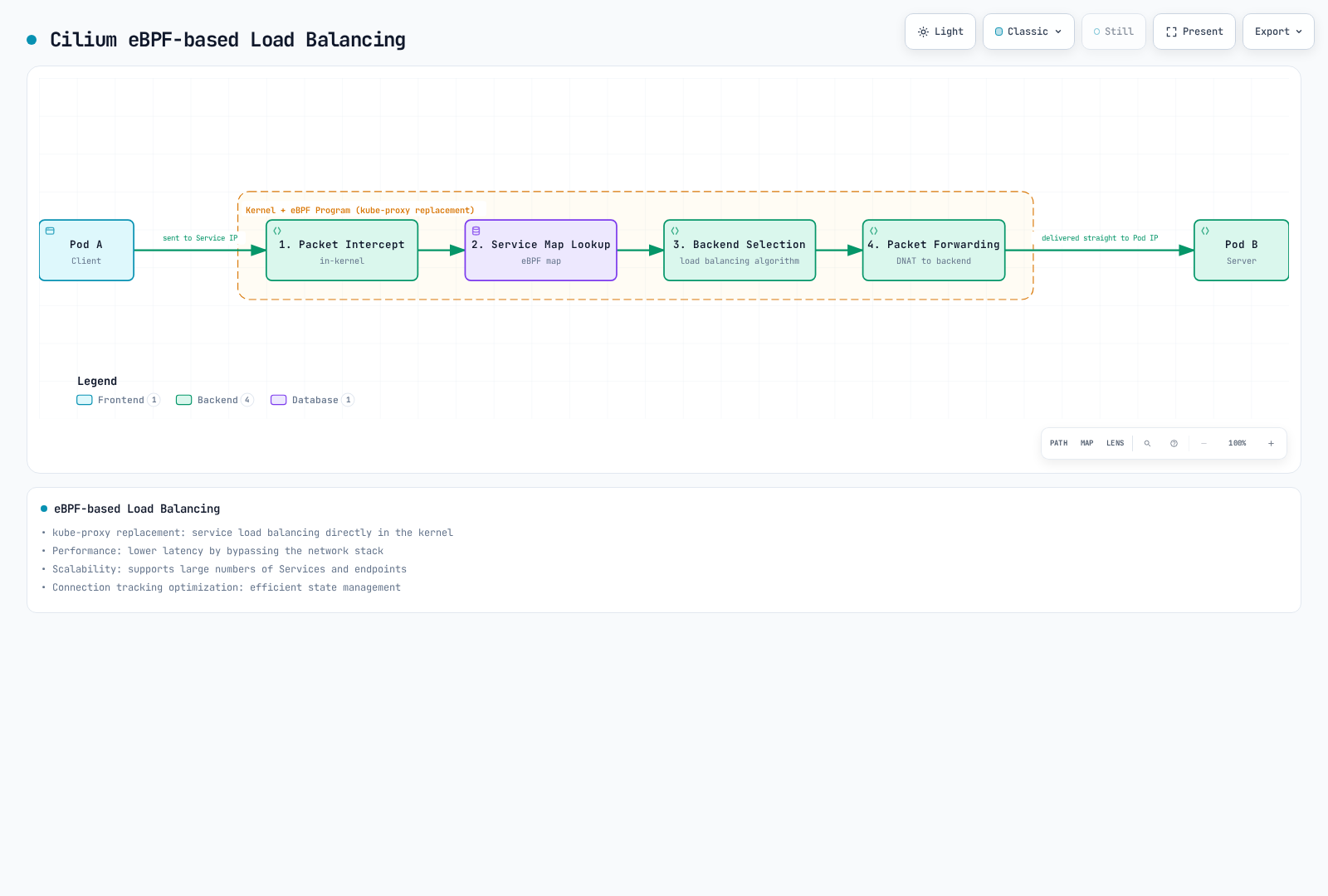
This depicts a packet-path Service translation. Socket-level load balancing can instead select a backend before a Service-IP packet exists. Latency improvements require measurement for the actual path.
2. Load Balancing Algorithms
The BPF Service algorithms are random (the default) and Maglev. Maglev hashes flow information; it is not simply source-IP affinity. Ordinary socket-level east-west selection is a different path from the external packet paths where Maglev is applied.
ClientIP session affinity is configured independently on a Service. Its timeout is not a “Maglev timeout”; Maglev has no timer that periodically rebalances sessions. Membership, seed or table changes can remap selection, and a removed backend cannot continue serving a connection merely because hashing is consistent.
3. L7 Load Balancing
Cilium also supports L7 (Application Layer) load balancing:
- HTTP Header-based Routing: Routing based on specific header values
- URL Path-based Routing: Traffic distribution based on URL patterns
- gRPC Routing: Routing based on gRPC methods and metadata
- Kafka: Current Cilium does not provide the former Kafka topic L7 policy/routing feature; use broker-appropriate controls
4. Global Service Load Balancing
Cilium supports load balancing across multiple clusters:
- Cross-cluster Load Balancing: Traffic distribution among backends across multiple clusters
- Locality Preference: Configured local/remote affinity is not automatic measurement of network latency
- Failure Handling: Depends on endpoint state and remote-cache behavior; the default zero cache TTL can retain stale remote state, so application failover must be tested
Cilium Load Balancing Configuration Example:
These are Helm values for a prepared installation. The shown hash seed is a valid 12-byte base64 demonstration value. For deployment, generate and persist a common random seed for the participating nodes, and review a seed/table change as a connection-impacting operation. See the prepared load-balancing profile.
# load-balancing-values.yaml
kubeProxyReplacement: true
loadBalancer:
  algorithm: maglev
maglev:
  tableSize: 16381
  hashSeed: AAECAwQFBgcICQoL
Network Security Basics
Network security is the practice of protecting network infrastructure, applications, and data from unauthorized access, misuse, failure, or modification. In container environments, network security is even more important due to their dynamic and distributed nature.
Core Network Security Concepts
1. Defense in Depth
Defense in depth combines controls to reduce the impact of an individual failure. Shared dependencies or a common misconfiguration can still affect multiple layers.
- Multiple Security Layers: Protection at network, host, application, and data levels
- Redundant Controls: Combination of various security mechanisms
- Failure Isolation: Design and test boundaries; independence of failures is not automatic
- Threat Detection and Response: Monitoring and response at each layer
2. Principle of Least Privilege
The principle of least privilege is a security practice that grants users, processes, or applications only the minimum privileges necessary to perform their tasks.
- Granular Access Control: Restricting access to only necessary resources
- Privilege Separation: Separation of privileges for various functions
- Default Deny: Denying all access not explicitly allowed
- Regular Review: Regular auditing and adjustment of privileges
3. Network Segmentation
Network segmentation is a technique that divides a network into smaller segments or zones to enhance security and limit lateral movement of threats.
- Security Zones: Grouping systems with similar security requirements
- Microsegmentation: Granular control at the workload level
- Perimeter Protection: Control and monitoring of traffic between zones
- Threat Isolation: Limiting the scope of impact of a breach
4. Encryption
Encryption is the process of transforming data so that it cannot be read by unauthorized parties.
- Encryption in Transit: Protecting data moving over the network (e.g., supported TLS)
- Encryption at Rest: Protecting data stored on disk or in databases
- End-to-End Encryption: Protecting data across the entire communication path
- Key Management: Secure generation, storage, and rotation of encryption keys
Container Networking Security Threats
Container environments present unique security challenges:
1. Network-based Attacks
- DDoS (Distributed Denial of Service) Attacks: Large volumes of traffic to disrupt service availability
- Port Scanning: Exploring open ports and vulnerabilities
- ARP Spoofing: Manipulating Address Resolution Protocol to intercept network traffic
- DNS Poisoning: Redirecting DNS lookups to malicious destinations
2. Application Layer Attacks
- SQL Injection: Inserting malicious SQL code
- XSS (Cross-Site Scripting): Inserting client-side scripts
- CSRF (Cross-Site Request Forgery): Performing malicious actions through authenticated users
- Command Injection: Malicious input to execute system commands
3. Container-Specific Threats
- Image Vulnerabilities: Container images containing vulnerable components
- Privilege Escalation: Gaining permissions within or across a boundary; it is not always the same event as a container escape
- Lateral Movement: Unauthorized access from one container to another
- Volume Mount Exploitation: Access to sensitive host paths
Network Security Controls
1. Firewalls
Firewalls are network security systems that filter network traffic based on defined security rules.
- Packet Filtering: Filtering based on IP addresses, ports, protocols
- Stateful Inspection: Context-based decisions tracking connection state
- Application Layer Filtering: Understanding and inspecting application protocols
- Next-Generation Firewalls (NGFW): Advanced threat detection and prevention features
2. Intrusion Detection and Prevention Systems (IDS/IPS)
IDS/IPS are systems that monitor network traffic and detect or block malicious activity.
- Signature-based Detection: Matching known attack patterns
- Anomaly Detection: Identifying activities that deviate from normal behavior
- Behavior Monitoring: Analysis of suspicious activity patterns
- Automated Response: Real-time response to detected threats
3. Network Policies
Network policies are sets of rules that define allowed communication within a network.
- Ingress Control: Restricting incoming traffic
- Egress Control: Restricting outgoing traffic
- Granular Policies: Communication control at workload level
- Label-based Policies: Flexible policy application in dynamic environments
4. Encryption Protocols
Encryption protocols provide secure communication over networks.
- TLS: Protecting web traffic and API communication; SSL protocols are obsolete
- IPsec: Network layer encryption
- WireGuard: Modern and efficient VPN protocol
- mTLS (mutual TLS): Authentication of both client and server
Network Security in Kubernetes
Kubernetes provides several mechanisms for network security of containerized applications:
1. Network Policies
Kubernetes NetworkPolicy specifies L3/L4 allowances for selected Pods. It needs an enforcing network implementation; allows from applicable policies combine, and existing/host-network paths require their own semantics.
- Pod Selectors: Selecting pods to which policies apply based on labels
- Ingress Rules: Controlling incoming traffic
- Egress Rules: Controlling outgoing traffic
- CIDR-based Rules: Filtering based on IP ranges
This L4 example uses its own namespace and assumes matching frontend/API/database workloads and the stated CoreDNS labels. It includes DNS egress. Keep it separate from the later L7 example: a broad L4 allow can bypass an overlapping L7 restriction.
# api-l4-policy.yaml
apiVersion: networking.k8s.io/v1
kind: NetworkPolicy
metadata:
  name: api-allow
  namespace: cilium-policy-l4-demo
spec:
  podSelector:
    matchLabels:
      app: api
  policyTypes:
  - Ingress
  - Egress
  ingress:
  - from:
    - podSelector:
        matchLabels:
          app: frontend
    ports:
    - protocol: TCP
      port: 8080
  egress:
  - to:
    - podSelector:
        matchLabels:
          app: database
    ports:
    - protocol: TCP
      port: 5432
  - to:
    - namespaceSelector:
        matchLabels:
          kubernetes.io/metadata.name: kube-system
      podSelector:
        matchLabels:
          k8s-app: kube-dns
    ports:
    - protocol: UDP
      port: 53
    - protocol: TCP
      port: 53
2. Service Mesh Security
Service mesh is an infrastructure layer that manages and protects communication between microservices.
- mTLS: Encrypted communication between services
- Authentication and Authorization: Service identity verification and access control
- Traffic Policies: Granular routing and access control
- Observability: Visibility into service-to-service communication
3. Security Contexts
Security contexts define privilege and access control settings for pods and containers.
- Privilege Restriction: Running as non-root user
- Capability Restriction: Allowing only necessary Linux capabilities
- Read-only Root Filesystem: Restricts writes to the container root filesystem; mounted volumes can remain writable
- seccomp and AppArmor: Restricting system calls and application behavior
Cilium's Network Security Features
Cilium leverages eBPF to provide powerful network security features:
1. Identity-based Security
Cilium supports workload-identity policy derived from security-relevant labels, alongside explicit CIDR/IP controls where configured.
- Label-based Policies: Consistent security in dynamic environments
- Service Account-based Policies: Access control based on Kubernetes service accounts
- DNS-based Policies: Egress control based on FQDNs
- API-aware Security: Filtering based on HTTP methods and paths
toCIDR selects destination ranges, but by default CIDR selectors do not match managed in-cluster Pods/nodes; this version has an explicit Beta opt-in for those cases. The world entity covers external endpoints rather than all known cluster/ClusterMesh identities. Use the appropriate identity/entity scope instead of treating world as an allow-all-clusters synonym.
2. Transparent Encryption
Cilium can encrypt supported paths without application changes. Node tunnels do not cover same-node traffic or every external destination. The separate SPIRE mutual-authentication handshake does not itself encrypt application traffic; Beta ztunnel workload mTLS has its own prerequisites.
- IPsec: Network layer encryption for inter-node traffic
- WireGuard: Modern and efficient encryption protocol
- Transparent Integration: Encryption applied without application changes
- Key Rotation: Follow the chosen mode's key lifecycle; Cilium IPsec requires provisioned key material and its documented Secret rotation procedure
3. Threat Detection and Visibility
Cilium/Hubble provides network observations that can support investigation. A complete IDS/WAF, runtime enforcement or alert/response workflow requires the appropriate separate configuration or integration.
- Hubble: Network flow monitoring and analysis
- Flow Logs: Detailed logs of pod-to-pod communication
- Anomaly Detection: External detection rules can analyze observed patterns; Hubble does not automatically classify every attack
- Security Event Alerts: Configure an alerting/SIEM integration and account for event loss, noise and incomplete observations
4. L3-L7 Policy Enforcement
Cilium provides comprehensive policy enforcement from network layer to application layer.
- L3/L4 Policies: IP and port-based filtering
- L7 HTTP Filtering: URL, method, header-based control
- L7 gRPC Filtering: gRPC method and metadata-based control
- DNS Policy: Query filtering and DNS observation for FQDN rules; no current Kafka topic L7 policy
Cilium Network Security Configuration Example:
This alternative L7 policy uses a different namespace from the L4 example. It requires visible plaintext HTTP or an appropriate TLS inspection path, real labeled dependencies and resolver reachability. The .example external name is a placeholder; no working external service is provisioned.
# api-l7-policy.yaml
apiVersion: cilium.io/v2
kind: CiliumNetworkPolicy
metadata:
  name: secure-api
  namespace: cilium-policy-l7-demo
spec:
  endpointSelector:
    matchLabels:
      app: api
  ingress:
  - fromEndpoints:
    - matchLabels:
        k8s:io.kubernetes.pod.namespace: cilium-policy-l7-demo
        k8s:app: frontend
    toPorts:
    - ports:
      - port: '8080'
        protocol: TCP
      rules:
        http:
        - method: GET
          path: /api/v1/products
  egress:
  - toEndpoints:
    - matchLabels:
        k8s:io.kubernetes.pod.namespace: kube-system
        k8s:k8s-app: kube-dns
    toPorts:
    - ports:
      - port: '53'
        protocol: UDP
      - port: '53'
        protocol: TCP
      rules:
        dns:
        - matchPattern: '*'
  - toEndpoints:
    - matchLabels:
        k8s:io.kubernetes.pod.namespace: cilium-policy-l7-demo
        k8s:app: database
    toPorts:
    - ports:
      - port: '5432'
        protocol: TCP
  - toFQDNs:
    - matchName: api.external-service.example
    toPorts:
    - ports:
      - port: '443'
        protocol: TCP
Network Security Best Practices
1. Default Deny Policy
- Implement default deny policy that only allows explicitly permitted traffic
- Open only necessary communication paths
- Regular policy review and removal of unnecessary rules
- Maintain audit trail for policy changes
2. Defense in Depth Approach
- Implement multiple security layers
- Combine network, host, and application-level protection
- Redundant controls with various security mechanisms
- Eliminate single points of failure
3. Least Privilege Networking
- Allow only minimum necessary network access
- Define granular policies per service
- Block unnecessary ports and protocols
- Regular access review and adjustment
4. Continuous Monitoring and Auditing
- Monitor network traffic and policy violations
- Detect anomalies and potential threats
- Alerts and response to security events
- Regular security audits and vulnerability assessments
Primary References
- Cilium routing
- Cilium chart values
- Kube-proxy replacement
- Masquerading
- BGP Control Plane
- Global Services
- Policy language
- DNS policy
- IPsec
- WireGuard
- Kubernetes network model
- Services
- DNS for Services and Pods
- NetworkPolicy
- CNI specification
- Docker bridge networking
- Docker host networking
- Ingress NGINX retirement
- Internet architecture / RFC 1122
- DNS / RFC 1034
- NAT terminology / RFC 2663
- NAT mapping behavior / RFC 4787
- RIP v2 / RFC 2453
- EIGRP / RFC 7868
Quiz
To test what you learned in this chapter, try the Topic Quiz.