Docker Hub
Last Updated: September 11, 2026
Overview
Docker Hub is the default registry for the Docker CLI when no registry is specified. It hosts public and private container images, including Docker Official Images, verified-publisher images and community-contributed content.
Plans and Features
| Feature | Personal | Pro | Team | Business |
|---|---|---|---|---|
| Price | Base free allowance | $11 monthly / $9 per month with annual billing | $16 monthly / $15 per user-month with annual billing | Check current price and contract |
| Private Repositories | 1 | Unlimited | Unlimited | Unlimited |
| Team Features | Individual use | Individual use | Organization collaboration | Organization governance |
| Legacy Automated Builds concurrency | Not available | 5 | 15 | 15 |
| Security and administration | Check plan scope | Check plan scope | Check organization features | Check SSO, audit and contract scope |
Prices reflect the USD display on the official pricing page checked on September 11, 2026; verify billing terms and tax. Automated Builds is deprecated and scheduled for retirement on April 1, 2027.
Rate Limits
The usage documentation describes the following six-hour limits. Check the actual account terms and response headers; fair-use and abuse limits are separate:
| User Type | Rate Limit | Reset Period |
|---|---|---|
| Anonymous | 100 pulls | 6 hours |
| Authenticated (Free) | 200 pulls | 6 hours |
| Authenticated (Pro) | Unlimited under fair use | - |
| Authenticated (Team) | Unlimited under fair use | - |
| Authenticated (Business) | Unlimited | - |
Anonymous limits are applied per IPv4 address or IPv6 /64 subnet. Authenticated pulls are attributed according to the account/organization rules. Nodes sharing a NAT address share the anonymous quota, but do not necessarily share authenticated account quotas.
Using Docker Hub with Kubernetes
Creating Image Pull Secrets
To pull private images from Docker Hub, create a Kubernetes Secret:
The Secret, Pod and ServiceAccount must use the same namespace. Use a read-only PAT for pulls and avoid putting a real credential directly into shell history or CI logs.
# Create docker-registry secret
kubectl create secret docker-registry dockerhub-secret \
  --docker-server=https://index.docker.io/v1/ \
  --docker-username=<your-username> \
  --docker-password=<your-password-or-token> \
  --docker-email=<your-email> \
  -n <namespace>
Using a Personal Access Token (recommended over password):
# Generate a Personal Access Token at https://hub.docker.com/settings/security
kubectl create secret docker-registry dockerhub-secret \
  --docker-server=https://index.docker.io/v1/ \
  --docker-username=myuser \
  --docker-password=dckr_pat_xxxxxxxxxxxx \
  -n default
Using Secrets in Pods
Reference the secret in your Pod specification:
apiVersion: v1
kind: Pod
metadata:
  name: private-app
  namespace: default
spec:
  containers:
  - name: app
    image: myusername/private-app:v1.0.0
  imagePullSecrets:
  - name: dockerhub-secret
ServiceAccount Integration
Attach image pull secrets to a ServiceAccount for automatic injection:
apiVersion: v1
kind: ServiceAccount
metadata:
  name: app-service-account
  namespace: default
imagePullSecrets:
- name: dockerhub-secret
Now any Pod using this ServiceAccount automatically uses the Docker Hub credentials:
This applies to newly admitted Pods that do not already specify their own imagePullSecrets; existing Pods and other ServiceAccounts are not retroactively changed.
apiVersion: apps/v1
kind: Deployment
metadata:
  name: my-app
  namespace: default
spec:
  replicas: 3
  selector:
    matchLabels:
      app: my-app
  template:
    metadata:
      labels:
        app: my-app
    spec:
      serviceAccountName: app-service-account
      containers:
      - name: app
        image: myusername/private-app:v1.0.0
Namespace-Wide Secret Distribution
For multi-namespace clusters, automate secret distribution:
# Using Kubernetes Replicator or similar controller
apiVersion: v1
kind: Secret
metadata:
  name: dockerhub-secret
  namespace: default
  annotations:
    replicator.v1.mittwald.de/replicate-to: "staging,production,dev-*"
type: kubernetes.io/dockerconfigjson
data:
  .dockerconfigjson: <base64-encoded-config>
Rate Limit Mitigation Strategies
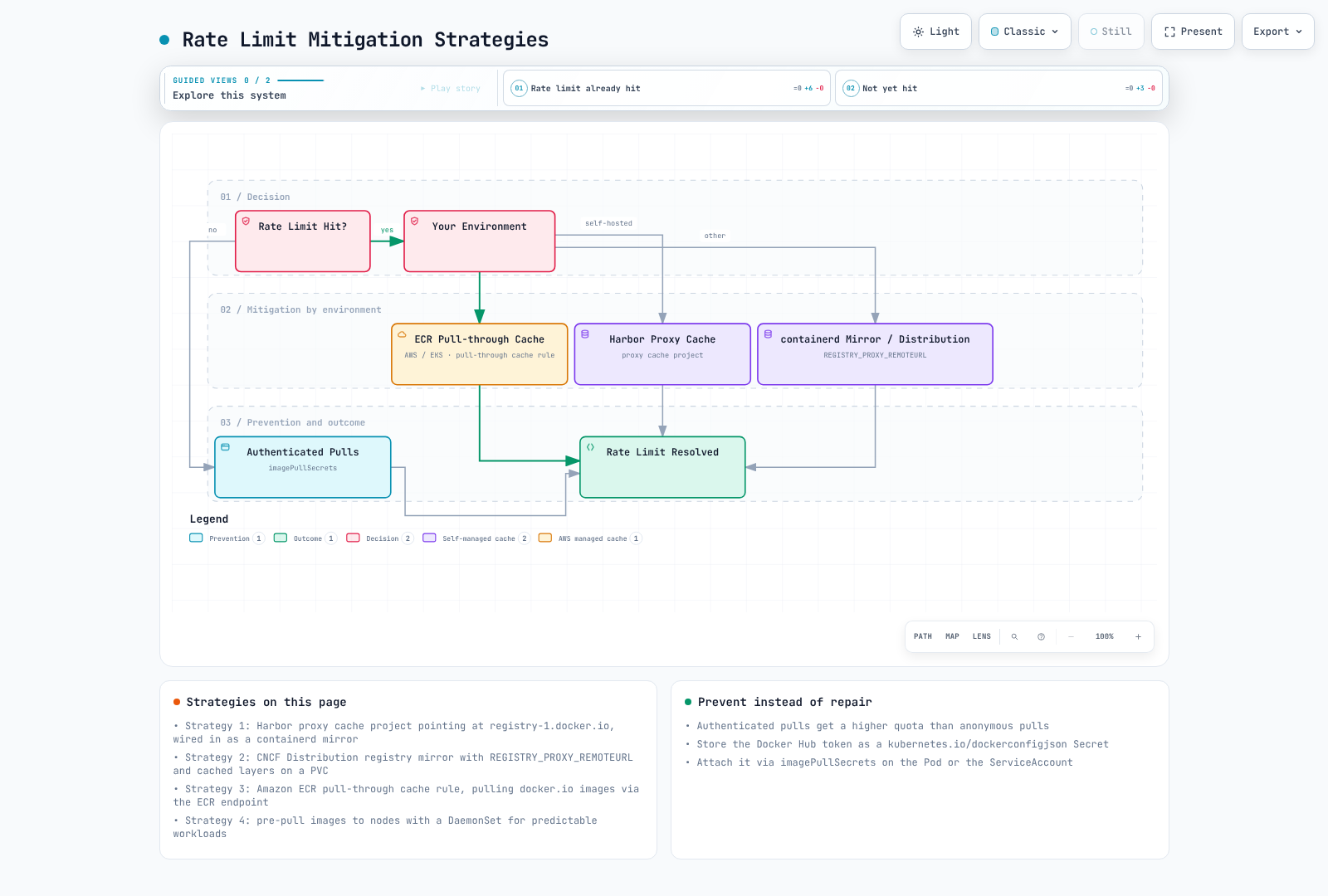
Strategy 1: Pull-Through Cache with Harbor
Deploy Harbor as a proxy cache to reduce Docker Hub pulls:
# Harbor values.yaml excerpt
proxy:
  httpProxy: ""
  httpsProxy: ""
  noProxy: 127.0.0.1,localhost,.local,.internal

# After Harbor deployment, configure a Docker Hub registry endpoint
# and select that endpoint when creating a proxy cache project.
Use an explicit proxy-project image name such as harbor.internal.example.com/dockerhub-cache/library/nginx:TAG. Do not treat Harbor's outgoing HTTP proxy settings above as registry-cache configuration. A containerd mirror additionally needs a compatible registry URL layout and trusted TLS configuration.
# containerd 2.x: /etc/containerd/config.toml
[plugins."io.containerd.cri.v1.images".registry]
config_path = "/etc/containerd/certs.d"# containerd 1.x uses this plugin name instead
[plugins."io.containerd.grpc.v1.cri".registry]
config_path = "/etc/containerd/certs.d"# /etc/containerd/certs.d/docker.io/hosts.toml
server = "https://registry-1.docker.io"
[host."https://mirror.gcr.io"]
capabilities = ["pull"]The old registry.mirrors configuration is deprecated. Follow the containerd hosts documentation, and grant resolve only to trusted mirrors. A public mirror does not guarantee availability of every public or private image.
Strategy 2: Registry Mirror with Distribution
Deploy the CNCF Distribution registry as a pull-through cache:
Create the referenced PVC and dockerhub-creds Secret first. This excerpt exposes an HTTP registry for a controlled lab; production requires TLS, authentication and access controls. A proxy using privileged upstream credentials must not expose cached private images to unauthorized users.
apiVersion: apps/v1
kind: Deployment
metadata:
  name: registry-mirror
spec:
  replicas: 1
  selector:
    matchLabels:
      app: registry-mirror
  template:
    metadata:
      labels:
        app: registry-mirror
    spec:
      containers:
      - name: registry
        image: registry:2
        ports:
        - containerPort: 5000
        env:
        - name: REGISTRY_PROXY_REMOTEURL
          value: "https://registry-1.docker.io"
        - name: REGISTRY_PROXY_USERNAME
          valueFrom:
            secretKeyRef:
              name: dockerhub-creds
              key: username
        - name: REGISTRY_PROXY_PASSWORD
          valueFrom:
            secretKeyRef:
              name: dockerhub-creds
              key: password
        volumeMounts:
        - name: cache-storage
          mountPath: /var/lib/registry
      volumes:
      - name: cache-storage
        persistentVolumeClaim:
          claimName: registry-cache-pvc
---
apiVersion: v1
kind: Service
metadata:
  name: registry-mirror
spec:
  selector:
    app: registry-mirror
  ports:
  - port: 5000
    targetPort: 5000
Strategy 3: Amazon ECR Pull-Through Cache
If running on AWS, use ECR's pull-through cache feature. First create the upstream credential secret in the same account and Region, with an ecr-pullthroughcache/ name prefix; use its actual full ARN:
# Example after creating a secret named ecr-pullthroughcache/dockerhub
PTC_SECRET_ARN=$(aws secretsmanager describe-secret \
  --secret-id ecr-pullthroughcache/dockerhub --region us-east-1 \
  --query ARN --output text)
# Create pull-through cache rule for Docker Hub
aws ecr create-pull-through-cache-rule \
  --ecr-repository-prefix docker-hub \
  --upstream-registry-url registry-1.docker.io \
  --credential-arn "$PTC_SECRET_ARN" \
  --region us-east-1

# Pull images through ECR
# Original: docker.io/library/nginx:latest
# Via ECR: 123456789012.dkr.ecr.us-east-1.amazonaws.com/docker-hub/library/nginx:latest
Strategy 4: Pre-Pull Images to Nodes
For predictable workloads, pre-pull images using a DaemonSet:
Pre-pulling shifts download timing; it does not eliminate upstream pulls or guarantee that kubelet image garbage collection will retain the cache. Keep credentials in the DaemonSet's namespace and use maintained tags or verified digests.
apiVersion: apps/v1
kind: DaemonSet
metadata:
  name: image-prepuller
spec:
  selector:
    matchLabels:
      app: image-prepuller
  template:
    metadata:
      labels:
        app: image-prepuller
    spec:
      initContainers:
      - name: prepull-nginx
        image: nginx:1.30.4
        command: ['sh', '-c', 'echo Image pulled']
      - name: prepull-redis
        image: redis:7
        command: ['sh', '-c', 'echo Image pulled']
      containers:
      - name: pause
        image: registry.k8s.io/pause:3.10
      imagePullSecrets:
      - name: dockerhub-secret
Automated Builds
Docker Hub Automated Builds is deprecated and scheduled for retirement on April 1, 2027. The following describes legacy GitHub/Bitbucket integration. GitLab builds should run in GitLab CI and push the result; new pipelines should follow the migration guidance.
Setting Up Automated Builds
- For an existing autobuild setup, inspect the linked GitHub/Bitbucket account
- Create a repository and connect it to a source repository
- Configure build rules:
# Example build rules configuration
Source Type: Branch
Source: main
Docker Tag: latest
Dockerfile location: /Dockerfile
Build Context: /

Source Type: Tag
Source: /^v[0-9.]+$/
Docker Tag: {sourceref}
Dockerfile location: /Dockerfile
Build Context: /
Build Hooks
Customize builds with hook scripts in your repository:
# hooks/build - Custom build script
#!/bin/bash
docker build \
  --build-arg BUILD_DATE=$(date -u +'%Y-%m-%dT%H:%M:%SZ') \
  --build-arg VCS_REF=$(git rev-parse --short HEAD) \
-t $IMAGE_NAME .# hooks/post_push - Run after successful push
#!/bin/bash
# Tag with additional tags
docker tag $IMAGE_NAME $DOCKER_REPO:$SOURCE_COMMIT
docker push $DOCKER_REPO:$SOURCE_COMMITLimitations of Docker Hub Automated Builds
- The service is deprecated; plan migration before April 1, 2027.
- The documented concurrent-build allowance is 5 for Pro and 15 for Team/Business.
- Do not assume multi-platform, cache, credentials and retention behavior match an external CI runner; inspect the actual legacy setup.
Recommendation: Use GitHub Actions with docker/build-push-action, or GitLab CI with Docker/BuildKit commands. GitHub Actions actions are not directly executable as GitLab CI jobs.
Public Image Security Considerations
Supply Chain Attack Vectors
Public images from Docker Hub can introduce security risks:
- Typosquatting: Malicious images with names similar to popular ones
- Compromised Maintainer Accounts: Legitimate images taken over by attackers
- Embedded Malware: Cryptominers, backdoors, or data exfiltration code
- Vulnerable Base Images: Outdated images with known CVEs
- Bloated Images: Unnecessary packages increasing attack surface
Identifying Trusted Images
| Image Type | Indicator | Trust Level |
|---|---|---|
| Docker Official Images | Curated upstream image program | Verify the specific tag, digest and vulnerabilities |
| Verified Publisher | Verified publisher identity | Verify the specific artifact and maintenance policy |
| Sponsored OSS | Sponsored project program | Sponsorship is not a vulnerability-free guarantee |
| Community Images | No badge | Verify manually |
Docker Official Images
Official Images are curated with Docker and upstream/community maintainers; not every image is maintained directly by Docker Inc.:
# Official images use the library/ namespace (often omitted)
docker pull nginx          # Same as docker.io/library/nginx
docker pull postgres:15    # Same as docker.io/library/postgres:15
Characteristics of Official Images:
- Clear documentation and Dockerfile transparency
- Regular security updates
- Best practice Dockerfile patterns
- Architecture support varies by image/tag
- Base size and included packages vary by variant
Verified Publishers
Verified Publishers are organizations validated by Docker:
# Select an actual maintained tag/digest from the publisher's current catalog
docker buildx imagetools inspect "$VERIFIED_VENDOR_IMAGE"
docker pull "$VERIFIED_VENDOR_IMAGE"
Do not infer current tag availability or vulnerability status from a publisher badge. Vendor catalogs and access policies change; old Bitnami or Grafana tag examples are not a current recommendation.
Security Scanning Best Practices
Always scan public images before deployment:
# Using Trivy (recommended)
trivy image nginx:latest

# Using Docker Scout (Docker Desktop)
docker scout cves nginx:latest

# Using Grype
grype nginx:latest
A source allowlist is useful, but does not enforce signing or vulnerability scanning. The following uses Kyverno Audit mode in a dedicated registry-demo namespace; inspect results before choosing an enforcement policy.
# Source allowlist only; Kyverno must already be installed
apiVersion: kyverno.io/v1
kind: ClusterPolicy
metadata:
  name: allowed-image-sources
spec:
  validationFailureAction: Audit
  rules:
  - name: check-image-source
    match:
      any:
      - resources:
          kinds:
          - Pod
          namespaces:
          - registry-demo
    validate:
      message: "Use an approved, fully qualified image reference."
      pattern:
        spec:
          =(initContainers):
          - image: "docker.io/library/* | docker.io/my-approved-org/*"
          =(ephemeralContainers):
          - image: "docker.io/library/* | docker.io/my-approved-org/*"
          containers:
          - image: "docker.io/library/* | docker.io/my-approved-org/*"
Signature policies need trusted keys/identities and digest verification. Vulnerability-attestation policies additionally need a trusted signer and explicit acceptance criteria; checking an unsigned scanner string is insufficient. See image security and the upstream source-allowlist example. Docker CLI Content Trust settings do not automatically enforce Kubernetes/containerd admission.
Recommendations for Public Images
Pin to Specific Digests (not just tags):
yaml# Avoid image: nginx:latest # Better image: nginx:1.30.4Obtain the complete value with
docker image inspect nginx:1.30.4 --format='{{index .RepoDigests 0}}'after pulling it, then use the printedrepository@sha256:...in the workload. A shortened example hash is not an applicable image reference.Mirror to Private Registry:
bash# Pull, scan, and push to your private registry docker pull nginx:1.30.4 trivy image nginx:1.30.4 --exit-code 1 docker tag nginx:1.30.4 myregistry.com/library/nginx:1.30.4 docker push myregistry.com/library/nginx:1.30.4Use Distroless or Minimal Base Images:
dockerfile# Instead of full OS base images FROM gcr.io/distroless/static-debian12 # or FROM cgr.dev/chainguard/static:latest
Docker Hub API Usage
Authentication
The legacy /v2/users/login route is deprecated. The official Hub API accepts identifier and secret at /v2/auth/token and returns access_token. This token expires in 10 minutes and is distinct from the auth.docker.io token used for Registry pulls. Prefer a PAT with the required scope instead of a password.
set -euo pipefail
# Load these from secure shell input or CI secrets; do not commit their values.
: "${DOCKER_USER:?Set Docker Hub username}"
: "${DOCKER_PAT:?Load a Docker Hub personal access token}"
export DOCKER_USER DOCKER_PAT
HUB_TOKEN=$(jq -n '{identifier: env.DOCKER_USER, secret: env.DOCKER_PAT}' | \
  curl -fsS -X POST https://hub.docker.com/v2/auth/token \
    -H 'Content-Type: application/json' --data-binary @- | jq -er '.access_token')
HUB_NAMESPACE=${HUB_NAMESPACE:-$DOCKER_USER}
export HUB_TOKEN HUB_NAMESPACE
List Repositories and Tags
HUB_NAMESPACE defaults to the login user; set an authorized organization namespace when needed. These examples request only the first visible page. The maximum page_size is 100; follow the response's next URL for a complete inventory.
: "${DOCKER_REPO:?Set repository name}"
curl -fsS -H "Authorization: Bearer $HUB_TOKEN" \
  "https://hub.docker.com/v2/namespaces/$HUB_NAMESPACE/repositories?page_size=100" | \
  jq '.results[] | {name, is_private}'

curl -fsS -H "Authorization: Bearer $HUB_TOKEN" \
  "https://hub.docker.com/v2/namespaces/$HUB_NAMESPACE/repositories/$DOCKER_REPO/tags?page_size=100" | \
  jq '.results[] | {name, last_updated}'
Review Tags Before Cleanup
Do not delete tags based on the first 100 records or assume an undocumented server-side ordering. This standalone Bash script gathers every page and sorts the inventory locally; it performs no deletion. Before deleting anything, check running workload digests, rollback retention and protected tags, then use the Hub management UI or currently documented API capabilities.
#!/usr/bin/env bash
set -euo pipefail
: "${HUB_TOKEN:?Create a current Hub API access token}"
: "${HUB_NAMESPACE:?Set namespace}"
: "${DOCKER_REPO:?Set repository}"
registry_tag_index=$(mktemp)
trap 'rm -f "$registry_tag_index"' EXIT
registry_next="https://hub.docker.com/v2/namespaces/$HUB_NAMESPACE/repositories/$DOCKER_REPO/tags?page_size=100"
while [ -n "$registry_next" ]; do
  case "$registry_next" in
    https://hub.docker.com/*) ;;
    *) printf '%s\n' 'Unexpected pagination host' >&2; exit 1 ;;
  esac
  registry_page=$(curl -fsS -H "Authorization: Bearer $HUB_TOKEN" "$registry_next")
  printf '%s' "$registry_page" | jq -c '.results[]' >> "$registry_tag_index"
  registry_next=$(printf '%s' "$registry_page" | jq -r '.next // empty')
done
# Read-only inventory. No DELETE request is made.
jq -s 'sort_by(.last_updated // "") | reverse | .[] | {name, last_updated}' "$registry_tag_index"
Vulnerability Analysis
# Check Scout access against the account, plan and repository configuration.
# Use the documented CLI instead of assuming a /tags/TAG/vulnerabilities endpoint.
docker scout cves nginx:1.30.4
Create a Private Repository
Confirm namespace permissions and plan allowances first.
jq -n --arg ns "$HUB_NAMESPACE" \
  '{namespace:$ns, name:"myapp", description:"My application", is_private:true}' | \
  curl -fsS -X POST "https://hub.docker.com/v2/namespaces/$HUB_NAMESPACE/repositories" \
    -H "Authorization: Bearer $HUB_TOKEN" \
    -H 'Content-Type: application/json' --data-binary @-
Best Practices
1. Authentication and Access
- Use Personal Access Tokens instead of passwords
- Rotate tokens regularly (every 90 days recommended)
- Use read-only tokens for CI/CD pull operations
- Enable 2FA on Docker Hub accounts
- For teams, use organization-level access management
2. Image Management
- Use specific tags, never
latestin production - Implement a consistent tagging strategy (SemVer recommended)
- Regularly clean up old/unused tags
- Document image dependencies and update procedures
3. Security
- Scan all images before deployment
- Prefer Official Images and Verified Publishers
- Mirror critical images to your private registry
- Implement admission controllers to enforce policies
- Review Dockerfiles for security issues
4. Performance and Reliability
- Implement registry mirroring/caching for production clusters
- Monitor rate limit usage
- Use authenticated pulls even for public images (higher limits)
- Pre-pull images for predictable deployments
5. CI/CD Integration
- Use GitHub Actions or GitLab CI for builds (more features than Docker Hub Automated Builds)
- Implement multi-stage builds for smaller images
- Cache layers effectively to speed up builds
- Sign images for supply chain security
Summary
Docker Hub provides the Docker CLI's default public-image ecosystem and private repositories. Authentication, caching, artifact verification and explicit maintenance policies are needed to use it reliably in Kubernetes infrastructure.
For production workloads requiring higher reliability or stricter security controls, consider:
- Amazon ECR for AWS-native environments
- Harbor for self-hosted, air-gap, or multi-cloud scenarios
- Docker Hub Business for enterprise features with the convenience of SaaS
Key takeaways:
- Use appropriate authentication and verify the account's actual rate/fair-use limits
- Implement pull-through caching for production clusters
- Trust but verify: scan all public images
- Use Official Images and Verified Publishers when possible
- Consider hybrid approaches: Docker Hub for base images, private registry for your applications