Harbor
Last Updated: September 11, 2026
Overview
Harbor is an open-source, cloud-native container registry that provides enterprise-grade features for storing, signing, and scanning container images. As a CNCF Graduated project, Harbor has proven its maturity, security, and adoption across the industry.
Key Features
| Feature | Description |
|---|---|
| Multi-tenancy | Project-based isolation with RBAC |
| Vulnerability Scanning | Built-in Trivy scanner |
| Image Signing | Cosign and Notation support |
| Replication | Push/pull replication between registries |
| Garbage Collection | Automated cleanup of unused layers |
| Proxy Cache | Cache remote registries (Docker Hub, etc.) |
| Audit Logging | Complete operation history |
| OIDC/LDAP | Enterprise identity integration |
| Quota Management | Storage limits per project |
| Robot Accounts | Service accounts for automation |
Architecture
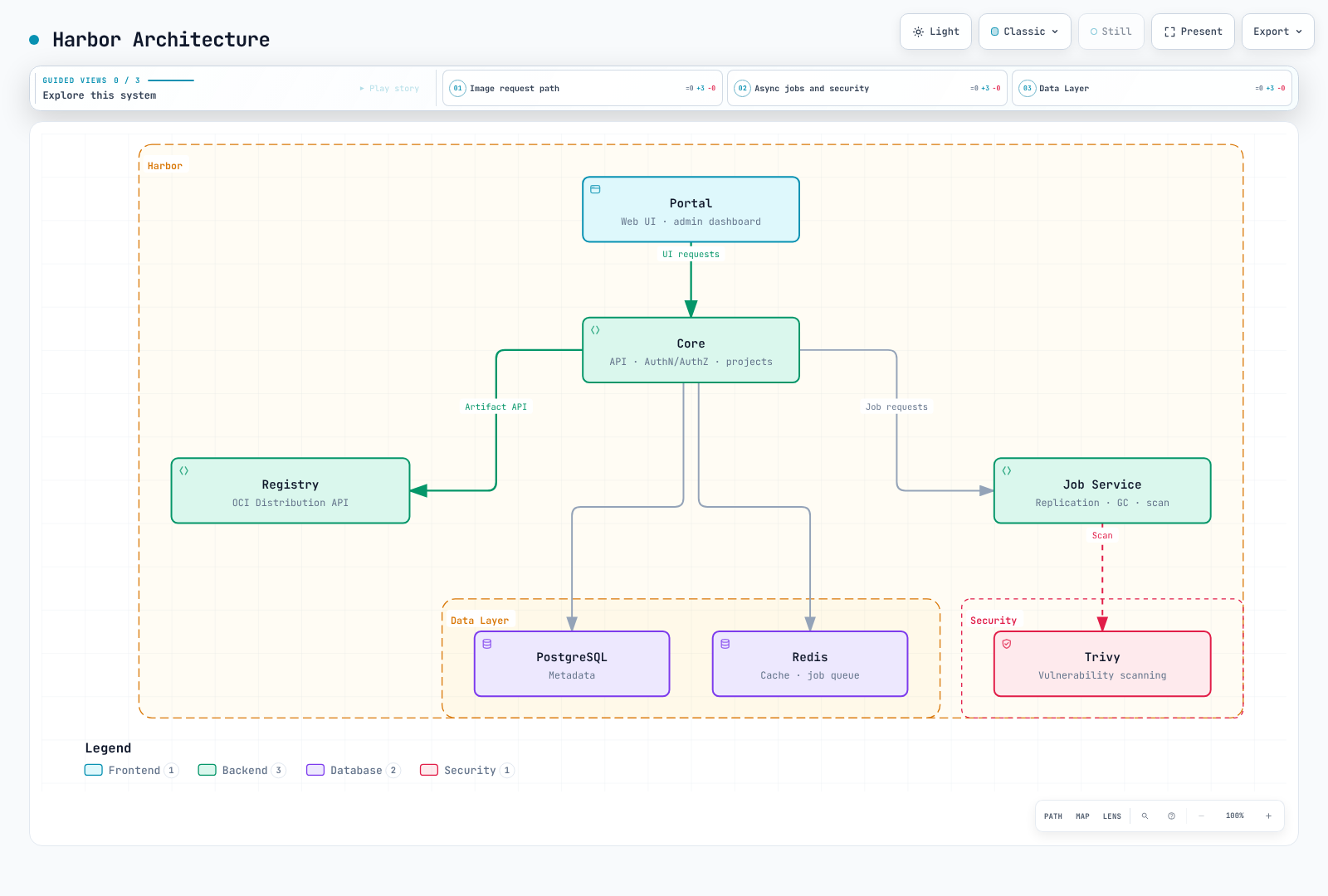
Component Responsibilities
| Component | Purpose |
|---|---|
| Core | API server, authentication, authorization, project management |
| Registry | Docker Distribution v2 API implementation, image storage |
| Job Service | Async task execution (replication, scanning, GC) |
| Trivy | Vulnerability scanning engine |
| Portal | Web UI for administration |
| PostgreSQL | Metadata, user data, audit logs |
| Redis | Job queue, session cache, registry cache |
Helm Installation
The reviewed baseline on 2026-09-11 is Harbor 2.15.2 / Helm chart 1.19.2. Application and chart versions differ. This example assumes that external HA PostgreSQL, Redis and shared storage already exist; the values file does not provision them.
Prerequisites
- Prepare supported Kubernetes/Helm versions, DNS, a maintained Ingress controller and its
IngressClass. Configure upload limits, timeouts and TLS for that controller. - Create the
harbor-tlscertificate/key Secret in namespaceharbor. The certificate must match the hostname; clients and nodes must trust its CA. - Two Registry replicas on separate nodes require a shared RWX PVC or object storage. Sharing one EBS
gp3RWO PVC across nodes is not an HA configuration. - Prepare PostgreSQL database
registry, its user and thepasswordkey in Secretharbor-database.sslmode: requirerequires encryption only; validate CA trust andverify-fullwhen certificate and hostname validation are required. - Redis must support the multiple logical databases used by Harbor. Do not use a Redis Cluster mode restricted to DB 0. Prepare
REDIS_PASSWORDin Secretharbor-redisand validate TLS connectivity. Use the chart'scaBundleSecretNamefor a private CA.
helm repo add harbor https://helm.goharbor.io
helm repo update
helm show chart harbor/harbor --version 1.19.2
kubectl create namespace harbor
kubectl get ingressclass
kubectl get storageclass
Initial Credentials
# Initial installation only: preserve this encryption key during upgrades.
umask 077
HARBOR_SETUP_DIR=$(mktemp -d)
python3 - "$HARBOR_SETUP_DIR" <<'PYTHON'
import getpass
import pathlib
import secrets
import sys
root = pathlib.Path(sys.argv[1])
(root / "admin-password").write_text(getpass.getpass("Initial Harbor admin password: "))
(root / "secretKey").write_text(secrets.token_hex(8))  # exactly 16 characters
PYTHON
kubectl create secret generic harbor-admin -n harbor \
  --from-file=HARBOR_ADMIN_PASSWORD="$HARBOR_SETUP_DIR/admin-password"
kubectl create secret generic harbor-encryption-key -n harbor \
  --from-file=secretKey="$HARBOR_SETUP_DIR/secretKey"
rm -rf -- "$HARBOR_SETUP_DIR"
Production values.yaml
Save as harbor-values.yaml and replace every example hostname and StorageClass. Add resource requests/limits and Pod spreading for the measured load and available nodes. Enable serviceMonitor.enabled only after installing the Prometheus Operator CRDs.
expose:
  type: ingress
  tls:
    enabled: true
    certSource: secret
    secret:
      secretName: harbor-tls
  ingress:
    hosts:
      core: harbor.example.com
    className: your-ingress-class
    annotations: {}
externalURL: https://harbor.example.com
existingSecretAdminPassword: harbor-admin
existingSecretSecretKey: harbor-encryption-key
internalTLS:
  enabled: true
  certSource: auto
persistence:
  enabled: true
  resourcePolicy: keep
  persistentVolumeClaim:
    registry:
      storageClass: your-rwx-storage-class
      accessMode: ReadWriteMany
      size: 100Gi
    trivy:
      storageClass: your-storage-class
      size: 10Gi
core:
  replicas: 2
portal:
  replicas: 2
registry:
  replicas: 2
jobservice:
  replicas: 2
  jobLoggers: [database]
database:
  type: external
  external:
    host: harbor-db.internal
    port: "5432"
    username: harbor
    coreDatabase: registry
    existingSecret: harbor-database
    sslmode: require
redis:
  type: external
  external:
    addr: harbor-redis.internal:6379
    existingSecret: harbor-redis
    tlsOptions:
      enable: true
trivy:
  enabled: true
  skipUpdate: false
  skipJavaDBUpdate: false
  offlineScan: false
metrics:
  enabled: true
  serviceMonitor:
    enabled: false
Installation with Custom Values
helm template harbor harbor/harbor --version 1.19.2   --namespace harbor --values harbor-values.yaml > harbor-rendered.yaml
helm install harbor harbor/harbor --version 1.19.2   --namespace harbor --values harbor-values.yaml --wait --timeout 15m
kubectl get pods,svc,ingress,pvc -n harbor
docker login harbor.example.com --username admin
Upgrading Harbor
Before upgrading, check the supported upgrade path in release notes. Back up metadata, registry data, configuration and encryption keys at a consistent recovery point and test restoration. Compare old/new chart values and test rendering and migrations in staging. Pin the target chart in helm upgrade; a Helm rollback alone may not reverse a database migration.
Notary v1 was removed in Harbor 2.9. Cosign and Notation are external signing tools; their signatures are stored as OCI artifacts in the registry.
Projects and RBAC
API examples assume a reachable test Harbor over HTTPS, curl and jq. Set HARBOR_USER to a user with the required permissions. curl --user "$HARBOR_USER" prompts for the password. For automation, supply scoped robot credentials through your secret manager without logging them.
export HARBOR_USER=adminProject Types
| Type | Description | Use Case |
|---|---|---|
| Public | Anyone can pull images | Open source, shared base images |
| Private | Only members can access | Application images, internal tools |
Creating Projects
# Create project via API
curl --fail-with-body -X POST "https://harbor.example.com/api/v2.0/projects" \
  -H "Content-Type: application/json" \
  --user "$HARBOR_USER" \
  -d '{
    "project_name": "myapp",
    "metadata": {
      "public": "false",
      "prevent_vul": "true",
      "auto_scan": "true",
      "severity": "high"
    },
    "storage_limit": 107374182400
  }'
RBAC Roles
| Role | Permissions |
|---|---|
| Project Admin | Full control: manage members, policies, images |
| Maintainer | Push/pull images, scan, delete tags |
| Developer | Push/pull images; member administration is not included |
| Guest | Pull images only |
| Limited Guest | Pull/read artifacts; no project member or log listing |
Adding Members
# Add user to project
curl --fail-with-body -X POST "https://harbor.example.com/api/v2.0/projects/myapp/members" \
  -H "Content-Type: application/json" \
  --user "$HARBOR_USER" \
  -d '{
    "role_id": 2,
    "member_user": {
      "username": "developer1"
    }
  }'

# Role IDs: 1=Admin, 2=Developer, 3=Guest, 4=Maintainer, 5=Limited Guest
Robot Accounts
Robot accounts are service accounts for CI/CD automation:
# Create robot account
curl --fail-with-body -X POST "https://harbor.example.com/api/v2.0/robots" \
  -H "Content-Type: application/json" \
  --user "$HARBOR_USER" \
  -d '{
    "name": "ci-robot",
    "description": "Robot account for CI/CD pipelines",
    "duration": 90,
    "level": "project",
    "permissions": [
      {
        "kind": "project",
        "namespace": "myapp",
        "access": [
          {"resource": "repository", "action": "push"},
          {"resource": "repository", "action": "pull"}
        ]
      }
    ]
  }'

# Response includes robot name and secret
# {
#   "name": "robot$myapp+ci-robot",
#   "secret": "xxxxxxxxxxxxxxxxxxxx",
#   ...
# }
Using robot account in CI/CD:
# Docker login with robot account
read -r -p 'Robot name returned by Harbor: ' ROBOT_NAME
read -r -s -p 'Robot secret: ' ROBOT_SECRET
printf '\n'
printf '%s' "$ROBOT_SECRET" | docker login harbor.example.com \
  --username "$ROBOT_NAME" --password-stdin
unset ROBOT_SECRET

# Push image
docker push harbor.example.com/myapp/app:v1.0.0
Image Replication
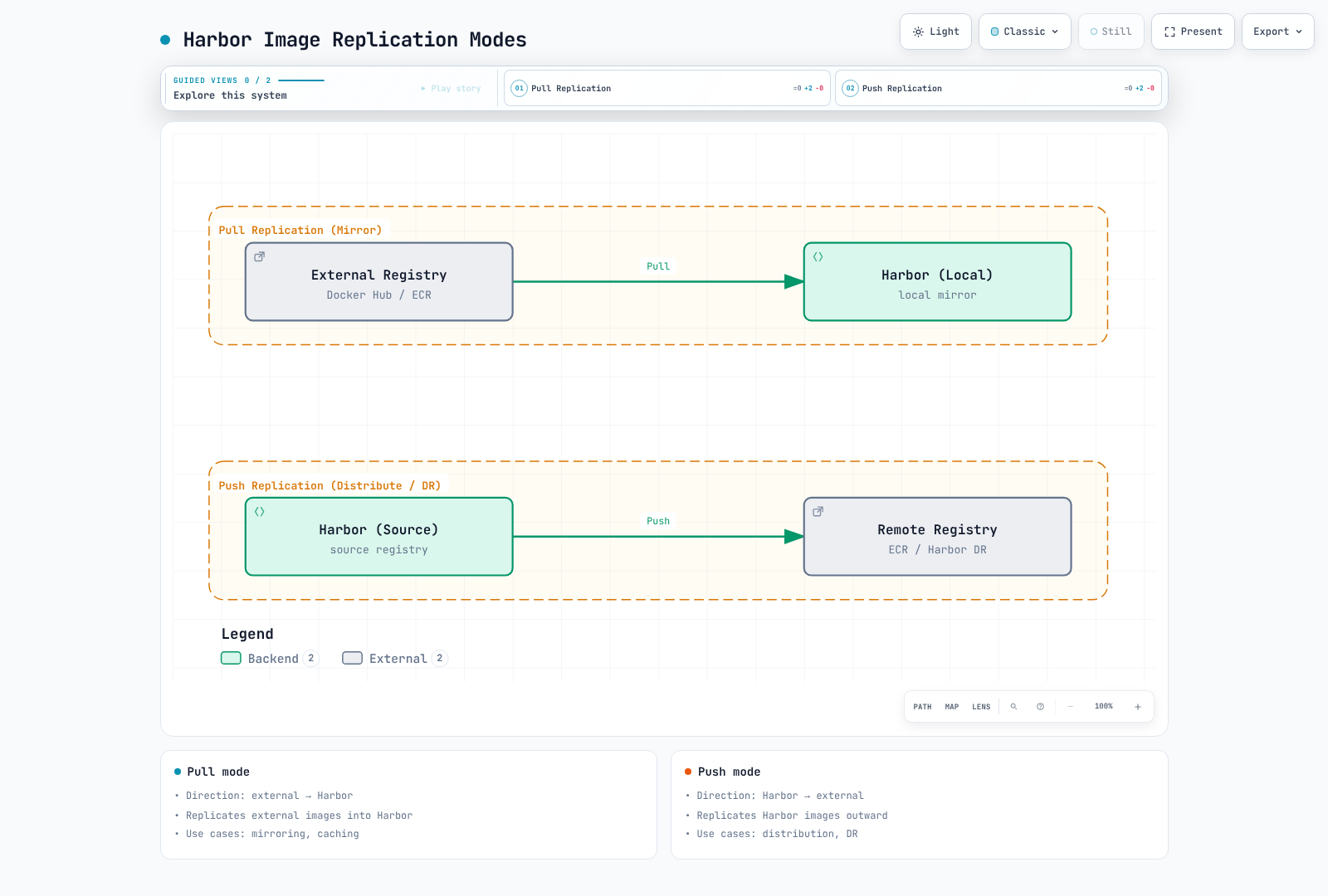
Harbor supports bidirectional replication between registries.
Endpoint IDs 1 and 3 below are examples: obtain actual IDs from the creation response Location or endpoint list. Scheduled cron expressions contain six fields including seconds (0 0 0 * * *); check the Job Service timezone. Pull replication needs connectivity to its upstream and cannot import into a fully disconnected network. Event replication follows local Harbor push/retag/deletion events, not arbitrary changes in a remote registry.
Replication Modes
| Mode | Description | Use Case |
|---|---|---|
| Push | Harbor pushes to remote | Distribute to edge locations |
| Pull | Harbor pulls from remote | Mirror Docker Hub, sync from ECR |
Setting Up Replication Endpoints
# Create registry endpoint (e.g., Docker Hub)
curl --fail-with-body -X POST "https://harbor.example.com/api/v2.0/registries" \
  -H "Content-Type: application/json" \
  --user "$HARBOR_USER" \
  -d '{
    "name": "docker-hub",
    "type": "docker-hub",
    "url": "https://hub.docker.com",
    "credential": {
      "type": "basic",
      "access_key": "dockerhub-username",
      "access_secret": "<dockerhub-PAT>"
    }
  }'

# Create registry endpoint (ECR)
curl --fail-with-body -X POST "https://harbor.example.com/api/v2.0/registries" \
  -H "Content-Type: application/json" \
  --user "$HARBOR_USER" \
  -d '{
    "name": "aws-ecr",
    "type": "aws-ecr",
    "url": "https://123456789012.dkr.ecr.us-east-1.amazonaws.com",
    "credential": {
      "type": "basic",
      "access_key": "AKIAIOSFODNN7EXAMPLE",
      "access_secret": "wJalrXUtnFEMI/K7MDENG/bPxRfiCYEXAMPLEKEY"
    }
  }'

# Create registry endpoint (another Harbor)
curl --fail-with-body -X POST "https://harbor.example.com/api/v2.0/registries" \
  -H "Content-Type: application/json" \
  --user "$HARBOR_USER" \
  -d '{
    "name": "harbor-dr",
    "type": "harbor",
    "url": "https://harbor-dr.example.com",
    "credential": {
      "type": "basic",
      "access_key": "<replication-user>",
      "access_secret": "<replication-secret>"
    }
  }'
Creating Replication Rules
# Pull replication from Docker Hub (mirror official images)
curl --fail-with-body -X POST "https://harbor.example.com/api/v2.0/replication/policies" \
  -H "Content-Type: application/json" \
  --user "$HARBOR_USER" \
  -d '{
    "name": "mirror-dockerhub-nginx",
    "src_registry": {"id": 1},
    "dest_namespace": "dockerhub-mirror",
    "filters": [
      {"type": "name", "value": "library/nginx"},
      {"type": "tag", "value": "1.*"}
    ],
    "trigger": {
      "type": "scheduled",
      "trigger_settings": {
        "cron": "0 0 0 * * *"
      }
    },
    "enabled": true,
    "replicate_deletion": false,
    "override": true,
    "speed": -1
  }'

# Push replication to DR site
curl --fail-with-body -X POST "https://harbor.example.com/api/v2.0/replication/policies" \
  -H "Content-Type: application/json" \
  --user "$HARBOR_USER" \
  -d '{
    "name": "replicate-to-dr",
    "dest_registry": {"id": 3},
    "filters": [
      {"type": "name", "value": "production/**"},
      {"type": "tag", "value": "v*"}
    ],
    "trigger": {
      "type": "event_based"
    },
    "enabled": true,
    "replicate_deletion": false,
    "override": true,
    "speed": 102400
  }'
Replication Filters
| Filter Type | Description | Example |
|---|---|---|
name | Repository name pattern | library/**, myapp/* |
tag | Tag pattern | v*, latest |
label | Harbor label | production, approved |
resource | Resource type | image, chart |
Vulnerability Scanning
Trivy Integration
Harbor uses Trivy as its default vulnerability scanner. Trivy scans for:
- OS package vulnerabilities (Alpine, Debian, Ubuntu, RHEL, etc.)
- Application dependencies (npm, pip, gem, maven, go modules)
Scan-on-Push Configuration
# Enable automatic scanning for a project
curl --fail-with-body -X PUT "https://harbor.example.com/api/v2.0/projects/myapp" \
  -H "Content-Type: application/json" \
  --user "$HARBOR_USER" \
  -d '{
    "metadata": {
      "auto_scan": "true"
    }
  }'
Manual Scanning
# Use the digest of an existing artifact from the Harbor UI/API.
: "${HARBOR_DIGEST:?Set the complete sha256 digest}"
curl --fail-with-body --user "$HARBOR_USER" -X POST \
  "https://harbor.example.com/api/v2.0/projects/myapp/repositories/app/artifacts/${HARBOR_DIGEST}/scan"
curl --fail-with-body --user "$HARBOR_USER" \
  "https://harbor.example.com/api/v2.0/projects/myapp/repositories/app/artifacts/${HARBOR_DIGEST}?with_scan_overview=true"
Scanning is asynchronous. Check completion and database freshness; an empty/incomplete report is not a clean scan. Unlike the single-component app example, nested repository names such as team/app require Harbor API double URL encoding.
CVE Allowlists
Limit exceptions to approved CVEs with an owner, rationale and expiry. The PUT below replaces the project allowlist, so merge existing entries first. It disables reuse of the system list and requires an approved identifier and future expiry.
# Review the existing project allowlist before replacing it.
: "${APPROVED_CVE:?Set an approved CVE identifier}"
: "${ALLOWLIST_EXPIRES_AT:?Set a future Unix timestamp in seconds}"
jq -n --arg cve "$APPROVED_CVE" --argjson expires "$ALLOWLIST_EXPIRES_AT" \
  '{metadata:{reuse_sys_cve_allowlist:"false"},
    cve_allowlist:{items:[{cve_id:$cve}],expires_at:$expires}}' > cve-allowlist.json
curl --fail-with-body --user "$HARBOR_USER" -X PUT \
  -H 'Content-Type: application/json' \
  --data-binary @cve-allowlist.json \
  'https://harbor.example.com/api/v2.0/projects/myapp'
Preventing Vulnerable Image Deployment
Configure Harbor to block pulls of vulnerable images:
# Set vulnerability prevention policy
curl --fail-with-body -X PUT "https://harbor.example.com/api/v2.0/projects/myapp" \
  -H "Content-Type: application/json" \
  --user "$HARBOR_USER" \
  -d '{
    "metadata": {
      "prevent_vul": "true",
      "severity": "high"
    }
  }'

# Severity options: none, low, medium, high, critical
This policy gates registry pulls; it does not inspect or stop containers that are already running or using cached images. Auto-scan alone does not enable pull prevention.
Image Signing
Signatures verify artifact integrity and a trusted signer. They do not patch vulnerabilities or inspect running Pods. Install Cosign/Notation using their official guides and validate signature-format compatibility with Harbor and your policy engine.
Cosign Integration
# HARBOR_IMAGE must include an existing image digest, not a mutable tag.
: "${HARBOR_IMAGE:?Set harbor.example.com/myapp/app@sha256:<actual-digest>}"
cosign version
cosign generate-key-pair
cosign sign --key cosign.key "$HARBOR_IMAGE"
cosign verify --key cosign.pub "$HARBOR_IMAGE"
Keyless signing uses an OIDC identity and transparency log; verification must constrain the trusted issuer and identity. Protect the private key and its password in the key-based example. A fully disconnected environment cannot directly use a workflow that depends on public Sigstore services.
Notation (Notary v2) Integration
This uses a test-only self-signed certificate. Import the trust policy for the trust store created by generate-test before verifying. Production policies should use the organization's CA/key management and explicit signer identity restrictions.
notation version
notation login harbor.example.com
notation cert generate-test --default harbor-demo
notation sign "$HARBOR_IMAGE"
cat > trustpolicy.json <<'JSON'
{
  "version": "1.0",
  "trustPolicies": [{
    "name": "harbor-demo",
    "registryScopes": ["harbor.example.com/myapp/app"],
    "signatureVerification": {"level": "strict"},
    "trustStores": ["ca:harbor-demo"],
    "trustedIdentities": ["*"]
  }]
}
JSON
notation policy import trustpolicy.json
notation verify "$HARBOR_IMAGE"
Configuring Cosign in Harbor
Select the Cosign or Notation policy in project Configuration. Enabling both requires both signature types. The chart has no core.cosignKeyFile option for public-key verification. Distinguish the registry's signature-accessory checks from verification against your organization's trusted keys and identities.
Kubernetes Policy Enforcement
For deployment enforcement, configure an admission policy such as Kyverno as described in Image Security. Supply valid keys or trusted OIDC issuer/identity, exact image scope and private registry credentials; cover init/ephemeral containers. Validate in Audit before Enforce, including wrong-key, unsigned-image and tag-reassignment failures.
Air-Gap Scenarios
The Docker Compose offline installer and a Kubernetes Helm deployment are separate installation paths. The offline installer bundles Harbor images, but not every Docker/Compose package, Kubernetes chart, CNI, application image or Trivy database.
Offline Installer
HARBOR_VERSION=2.15.2
curl --fail --location --remote-name \
  "https://github.com/goharbor/harbor/releases/download/v${HARBOR_VERSION}/harbor-offline-installer-v${HARBOR_VERSION}.tgz"
# Verify the release checksum/signature before transporting the bundle.
sha256sum "harbor-offline-installer-v${HARBOR_VERSION}.tgz" > harbor-bundle.sha256
# Transfer both files through the approved offline transport.
On the disconnected host, run the following. A locally generated SHA-256 verifies transport integrity; it does not replace verification of the publisher's release signature.
sha256sum -c harbor-bundle.sha256
tar xzf harbor-offline-installer-v2.15.2.tgz
cd harbor
cp harbor.yml.tmpl harbor.yml
# Set hostname, HTTPS certificate/key, strong admin/DB passwords and data_volume.
# For Trivy: preload DBs, set skip_update, skip_java_db_update and offline_scan.
# Install Docker Engine/Compose and other prerequisites from offline packages first.
./install.sh --with-trivy
Preloading Images for Air-Gap Kubernetes
Use a matching kubeadm binary to list control-plane images for the exact supported Kubernetes version. Add CNI, CSI, ingress and monitoring images plus charts/CRDs separately. For clusters not managed by kubeadm, use the distribution's own image inventory.
: "${K8S_VERSION:?Set the exact supported Kubernetes patch version}"
kubeadm config images list --kubernetes-version "$K8S_VERSION" > kubeadm-images.txt
Automated Image Sync Script
Map source and target references explicitly in a TSV file. Basename-only retagging can collide across registries/namespaces. These Bash/Skopeo examples transport all platforms through OCI archives. Signatures/SBOM referrers require separate transport and verification according to tool support.
# images.tsv: two columns separated by a TAB; replace the internal hostname.
docker.io/library/nginx:1.30.4	harbor.airgap.local/k8s-system/dockerhub/library/nginx:1.30.4
On the connected side:
#!/usr/bin/env bash
set -euo pipefail
mkdir -p image-bundle
: > image-bundle/import.tsv
index=0
while IFS=$'\t' read -r source target || [[ -n "$source" ]]; do
  [[ -z "$source" || "$source" == \#* ]] && continue
  [[ -n "$target" ]] || { echo 'Missing target image' >&2; exit 1; }
  index=$((index + 1))
  file="image-${index}.tar"
  skopeo copy --all "docker://${source}" "oci-archive:image-bundle/${file}"
  printf '%s\t%s\n' "$file" "$target" >> image-bundle/import.tsv
done < images.tsv
(cd image-bundle && sha256sum image-*.tar import.tsv > SHA256SUMS)
After transferring image-bundle, on the disconnected side:
#!/usr/bin/env bash
set -euo pipefail
cd image-bundle
sha256sum -c SHA256SUMS
# Pre-create the target Harbor projects and trust its TLS CA.
skopeo login harbor.airgap.local
while IFS=$'\t' read -r file target; do
  skopeo copy --all "oci-archive:${file}" "docker://${target}"
done < import.tsv
Apply the mapped internal image URIs to Pod/Helm/kubeadm configuration and verify digests, platforms and pulls. --all requests all platform manifests; representation conversion can change a digest, so compare source and destination results.
Trivy Database Update for Air-Gap
# Use a Trivy version compatible with the deployed Harbor scanner adapter.
trivy image --cache-dir ./trivy-cache --download-db-only
trivy image --cache-dir ./trivy-cache --download-java-db-only
tar -C trivy-cache -czf trivy-db-bundle.tgz db java-db
Extract the bundle into each Trivy replica's persistent cache root /home/scanner/.cache/trivy, with correct ownership for db/trivy.db, db/metadata.json, java-db/trivy-java.db and its metadata. Stop the scanner or use a replacement PVC/init job instead of overwriting an open database. The tar -C form above avoids accidentally nesting a home-directory path inside the cache.
trivy:
  skipUpdate: true
  skipJavaDBUpdate: true
  offlineScan: true
offlineScan alone neither disables every database update nor creates a missing database. Establish a database import/freshness schedule and rescan after updates. The equivalent Compose harbor.yml keys are skip_update, skip_java_db_update and offline_scan.
Containerd Trust Configuration
Use explicit internal Harbor image references in offline manifests. Redirecting arbitrary external registries to /v2/<project> does not automatically rewrite repository paths or credentials. Install the CA on each node and use configuration appropriate to its runtime version.
# containerd 2.x: /etc/containerd/config.toml
[plugins."io.containerd.cri.v1.images".registry]
  config_path = "/etc/containerd/certs.d"
# containerd 1.x uses plugins."io.containerd.grpc.v1.cri".registry instead.# /etc/containerd/certs.d/harbor.airgap.local/hosts.toml
server = "https://harbor.airgap.local"
[host."https://harbor.airgap.local"]
capabilities = ["pull", "resolve"]
ca = "/etc/containerd/certs.d/harbor.airgap.local/ca.crt"Restart containerd under your node maintenance procedure when changing config_path, then verify an actual CRI pull. Supply namespace-scoped pull-only credentials through imagePullSecrets.
Harbor + Kubernetes Integration
Creating imagePullSecrets
# Create pull credentials in the same namespace as the consuming Pod.
umask 077
HARBOR_AUTH_DIR=$(mktemp -d)
python3 - "$HARBOR_AUTH_DIR/config.json" <<'PYTHON'
import base64
import getpass
import json
import pathlib
import sys
name = input("Pull robot name returned by Harbor: ")
password = getpass.getpass("Pull robot secret: ")
auth = base64.b64encode(f"{name}:{password}".encode()).decode()
pathlib.Path(sys.argv[1]).write_text(json.dumps({
    "auths": {"harbor.example.com": {"auth": auth}}
}))
PYTHON
kubectl create secret generic harbor-secret -n default \
  --type=kubernetes.io/dockerconfigjson \
  --from-file=.dockerconfigjson="$HARBOR_AUTH_DIR/config.json" \
  --dry-run=client -o yaml \
  | kubectl apply --server-side --field-manager=harbor-pull-secret -f -
rm -rf -- "$HARBOR_AUTH_DIR"
kubectl get secret harbor-secret -n default -o jsonpath='{.type}'
ServiceAccount Configuration
apiVersion: v1
kind: ServiceAccount
metadata:
  name: app-sa
  namespace: default
imagePullSecrets:
- name: harbor-secret
---
apiVersion: apps/v1
kind: Deployment
metadata:
  name: myapp
spec:
  replicas: 3
  selector:
    matchLabels:
      app: myapp
  template:
    metadata:
      labels:
        app: myapp
    spec:
      serviceAccountName: app-sa
      containers:
      - name: app
        image: harbor.example.com/myapp/app:v1.0.0
Proxy Cache Configuration
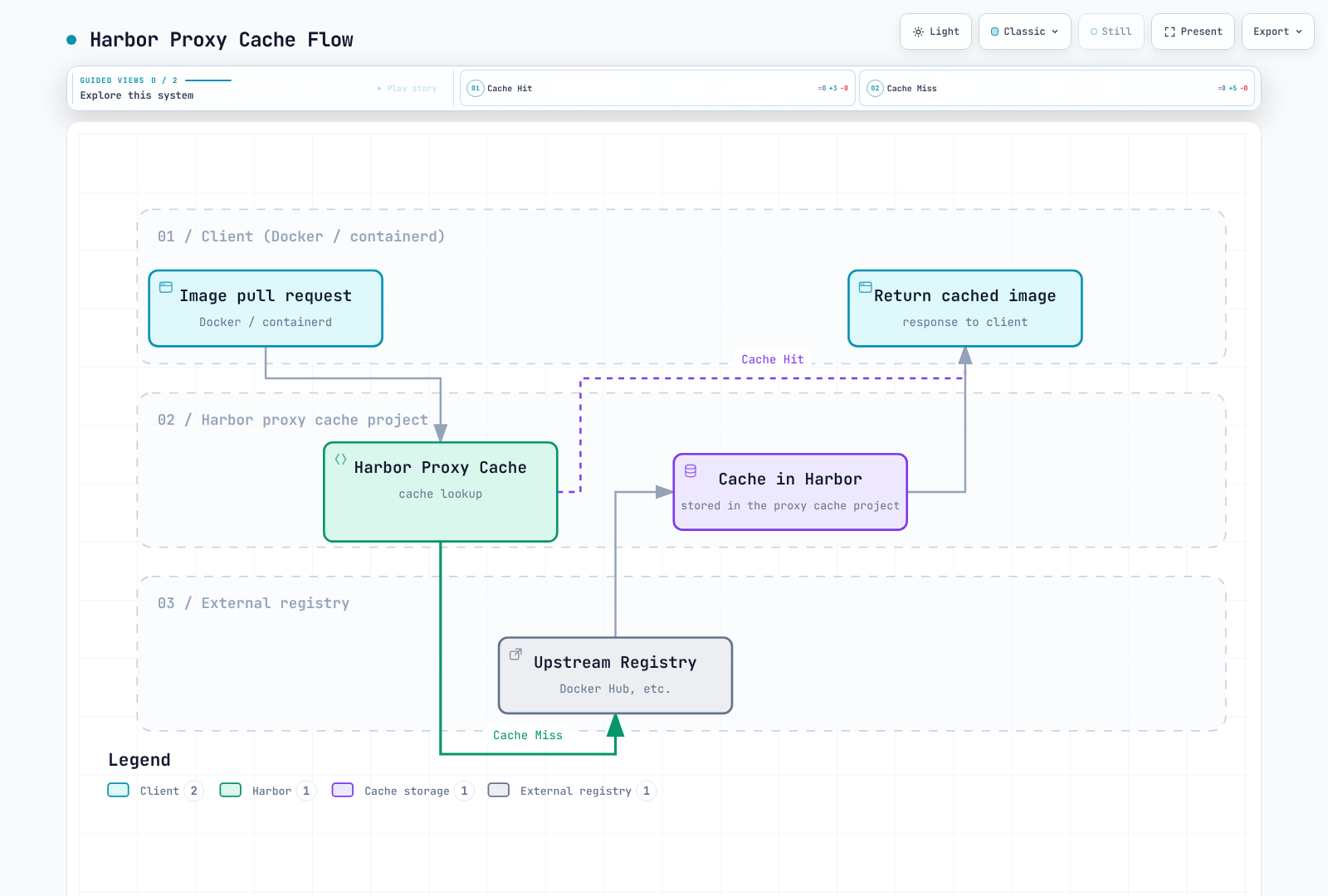
Configure Harbor as a proxy cache for external registries:
# Create proxy cache project via API
curl --fail-with-body -X POST "https://harbor.example.com/api/v2.0/projects" \
  -H "Content-Type: application/json" \
  --user "$HARBOR_USER" \
  -d '{
    "project_name": "dockerhub-proxy",
    "registry_id": 1,
    "metadata": {
      "public": "true"
    }
  }'
Pull the explicit proxy path, for example harbor.example.com/dockerhub-proxy/library/nginx:1.30.4. A cache miss requires upstream access. Cached-content freshness, upstream deletion behavior and authentication depend on the proxy project configuration; this is not an offline completeness guarantee.
Garbage Collection
GC reclaims unreferenced blobs. delete_untagged additionally deletes untagged artifacts, which may still be deployed by digest. Protect deployed/rollback images first. The following example performs a dry run without deletion.
curl --fail-with-body --user "$HARBOR_USER" -X POST \
  'https://harbor.example.com/api/v2.0/system/gc/schedule' \
  -H 'Content-Type: application/json' \
  -d '{"schedule":{"type":"Manual"},
       "parameters":{"delete_untagged":false,"dry_run":true}}'
curl --fail-with-body --user "$HARBOR_USER"   'https://harbor.example.com/api/v2.0/system/gc'
Review results before configuring a real run/schedule in the UI. Harbor supports push/pull during GC, but I/O load and the recent-upload protection window can delay space reclamation.
Tag Retention Policies
In the project Policy → Tag Retention view, define what to retain. Combining the latest 10 pushes with the last 30 days retains their OR/union, potentially more than 10 artifacts. Use Dry Run to review excluded tags/artifacts, signature relationships and deployed/rollback digests.
The policy creation endpoint is /api/v2.0/retentions, not a project /tag-retention endpoint. Instead of creating a policy with a guessed project ID, inspect and dry-run an existing policy configured in the UI.
curl --fail-with-body --user "$HARBOR_USER" \
  'https://harbor.example.com/api/v2.0/projects/myapp' \
  | jq '{project_id, retention_id: .metadata.retention_id}'
# Use the actual non-empty policy ID returned above.
: "${RETENTION_ID:?Set an existing retention policy ID}"
curl --fail-with-body --user "$HARBOR_USER"   "https://harbor.example.com/api/v2.0/retentions/${RETENTION_ID}"
curl --fail-with-body --user "$HARBOR_USER" -X POST \
  "https://harbor.example.com/api/v2.0/retentions/${RETENTION_ID}/executions" \
  -H 'Content-Type: application/json' -d '{"dry_run":true}'
Best Practices
High Availability
Spread at least two portal/core/jobservice/registry replicas and validate failover of PostgreSQL, Redis and the shared storage itself. For S3, set persistence.imageChartStorage.type: s3, bucket/region and an explicit registry Pod IAM identity or existingSecret. Do not embed long-lived keys in values. IRSA/Pod Identity requires compatible SDK support in the registry image, the correct ServiceAccount and scoped S3 permissions; omitting static keys alone does not configure an IAM role.
Security Hardening
Use external/internal TLS, OIDC/LDAP, expiring scoped robots, audit logs and patch management. Build NetworkPolicies from rendered Pod labels/container ports and required DNS, core/registry/jobservice, PostgreSQL/Redis, scanner DB and replication flows. A blanket port-443-only policy can break internal traffic and DNS. Manage password/MFA requirements through the identity provider rather than assuming undocumented Harbor UI controls.
Backup Strategy
Coordinate writes, replication and GC to capture a consistent recovery point for PostgreSQL, registry blobs, configuration, TLS and encryption keys. Helm values do not back up databases/images; S3 versioning or aws s3 sync alone does not guarantee a consistent snapshot. Secret YAML is merely base64-encoded, so store it in an encrypted access-controlled backup. Test restoration of projects/robot authentication, digest pulls, signatures, policies and scan results.
Monitoring
Use the chart's metrics.enabled and, when Operator CRDs exist, metrics.serviceMonitor.enabled. Inspect the generated ServiceMonitor/Service ports instead of guessing an http-metrics port. Match Prometheus ServiceMonitor and namespace selectors. Monitor storage/database capacity, replication/scan/GC failures, queue delays, Trivy DB freshness and certificate/robot expiry.
Summary
Harbor provides a comprehensive, enterprise-grade container registry solution that excels in:
- Security: Built-in vulnerability scanning, image signing, and RBAC
- Flexibility: Self-hosted with full control over data and infrastructure
- Air-Gap Support: Designed for disconnected environments
- Multi-tenancy: Project-based isolation with fine-grained access control
- Integration: Replication through supported registry adapters and artifact formats
When to Choose Harbor
| Scenario | Recommendation |
|---|---|
| Air-gapped environment | Harbor or another supported self-hosted registry |
| Strict data sovereignty | Harbor |
| Multi-cloud deployment | Harbor |
| AWS-native with EKS | Consider ECR first, Harbor for advanced features |
| Small team, limited ops | Docker Hub or ECR |
| Enterprise with compliance | Harbor or ECR |
Key Takeaways
- Plan storage carefully: Use S3-compatible storage for production
- Configure replication: Set up DR replication from day one
- Enable scanning: Auto-scan on push with severity thresholds
- Use robot accounts: Never use personal credentials in CI/CD
- Implement retention: Configure garbage collection and retention policies
- Monitor and alert: Use Prometheus metrics and alerting
- Backup regularly: Database backups are critical for disaster recovery