Linkerd Multi-cluster
Last Updated: September 11, 2026 · Linkerd edge-26.9.1 / charts 2026.9.1 · Gateway API 1.5.1
Linkerd mirrors selected service information across cluster boundaries. This requires both a working control-plane discovery path and the appropriate data-plane network path. It does not merge clusters, replicate application data or duplicate every request for shadow testing.
Communication Modes
| Mode | Discovery/service selection | Data path and identity |
|---|---|---|
| Hierarchical | By default, mirror.linkerd.io/exported=true | Source client proxy → target cluster gateway → server; original caller identity is lost at the gateway |
| Flat / remote discovery | mirror.linkerd.io/exported=remote-discovery | Direct cross-cluster Pod connections; original workload identity is preserved |
| Federated Service | mirror.linkerd.io/federated=member | Union of same-name/same-namespace services over flat networking; meshed clients required |
The source cluster's mirror controller watches the target Kubernetes API, not another mirror controller. A mirrored Service is a Kubernetes discovery object, not a process that performs TLS. Its usual name is <service>-<Link cluster name> in the corresponding namespace.
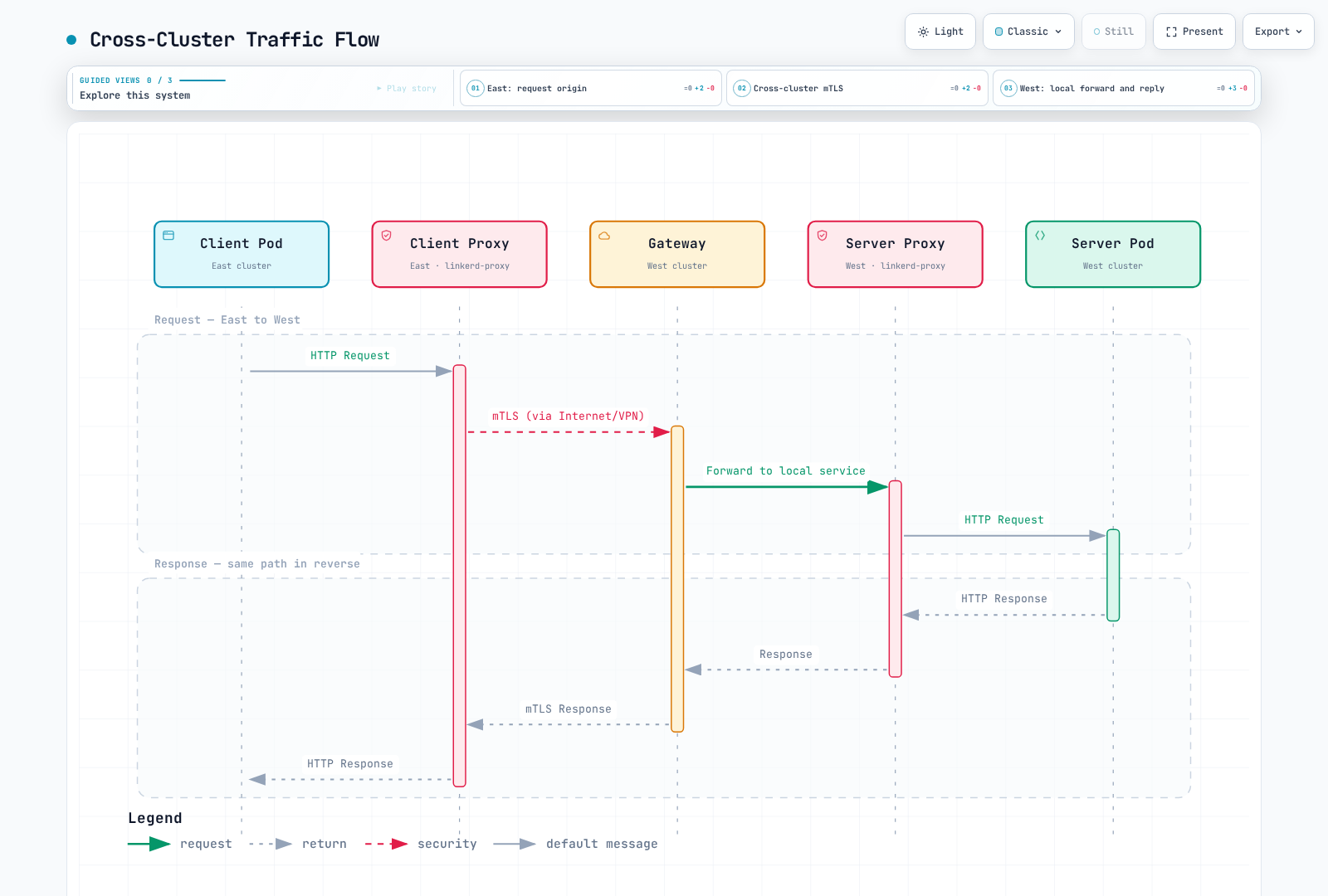
Hierarchical mode needs the target gateway reachable from source clients. Flat/federated mode additionally needs direct, unambiguous Pod-IP routing between clusters and the same Linkerd control-plane namespace. An internal load balancer or a VPC endpoint by itself does not establish that flat network.
Prerequisites and Shared Trust
Use two prepared clusters with explicit kubeconfig contexts west and east. These are local aliases, not proof of their AWS account or Region. Use the compatible Kubernetes/Gateway API versions, Linux worker/CNI setup and pinned CLI from the installation guide; do not equate the newest Kubernetes release with Linkerd compatibility.
Both Linkerd installations must trust the relevant issuer chains. A common public root is the simplest arrangement; a shared bundle containing multiple appropriate roots is also supported. Clusters need not share an issuer private key or workload certificates.
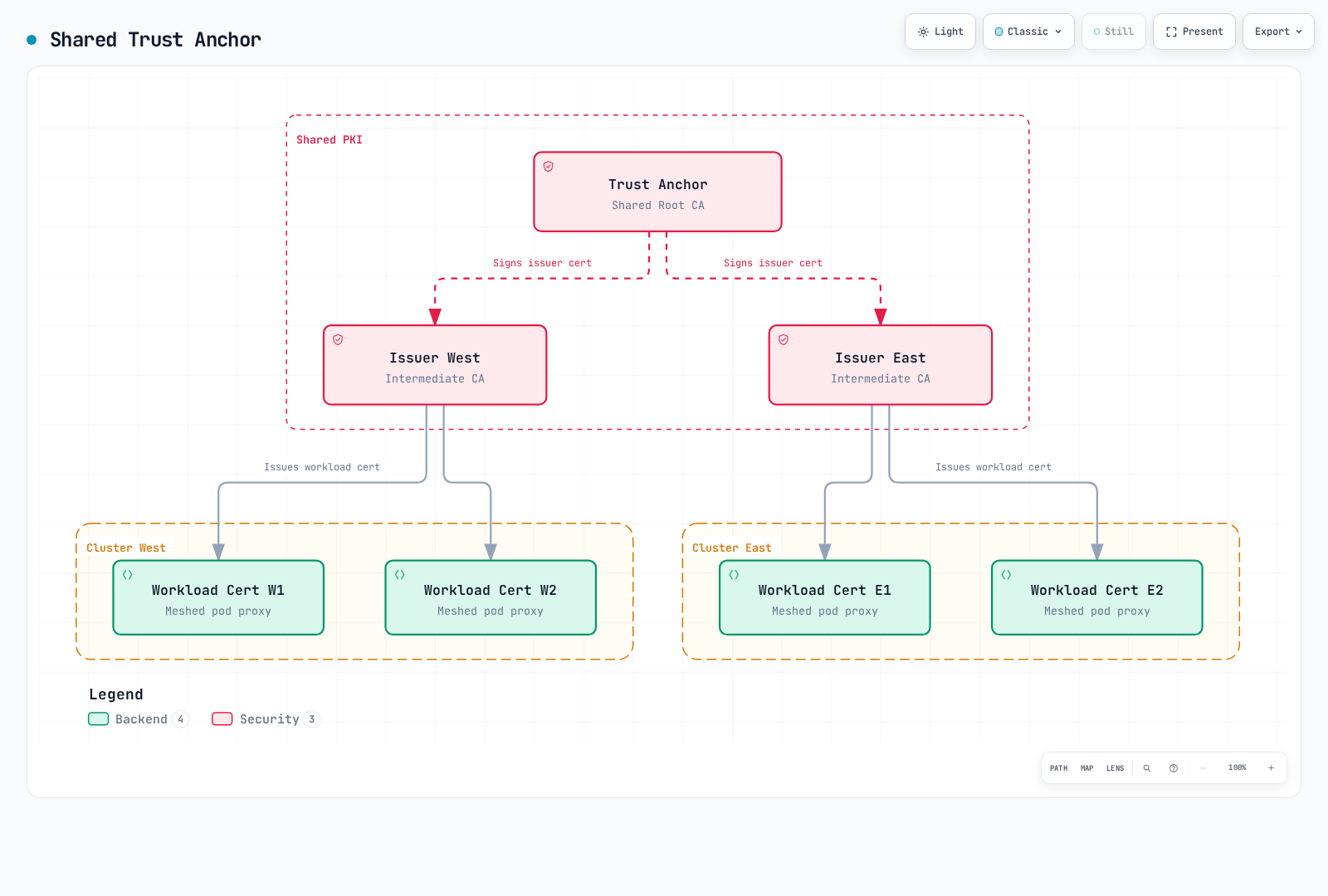
For a new isolated lab only, the following creates a common root and separate ECDSA P-256 issuers. The ten-year root lifetime is an example, not the CLI default or a universal recommendation:
set -euo pipefail
umask 077
# New lab PKI only. The chosen root lifetime is an example, not a default.
step certificate create root.linkerd.cluster.local ca.crt ca.key \
  --profile root-ca --kty EC --curve P-256 \
  --not-after 87600h --no-password --insecure
step certificate create identity.linkerd.cluster.local issuer-west.crt issuer-west.key \
  --profile intermediate-ca --kty EC --curve P-256 \
  --ca ca.crt --ca-key ca.key --not-after 8760h --no-password --insecure
step certificate create identity.linkerd.cluster.local issuer-east.crt issuer-east.key \
  --profile intermediate-ca --kty EC --curve P-256 \
  --ca ca.crt --ca-key ca.key --not-after 8760h --no-password --insecure
cp ca.crt shared-roots.pem
--no-password --insecure produces unencrypted private-key files. Keep them in a protected working location and distribute only the public trust bundle plus the issuer material required by each cluster. For existing meshes, use the staged trust rotation procedure; do not replace roots merely to follow a new-install example.
Install the core with explicit contexts
The following is the CLI-owned core-install path after completing the installation guide's Gateway API/CNI prerequisites in both clusters. For Helm-owned cores, keep that owner and pass the corresponding per-cluster credentials through its reviewed values instead.
The commands show the default proxy-init path on compatible Linux workers. A Linkerd CNI installation must also pass cniEnabled:true through its selected install configuration.
set -euo pipefail
# New CLI-owned installations only; complete Gateway API/CNI prerequisites first.
linkerd --context west install --crds | kubectl --context west apply -f -
linkerd --context west install \
  --identity-trust-anchors-file shared-roots.pem \
  --identity-issuer-certificate-file issuer-west.crt \
  --identity-issuer-key-file issuer-west.key | kubectl --context west apply -f -

linkerd --context east install --crds | kubectl --context east apply -f -
linkerd --context east install \
  --identity-trust-anchors-file shared-roots.pem \
  --identity-issuer-certificate-file issuer-east.crt \
  --identity-issuer-key-file issuer-east.key | kubectl --context east apply -f -
linkerd --context west check
linkerd --context east check
Install Viz separately if its traffic statistics are needed. The multicluster extension's own checks are not application/business validation.
Extension and Directional Links
This exercise uses Helm to own the multicluster extension and its peer controllers. The selected CLI's old multicluster link is deprecated; use link-gen for the Link and credential Secrets, together with the chart's controllers list.
Base installation
For EKS with an installed AWS Load Balancer Controller, save this as mc-base-values.yaml. It requests an internal TCP NLB; ensure the peer routes, DNS, security groups and required ports are already designed. Other platforms need their own supported load-balancer configuration.
gateway:
  enabled: true
  serviceType: LoadBalancer
  loadBalancerClass: service.k8s.aws/nlb
  serviceAnnotations:
    service.beta.kubernetes.io/aws-load-balancer-scheme: internal
    service.beta.kubernetes.io/aws-load-balancer-nlb-target-type: ip
service.beta.kubernetes.io/aws-load-balancer-attributes: load_balancing.cross_zone.enabled=truehelm repo add linkerd-edge https://helm.linkerd.io/edge
helm repo update linkerd-edge
# Initially install gateway/remote-access prerequisites, without peer controllers.
helm --kube-context west upgrade --install linkerd-multicluster \
linkerd-edge/linkerd-multicluster --version 2026.9.1 \
-n linkerd-multicluster --create-namespace -f mc-base-values.yaml \
--wait --timeout 10m
helm --kube-context east upgrade --install linkerd-multicluster \
linkerd-edge/linkerd-multicluster --version 2026.9.1 \
-n linkerd-multicluster --create-namespace -f mc-base-values.yaml \
--wait --timeout 10m
kubectl --context west -n linkerd-multicluster get svc linkerd-gateway -o yaml
kubectl --context east -n linkerd-multicluster get svc linkerd-gateway -o yamlThe target Service must have an ingress IP or hostname before gateway-based Link generation succeeds. AWS NLBs commonly expose a hostname, which link-gen accepts. Gateway data traffic defaults to 4143; gateway readiness probing defaults to 4191. Neither port's reachability proves that the remote Kubernetes API or every application is healthy.
East consumes West
Save this desired controller list as mc-east-links.yaml:
controllers:
- link:
    ref:
name: westset -euo pipefail
umask 077
# Read West's configuration; install the generated credentials/Link into East.
linkerd --context west multicluster link-gen --cluster-name west > west-link.yaml
# Review public metadata and target endpoint without printing credential values.
kubectl --context east apply -f west-link.yaml
helm --kube-context east upgrade linkerd-multicluster \
linkerd-edge/linkerd-multicluster --version 2026.9.1 \
-n linkerd-multicluster -f mc-base-values.yaml -f mc-east-links.yaml \
--wait --timeout 10m
kubectl --context east -n linkerd-multicluster get links.multicluster.linkerd.io
linkerd --context east multicluster check
linkerd --context east multicluster gatewayslink-gen reads West's API location/CA and the selected remote-access ServiceAccount token. It emits a Link plus two credential Secrets, for linkerd-multicluster and the control-plane namespace linkerd. It does not itself install a network route or the source mirror controller.
Treat the generated file as a credential: restrict access, do not commit it or print its contents into logs. The generated kubeconfig must be usable from the controllers, including self-contained API CA data and a reachable, certificate-valid server address. If the workstation's endpoint is not appropriate, use the supported --api-server-address override with the actual controller-reachable API endpoint.
The Link is directional: generating on West and applying to East enables East to discover West. Keep every existing peer in the desired Helm controller list when updating an established installation; replacing an array with this one-entry example can remove other controllers.
Optional reverse direction
Save mc-west-links.yaml:
controllers:
- link:
    ref:
name: eastset -euo pipefail
umask 077
linkerd --context east multicluster link-gen --cluster-name east > east-link.yaml
kubectl --context west apply -f east-link.yaml
helm --kube-context west upgrade linkerd-multicluster \
linkerd-edge/linkerd-multicluster --version 2026.9.1 \
-n linkerd-multicluster -f mc-base-values.yaml -f mc-west-links.yaml \
--wait --timeout 10m
linkerd --context west multicluster checkDistinct remote-access ServiceAccounts per peer can make revocation more selective. Coordinate their RBAC and credential renewal; these are Kubernetes API credentials, separate from mesh workload certificates.
Export and Consume a Service
Prepare the application namespace in both clusters. The chart does not create missing mirror namespaces by default.
Save as mc-namespace.yaml:
apiVersion: v1
kind: Namespace
metadata:
  name: mc-demo
  annotations:
    linkerd.io/inject: enabled
Use tested, meshed web workloads listening on 8080 with label app:web, and an existing meshed client workload for the request check. This page does not deploy an unspecified client:latest image or claim that a partial Deployment is valid.
Save this West Service as west-web-service.yaml:
apiVersion: v1
kind: Service
metadata:
  name: web
  namespace: mc-demo
  labels:
    mirror.linkerd.io/exported: 'true'
spec:
  selector:
    app: web
  ports:
  - name: http
    port: 80
    targetPort: 8080
appProtocol: http# Apply the Namespace manifest to both contexts before creating workloads/mirrors.
kubectl --context west apply -f mc-namespace.yaml
kubectl --context east apply -f mc-namespace.yaml
kubectl --context west apply -f west-web-service.yaml
# Alternative for an existing West Service:
kubectl --context west -n mc-demo label service/web mirror.linkerd.io/exported=true --overwrite
kubectl --context east -n mc-demo get service web-west
# Hierarchical mode: current service-mirror still manages legacy Endpoints.
kubectl --context east -n mc-demo get endpoints web-west -o yaml
kubectl --context east -n mc-demo get endpointslices.discovery.k8s.io \
-l kubernetes.io/service-name=web-west -o yaml
# Existing meshed client with curl installed and the expected app endpoint.
kubectl --context east -n mc-demo exec deployment/client -c client -- \
curl --fail --show-error --retry 0 --max-time 10 http://web-west.mc-demo.svc.cluster.local/For a newly created Service, apply its manifest after creating the namespace and preparing the workloads. The label command is the alternative for an existing Service. Export labels select discovery; they are not an access-control boundary and only affect peers whose Link selectors/RBAC match.
The selected service-mirror implementation still maintains legacy Endpoints for hierarchical mirrors. Inspect EndpointSlices where present as well, but do not pretend that changing a diagnostic command migrates the controller. In remote-discovery mode local Endpoints can intentionally be absent: the destination component queries remote endpoints instead.
Explicit Local/Remote Routing
For East's local web workloads, save these apex/local backend Services as east-web-services.yaml:
apiVersion: v1
kind: Service
metadata:
  name: web
  namespace: mc-demo
spec:
  selector:
    app: web
  ports:
  - name: http
    port: 80
    targetPort: 8080
    appProtocol: http
---
apiVersion: v1
kind: Service
metadata:
  name: web-local
  namespace: mc-demo
spec:
  selector:
    app: web
  ports:
  - name: http
    port: 80
    targetPort: 8080
    appProtocol: http
Save east-web-route.yaml to split eligible meshed-client traffic between that local backend and the imported Service:
apiVersion: gateway.networking.k8s.io/v1
kind: HTTPRoute
metadata:
  name: web-cluster-route
  namespace: mc-demo
spec:
  parentRefs:
  - group: ''
    kind: Service
    name: web
    port: 80
  rules:
  - backendRefs:
    - name: web-local
      port: 80
      weight: 80
    - name: web-west
      port: 80
weight: 20kubectl --context east apply -f east-web-services.yaml
kubectl --context east apply -f east-web-route.yaml
kubectl --context east -n mc-demo get httproute web-cluster-route -o yaml
linkerd --context east diagnostics policy -n mc-demo service/web 80 -o jsonUse the core Service group "" and Service port 80. Confirm ready local and remote paths, route acceptance and effective client policy. A conflicting ServiceProfile can supersede the current outbound policy; see traffic management.
Manual transition versus automatic failover
A 100/0 configuration does not automatically turn a zero-weight backend into an active standby. For this manually owned route, an explicitly reviewed remote-only state is:
apiVersion: gateway.networking.k8s.io/v1
kind: HTTPRoute
metadata:
  name: web-cluster-route
  namespace: mc-demo
spec:
  parentRefs:
  - group: ''
    kind: Service
    name: web
    port: 80
  rules:
  - backendRefs:
    - name: web-local
      port: 80
      weight: 0
    - name: web-west
      port: 80
      weight: 100
Apply a chosen state deliberately and verify the application outcome, remote capacity and data consistency before treating it as recovery. Existing requests and writes can have uncertain outcomes; routing changes do not replicate databases or undo committed operations.
The previous Flagger rollback webhook referenced an undeployed/unverified /failover service and patched a separately named TrafficSplit. It did not establish reliable regional failover. Flagger progressive delivery is covered separately in the traffic guide.
SMI TrafficSplit and the Linkerd Failover extension are deprecated. The official migration direction is federated services where flat networking is available; federation is not an automatic replacement for every hierarchical-network or strict local-primary requirement.
Flat Networking and Federated Services
For a separate flat-only setup, the base values omit the gateway. Save as flat-base-values.yaml:
gateway:
  enabled: false
East's peer-controller values, flat-east-links.yaml, also omit gateway probing:
controllers:
- link:
    ref:
      name: west
  gateway:
    enabled: false
Follow the same base-install → Link/Secrets → Helm-controller sequence, using these files and --gateway=false on Link generation. Prepare both clusters' Pod routing, namespaces and trust first. When migrating an existing installation, keep gateways until their last hierarchical consumer has moved.
set -euo pipefail
umask 077
# Separate flat-network setup: both base installs omit the gateway.
# Use flat-base-values.yaml plus the corresponding flat controller values.
linkerd --context west multicluster link-gen --cluster-name west \
  --gateway=false > west-flat-link.yaml
kubectl --context east apply -f west-flat-link.yaml
helm --kube-context east upgrade linkerd-multicluster \
  linkerd-edge/linkerd-multicluster --version 2026.9.1 \
  -n linkerd-multicluster -f flat-base-values.yaml -f flat-east-links.yaml \
  --wait --timeout 10m
kubectl --context west -n mc-demo label service/web \
  mirror.linkerd.io/exported=remote-discovery --overwrite
linkerd --context east diagnostics endpoints web-west.mc-demo.svc.cluster.local:80
Remote-discovery changes where endpoint lookup occurs; it does not create Pod routes, security-group rules or remote API access. The corresponding control-plane credentials must also work from the destination component.
Federated service membership
Services with the same name and namespace can join a federated Service, normally named web-federated in this example:
# Flat connectivity, matching namespaces and the required directional Links first.
kubectl --context west -n mc-demo label service/web mirror.linkerd.io/federated=member --overwrite
kubectl --context east -n mc-demo label service/web mirror.linkerd.io/federated=member --overwrite
kubectl --context east -n mc-demo get service web-federated
kubectl --context east -n linkerd-multicluster get link west -o yaml
linkerd --context east diagnostics endpoints web-federated.mc-demo.svc.cluster.local:80
The federated Service exists where the relevant directional Links/controllers are configured. Meshed clients balance across the discovered member endpoints directly, without a gateway. This provides a basis for resilience but does not guarantee immediate recovery, strict local-first ordering or application/data availability.
Review endpoint readiness, failure-accrual settings, network partitions, discovery freshness and client retry semantics. Federation's metadata/port selection also matters when member Services differ; do not assume all conflicting annotations are merged as intended.
Headless service mirroring is a separate optional controller capability (enableHeadlessServices in the corresponding controller settings). It requires suitable named hosts and has different endpoint behavior; headless Services cannot join federated Services.
Authorization across Clusters
Hierarchical gateways authenticate the incoming mesh connection and create a separate outbound connection. The final server cannot use the original remote client identity to distinguish callers through that gateway.
For flat/federated traffic, this policy in West allows the preserved client.mc-demo.serviceaccount.identity.linkerd.cluster.local identity:
apiVersion: policy.linkerd.io/v1beta3
kind: Server
metadata:
  name: web-http
  namespace: mc-demo
spec:
  podSelector:
    matchLabels:
      app: web
  port: 8080
  proxyProtocol: HTTP/1
  accessPolicy: deny
---
apiVersion: policy.linkerd.io/v1alpha1
kind: AuthorizationPolicy
metadata:
  name: web-from-client
  namespace: mc-demo
spec:
  targetRef:
    group: policy.linkerd.io
    kind: Server
    name: web-http
  requiredAuthenticationRefs:
  - kind: ServiceAccount
    name: client
    namespace: mc-demo
The API is Linkerd AuthorizationPolicy with Server v1beta3, not the nonexistent ServerAuthorization v1beta2. The standard Kubernetes identity is DNS-form, not the previously shown Istio-style SPIFFE URI.
The same ServiceAccount/namespace/trust-domain combination can have the same identity in multiple clusters. Separate issuer keys do not introduce an implicit cryptographic cluster ID. This policy permits that workload identity; it does not prove “East only.” Design distinct identities and trust boundaries where required, and evaluate the identity actually visible at each enforcement point.
For gateway-mode deployments, account for the gateway's identity at the final server and controls at the gateway/network boundary. Export labels and an internal load balancer do not replace authorization.
EKS Connectivity and Ownership
The base values above assume AWS Load Balancer Controller, service.k8s.aws/nlb, IP targets and an internal NLB. They use the current load-balancer attributes annotation rather than the deprecated cross-zone annotation. EKS Auto Mode uses a different owner/class, eks.amazonaws.com/nlb, and its supported annotations must be checked separately.
Keep the Linkerd TCP/mTLS path intact; an ALB's HTTP routing or TLS termination is not an interchangeable gateway transport. Account separately for source-to-gateway data port 4143, mirror-controller-to-gateway probe port 4191, and source control-plane access to the target Kubernetes API. Restrict permitted sources according to the actual routing/SNAT/security-group design.
| Connectivity | What it provides |
|---|---|
| VPC peering / suitable Transit Gateway routing | Private network connectivity when routes, addresses, DNS and security controls are configured |
| AWS PrivateLink | Access to selected services/resources through endpoints; not VPC peering or automatic arbitrary Pod-to-Pod routing |
| EKS private Kubernetes API endpoint | Access to that cluster's Kubernetes API from its VPC/appropriately connected network |
| EKS interface VPC endpoint | Private access to the AWS EKS management API; it is not the Kubernetes API endpoint |
For flat mode, ensure non-conflicting, directly reachable Pod addresses; a gateway-only connection is insufficient. For hierarchical mode, design gateway and remote API reachability even if arbitrary remote Pod routing is unavailable.
Provision clusters and network connections through their reviewed infrastructure workflow, selecting the intended AWS account/profile and compatible versions. Giving two eksctl create cluster commands different names does not put them in different accounts. Cluster creation, gateway provisioning and real cross-region traffic were not executed in this audit.
AWS IAM permissions are needed by the operators/controllers managing AWS resources. Linkerd's generated mirror credentials authenticate with Kubernetes ServiceAccount tokens and RBAC; a blanket cross-account IAM role is not a requirement of every runtime Link. Keep these trust relationships separate.
Observability and Federation
multicluster gateways reports the target gateway probe, not end-to-end health of every exported application. Probe metrics belong to the source mirror controller: examples include gateway_alive and gateway_probe_latency_ms, labeled by target_cluster_name. They are not ordinary metrics from the local gateway proxy.
For central Prometheus, the following is a client configuration example for already deployed private HTTPS endpoints with Basic authentication. Supply actual DNS, CA/password files, server-side authentication, reachability and scrape authorization. Default Viz does not automatically expose these endpoints.
scrape_configs:
- job_name: federate-west
  scheme: https
  honor_labels: true
  metrics_path: /federate
  params:
    match[]:
    - '{job=~"linkerd-proxy|linkerd-controller"}'
  static_configs:
  - targets:
    - prometheus-west.internal.example.com:443
  tls_config:
    ca_file: /etc/prometheus/federation/ca.crt
  basic_auth:
    username: federation-reader
    password_file: /etc/prometheus/federation/west/password
  metric_relabel_configs:
  - target_label: origin_cluster
    replacement: west
- job_name: federate-east
  scheme: https
  honor_labels: true
  metrics_path: /federate
  params:
    match[]:
    - '{job=~"linkerd-proxy|linkerd-controller"}'
  static_configs:
  - targets:
    - prometheus-east.internal.example.com:443
  tls_config:
    ca_file: /etc/prometheus/federation/ca.crt
  basic_auth:
    username: federation-reader
    password_file: /etc/prometheus/federation/east/password
  metric_relabel_configs:
  - target_label: origin_cluster
    replacement: east
honor_labels:true preserves source metric labels; a target relabel alone does not reliably override a conflicting exported label. Here metric relabeling assigns the collector-controlled origin_cluster after scraping. Keep that origin label when aggregating and avoid duplicate collection paths.
Backend success ratio by metric origin:
(sum by (origin_cluster) (rate(response_total{namespace="mc-demo",deployment="web",direction="inbound",classification="success"}[5m]))
 or on(origin_cluster) (0 * sum by (origin_cluster) (rate(response_total{namespace="mc-demo",deployment="web",direction="inbound"}[5m])))) / sum by (origin_cluster) (rate(response_total{namespace="mc-demo",deployment="web",direction="inbound"}[5m]))
and on(origin_cluster) (sum by (origin_cluster) (rate(response_total{namespace="mc-demo",deployment="web",direction="inbound"}[5m])) > 0)
Client-observed TTFB by metric origin:
histogram_quantile(0.99,
  sum by (le, origin_cluster) (rate(response_latency_ms_bucket{namespace="mc-demo",deployment="client",direction="outbound"}[5m]))
)
The demo client must be sending the intended remote traffic for the second query to represent that path. It includes application/proxy/network time and is not pure inter-region RTT. src_cluster and dst_cluster are not guaranteed labels added by this setup. Inspect actual series before building more specific cross-cluster dimensions.
Missing success series are aligned to the total for each cluster; idle/missing totals are not reported as 100% success. See the observability guide for classification, units, scrape health and dashboard prerequisites.
Troubleshooting
linkerd --context east multicluster check
linkerd --context east multicluster gateways
kubectl --context east -n linkerd-multicluster get link west -o yaml
kubectl --context east -n linkerd-multicluster logs deployment/controller-west -c controller --tail=100
kubectl --context west -n linkerd-multicluster logs deployment/linkerd-gateway -c linkerd-proxy --tail=100
linkerd --context east viz stat deployment/client -n mc-demo --to service/web-west
linkerd --context west check --proxy
linkerd --context east check --proxy
Check Link status and controller logs for remote API/RBAC/namespace problems. For gateway problems, inspect the target Service ingress address, probe path/port and network path. A healthy probe does not verify the data port or business logic. For flat mode, use destination endpoint diagnostics and direct Pod connectivity rather than expecting gateway statistics.
Read the actual public trust bundle:
set -euo pipefail
# Public bundle data, not private keys or the generated Link kubeconfig.
kubectl --context west -n linkerd get configmap linkerd-identity-trust-roots -o json \
  | jq -er '.data["ca-bundle.crt"] | select(length > 0)' > west-trust.pem
kubectl --context east -n linkerd get configmap linkerd-identity-trust-roots -o json \
  | jq -er '.data["ca-bundle.crt"] | select(length > 0)' > east-trust.pem
openssl crl2pkcs7 -nocrl -certfile west-trust.pem | openssl pkcs7 -print_certs -text -noout
openssl crl2pkcs7 -nocrl -certfile east-trust.pem | openssl pkcs7 -print_certs -text -noout
Inspect every certificate and its validity/issuer chain. PEM order/format alone is not a trust-equivalence test, and a short grep of the old config field is not complete verification. Use the security guide's staged rotation process for changes.
References and Next Steps
- Best practices, multi-cluster quiz
- Multicluster reference and installation
- Pod-to-Pod mode and federated services
- Deprecated failover extension
- Released link-gen implementation
- Released service-mirror endpoint handling
- AWS Load Balancer Controller annotations
- EKS Auto Mode NLB
- VPC peering and AWS PrivateLink
- EKS Kubernetes API endpoint and EKS interface endpoints