Part 2: Flink Kubernetes Operator
Last Updated: September 12, 2026. Operator/Helm chart 1.15.0; Flink 2.2.1 / Java 17.
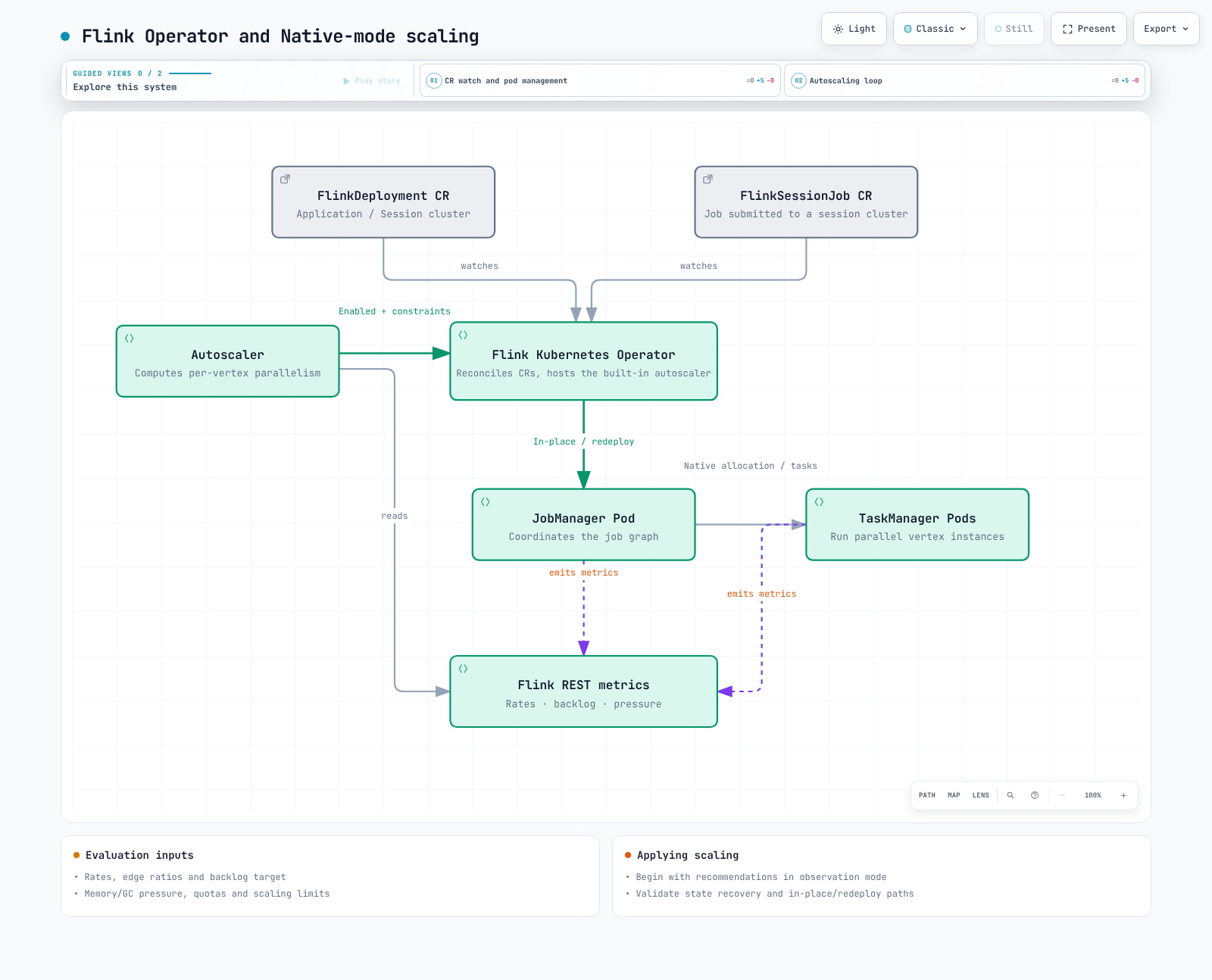
The Operator reconciles desired cluster/job state and manages upgrades, snapshots, recovery and autoscaling. It does not guarantee zero downtime or zero data loss for every change. See Part 1 for Native/Standalone and Application/Session boundaries.
1. Resources and operating boundaries
| CR | Role |
|---|---|
| FlinkDeployment | Desired state of an Application or Session cluster |
| FlinkSessionJob | Job submitted to an existing managed Session cluster |
| FlinkStateSnapshot | Savepoint/checkpoint management for a linked Deployment/SessionJob |
| FlinkBlueGreenDeployment | Blue/green transitions through two child deployments |
SessionJobs have separate specs but share JM/TM capacity and underlying cluster failures. Application clusters are not fully isolated from shared EKS nodes, network, storage or quotas. A blue/green CR does not automatically guarantee safe Kafka consumer-group, transactional-ID or sink-write transitions. Validate state/ data-path compatibility, duplicate processing and temporary additional capacity.
2. Installation: prepare cert-manager and namespaces
Use supported EKS/Kubernetes versions and compatible kubectl/Helm. This release's default webhook chart creates cert-manager Certificate and Issuer resources, not an internal certificate-generation Job. First verify a compatible cert-manager installation and its controller/webhook/cainjector. Disabling validation is not the default remedy for installation failures.
operator-values.yaml below restricts the workload namespace to data-processing and pins the verified Operator image digest. The chart's short default tag and the 1.15.0 tag resolved to the same multi-architecture digest.
watchNamespaces:
- data-processing
image:
  repository: ghcr.io/apache/flink-kubernetes-operator
  tag: 1.15.0
  digest: sha256:5372e4461b433ee37391b0ee3fc3e4029980d14e9b64576b0cb78493d1cafe3a
webhook:
create: true# Existing cert-manager installation; adjust its namespace if necessary.
kubectl get crd certificates.cert-manager.io issuers.cert-manager.io
kubectl rollout status deployment/cert-manager -n cert-manager --timeout=180s
kubectl rollout status deployment/cert-manager-webhook -n cert-manager --timeout=180s
kubectl rollout status deployment/cert-manager-cainjector -n cert-manager --timeout=180s
# Create the watched workload namespace before Helm creates its SA/RBAC.
kubectl create namespace data-processing --dry-run=client -o yaml | kubectl apply -f -
helm repo add flink-operator-repo https://downloads.apache.org/flink/flink-kubernetes-operator-1.15.0/
helm repo update flink-operator-repo
helm upgrade --install flink-kubernetes-operator flink-operator-repo/flink-kubernetes-operator \
--version 1.15.0 \
--namespace flink-operator --create-namespace \
-f operator-values.yaml \
--wait --timeout 10m
kubectl wait --for=condition=Ready certificate/flink-operator-serving-cert \
-n flink-operator --timeout=180s
kubectl get serviceaccount/flink -n data-processingAn empty watchNamespaces watches all namespaces. With the explicit list above, the chart also creates the flink job service account, Role and RoleBinding in that workload namespace, which must already exist. Inspect watch scope, actual RBAC and other grants together; namespace scoping is not complete isolation between untrusted tenants.
For upgrades, review CRD changes, webhook compatibility and running jobs alongside chart version/values. Helm upgrade alone does not update every existing CRD from crds/. Keep CRDs and the image aligned to the reviewed release.
3. First verify execution with a bundled job
flink-smoke.yaml runs StateMachineExample from the official image. It does not assume that a fictitious order-events JAR or entry class exists in that image. This is a long-running demo with stateless upgrades, not a production state-preservation configuration.
apiVersion: flink.apache.org/v1beta1
kind: FlinkDeployment
metadata:
  name: flink-smoke
  namespace: data-processing
spec:
  image: flink:2.2.1-java17
  flinkVersion: v2_2
  mode: native
  flinkConfiguration:
    taskmanager.numberOfTaskSlots: '2'
  serviceAccount: flink
  jobManager:
    resource:
      memory: 2048m
      cpu: 1
  taskManager:
    resource:
      memory: 2048m
      cpu: 1
  job:
    jarURI: local:///opt/flink/examples/streaming/StateMachineExample.jar
    parallelism: 2
    upgradeMode: stateless
state: running# This readiness sequence is for the initial deployment.
kubectl apply -f flink-smoke.yaml
kubectl wait --for=condition=Running flinkdeployment/flink-smoke \
-n data-processing --timeout=300s
kubectl get flinkdeployment/flink-smoke -n data-processing -o yaml
kubectl get pods -n data-processing -l app=flink-smoke
kubectl logs deployment/flink-smoke -n data-processing --tail=100In Native mode, Operator/Flink creates the JM Deployment and the JM ResourceManager dynamically manages TM pods. Native TMs are not invariably Deployments. Distinguish this from externally managed TM Deployments in Standalone mode.
The 1.15.0 condition is Running, not Available. It becomes True for an observed RUNNING application job or a READY Session JM Deployment. It does not prove data correctness, successful checkpoints or target throughput. This implementation does not populate condition observedGeneration. After updating an existing CR, do not treat a retained Running=True as proof that the new spec was reconciled. Also inspect reconciliation status and actual image/config/job state.
4. Additional requirements for stateful deployments
Package a real application JAR with compatible runtime/connectors or use a supported artifact-delivery path. Check the Operator's allowed artifact schemes/hosts for SessionJobs as well.
An S3 URL and service-account annotation alone do not complete a stateful deployment:
- Install the appropriate S3 filesystem plugin and credential provider in JM/TM images.
- Verify IRSA or Pod Identity trust/association, Agent/SDK and bucket-prefix/KMS permissions.
- Configure checkpoint intervals, accessible checkpoint/savepoint storage and HA metadata/recovery.
- Verify state serializers, operator UIDs, maximum parallelism and connector-state compatibility.
Part 3 covers backend/plugin/checkpoint configuration; Part 4 covers HA. RocksDB uses local disk I/O and recovery may require state downloads. Measure TM memory/disk/network capacity and relocation time. Node/AZ spreading alone does not guarantee job continuity; plan requests, taints, affinity and spare capacity.
5. Choose upgrade modes together with restore prerequisites
| Mode | State handling | What to check |
|---|---|---|
| stateless | Restart without prior state | Whether replay is acceptable, including source offsets and external side effects |
| savepoint | Create and restore a savepoint | Runnable job, storage/state compatibility and failure-fallback policy |
| last-state | Restore using accessible HA metadata or the last checkpoint/savepoint | Checkpointing, valid metadata/state, credentials and actual recoverability |
Savepoints are not universally the slowest, safest, stop-the-world option. Timing and restorability depend on the job, backend and state changes. With the default last-state fallback and accessible HA metadata, an unhealthy job's savepoint upgrade may switch to last-state. Make the fallback policy explicit.
Last-state does not guarantee recovery after metadata loss or from stale/ incompatible state. Checkpoint-age limits can also trigger a savepoint for healthy jobs. SessionJobs can use last-state, but require the underlying Session configuration and checkpoint storage; a mode string alone is not sufficient.
6. Autoscaler: begin with observation
The autoscaler's main target is job-vertex parallelism. Its throughput model uses source ingestion/lag, processing rate/busy time and edge output ratios. For downstream vertices, it sums upstream target rate × that edge's output ratio. This is different from merely adding observed upstream output rates.
It differs from CPU-based HPA, but it does not ignore every CPU/memory signal. The reviewed code checks GC/memory pressure and CPU/memory quotas and can optionally tune TM memory. Memory tuning defaults to false.
Merge the following observation-mode configuration under an existing spec. Actual rescaling is disabled. Choose pipeline.max-parallelism when designing a new job; do not change it casually for existing state.
flinkConfiguration:
  job.autoscaler.enabled: 'true'
  job.autoscaler.scaling.enabled: 'false'
  job.autoscaler.utilization.target: '0.6'
  job.autoscaler.utilization.min: '0.4'
  job.autoscaler.utilization.max: '0.8'
  job.autoscaler.stabilization.interval: 5m
  job.autoscaler.metrics.window: 10m
  job.autoscaler.catch-up.duration: 10m
  pipeline.max-parallelism: '360'
Current keys are utilization.target/min/max; older target.utilization and boundary settings are deprecated. Here 0.4/0.8 define the utilization band, while decisions also account for backlog, restart time, metric windows, quotas, bounds and stabilization. Crossing an instantaneous busy-time threshold does not guarantee an immediate rescale.
catch-up.duration is the target time to process backlog after rescaling. A backlog of 6,000 records requires an extra 10 records/second over 600 seconds, or 100 records/second over 60 seconds. Shorter durations demand more capacity; zero disables backlog-based scaling. This is not a grace period for ignoring backlog.
A 3–60 minute metrics window is a tuning starting point, not a universal requirement. Tune it together with stabilization, scale-down intervals and SLOs. Divisor-rich maximum parallelism can help autoscaler key-group/partition alignment, but Flink itself does not require every parallelism to divide the maximum evenly. Alignment mode, source partitions and keyed/non-keyed inputs affect selection.
Scaling applies parallelism overrides and, where possible, uses the adaptive scheduler's resource-requirements API in place. Depending on support, change type, configuration and success, it can fall back to full redeployment. It is not invariably a last-state upgrade. In-place scaling can still restart tasks and recover state. Enable scaling.enabled only after reviewing recommendations and testing stateful recovery and peak load.
Validation scope
The official chart digest was verified and default, namespace-scoped and webhook-disabled comparison variants were rendered with Helm. CRD schemas, image manifests, released readiness/scaling source and example structure were checked. No Kubernetes deployment, certificate issuance, S3/HA operation, live job throughput test or rescaling was performed.