Part 2: Helm Deployment and Executor Choice
Review baseline: chart 1.22.0 / Airflow 3.3.1 / KEDA 2.20 Latest upstream patch checked: Airflow 3.3.2; chart examples remain on 3.3.1 · October 12, 2026
1. Chart identity and actual defaults
This guide uses the official chart in the Apache Airflow repository. Registering the repository alias apache-airflow makes the Helm chart name apache-airflow/airflow. Do not mix values from independent charts such as airflow-helm/charts; these are not the only charts that exist.
Chart 1.22.0 defaults to Airflow 3.2.2 and CeleryExecutor, not KubernetesExecutor. The examples explicitly align image tag and airflowVersion to 3.3.1 and select an executor. Mismatched version fields or digest overrides can make chart-generated configuration disagree with the actual image.
Use Helm 3.19.0 or later. The release change record specifies this minimum even though an older Helm 3.0+ statement remains in the packaged README. Airflow 3.3.1's tested Kubernetes list is 1.30–1.35. Chart 1.16.0's README specified 1.29+, so it did not introduce a 1.30+ requirement. Do not assume Chart.yaml enforces every documented minimum: templates rendered for 1.29 during review, which does not demonstrate support.
2. Prepare connections and Secrets
This lab assumes namespace permissions, a prepared external PostgreSQL database, and EKS networking/capacity. Prepare the database schema/user, migration privileges, tested connection URI/TLS and backup/retention policies. KEDA is needed only for the Celery scaling profile.
Values below reference Secrets instead of embedding passwords. Store the database URI as one line in a protected file and URI-encode reserved characters in passwords and other fields. Use verified TLS for RDS or other remote databases. Any sslrootcert path must be readable by the actual database client. KEDA is also a database client: Airflow-only CA, DNS, network and access setup is insufficient. The chart does not automatically copy CA files into KEDA.
This is a fresh-install sequence. It does not overwrite existing Secrets. Do not regenerate Fernet/API/JWT keys during ordinary upgrades; manage backup and rotation separately.
set -euo pipefail
# Fresh installation only. Keep existing Fernet/API/JWT keys during an ordinary upgrade.
# AIRFLOW_DB_URI_FILE contains the tested, single-line PostgreSQL URI; do not commit it.
: "${AIRFLOW_DB_URI_FILE:?Set the path to your protected database connection file}"
kubectl create namespace airflow --dry-run=client -o yaml | kubectl apply -f -
kubectl -n airflow create secret generic airflow-metadata \
  --from-file="connection=$AIRFLOW_DB_URI_FILE"

umask 077
AIRFLOW_SECRET_TMP_DIR="$(mktemp -d)"
trap 'rm -rf "$AIRFLOW_SECRET_TMP_DIR"' EXIT
python3 - "$AIRFLOW_SECRET_TMP_DIR" <<'PY'
import base64
from pathlib import Path
import secrets
import sys
folder = Path(sys.argv[1])
(folder / "fernet-key").write_text(base64.urlsafe_b64encode(secrets.token_bytes(32)).decode())
(folder / "api-secret-key").write_text(secrets.token_urlsafe(48))
(folder / "jwt-secret").write_text(secrets.token_urlsafe(48))
PY
kubectl -n airflow create secret generic airflow-fernet \
  --from-file="fernet-key=$AIRFLOW_SECRET_TMP_DIR/fernet-key"
kubectl -n airflow create secret generic airflow-api-secret \
  --from-file="api-secret-key=$AIRFLOW_SECRET_TMP_DIR/api-secret-key"
kubectl -n airflow create secret generic airflow-jwt \
  --from-file="jwt-secret=$AIRFLOW_SECRET_TMP_DIR/jwt-secret"
With metadataSecretName set, metadataConnection is not the authoritative connection source. Disabling bundled PostgreSQL alone does not configure an external database. For a PostgreSQL URI shared by Airflow and KEDA, verify a scheme both understand, such as postgresql://; SQLAlchemy-specific +driver schemes may not work in KEDA.
3. Explicit KubernetesExecutor installation
Save as kubernetes-values.yaml. This lab disables triggerer persistence; temporary local logs are not durable history. Part 3 prepares DAG delivery and Part 5 covers remote logs/storage. Verify post-task log access before production use.
airflowVersion: 3.3.1
defaultAirflowTag: 3.3.1
executor: KubernetesExecutor
postgresql:
  enabled: false
redis:
  enabled: false
data:
  metadataSecretName: airflow-metadata
  metadataConnection:
    protocol: postgresql
fernetKeySecretName: airflow-fernet
apiSecretKeySecretName: airflow-api-secret
jwtSecretName: airflow-jwt
createUserJob:
  enabled: false
triggerer:
  persistence:
    enabled: false
config:
  core:
auth_manager: airflow.providers.fab.auth_manager.fab_auth_manager.FabAuthManagerhelm repo add apache-airflow https://airflow.apache.org
helm repo update apache-airflow
helm install airflow apache-airflow/airflow \
--namespace airflow --version 1.22.0 \
--values kubernetes-values.yaml --wait --timeout 10m
kubectl -n airflow get deployments,statefulsets,pods,jobs
helm list -n airflowSuccessful --wait or Running pods do not prove DAG execution. Verify successful migration jobs and Ready long-running components, then use Part 3's smoke DAG to check worker startup, Execution API communication, results and logs.
Initial user
The default createUserJob can create admin/admin, so this profile disables it. Current values live under createUserJob.defaultUser; webserver.defaultUser is a compatibility path. Instead of storing a password in values.yaml or Helm --set, use this interactive command for the selected FAB auth manager. Other auth managers or SSO require their own user-management procedures.
# FAB auth manager, as selected in these values. Password is prompted twice.
kubectl -n airflow exec -it deployment/airflow-api-server -c api-server -- \
  airflow users create --username airflow-admin --role Admin \
  --email admin@example.com --firstname Airflow --lastname Admin
kubectl -n airflow port-forward --address 127.0.0.1 service/airflow-api-server 8080:8080
With port-forward running, inspect the UI on local port 8080. Production access needs an appropriate authentication/authorization/TLS path; this command does not create a public endpoint. API and task-JWT secrets have different roles and need stable lifecycle management. Losing or casually replacing a Fernet key can make existing encrypted connections/variables unreadable.
4. Choose executors by workload and operations
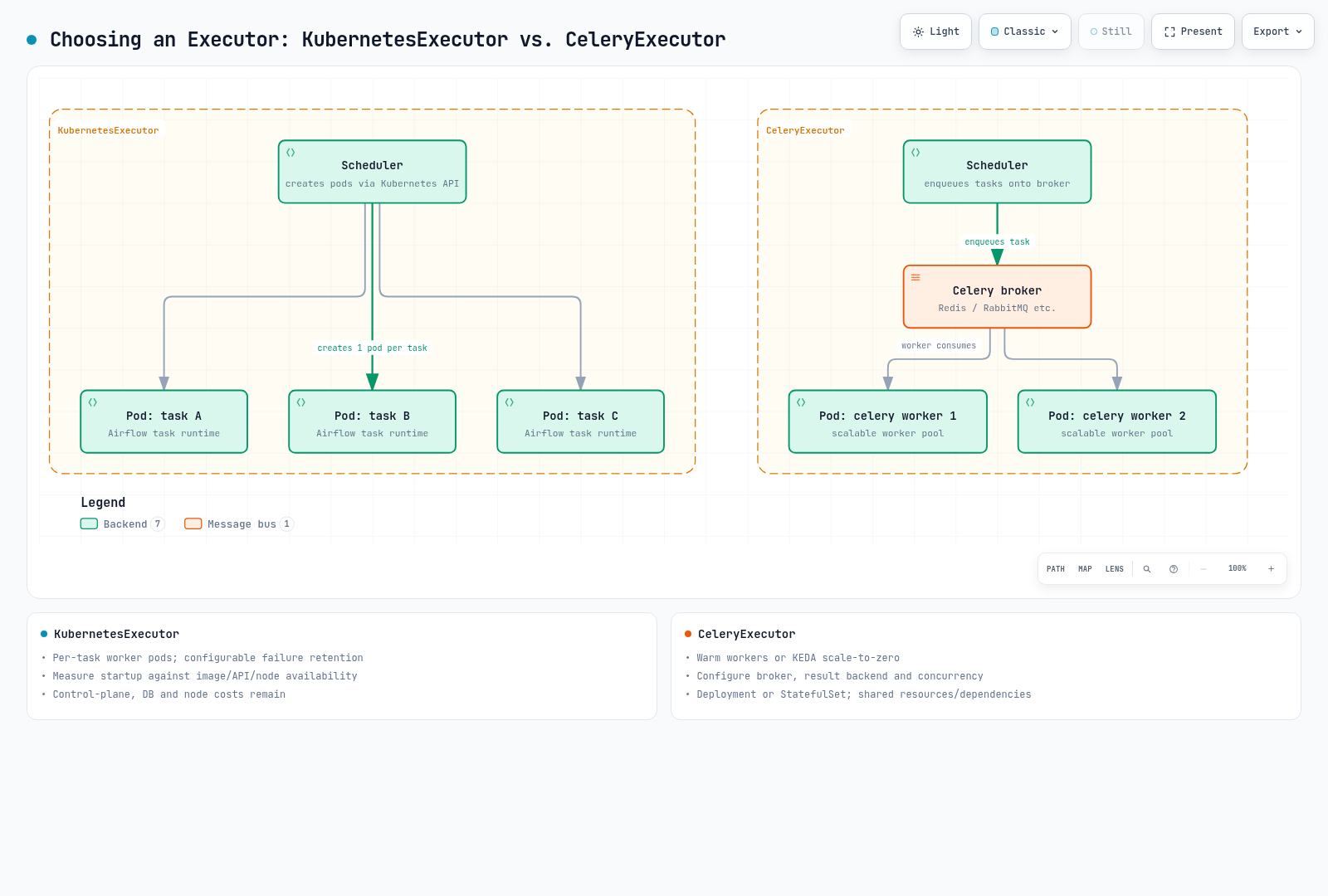
| Aspect | KubernetesExecutor | CeleryExecutor |
|---|---|---|
| Worker unit | Pod per task instance | Pool consuming broker work |
| Startup | Measure image cache, API/scheduler latency and node availability | Warm capacity can reduce startup; scale-to-zero reintroduces cold starts |
| Idle cost | Control plane, database, nodes and logs remain | Broker, database and node costs remain beyond worker count |
| Resources/isolation | Depend on pod spec, quotas, service accounts, networking and nodes | Concurrent tasks share worker resources/dependencies |
| Additional requirements | Task runtime/image, DAG delivery and Kubernetes API rights | Broker, result backend, worker lifecycle, queues and concurrency |
Do not assume a fixed 1–2 minute startup or universal high-volume superiority. A KubernetesExecutor worker image needs a compatible Airflow task runtime and DAG dependencies; it is not an arbitrary GPU/CLI image. KubernetesPodOperator launches a separate child pod with a workload image and is a different path. Failed-pod retention/deletion also depends on provider configuration.
Concurrent executors are available, but mixed operation is not mandatory for most deployments. Compare single-executor simplicity with measured benefits and added policies for your actual workload.
5. Scale Celery workers
Prepare the external broker and result backend first. These Secrets are needed only for the Celery profile; validate protocol, TLS and permissions against the actual services. A Celery SQLAlchemy database result backend uses a URI such as db+postgresql://, so do not blindly copy the metadata connection URI.
# Use protected URI files for the chosen external broker and result backend.
: "${AIRFLOW_BROKER_URI_FILE:?Set the protected broker URI file}"
: "${AIRFLOW_RESULT_URI_FILE:?Set the protected Celery result-backend URI file}"
kubectl -n airflow create secret generic airflow-broker \
  --from-file="connection=$AIRFLOW_BROKER_URI_FILE"
kubectl -n airflow create secret generic airflow-result-backend \
  --from-file="connection=$AIRFLOW_RESULT_URI_FILE"
Save as celery-values.yaml, an independent complete profile. Select this file in the install command for a new deployment. Switching an active deployment requires a drain, migration and recovery plan.
airflowVersion: 3.3.1
defaultAirflowTag: 3.3.1
executor: CeleryExecutor
postgresql:
  enabled: false
redis:
  enabled: false
data:
  metadataSecretName: airflow-metadata
  metadataConnection:
    protocol: postgresql
  brokerUrlSecretName: airflow-broker
  resultBackendSecretName: airflow-result-backend
fernetKeySecretName: airflow-fernet
apiSecretKeySecretName: airflow-api-secret
jwtSecretName: airflow-jwt
createUserJob:
  enabled: false
triggerer:
  persistence:
    enabled: false
config:
  core:
    auth_manager: airflow.providers.fab.auth_manager.fab_auth_manager.FabAuthManager
  celery:
    worker_concurrency: 4
workers:
  celery:
    persistence:
      enabled: false
    keda:
      enabled: true
      minReplicaCount: 0
      maxReplicaCount: 20
      pollingInterval: 10
      cooldownPeriod: 300
      advanced:
        horizontalPodAutoscalerConfig:
          behavior:
            scaleDown:
              stabilizationWindowSeconds: 300
Concurrency=4 and maxReplicaCount=20 are example bounds, not throughput or cost guarantees. Tune worker resources, task memory, database/broker load and node limits together. With persistence=false this profile targets a Deployment; persistence=true can produce a StatefulSet, which KEDA also supports.
Actual chart defaults are pollingInterval=5s and cooldownPeriod=30s. The example explicitly chooses 10s/300s. Cooldown governs scaling to zero; distinguish it from HPA polling/stabilization above zero. Actual database polling also depends on KEDA activity, HPA requests and metric caching, not an exact universal 10-second interval.
This profile renders the following PostgreSQL query:
SELECT ceil(COUNT(*)::decimal / 4) FROM task_instance WHERE (state='running' OR state='queued') AND queue IN ('default')worker_concurrency is not a database column: the chart inserts the number 4. It counts running/queued work for this worker queue and computes required replicas. A query result of 25 is still bounded by maxReplicaCount=20, leaving possible backlog. Do not interpret query or authentication failures as zero work; inspect ScaledObject/HPA status.
Mixed executors and aliases
Exclude work Celery will not execute when mixing executors. The chart's default query excludes the literal KubernetesExecutor, but a stored alias such as k8s can still be counted. TaskInstance preserves the task.executor value.
This example query override assumes default CeleryExecutor alongside KubernetesExecutor. Update filters when changing queues, aliases or full class names, based on actual stored values. NULL represents the default Celery executor in this configuration.
executor: CeleryExecutor,KubernetesExecutor
workers:
  celery:
    keda:
      query: >-
        SELECT ceil(COUNT(*)::decimal / {{ .Values.config.celery.worker_concurrency }})
        FROM task_instance
        WHERE state IN ('running', 'queued')
        AND queue = 'default'
        AND (executor IS NULL OR executor = 'CeleryExecutor')
Merge this fragment into the complete Celery profile and inspect the rendered SQL and target before changing a deployment. KubernetesExecutor task pods are not a replica pool scaled in the same way. Node capacity from Karpenter/Cluster Autoscaler, Airflow parallelism/pools/DAG concurrency and API throughput remain separate limits. This does not mean KEDA supports only Deployments or cannot be used elsewhere in a KubernetesExecutor environment.
6. Validation and resource lifecycle
kubectl -n airflow rollout status deployment/airflow-api-server --timeout=180s
kubectl -n airflow rollout status deployment/airflow-scheduler --timeout=180s
kubectl -n airflow rollout status deployment/airflow-dag-processor --timeout=180s
kubectl -n airflow get jobs
kubectl -n airflow logs deployment/airflow-scheduler -c scheduler --tail=100
kubectl -n airflow logs deployment/airflow-dag-processor -c dag-processor --tail=100
# Celery/KEDA profile only:
kubectl -n airflow get scaledobjects,hpa
kubectl -n airflow describe scaledobject airflow-worker
kubectl -n airflow get deployments,statefulsets -l component=worker
One successful UI visit or healthy Deployment does not validate migrations, DAG delivery, task execution, remote logs and scale-to-zero together. Submit known work, inspect worker count/results/logs, then test return to idle and recovery.
This profile does not use bundled PostgreSQL. The default chart uses an older bitnamilegacy PostgreSQL image; a default installation is not a production baseline. Removing a database pod with Helm uninstall does not necessarily delete PVC/PV data immediately. Inspect PVC retention, StorageClass reclaim policy and external database deletion/backups separately rather than indiscriminately deleting the namespace, Secrets and database.
The review checks chart/KEDA resource shape, public image manifests and 24 SQL cases in an actual PostgreSQL engine. It does not execute an EKS/database connection, container workload, user creation or KEDA-controller scaling.