Part 1: Infrastructure setup
Difficulty: Advanced Last Updated: September 13, 2026 Prepare two EKS clusters and a dedicated lab database/message path. Executable files are in the application example. Review account, Region, network, permissions and cleanup before creating billed resources. This audit did not create AWS resources.
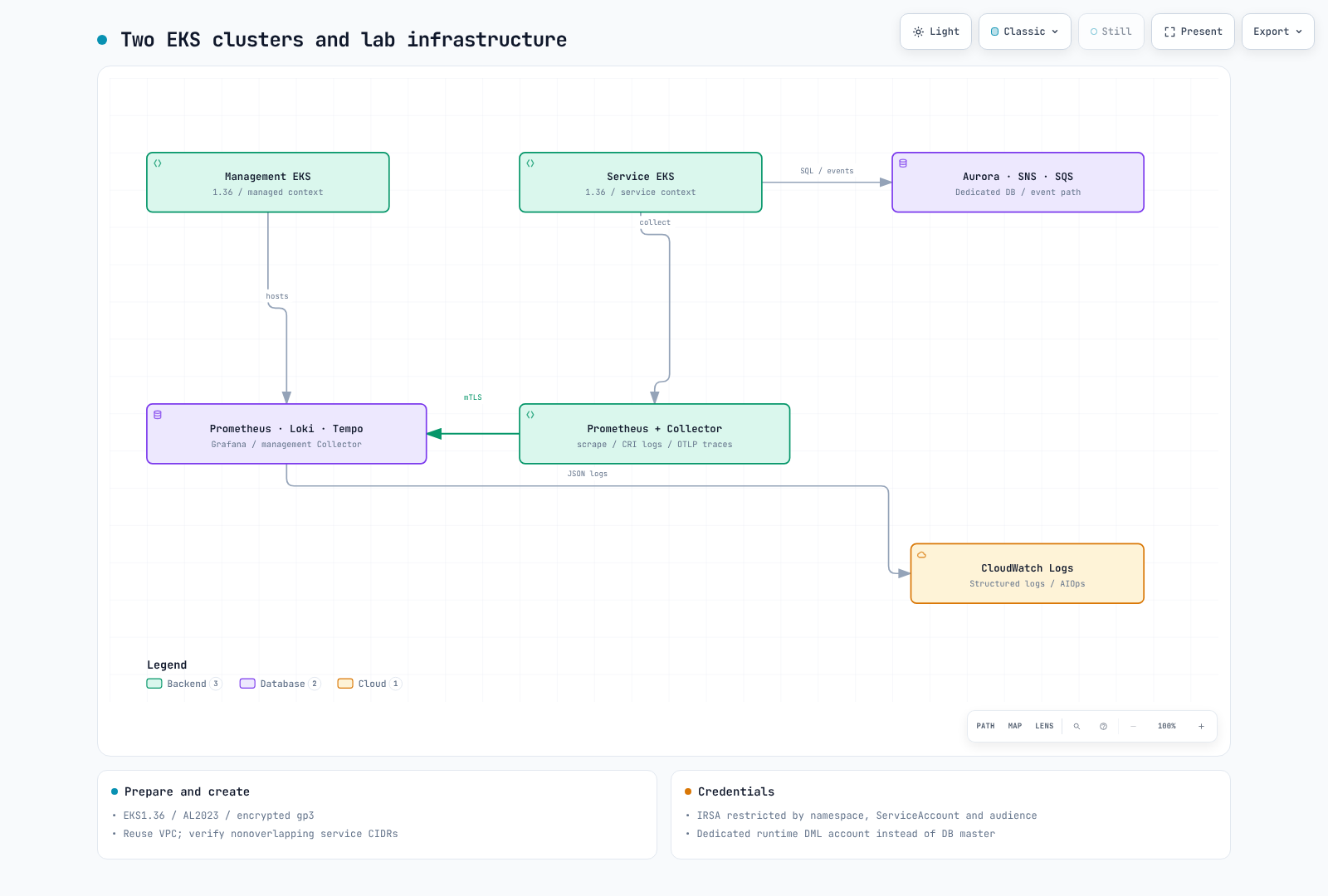
1. Verify environment and ownership
Examples were reviewed with AWS CLI v2, eksctl 0.229.0, kubectl 1.36.2, Helm 3.21.3, Python 3.12, Docker, Git and jq. EKS 1.36 was in standard support at review time. The old 1.31 example was in extended support, not already unsupported. Recheck version/Region availability when executing.
aws --version
eksctl version
kubectl version --client
helm version
python3 --version
aws sts get-caller-identity
Use an approved temporary role. Review required EKS, EC2/VPC, CloudFormation, IAM/PassRole, RDS, SNS/SQS, KMS and Logs operations against the deployment plan. Do not grant every service FullAccess or create long-lived IAM access keys for this exercise.
umask 077
export LAB_STATE="$(mktemp -d "$PWD/obs-lab.XXXXXXXX")"
# Set AWS_REGION, EXPECTED_ACCOUNT_ID and a unique LAB_PREFIX first.
test "$(aws sts get-caller-identity --query Account --output text)" = "$EXPECTED_ACCOUNT_ID"
2. Network and two clusters
The example reuses a reviewed VPC and two private subnets in different AZs. Prepare NAT/required VPC endpoints, DNS, address capacity and SG/NACL rules first. Kubernetes service CIDRs172.20.0.0/16 and172.21.0.0/16 must not overlap actual VPC/connected networks. Separate VPCs require additional peering/TGW, bidirectional routes, DNS and source-IP verification.
cd examples/labs/observability/application
python3 prepare_clusters.py --region "$AWS_REGION" --vpc-id "$VPC_ID" \
  --subnet-a "$PRIVATE_SUBNET_A" --az-a "$AZ_A" \
  --subnet-b "$PRIVATE_SUBNET_B" --az-b "$AZ_B" \
  --client-cidr "$CLIENT_CIDR" --prefix "$LAB_PREFIX" \
  --output-directory "$LAB_STATE/clusters"
The generator selects EKS 1.36, API access entries, OIDC, AL2023 managed nodes, encrypted gp3 and a narrow public API client CIDR. Node sizing/counts are lab settings, not measured capacity. Review JSON and costs before creation. On failure, inspect partially created resources under that name before creating anything again.
eksctl create cluster -f "$LAB_STATE/clusters/managed.json" --write-kubeconfig=false
eksctl create cluster -f "$LAB_STATE/clusters/service.json" --write-kubeconfig=false
export KUBECONFIG="$LAB_STATE/kubeconfig"
aws eks update-kubeconfig --name "$LAB_PREFIX-managed" --alias managed --kubeconfig "$KUBECONFIG"
aws eks update-kubeconfig --name "$LAB_PREFIX-service" --alias service --kubeconfig "$KUBECONFIG"
kubectl --context managed get nodes
kubectl --context service get nodes
Apply the account/endpoint/ownership checks in the EKS creation guide and cluster lab. Verify that both contexts select the intended distinct clusters.
3. Storage, load balancer and OIDC prerequisites
Install EBS CSI and a reviewed gp3 StorageClass, a CNI that actually enforces NetworkPolicy, and the AWS Load Balancer Controller (service.k8s.aws/nlb). Do not overwrite shared StorageClasses blindly. Obtain each cluster OIDC issuer and matching IAM provider ARN. The issuer host/path without https:// must match the provider ARN suffix.
aws eks describe-cluster --name "$LAB_PREFIX-managed" --query cluster.identity.oidc.issuer --output text
aws eks describe-cluster --name "$LAB_PREFIX-service" --query cluster.identity.oidc.issuer --output text
kubectl --context managed get storageclass gp3
kubectl --context service get storageclass gp3
4. Aurora, SNS/SQS and roles
application/infra.yaml creates a private Aurora writer, managed master Secret, SNS fanout, separate consumer queues/DLQs, a CloudWatch log group and roles. DB ingress allows only the actual service-node SG. A single-writer exercise is not Multi-AZ HA. Discover and explicitly supply a supported Aurora engine version for the Region.
aws rds describe-db-engine-versions --engine aurora-postgresql \
  --query "DBEngineVersions[].EngineVersion" --output table
Supply VpcId, PrivateSubnetIds, ServiceNodeSecurityGroupId, AuroraEngineVersion and both OIDC provider/issuer pairs; review and execute the CloudFormation change set. Verify account, ARN and ServiceAccount consistency. App runtime roles, KEDA queue-read identity and management Collector log identity are separate.
aws cloudformation describe-stacks --stack-name "$LAB_STACK" \
  --query "Stacks[0].Outputs" --output json > "$LAB_STATE/infra-outputs.json"
Generate Collector identity inputs here for Part2. Choose the image repository and immutable tag now; build/push the image in Part3.
python3.12 -m venv .venv
.venv/bin/python -m pip install -r requirements.txt PyYAML==6.0.3
.venv/bin/python prepare_values.py --outputs-file "$LAB_STATE/infra-outputs.json"   --region "$AWS_REGION" --image-repository "$IMAGE_REPOSITORY"   --image-tag "$IMAGE_TAG" --output-directory "$LAB_STATE/helm-inputs"
5. Runtime DB account and next step
Read the master Secret only in an authorized environment and store a private JSON connection file. Use the RDS CA bundle and sslmode=verify-full. The bootstrap_db.py procedure creates dedicated lab_runtime DML access without overwriting an existing password. Set its Pod CA path to /run/database-ca/global-bundle.pem.
Record stacks, clusters, retained snapshots, IAM attachments, LBs and PVCs in the ownership inventory. Estimate EKS/node/NAT/EBS/Aurora/Logs/SNS/SQS/KMS/transfer costs for the actual Region and usage. Do not present fixed hourly totals or convert AMG per-user monthly prices into workspace hourly charges. Continue to Part2.
Validation scope
Checks covered eksctl schemas, CloudFormation lint/role structure and local PostgreSQL behavior. Actual EKS/VPC/OIDC/IRSA/Aurora/TLS, quotas and provisioning duration were not exercised.