Authorization
AuthorizationPolicy allows you to finely control service access permissions.
Table of Contents
Authorization Overview
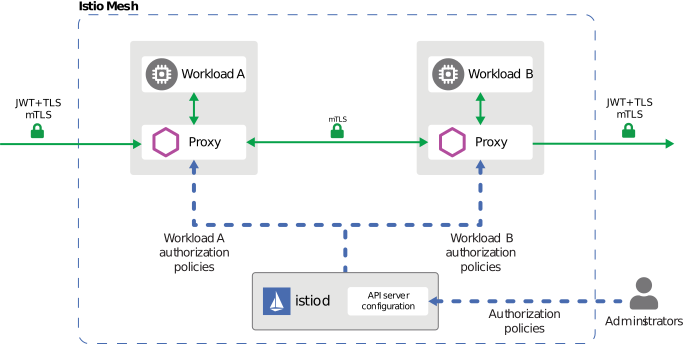
Istio AuthorizationPolicy provides fine-grained access control for services. The diagram above shows how Authorization Policy works:
- Request Reception: Envoy receives inbound request
- Policy Evaluation: Matching CUSTOM policies, then DENY, then ALLOW; not YAML creation order
- Access Decision: ALLOW, DENY, or CUSTOM action is applied
- Audit Logging: Requires configured access/audit logging; AUDIT alone only marks a request
Supported Conditions:
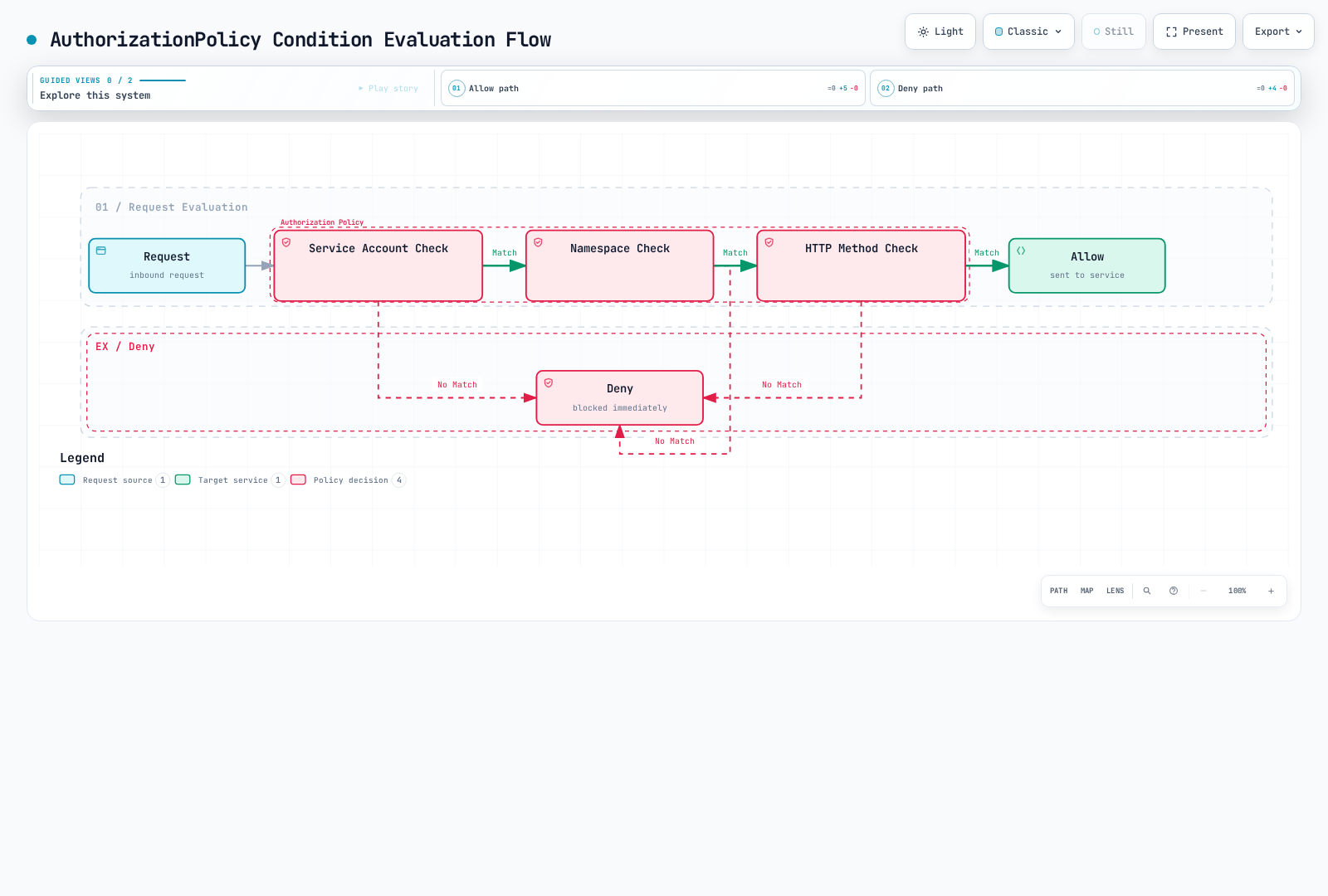
- Source: Request origin (ServiceAccount, Namespace, IP)
- Operation: HTTP method, path, port
- Conditions: Custom conditions (headers, JWT claims, etc.)
Basic Policies
The diagram illustrates one conjunctive rule. Within a rule, from/to/when constraints combine; separate rules and matching ALLOW policies are alternatives. With no ALLOW policy for a workload, requests are allowed unless CUSTOM/DENY rejects them. Once an ALLOW policy applies, at least one ALLOW match is needed. The examples below are alternatives; allow-all would broaden a get-only policy.
Default Deny (Deny All)
apiVersion: security.istio.io/v1
kind: AuthorizationPolicy
metadata:
  name: deny-all
  namespace: default
spec:
  action: ALLOW
  rules: []  # Default deny with room for specific ALLOW exceptions
Default Allow (Allow All)
apiVersion: security.istio.io/v1
kind: AuthorizationPolicy
metadata:
  name: allow-all
  namespace: default
spec:
  action: ALLOW
  rules:
  - {}  # Allow all requests
HTTP Method Based
apiVersion: security.istio.io/v1
kind: AuthorizationPolicy
metadata:
  name: httpbin-get-only
  namespace: default
spec:
  selector:
    matchLabels:
      app: httpbin
  action: ALLOW
  rules:
  - to:
    - operation:
        methods: ["GET"]  # Allow only GET
Advanced Policies
Service Account Based
apiVersion: security.istio.io/v1
kind: AuthorizationPolicy
metadata:
  name: ratings-sa-policy
  namespace: default
spec:
  selector:
    matchLabels:
      app: ratings
  action: ALLOW
  rules:
  - from:
    - source:
        principals: ["cluster.local/ns/default/sa/reviews"]  # Allow only reviews SA
Namespace Based
apiVersion: security.istio.io/v1
kind: AuthorizationPolicy
metadata:
  name: db-namespace-policy
  namespace: database
spec:
  selector:
    matchLabels:
      app: postgresql
  action: ALLOW
  rules:
  - from:
    - source:
        namespaces: ["production", "staging"]  # Specific namespaces only
Path Based
apiVersion: security.istio.io/v1
kind: AuthorizationPolicy
metadata:
  name: path-based-policy
  namespace: default
spec:
  selector:
    matchLabels:
      app: api
  action: ALLOW
  rules:
  - to:
    - operation:
        paths: ["/api/public/*"]  # Allow only public API
  - from:
    - source:
        principals: ["cluster.local/ns/default/sa/admin"]
    to:
    - operation:
        paths: ["/api/admin/*"]  # admin SA can access admin API
JWT Claims Based
apiVersion: security.istio.io/v1
kind: AuthorizationPolicy
metadata:
  name: jwt-claims-policy
  namespace: default
spec:
  selector:
    matchLabels:
      app: myapp
  action: ALLOW
  rules:
  - when:
    - key: request.auth.claims[role]
      values: ["admin", "superuser"]  # role claim is admin or superuser
Practical Examples
For default deny plus exceptions, apply the empty ALLOW policy and only the intended specific ALLOW rules. An explicit DENY with rules: [{}] is a hard block that no ALLOW can override. A policy with no selector applies to its namespace; root-namespace and targetRefs attachment rules need separate care.
The service-account/namespace matches require authenticated mTLS peer identity. The JWT role example requires a matching RequestAuthentication and intended issuer/audience validation. Client headers do not substitute for either identity. For native TCP, match identities/IPs/ports rather than HTTP methods or JWT claims; missing HTTP attributes in DENY rules can match TCP unexpectedly.
Best Practices
- Scope policies to the intended workload/resource and review all applicable ALLOW rules together.
- Use waypoint targetRefs for ambient L7 policies; a sidecar selector is not a waypoint attachment.
- Validate no-policy, no-match, explicit-deny, and permitted-request cases, including namespace boundaries.
- Configure logging explicitly and inspect effective policies with
istioctl x authz check <pod> -n <namespace>.