Security Quiz
Last Updated: October 12, 2026
Versions: Istio 1.31, which supports Kubernetes 1.32–1.37 (EKS standard support: 1.34–1.37). See the installation matrix.
This quiz tests Istio security with sidecar examples. Each question is an independent scenario; do not combine every ALLOW policy on the same workload. Ambient requires waypoint targetRefs for HTTP/JWT policy, and does not support PeerAuthentication DISABLE. Named workloads, ServiceAccounts, ports and identities must match the actual deployment.
Multiple Choice Questions (1-5)
Question 1: PeerAuthentication Mode
Which statement correctly describes the PERMISSIVE mTLS mode in PeerAuthentication?
A. It allows both mTLS and plaintext traffic
B. It only allows mTLS and rejects plaintext
C. It rejects all traffic
D. It disables mTLS
Show Answer
Answer: A
PERMISSIVE mode allows both mTLS and plaintext traffic to support gradual migration.
Explanation:
PeerAuthentication mTLS Modes:
| Mode | Description | Use Scenario |
|---|---|---|
| PERMISSIVE | Allows both mTLS + plaintext | Gradual migration, mixed environments |
| STRICT | Only allows mTLS | Production security hardening |
| DISABLE | Disables mesh mTLS at the selected receiver | Explicit legacy exception |
PERMISSIVE Mode Example:
apiVersion: security.istio.io/v1
kind: PeerAuthentication
metadata:
  name: default
  namespace: istio-system
spec:
  mtls:
    mode: PERMISSIVE  # Allows both mTLS + plaintext
Behavior:
Client A (Istio Sidecar) -> [mTLS] -> Server (PERMISSIVE)  Allowed
Client B (No Sidecar)    -> [Plaintext] -> Server (PERMISSIVE)  Allowed
Comparison with STRICT Mode:
apiVersion: security.istio.io/v1
kind: PeerAuthentication
metadata:
  name: strict-mtls
  namespace: production
spec:
  mtls:
    mode: STRICT  # Only allows mTLS
Client A (Istio Sidecar) -> [mTLS] -> Server (STRICT) Allowed
Client B (No Sidecar) -> [Plaintext] -> Server (STRICT) RejectedMigration Strategy:
Step 1: PERMISSIVE (Allow mixed traffic)
  |
Step 2: Inject Sidecars to all services
  |
Step 3: STRICT (Enforce mTLS)
Reference:
Question 2: AuthorizationPolicy Action
If this is the only AuthorizationPolicy selecting the workloads in its namespace, what does it mean?
apiVersion: security.istio.io/v1
kind: AuthorizationPolicy
metadata:
  name: deny-all
spec:
  {}
A. It allows all requests
B. It denies all requests
C. It does not apply any policy
D. It only allows mTLS
Show Answer
Answer: B
An empty spec defaults to ALLOW with no matching rules, so this policy alone denies all requests. Other matching ALLOW policies can provide exceptions; an explicit DENY-all cannot be overridden by ALLOW.
Explanation:
Default Behavior of AuthorizationPolicy:
- No policy exists: All requests allowed
- Empty spec (like the example): All requests denied
- Has rules: Allow/deny based on rules
Deny-by-default Pattern:
# Step 1: Deny all requests
apiVersion: security.istio.io/v1
kind: AuthorizationPolicy
metadata:
  name: deny-all
  namespace: default
spec: {}  # Empty spec = deny all requests

---
# Step 2: Selectively allow only what's needed
apiVersion: security.istio.io/v1
kind: AuthorizationPolicy
metadata:
  name: allow-frontend
  namespace: default
spec:
  selector:
    matchLabels:
      app: backend
  action: ALLOW
  rules:
  - from:
    - source:
        principals: ["cluster.local/ns/default/sa/frontend"]
    to:
    - operation:
        methods: ["GET", "POST"]
Evaluation: CUSTOM → DENY → ALLOW. A matching CUSTOM provider must allow the request; then any matching DENY rejects it. If applicable ALLOW policies exist, at least one rule must match. Without an applicable ALLOW policy, this stage allows the request. Rules and ALLOW policies form a union, not an ordered list of additional restrictions. AUDIT marks matching requests for a configured audit plugin; it is not a fourth enforcement stage and does not log by itself.
Practical Example:
# Scenario: Restrict HTTP methods
---
# DENY: Prohibit DELETE
apiVersion: security.istio.io/v1
kind: AuthorizationPolicy
metadata:
  name: deny-delete
spec:
  selector:
    matchLabels:
      app: backend
  action: DENY
  rules:
  - to:
    - operation:
        methods: ["DELETE"]

---
# ALLOW: Only allow GET, POST
apiVersion: security.istio.io/v1
kind: AuthorizationPolicy
metadata:
  name: allow-read-write
spec:
  selector:
    matchLabels:
      app: backend
  action: ALLOW
  rules:
  - from:
    - source:
        principals: ["cluster.local/ns/default/sa/frontend"]
    to:
    - operation:
        methods: ["GET", "POST"]
Test: Run from the meshed frontend workload using ServiceAccount frontend; configure backend HTTP protocol/port detection.
# GET request -> Matches ALLOW policy -> Allowed
curl http://backend/api

# POST request -> Matches ALLOW policy -> Allowed
curl -X POST http://backend/api

# DELETE request -> Matches DENY policy -> Rejected
curl -X DELETE http://backend/api

# PUT request -> No ALLOW policy match -> Rejected
curl -X PUT http://backend/api
Reference:
Question 3: JWT Authentication
Which fields are used to validate JWT tokens in RequestAuthentication?
A. issuer and audiences
B. principals and namespaces
C. methods and paths
D. hosts and ports
Show Answer
Answer: A
RequestAuthentication uses the issuer and audiences fields to validate JWT tokens.
Explanation:
A token, when present, must pass signature, issuer, audience and time checks. RequestAuthentication alone accepts a missing token; AuthorizationPolicy must require requestPrincipals. The timestamp values below are an expired historical illustration, not a usable token.
JWT Token Structure:
Header.Payload.Signature

Payload example:
{
  "iss": "https://auth.example.com",        # issuer
  "sub": "user@example.com",                # subject
  "aud": ["api.example.com"],               # audiences
  "exp": 1735689600,                        # expiration
  "iat": 1735686000                         # issued at
}
RequestAuthentication Configuration:
apiVersion: security.istio.io/v1
kind: RequestAuthentication
metadata:
  name: jwt-auth
  namespace: default
spec:
  selector:
    matchLabels:
      app: backend
  jwtRules:
  - issuer: "https://auth.example.com"      # Validate iss field
    jwksUri: "https://auth.example.com/.well-known/jwks.json"
    audiences:
    - "api.example.com"                     # Validate aud field
    forwardOriginalToken: true
JWT Validation Process:
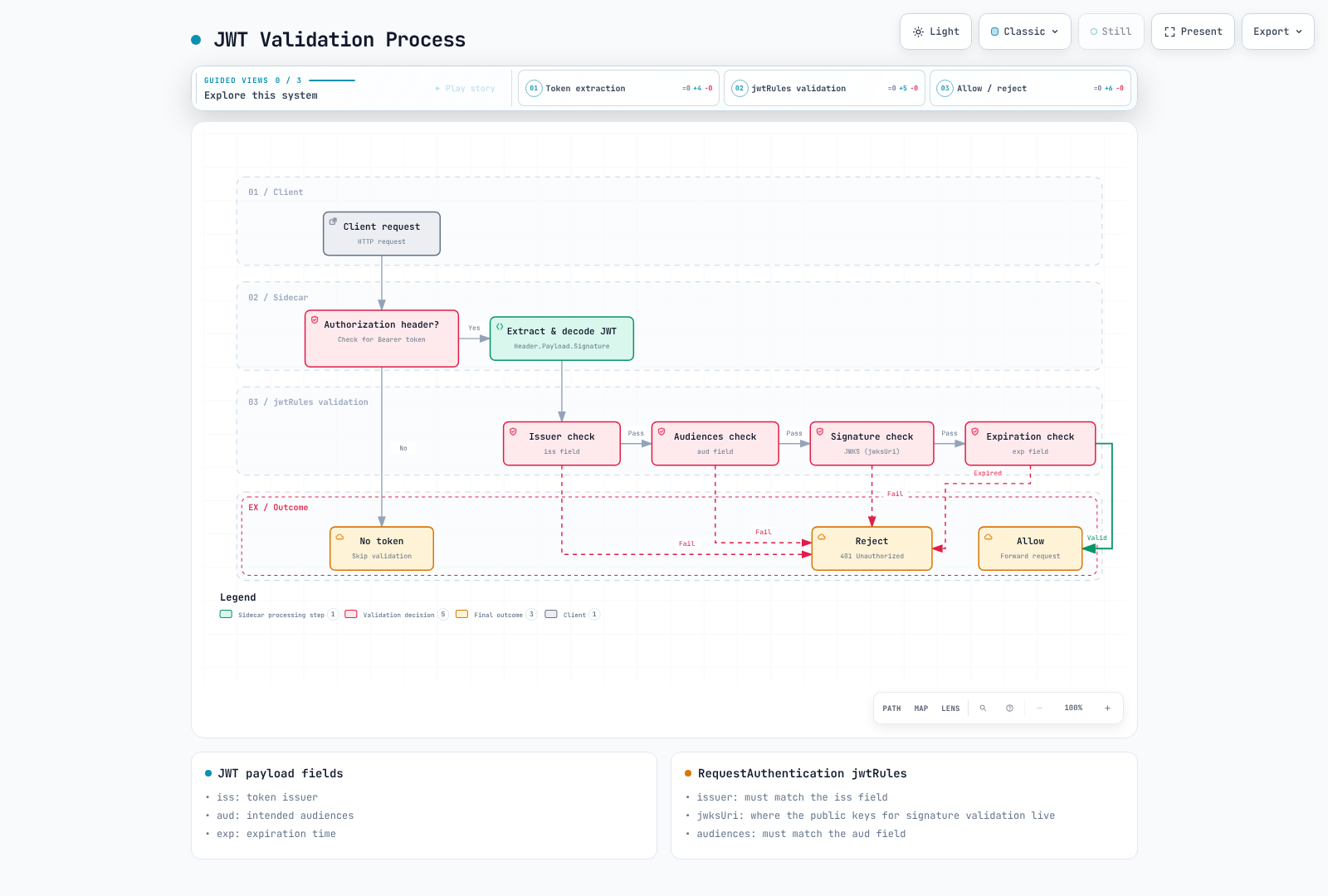
The diagram describes validation of a present token, not authorization or missing-token handling. Provider examples below are alternatives; configure the token type and audience expected by the application.
Integration with OIDC Providers:
# Google OAuth2 example
apiVersion: security.istio.io/v1
kind: RequestAuthentication
metadata:
  name: google-jwt
spec:
  jwtRules:
  - issuer: "https://accounts.google.com"
    jwksUri: "https://www.googleapis.com/oauth2/v3/certs"
    audiences:
    - "123456789-abcdefg.apps.googleusercontent.com"

---
# Keycloak example
apiVersion: security.istio.io/v1
kind: RequestAuthentication
metadata:
  name: keycloak-jwt
spec:
  jwtRules:
  - issuer: "https://keycloak.example.com/realms/myrealm"
    jwksUri: "https://keycloak.example.com/realms/myrealm/protocol/openid-connect/certs"
    audiences:
    - "myapp"
Combining with AuthorizationPolicy:
# 1. RequestAuthentication: Validate JWT
apiVersion: security.istio.io/v1
kind: RequestAuthentication
metadata:
  name: jwt-auth
spec:
  selector:
    matchLabels:
      app: backend
  jwtRules:
  - issuer: "https://auth.example.com"
    jwksUri: "https://auth.example.com/.well-known/jwks.json"
    audiences: ["api.example.com"]

---
# 2. AuthorizationPolicy: Only allow authenticated requests
apiVersion: security.istio.io/v1
kind: AuthorizationPolicy
metadata:
  name: require-jwt
spec:
  selector:
    matchLabels:
      app: backend
  action: ALLOW
  rules:
  - from:
    - source:
        requestPrincipals: ["https://auth.example.com/*"]  # Verified issuer + method in the same rule
    to:
    - operation:
        methods: ["GET", "POST"]
Test:
# Request without JWT -> Passes RequestAuthentication, denied by AuthorizationPolicy
curl http://backend/api
# 403 Forbidden

# Request with valid JWT
read -rsp "Test access token: " TOKEN; echo
curl -H "Authorization: Bearer $TOKEN" http://backend/api
unset TOKEN
# 200 OK
Reference:
Question 4: mTLS Certificate Management
What is the default validity period for mTLS certificates in Istio?
A. 1 hour
B. 24 hours
C. 7 days
D. 90 days
Show Answer
Answer: B
The default validity period for mTLS certificates in Istio is 24 hours, and they are automatically renewed.
Explanation:
The agent requests a 24-hour leaf by default and renews around half its lifetime, with jitter (SECRET_GRACE_PERIOD_RATIO=0.5). Istiod or the selected external CA signs the request; the agent delivers the result to Envoy through SDS. Root/intermediate lifetimes are separate. The default self-signed root signs workload leaves directly; an intermediate hierarchy is an administrator choice.
Inspect the public certificate without assuming an on-disk /etc/certs file or fixed SDS array order:
istioctl proxy-config secret <pod-name> -n <namespace> -o json | \
  jq -r '.dynamicActiveSecrets[] | select(.secret.name == "default") | .secret.tlsCertificate.certificateChain.inlineBytes' | \
  base64 -d | openssl x509 -noout -dates -issuer -ext subjectAltName
Customizing Validity Period:
apiVersion: install.istio.io/v1alpha1
kind: IstioOperator
spec:
  meshConfig:
    # Change certificate validity period
    defaultConfig:
      proxyMetadata:
        SECRET_TTL: "48h"  # Extend to 48 hours
This is an istioctl install -f input fragment, not an in-cluster operator resource. The issuer may cap the requested 48-hour TTL; verify the issued certificate and rotate selected proxies when changing bootstrap settings.
For failed renewal, inspect the agent and istiod logs, CA connectivity, token authentication, clock synchronization and trust bundles before restarting workloads. A restart alone does not fix an expired CA. cert-manager integration requires istio-csr and its installation prerequisites; EXTERNAL_CA=ISTIOD_RA_KUBERNETES_API alone is not a cert-manager setup. See the certificate lifecycle guide.
Question 5: Service Account-based Authentication
What identity is used for service-to-service authentication in Istio?
A. Pod name
B. Service name
C. Service Account
D. Namespace name
Show Answer
Answer: C
Istio manages service-to-service identity based on Service Account.
Explanation:
Service Account-based Identity:
# 1. Create Service Account
apiVersion: v1
kind: ServiceAccount
metadata:
  name: frontend
  namespace: default

---
# 2. Use Service Account in Deployment
apiVersion: apps/v1
kind: Deployment
metadata:
  name: frontend
  namespace: default
spec:
  selector:
    matchLabels:
      app: frontend
  template:
    metadata:
      labels:
        app: frontend
    spec:
      serviceAccountName: frontend  # Used as identity
      containers:
      - name: frontend
        image: registry.example.com/team/frontend:REPLACE_WITH_TESTED_TAG
SPIFFE ID Format:
spiffe://<trust-domain>/ns/<namespace>/sa/<service-account>

Examples:
spiffe://cluster.local/ns/default/sa/frontend
spiffe://cluster.local/ns/production/sa/backend
Using Service Account in AuthorizationPolicy:
apiVersion: security.istio.io/v1
kind: AuthorizationPolicy
metadata:
  name: backend-policy
  namespace: default
spec:
  selector:
    matchLabels:
      app: backend
  action: ALLOW
  rules:
  # Only allow frontend Service Account
  - from:
    - source:
        principals:
        - "cluster.local/ns/default/sa/frontend"
    to:
    - operation:
        methods: ["GET", "POST"]
        paths: ["/api/*"]

  # admin Service Account allowed for all operations
  - from:
    - source:
        principals:
        - "cluster.local/ns/default/sa/admin"
The image above is an application placeholder. Kubernetes RBAC governs access to the Kubernetes API; it does not automatically grant mesh traffic permissions. Istio authorization uses the authenticated ServiceAccount identity separately. A principal also includes the namespace and trust domain.
Service Account vs Pod/Service Name:
| Item | Service Account | Pod Name | Service Name |
|---|---|---|---|
| Stability | Stable | Dynamically changes | Stable |
| Security | Certificate-based | Not trustworthy | Not trustworthy |
| RBAC Integration | Kubernetes RBAC | Not possible | Not possible |
| mTLS | Included in certificate | Not included | Not included |
Practical Example: 3-Tier Application:
# Frontend -> Backend only allowed
---
apiVersion: v1
kind: ServiceAccount
metadata:
  name: frontend
  namespace: app

---
apiVersion: v1
kind: ServiceAccount
metadata:
  name: backend
  namespace: app

---
apiVersion: v1
kind: ServiceAccount
metadata:
  name: database
  namespace: app

---
# Backend policy: Only allow Frontend access
apiVersion: security.istio.io/v1
kind: AuthorizationPolicy
metadata:
  name: backend-policy
  namespace: app
spec:
  selector:
    matchLabels:
      app: backend
  action: ALLOW
  rules:
  - from:
    - source:
        principals: ["cluster.local/ns/app/sa/frontend"]

---
# Database policy: Only allow Backend access
apiVersion: security.istio.io/v1
kind: AuthorizationPolicy
metadata:
  name: database-policy
  namespace: app
spec:
  selector:
    matchLabels:
      app: database
  action: ALLOW
  rules:
  - from:
    - source:
        principals: ["cluster.local/ns/app/sa/backend"]
Checking Service Account:
# Check pod's Service Account
kubectl get pod <pod-name> -o jsonpath='{.spec.serviceAccountName}'

# Check SPIFFE ID in mTLS certificate
istioctl proxy-config secret <pod-name> -o json | \
  jq -r '.dynamicActiveSecrets[] | select(.secret.name == "default") | .secret.tlsCertificate.certificateChain.inlineBytes' | \
  base64 -d | openssl x509 -text -noout | grep URI

# Output:
# URI:spiffe://cluster.local/ns/default/sa/frontend
Cross-Namespace Communication:
# Allow production namespace's frontend -> staging namespace's backend access
apiVersion: security.istio.io/v1
kind: AuthorizationPolicy
metadata:
  name: backend-policy
  namespace: staging
spec:
  selector:
    matchLabels:
      app: backend
  action: ALLOW
  rules:
  - from:
    - source:
        principals:
        - "cluster.local/ns/production/sa/frontend"
        namespaces:
        - "production"
Reference:
Short Answer Questions (6-10)
Question 6: Implementing Deny-by-default Security Policy
Explain step by step how to implement a deny-by-default security policy using Istio in a Kubernetes cluster. Include required resources (PeerAuthentication, AuthorizationPolicy) and exception handling methods.
Show Answer
- Inventory actual callers, ServiceAccounts, workload ports and application protocols. Enroll workloads in the mesh, then enforce namespace
STRICTafter checking compatibility. PeerAuthentication alone does not authorize callers. - Apply an empty ALLOW policy as the namespace baseline; add explicit rules for the required call graph. Do not use
DENYwithrules: [{}]when exceptions are intended. - The example assumes namespace
app, meshed frontend/backend/database workloads with matchingapplabels and ServiceAccounts, HTTP port 8080, PostgreSQL port 5432, and gateway ServiceAccountistio-ingressgatewayinistio-system. Verify that identity from the actual gateway pod. The gateway Service maps HTTPS 443 to workload port 8443, which is the AuthorizationPolicy port. Configure TLS termination and a VirtualService formyapp.example.com/api/*separately.
apiVersion: security.istio.io/v1
kind: PeerAuthentication
metadata:
  name: default
  namespace: app
spec:
  mtls:
    mode: STRICT
---
apiVersion: security.istio.io/v1
kind: AuthorizationPolicy
metadata:
  name: default-deny
  namespace: app
spec: {}
---
apiVersion: security.istio.io/v1
kind: AuthorizationPolicy
metadata:
  name: ingress-public-api
  namespace: istio-system
spec:
  selector:
    matchLabels:
      istio: ingressgateway
  action: ALLOW
  rules:
  - to:
    - operation:
        ports:
        - '8443'
        hosts:
        - myapp.example.com
        paths:
        - /api/*
        methods:
        - GET
        - POST
---
apiVersion: security.istio.io/v1
kind: AuthorizationPolicy
metadata:
  name: frontend-policy
  namespace: app
spec:
  selector:
    matchLabels:
      app: frontend
  action: ALLOW
  rules:
  - from:
    - source:
        principals:
        - cluster.local/ns/istio-system/sa/istio-ingressgateway
    to:
    - operation:
        ports:
        - '8080'
        paths:
        - /api/*
        methods:
        - GET
        - POST
---
apiVersion: security.istio.io/v1
kind: AuthorizationPolicy
metadata:
  name: backend-policy
  namespace: app
spec:
  selector:
    matchLabels:
      app: backend
  action: ALLOW
  rules:
  - from:
    - source:
        principals:
        - cluster.local/ns/app/sa/frontend
    to:
    - operation:
        ports:
        - '8080'
        paths:
        - /api/*
        methods:
        - GET
        - POST
---
apiVersion: security.istio.io/v1
kind: AuthorizationPolicy
metadata:
  name: database-policy
  namespace: app
spec:
  selector:
    matchLabels:
      app: database
  action: ALLOW
  rules:
  - from:
    - source:
        principals:
        - cluster.local/ns/app/sa/backend
    to:
    - operation:
        ports:
- '5432'- Keep Istio's default probe rewrite for sidecars: kubelet HTTP/TCP/gRPC probes are directed through the agent (typically 15020). An HTTP ALLOW path does not make plaintext pass STRICT. If a legacy health endpoint needs a plaintext exception,
portLevelMtlsrequires a workload selector and the workload port; authorization/network restrictions must still constrain that endpoint. Do not disable mTLS on the application port as a generic health fix. - Agent/Envoy metrics ports (15020/15090) are different from intercepted application metrics endpoints. For a protected application metrics endpoint, scope an ALLOW policy to the workload, actual port/path and an mTLS-authenticated Prometheus principal. For agent metrics, configure scraping and network access; an AuthorizationPolicy on application inbound traffic is not sufficient.
- Validate effective configuration and both allowed/denied traffic:
istioctl analyze -n app
istioctl proxy-config secret <backend-pod> -n app
istioctl proxy-config clusters <frontend-pod> -n app -o json
istioctl x authz check <backend-pod>.app
# Run from the indicated application containers with the test clients installed.
kubectl exec <frontend-pod> -n app -c frontend -- curl -i http://backend:8080/api/users
kubectl exec <frontend-pod> -n app -c frontend -- pg_isready -h database -p 5432
kubectl exec <backend-pod> -n app -c backend -- pg_isready -h database -p 5432
Frontend → backend should reach the application; frontend → database should fail at the TCP layer, not return HTTP 403. Backend → database should reach PostgreSQL (database credentials are a separate check). Missing routing can produce 404 before an authorization test reaches the intended backend. Use namespace-qualified pods, application containers and real test clients. See authorization and health checks.
Question 7: JWT + mTLS Dual Authentication
Implement a scenario where end-user authentication (JWT) and service-to-service authentication (mTLS) are used together in Istio. Include how to integrate with OAuth2/OIDC providers (e.g., Keycloak).
Show Answer
Configure Keycloak realm myrealm, an OIDC client and an explicit API audience myapp. Use authorization code flow with PKCE and exact HTTPS redirect URIs. Client type/authentication depends on whether the application can keep a secret. Keycloak roles normally appear in realm_access.roles; use an audience mapper/client scope so the API token has the expected aud.
Every proxy evaluating requestPrincipals or request.auth.claims needs its own RequestAuthentication. A verified JWT at the gateway does not establish the request identity at the frontend or backend. forwardOriginalToken preserves the token on that forwarded request, and the frontend application must propagate Authorization to its new backend request.
The following replaces the related policies from Question 6. Do not retain a broader ALLOW policy beside the role-restricted backend rules: ALLOW policies form a union. The deployment and HTTPS gateway prerequisites are the same as Question 6.
apiVersion: security.istio.io/v1
kind: PeerAuthentication
metadata:
  name: default
  namespace: app
spec:
  mtls:
    mode: STRICT
---
apiVersion: security.istio.io/v1
kind: AuthorizationPolicy
metadata:
  name: default-deny
  namespace: app
spec: {}
---
apiVersion: security.istio.io/v1
kind: RequestAuthentication
metadata:
  name: jwt-ingress
  namespace: istio-system
spec:
  selector:
    matchLabels:
      istio: ingressgateway
  jwtRules:
  - issuer: https://keycloak.example.com/realms/myrealm
    jwksUri: https://keycloak.example.com/realms/myrealm/protocol/openid-connect/certs
    audiences:
    - myapp
    forwardOriginalToken: true
---
apiVersion: security.istio.io/v1
kind: AuthorizationPolicy
metadata:
  name: ingress-public-api
  namespace: istio-system
spec:
  selector:
    matchLabels:
      istio: ingressgateway
  action: ALLOW
  rules:
  - to:
    - operation:
        ports:
        - '8443'
        hosts:
        - myapp.example.com
        paths:
        - /api/*
        methods:
        - GET
        - POST
        - DELETE
    from:
    - source:
        requestPrincipals:
        - https://keycloak.example.com/realms/myrealm/*
---
apiVersion: security.istio.io/v1
kind: RequestAuthentication
metadata:
  name: jwt-frontend
  namespace: app
spec:
  selector:
    matchLabels:
      app: frontend
  jwtRules:
  - issuer: https://keycloak.example.com/realms/myrealm
    jwksUri: https://keycloak.example.com/realms/myrealm/protocol/openid-connect/certs
    audiences:
    - myapp
    forwardOriginalToken: true
---
apiVersion: security.istio.io/v1
kind: AuthorizationPolicy
metadata:
  name: frontend-policy
  namespace: app
spec:
  selector:
    matchLabels:
      app: frontend
  action: ALLOW
  rules:
  - from:
    - source:
        principals:
        - cluster.local/ns/istio-system/sa/istio-ingressgateway
        requestPrincipals:
        - https://keycloak.example.com/realms/myrealm/*
    to:
    - operation:
        ports:
        - '8080'
        paths:
        - /api/*
        methods:
        - GET
        - POST
        - DELETE
---
apiVersion: security.istio.io/v1
kind: RequestAuthentication
metadata:
  name: jwt-backend
  namespace: app
spec:
  selector:
    matchLabels:
      app: backend
  jwtRules:
  - issuer: https://keycloak.example.com/realms/myrealm
    jwksUri: https://keycloak.example.com/realms/myrealm/protocol/openid-connect/certs
    audiences:
    - myapp
    forwardOriginalToken: true
---
apiVersion: security.istio.io/v1
kind: AuthorizationPolicy
metadata:
  name: backend-policy
  namespace: app
spec:
  selector:
    matchLabels:
      app: backend
  action: ALLOW
  rules:
  - from:
    - source:
        principals:
        - cluster.local/ns/app/sa/frontend
        requestPrincipals:
        - https://keycloak.example.com/realms/myrealm/*
    to:
    - operation:
        ports:
        - '8080'
        paths:
        - /api/users/*
        methods:
        - GET
        - POST
    when:
    - key: request.auth.claims[realm_access][roles]
      values:
      - user
      - admin
  - from:
    - source:
        principals:
        - cluster.local/ns/app/sa/frontend
        requestPrincipals:
        - https://keycloak.example.com/realms/myrealm/*
    to:
    - operation:
        ports:
        - '8080'
        methods:
        - DELETE
        paths:
        - /api/admin/*
    when:
    - key: request.auth.claims[realm_access][roles]
      values:
      - admin
For an application needing a scalar claim as a header, RequestAuthentication supports the experimental outputClaimToHeaders field, for example header: x-user-id with claim: sub. Use validated JWT claims for authorization; do not trust caller-supplied identity headers. outputPayloadToHeader contains an encoded payload, and Envoy's Lua runtime does not include an arbitrary require("json") module. Roles arrays should be matched as claims rather than blindly concatenated into headers.
Obtain a test token through the configured login flow, then test HTTPS. Do not embed passwords/client secrets in quiz commands:
read -rsp "Test access token: " TOKEN; echo
curl -i -H "Authorization: Bearer $TOKEN" https://myapp.example.com/api/users/test
unset TOKEN
curl -i https://myapp.example.com/api/users/test
# No JWT: 403 from AuthorizationPolicy.
curl -i -H "Authorization: Bearer invalid-token" https://myapp.example.com/api/users/test
# Invalid JWT: 401 from RequestAuthentication.
Also test a valid token from the wrong ServiceAccount, wrong audience and insufficient role. JWT role changes are not instantaneous revocation of already-issued tokens; token lifetime and issuer/application revocation mechanisms matter. See authentication and Keycloak grant types.
Question 8: External Service Access Control
Explain how to control Egress traffic in Istio to allow access only to specific external services. Include complete examples using ServiceEntry, VirtualService, and AuthorizationPolicy.
Show Answer
ALLOW_ANY forwards unknown destinations; REGISTRY_ONLY rejects unknown destinations in the proxy's registry. The registry includes Kubernetes services as well as ServiceEntry. Neither mode is a firewall, and an application can bypass the proxy without independent network restrictions. Apply mesh settings through the existing installation values; do not replace the entire istio ConfigMap with a one-field fragment.
AuthorizationPolicy evaluates traffic received by its selected proxy. A namespace policy on client sidecars is not an outbound ACL. For identity/method/path control, route through an egress gateway that terminates mesh mTLS, authorize there, then originate TLS to the external server. The application sends HTTP to the sidecar; HTTPS passthrough would hide HTTP paths and methods.
Prerequisites: meshed clients in namespace app, a dedicated egress gateway labelled istio: egressgateway, Service istio-egressgateway.istio-system.svc.cluster.local mapping 443 to workload 8443, and no other broad gateway ALLOW policy. The installed proxy's public CA trust must validate GitHub's certificate.
apiVersion: networking.istio.io/v1
kind: ServiceEntry
metadata:
  name: github-api
  namespace: app
spec:
  hosts:
  - api.github.com
  location: MESH_EXTERNAL
  resolution: DNS
  ports:
  - number: 80
    targetPort: 443
    name: http
    protocol: HTTP
---
apiVersion: networking.istio.io/v1
kind: Gateway
metadata:
  name: github-egress
  namespace: istio-system
spec:
  selector:
    istio: egressgateway
  servers:
  - port:
      number: 443
      name: https
      protocol: HTTPS
    hosts:
    - api.github.com
    tls:
      mode: ISTIO_MUTUAL
---
apiVersion: networking.istio.io/v1
kind: DestinationRule
metadata:
  name: to-egress
  namespace: app
spec:
  host: istio-egressgateway.istio-system.svc.cluster.local
  trafficPolicy:
    tls:
      mode: ISTIO_MUTUAL
      sni: api.github.com
---
apiVersion: networking.istio.io/v1
kind: VirtualService
metadata:
  name: github-through-egress
  namespace: app
spec:
  hosts:
  - api.github.com
  gateways:
  - mesh
  - istio-system/github-egress
  http:
  - match:
    - gateways:
      - mesh
      port: 80
    route:
    - destination:
        host: istio-egressgateway.istio-system.svc.cluster.local
        port:
          number: 443
  - match:
    - gateways:
      - istio-system/github-egress
      port: 443
    timeout: 10s
    retries:
      attempts: 2
      perTryTimeout: 3s
      retryOn: connect-failure,reset
    route:
    - destination:
        host: api.github.com
        port:
          number: 80
---
apiVersion: networking.istio.io/v1
kind: DestinationRule
metadata:
  name: github-origin-tls
  namespace: istio-system
spec:
  host: api.github.com
  workloadSelector:
    matchLabels:
      istio: egressgateway
  trafficPolicy:
    tls:
      mode: SIMPLE
      sni: api.github.com
      subjectAltNames:
      - api.github.com
---
apiVersion: security.istio.io/v1
kind: AuthorizationPolicy
metadata:
  name: github-egress-allow
  namespace: istio-system
spec:
  selector:
    matchLabels:
      istio: egressgateway
  action: ALLOW
  rules:
  - from:
    - source:
        principals:
        - cluster.local/ns/app/sa/backend
    to:
    - operation:
        hosts:
        - api.github.com
        methods:
        - GET
        paths:
        - /users/*
        ports:
        - '8443'
The mesh client calls http://api.github.com/users/octocat. Its sidecar connects to the gateway with ISTIO_MUTUAL. The gateway's HTTP listener can enforce the backend ServiceAccount and GET /users/*, then sends HTTPS to GitHub using port 80 → targetPort 443. Retries shown are for this idempotent GET use case, not arbitrary side-effecting APIs.
kubectl exec <backend-pod> -n app -c backend -- curl -i http://api.github.com/users/octocat
kubectl exec <frontend-pod> -n app -c frontend -- curl -i http://api.github.com/users/octocat
# Gateway should reject the second caller with HTTP 403.
istioctl proxy-config clusters <egress-pod> -n istio-system --fqdn api.github.com -o json
istioctl x authz check <egress-pod>.istio-system
For a private external database, use a STATIC ServiceEntry with explicit endpoints/address and TCP port 5432; TLS/database authentication must be designed for that protocol. An HTTP-only service can use an HTTP ServiceEntry, but sensitive data requires encryption. Store API credentials in the application or a supported secret-backed signing/authentication component; VirtualService header literals are readable configuration, not secret storage.
Finally enforce the path with CNI NetworkPolicy/firewall controls: clients may reach required mesh services, DNS, istiod and the egress gateway, but not arbitrary internet IPs; the gateway gets the required external access. Account for IPv4/IPv6, bypass/excluded ports and privileged workloads. Standard NetworkPolicy does not filter DNS names; use a supported FQDN-aware control when required. Test direct-IP/HTTPS bypass as well as the approved path. See egress control and TLS origination.
Question 9: Security Auditing and Logging
Explain how to audit and log security-related events in Istio. Include AuthorizationPolicy's AUDIT action and Access Log configuration.
Show Answer
AUDIT marks matching requests for an installed audit plugin. Without that plugin the policy has no logging effect, and it does not allow or deny traffic. This example audits a conjunction (DELETE and admin path), not two ordered conditions:
apiVersion: security.istio.io/v1
kind: AuthorizationPolicy
metadata:
  name: audit-sensitive
  namespace: app
spec:
  selector:
    matchLabels:
      app: backend
  action: AUDIT
  rules:
  - to:
    - operation:
        methods:
        - DELETE
        paths:
        - /api/admin/*
Access logging is separate. Merge this custom provider into the existing Istio installation configuration with istioctl install -f (preserve other providers/settings), then enable it only for the selected backend. Query strings, bearer tokens and full JWT payloads are deliberately excluded from the format.
apiVersion: install.istio.io/v1alpha1
kind: IstioOperator
spec:
  meshConfig:
    extensionProviders:
    - name: security-json
      envoyFileAccessLog:
        path: /dev/stdout
        logFormat:
          labels:
            start_time: '%START_TIME%'
            method: '%REQ(:METHOD)%'
            path: '%REQ_WITHOUT_QUERY(:PATH)%'
            response_code: '%RESPONSE_CODE%'
            response_code_details: '%RESPONSE_CODE_DETAILS%'
            response_flags: '%RESPONSE_FLAGS%'
            peer: '%DOWNSTREAM_PEER_URI_SAN%'
request_id: '%REQ(X-REQUEST-ID)%'apiVersion: telemetry.istio.io/v1
kind: Telemetry
metadata:
name: backend-security
namespace: app
spec:
selector:
matchLabels:
app: backend
accessLogging:
- providers:
- name: security-json
filter:
expression: response.code >= 400 || request.method == "DELETE" || request.url_path.startsWith("/api/admin/")
metrics:
- providers:
- name: prometheus
overrides:
- match:
metric: REQUEST_COUNT
mode: SERVER
tagOverrides:
security_operation:
value: 'request.url_path.startsWith("/api/admin/") ? "admin" : "other"'The Telemetry resource also adds a bounded security_operation dimension (admin/other) to request counts. request_method and raw URL path are not default Istio metric labels. Avoid full URL labels because of cardinality and sensitive data. Errors, DELETE requests and admin access are logged even if no AUDIT plugin is installed. To enable all requests omit the filter; to cover a namespace omit the selector; a selector-free root-namespace policy is mesh-wide.
For CloudWatch, deploy/configure the supported EKS logging agent or Fluent Bit DaemonSet with node log mounts, CRI/containerd parsing, JSON parsing of the log field, IAM credentials and a CloudWatch output. A ConfigMap alone does not start an agent. For Elasticsearch/OpenSearch use a collector output configured for that destination; Telemetry with provider envoy writes stdout and does not configure Elasticsearch. Fargate needs its supported logging mechanism instead of a node DaemonSet.
After ingesting the structured JSON fields, run each CloudWatch Logs Insights query separately:
fields @timestamp, method, path, response_code, peer
| filter method = "DELETE"
| sort @timestamp desc
| limit 100fields @timestamp, path, response_code, response_code_details
| filter path like /^\/api\/admin\//
| filter response_code = "403"
| stats count() by bin(5m), response_code_detailsA 403 may come from the application, JWT authorization, or an external provider. Inspect response_code_details, proxy RBAC logs and effective policy before attributing it to Istio. Do not assume envoy_http_rbac_logged_total is a built-in AUDIT counter. Actual RBAC/experimental dry-run statistics depend on proxy configuration and naming; inspect the exported series.
Grafana can graph the standard destination-reported 403 rate and the custom admin dimension. A PrometheusRule selected by the installed Prometheus Operator can alert on the latter:
apiVersion: monitoring.coreos.com/v1
kind: PrometheusRule
metadata:
  name: istio-security-alerts
  namespace: monitoring
spec:
  groups:
  - name: istio-security
    rules:
    - alert: AdminHTTP403Responses
      expr: sum(rate(istio_requests_total{reporter="destination",security_operation="admin",response_code="403"}[5m]))
        > 0
      for: 5m
      labels:
        severity: warning
      annotations:
        summary: Admin API returned HTTP 403; inspect response_code_details to identify
          the cause
Before enforcing a new policy, the experimental istio.io/dry-run: "true" annotation on ALLOW/DENY can report shadow decisions; it is different from AUDIT and its diagnostic output is not a stable API. Set retention, access controls and redaction according to the actual organization/legal requirements; there is no universal 90-day/one-year retention mandate. See access logging and authorization dry-run.
Question 10: Implementing Zero Trust Network
Explain how to implement Zero Trust Network principles using Istio. Include complete examples applying mTLS STRICT, deny-by-default, and least privilege principles.
Show Answer
Zero trust combines authenticated identities, explicit least-privilege authorization and controls that still hold when a workload is compromised. Istio secures traffic captured by its data plane; it does not replace Kubernetes RBAC, admission policy, network isolation or application authorization.
- Give frontend/backend/database separate ServiceAccounts and prevent workloads from freely assuming each other's accounts. Enroll workloads in the mesh; verify trust domain, certificate issuance and renewal.
- Apply STRICT to the target namespace and an empty ALLOW baseline there. A policy in
defaultdoes not automatically coverapp; a root-namespace baseline has wider effects and requires explicit gateway/operational exceptions. - Permit only gateway → frontend → backend → database. For the same deployment prerequisites as Question 6, the complete traffic-policy set is:
apiVersion: security.istio.io/v1
kind: PeerAuthentication
metadata:
  name: default
  namespace: app
spec:
  mtls:
    mode: STRICT
---
apiVersion: security.istio.io/v1
kind: AuthorizationPolicy
metadata:
  name: default-deny
  namespace: app
spec: {}
---
apiVersion: security.istio.io/v1
kind: AuthorizationPolicy
metadata:
  name: ingress-public-api
  namespace: istio-system
spec:
  selector:
    matchLabels:
      istio: ingressgateway
  action: ALLOW
  rules:
  - to:
    - operation:
        ports:
        - '8443'
        hosts:
        - myapp.example.com
        paths:
        - /api/*
        methods:
        - GET
        - POST
---
apiVersion: security.istio.io/v1
kind: AuthorizationPolicy
metadata:
  name: frontend-policy
  namespace: app
spec:
  selector:
    matchLabels:
      app: frontend
  action: ALLOW
  rules:
  - from:
    - source:
        principals:
        - cluster.local/ns/istio-system/sa/istio-ingressgateway
    to:
    - operation:
        ports:
        - '8080'
        paths:
        - /api/*
        methods:
        - GET
        - POST
---
apiVersion: security.istio.io/v1
kind: AuthorizationPolicy
metadata:
  name: backend-policy
  namespace: app
spec:
  selector:
    matchLabels:
      app: backend
  action: ALLOW
  rules:
  - from:
    - source:
        principals:
        - cluster.local/ns/app/sa/frontend
    to:
    - operation:
        ports:
        - '8080'
        paths:
        - /api/*
        methods:
        - GET
        - POST
---
apiVersion: security.istio.io/v1
kind: AuthorizationPolicy
metadata:
  name: database-policy
  namespace: app
spec:
  selector:
    matchLabels:
      app: database
  action: ALLOW
  rules:
  - from:
    - source:
        principals:
        - cluster.local/ns/app/sa/backend
    to:
    - operation:
        ports:
- '5432'- Where namespace isolation is needed, match authenticated namespaces/principals. A DENY selecting
productionwithnotNamespaces: [production, istio-system]blocks other callers into production, not production → staging. Account for gateways and operators; DENY overrides ALLOW. - If access depends on business hours, use application authorization or a configured CUSTOM external authorization provider with an explicit timezone, clock source and failure policy. A Lua
os.date()check with an unspecified insertion point/timezone is not a complete authorization design. CUSTOM permission must still pass DENY/ALLOW. - Enforce egress through the gateway pattern from Question 8 plus network controls; neither REGISTRY_ONLY nor a sidecar policy named
deny-all-egressis a firewall. An inbound DENY matching every host would instead block application traffic and cannot be undone by ALLOW. - Preserve probe rewrite, design scraping for the correct ports, and add only necessary exceptions as explained in Question 6. Use JWT validation and per-hop token propagation from Question 7 for end-user authorization. Log and alert using Question 9, with certificate-expiry monitoring from the mTLS chapter.
- Check the actual policy and test the intended allow/deny matrix, TCP database access and egress bypass after each change:
istioctl analyze -n app
istioctl proxy-config secret <backend-pod> -n app
istioctl proxy-config clusters <frontend-pod> -n app -o json
istioctl x authz check <backend-pod>.app
# Run from the indicated application containers with the test clients installed.
kubectl exec <frontend-pod> -n app -c frontend -- curl -i http://backend:8080/api/users
kubectl exec <frontend-pod> -n app -c frontend -- pg_isready -h database -p 5432
kubectl exec <backend-pod> -n app -c backend -- pg_isready -h database -p 5432
A quiz score is not evidence of production readiness. Review workload identity assignment, network bypass paths, issuer trust, least-privilege rules, observability, rollback and the application's own permissions for the real environment. See security concepts and authorization.
Score Calculation
- Multiple Choice 1-5: 10 points each (50 points total)
- Short Answer 6-10: 10 points each (50 points total)
- Total: 100 points
Evaluation Criteria:
- 90-100 points: Excellent understanding of these quiz topics
- 80-89 points: Good understanding; validate real deployments separately
- 70-79 points: Average (Additional Study Recommended)
- 60-69 points: Below Average (Basic Concept Review Needed)
- 0-59 points: Needs Re-study