Part 2: The KubeRay Operator
Review baseline: KubeRay 1.7.0 · Ray 2.58.0 · 2026-09-12
Lab Environment Setup
Prepare supported Kubernetes, compatible kubectl, and Helm 3. GPU hardware and Karpenter are not prerequisites for reviewing a CPU configuration. Actual EKS capacity can come from existing managed node groups, Karpenter, Cluster Autoscaler, or the cluster's chosen provisioning setup.
Validation here covers the official chart download and native Helm rendering, CRD schema checks, and Ray 2.58.0's autoscaler configuration generator. It does not establish API-server admission/CEL, controller reconciliation, live autoscaling, or GPU execution.
What KubeRay Does
KubeRay reconciles Ray CRs into Pods, Services, and related resources. Do not assume an ordinary RayCluster worker group is necessarily a Deployment or StatefulSet. A Ray node usually corresponds to a Ray Pod, distinct from the Kubernetes/EC2 node hosting that Pod.
Installing the operator does not start a Ray workload. Create resources such as RayCluster, RayJob, or RayService separately. Nor is every spec change automatically applied in place to an existing Pod; inspect the update path.
CRDs and Feature Gates
The 1.7.0 chart includes RayCluster, RayJob, RayService, and RayCronJob CRDs. All provide ray.io/v1. The first three also retain deprecated v1alpha1; new examples use v1.
| Resource | Role and boundary |
|---|---|
| RayCluster | manages a head Pod and worker groups; head-only configurations are possible |
| RayJob | batch submission and optional RayCluster lifecycle; distinguish existing clusters and cleanup policies |
| RayService | manages RayCluster and Serve applications; inspect upgrade and traffic-transition conditions |
| RayCronJob | creates RayJobs on a schedule; its controller feature gate is disabled by default despite the installed CRD |
Chart defaults enable the beta RayServiceIncrementalUpgrade gate. Alpha gates for mTLS, RayCluster NetworkPolicy, and automatic History collector injection are disabled. The History Server's beta status differs from alpha automatic collector injection. An available feature gate does not mean the resource has configured that feature.
RayJob Cleanup
shutdownAfterJobFinishes defaults to false. The default ttlSecondsAfterFinished: 0 does not enable it. Configure cleanup, retries, and pre-running/execution deadlines explicitly. Version 1.7 also has deletionStrategy, with constraints such as not mixing legacy onSuccess/onFailure policies and deletionRules.
Distinguish shared-cluster selection from cleanup of a controller-created cluster, and preserve results, checkpoints, and logs first. Deleting a RayCluster does not automatically clean up external artifacts/PVCs or all EC2 charges.
RayService Upgrades
NewCluster and NewClusterWithIncrementalUpgrade create a new cluster. The latter uses the Kubernetes Gateway API and a suitable GatewayClass implementation to shift traffic progressively. This is different from simply rolling a few Pods in place.
Although the incremental gate is enabled by default in 1.7, strategy, Gateway configuration, spare capacity, readiness, and draining requirements still matter. Zero downtime is an objective, not a guarantee for every application. Part 4 covers Serve behavior in more detail.
Autoscaling Layers
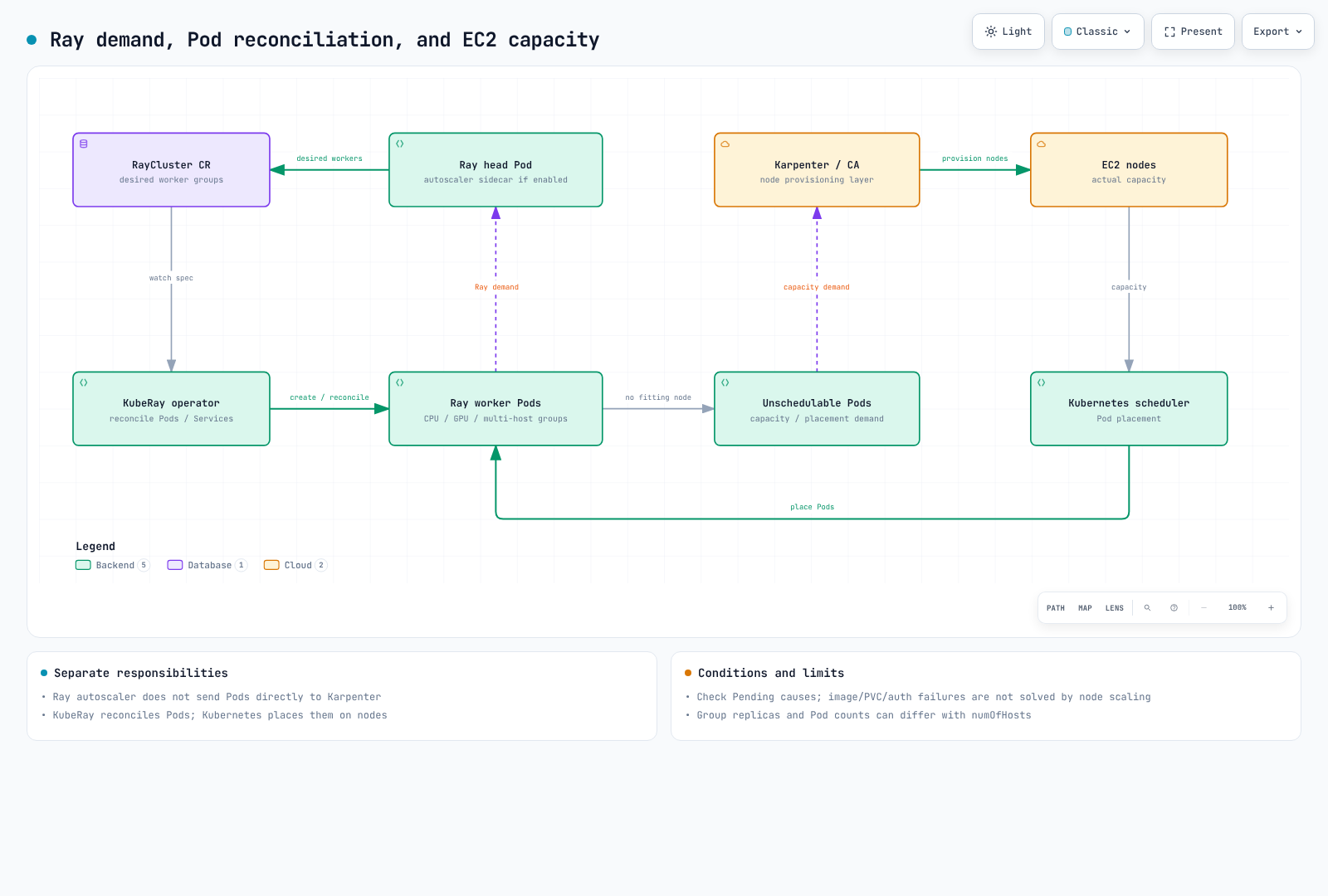
Enable Ray autoscaling with enableInTreeAutoscaling: true. KubeRay configures a head-Pod autoscaler sidecar and the required permissions. The example explicitly sets autoscalerOptions.version: v2 instead of depending on version-sensitive defaults.
The Ray autoscaler examines tasks, actors, placement/resource requests, and desired worker-group size; KubeRay adjusts Pods. With numOfHosts, one group replica can correspond to several Ray Pods, so replicas == Pod count is not universal.
Kubernetes places Pods, while a provisioner such as Karpenter supplies EC2 capacity for unschedulable requirements. A Pending Pod caused by image pulls, PVCs, permissions, or quotas is not necessarily fixed by adding a node. Karpenter consolidation and drift handling are separate control behavior too.
The Ray 2.58.0 configuration generator defaults the global idle timeout to 60 seconds; group-level idle timeouts can override behavior. Min/max replicas, activity, polling, and draining conditions mean it is not a promise to delete a Pod exactly 60 seconds later.
CPU/GPU Resource Declarations
A Pod GPU limit is not always the only source of configuration. The reviewed code applies precedence across structured group resources, rayStartParams, and the first Ray container's limits/requests. An explicit num-gpus is not unconditionally overwritten with the container GPU limit.
Native Ray 2.58.0 configuration checks produced GPU 1 from limit 1, GPU 2 with rayStartParams.num-gpus=2, and GPU 3 with structured group resources.GPU=3. This does not create more physical GPUs. Align Kubernetes limits, device plugins, drivers, Ray logical resources, and visible hardware.
Min replicas and CPU/placement requirements can also affect GPU-group size; GPU Pods do not necessarily appear only when GPU tasks are pending. Distinguish logical Ray CPU settings from container enforcement as well.
Installing and Upgrading the Operator
helm repo add kuberay https://ray-project.github.io/kuberay-helm/
helm repo update kuberay
helm pull kuberay/kuberay-operator --version 1.7.0 --untar --untardir ./vendor
helm template kuberay-operator ./vendor/kuberay-operator \
  --namespace kuberay-system --include-crds > operator.rendered.yaml
Inspect CRDs, RBAC, namespace watch scope, and feature gates. The chart defaults enable leader election and watch cluster-wide. To narrow scope, review singleNamespaceInstall, watchNamespace, and related RBAC settings together.
Perform actual installation after verifying context and administrative permissions:
helm upgrade --install kuberay-operator kuberay/kuberay-operator \
  --version 1.7.0 --namespace kuberay-system --create-namespace
kubectl rollout status deployment/kuberay-operator -n kuberay-system
Helm's crds/ mechanism does not automatically upgrade or delete existing CRDs. Do not assume a chart upgrade updated the schema. Check stored CRs and API-version compatibility, then perform the release-appropriate CRD update separately. Deleting a CRD can delete its custom resources.
Minimal CPU Configuration
This example assumes the ray-demo namespace exists. The CRD schema was validated; controller execution, image startup, and autoscaling were not exercised.
apiVersion: ray.io/v1
kind: RayCluster
metadata:
  name: ray-cpu-demo
  namespace: ray-demo
spec:
  rayVersion: '2.58.0'
  enableInTreeAutoscaling: true
  autoscalerOptions:
    version: v2
    idleTimeoutSeconds: 60
  headGroupSpec:
    serviceType: ClusterIP
    rayStartParams:
      num-cpus: '0'
    template:
      spec:
        containers:
          - name: ray-head
            image: rayproject/ray:2.58.0-py312
            resources:
              requests:
                cpu: '1'
                memory: 2Gi
              limits:
                cpu: '1'
                memory: 2Gi
  workerGroupSpecs:
    - groupName: cpu
      replicas: 0
      minReplicas: 0
      maxReplicas: 2
      rayStartParams: {}
      template:
        spec:
          containers:
            - name: ray-worker
              image: rayproject/ray:2.58.0-py312
              resources:
                requests:
                  cpu: '1'
                  memory: 2Gi
                limits:
                  cpu: '1'
                  memory: 2Gi
The complete schema fixture uses rayproject/ray:2.58.0-py312 and CPU 1/memory 2 GiB requests and limits for head and workers. Setting rayVersion does not itself upgrade container images. Verify runtime, Python, and image compatibility too.
Restrict dashboard, Ray Client, and job-submission entry points to trusted actors. Token authentication is separate configuration, not TLS or access control for every application endpoint. Check secret delivery against organizational policy and keep sensitive tokens out of public manifests and logs.