Part 4: Ray Serve
Review baseline: Ray 2.58.0 · KubeRay 1.7.0 · 2026-09-12
Environment and Validation Scope
A small CPU response example was checked with Python 3.12 and ray[serve]==2.58.0. In this environment, the HAProxy module imported Jinja2 although the extra installation had not supplied it; explicitly adding Jinja2==3.1.6 fixed the import. Other environments may already have it through another dependency.
The ray[llm] extra adds large inference dependencies such as vLLM. It was not installed here, and no model weights, GPU, or EKS workload ran. Validation below covers Serve configuration, HTTP responses, and DeploymentHandle calls.
Deployments, Applications, and Request Paths
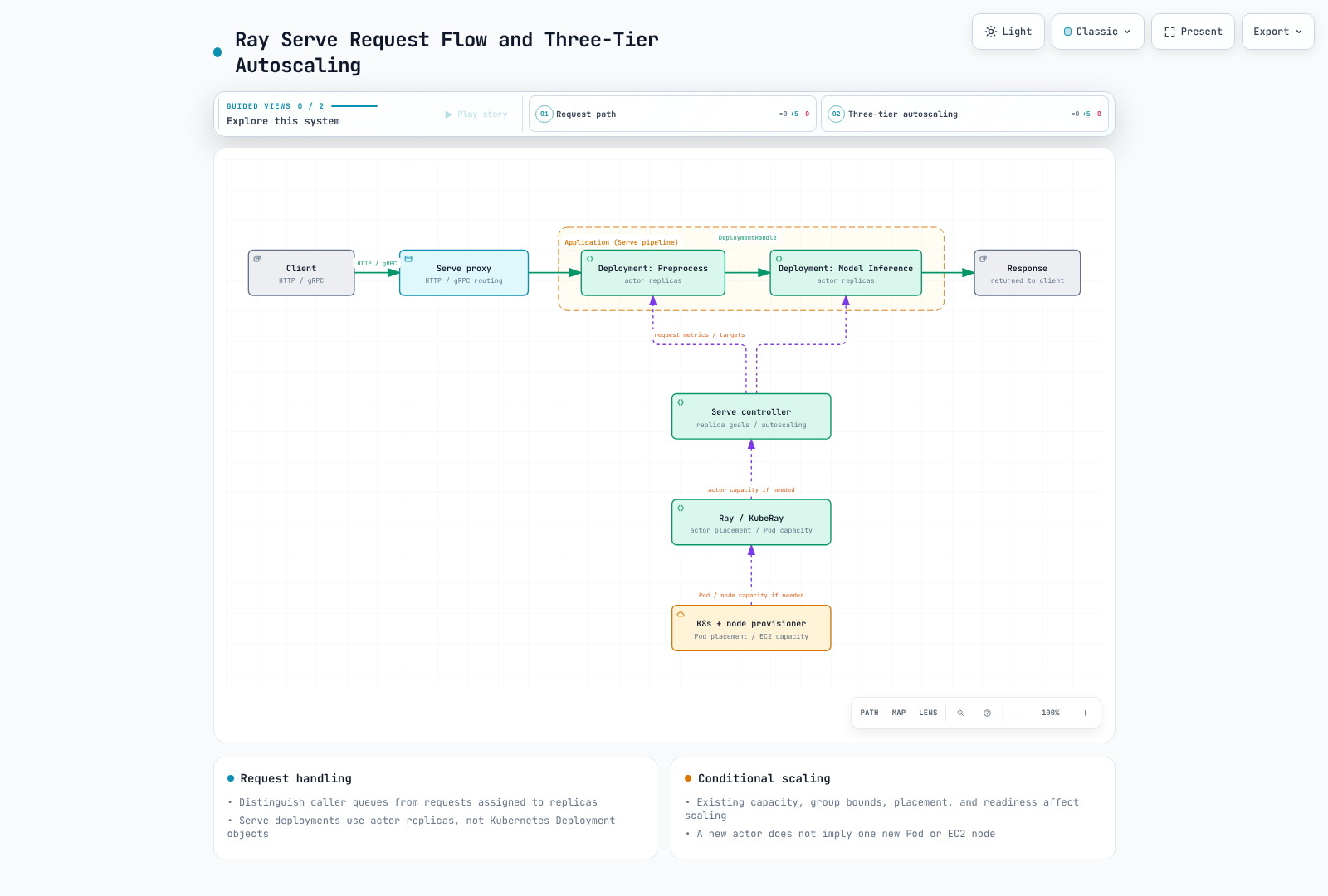
A Serve Deployment manages actor replicas; it is different from a Kubernetes Deployment. Several replica actors can fit in one Ray Pod, so replica and Pod counts are not interchangeable.
An Application contains one or more deployments and an ingress deployment. DeploymentHandles can connect preprocessing and inference without making every internal call traverse HTTP or creating a Kubernetes Service per deployment.
The Controller manages Serve control state and actor lifecycles. Proxies receive HTTP/gRPC traffic and forward it to deployments. The 2.58.0 default proxy location is EveryNode on nodes hosting replicas. HeadOnly and Disabled can be selected explicitly. An older architecture page's head-only default should not override the current API contract.
Distinguish caller queues at proxies/handles from ongoing requests assigned to replicas. Review synchronous/async handlers, blocking work, timeouts, and cancellation behavior in the application.
Small Local HTTP/Handle Example
This validates response APIs rather than model inference. The actual check used an available private-loopback port and confirmed HTTP 200 and double(4) == 8.
import requests
import ray
from ray import serve

try:
    ray.init(address="local", num_cpus=2, include_dashboard=False,
             object_store_memory=80 * 1024 * 1024)
    serve.start(proxy_location="HeadOnly",
                http_options={"host": "127.0.0.1", "port": 18080})

    @serve.deployment(num_replicas=1,
                      ray_actor_options={"num_cpus": 1},
                      max_ongoing_requests=2, max_queued_requests=4)
    class Echo:
        async def __call__(self, request):
            return {"echo": request.query_params.get("value", "")}
        def double(self, value):
            return value * 2

    handle = serve.run(Echo.bind(), name="echo", route_prefix="/echo")
    response = requests.get("http://127.0.0.1:18080/echo",
                            params={"value": "fixture"}, timeout=15)
    assert response.status_code == 200
    assert response.json() == {"echo": "fixture"}
    assert handle.double.remote(4).result(timeout_s=15) == 8
finally:
    serve.shutdown()
    ray.shutdown()
Run in a separate exercise process with port 18080 available. Ray logical resources and object-store size are not whole-process OS memory/CPU limits. serve.shutdown() stops the connected Serve instance; do not use this example's cleanup against a shared production cluster.
Replicas, Autoscaling, and Backpressure
Distinguish these verified 2.58.0 defaults:
| Configuration | Value or meaning |
|---|---|
| Default deployment | one replica, autoscaling unconfigured |
num_replicas="auto" | applies min 1, max 100, target ongoing 2 |
Direct AutoscalingConfig() | min 1, max 1; omitting max restricts expansion |
max_ongoing_requests | requests sent to a replica without a response; default 5 |
max_queued_requests | queue bound at each caller (proxy/handle); default -1, unlimited |
| Scaling delay | default upscale 30 seconds/downscale 600 seconds; not actual readiness latency |
The autoscaling target observes request load; it is distinct from max ongoing and a global queue bound. Exceeding queue limits can raise BackPressureError for handles or return HTTP 503 by default. Backpressure configuration can customize the HTTP response.
Tune min/max, measurement windows/delays, cold starts, model loading, batching, and real processing time together. Scaling to zero with min_replicas=0 does not eliminate restart latency. A desired replica count does not guarantee all replicas are ready.
Control Layers on EKS
- Serve adjusts deployment replica targets from request load and policy.
- Ray places actors/bundles; enabled Ray autoscaling and KubeRay can adjust worker Pod capacity.
- Kubernetes places Pods and a provisioner such as Karpenter supplies node capacity when required.
A pending actor does not automatically become one Pending Pod or one EC2 node. Existing Ray Pods can gain free capacity, or group bounds, placement, and quotas can prevent progress. Inspect demand and readiness at each layer.
GPU Inference and Ray Serve LLM
Ordinary GPU replicas use Ray resource settings such as ray_actor_options. Align devices, drivers, Pod limits, and Ray's structured-resource/rayStartParams precedence. As Part 2 explains, Pod limits are not always the only configured value.
APIs such as LLMConfig and build_openai_app provide a separate LLM configuration layer. The 2.58.0 documentation and package show vLLM and SGLang backends. Verified ray[llm] dependencies include vllm[audio]==0.26.0 and NIXL packages; this does not imply every SGLang dependency is installed too.
Distinguish model_loading_config, deployment_config, engine_kwargs, and server_cls. Check engine-specific fields and supported combinations rather than assuming every vllm serve CLI option transfers unchanged. Backends can differ in tensor-parallel option names and worker placement. Some APIs are beta, and older LLMServer/LLMRouter paths carry deprecation notices.
Validate model access, revision, weight downloads, engine/CUDA/driver compatibility, KV cache, and tensor/pipeline-parallel resources separately. OpenAI-compatible request format does not establish authentication, security, or identical feature coverage. The CPU Echo check does not prove LLM performance or compatibility.
RayService and Operational Updates
RayService is an option for declarative lifecycle management of Serve applications and RayClusters on EKS, not a universal requirement for every production deployment. Distinguish application configuration changes from cluster changes, and NewCluster from Gateway-based incremental upgrade strategies.
KubeRay 1.7's enabled incremental feature gate still requires Gateway APIs/implementation, spare capacity, readiness, and draining conditions. Test streaming and long-running requests against shutdown bounds. Do not describe every upgrade as guaranteed zero request loss.
Cluster-scoped startup settings such as HTTP options have dynamic-update limits. Deployment changes can be lightweight reconfiguration or actor replacement. Restarted/replaced replicas pay model initialization and state-recovery costs.
Access Control and Limits
Restrict API/dashboard/client entry points, model-artifact access, and application-user access separately. Ray cluster tokens and ClusterIP do not automatically implement authentication/authorization for every Serve endpoint. Review sensitive inputs, responses, prompts, and logs, and configure queue, timeout, and resource bounds.
The checks here cover native configuration/decorators and a tiny single-node HTTP/Handle application. Autoscaling load tests, GPU/LLM execution, multi-node failover, and RayService rollouts were not performed.