Zonal Cluster Operations: Traffic Shifting, Upgrade Rollback, and Data-Layer AZ Affinity
Review baseline: EKS rollback and ARC documentation, Strimzi 1.2.0, Valkey GLIDE 2.5.2, AWS Advanced JDBC Wrapper 4.4.0 Last reviewed: September 11, 2026. Configuration examples were checked; live cluster cutovers and failure experiments were not performed.
< Previous: Tekton Pipelines | Table of Contents | Next: Troubleshooting Playbook >
This guide combines traffic shifting across clusters with AZ-local workers, conditional version rollback, and AZ-aware data reads. A zonal fleet is not a default architecture for every team. Consider it when you can operate cell capacity, routing, deployments, and data dependencies independently.
Here, zonal describes worker and application placement. The managed EKS control plane remains distributed across multiple AZs. The entire cluster does not reside inside one AZ.
Table of Contents
- Why Zonal Operations
- Traffic Layer: Target Group + TargetGroupBinding + Weight Shifting
- Upgrades: Conditions for In-Place and Native Rollback
- Data Layer: Prefer Same-AZ Reads
- Recommended Combination Summary
Why Zonal Operations
| Aspect | Multi-AZ single cluster | Clusters with workers in one AZ each |
|---|---|---|
| Failure isolation | Replicas and spare capacity in healthy AZs handle recovery | A cell can lose all its workers; shared databases, routing, and regional dependencies can affect other cells |
| Cross-AZ cost | Depends on service and data paths | Local application traffic can decrease, but replication, shared services, and LB forwarding can still cross AZs |
| Upgrades | Control plane and nodes change in stages, with version skew managed | Sequential cell upgrades need compatible versions and capacity in the remaining cells |
| Operational complexity | One cluster | Multiple clusters and coordinated routing |
See AWS's Cell-Based Architecture for Amazon EKS Guidance. Minimize dependencies between cells and size healthy cells to absorb the failed cell's traffic. Selecting per-cell LBs through DNS and weighting target groups behind one LB are different routing designs. Measure costs using the actual traffic paths and each service's charging rules.
Related guides: Advanced Infrastructure and EKS Resiliency.
Traffic Layer: Target Group + TargetGroupBinding + Weight Shifting
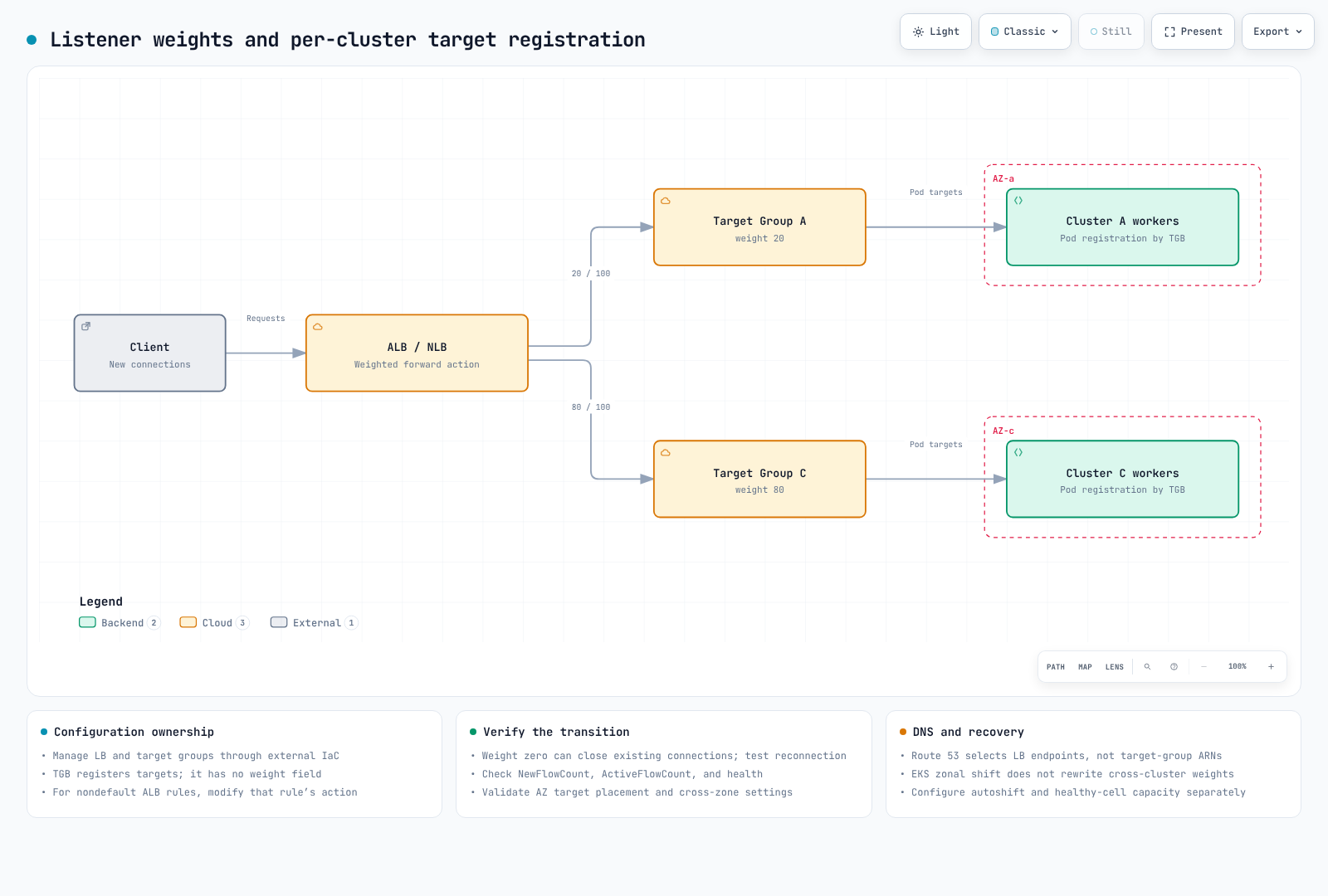
For two clusters sharing one LB:
- Create the NLB/ALB and target groups outside the clusters using IaC, so replacing a cluster does not delete the LB.
- Bind each cluster's Service to its own target group using
TargetGroupBinding. - Change weights in the listener's forward action. TGB itself has no weight field. Assign ownership of target groups and listener configuration explicitly between IaC and controllers.
The TGB example assumes the production namespace, app-service:80, an IP target group in the intended VPC, and AWS Load Balancer Controller already exist. Replace the example ARN and verify target health and network access.
This example uses a separately installed AWS Load Balancer Controller. Built-in Auto Mode TGB uses eks.amazonaws.com/v1 with different tag and lifecycle rules. AWS documents target-group deletion when that built-in TGB or cluster is deleted; do not mix that ownership model with this externally managed target group.
apiVersion: elbv2.k8s.aws/v1beta1
kind: TargetGroupBinding
metadata:
  name: zone-a-tgb
  namespace: production
spec:
  targetGroupARN: arn:aws:elasticloadbalancing:ap-northeast-2:ACCOUNT:targetgroup/zone-a-tg/xxxxxxxxxxxx
  serviceRef:
    name: app-service
    port: 80
targetType: ipset -euo pipefail
# NLB listener whose existing default action forwards to these two groups.
# Nondefault ALB rules require modify-rule, not this operation.
: "${LISTENER_ARN:?}" "${ZONE_A_TG_ARN:?}" "${ZONE_C_TG_ARN:?}"
aws elbv2 describe-listeners \
--listener-arns "$LISTENER_ARN" \
--query 'Listeners[0].DefaultActions' --output json > current-actions.json
jq -e --arg a "$ZONE_A_TG_ARN" --arg c "$ZONE_C_TG_ARN" '
if $a == $c or length != 1 or .[0].Type != "forward"
or ([.[0].ForwardConfig.TargetGroups[].TargetGroupArn] | sort)
!= ([$a, $c] | sort)
then error("Expected one forward action with exactly the two selected groups")
else
.[0].ForwardConfig.TargetGroups |= map(
.Weight = (if .TargetGroupArn == $a then 20 else 80 end))
end
' current-actions.json > proposed-actions.json &&
aws elbv2 modify-listener \
--listener-arn "$LISTENER_ARN" \
--default-actions file://proposed-actions.jsonBefore execution, reconcile this change with the IaC plan. Ordinary NLB weight changes affect new flows, but weight zero needs separate treatment. The current user guide states that shortly after setting zero, the group receives no new connections and existing connections are closed. Do not assume existing connections survive until natural closure; test application drain, reconnection, and retry behavior before switching to zero. Follow the official guide to inspect NewFlowCount and ActiveFlowCount per target group, health, error rates, and connection draining before changing nodes. Verify target-group protocol/IP-version compatibility and cross-zone settings. With targets confined to different AZs, disabling cross-zone balancing can prevent the intended weight distribution.
Route 53 weighted records select LB DNS endpoints, not target-group ARNs. TTLs, client caches, and long-lived connections also prevent instant DNS cutover. See AWS Load Balancer Controller and Advanced Infrastructure for the surrounding setup.
Planned shifts and failure response: weight changes support planned transitions but do not provide automatic failure detection. ARC zonal shift is operator initiated. Zonal autoshift requires separate activation, practice, and alarm configuration. An EKS resource shift changes impaired-AZ endpoint/node handling within that cluster; it does not rewrite another cluster's target-group weights. Plan the LB resource's shift separately too.
EKS Auto Mode support: following the July 2026 release, enabling cluster zonal shift lets Auto Mode constrain new provisioning and voluntary disruption in the impaired AZ during a shift. This does not enable autoshift by itself. Shifting away from the only AZ containing workers can cause an outage. EKS shift needs healthy-AZ replicas, CoreDNS, and spare capacity. A cell whose workers occupy one AZ needs external cell routing as part of recovery.
Upgrades: Conditions for In-Place and Native Rollback
EKS native version rollback, introduced in July 2026, can return to the immediately previous minor version if initiated within seven days after upgrade completion. Seven days is an eligibility window, not a recovery-time guarantee. Check creation version, support status, subsequent upgrades, feature compatibility, and Rollback Readiness Insights.
- Auto Mode: EKS rolls back Auto Mode nodes first, then the control plane. PDBs and NodePool disruption budgets still apply; rollback is not instantaneous.
- Managed node groups: roll them back separately with
UpdateNodegroupVersion. Operators prepare self-managed and Hybrid nodes separately. Nodes must not run a version newer than the control plane. - Add-ons, data, and applications: rollback does not restore add-on versions, etcd data, persistent-volume data, or application changes. Plan compatibility and data-migration recovery independently.
--force: can bypass readiness insights, but not eligibility prerequisites or Auto Mode disruption controls. Resolve issues before following the normal rollback procedure.
There is no additional charge for the rollback feature itself; existing cluster, compute, and traffic charges still apply. Choose in-place or blue/green after validating remaining-cell capacity and recovery objectives.
| Approach | Appropriate conditions |
|---|---|
| Blue/green clusters | Validate in a separate environment and retain traffic failback to the old environment; shared data changes need their own recovery plan |
| Zonal in-place + native rollback | An existing cell fleet can absorb traffic, and eligibility, compatibility, and recovery time have been tested |
| Route 53 weighted DNS cutover | Distinct LB endpoints, including cross-Region/account designs, with DNS caching and health behavior considered |
The operational sequence is check remaining-cell capacity → shift weights → confirm connection draining → upgrade → validate → restore weights. See Upgrade Operations and EKS Upgrades for detailed procedures and node-specific conditions.
Data Layer: Prefer Same-AZ Reads
Prefer local reads when a suitable replica exists in the same AZ and the application accepts its consistency behavior. Writes, replication, initial metadata requests, and failure fallback can still cross AZs. Measure replication lag, errors, actual connection destinations, and transfer volume together.
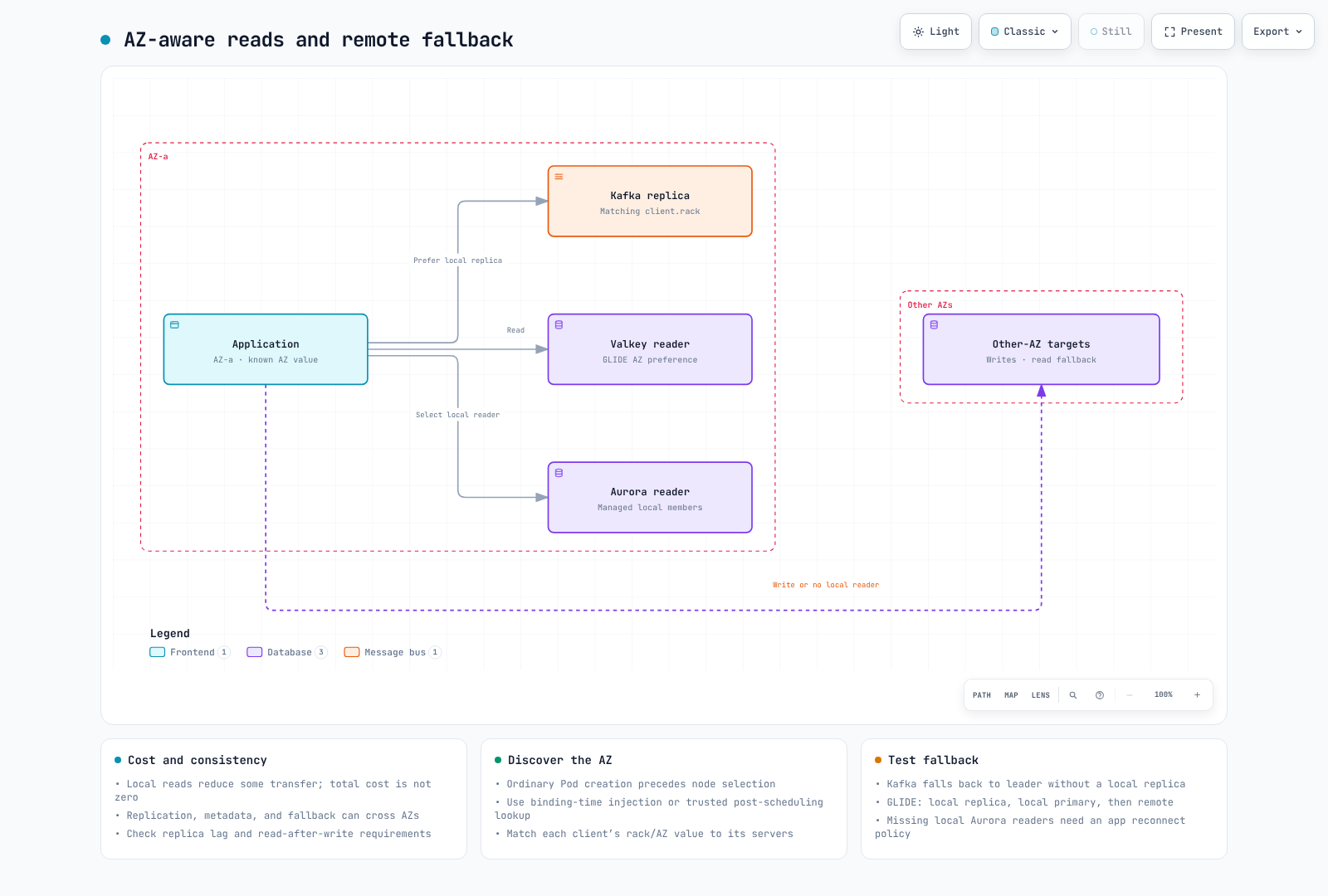
First determine the pod's AZ. The Downward API exposes pod fields; it does not directly query node labels.
- Node metadata injection: ordinary Pod-create admission occurs before scheduling, so the destination node is not yet known. The AWS MSK guide handles
Pod/bindingrequests to read the selected node and inject its AZ ID. Configure Kyverno binding-request filters, node-read RBAC, and completion before pod startup together. - Post-scheduling lookup: expose
spec.nodeNamethrough the Downward API and use a trusted initialization component to read node labels. Do not grant all applications broad node-read access. - EC2 IMDSv2: where EC2 metadata access is intentionally available, obtain a token before reading placement information. Do not assume an IMDSv1 GET works or remove metadata restrictions indiscriminately. This is not directly applicable to Fargate.
- Operator support: Strimzi configures rack awareness for its managed brokers and supported client resources. It does not automatically set
client.rackin unrelated application Deployments.
Do not mix AZ names and AZ IDs. Kafka's broker.rack and client.rack must use matching strings. If MSK uses AZ IDs, do not substitute a name such as ap-northeast-2a. GLIDE's client_az must likewise match the AZ values reported by the servers.
Kafka: KIP-392 Follower Fetching
KIP-392, introduced in Kafka 2.4, allows consumers to read from a same-rack replica. This is the feature's introduction version, not a recommendation to deploy Kafka 2.4 today.
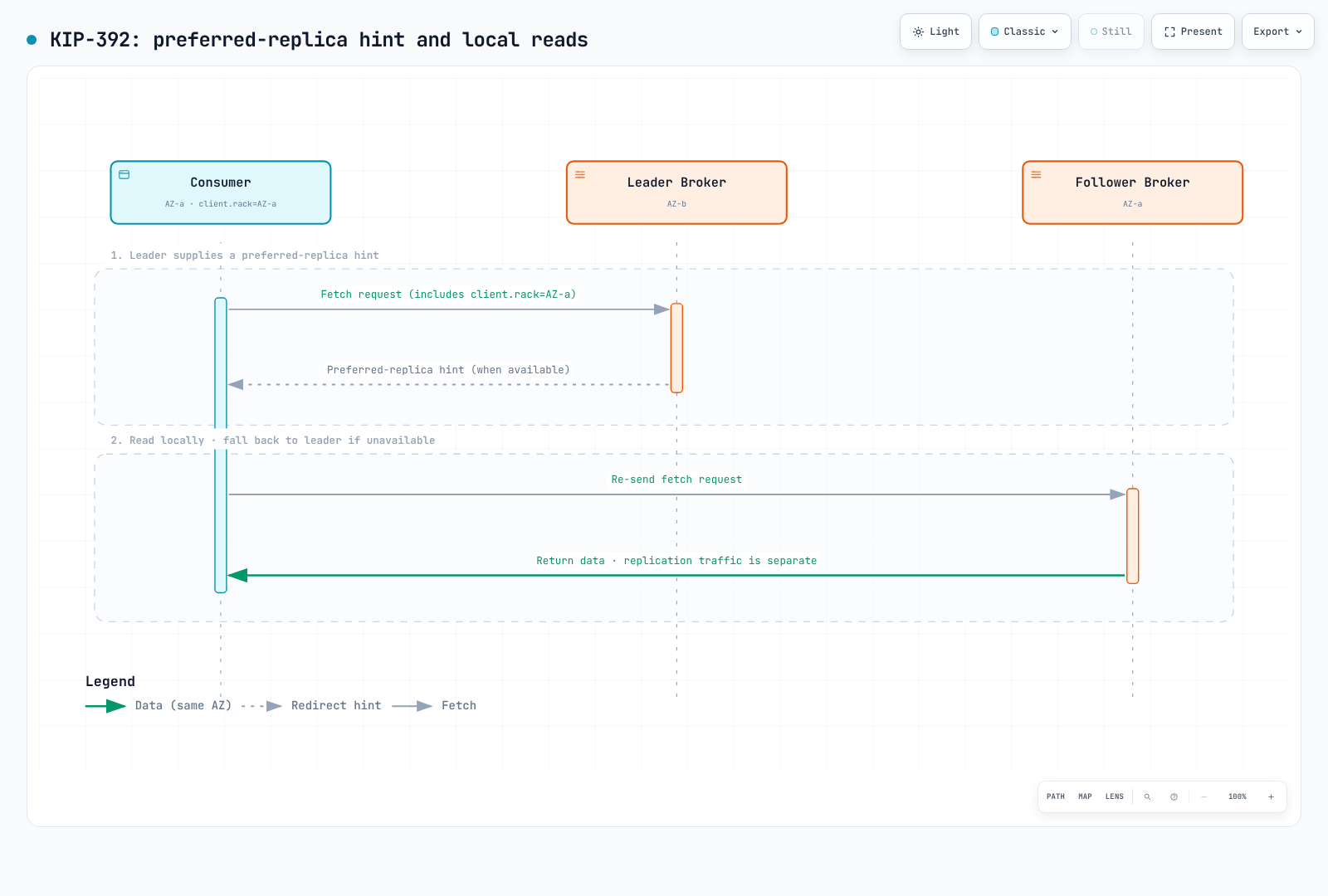
- Brokers: configure
replica.selector.class=org.apache.kafka.common.replica.RackAwareReplicaSelectorandbroker.rack. - Consumers: set
client.rackto the consumer's rack. If no suitable local replica exists, selection falls back to the leader. - Strimzi 1.2.0: the following is a configuration excerpt to merge into an existing Kafka CR, not a complete deployment. KafkaNodePools, listeners, storage, and other configuration are also required. From Strimzi 1.0 the CR API is
v1; specify the rack type too.
apiVersion: kafka.strimzi.io/v1
kind: Kafka
metadata:
  name: my-cluster
spec:
  kafka:
    rack:
      type: topology-label
      topologyKey: topology.kubernetes.io/zone
    config:
      replica.selector.class: org.apache.kafka.common.replica.RackAwareReplicaSelector
This configures the brokers' broker.rack. Set ordinary application consumers' client.rack separately. KafkaConnect, MirrorMaker 2, and Bridge have their own CR rack settings. Follow the Strimzi documentation to distribute broker placement as well. Follower fetching can increase read latency because of replication lag.
KIP-881 concerns rack-aware partition assignment, a separate mechanism. Check consumer-version and assignor support. See Kafka on EKS for deployment guidance.
Redis/Valkey (ElastiCache): AZ-Affinity Read Strategies
These are the principal Valkey GLIDE ReadFrom choices discussed here. GLIDE 2.5.2 also has ALL_NODES; this is not the complete enum list.
| Strategy | Behavior |
|---|---|
PRIMARY | Read from the primary (default) |
PREFER_REPLICA | Round-robin across replicas, then primary if no replica is available |
AZ_AFFINITY | Local replicas first, then other replicas or primary |
AZ_AFFINITY_REPLICAS_AND_PRIMARY | Local replicas → local primary → replicas or primary in other AZs |
Consider replica reads when the application tolerates stale data; read percentage alone does not determine the strategy. Verify server AZ-metadata support/configuration, primary load, and fallback. Design requests needing freshness or read-after-write separately, for example with primary reads where appropriate for the data model.
This valkey-glide==2.5.2 example creates configuration for cluster mode without opening a connection. It enables TLS; supply credentials where authentication is required. For cluster mode disabled, use GlideClientConfiguration and GlideClient instead.
from glide import GlideClusterClientConfiguration, NodeAddress, ReadFrom


def cache_config(host: str, client_az: str, credentials=None):
    if not host or not client_az:
        raise ValueError("Cache endpoint and client AZ are required")
    return GlideClusterClientConfiguration(
        addresses=[NodeAddress(host, 6379)],
        use_tls=True,
        credentials=credentials,
        read_from=ReadFrom.AZ_AFFINITY_REPLICAS_AND_PRIMARY,
        client_az=client_az,
    )
The HotelTrader case study reports 95% lower inter-AZ transfer cost and 49% lower average latency after both AZ-aware routing and request batching. These are results from that ECS/ElastiCache workload, not guarantees for the routing option alone.
Aurora/RDS: Reader Endpoint Limits and Alternatives
Aurora's default reader endpoint balances connections across read replicas; it does not guarantee AZ preference or per-query balancing. With no replicas, it can connect to the writer. DNS changes alone do not move existing pooled connections to another instance.
Per-AZ custom endpoints: explicitly select instance IDs after verifying their AZ and reader role. Replace the names in this creation example with real resources.
bashaws rds create-db-cluster-endpoint \ --db-cluster-identifier my-aurora-cluster \ --db-cluster-endpoint-identifier reader-az-a \ --endpoint-type READER \ --static-members db-instance-az-a-1 db-instance-az-a-2The CLI/API supports
READERendpoints. A member promoted to writer is excluded, and new replicas are not automatically added to a static list. Check membership behavior and provide an application fallback endpoint or explicit failure policy when no local reader remains.AWS Advanced JDBC Wrapper 4.4.0:
fastestResponseselects a host using measured response time. Also load thefastestResponseStrategyplugin. This is not an AZ-label constraint; the fastest host is not guaranteed to be local.
Issue #1139 was closed in May 2025 after discussion that the response-time feature in 2.5.5 met the request. It is not an open feature request proving custom endpoints are the only solution.
Complementary Kubernetes Service-Layer Options
Topology Aware Routing and Istio Zone-Aware Routing complement Service endpoint selection. Local endpoint shortages, health changes, and configuration can send traffic to other AZs. They do not automatically control external DB/cache/Kafka connections. Preference is not a guarantee that the entire read path remains in one AZ.
Recommended Combination Summary
| Layer | Selection criteria | Alternative/fallback |
|---|---|---|
| Architecture | Independent cell operations and healthy-cell capacity | A multi-AZ single cluster remains a valid choice |
| Traffic shifting | LB forward-action weights and TGB target registration | Route 53 selects LB endpoints |
| Failure response | Manual zonal shift / separately enabled autoshift | Single-AZ worker cells need external cell routing |
| Upgrades | Tested eligibility, compatibility, and recovery time | Blue/green, with data recovery handled separately |
| Kafka reads | Broker selector plus matching consumer rack | Leader when no suitable local replica exists |
| Cache reads | GLIDE strategy matching freshness and AZ metadata | Verify remote fallback and primary load |
| DB reads | Maintained local reader list or response-time selection | Handle missing local readers and reconnection |
Measure load, cost, and recovery-time baselines, then rehearse traffic shifts and rollback outside production. Read-path optimization can also be introduced independently: validate consistency, fallback, and cost on a small scope before expanding.
< Previous: Tekton Pipelines | Table of Contents | Next: Troubleshooting Playbook >