EKS Networking - Part 2: Services, Load Balancing, and Network Policies
Verified Example Versions: EKS Kubernetes 1.36, AWS Load Balancer Controller 3.5.0, Gateway API 1.6.0 Last Updated: September 11, 2026
Overview
In this document, we will learn about services, load balancing, and network policies in Amazon EKS. We cover how to expose applications through Kubernetes services, integration with AWS load balancers, and how to control pod-to-pod communication using network policies.
Kubernetes Service Types
Kubernetes provides the following service types:
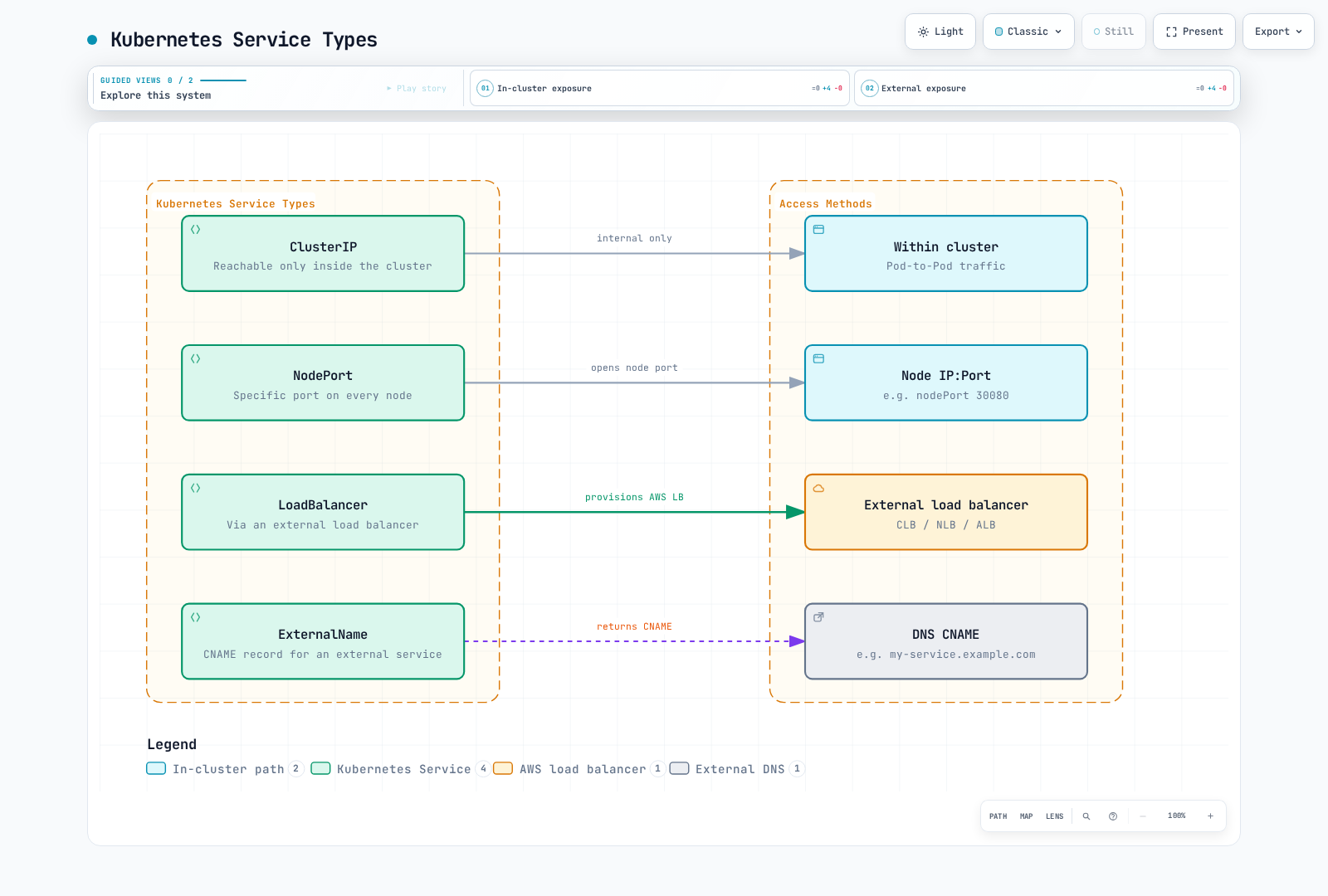
- ClusterIP: Service virtual IP for cluster routing; not an authorization boundary
- NodePort: Service exposed on eligible node addresses and an allocated port, subject to routing and firewall rules
- LoadBalancer: Service reconciled by an installed load-balancer implementation; the load balancer can be internal
- ExternalName: Provides CNAME record for external services
ClusterIP Service
ClusterIP is the default type. Its virtual IP is intended for cluster networking; it does not enforce namespace isolation or authentication. A headless Service (clusterIP: None) instead exposes endpoint addresses through DNS.
apiVersion: v1
kind: Service
metadata:
  name: my-service
spec:
  selector:
    app: my-app
  ports:
  - port: 80
    targetPort: 8080
  type: ClusterIP
NodePort Service
NodePort normally uses the configured node address set and a port in 30000–32767 (the default range). Node readiness, service-proxy configuration, externalTrafficPolicy, routes and security rules determine actual reachability. Opening the whole range is not required for one Service.
apiVersion: v1
kind: Service
metadata:
  name: my-service
spec:
  selector:
    app: my-app
  ports:
  - port: 80
    targetPort: 8080
    nodePort: 30080
  type: NodePort
LoadBalancer Service
An installed controller reconciles this Service. The example explicitly selects LBC and creates an internal NLB with Pod IP targets; ALBs are configured using Ingress or an ALB Gateway. EKS Auto Mode uses eks.amazonaws.com/nlb and has its own supported configuration. Do not apply both versions of the same my-service example together.
apiVersion: v1
kind: Service
metadata:
  name: my-service
  annotations:
    service.beta.kubernetes.io/aws-load-balancer-scheme: internal
    service.beta.kubernetes.io/aws-load-balancer-nlb-target-type: ip
spec:
  type: LoadBalancer
  loadBalancerClass: service.k8s.aws/nlb
  allocateLoadBalancerNodePorts: false
  selector:
    app: my-app
  ports:
  - port: 80
    targetPort: 8080
ExternalName Service
An ExternalName service provides a CNAME record for external services. It does not proxy traffic or configure TLS, ports or firewall access. HTTP Host headers and certificate names must still match the destination.
apiVersion: v1
kind: Service
metadata:
  name: my-service
spec:
  type: ExternalName
  externalName: my-service.example.com
AWS Load Balancer Integration
EKS integrates Kubernetes services with AWS load balancers to make applications accessible from outside.
Classic Load Balancer (CLB)
Legacy AWS service-controller paths could create CLBs. This is not the default of modern LBC: LBC 2.5+ normally assigns its NLB class to new LoadBalancer Services. Check the actual controller, class and ownership before migrating an existing Service; changing ownership annotations in place can leak resources or change exposure.
Network Load Balancer (NLB)
Use the explicit NLB example above. The following is an annotation fragment to merge into that Service, not a standalone manifest:
metadata:
  annotations:
    service.beta.kubernetes.io/aws-load-balancer-scheme: internal
    service.beta.kubernetes.io/aws-load-balancer-nlb-target-type: ip
    service.beta.kubernetes.io/aws-load-balancer-attributes: load_balancing.cross_zone.enabled=true
    service.beta.kubernetes.io/aws-load-balancer-target-group-attributes: preserve_client_ip.enabled=true
aws-load-balancer-nlb-target-type selects the target type. preserve_client_ip.enabled changes source-IP behavior, not target type. Cross-zone balancing is a capacity, availability and cost decision; check zonal targets and failure behavior. Proxy Protocol v2 is optional and requires a backend parser; enabling it on an ordinary HTTP server can break requests.
Application Load Balancer (ALB)
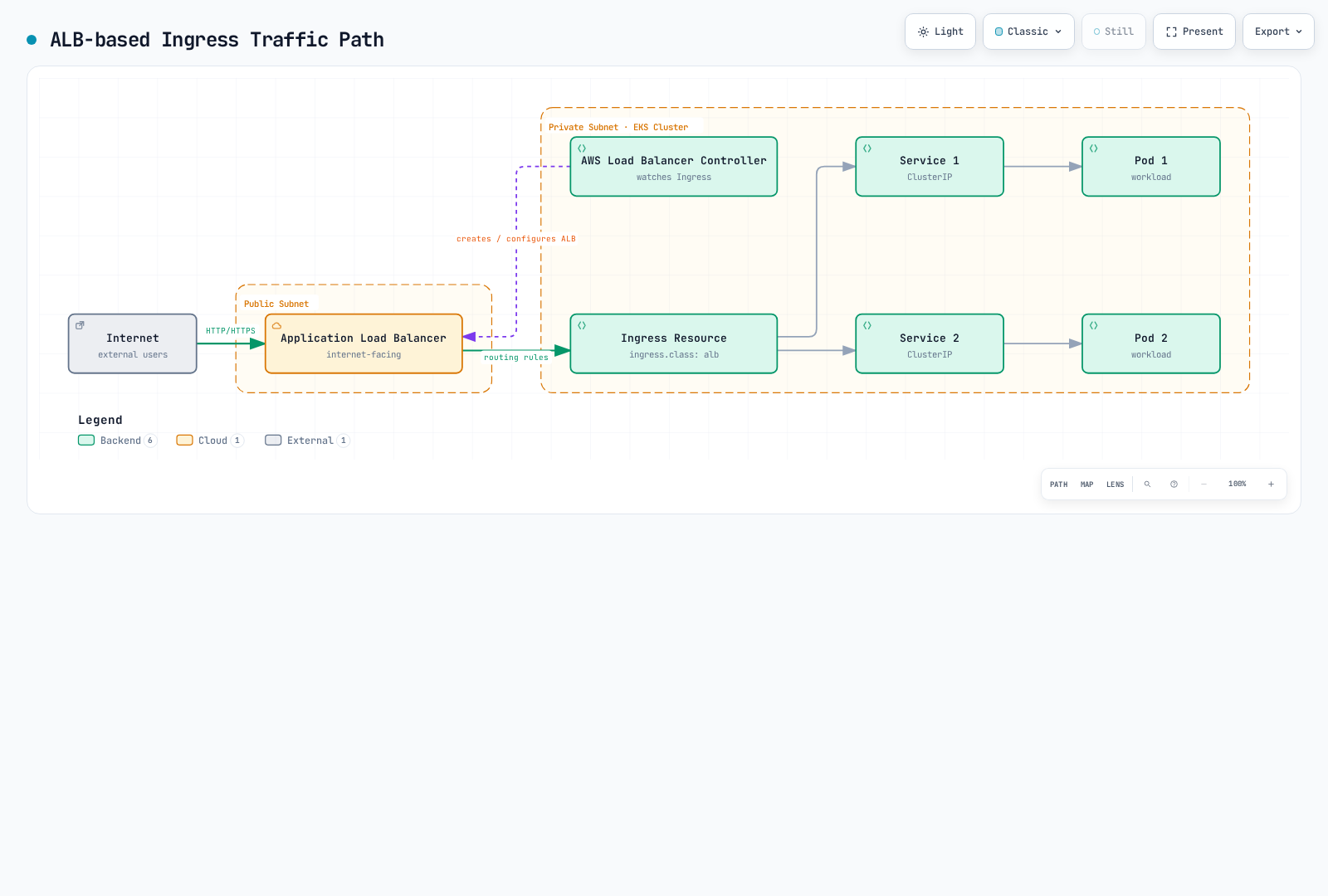
To use ALB, you need to install the AWS Load Balancer Controller and use Ingress resources:
- Prepare the controller with the platform owner. These commands download the pinned IAM policy and render the pinned chart; they do not establish IAM trust. First provision a
kube-system/aws-load-balancer-controllerServiceAccount with a reviewed Pod Identity association or IRSA role/OIDC trust and the release policy. Keep existing installations in their original Helm/IaC ownership. Confirm subnet discovery, API/webhook connectivity and a usable kubeconfig.
set -euo pipefail
: "${CLUSTER_NAME:?Set the existing cluster name}"
: "${AWS_REGION:?Set the cluster Region}"
: "${VPC_ID:?Set the cluster VPC ID}"
curl --fail --show-error --location \
  https://raw.githubusercontent.com/kubernetes-sigs/aws-load-balancer-controller/v3.5.0/docs/install/iam_policy.json \
  --output lbc-iam-policy-v3.5.0.json
helm repo add eks https://aws.github.io/eks-charts
helm repo update eks
helm template aws-load-balancer-controller eks/aws-load-balancer-controller \
  --version 3.5.0 --namespace kube-system \
  --set-string clusterName="$CLUSTER_NAME" \
  --set-string region="$AWS_REGION" --set-string vpcId="$VPC_ID" \
  --set serviceAccount.create=false \
  --set-string serviceAccount.name=aws-load-balancer-controller \
  > lbc-rendered.yaml
After reviewing the rendered resources and satisfying the IAM prerequisites, installation changes the cluster. Upgrade CRDs through the documented release procedure; Helm upgrades do not automatically upgrade every CRD.
helm upgrade --install aws-load-balancer-controller eks/aws-load-balancer-controller \
  --version 3.5.0 --namespace kube-system \
  --set-string clusterName="$CLUSTER_NAME" \
  --set-string region="$AWS_REGION" --set-string vpcId="$VPC_ID" \
  --set serviceAccount.create=false \
  --set-string serviceAccount.name=aws-load-balancer-controller
kubectl -n kube-system rollout status deployment/aws-load-balancer-controller --timeout=180s- Create an Ingress with
spec.ingressClassName: alb. Use the ClusterIPmy-servicefrom the first example as its backend to avoid creating another load balancer. Its selected Pods must really listen on port 8080. The diagram above depicts logical configuration: traffic does not pass through an Ingress API object or the controller Pod.
apiVersion: networking.k8s.io/v1
kind: Ingress
metadata:
  name: my-ingress
  annotations:
    alb.ingress.kubernetes.io/scheme: internal
    alb.ingress.kubernetes.io/target-type: ip
spec:
  ingressClassName: alb
  rules:
  - http:
      paths:
      - path: /
        pathType: Prefix
        backend:
          service:
            name: my-service
            port:
              number: 80
For HTTPS, merge this fragment into the Ingress and replace the ACM ARN and security group with real same-Region/VPC resources. Configure the custom frontend SG yourself; backend-rule management is a separate choice. An action annotation alone does not add a redirect unless referenced; ssl-redirect below provides the documented shortcut.
metadata:
  annotations:
    alb.ingress.kubernetes.io/listen-ports: '[{"HTTP":80},{"HTTPS":443}]'
    alb.ingress.kubernetes.io/certificate-arn: arn:aws:acm:us-west-2:123456789012:certificate/00000000-0000-4000-8000-000000000000
    alb.ingress.kubernetes.io/ssl-redirect: "443"
    alb.ingress.kubernetes.io/security-groups: sg-0123456789abcdef0
    alb.ingress.kubernetes.io/manage-backend-security-group-rules: "true"
Service and Load Balancer Best Practices
- Use ClusterIP for internal services: Use ClusterIP type for services accessed only within the cluster.
- Use LoadBalancer or Ingress for external services: Use LoadBalancer type or Ingress resources for services that need external access.
- Use ALB: Use ALB when features like path-based routing, SSL termination, and authentication are needed.
- Use NLB: Use NLB when TCP/UDP traffic, high performance, and static IP are needed.
- Use internal load balancers: Use an internal load balancer for private routed clients, including connected VPCs/on-premises where allowed; ClusterIP is usually sufficient for in-cluster clients.
- Enable cross-zone load balancing: Evaluate cross-zone behavior against target capacity, zonal failure tests and transfer costs; enabling it alone does not guarantee high availability.
- Select appropriate target type: Choose
iptarget type to use pod IPs directly as targets, orinstancetarget type to use node IPs as targets.
Network Policies
NetworkPolicy filters selected Pods and directions at L3/L4 when an enforcement implementation is enabled. Amazon VPC CNI has native network-policy support on supported EC2/Linux configurations; installing another CNI is not inherently required. Check the exact add-on version, kernel/compute limitations, standard/strict mode and managed Pod requirements in the AWS guide.
Choosing the policy implementation
For an EKS-managed VPC CNI add-on, merge the following fragment into its existing configuration through the add-on owner after checking describe-addon-configuration; preserve unrelated settings. Verify enforcement with positive and negative TCP tests, not only the existence of a policy object.
{"enableNetworkPolicy":"true"}Calico is an alternative policy engine. With VPC CNI, follow the official EKS policy-only procedure, including cni.type: AmazonVPC, Pod-IP annotation permissions and version compatibility. Do not simultaneously enable native VPC CNI policy enforcement. Applying a VXLAN networking manifest over an existing VPC CNI cluster is not a policy-only installation. A replacement network requires a separate migration design.
Default Network Policy
Without a selecting NetworkPolicy, a Pod is non-isolated for that direction; routes, security groups and other controls still apply. Isolation is separate for ingress and egress, and allows from all matching policies are additive. Both the source egress and destination ingress must allow a connection when both are isolated. Reply traffic is implicitly allowed. These are alternative policy examples, not a cumulative restrictive policy set: the namespace-wide ingress allow below would also allow traffic that the later frontend-only example intends to restrict.
Namespace Isolation Policy
This policy selects every Pod in my-namespace and isolates ingress only. It permits same-namespace ingress on all ports; it does not restrict egress. Create the namespace and intended workload labels first.
apiVersion: networking.k8s.io/v1
kind: NetworkPolicy
metadata:
  name: namespace-isolation
  namespace: my-namespace
spec:
  podSelector: {}
  policyTypes:
  - Ingress
  ingress:
  - from:
    - podSelector: {}
Specific Pod Communication Allow Policy
A policy that allows communication only between pods with specific labels:
apiVersion: networking.k8s.io/v1
kind: NetworkPolicy
metadata:
  name: allow-frontend-to-backend
  namespace: my-namespace
spec:
  podSelector:
    matchLabels:
      app: backend
  policyTypes:
  - Ingress
  ingress:
  - from:
    - podSelector:
        matchLabels:
          app: frontend
    ports:
    - protocol: TCP
      port: 80
External Traffic Restriction Policy
An ingress allow for a source CIDR, subject to other additive policies. It evaluates the source IP visible at the policy enforcement point; NAT, NodePort and load balancers can change that IP. It is not a substitute for a frontend load-balancer SG or WAF rule.
apiVersion: networking.k8s.io/v1
kind: NetworkPolicy
metadata:
  name: allow-external-traffic
  namespace: my-namespace
spec:
  podSelector:
    matchLabels:
      app: web
  policyTypes:
  - Ingress
  ingress:
  - from:
    - ipBlock:
        cidr: 192.168.1.0/24
        except:
        - 192.168.1.10/32
    ports:
    - protocol: TCP
      port: 80
Egress Traffic Restriction Policy
A policy that allows egress traffic only to specific destinations: 203.0.113.0/24 is a documentation range; replace it with the real approved external destination. DNS allowance assumes ordinary CoreDNS Pods and must be adapted for NodeLocal DNS or other DNS designs. Excluding RFC1918 ranges from 0.0.0.0/0 would not identify one external service or reliably protect instance metadata.
apiVersion: networking.k8s.io/v1
kind: NetworkPolicy
metadata:
  name: limit-egress-traffic
  namespace: my-namespace
spec:
  podSelector:
    matchLabels:
      app: web
  policyTypes:
  - Egress
  egress:
  - to:
    - podSelector:
        matchLabels:
          app: db
    ports:
    - protocol: TCP
      port: 5432
  - to:
    - ipBlock:
        cidr: 203.0.113.0/24
    ports:
    - protocol: TCP
      port: 443
  - to:
    - namespaceSelector:
        matchLabels:
          kubernetes.io/metadata.name: kube-system
      podSelector:
        matchLabels:
          k8s-app: kube-dns
    ports:
    - protocol: UDP
      port: 53
    - protocol: TCP
      port: 53
Network Policy Best Practices
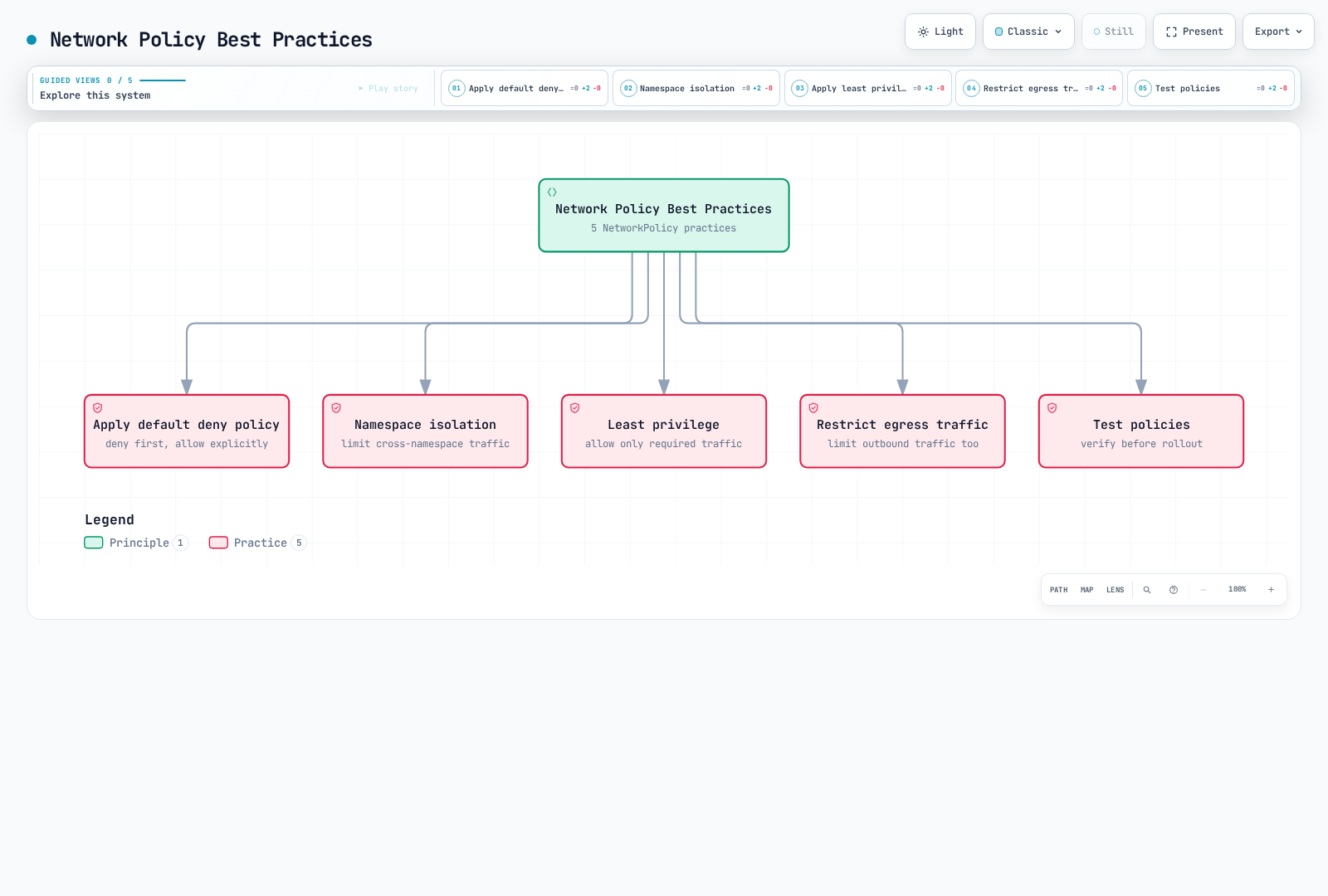
- Apply default deny policy: Deny all traffic by default and explicitly allow only necessary traffic.
- Namespace isolation: Enhance security by restricting communication between namespaces.
- Apply principle of least privilege: Allow only the minimum necessary communication.
- Restrict egress traffic: Enhance security by restricting traffic going out from pods.
- Test policies: Test network policies before applying them to prevent unintended communication blocking.
Gateway API
Overview
Gateway API separates infrastructure ownership (GatewayClass/Gateway) from application routes. LBC uses separate ALB and NLB Gateways; one Gateway cannot mix L4 and L7 routes. ALB supports HTTPRoute/GRPCRoute and NLB supports TCPRoute/UDPRoute/TLSRoute within the controller’s documented feature subset.
Prerequisites
These examples target LBC 3.5.0 with Gateway API 1.6.0, the version named by that release. Earlier L4 support started at 2.13.3 and L7 at 2.14.0; “2.13+ supports everything” is incorrect. In 3.5.0, the controller detects CRDs and enables NLBGatewayAPI/ALBGatewayAPI by default. There is no EnableGatewayAPI gate. TCPRoute and UDPRoute are now v1 resources in the standard channel; do not blindly install older experimental CRDs.
set -euo pipefail
curl --fail --show-error --location \
  https://github.com/kubernetes-sigs/gateway-api/releases/download/v1.6.0/standard-install.yaml \
  --output gateway-standard-v1.6.0.yaml
curl --fail --show-error --location \
  https://raw.githubusercontent.com/kubernetes-sigs/aws-load-balancer-controller/v3.5.0/config/crd/gateway/gateway-crds.yaml \
  --output lbc-gateway-crds-v3.5.0.yaml
Review the downloads and existing CRD ownership/stored versions before applying these cluster-scoped updates. For an existing installation, follow the release migration procedure. Restart/reconcile the controller after CRDs are established if it started without them.
kubectl apply --server-side -f gateway-standard-v1.6.0.yaml
kubectl apply --server-side -f lbc-gateway-crds-v3.5.0.yaml
kubectl get crd gateways.gateway.networking.k8s.io \
  tcproutes.gateway.networking.k8s.io udproutes.gateway.networking.k8s.io \
  loadbalancerconfigurations.gateway.k8s.aws
GatewayClass and Gateway Setup
Create a dedicated gateway-demo namespace and the named backend Services/ready workloads first. Replace the ACM ARN and source CIDR; the certificate must be usable by the ALB in its Region. This is a configuration example, not an executed production deployment. The referenced default TargetGroupConfiguration makes ClusterIP backends use IP targets; otherwise the controller default can be instance targets requiring NodePort. This LBC-specific HTTPS pattern configures ACM through LoadBalancerConfiguration and deliberately omits tls.certificateRefs, which this implementation does not support.
apiVersion: gateway.networking.k8s.io/v1
kind: GatewayClass
metadata:
  name: amazon-alb
spec:
  controllerName: gateway.k8s.aws/alb
---
apiVersion: gateway.k8s.aws/v1
kind: TargetGroupConfiguration
metadata:
  name: ip-targets
  namespace: gateway-demo
spec:
  defaultConfiguration:
    targetType: ip
---
apiVersion: gateway.k8s.aws/v1
kind: LoadBalancerConfiguration
metadata:
  name: alb-config
  namespace: gateway-demo
spec:
  scheme: internal
  sourceRanges:
  - 10.0.0.0/16
  defaultTargetGroupConfiguration:
    name: ip-targets
  listenerConfigurations:
  - protocolPort: HTTPS:443
    defaultCertificate: arn:aws:acm:us-west-2:123456789012:certificate/00000000-0000-4000-8000-000000000000
---
apiVersion: gateway.networking.k8s.io/v1
kind: Gateway
metadata:
  name: my-hotel-gateway
  namespace: gateway-demo
spec:
  gatewayClassName: amazon-alb
  infrastructure:
    parametersRef:
      group: gateway.k8s.aws
      kind: LoadBalancerConfiguration
      name: alb-config
  listeners:
  - name: https
    protocol: HTTPS
    port: 443
    hostname: app.example.com
    allowedRoutes:
      namespaces:
        from: Same
HTTPRoute Example (L7 → ALB)
The 90/10 weights apply to eligible requests matching /api; they are not an exact request count guarantee or health-based failover policy. This route attaches to the HTTPS listener, with an intersecting hostname. Backend ports are Service ports. Cross-namespace routes/backends require the corresponding allowedRoutes/ReferenceGrant controls.
apiVersion: gateway.networking.k8s.io/v1
kind: HTTPRoute
metadata:
  name: app-route
  namespace: gateway-demo
spec:
  parentRefs:
  - name: my-hotel-gateway
    sectionName: https
  hostnames:
  - app.example.com
  rules:
  - matches:
    - path:
        type: PathPrefix
        value: /api
    backendRefs:
    - name: api-service
      port: 80
      weight: 90
    - name: api-service-v2
      port: 80
      weight: 10
  - matches:
    - path:
        type: PathPrefix
        value: /
    backendRefs:
    - name: frontend-service
      port: 80
TCPRoute Example (L4 → NLB)
This separate internal NLB Gateway reuses ip-targets. postgres-service must exist in gateway-demo with ready, routable targets on the Service’s target port. A TCP listener forwards bytes; it does not itself configure database authentication or TLS.
apiVersion: gateway.networking.k8s.io/v1
kind: GatewayClass
metadata:
  name: amazon-nlb
spec:
  controllerName: gateway.k8s.aws/nlb
---
apiVersion: gateway.k8s.aws/v1
kind: LoadBalancerConfiguration
metadata:
  name: nlb-config
  namespace: gateway-demo
spec:
  scheme: internal
  sourceRanges:
  - 10.0.0.0/16
  defaultTargetGroupConfiguration:
    name: ip-targets
---
apiVersion: gateway.networking.k8s.io/v1
kind: Gateway
metadata:
  name: my-nlb-gateway
  namespace: gateway-demo
spec:
  gatewayClassName: amazon-nlb
  infrastructure:
    parametersRef:
      group: gateway.k8s.aws
      kind: LoadBalancerConfiguration
      name: nlb-config
  listeners:
  - name: tcp
    protocol: TCP
    port: 5432
    allowedRoutes:
      namespaces:
        from: Same
---
apiVersion: gateway.networking.k8s.io/v1
kind: TCPRoute
metadata:
  name: db-route
  namespace: gateway-demo
spec:
  parentRefs:
  - name: my-nlb-gateway
    sectionName: tcp
  rules:
  - backendRefs:
    - name: postgres-service
      port: 5432
QUIC/HTTP3 Support
An ALB HTTPS listener does not automatically become HTTP/3. LBC 3.5.0 documents QUIC for NLB UDP/TCP_UDP listeners using listenerConfigurations[].quicEnabled. This requires IP targets and an NLB without attached security groups. The backend must terminate QUIC/HTTP3 itself. The following is a configuration component for a separate NLB Gateway with UDP:443 and UDPRoute; it is not an ALB configuration or a complete deployment. Plan target-side security and health checks before choosing the no-SG design.
apiVersion: gateway.k8s.aws/v1
kind: LoadBalancerConfiguration
metadata:
  name: quic-config
  namespace: gateway-demo
spec:
  scheme: internal
  disableSecurityGroup: true
  defaultTargetGroupConfiguration:
    name: ip-targets
  listenerConfigurations:
  - protocolPort: UDP:443
    quicEnabled: true
Certificate Discovery
Static certificates use LoadBalancerConfiguration.spec.listenerConfigurations[].defaultCertificate (and certificates for additional ARNs). Alternatively, with a secure listener, LBC discovers matching ACM certificates from listener and attached-route hostnames. An HTTPRoute alone neither adds an HTTPS listener nor issues a certificate. Gateway certificateRefs pointing at Kubernetes Secrets is not supported by this LBC release; creating such a Secret does not import it into ACM.
Security Groups
By default LBC manages frontend/backend SG paths. A custom frontend SG is configured through LoadBalancerConfiguration, not gateway.k8s.aws/security-group-ids. Merge the following fields into alb-config while preserving its certificate, scheme and target configuration; configure its frontend rules separately. sourceRanges is not an additional filter over an explicitly supplied frontend SG. Confirm backend-rule ownership and only permit required target/health-check ports.
apiVersion: gateway.k8s.aws/v1
kind: LoadBalancerConfiguration
metadata:
  name: alb-config
  namespace: gateway-demo
spec:
  securityGroups:
  - sg-0123456789abcdef0
  manageBackendSecurityGroupRules: true
Out-of-Band Target Groups
LBC’s extension uses group: "", kind: TargetGroupName and the existing AWS target-group name, not a Kubernetes TargetGroupBinding. Registration, lifecycle, protocol, VPC and load-balancer association compatibility remain the external owner’s responsibility. The example is an alternative to the earlier root-path route; do not create conflicting root matches on the same listener.
apiVersion: gateway.networking.k8s.io/v1
kind: HTTPRoute
metadata:
  name: oob-route
  namespace: gateway-demo
spec:
  parentRefs:
  - name: my-hotel-gateway
    sectionName: https
  hostnames:
  - app.example.com
  rules:
  - backendRefs:
    - group: ""
      kind: TargetGroupName
      name: existing-target-group
      weight: 1
Gateway API vs Ingress Comparison
| Feature | Ingress with LBC | Gateway API with LBC 3.5.0 |
|---|---|---|
| Routing | Host/path plus controller annotations | HTTPRoute/GRPCRoute matches and supported extensions |
| L4 | Use a separate NLB Service | Separate NLB Gateway with TCPRoute/UDPRoute/TLSRoute |
| Traffic splitting | Referenced weighted-forward action | Route backend weights |
| Ownership | IngressClass and Ingress | GatewayClass, Gateway and Route roles |
| TLS certificate | ACM annotation/discovery | ACM LoadBalancerConfiguration/discovery; no Secret certificateRefs |
| Portability | Controller-specific annotations | Check controller conformance; not every standard filter is implemented |
Official references: LBC Gateway API, LoadBalancerConfiguration, Kubernetes Services, NetworkPolicy.
Quiz
To test what you learned in this chapter, try the Topic Quiz.