Configuration and Secrets
Supported Versions: Kubernetes 1.35, 1.36, 1.37 Last Updated: February 22, 2026
In Kubernetes, configuration management is an important part of managing application settings separately from code. In this chapter, we'll explore Kubernetes configuration management methods in detail, including ConfigMaps, Secrets, environment variables, and mounting configuration through volumes.
Lab Environment Setup
To follow the examples in this document, you'll need the following tools and environment:
Required Tools
- kubectl within one minor version of the API server
- A working Kubernetes cluster (EKS, minikube, kind, etc.)
Configuration Example Setup
# Create namespace
kubectl create namespace config-demo

# Create ConfigMap
kubectl -n config-demo create configmap app-config \
  --from-literal=APP_ENV=production \
  --from-literal=APP_DEBUG=false \
  --from-literal=APP_PORT=8080

# Create Secret
kubectl -n config-demo create secret generic app-secrets \
  --from-literal=DB_USER=admin \
  --from-literal=DB_PASSWORD=s3cr3t \
  --from-literal=API_KEY=abcdef123456

# Create Pod using ConfigMap and Secret
kubectl -n config-demo apply -f - <<'EOF'
apiVersion: v1
kind: Pod
metadata:
  name: config-test-pod
spec:
  containers:
  - name: test-container
    image: busybox
    command: ["sh", "-c", 'test -n "$DB_PASSWORD" && echo "Secret available" && sleep 3600']
    env:
    - name: APP_ENV
      valueFrom:
        configMapKeyRef:
          name: app-config
          key: APP_ENV
    - name: DB_PASSWORD
      valueFrom:
        secretKeyRef:
          name: app-secrets
          key: DB_PASSWORD
  restartPolicy: Never
EOF

# Check Pod logs
kubectl -n config-demo logs config-test-pod
Configuration Management at a Glance
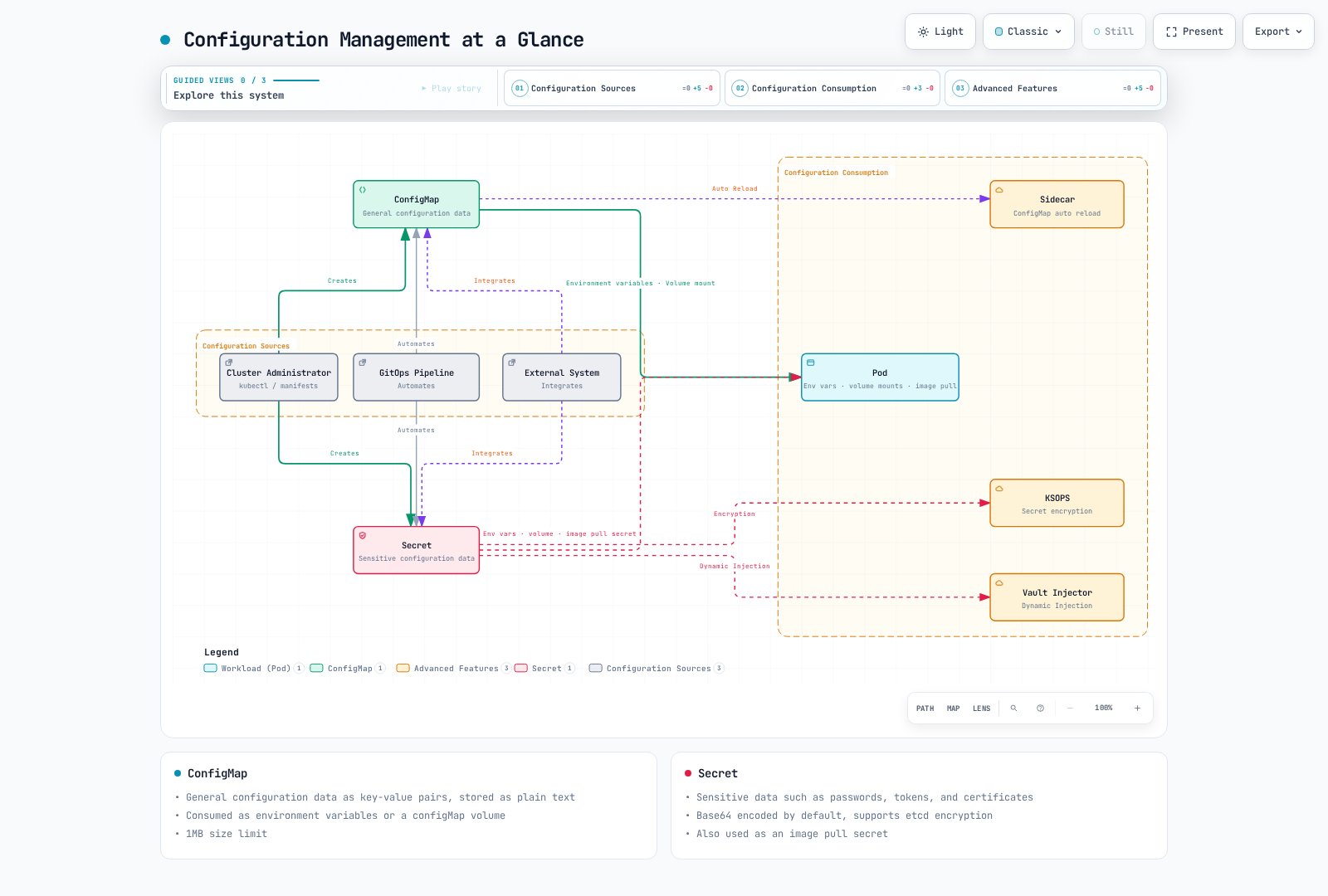
Table of Contents
- ConfigMap
- Secret
- Environment Variables
- Mounting Configuration Through Volumes
- Configuration Best Practices
- Configuration Management in Amazon EKS
ConfigMap
Key Concept: ConfigMaps store configuration data in key-value pairs, separating application code from configuration.
ConfigMaps are API objects that store configuration data in key-value pairs. Using ConfigMaps allows you to separate configuration data from container images, making applications more portable.
ConfigMap vs Secret Comparison
| Feature | ConfigMap | Secret |
|---|---|---|
| Purpose | General configuration data | Sensitive configuration data |
| API Representation | UTF-8 data or base64 binaryData | Base64 data; stringData accepted on write |
| Size Limit | 1 MiB | 1 MiB |
| Encryption at rest | Depends on API-server/platform configuration | Depends on API-server/platform configuration |
| Volume Type | configMap | secret |
| Use Cases | Environment variables, config files | Passwords, tokens, certificates |
| Auto Update | Possible delay when volume mounted | Possible delay when volume mounted |
ConfigMap Creation Methods
ConfigMaps can be created in various ways:
- Imperative creation:
# Create from literal values
kubectl create configmap my-config --from-literal=key1=value1 --from-literal=key2=value2

# Create from file
kubectl create configmap my-config --from-file=config.properties

# Create from directory
kubectl create configmap my-config --from-file=config-dir/- Declarative creation:
apiVersion: v1
kind: ConfigMap
metadata:
  name: my-config
data:
  # Simple key-value pairs
  database.host: "mysql"
  database.port: "3306"

  # File-like configuration
  config.yaml: |
    server:
      port: 8080
    logging:
      level: INFO
    features:
      enabled: true
ConfigMap Usage Methods
ConfigMaps can be used in the following ways:
- Use as environment variables:
apiVersion: v1
kind: Pod
metadata:
  name: config-env-pod
spec:
  containers:
  - name: app
    image: nginx
    env:
    # Single key-value reference
    - name: DB_HOST
      valueFrom:
        configMapKeyRef:
          name: my-config
          key: database.host
    # All key-value references
    envFrom:
    - configMapRef:
        name: my-config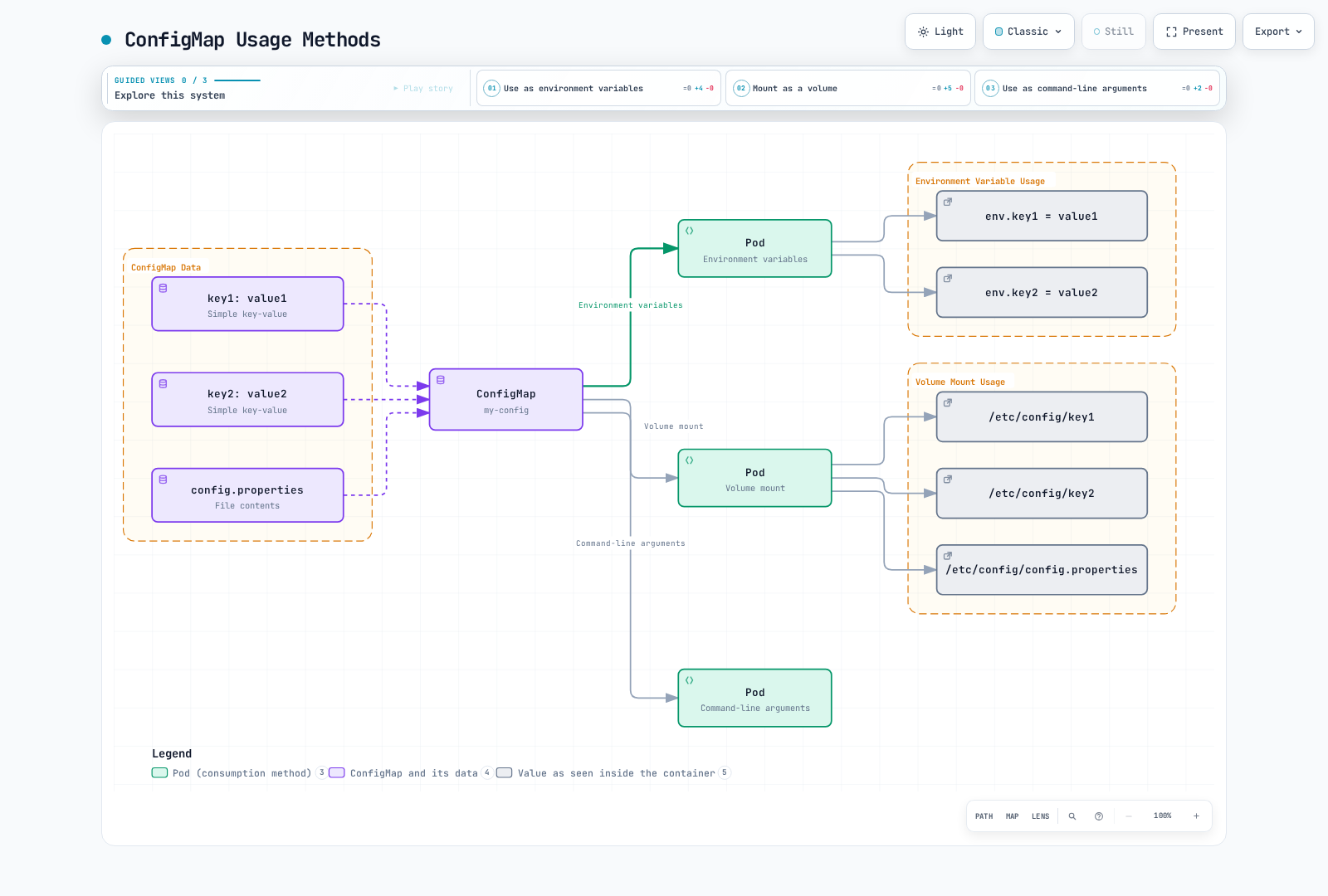
ConfigMap Creation
ConfigMaps can be created in various ways:
Imperative
# Create from literal values
kubectl create configmap my-config --from-literal=key1=value1 --from-literal=key2=value2

# Create from file
kubectl create configmap my-config --from-file=config.properties

# Create from directory
kubectl create configmap my-config --from-file=config-dir/
Declarative
apiVersion: v1
kind: ConfigMap
metadata:
  name: my-config
data:
  # Simple key-value pairs
  key1: value1
  key2: value2
  # File-like configuration
  config.properties: |
    property1=value1
    property2=value2
  # JSON configuration
  config.json: |
    {
      "property1": "value1",
      "property2": "value2"
    }
ConfigMap Usage
ConfigMaps can be used in Pods in the following ways:
Use as Environment Variables
apiVersion: v1
kind: Pod
metadata:
  name: configmap-pod
spec:
  containers:
  - name: test-container
    image: busybox
    command: [ "/bin/sh", "-c", "env" ]
    env:
    # Use single key-value pair
    - name: SPECIAL_KEY
      valueFrom:
        configMapKeyRef:
          name: my-config
          key: key1
    # Use all key-value pairs as environment variables
    envFrom:
    - configMapRef:
        name: my-config
  restartPolicy: Never
Mount as Volume
apiVersion: v1
kind: Pod
metadata:
  name: configmap-pod
spec:
  containers:
  - name: test-container
    image: busybox
    command: [ "/bin/sh", "-c", "ls /etc/config/" ]
    volumeMounts:
    - name: config-volume
      mountPath: /etc/config
  volumes:
  - name: config-volume
    configMap:
      name: my-config
  restartPolicy: Never
Mount Only Specific Keys
apiVersion: v1
kind: Pod
metadata:
  name: configmap-pod
spec:
  containers:
  - name: test-container
    image: busybox
    command: [ "/bin/sh", "-c", "cat /etc/config/key1" ]
    volumeMounts:
    - name: config-volume
      mountPath: /etc/config
  volumes:
  - name: config-volume
    configMap:
      name: my-config
      items:
      - key: key1
        path: key1
  restartPolicy: Never
ConfigMap Updates
Mutable ConfigMaps and Secrets mounted as full volumes update eventually; delay depends on kubelet sync and change-detection/cache settings. Applications must reread or reload the files. subPath mounts do not receive updates. Environment values do not change in a running process; recreate Pods (for example, a Deployment rollout) to use new values.
kubectl edit configmap my-configOr
apiVersion: v1
kind: ConfigMap
metadata:
  name: my-config
data:
  key1: updated-value1
key2: value2kubectl apply -f updated-configmap.yamlSecret
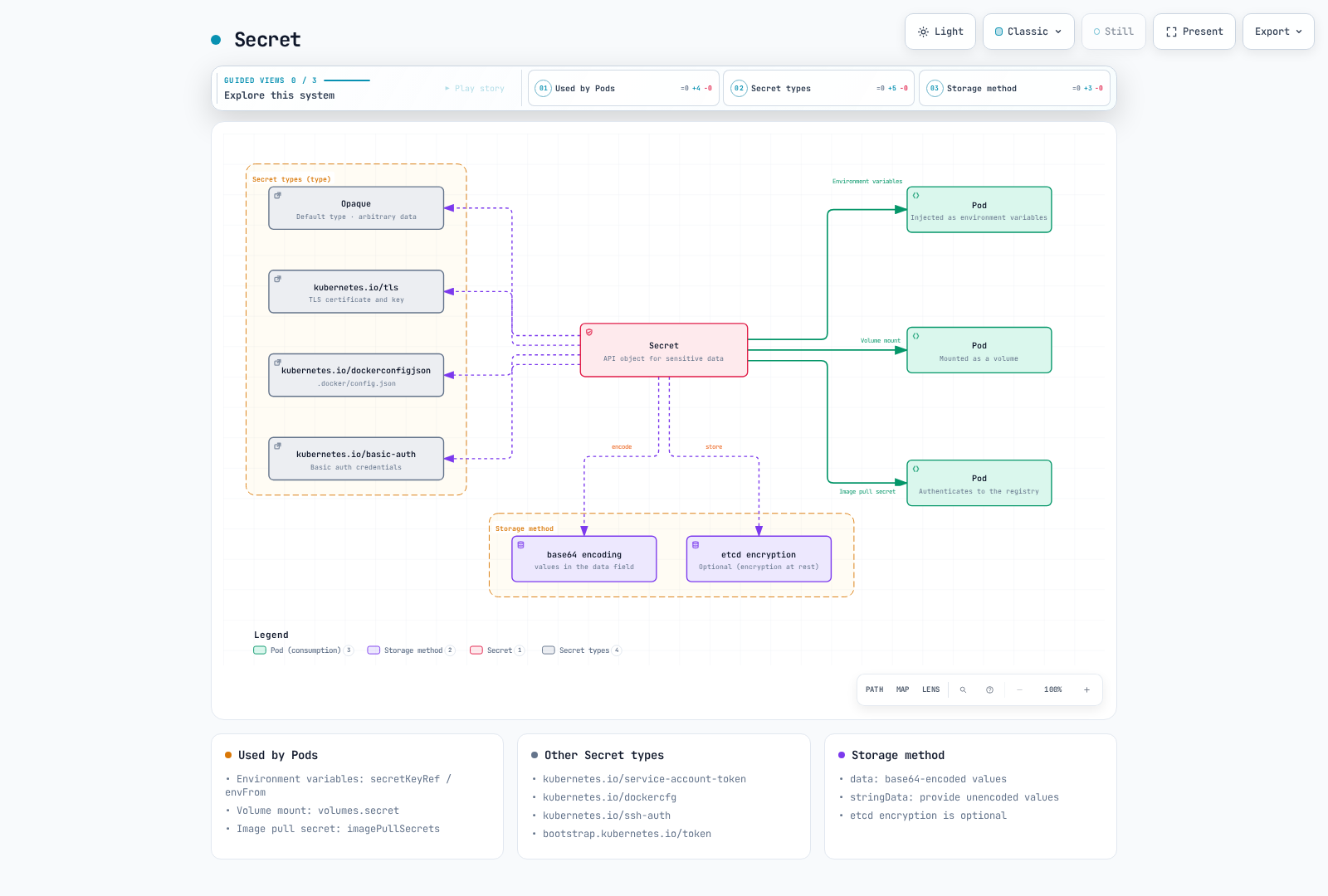
Secrets are API objects that store sensitive information such as passwords, OAuth tokens, and SSH keys. Secrets are similar to ConfigMaps but provide additional security features for storing sensitive data.
Secret Types
Kubernetes provides various types of secrets:
- Opaque: Default type, stores arbitrary user-defined data.
- kubernetes.io/service-account-token: Stores service account tokens.
- kubernetes.io/dockercfg: Stores serialized form of
.dockercfgfile. - kubernetes.io/dockerconfigjson: Stores serialized form of
.docker/config.jsonfile. - kubernetes.io/basic-auth: Stores credentials for basic authentication.
- kubernetes.io/ssh-auth: Stores credentials for SSH authentication.
- kubernetes.io/tls: Stores TLS certificates and keys.
- bootstrap.kubernetes.io/token: Stores bootstrap token data.
Secret Creation
Secrets can be created in various ways:
Imperative
# Create from literal values
kubectl create secret generic my-secret --from-literal=username=admin --from-literal=password=secret

# Create from files
kubectl create secret generic my-secret --from-file=username=username.txt --from-file=password=password.txt

# Create TLS secret
kubectl create secret tls my-tls-secret --cert=path/to/cert.crt --key=path/to/key.key

# Create Docker registry secret
kubectl create secret docker-registry my-registry-secret \
  --docker-server=DOCKER_REGISTRY_SERVER \
  --docker-username=DOCKER_USER \
  --docker-password=DOCKER_PASSWORD \
  --docker-email=DOCKER_EMAIL
Declarative
apiVersion: v1
kind: Secret
metadata:
  name: my-secret
type: Opaque
data:
  # base64 encoded values
  username: YWRtaW4=  # admin
  password: c2VjcmV0  # secret
Or you can use the stringData field to provide unencoded values:
apiVersion: v1
kind: Secret
metadata:
  name: my-secret
type: Opaque
stringData:
  # Unencoded values
  username: admin
  password: secret
Secret Usage
Secrets can be used in Pods in the following ways:
Use as Environment Variables
apiVersion: v1
kind: Pod
metadata:
  name: secret-pod
spec:
  containers:
  - name: test-container
    image: busybox
    command: ["/bin/sh", "-c", 'test -n "$USERNAME" && echo "Secret available"']
    env:
    # Use single key-value pair
    - name: USERNAME
      valueFrom:
        secretKeyRef:
          name: my-secret
          key: username
    # Use all key-value pairs as environment variables
    envFrom:
    - secretRef:
        name: my-secret
  restartPolicy: Never
Mount as Volume
apiVersion: v1
kind: Pod
metadata:
  name: secret-pod
spec:
  containers:
  - name: test-container
    image: busybox
    command: [ "/bin/sh", "-c", "ls /etc/secret/" ]
    volumeMounts:
    - name: secret-volume
      mountPath: /etc/secret
  volumes:
  - name: secret-volume
    secret:
      secretName: my-secret
  restartPolicy: Never
Image Pull Secrets
apiVersion: v1
kind: Pod
metadata:
  name: private-image-pod
spec:
  containers:
  - name: private-image-container
    image: private-registry.example.com/my-app:v1
  imagePullSecrets:
  - name: my-registry-secret
Secret Security Considerations
Secrets are base64 encoded by default, but this is not encryption. To enhance secret security, consider the following methods:
- etcd Encryption: Encrypt secrets stored in etcd.
- RBAC: Restrict access to secrets.
- Network Policies: Restrict network access to the API or external stores where supported; Secret object authorization is enforced by RBAC, not NetworkPolicy.
- External Secret Management Tools: Use external secret management tools like AWS Secrets Manager, HashiCorp Vault, etc.
All credentials shown here are dummy learning values. Do not log Secret contents or commit real values/base64 equivalents; prefer protected input files or an external secret manager over literal CLI arguments. Users who can create Pods using a Secret may obtain it even without direct Secret read permission.
etcd Encryption Configuration
apiVersion: apiserver.config.k8s.io/v1
kind: EncryptionConfiguration
resources:
  - resources:
    - secrets
    providers:
    - aescbc:
        keys:
        - name: key1
          secret: <base64 encoded key>
    - identity: {}
For self-managed clusters, load this file with --encryption-provider-config, protect the encryption key, and rewrite existing Secrets to encrypt them. It is not a resource for kubectl apply. EKS manages its own encryption (see below).
Environment Variables
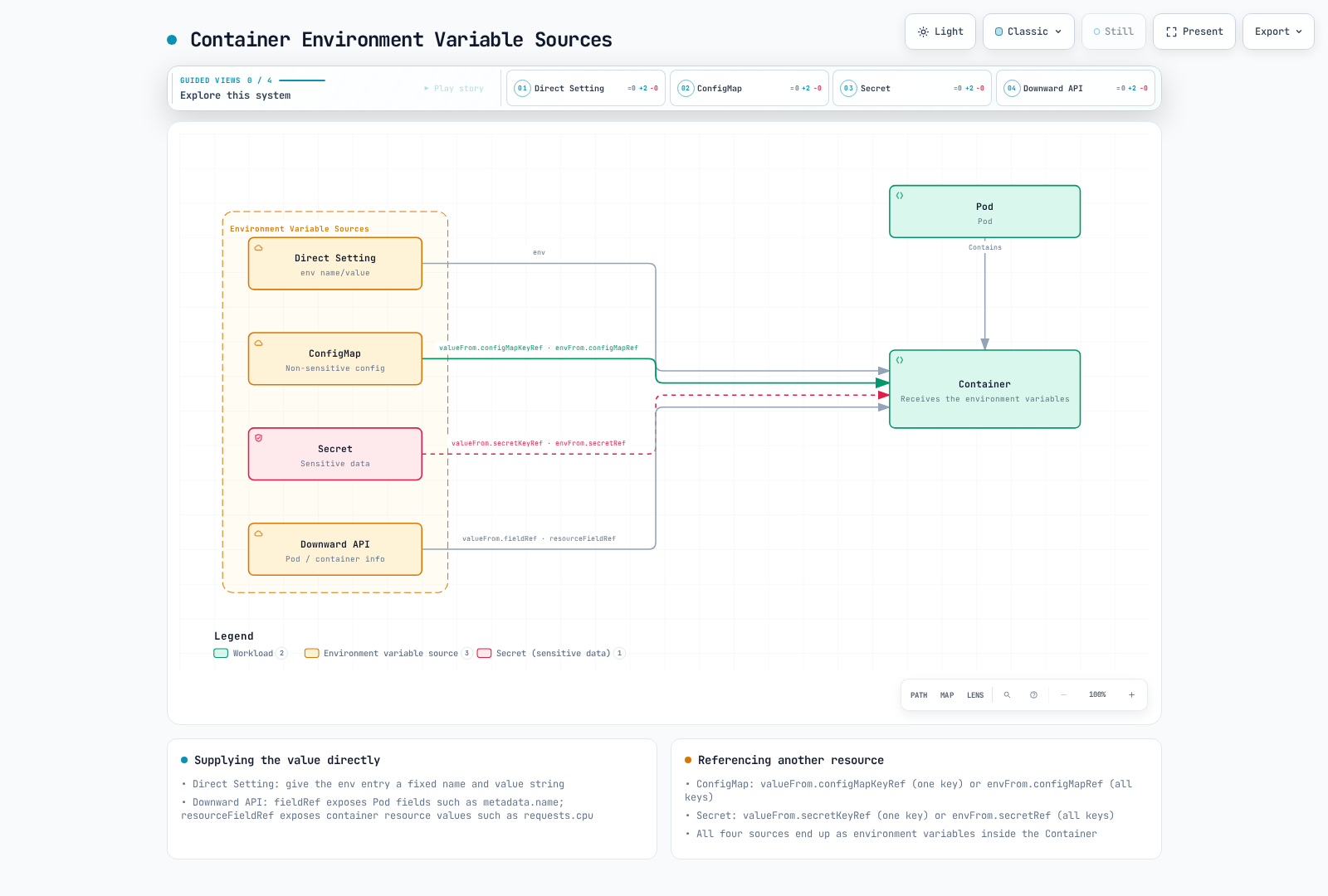
Environment variables are a simple way to pass configuration information to containers. Kubernetes provides several ways to set environment variables.
Direct Setting
apiVersion: v1
kind: Pod
metadata:
  name: env-pod
spec:
  containers:
  - name: test-container
    image: busybox
    command: [ "/bin/sh", "-c", "env" ]
    env:
    - name: ENVIRONMENT
      value: "production"
    - name: LOG_LEVEL
      value: "INFO"
  restartPolicy: Never
Setting from ConfigMap
apiVersion: v1
kind: Pod
metadata:
  name: env-pod
spec:
  containers:
  - name: test-container
    image: busybox
    command: [ "/bin/sh", "-c", "env" ]
    env:
    - name: ENVIRONMENT
      valueFrom:
        configMapKeyRef:
          name: my-config
          key: key1
  restartPolicy: Never
Setting from Secret
apiVersion: v1
kind: Pod
metadata:
  name: env-pod
spec:
  containers:
  - name: test-container
    image: busybox
    command: ["/bin/sh", "-c", 'test -n "$DATABASE_PASSWORD" && echo "Secret available"']
    env:
    - name: DATABASE_PASSWORD
      valueFrom:
        secretKeyRef:
          name: my-secret
          key: password
  restartPolicy: Never
Setting through Downward API
The Downward API allows you to expose Pod and container information as environment variables.
apiVersion: v1
kind: Pod
metadata:
  name: downward-api-pod
  labels:
    app: myapp
spec:
  containers:
  - name: test-container
    image: busybox
    command: [ "/bin/sh", "-c", "env" ]
    env:
    - name: POD_NAME
      valueFrom:
        fieldRef:
          fieldPath: metadata.name
    - name: POD_NAMESPACE
      valueFrom:
        fieldRef:
          fieldPath: metadata.namespace
    - name: POD_IP
      valueFrom:
        fieldRef:
          fieldPath: status.podIP
    - name: NODE_NAME
      valueFrom:
        fieldRef:
          fieldPath: spec.nodeName
    - name: CONTAINER_CPU_REQUEST
      valueFrom:
        resourceFieldRef:
          containerName: test-container
          resource: requests.cpu
  restartPolicy: Never
Mounting Configuration Through Volumes
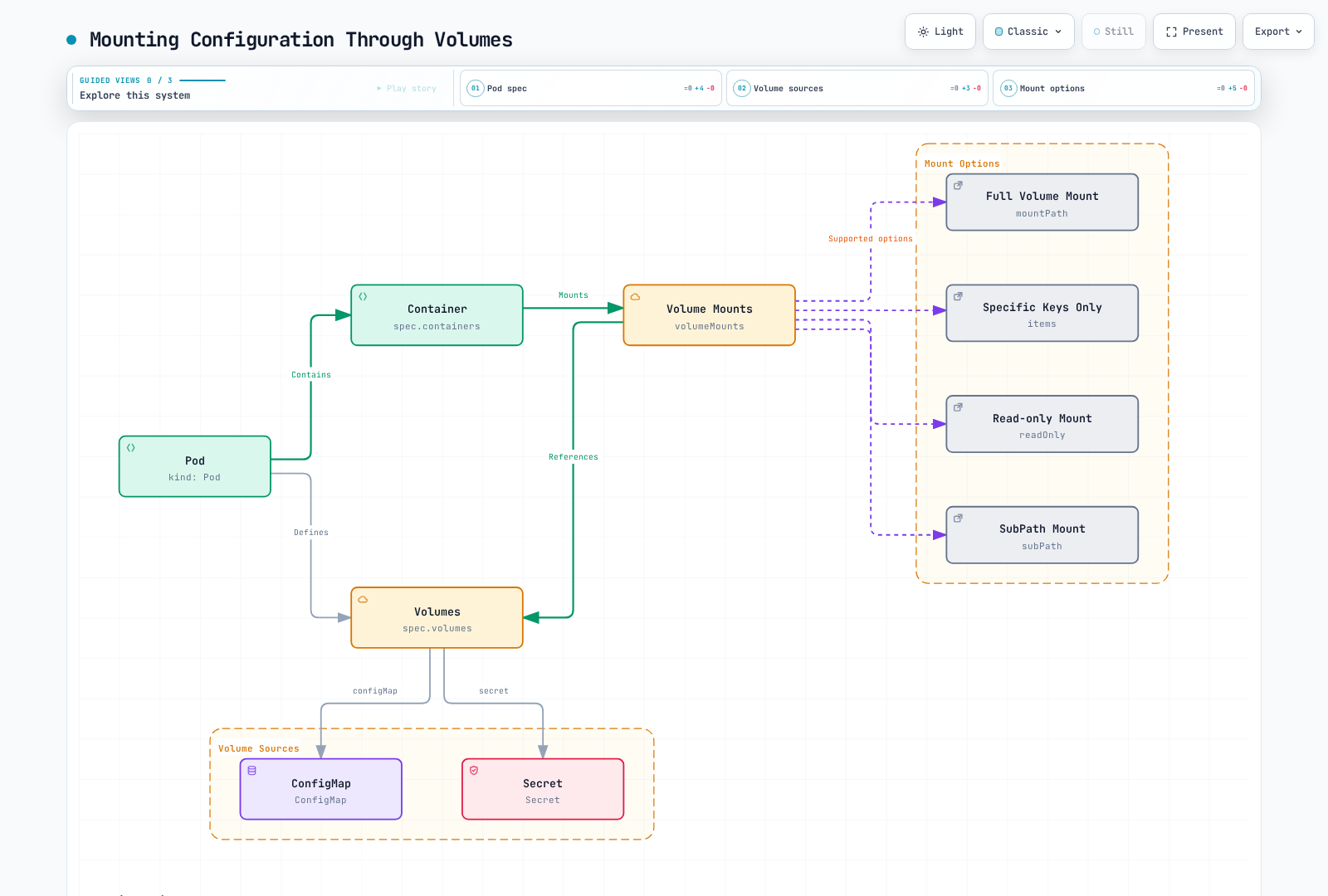
Mounting configuration files to containers through volumes provides a more flexible configuration management method than environment variables.
ConfigMap Volume
apiVersion: v1
kind: Pod
metadata:
  name: configmap-volume-pod
spec:
  containers:
  - name: test-container
    image: busybox
    command: [ "/bin/sh", "-c", "ls -la /etc/config" ]
    volumeMounts:
    - name: config-volume
      mountPath: /etc/config
  volumes:
  - name: config-volume
    configMap:
      name: my-config
  restartPolicy: Never
Secret Volume
apiVersion: v1
kind: Pod
metadata:
  name: secret-volume-pod
spec:
  containers:
  - name: test-container
    image: busybox
    command: [ "/bin/sh", "-c", "ls -la /etc/secret" ]
    volumeMounts:
    - name: secret-volume
      mountPath: /etc/secret
  volumes:
  - name: secret-volume
    secret:
      secretName: my-secret
  restartPolicy: Never
Specific File Mount
apiVersion: v1
kind: Pod
metadata:
  name: specific-file-pod
spec:
  containers:
  - name: test-container
    image: busybox
    command: [ "/bin/sh", "-c", "cat /etc/config/config.properties" ]
    volumeMounts:
    - name: config-volume
      mountPath: /etc/config
  volumes:
  - name: config-volume
    configMap:
      name: my-config
      items:
      - key: config.properties
        path: config.properties
  restartPolicy: Never
Read-only Mount
apiVersion: v1
kind: Pod
metadata:
  name: readonly-mount-pod
spec:
  containers:
  - name: test-container
    image: busybox
    command: [ "/bin/sh", "-c", "ls -la /etc/config" ]
    volumeMounts:
    - name: config-volume
      mountPath: /etc/config
      readOnly: true
  volumes:
  - name: config-volume
    configMap:
      name: my-config
  restartPolicy: Never
SubPath Mount
apiVersion: v1
kind: Pod
metadata:
  name: subpath-mount-pod
spec:
  containers:
  - name: test-container
    image: busybox
    command: [ "/bin/sh", "-c", "cat /etc/config/config.properties" ]
    volumeMounts:
    - name: config-volume
      mountPath: /etc/config/config.properties
      subPath: config.properties
  volumes:
  - name: config-volume
    configMap:
      name: my-config
  restartPolicy: Never
Configuration Best Practices
Consider the following best practices when managing configuration in Kubernetes:
1. Separate Configuration from Code
Manage application code and configuration separately. This eliminates the need to rebuild the application when changing configuration.
2. Environment-Specific Configuration Management
Manage configuration separately for different environments such as development, testing, and production. You can use namespaces to separate environments and use different ConfigMaps and Secrets for each environment.
apiVersion: v1
kind: ConfigMap
metadata:
  name: my-config
  namespace: development
data:
  environment: development
  log_level: DEBUG
---
apiVersion: v1
kind: ConfigMap
metadata:
  name: my-config
  namespace: production
data:
  environment: production
  log_level: INFO
3. Use Secrets for Sensitive Information
Always use Secrets to store sensitive information such as passwords, API keys, and certificates. Use ConfigMaps only for non-sensitive configuration data.
4. Maintain Immutability
When changing configuration, create a new version rather than modifying the existing one. This makes rollbacks easier and allows tracking of configuration change history.
apiVersion: v1
kind: ConfigMap
metadata:
  name: my-config-v1
immutable: true
data:
  log_level: INFO
  # Configuration data
---
apiVersion: v1
kind: ConfigMap
metadata:
  name: my-config-v2
immutable: true
data:
  log_level: DEBUG
  # Updated configuration data
5. Restart Pods on Configuration Changes
Configuration used as environment variables requires a Pod restart to be updated. Use Deployments to perform rolling updates.
kubectl rollout restart deployment/my-deployment6. Validate Configuration
Validate configuration before applying it. Invalid configuration can cause application failures.
7. Document Configuration
Document configuration options and their effects. This helps team members understand and manage configuration.
Resource Requests and QoS
Requests guide scheduling and runtime resource allocation; they do not force an application to consume that amount. CPU limits throttle CPU use, while memory limits can trigger OOM termination. For the quiz's container-level examples, Guaranteed requires equal CPU and memory requests/limits on every container; BestEffort has neither, and other configurations are Burstable. Pod-level resources can also affect QoS. Node-pressure eviction also considers priority and usage relative to requests. See resource management and Pod QoS.
Configuration Management in Amazon EKS
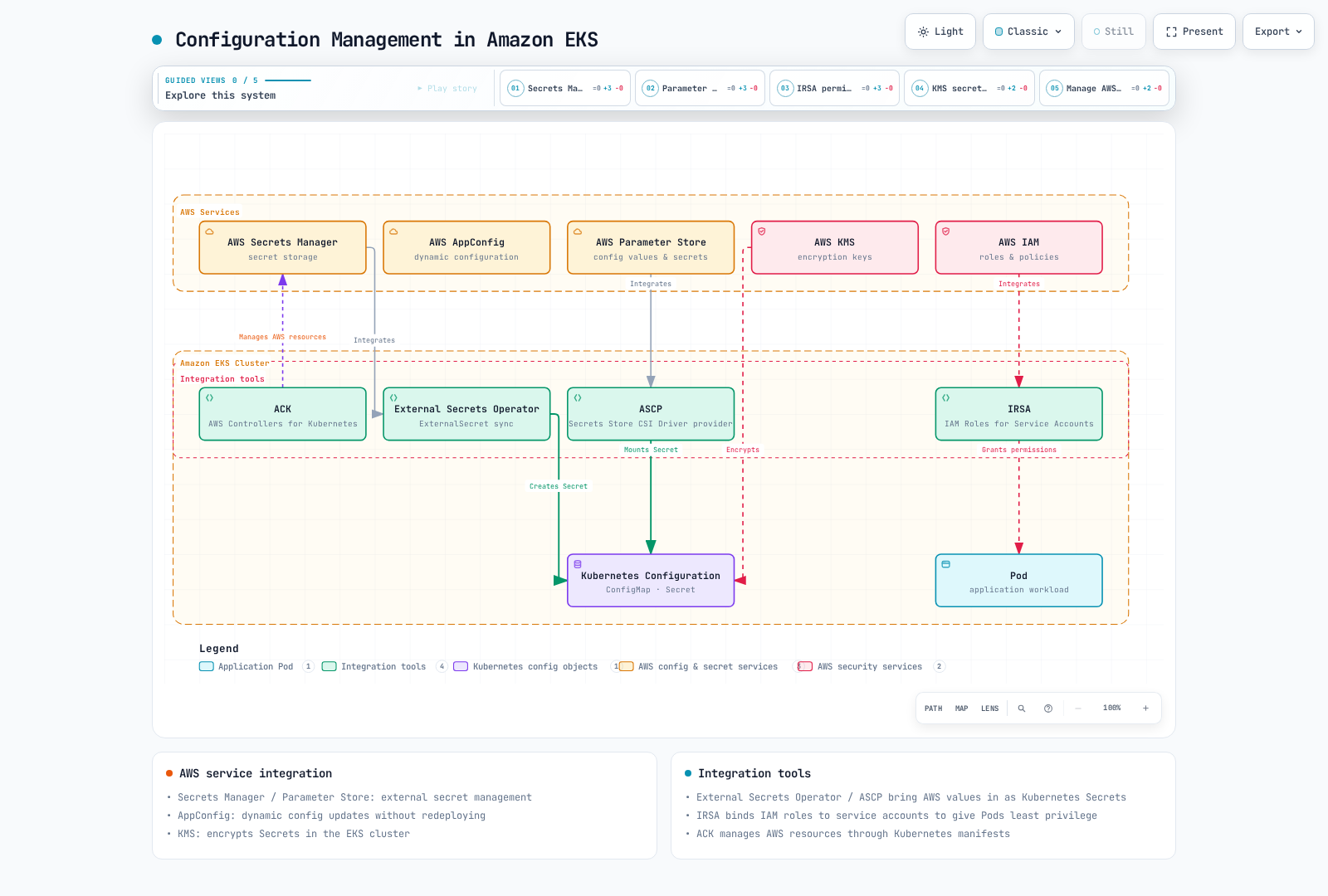
In Amazon EKS, you can use AWS's various services in addition to Kubernetes' basic configuration management features to manage configuration and secrets. This section covers various ways to manage configuration in EKS and integration with AWS services.
AWS Secrets Manager Integration
AWS Secrets Manager is a service that allows you to securely store and manage database credentials, API keys, and other secret information. External Secrets Operator reconciles Kubernetes Secrets. ASCP with Secrets Store CSI Driver mounts external values as files; Kubernetes Secret synchronization and automatic rotation require optional driver configuration.
External Secrets Operator Installation
# Install External Secrets Operator using Helm
helm repo add external-secrets https://charts.external-secrets.io
helm install external-secrets external-secrets/external-secrets \
  --namespace external-secrets \
  --create-namespace
Create SecretStore
apiVersion: external-secrets.io/v1
kind: SecretStore
metadata:
  name: aws-secretsmanager
  namespace: my-namespace
spec:
  provider:
    aws:
      service: SecretsManager
      region: us-west-2
      auth:
        jwt:
          serviceAccountRef:
            name: my-serviceaccount
Create ExternalSecret
apiVersion: external-secrets.io/v1
kind: ExternalSecret
metadata:
  name: database-credentials
  namespace: my-namespace
spec:
  refreshInterval: 1h
  secretStoreRef:
    name: aws-secretsmanager
    kind: SecretStore
  target:
    name: db-credentials
  data:
  - secretKey: username
    remoteRef:
      key: prod/db/credentials
      property: username
  - secretKey: password
    remoteRef:
      key: prod/db/credentials
      property: password
IRSA (IAM Roles for Service Accounts) Setup
External Secrets Operator needs appropriate IAM permissions to access AWS Secrets Manager. You can use IRSA to associate IAM roles with Kubernetes service accounts.
# Create OIDC provider
eksctl utils associate-iam-oidc-provider \
  --cluster my-cluster \
  --approve

# Create IAM role and service account
eksctl create iamserviceaccount \
  --cluster my-cluster \
  --namespace my-namespace \
  --name my-serviceaccount \
  --attach-policy-arn arn:aws:iam::123456789012:policy/ReadAppDatabaseSecret \
  --approve
Create ReadAppDatabaseSecret first with secretsmanager:GetSecretValue and secretsmanager:DescribeSecret restricted to the full ARN of prod/db/credentials; add scoped kms:Decrypt only if a customer-managed key requires it. The IAM trust policy must match this cluster, namespace, and ServiceAccount. Install ESO/its v1 CRDs and create the namespace and ServiceAccount before the SecretStore.
Using AWS Parameter Store
AWS Systems Manager Parameter Store is a service that allows you to hierarchically store and manage configuration data and secret values. Choose between Parameter Store and Secrets Manager based on rotation, lifecycle, and access requirements; charges depend on the parameter tier and API usage.
ASCP (AWS Secrets and Configuration Provider) Installation
# Install ASCP
helm repo add secrets-store-csi-driver https://kubernetes-sigs.github.io/secrets-store-csi-driver/charts
helm install csi-secrets-store secrets-store-csi-driver/secrets-store-csi-driver \
  --namespace kube-system

# Install AWS provider
kubectl apply -f https://raw.githubusercontent.com/aws/secrets-store-csi-driver-provider-aws/main/deployment/aws-provider-installer.yaml
Create SecretProviderClass
apiVersion: secrets-store.csi.x-k8s.io/v1
kind: SecretProviderClass
metadata:
  name: aws-parameters
  namespace: my-namespace
spec:
  provider: aws
  parameters:
    objects: |
      - objectName: /my-app/config/log-level
        objectType: ssmparameter
      - objectName: /my-app/config/environment
        objectType: ssmparameter
Using Parameter Store Values in Pods
apiVersion: v1
kind: Pod
metadata:
  name: parameter-store-pod
  namespace: my-namespace
spec:
  serviceAccountName: parameter-reader
  containers:
  - name: app
    image: my-app:latest
    volumeMounts:
    - name: parameters-store-volume
      mountPath: "/mnt/parameters"
      readOnly: true
  volumes:
  - name: parameters-store-volume
    csi:
      driver: secrets-store.csi.k8s.io
      readOnly: true
      volumeAttributes:
        secretProviderClass: aws-parameters
Create parameter-reader with an IRSA role or Pod Identity association granting ssm:GetParameters for the two parameter ARNs and, if needed, scoped KMS decryption. The earlier Secrets Manager role does not provide SSM permissions. ASCP requires a supported node/add-on combination; the CSI mount does not work on Fargate. Hybrid Nodes require the explicitly supported add-on version and credential configuration.
Dynamic Configuration with AWS AppConfig
AWS AppConfig is a service that manages and deploys application configuration. Using AppConfig allows you to dynamically update configuration without redeploying applications.
AppConfig Agent Sidecar Pattern
The application fetches configuration from the agent's local HTTP endpoint and must refresh/reload it. A shared emptyDir alone does not make the agent write /config/config.json. Create the application/environment/configuration profile and a deployment first, and grant the Pod identity appconfig:StartConfigurationSession and appconfig:GetLatestConfiguration for the required configuration.
apiVersion: apps/v1
kind: Deployment
metadata:
  name: my-app
  namespace: my-namespace
spec:
  replicas: 3
  selector:
    matchLabels:
      app: my-app
  template:
    metadata:
      labels:
        app: my-app
    spec:
      serviceAccountName: appconfig-reader
      containers:
      - name: app
        image: my-app:latest
        env:
        - name: CONFIG_URL
          value: http://localhost:2772/applications/MyApp/environments/Production/configurations/MyConfig
      - name: appconfig-agent
        image: public.ecr.aws/aws-appconfig/aws-appconfig-agent:2.x
        env:
        - name: SERVICE_REGION
          value: us-west-2
        - name: POLL_INTERVAL
          value: "45s"
        - name: REQUEST_TIMEOUT
          value: "15s"
        - name: HTTP_PORT
          value: "2772"
        - name: HTTP_HOST
          value: localhost
        - name: PREFETCH_LIST
          value: MyApp:Production:MyConfig
The application image must implement CONFIG_URL retrieval and retry while the sidecar starts. Create appconfig-reader and its scoped AWS identity before deploying; pin a tested agent version/digest for production. These are container-agent settings, not Lambda extension variables.
Configuration with EKS Fargate Profiles
Using EKS Fargate allows you to run Kubernetes Pods without managing nodes. You can configure the Pod execution environment using Fargate profiles.
Fargate profiles are EKS API resources, not native Kubernetes objects. For example, use this eksctl configuration with eksctl create fargateprofile -f fargate-profile.yaml after replacing the private subnet IDs and execution role:
apiVersion: eksctl.io/v1alpha5
kind: ClusterConfig
metadata:
  name: my-cluster
  region: us-west-2
fargateProfiles:
- name: my-profile
  podExecutionRoleARN: arn:aws:iam::123456789012:role/my-pod-execution-role
  selectors:
  - namespace: my-namespace
    labels:
      environment: production
  subnets:
  - subnet-1234567890abcdef0
  - subnet-0abcdef1234567890
Secret Encryption with AWS KMS
EKS clusters on Kubernetes 1.28 or later have default envelope encryption for all Kubernetes API data, including Secrets and ConfigMaps, with an AWS-owned key. A customer-managed KMS key is optional; it is not required to turn encryption on.
To associate a customer-managed key with an eligible existing cluster, use associate-encryption-config, not update-cluster-config. Review the key's Region, policy, permissions, and association restrictions before applying it. The following example creates one key and reuses its returned ARN:
set -eu
KEY_ARN=$(aws kms create-key --region us-west-2 \
  --description "EKS customer-managed encryption key" \
  --query KeyMetadata.Arn --output text)
aws kms create-alias --region us-west-2 \
  --alias-name alias/eks-secrets --target-key-id "$KEY_ARN"

aws eks associate-encryption-config --region us-west-2 \
  --cluster-name my-cluster \
  --encryption-config "resources=secrets,provider={keyArn=$KEY_ARN}"
Check completion with aws eks describe-update using the returned update ID and inspect aws eks describe-cluster --name my-cluster --region us-west-2 --query cluster.encryptionConfig. An absent customer-managed configuration does not mean default encryption is disabled.
Secret Access Control with AWS IAM
Using IRSA (IAM Roles for Service Accounts) to associate IAM roles with Kubernetes service accounts allows Pods to securely access AWS services.
Create Service Account
apiVersion: v1
kind: ServiceAccount
metadata:
  name: my-service-account
  namespace: my-namespace
  annotations:
    eks.amazonaws.com/role-arn: arn:aws:iam::123456789012:role/my-iam-role
Using Service Account in Pods
apiVersion: v1
kind: Pod
metadata:
  name: my-pod
  namespace: my-namespace
spec:
  serviceAccountName: my-service-account
  containers:
  - name: app
    image: my-app:latest
EKS Configuration Best Practices
Consider the following best practices when managing configuration in EKS:
Use workload identity: Use EKS Pod Identity on supported compute or IRSA, with scoped permissions. Fargate applications use IRSA; their Pod execution role is for infrastructure, not application credentials.
Encrypt Secrets: Use KMS to encrypt secrets in your EKS cluster.
External Secret Management: Use external secret management services like AWS Secrets Manager or Parameter Store to manage sensitive information.
Configuration Version Management: Use AWS AppConfig or Parameter Store to manage configuration versions.
Environment-Specific Configuration Separation: Manage configuration separately for development, testing, and production environments. Use Kubernetes namespaces and AWS resource tags.
Minimize IAM Policies: Follow the principle of least privilege when accessing AWS services.
Configuration Automation: Use tools like AWS CloudFormation, AWS CDK, or Terraform to automate configuration management.
EKS Configuration Management Tools
Let's look at tools that help manage configuration in EKS:
AWS Controllers for Kubernetes (ACK)
ACK is a tool that allows you to manage AWS resources from Kubernetes. Using ACK, you can create and manage AWS resources through Kubernetes manifests.
apiVersion: secretsmanager.services.k8s.aws/v1alpha1
kind: Secret
metadata:
  name: my-secret
  annotations:
    services.k8s.aws/deletion-policy: retain
spec:
  name: my-secret
  description: "My secret created via ACK"
  recoveryWindowInDays: 30
Install the ACK Secrets Manager controller and its IAM role/CRDs first. This manifest manages the secret container metadata; it does not generate a password or create a native Kubernetes Secret. Populate the secret value through a controlled secret-management workflow.
eksctl
eksctl is a command-line tool for creating and managing EKS clusters. You can use eksctl to manage cluster configuration.
# cluster.yaml
apiVersion: eksctl.io/v1alpha5
kind: ClusterConfig
metadata:
  name: my-cluster
  region: us-west-2
secretsEncryption:
keyARN: arn:aws:kms:us-west-2:123456789012:key/1234abcd-12ab-34cd-56ef-1234567890abeksctl create cluster -f cluster.yamlAWS CDK
AWS CDK (Cloud Development Kit) is a tool for defining AWS resources using programming languages. You can use CDK to define EKS clusters and related resources.
This helper works with an existing CDK EKS cluster and Secret construct; it grants read access only to that Secret. The namespace must already exist and the cluster must have a compatible kubectl provider configured.
import * as eks from 'aws-cdk-lib/aws-eks';
import * as secretsmanager from 'aws-cdk-lib/aws-secretsmanager';

export function addSecretReader(
  cluster: eks.Cluster,
  secret: secretsmanager.ISecret,
): eks.ServiceAccount {
  const serviceAccount = cluster.addServiceAccount('SecretReader', {
    name: 'my-service-account',
    namespace: 'my-namespace',
  });
  secret.grantRead(serviceAccount);
  return serviceAccount;
}
Conclusion
In this chapter, we learned about Kubernetes configuration management methods. ConfigMaps and Secrets provide basic ways to manage application configuration, and you can pass this configuration to containers through environment variables and volumes. We also covered configuration management best practices and external configuration management tools.
In Amazon EKS environments, you can achieve more powerful and secure configuration management by using AWS services alongside Kubernetes' basic configuration management features. You can securely manage secrets by integrating services like AWS Secrets Manager, Parameter Store, KMS, and IAM, and grant minimum permissions to Pods through IRSA. Additionally, you can dynamically update configuration without redeploying applications using AWS AppConfig.
Effective configuration management is important for improving the maintainability, scalability, and security of Kubernetes applications. It's important to choose the appropriate configuration management strategy for your application's requirements and follow best practices. In EKS environments, you can build more powerful configuration management solutions through integration with AWS services.
In the next chapter, we'll learn about Kubernetes security.
Quiz
To test what you learned in this chapter, try the Configuration and Secrets Quiz.
References
- Kubernetes Official Documentation - ConfigMaps
- Kubernetes Official Documentation - Secrets
- Kubernetes Official Documentation - Environment Variables
- Kubernetes Official Documentation - Configure a Pod to Use a ConfigMap
- Kubernetes Official Documentation - Distribute Credentials Securely Using Secrets
- Helm Official Documentation
- Kustomize Official Documentation
- External Secrets Operator Official Documentation
- AWS Secrets Manager Official Documentation
- AWS Systems Manager Parameter Store Official Documentation
- AWS AppConfig Official Documentation
- EKS Official Documentation - IRSA
- EKS Official Documentation - Secrets Encryption
- AWS Controllers for Kubernetes (ACK) Official Documentation