Prerequisites
Supported Versions: Examples reviewed for EKS 1.36 / hybrid nodeadm 1.0.20; OS-specific requirements below Last Updated: September 13, 2026
Prepare host, network, credentials and cluster access before joining a hybrid node. Local schema/crypto/input checks do not validate your physical network, GPU runtime or production cluster. No cloud, host-network, GPU-driver or image-build changes were executed during this audit.
Operating Systems and Runtime
| AWS-validated hybrid integration | Versions / scope |
|---|---|
| Ubuntu | 20.04, 22.04, 24.04; separately review distribution security maintenance |
| RHEL | 8, 9; review kernel/CNI and Red Hat subscription/support |
| AL2023 | On-premises virtualized environments; not generic bare metal or AWS OS-support entitlement outside EC2 |
| Bottlerocket | VMware variants v1.37.0+, available for Kubernetes 1.28+, x86_64 only; distinct bootstrap procedure |
These floors do not make old Kubernetes releases currently EKS-supported. Choose an active EKS version and matching OS/runtime/CNI cohort. AWS supports Ubuntu/RHEL hybrid integration, not the vendor's OS maintenance itself.
SSM new installations/upgrades require nodeadm 1.0.19+ because older binaries contain an outdated SSM signing key. The reviewed release is v1.0.20. Use hybrid nodeadm, not the similarly named EC2 EKS AMI tool.
EKS kube-proxy 1.31+ on ARM requires ARMv8.2+crypto. Pre-Pi-5/Cortex-A72 hardware fails that requirement; a Pi 5 CPU alone does not validate the complete stack. The old kube-proxy 1.30 workaround ended EKS extended support in July 2026.
Containerd is required; Docker Engine is not. A “containerd 1.6+” or Docker version check does not establish current CRI compatibility.
| OS / choice | nodeadm containerd source |
|---|---|
| Ubuntu / AL2023 | distro is the supported default |
| RHEL | docker, or none with a compatible preinstalled runtime; distro is invalid |
| AL2023 | docker is not supported |
| Manual runtime installation | none skips installation; it does not supply a runtime |
Ubuntu 24.04's historical Pod-termination/AppArmor fix needed containerd 1.7.19+ or the appropriate AppArmor update. This is not an old-version install recommendation. Review the chosen CNI's kernel requirements; neither “kernel 5.4+” nor blindly replacing the kernel is sufficient.
Sizing and host inspection
AWS recommends at least 1 vCPU / 1 GiB RAM, while explicitly stating there is no strict universal minimum. Add capacity for OS/runtime/CNI/agents, images/logs and actual workloads. The former quiz's two-core/two-GB minimum was inconsistent.
The old 20/50/100GB disk, 2/4-core and 4/8GB RAM figures were planning examples, not validated workload sizes.
# Run these read-only checks on the intended hybrid host.
cat /etc/os-release
uname -m
uname -r
free -h
df -h /
swapon --show
ip -j link show
# When already installed, inspect the actual CRI runtime:
containerd --version
A binary version does not prove kubelet uses that runtime socket. Review swap, cgroups, forwarding, CNI modules and firewalls through the host owner. Blanket swapoff/fstab/sysctl/MTU edits are not portable across all supported hosts.
Install, validate, then init
For prepared Ubuntu/AL2023 hosts, the sequence below installs dependencies before joining. RHEL needs the runtime source described above; Bottlerocket uses a different path.
set -euo pipefail
# Installation/bootstrap sequence for prepared Ubuntu/AL2023 hosts.
# RHEL requires --containerd-source docker, or none with a preinstalled compatible runtime.
# These commands mutate the host; review OS/runtime/network/identity first.
sudo nodeadm install 1.36 --credential-provider ssm --containerd-source distro \
  --region ap-northeast-2 --timeout 20m
sudo nodeadm config check -c file:///etc/eks/nodeConfig.yaml
sudo nodeadm init -c file:///etc/eks/nodeConfig.yaml
The node config must already contain the intended cluster/provider inputs. Protect credential-bearing config files with mode 0600 and keep activation codes out of golden images and logs. These commands mutate the host. Do not skip validation phases to hide failures. nodeadm upgrade is disruptive and requires workload evacuation.
Packer Image Preparation
AWS examples cover Ubuntu 22.04/24.04 and RHEL 8/9 with vSphere OVA and QEMU qcow2/raw targets. The reviewed v1.0.20 template is not a ready EKS 1.36 image pipeline:
K8S_VERSIONvalidation still permits only 1.26–1.31. Maintain a reviewed current fork; do not downgrade to satisfy the example.NODEADM_ARCHexpectsamdorarm, then appends64; the formeramd64becomesamd6464.- Packer's
CREDENTIAL_PROVIDER=iammaps to nodeadm'siam-ra. - The actual file is
hybrid-nodes-template.pkr.hcl; nogeneral-build.qemu.al2023source exists. - Review mutable
releases/latestdownloads, vSphereinsecure_connection=true, default builder passwords and global variable requirements. RHEL provisioners hardcode x86 repositories; changing the binary architecture alone is not an ARM build.
| Input group | Review |
|---|---|
| Tools | Packer ≥1.11, vSphere plugin ≥1.4 or QEMU 1.x; pin a tested combination |
| Common | ISO_URL, verified ISO_CHECKSUM, PKR_SSH_PASSWORD, K8S_VERSION, NODEADM_ARCH, CREDENTIAL_PROVIDER |
| RHEL | RH_USERNAME, RH_PASSWORD, RHEL_VERSION; exclude secrets from final images/logs |
| vSphere | Server/user/password, datacenter, cluster, datastore, network, VSPHERE_OUTPUT_FOLDER |
| QEMU | PACKER_OUTPUT_FORMAT (qcow2/raw), CPU/virtualization compatibility |
The source also includes billable AWS AMI builders; that is not permission to run cloud machines as hybrid nodes. Validate a maintained template and resulting image. No Packer/VM build was performed here.
GPU Compatibility
Check GPU variant, CPU architecture, OS/kernel, supported NVIDIA driver, container toolkit/runtime, CUDA/framework image and memory together. The former driver 525/535/545/550 and CUDA 11.8/12.x values mixed historical minima and recommendations; they are not universal current Hybrid Nodes requirements.
H100 80GB, H200 141GB, A100 40/80GB and L40S 48GB are example variants, not a complete certified list. Four GB is not a meaningful minimum for every model. A host CUDA compiler is not required merely to run a correctly packaged GPU container; driver and compiler versions mean different things.
# On a host where the driver is already installed:
nvidia-smi --query-gpu=name,driver_version,memory.total --format=csv,noheader
# Optional: nvcc reports the locally installed compiler, if present.
if command -v nvcc >/dev/null 2>&1; then nvcc --version; fi
Use the current NVIDIA compatibility/platform instructions for the chosen cohort. Stage driver/kernel changes on a drained test host. Installing an old driver branch or restarting containerd on a live worker is not a harmless prerequisite check.
Network, CIDRs and MTU
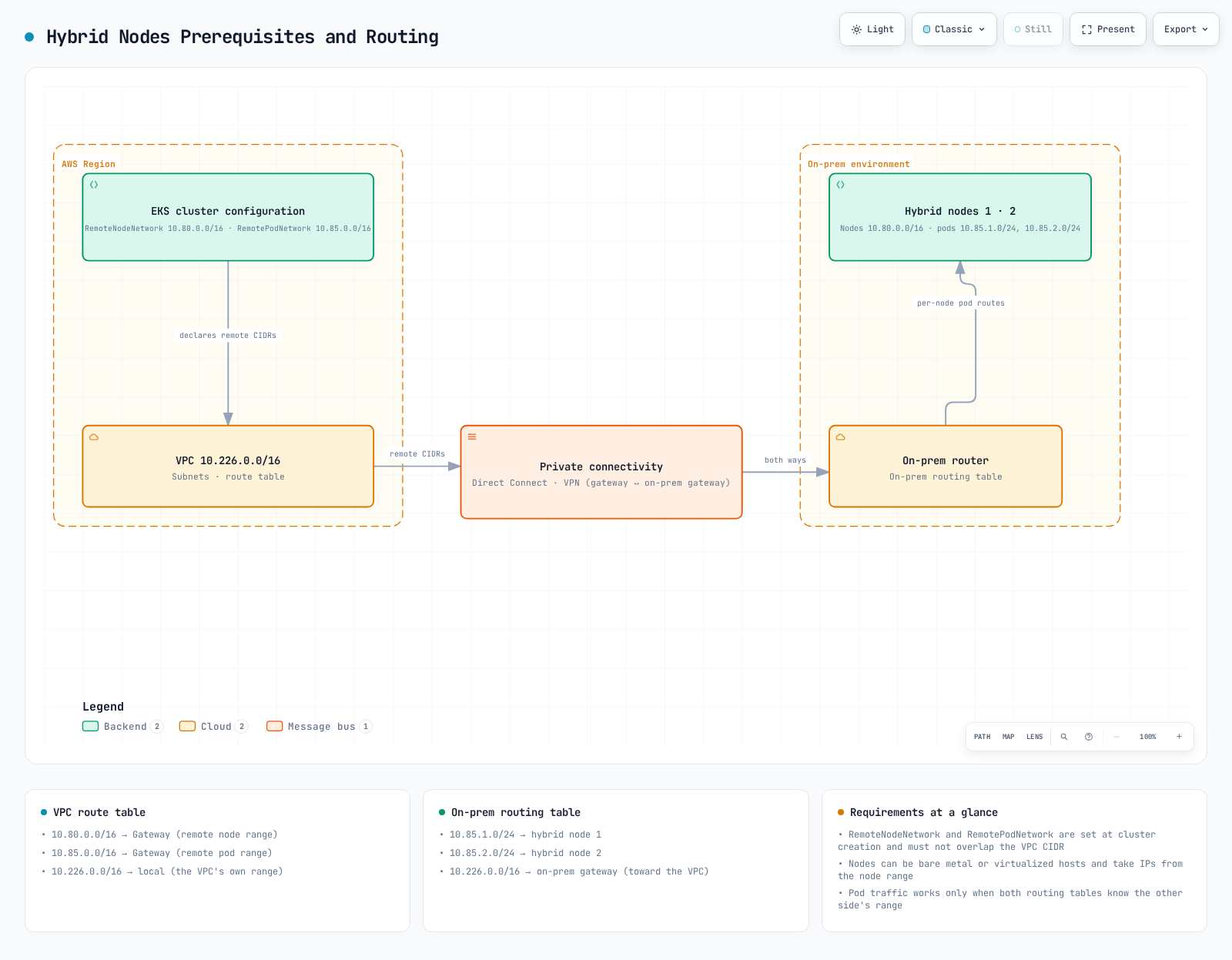
Hybrid Nodes requires reliable private bidirectional connectivity, including control-plane access to kubelet and hybrid-hosted webhooks. Public API access changes node→API traffic, not the required private reverse path.
AWS's 100 Mbps / ≤200ms RTT is general guidance, not a strict universal minimum. The old 10Gbps/5ms, packet-loss 0.1%/0.01% and MTU 1500/9000 values are unverified planning examples. Test actual demand and encapsulation/path MTU; do not set every NIC to 9000.
Remote node/Pod CIDRs use IPv4 RFC1918 or CGNAT, without overlap with each other, VPC or service networks. Up to 15 CIDRs of each remote kind fit inside one remote-node-network and one remote-pod-network wrapper. Pod routing across clusters also needs deliberate separation.
Save a reviewed network-plan.json:
{
  "vpcCidrs": [
    "10.0.0.0/16"
  ],
  "serviceCidrs": [
    "10.100.0.0/16"
  ],
  "remoteNodeCidrs": [
    "10.80.0.0/16"
  ],
  "remotePodCidrs": [
    "10.85.0.0/16"
  ]
}: "${NETWORK_PLAN_JSON:?Set the reviewed local network plan JSON}"
export NETWORK_PLAN_JSON
python3 - <<'PY'
import ipaddress, itertools, json, os
from pathlib import Path
plan = json.loads(Path(os.environ["NETWORK_PLAN_JSON"]).read_text())
allowed = [ipaddress.ip_network(c) for c in ("10.0.0.0/8", "172.16.0.0/12", "192.168.0.0/16", "100.64.0.0/10")]
groups = {}
for key in ("vpcCidrs", "serviceCidrs", "remoteNodeCidrs", "remotePodCidrs"):
values = plan[key]
if not isinstance(values, list) or not values:
raise SystemExit(f"{key} must be a nonempty list for this example")
groups[key] = [ipaddress.ip_network(v, strict=True) for v in values]
if any(n.version != 4 for n in groups[key]):
raise SystemExit("This Hybrid Nodes plan requires IPv4")
for key in ("remoteNodeCidrs", "remotePodCidrs"):
if len(groups[key]) > 15 or any(not any(n.subnet_of(a) for a in allowed) for n in groups[key]):
raise SystemExit("Remote CIDRs must use RFC1918/CGNAT ranges, at most 15 per kind")
flat = [(key, n) for key, networks in groups.items() for n in networks]
for (ka, a), (kb, other) in itertools.combinations(flat, 2):
if a.overlaps(other):
raise SystemExit(f"Overlapping CIDRs: {ka} {a}, {kb} {other}")
print("CIDR syntax/range/non-overlap checks passed; routing and reachability remain unverified")
PYThis checks syntax/ranges/overlap, not reachability. Configure VPC return routes through the real TGW/VGW and on-premises return/per-node Pod routes.
| Flow | Review |
|---|---|
| Remote node/Pod → API TCP443 | Additional cluster SG ingress for the intended CIDRs |
| Control-plane ENI → node TCP10250 | Restricted cluster egress, private route and on-prem host/firewall ingress |
| Control plane → webhook | Actual Pod IP, port, routes and firewall |
| Host/Pod → credentials/images/DNS/time | Provider endpoints, registry, DNS and clock synchronization |
TCP10250 is not kubelet ingress into the API-server SG. EKS alone does not create all custom remote rules; eksctl may automate VPC-side resources it owns. Check actual rule quotas instead of treating 60 as an immutable maximum.
AWS recommends public-only or private-only. With both enabled, nodes outside the VPC resolve public addresses and can fail to join if paths/access rules differ. This is not categorical API rejection. Private-only also needs private DNS and administrative reachability.
Provider-Specific Credentials
Prepare AWS inputs with the intended administrator identity. Keep activation material in a private directory:
set -euo pipefail
: "${EXPECTED_ACCOUNT_ID:?Set the intended account}"
: "${AWS_REGION:?Set the intended Region}"
: "${CLUSTER_NAME:?Set the intended cluster}"
check_account() {
  local actual
  actual=$(aws sts get-caller-identity --region "$AWS_REGION" --query Account --output text) || return
  test "$actual" = "$EXPECTED_ACCOUNT_ID" || { printf 'Account mismatch.\n' >&2; return 1; }
}
check_account
umask 077
export WORK_DIR
WORK_DIR=$(mktemp -d "$PWD/hybrid-preflight.XXXXXXXX")
export EXPECTED_ACCOUNT_ID AWS_REGION CLUSTER_NAME
printf 'Private preparation directory: %s\n' "$WORK_DIR"
SSM and Roles Anywhere both require AWS connectivity. A local CA or longer cached credentials do not create an offline control plane.
SSM role and activation
The role needs eks:DescribeCluster, ECR pull and SSM core/cleanup permissions. AmazonEKSWorkerNodeMinimalPolicy alone does not supply DescribeCluster. Pod Identity's eks-auth:AssumeRoleForPodIdentity permission is separate.
Replace example account/Region/cluster values consistently. The list operation below lacks per-instance resource scoping, so its wildcard is restricted to the intended Region:
{
  "Version": "2012-10-17",
  "Statement": [
    {
      "Effect": "Allow",
      "Principal": {
        "Service": "ssm.amazonaws.com"
      },
      "Action": "sts:AssumeRole",
      "Condition": {
        "StringEquals": {
          "aws:SourceAccount": "123456789012"
        },
        "ArnLike": {
          "aws:SourceArn": "arn:aws:ssm:ap-northeast-2:123456789012:*"
        }
      }
    }
  ]
}{
"Version": "2012-10-17",
"Statement": [
{
"Effect": "Allow",
"Action": "eks:DescribeCluster",
"Resource": "arn:aws:eks:ap-northeast-2:123456789012:cluster/my-hybrid-cluster"
},
{
"Effect": "Allow",
"Action": "ssm:DescribeInstanceInformation",
"Resource": "*",
"Condition": {
"StringEquals": {
"aws:RequestedRegion": "ap-northeast-2"
}
}
},
{
"Effect": "Allow",
"Action": "ssm:DeregisterManagedInstance",
"Resource": "arn:aws:ssm:ap-northeast-2:123456789012:managed-instance/*",
"Condition": {
"StringEquals": {
"ssm:resourceTag/EKSClusterARN": "arn:aws:eks:ap-northeast-2:123456789012:cluster/my-hybrid-cluster"
}
}
}
]
}Attach reviewed AmazonEC2ContainerRegistryPullOnly and AmazonSSMManagedInstanceCore or equivalent permissions. The activation's EKSClusterARN tag must match the deregistration policy.
Prepare a deliberate registration limit and 24-hour registration expiry:
: "${HYBRID_ROLE_NAME:?Use the reviewed SSM-trusting role name}"
: "${REGISTRATION_LIMIT:?Set a deliberate node registration limit}"
export HYBRID_ROLE_NAME REGISTRATION_LIMIT
python3 - <<'PY'
import json, os, re
from datetime import datetime, timedelta, timezone
from pathlib import Path
account, region, cluster = (os.environ[k] for k in ("EXPECTED_ACCOUNT_ID", "AWS_REGION", "CLUSTER_NAME"))
if not re.fullmatch(r"\d{12}", account) or not re.fullmatch(r"[a-z]{2}(?:-[a-z]+)+-\d", region):
    raise SystemExit("Invalid account/Region")
if region.startswith(("cn-", "us-gov-")):
    raise SystemExit("Hybrid Nodes is not available in this Region family")
if not re.fullmatch(r"[A-Za-z0-9][A-Za-z0-9_-]{0,99}", cluster):
    raise SystemExit("Invalid cluster name")
role = os.environ["HYBRID_ROLE_NAME"]
if not re.fullmatch(r"[\w+=,.@-]{1,64}", role, re.ASCII):
    raise SystemExit("Use the actual IAM role name, not a role ARN")
limit = int(os.environ["REGISTRATION_LIMIT"])
if not 1 <= limit <= 1000:
    raise SystemExit("RegistrationLimit must be 1..1000 per activation; review service quotas separately")
body = {"DefaultInstanceName": "eks-hybrid-node", "IamRole": role, "RegistrationLimit": limit,
        "Description": "Reviewed EKS hybrid activation",
        "Tags": [{"Key": "EKSClusterARN", "Value": f"arn:aws:eks:{region}:{account}:cluster/{cluster}"}],
        "ExpirationDate": (datetime.now(timezone.utc) + timedelta(hours=24)).isoformat()}
(Path(os.environ["WORK_DIR"]) / "activation-request.json").write_text(json.dumps(body, indent=2) + "\n")
PYset -euo pipefail
# Run only after the role/trust/tag policy and registration scope are prepared.
check_account
aws ssm create-activation --region "$AWS_REGION" \
--cli-input-json "file://$WORK_DIR/activation-request.json" --output json \
> "$WORK_DIR/activation-response.json"
chmod 600 "$WORK_DIR/activation-response.json"
# The response contains the secret ActivationCode. Do not print or commit it.ActivationCode is returned once; distribute it securely with ActivationId. Expiration/deletion of the activation is not deregistration of existing managed instances. The CreateActivation RegistrationLimit remains 1–1,000 per activation. It is not a fleet-wide free-tier threshold; current pricing is explained in the credential-provider comparison.
SSM uses an mi-... node name and fixed one-hour credentials. Refresh backoff can delay reconnection after a network outage. Do not log credentials.
Roles Anywhere trust and duration
Use a provider-appropriate role, trust anchor and profile. Bind session name to certificate identity/nodeName; the previous PrincipalTag/RequestTag comparison did not do this.
{
  "Version": "2012-10-17",
  "Statement": [
    {
      "Effect": "Allow",
      "Principal": {
        "Service": "rolesanywhere.amazonaws.com"
      },
      "Action": [
        "sts:TagSession",
        "sts:SetSourceIdentity"
      ],
      "Condition": {
        "ArnEquals": {
          "aws:SourceArn": "arn:aws:rolesanywhere:ap-northeast-2:123456789012:trust-anchor/11111111-2222-3333-4444-555555555555"
        }
      }
    },
    {
      "Effect": "Allow",
      "Principal": {
        "Service": "rolesanywhere.amazonaws.com"
      },
      "Action": "sts:AssumeRole",
      "Condition": {
        "ArnEquals": {
          "aws:SourceArn": "arn:aws:rolesanywhere:ap-northeast-2:123456789012:trust-anchor/11111111-2222-3333-4444-555555555555"
        },
        "StringEquals": {
          "sts:RoleSessionName": "${aws:PrincipalTag/x509Subject/CN}"
        }
      }
    }
  ]
}{
"name": "hybrid-node-profile",
"roleArns": [
"arn:aws:iam::123456789012:role/EKSHybridNodeRole"
],
"enabled": true,
"acceptRoleSessionName": true,
"durationSeconds": 3600
}Replace the anchor ARN, grant scoped DescribeCluster/ECR permissions, and set acceptRoleSessionName=true.
effectiveDuration = min(profileDuration, requestedDuration)
                    or profileDuration when the request omits duration
effectiveDuration <= role.MaxSessionDuration
Request/profile durations are 900–43,200 seconds. Equality is allowed by CreateSession: profile 3,600, no override, role maximum 3,600 is valid. The previous strict “greater than” wording was inaccurate. Certificate validity/revocation and AWS reachability remain necessary.
Per-node keys and certificates
Use a private directory on the intended new node. Generate a unique key/CSR; this example accepts a simple lowercase DNS label. Send the CSR to the approved issuer; do not place a CA signing key on nodes.
set -euo pipefail
umask 077
: "${WORK_DIR:?Set a private preparation directory on this node}"
: "${NODE_NAME:?Use a unique certificate CN / node name}"
export NODE_NAME
python3 - <<'PY'
import os, re
name = os.environ["NODE_NAME"]
if not re.fullmatch(r"[a-z0-9][a-z0-9-]{0,61}[a-z0-9]", name):
    raise SystemExit("This example requires a lowercase DNS label of 2..63 characters")
PY
test ! -e "$WORK_DIR/node.key"
test ! -e "$WORK_DIR/node.csr"
openssl genpkey -algorithm EC -pkeyopt ec_paramgen_curve:P-256 -out "$WORK_DIR/node.key"
chmod 600 "$WORK_DIR/node.key"
openssl req -new -key "$WORK_DIR/node.key" -out "$WORK_DIR/node.csr" -subj "/CN=$NODE_NAME"
# Send the CSR to the approved PKI issuer; do not copy its CA private key to nodes.
Verify the issued chain, approved CA, validity/revocation, key match and CN. Keep clocks synchronized. For a new node only:
set -euo pipefail
: "${ISSUED_NODE_CERT:?Set the verified certificate/chain issued for this node}"
: "${WORK_DIR:?Set the private directory containing the node key}"
# New-node installation only; do not overwrite an existing identity.
sudo test ! -e /etc/iam/pki/server.key
sudo test ! -e /etc/iam/pki/server.pem
sudo install -d -m 0700 /etc/iam/pki
sudo install -m 0644 "$ISSUED_NODE_CERT" /etc/iam/pki/server.pem
sudo install -m 0600 "$WORK_DIR/node.key" /etc/iam/pki/server.key
These are not the EKS Kubernetes API CA files. Do not clone node identities into images or silently overwrite an existing key.
CloudFormation Preparation
Pinned v1.0.20 templates are provisioning starting points. The SSM template creates the role, not the activation. Review broad DescribeCluster scope and fixed export names before multi-cluster use.
The IRA CertAttributeTrustPolicy value is the literal ${aws:PrincipalTag/x509Subject/CN}, not "CN". This Python cryptography helper serializes PEM correctly and checks basic CA shape/current validity, not issuer authority or revocation:
: "${CA_PEM_FILE:?Set the approved CA certificate file, not a private key}"
: "${ROLE_NAME:?Set the new role name selected by the IaC owner}"
export CA_PEM_FILE ROLE_NAME
python3 - <<'PY'
import json, os, re
from pathlib import Path
from cryptography import x509
from datetime import datetime, timezone
raw = Path(os.environ["CA_PEM_FILE"]).read_bytes()
if b"PRIVATE KEY" in raw or raw.count(b"-----BEGIN CERTIFICATE-----") != 1:
    raise SystemExit("Provide one reviewed CA certificate")
cert = x509.load_pem_x509_certificate(raw)
if not cert.extensions.get_extension_for_class(x509.BasicConstraints).value.ca:
    raise SystemExit("Certificate is not a CA")
now = datetime.now(timezone.utc)
if not cert.not_valid_before.replace(tzinfo=timezone.utc) <= now <= cert.not_valid_after.replace(tzinfo=timezone.utc):
    raise SystemExit("CA certificate is not currently valid")
role = os.environ["ROLE_NAME"]
if not re.fullmatch(r"[\w+=,.@-]{1,64}", role, re.ASCII):
    raise SystemExit("Invalid IAM role name")
body = [
    {"ParameterKey": "RoleName", "ParameterValue": role},
    {"ParameterKey": "CertAttributeTrustPolicy", "ParameterValue": "${aws:PrincipalTag/x509Subject/CN}"},
    {"ParameterKey": "CABundleCert", "ParameterValue": raw.decode("ascii")}
]
(Path(os.environ["WORK_DIR"]) / "cfn-iamra-parameters.json").write_text(json.dumps(body, indent=2) + "\n")
PY
Compare parameter keys/AllowedValues with the pinned template, scope policies and namespace exports through the IaC owner, then review the change set. Do not deploy malformed PEM shorthand or an unreviewed mutable-main template.
Cluster Access and Creation Plans
Prefer a HYBRID_LINUX access entry for the node IAM role:
{
  "clusterName": "my-hybrid-cluster",
  "principalArn": "arn:aws:iam::123456789012:role/EKSHybridNodeRole",
  "type": "HYBRID_LINUX"
}
The mapping uses system:node:{{SessionName}} and node-bootstrap groups. Confirm API/API_AND_CONFIG_MAP authentication and ownership. Do not apply a replacement one-role aws-auth ConfigMap that erases existing mappings; legacy mapping changes need a controlled migration.
Replace all identifiers below with reviewed existing resources. Private-only endpoints, IPv4 and version 1.36 are explicit. The bootstrap-creator admin permission is for a controlled lab; choose production operator access deliberately.
For eksctl 0.229.0, use documented SSM/IRA provider values. With a supplied roleARN, prepare provider resources separately:
apiVersion: eksctl.io/v1alpha5
kind: ClusterConfig
metadata:
  name: my-hybrid-cluster
  region: ap-northeast-2
  version: '1.36'
iam:
  serviceRoleARN: arn:aws:iam::123456789012:role/EKSClusterRole
accessConfig:
  authenticationMode: API_AND_CONFIG_MAP
  bootstrapClusterCreatorAdminPermissions: true
kubernetesNetworkConfig:
  ipFamily: IPv4
  serviceIPv4CIDR: 10.100.0.0/16
vpc:
  id: vpc-0123456789abcdef0
  subnets:
    private:
      ap-northeast-2a:
        id: subnet-0123456789abcdef0
      ap-northeast-2c:
        id: subnet-0123456789abcdef1
  controlPlaneSecurityGroupIDs:
  - sg-0123456789abcdef0
  clusterEndpoints:
    privateAccess: true
    publicAccess: false
remoteNetworkConfig:
  iam:
    provider: SSM
    roleARN: arn:aws:iam::123456789012:role/EKSHybridNodeRole
  vpcGatewayID: tgw-0123456789abcdef0
  remoteNodeNetworks:
  - cidrs:
    - 10.80.0.0/16
  remotePodNetworks:
  - cidrs:
    - 10.85.0.0/16
When provisioning with eksctl, use --without-nodegroup and an explicit private kubeconfig path. Schema validity does not prove IAM, routes or gateway reachability. The older eksctl launch-only documentation is stale: current EKS supports hybrid remote-network configuration on existing clusters through the appropriate API workflow.
Equivalent EKS CreateCluster request:
{
  "name": "my-hybrid-cluster",
  "version": "1.36",
  "roleArn": "arn:aws:iam::123456789012:role/EKSClusterRole",
  "resourcesVpcConfig": {
    "subnetIds": [
      "subnet-0123456789abcdef0",
      "subnet-0123456789abcdef1"
    ],
    "securityGroupIds": [
      "sg-0123456789abcdef0"
    ],
    "endpointPrivateAccess": true,
    "endpointPublicAccess": false
  },
  "kubernetesNetworkConfig": {
    "ipFamily": "ipv4",
    "serviceIpv4Cidr": "10.100.0.0/16"
  },
  "accessConfig": {
    "authenticationMode": "API_AND_CONFIG_MAP",
    "bootstrapClusterCreatorAdminPermissions": true
  },
  "remoteNetworkConfig": {
    "remoteNodeNetworks": [
      {
        "cidrs": [
          "10.80.0.0/16"
        ]
      }
    ],
    "remotePodNetworks": [
      {
        "cidrs": [
          "10.85.0.0/16"
        ]
      }
    ]
  }
}
Choose one infrastructure owner; do not execute both paths. Validate real cluster/endpoint identity, operator permissions and node access before joining hosts. These example AWS identifiers are not verified resources.
Add-ons
These documented hybrid compatibility floors are not installation targets for every Kubernetes version:
| Add-on | Hybrid compatibility floor |
|---|---|
| kube-proxy / CoreDNS | 1.25.14-eksbuild.2 / 1.9.3-eksbuild.7 |
| ADOT / CloudWatch Observability | 0.102.1-eksbuild.2 / 2.2.1-eksbuild.1 |
| Pod Identity Agent | 1.3.3-eksbuild.1 generally; 1.3.7-eksbuild.2 on Bottlerocket, which also requires Bottlerocket OS 1.39.0+ |
| Node monitoring / snapshot controller | 1.2.0-eksbuild.1 / 8.1.0-eksbuild.2 |
| Private CA Connector / FSx CSI / Secrets Store provider | 1.6.0-eksbuild.1 / 1.7.0-eksbuild.1 / 2.1.1-eksbuild.1 |
| Metrics Server / cert-manager | 0.7.2-eksbuild.1 / 1.17.2-eksbuild.1 |
| Node Exporter / kube-state-metrics / External DNS | 1.9.1-eksbuild.2 / 2.15.0-eksbuild.4 / 0.19.0-eksbuild.1 |
check_account
: "${ADDON_NAME:?Select one add-on to review}"
aws eks describe-addon-versions --region "$AWS_REGION" --addon-name "$ADDON_NAME" \
  --kubernetes-version 1.36 --output json > "$WORK_DIR/addon-catalog.json"
jq '[.addons[].addonVersions[] |
     {addonVersion,architecture,computeTypes,compatibilities}]' "$WORK_DIR/addon-catalog.json"
Review the selected version's hybrid/OS/kernel configuration. VPC CNI does not manage hybrid nodes; configure a compatible CNI and cloud-only agent placement. Catalog presence does not prove installation or readiness.
References
- Hybrid prerequisites
- Operating systems and nodeadm minimum
- nodeadm reference
- Hybrid networking
- Credentials and Hybrid Nodes IAM role
- Host credentials during disconnections
- IAM Roles Anywhere CreateSession
- Supported hybrid add-ons
- eksctl hybrid configuration
- Released nodeadm v1.0.20
- Pinned Packer source
- Pinned SSM CloudFormation template
- Pinned Roles Anywhere CloudFormation template
- NVIDIA CUDA compatibility
- NVIDIA Container Toolkit installation