mTLS
Mutual TLS (mTLS) is a core security feature of Istio that automatically encrypts and authenticates service-to-service communication.
Table of Contents
- mTLS Overview
- mTLS Modes
- Certificate Management
- PeerAuthentication Configuration
- mTLS Integration with AWS Services
- mTLS with External Services
- Migration Strategy
- Common Issues and Solutions
- Performance and Monitoring
mTLS Overview
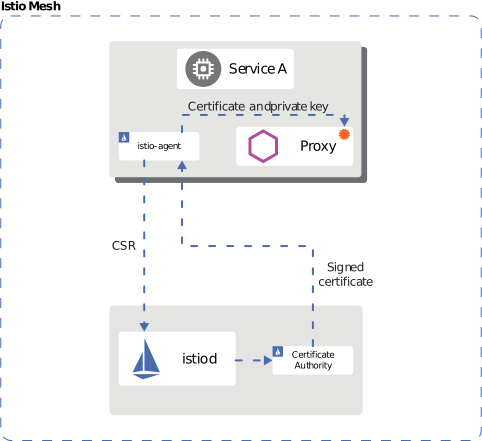
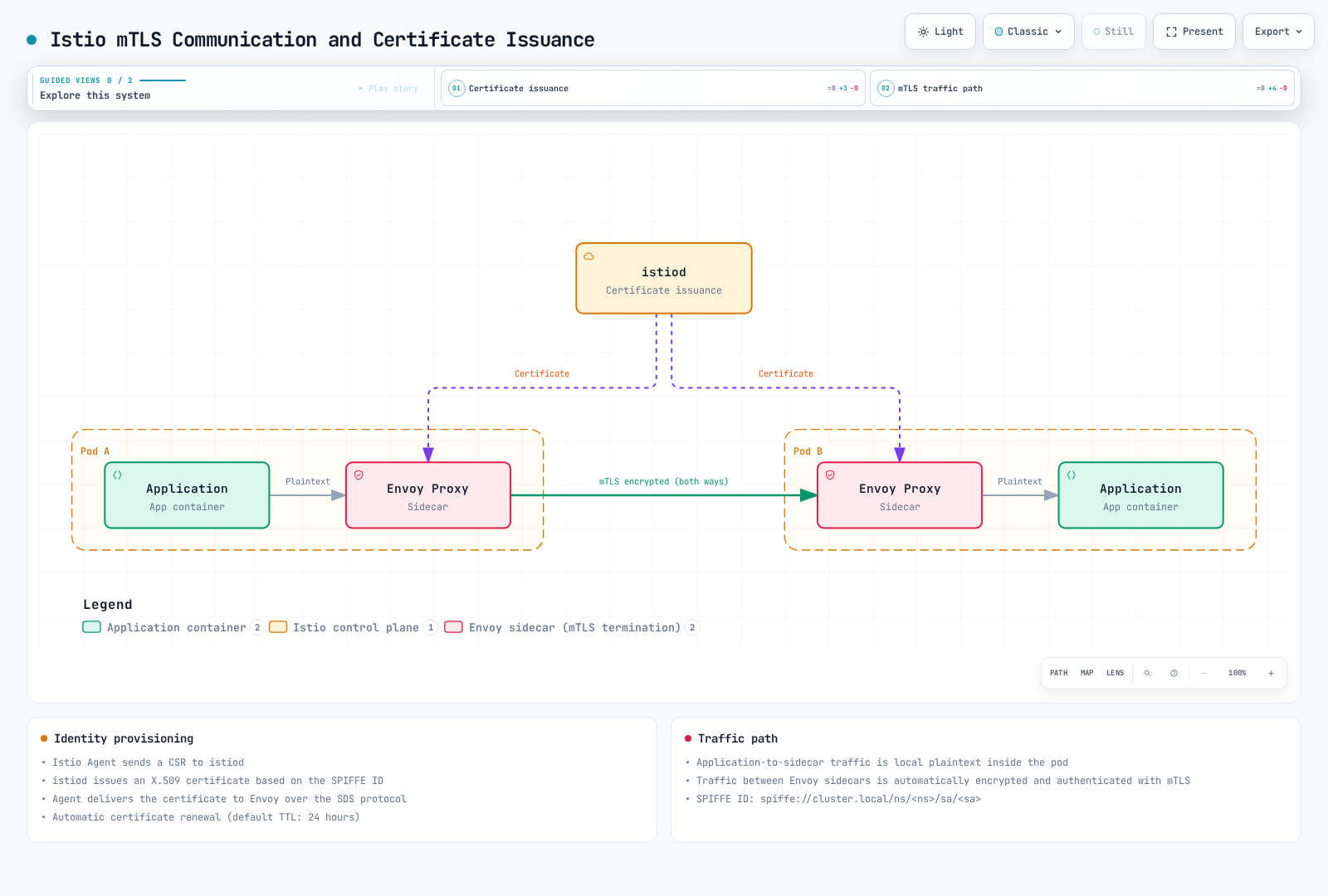
Auto mTLS selects TLS for compatible mesh peers. In sidecar mode, use STRICT to reject plaintext at the receiving proxy and AuthorizationPolicy to restrict identities. Auto mTLS alone is not a complete zero-trust policy. The identity flow below describes sidecars; ambient uses ztunnel and optional waypoints.
Identity-Based Security
Istio uses the SPIFFE (Secure Production Identity Framework for Everyone) standard to assign strong identities to each workload:
spiffe://cluster.local/ns/default/sa/productpage
  |         |           |     |      |    |
  |         |           |     |      |    +- ServiceAccount name
  |         |           |     |      +----- "sa" (ServiceAccount)
  |         |           |     +------------ Namespace name
  |         |           +------------------ "ns" (Namespace)
  |         +------------------------------ Trust Domain
  +---------------------------------------- Protocol
Identity Provisioning Process:
- Kubernetes creates a pod and assigns a ServiceAccount
- Istio Agent starts within the pod
- Agent sends CSR (Certificate Signing Request) to Istiod
- Istiod issues X.509 certificate based on SPIFFE ID
- Agent delivers certificate to Envoy (SDS protocol)
- Automatic certificate renewal (default TTL: 24 hours)
mTLS Modes
These examples are alternatives. A selector-free policy in the mesh root namespace (normally istio-system) is mesh-wide. Ambient encrypts captured mesh traffic with HBONE; DISABLE is unsupported there, while STRICT rejects bypass traffic.
STRICT Mode (Recommended)
apiVersion: security.istio.io/v1
kind: PeerAuthentication
metadata:
  name: default
  namespace: istio-system
spec:
  mtls:
    mode: STRICT  # Only mTLS allowed
PERMISSIVE Mode (For Migration)
apiVersion: security.istio.io/v1
kind: PeerAuthentication
metadata:
  name: default
  namespace: default
spec:
  mtls:
    mode: PERMISSIVE  # Both mTLS and plaintext allowed
DISABLE Mode
apiVersion: security.istio.io/v1
kind: PeerAuthentication
metadata:
  name: disable-mtls
  namespace: default
spec:
  mtls:
    mode: DISABLE  # mTLS disabled
Certificate Management
Istio Default CA Certificate
By default, istiod creates a self-signed root CA and uses it directly to sign workload certificates. An offline root CA with a separate intermediate signer is a production deployment choice, not an automatically created default hierarchy.
The agent requests a 24-hour workload certificate by default and schedules renewal around half its lifetime, with jitter. The CA may cap the requested lifetime. Root and intermediate certificates have separate lifecycles. Inspect the issued certificate for its actual algorithm and validity.
Certificate Verification
# 1. Check CA certificate
kubectl get secret istio-ca-secret -n istio-system -o jsonpath='{.data.ca-cert\.pem}' | \
  base64 -d | openssl x509 -noout -issuer -subject -dates

# 2. Check workload certificate
istioctl proxy-config secret <pod-name> -n <namespace>

# 3. Certificate details
istioctl proxy-config secret <pod-name> -n <namespace> -o json | \
  jq -r '.dynamicActiveSecrets[] | select(.secret.name == "default") | .secret.tlsCertificate.certificateChain.inlineBytes' | \
  base64 -d | openssl x509 -text -noout

# 4. Check certificate expiration date
istioctl proxy-config secret <pod-name> -n <namespace> -o json | \
  jq -r '.dynamicActiveSecrets[] | select(.secret.name == "default") | .secret.tlsCertificate.certificateChain.inlineBytes' | \
  base64 -d | openssl x509 -noout -dates
Using Custom CA Certificates
Use a private PKI that can issue SPIFFE URI SANs. Public ACME certificates are unsuitable for workload identity. This OpenSSL example bootstraps a new test mesh; create istio-system and cacerts before installing istiod. Protect the root key offline in production.
Step 1: Generate CA Certificate and Key
# 1. Generate Root CA
umask 077
openssl genrsa -out root-key.pem 4096

openssl req -new -x509 -days 3650 -key root-key.pem \
  -out root-cert.pem -addext "basicConstraints=critical,CA:TRUE" \
  -subj "/C=US/ST=California/L=San Francisco/O=MyOrg/OU=IT/CN=Root CA"

# 2. Generate Intermediate CA
openssl genrsa -out ca-key.pem 4096

openssl req -new -key ca-key.pem -out ca-cert.csr \
  -subj "/C=US/ST=California/L=San Francisco/O=MyOrg/OU=IT/CN=Intermediate CA"

# 3. Sign Intermediate CA with Root CA
cat > ca-extensions.txt <<EOF
basicConstraints=critical,CA:TRUE,pathlen:0
keyUsage=critical,keyCertSign,cRLSign
EOF

openssl x509 -req -days 1825 -in ca-cert.csr \
  -CA root-cert.pem -CAkey root-key.pem -CAcreateserial \
  -out ca-cert.pem -extfile ca-extensions.txt

# 4. Create Certificate Chain
cat ca-cert.pem root-cert.pem > cert-chain.pem
Step 2: Create Kubernetes Secret
kubectl create secret generic cacerts -n istio-system \
  --from-file=ca-cert.pem=ca-cert.pem \
  --from-file=ca-key.pem=ca-key.pem \
  --from-file=root-cert.pem=root-cert.pem \
  --from-file=cert-chain.pem=cert-chain.pem
Step 3: Install the New Mesh
Install the compatible, pinned Istio version using the installation guide after creating cacerts. Do not replace a running mesh root with this initial-install procedure.
Step 4: Verification
# Verify CA certificate is loaded correctly
kubectl logs -l app=istiod -n istio-system | grep "Use plugged-in cert"

# Verify workload certificates are issued by new CA
istioctl proxy-config secret <pod-name> -n <namespace> -o json | \
  jq -r '.dynamicActiveSecrets[] | select(.secret.name == "default") | .secret.tlsCertificate.certificateChain.inlineBytes' | \
  base64 -d | openssl x509 -noout -issuer
AWS Private CA Integration
Use cert-manager → AWS Private CA issuer → istio-csr for workload signing. Prepare a new cluster without Istio, an active Private CA, and IAM permissions for the issuer ServiceAccount scoped to that CA (DescribeCertificateAuthority, GetCertificate, IssueCertificate). Use EKS Pod Identity or IRSA. The CA must permit the SPIFFE SANs and requested validity.
Install cert-manager at a version compatible with Kubernetes (1.21 supports Kubernetes 1.33–1.36), then the AWS Private CA issuer. Replace the ARN below with the selected CA; plain YAML does not expand shell variables.
apiVersion: awspca.cert-manager.io/v1beta1
kind: AWSPCAClusterIssuer
metadata:
  name: istio-ca
spec:
  arn: arn:aws:acm-pca:us-west-2:123456789012:certificate-authority/REPLACE_WITH_CA_ID
  region: us-west-2
Create istio-root-ca in the cert-manager namespace from a verified public root bundle (ca.pem), then configure istio-csr using these Helm values:
# istio-csr Helm values fragment
app:
  certmanager:
    issuer:
      group: awspca.cert-manager.io
      kind: AWSPCAClusterIssuer
      name: istio-ca
  tls:
    rootCAFile: /var/run/secrets/istio-csr/ca.pem
volumeMounts:
- name: root-ca
  mountPath: /var/run/secrets/istio-csr
  readOnly: true
volumes:
- name: root-ca
  secret:
    secretName: istio-root-ca
Follow the current istio-csr installation guide for its complete, version-compatible chart and Istio install manifest. The latter disables istiod's CA (ENABLE_CA_SERVER=false), sets the CA endpoint to cert-manager-istio-csr.cert-manager.svc:443, and mounts the issued istiod serving certificate and pinned root. Use istioctl install -f for that manifest. Ambient additionally needs trusted ztunnel ServiceAccounts configured in istio-csr. Installing istio-csr after an existing Istio installation is unsupported by that guide.
A cert-manager Certificate normally creates tls.crt, tls.key, and possibly ca.crt; naming its Secret cacerts does not produce Istio's required ca-cert.pem, ca-key.pem, root-cert.pem, and cert-chain.pem. The istio-csr path avoids that incompatible Secret assumption.
Certificate Renewal Policy
The sidecar agent controls its requested lifetime and rotation window. The following is istioctl input; apply it through the installation workflow, and roll selected proxies when changing bootstrap configuration:
# Input to istioctl install -f; not kubectl apply
apiVersion: install.istio.io/v1alpha1
kind: IstioOperator
spec:
  meshConfig:
    defaultConfig:
      proxyMetadata:
        SECRET_TTL: "24h"
        SECRET_GRACE_PERIOD_RATIO: "0.5"
SECRET_TTL defaults to 24h and SECRET_GRACE_PERIOD_RATIO to 0.5; renewal also includes jitter. These are agent settings, not the removed CITADEL_CERT_TTL/CITADEL_GRACE_PERIOD examples. The actual certificate issuer can shorten the lifetime.
Certificate Rotation
Leaf renewal, intermediate renewal under the same root, and root replacement are different operations. For a root change:
- Distribute a bundle containing both old and new roots to every affected workload, gateway and cluster; verify active trust before changing the signer.
- Introduce the new signer and issue new leaf certificates while both roots remain trusted.
- Verify SDS state, certificate chains, cross-cluster traffic and remaining old leaves; account for disconnected workloads and long-lived connections.
- Remove the old root only after migration and the rollback window finish.
Use the supported rotation procedure for the chosen CA provider. A one-step cacerts overwrite plus restart does not guarantee uninterrupted service. Avoid restarting every namespace to force renewal.
PeerAuthentication Configuration
Global Configuration
apiVersion: security.istio.io/v1
kind: PeerAuthentication
metadata:
  name: default
  namespace: istio-system
spec:
  mtls:
    mode: STRICT
Namespace-level Configuration
apiVersion: security.istio.io/v1
kind: PeerAuthentication
metadata:
  name: namespace-policy
  namespace: production
spec:
  mtls:
    mode: STRICT
Workload-level Configuration
apiVersion: security.istio.io/v1
kind: PeerAuthentication
metadata:
  name: workload-policy
  namespace: default
spec:
  selector:
    matchLabels:
      app: reviews
      version: v1
  mtls:
    mode: STRICT
Port-level Configuration
apiVersion: security.istio.io/v1
kind: PeerAuthentication
metadata:
  name: port-policy
  namespace: default
spec:
  selector:
    matchLabels:
      app: myapp
  mtls:
    mode: STRICT
  portLevelMtls:
    8080:
      mode: DISABLE  # mTLS disabled for port 8080
mTLS Integration with AWS Services
AWS Application Load Balancer (ALB) and mTLS
ALB supports client certificate-based mTLS.
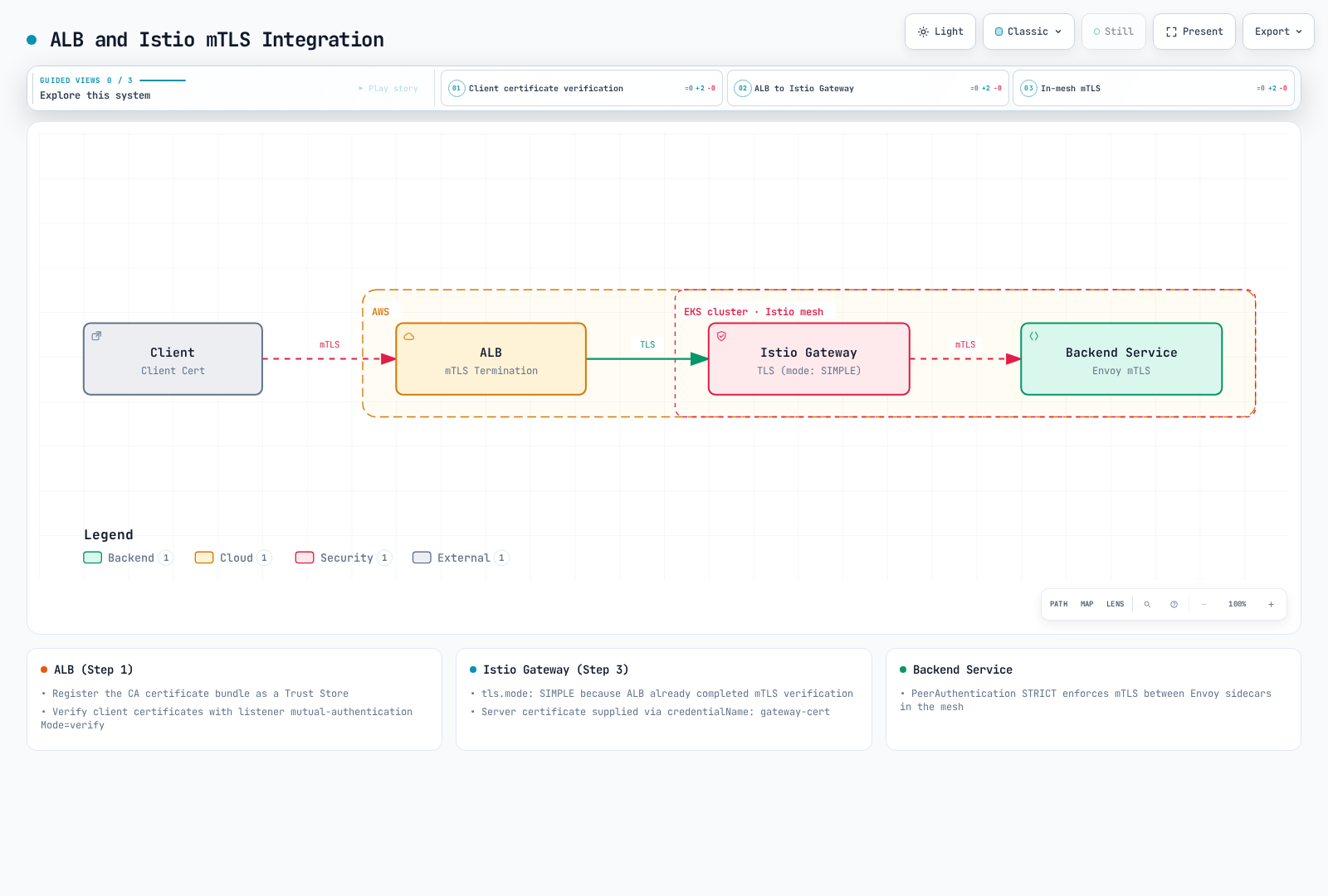
Configure the ALB Listener and Gateway
Create an ALB trust store from the client CA bundle and use its name below. The AWS Load Balancer Controller owns this Ingress and its listener settings. The gateway deployment must already exist with label istio: ingressgateway, a gateway-cert TLS Secret, and a VirtualService bound to istio-system/public-gateway routing api.example.com to the application.
apiVersion: v1
kind: Service
metadata:
  name: istio-gateway
  namespace: istio-system
spec:
  type: ClusterIP
  selector:
    istio: ingressgateway
  ports:
  - name: https
    port: 443
    targetPort: 8443
  - name: status-port
    port: 15021
    targetPort: 15021
---
apiVersion: networking.k8s.io/v1
kind: Ingress
metadata:
  name: istio-edge
  namespace: istio-system
  annotations:
    alb.ingress.kubernetes.io/scheme: internet-facing
    alb.ingress.kubernetes.io/target-type: ip
    alb.ingress.kubernetes.io/listen-ports: '[{"HTTPS":443}]'
    alb.ingress.kubernetes.io/certificate-arn: arn:aws:acm:us-west-2:123456789012:certificate/REPLACE_WITH_CERT_ID
    alb.ingress.kubernetes.io/mutual-authentication: '[{"port":443,"mode":"verify","trustStore":"istio-client-trust-store","ignoreClientCertificateExpiry":false}]'
    alb.ingress.kubernetes.io/backend-protocol: HTTPS
    alb.ingress.kubernetes.io/healthcheck-protocol: HTTP
    alb.ingress.kubernetes.io/healthcheck-port: '15021'
    alb.ingress.kubernetes.io/healthcheck-path: /healthz/ready
spec:
  ingressClassName: alb
  rules:
  - host: api.example.com
    http:
      paths:
      - path: /
        pathType: Prefix
        backend:
          service:
            name: istio-gateway
            port:
              number: 443
---
apiVersion: networking.istio.io/v1
kind: Gateway
metadata:
  name: public-gateway
  namespace: istio-system
spec:
  selector:
    istio: ingressgateway
  servers:
  - port:
      number: 443
      name: https
      protocol: HTTPS
    tls:
      mode: SIMPLE
      credentialName: gateway-cert
    hosts:
    - api.example.com
ALB verify mode validates the viewer certificate during the handshake. Its passthrough mode forwards the certificate chain for application validation; it still terminates TLS. HTTPS target groups encrypt ALB-to-gateway traffic but ALB does not validate target certificates. Restrict target traffic to the ALB security group and health-check ports; a ClusterIP Service alone does not prevent other cluster pods from reaching the gateway.
ALB emits X-Amzn-Mtls-Clientcert-Serial-Number, -Subject, -Issuer, -Validity, and -Leaf. These HTTP headers are identity assertions from the trusted edge, not a client TLS session at Envoy. Prevent direct origin access and sanitize competing client-supplied identity headers. At backends require the gateway's authenticated mesh principal, then apply application authorization to verified claims. Header presence or a Subject string alone is insufficient. An arbitrary ConfigMap containing Envoy bootstrap YAML does not configure the gateway.
Amazon CloudFront and mTLS
CloudFront supports native viewer mTLS. Use a CloudFront trust store containing the approved client CA bundle and ViewerMtlsConfig.Mode=required to require a valid certificate. The trust store reads the S3 bundle when created or updated; changing S3 alone does not refresh it. Viewer mTLS currently requires HTTP/2 rather than HTTP/3, and every cache behavior must reject or redirect HTTP.
Update the Selected Distribution
The following example preserves the complete existing configuration and uses its ETag. Review the selected distribution, origin HTTPS settings, all cache behaviors and trust store before applying it. Use a current AWS CLI with viewer mTLS API support.
# Existing distribution and trust store selected explicitly by the operator.
DIST_ID=REPLACE_WITH_DISTRIBUTION_ID
TRUST_STORE_ID=REPLACE_WITH_TRUST_STORE_ID
aws cloudfront get-distribution-config --id "$DIST_ID" --output json > dist-before.json
ETAG=$(jq -r '.ETag' dist-before.json)
jq --arg trust "$TRUST_STORE_ID" '
  .DistributionConfig
  | .HttpVersion = "http2"
  | .DefaultCacheBehavior.ViewerProtocolPolicy = "https-only"
  | (if .CacheBehaviors.Quantity > 0 then
       .CacheBehaviors.Items |= map(.ViewerProtocolPolicy = "https-only")
     else . end)
  | .ViewerMtlsConfig = {
      Mode: "required",
      TrustStoreConfig: {
        TrustStoreId: $trust,
        AdvertiseTrustStoreCaNames: true,
        IgnoreCertificateExpiry: false
      }
    }
' dist-before.json > dist-mtls.json
# Review the complete diff before applying to the selected distribution.
diff -u <(jq '.DistributionConfig' dist-before.json) dist-mtls.json || true
aws cloudfront update-distribution --id "$DIST_ID" --if-match "$ETAG" \
  --distribution-config file://dist-mtls.json
Forward and Authorize Certificate Identity
Use an origin request policy to forward only required CloudFront-Viewer-Cert-* headers: Present, Sha256, Serial-Number, Issuer, Subject, and optionally Validity/Pem. The PEM header is available only to the origin, not edge functions. For user-specific responses, disable caching or use an appropriate identity-sensitive cache key; an origin request policy does not change the cache key.
An optional viewer-request CloudFront Function can apply an allowlist after native mTLS verification. A fingerprint identifies the certificate; serial numbers alone are only unique within an issuer. Keep the allowlist synchronized with client certificate rotation:
// Additional authorization after native CloudFront viewer mTLS verification.
function handler(event) {
    var fingerprint = event.request.headers['cloudfront-viewer-cert-sha256'];
    var allowed = ['REPLACE_WITH_VERIFIED_CERT_SHA256'];
    if (!fingerprint || allowed.indexOf(fingerprint.value) === -1) {
        return {statusCode: 403, statusDescription: 'Forbidden'};
    }
    return event.request;
}
Require the origin to accept traffic only from the intended distribution using the supported origin access controls/network design and origin authentication. A backend must not trust these headers from arbitrary callers. Viewer certificate validation ends at CloudFront; HTTPS toward the origin is a separate TLS session. See the CloudFront mTLS configuration and certificate headers.
Security Across Multiple TLS Hops
The diagram below uses separate TLS sessions. Its historical “End-to-End mTLS” title does not mean the viewer certificate is the mesh workload identity. CloudFront-to-ALB and ALB-to-gateway are server-authenticated/encrypted hops with forwarded identity assertions, not viewer mTLS carried through every hop.
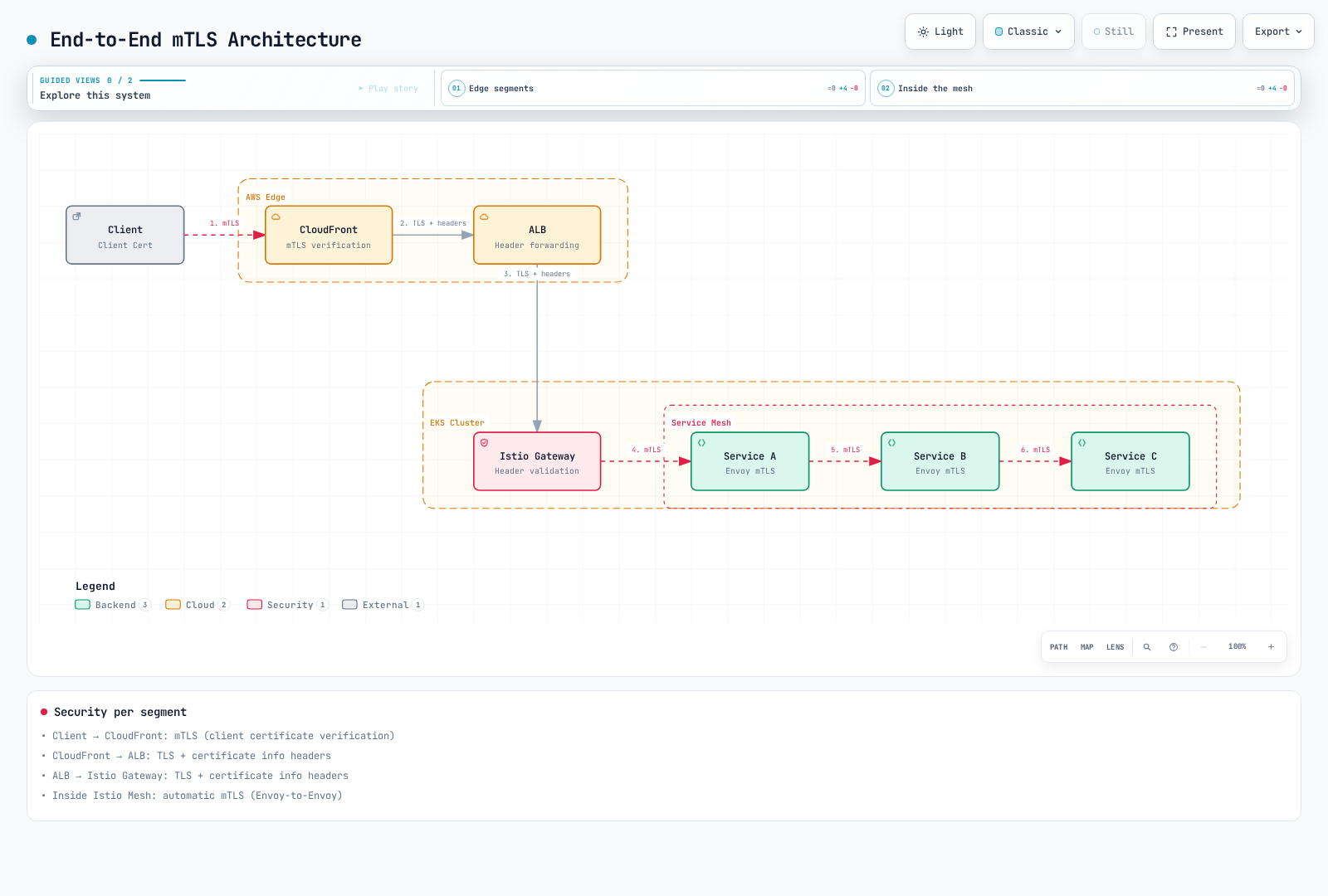
Security per segment:
- Client -> CloudFront: mTLS (client certificate verification)
- CloudFront -> ALB: TLS + certificate info headers
- ALB -> Istio Gateway: TLS + certificate info headers
- Inside Istio Mesh: Automatic mTLS (Envoy-to-Envoy)
mTLS with External Services
Legacy System Integration
For a legacy server supporting ordinary HTTPS, a sidecar can originate TLS. The application sends http://legacy.external.com:80; the proxy connects to port 443. If the application already sends HTTPS, keep it opaque and do not add a second TLS layer with this rule. Private server CAs need an explicit trusted CA bundle.
apiVersion: networking.istio.io/v1
kind: ServiceEntry
metadata:
  name: legacy-system
  namespace: default
spec:
  hosts: [legacy.external.com]
  location: MESH_EXTERNAL
  resolution: DNS
  ports:
  - number: 80
    targetPort: 443
    name: http
    protocol: HTTP
---
apiVersion: networking.istio.io/v1
kind: DestinationRule
metadata:
  name: legacy-system
  namespace: default
spec:
  host: legacy.external.com
  trafficPolicy:
    tls:
      mode: SIMPLE
      sni: legacy.external.com
      subjectAltNames: [legacy.external.com]
External API mTLS Client Authentication
For HTTP-to-mTLS origination, place the client certificate chain/key and server trust bundle in the client proxy's namespace. The sidecar credentialName example requires the DestinationRule workload selector below. Certificate SANs must match api.external.com.
kubectl create secret generic client-mtls-credential -n default \
  --from-file=tls.crt=client-chain.pem \
  --from-file=tls.key=client-key.pem \
--from-file=ca.crt=server-ca.pemapiVersion: networking.istio.io/v1
kind: ServiceEntry
metadata:
name: external-api
namespace: default
spec:
hosts: [api.external.com]
location: MESH_EXTERNAL
resolution: DNS
ports:
- number: 80
targetPort: 443
name: http
protocol: HTTP
---
apiVersion: networking.istio.io/v1
kind: DestinationRule
metadata:
name: external-api-mtls
namespace: default
spec:
host: api.external.com
workloadSelector:
matchLabels:
app: external-api-client
trafficPolicy:
tls:
mode: MUTUAL
credentialName: client-mtls-credential
sni: api.external.com
subjectAltNames: [api.external.com]The selected workload sends http://api.external.com:80; only its proxy originates mTLS. This and the egress-gateway method below are alternatives.
External mTLS via Egress Gateway
Install an egress gateway using the egress guide. This example assumes Service istio-egressgateway.istio-system.svc.cluster.local, service port 443, and gateway pod label istio: egressgateway. Keep the preceding ServiceEntry visible to both namespaces, omit the direct-client DestinationRule, and create the client credential Secret in istio-system for the gateway.
apiVersion: networking.istio.io/v1
kind: Gateway
metadata:
  name: egress-gateway
  namespace: istio-system
spec:
  selector:
    istio: egressgateway
  servers:
  - port:
      number: 443
      name: https
      protocol: HTTPS
    hosts: [api.external.com]
    tls:
      mode: ISTIO_MUTUAL
---
apiVersion: networking.istio.io/v1
kind: DestinationRule
metadata:
  name: to-egress-gateway
  namespace: default
spec:
  host: istio-egressgateway.istio-system.svc.cluster.local
  trafficPolicy:
    tls:
      mode: ISTIO_MUTUAL
      sni: api.external.com
---
apiVersion: networking.istio.io/v1
kind: VirtualService
metadata:
  name: external-api-through-egress
  namespace: default
spec:
  hosts: [api.external.com]
  gateways: [mesh, istio-system/egress-gateway]
  http:
  - match:
    - gateways: [mesh]
      port: 80
    route:
    - destination:
        host: istio-egressgateway.istio-system.svc.cluster.local
        port:
          number: 443
  - match:
    - gateways: [istio-system/egress-gateway]
      port: 443
    route:
    - destination:
        host: api.external.com
        port:
          number: 80
---
apiVersion: networking.istio.io/v1
kind: DestinationRule
metadata:
  name: external-api-from-egress
  namespace: istio-system
spec:
  host: api.external.com
  workloadSelector:
    matchLabels:
      istio: egressgateway
  trafficPolicy:
    tls:
      mode: MUTUAL
      credentialName: client-mtls-credential
      sni: api.external.com
      subjectAltNames: [api.external.com]
Traffic is application HTTP:80 → gateway ISTIO_MUTUAL:443 → external MUTUAL:443 (ServiceEntry port 80 maps to targetPort 443). Verify gateway SDS secrets, generated clusters, server SAN validation and test traffic. Routing through a gateway does not prevent bypass; enforce egress restrictions separately with the appropriate network controls.
Migration Strategy
Step 1: Check Current State
# Check current mTLS configuration
kubectl get peerauthentication -A

# Check mTLS status by service
istioctl proxy-config clusters <pod-name> -n <namespace> -o json
Use this sequence only for a planned migration. Scope a plaintext exception to the smallest namespace/workload that needs it; do not downgrade an already STRICT mesh merely to diagnose a failure.
Step 2: Switch to PERMISSIVE Mode
apiVersion: security.istio.io/v1
kind: PeerAuthentication
metadata:
  name: default
  namespace: istio-system
spec:
  mtls:
    mode: PERMISSIVE  # Allow both mTLS and plaintext
Step 3: Monitoring
Use destination-reported istio_requests_total/istio_tcp_connections_opened_total grouped by connection_security_policy to find observed plaintext traffic. Generate representative traffic and inspect effective proxy clusters and certificates. Missing metrics do not prove that no plaintext callers exist.
Step 4: Switch to STRICT Mode
apiVersion: security.istio.io/v1
kind: PeerAuthentication
metadata:
  name: default
  namespace: istio-system
spec:
  mtls:
    mode: STRICT  # Only mTLS allowed
Common Issues and Solutions
1. mTLS Connection Failure
Symptoms:
upstream connect error or disconnect/reset before headers. reset reason: connection failureRoot Cause Analysis:
# 1. Check PeerAuthentication
kubectl get peerauthentication -A

# 2. Check DestinationRule mTLS mode
kubectl get destinationrule -A -o yaml | grep -A 5 "trafficPolicy"

# 3. Check certificates
istioctl proxy-config secret <pod-name> -n <namespace>

# 4. Verify TLS connection
istioctl proxy-config clusters <source-pod> -n <namespace> --fqdn <dest-service> -o json

# 5. Check Envoy logs in detail
kubectl logs <pod-name> -c istio-proxy -n <namespace> | grep -E "(TLS|SSL|certificate)"Solutions:
- PeerAuthentication and DestinationRule mismatch:
# Problem: PeerAuthentication is STRICT, DestinationRule is DISABLE
# Solution: Change DestinationRule to ISTIO_MUTUAL
apiVersion: networking.istio.io/v1
kind: DestinationRule
metadata:
  name: fix-mtls
spec:
  host: myservice.default.svc.cluster.local
  trafficPolicy:
    tls:
mode: ISTIO_MUTUAL # Match STRICT mode- Pod without sidecar injection:
# Add istio-injection label to namespace
kubectl label namespace default istio-injection=enabled

# Restart pod
kubectl rollout restart deployment/<deployment-name> -n default
2. Certificate Expiration Issue
Symptoms:
TLS error: Secret is not supplied by SDS
x509: certificate has expired
Check Certificate Expiration:
# Check workload certificate expiration date
istioctl proxy-config secret <pod-name> -n <namespace> -o json | \
  jq -r '.dynamicActiveSecrets[] | select(.secret.name == "default") | .secret.tlsCertificate.certificateChain.inlineBytes' | \
  base64 -d | openssl x509 -noout -dates

# Check CA certificate expiration
kubectl get secret istio-ca-secret -n istio-system -o json | \
  jq -r '.data."ca-cert.pem"' | base64 -d | openssl x509 -noout -dates

# Check certificate expiration for all workloads
for pod in $(kubectl get pods -n default -o jsonpath='{.items[*].metadata.name}'); do
  echo "Pod: $pod"
  istioctl proxy-config secret $pod -n default -o json 2>/dev/null | \
    jq -r '.dynamicActiveSecrets[] | select(.secret.name == "default") | .secret.tlsCertificate.certificateChain.inlineBytes' | \
    base64 -d 2>/dev/null | openssl x509 -noout -dates 2>/dev/null || echo "No cert found"
doneSolutions:
Restore CA connectivity, valid trust and node time first; inspect agent/istiod logs for failed renewal. Restarting istiod does not itself repair an expired CA. If a selected workload cannot recover after the cause is fixed, perform a controlled rollout respecting its disruption budget.
3. Clock Skew (Time Synchronization Issue)
certificate is not valid yet or expired-certificate errors can indicate node clock problems. Compare UTC time against certificate NotBefore/NotAfter; there is no universal ±5-minute TLS tolerance. On the affected EC2 node, inspect chrony rather than querying the NTP address as HTTP:
date -u
chronyc tracking
chronyc sources -v
# Amazon Time Sync NTP: 169.254.169.123 (not an HTTP metadata URL)
Repair the node's configured time synchronization service according to its OS (chronyd or chrony). Do not invent a certificate grace-period environment variable to bypass validity checks.
4. Circular Dependency
A Service A → B → A call cycle does not inherently cause an mTLS failure. Inspect distributed traces, application deadlines, retries, connection errors and proxy logs to distinguish recursion or resource exhaustion from TLS negotiation. istioctl analyze checks configuration; it does not reconstruct the runtime call graph. Increasing TCP connect timeout is not a fix for a dependency cycle.
5. Mixed Protocol (mTLS + Plaintext)
WRONG_VERSION_NUMBER often indicates a TLS/plaintext port mismatch. Inspect Service port protocols, application scheme, PeerAuthentication, DestinationRule and actual proxy clusters. Remove an incorrect explicit TLS override or correct the destination protocol; use automatic mTLS for ordinary mesh peers. A bounded PERMISSIVE exception is for intentional migration, not a universal fix.
6. Headless Service mTLS
Headless services also support auto mTLS. First check endpoint discovery and the named service port. The following explicit rule is optional and cannot repair missing endpoint metadata or an application protocol mismatch.
Symptoms: mTLS connection failure on headless services
Solution:
apiVersion: networking.istio.io/v1
kind: DestinationRule
metadata:
  name: headless-service-mtls
spec:
  host: headless-service.default.svc.cluster.local
  trafficPolicy:
    tls:
      mode: ISTIO_MUTUAL
    portLevelSettings:
    - port:
        number: 3306
      tls:
        mode: ISTIO_MUTUAL
7. mTLS and NetworkPolicy Conflict
Sidecar mTLS uses the application's destination port; 15008 is ambient HBONE, not a universal sidecar mTLS port. This sidecar example allows gateway → productpage:9080, productpage → reviews/details:9080, istiod:15012 and cluster DNS. Adapt labels, all real dependencies, scraping/probes and NodeLocal DNS before applying. Ambient requires its own CNI/network-policy treatment.
apiVersion: networking.k8s.io/v1
kind: NetworkPolicy
metadata:
  name: productpage-sidecar
  namespace: default
spec:
  podSelector:
    matchLabels:
      app: productpage
  policyTypes: [Ingress, Egress]
  ingress:
  - from:
    - namespaceSelector:
        matchLabels:
          kubernetes.io/metadata.name: istio-system
      podSelector:
        matchLabels:
          istio: ingressgateway
    ports:
    - protocol: TCP
      port: 9080
  egress:
  - to:
    - podSelector:
        matchLabels:
          app: reviews
    - podSelector:
        matchLabels:
          app: details
    ports:
    - protocol: TCP
      port: 9080
  - to:
    - namespaceSelector:
        matchLabels:
          kubernetes.io/metadata.name: istio-system
      podSelector:
        matchLabels:
          app: istiod
    ports:
    - protocol: TCP
      port: 15012
  - to:
    - namespaceSelector:
        matchLabels:
          kubernetes.io/metadata.name: kube-system
      podSelector:
        matchLabels:
          k8s-app: kube-dns
    ports:
    - protocol: UDP
      port: 53
    - protocol: TCP
      port: 53
Performance and Monitoring
mTLS Performance Impact — Measured on EKS
The following historical benchmark compares complete data-plane paths, including encryption and proxy processing. The numbers below were measured by this guidebook on a dedicated EKS cluster (Graviton m7g.xlarge, fortio at 200 qps for 60s over 16 connections, Code 200 100% in every case):
| Case (mTLS STRICT) | P50 | P90 | P99 | P50 overhead vs no-mesh |
|---|---|---|---|---|
| no-mesh (plaintext baseline) | 0.82ms | 1.73ms | 1.97ms | — |
| sidecar | 2.11ms | 2.89ms | 3.91ms | +1.29ms |
| ambient L4 (ztunnel only) | 0.86ms | 1.74ms | 1.98ms | +0.04ms (negligible) |
| ambient L7 (waypoint) | 2.68ms | 3.63ms | 3.98ms | +1.86ms |
The takeaway: there is no single "mTLS costs +20%" coefficient. Ambient L4 added 0.04ms at P50 in this run. Because the cases differ in L7 processing and proxy paths, these numbers do not isolate the cost of TLS cryptography or prove it is zero. See the measured sidecar vs ambient comparison for methodology, 503 rates during rollouts, and reproduction steps. Different workloads require your own re-measurement.
Optimization Methods:
- Architecture-appropriate cryptographic acceleration: AES-NI is an x86 extension; Graviton uses Arm cryptographic extensions. Verify CPU features and benchmark the actual cipher/workload.
lscpu
rg -m 1 "^(flags|Features)" /proc/cpuinfo- Use TLS 1.3 (faster handshake):
apiVersion: install.istio.io/v1alpha1
kind: IstioOperator
spec:
  meshConfig:
    meshMTLS:
minProtocolVersion: TLSV1_3- Connection Pooling:
apiVersion: networking.istio.io/v1
kind: DestinationRule
metadata:
  name: connection-pool
spec:
  host: myservice.default.svc.cluster.local
  trafficPolicy:
    connectionPool:
      tcp:
        maxConnections: 100
        connectTimeout: 1s
      http:
        http1MaxPendingRequests: 1024
        http2MaxRequests: 1024
        maxRequestsPerConnection: 0  # No request-count cap; reuse connections
        idleTimeout: 900s
Prometheus Metrics
Measure adoption, application errors, certificate renewal and TLS handshakes separately. The HTTP metrics below require L7 telemetry (sidecars or waypoints); ztunnel L4 telemetry cannot report HTTP status. Agent certificate metrics require scraping the sidecar agent endpoint, normally port 15020 /stats/prometheus, and may be absent for file-mounted or other data planes. Confirm metric names and labels in your deployment.
# Observed HTTP request share protected by mTLS (destination reporter).
sum by (destination_service_name) (rate(istio_requests_total{reporter="destination",connection_security_policy="mutual_tls"}[5m]))
/
sum by (destination_service_name) (rate(istio_requests_total{reporter="destination"}[5m]))

# Remaining sidecar workload certificate lifetime in seconds.
istio_agent_cert_expiry_seconds{resource_name="default"}

# HTTP 5xx fraction on mTLS-protected requests; not TLS handshake failures.
sum by (destination_service_name) (rate(istio_requests_total{reporter="destination",response_code=~"5.*",connection_security_policy="mutual_tls"}[5m]))
/
sum by (destination_service_name) (rate(istio_requests_total{reporter="destination",connection_security_policy="mutual_tls"}[5m]))
The encrypted/total ratio describes observed traffic adoption, not handshake success. HTTP 5xx can be an application failure over a perfectly valid TLS connection. Envoy exposes TLS handshake, connection_error, and fail_verify_* counters under listener/cluster SSL statistics; the old ssl_connection_handshake_duration_bucket example is not a standard Envoy histogram. Enable required proxy statistics and inspect their actual exported names before building queries.
Grafana Dashboard
Create panels for mTLS adoption, remaining workload certificate lifetime in seconds, HTTP 5xx over mTLS, and actual TLS verification counters. Use the expressions above with the configured Prometheus datasource. Provisioning requires mounting dashboard JSON through Grafana's dashboard provider (or configuring a dashboard sidecar); creating a ConfigMap alone does not load a dashboard. A provisioned file contains the dashboard object itself, not an HTTP API { "dashboard": ... } wrapper.
Certificate Expiration Alerts
The example below assumes 24-hour, automatically renewed sidecar leaves and a Prometheus Operator selecting this PrometheusRule. Adjust thresholds for the issued TTL and renewal schedule. Alert separately on failed scrapes/missing expected series: absent certificate metrics do not mean healthy certificates. The agent's seconds gauge can be negative; Envoy's whole-day expiry gauge is unsuitable for a seven-day alert on 24-hour leaves and does not provide a reliable negative-expiry signal.
apiVersion: monitoring.coreos.com/v1
kind: PrometheusRule
metadata:
  name: istio-cert-expiration-alert
  namespace: istio-system
spec:
  groups:
  - name: istio-certificates
    rules:
    - alert: IstioWorkloadCertificateExpiringSoon
      expr: istio_agent_cert_expiry_seconds{resource_name="default"} < 3600
      for: 5m
      labels:
        severity: warning
      annotations:
        summary: "Workload certificate has less than one hour remaining"
    - alert: IstioWorkloadCertificateExpired
      expr: istio_agent_cert_expiry_seconds{resource_name="default"} < 0
      for: 1m
      labels:
        severity: critical
      annotations:
        summary: "Workload certificate has expired"
    - alert: IstioHTTP5xxOverMTLS
      expr: |
        sum by (destination_service_name) (rate(istio_requests_total{reporter="destination",response_code=~"5.*",connection_security_policy="mutual_tls"}[5m]))
        /
        sum by (destination_service_name) (rate(istio_requests_total{reporter="destination",connection_security_policy="mutual_tls"}[5m])) > 0.05
      for: 5m
      labels:
        severity: warning
      annotations:
        summary: "HTTP 5xx fraction exceeds 5% on mTLS traffic"
Logging and Debugging
# 1. Change Envoy log level dynamically
istioctl proxy-config log <pod-name> -n <namespace> --level connection:debug

# 2. Filter mTLS-related logs
kubectl logs <pod-name> -c istio-proxy -n <namespace> | grep -E "(TLS|SSL|certificate|handshake)"

# 3. Check certificates from Envoy Admin Interface
kubectl exec -it <pod-name> -c istio-proxy -n <namespace> -- \
  curl -s localhost:15000/certs | jq '.'

# 4. TLS connection statistics
kubectl exec -it <pod-name> -c istio-proxy -n <namespace> -- \
  curl -s localhost:15000/stats | grep ssl

# 5. Real-time mTLS traffic verification
istioctl dashboard envoy <pod-name>.<namespace>
# Check ssl metrics at http://localhost:15000/stats/prometheus
After collecting diagnostics, restore the previous log level. Minimal proxy images may not contain curl; use local port-forwarding to inspect the admin endpoint instead.
Best Practices
Production Environment:
- Use STRICT mode
- Use custom CA certificates
- Configure automatic certificate renewal
- Set up expiration alerts
Performance Optimization:
- Use TLS 1.3
- Enable connection pooling
- Use CPU-appropriate cryptographic acceleration
Monitoring:
- Track certificate expiration
- Monitor mTLS adoption and TLS verification errors separately
- Track actual handshake counters and certificate renewal
Security:
- Regular CA rotation
- Principle of least privilege
- Use together with NetworkPolicy