ArgoCD Notifications
Reviewed Against: Argo CD 3.5.2 (bundled Notifications Engine 0cff13b8a717); updated to patch 3.5.4, which pins the same Notifications Engine commit, after release-note review (examples not re-run) Last Updated: October 12, 2026
Table of Contents
- Overview
- Architecture
- Notification Services
- Triggers
- Templates
- Subscriptions
- Advanced Configuration
- AWS Integration
Overview
ArgoCD Notifications is a component that monitors ArgoCD applications and sends notifications when certain conditions are met. It supports multiple notification services and provides flexible templating.
Key Features
| Feature | Description |
|---|---|
| Multiple Services | Slack, Teams, Email, Webhook, GitHub, and more |
| Flexible Triggers | Condition-based notification triggers |
| Go Templates | Rich template syntax for message formatting |
| Subscription Model | Per-application notification subscriptions |
| Example Catalog | Optional trigger/template definitions to merge into your configuration |
Architecture
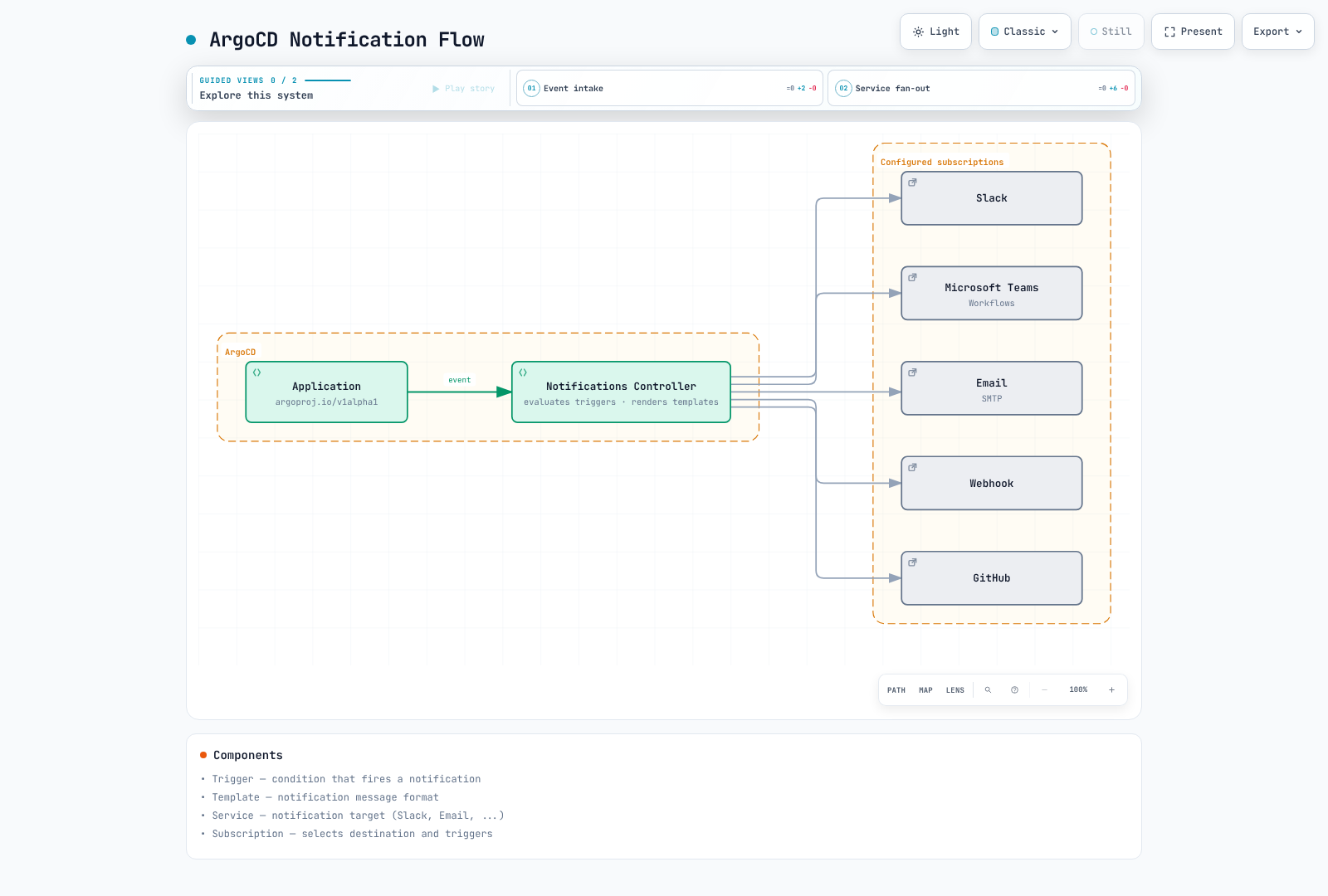
Controller and Configuration
The full Argo CD 3.5.4 installation includes the Notifications controller. Check that it is enabled in your installation/Helm values. The notifications_catalog/install.yaml file contains example configuration; it is not an installer for a missing controller. Merge selected catalog entries with your existing ConfigMap and Secret.
kubectl get deployment argocd-notifications-controller -n argocdNotification Services
Compose these data fragments into one argocd-notifications-cm configuration; do not replace the same ConfigMap/Secret with each independent snippet. Store tokens, signed webhook URLs and private keys in protected argocd-notifications-secret values outside Git. Service, template, trigger and subscription names must all line up.
Slack
Configure chat:write and invite the bot to the intended channels. chat:write.public is only needed to post to public channels the bot has not joined. signingSecret is not a replacement for an Incoming Webhook URL.
apiVersion: v1
kind: ConfigMap
metadata:
  name: argocd-notifications-cm
  namespace: argocd
data:
  service.slack: |
    token: $slack-token
---
apiVersion: v1
kind: Secret
metadata:
  name: argocd-notifications-secret
  namespace: argocd
type: Opaque
stringData:
  slack-token: xoxb-your-bot-token
Slack Bot Setup:
- Create a Slack App at https://api.slack.com/apps
- Add
chat:write; usechat:write.publiconly if the stated use case requires it - Install app to workspace
- Copy Bot User OAuth Token
Microsoft Teams Workflows
Use a Workflows endpoint with teams-workflows rather than legacy Office365 Connectors. Verify the actual endpoint authentication and flow ownership/co-owner lifecycle. Keep its signed URL in a Secret; do not assume a legacy MessageCard endpoint is interchangeable.
apiVersion: v1
kind: ConfigMap
metadata:
  name: argocd-notifications-cm
  namespace: argocd
data:
  service.teams-workflows: |
    recipientUrls:
      deployments: $teams-webhook-deployments
      alerts: $teams-webhook-alerts
---
apiVersion: v1
kind: Secret
metadata:
  name: argocd-notifications-secret
  namespace: argocd
type: Opaque
stringData:
  teams-webhook-deployments: REPLACE_WITH_TEAMS_WORKFLOWS_URL
  teams-webhook-alerts: REPLACE_WITH_TEAMS_WORKFLOWS_URL
Email (SMTP)
apiVersion: v1
kind: ConfigMap
metadata:
  name: argocd-notifications-cm
  namespace: argocd
data:
  service.email: |
    host: smtp.example.com
    port: 587
    username: $email-username
    password: $email-password
    from: argocd@example.com
    html: true
---
apiVersion: v1
kind: Secret
metadata:
  name: argocd-notifications-secret
  namespace: argocd
type: Opaque
stringData:
  email-username: argocd@example.com
  email-password: your-smtp-password
Webhook
apiVersion: v1
kind: ConfigMap
metadata:
  name: argocd-notifications-cm
  namespace: argocd
data:
  service.webhook.custom: |
    url: https://api.example.com/webhooks/argocd
    headers:
    - name: Authorization
      value: $webhook-authorization
    - name: Content-Type
      value: application/json
---
apiVersion: v1
kind: Secret
metadata:
  name: argocd-notifications-secret
  namespace: argocd
type: Opaque
stringData:
  webhook-authorization: Bearer REPLACE_WITH_RECEIVER_TOKEN
GitHub (Commit Status)
Install the GitHub App on the target repository and grant write access to Commit statuses. Replace the example IDs and private key with that installation’s values.
apiVersion: v1
kind: ConfigMap
metadata:
  name: argocd-notifications-cm
  namespace: argocd
data:
  service.github: |
    appID: 123456
    installationID: 12345678
    privateKey: $github-privateKey
---
apiVersion: v1
kind: Secret
metadata:
  name: argocd-notifications-secret
  namespace: argocd
type: Opaque
stringData:
  github-privateKey: |
    -----BEGIN RSA PRIVATE KEY-----
    ...
    -----END RSA PRIVATE KEY-----
Grafana
Use a service-account token with the required annotation-write permissions. This engine expects apiUrl including /api and appends annotations. Avoid making an administrator token or unnecessarily long lifetime the default.
apiVersion: v1
kind: ConfigMap
metadata:
  name: argocd-notifications-cm
  namespace: argocd
data:
  service.grafana: |
    apiUrl: https://grafana.example.com/api
    apiKey: $grafana-api-key
PagerDuty Events API v2
apiVersion: v1
kind: ConfigMap
metadata:
  name: argocd-notifications-cm
  namespace: argocd
data:
  service.pagerdutyv2: |
    serviceKeys:
      production: $pagerduty-key-prod
      staging: $pagerduty-key-staging
Triggers
These are explicitly defined examples, not assumptions about an automatically installed catalog. Their send entries reference template.app-status below. Merge the fragments into one ConfigMap together with your selected service settings.
apiVersion: v1
kind: ConfigMap
metadata:
  name: argocd-notifications-cm
  namespace: argocd
data:
  context: |
    argocdUrl: https://argocd.example.com
  trigger.on-sync-succeeded: |
    - when: app.status?.operationState?.phase == 'Succeeded'
      oncePer: app.status.operationState.startedAt
      send:
      - app-status
  trigger.on-sync-failed: |
    - when: app.status?.operationState?.phase in ['Failed', 'Error']
      oncePer: app.status.operationState.startedAt
      send:
      - app-status
  trigger.on-sync-running: |
    - when: app.status?.operationState?.phase == 'Running'
      oncePer: app.status.operationState.startedAt
      send:
      - app-status
  trigger.on-sync-status-unknown: |
    - when: app.status?.sync?.status == 'Unknown'
      send:
      - app-status
  trigger.on-health-degraded: |
    - when: app.status?.health?.status == 'Degraded'
      send:
      - app-status
  trigger.on-deployed: |
    - when: app.status?.operationState?.phase == 'Succeeded' && app.status?.sync?.status == 'Synced' && app.status?.health?.status
        == 'Healthy'
      oncePer: app.status.operationState.startedAt
      send:
      - app-status
?. handles Applications that do not yet have status or operationState. Sync success alone does not mean the application is ready. on-deployed requires a successful operation and current Synced + Healthy status, excluding a new OutOfSync change with an older successful operation.
Custom Conditions
apiVersion: v1
kind: ConfigMap
metadata:
  name: argocd-notifications-cm
  namespace: argocd
data:
  trigger.on-production-deployed: |
    - when: app.metadata?.labels?.environment == 'production' && app.status?.operationState?.phase == 'Succeeded' &&
        app.status?.sync?.status == 'Synced' && app.status?.health?.status == 'Healthy'
      oncePer: app.status.operationState.startedAt
      send:
      - app-status
  trigger.on-resource-failed: |
    - when: app.status?.resources != nil && any(app.status.resources, {#.health?.status == 'Degraded'})
      send:
      - app-status
  trigger.on-many-images: |
    - when: app.status?.summary?.images != nil && len(app.status.summary.images) > 5
      oncePer: app.metadata.generation
      send:
      - app-status
  trigger.on-long-sync: |
    - when: app.status?.operationState?.phase == 'Running' && app.status.operationState.startedAt != nil && time.Now().Sub(time.Parse(app.status.operationState.startedAt)).Minutes()
        > 10
      oncePer: app.status.operationState.startedAt
      send:
      - app-status
  trigger.on-declared-rollback: |
    - when: 'app.status?.operationState?.phase == ''Succeeded'' && app.status.operationState.operation?.info != nil
        && any(app.status.operationState.operation.info, {#.name == ''release-action'' && #.value == ''rollback''})'
      oncePer: app.status.operationState.startedAt
      send:
      - app-status
  trigger.on-critical-failure: |
    - when: app.status?.operationState?.phase in ['Failed', 'Error'] && app.metadata?.labels?.tier == 'critical'
      oncePer: app.status.operationState.startedAt
      send:
      - app-status
  trigger.on-production-namespace-failure: |
    - when: app.status?.operationState?.phase in ['Failed', 'Error'] && app.spec?.destination?.namespace != nil && app.spec.destination.namespace
        matches '^prod-.*$'
      oncePer: app.status.operationState.startedAt
      send:
      - app-status
  trigger.on-utc-window: |
    - when: app.status?.operationState?.phase == 'Succeeded' && time.Now().UTC().Hour() >= 9 && time.Now().UTC().Hour()
        < 18
      oncePer: app.status.operationState.startedAt
      send:
- app-statussummary.imagescounts images, not replicas. Useany(...)for resource arrays andmatchesfor regular expressions.- Time conditions run when an Application is evaluated. They are not precise ten-minute timers and do not queue notifications for the next UTC business window.
- Revision differences do not prove a rollback.
on-declared-rollbackreads explicit operation info. After reviewing a recovery change in Git, a manual-sync workflow can useargocd app sync my-app --info release-action=rollback. Automatic sync does not add this marker automatically.
Sustained OutOfSync Monitoring
The last operation’s finishedAt is not the time OutOfSync began. For a continuous thirty-minute condition, scrape Argo CD metrics with Prometheus and use a rule such as this. It requires Prometheus Operator and labels/namespaces matching your Prometheus ruleSelector configuration.
apiVersion: monitoring.coreos.com/v1
kind: PrometheusRule
metadata:
  name: argocd-sync-alerts
  namespace: monitoring
spec:
  groups:
  - name: argocd-sync
    rules:
    - alert: ArgoCDApplicationOutOfSync
      expr: argocd_app_info{sync_status="OutOfSync"} == 1
      for: 30m
      labels:
        severity: warning
      annotations:
        summary: Application {{ $labels.name }} has remained OutOfSync for 30 minutes
Templates
This common template defines Slack, Teams Workflows, HTML email, webhook, and incident formats. Subscriptions select destinations; including a service format does not broadcast to every provider. Subscribe PagerDuty/Opsgenie only to failure or Degraded triggers. This example does not automatically resolve incidents.
This engine version uses Go text/template with Sprig functions. Escape JSON values with toJson and HTML values with html. Fields render independently, so local variables are declared in each field. The template handles missing status, a single operation revision, and multi-source revisions. It does not forward raw operation error messages to external channels.
apiVersion: v1
kind: ConfigMap
metadata:
  name: argocd-notifications-cm
  namespace: argocd
data:
  template.app-status: |
    message: |
      {{- $status := default (dict) .app.status -}}
      {{- $sync := default (dict) $status.sync -}}
      {{- $health := default (dict) $status.health -}}
      {{- $op := default (dict) $status.operationState -}}
      {{- $result := default (dict) $op.syncResult -}}
      {{- $applied := default (list) $result.revisions -}}
      {{- if and (not $applied) $result.revision -}}{{- $applied = list $result.revision -}}{{- end -}}
      {{- $url := printf "%s/applications/%s/%s" (trimSuffix "/" .context.argocdUrl) .app.metadata.namespace .app.metadata.name -}}
      Application {{.app.metadata.namespace}}/{{.app.metadata.name}}: phase={{default "None" $op.phase}}, sync={{default "Unknown" $sync.status}}, health={{default "Unknown" $health.status}}.
      Details: {{$url}}
    slack:
      attachments: |
        {{- $status := default (dict) .app.status -}}
        {{- $sync := default (dict) $status.sync -}}
        {{- $health := default (dict) $status.health -}}
        {{- $op := default (dict) $status.operationState -}}
        {{- $result := default (dict) $op.syncResult -}}
        {{- $applied := default (list) $result.revisions -}}
        {{- if and (not $applied) $result.revision -}}{{- $applied = list $result.revision -}}{{- end -}}
        {{- $url := printf "%s/applications/%s/%s" (trimSuffix "/" .context.argocdUrl) .app.metadata.namespace .app.metadata.name -}}
        [{
          "color": "#f4c030",
          "title": {{.app.metadata.name | toJson}},
          "title_link": {{$url | toJson}},
          "fields": [
            {"title":"Sync","value":{{default "Unknown" $sync.status | toJson}},"short":true},
            {"title":"Health","value":{{default "Unknown" $health.status | toJson}},"short":true},
            {"title":"Operation revision(s)","value":{{join ", " $applied | toJson}},"short":false}
          ]
        }]
    teams-workflows:
      title: 'Application status changed: {{.app.metadata.name}}'
      text: |-
        {{- $status := default (dict) .app.status -}}
        {{- $sync := default (dict) $status.sync -}}
        {{- $health := default (dict) $status.health -}}
        {{- $op := default (dict) $status.operationState -}}
        {{- $result := default (dict) $op.syncResult -}}
        {{- $applied := default (list) $result.revisions -}}
        {{- if and (not $applied) $result.revision -}}{{- $applied = list $result.revision -}}{{- end -}}
        {{- $url := printf "%s/applications/%s/%s" (trimSuffix "/" .context.argocdUrl) .app.metadata.namespace .app.metadata.name -}}
        Application {{.app.metadata.namespace}}/{{.app.metadata.name}}
        {{$url}}
      themeColor: Accent
      facts: |-
        {{- $status := default (dict) .app.status -}}
        {{- $sync := default (dict) $status.sync -}}
        {{- $health := default (dict) $status.health -}}
        {{- $op := default (dict) $status.operationState -}}
        {{- $result := default (dict) $op.syncResult -}}
        {{- $applied := default (list) $result.revisions -}}
        {{- if and (not $applied) $result.revision -}}{{- $applied = list $result.revision -}}{{- end -}}
        {{- $url := printf "%s/applications/%s/%s" (trimSuffix "/" .context.argocdUrl) .app.metadata.namespace .app.metadata.name -}}
        [{"name":"Sync","value":{{default "Unknown" $sync.status | toJson}}},{"name":"Health","value":{{default "Unknown" $health.status | toJson}}}]
    email:
      subject: '[Argo CD] Application status changed: {{.app.metadata.name}}'
      body: |-
        {{- $status := default (dict) .app.status -}}
        {{- $sync := default (dict) $status.sync -}}
        {{- $health := default (dict) $status.health -}}
        {{- $op := default (dict) $status.operationState -}}
        {{- $result := default (dict) $op.syncResult -}}
        {{- $applied := default (list) $result.revisions -}}
        {{- if and (not $applied) $result.revision -}}{{- $applied = list $result.revision -}}{{- end -}}
        {{- $url := printf "%s/applications/%s/%s" (trimSuffix "/" .context.argocdUrl) .app.metadata.namespace .app.metadata.name -}}
        <h2>Application status changed</h2><p>Application: {{.app.metadata.namespace | html}}/{{.app.metadata.name | html}}</p><p>Sync: {{default "Unknown" $sync.status | html}}; health: {{default "Unknown" $health.status | html}}</p><a href="{{$url | html}}">View in Argo CD</a>
    webhook:
      custom:
        method: POST
        body: |
          {{- $status := default (dict) .app.status -}}
          {{- $sync := default (dict) $status.sync -}}
          {{- $health := default (dict) $status.health -}}
          {{- $op := default (dict) $status.operationState -}}
          {{- $result := default (dict) $op.syncResult -}}
          {{- $applied := default (list) $result.revisions -}}
          {{- if and (not $applied) $result.revision -}}{{- $applied = list $result.revision -}}{{- end -}}
          {{- $url := printf "%s/applications/%s/%s" (trimSuffix "/" .context.argocdUrl) .app.metadata.namespace .app.metadata.name -}}
          {{ dict "event" "application-status" "application" .app.metadata.name "namespace" .app.metadata.namespace "uid" (default "" .app.metadata.uid) "project" (default "default" .app.spec.project) "phase" (default "" $op.phase) "syncStatus" (default "Unknown" $sync.status) "healthStatus" (default "Unknown" $health.status) "appliedRevisions" $applied "operationStartedAt" (default "" $op.startedAt) "url" $url | toJson }}
    pagerdutyv2:
      summary: 'Application status changed: {{.app.metadata.namespace}}/{{.app.metadata.name}}'
      severity: error
      source: argocd
      dedupKey: argocd/{{.app.metadata.namespace}}/{{.app.metadata.name}}/application-status
    opsgenie:
      description: 'Application status changed: {{.app.metadata.namespace}}/{{.app.metadata.name}}'
      priority: P2
      alias: argocd/{{.app.metadata.namespace}}/{{.app.metadata.name}}/application-status
service.email.html: true enables HTML bodies. Teams uses the teams-workflows field and Adaptive Card color names. The service name for service.webhook.custom is custom, with its body under webhook.custom; set POST explicitly. Grafana uses the common message for its annotation.
| Function | Purpose |
|---|---|
upper, lower | Change letter case |
default, dict, list | Defaults and collections |
join, splitList | Join/split lists |
toJson | Encode JSON values |
html | Escape HTML special characters |
GitHub Commit Status
Use separate triggers/templates for commit status. This example is limited to one HTTPS GitHub source and publishes only when the operation result identifies its repository and revision. Multi-source, Helm/OCI, and SSH sources require explicit mapping. Failures before a result revision is recorded are not published. status.label supplies the GitHub status context; context and description are not fields in this template schema.
apiVersion: v1
kind: ConfigMap
metadata:
  name: argocd-notifications-cm
  namespace: argocd
data:
  trigger.on-github-deployed: |
    - when: app.spec?.source?.repoURL != nil && app.spec.source.repoURL startsWith 'https://github.com/' && app.spec?.sources
        == nil && app.status?.operationState?.syncResult?.revision != nil && app.status.operationState.syncResult?.source?.repoURL
        == app.spec.source.repoURL && app.status?.operationState?.phase == 'Succeeded' && app.status?.sync?.status ==
        'Synced' && app.status?.health?.status == 'Healthy'
      oncePer: app.status.operationState.startedAt
      send:
      - github-deployed
  trigger.on-github-failed: |
    - when: app.spec?.source?.repoURL != nil && app.spec.source.repoURL startsWith 'https://github.com/' && app.spec?.sources
        == nil && app.status?.operationState?.syncResult?.revision != nil && app.status.operationState.syncResult?.source?.repoURL
        == app.spec.source.repoURL && app.status?.operationState?.phase in ['Failed', 'Error']
      oncePer: app.status.operationState.startedAt
      send:
      - github-failed
  template.github-deployed: |
    github:
      repoURLPath: '{{.app.status.operationState.syncResult.source.repoURL}}'
      revisionPath: '{{.app.status.operationState.syncResult.revision}}'
      status:
        state: success
        label: argocd/{{.app.metadata.namespace}}/{{.app.metadata.name}}
        targetURL: '{{.context.argocdUrl}}/applications/{{.app.metadata.namespace}}/{{.app.metadata.name}}'
  template.github-failed: |
    github:
      repoURLPath: '{{.app.status.operationState.syncResult.source.repoURL}}'
      revisionPath: '{{.app.status.operationState.syncResult.revision}}'
      status:
        state: failure
        label: argocd/{{.app.metadata.namespace}}/{{.app.metadata.name}}
        targetURL: '{{.context.argocdUrl}}/applications/{{.app.metadata.namespace}}/{{.app.metadata.name}}'
Subscriptions
Application Annotations
Merge this metadata fragment into an existing Application; it is not a standalone Application manifest. Match the recipient names configured by each service and select the subscriptions you need. Multiple recipients are separated by semicolons, not commas.
metadata:
  name: my-app
  namespace: argocd
  annotations:
    notifications.argoproj.io/subscribe.on-sync-succeeded.slack: deployments
    notifications.argoproj.io/subscribe.on-sync-failed.slack: deployments;alerts
    notifications.argoproj.io/subscribe.on-health-degraded.slack: alerts
    notifications.argoproj.io/subscribe.on-deployed.teams-workflows: deployments
    notifications.argoproj.io/subscribe.on-sync-failed.email: ops@example.com
    notifications.argoproj.io/subscribe.on-deployed.custom: ''
    notifications.argoproj.io/subscribe.on-github-deployed.github: ''
    notifications.argoproj.io/subscribe.on-github-failed.github: ''
Default Triggers and Global Subscriptions
defaultTriggers supplies trigger names for annotations such as notifications.argoproj.io/subscribe.slack: alerts. It does not create subscriptions on every Application. Use subscriptions for centrally managed recipients; selector matches Application labels.
apiVersion: v1
kind: ConfigMap
metadata:
  name: argocd-notifications-cm
  namespace: argocd
data:
  defaultTriggers: |
    - on-sync-failed
    - on-health-degraded
  subscriptions: |
    - recipients:
      - slack:alerts
      triggers:
      - on-sync-failed
      - on-health-degraded
    - recipients:
      - email:ops@example.com
      triggers:
      - on-sync-failed
      selector: environment=production
AppProject Subscriptions
Merge this metadata fragment into the existing AppProject to cover its Applications, retaining the source/destination/RBAC policies from the previous chapter.
metadata:
  name: production
  namespace: argocd
  annotations:
    notifications.argoproj.io/subscribe.on-sync-failed.slack: production-alerts
    notifications.argoproj.io/subscribe.on-health-degraded.pagerdutyv2: production
Advanced Configuration
oncePer and Duplicate Handling
oncePer reduces duplicate notifications for a condition using the expression’s value. It is not a requests-per-second limit or an exactly-once delivery guarantee. Operation triggers here use operationState.startedAt to distinguish new sync attempts at the same revision. Handle rate limits at the receiving service/bridge and make webhook/SQS consumers idempotent.
Console Validation
Save the composed ConfigMap as notifications.yaml. These commands read the Application/AppProject through your current kubeconfig and explicitly render to console:stdout. Actual Slack/Teams/GitHub/SQS permissions and delivery require separate integration tests.
kubectl get application my-app -n argocd -o yaml > sample-application.yaml
argocd admin notifications trigger run on-deployed ./sample-application.yaml \
  --config-map ./notifications.yaml --secret :empty
argocd admin notifications template notify app-status ./sample-application.yaml \
  --config-map ./notifications.yaml --secret :empty --recipient console:stdout
AWS Integration
Native SQS Service
This version provides an awssqs service. An AWS API URL or static Authorization: AWS4-HMAC-SHA256 ... string in a generic webhook does not sign a SigV4 request. IRSA/Pod Identity credentials alone do not make the generic webhook signer-aware.
First provision a Standard queue named argocd-notifications in the same account/region and associate the Notifications Controller service account with IRSA or EKS Pod Identity. The SDK default credential chain avoids static access keys here. Replace the account/region/queue values and merge the context setting above.
apiVersion: v1
kind: ConfigMap
metadata:
  name: argocd-notifications-cm
  namespace: argocd
data:
  service.awssqs: |
    queue: argocd-notifications
    region: ap-northeast-2
    account: '123456789012'
  trigger.on-aws-sync-completed: |
    - when: app.status?.operationState?.phase in ['Succeeded', 'Failed', 'Error']
      oncePer: app.status.operationState.startedAt
      send:
      - aws-app-event
  template.aws-app-event: |
    message: |
      {{- $status := default (dict) .app.status -}}
      {{- $sync := default (dict) $status.sync -}}
      {{- $health := default (dict) $status.health -}}
      {{- $op := default (dict) $status.operationState -}}
      {{- $result := default (dict) $op.syncResult -}}
      {{- $applied := default (list) $result.revisions -}}
      {{- if and (not $applied) $result.revision -}}{{- $applied = list $result.revision -}}{{- end -}}
      {{- $url := printf "%s/applications/%s/%s" (trimSuffix "/" .context.argocdUrl) .app.metadata.namespace .app.metadata.name -}}
      {{ dict "event" "sync-completed" "application" .app.metadata.name "namespace" .app.metadata.namespace "uid" (default "" .app.metadata.uid) "project" (default "default" .app.spec.project) "phase" (default "" $op.phase) "syncStatus" (default "Unknown" $sync.status) "healthStatus" (default "Unknown" $health.status) "appliedRevisions" $applied "operationStartedAt" (default "" $op.startedAt) "url" $url | toJson }}
Example sender permissions for the controller role, assuming SQS-managed encryption. A customer-managed KMS key additionally needs the appropriate key policy and KMS permissions.
{
  "Version": "2012-10-17",
  "Statement": [
    {
      "Effect": "Allow",
      "Action": [
        "sqs:GetQueueUrl",
        "sqs:SendMessage"
      ],
      "Resource": "arn:aws:sqs:ap-northeast-2:123456789012:argocd-notifications"
    }
  ]
}
Add this entry to an existing Application’s annotations. The recipient is a queue name and overrides the service’s default queue.
metadata:
  annotations:
    notifications.argoproj.io/subscribe.on-aws-sync-completed.awssqs: argocd-notifications
The bundled engine sets a ten-second delay on SendMessage. FIFO queues do not support per-message delay, so do not substitute a FIFO queue in this example. Do not assume configured messageAttributes are sent; include required metadata in the JSON message body.
Lambda, SNS, and EventBridge Integration
A supported integration path is Notifications → SQS → Lambda → SNS or EventBridge. Implement and deploy the downstream resources separately; the ConfigMap does not create them.
| Hop | Required configuration |
|---|---|
| SQS → Lambda | Same-region event source mapping; receive/delete/queue-attribute permissions; visibility timeout sized for processing; retries/DLQ |
| Lambda → SNS | Execution-role sns:Publish permission on the target topic; signed AWS SDK call |
| Lambda → EventBridge | events:PutEvents on the target bus; inspect FailedEntryCount and individual entry errors |
| Consumer | JSON validation; idempotency key considering Application UID, event, operationStartedAt and current status; SQS partial batch failure response configuration |
If an API Gateway webhook is required, build a separately authenticated bridge. An API key/usage plan alone is not authentication. This chapter’s review did not provision AWS resources or send real messages.
References
- Notifications
- Triggers
- Subscriptions
- Teams Workflows
- Engine template implementation
- Engine SQS implementation
- Lambda with SQS
Quiz
Test your understanding with the notifications quiz.