Fault Injection
Fault Injection is a technique that intentionally injects failures to test system resilience.
Table of Contents
- Why Fault Injection?
- When to Use Fault Injection
- Fault Injection Overview
- Delay Injection
- Abort Injection
- Practical Examples
- Real-World Scenarios
- Testing Strategies
- Best Practices
These are alternative HTTP-layer experiments. Start in an isolated namespace, preserve the full no-fault routing configuration, and define an independent cleanup path before scheduling a test. A percentage applies to matching requests, not a percentage of Pods. Tester headers are not authentication and must be propagated to the targeted downstream call. Native SQL/TCP, packet loss, Pod readiness and node failures require different tests.
Why Fault Injection?
Testing Resilience in Production Environments
In microservice architecture, numerous services depend on each other, and a single service failure can affect the entire system. Fault Injection is essential for the following reasons:
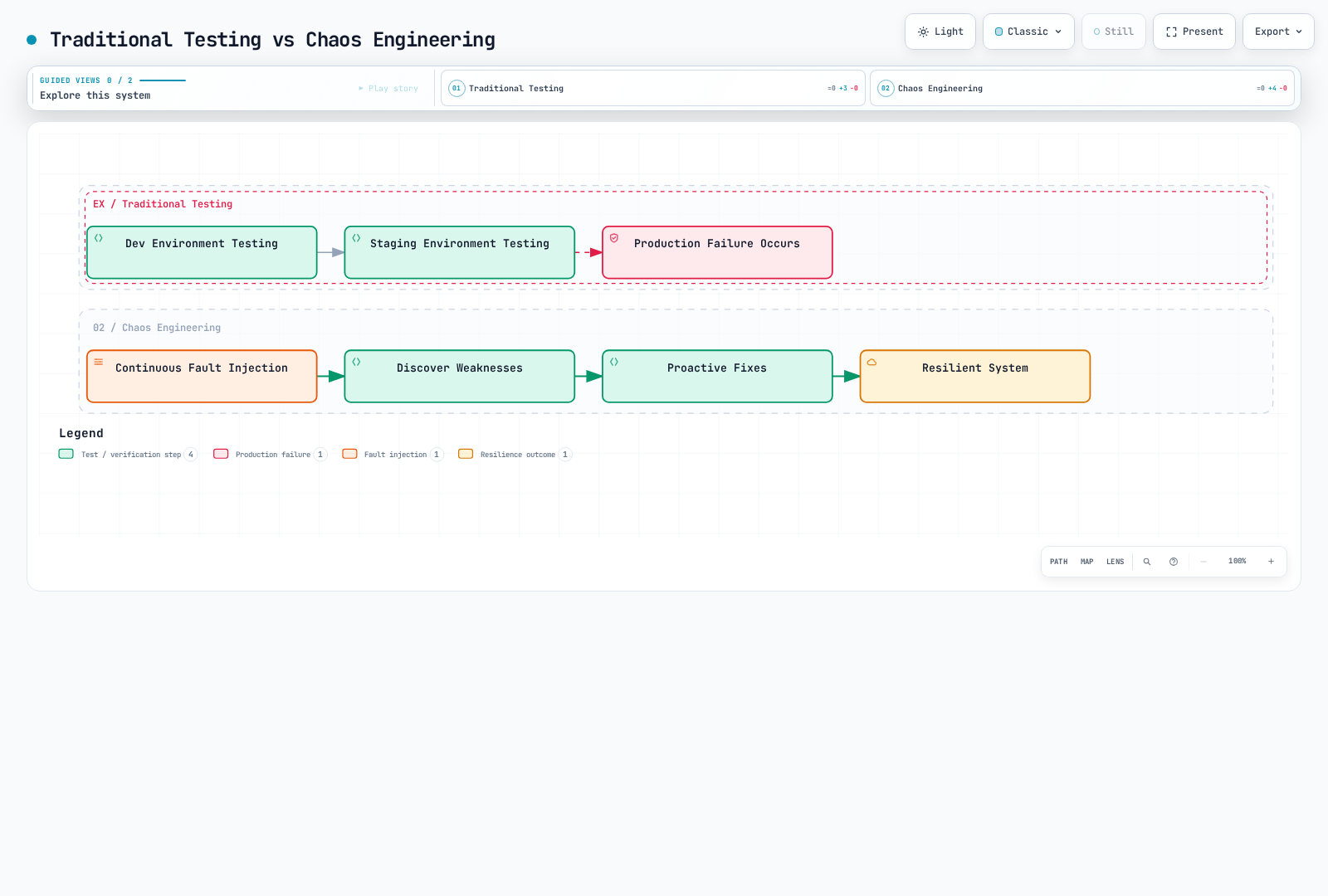
1. Core Principle of Chaos Engineering
Chaos Engineering, popularized by practices such as Netflix's Chaos Monkey, aims to experience failures proactively in production environments and discover system weaknesses.
2. Reproducing Real Production Scenarios
In production environments, the following problems can occur:
| Scenario | Cause | Fault Injection Test |
|---|---|---|
| Network Latency | Inter-region network latency | Delay Injection |
| Service Timeout | Slow database queries | Delay Injection |
| Temporary Failure | Service restart, scale down | Abort Injection |
| Partial Failure | Only some pods fail | Percentage-based Injection |
| Cascading Failure | One service failure propagates to others | Combined Fault Injection |
3. Verifying Circuit Breaker and Timeout Settings
Fault injection tests how callers handle delays/errors. For proxy retries/timeouts or endpoint ejection, the failure must be produced at a layer that those mechanisms observe.
Verify the caller’s behavior independently from proxy ejection: a locally injected abort is not an upstream endpoint failure. The order service’s actual responses determine what its callers observe.
4. Validating Safe Deployments
When deploying new versions, you can verify whether they're safe even when dependent services fail:
- Does the new version handle timeouts correctly?
- Does it perform graceful degradation when dependent services fail?
- Does the error handling logic work properly?
When to Use Fault Injection
Fault Injection should be used in the following situations:
1. Development and Test Environments
Scenario: Developing a New Microservice
# Inject faults into service under development
apiVersion: networking.istio.io/v1
kind: VirtualService
metadata:
  name: payment-service-dev
  namespace: dev
spec:
  hosts:
  - payment-service
  http:
  - match:
    - headers:
        x-testing:
          exact: "true"  # Apply only to test traffic
    fault:
      delay:
        percentage:
          value: 50.0
        fixedDelay: 3s
      abort:
        percentage:
          value: 20.0
        httpStatus: 503
    route:
    - destination:
        host: payment-service
        subset: v2
  - route:
    - destination:
        host: payment-service
Use Case:
- Test how the order service reacts when the payment service slows down or fails
- Verify appropriate error messages are shown to users
2. Integration Testing in Staging Environment
Scenario: Final Verification Before Production Deployment
# Inject random faults into all dependent services
apiVersion: networking.istio.io/v1
kind: VirtualService
metadata:
  name: database-service-staging
spec:
  hosts:
  - database-service
  http:
  - fault:
      delay:
        percentage:
          value: 10.0  # 10% of requests delayed
        fixedDelay: 5s
      abort:
        percentage:
          value: 5.0   # 5% of requests fail
        httpStatus: 500
    route:
    - destination:
        host: database-service
Use Case:
- Verify entire system resilience before production deployment
- Confirm monitoring alerts work properly
3. Chaos Testing in Production Environment
Scenario: Regular Production Resilience Testing
# Inject faults at very low rate in production
apiVersion: networking.istio.io/v1
kind: VirtualService
metadata:
  name: recommendation-service-prod
spec:
  hosts:
  - recommendation-service
  http:
  - match:
    - headers:
        x-canary:
          exact: "true"  # Apply only to canary users
    fault:
      abort:
        percentage:
          value: 1.0  # Only 1% of requests fail
        httpStatus: 503
    route:
    - destination:
        host: recommendation-service
  - route:
    - destination:
        host: recommendation-service
Use Case:
- Netflix-style Chaos Engineering
- Verify actual failure response capability in production
- Note: Start with very low rates (1-5%) and monitor impact
4. Adjusting Timeout and Retry Policies
Istio does not enable timeout/retry handling on the same client-side route when faults are enabled. Removing the route timeout below is intentional; the caller must enforce the deadline for this test.
Scenario: Finding Optimal Timeout Values
# Test with various delay times
apiVersion: networking.istio.io/v1
kind: VirtualService
metadata:
  name: search-service-timeout-test
spec:
  hosts:
  - search-service
  http:
  - match:
    - headers:
        x-test-scenario:
          exact: "slow-response"
    fault:
      delay:
        percentage:
          value: 100.0
        fixedDelay: 10s  # 10 second delay
    route:
    - destination:
        host: search-service
  - route:
    - destination:
        host: search-service
Use Case:
- Test a 5-second application/client deadline while the proxy injects a 10-second delay
- For an Istio route timeout, use a genuinely slow upstream or inject at a different hop
- Find optimal value that doesn't harm user experience
5. Verifying Outlier Detection
A local fault abort is returned before an upstream request is sent, so it does not exercise that proxy’s per-endpoint consecutive-error detector. Use a controlled HTTP backend that really returns 503, then observe its ejection. For example, after deploying the Istio httpbin sample in the test namespace:
apiVersion: networking.istio.io/v1
kind: DestinationRule
metadata:
  name: httpbin-outlier-test
spec:
  host: httpbin
  trafficPolicy:
    outlierDetection:
      consecutive5xxErrors: 5
      interval: 5s
      baseEjectionTime: 30s
      maxEjectionPercent: 100
      minHealthPercent: 0
Send requests from a mesh application client to http://httpbin:8000/status/503. This deliberately allows all test endpoints to be ejected; recovery depends on ejection history and subsequent health, not a guaranteed fixed 30 seconds. Keep this configuration out of unrelated workloads.
6. Testing for Specific User Groups
Scenario: Inject Faults Only for Beta Testers
# Inject faults only for specific users
apiVersion: networking.istio.io/v1
kind: VirtualService
metadata:
  name: api-service-beta
spec:
  hosts:
  - api-service
  http:
  - match:
    - headers:
        end-user:
          exact: "beta-tester"  # Beta testers only
    fault:
      delay:
        percentage:
          value: 20.0
        fixedDelay: 2s
    route:
    - destination:
        host: api-service
  - route:  # Normal routing for regular users
    - destination:
        host: api-service
Use Case:
- Test safely without affecting actual users
- Improve based on beta tester feedback
Fault Injection Overview
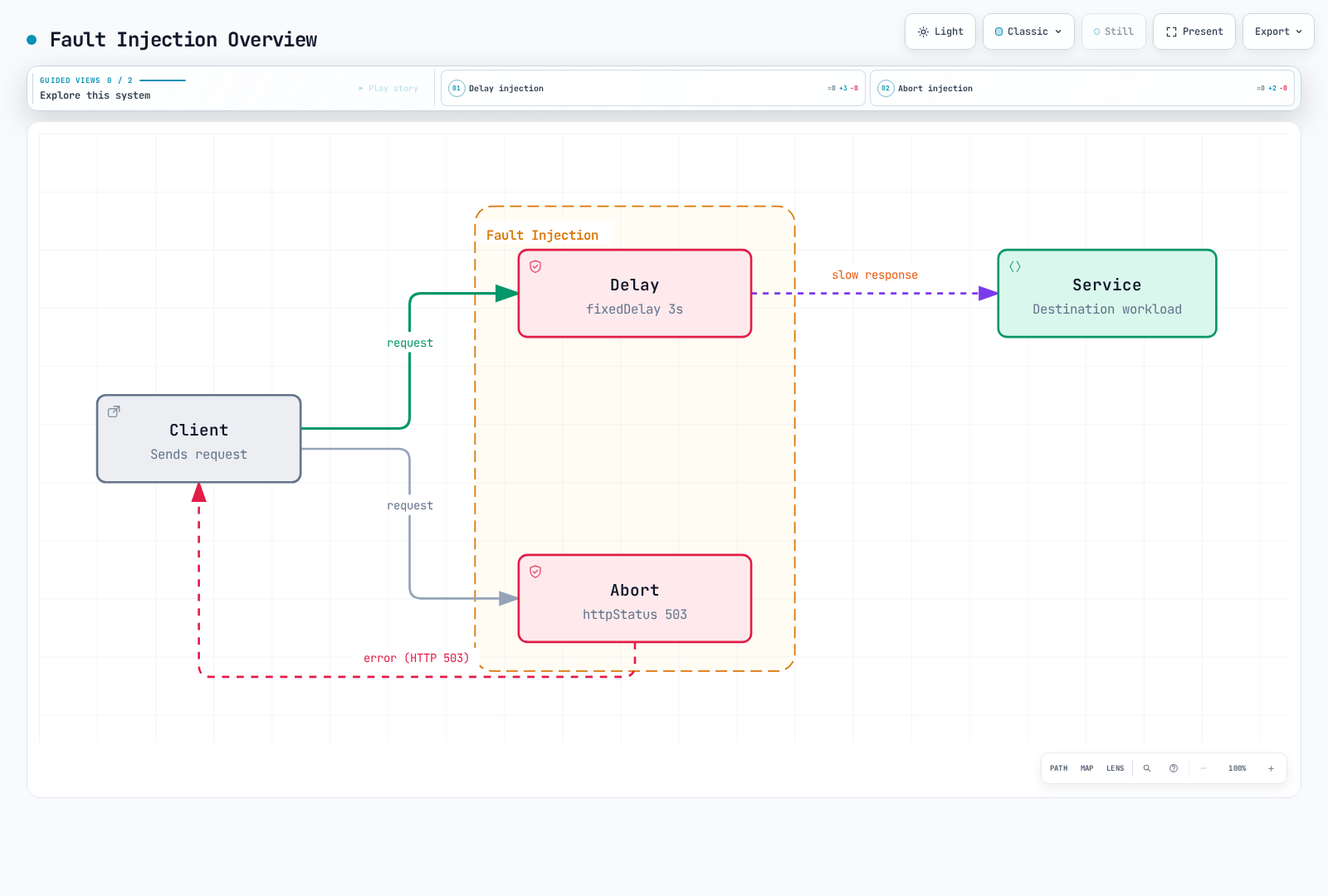
Delay Injection
apiVersion: networking.istio.io/v1
kind: VirtualService
metadata:
  name: reviews-delay
spec:
  hosts:
  - reviews
  http:
  - fault:
      delay:
        percentage:
          value: 10.0  # Inject delay in 10% of requests
        fixedDelay: 5s  # 5 second delay
    route:
    - destination:
        host: reviews
Abort Injection
apiVersion: networking.istio.io/v1
kind: VirtualService
metadata:
  name: reviews-abort
spec:
  hosts:
  - reviews
  http:
  - fault:
      abort:
        percentage:
          value: 10.0  # Abort 10% of requests
        httpStatus: 503  # Return HTTP 503 error
    route:
    - destination:
        host: reviews
Practical Examples
1. Combining Delay and Abort
In real production environments, delays and failures can occur simultaneously:
apiVersion: networking.istio.io/v1
kind: VirtualService
metadata:
  name: ratings-combined-fault
spec:
  hosts:
  - ratings
  http:
  - fault:
      delay:
        percentage:
          value: 20.0  # 20% of requests delayed
        fixedDelay: 3s
      abort:
        percentage:
          value: 10.0  # 10% of requests fail
        httpStatus: 503
    route:
    - destination:
host: ratingsResult:
- 20% of requests get 3 second delay
- Abort can overlap with delay, so some aborted requests are delayed first
- Do not add the two percentages as disjoint populations; measure their overlap
2. Conditional Fault Injection
Inject faults only under specific conditions:
apiVersion: networking.istio.io/v1
kind: VirtualService
metadata:
  name: reviews-conditional-fault
spec:
  hosts:
  - reviews
  http:
  # Inject faults only for mobile users
  - match:
    - headers:
        user-agent:
          regex: ".*Mobile.*"
    fault:
      delay:
        percentage:
          value: 30.0
        fixedDelay: 2s
    route:
    - destination:
        host: reviews
        subset: v2
  # Normal routing for regular users
  - route:
    - destination:
        host: reviews
        subset: v1
3. Progressive Fault Injection
Test by gradually increasing fault rate:
# Stage 1: 5% faults
apiVersion: networking.istio.io/v1
kind: VirtualService
metadata:
  name: api-fault
spec:
  hosts:
  - api-service
  http:
  - fault:
      abort:
        percentage:
          value: 5.0
        httpStatus: 500
    route:
    - destination:
host: api-service# Stage 2: 10% faults (apply after monitoring)
apiVersion: networking.istio.io/v1
kind: VirtualService
metadata:
name: api-fault
spec:
hosts:
- api-service
http:
- fault:
abort:
percentage:
value: 10.0
httpStatus: 500
route:
- destination:
host: api-service# Stage 3: 20% faults (apply after sufficient validation)
apiVersion: networking.istio.io/v1
kind: VirtualService
metadata:
name: api-fault
spec:
hosts:
- api-service
http:
- fault:
abort:
percentage:
value: 20.0
httpStatus: 500
route:
- destination:
host: api-service4. Testing by HTTP Status Code
Test with various HTTP error codes:
apiVersion: networking.istio.io/v1
kind: VirtualService
metadata:
  name: payment-error-scenarios
spec:
  hosts:
  - payment-service
  http:
  # Scenario 1: Service overload (503)
  - match:
    - headers:
        x-test-scenario:
          exact: "overload"
    fault:
      abort:
        percentage:
          value: 50.0
        httpStatus: 503
    route:
    - destination:
        host: payment-service
  # Scenario 2: Internal server error (500)
  - match:
    - headers:
        x-test-scenario:
          exact: "server-error"
    fault:
      abort:
        percentage:
          value: 30.0
        httpStatus: 500
    route:
    - destination:
        host: payment-service
  # Scenario 3: Gateway timeout (504)
  - match:
    - headers:
        x-test-scenario:
          exact: "timeout"
    fault:
      abort:
        percentage:
          value: 20.0
        httpStatus: 504
    route:
    - destination:
        host: payment-service
  # Default routing
  - route:
    - destination:
        host: payment-service
Real-World Scenarios
Scenario 1: Simulating a Slow HTTP Database Facade
Situation: Database queries intermittently become slow
apiVersion: networking.istio.io/v1
kind: VirtualService
metadata:
  name: database-slow-query
  namespace: chaos-tests
spec:
  hosts:
  - database-service
  http:
  - fault:
      delay:
        percentage:
          value: 15.0  # 15% of HTTP requests are delayed
        fixedDelay: 8s   # 8 second delay
    route:
    - destination:
        host: database-service
Test Objectives:
- Are application timeout settings appropriate?
- Does connection pool get exhausted?
- Are appropriate error messages displayed to users?
Expected Results:
- Appropriate timeout enables fast failure (fail-fast)
- Connection pool management normal
- Entire system response delay -> Circuit Breaker needed
Scenario 2: Testing Microservice Cascade Failure
Situation: Verify if one service failure propagates to other services
Verify the caller’s behavior independently from proxy ejection: a locally injected abort is not an upstream endpoint failure. The order service’s actual responses determine what its callers observe.
# Inject faults into payment service
apiVersion: networking.istio.io/v1
kind: VirtualService
metadata:
  name: payment-cascade-test
spec:
  hosts:
  - payment-service
  http:
  - fault:
      abort:
        percentage:
          value: 30.0  # 30% failure
        httpStatus: 503
    route:
    - destination:
        host: payment-service
---
# Configure Circuit Breaker for order service
apiVersion: networking.istio.io/v1
kind: DestinationRule
metadata:
  name: order-circuit-breaker
spec:
  host: order-service
  trafficPolicy:
    outlierDetection:
      consecutive5xxErrors: 5
      interval: 30s
      baseEjectionTime: 30s
Test Objectives:
- Does order service handle payment failure gracefully?
- Does the order service preserve its caller-facing behavior? Ejection depends on actual errors returned by order-service.
- Are appropriate user messages displayed on frontend?
Scenario 3: Testing API Rate Limit Situation
Situation: Simulate external API reaching rate limit
apiVersion: networking.istio.io/v1
kind: VirtualService
metadata:
  name: external-api-rate-limit
spec:
  hosts:
  - external-api-service
  http:
  - match:
    - headers:
        x-api-key:
          exact: "test-key"
    fault:
      abort:
        percentage:
          value: 40.0  # 40% of requests rate limited
        httpStatus: 429  # Too Many Requests
    route:
    - destination:
        host: external-api-service
  - route:
    - destination:
        host: external-api-service
Test Objectives:
- Are 429 errors handled appropriately?
- Does retry logic use Exponential Backoff?
- Is caching utilized to reduce API calls?
Scenario 4: Simulating Inter-Region Network Latency
Situation: Latency when calling services in different regions
apiVersion: networking.istio.io/v1
kind: VirtualService
metadata:
  name: cross-region-latency
spec:
  hosts:
  - us-east-service
  http:
  - match:
    - sourceLabels:
        region: "eu-west"  # Calling from EU to US
    fault:
      delay:
        percentage:
          value: 100.0
        fixedDelay: 150ms  # 150ms delay (transatlantic)
    route:
    - destination:
        host: us-east-service
  - route:
    - destination:
        host: us-east-service
Test Objectives:
- Confirm inter-region latency impact in global services
- Determine if optimization through caching or CDN is possible
- Is SLA target met (e.g., 95% of requests within 500ms)?
Scenario 5: Simulating Temporary Failure During Deployment
Situation: Some pods temporarily unavailable during Rolling Update
apiVersion: networking.istio.io/v1
kind: VirtualService
metadata:
  name: deployment-transient-failure
spec:
  hosts:
  - app-service
  http:
  - match:
    - headers:
        x-deployment-test:
          exact: "true"
    fault:
      abort:
        percentage:
          value: 25.0  # 25% of matching requests fail; Pods remain running
        httpStatus: 503
      delay:
        percentage:
          value: 10.0
        fixedDelay: 5s   # Some start slowly
    route:
    - destination:
        host: app-service
        subset: v2
  - route:
    - destination:
        host: app-service
Test Objectives:
- Measure caller behavior under injected request errors
- Test readiness separately using a controlled workload state change
- Verify healthy-endpoint routing separately; HTTP abort does not mark a Pod unready
Testing Strategies
1. Progressive Chaos Engineering
Gradually increase fault rate to find system limits:
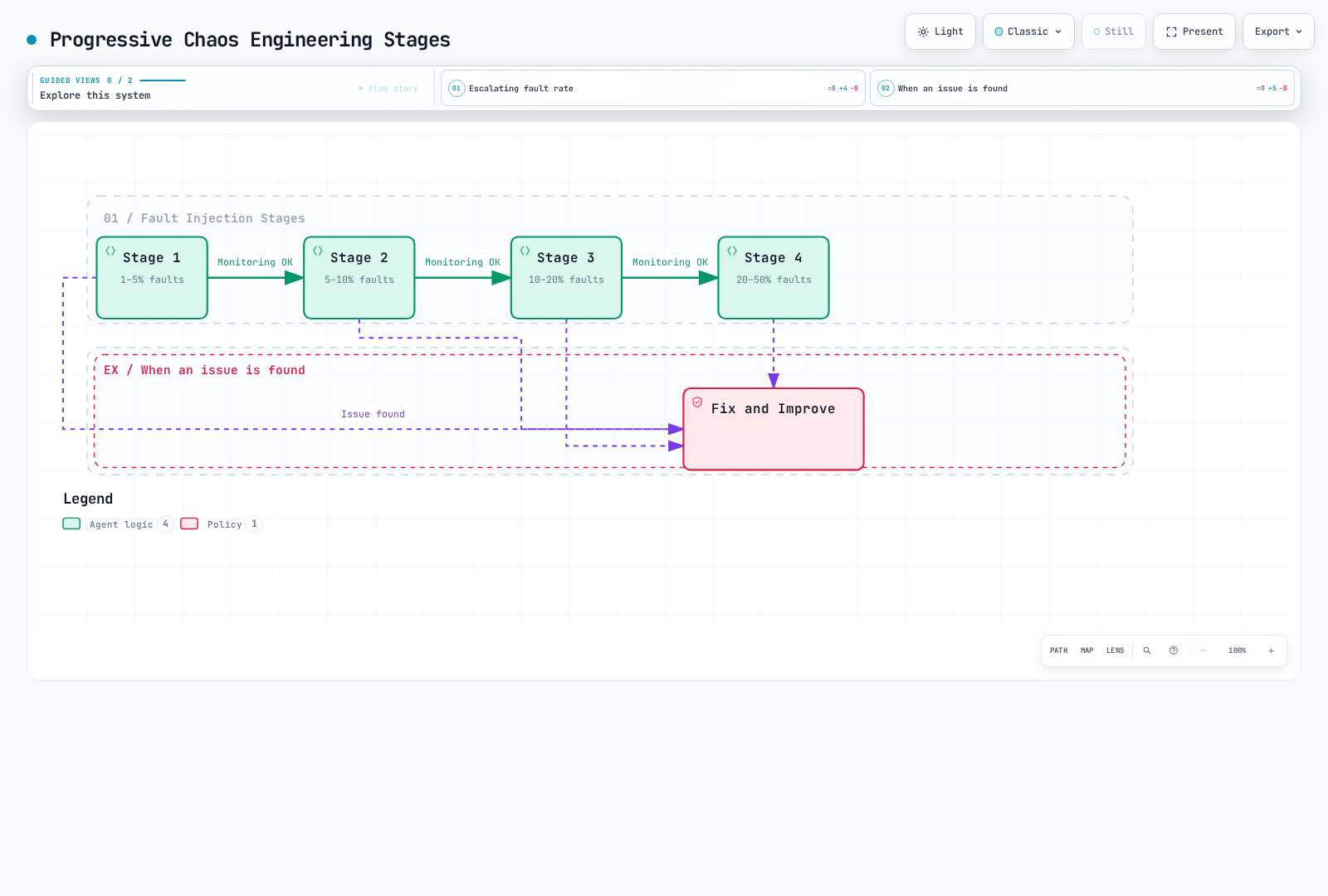
Step-by-step execution:
# Stage 1: 1% fault injection
kubectl apply -f fault-injection-1percent.yaml
# Monitor for 15 minutes
kubectl logs -f deployment/monitoring

# If no issues, proceed to stage 2
kubectl apply -f fault-injection-5percent.yaml
# Monitor for 15 minutes

# Continue...
2. Time-Based Testing
This is a scheduling template, suspended until its prerequisites are prepared: a test namespace, a built/pinned organization-owned runner image containing shell and a compatible kubectl, an existing chaos-tester ServiceAccount with only the needed access to the pre-created test VirtualService, and a chaos-fixtures ConfigMap containing full fault/no-fault manifests for that same resource. The example registry image is a placeholder. Traps cannot run after SIGKILL/node loss; provide an independent cleanup check.
Inject faults only during specific time periods:
apiVersion: batch/v1
kind: CronJob
metadata:
  name: fault-injection-scheduler
  namespace: chaos-tests
spec:
  schedule: "0 2 * * *"
  timeZone: "Etc/UTC"
  suspend: true
  concurrencyPolicy: Forbid
  startingDeadlineSeconds: 300
  jobTemplate:
    spec:
      activeDeadlineSeconds: 420
      backoffLimit: 0
      template:
        metadata:
          labels:
            sidecar.istio.io/inject: "false"
        spec:
          serviceAccountName: chaos-tester
          restartPolicy: Never
          containers:
          - name: apply-fault
            image: registry.example.com/ops/chaos-runner:1.0.0
            command: ["/bin/sh", "-ec"]
            args:
            - |
              cleanup() { kubectl apply -n chaos-tests -f /config/no-fault.yaml; }
              trap cleanup EXIT
              trap 'exit 130' INT
              trap 'exit 143' TERM
              kubectl apply -n chaos-tests -f /config/fault-injection.yaml
              sleep 300
            volumeMounts:
            - name: fixtures
              mountPath: /config
              readOnly: true
          volumes:
          - name: fixtures
            configMap:
              name: chaos-fixtures
3. Automated Testing Pipeline
Integrate into CI/CD pipeline:
stages: [fault-injection-test]

fault_injection_test:
  stage: fault-injection-test
  script:
    - kubectl apply -n chaos-tests -f tests/fault-injection.yaml
    - k6 run --vus 100 --duration 5m tests/load-test.js
    - ./tests/check-fault-metrics.sh
  after_script:
    - kubectl apply -n chaos-tests -f tests/no-fault.yaml
Save the following as tests/check-fault-metrics.sh in the test project. The runner needs kubectl, k6, curl, and jq plus the reviewed manifests/load test. Choose the measured service and threshold from the test hypothesis: errors intentionally injected into a dependency are not automatically failures of the user-facing SLO. An absent/NaN response fails the check. GitLab after_script is not guaranteed after runner loss and has its own timeout; verify baseline restoration independently.
#!/usr/bin/env bash
set -euo pipefail
: "${PROMETHEUS_URL:?Set the Prometheus base URL}"
: "${TEST_DESTINATION:?Set the exact destination_service label}"
: "${ERROR_THRESHOLD:?Set the error-fraction limit for the hypothesis}"
QUERY="sum(rate(istio_requests_total{reporter=\"source\",destination_service=\"${TEST_DESTINATION}\",response_code=~\"5..\"}[5m])) / sum(rate(istio_requests_total{reporter=\"source\",destination_service=\"${TEST_DESTINATION}\"}[5m]))"
curl -fsSG "$PROMETHEUS_URL/api/v1/query" --data-urlencode "query=$QUERY" |
  jq -e --argjson limit "$ERROR_THRESHOLD" '
    .status == "success" and
    (.data.result | length) == 1 and
    (.data.result[0].value[1] as $v |
      $v != "NaN" and $v != "+Inf" and $v != "-Inf" and
      (($v | tonumber) <= $limit))'
4. Monitoring and Alerting
Mount/load this rule file in Prometheus or use the installed operator’s PrometheusRule resource. A ConfigMap by itself does not activate alerts. Scope rules to the test services and enable the referenced Envoy stats.
Monitor key metrics during fault injection:
# Prometheus alert rules
apiVersion: v1
kind: ConfigMap
metadata:
  name: prometheus-alerts
data:
  fault-injection-alerts.yaml: |
    groups:
    - name: fault-injection
      rules:
      # Error rate increase
      - alert: HighErrorRate
        expr: sum by (destination_service) (rate(istio_requests_total{reporter="source",response_code=~"5.."}[5m])) / sum by (destination_service) (rate(istio_requests_total{reporter="source"}[5m])) > 0.1
        for: 2m
        annotations:
          summary: "High error rate during fault injection"

      # Circuit Breaker activation
      - alert: CircuitBreakerOpen
        expr: envoy_cluster_circuit_breakers_default_rq_open > 0
        for: 1m
        annotations:
          summary: "Circuit breaker opened"

      # Response time increase
      - alert: HighLatency
        expr: histogram_quantile(0.95, sum by (destination_service, le) (rate(istio_request_duration_milliseconds_bucket{reporter="source"}[5m]))) > 3000
        for: 5m
        annotations:
          summary: "95th percentile latency > 3s"
5. Blue-Green Fault Injection
Inject faults into Blue environment and compare with Green environment:
apiVersion: networking.istio.io/v1
kind: VirtualService
metadata:
  name: app-blue-green-test
spec:
  hosts:
  - app-service
  http:
  - match:
    - headers:
        x-version:
          exact: "blue"
    fault:
      delay:
        percentage:
          value: 20.0
        fixedDelay: 3s
    route:
    - destination:
        host: app-service
        subset: blue
  - route:
    - destination:
        host: app-service
        subset: green
Comparison metrics:
- Error rate
- Response time (P50, P95, P99)
- User experience indicators
Best Practices
1. Start Small
- Start with 1-5% low rates initially
- Test thoroughly in development/staging environments
- Execute in production during times with low business impact
2. Monitoring is Essential
Prepare monitoring dashboard before applying Fault Injection:
# Grafana dashboard metrics
- istio_requests_total (Error rate)
- istio_request_duration_milliseconds (Latency)
- envoy_cluster_upstream_rq_retry (Retry count)
- envoy_cluster_circuit_breakers_* (Circuit Breaker status)
3. Use Clear Labels
# Metadata excerpt for the existing reviewed fault VirtualService
metadata:
  name: payment-fault
  labels:
    fault-injection: "true"
    test-type: "chaos-engineering"
    test-date: "2025-01-15"
  annotations:
    description: "Testing payment service resilience"
    owner: "platform-team"
4. Automatic Rollback Mechanism
#!/usr/bin/env bash
set -euo pipefail
cleanup() { kubectl apply -n chaos-tests -f tests/no-fault.yaml; }
trap cleanup EXIT
trap 'exit 130' INT
trap 'exit 143' TERM
kubectl apply -n chaos-tests -f tests/fault-injection.yaml
sleep 300
./tests/check-fault-metrics.sh
# EXIT restores the full baseline on success or normal failure.
5. Documentation
Document all Fault Injection tests:
# Metadata excerpt for the existing reviewed fault VirtualService
metadata:
  name: api-fault-test
  annotations:
    # Test purpose
    test-purpose: "Verify caller error handling; test upstream ejection separately"

    # Expected behavior
    expected-behavior: |
      - Caller handles the injected error according to the test hypothesis
      - Requests fail fast with 503 error
      - Restore baseline and verify recovery

    # Success criteria
    success-criteria: |
      - Error rate < 5%
      - P95 latency < 500ms
      - No cascading failures

    # Rollback plan
    rollback-plan: "Restore the reviewed complete no-fault VirtualService"
6. Production Environment Precautions
- Business Impact Assessment: Analyze the impact of fault injection on actual users
- Gradual Expansion: Slowly increase from 1% -> 5% -> 10%
- Alert Setup: Immediate alerts when thresholds are exceeded
- Rollback Preparation: Be ready to rollback immediately at any time
- Avoid Business Hours: Choose times with low traffic
7. Regular Testing
# Change the prepared scheduler to weekly; suspension/prerequisites still apply
kubectl patch cronjob fault-injection-scheduler -n chaos-tests --type=merge \
  -p '{"spec":{"schedule":"0 3 * * 0","timeZone":"Etc/UTC"}}'